transmission Lancia Voyager 2012 Owner handbook (in English)
[x] Cancel search | Manufacturer: LANCIA, Model Year: 2012, Model line: Voyager, Model: Lancia Voyager 2012Pages: 344, PDF Size: 3.95 MB
Page 241 of 344

but will shift down into second and
first gear normally.
You can switch between DRIVE and
ERS mode at any vehicle speed. When
the shift lever is in the DRIVE posi-
tion, the transmission will operate au-
tomatically, shifting between all
available gears. Tapping the shift le-
ver to the left (-) will activate ERS
mode, display the current gear in theinstrument cluster, and maintain that
gear as the top available gear. Once in
ERS mode, tapping the shift lever to
the left (-) or right (+) will change the
top available gear.
To exit ERS mode, simply press and
hold the shift lever to the right (+)
until “D” is once again displayed in
the shift lever position indicator in the
instrument cluster.
WARNING!
Do not downshift for additional en-
gine braking on a slippery surface.
The drive wheels could lose their
grip and the vehicle could skid,
causing an accident or personal in-
jury.
Odometer Screen Display
1 2 3 4 5 6 D
Actual Gear(s) Allowed 1 1-2 1-3 1-4 1-5 1-6 1-6
NOTE:
To select the proper gear position
for maximum deceleration (engine
braking), tap the shift lever to the
left (-) repeatedly as the vehicle
slows. The transmission will shift
to the range from which the vehicle
can best be slowed down. Overdrive Operation
The automatic transmission includes
an electronically controlled Overdrive
(sixth gear). The transmission will
automatically shift into the Overdrive
gear if the following conditions are
present:
the shift lever is in the DRIVE po-
sition,
the transmission fluid has reached an adequate temperature,
the engine coolant has reached an adequate temperature,
vehicle speed is sufficiently high, and the driver is not heavily pressing
the accelerator
Torque Converter Clutch
A feature designed to improve fuel
economy has been included in the au-
tomatic transmission on your vehicle.
A clutch within the torque converter
engages automatically at calibrated
speeds. This may result in a slightly
different feeling or response during
normal operation in the upper gears.
When the vehicle speed drops or dur-
ing some accelerations, the clutch au-
tomatically disengages.
235
Page 242 of 344
![Lancia Voyager 2012 Owner handbook (in English) NOTE:
The torque converter clutch will
not engage until the transmission
fluid and engine coolant are warm
[usually after 1.6 to 4.8 km of driv-
ing]. Because the engine speed is
higher when the torqu](/img/41/31344/w960_31344-241.png "Lancia Voyager 2012 Owner handbook (in English) NOTE:
The torque converter clutch will
not engage until the transmission
fluid and engine coolant are warm
[usually after 1.6 to 4.8 km of driv-
ing]. Because the engine speed is
higher when the torqu")
NOTE:
The torque converter clutch will
not engage until the transmission
fluid and engine coolant are warm
[usually after 1.6 to 4.8 km of driv-
ing]. Because the engine speed is
higher when the torque converter
clutch is not engaged, it may seem
as if the transmission is not shift-
ing into Overdrive when cold. This
is normal. Using the Electronic
Range Select (ERS) feature, when
the transmission is sufficiently
warm, will demonstrate that the
transmission is able to shift into
and out of Overdrive.
DRIVING ON SLIPPERY
SURFACES
ACCELERATION
Rapid acceleration on snow covered,
wet, or other slippery surfaces may
cause the driving wheels to pull errati-
cally to the right or left. This phenom-
enon occurs when there is a difference
in the surface traction under the front
(driving) wheels.
WARNING!
Rapid acceleration on slippery sur-
faces is dangerous. Unequal traction
can cause sudden pulling of the front
wheels. You could lose control of the
vehicle and possibly have a collision.
Accelerate slowly and carefully
whenever there is likely to be poor
traction (ice, snow, wet mud, loose
sand, etc.).
TRACTION
When driving on wet or slushy roads,
it is possible for a layer of water to
build up between the tire and road
surface. This is known as hydroplan-
ing and may cause partial or complete
loss of vehicle control and stopping
ability. To reduce this possibility, the
following precautions should be ob-
served:
1. Slow down during rainstorms or
when roads are slushy.
2. Slow down if the road has standing
water or puddles.
3. Replace the tires when tread wear
indicators first become visible.
4. Keep the tires properly inflated. 5. Maintain sufficient distance be-
tween your vehicle and the vehicle in
front of you to avoid a collision in a
sudden stop.
DRIVING THROUGH
WATER
Driving through water more than a
few centimeters deep will require ex-
tra caution to ensure safety and pre-
vent damage to your vehicle.
FLOWING/RISING WATER
WARNING!
Do not drive on or across a road or
path where water is flowing and/or
rising (as in storm run-off). Flowing
water can wear away the road or
path's surface and cause your
ve-
hicle to sink into deeper water. Fur-
thermore, flowing and/or rising wa-
ter can carry your vehicle away
swiftly. Failure to follow this warn-
ing may result in injuries that are
serious or fatal to you, your passen-
gers, and others around you.
236
Page 243 of 344

SHALLOW STANDING
WATER
Although your vehicle is capable of
driving through shallow standing wa-
ter, consider the following Caution
and Warning before doing so.CAUTION!
Always check the depth of thestanding water before driving
through it. Never drive through
standing water that is deeper than
the bottom of the tire rims
mounted on the vehicle.
Determine the condition of the
road or the path that is under
water and if there are any ob-
stacles in the way before driving
through the standing water.
Do not exceed 8 km/h when driv-
ing through standing water. This
will minimize wave effects.
(Continued)
CAUTION!(Continued)
Driving through standing water
may cause damage to your vehi-
cle’s drivetrain components. Al-
ways inspect your vehicle’s fluids
(i.e., engine oil, transmission,
axle, etc.) for signs of contamina-
tion (i.e., fluid that is milky or
foamy in appearance) after driv-
ing through standing water. Do
not continue to operate the vehicle
if any fluid appears contami-
nated, as this may result in further
damage. Such damage is not cov-
ered by the New Vehicle Limited
Warranty.
Getting water inside your vehi-
cle’s engine can cause it to lock up
and stall out, and cause serious
internal damage to the engine.
Such damage is not covered by the
New Vehicle Limited Warranty.
WARNING!
Driving through standing waterlimits your vehicle’s traction ca-
pabilities. Do not exceed 8 km/h
when driving through standing
water.
Driving through standing water
limits your vehicle’s braking ca-
pabilities, which increases stop-
ping distances. Therefore, after
driving through standing water,
drive slowly and lightly press on
the brake pedal several times to
dry the brakes.
Getting water inside your vehi-
cle’s engine can cause it to lock up
and stall out, and leave you
stranded.
Failure to follow these warnings
may result in injuries that are se-
rious or fatal to you, your passen-
gers, and others around you.
237
Page 245 of 344

The foot operated parking brake is
positioned below the lower left corner
of the instrument panel. To apply the
park brake, firmly push the park
brake pedal fully. To release the park-
ing brake, press the park brake pedal
a second time and let your foot up as
you feel the brake disengage.
When the parking brake is applied
with the ignition switch in the ON
position, the “Brake Warning Light”
in the instrument cluster will illumi-
nate.
NOTE:
When the parking brake is ap-plied and the automatic trans-
mission is placed in gear, the
“Brake Warning Light” will
flash. If vehicle speed is de-
tected, a chime will sound to alert the driver. Fully release the
parking brake before attempting
to move the vehicle.
This light only shows that the parking brake is applied. It does
not show the degree of brake ap-
plication.
When parking on a hill, it is important
to turn the front wheels toward the
curb on a downhill grade and away
from the curb on an uphill grade. For
vehicles equipped with an automatic
transmission, apply the parking brake
before placing the shift lever in PARK,
otherwise the load on the transmis-
sion locking mechanism may make it
difficult to move the shift lever out of
PARK. The parking brake should al-
ways be applied whenever the driver
is not in the vehicle.
WARNING!
Never use the PARK position as a substitute for the parking brake.
Always apply the parking brake
fully when parked to guard
against vehicle movement and
possible injury or damage.
(Continued)
WARNING!(Continued)
When leaving the vehicle, always
remove the key fob from the igni-
tion and lock your vehicle.
Never leave children alone in a
vehicle, or with access to an un-
locked vehicle. Allowing children
to be in a vehicle unattended is
dangerous for a number of rea-
sons. A child or others could be
seriously or fatally injured. Chil-
dren should be warned not to
touch the parking brake, brake
pedal or the shift lever.
Do not leave the key fob in or near
the vehicle, and do not leave a
vehicle equipped with Keyless
Enter-N-Go in the ACC or ON/
RUN mode. A child could operate
power windows, other controls, or
move the vehicle.CAUTION!
If the Brake System Warning Light
remains on with the parking brake
released, a brake system malfunc-
tion is indicated. Have the brake
system serviced by an authorized
dealer immediately.
Parking Brake
239
Page 268 of 344

vehicle and trailer. Failure to load
trailers heavier in front is the cause of
many trailer accidents.
Never exceed the maximum trailer
tongue weight stamped on your trailer
hitch.
Consider the following items when
computing the weight on the rear axle
of the vehicle:
The tongue weight of the trailer.
The weight of any other type ofcargo or equipment put in or on
your vehicle.
The weight of the driver and all passengers.
NOTE:
Remember that everything put into
or on the trailer adds to the load on
your vehicle. Also, additional
factory-installed options, or
dealer-installed options, must be
considered as part of the total load
on your vehicle. Refer to the Tire
and Loading Information placard,
located on the drivers door pillar, for the maximum combined weight
of occupants and cargo for your
vehicle.
Towing Requirements
To promote proper break-in of your
new vehicle drivetrain components
the following guidelines are recom-
mended:
CAUTION!
Do not tow a trailer at all during
the first 805 km the new vehicle is
driven. The engine, axle or other
parts could be damaged.
Then, during the first 805 km that
a trailer is towed, do not drive
over 80 km/h and do not make
starts at full throttle. This helps
the engine and other parts of the
vehicle wear in at the heavier
loads.WARNING!
Improper towing can lead to an in-
jury accident. Follow these guide-
lines to make your trailer towing as
safe as possible:
(Continued)
WARNING!(Continued)
Make certain that the load is se-
cured in the trailer and will not
shift during travel. When traile-
ring cargo that is not fully se-
cured, dynamic load shifts can oc-
cur that may be difficult for the
driver to control. You could lose
control of your vehicle and have
an accident.
All trailer hitches should be pro-
fessionally installed on your ve-
hicle.
When hauling cargo or towing a
trailer, do not overload your ve-
hicle or trailer. Overloading can
cause a loss of control, poor per-
formance or damage to brakes,
axle, engine, transmission, steer-
ing, suspension, chassis structure
or tires.
Safety chains must always be used
between your vehicle and trailer.
Always connect the chains to the
frame or hook retainers of the ve-
hicle hitch. Cross the chains under
the trailer tongue and allow
enough slack for turning corners.
(Continued)
262
Page 269 of 344

WARNING!(Continued)
Vehicles with trailers should not
be parked on a grade. When park-
ing, apply the parking brake on
the tow vehicle. Put the tow ve-
hicle automatic transmission in
PARK. Always block or "chock"
the trailer wheels.
GCWR must not be exceeded.
Total weight must be distrib-
uted between the tow vehicle
and the trailer such that the
following four ratings are not
exceeded:
1. GVWR
2. GTW
3. GAWR
4. Trailer tongue weight rating for
the trailer hitch utilized.
Towing Requirements – Tires
Do not attempt to tow a trailer while using a compact spare tire.
Proper tire inflation pressures are essential for the safe and satisfac-
tory operation of your vehicle. Re-
fer to “Tires – General Informa-
tion” in “Starting and Operating”
for proper tire inflation procedures. Check the trailer tires for proper
tire inflation pressures before
trailer usage.
Check for signs of tire wear or vis- ible tire damage before towing a
trailer. Refer to “Tires – General
Information” in “Starting and Op-
erating” for the proper inspection
procedure.
When replacing tires, refer to “Tires – General Information” in “Start-
ing and Operating” for proper tire
replacement procedures. Replacing
tires with a higher load carrying
capacity will not increase the vehi-
cle's GVWR and GAWR limits.
Towing Requirements – Trailer
Brakes
Do notinterconnect the hydraulic
brake system or vacuum system of
your vehicle with that of the trailer.
This could cause inadequate brak-
ing and possible personal injury.
When towing a trailer equipped with a hydraulic surge actuated
brake system, an electronic brake
controller is not required. Trailer brakes are recommended
for trailers over 450 kg and re-
quired for trailers in excess of
750 kg.
CAUTION!
If the trailer weighs more than
450 kg loaded, it should have its
own brakes and they should be of
adequate capacity. Failure to do this
could lead to accelerated brake lin-
ing wear, higher brake pedal effort,
and longer stopping distances.WARNING!
Do not connect trailer brakes to
your vehicle's hydraulic brake
lines. It can overload your brake
system and cause it to fail. You
might not have brakes when you
need them and could have an ac-
cident.
Towing any trailer will increase
your stopping distance. When
towing you should allow for addi-
tional space between your vehicle
and the vehicle in front of you.
Failure to do so could result in an
accident.
263
Page 271 of 344

Thirteen - Pin Connector DetailsPin Function Wire
Color
6 Stop Lights Red
7 Left Rear Posi-
tion, Side
Marker Lights,
and Rear Regis-
tration Plate
Illumination
Device
1
Black
8 Reverse Lights Red/ Black
9 Permanent
Power Supply
(+12V) Brown/
White
10 Power Supply Controlled by
Ignition Switch
(+12V) Red
11
a
Return for Con-
tact (Pin) 10
2
White
12 Reserve for Fu- ture Allocation
3
Red/
Blue
13 Return for Con-
tact (Pin) 9
2
White
Thirteen - Pin Connector DetailsPin Function Wire
Color1The rear position registration
plate illumination device shall be
connected such that no light of the
device has a common connection
with both pins 5 and 7.2The three return circuits shall not
be connected electrically in the
trailer.3The allocation pin 12 has been
changed from “Coding for coupled
Trailer” to “Reserve for Future Al-
location.”
TOWING TIPS
Before setting out on a trip, practice
turning, stopping and backing the
trailer in an area away from heavy
traffic.
Automatic Transmission
The DRIVE gear can be selected when
towing. However, if frequent shifting
occurs while in DRIVE, select a lower
gear range using the Electronic Range
Select (ERS) shift control. NOTE:
Using a lower gear range while op-
erating the vehicle under heavy
operating conditions will improve
performance and extend transmis-
sion life by reducing excessive
shifting and heat build up. This
action will also provide better en-
gine braking.
The automatic transmission fluid and
filter should be changed if you REGU-
LARLY tow a trailer for more than
45 minutes of continuous operation.
Refer to the “Maintenance Schedule”
for the proper maintenance intervals.
Electronic Speed Control (for
versions/markets, where
provided)
Do not use in hilly terrain or with
heavy loads.
When using the speed control, if you experience speed drops greater
than 16 km/h, disengage until you
can get back to cruising speed.
Use speed control in flat terrain and with light loads to maximize fuel
efficiency.
265
Page 272 of 344
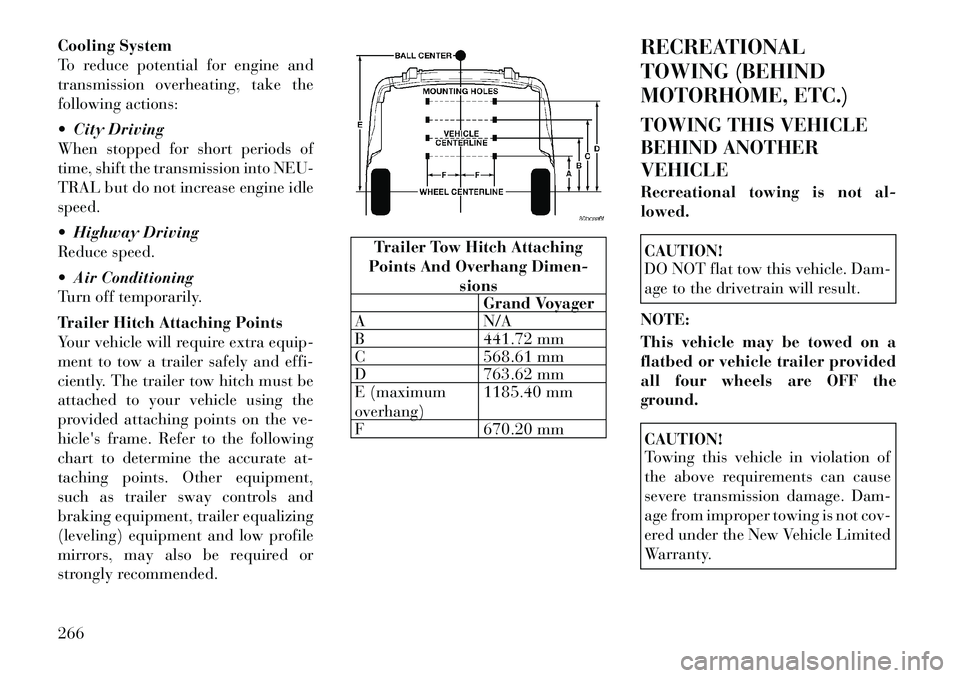
Cooling System
To reduce potential for engine and
transmission overheating, take the
following actions:
City Driving
When stopped for short periods of
time, shift the transmission into NEU-
TRAL but do not increase engine idle
speed.
Highway Driving
Reduce speed.
Air Conditioning
Turn off temporarily.
Trailer Hitch Attaching Points
Your vehicle will require extra equip-
ment to tow a trailer safely and effi-
ciently. The trailer tow hitch must be
attached to your vehicle using the
provided attaching points on the ve-
hicle's frame. Refer to the following
chart to determine the accurate at-
taching points. Other equipment,
such as trailer sway controls and
braking equipment, trailer equalizing
(leveling) equipment and low profile
mirrors, may also be required or
strongly recommended.
Trailer Tow Hitch Attaching
Points And Overhang Dimen-
sionsGrand Voyager
A N/A
B 441.72 mm
C 568.61 mm
D 763.62 mm
E (maximum
overhang) 1185.40 mm
F 670.20 mm RECREATIONAL
TOWING (BEHIND
MOTORHOME, ETC.)
TOWING THIS VEHICLE
BEHIND ANOTHER
VEHICLE
Recreational towing is not al-
lowed.
CAUTION!
DO NOT flat tow this vehicle. Dam-
age to the drivetrain will result.
NOTE:
This vehicle may be towed on a
flatbed or vehicle trailer provided
all four wheels are OFF the
ground.CAUTION!
Towing this vehicle in violation of
the above requirements can cause
severe transmission damage. Dam-
age from improper towing is not cov-
ered under the New Vehicle Limited
Warranty.
266
Page 274 of 344

HAZARD WARNING
FLASHERS
The Hazard Warning flasher switch is
located in the lower center area of the
instrument panel.Press the switch to turn on the
Hazard Warning flasher. When
the switch is activated, all di-
rectional turn signals will flash on and
off to warn oncoming traffic of an
emergency. Press the switch a second
time to turn off the Hazard Warning
flashers.
This is an emergency warning system
and it should not be used when the
vehicle is in motion. Use it when your
vehicle is disabled and it is creating a
safety hazard for other motorists.
When you must leave the vehicle to
seek assistance, the Hazard Warning
flashers will continue to operate even
though the ignition is placed in the
OFF position.
NOTE:
With extended use the Hazard
Warning flashers may wear down
your battery. IF YOUR ENGINE
OVERHEATS
In any of the following situations, you
can reduce the potential for overheat-
ing by taking the appropriate action.
On the highways — slow down.
In city traffic — while stopped,
place the transmission in NEU-
TRAL, but do not increase engine
idle speed.
NOTE:
There are steps that you can take to
slow down an impending overheat
condition:
If your air conditioner (A/C) is on, turn it off. The A/C system
adds heat to the engine cooling
system and turning the A/C off
can help remove this heat.
You can also turn the tempera- ture control to maximum heat,
the mode control to floor and the
blower control to high. This al-
lows the heater core to act as a
supplement to the radiator and
aids in removing heat from the
engine cooling system.
CAUTION!
Driving with a hot cooling system
could damage your vehicle. If tem-
perature gauge reads “H”, pull over
and stop the vehicle. Idle the vehicle
with the air conditioner turned off
until the pointer drops back into the
normal range. If the pointer remains
on the “H”, turn the engine off im-
mediately, and call for service.WARNING!
You or others can be badly burned
by hot engine coolant (antifreeze) or
steam from your radiator. If you see
or hear steam coming from under
the hood, do not open the hood until
the radiator has had time to cool.
Never try to open a cooling system
pressure cap when the radiator or
coolant bottle is hot.
268
Page 278 of 344

NOTE:
If either front tire is flat it may be
necessary to jack up the vehicle to
remove the compact spare tire/
cover assembly from under the ve-
hicle.
4. Stand the tire/cover assembly up-
right and remove the wheel spacer by
squeezing the winch retaining tabs to-
gether. Push the retainer through the
spare tire to release it from the wheel.
PREPARATIONS FOR
JACKING
1. Park the vehicle on a firm, level
surface. Avoid ice or slippery areas.
WARNING!
Do not attempt to change a tire on
the side of the vehicle close to mov-
ing traffic, pull far enough off the
road to avoid being hit when operat-
ing the jack or changing the wheel.
2. Turn on the Hazard Warning
flasher.
3. Set the parking brake.
4. Place the shift lever into PARK.
5. Turn OFF the ignition. 6. Block both the
front and rear of
the wheel diago-
nally opposite the
jacking position.
For example, if
changing the right
front tire, block the left rear wheel.
NOTE:
Passengers should not remain in
the vehicle when the vehicle is be-
ing jacked. JACKING INSTRUCTIONS
WARNING!
Carefully follow these tire changing
warnings to help prevent personal
injury or damage to your vehicle:
Always park on a firm, level sur-
face as far from the edge of the
roadway as possible before raising
the vehicle.
Turn on the Hazard Warning
flasher.
Block the wheel diagonally oppo-
site the wheel to be raised.
Set the parking brake firmly and
set an automatic transmission in
PARK; a manual transmission in
REVERSE.
Never start or run the engine with
the vehicle on a jack.
Do not let anyone sit in the vehicle
when it is on a jack.
Do not get under the vehicle when
it is on a jack.
Only use the jack in the positions
indicated and for lifting this ve-
hicle during a tire change.
(Continued)
Removing Wheel Spacer
272