air condition Lexus CT200h 2014 Owner's Manual (in English)
[x] Cancel search | Manufacturer: LEXUS, Model Year: 2014, Model line: CT200h, Model: Lexus CT200h 2014Pages: 622
Page 6 of 622
TABLE OF CONTENTS6
CT200h_OM_OM76135E_(EE)
5-19. Bluetooth® Phone (Lexus
Display Audio System)
Using a Bluetooth
®
Phone ........................................... 373
Making a call ................................ 375
Receiving a call ........................... 378
Speaking on the phone............ 379
Using a Bluetooth
®
phone messages ....................... 381
Using the steering wheel switches ...................................... 383
Bluetooth
® phone
settings........................................ 384
5-20.Phonebook (Lexus Display Audio System)
Contact settings ........................ 386
Messaging setting ..................... 389
5-21. Bluetooth
® (Lexus
Display Audio System)
What to do if... (Troubleshooting) ................... 390
Bluetooth
®...................................393
5-22.Other function (Lexus Display Audio System)
“Information” screen .................399
MirrorLink™ ............................... 400
USB photo ....................................403
Speech command system ..... 405 6-1. Using the air conditioning
system and defogger
Automatic air conditioning system (Vehicles with
a navigation system or
Lexus Display Audio
System) ....................................... 408
Automatic air conditioning system (Vehicles without
a navigation system or
Lexus Display Audio
System) ..........................................417
Heated steering wheel/ seat heaters ............................... 424
• Heated steering wheel ...... 424
• Seat heaters............................ 425
6-2. Using the interior lights Interior lights list.......................... 426• Personal/interior light main switch ............................. 426
• Front personal/ interior lights .......................... 427
• Rear interior light ................. 427
6-3. Using the storage features List of storage features............. 428• Glove box................................ 429
• Console box ........................... 429
•Cup holders/bottle holders/
door pockets ..........................430
• Auxiliary boxes....................... 431
Luggage compartment features........................................ 433
6Interior features
CT200h_OM_OM76135E_(EE).book Page 6 Friday, May 30, 2014 11: 14 AM
Page 7 of 622
7
1
8 7
6
5
4
3
2
CT200h_OM_OM76135E_(EE)
9
6-4. Using the other interior featuresOther interior features ............436• Sun visors.................................436
• Vanity mirrors ........................436
• Clock......................................... 437
• Power outlet ........................... 437
• Assist grips ..............................439
7-1. Maintenance and care Cleaning and protecting the vehicle exterior ........................ 442
Cleaning and protecting the vehicle interior..........................446
7-2. Maintenance Maintenance requirements .............................448 7-3. Do-it-yourself maintenance
Do-it-yourself service precautions ................................450
Hood ............................................... 452
Positioning a floor jack ............. 454
Engine compartment ............... 455
12-volt battery..............................463
Tires ..................................................468
Tire inflation pressure................ 477
Wheels ........................................... 479
Air conditioning filter................. 481
Electronic key battery ............. 483
Checking and replacing fuses ..............................................486
Light bulbs .....................................490
8-1. Essential information Emergency flashers.................. 508
If your vehicle has to be stopped in an
emergency ................................ 509
7Maintenance and care
8When trouble arises
CT200h_OM_OM76135E_(EE).book Page 7 Friday, May 30, 2014 11: 14 AM
Page 17 of 622
17Pictorial index
CT200h_OM_OM76135E_(EE)
Multi-information display . . . . . . . . . . . . . . . . . . . . . . . . . . . . . . . . . . . . . . P. 100, 103
Display . . . . . . . . . . . . . . . . . . . . . . . . . . . . . . . . . . . . . . . . . . . . . . . . . . . . . . . . . . . . P. 100, 103
Energy monitor . . . . . . . . . . . . . . . . . . . . . . . . . . . . . . . . . . . . . . . . . . . . . . . . . . . . . . . . . P. 1 0 6
When the warning messages are displayed . . . . . . . . . . . . . . . . . . . . . . . . . . . . . .P. 521
Parking brake. . . . . . . . . . . . . . . . . . . . . . . . . . . . . . . . . . . . . . . . . . . . . . . . . . . . . . . . .P . 189
Applying/releasing . . . . . . . . . . . . . . . . . . . . . . . . . . . . . . . . . . . . . . . . . . . . . . . . . . . . . P. 189
Precautions against winter season . . . . . . . . . . . . . . . . . . . . . . . . . . . . . . . . . . . . . . P. 254
Warning buzzer/message . . . . . . . . . . . . . . . . . . . . . . . . . . . . . . . . . . . . . . . . . P. 515, 526
Turn signal lever . . . . . . . . . . . . . . . . . . . . . . . . . . . . . . . . . . . . . . . . . . . . . . . . . . . . . P. 188
Headlight switch. . . . . . . . . . . . . . . . . . . . . . . . . . . . . . . . . . . . . . . . . . . . . . . . . . . . . . . . . .P. 190
Headlights/front position lights/tail lights/daytime running lights . . . . . . . . P. 190
Front fog lights
*1/rear fog light . . . . . . . . . . . . . . . . . . . . . . . . . . . . . . . . . . . . . . . . . P. 194
Windshield wiper and washer switch . . . . . . . . . . . . . . . . . . . . . . . . . . . . . . . . P. 196
Usage . . . . . . . . . . . . . . . . . . . . . . . . . . . . . . . . . . . . . . . . . . . . . . . . . . . . . . . . . . . . . . . . . . P. 196
Adding washer fluid . . . . . . . . . . . . . . . . . . . . . . . . . . . . . . . . . . . . . . . . . . . . . . . . . . . . P. 4 62
Warning messages . . . . . . . . . . . . . . . . . . . . . . . . . . . . . . . . . . . . . . . . . . . . . . . . . . . . . P. 53 3
Emergency flasher switch . . . . . . . . . . . . . . . . . . . . . . . . . . . . . . . . . . . . . . . . . . . P. 508
Fuel filler door opener. . . . . . . . . . . . . . . . . . . . . . . . . . . . . . . . . . . . . . . . . . . . . . . P. 202
Hood lock release lever . . . . . . . . . . . . . . . . . . . . . . . . . . . . . . . . . . . . . . . . . . . . . P. 452
Tilt and telescopic steering lock release lever . . . . . . . . . . . . . . . . . . . . . . .P. 153
Air conditioning system . . . . . . . . . . . . . . . . . . . . . . . . . . . . . . . . . . . . . . . . P. 408, 417
Usage . . . . . . . . . . . . . . . . . . . . . . . . . . . . . . . . . . . . . . . . . . . . . . . . . . . . . . . . . . . . .P. 4 0 8 , 4 1 7
Rear window defogger . . . . . . . . . . . . . . . . . . . . . . . . . . . . . . . . . . . . . . . . . . . . .P. 412, 419
Audio system*1, 2. . . . . . . . . . . . . . . . . . . . . . . . . . . . . . . . . . . . . . . . . . . . . . .P. 260, 321
Audio system . . . . . . . . . . . . . . . . . . . . . . . . . . . . . . . . . . . . . . . . . . . . . . . . . . . . . . P. 260, 321
Hands-free system . . . . . . . . . . . . . . . . . . . . . . . . . . . . . . . . . . . . . . . . . . . . . . . P. 289, 363
P position switch . . . . . . . . . . . . . . . . . . . . . . . . . . . . . . . . . . . . . . . . . . . . . . . . . . . . . .P. 184
*1: If equipped
*2: For vehicles with a navigation system, refer to
“NAVIGATION SYSTEM OWNER’S MANUAL”.
4
5
6
7
8
9
10
11
12
13
14
CT200h_OM_OM76135E_(EE).book Page 17 Friday, May 30, 2014 11 :14 AM
Page 25 of 622
25Pictorial index
CT200h_OM_OM76135E_(EE)
Multi-information display . . . . . . . . . . . . . . . . . . . . . . . . . . . . . . . . . . . . . . P. 100, 103
Display . . . . . . . . . . . . . . . . . . . . . . . . . . . . . . . . . . . . . . . . . . . . . . . . . . . . . . . . . . . . P. 100, 103
Energy monitor . . . . . . . . . . . . . . . . . . . . . . . . . . . . . . . . . . . . . . . . . . . . . . . . . . . . . . . . . P. 1 0 6
When the warning messages are displayed . . . . . . . . . . . . . . . . . . . . . . . . . . . . . .P. 521
Parking brake. . . . . . . . . . . . . . . . . . . . . . . . . . . . . . . . . . . . . . . . . . . . . . . . . . . . . . . . .P . 189
Applying/releasing . . . . . . . . . . . . . . . . . . . . . . . . . . . . . . . . . . . . . . . . . . . . . . . . . . . . . P. 189
Precautions against winter season . . . . . . . . . . . . . . . . . . . . . . . . . . . . . . . . . . . . . . P. 254
Warning buzzer/message . . . . . . . . . . . . . . . . . . . . . . . . . . . . . . . . . . . . . . . . . P. 515, 526
Turn signal lever . . . . . . . . . . . . . . . . . . . . . . . . . . . . . . . . . . . . . . . . . . . . . . . . . . . . . P. 188
Headlight switch. . . . . . . . . . . . . . . . . . . . . . . . . . . . . . . . . . . . . . . . . . . . . . . . . . . . . . . . . .P. 190
Headlights/front position lights/tail lights/daytime running lights . . . . . . . . P. 190
Front fog lights
*1/rear fog light . . . . . . . . . . . . . . . . . . . . . . . . . . . . . . . . . . . . . . . . . P. 194
Windshield wiper and washer switch . . . . . . . . . . . . . . . . . . . . . . . . . . . . . . . . P. 196
Usage . . . . . . . . . . . . . . . . . . . . . . . . . . . . . . . . . . . . . . . . . . . . . . . . . . . . . . . . . . . . . . . . . . P. 196
Adding washer fluid . . . . . . . . . . . . . . . . . . . . . . . . . . . . . . . . . . . . . . . . . . . . . . . . . . . . P. 4 62
Warning messages . . . . . . . . . . . . . . . . . . . . . . . . . . . . . . . . . . . . . . . . . . . . . . . . . . . . . P. 53 3
Emergency flasher switch . . . . . . . . . . . . . . . . . . . . . . . . . . . . . . . . . . . . . . . . . . . P. 508
Fuel filler door opener. . . . . . . . . . . . . . . . . . . . . . . . . . . . . . . . . . . . . . . . . . . . . . . P. 202
Hood lock release lever . . . . . . . . . . . . . . . . . . . . . . . . . . . . . . . . . . . . . . . . . . . . . P. 452
Tilt and telescopic steering lock release lever . . . . . . . . . . . . . . . . . . . . . . .P. 153
Air conditioning system . . . . . . . . . . . . . . . . . . . . . . . . . . . . . . . . . . . . . . . . P. 408, 417
Usage . . . . . . . . . . . . . . . . . . . . . . . . . . . . . . . . . . . . . . . . . . . . . . . . . . . . . . . . . . . . .P. 4 0 8 , 4 1 7
Rear window defogger . . . . . . . . . . . . . . . . . . . . . . . . . . . . . . . . . . . . . . . . . . . . .P. 412, 419
Audio system*1, 2. . . . . . . . . . . . . . . . . . . . . . . . . . . . . . . . . . . . . . . . . . . . . . .P. 260, 321
Audio system . . . . . . . . . . . . . . . . . . . . . . . . . . . . . . . . . . . . . . . . . . . . . . . . . . . . . . P. 260, 321
Hands-free system . . . . . . . . . . . . . . . . . . . . . . . . . . . . . . . . . . . . . . . . . . . . . . . P. 289, 363
P position switch . . . . . . . . . . . . . . . . . . . . . . . . . . . . . . . . . . . . . . . . . . . . . . . . . . . . . .P. 184
*1: If equipped
*2: For vehicles with a navigation system, refer to
“NAVIGATION SYSTEM OWNER’S MANUAL”.
4
5
6
7
8
9
10
11
12
13
14
CT200h_OM_OM76135E_(EE).book Page 25 Friday, May 30, 2014 11 :14 AM
Page 47 of 622
471-1. For safe use
1
CT200h_OM_OM76135E_(EE)
For safety and security
■If the SRS airbags deploy (inflate)
●Bruising and slight abrasions may result from contact with a deploying (inflating) SRS
airbag.
●A loud noise and white powder will be emitted.
●Parts of the airbag module (steering wheel hub, airbag cover and inflator) as well as the
front seats, parts of the front and rear pillars, and roof side rails, may be hot for several
minutes. The airbag itself may also be hot.
●The windshield may crack.
■SRS airbag deployment conditions (SRS front airbags)
●The SRS front airbags will deploy in the event of an impact that exceeds the set thresh-
old level (the level of force correspond ing to an approximately 20-30 km/h [12-18
mph] frontal collision with a fixed wall that does not move or deform).
However, this threshold velocity will be considerably higher in the following situations:
• If the vehicle strikes an object, such as a parked vehicle or sign pole, which can move or deform on impact
• If the vehicle is involved in an underride collision, such as a collision in which the
front of the vehicle “underrides”, or goes under, the bed of a truck
●Depending on the type of collision, it is possi ble that only the seat belt pretensioners will
activate.
■SRS airbag deployment conditions (SRS side and curtain shield airbags)
●The SRS side and curtain shield airbags w ill deploy in the event of an impact that
exceeds the set threshold level (the level of force corresponding to the impact force
produced by an approximately 1500 kg [ 3300 lb.] vehicle colliding with the vehicle
cabin from a direction perpendicular to the vehicle orientation at an approximate
speed of 20 -30 km/h [12 -18 mph]).
●The SRS curtain shield airbags may also deploy in the event of a severe frontal collision.
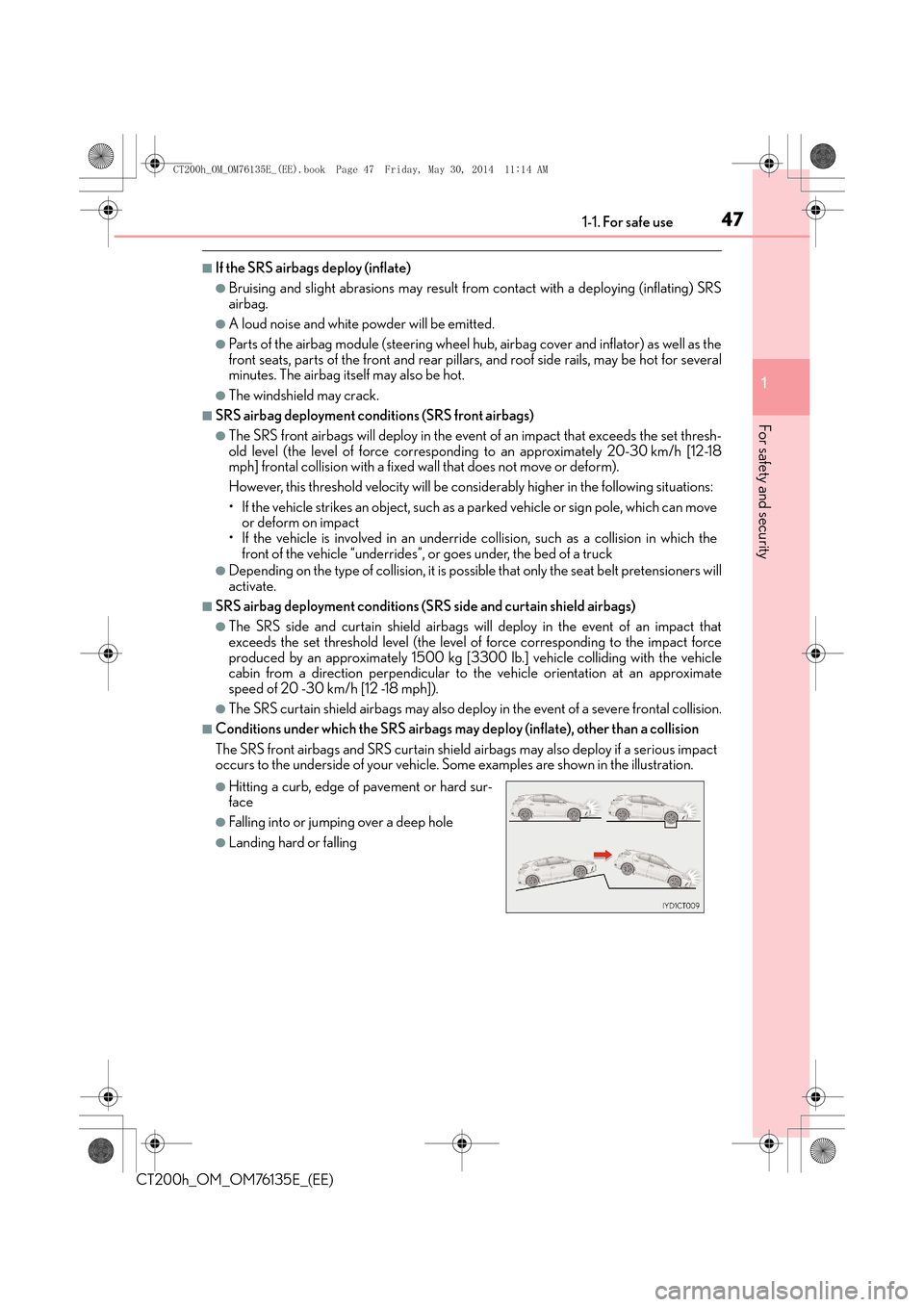
■Conditions under which the SRS airbags may deploy (inflate), other than a collision
The SRS front airbags and SRS curtain shield airbags may also deploy if a serious impact
occurs to the underside of your vehicle. Some examples are shown in the illustration.
●Hitting a curb, edge of pavement or hard sur-
face
●Falling into or jumping over a deep hole
●Landing hard or falling
CT200h_OM_OM76135E_(EE).book Page 47 Friday, May 30, 2014 11 :14 AM
Page 48 of 622
481-1. For safe use
CT200h_OM_OM76135E_(EE)
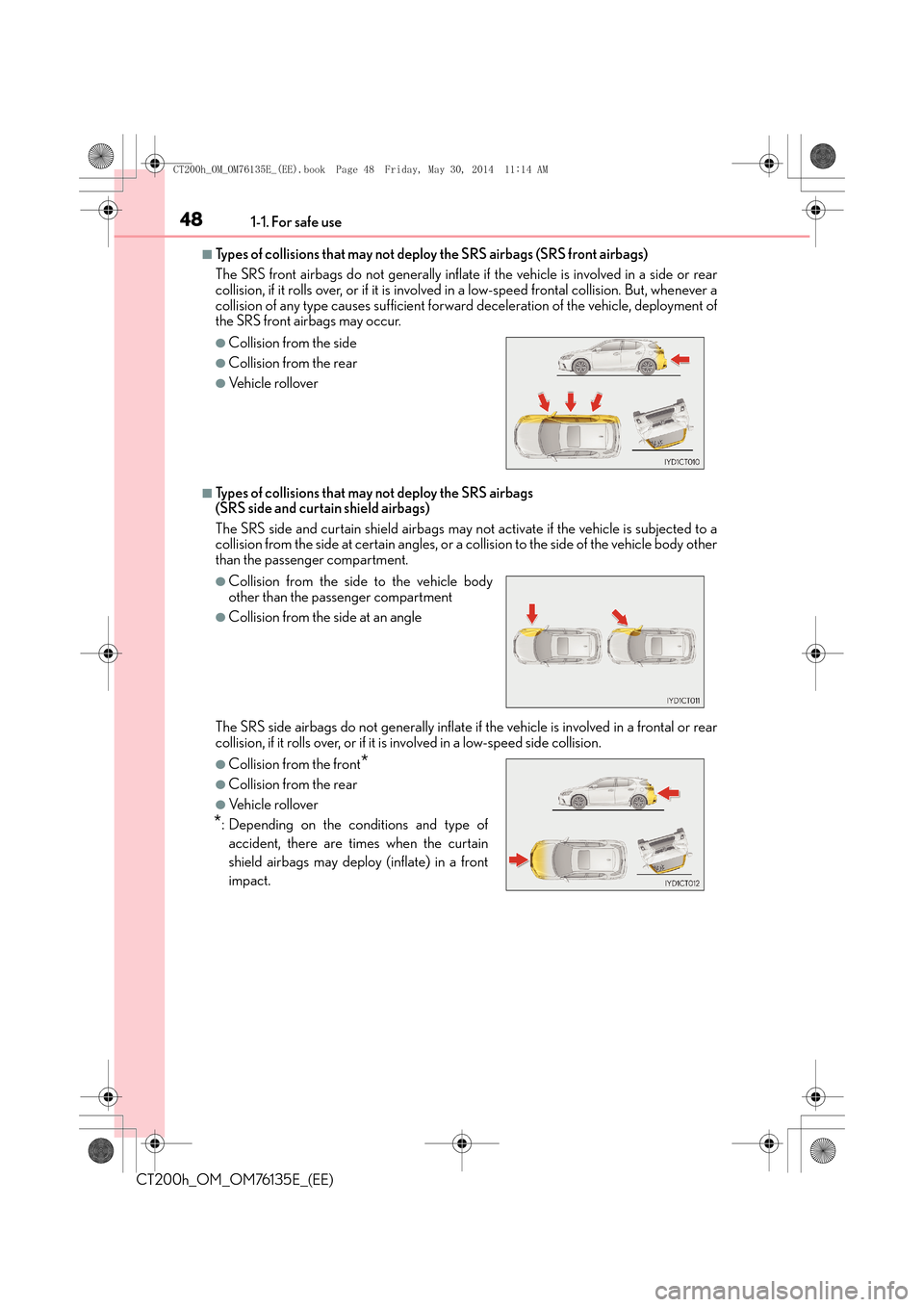
■Types of collisions that may not deploy the SRS airbags (SRS front airbags)
The SRS front airbags do not generally inflate if the vehicle is involved in a side or rear
collision, if it rolls over, or if it is involved in a low-speed frontal collision. But, whenever a
collision of any type causes sufficient forward deceleration of the vehicle, deployment of
the SRS front airbags may occur.
■Types of collisions that may not deploy the SRS airbags
(SRS side and curtain shield airbags)
The SRS side and curtain shield airbags may not activate if the vehicle is subjected to a
collision from the side at certain angles, or a collision to the side of the vehicle body other
than the passenger compartment.
The SRS side airbags do not generally inflate if the vehicle is involved in a frontal or rear
collision, if it rolls over, or if it is involved in a low-speed side collision.
●Collision from the side
●Collision from the rear
●Vehicle rollover
●Collision from the side to the vehicle body
other than the passenger compartment
●Collision from the side at an angle
●Collision from the front*
●Collision from the rear
●Vehicle rollover
*: Depending on the conditions and type of
accident, there are times when the curtain
shield airbags may deploy (inflate) in a front
impact.
CT200h_OM_OM76135E_(EE).book Page 48 Friday, May 30, 2014 11 :14 AM
Page 72 of 622

721-2. Hybrid system
CT200h_OM_OM76135E_(EE)
■EV indicator
■Conditions in which the gasoline engine may not stop
The gasoline engine starts an d stops automatically. However, it may not stop automati-
cally in the following conditions:
●During gasoline engine warm-up
●During hybrid battery (traction battery) charging
●When the temperature of the hybrid battery (traction battery) is high or low
●When the heater is switched on
■Charging the hybrid battery (traction battery)
As the gasoline engine charges the hybrid battery (traction battery), the battery does not
need to be charged from an outside source. However, if the vehicle is left parked for a
long time the hybrid battery will slowly disc harge. For this reason, be sure to drive the
vehicle at least once every few months for at least 30 minutes or 16 km (10 miles). If the
hybrid battery becomes fully discharged and you are unable to start the hybrid system,
contact any authorized Lexus dealer or repairer, or another duly qualified and equipped
professional.
■Charging the 12-volt battery
→ P. 5 6 9
■After the 12-volt battery has discharged or has been changed or removed
The gasoline engine may not stop even if the vehicle is being driven by the hybrid battery
(traction battery). If this continues for a few days, contact any authorized Lexus dealer or
repairer, or another duly qualified and equipped professional. The EV indicator comes on when the vehicle is
driven using only the electric motor (traction
motor) or the gasoline engine is stopped.
CT200h_OM_OM76135E_(EE).book Page 72 Friday, May 30, 2014 11 :14 AM
Page 74 of 622

741-2. Hybrid system
CT200h_OM_OM76135E_(EE)
Hybrid system precautions
The illustration is an example for explanation and may differ from the actual item.
Take care when handling the hybrid system, as it is a high voltage system
(about 650V at maximum) as well as parts that become extremely hot when
the hybrid system is operating. Obey the caution labels attached to the vehi-
cle.
Caution label
Hybrid battery (traction battery)
Service plug
Air conditioning compressor High voltage cables (orange)
Po w e r c o n t ro l u n i t
Electric motor (traction motor)1
2
3
4
5
6
7
CT200h_OM_OM76135E_(EE).book Page 74 Friday, May 30, 2014 11
:14 AM
Page 99 of 622
992. Instrument cluster
2
Instrument cluster
CT200h_OM_OM76135E_(EE)
●Hybrid System Indicator is displayed when the driving mode is in other than the sport
mode.
●By keeping the indicator needle within Ec o area, more Eco-friendly driving can be
achieved.
●Charge area indicates regeneration* status. Regenerated energy will be used to
charge the hybrid battery (traction battery).
*: When used in this manual, “regeneration” refers to the conversion of energy created
by the movement of the vehicle into electrical energy.
■Tachometer (if equipped)
The tachometer is displayed when the driving mode is in the sport mode.
■ECO lamp and SPORT lamp (if equipped)
●When sport mode is selected, the SPORT lamp (red) will illuminate.
●When all of the following conditions are satisfied and the Eco-friendly driving, the ECO
lamp (blue) will illuminate:
• Driving with the shift position in D
• Either normal mode or Eco drive mode is selected, and EV drive mode is not in use
( → P. 1 8 1 , 2 3 7 )
• The vehicle speed is approximately 130 km/h (80 mph) or below.
■Engine speed
On hybrid vehicles, engine speed is precis ely controlled in order to help improve fuel
efficiency and reduce exhaust emissions etc.
There are times when the engine speed that is displayed may differ even when vehicle
operation and driving co nditions are the same.
■Outside temperature display
●In the following situations, the correct outside temperature may not be displayed, or the
display may take longer than normal to change.
• When stopped, or driving at low speeds (less than 20 km/h [12 mph])
• When the outside temperature has changed suddenly (at the entrance/exit of a
garage, tunnel, etc.)
●When “--” or “E” is displayed, the system may be malfunctioning.
Take your vehicle to any authorized Lexus de aler or repairer, or another duly qualified
and equipped professional.
■Customization
Settings (e.g. on/off operation of the ECO lamp) can be changed.
(Customizable features: →P. 5 8 9 )
NOTICE
■To prevent damage to the engine and its components
●Vehicles with tachometer: Do not let the indicator needle of the tachometer enter the
red zone, which indicates the maximum engine speed.
●The engine may be overheating if the high coolant temperature warning light comes
on or flashes. In this case, immediately stop the vehicle in a safe place, and check the
engine after it has cooled completely. ( →P. 5 7 1 )
CT200h_OM_OM76135E_(EE).book Page 99 Friday, May 30, 2014 11 :14 AM
Page 130 of 622
1303-2. Opening, closing and locking the doors
CT200h_OM_OM76135E_(EE)
■Alarms and warning messages
An alarm sounds and warning message displays shown on the multi-information display
are used to protect against unexpected accidents or theft of the vehicle resulting from
erroneous operation. When a warning message is displayed, take appropriate measures
based on the displayed message. ( →P. 5 2 1 )
When only an alarm sounds, circumstances and correction procedures are as follows.
■Battery-saving function (vehicles with entry function)
The battery-saving function will be activated in order to prevent the electronic key bat-
tery and the 12-volt battery from being discha rged while the vehicle is not in operation
for a long time.
●In the following situations, the smart entry & start system may take some time to unlock
the doors.
• The electronic key has been left in an area of approximately 2 m (6 ft.) of the outside
of the vehicle for 10 minutes or longer.
• The smart entry & start system has not been used for 5 days or longer.
●If the smart entry & start system has not been used for 14 days or longer, the doors can-
not be unlocked at any doors except the driver’s door. In this case, take hold of the
driver’s door handle, or use the wireless remote control or the mechanical key, to
unlock the doors.
■Conditions affecting operation
The smart entry & start system, wireless re mote control and immobilizer system use
weak radio waves. In the following situations, the communication between the electronic
key and the vehicle may be affected, preventing the smart entry & start system, wireless
remote control and immobilizer sy stem from operating properly.
(Ways of coping: →P. 565)
●When the electronic key battery is depleted
●Near a TV tower, electric power plant, gas station, radio station, large display, airport or
other facility that generates strong radio waves or electrical noise
●When carrying a portable radio, cellular ph one, cordless phone or other wireless com-
munication devices
AlarmSituationCorrection procedure
Exterior alarm
sounds once for 5
seconds (vehicles
with entry function)An attempt was made to lock
the vehicle while a door was
open.Close all of the doors and
lock the doors again.
Interior alarm pings
repeatedly
The power switch was turned to
ACCESSORY mode while the
driver’s door was open (The
driver’s door was opened when
the power switch was in
ACCESSORY mode).
Turn the power switch off
and close the driver’s door.
CT200h_OM_OM76135E_(EE).book Page 130 Friday, May 30, 2014 1 1:14 AM