display Lexus GS300h 2013 Manual Online
[x] Cancel search | Manufacturer: LEXUS, Model Year: 2013, Model line: GS300h, Model: Lexus GS300h 2013Pages: 1014
Page 377 of 1014
3664-5. Using the driving support system
GS450h_300h_OM_OM30D53E_(EE)
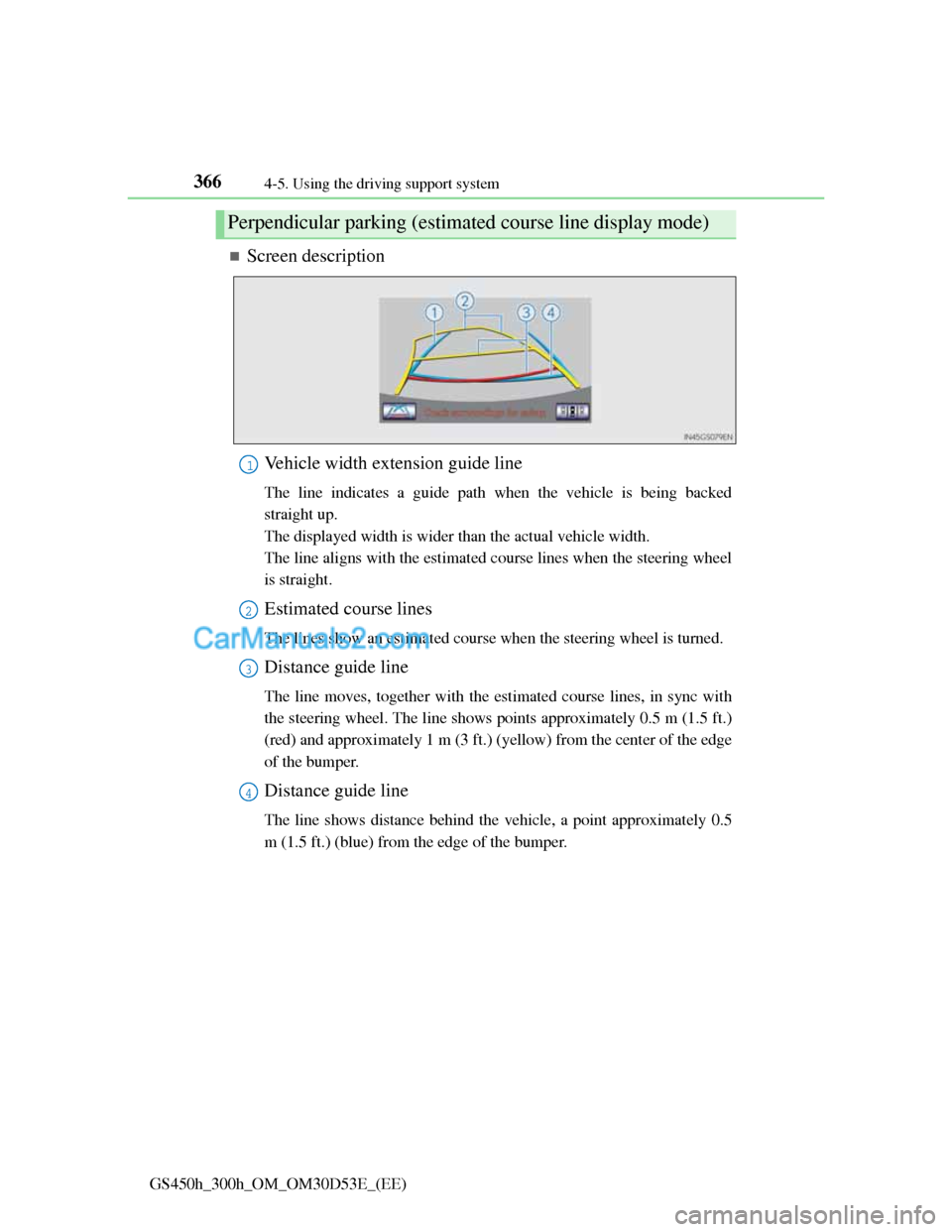
Screen description
Vehicle width extension guide line
The line indicates a guide path when the vehicle is being backed
straight up.
The displayed width is wider than the actual vehicle width.
The line aligns with the estimated course lines when the steering wheel
is straight.
Estimated course lines
The lines show an estimated course when the steering wheel is turned.
Distance guide line
The line moves, together with the estimated course lines, in sync with
the steering wheel. The line shows points approximately 0.5 m (1.5 ft.)
(red) and approximately 1 m (3 ft.) (yellow) from the center of the edge
of the bumper.
Distance guide line
The line shows distance behind the vehicle, a point approximately 0.5
m (1.5 ft.) (blue) from the edge of the bumper.
Perpendicular parking (estimated course line display mode)
1
2
3
4
Page 379 of 1014
3684-5. Using the driving support system
GS450h_300h_OM_OM30D53E_(EE)
Once the vehicle width extension guide lines and the parking
space lines are parallel, straighten the steering wheel and back
up slowly until the vehicle has completely entered the parking
space.
Stop the vehicle in an appropriate place, and finish parking.
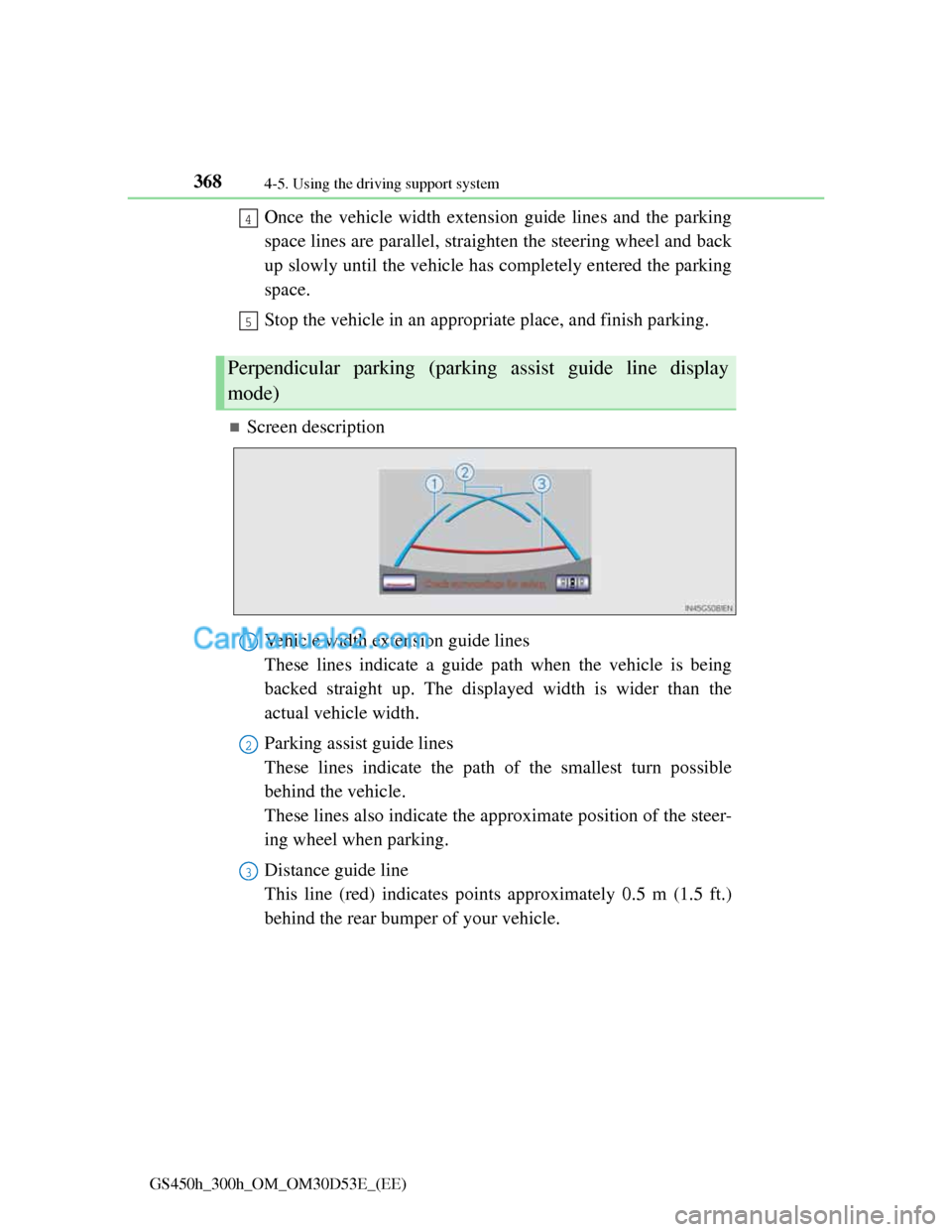
Screen description
Vehicle width extension guide lines
These lines indicate a guide path when the vehicle is being
backed straight up. The displayed width is wider than the
actual vehicle width.
Parking assist guide lines
These lines indicate the path of the smallest turn possible
behind the vehicle.
These lines also indicate the approximate position of the steer-
ing wheel when parking.
Distance guide line
This line (red) indicates points approximately 0.5 m (1.5 ft.)
behind the rear bumper of your vehicle.
Perpendicular parking (parking assist guide line display
mode)
4
5
1
2
3
Page 381 of 1014
3704-5. Using the driving support system
GS450h_300h_OM_OM30D53E_(EE)
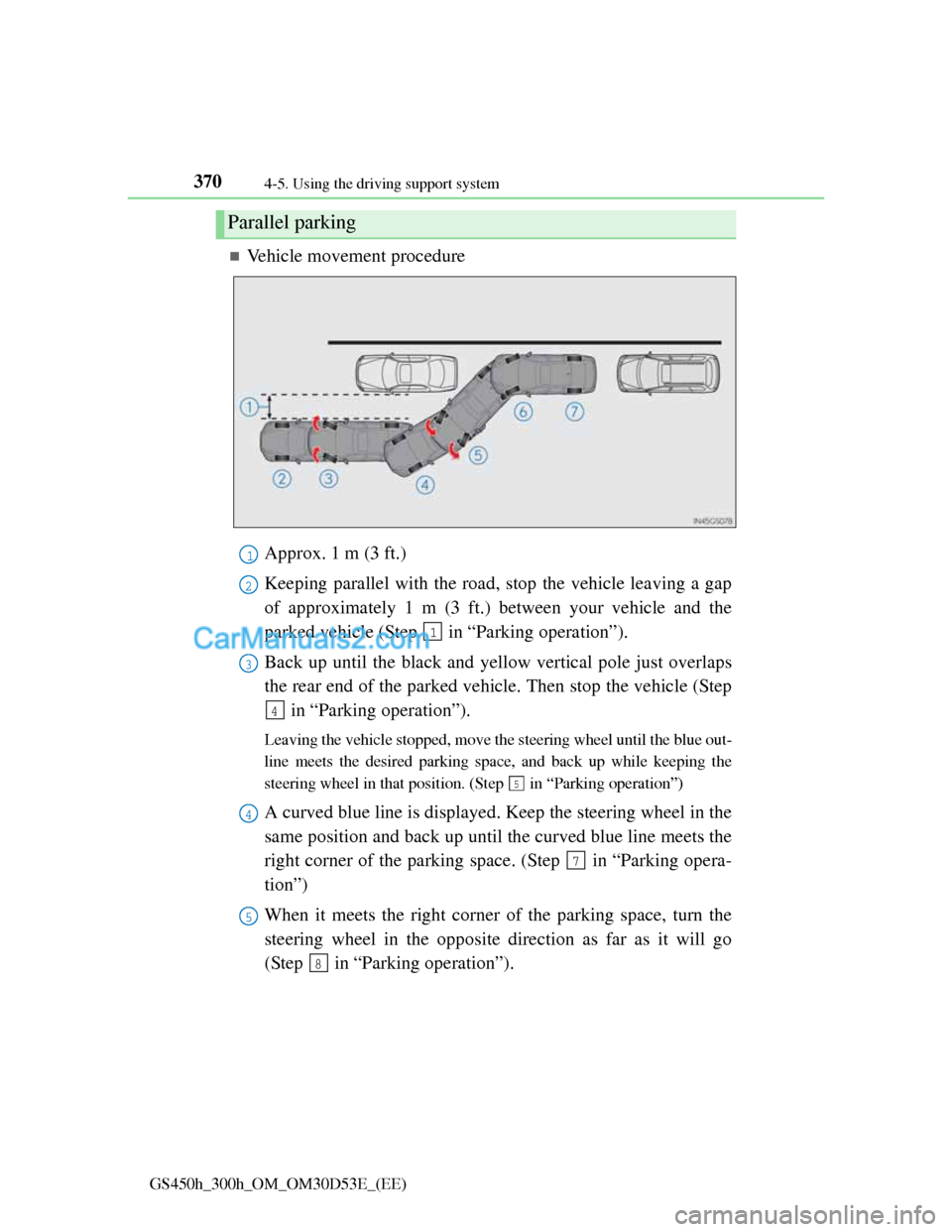
Vehicle movement procedure
Approx. 1 m (3 ft.)
Keeping parallel with the road, stop the vehicle leaving a gap
of approximately 1 m (3 ft.) between your vehicle and the
parked vehicle (Step in “Parking operation”).
Back up until the black and yellow vertical pole just overlaps
the rear end of the parked vehicle. Then stop the vehicle (Step
in “Parking operation”).
Leaving the vehicle stopped, move the steering wheel until the blue out-
line meets the desired parking space, and back up while keeping the
steering wheel in that position. (Step in “Parking operation”)
A curved blue line is displayed. Keep the steering wheel in the
same position and back up until the curved blue line meets the
right corner of the parking space. (Step in “Parking opera-
tion”)
When it meets the right corner of the parking space, turn the
steering wheel in the opposite direction as far as it will go
(Step in “Parking operation”).
Parallel parking
1
2
1
3
4
5
4
7
5
8
Page 383 of 1014
3724-5. Using the driving support system
GS450h_300h_OM_OM30D53E_(EE)
Shift the shift lever to the R position.
Make sure the monitor displays the part behind the rear tires of
the parked vehicle, and select .
If the area is not displayed, move the vehicle to forward.
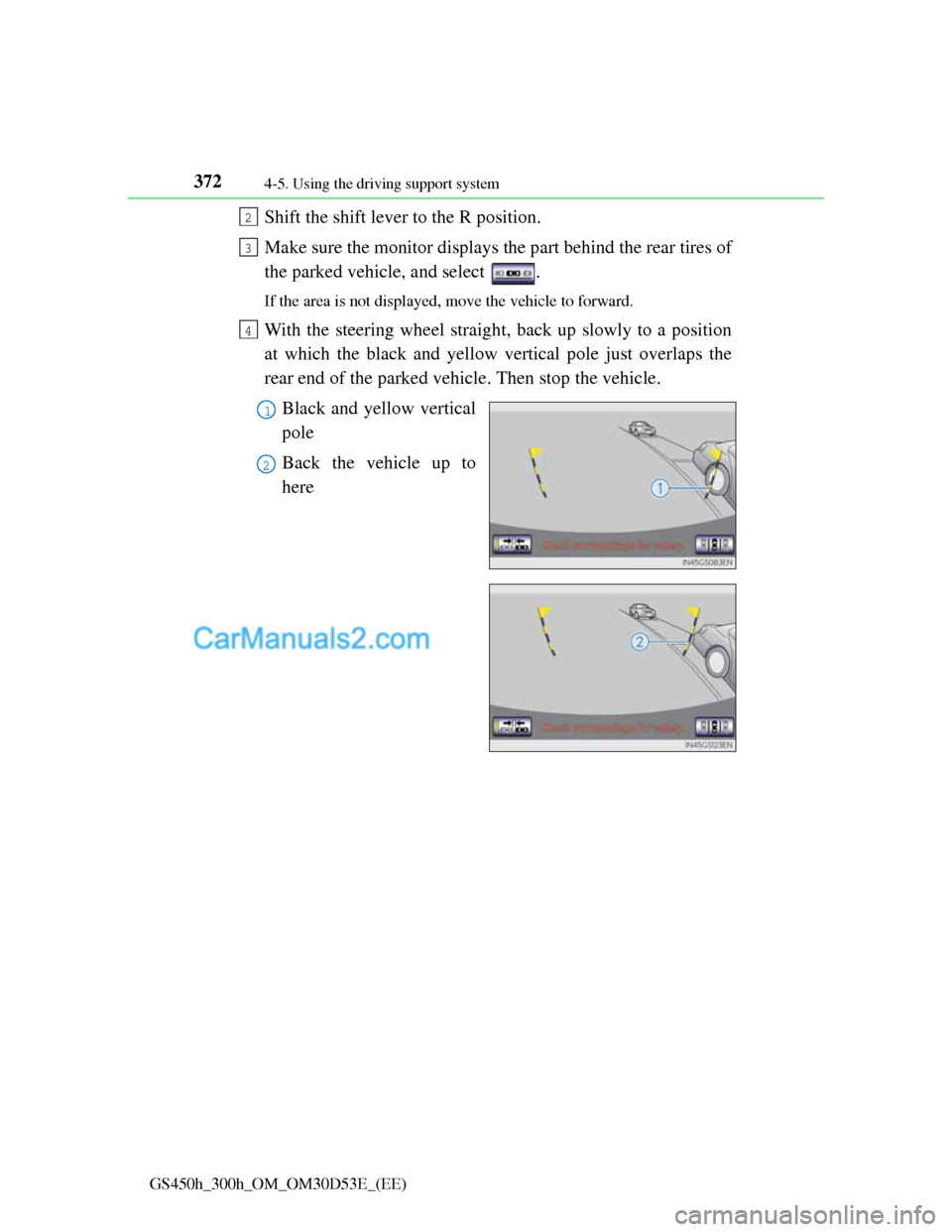
With the steering wheel straight, back up slowly to a position
at which the black and yellow vertical pole just overlaps the
rear end of the parked vehicle. Then stop the vehicle.
Black and yellow vertical
pole
Back the vehicle up to
here
2
3
4
1
2
Page 384 of 1014
3734-5. Using the driving support system
4
Driving
GS450h_300h_OM_OM30D53E_(EE)
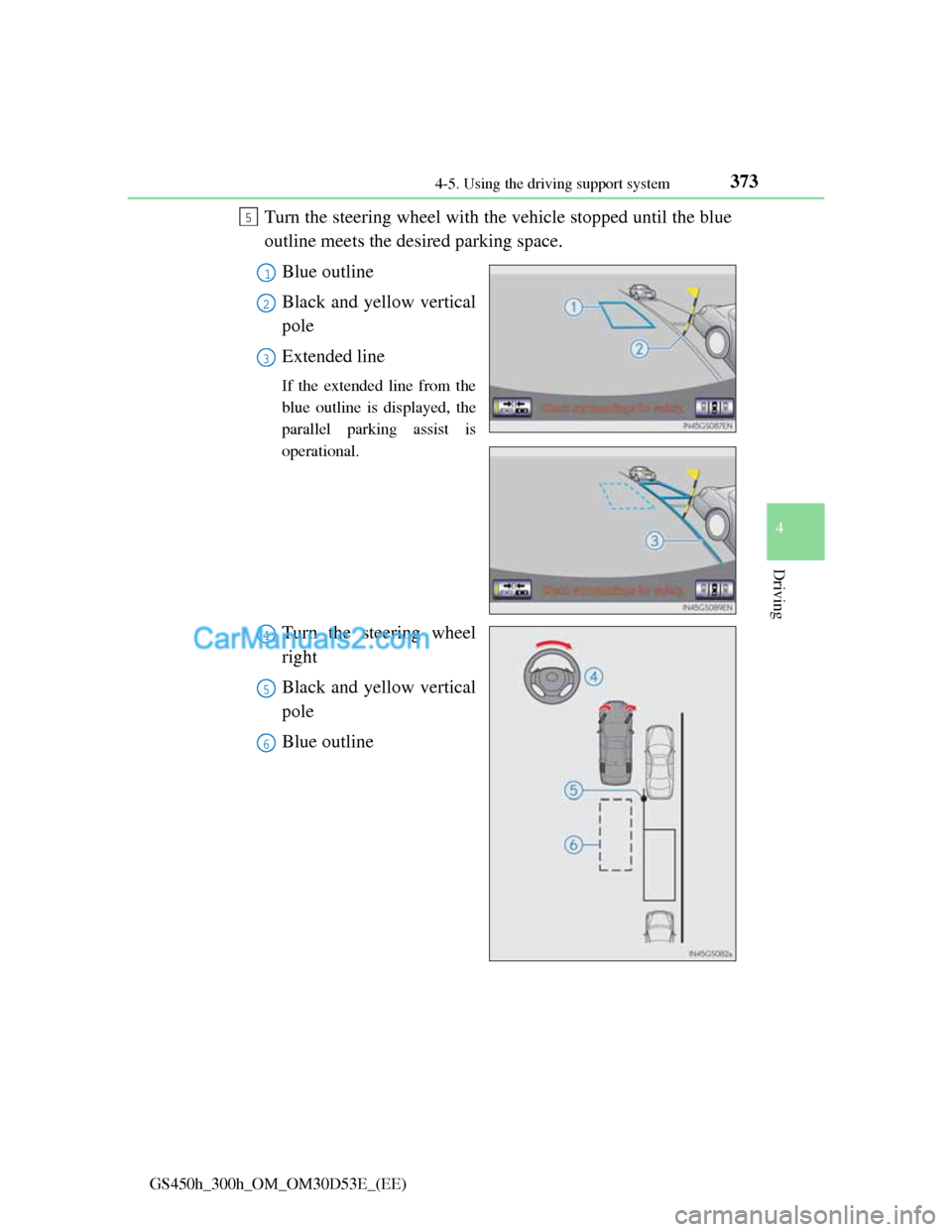
Turn the steering wheel with the vehicle stopped until the blue
outline meets the desired parking space.
Blue outline
Black and yellow vertical
pole
Extended line
If the extended line from the
blue outline is displayed, the
parallel parking assist is
operational.
Turn the steering wheel
right
Black and yellow vertical
pole
Blue outline
5
1
2
3
4
5
6
Page 387 of 1014
3764-5. Using the driving support system
GS450h_300h_OM_OM30D53E_(EE)
Leaving the vehicle stopped, turn the steering wheel all the
way to the left.
Be sure to turn the steering wheel only when the vehicle is stopped.
When the screen changes, keep the steering wheel in its cur-
rent position and back up.
When backing up, be careful not to hit any obstacles with the right front
corner of your vehicle. Back the vehicle up slowly.
When the vehicle is parallel with the road or the shoulder,
straighten the steering wheel.
Check your surroundings visually and with the mirrors, then
back up using the distance guide lines as a reference, and stop.
When the vehicle is approximately in the desired parking location, the
parallel parking assist is complete.
Parallel parking assist mode information
• There is a possibility that parallel parking guidance may not
be given when backing up at a very slow speed.
• If the trunk is opened during parallel parking guidance, the
parallel parking assist will be interrupted and canceled. Stop
the vehicle, shift the shift lever out of the R position, and
restart the operation from the step
.
Canceling parallel parking assist
Select .
Vehicles with Lexus parking assist-sensor
If Lexus parking assist-sensor detects an object while you
attempt to park in a parking space on the left, the black and
yellow vertical pole could be obscured by Lexus parking
assist-sensor display. In this event, turn Lexus parking assist-
sensor switch off (P. 349), and operate the vehicle while
checking the safety of the surrounding area direct visually and
with mirror. After the operation, turn the switch on.
8
9
10
1
Page 388 of 1014
3774-5. Using the driving support system
4
Driving
GS450h_300h_OM_OM30D53E_(EE)
If the message “Steering wheel turned too far, please return.”
is displayed
The steering wheel has been turned too far, and the system
cannot function. Return the steering wheel to its original posi-
tion.
If the message is displayed before the outline is positioned
over the desired parking space, it is likely that the vehicle is
too far away from the shoulder. Check that there is a gap of
approximately 1 m (3 ft.) between your vehicle and the parked
vehicle.
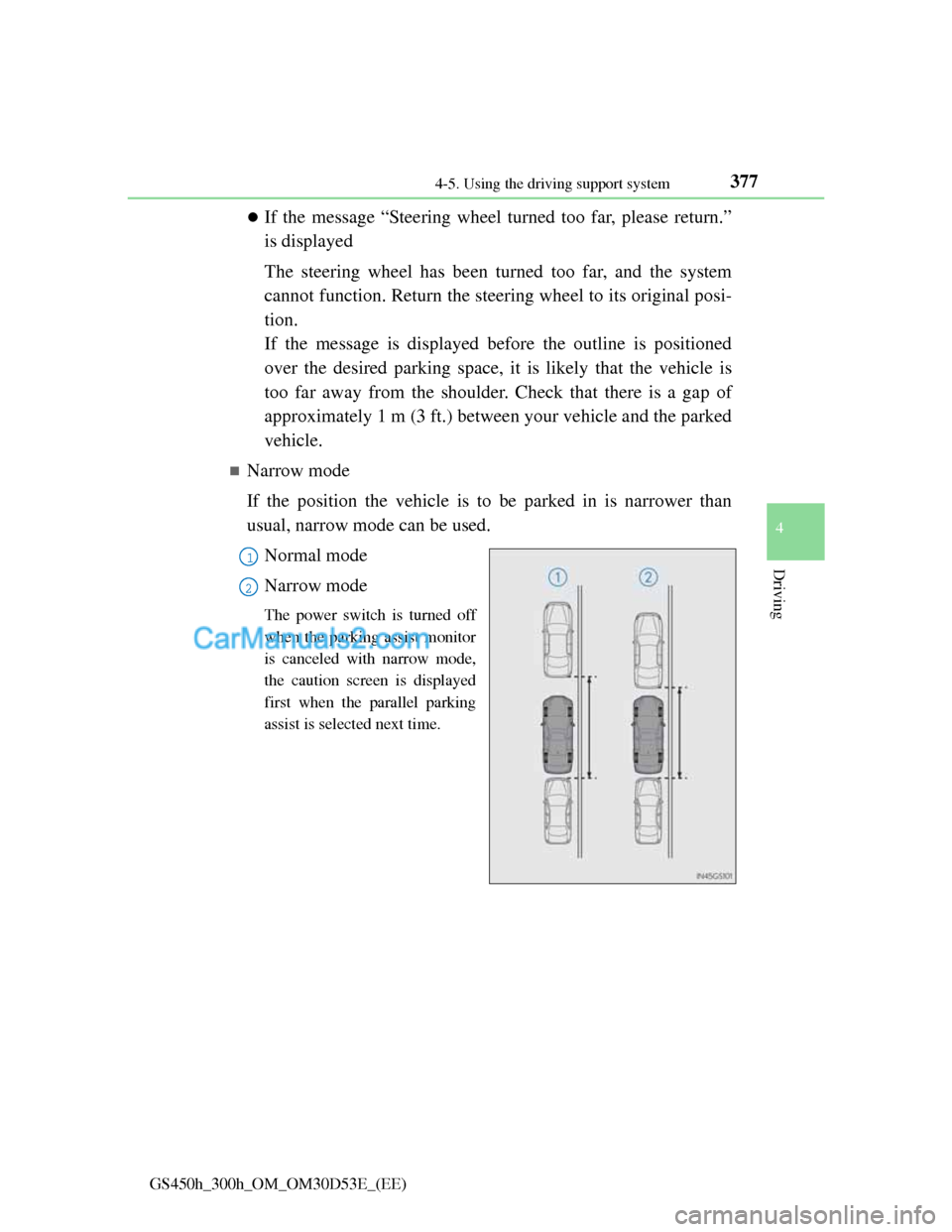
Narrow mode
If the position the vehicle is to be parked in is narrower than
usual, narrow mode can be used.
Normal mode
Narrow mode
The power switch is turned off
when the parking assist monitor
is canceled with narrow mode,
the caution screen is displayed
first when the parallel parking
assist is selected next time.
1
2
Page 390 of 1014
3794-5. Using the driving support system
4
Driving
GS450h_300h_OM_OM30D53E_(EE)
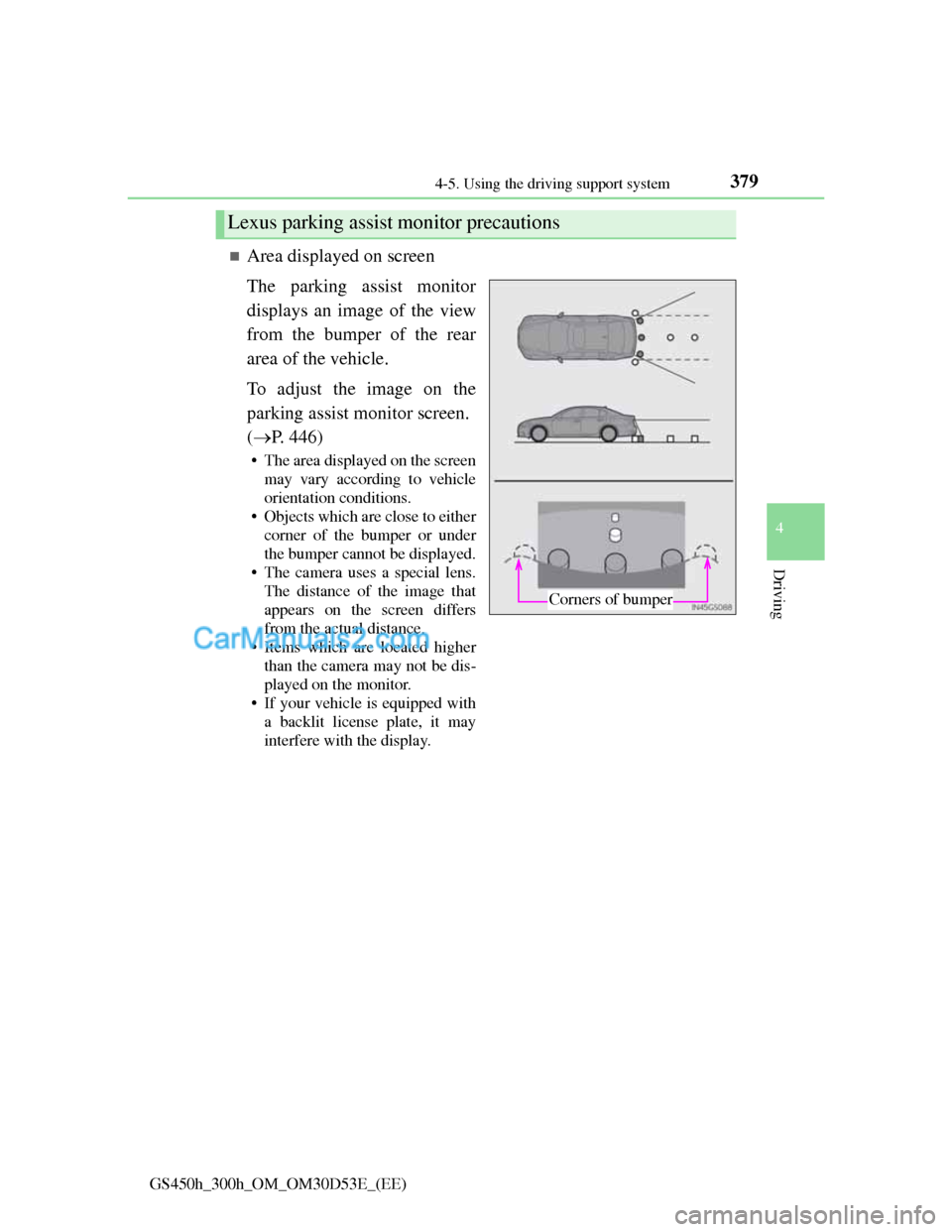
Area displayed on screen
The parking assist monitor
displays an image of the view
from the bumper of the rear
area of the vehicle.
To adjust the image on the
parking assist monitor screen.
(P. 446)
• The area displayed on the screen
may vary according to vehicle
orientation conditions.
• Objects which are close to either
corner of the bumper or under
the bumper cannot be displayed.
• The camera uses a special lens.
The distance of the image that
appears on the screen differs
from the actual distance.
• Items which are located higher
than the camera may not be dis-
played on the monitor.
• If your vehicle is equipped with
a backlit license plate, it may
interfere with the display.
Lexus parking assist monitor precautions
Corners of bumper
Page 398 of 1014
3874-5. Using the driving support system
4
Driving
GS450h_300h_OM_OM30D53E_(EE)
Guide lines are not dis-
playedThe trunk lid is open.
Close the trunk lid.
If this does not resolve
the symptom, have the
vehicle inspected by
any authorized Lexus
dealer or repairer, or
another duly qualified
and equipped profes-
sional.
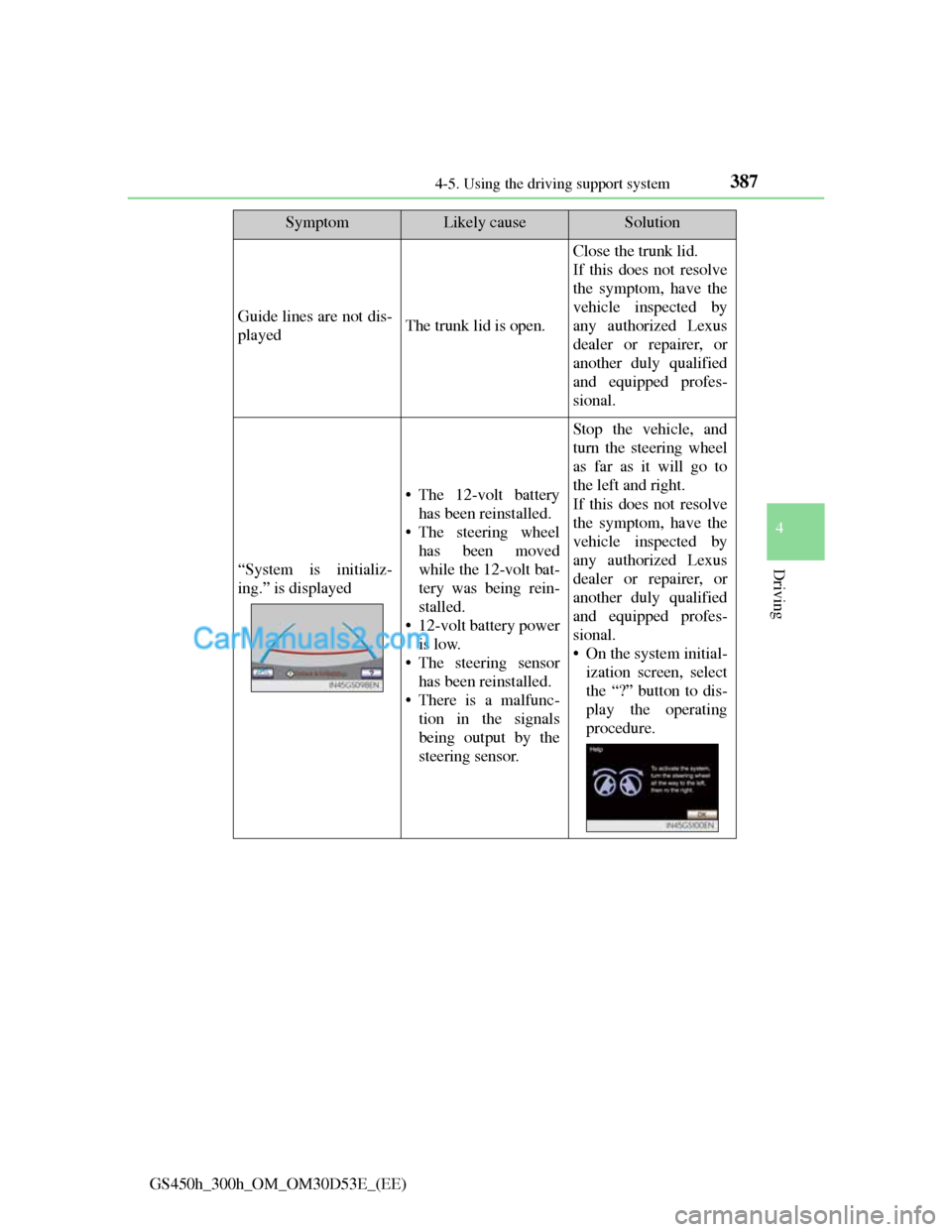
“System is initializ-
ing.” is displayed
• The 12-volt battery
has been reinstalled.
• The steering wheel
has been moved
while the 12-volt bat-
tery was being rein-
stalled.
• 12-volt battery power
is low.
• The steering sensor
has been reinstalled.
• There is a malfunc-
tion in the signals
being output by the
steering sensor.
Stop the vehicle, and
turn the steering wheel
as far as it will go to
the left and right.
If this does not resolve
the symptom, have the
vehicle inspected by
any authorized Lexus
dealer or repairer, or
another duly qualified
and equipped profes-
sional.
• On the system initial-
ization screen, select
the “?” button to dis-
play the operating
procedure.
SymptomLikely causeSolution
Page 399 of 1014
3884-5. Using the driving support system
GS450h_300h_OM_OM30D53E_(EE)
CAUTION
When using the Lexus parking assist monitor system
The Lexus parking assist monitor is a supplemental device intended to
assist the driver when backing up. When backing up, be sure to check visu-
ally behind and all around the vehicle before proceeding.
Observe the following precautions to avoid an accident that could result in
death or serious injuries.
Never depend on the Lexus parking assist monitor entirely when backing
up. The image and the position of the guide lines displayed on the screen
may differ from the actual state.
Use caution, just as you would when backing up any vehicle.
Be sure to back up slowly, depressing the brake pedal to control vehicle
speed.
If you seem likely to hit nearby vehicles, obstacles, people or mount the
shoulder, depress the brake pedal to stop the vehicle, then disable the
assist system by select on the screen to cancel the system.
The instructions given are only guidelines.
When and how much to turn the steering wheel will vary according to
traffic conditions, road surface conditions, vehicle condition, etc. when
parking. It is necessary to be fully aware of this before using the parking
assist system.
When parking, be sure to check that the parking space will accommodate
your vehicle before maneuvering into it.
Do not use the Lexus parking assist monitor in the following cases:
• On icy or slick road surfaces, or in snow
• When using tire chains or emergency tires
• When the trunk lid is not closed completely
• On roads that are not flat or straight, such as curves or slopes.