control Lexus GS350 2010 Workshop Manual
[x] Cancel search | Manufacturer: LEXUS, Model Year: 2010, Model line: GS350, Model: Lexus GS350 2010Pages: 650, PDF Size: 15.04 MB
Page 178 of 650
177
2-4. Using other driving systems
2
When driving
GS_G_U (OM30C80U)
January 27, 2010 4:47 pm
■Dynamic radar cruise can be set when
●The shift lever is in D. (Recommended)
Dynamic radar cruise control can also be set when the shift lever is in the S posi-
tion and range “4”, “5”, “6”, “7” or “8” (GS460) or “4”, “5” or “6” (GS350) has
been selected.
●Vehicle speed is above approximately 30 mph (50 km/h).
■Accelerating
The vehicle can be accelerated normally. After acceleration, the set speed
resumes.
■Automatically canceling vehicle-to-vehicle distance control
Vehicle-to-vehicle distance control driving is automatically canceled in the follow-
ing situations.
●Actual vehicle speed falls below 25 mph (40 km/h)
●Enhanced VSC is activated
●The windshield wipers are operating at high speed
●The mode select switch is set to snow mode
●The sensor cannot operate correctly because it is covered in some way
Vehicle-to-vehicle distance control driving must be reset by turning the “ON-
OFF” button on again.
If vehicle-to-vehicle distance control driving is automatically canceled for any other
reason, there may be a malfunction in the system. Contact your Lexus dealer.
■Automatically canceling constant speed control
The set speed is automatically canceled in the following situations.
●Actual vehicle speed is more than 10 mph (16 km/h) below the preset vehicle
speed
●Actual vehicle speed falls below 25 mph (40 km/h)
●Enhanced VSC is activated
GS_U_G.book Page 177 Wednesday, January 27, 2010 4:48 PM
Page 179 of 650
178
2-4. Using other driving systems
GS_G_U (OM30C80U)
January 27, 2010 4:47 pm
■Vehicle-to-vehicle distance settings
Select a distance from the table below. Note that the distances shown correspond
to a vehicle speed of 50 mph (80 km/h). Vehicle-to-vehicle distance increases/
decreases in accordance with vehicle speed.
■Radar sensor and grille cover
Always keep the sensor and grille cover clean to ensure that the vehicle-to-vehicle
distance control operates properly. (Some obstructions, such as snow, ice or plastic
objects, cannot be detected by the obstruction sensor.)
Dynamic radar cruise control is canceled if an obstruction is detected.
■Approach warning
In the following instances, there is a possibility that the warnings will not occur:
●When the speed of the vehicle ahead matches or exceeds your vehicle’s speed
●When the vehicle ahead is traveling at an extremely slow speed
●Immediately after the cruise control speed has been set
●At the instant the accelerator is applied
Distance optionsVehicle-to-vehicle distance
LongApproximately 210 ft. (65 m)
MediumApproximately 150 ft. (45 m)
ShortApproximately 100 ft. (30 m)
Grille cover
Radar sensor
GS_U_G.book Page 178 Wednesday, January 27, 2010 4:48 PM
Page 181 of 650
180
2-4. Using other driving systems
GS_G_U (OM30C80U)
January 27, 2010 4:47 pm
CAUTION
■Before using dynamic radar cruise control
Do not overly rely on vehicle-to-vehicle distance control.
Be aware of the set vehicle speed. If automatic deceleration/acceleration is not
appropriate, adjust the vehicle speed, as well as the distance between your vehicle
and vehicles ahead by applying the brakes, etc.
■To avoid operating the dynamic radar cruise control by mistake
Keep the “ON-OFF” button off when not in use.
■Situations unsuitable for dynamic radar cruise control
Do not use dynamic radar cruise control in any of the following situations.
Doing so may result in inappropriate control of speed and could cause serious or
fatal accident.
●In heavy traffic
●On roads with sharp bends
●On winding roads
●On slippery roads, such as those covered with rain, ice or snow
●On steep downhills, where there are sudden changes between sharp up and
down gradients
Vehicle speed may exceed the set speed when driving down a steep hill.
●At entrances to expressways
●When weather conditions are bad enough that they may prevent the sensors
from functioning correctly (fog, snow, sandstorm, etc.)
●When the approach warning buzzer can be heard often
●When emergency towing
GS_U_G.book Page 180 Wednesday, January 27, 2010 4:48 PM
Page 182 of 650
181
2-4. Using other driving systems
2
When driving
GS_G_U (OM30C80U)
January 27, 2010 4:47 pm
CAUTION
■When the radar sensor may not be correctly detecting the vehicle ahead
Apply the brakes as necessary when any of the following types of vehicles are in
front of you.
As the sensor may not be able to correctly detect these types of vehicles, the prox-
imity alarm ( →P. 551) will not be activated, and a serious or fatal accident may
result.
●Vehicles that cut in suddenly
●Vehicles traveling at low speeds
●Vehicles that are not moving
●Vehicles with small rear ends (trailers with no load on board etc.)
●Motorcycles traveling in the same lane
■Conditions under which the vehicle-to-vehicle distance control may not function
correctly
Apply the brakes as necessary in the following conditions as the radar sensor may
not be able to correctly detect vehicles ahead, and a serious or fatal accident may
result.
●When water or snow thrown up by the surrounding vehicles hinders the function-
ing of the sensor
●When your vehicle is pointing upwards (caused by a heavy load in the trunk, etc.)
●When the road curves or when the lanes are narrow
●When steering wheel operation or your position in the lane is unstable
●When the vehicle ahead of you decelerates suddenly
GS_U_G.book Page 181 Wednesday, January 27, 2010 4:48 PM
Page 183 of 650
182
2-4. Using other driving systems
GS_G_U (OM30C80U)
January 27, 2010 4:47 pm
CAUTION
■To ensure the radar sensor functions correctly
Do not do the following to the sensor or grille cover as doing so may cause the sen-
sor not to function correctly and could result in a serious or fatal accident.
●Stick or attach anything to them
●Leave them dirty
●Disassemble, subject them to strong shocks
●Modify or paint them
●Replace them with non-genuine parts
■Handling the radar sensor
Observe the following to ensure the cruise control system can function effectively.
●Keep the sensor and front grille clean at all times.
Clean the sensor and front grille with a soft cloth so you do not mark or damage
them.
●Do not subject the sensor or surrounding area to a strong impact.
If the sensor moves even slightly off position, the system may malfunction. If the
sensor or surrounding area is subject to a strong impact, always have the area
inspected and adjusted by a Lexus dealer.
●Do not disassemble the sensor.
●Do not attach accessories or stickers to the sensor, grille or surrounding area.
●Do not modify or paint the sensor and grille.
GS_U_G.book Page 182 Wednesday, January 27, 2010 4:48 PM
Page 193 of 650

192
2-4. Using other driving systems
GS_G_U (OM30C80U)
January 27, 2010 4:47 pm
■The intuitive parking assist can be operated when
The “ENGINE START STOP” switch is in the IGNITION ON mode.
■When the system malfunctions
●If a malfunction occurs and no obstacles have been detected, a warning is dis-
played, and a malfunction beep sounds for 7 seconds.
If an obstacle has been detected, or another malfunction occurs in a different
sensor, the malfunction beeps will not sound.
●In the following circumstances the displayed warning will disappear:
• If you switch the screen to a different mode.
• If you turn off the intuitive parking assist main switch.
• If the vehicle speed exceeds 6 mph (10 km/h). Once the vehicle speed dropsbelow 6 mph (10 km/h), the warning will be displayed again.
●If the malfunction screen is displayed, the detection range of the dual sensors is
shortened. In this case, the necessity for obstacle evasion (whether the obstacle
will come within 0.8 ft. [25 cm] of the vehicle or not) will not be calculated.
■When using the intuitive parking assist
●The sensors’ detection areas and reaction times are limited. When moving for-
ward or reversing, check the areas surrounding the vehicle (especially the sides
of the vehicle) for safety, and drive slowly, using the brake to control the vehicle’s
speed.
• The sensors’ detection areas are limited to the areas around the vehicle’s frontand rear bumpers.
• Depending on the shape of the obstacle and other factors, the detection dis-
tance may shorten, or detection may be impossible.
• There will be a short delay between obstacle detection and display. Even at slow speeds, there is a possibility that the obstacle will come within 0.8 ft. (25
cm) of the vehicle before the display is shown and the warning beep sounds.
• Braking distance may differ according to the road conditions (rain, gravel etc.).
• It might be difficult to hear beeps due to the volume of audio system or air flow noise of air conditioning system.
• For long obstacles such as walls, the obstacle warning may change as the obstacle gets closer.
GS_U_G.book Page 192 Wednesday, January 27, 2010 4:48 PM
Page 200 of 650
199
2-4. Using other driving systems
2
When driving
GS_G_U (OM30C80U)
January 27, 2010 4:47 pm
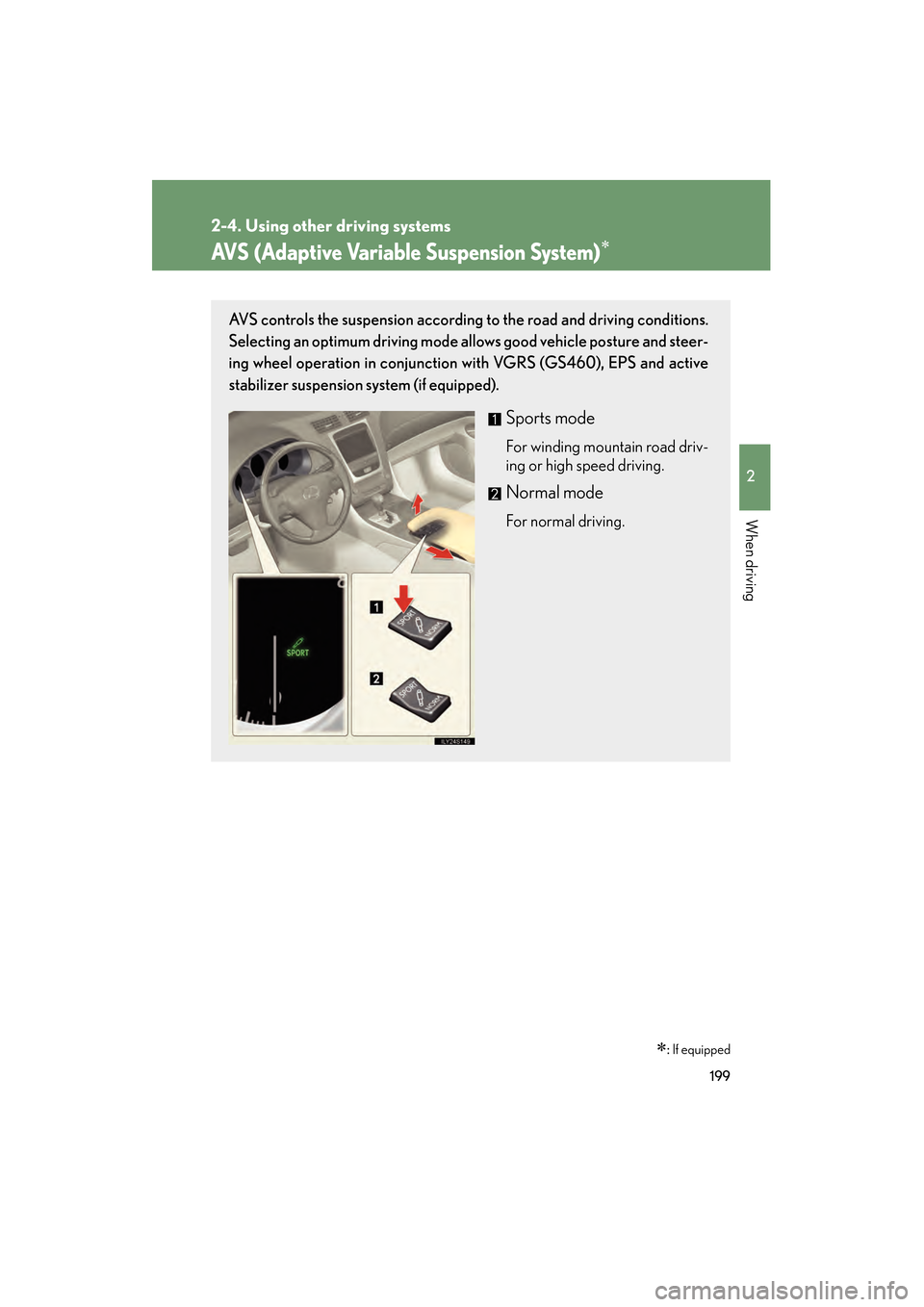
AVS (Adaptive Variable Suspension System)∗
∗: If equipped
AVS controls the suspension according to the road and driving conditions.
Selecting an optimum driving mode allows good vehicle posture and steer-
ing wheel operation in conjunction with VGRS (GS460), EPS and active
stabilizer suspension system (if equipped).
Sports mode
For winding mountain road driv-
ing or high speed driving.
Normal mode
For normal driving.
GS_U_G.book Page 199 Wednesday, January 27, 2010 4:48 PM
Page 201 of 650
200
2-4. Using other driving systems
GS_G_U (OM30C80U)
January 27, 2010 4:47 pm
Driving assist systems
To help enhance driving safety and performance, the following systems
operate automatically in response to various driving situations. Be aware,
however, that these systems are supplementary and should not be relied
upon too heavily when operating the vehicle.
■ ABS (Anti-lock Brake System)
Helps to prevent wheel lock when the brakes are applied suddenly, or if
the brakes are applied while driving on a slippery road surface.
■Brake assist
Generates an increased level of braking force after the brake pedal is
depressed, when the system detects a panic stop situation.
■Enhanced VSC (Enhanced Vehicle Stability Control)
Helps the driver to control skidding when swerving suddenly or turning on
slippery road surfaces.
■TRAC (Traction Control)
Helps to maintain drive power and prevent the rear wheels from spinning
when starting the vehicle or accelerating on slippery roads.
■Hill-start assist control
Helps prevent the vehicle from rolling backwards when starting on an
incline or slippery slope. It operates for approximately 5 seconds at maxi-
mum.
■EPS (Electric Power Steering)
Employs an electric motor to reduce the amount of effort needed to turn
the steering wheel.
■Active stabilizer suspensi on system (if equipped)
Reduces sway when cornering according to steering wheel movement
and the selected suspension damping mode, in order to maintain a stable
vehicle posture.
■PCS (Pre-Collision System) (if equipped)
→ P. 2 0 7
GS_U_G.book Page 200 Wednesday, January 27, 2010 4:48 PM
Page 202 of 650
201
2-4. Using other driving systems
2
When driving
GS_G_U (OM30C80U)
January 27, 2010 4:47 pm
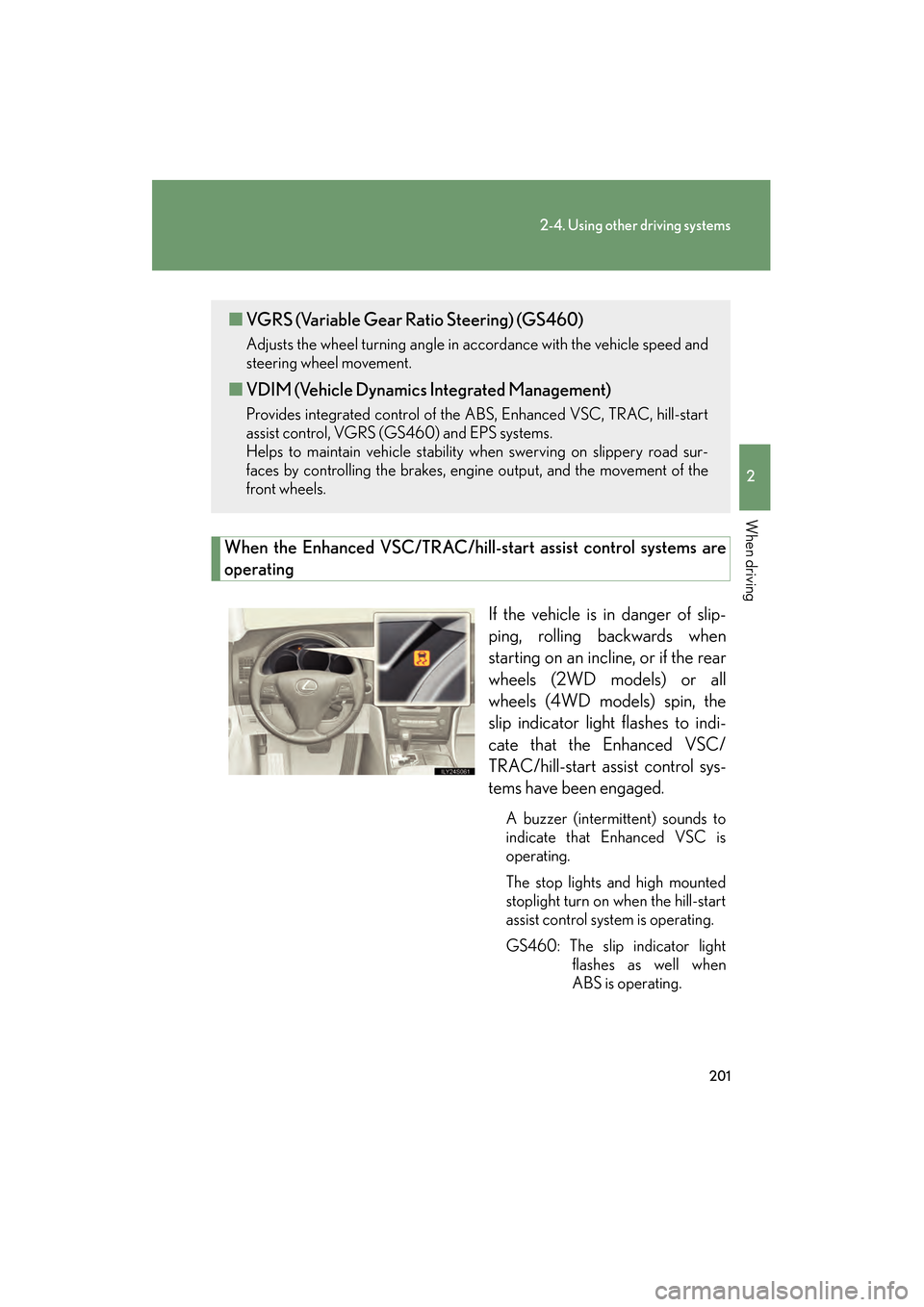
When the Enhanced VSC/TRAC/hill-start assist control systems are
operatingIf the vehicle is in danger of slip-
ping, rolling backwards when
starting on an incline, or if the rear
wheels (2WD models) or all
wheels (4WD models) spin, the
slip indicator light flashes to indi-
cate that the Enhanced VSC/
TRAC/hill-start assist control sys-
tems have been engaged.
A buzzer (intermittent) sounds to
indicate that Enhanced VSC is
operating.
The stop lights and high mounted
stoplight turn on when the hill-start
assist control system is operating.
GS460: The slip indicator lightflashes as well when
ABS is operating.
■VGRS (Variable Gear Ratio Steering) (GS460)
Adjusts the wheel turning angle in accordance with the vehicle speed and
steering wheel movement.
■VDIM (Vehicle Dynamics Integrated Management)
Provides integrated control of the ABS, Enhanced VSC, TRAC, hill-start
assist control, VGRS (GS460) and EPS systems.
Helps to maintain vehicle stability when swerving on slippery road sur-
faces by controlling the brakes, engine output, and the movement of the
front wheels.
GS_U_G.book Page 201 Wednesday, January 27, 2010 4:48 PM
Page 205 of 650
204
2-4. Using other driving systems
GS_G_U (OM30C80U)
January 27, 2010 4:47 pm
■Automatic reactivation of TRAC and Enhanced VSC
Turning the “ENGINE START STOP” switch OFF after turning off the TRAC and
Enhanced VSC systems will automatically re-enable them.
■Automatic TRAC reactivation
If only the TRAC system is turned off, the TRAC system will turn on when the vehi-
cle speed increases.
■Automatic TRAC and Enhanced VSC reactivation
If the TRAC and Enhanced VSC systems are turned off, the systems will not turn on
even when the vehicle speed increases.
■Sounds and vibrations caused by the ABS, brake assist, Enhanced VSC, TRAC,
hill-start assist control and VGRS (GS460) systems
●A sound may be heard from the engine compartment when the engine is
started or just after the vehicle begins to move. This sound does not indicate that
a malfunction has occurred in any of these systems.
●Any of the following conditions may occur when the above systems are operat-
ing. None of these indicates that a malfunction has occurred.
• Vibrations may be felt through the vehicle body and steering.
• A motor sound may be heard after the vehicle comes to a stop.
• The brake pedal may pulsate slightly after the ABS is activated.
• The brake pedal may move down slightly after the ABS is activated.
■Hill-start assist control operating conditions
This system comes into operation under the following conditions after the brake
pedal has been depressed and the vehicle has come to a stop:
●The shift lever is in the “D” or “S”.
●The system has detected that the vehicle is moving backwards.
●GS350: The brake pedal is not depressed.
■EPS operation sound
When the steering wheel operates, a motor sound (whirring sound) may be heard.
This does not indicate a malfunction.
GS_U_G.book Page 204 Wednesday, January 27, 2010 4:48 PM