control Lexus GS350 2010 Manual Online
[x] Cancel search | Manufacturer: LEXUS, Model Year: 2010, Model line: GS350, Model: Lexus GS350 2010Pages: 650, PDF Size: 15.04 MB
Page 284 of 650
283
3-3. Using the audio system
3
Interior features
GS_G_U (OM30C80U)
January 27, 2010 4:47 pm
Fast forwarding/rewinding a discTouch and hold or on the control icon screen or press and hold
∧ or ∨ on until a beep is heard.
Slow playback
Touch and then touch on the control icon screen. Video is played
slowly while you are touching .
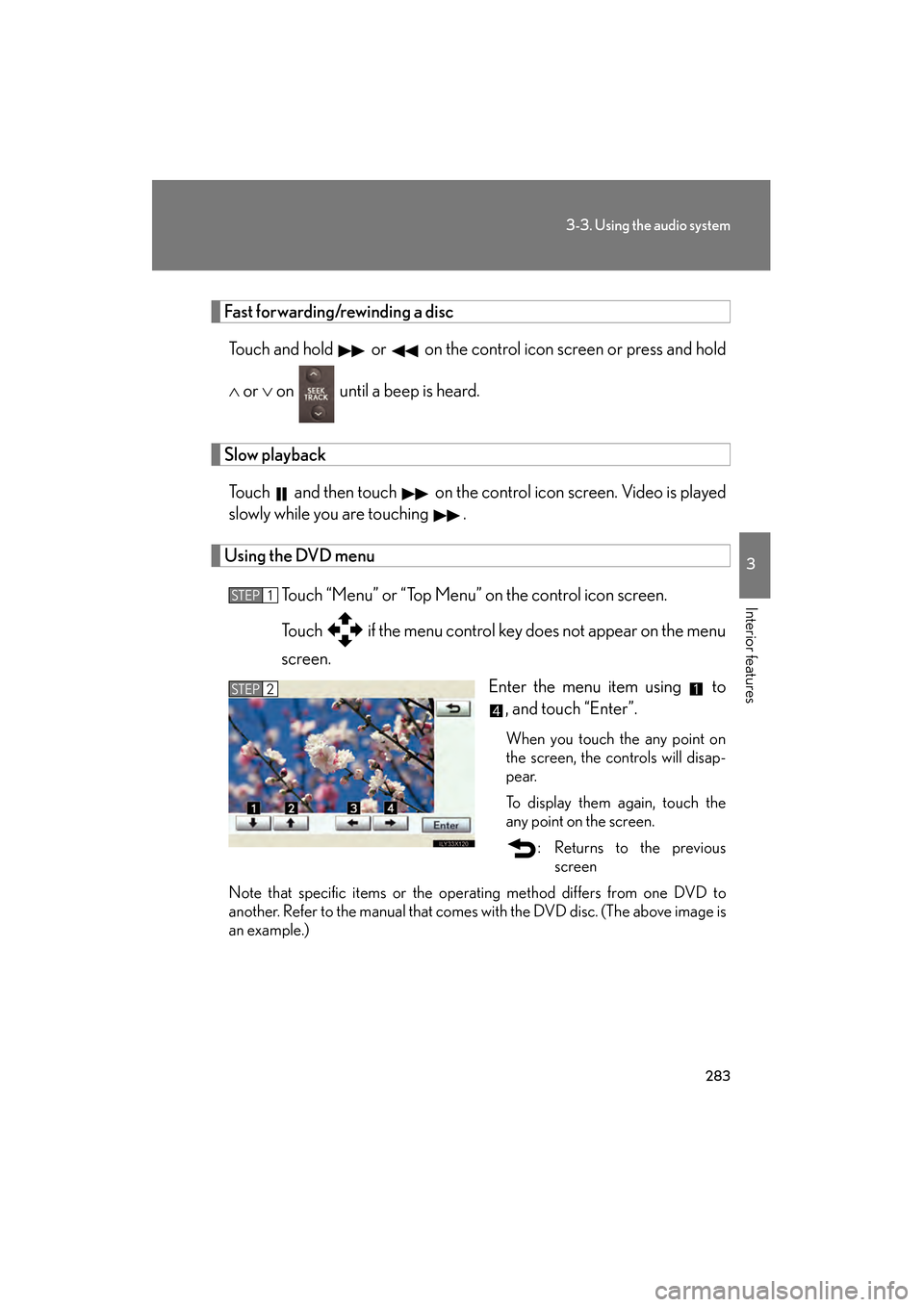
Using the DVD menu
Touch “Menu” or “Top Menu” on the control icon screen.
Touch if the menu control key does not appear on the menu
screen. Enter the menu item using to, and touch “Enter”.
When you touch the any point on
the screen, the controls will disap-
pear.
To display them again, touch the
any point on the screen.
: Returns to the previousscreen
Note that specific items or the oper ating method differs from one DVD to
another. Refer to the manual that comes with the DVD disc. (The above image is
an example.)
STEP1
STEP2
GS_U_G.book Page 283 Wednesday, January 27, 2010 4:48 PM
Page 295 of 650
294
3-3. Using the audio system
GS_G_U (OM30C80U)
January 27, 2010 4:47 pm
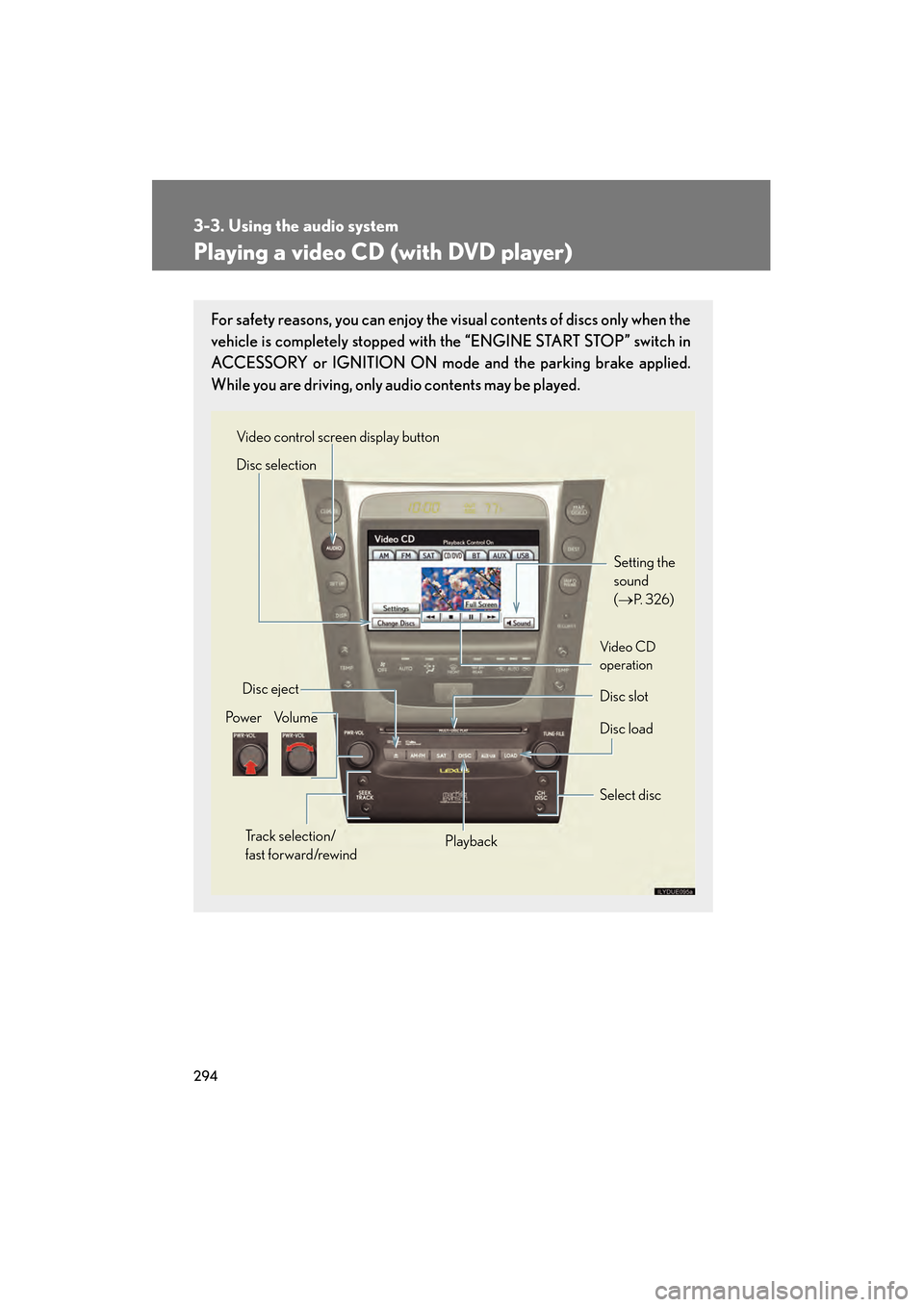
Playing a video CD (with DVD player)
For safety reasons, you can enjoy the visual contents of discs only when the
vehicle is completely stopped with the “ENGINE START STOP” switch in
ACCESSORY or IGNITION ON mode and the parking brake applied.
While you are driving, only audio contents may be played.
Setting the
sound
(→
P. 3 2 6)
Disc slot
Disc eject
Disc load
Video control screen display button
Po w e r Vo l u m e Select disc
Track selection/
fast forward/rewind Playback
Disc selection
Vid e o CD
operation
GS_U_G.book Page 294 Wednesday, January 27, 2010 4:48 PM
Page 296 of 650
295
3-3. Using the audio system
3
Interior features
GS_G_U (OM30C80U)
January 27, 2010 4:47 pm
Loading, ejecting and selecting discs→ P. 2 7 0
Fast forwarding/rewinding a video CD
Touch and hold or on the control icon screen or press and hold
∧ or ∨ on until a beep is heard.
Slow playback
Touch and then touch on the control icon screen. Video is played
slowly while you are touching .
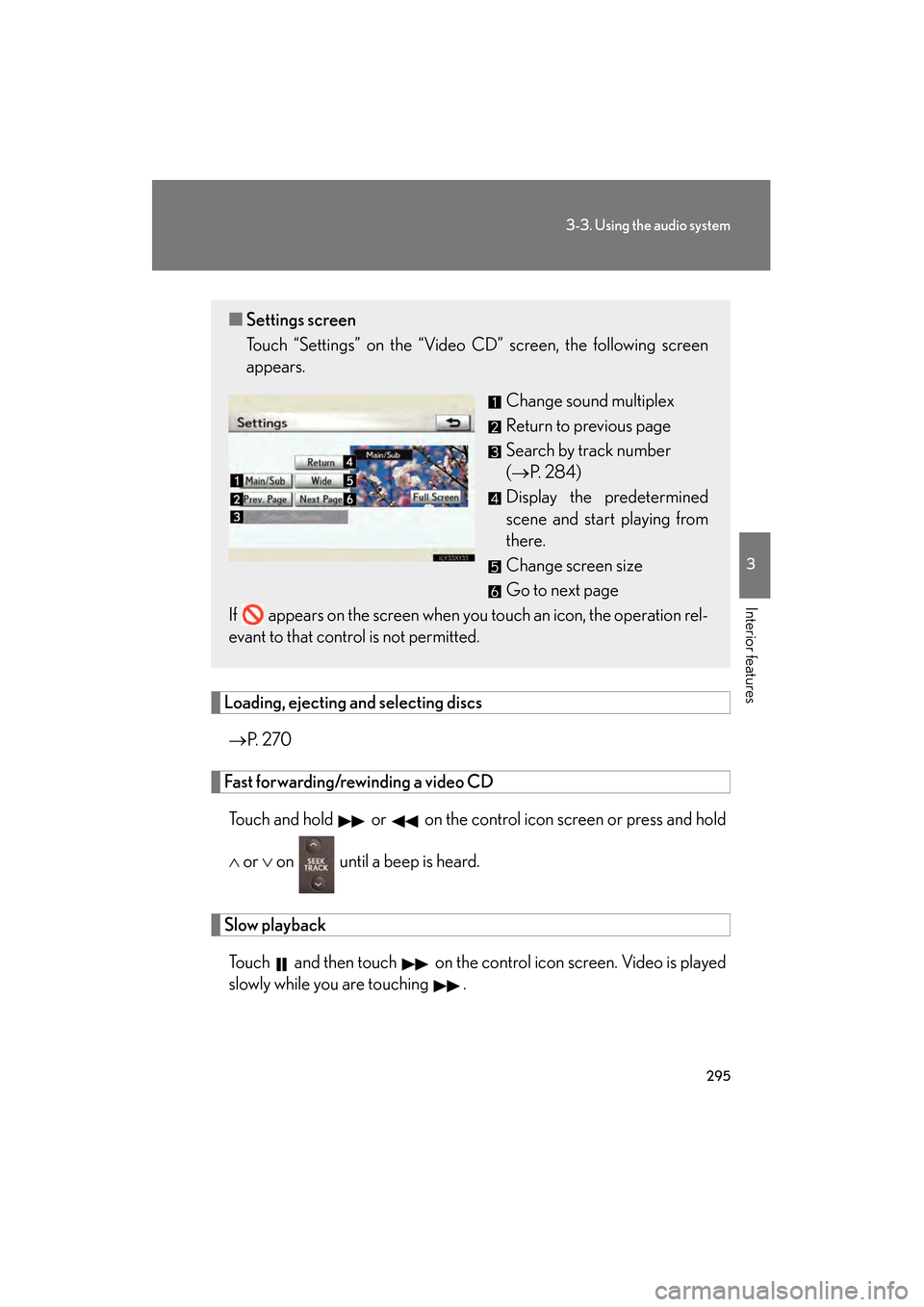
■ Settings screen
Touch “Settings” on the “Video CD” screen, the following screen
appears.
Change sound multiplex
Return to previous page
Search by track number
(→P. 2 8 4 )
Display the predetermined
scene and start playing from
there.
Change screen size
Go to next page
If appears on the screen when you touch an icon, the operation rel-
evant to that control is not permitted.
GS_U_G.book Page 295 Wednesday, January 27, 2010 4:48 PM
Page 309 of 650
308
3-3. Using the audio system
GS_G_U (OM30C80U)
January 27, 2010 4:47 pm
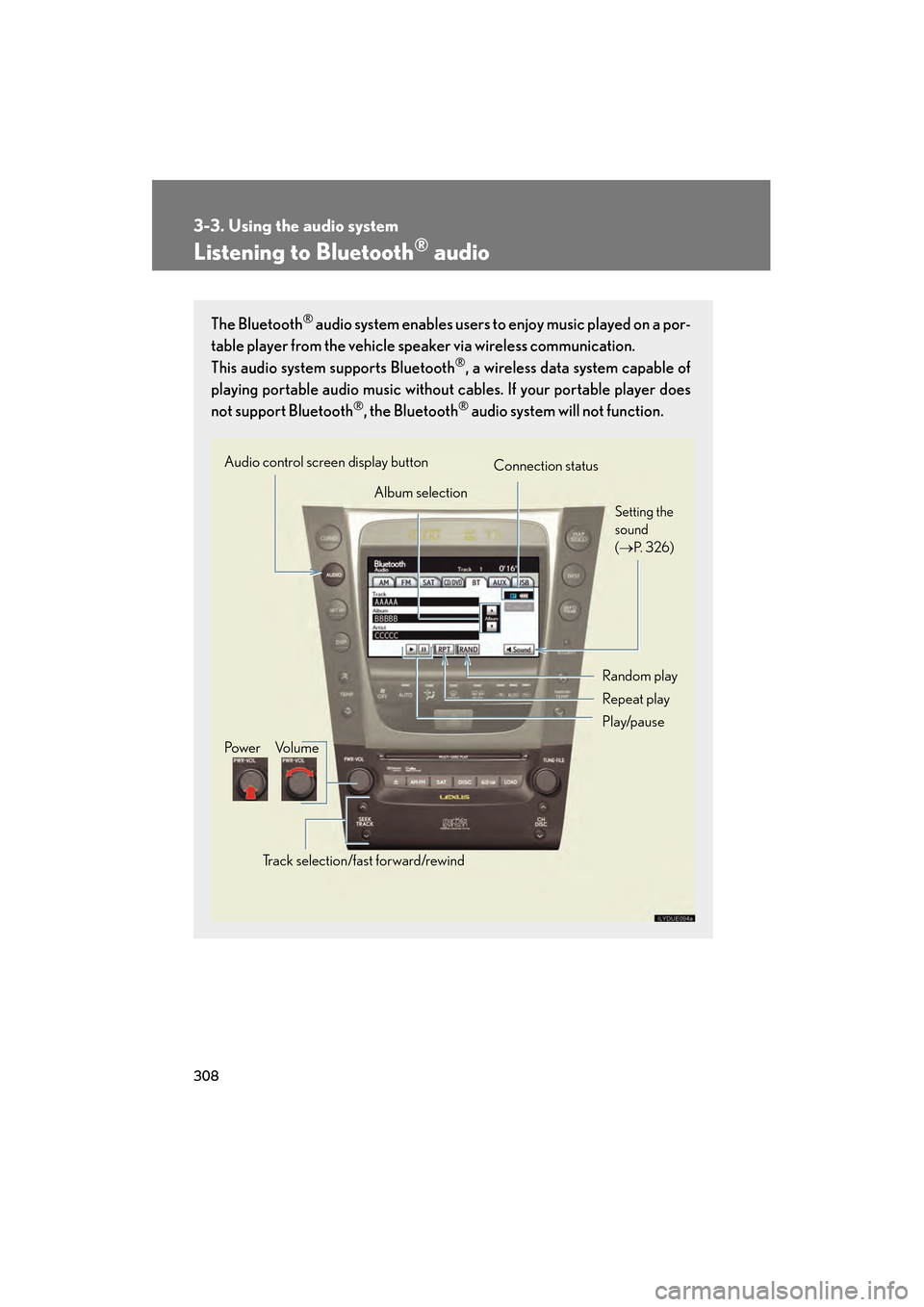
Listening to Bluetooth® audio
The Bluetooth® audio system enables users to enjoy music played on a por-
table player from the vehicle speaker via wireless communication.
This audio system supports Bluetooth
®, a wireless data system capable of
playing portable audio music without cables. If your portable player does
not support Bluetooth
®, the Bluetooth® audio system will not function.
Album selection
Random play
Repeat play
Audio control screen display button
Track selection/fast forward/rewindVo l u m e
Po w e r Connection status
Play/pause
Setting the
sound
(→ P. 3 2 6 )
GS_U_G.book Page 308 Wednesday, January 27, 2010 4:48 PM
Page 315 of 650
314
3-3. Using the audio system
GS_G_U (OM30C80U)
January 27, 2010 4:47 pm
■Compatible models
Portable players must correspond to the following specifications:
●Bluetooth® specification
Ve r. 1 .1 o r h i g h e r
(Recommended: Ver. 2.0+EDR or higher)
●Profile
• A2DP (Advanced Audio Distribution Profile) Ver. 1.0 or higher
• AVRCP (Audio/Video Remote Control Profile) Ver. 1.0 or higher
(Recommended: Ver. 1.3 or higher)
However, please note that some functions may be limited depending on the type of
portable player.
Please go to the website at http://www.lexus.com/
to find approved portable play-
ers for this system.
■Certification
→ P. 3 3 6
■Reconnecting the portable player
If the portable player is disconnected with a poor reception when the “ENGINE
START STOP” switch is in ACCESSORY or IGNITION ON mode, the system
automatically reconnects the portable player.
If you have switched off the portable player yourself, follow the instructions below to
reconnect:
●Select the portable player again
●Enter the portable player
■When transferring ownership of your vehicle
Be sure to remove the registered portable player from the system.
GS_U_G.book Page 314 Wednesday, January 27, 2010 4:48 PM
Page 317 of 650
316
3-3. Using the audio system
GS_G_U (OM30C80U)
January 27, 2010 4:47 pm
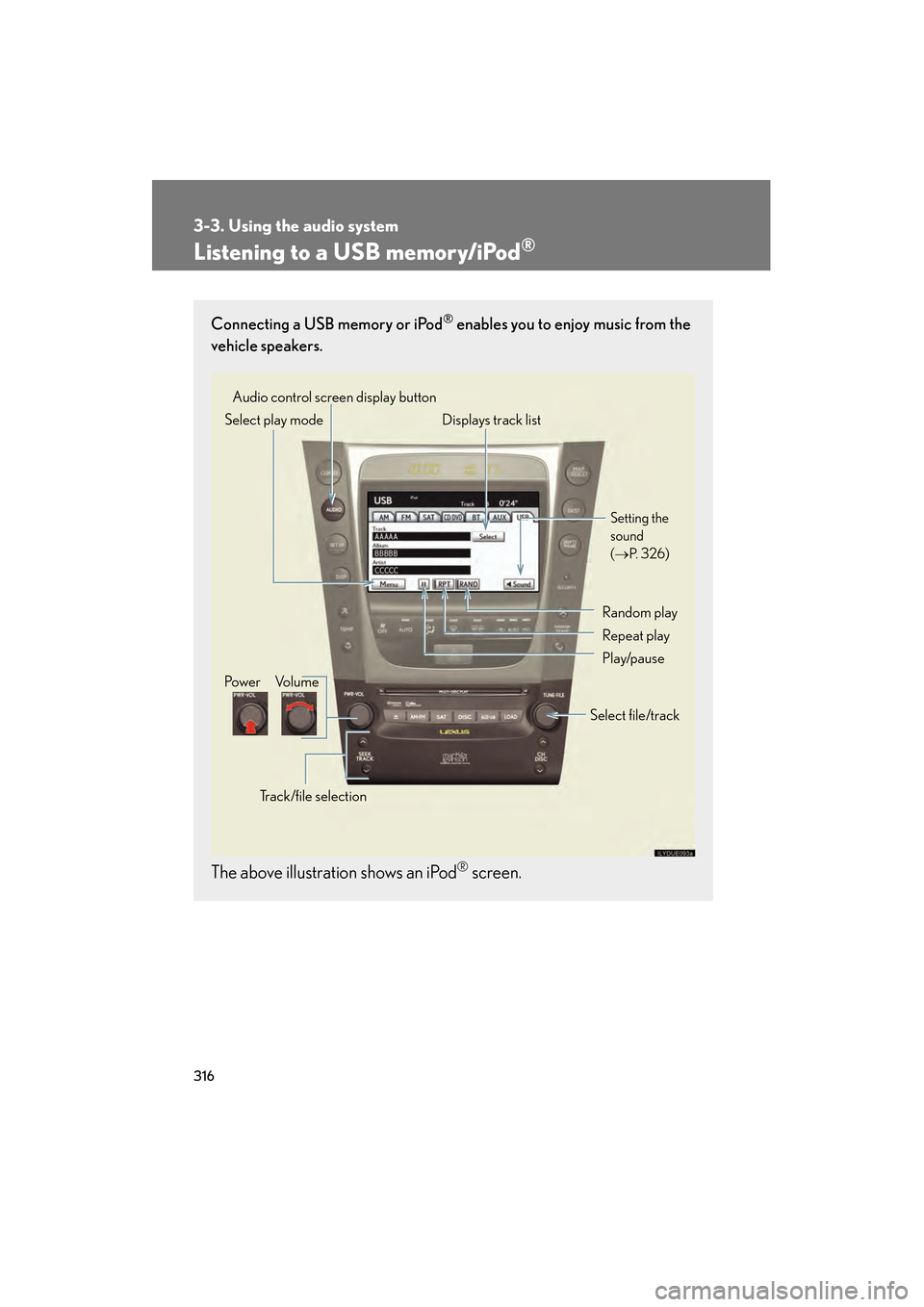
Listening to a USB memory/iPod®
Connecting a USB memory or iPod® enables you to enjoy music from the
vehicle speakers.
The above illustration shows an iPod® screen.
Audio control screen display button
Track/file selectionVo l u m e
Po w e r Select play mode Displays track list
Setting the
sound
(
→ P. 3 2 6 )
Random play
Repeat play
Play/pause
Select file/track
GS_U_G.book Page 316 Wednesday, January 27, 2010 4:48 PM
Page 326 of 650
325
3-3. Using the audio system
3
Interior features
GS_G_U (OM30C80U)
January 27, 2010 4:47 pm
CAUTION
■While driving
Do not connect an iPod
® or USB memory or operate the controls.
NOTICE
■To prevent damage to the player or its terminal
●Do not leave your portable player in the vehicle. The temperature inside of the
vehicle may become high, resulting in damage to the player.
●Do not push down on or apply unnecessary pressure to the player while it is con-
nected.
●Do not insert foreign objects into the port.
GS_U_G.book Page 325 Wednesday, January 27, 2010 4:48 PM
Page 329 of 650
328
3-3. Using the audio system
GS_G_U (OM30C80U)
January 27, 2010 4:47 pm
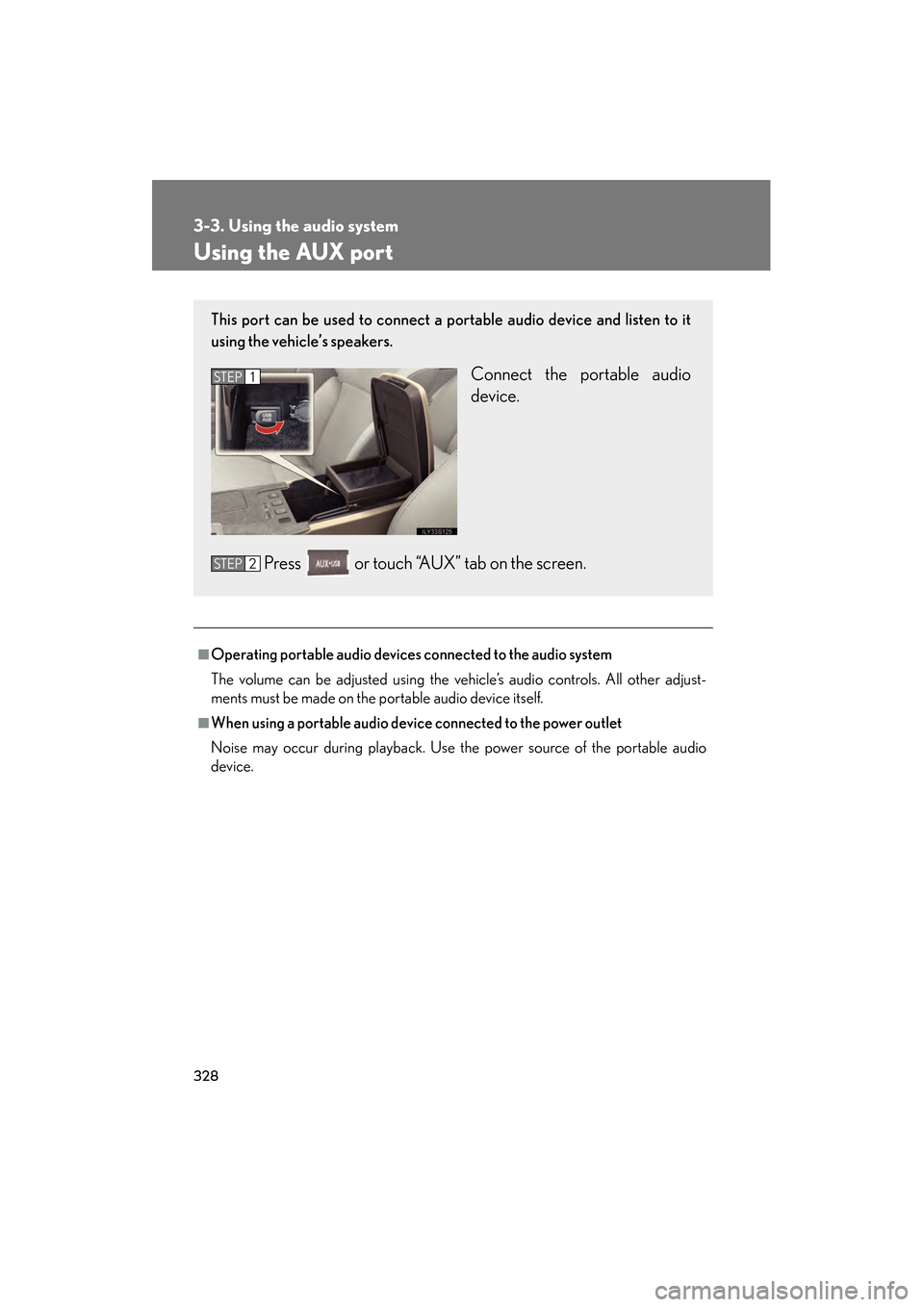
Using the AUX port
■Operating portable audio devices connected to the audio system
The volume can be adjusted using the vehicle’s audio controls. All other adjust-
ments must be made on the portable audio device itself.
■When using a portable audio device connected to the power outlet
Noise may occur during playback. Use the power source of the portable audio
device.
This port can be used to connect a portable audio device and listen to it
using the vehicle’s speakers.
Connect the portable audio
device.
Press or touch “AUX” tab on the screen.STEP1
STEP2
GS_U_G.book Page 328 Wednesday, January 27, 2010 4:48 PM
Page 330 of 650
329
3-3. Using the audio system
3
Interior features
GS_G_U (OM30C80U)
January 27, 2010 4:47 pm
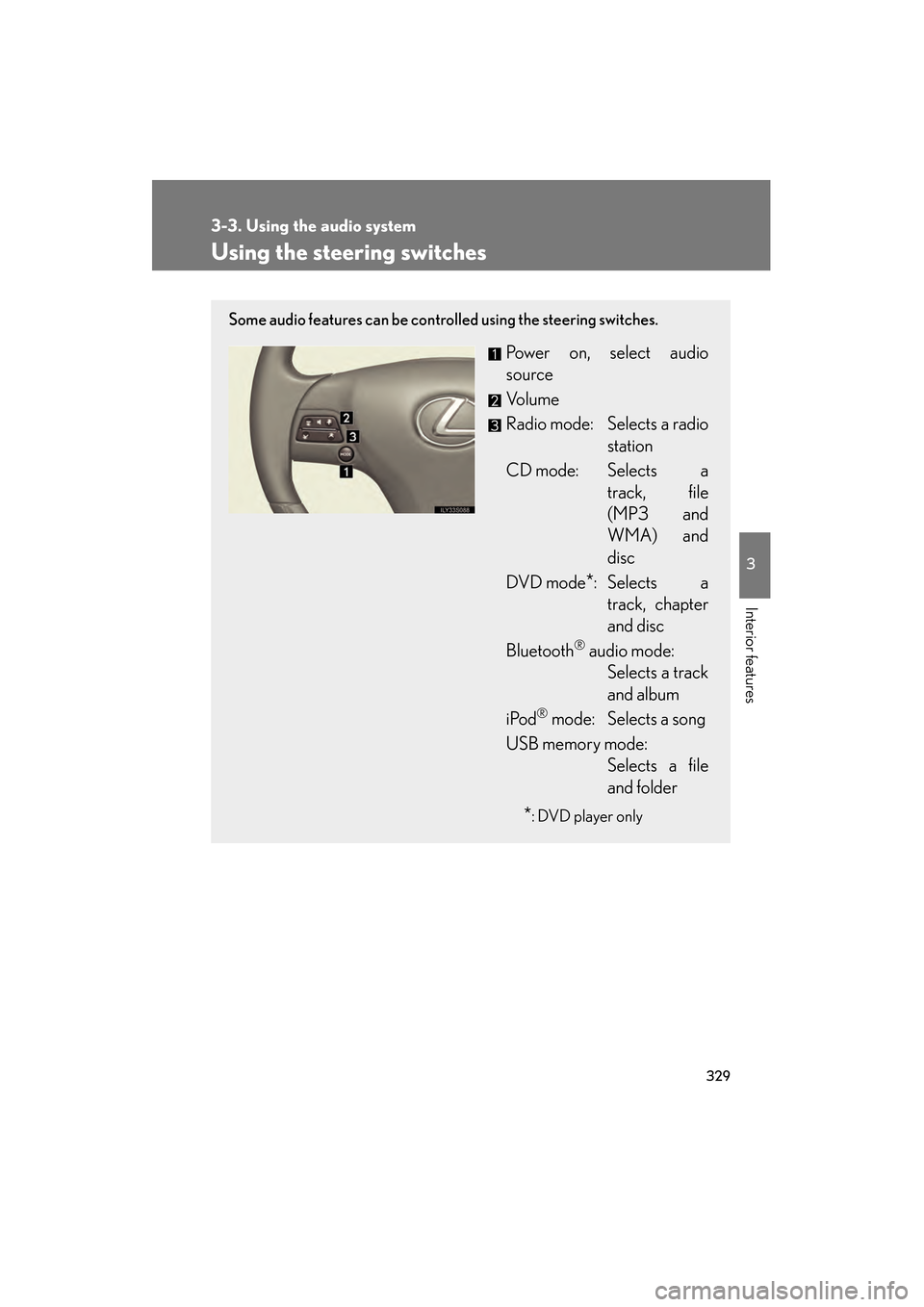
Using the steering switches
Some audio features can be controlled using the steering switches.
Power on, select audio
source
Vo l u m e
Radio mode: Selects a radiostation
CD mode: Selects a track, file
(MP3 and
WMA) and
disc
DVD mode
*: Selects a track, chapter
and disc
Bluetooth
® audio mode: Selects a track
and album
iPod
® mode: Selects a song
USB memory mode: Selects a file
and folder
*: DVD player only
GS_U_G.book Page 329 Wednesday, January 27, 2010 4:48 PM
Page 338 of 650
337
3-4. Using the hands-free system (for cellular phone)
3
Interior features
GS_G_U (OM30C80U)
January 27, 2010 4:47 pm
CAUTION
■FCC WARNING
Changes or modifications not expressly approved by the party responsible for
compliance could void the user’s authority to operate the equipment.
Radio Frequency Exposure. This equipment complies with FCC/IC radiation expo-
sure limits set forth for uncontrolled equipment and meets the FCC radio fre-
quency (RF) Exposure Guidelines in Supplement C to OET65 and RSS-102 of the
IC radio frequency (RF) Exposure rules. This equipment has very low levels of RF
energy that it deemed to comply without maximum permissive exposure evaluation
(MPE). But it is desirable that it should be installed and operated with at least 7.9 in.
(20 cm) and more between the radiator and person’s body (excluding extremities:
hands, wrists, feet and ankles).
This transmitter must not be co-located or operated in conjunction with any other
antenna or transmitter.
■Caution while driving
Do not use the mobile phone or connect the Bluetooth
® system.
NOTICE
■When leaving the vehicle
Do not leave your mobile phone in the vehicle. The inside of the vehicle may
become hot, causing damage to the phone.
GS_U_G.book Page 337 Wednesday, January 27, 2010 4:48 PM