Can Lexus IS300h 2015 Owner's Manual
[x] Cancel search | Manufacturer: LEXUS, Model Year: 2015, Model line: IS300h, Model: Lexus IS300h 2015Pages: 628, PDF Size: 137.89 MB
Page 255 of 628
2554-5. Using the driving support systems
4
Driving
IS300h_EE(OM53D56E)
This mode employs a radar sensor to detect the presence of vehicles up to
approximately 120 m (400 ft.) ahead, determines the current vehicle-to-vehicle
following distance, and operates to maintain a suitable following distance from
the vehicle ahead.
Note that vehicle-to-vehicle distance will close in when traveling on long downhill
slopes.
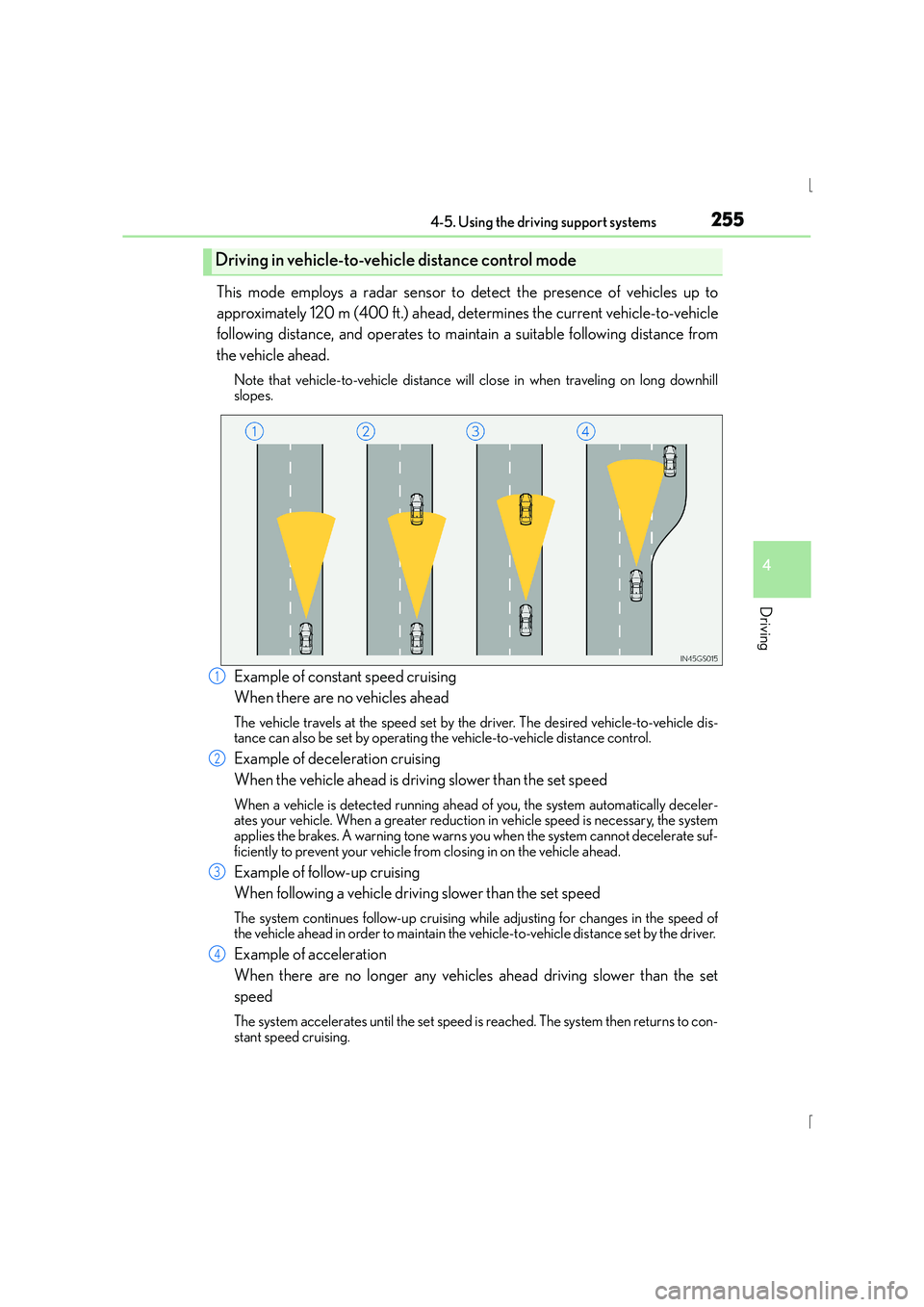
Example of constant speed cruising
When there are no vehicles ahead
The vehicle travels at the speed set by the driver. The desired vehicle-to-vehicle dis-
tance can also be set by operating the vehicle-to-vehicle distance control.
Example of deceleration cruising
When the vehicle ahead is driving slower than the set speed
When a vehicle is detected running ahead of you, the system automatically deceler-
ates your vehicle. When a greater reduction in vehicle speed is necessary, the system
applies the brakes. A warning tone warns you when the system cannot decelerate suf-
ficiently to prevent your vehicle from closing in on the vehicle ahead.
Example of follow-up cruising
When following a vehicle driving slower than the set speed
The system continues follow-up cruising wh ile adjusting for changes in the speed of
the vehicle ahead in order to maintain the vehicle-to-vehicle distance set by the driver.
Example of acceleration
When there are no longer any vehicles ahead driving slower than the set
speed
The system accelerates until the set speed is reached. The system then returns to con-
stant speed cruising.
Driving in vehicle-to-vehic le distance control mode
1
2
3
4
Page 257 of 628
2574-5. Using the driving support systems
4
Driving
IS300h_EE(OM53D56E)
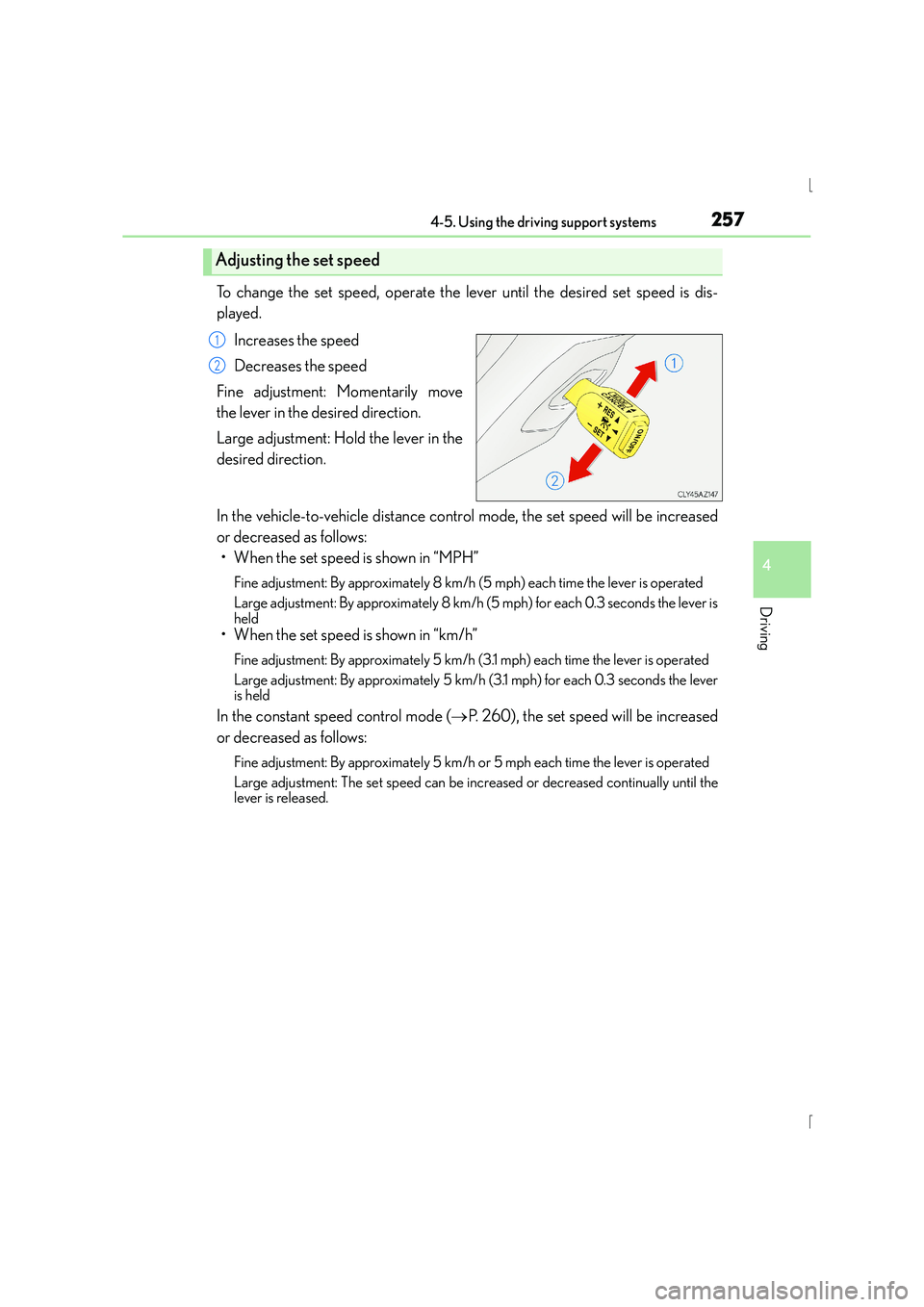
To change the set speed, operate the lever until the desired set speed is dis-
played.Increases the speed
Decreases the speed
Fine adjustment: Momentarily move
the lever in the desired direction.
Large adjustment: Hold the lever in the
desired direction.
In the vehicle-to-vehicle distance control mode, the set speed will be increased
or decreased as follows: • When the set speed is shown in “MPH”
Fine adjustment: By approximately 8 km/h (5 mph) each time the lever is operated
Large adjustment: By approximately 8 km/h (5 mph) for each 0.3 seconds the lever is
held
• When the set speed is shown in “km/h”
Fine adjustment: By approximately 5 km/h (3.1 mph) each time the lever is operated
Large adjustment: By approximately 5 km/h (3.1 mph) for each 0.3 seconds the lever
is held
In the constant speed control mode ( →P. 260), the set speed will be increased
or decreased as follows:
Fine adjustment: By approximately 5 km/h or 5 mph each time the lever is operated
Large adjustment: The set speed can be incr eased or decreased continually until the
lever is released.
Adjusting the set speed
1
2
Page 258 of 628
2584-5. Using the driving support systems
IS300h_EE(OM53D56E)
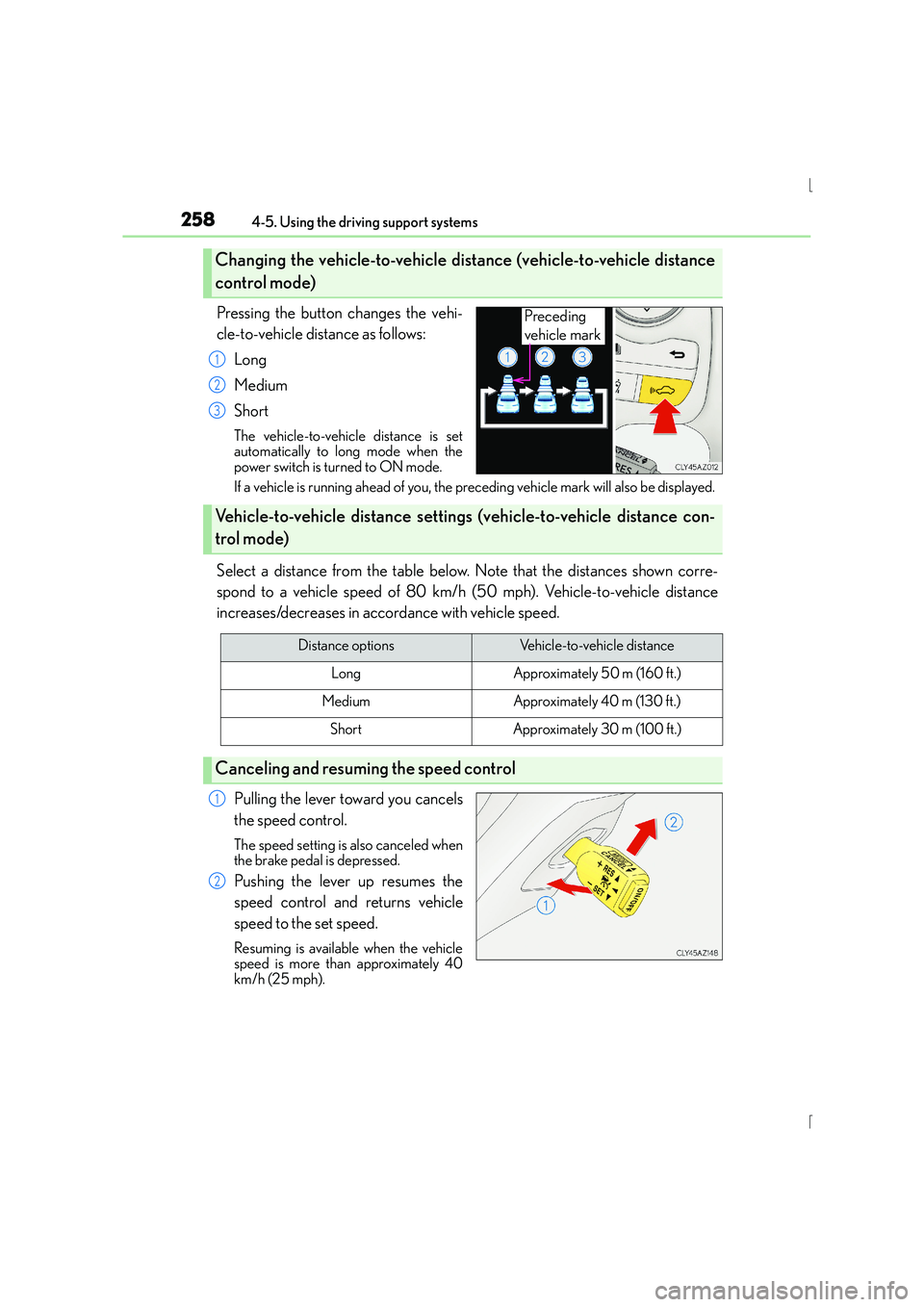
Pressing the button changes the vehi-
cle-to-vehicle distance as follows:Long
Medium
Short
The vehicle-to-vehicle distance is set
automatically to long mode when the
power switch is turned to ON mode.
If a vehicle is running ahead of you, the pr eceding vehicle mark will also be displayed.
Select a distance from the table below. Note that the distances shown corre-
spond to a vehicle speed of 80 km/h (50 mph). Vehicle-to-vehicle distance
increases/decreases in accordance with vehicle speed.
Pulling the lever toward you cancels
the speed control.
The speed setting is also canceled when
the brake pedal is depressed.
Pushing the lever up resumes the
speed control and returns vehicle
speed to the set speed.
Resuming is available when the vehicle
speed is more than approximately 40
km/h (25 mph).
Changing the vehicle-to-vehicle di stance (vehicle-to-vehicle distance
control mode)
Preceding
vehicle mark
1
2
3
Vehicle-to-vehicle distance setting s (vehicle-to-vehicle distance con-
trol mode)
Distance optionsVehicle-to-vehicle distance
LongApproximately 50 m (160 ft.)
MediumApproximately 40 m (130 f t.)
ShortApproximately 30 m (100 ft.)
Canceling and resuming the speed control
1
2
Page 260 of 628
2604-5. Using the driving support systems
IS300h_EE(OM53D56E)
When constant speed control mode is selected, your vehicle will maintain a set
speed without controlling the vehicle-to-vehicle distance. Select this mode only
when vehicle-to-vehicle distance control mode does not function correctly due
to dirt, etc.
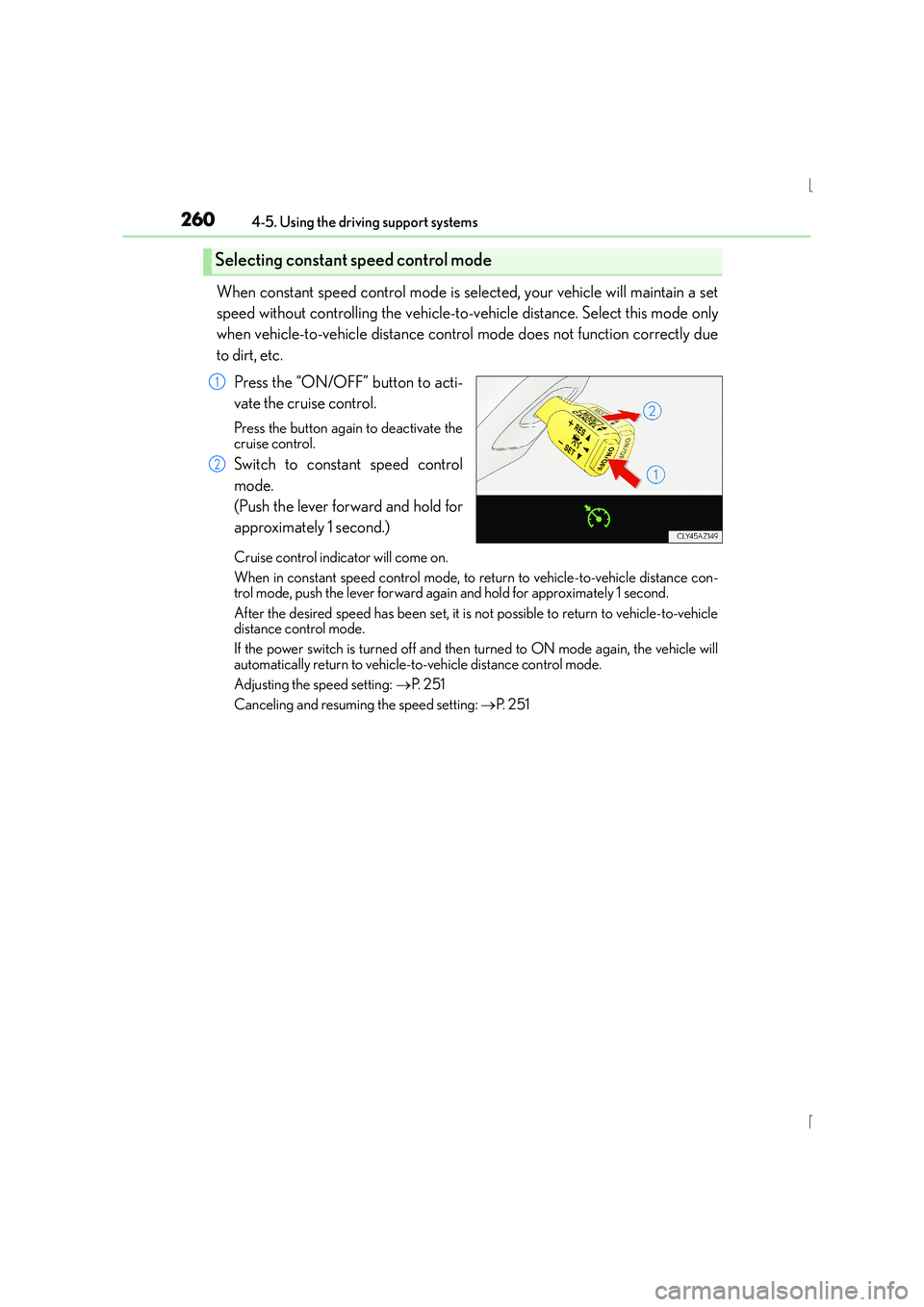
Press the “ON/OFF” button to acti-
vate the cruise control.
Press the button again to deactivate the
cruise control.
Switch to constant speed control
mode.
(Push the lever forward and hold for
approximately 1 second.)
Cruise control indicator will come on.
When in constant speed control mode, to return to vehicle-to-vehicle distance con-
trol mode, push the lever forward again and hold for approximately 1 second.
After the desired speed has been set, it is not possible to return to vehicle-to-vehicle
distance control mode.
If the power switch is turned off and then turned to ON mode again, the vehicle will
automatically return to vehicle-to-vehicle distance control mode.
Adjusting the speed setting: →P. 2 5 1
Canceling and resuming the speed setting: →P. 2 5 1
Selecting constant speed control mode
1
2
Page 261 of 628
2614-5. Using the driving support systems
4
Driving
IS300h_EE(OM53D56E)
■Dynamic radar cruise control can be set when
●The shift lever is in D or range 4 or higher of S has been selected.
●Range 4 or higher of D has been selected by using the paddle shift switch.
●Vehicle speed is above approximately 50 km/h (30 mph).
■Accelerating after setting the vehicle speed
The vehicle can accelerate by operating the accelerator pedal. After accelerating, the
set speed resumes. However, during vehicle-to-vehicle distance control mode, the vehi-
cle speed may decrease below the set speed in order to maintain the distance to the pre-
ceding vehicle.
■Automatic cancelation of vehicle-to-vehicle distance control mode
Vehicle-to-vehicle distance control driving is automatically canceled in the following situ-
ations:
●Actual vehicle speed falls below approximately 40 km/h (25 mph).
●VSC is activated.
●TRC is activated for a period of time.
●When the VSC or TRC system is turned off by pressing the VSC OFF switch.
●The sensor cannot detect correctly because it is covered in some way.
●The windshield wipers are operating at high speed (when the wipers are in AUTO
mode or the high speed wiper operation).
●When snow mode is set.
●Pre-crash braking is activated.
If vehicle-to-vehicle distance control mode is automatically canceled for any other rea-
son, there may be a malfunction in the system. Contact any authorized Lexus dealer or
repairer, or another duly qualified and equipped professional.
■Automatic cancelation of constant speed control mode
The cruise control will stop maintaining th e vehicle speed in the following situations:
●Actual vehicle speed is more than approximately 16 km/h (10 mph) below the set vehi-
cle speed.
●Actual vehicle speed falls below approximately 40 km/h (25 mph).
●VSC is activated.
●TRC is activated for a period of time.
●When the VSC or TRC system is turned off by pressing the VSC OFF switch.
●Pre-crash braking is activated.
Page 262 of 628
2624-5. Using the driving support systems
IS300h_EE(OM53D56E)
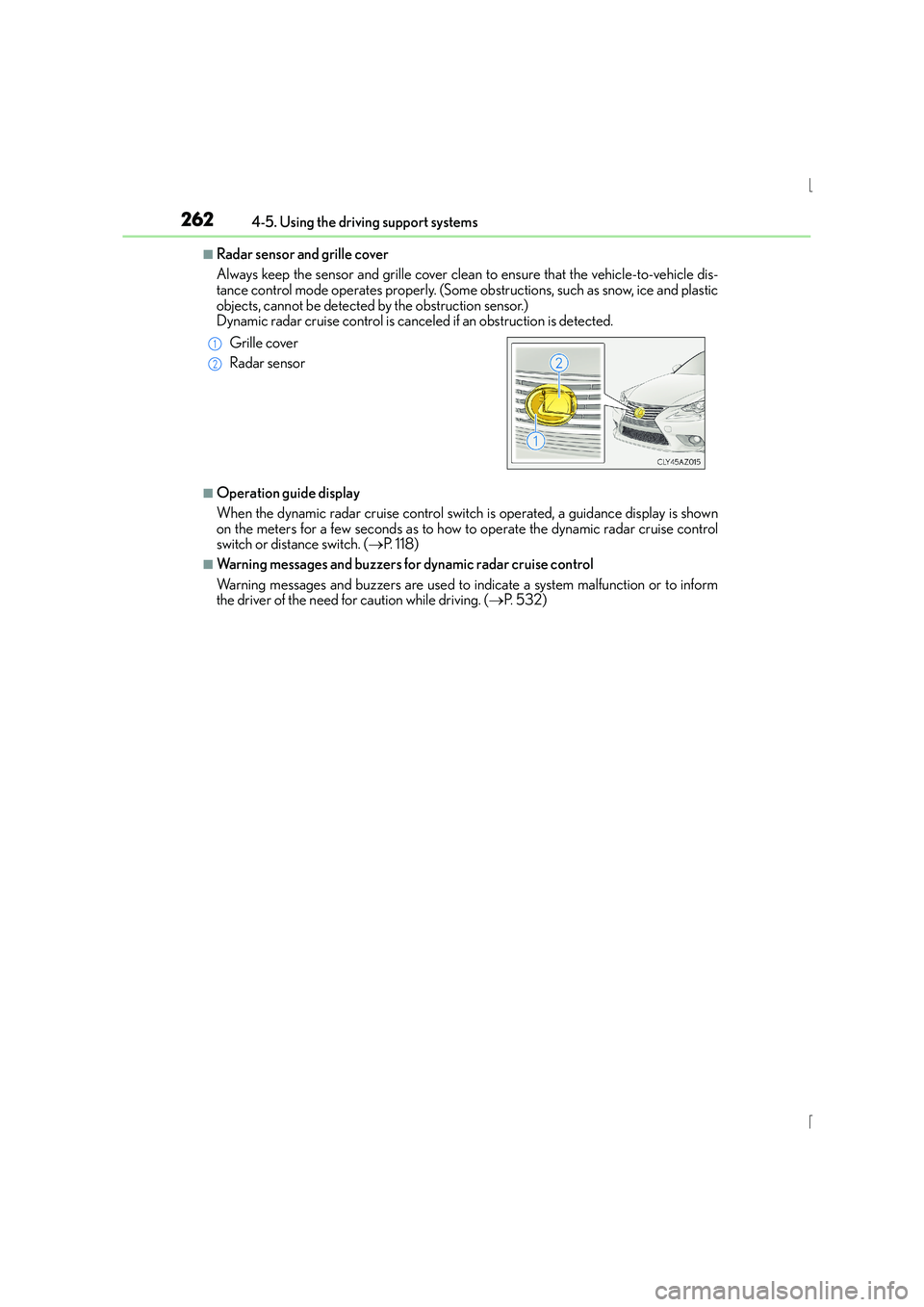
■Radar sensor and grille cover
Always keep the sensor and grille cover clean to ensure that the vehicle-to-vehicle dis-
tance control mode operates properly. (Some obstructions, such as snow, ice and plastic
objects, cannot be detected by the obstruction sensor.)
Dynamic radar cruise control is canceled if an obstruction is detected.
■Operation guide display
When the dynamic radar cruise control switch is operated, a guidance display is shown
on the meters for a few seconds as to how to operate the dynamic radar cruise control
switch or distance switch. ( →P. 1 1 8 )
■Warning messages and buzzers for dynamic radar cruise control
Warning messages and buzzers are used to in dicate a system malfunction or to inform
the driver of the need for caution while driving. ( →P. 5 3 2 )
Grille cover
Radar sensor
1
2
Page 265 of 628
2654-5. Using the driving support systems
4
Driving
IS300h_EE(OM53D56E)
CAUTION
■Before using dynamic radar cruise control
Do not overly rely on vehicle-to-vehicle distance control mode.
Be aware of the set speed. If automatic deceleration/acceleration is not appropriate,
adjust the vehicle speed, as well as the distance between your vehicle and vehicles
ahead by applying the brakes etc.
■Cautions regarding the driving assist systems
Observe the following precautions.
Failure to do so may cause an accident resulting in death or serious injury.
●Assisting the driver to measure following distance
The dynamic radar cruise control is only intended to help the driver in determining
the following distance between the driver’s own vehicle and a designated vehicle
traveling ahead. It is not a mechanism that allows careless or inattentive driving, and it
is not a system that can assist the driver in low-visibility conditions. It is still necessary
for driver to pay close attention to the vehicle’s surroundings.
●Assisting the driver to judge proper following distance
The dynamic radar cruise control determines whether the following distance
between the driver’s own vehicle and a designated vehicle traveling ahead is appro-
priate or not. It is not capable of making any other type of judgement. Therefore, it is
absolutely necessary for the driver to remain vigilant and to determine whether or not
there is a possibility of danger in any given situation.
●Assisting the driver to operate the vehicle
The dynamic radar cruise control has no capability to prevent or avoid a collision with
a vehicle traveling ahead. Therefore, if there is ever any danger, the driver must take
immediate and direct control of the vehicle and act appropriately in order to ensure
the safety of all involved.
■To avoid inadvertent cruise control activation
Switch the dynamic radar cruise control off using the “ON/OFF” button when not in
use.
Page 269 of 628
2694-5. Using the driving support systems
4
Driving
IS300h_EE(OM53D56E)
CAUTION
■Handling the radar sensor
Observe the following to ensure the cruise control system can function effectively.
Otherwise, the system may not detect correctly and could result in an accident.
●Keep the sensor and grille cover clean at all times.
Clean the sensor and grille cover with a soft cloth so you do not mark or damage
them.
●Do not subject the sensor or surrounding area to a strong impact.
If the sensor moves even slightly off position, the system may not work normally or
malfunction. If the sensor or surrounding area is subject to a strong impact, always
have the area inspected and adjusted by any authorized Lexus dealer or repairer, or
another duly qualified and equipped professional.
●Do not disassemble the sensor.
●Do not attach accessories or stickers to the sensor, grille cover or surrounding area.
●Do not modify or paint the sensor and grille cover.
●If the radar sensor needs to be replaced, contact any authorized Lexus dealer or
repairer, or another duly qualified and equipped professional.
Page 272 of 628
2724-5. Using the driving support systems
IS300h_EE(OM53D56E)
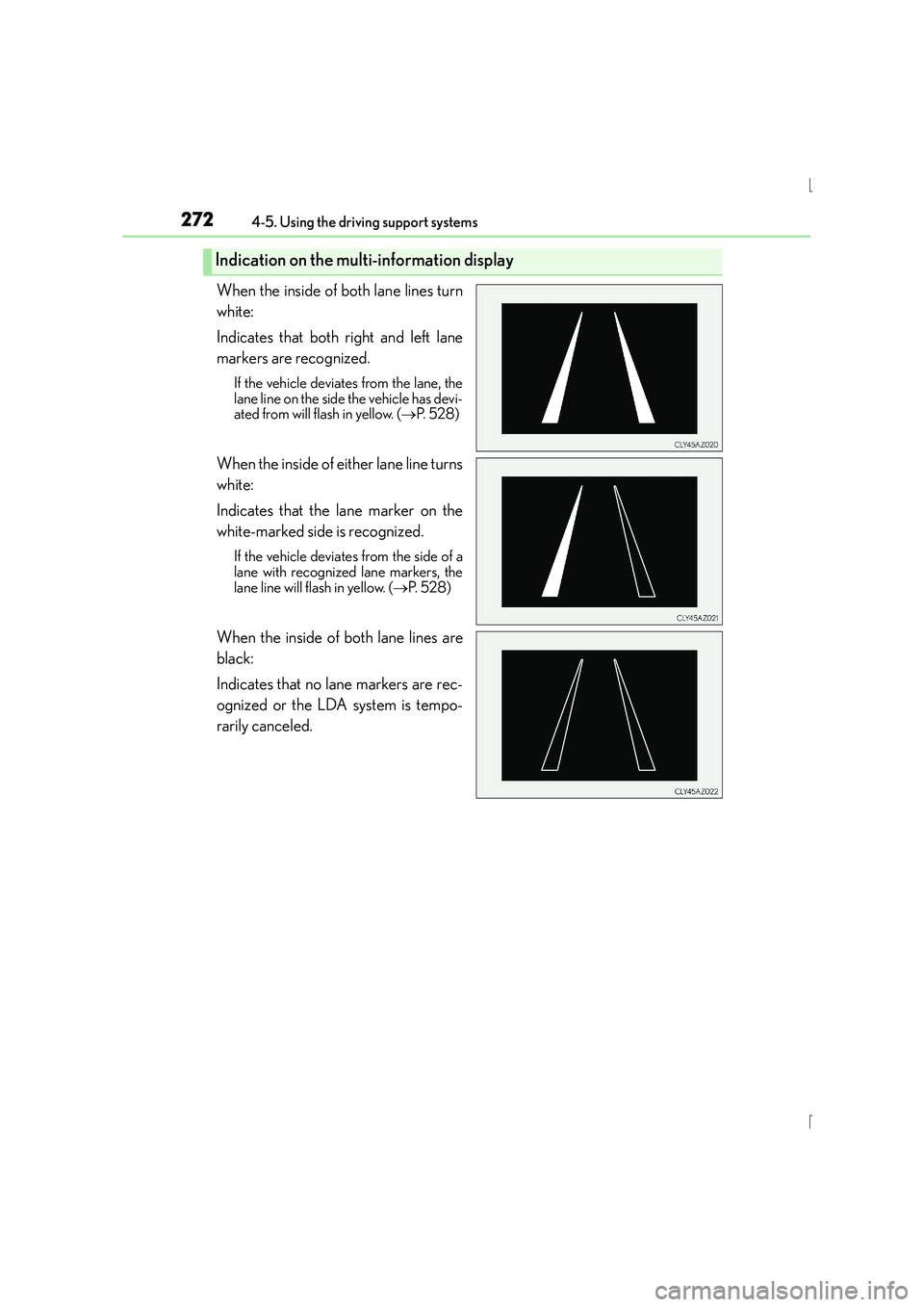
When the inside of both lane lines turn
white:
Indicates that both right and left lane
markers are recognized.
If the vehicle deviates from the lane, the
lane line on the side the vehicle has devi-
ated from will flash in yellow. (→P. 5 2 8 )
When the inside of either lane line turns
white:
Indicates that the lane marker on the
white-marked side is recognized.
If the vehicle deviates from the side of a
lane with recognized lane markers, the
lane line will flash in yellow. ( →P. 5 2 8 )
When the inside of both lane lines are
black:
Indicates that no lane markers are rec-
ognized or the LDA system is tempo-
rarily canceled.
Indication on the mult i-information display
Page 273 of 628
2734-5. Using the driving support systems
4
Driving
IS300h_EE(OM53D56E)
■Temporary cancelation of the LDA system functions
If any of the following occurs, the LDA system functions will be temporarily canceled. The
functions will resume after the necessary operating conditions have returned.
●The turn signal lever is operated.
●The vehicle speed deviates from the operating range of the LDA system functions.
●When the lane lines cannot be recognized while driving.
●When the lane departure warning sounds.
The lane departure warning function will not operate again for a several seconds after it
has been activated, even if the vehicle leaves the lane again.
■The lane departure warning
Depending on the audio system sound level or air conditioning fan noise while the audio
system or air conditioning system is in use, it may be difficult to hear the warning sound.
■After the vehicle has been parked in the sun
The LDA system may not be available and a warning message ( →P. 533) will be dis-
played for a while after driving has started. When the temperature in the cabin decreases
and the temperature around the camera sensor ( →P. 270) becomes suitable for its
operation, the functions will begin to operate.
■If there are lane markers on only one side of the vehicle
The lane departure warning will not operate fo r the side on which lane markers could not
be recognized.
■Conditions in which the function may not operate correctly
In the following situations, the camera sensor may be unable to recognize lane markers
causing the lane departure warning function to operate incorrectly. However, this does
not indicate a malfunction.
●When driving through an area with no lane markers, such as a tollbooth, a crossing or
before a ticket checkpoint
●When driving on a sharp curve
●When lane markers are extremely narrow or extremely wide
●When the vehicle leans to one side an unusual amount due to a heavy load or improper
tire inflation pressure
●When the following distance between your vehicle and the vehicle ahead is extremely
short
●When the lane markers are yellow (These may be more difficult for the system to rec-
ognize compared to white markers.)
●When the lane markers are broken, Botts’ dots (raised pavement markers) or stones
●When the lane markers are on a curb etc.
●When lane markers are obscured or partially obscured by sand, dirt, etc.
●When there are shadows on the road running parallel with lane markers, or if a shadow
covers the lane markers
●When driving on a particularly brig ht road surface, such as concrete
●When driving on a road surface that is bright due to reflected light
●When driving in a location where the light level changes rapidly, such as the entrance to
or exit from a tunnel