Can Lexus IS300h 2015 Owner's Manual
[x] Cancel search | Manufacturer: LEXUS, Model Year: 2015, Model line: IS300h, Model: Lexus IS300h 2015Pages: 628, PDF Size: 137.89 MB
Page 305 of 628

3054-5. Using the driving support systems
4
Driving
IS300h_EE(OM53D56E)
■Obstacles not detected
The sensor cannot detect plastic obstacles such as traffic cones. There may also be occa-
sions when the sensor cannot detect pedestri ans, animals, bicycles, motorcycles, trees,
or snowdrifts.
■Situations in which the pre-crash safe ty system does not function properly
The system may not function effectively in situations such as the following:
●On roads with sharp bends or uneven surfaces
●If a vehicle suddenly moves in front of your vehicle, such as at an intersection
●If a vehicle suddenly cuts in front of your vehicle, such as when overtaking
●In inclement weather such as heavy rain, fog, snow or sand storms
●If the vehicle is skidding when VSC is not operating
●When your vehicle is steeply inclined
●When only part of your vehicle’s front end collides with, or contacts, a vehicle or object
in a frontal collision
●When the radar sensor moves off position due to its surrounding area being subjected
to a strong impact
●When an obstacle suddenly appears in front of the vehicle due to the steering wheel
being turned sharply or another cause
■Automatic cancelation of the pre-crash safety system
When a malfunction occurs due to sensor contamination, etc. that results in the sensors
being unable to detect obstacles, the pre-crash safety system will be automatically dis-
abled. In this case, the system will not activa te even if there is a collision possibility.
■When there is a malfunction in the system or if the system is temporarily unusable
The pre-crash safety system warning light will flash and warning messages will be dis-
played. ( →P. 5 2 2 , 5 3 3 )
Page 308 of 628

3084-5. Using the driving support systems
IS300h_EE(OM53D56E)
CAUTION
■Limitations of the pre-crash safety system
●The driver is solely responsible for safe driving. Always drive safely, taking care to
observe your surroundings.
Do not use the pre-crash safety system instead of normal braking operations under
any circumstances. This system will not prevent collisions or lessen damage or inju-
ries in all cases. Do not overly rely on this system. Failure to do so may cause an acci-
dent, resulting in death or serious injury.
This system has been designed to help avoid and reduce the impact of collisions.
However, the system operates differently depending on the situation ( →P. 3 0 4 ,
305). As a result, the same level of performance may not be expected in all cases.
Also, the pre-crash safety brakes may not operate if the driver is depressing the
brake pedal or turning the steering wheel, as the system will determine such condi-
tions as collision avoidance operations.
●As the pre-crash safety system is designed to assist the driver in safe driving, it may
operate under sporty driving conditions, which may cause an accident. For this rea-
son under sporty driving conditions, it is recommended that this system be disabled
by using the PCS OFF switch.
■Handling the radar sensor
Observe the following to ensure the pre-cras h safety system can function effectively.
Otherwise, the system may not function correctly and could result in an accident.
●Keep the sensor and grille cover clean at all times.
Clean the sensor and grille cover with a soft cloth so you do not mark or damage
them.
●Do not subject the sensor or surrounding area to a strong impact.
If the sensor moves even slightly off position, the system may become inaccurate or
malfunction. If the sensor or surrounding area is subject to a strong impact, always
have the area inspected and adjusted by any authorized Lexus dealer or repairer, or
another duly qualified and equipped professional.
●Do not disassemble the sensor.
●Do not attach accessories or stickers to the sensor, grille cover or surrounding area.
●Do not modify or paint the sensor and grille cover.
●If the radar sensor needs to be replaced, contact any authorized Lexus dealer or
repairer, or another duly qualified and equipped professional.
Page 309 of 628
3094-5. Using the driving support systems
4
Driving
IS300h_EE(OM53D56E)
CAUTION
■Cautions regarding the assist contents of the system
By means of alarms and brake control, the pre-crash safety system is intended to assist
the driver in avoiding collisions through the process of LOOK-JUDGE-ACT. There are
limits to the degree of assistance the system can provide, so please keep in mind the
following important points.
●Assisting the driver in watching the road
The pre-crash safety system is only able to detect obstacles directly in front of the
vehicle, and only within a limited range. It is not a mechanism that allows careless or
inattentive driving, and it is not a system th at can assist the driver in low-visibility con-
ditions. It is still necessary for the driver to pay close attention to the vehicle’s sur-
roundings.
●Assisting the driver in making correct judgment
When attempting to estimate the possibility of a collision, the only data available to
the pre-crash safety system is that from obstacles it has detected directly in front of
the vehicle. Therefore, it is absolutely nece ssary for the driver to remain vigilant and
to determine whether or not there is a possibility of collision in any given situation.
●Assisting the driver in taking action
The pre-crash safety system’s braking assist feature is designed to help reduce the
severity of a collision, and so only acts when the system has judged that a collision is
unavoidable. This system is not capable of automatically avoiding a collision or bring-
ing the vehicle to a stop safely without appropriate operations performed by the
driver. For this reason, when encountering a dangerous situation the driver must take
direct and immediate action in order to ensure the safety of all involved.
Page 314 of 628

3144-5. Using the driving support systems
IS300h_EE(OM53D56E)
CAUTION
■Handling the radar sensor
One Blind Spot Monitor sensor is installed inside the left and right side of the vehicle
rear bumper respectively. Observe the following to ensure the Blind Spot Monitor can
function correctly.
●Do not subject the sensor or surrounding area on the bumper to a strong impact. If
the sensor moves even slightly off position, the system may malfunction and vehicles
that enter the detection area may not be detected. If the sensor or surrounding area is
subject to a strong impact, always have the area inspected by any authorized Lexus
dealer or repairer, or another duly qualified and equipped professional.
●Do not disassemble the sensor.
●Do not attach accessories or stickers to the sensor or surrounding area on the
bumper.
●Do not modify the sensor or surrounding area on the bumper.
●Do not paint the sensor or surrounding area on the bumper.
●Keep the sensor and its surrounding area on
the bumper clean at all times.
Page 315 of 628

3154-5. Using the driving support systems
4
Driving
IS300h_EE(OM53D56E)
The Blind Spot Monitor function uses radar sensors to detect vehicles that are
traveling in an adjacent lane in the area that is not reflected in the outside rear
view mirror (the blind spot), and advises the driver of the vehicles existence via
the outside rear view mirror indicator.
The areas that vehicles can be detected in are outlined below.
The range of the detection area
extends to:
Approximately 3.5 m (11.5 ft.) from
the side of the vehicle
The first 0.5 m (1.6 ft.) from the side of
the vehicle is not in the detection area
Approximately 3 m (9.8 ft.) from the
rear bumper
Approximately 1 m (3.3 ft.) forward
of the rear bumper
The Blind Spot Monitor function
The Blind Spot Monitor function detection areas
1
2
3
CAUTION
■Cautions regarding the use of the system
The driver is solely responsible for safe driving. Always drive safely, taking care to
observe your surroundings.
The Blind Spot Monitor function is a supplementary function which alerts the driver
that a vehicle is present in the blind spot. Do not overly rely on the Blind Spot Monitor
function. The function cannot judge if it is safe to change lanes, therefore over reliance
could cause an accident resulting in death or serious injury.
According to conditions, the system may not function correctly. Therefore the driver’s
own visual confirmation of safety is necessary.
Page 316 of 628
3164-5. Using the driving support systems
IS300h_EE(OM53D56E)
■The Blind Spot Monitor function is operational when
●The BSM main switch is set to on
●Vehicle speed is greater than approximately 16 km/h (10 mph).
■The Blind Spot Monitor function will detect a vehicle when
●A vehicle in an adjacent lane overtakes your vehicle.
●Another vehicle enters the detection area when it changes lanes.
■Conditions under which the Blind Spot Monitor function will not detect a vehicle
The Blind Spot Monitor function is not designed to detect the following types of vehicles
and/or objects:
●Small motorcycles, bicycles, pedestrians etc.*
●Vehicles traveling in the opposite direction
●Guardrails, walls, signs, parked vehi cles and similar stationary objects*
●Following vehicles that are in the same lane*
●Vehicles driving 2 lanes across from your vehicle*
*
: Depending on conditions, detection of a vehicle and/or object may occur.
■Conditions under which the Blind Spot Monitor function may not function correctly
●The Blind Spot Monitor function may not detect vehicles correctly in the following con-
ditions:
• During bad weather such as heavy rain, fog, snow etc.
• When ice or mud etc. is attached to the rear bumper
• When driving on a road surface that is wet due to rain, standing water etc.
• When there is a significant difference in speed between your vehicle and the vehicle that enters the detection area
• When a vehicle is in the detection area from a stop and remains in the detection area as your vehicle accelerates
• When driving up or down consecutive steep inclines, such as hills, a dip in the road
etc.
• When multiple vehicles approach with only a small gap between each vehicle
• When vehicle lanes are wide, and the vehicle in the next lane is too far away from
your vehicle
• When the vehicle that enters the detection area is traveling at about the same speed as your vehicle
• When there is a significant difference in height between your vehicle and the vehicle that enters the detection area
• Directly after the BSM main switch is set to on
• When your vehicle is towing a trailer
●Instances of the Blind Spot Monitor function unnecessarily detecting a vehicle and/ or
object may increase under the following conditions:
• When there is only a short distance between your vehicle and a guardrail, wall etc.
• When there is only a short distance between your vehicle and a following vehicle
• When vehicle lanes are narrow and a vehicle driving 2 lanes across from your vehi- cle enters the detection area
• When items such as a bicycle carrier are installed on the rear of the vehicle
Page 317 of 628

3174-5. Using the driving support systems
4
Driving
IS300h_EE(OM53D56E)
The Rear Crossing Traffic Alert functions when your vehicle is in reverse. It can
detect other vehicles approaching from the right or left rear of the vehicle. It uses
radar sensors to alert the driver of the other vehicle’s existence through flashing
the outside rear view mirror indi cators and sounding a buzzer.
The Rear Crossing Traffic Alert function
Approaching vehicles Detection areas
CAUTION
■Cautions regarding the use of the system
The driver is solely responsible for safe driving. Always drive safely, taking care to
observe your surroundings.
The Rear Crossing Traffic Alert function is only an assist and is not a replacement for
careful driving. Driver must be careful wh en backing up, even when using Rear Cross-
ing Traffic Alert function. The driver’s own visual confirmation of behind you and your
vehicle is necessary and be sure there are no pedestrians, other vehicles etc. before
backing up. Failure to do so could cause death or serious injury.
According to conditions, the system may not function correctly. Therefore the driver’s
own visual confirmation of safety is necessary.
12
Page 318 of 628
3184-5. Using the driving support systems
IS300h_EE(OM53D56E)
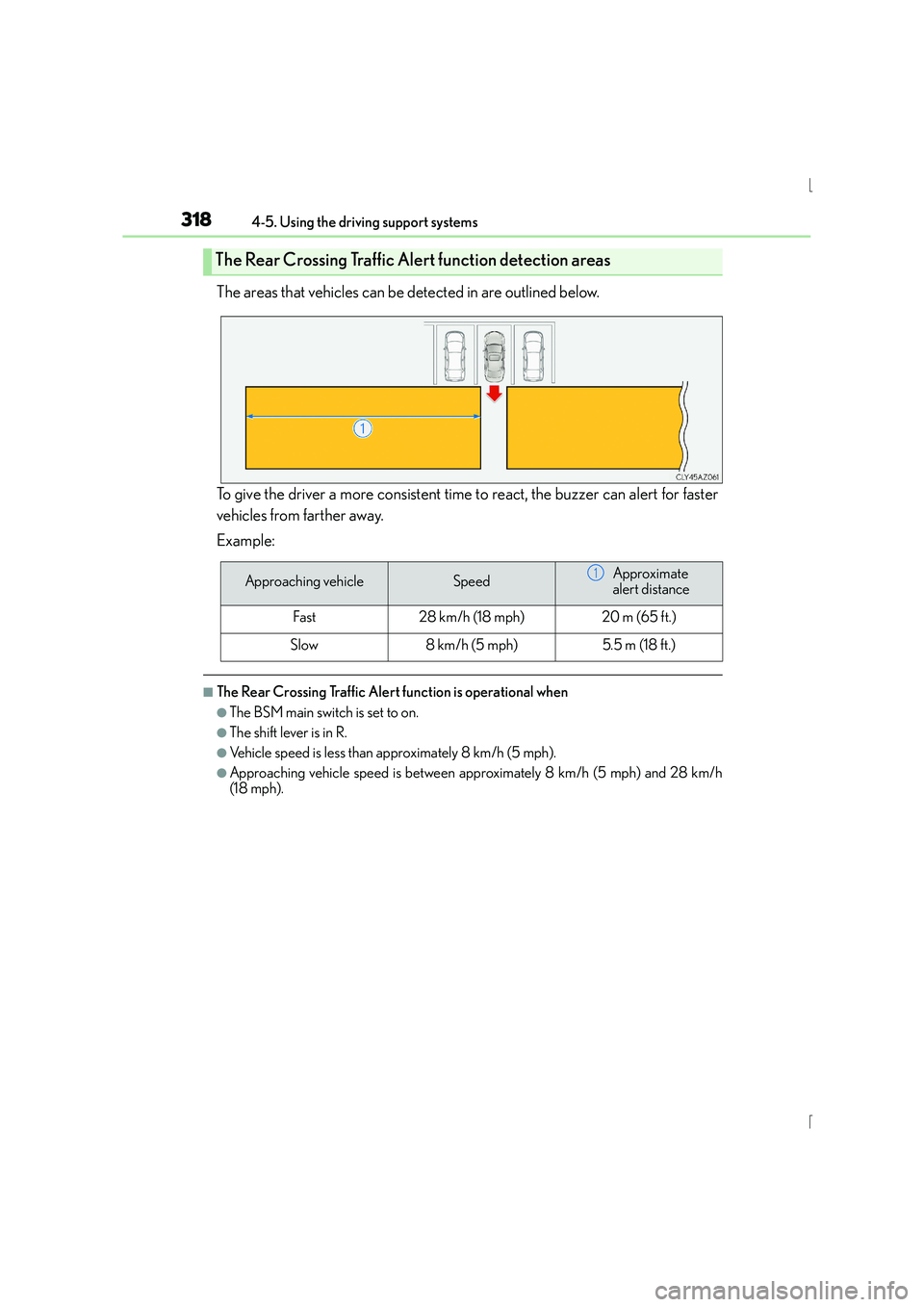
The areas that vehicles can be detected in are outlined below.
To give the driver a more consistent time to react, the buzzer can alert for faster
vehicles from farther away.
Example:
■The Rear Crossing Traffic Alert function is operational when
●The BSM main switch is set to on.
●The shift lever is in R.
●Vehicle speed is less than approximately 8 km/h (5 mph).
●Approaching vehicle speed is between approximately 8 km/h (5 mph) and 28 km/h
(18 mph).
The Rear Crossing Traffic Alert function detection areas
Approaching vehicleSpeedApproximate
alert distance
Fast28 km/h (18 mph)20 m (65 ft.)
Slow8 km/h (5 mph)5.5 m (18 ft.)
1
Page 319 of 628

3194-5. Using the driving support systems
4
Driving
IS300h_EE(OM53D56E)
■Conditions under which the Rear Crossing Traffic Alert function will not detect a vehi-
cle
The Rear Crossing Traffic Alert function is not designed to detect the following types of
vehicles and/or objects.
●Small motorcycles, bicycles, pedestrians etc.*
●Vehicles approaching from directly behind
●Guardrails, walls, signs, parked vehicles and similar stationary objects*
●Vehicles moving away from your vehicle
●Vehicles approaching from the parking spaces next to your vehicle*
●Vehicles backing up in the parking space next to your vehicle
*: Depending on conditions, detection of a vehicle and/or object may occur.
■Conditions under which the Rear Crossing Traffic Alert function may not function cor-
rectly
The Rear Crossing Traffic Alert function may not detect vehicles correctly in the follow-
ing conditions:
●During bad weather such as heavy rain, fog, snow etc.
●When ice or mud etc. is attached to the rear bumper
●When multiple vehicles approach continuously
●Shallow angle parking
●When a vehicle is approaching at high speed
●When parking on a steep incline, such as hills, a dip in the road etc.
●Directly after the BSM main switch is set to on
●When your vehicle is towing a trailer
●Directly after the hybrid system is started with the BSM main switch on
●Vehicles that the sensors cannot detect
because of obstacles
Page 320 of 628
320
IS300h_EE(OM53D56E)4-6. Driving tips
■Using Eco drive mode
When using Eco drive mode, the torque corresponding to the accelerator
pedal depression amount can be generated more smoothly than it is in normal
conditions. In addition, the operation of the air conditioning system (heating/
cooling) will be minimized, improving the fuel economy. (
→P. 2 9 3 )
■Use of Hybrid System Indicator
Eco-friendly driving is possible by keeping the indicator needle (except F
SPORT models) or bar display (F SPORT models) of Hybrid System Indicator
within the Eco area. ( →P. 1 1 3 )
■When braking
Make sure to operate the brakes gently and in good time. A greater amount
of electrical energy can be regenerated when slowing down.
■Delays
Repeated acceleration and deceleration, as well as long waits at traffic lights,
will lead to bad fuel economy. Check traffic reports before leaving and avoid
delays as much as possible. When driving in a traffic jam, gently release the
brake pedal to allow the vehicle to move forward slightly while avoiding over-
use of the accelerator pedal. Doing so can help control excessive gasoline
consumption.
■Highway driving
Control your speed and keep at a constant speed. Before stopping at a toll
booth or similar, allow plenty of time to release the accelerator and gently
apply the brakes. A greater amount of electrical energy can be regenerated
when slowing down.
Hybrid vehicle driving tips
For economical and ecological driving, pay attention to the following points: