Can Lexus IS300h 2015 Owner's Manual
[x] Cancel search | Manufacturer: LEXUS, Model Year: 2015, Model line: IS300h, Model: Lexus IS300h 2015Pages: 628, PDF Size: 137.89 MB
Page 340 of 628
3405-2. Setup
IS300h_EE(OM53D56E)
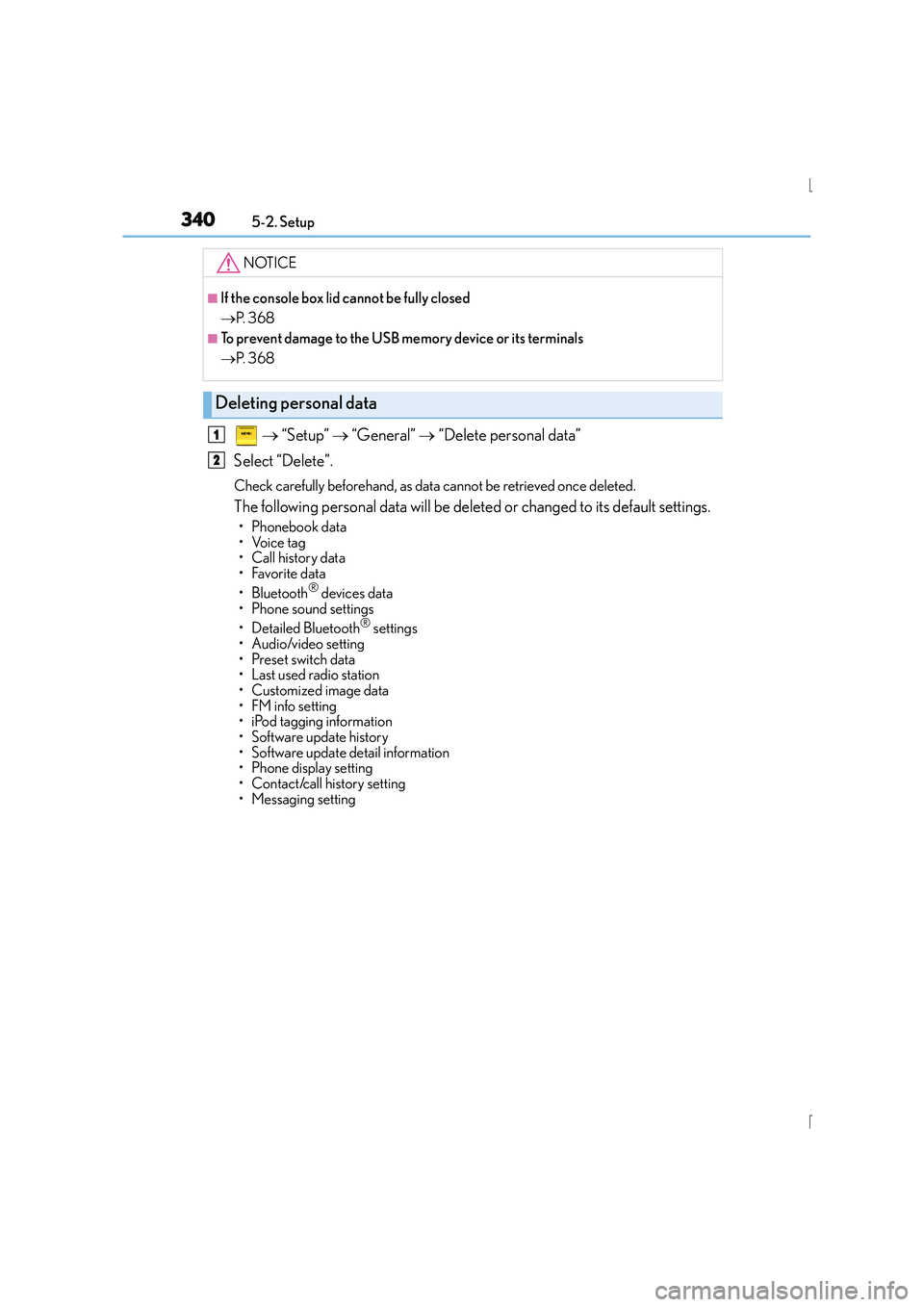
→ “Setup” → “General” → “Delete personal data”
Select “Delete”.
Check carefully beforehand, as data cannot be retrieved once deleted.
The following personal data will be deleted or changed to its default settings.
•Phonebook data
•Voice tag
• Call history data
•Favorite data
• Bluetooth
® devices data
• Phone sound settings
• Detailed Bluetooth
® settings
• Audio/video setting
• Preset switch data
• Last used radio station
• Customized image data
•FM info setting
• iPod tagging information
• Software update history
• Software update detail information
• Phone display setting
• Contact/call history setting
• Messaging setting
NOTICE
■If the console box lid cannot be fully closed
→ P. 3 6 8
■To prevent damage to the USB memory device or its terminals
→P. 3 6 8
Deleting personal data
1
2
Page 342 of 628

3425-2. Setup
IS300h_EE(OM53D56E)
Go to “Display”: → “Display”
Turn off screen.
Adjust screen quality.
Adjust screen quality of the rear
view monitor camera.
Change to day mode.
This setting turns the screen off. To turn it on, press any button such as or .
If a screen off image has been se t, the set image will be displayed.
When the headlights are turned on, the screen dims.
However, the screen can be switched to day mode by selecting “Day mode”.
The screen will stay in day mode when the headlights are turned on until “Day mode”
is selected again.
Select “General” or “Camera” on the “Display” screen or select “Display” on
each audio menu screen. ( →P. 3 4 9 )
Adjust the display as desired by turning the controller clockwise (+) or
counterclockwise (-).
To select “Contrast”, “Brightness”, “Colour” or “Tone”, move the controller to the left.
(when “Display” is selected, “Colour” and “Tone” are available.)
■Changing the sample image (when “General” is selected)
Move the controller to the right and select the desired sample image.
Display settings
Settings are available for adjusting the contrast and brightness of the screen.
The display can also be turned off.
Screen for display settings
1
2
3
4
Screen off
Day mode
Adjusting the screen contrast/brightness/color/tone
1
2
Page 343 of 628
343
5
Lexus Display Audio system
IS300h_EE(OM53D56E)5-3. Using the audio system
Press the button to display the “Source” screen.
If the “Source” screen is not displayed, press the button again.
Select the desired audio source.
The audio source can be selected by pressing the “RADIO” or “MEDIA” button.
Press the “MODE” switch when the audio system is turned on. The audio source
changes each time the “MODE” switch is pressed.
■Rearranging the list
The listing order of the source list can be rearranged.
Move the controller to the left while on the “Source” screen.
Select “Audio source select”.
Select an item you wish to move and th en select where to move the item to.
Selecting the audio source
Switching between audio sources such as radio and CD are explained in this
section.
Changing audio source
Using the steering wheel switches to change audio sources
1
2
1
2
3
Page 344 of 628
3445-3. Using the audio system
IS300h_EE(OM53D56E)
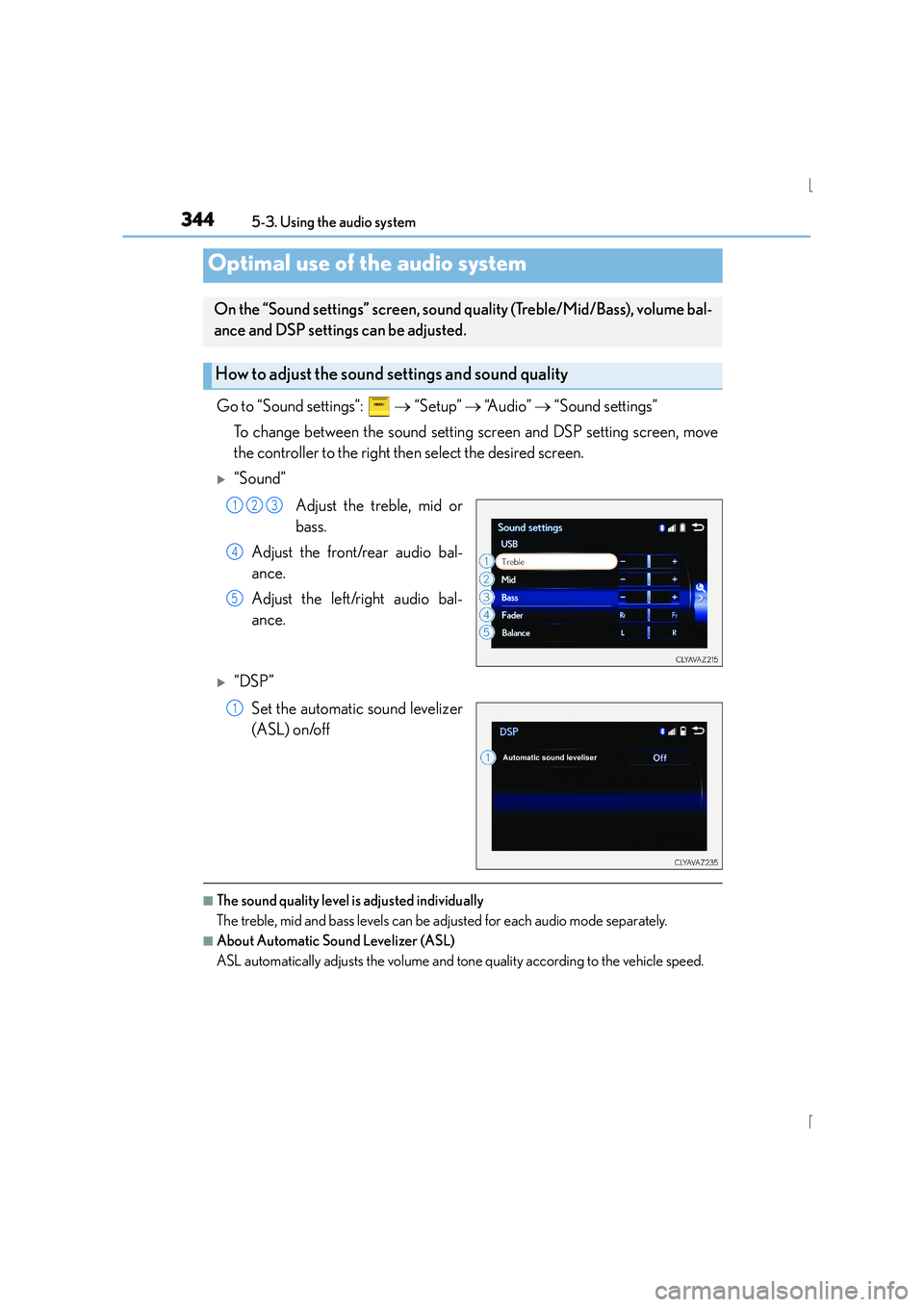
Go to “Sound settings”: → “Setup” → “A u d i o ” → “Sound settings”
To change between the sound setting screen and DSP setting screen, move
the controller to the right then select the desired screen.
X“Sound”
Adjust the treble, mid or
bass.
Adjust the front/rear audio bal-
ance.
Adjust the left/right audio bal-
ance.
X“DSP”
Set the automatic sound levelizer
(ASL) on/off
■The sound quality level is adjusted individually
The treble, mid and bass levels can be adjusted for each audio mode separately.
■About Automatic Sound Levelizer (ASL)
ASL automatically adjusts the volume and tone quality according to the vehicle speed.
Optimal use of the audio system
On the “Sound settings” screen, sound quality (Treble/Mid/Bass), volume bal-
ance and DSP settings can be adjusted.
How to adjust the sound settings and sound quality
123
4
5
1
Page 349 of 628
3495-3. Using the audio system
5
Lexus Display Audio system
IS300h_EE(OM53D56E)
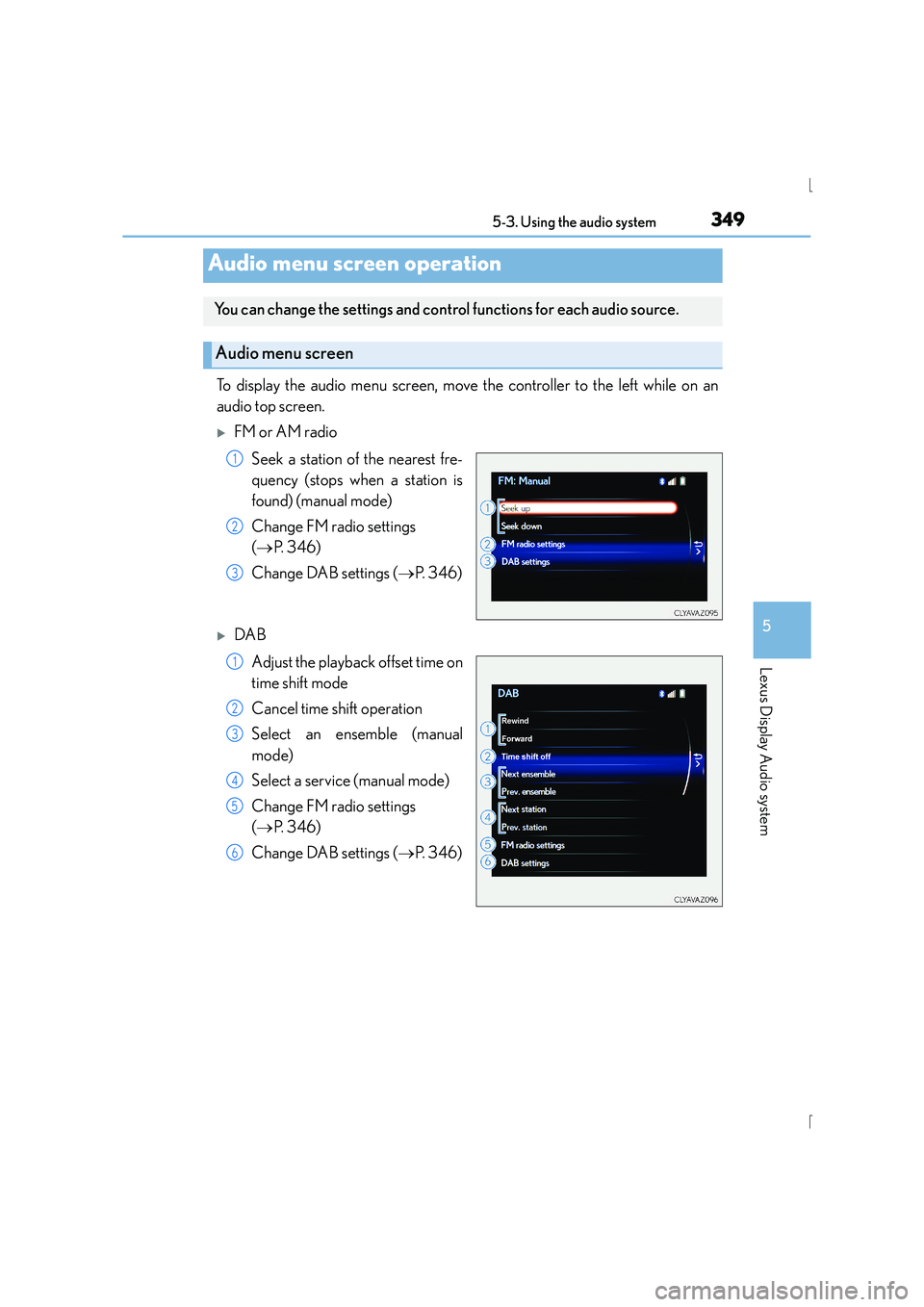
To display the audio menu screen, move the controller to the left while on an
audio top screen.
XFM or AM radioSeek a station of the nearest fre-
quency (stops when a station is
found) (manual mode)
Change FM radio settings
(→ P. 3 4 6 )
Change DAB settings ( →P. 3 4 6 )
XDAB
Adjust the playback offset time on
time shift mode
Cancel time shift operation
Select an ensemble (manual
mode)
Select a service (manual mode)
Change FM radio settings
(→ P. 3 4 6 )
Change DAB settings ( →P. 3 4 6 )
Audio menu screen operation
You can change the settings and cont rol functions for each audio source.
Audio menu screen
1
2
3
1
2
3
4
5
6
Page 352 of 628
352
IS300h_EE(OM53D56E)5-4. Using the radio
Pressing the “RADIO” button displays the radio top screen from any screen of
the selected source.
■Menu screen
→
P. 3 4 9
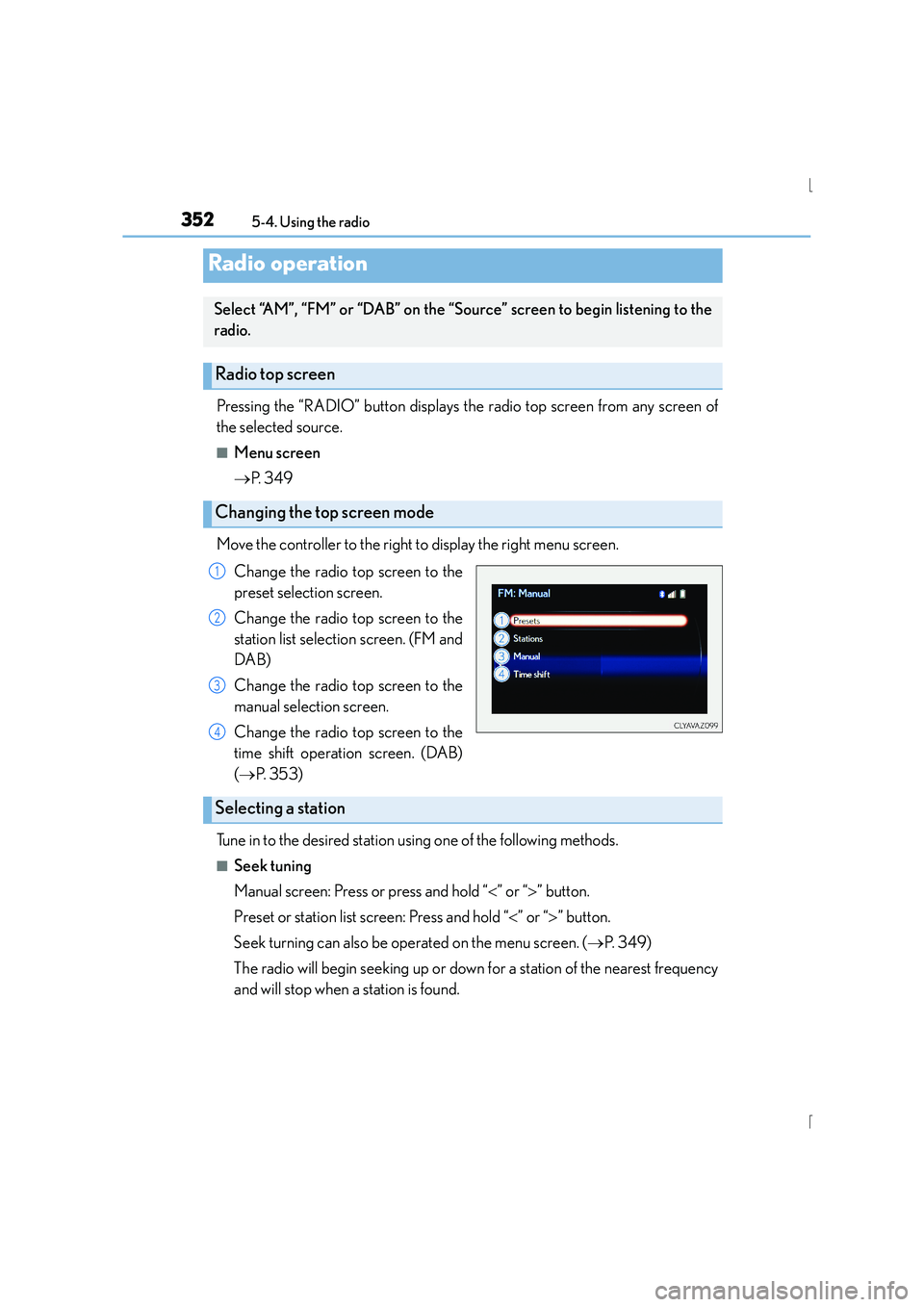
Move the controller to the right to display the right menu screen. Change the radio top screen to the
preset selection screen.
Change the radio top screen to the
station list selection screen. (FM and
DAB)
Change the radio top screen to the
manual selection screen.
Change the radio top screen to the
time shift operation screen. (DAB)
(→ P. 3 5 3 )
Tune in to the desired station using one of the following methods.
■Seek tuning
Manual screen: Press or press and hold “ <” or “ >” button.
Preset or station list screen: Press and hold “ <” or “ >” button.
Seek turning can also be operated on the menu screen. ( →P. 3 4 9 )
The radio will begin seeking up or down for a station of the nearest frequency
and will stop when a station is found.
Radio operation
Select “AM”, “FM” or “DAB” on the “Source” screen to begin listening to the
radio.
Radio top screen
Changing the top screen mode
1
2
3
4
Selecting a station
Page 353 of 628
3535-4. Using the radio
5
Lexus Display Audio system
IS300h_EE(OM53D56E)
■Manual tuning (manual screen)
Turn the right side knob (left-hand drive vehicle) or left side knob (right-hand
drive vehicle) on the audio panel or turn the controller.
■Station list (preset or station list screen)
Select the desired station by pressing “<” or “ >”, turn the right side knob (left-
hand drive vehicle) or left side knob (right-hand drive vehicle) on the audio
panel or controller.
Radio stations can be preset. Search for desired stations.
Turn the controller to select one of the preset stations and then press the con-
troller until you hear a beep while on the preset selection screen.
The broadcast you are currently listening to can be re-listened to at any time. Move the controller to the right and then select “Time shift”.
Turn the right side knob (left-hand drive vehicle) or left side knob (right-hand
drive vehicle) on the audio panel to set the desired offset.
An offset playback time can also be set on the menu screen. ( →P. 3 4 9 )
To cancel the time shift operation while in time shift mode, move the controller to the
left and select “Time shift off” . If the time shift display is left showing “-0' 00”” for 6
seconds without any operation, the time shift operation will be canceled.
■Reception sensitivity
●Maintaining perfect radio reception at all time s is difficult due to the continually chang-
ing position of the antenna, differences in si gnal strength and surrounding objects, such
as trains, transmitters, etc.
●The radio antenna is mounted inside the rear window. To maintain clear radio reception,
do not attach metallic window tinting or other metallic objects to the antenna wire
mounted inside the rear window.
■Traffic announcement operation
When traffic announcement is set to on, “TP” will appear on the screen and the radio will
begin seeking a TP station. If the radio s eeks out a TP station, the program name will
appear on the screen. If a traffic announcement station is received, the radio will be
switched to the traffic information program automatically. When the program ends, the
initial operation will resume.
Setting station presets (preset screen)
Time shift operation (DAB)
1
2
1
2
Page 355 of 628

3555-5. Playing an audio CD and MP3/WMA/AAC discs
5
Lexus Display Audio system
IS300h_EE(OM53D56E)
■Error messages
If an error message is displayed, refer to the following table and take the appropriate
measures. If the problem is not rectified, take the vehicle to any authorized Lexus dealer
or repairer, or another duly qu alified and equipped professional.
■Discs that can be used
Discs with the marks shown below can be used.
Playback may not be possible depending on recording format or disc features, or due to
scratches, dirt or deterioration.
CDs with copy-protection features may not play correctly.
■Music disc player protection feature
To protect the internal components, playback is automatically stopped when a problem is
detected.
■If a disc is left inside the Music disc player or in the ejected position for extended peri-
ods
Disc may be damaged and may not play properly.
■Lens cleaners
Do not use lens cleaners. Doing so may damage the Music disc player.
■MP3, WMA and AAC files
MP3 (MPEG Audio LAYER3) is a standard audio compression format.
Files can be compressed to approximately 1 /10 of their original size by using MP3 com-
pression.
WMA (Windows Media Audio) is a Microsoft audio compression format.
This format compresses audio data to a size smaller than that of the MP3 format.
AAC is short for Advanced Audio Coding and refers to an audio compression technol-
ogy standard used with MPEG2 and MPEG4.
MP3, WMA and AAC file and media/ formats compatibility are limited.
MessageCauseCorrection procedures
“Check disc”
• The disc is dirty or dam-
aged.
• The disc is inserted upside down.
• The disc is not playable with the player.
•Clean the disc.
• Insert the disc correctly.
• Confirm the disc is play-
able with the player.
“DISC error”There is a malfunction
within the system.Eject the disc.
“No music files found.”No playable data is
included on the disc.Eject the disc.
Page 356 of 628
3565-5. Playing an audio CD and MP3/WMA/AAC discs
IS300h_EE(OM53D56E)
●MP3 file compatibility
• Compatible standards MP3 (MPEG1 LAYER3, MPEG2 LSF LAYER3)
• Compatible sampling frequencies MPEG1 LAYER3: 32, 44.1, 48 (kHz)
MPEG2 LSF LAYER3: 16, 22.05, 24 (kHz)
• Compatible bit rates (compatible with VBR) MPEG1 LAYER3: 32-320 (kbps)
MPEG2 LSF LAYER3: 8-160 (kbps)
• Compatible channel modes: stereo, joint stereo, dual channel and monaural
●WMA file compatibility
• Compatible standards WMA Ver. 7, 8, 9 (only compatible with Windows Media Audio Standard)
• Compatible sampling frequencies
32, 44.1, 48 (kHz)
• Compatible bit rates (only compatible with 2-channel playback) Ver. 7, 8: CBR 48-192 (kbps)
Ver. 9: CBR 48-320 (kbps)
●AAC file compatibility
• Compatible standards MPEG4/AAC-LC
• Compatible sampling frequencies
11.025/12 /16/22.05/24 /32 /44.1 /48 (kHz)
• Compatible bit rates 16-320 (kbps)
• Compatible channel modes: 1 ch and 2 ch
●Compatible media
Media that can be used for MP3, WMA and AAC playback are CD-Rs and CD-
RWs.
Playback in some instances may not be possible if the CD-R or CD-RW is not final-
ized. Playback may not be possible or the audio may jump if the disc is scratched or
marked with fingerprints.
●Compatible disc formats
The following disc formats can be used.
• Disc formats: CD-ROM Mode 1 and Mode 2
CD-ROM XA Mode 2, Form 1 and Form 2
• File formats: ISO9660 Level 1, Level 2, (Romeo, Joliet) UDF (2.01 or lower)
MP3, WMA and AAC files written in any format other than those listed above may
not play correctly, and their file names and folder names may not be displayed cor-
rectly.
Items related to standards an d limitations are as follows.
• Maximum directory hierarchy: 8 levels (including the root)
• Maximum length of folder names/file names: 32 characters
• Maximum number of folders: 192 (including the root)
• Maximum number of files per disc: 255
Page 357 of 628
3575-5. Playing an audio CD and MP3/WMA/AAC discs
5
Lexus Display Audio system
IS300h_EE(OM53D56E)
●File names
The only files that can be recognized as MP3/WMA/AAC and played are those with
the extension .mp3, .wma or .m4a.
●Discs containing multi-session recordings
As the audio system is compatible with multi session discs, it is possible to play discs
that contain MP3, WMA and AAC files. However, only the first session can be played.
●ID3, WMA and AAC tags
ID3 tags can be added to MP3 files, making it possible to record the track title, artist
name, etc.
The system is compatible with ID3 Ver. 1.0, 1.1, and Ver. 2.2, 2.3 ID3 tags. (The number
of characters is based on ID3 Ver. 1.0 and 1.1.)
WMA tags can be added to WMA files, making it possible to record the track title and
artist name in the same way as with ID3 tags.
AAC tags can be added to AAC files, making it possible to record the track title and
artist name in the same way as with ID3 tags.
●MP3, WMA and AAC playback
When a disc containing MP3, WMA or AAC f iles is inserted, all files on the disc are
first checked. Once the file check is finished, the first MP3, WMA or AAC file is
played. To make the file check finish more quickly, we recommend you do not write any
files to the disc other than MP3, WMA or AAC files or create any unnecessary fold-
ers.
Discs that contain a mixture of music data and MP3, WMA or AAC format data can-
not be played.
●Extensions
If the file extensions .mp3, .wma and .m4a are used for files other than MP3, WMA
and AAC files, they may be mistakenly recognized and played as MP3, WMA and
AAC files. This may result in large amount s of interference and damage to the speak-
ers.
●Playback
• To play MP3 files with steady sound quality, we recommend a fixed bit rate of at least 128 kbps and a sampling frequency of 44.1 kHz.
• CD-R or CD-RW playback may not be po ssible in some instances, depending on
the characteristics of the disc.
• There is a wide variety of freeware and other encoding software for MP3, WMA and AAC files on the market, and depending on the status of the encoding and the
file format, poor sound quality or noise at the start of playback may result. In some
cases, playback may not be possible at all.
• When files other than MP3, WMA or AAC f iles are recorded on a disc, it may take
more time to recognize the disc and in some cases, playback may not be possible at
all.
• Microsoft, Windows, and Windows Media are the registered trademarks of
Microsoft Corporation in the U.S.A. and other countries.