Can Lexus IS300h 2015 Owner's Manual
[x] Cancel search | Manufacturer: LEXUS, Model Year: 2015, Model line: IS300h, Model: Lexus IS300h 2015Pages: 628, PDF Size: 137.89 MB
Page 277 of 628
2774-5. Using the driving support systems
4
Driving
IS300h_EE(OM53D56E)
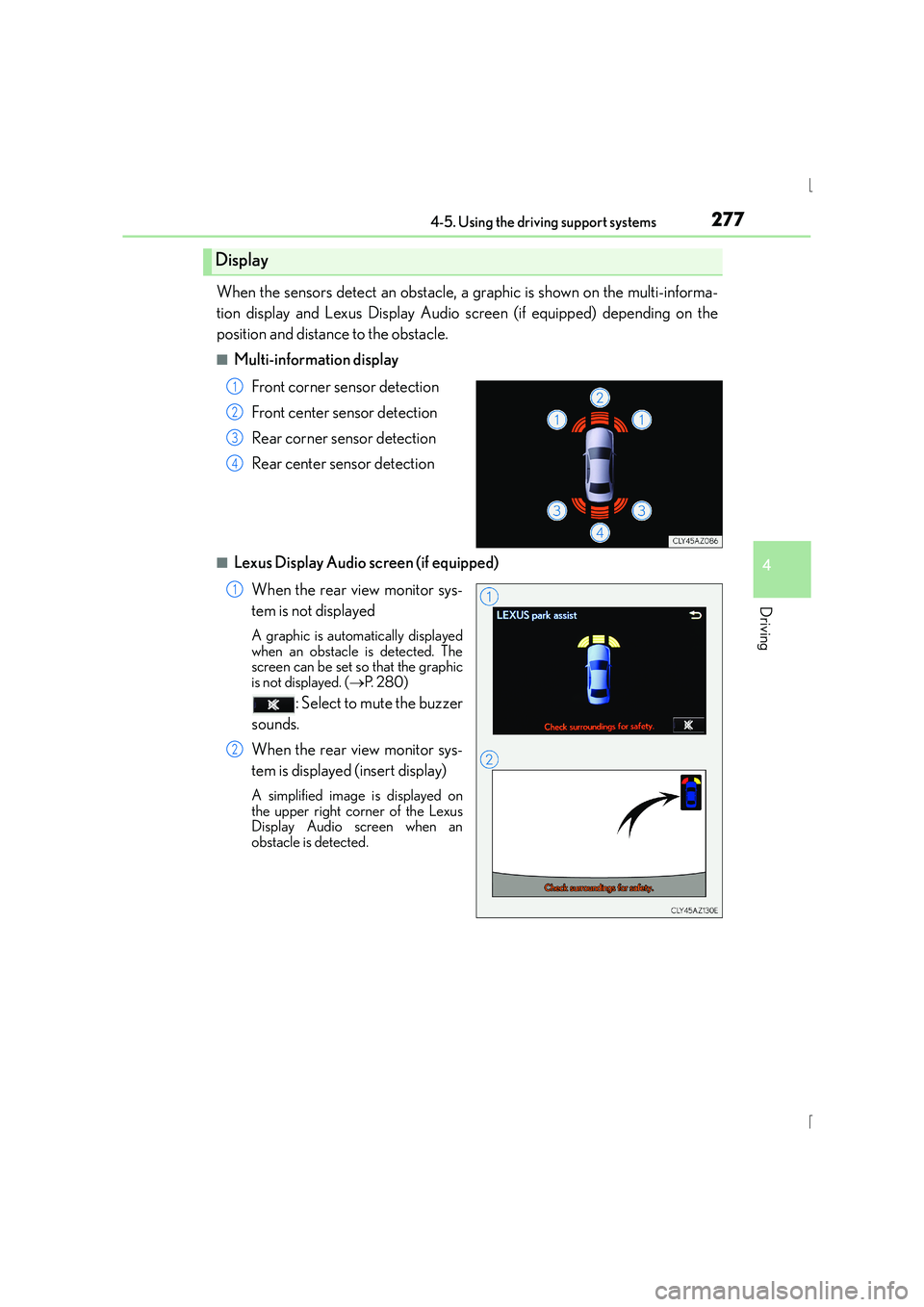
When the sensors detect an obstacle, a graphic is shown on the multi-informa-
tion display and Lexus Display Audio screen (if equipped) depending on the
position and distance to the obstacle.
■Multi-information displayFront corner sensor detection
Front center sensor detection
Rear corner sensor detection
Rear center sensor detection
■Lexus Display Audio screen (if equipped)When the rear view monitor sys-
tem is not displayed
A graphic is automatically displayed
when an obstacle is detected. The
screen can be set so that the graphic
is not displayed. ( →P. 2 8 0 )
: Select to mute the buzzer
sounds.
When the rear view monitor sys-
tem is displayed (insert display)
A simplified image is displayed on
the upper right corner of the Lexus
Display Audio screen when an
obstacle is detected.
Display
1
2
3
4
1
2
Page 279 of 628
2794-5. Using the driving support systems
4
Driving
IS300h_EE(OM53D56E)
■Buzzer operation and distance to an obstacle
A buzzer sounds when the sensors are operating.
●The buzzer beeps faster as the vehicle approaches an obstacle. When the
vehicle comes within the following distance of the obstacle, the buzzer
sounds continuously:• Front center sensors: Approximately 30 cm (1.0 ft.)
• Corner sensors: Approximately 30 cm (1.0 ft.)
• Rear center sensors: Approximately 35 cm (1.1 ft.)
●When 2 or more obstacles are detected simultaneously, the buzzer system
responds to the nearest obstacle. If one or both come within the above dis-
tances, the beep will repeat a long tone, followed by fast beeps.
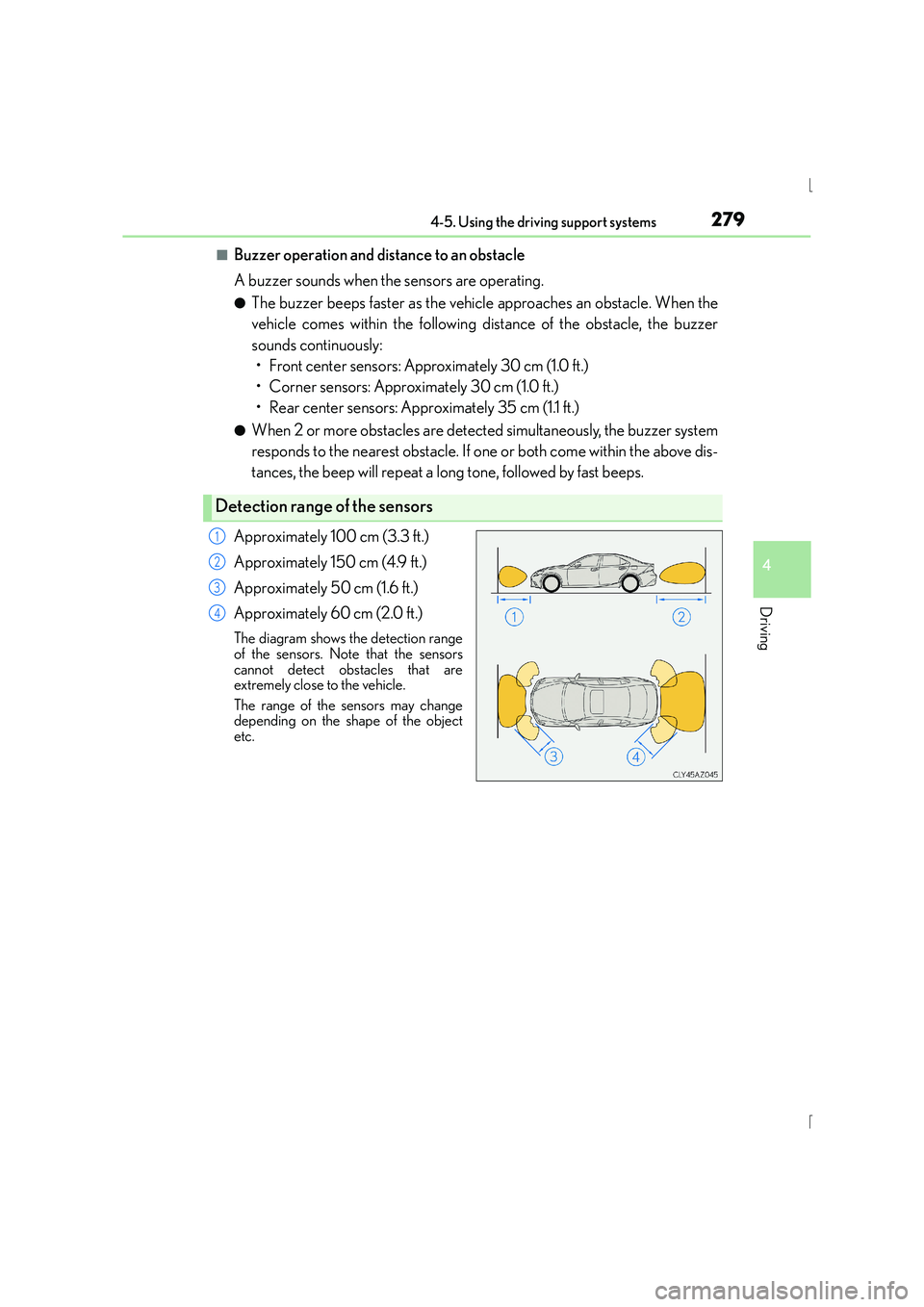
Approximately 100 cm (3.3 ft.)
Approximately 150 cm (4.9 ft.)
Approximately 50 cm (1.6 ft.)
Approximately 60 cm (2.0 ft.)
The diagram shows the detection range
of the sensors. Note that the sensors
cannot detect obstacles that are
extremely close to the vehicle.
The range of the sensors may change
depending on the shape of the object
etc.
Detection range of the sensors
1
2
3
4
Page 280 of 628
2804-5. Using the driving support systems
IS300h_EE(OM53D56E)
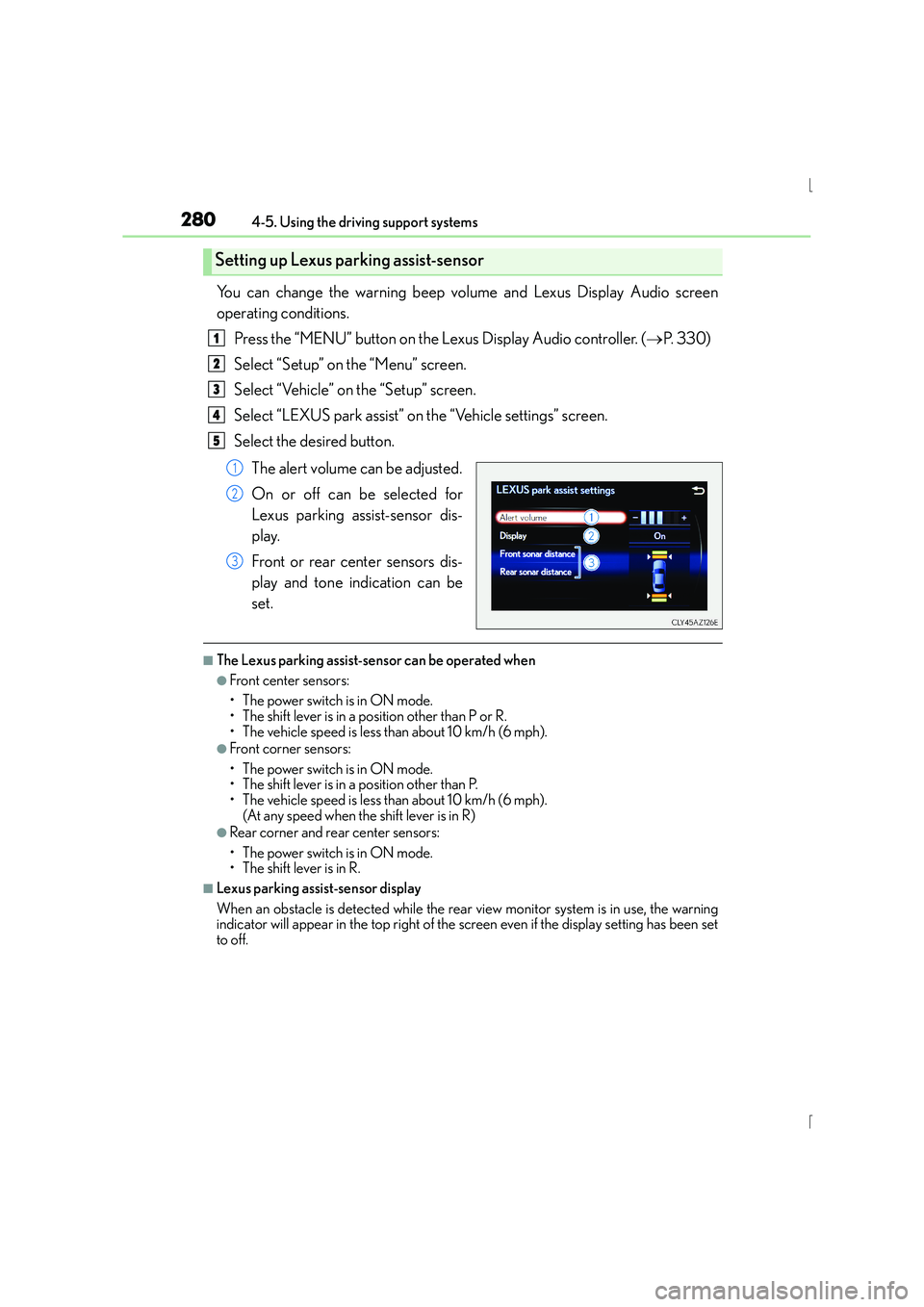
You can change the warning beep volume and Lexus Display Audio screen
operating conditions.Press the “MENU” button on the Lexus Display Audio controller. ( →P. 3 3 0 )
Select “Setup” on the “Menu” screen.
Select “Vehicle” on the “Setup” screen.
Select “LEXUS park assist” on the “Vehicle settings” screen.
Select the desired button.
The alert volume can be adjusted.
On or off can be selected for
Lexus parking assist-sensor dis-
play.
Front or rear center sensors dis-
play and tone indication can be
set.
■The Lexus parking assist-sensor can be operated when
●Front center sensors:
• The power switch is in ON mode.
• The shift lever is in a position other than P or R.
• The vehicle speed is less than about 10 km/h (6 mph).
●Front corner sensors:
• The power switch is in ON mode.
• The shift lever is in a position other than P.
• The vehicle speed is less than about 10 km/h (6 mph). (At any speed when the shift lever is in R)
●Rear corner and rear center sensors:
• The power switch is in ON mode.
• The shift lever is in R.
■Lexus parking assist-sensor display
When an obstacle is detected while the rear view monitor system is in use, the warning
indicator will appear in the top right of the screen even if the display setting has been set
to off.
Setting up Lexus parking assist-sensor
1
2
3
4
5
1
2
3
Page 283 of 628
2834-5. Using the driving support systems
4
Driving
IS300h_EE(OM53D56E)
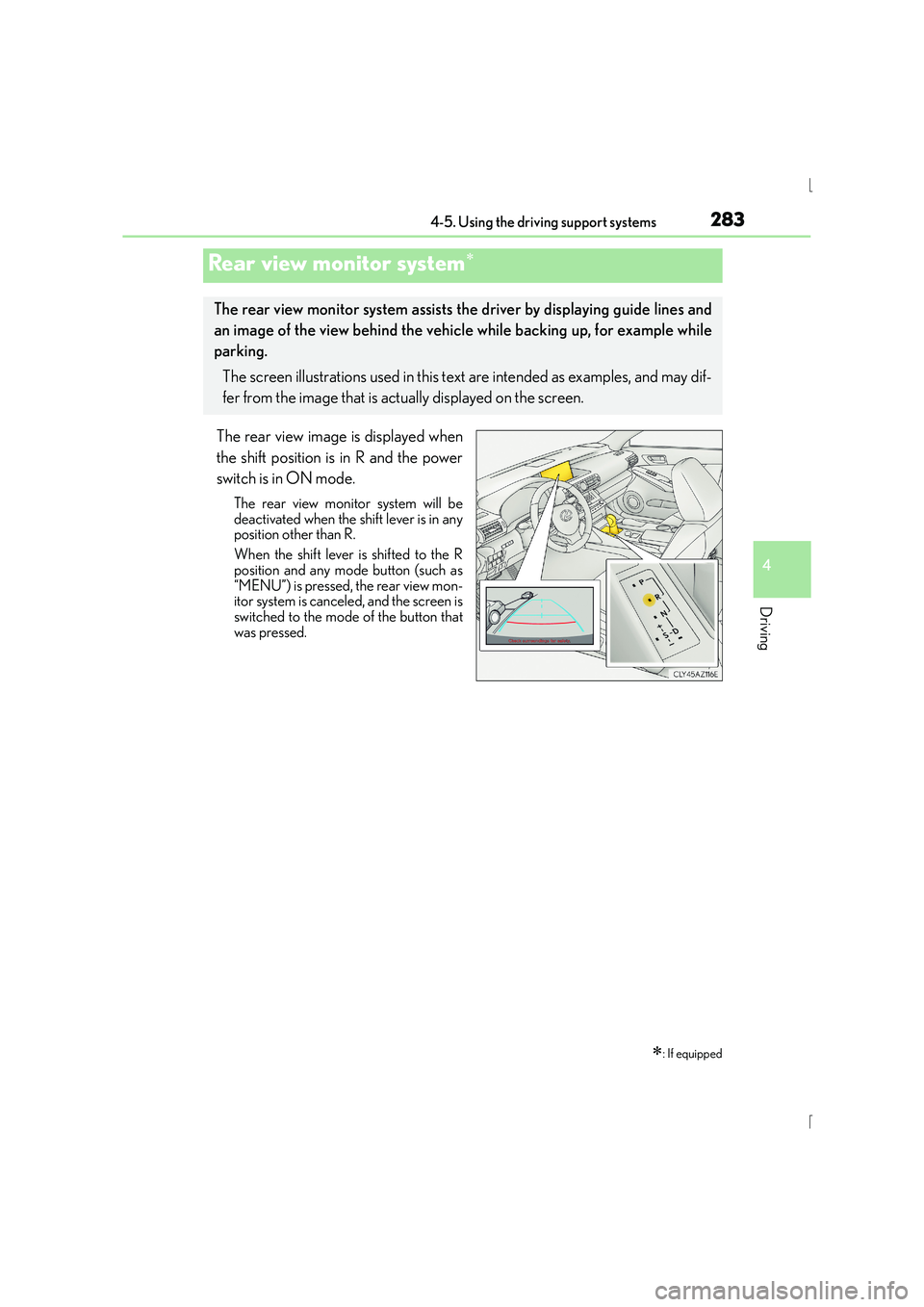
The rear view image is displayed when
the shift position is in R and the power
switch is in ON mode.
The rear view monitor system will be
deactivated when the shift lever is in any
position other than R.
When the shift lever is shifted to the R
position and any mode button (such as
“MENU”) is pressed, the rear view mon-
itor system is canceled, and the screen is
switched to the mode of the button that
was pressed.
Rear view monitor system∗
∗: If equipped
The rear view monitor system assists the driver by displaying guide lines and
an image of the view behind the vehicle while backing up, for example while
parking.
The screen illustrations used in this text are intended as examples, and may dif-
fer from the image that is actually displayed on the screen.
Page 285 of 628
2854-5. Using the driving support systems
4
Driving
IS300h_EE(OM53D56E)
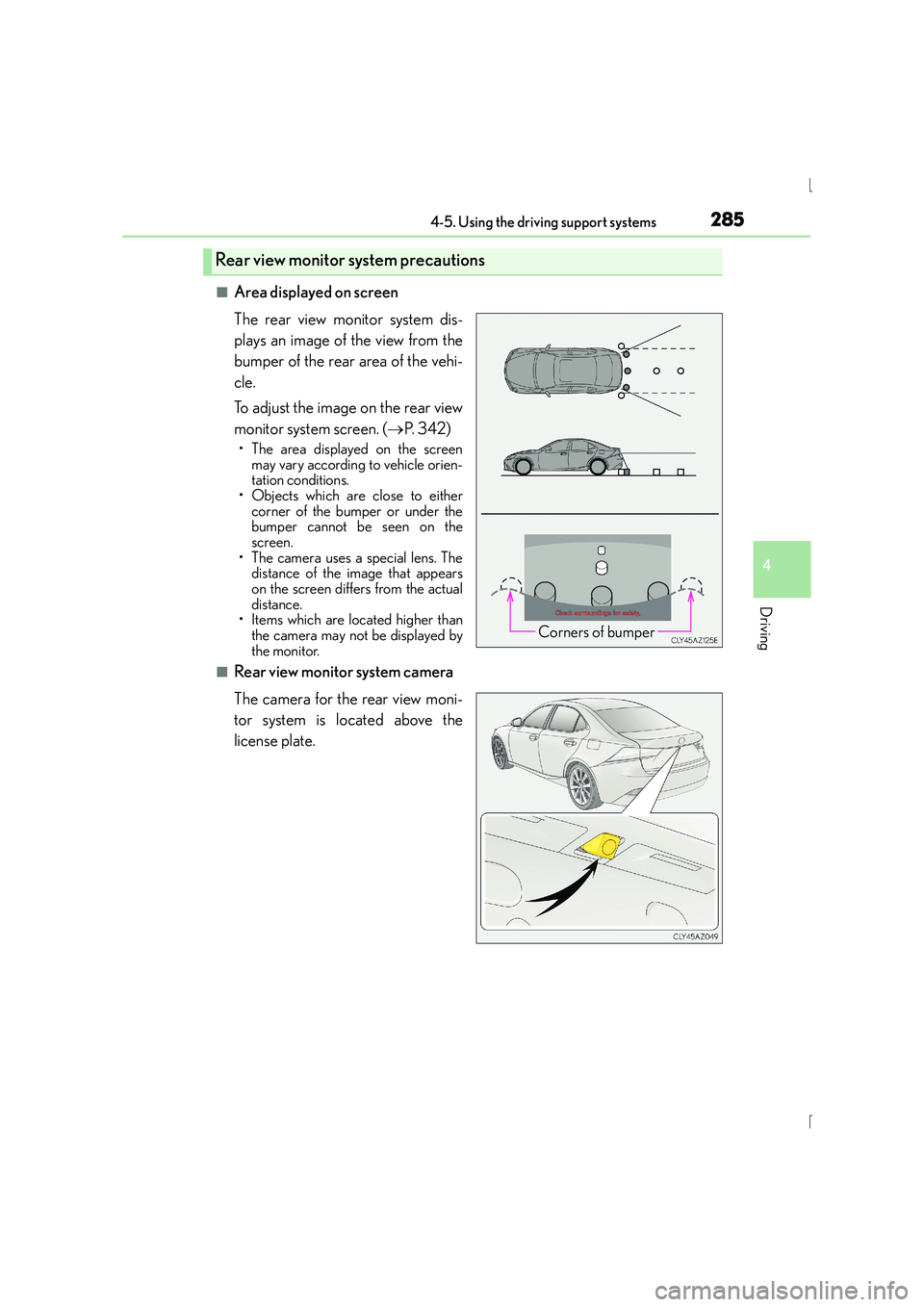
■Area displayed on screen
The rear view monitor system dis-
plays an image of the view from the
bumper of the rear area of the vehi-
cle.
To adjust the image on the rear view
monitor system screen. (→P. 3 4 2 )
• The area displayed on the screen
may vary according to vehicle orien-
tation conditions.
• Objects which are close to either corner of the bumper or under the
bumper cannot be seen on the
screen.
• The camera uses a special lens. The distance of the image that appears
on the screen differs from the actual
distance.
• Items which are located higher than
the camera may not be displayed by
the monitor.
■Rear view monitor system camera
The camera for the rear view moni-
tor system is located above the
license plate.
Rear view monitor system precautions
Corners of bumper
Page 286 of 628
2864-5. Using the driving support systems
IS300h_EE(OM53D56E)
●Using the camera
If dirt or foreign matter (such as water droplets, snow, mud etc.) is adhering to
the camera, it cannot transmit a clear image. In this case, flush it with a large
quantity of water and wipe the camera lens clean with a soft and wet cloth.
■Differences between the screen and the actual road
The distance guide lines and the vehicle width guide lines may not actually be
parallel with the dividing lines of the parking space, even when they appear to
be so. Be sure to check visually.
The distances between the vehicle width guide lines and the left and right
dividing lines of the parking space may not be equal, even when they appear
to be so. Be sure to check visually.
The distance guide lines give a distance guide for flat road surfaces. In any of
the following situations, there is a margin of error between the fixed guide
lines on the screen and the actual distance/course on the road.
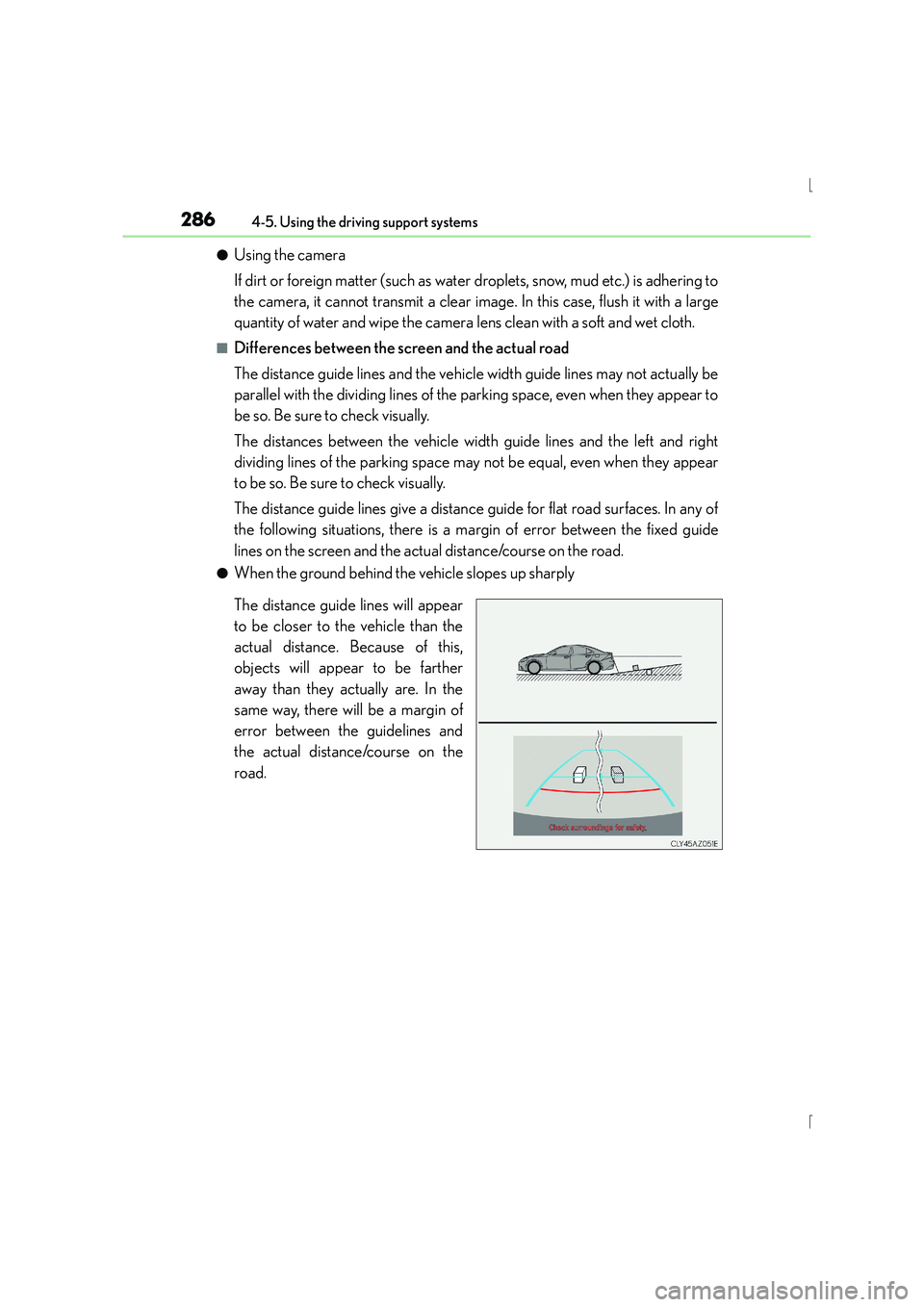
●When the ground behind the vehicle slopes up sharply
The distance guide lines will appear
to be closer to the vehicle than the
actual distance. Because of this,
objects will appear to be farther
away than they actually are. In the
same way, there will be a margin of
error between the guidelines and
the actual distance/course on the
road.
Page 293 of 628
2934-5. Using the driving support systems
4
Driving
IS300h_EE(OM53D56E)
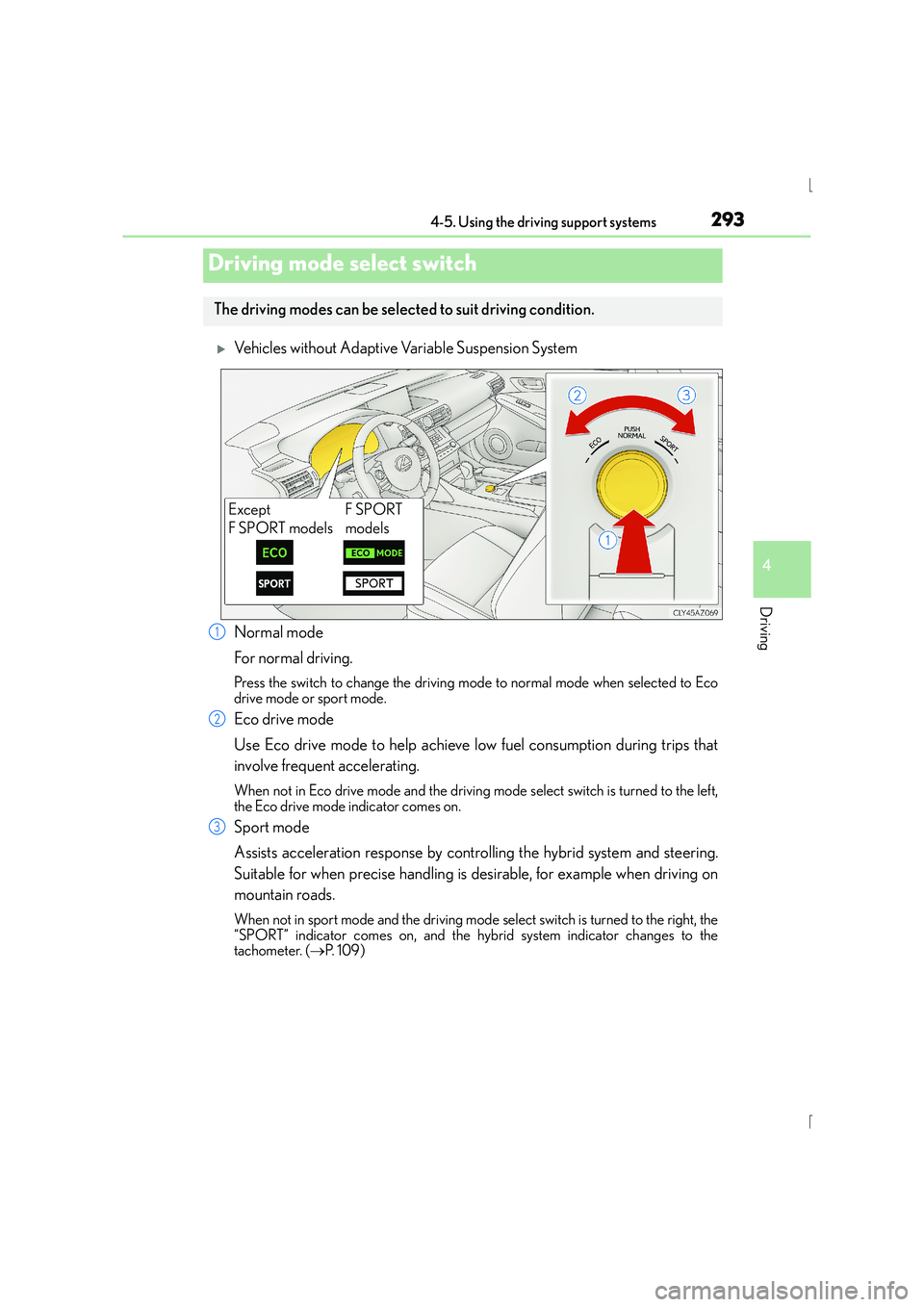
XVehicles without Adaptive Variable Suspension System
Normal mode
For normal driving.
Press the switch to change the driving mode to normal mode when selected to Eco
drive mode or sport mode.
Eco drive mode
Use Eco drive mode to help achieve low fuel consumption during trips that
involve frequent accelerating.
When not in Eco drive mode and the driving mode select switch is turned to the left,
the Eco drive mode indicator comes on.
Sport mode
Assists acceleration response by controlling the hybrid system and steering.
Suitable for when precise handling is desirable, for example when driving on
mountain roads.
When not in sport mode and the driving mode select switch is turned to the right, the
“SPORT” indicator comes on, and the hybrid system indicator changes to the
tachometer. ( →P. 1 0 9 )
Driving mode select switch
The driving modes can be select ed to suit driving condition.
Except
F SPORT modelsF SPORT
models
1
2
3
Page 298 of 628
2984-5. Using the driving support systems
IS300h_EE(OM53D56E)
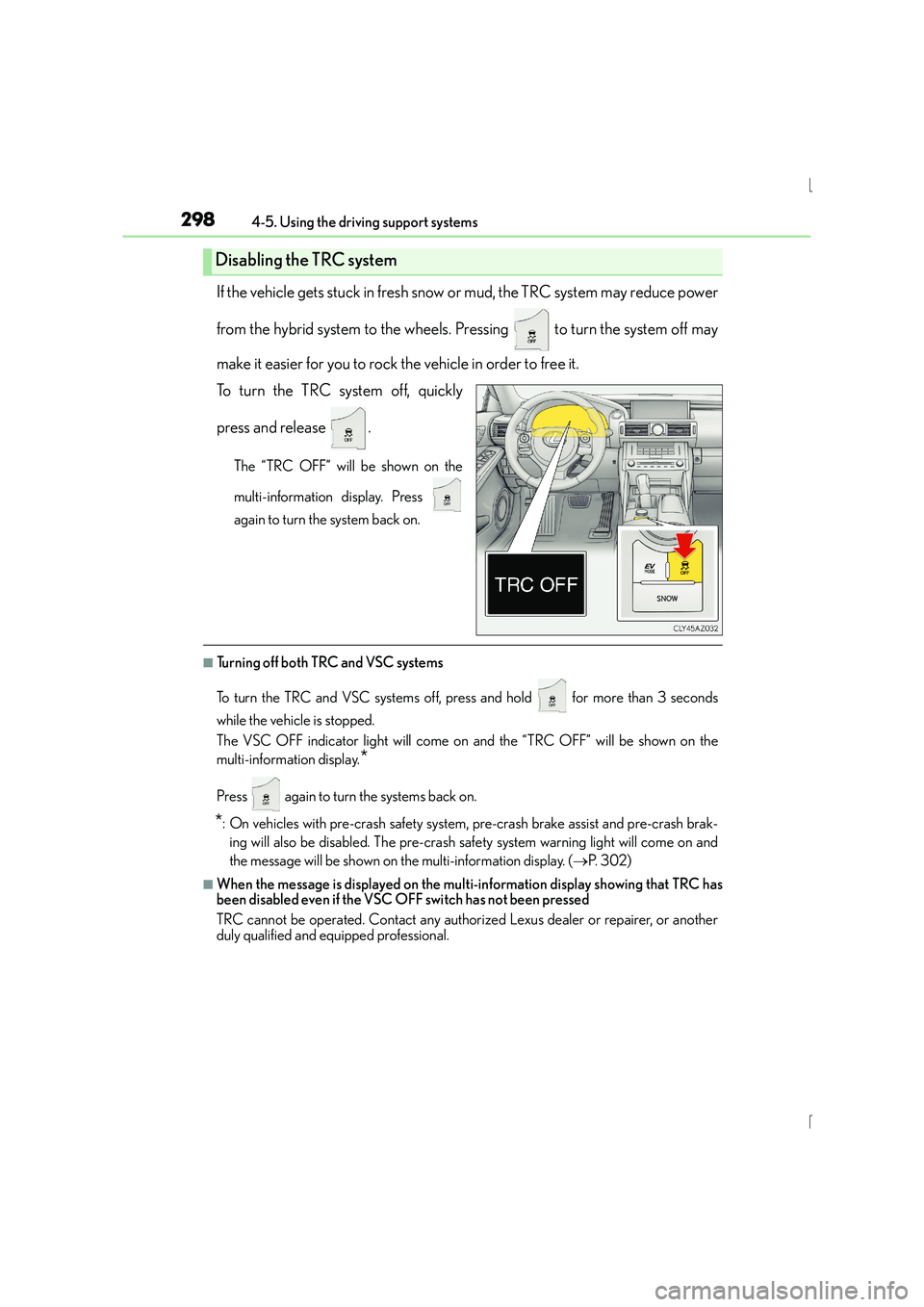
If the vehicle gets stuck in fresh snow or mud, the TRC system may reduce power
from the hybrid system to the wheels. Pressing to turn the system off may
make it easier for you to rock the vehicle in order to free it.
To turn the TRC system off, quickly
press and release .
The “TRC OFF” will be shown on the
multi-information display. Press
again to turn the system back on.
■Turning off both TRC and VSC systems
To turn the TRC and VSC systems off, press and hold for more than 3 seconds
while the vehicle is stopped.
The VSC OFF indicator light will come on and the “TRC OFF” will be shown on the
multi-information display.
*
Press again to turn the systems back on.
*: On vehicles with pre-crash safety system, pre-crash brake assist and pre-crash brak- ing will also be disabled. The pre-crash safe ty system warning light will come on and
the message will be shown on the multi-information display. ( →P. 3 0 2 )
■When the message is displayed on the mult i-information display showing that TRC has
been disabled even if the VSC OFF switch has not been pressed
TRC cannot be operated. Contact any authorized Lexus dealer or repairer, or another
duly qualified and equipped professional.
Disabling the TRC system
Page 300 of 628

3004-5. Using the driving support systems
IS300h_EE(OM53D56E)
■Operating conditions of hill-start assist control
When the following four conditions are met, the hill-start assist control will operate:
●The shift lever is in a position other than P or N (when starting off forward/backward on
an upward incline).
●The vehicle is stopped.
●The accelerator pedal is not depressed.
●The parking brake is not engaged.
■Automatic system cancelation of hill-start assist control
The hill-start assist control will turn off in any of the following situations:
●The shift lever is moved to P or N.
●The accelerator pedal is depressed.
●The parking brake is engaged.
●Approximately 2 seconds elapse after the brake pedal is released.
■Operating conditions of emergency brake signal
When the following three conditions are me t, the emergency brake signal will operate:
●The emergency flashers are off.
●Actual vehicle speed is over 55 km/h (35 mph).
●The brake pedal is depressed in a manner that cause the system to judge from the vehi-
cle deceleration that this is a sudden braking operation.
■Automatic system cancelation of emergency brake signal
The emergency brake signal will turn off in any of the following situations:
●The emergency flashers are turned on.
●The brake pedal is released.
●The system judges from the vehicle deceleration that is not a sudden braking operation.
Page 302 of 628
3024-5. Using the driving support systems
IS300h_EE(OM53D56E)
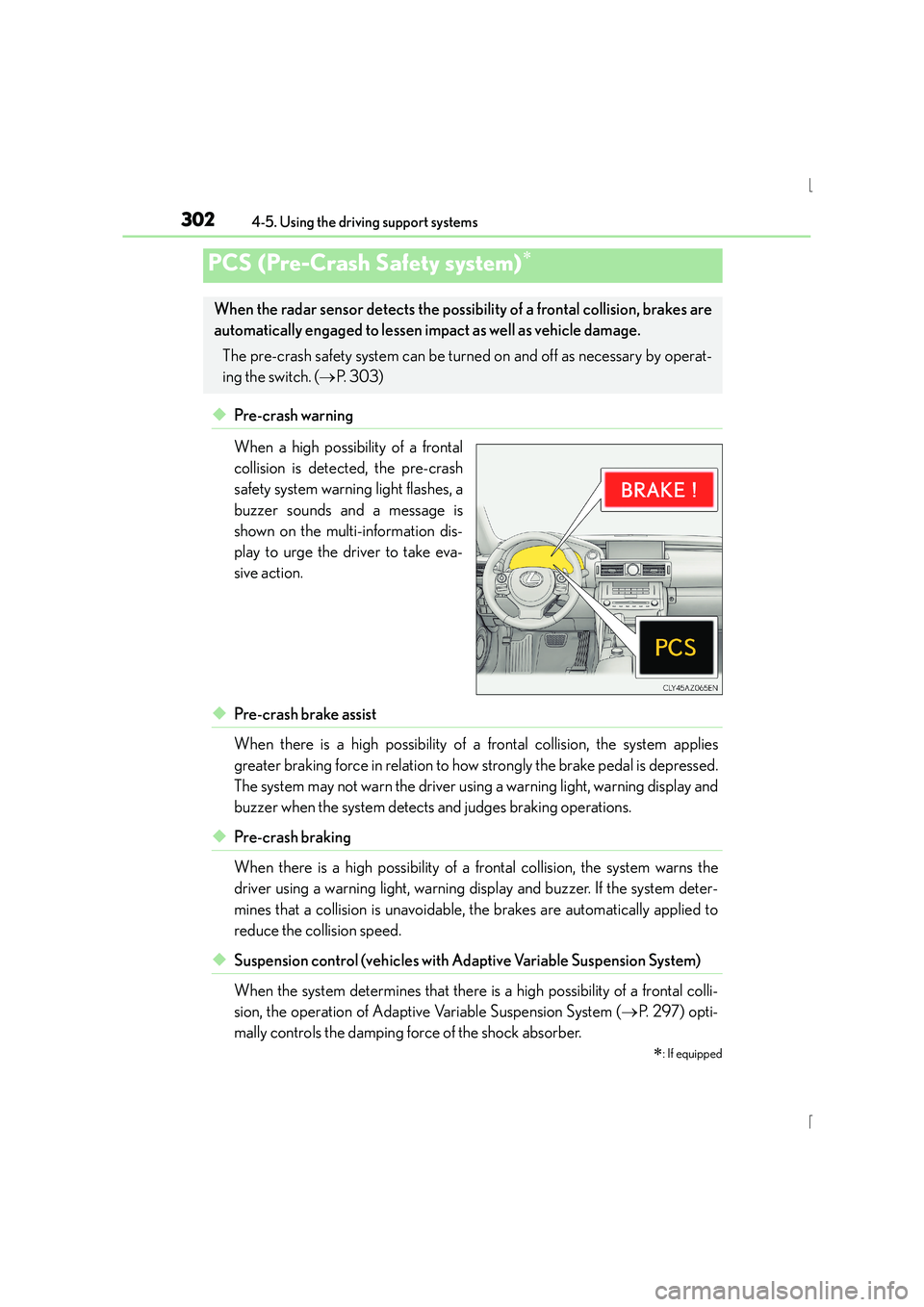
◆Pre-crash warning
When a high possibility of a frontal
collision is detected, the pre-crash
safety system warning light flashes, a
buzzer sounds and a message is
shown on the multi-information dis-
play to urge the driver to take eva-
sive action.
◆Pre-crash brake assist
When there is a high possibility of a frontal collision, the system applies
greater braking force in relation to how strongly the brake pedal is depressed.
The system may not warn the driver using a warning light, warning display and
buzzer when the system detects and judges braking operations.
◆Pre-crash braking
When there is a high possibility of a frontal collision, the system warns the
driver using a warning light, warning display and buzzer. If the system deter-
mines that a collision is unavoidable, the brakes are automatically applied to
reduce the collision speed.
◆Suspension control (vehicles with Ad aptive Variable Suspension System)
When the system determines that there is a high possibility of a frontal colli-
sion, the operation of Adaptive Variable Suspension System ( →P. 2 9 7 ) o p t i -
mally controls the damping force of the shock absorber.
PCS (Pre-Crash Safety system)∗
∗
: If equipped
When the radar sensor detects the possibili ty of a frontal collision, brakes are
automatically engaged to lessen im pact as well as vehicle damage.
The pre-crash safety system can be turned on and off as necessary by operat-
ing the switch. ( →P. 303)