speed warning LEXUS RX200T 2017 Owners Manual
[x] Cancel search | Manufacturer: LEXUS, Model Year: 2017, Model line: RX200T, Model: LEXUS RX200T 2017Pages: 776, PDF Size: 44.51 MB
Page 33 of 776
331-1. For safe use
1
For safety and security
RX350/RX200t_EE_OM48F32E
WARNING
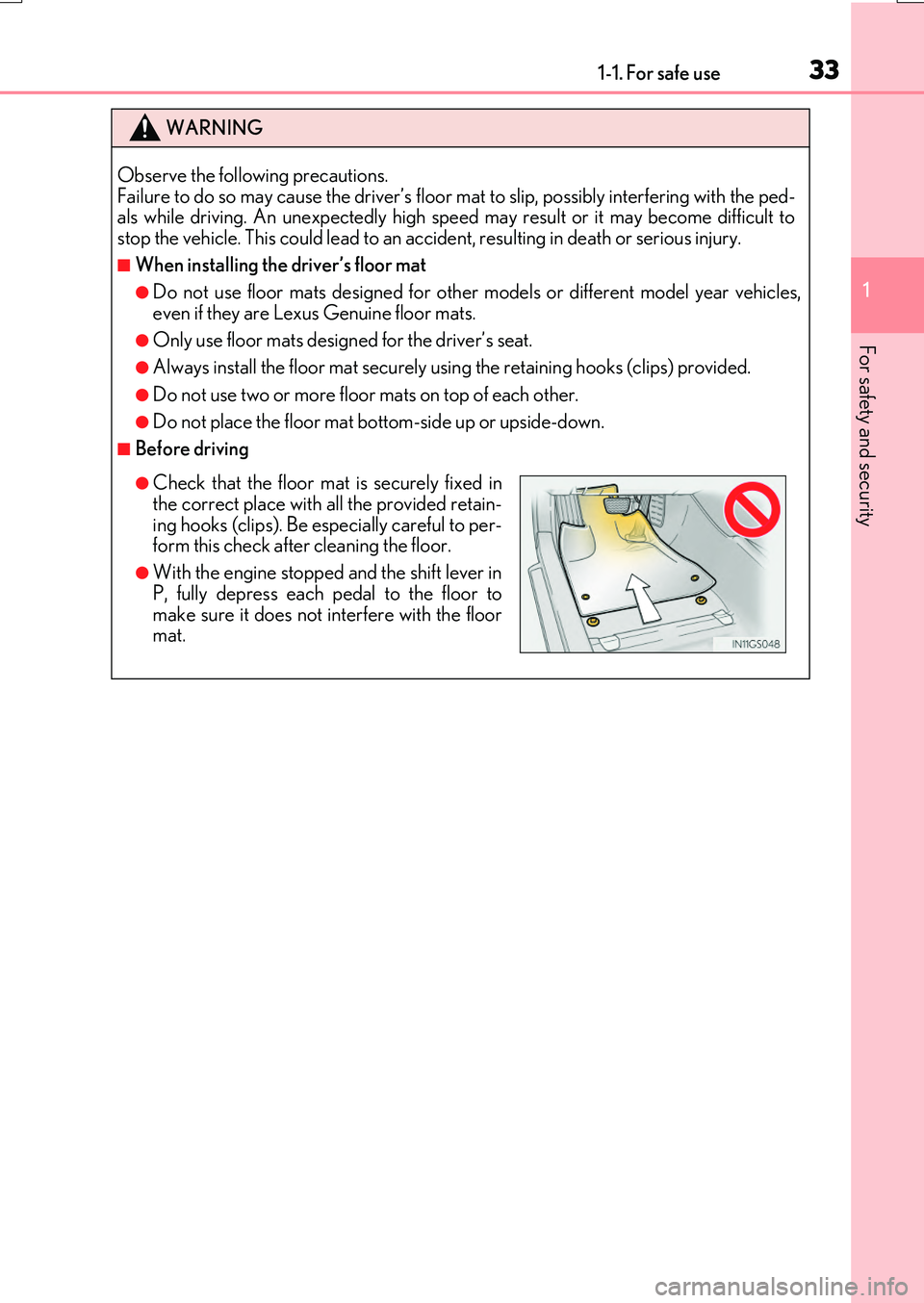
Observe the following precautions. Failure to do so may cause the driver’s floor mat to slip, possibly interfering with the ped-als while driving. An unexpect edly high speed may result or it may become difficult to
stop the vehicle. This could lead to an acci dent, resulting in death or serious injury.
■When installing the driver’s floor mat
●Do not use floor mats designed for other models or different model year vehicles,
even if they are Lexus Genuine floor mats.
●Only use floor mats designed for the driver’s seat.
●Always install the floor mat securely us ing the retaining hooks (clips) provided.
●Do not use two or more floor mats on top of each other.
●Do not place the floor mat bottom-side up or upside-down.
■Before driving
●Check that the floor mat is securely fixed in the correct place with all the provided retain-
ing hooks (clips). Be especially careful to per- form this check after cleaning the floor.
●With the engine stopped and the shift lever in
P, fully depress each pedal to the floor to make sure it does not interfere with the floormat.
Page 35 of 776
351-1. For safe use
1
For safety and security
RX350/RX200t_EE_OM48F32E
WARNING
Observe the following precautions. Failure to do so may result in death or serious injury.
●Do not adjust the position of the driver’s seat while driving.
Doing so could cause the driver to lose control of the vehicle.
●Do not place a cushion between the driver or passenger and the seatback. A cushion may prevent correct posture from being achieved, and reduce the effec-
tiveness of the seat be lt and head restraint.
●Do not place anything under the front seats. Objects placed under the front seats may become jammed in the seat tracks and stop
the seat from locking in place. This may lead to an accident and the adjustment mech- anism may also be damaged.
●Always observe the legal speed limit when driving on public roads.
●When driving over long distances, take regular breaks before you start to feel tired. Also, if you feel tired or sleepy while drivin g, do not force yourself to continue driving and take a break immediately.
Page 45 of 776
451-1. For safe use
1
For safety and security
RX350/RX200t_EE_OM48F32E
WARNING
■SRS airbag precautions
●Do not hang coat hangers or other hard objects on the coat hooks. All of these items
could become projectiles and may cause deat h or serious injury, should the SRS cur- tain shield airbags deploy.
●If a vinyl cover is put on the area where the SRS knee airbag will deploy, be sure to
remove it.
●Do not use seat accessories which cover the parts where the SRS side airbags and SRS seat cushion airbag inflate as they may interfere with inflation of the SRS airbags.
Such accessories may prevent the side airbags and SRS seat cushion airbag from activating correctly, disable the system or cause the side airbags and SRS seat cush-
ion airbag to inflate accidentally, re sulting in death or serious injury.
●Do not strike or apply significant levels of force to the areas around the SRS airbag components or the front doors.
Doing so can cause the SRS airbags to malfunction.
●Do not touch any of the component parts immediately after the SRS airbags have deployed (inflated) as they may be hot.
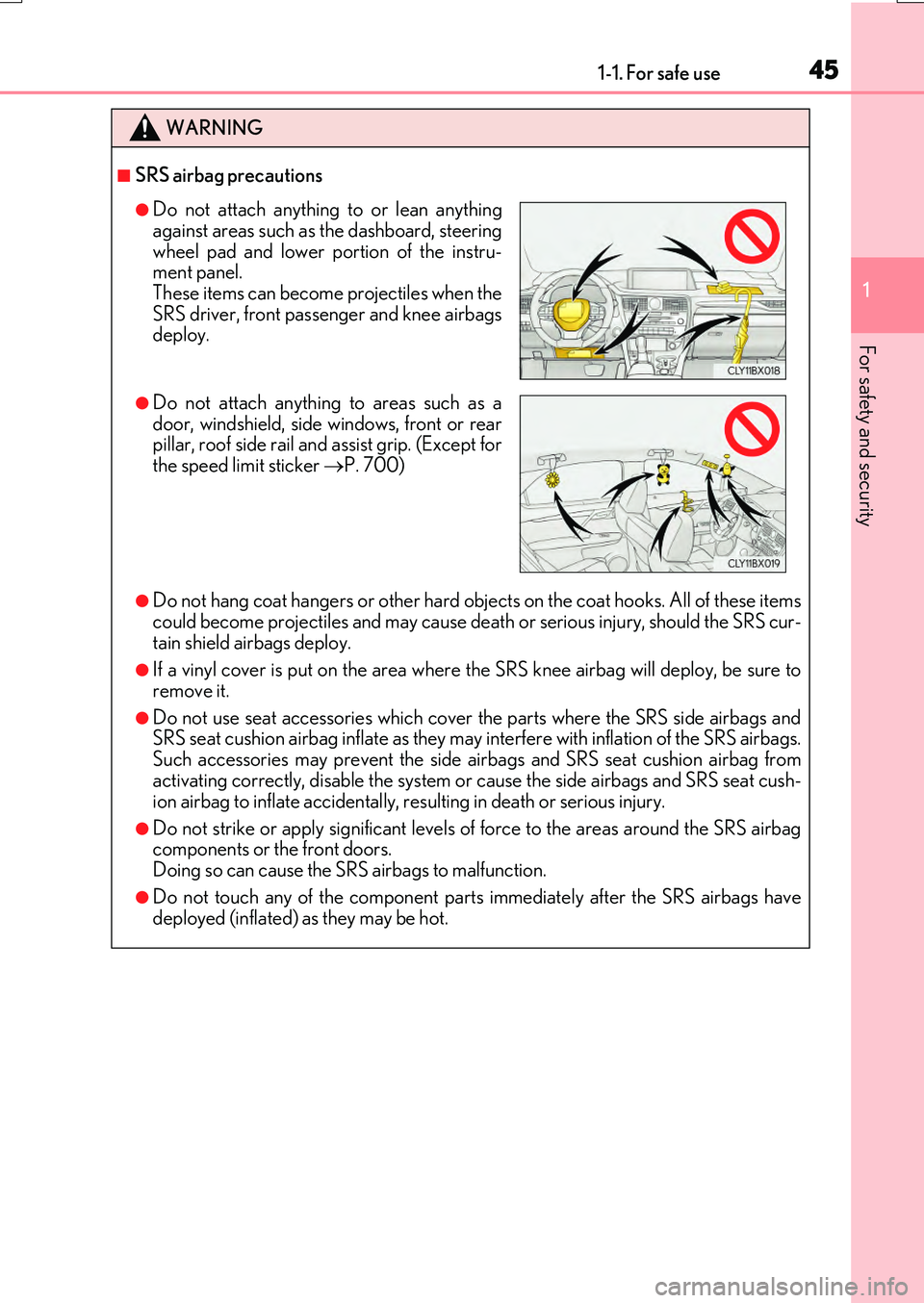
●Do not attach anything to or lean anything
against areas such as the dashboard, steering wheel pad and lower portion of the instru-ment panel.
These items can become projectiles when the SRS driver, front passenger and knee airbagsdeploy.
●Do not attach anything to areas such as adoor, windshield, side windows, front or rearpillar, roof side rail and assist grip. (Except for
the speed limit sticker P. 700)
Page 46 of 776
461-1. For safe use
RX350/RX200t_EE_OM48F32E
■If the SRS airbags deploy (inflate)
●Slight abrasions, burns, bruising etc., may be sustained from SRS airbags, due to the extremely high speed deployment (inflation) by hot gases.
●A loud noise and white powder will be emitted.
●Parts of the airbag module (steering wheel hub, airbag cover and inflator) as well as thefront seats, parts of the front and rear pillars , and roof side rails, may be hot for several
minutes. The airbag itself may also be hot.
●The windshield may crack.
●Vehicles with ERA-GLONASS: If the SRS ai rbags deploy, the system is designed to
send an emergency call* to the Public Safety Answer ing Point (PSAP), notifying them of the vehicle’s location (without needing to push the “SOS” button) and an agent willattempt to speak with the occupants to ascertain the level of emergency and assistance
required. If the occupants are unable to communicate, the agent automatically treats the call as an emergency and helps to di spatch the necessary emergency services. ( P. 578)
*: In some cases, the call cannot be made.(P. 580)
WARNING
■SRS airbag precautions
●If breathing becomes difficult after the SRS airbags have deployed, open a door or window to allow fresh air in, or leave the vehicle if it is safe to do so. Wash off any resi-
due as soon as possible to prevent skin irritation.
●If the areas where the SRS airbags are stored, such as the steering wheel pad and front and rear pillar garnishes, are damage d or cracked, have them replaced by any
authorized Lexus dealer or repairer, or an other duly qualified and equipped profes- sional.
■Modification and disposal of SRS airbag system components
Do not dispose of your vehicle or perform any of the following modifications without consulting any authorized Lexus dealer or repairer, or another duly qualified and equipped professional. The SRS airbags may malfunction or deploy (inflate) acciden-
tally, causing death or serious injury.
●Installation, removal, disassembly and repair of the SRS airbags
●Repairs, modifications, removal or repl acement of the steering wheel, instrument
panel, dashboard, seats or seat upholstery, fr ont, side and rear pillars, roof side rails, front door panels, front door trims, or front door speakers
●Modifications to the front door panel (such as making a hole in it)
●Repairs or modifications of the front fender, front bumper, or side of the occupant compartment
●Installation of a grille guard (bull bars, ka ngaroo bar, etc.), snow plows or winches
●Modifications to the vehicle’s suspension system
●Installation of electronic devices such as mobile two-way radios (RF-transmitter) and CD players
●Modifications to your vehicle for a person with a physical disability
Page 97 of 776
972. Instrument cluster
2
Instrument cluster
RX350/RX200t_EE_OM48F32E
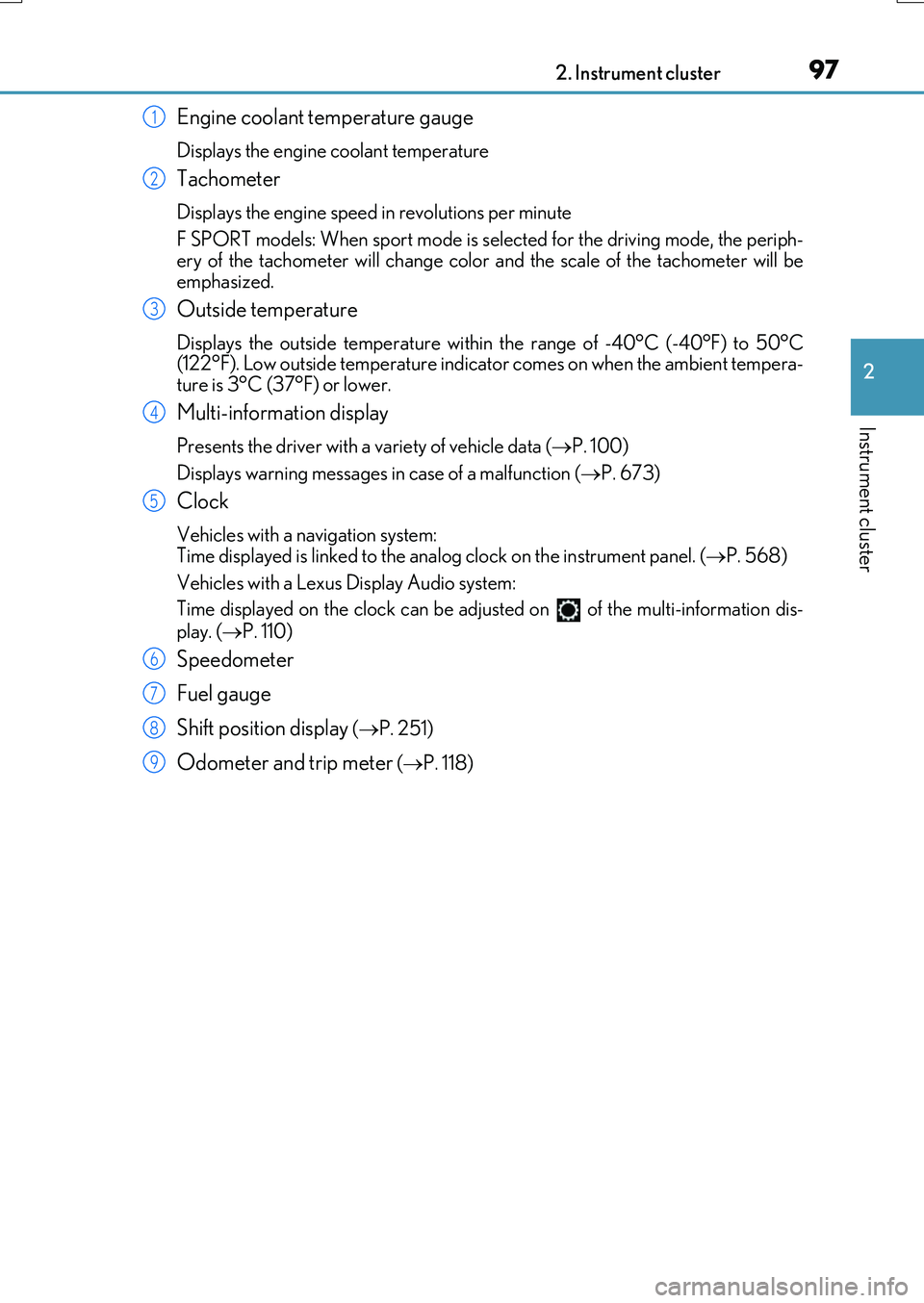
Engine coolant temperature gauge
Displays the engine coolant temperature
Tachometer
Displays the engine speed in revolutions per minute
F SPORT models: When sport mode is selected for the driving mode, the periph-
ery of the tachometer will change color and the scale of the tachometer will be emphasized.
Outside temperature
Displays the outside temperature within the range of -40°C (-40°F) to 50°C(122°F). Low outside temperature indicator comes on when the ambient tempera-
ture is 3°C (37°F) or lower.
Multi-information display
Presents the driver with a variety of vehicle data ( P. 100)
Displays warning messages in case of a malfunction ( P. 673)
Clock
Vehicles with a navigation system: Time displayed is linked to the analog clock on the instrument panel. (P. 568)
Vehicles with a Lexus Display Audio system:
Time displayed on the clock can be adju sted on of the multi-information dis-
play. ( P. 110)
Speedometer
Fuel gauge
Shift position display ( P. 251)
Odometer and trip meter (P. 118)
1
2
3
4
5
6
7
8
9
Page 101 of 776
1012. Instrument cluster
2
Instrument cluster
RX350/RX200t_EE_OM48F32E
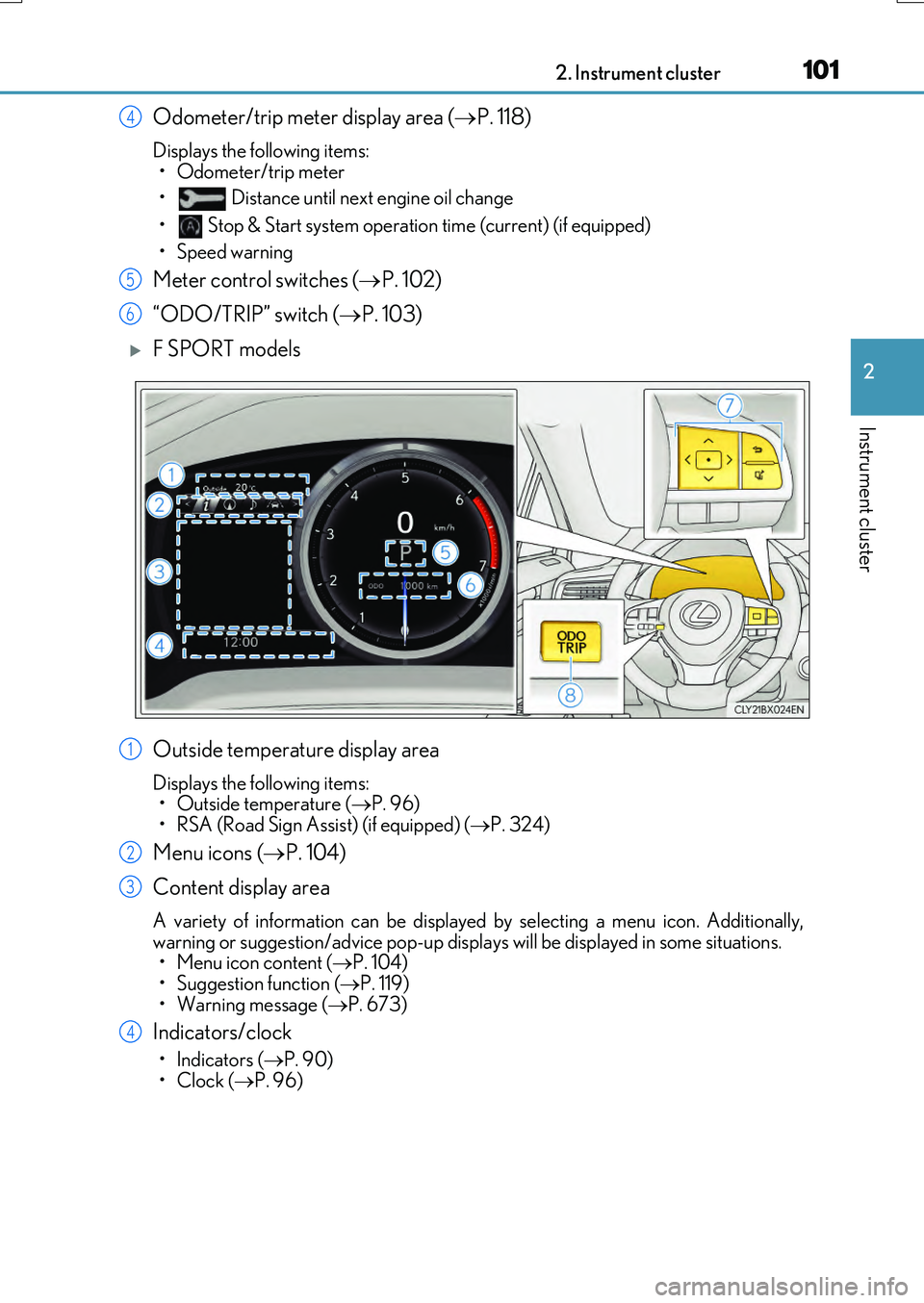
Odometer/trip meter display area (P. 118)
Displays the following items:
• Odometer/trip meter
• Distance until next engine oil change
• Stop & Start system operation time (current) (if equipped)
• Speed warning
Meter control switches ( P. 102)
“ODO/TRIP” switch ( P. 103)
F SPORT models
Outside temperature display area
Displays the following items: • Outside temperature ( P. 96)
• RSA (Road Sign Assist) (if equipped) ( P. 324)
Menu icons (P. 104)
Content display area
A variety of information can be displayed by selecting a menu icon. Additionally,
warning or suggestion/advice pop-up displa ys will be displayed in some situations. • Menu icon content ( P. 104) • Suggestion function ( P. 119)
• Warning message ( P. 673)
Indicators/clock
•Indicators (P. 90)
•Clock ( P. 96)
4
5
6
1
2
3
4
Page 102 of 776
1022. Instrument cluster
RX350/RX200t_EE_OM48F32E
Shift position display (P. 251)
Odometer/trip meter display area ( P. 118)
Displays the following items:
• Odometer/trip meter
• Distance until next engine oil change
• Stop & Start system operation time (current) (if equipped)
• Speed warning
Meter control switches ( P. 102)
“ODO/TRIP” switch ( P. 103)
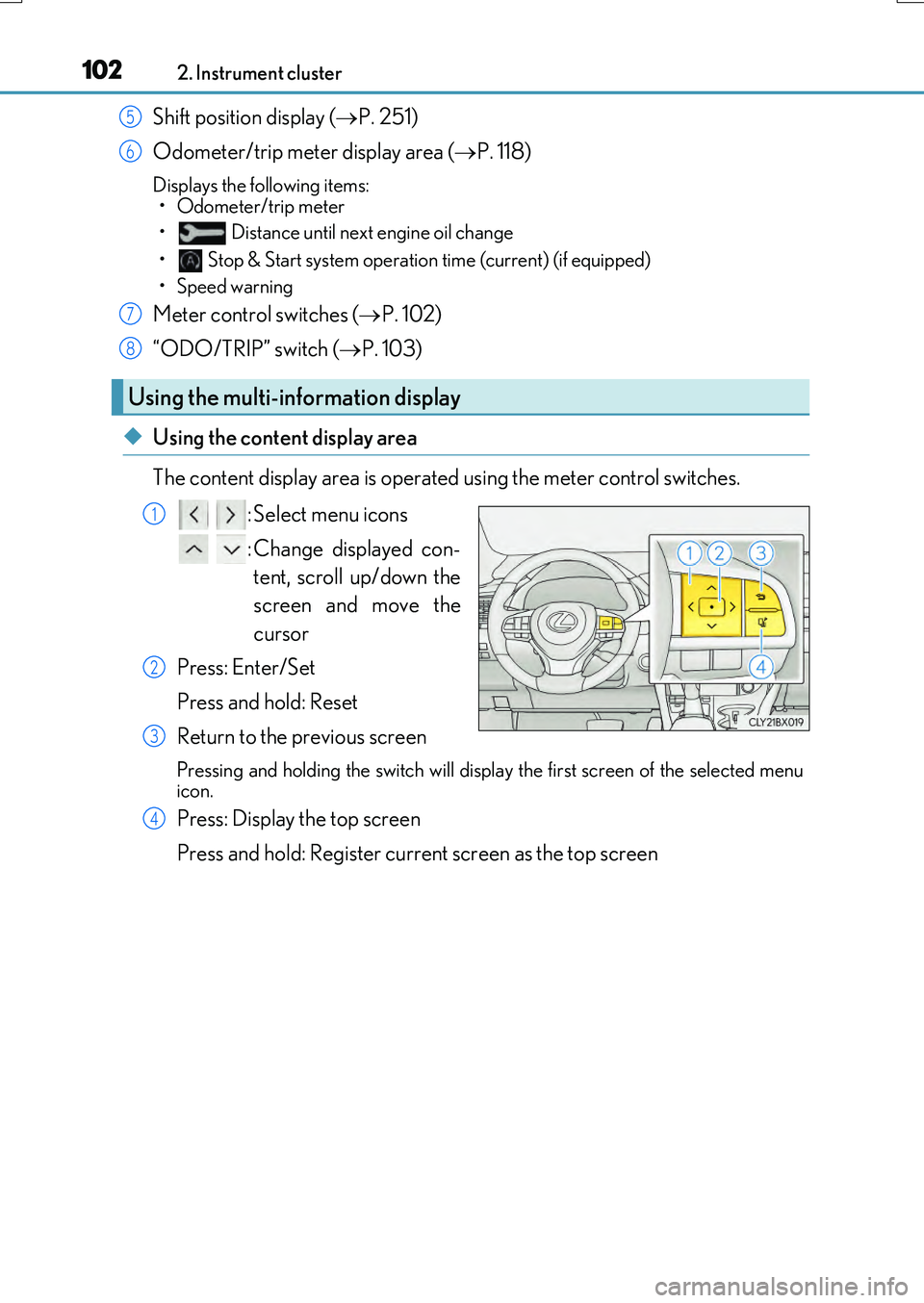
◆Using the content display area
The content display area is operated using the meter control switches. : Select menu icons
: Change displayed con- tent, scroll up/down the
screen and move the
cursor
Press: Enter/Set
Press and hold: Reset
Return to the previous screen
Pressing and holding the swit ch will display the first screen of the selected menu
icon.
Press: Display the top screen
Press and hold: Register current screen as the top screen
Using the multi-information display
5
6
7
8
1
2
3
4
Page 104 of 776
1042. Instrument cluster
RX350/RX200t_EE_OM48F32E
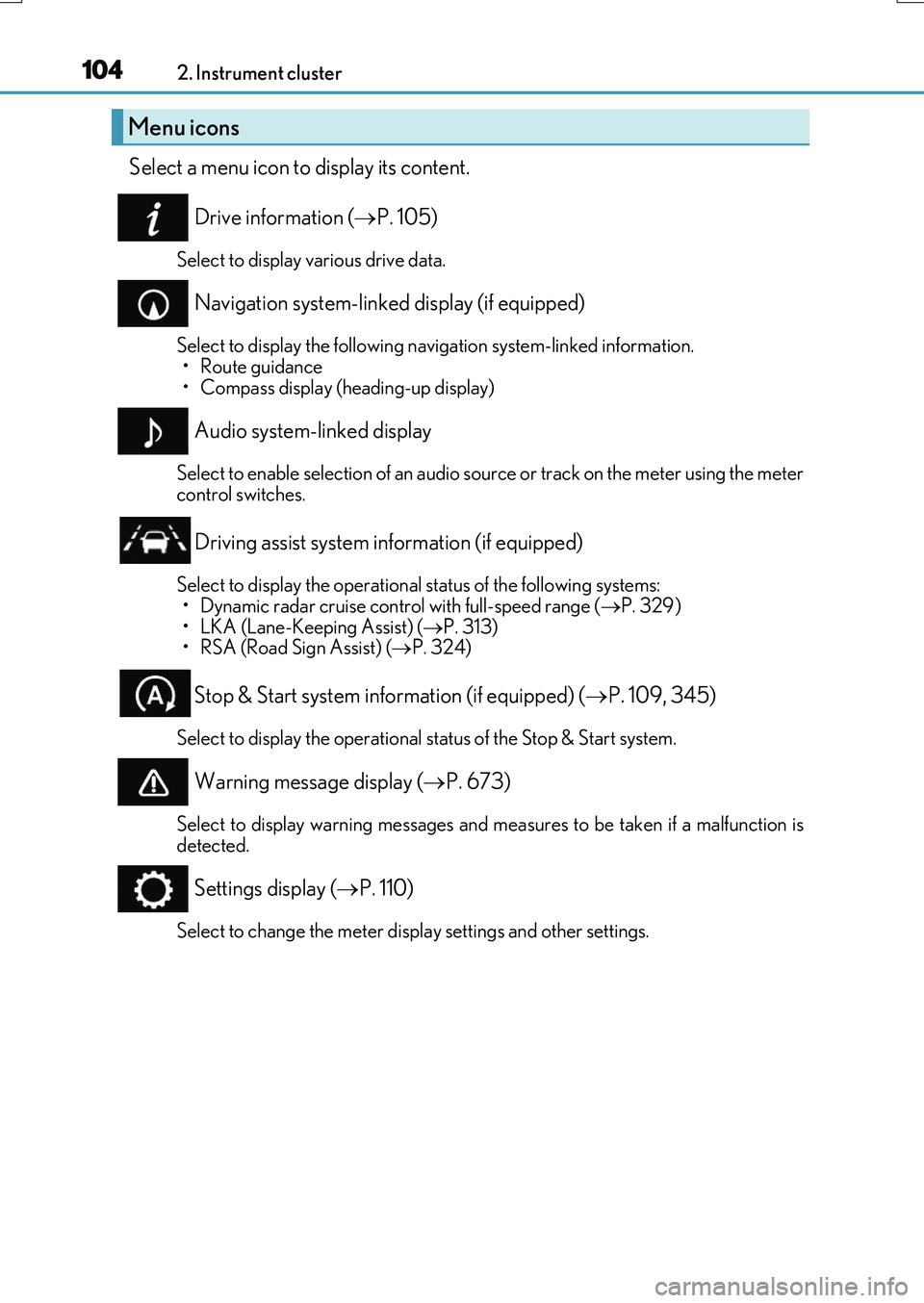
Select a menu icon to display its content.
Drive information ( P. 105)
Select to display various drive data.
Navigation system-linked display (if equipped)
Select to display the following navigation system-linked information.
•Route guidance • Compass display (heading-up display)
Audio system-linked display
Select to enable selection of an audio source or track on the meter using the metercontrol switches.
Driving assist system information (if equipped)
Select to display the operational status of the following systems: • Dynamic radar cruise control with full-speed range ( P. 329)
• LKA (Lane-Keeping Assist) ( P. 313) • RSA (Road Sign Assist) ( P. 324)
Stop & Start system information (if equipped) (P. 109, 345)
Select to display the operational status of the Stop & Start system.
Warning message display (P. 673)
Select to display warning messages and measures to be taken if a malfunction is detected.
Settings display ( P. 110)
Select to change the meter display settings and other settings.
Menu icons
Page 107 of 776
1072. Instrument cluster
2
Instrument cluster
RX350/RX200t_EE_OM48F32E
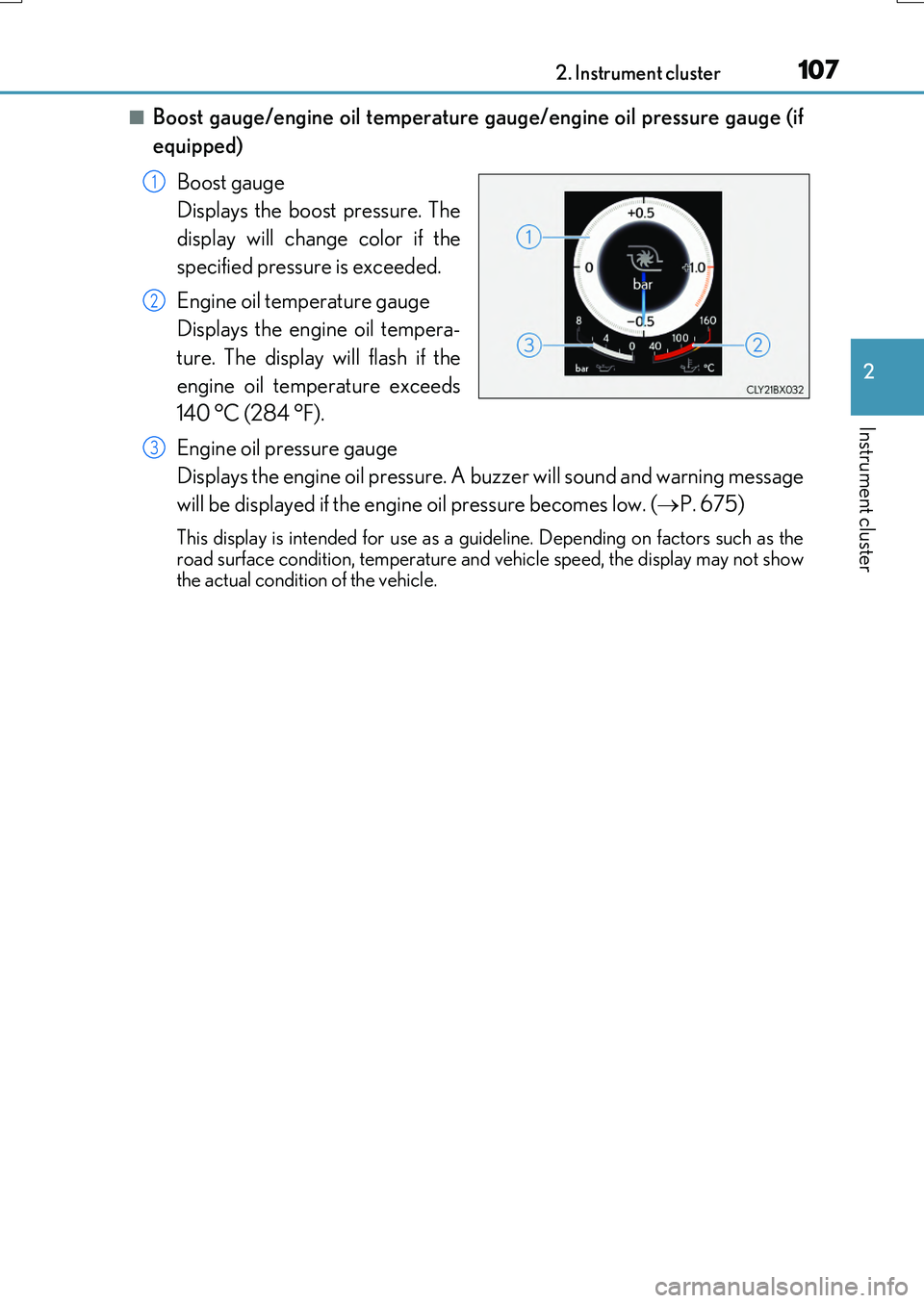
■Boost gauge/engine oil temperature gauge/engine oil pressure gauge (if
equipped)
Boost gauge
Displays the boost pressure. The
display will change color if the
specified pressure is exceeded.
Engine oil temperature gauge
Displays the engine oil tempera-
ture. The display will flash if the
engine oil temperature exceeds
140 °C (284 °F).
Engine oil pressure gauge
Displays the engine oil pressure. A buzzer will sound and warning message
will be displayed if the engine oil pressure becomes low. ( P. 675)
This display is intended for use as a guideline. Depending on factors such as the road surface condition, temperature and vehicle speed, the display may not show
the actual condition of the vehicle.
1
2
3
Page 112 of 776
1122. Instrument cluster
RX350/RX200t_EE_OM48F32E
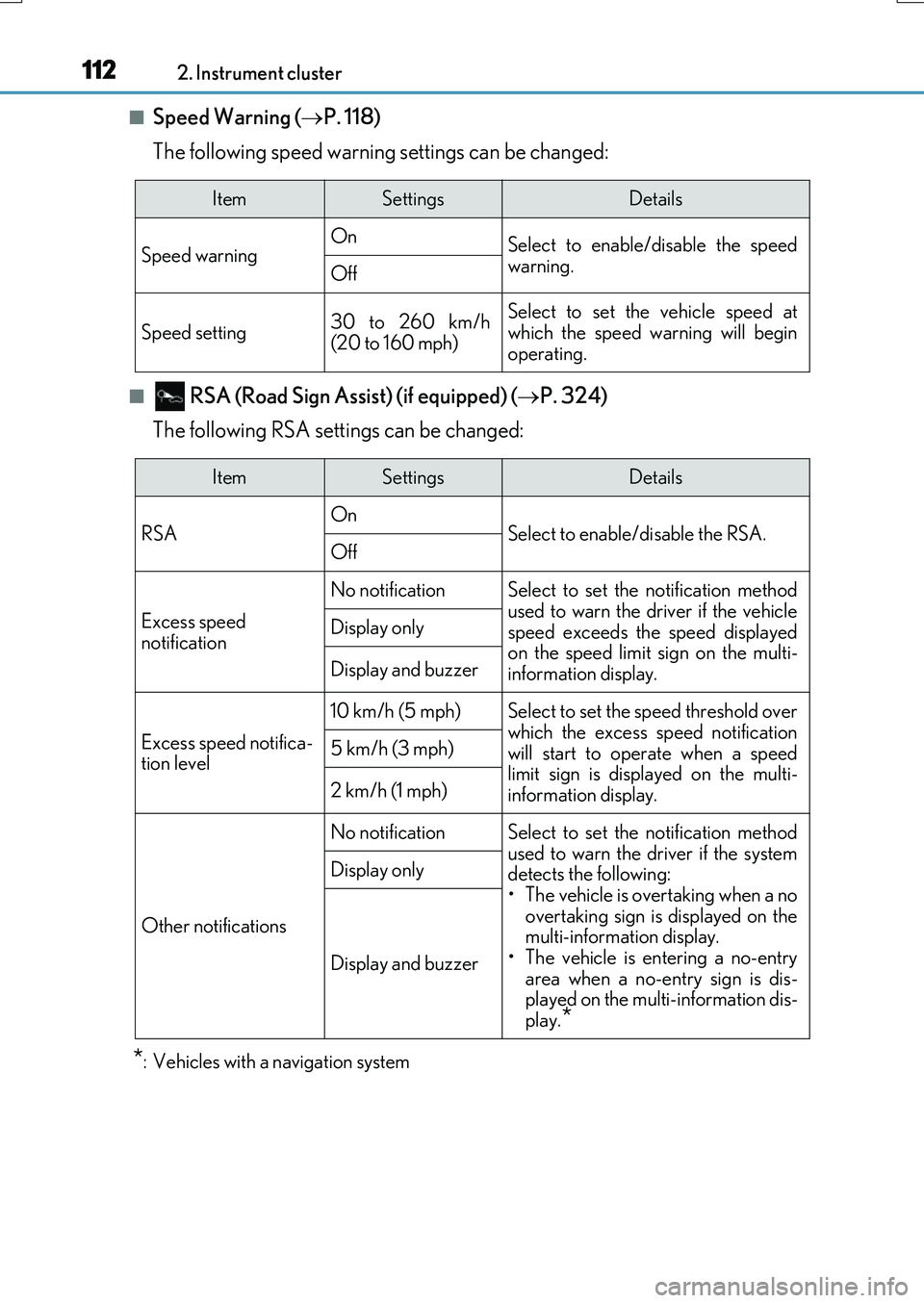
■Speed Warning (P. 118)
The following speed warning settings can be changed:
■ RSA (Road Sign Assi st) (if equipped) (P. 324)
The following RSA settings can be changed:
*: Vehicles with a navigation system
ItemSettingsDetails
Speed warning On Select to enable/disable the speed
warning.Off
Speed setting30 to 260 km/h (20 to 160 mph)
Select to set the vehicle speed atwhich the speed warning will begin
operating.
ItemSettingsDetails
RSA On Select to enable/disable the RSA.Off
Excess speed
notification
No notificationSelect to set the notification method
used to warn the driver if the vehicle speed exceeds the speed displayedon the speed limit sign on the multi-
information display.
Display only
Display and buzzer
Excess speed notifica- tion level
10 km/h (5 mph)Select to set the speed threshold overwhich the excess speed notification
will start to operate when a speed limit sign is disp layed on the multi- information display.
5 km/h (3 mph)
2 km/h (1 mph)
Other notifications
No notificationSelect to set the notification method
used to warn the driver if the system detects the following:• The vehicle is overtaking when a no
overtaking sign is displayed on the multi-information display.• The vehicle is entering a no-entry
area when a no-entry sign is dis- played on the multi-information dis-play.*
Display only
Display and buzzer