phone LEXUS RX350 2011 Owner's Guide
[x] Cancel search | Manufacturer: LEXUS, Model Year: 2011, Model line: RX350, Model: LEXUS RX350 2011Pages: 821, PDF Size: 13.27 MB
Page 437 of 821
367
3-4. Using the hands-free phone system (for mobile phones)
3
Interior features
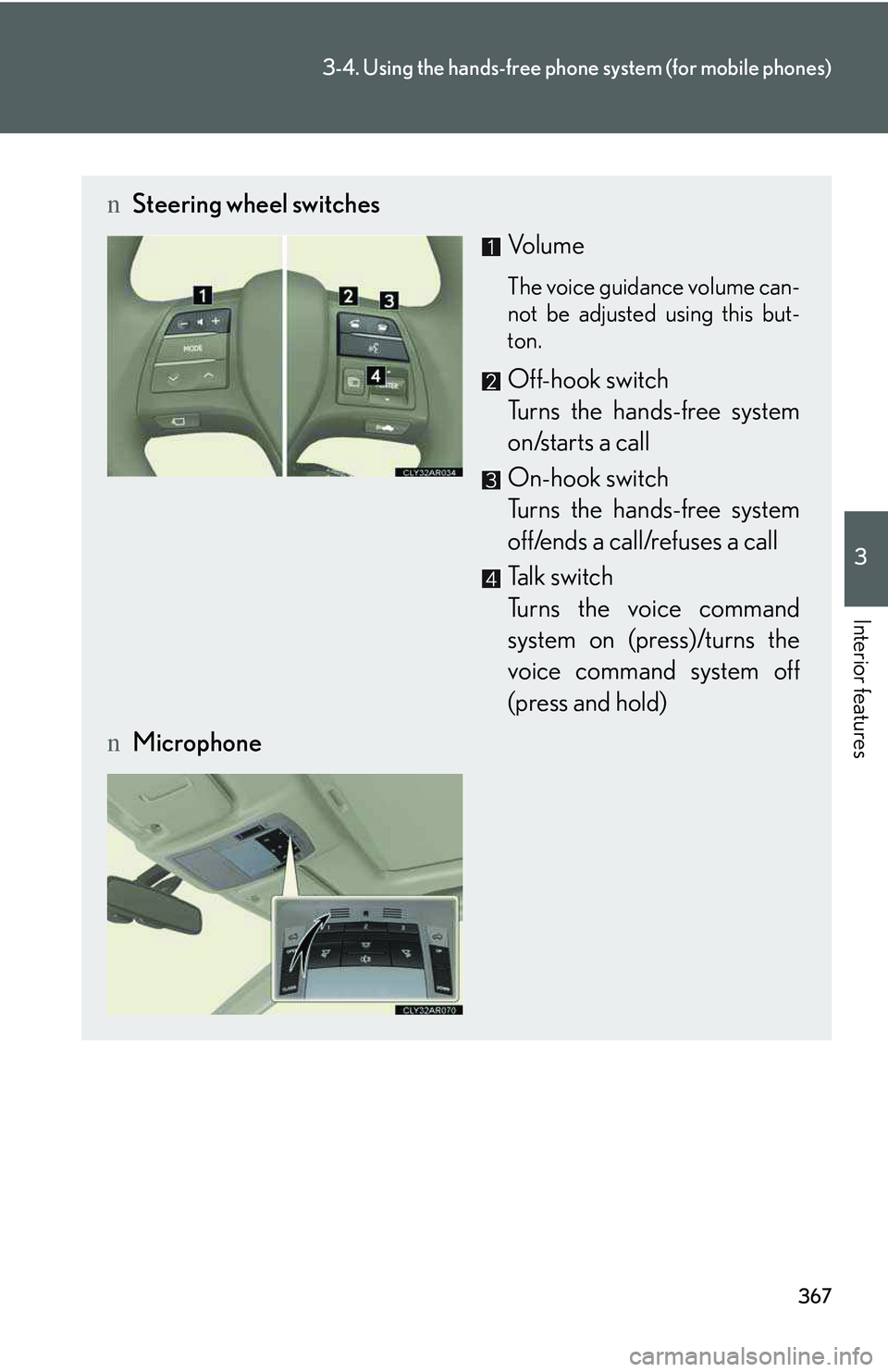
nSteering wheel switches
Vol u m e
The voice guidance volume can-
not be adjusted using this but-
ton.
Off-hook switch
Turns the hands-free system
on/starts a call
On-hook switch
Turns the hands-free system
off/ends a call/refuses a call
Talk switch
Turns the voice command
system on (press)/turns the
voice command system off
(press and hold)
nMicrophone
Page 438 of 821
368
3-4. Using the hands-free phone system (for mobile phones)
Operating the system using voice commands
By following voice guidance instructions output from the speaker, voice
commands enable to the operation of the hands-free phone system with-
out the need to check the display or operate .
nOperation procedure when using voice commands
Press the talk switch and follow voice guidance instructions.
nAuxiliary commands when using voice commands
The following auxiliary commands can be used when operating the
system using a voice command:
“Cancel”: Exits the hands-free phone system
“Repeat”: Repeats the previous voice guidance instruction
“Go back”: Returns to the previous procedure
“Help”: Reads aloud the function summary if a help comment is regis-
tered for the selected function
Page 439 of 821
369
3-4. Using the hands-free phone system (for mobile phones)
3
Interior features
Using the hands-free phone system for the first time
Before using the hands-free phone system, it is necessary to register a
mobile phone in the system. The system will enter phone registration
mode automatically when starting the system with no mobile phone reg-
istered. Follow the procedure below to register (pair) a mobile phone:
Press the off-hook switch or the talk switch.
The introductory guidance and phone name registration instructions are
heard.
Select “Pair Phone” using a voice command or .
Register a phone name by either of the following methods:
a. Select “Record Name” using , and say the name to be
registered.
b. Press the talk switch and say the name to be registered.
A voice guidance instruction to confirm the input is heard.
Select “Confirm” using a voice command or .
A passkey is displayed and heard, and a voice guidance instruction for
inputting the passkey into the mobile phone is heard.
Input the passkey into the mobile phone.
Refer to the manual that comes with the mobile phone for the operation
of the phone.
Guidance for registration completion is heard.
If the mobile phone has a Bluetooth® audio player, the audio player can
be registered at the same time. A voice guidance instruction to register a
Bluetooth® audio player is heard.
STEP1
STEP2
STEP3
STEP4
STEP5
Page 440 of 821
370
3-4. Using the hands-free phone system (for mobile phones)
Select “Yes” or “No” using a voice command or .
(Bluetooth® audio player →P. 343)
Menu list of the hands-free phone system
nNormal operation
First menuSecond
menuThird menuOperation detail
“Callback”--Dialing a number stored in the
incoming call history memory
“Redial”--Dialing a number stored in the
outgoing call history memory
“Phonebook”
“A d d E n t r y ”-Adding a new phone number
“Change
Name”-Changing the registered name
in the phone book
“Delete
Entry”-Deleting the registered data
“Del Spd
Dial”-Deleting speed dials
“List
Names”-Listing the registered data
“Speed
Dial”-Setting speed dials
STEP6
Page 441 of 821
371
3-4. Using the hands-free phone system (for mobile phones)
3
Interior features
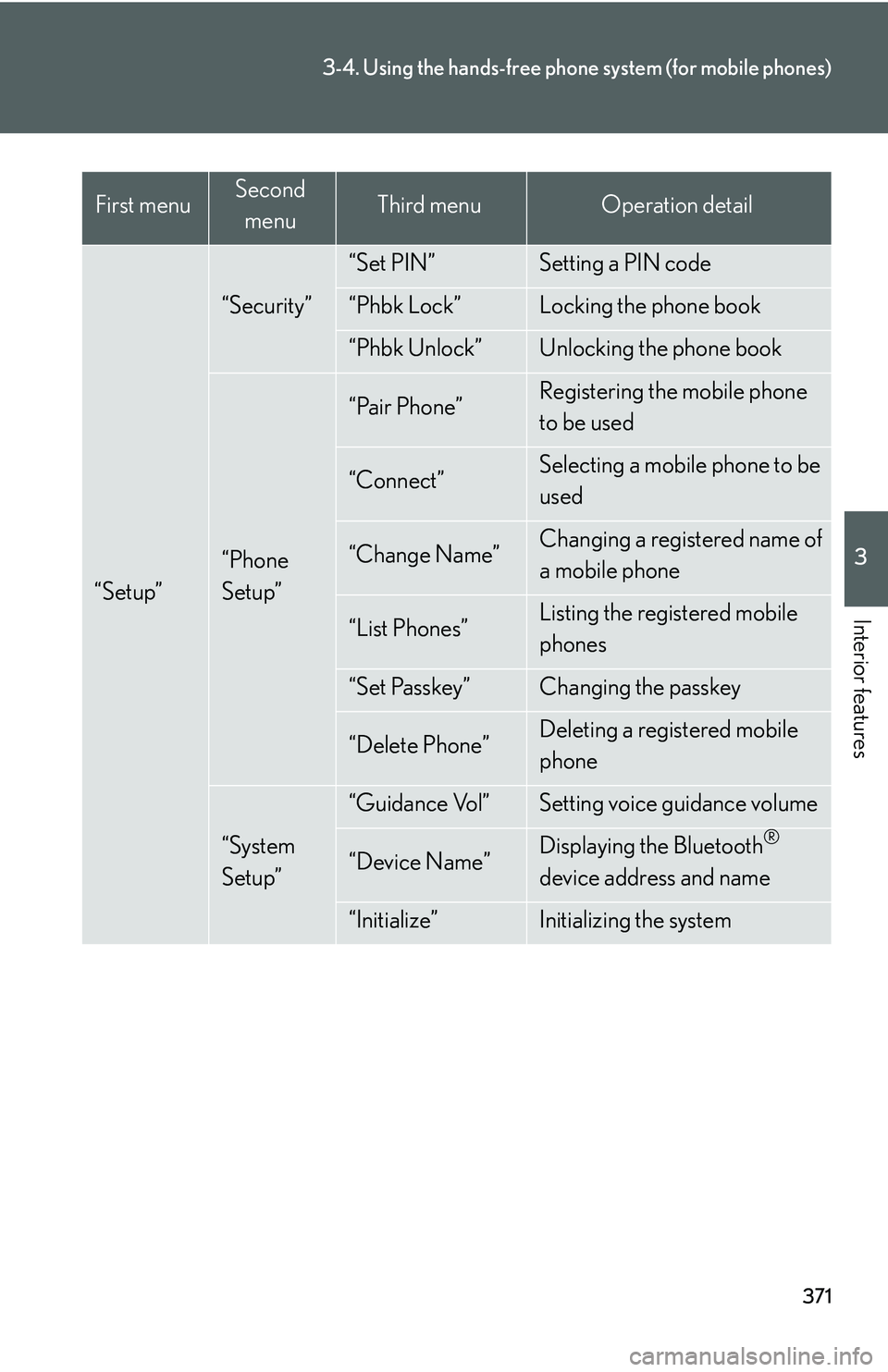
“Setup”
“Security”
“Set PIN”Setting a PIN code
“Phbk Lock”Locking the phone book
“Phbk Unlock”Unlocking the phone book
“Phone
Setup”
“Pair Phone”Registering the mobile phone
to be used
“Connect”Selecting a mobile phone to be
used
“Change Name”Changing a registered name of
a mobile phone
“List Phones”Listing the registered mobile
phones
“Set Passkey”Changing the passkey
“Delete Phone”Deleting a registered mobile
phone
“System
Setup”
“Guidance Vol”Setting voice guidance volume
“Device Name”Displaying the Bluetooth®
device address and name
“Initialize”Initializing the system
First menuSecond
menuThird menuOperation detail
Page 442 of 821

372
3-4. Using the hands-free phone system (for mobile phones)
nUsing a short cut key
First menuSecond menuOperation detail
“Dial XXX (name)”-Dialing a name registered in the
phone book
“Phone book add
Entry”-Adding a new phone number
“Phone book Change
name”-Changing a registered name in
the phone book
“Phone book Delete
Entry”-Deleting the registered data
“Phone book List
names”-Listing the registered data
“Phone book Set
Speed Dial”-Setting speed dials
“Phone book Delete
Speed Dial”-Deleting speed dials
“Dial XXX (number)”-Dialing by inputting a number
“Phonebook”“Phonebook Unlock”Unlocking the phone book
“Phonebook Lock”Locking the phone book
Page 443 of 821

373
3-4. Using the hands-free phone system (for mobile phones)
3
Interior features
nAutomatic volume adjustment
When vehicle speed reaches 50 mph (80 km/h) or more, the volume automati-
cally increases. The volume returns to the previous volume setting when vehicle
speed drops to 43 mph (70 km/h) or less.
nWhen using a voice command
For numbers, say a combination of single digits from zero to nine, # (pound),
∗ (star), and + (plus).
Say the command correctly and clearly.
nSituations that the system may not recognize your voice
lWhen driving on rough roads
lWhen driving at high speeds
lWhen air is blowing out of the vents onto the microphone
lWhen the air conditioning fan emits a loud noise
nOperations that cannot be performed while driving
lOperating the system with
lRegistering a mobile phone to the system
nChanging the passkey
→P. 3 8 2
Page 444 of 821
374
3-4. Using the hands-free phone system (for mobile phones)
Making a phone call
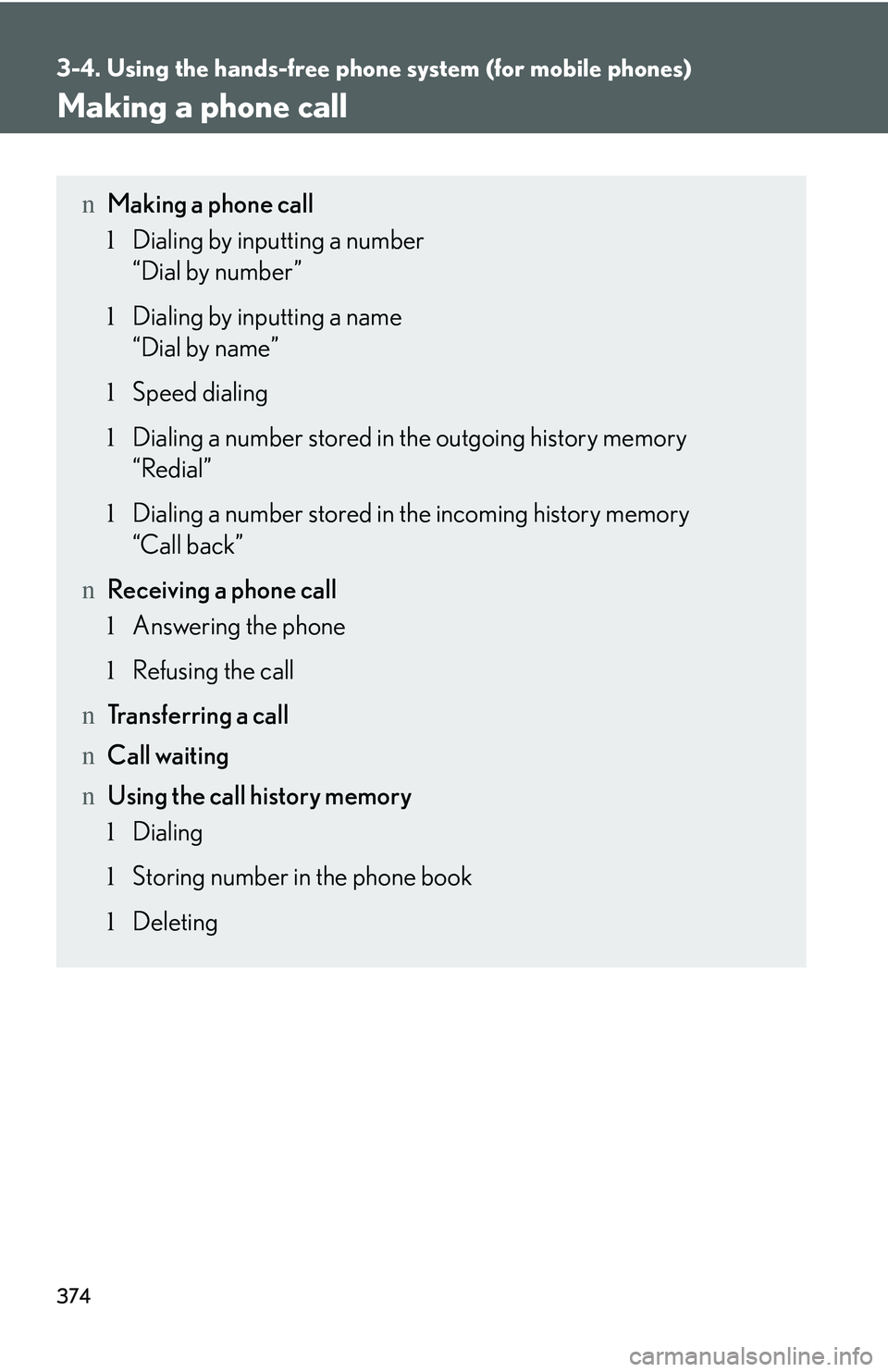
nMaking a phone call
lDialing by inputting a number
“Dial by number”
lDialing by inputting a name
“Dial by name”
lSpeed dialing
lDialing a number stored in the outgoing history memory
“Redial”
lDialing a number stored in the incoming history memory
“Call back”
nReceiving a phone call
lAnswering the phone
lRefusing the call
nTransferring a call
nCall waiting
nUsing the call history memory
lDialing
lStoring number in the phone book
lDeleting
Page 445 of 821

375
3-4. Using the hands-free phone system (for mobile phones)
3
Interior features
Dialing by inputting a number
Press the talk switch and say “Dial by number”.
Press the talk switch and say the phone number.
Dial by one of the following methods:
a. Press the off-hook switch.
b. Press the talk switch and say “Dial”.
c. Select “Dial” using .
Dialing by inputting a name
Press the talk switch and say “Dial by name”.
Select a registered name to be input by either of the following
methods:
a. Press the talk switch and say a registered name.
b. Press the talk switch and say “List Names”. Press the talk switch
when the desired name is read aloud.
Dial by one of the following methods:
a. Press the off-hook switch.
b. Press the talk switch and say “Dial”.
c. Select “Dial” using .
Speed dialing
Press the off-hook switch.
Press the preset button in which the desired number is registered.
Press the off-hook switch.
STEP1
STEP2
STEP3
STEP1
STEP2
STEP3
STEP1
STEP2
STEP3
Page 446 of 821
376
3-4. Using the hands-free phone system (for mobile phones)
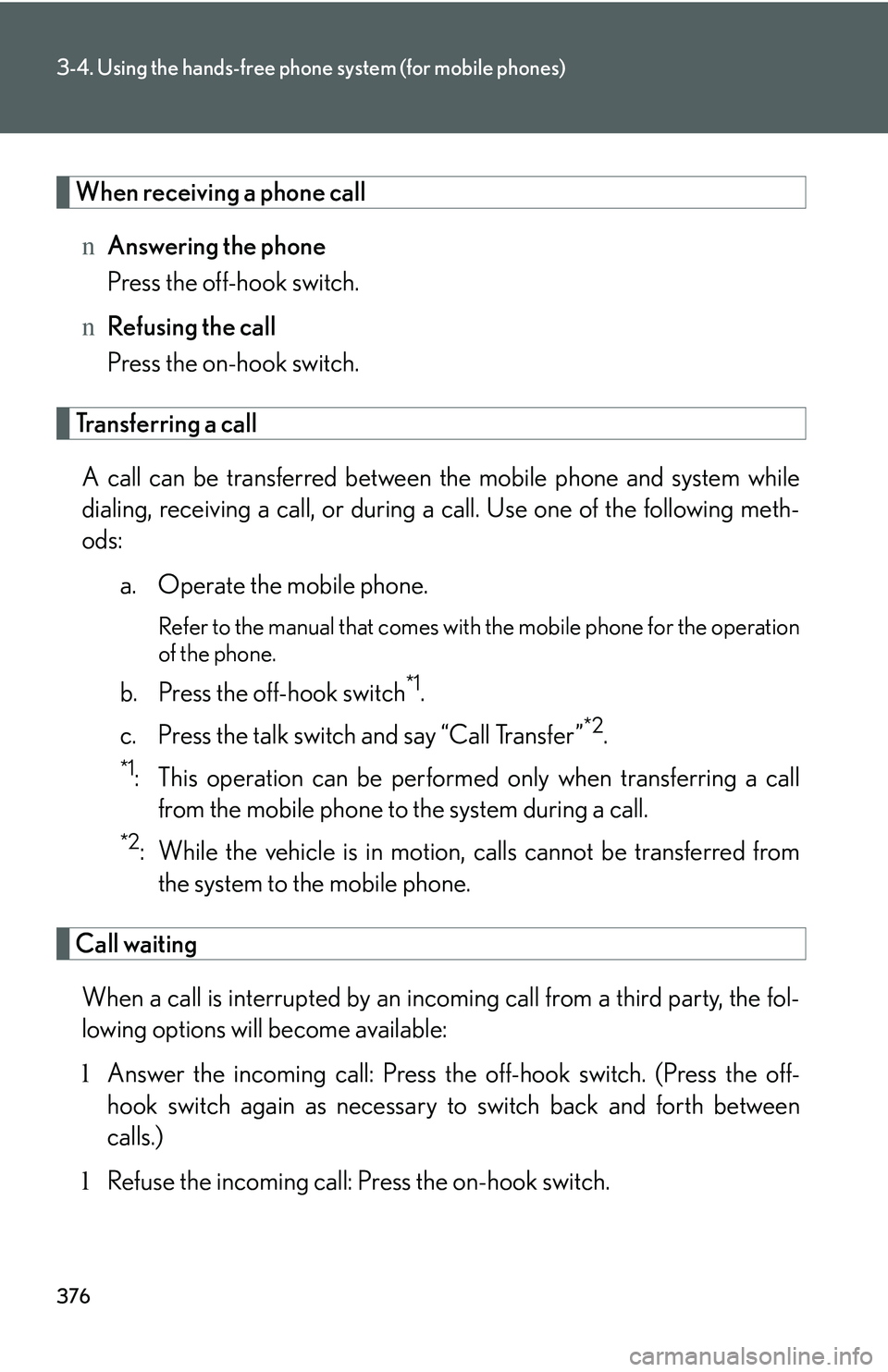
When receiving a phone call
nAnswering the phone
Press the off-hook switch.
nRefusing the call
Press the on-hook switch.
Transferring a call
A call can be transferred between the mobile phone and system while
dialing, receiving a call, or during a call. Use one of the following meth-
ods:
a. Operate the mobile phone.
Refer to the manual that comes with the mobile phone for the operation
of the phone.
b. Press the off-hook switch*1.
c. Press the talk switch and say “Call Transfer”*2.
*1: This operation can be performed only when transferring a call
from the mobile phone to the system during a call.
*2: While the vehicle is in motion, calls cannot be transferred from
the system to the mobile phone.
Call waiting
When a call is interrupted by an incoming call from a third party, the fol-
lowing options will become available:
lAnswer the incoming call: Press the off-hook switch. (Press the off-
hook switch again as necessary to switch back and forth between
calls.)
lRefuse the incoming call: Press the on-hook switch.