wheel LEXUS RX350 2011 Repair Manual
[x] Cancel search | Manufacturer: LEXUS, Model Year: 2011, Model line: RX350, Model: LEXUS RX350 2011Pages: 821, PDF Size: 13.27 MB
Page 327 of 821
255
2-5. Driving information
2
When driving
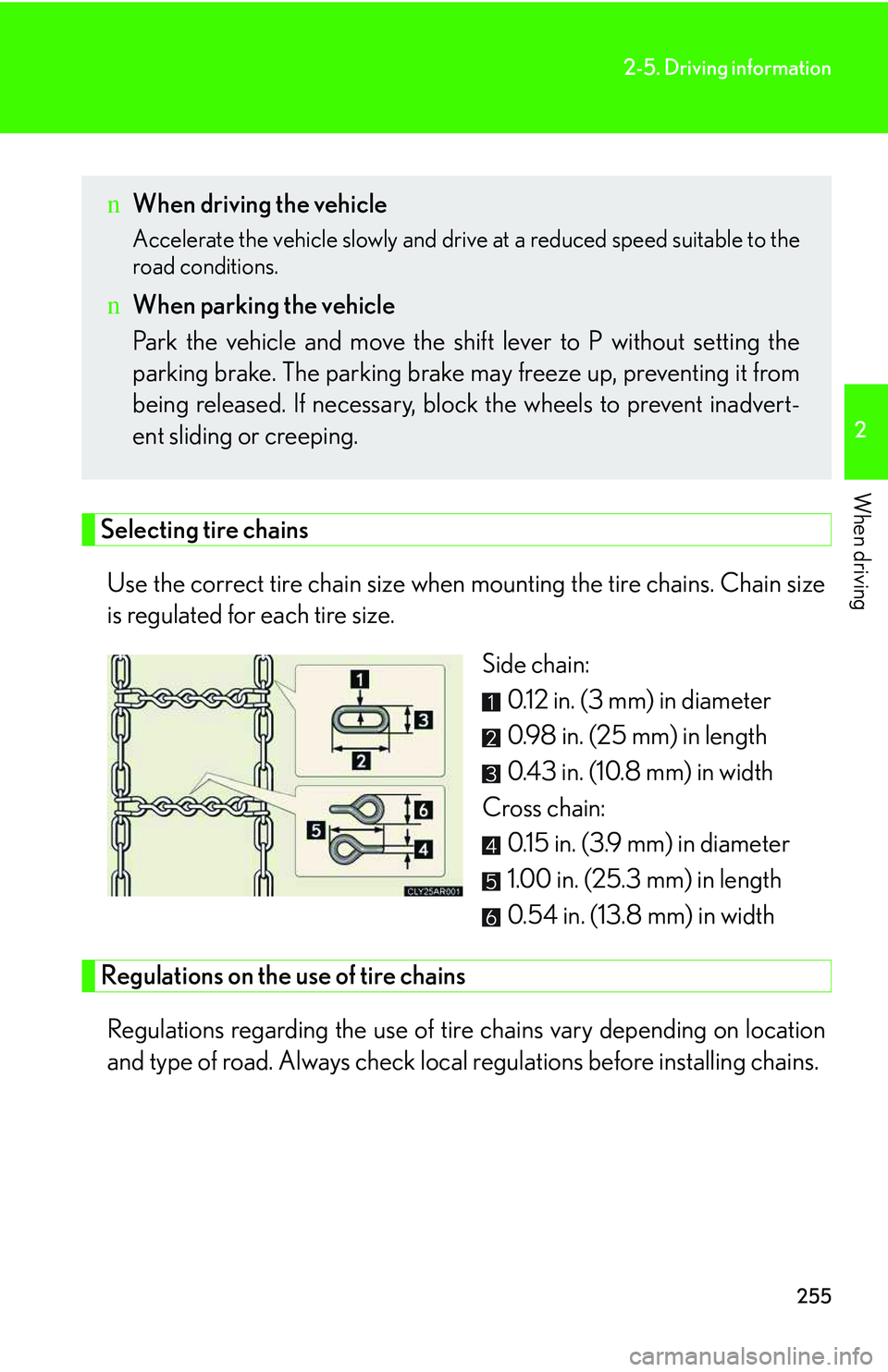
Selecting tire chains
Use the correct tire chain size when mounting the tire chains. Chain size
is regulated for each tire size.
Side chain:
0.12 in. (3 mm) in diameter
0.98 in. (25 mm) in length
0.43 in. (10.8 mm) in width
Cross chain:
0.15 in. (3.9 mm) in diameter
1.00 in. (25.3 mm) in length
0.54 in. (13.8 mm) in width
Regulations on the use of tire chains
Regulations regarding the use of tire chains vary depending on location
and type of road. Always check local regulations before installing chains.
nWhen driving the vehicle
Accelerate the vehicle slowly and drive at a reduced speed suitable to the
road conditions.
nWhen parking the vehicle
Park the vehicle and move the shift lever to P without setting the
parking brake. The parking brake may freeze up, preventing it from
being released. If necessary, block the wheels to prevent inadvert-
ent sliding or creeping.
Page 328 of 821
256
2-5. Driving information
nTire chain installation
Observe the following precautions when installing and removing chains:
lInstall and remove tire chains in a safe location.
lInstall tire chains on the front tires only. Do not install tire chains on the rear tires.
lInstall the tire chains on front tires as tightly as possible. Retighten chains after
driving 1 /4 ⎯ 1/2 mile (0.5 ⎯ 1.0 km).
lInstall tire chains following the instructions provided with the tire chains.
CAUTION
nDriving with snow tires
Observe the following precautions to reduce the risk of accidents.
Failure to do so may result in a loss of vehicle control and cause death or serious
injury.
lUse tires of the size specified for your vehicle.
lMaintain the recommended level of air pressure.
lDo not drive in excess of 75 mph (120 km/h), regardless of the type of snow tires
being used.
lUse snow tires on all, not just some wheels.
nDriving with tire chains
Observe the following precautions to reduce the risk of accidents.
Failure to do so may result in the vehicle being unable to be driven safely, and may
cause death or serious injury.
lDo not drive in excess of the speed limit specified for the tire chains being used,
or 30 mph (50 km/h), whichever is lower.
lAvoid driving on bumpy road surfaces or over potholes.
lAvoid sudden turns and braking, as use of chains may adversely affect vehicle
handling.
lSlow down sufficiently before entering a curve to ensure that vehicle control is
maintained.
Page 336 of 821
264
2-5. Driving information
Trailer towing tips
Your vehicle will handle differently when towing a trailer. In order to avoid
accident, death or serious injury, keep the following in mind when towing:
lBefore starting out, check the trailer lights and the vehicle-trailer con-
nections. Recheck after driving a short distance.
lPractice turning, stopping and reversing with the trailer attached in an
area away from traffic until you become accustomed to the feel of the
vehicle.
lReversing with a trailer attached is difficult and requires practice. Grip
the bottom of the steering wheel and move your hand to the left to
move the trailer to the left. Move your hand to the right to move the
trailer to right. (This is generally opposite to reversing without a trailer
attached.) Avoid sharp or prolonged turning. Have someone guide
you when reversing to reduce the risk of an accident.
lAs stopping distance is increased when towing a trailer, vehicle-to-
vehicle distance should be increased. For each 10 mph (16 km/h) of
speed, allow at least one vehicle and trailer length.
lAvoid sudden braking as you may skid, resulting in jackknifing and loss
of control. This is especially true on wet or slippery surfaces.
lAvoid jerky starts or sudden acceleration.
lAvoid jerky steering and sharp turns, and slow down before making
turns.
lNote that when making a turn, the trailer wheels will be closer than the
vehicle wheels to the inside of the turn. Compensate by making a
larger than normal turning radius.
Page 337 of 821
265
2-5. Driving information
2
When driving
lCrosswinds and rough roads will adversely affect handling of your
vehicle and trailer, causing sway. Periodically check the rear to prepare
for being passed by large trucks or buses, which may cause your vehi-
cle and trailer to sway. If swaying occurs, firmly grip the steering wheel,
reduce speed immediately but gradually, and steer straight ahead.
Never increase speed. If you make no extreme correction with the
steering or brakes, your vehicle and trailer will stabilize.
lTake care when passing other vehicles. Passing requires considerable
distance. After passing a vehicle, do not forget the length of your
trailer, and be sure you have plenty of room before changing lanes.
lIn order to maintain engine braking efficiency when driving on a long
steep downgrade, do not use overdrive. Transmission shift range posi-
tion must be in 4 in S mode.
lDue to the added load of the trailer, your vehicle's engine may over-
heat on hot days (at temperatures over 85°F [30°C]) when driving up
a long or steep grade. If the engine coolant temperature gauge indi-
cates overheating, immediately turn off the air conditioning (if in use),
pull your vehicle off the road and stop in a safe spot. (→P. 587)
lAlways place wheel blocks under both the vehicle and the trailer
wheels when parking. Apply the parking brake firmly, and put the
transmission in P. Avoid parking on a slope, but if unavoidable, do so
only after performing the following:
Apply the brakes and keep them applied.
Have someone place wheel blocks under both the vehicle and
trailer wheels.
When the wheel blocks are in place, release the brakes slowly
until the blocks absorb the load.
Apply the parking brake firmly.
Shift into P and turn off the engine.
STEP1
STEP2
STEP3
STEP4
STEP5
Page 338 of 821
266
2-5. Driving information
lWhen restarting after parking on a slope:
With the transmission in the P position, start the engine. Be sure
to keep the brake pedal depressed.
Shift into 3, 2, 1, or the R position (if reversing).
Release the parking brake and brake pedal, and slowly pull or
back away from the wheel blocks. Stop and apply the brakes.
Have someone retrieve the blocks.
nBefore towing
Check that the following conditions are met:
lThe vehicle's tires are properly inflated. (→P. 4 8 7 )
lTrailer tires are inflated according to the trailer manufacturer's recommendation.
lAll trailer lights work.
lAll lights work each time you connect them.
lThe trailer ball is set up at the proper height for the coupler on the trailer.
lThe vehicle remains level when a loaded or unloaded trailer is hitched. Do not
drive if the vehicle is not level, and check for improper tongue load, overloading,
worn suspension, or other possible causes.
lThe trailer cargo is securely loaded.
lThe rear view mirrors conform to all applicable federal, state/provincial or local
regulations. If they do not, install rear view mirrors appropriate for towing pur-
poses.
nBreak-in schedule
If your vehicle is new or equipped with any new power train components (such as
an engine, transmission, differential and wheel bearing), Lexus recommends that
you do not tow a trailer until it has been driven for over 500 miles (800 km).
However, avoid full throttle acceleration.
nMaintenance
lIf you tow a trailer, your vehicle will require more frequent maintenance due to
the additional load. (See “Warranty and Services Guide”, “Owner's Manual Sup-
plement” or “Scheduled Maintenance”.)
lRetighten the fixing bolts of the towing ball and bracket after approximately 600
miles (1000 km) of trailer towing.
STEP1
STEP2
STEP3
STEP4
Page 341 of 821
269
2-5. Driving information
2
When driving
NOTICE
nWhen installing a trailer hitch
lUse only the position recommended by your Lexus dealer. Do not install the
trailer hitch on the bumper; this may cause body damage.
lDo not use axle-mounted hitches, as they can cause damage to the axle housing,
wheel bearings, wheels or tires.
nSafety chain
A safety chain must always be used between the towing vehicle and the trailer.
Leave sufficient slack in the chain for turns. The chain should cross under the trailer
tongue to prevent the tongue from dropping to the ground in the case that it
becomes damaged or separated. For the correct safety chain installation proce-
dure, ask your Lexus dealer.
nDo not directly splice trailer lights
Directly splicing trailer lights may damage your vehicle's electrical system and
cause a malfunction.
Page 342 of 821
270
2-5. Driving information
Dinghy towing
NOTICE
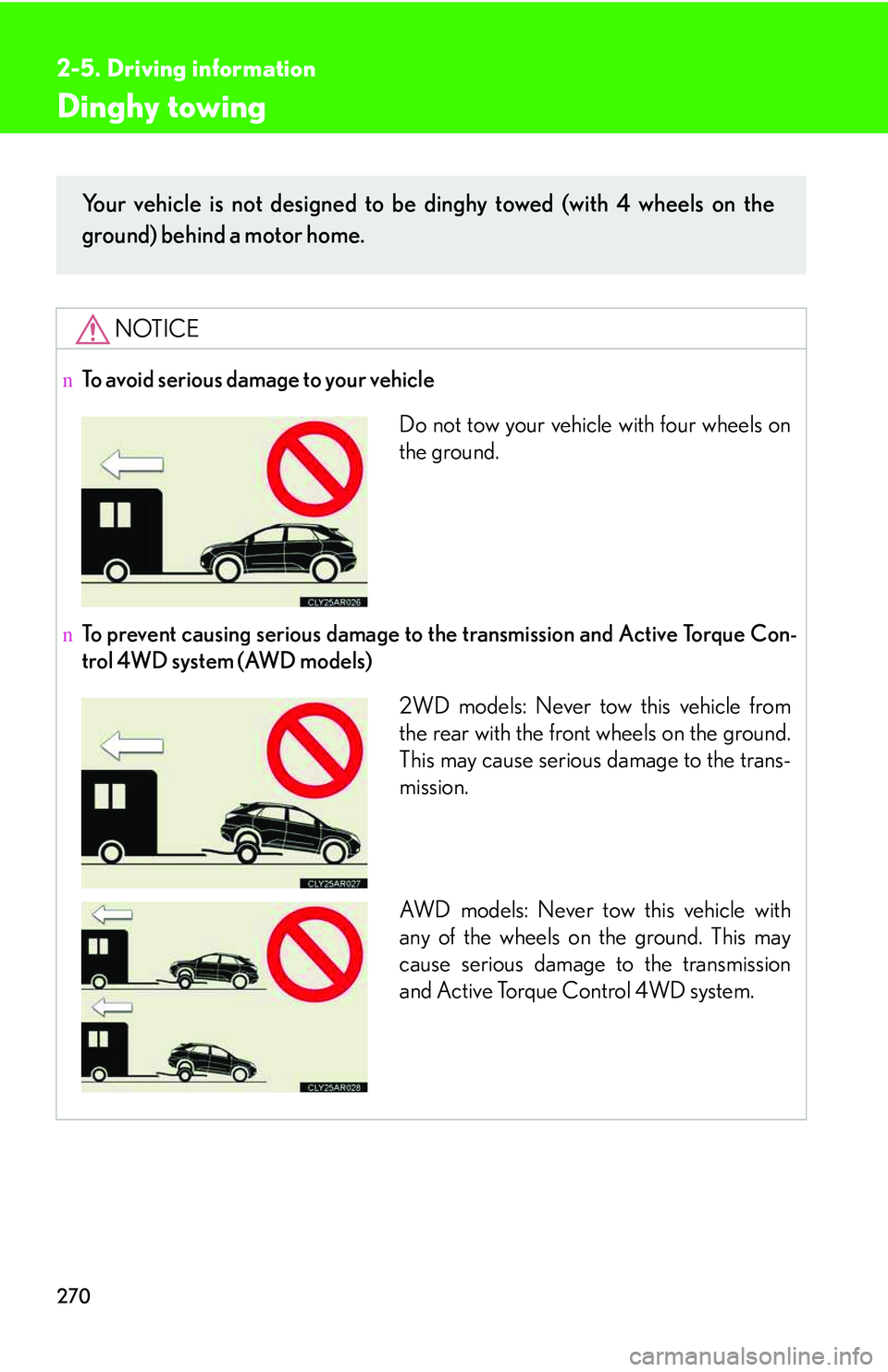
nTo avoid serious damage to your vehicle
nTo prevent causing serious damage to the transmission and Active Torque Con-
trol 4WD system (AWD models)
Your vehicle is not designed to be dinghy towed (with 4 wheels on the
ground) behind a motor home.
Do not tow your vehicle with four wheels on
the ground.
2WD models: Never tow this vehicle from
the rear with the front wheels on the ground.
This may cause serious damage to the trans-
mission.
AW D m o d e l s : N e v e r t ow this vehicle with
any of the wheels on the ground. This may
cause serious damage to the transmission
and Active Torque Control 4WD system.
Page 355 of 821
285
3-2. Using the audio system
3
Interior features
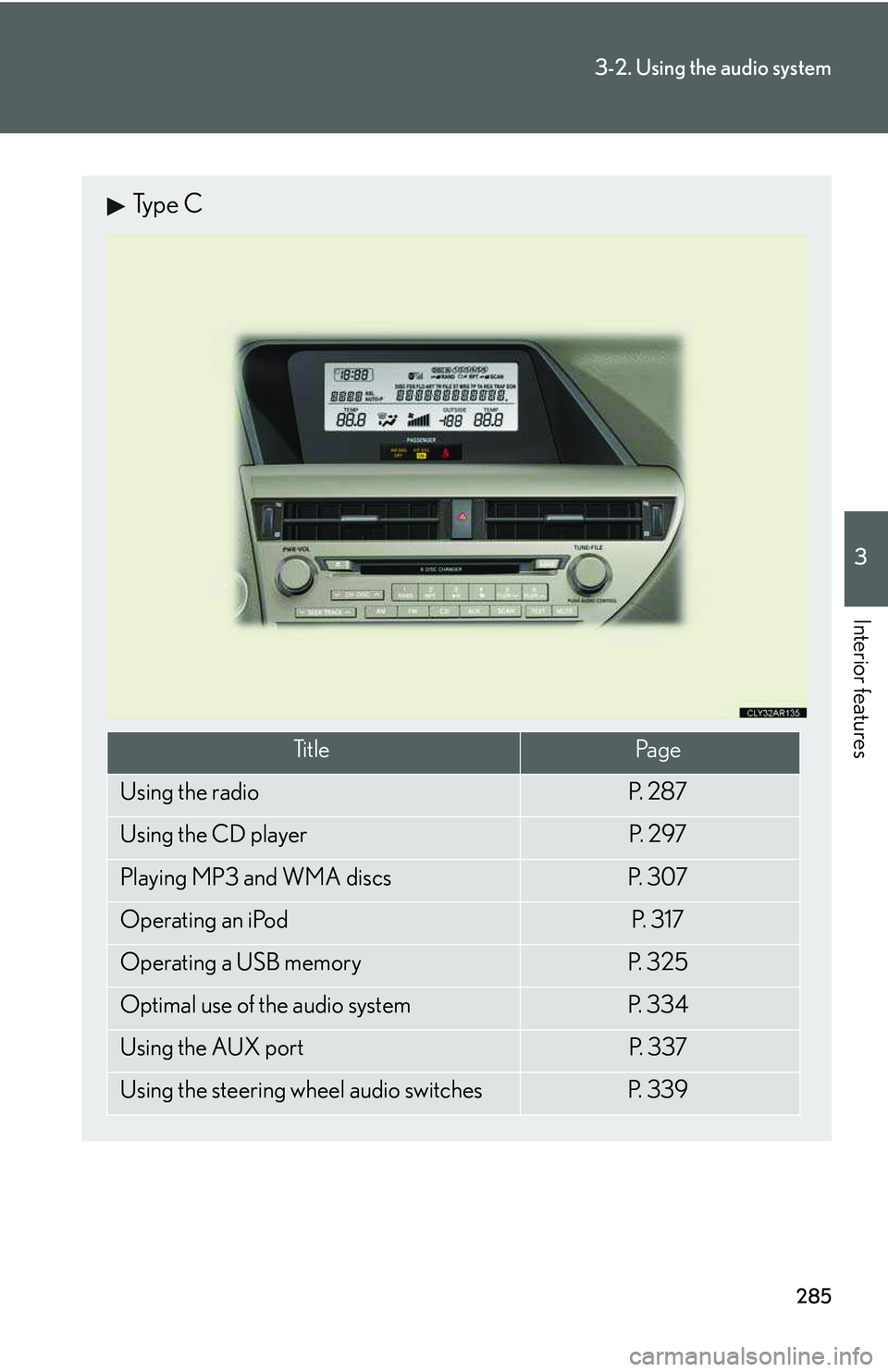
Type C
Ti t l ePa g e
Using the radioP. 2 8 7
Using the CD playerP. 2 9 7
Playing MP3 and WMA discsP. 3 0 7
Operating an iPodP. 3 1 7
Operating a USB memoryP. 3 2 5
Optimal use of the audio systemP. 3 3 4
Using the AUX portP. 3 3 7
Using the steering wheel audio switchesP. 3 3 9
Page 409 of 821
339
3-2. Using the audio system
3
Interior features
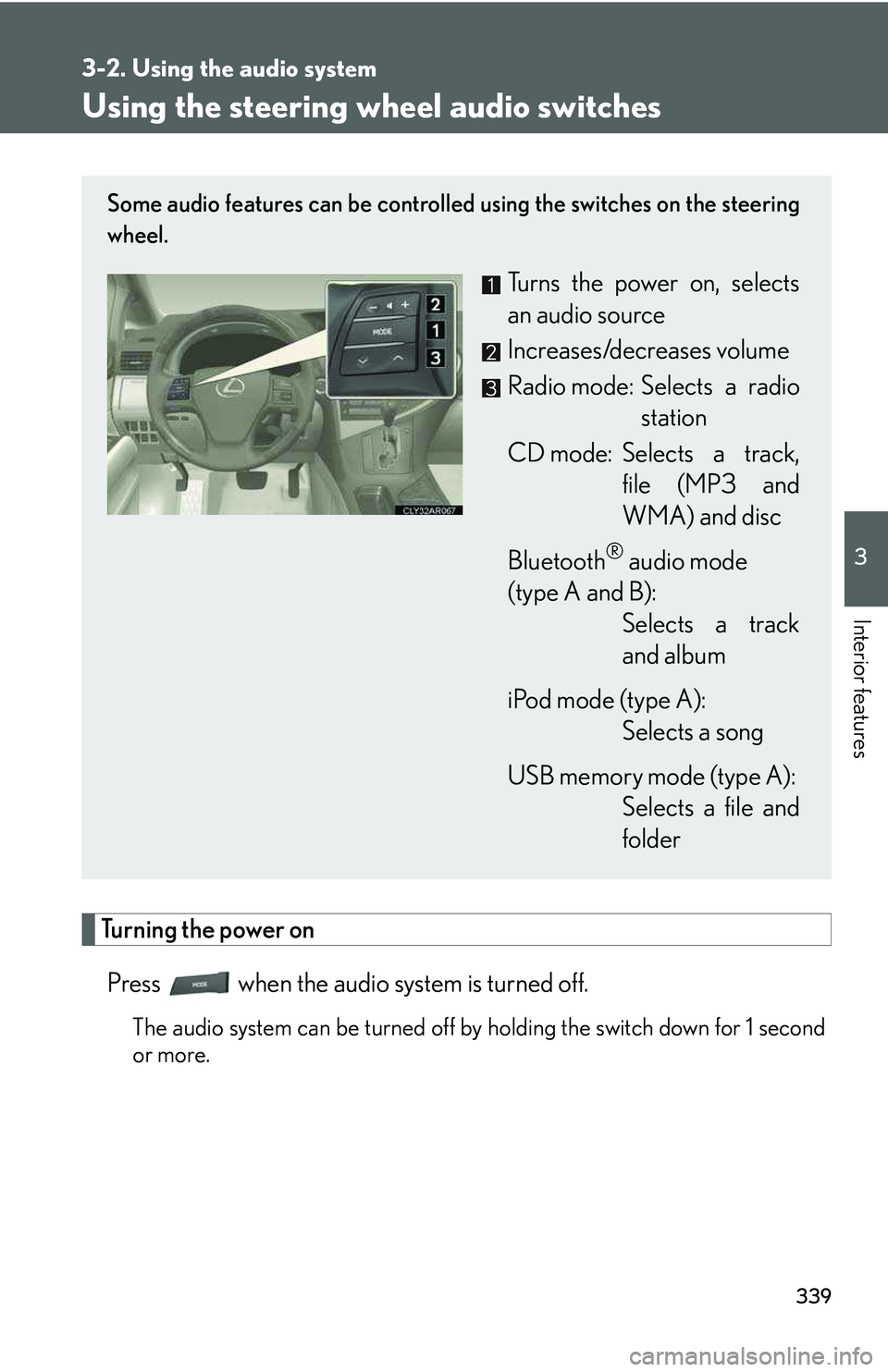
Using the steering wheel audio switches
Turning the power on
Press when the audio system is turned off.
The audio system can be turned off by holding the switch down for 1 second
or more.
Some audio features can be controlled using the switches on the steering
wheel.
Turns the power on, selects
an audio source
Increases/decreases volume
Radio mode: Selects a radio
station
CD mode: Selects a track,
file (MP3 and
WMA) and disc
Bluetooth® audio mode
(type A and B):
Selects a track
and album
iPod mode (type A):
Selects a song
USB memory mode (type A):
Selects a file and
folder
Page 411 of 821
341
3-2. Using the audio system
3
Interior features
Selecting an album (type A and B)
Press to select Bluetooth® audio mode.
Press and hold “∧” or “∨” on until you hear a beep.
Selecting a folder (type A)
Press to select USB memory mode.
Press and hold “∧” or “∨” on until you hear a beep.
Selecting a disc in the CD player
Press to select CD mode.
Press and hold “∧” or “∨” on until you hear a beep.
nCanceling automatic selection of a radio station
Press again.
CAUTION
nTo reduce the risk of an accident
Exercise care when operating the audio switches on the steering wheel.
STEP1
STEP2
STEP1
STEP2
STEP1
STEP2