Ring LINCOLN MARK VIII 1997 Owner's Manual
[x] Cancel search | Manufacturer: LINCOLN, Model Year: 1997, Model line: MARK VIII, Model: LINCOLN MARK VIII 1997Pages: 315, PDF Size: 2.18 MB
Page 97 of 315

92During autoglide operation the column will move to
the full in and up position. The column will return
when autoglide is completed.
During easy exit (if activated through the Message
Center) operation the column will move to the full
in and up position. When the key is inserted into
the ignition switch the column will return to the
previous setting. When you remove the key the
column will move away.
If the steering column adjustment switch is pressed
during memory recall the switch position will cancel
automatic operation and the column will respond to
manual adjustment of the switch.
The manual adjustment of the steering column is
adjustable with the ignition switch on or off.
The steering column can be adjusted manually by
using the four-way rocker adjustment switch located
on the multi-function switch below the turnsignal/wiper switch stalk. The switch will adjust the
column as long as held or until the column reaches
the end of travel.
The telescope function is adjusted by pulling the
switch towards the driver to telescope out and
pushing the switch towards the instrument panel to
telescope in.
The tilt function is adjusted by pressing the switch
up to tilt the column up or pressing the switch
down to tilt the column down.
NOTE:If attempting to manually adjust the
steering column and it does not respond see your
local dealer for service.
File:05fncf8.ex
Update:Thu Jun 27 10:02:20 1996
Page 98 of 315
93
Speed ControlThe speed of the vehicle cannot be automatically
controlled until the vehicle speed is at or above 30
mph (48 km/h).
Use of radio transmitting equipment that is not
Federal Communications Commission (FCC) or in
Canada the Canadian Radio and
Telecommunications Commission (CRTC) approved
may cause the speed control to malfunction.
Therefore, use only properly installed FCC (CRTC in
Canada) approved radio transmitting equipment in
your vehicle.
NOTE:Do not shift to N (Neutral) when using the
speed control. This will cause the engine to
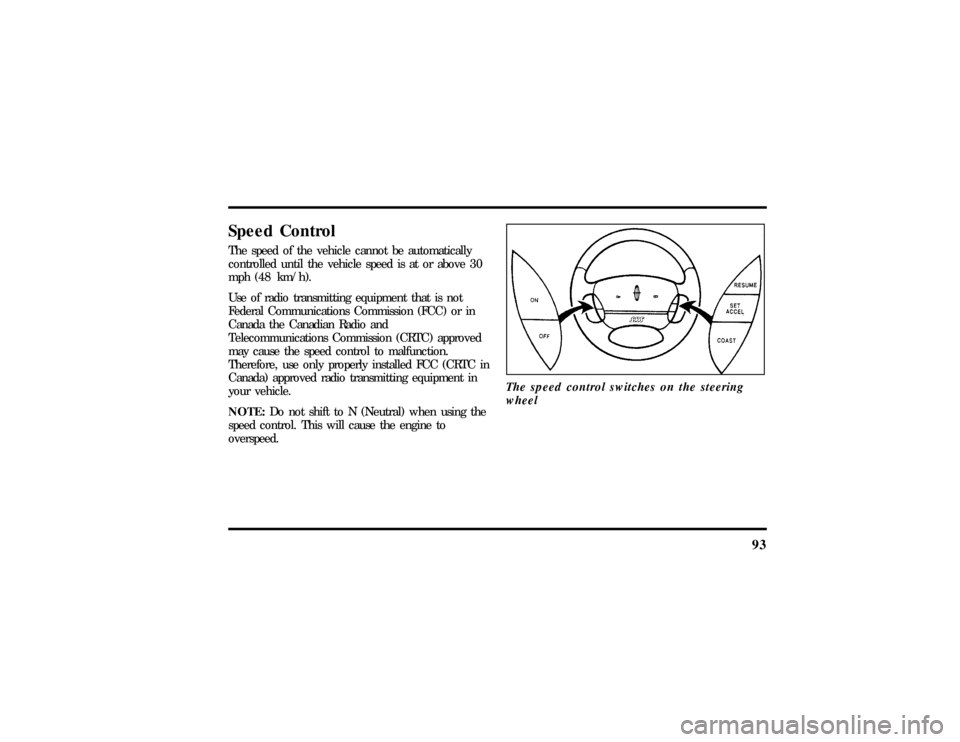
overspeed.The speed control switches on the steering
wheel
File:05fncf8.ex
Update:Thu Jun 27 10:02:20 1996
Page 100 of 315

95
To Set a Higher Set Speedq
Press and hold SET ACCEL. Release the switch
when the desired vehicle speed is reached. OR
q
Press and release SET ACCEL. Each press will
increase the set speed by 1 mph (1.6 km/h).
OR
q
Accelerate with your accelerator pedal, then
press SET ACCEL.
You may accelerate with the accelerator pedal at
any time during speed control usage. Releasing the
accelerator pedal will return your vehicle speed to
the previously programmed set speed.
To Set a Lower Set Speedq
Press and hold COAST. Release the switch
when the desired vehicle speed is reached. OR
q
Press and release COAST. Each press will
decrease the set speed by 1 mph (1.6 km/h).
OR
q
Depress the brake pedal. When the desired
vehicle speed is reached, press SET ACCEL.
To Disengage Speed Controlq
Depress the brake pedal.
Disengaging the speed control will not erase the
previously programmed set speed.
To Return to a Set Speedq
Press RESUME. For RESUME to operate, the
vehicle speed must be faster than 30 mph
(48 km/h).
Indicator Lightq
Lights when either the SET ACCEL or RESUME
switches are pressed and remains lighted until it
is either disengaged or turned off.
File:05fncf8.ex
Update:Thu Jun 27 10:02:20 1996
Page 108 of 315
103
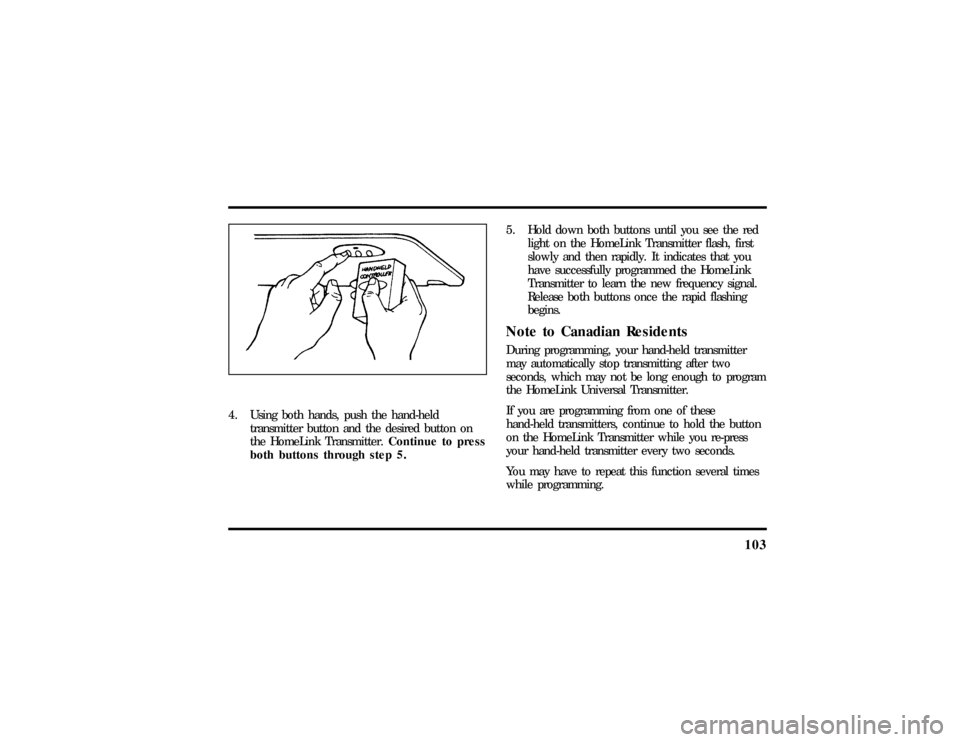
4. Using both hands, push the hand-held
transmitter button and the desired button on
the HomeLink Transmitter.Continue to press
both buttons through step 5.5. Hold down both buttons until you see the red
light on the HomeLink Transmitter flash, first
slowly and then rapidly. It indicates that you
have successfully programmed the HomeLink
Transmitter to learn the new frequency signal.
Release both buttons once the rapid flashing
begins.
Note to Canadian ResidentsDuring programming, your hand-held transmitter
may automatically stop transmitting after two
seconds, which may not be long enough to program
the HomeLink Universal Transmitter.
If you are programming from one of these
hand-held transmitters, continue to hold the button
on the HomeLink Transmitter while you re-press
your hand-held transmitter every two seconds.
You may have to repeat this function several times
while programming.
File:05fncf8.ex
Update:Thu Jun 27 10:02:20 1996
Page 115 of 315

110Memory Profile System
(If equipeed)The Personality Memory Feature customizes your
Mark VIII for up to two (2) drivers. The following
features are automatically recalled when unlocking
the doors using the remote entry transmitter,
keyless entry keypad, or by pressing the Memory 1
or Memory 2 switches on the driver's door:q
All driver's seat positions except power lumbar
and head restraint.
q
Both left and right outside mirror settings.
q
Steering column position.
q
Seven Driver Menu settings
Personality Memory also allows you to customize
settings from the Driver menu located in the
Message Center. Refer to the Message Center for
more information.
Recalling Personality MemoryAll of these settings are automatically recalled when
the driver unlocks the door using the remote entry
transmitter, keyless entry keypad or presses either
Memory 1 or Memory 2 switch inside the driver's
door. The vehicle must be in PARK or NEUTRAL to
recall Personality Memory settings.Remote EntryPressing the UNLOCK button on the remote entry
transmitter unlocks the driver's door and recalls all
of the Personality Memory settings. Two
transmitters are delivered with the vehicle. One is
programmed to always recall Memory 1 and the
other will always recall Memory 2. Personality
Memory 1 or 2 is indicated on the back of the
transmitter.
File:05fncf8.ex
Update:Thu Jun 27 10:02:20 1996
Page 116 of 315

111
Personality Memory recall from the remote
transmitter can be disabled. This is done by sliding
the switch on the back of the transmitter to OFF.
Personality Memory can still be recalled using
keyless entry code or the Memory 1 or Memory 2
switches.Keyless EntryUp to three unique keyless entry codes can be
programmed by the customer. Two of the codes
can be assigned to recall Personality Memory 1 or
Memory 2. Each time the 5-digit code is entered on
the keypad, the driver's door will unlock and
Personality Memory 1 or Memory 2 will be
recalled.
NOTE:Please note that even though the driver's
Personality Memory may be recalled using remote
or keyless entry, the seats and mirrors will not
move to the driver's set positions until the driver's
door is opened. The steering column will move
when the key is inserted.
Memory SwitchesPressing either the Memory 1 or Memory 2 switch
on the driver's door will also recall the Personality
Memory settings as selected, providing your vehicle
is in P (Park) or N (Neutral).Auto SaveAny change made by the driver to one of the above
Personality Memory settings will be updated and
saved automatically. The display, DRIVER 1 (or 2)
SETTING SAVED, will appear on the Message
Center for five (5) seconds as a confirmation of the
update to Personality Memory.
If the driver does not use the remote entry
transmitter, or keyless entry keypad to unlock the
doors upon entering or does not press the Memory
1 or Memory 2 switch, then any change to one of
the Personality Memory settings will not be
automatically saved. Instead the driver will be
prompted by the Message Center. ªIDENTIFY
DRIVER TO SAVEº. Press select button (located on
File:05fncf8.ex
Update:Thu Jun 27 10:02:20 1996
Page 119 of 315
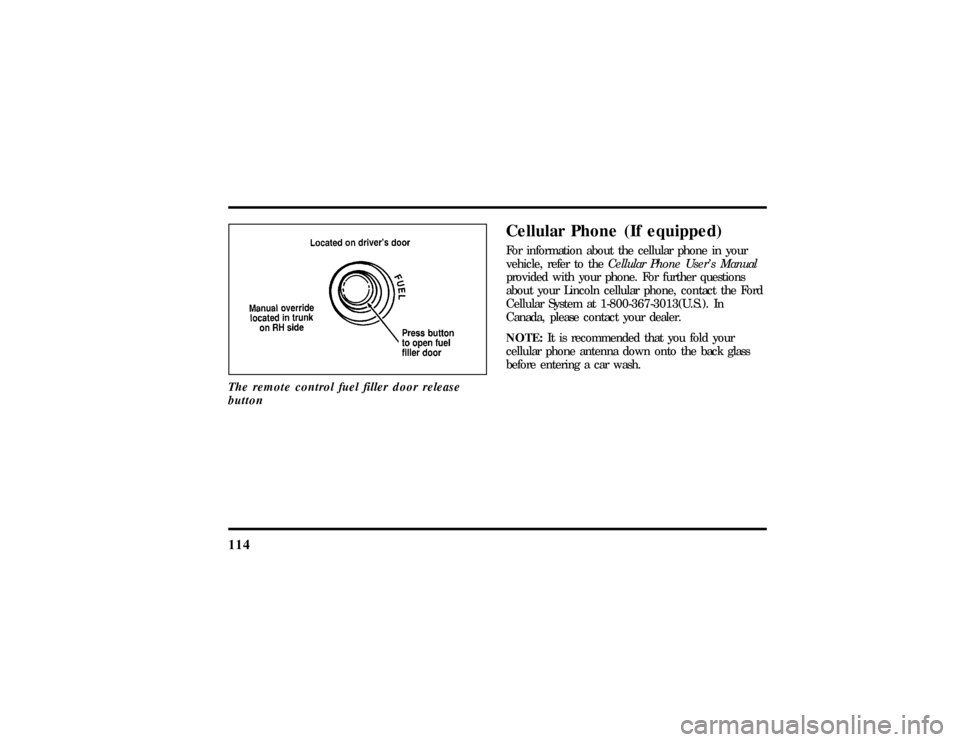
114The remote control fuel filler door release
button
Cellular Phone (If equipped)For information about the cellular phone in your
vehicle, refer to theCellular Phone User's Manual
provided with your phone. For further questions
about your Lincoln cellular phone, contact the Ford
Cellular System at 1-800-367-3013(U.S.). In
Canada, please contact your dealer.
NOTE:It is recommended that you fold your
cellular phone antenna down onto the back glass
before entering a car wash.
File:05fncf8.ex
Update:Thu Jun 27 10:02:20 1996
Page 126 of 315

121
To program your own code:
1. Select five digits for your personal code.
2. Enter the factory code that the dealership gave
you.
3. Within five (5) seconds, press 1/2.
4. Within five (5) seconds of pressing 1/2, enter
your personal code, pressing each digit within
five (5) seconds of the previous digit.
The keyless entry system registers this second
code. To open your vehicle, you can now use
either code. The module remembers only one
personal code at a time. Entering a second
personal code will erase the first, replacing it
with the new second one.To erase your personal code:
1. Enter the original permanent code.
2. Press 1/2 within five seconds of Step 1.
3. Wait six seconds.
The keyless entry system automatically erases
your personal code. The system will now only
respond to the permanent code.
Do not set a code that presents the numbers in
sequential order, such as 1/2, 3/4, 5/6, 7/8, 9/0.
Studies show that people who idly press the buttons
usually press a sequential pattern. Also, do not
select a code that uses the same button five times.
Thieves can easily figure out these types of codes.
File:05fncf8.ex
Update:Thu Jun 27 10:02:20 1996
Page 127 of 315

122Arming, disarming and resetting your
anti-theft system from the keyless entry
padThe Keyless Entry system will arm the anti-theft
system when you use the 7/8 and 9/0 keys to lock
the doors, and will disarm or reset a triggered
anti-theft alarm when you enter in the five digit
code to unlock the driver's door.Remote Entry SystemWith the remote entry system, you can lock and
unlock the vehicle doors and open the trunk
without using a key. The buttons for the system are
located on the two hand held transmitters that
came with your vehicle. The remote also has a
personal alarm feature.
The system will work with up to four remotes.
Your vehicle came with two remotes. Additional
remotes can be ordered from your dealer.When unlocking a vehicle with the Programmable
Memory Seat/Outside Rear View Mirrors feature,
the seat, the outside mirrors and steering column
will adjust to position that is set for the transmitter
being used.
The remote entry features only operate with the
ignition in the OFF position.
Remote entry transmitter
File:05fncf8.ex
Update:Thu Jun 27 10:02:20 1996
Page 129 of 315

124When you use the remote entry UNLOCK, TRUNK
or PANIC buttons, the illuminated entry system
turns on the interior lights for 25 seconds. You can
turn these lights off with the LOCK button or by
turning the ignition to the RUN position.Memory Seat/Mirrors/Steering Column
FeatureYour vehicle allows the remote keyless entry system
to control the Memory Seat/Mirrors/Steering
Column feature. With this feature, each of the first
two transmitters programmed will recall a different
seat position.
Pressing the transmitter UNLOCK button once will
unlock the driver's door and move the seat to its
corresponding memory seat/mirrors position, just as
if you had pressed the memory button in the
vehicle.When your dealer programs new transmitters, the
order of programming controls seat recall as follows:
q
First Transmitter Programmed Ð Recall
Seat/Mirrors/Steering Column Position #1
q
Second Transmitter Programmed Ð Recall
Seat/Mirrors/Steering Column Position #2
q
Third Transmitter Programmed Ð NO
Recall/Memory Seat/Mirrors/Steering Column
(allows only three positions)
You may change seat/mirrors positions at any time.
Once programmed, Transmitter #1 will always
move the seat/mirrors/steering column to position
#1.
The feature is turned on at the factory for your
convenience. You can deactivate the system by
using the OFF button or switching the key fob
switch to OFF.
File:05fncf8.ex
Update:Thu Jun 27 10:02:20 1996