Rear LINCOLN MKZ 2013 Owners Manual
[x] Cancel search | Manufacturer: LINCOLN, Model Year: 2013, Model line: MKZ, Model: LINCOLN MKZ 2013Pages: 474, PDF Size: 3.79 MB
Page 356 of 474
1. Press the Settings icon > Vehicle
> Ambient Lighting.
2. Touch the desired color.
3. Use the scroll bar to increase or decrease the intensity.
To turn the feature on or off, press the
power button.
Vehicle Health Report (If
Equipped)
Turn Automatic Reminders on and off
and set the mileage interval at which
you would like to receive the reports.
Press the ? for more information on
these selections.
When done making your selections,
press Run Vehicle Health Report Now
if you want your report.
Door Keypad Code (If Equipped)
To change the keypad code for your
keyless entry keypad system:
1. Press the Settings icon > Vehicle > Door Keypad Code.
2. Enter your current factory code, then, when prompted, enter your
new code.
Rear View Camera (If Equipped)
This menu allows you to access
settings for your rear view camera. Press the Settings icon > Vehicle >
Rear View Camera, then select from
the following settings:
•
Rear Camera Delay
• Visual Park Aid Alert
• Guidelines.
Enable Valet Mode
Note: If you are locked out and need
to reset the PIN, you can enter 3681
and the system unlocks.
Valet mode allows you to lock the
system so that none of your
information on the system can be
accessed until it is unlocked with the
correct PIN.
1. Press the Settings icon > Vehicle > Enable Valet Mode.
2. When prompted, enter a four-digit
PIN.
After you press Continue the system
is locked until the correct PIN is
entered again.
Settings
Access and adjust system settings,
voice features, as well as phone,
navigation and wireless settings.
Some of these settings can also be
accessed with regard to their specific
modes (i.e., phone and media).
System
Press the Settings icon > Settings >
System, then select from the
following:
353
MyLincoln Touch
™
Page 374 of 474
You Can
When You Select
Artist/Title/Team Alerts allows you to select
Artists, Titles and Teams that you would like the
system to alert you to when they are playing on
other channels. Press Edit Alerts to delete or turn
off alerts. You can also set all alerts to on or off.
When an alert appears on the screen, you can
choose to Tune to the channel, to Cancel the alert
or to Disable Alerts. If you are listening to a sporting
event, you can save your favorite teams so that the
system can alert you when they are playing on a
satellite radio channel.
Note:
SIRIUS does not support the Alert feature on
all channels. Ford Motor Company shall not be
responsible for Alert feature variation.
Electronic Serial Number (ESN) is required when
communicating with SIRIUS about your account.
Enter the desired satellite channel number using
the on-screen keypad.
Direct Tune
View a list of all available stations. Scroll and select
the desired station.
Browse
You can also lock or skip unwanted channels or view
the song and artist on other stations.
* SIRIUS does not support the Alert feature on all channels. Ford Motor Company
shall not be responsible for Alert feature variation.
SIRIUS Satellite Radio Information
Note: SIRIUS reserves the unrestricted
right to change, rearrange, add or
delete programming including
canceling, moving or adding particular
channels, and its prices, at any time,
with or without notice to you. Ford
Motor Company shall not be
responsible for any such programming
changes.
371
MyLincoln Touch
™
Page 407 of 474
Power: Touch to turn the climate control system on and off. When
the system is off, outside air is prevented from entering the vehicle.
A
Passenger settings:
Touch DUAL to switch passenger side
temperature controls on and off. Touch the + and - to adjust the
temperature. Touch the heated seat icon to control the heated seat
(if equipped). Touch the cooled seat icon to control the cooled seat
(if equipped).
B
Fan speed:
Touch + or - to increase or decrease the volume of air
circulated in your vehicle.
C
Recirculated air: Touch the button to switch between outside air and
recirculated air. When recirculated air is selected, the button illuminates
and the air currently in the passenger compartment recirculates. This
may reduce the time needed to cool the interior (when used with A/C)
and may also reduce unwanted odors from entering your vehicle.
Recirculated air may turn off automatically in all airflow modes except
MAX A/C to reduce the possibility of fogging.
D
MAX A/C:
Touch to switch on. Recirculated air is distributed through
the instrument panel air vents, air conditioning is automatically adjusted
to the highest speed and the temperature dial returns to the full cool
position. This re-cooling of the interior is more economical and efficient.
E
A/C:
Touch to turn air conditioning on or off. To improve air
conditioning when starting your vehicle, drive with the windows slightly
open for two to three minutes. Use A/C with recirculated air to improve
cooling performance and efficiency.
F
AUTO:
Touch to turn on fully automatic operation. Select the desired
temperature using the temperature control. The system automatically
adjusts fan speed, air distribution, A/C operation, and outside or
recirculated air, to heat or cool the vehicle to maintain the selected
temperature.
G
Rear defroster:
Touch to turn the rear window defroster and heated
mirrors (if equipped).
H
404
MyLincoln Touch
™
Page 408 of 474
Manual airflow distribution controls:Floor/Defrost: Distributes
air through the windshield defroster vents, demister vents, floor vents
and rear seat floor vents, and provides outside air to reduce window
fogging. Panel:
Distributes air through the instrument panel vents.
Panel/Floor: Distributes air through the instrument panel vents,
demister vents, floor vents and rear seat floor vents. Floor: Distributes
air through the demister vents, floor vents and rear seat floor vents.
Defrost:
Touch to clear the windshield of fog and thin ice. Touch again
to return to the previous airflow selection. When switched on, defrost
distributes outside air through the windshield defroster vents and
demister vents to reduce window fogging.
I
Driver settings:
Depending on your vehicle and option package, you
may have the following features: Touch the + and - to adjust the
temperature. Touch the heated seat icon to control the heated seat
(if equipped). Touch the cooled seat icon to control the cooled seat
(if equipped). Touch MyTemp to select your previously pre-set
temperature setpoint. Touch and hold MyTemp store a new pre-set
for temperature setpoint. Touch the heated steering wheel icon (if
equipped) to warm the steering wheel.
J
Note: If your vehicle is equipped with
a wood-trimmed steering wheel, it
does not heat between the 10 o'clock
and 2 o'clock positions. Climate Control Voice
Commands Press the voice button on the
steering wheel controls.
When prompted, say any of
the following commands: Climate Control Commands
"Climate automatic"
"Climate my temperature" "Climate off""Climate on"
"Climate temperature <15.5-29.5> degrees" "Climate temperature <60-85> degrees" "Help"
405
MyLincoln Touch
™E142599
Page 409 of 474
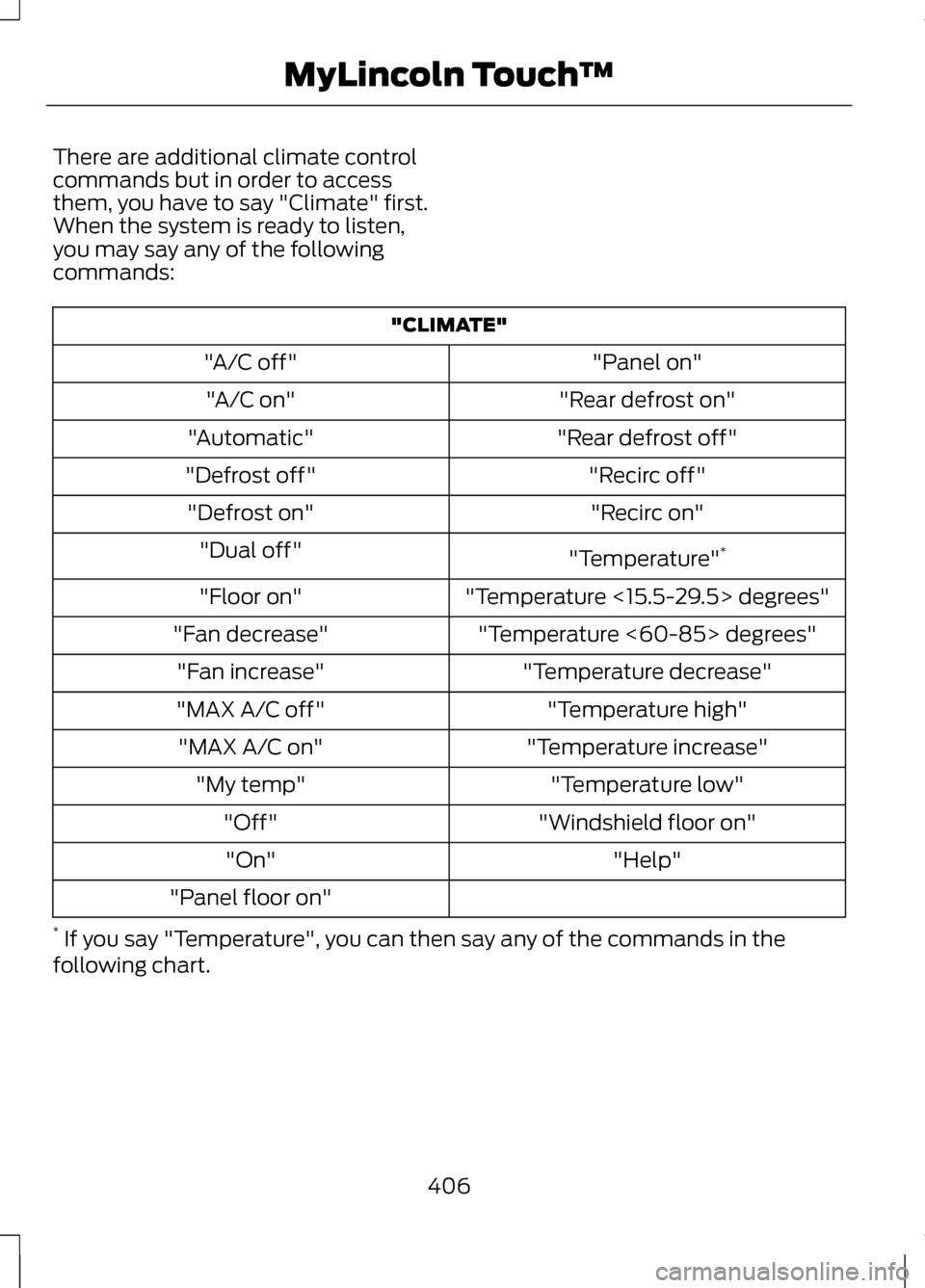
There are additional climate control
commands but in order to access
them, you have to say "Climate" first.
When the system is ready to listen,
you may say any of the following
commands:
"CLIMATE"
"Panel on"
"A/C off"
"Rear defrost on"
"A/C on"
"Rear defrost off"
"Automatic"
"Recirc off"
"Defrost off"
"Recirc on"
"Defrost on"
"Temperature"*
"Dual off"
"Temperature <15.5-29.5> degrees"
"Floor on"
"Temperature <60-85> degrees"
"Fan decrease"
"Temperature decrease"
"Fan increase"
"Temperature high"
"MAX A/C off"
"Temperature increase"
"MAX A/C on"
"Temperature low"
"My temp"
"Windshield floor on"
"Off"
"Help"
"On"
"Panel floor on"
* If you say "Temperature", you can then say any of the commands in the
following chart.
406
MyLincoln Touch
™
Page 448 of 474
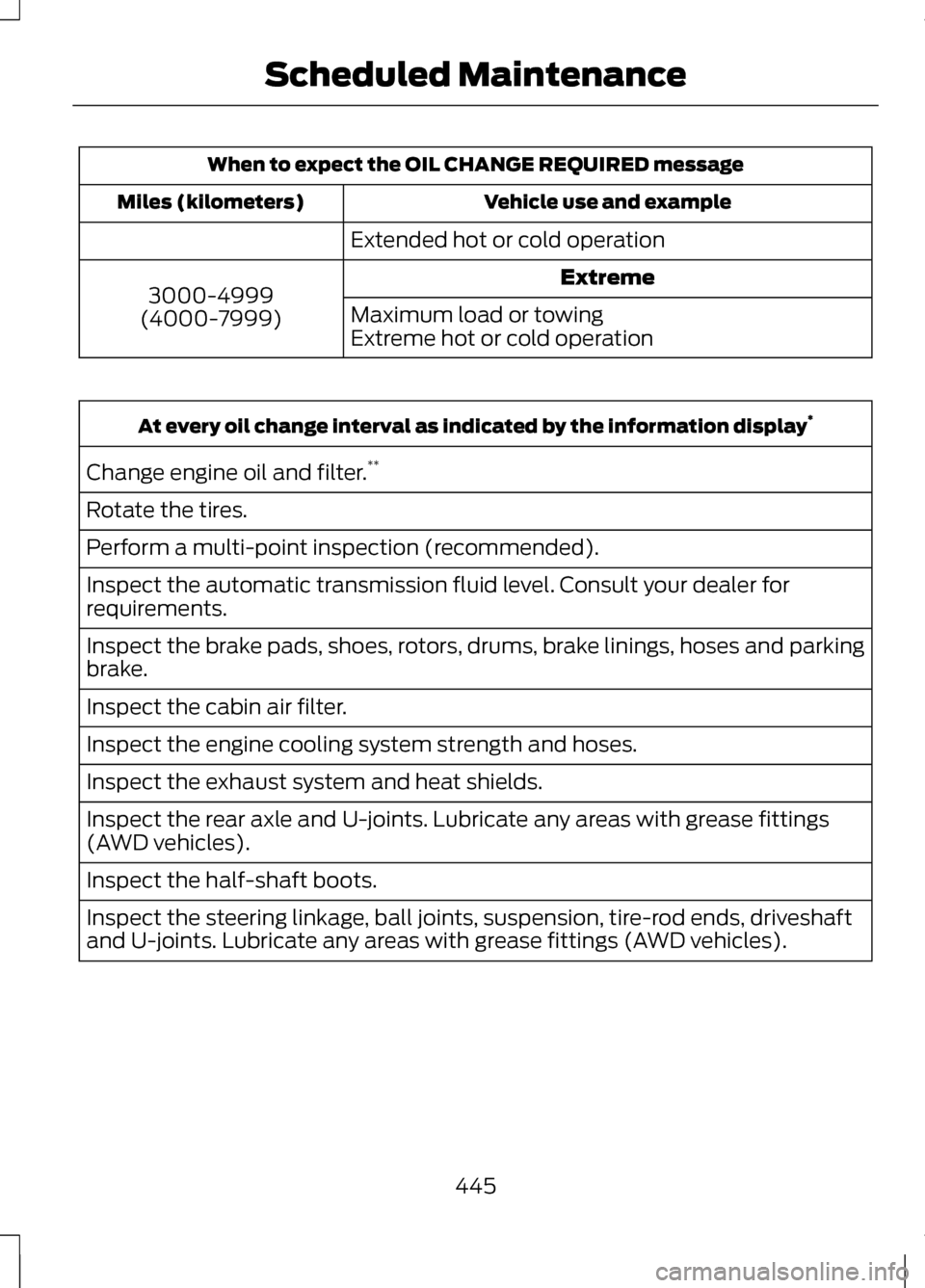
When to expect the OIL CHANGE REQUIRED message
Vehicle use and example
Miles (kilometers)
Extended hot or cold operationExtreme
3000-4999
(4000-7999) Maximum load or towing
Extreme hot or cold operationAt every oil change interval as indicated by the information display
*
Change engine oil and filter. **
Rotate the tires.
Perform a multi-point inspection (recommended).
Inspect the automatic transmission fluid level. Consult your dealer for
requirements.
Inspect the brake pads, shoes, rotors, drums, brake linings, hoses and parking
brake.
Inspect the cabin air filter.
Inspect the engine cooling system strength and hoses.
Inspect the exhaust system and heat shields.
Inspect the rear axle and U-joints. Lubricate any areas with grease fittings
(AWD vehicles).
Inspect the half-shaft boots.
Inspect the steering linkage, ball joints, suspension, tire-rod ends, driveshaft
and U-joints. Lubricate any areas with grease fittings (AWD vehicles).
445
Scheduled Maintenance
Page 465 of 474
Event Data Recording
See: Data Recording....................................9
Export Unique Options........................14
Exterior Mirrors......................................88 Auto-Dimming Feature...........................89
Blind Spot Monitor....................................90
Fold-Away Exterior Mirrors.....................89
Heated Exterior Mirrors............................89
Integrated Blind Spot Mirrors................89
Memory Mirrors.......................................... 89
Power Exterior Mirrors..............................88
Signal Indicator Mirrors...........................89
F
Fastening the Safety Belts................32 Rear Inflatable Safety Belt......................35
Restraint of Pregnant Women..............33
Safety Belt Extension Assembly..........36
Safety Belt Locking Modes.....................33
Floor Mats.............................................236
Ford Extended Service Plan (ESP)....................................................334
SERVICE PLANS (CANADA
ONLY)...................................................... 336
SERVICE PLANS (U.S. only)................334
Front Passenger Sensing System...................................................45
Fuel and Refueling..............................155
Fuel Consumption
..............................160
Calculating Fuel Economy....................160
Filling the Tank.......................................... 160
Fuel Cut-Off Switch
..........................239
Fuel Filter...............................................276
Fuel Quality...........................................156
Choosing the Right Fuel........................156
Octane Recommendations..................156
Fuses........................................................251
Fuse Specification Chart
.................252
Passenger Compartment Fuse
Panel........................................................ 259
Power Distribution Box..........................252 G
Garage Door Opener
See: Universal Garage Door
Opener...................................................... 142
Gauges......................................................94 Engine Coolant Temperature
Gauge......................................................... 95
Fuel Gauge................................................... 95
Information Display...................................94
Gearbox See: Transmission....................................165
General Information on Radio Frequencies..........................................53
Intelligent Access.......................................53
Getting Assistance Outside the U.S. and Canada
........................................247
Getting the Services You Need
.....................................................243
Away From Home....................................243
Global Opening and Closing............88 Closing the Windows...............................88
Opening the Windows.............................88
H
Hazard Warning Flashers
................239
Headlamp Exit Delay...........................83
Head Restraints
....................................131
Adjusting the Head Restraint...............132
Tilting Head Restraints (If
Equipped)............................................... 133
Heated Seats.........................................137 Rear Heated Seats...................................138
Heated Steering Wheel......................78
Heated Windows and Mirrors.........128 Heated Exterior Mirror.............................128
Heated Rear Window..............................128
Heating See: Climate Control...............................126
Hill Start Assist.....................................170 Using Hill Start Assist..............................170
462
Index
Page 466 of 474
Hints on Controlling the Interior
Climate..................................................127
Cooling the Interior Quickly..................128
General Hints.............................................. 127
Heating the Interior Quickly..................128
Recommended Settings for Cooling ..................................................................... 128
Recommended Settings for Heating..................................................... 128
Side Window Defogging in Cold Weather................................................... 128
Hints on Driving With Anti-Lock Brakes....................................................178
Hood Lock See: Opening and Closing the
Hood........................................................ 264
I
In California (U.S. Only)...................244
Information Display Control..............77 Cluster Display Control Features..........77
Information Displays.........................100
General Information...............................100
Information...........................................392 911 Assist®................................................. 399
Alerts............................................................ 399
Calendar..................................................... 399
SIRIUS Travel Link...................................396
SYNC Services (If Equipped, U.S. Only)........................................................ 392
Vehicle Health Report...........................402 Information Messages
......................105
Active Park.................................................. 105
Adaptive Cruise Control........................106
AdvanceTrac®........................................... 107
Airbag............................................................ 107
Alarm............................................................. 107
Automatic Engine Shutdown...............107
AWD.............................................................. 108
Battery and Charging System.............109
Blind Spot Information and Cross Traffic Alert System.............................110
Collision Warning System......................110
Doors and Locks.......................................... 111
Driver Alert..................................................... 111
Engine.............................................................. 111
Fuel.................................................................. 112
Hill Start Assist........................................... 112
Keys and Intelligent Access...................112
Lane Keeping System..............................113
Maintenance................................................ 114
MyKey............................................................. 115
Park Aid......................................................... 116
Park Brake.................................................... 116
Power Steering............................................ 117
Remote Start............................................... 117
Starting System ........................................118
Tire Pressure Monitoring System........118
Traction Control......................................... 119
Transmission............................................... 119
Installing Child Seats
............................21
Child Seats..................................................... 21
Using Lap and Shoulder Belts................21
Using Lower Anchors and Tethers for CHildren (LATCH)..................................26
Using Tether Straps...................................28
Instrument Cluster...............................94
Instrument Lighting Dimmer............83
Interior Lamps
........................................85
Front Interior Lamp...................................86
Rear Interior Lamp.....................................86
Interior Luggage Compartment Release...................................................70
463
Index
Page 468 of 474
MyKey®....................................................58
Principle of Operation..............................58
MyKey Troubleshooting.......................61
MyLincoln Touch ™.............................337
General Information................................337
N
Navigation.............................................407 cityseekr..................................................... 409
Map Mode................................................... 412
Navigation Map Updates.......................415
Navigation Voice Commands..............415
Point of Interest (POI) Categories............................................. 408
Quick-touch Buttons..............................414
Setting a Destination.............................407
Setting Your Navigation Preferences............................................ 410
O
Oil Check See: Engine Oil Check - 2.0L
EcoBoost™/3.7L..................................267
Opening and Closing the Hood.....................................................264
Ordering Additional Owner's Literature............................................248
Obtaining a French Owner ’s
Manual.................................................... 249
Overhead Console..............................149
P
Parking Aid
............................................184
Front Sensing System............................185
Rear Sensing System..............................185
Parking Aids
..........................................184
Passive Anti-Theft System................72
SecuriLock®.................................................. 72PATS
See: Passive Anti-Theft System...........72
Perchlorate...............................................12
Personal Safety System ™
.................41
How Does the Personal Safety System
Work?.......................................................... 41
Phone.....................................................385 Making Calls.............................................. 386
Pairing Subsequent Phones...............386
Pairing Your Phone for the First Time......................................................... 385
Phone Menu Options.............................386
Phone Settings.........................................389
Receiving Calls.........................................386
Text Messaging........................................388
Power Door Locks See: Locking and Unlocking...................62
Power Seats
..........................................133
Multi-Contour Front Seats with Active
Motion (If Equipped)..........................134
Power Lumbar........................................... 134
Power Steering Fluid Check............276
Power Windows
....................................87
Accessory Delay.........................................88
Bounce-Back............................................... 87
One-Touch Down.......................................87
One-Touch Up............................................. 87
Window Lock............................................... 87
R
Rear Seat Armrest
..............................140
Armrest pass-through............................140
Rear Seats..............................................137
Rear View Camera...............................191 Using the Rear View Camera
System...................................................... 191
Rear View Camera See: Rear View Camera...........................191
Recommended Towing Weights................................................227
465
Index