Rear LINCOLN MKZ 2013 Manual Online
[x] Cancel search | Manufacturer: LINCOLN, Model Year: 2013, Model line: MKZ, Model: LINCOLN MKZ 2013Pages: 474, PDF Size: 3.79 MB
Page 293 of 474
All motor vehicles and their
components were engineered and
tested for reliable, regular driving.
Long term storage under various
conditions may lead to component
degradation or failure unless specific
precautions are taken to preserve the
components.
General
•
Store all vehicles in a dry,
ventilated place.
• Protect from sunlight, if possible.
• If vehicles are stored outside, they
require regular maintenance to
protect against rust and damage.
Body
• Wash vehicle thoroughly to
remove dirt, grease, oil, tar or mud
from exterior surfaces, rear-wheel
housing and underside of front
fenders.
• Periodically wash vehicles stored
in exposed locations.
• Touch-up raw or primed metal to
prevent rust
• Cover chrome and stainless steel
parts with a thick coat of auto wax
to prevent discoloration. Re-wax
as necessary when the vehicle is
washed.
• Lubricate all hood, door and trunk
lid hinges, and latches with a light
grade oil.
• Cover interior trim to prevent
fading.
• Keep all rubber parts free from oil
and solvents. Engine
•
The engine oil and filter should be
changed prior to storage, as used
engine oil contain contaminates
that may cause engine damage.
• Start the engine every 15 days. Run
at fast idle until it reaches normal
operating temperature
• With your foot on the brake, shift
through all the gears while the
engine is running.
Fuel system
• Fill the fuel tank with high-quality
fuel until the first automatic
shutoff of the fuel pump nozzle.
Note: During extended periods of
vehicle storage (30 days or more), fuel
may deteriorate due to oxidation. Add
a quality gas stabilizer product to the
vehicle fuel system whenever actual or
expected storage periods exceed 30
days. Follow the instructions on the
additive label. The vehicle should then
be operated at idle speed to circulate
the additive throughout the fuel
system.
Cooling system
• Protect against freezing
temperatures.
• When removing vehicle from
storage, check coolant fluid level.
Confirm there are no cooling
system leaks, and fluid is at the
recommended level.
290
Vehicle Care
Page 313 of 474
M.
Maximum Inflation Pressure:
Indicates the tire manufacturers'
maximum permissible pressure or the
pressure at which the maximum load
can be carried by the tire. This
pressure is normally higher than the
vehicle manufacturer's recommended
cold inflation pressure which can be
found on the Safety Compliance
Certification Label (affixed to either
the door hinge pillar, door-latch post,
or the door edge that meets the
door-latch post, next to the driver's
seating position), or Tire Label which
is located on the B-Pillar or the edge
of the driver ’s door. The cold inflation
pressure should never be set lower
than the recommended pressure on
the vehicle label.
The tire suppliers may have additional
markings, notes or warnings such as
standard load, radial tubeless, etc.
Additional Information Contained
on the Tire Sidewall for LT Type
Tires
Note: Tire Quality Grades do not apply
to this type of tire. LT type tires have some additional
information beyond those of P type
tires; these differences are described
below.
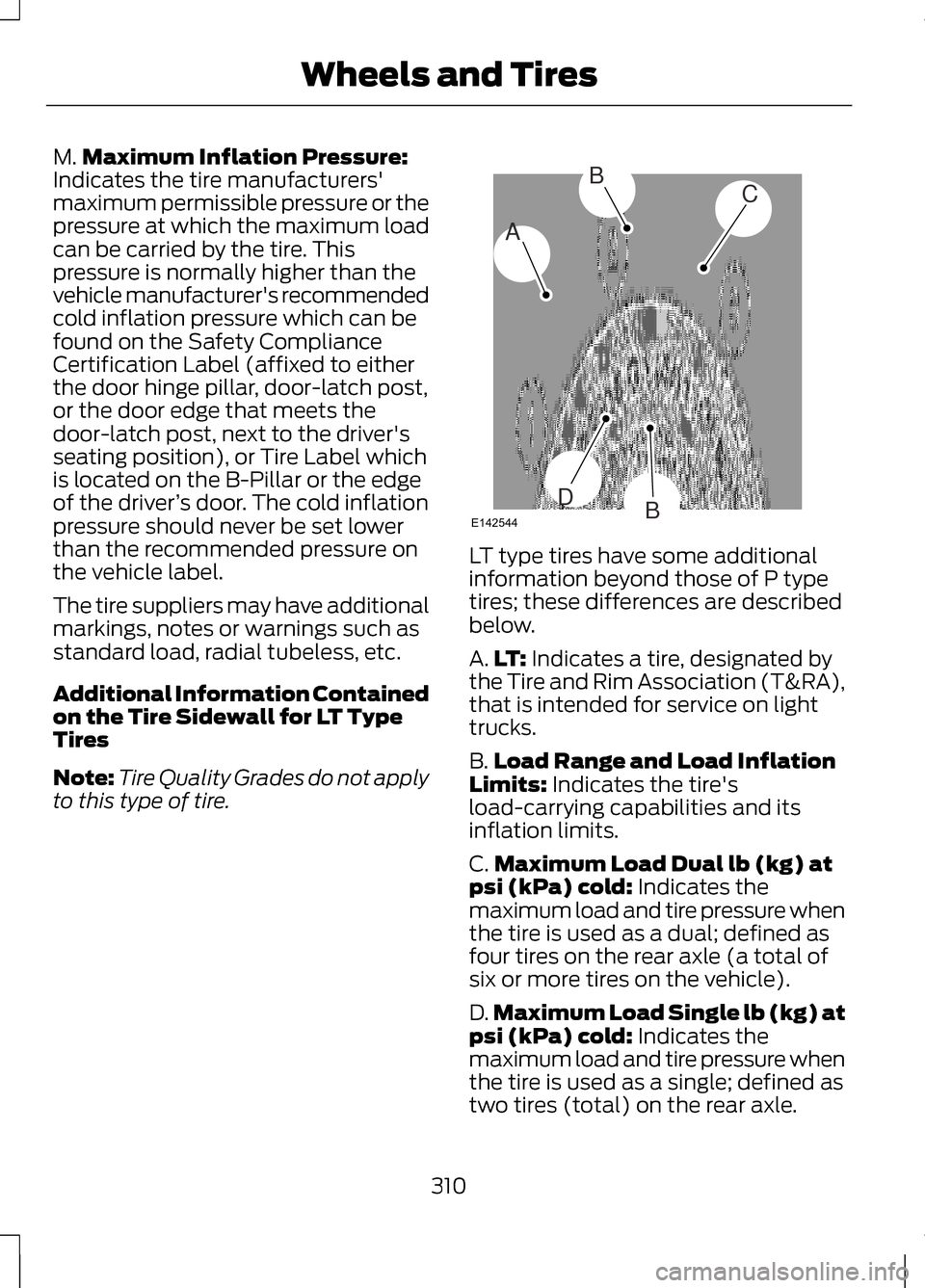
A.
LT: Indicates a tire, designated by
the Tire and Rim Association (T&RA),
that is intended for service on light
trucks.
B. Load Range and Load Inflation
Limits:
Indicates the tire's
load-carrying capabilities and its
inflation limits.
C. Maximum Load Dual lb (kg) at
psi (kPa) cold:
Indicates the
maximum load and tire pressure when
the tire is used as a dual; defined as
four tires on the rear axle (a total of
six or more tires on the vehicle).
D. Maximum Load Single lb (kg) at
psi (kPa) cold:
Indicates the
maximum load and tire pressure when
the tire is used as a single; defined as
two tires (total) on the rear axle.
310
Wheels and TiresA
BC
BDE142544
Page 316 of 474
When weather temperature changes
occur, tire inflation pressures also
change. A 10°F (6°C) temperature
drop can cause a corresponding drop
of 1 psi (7 kPa) in inflation pressure.
Check your tire pressures frequently
and adjust them to the proper
pressure which can be found on the
Safety Compliance Certification Label
or Tire Label.
To check the pressure in your tire(s):
1. Make sure the tires are cool,
meaning they are not hot from
driving even a mile.
Note: If you are checking tire pressure
when the tire is hot, (i.e. driven more
than 1 mile [1.6 kilometers]), never
bleed or reduce air pressure. The tires
are hot from driving and it is normal for
pressures to increase above
recommended cold pressures. A hot
tire at or below recommended cold
inflation pressure could be significantly
under-inflated.
Note: If you have to drive a distance
to get air for your tire(s), check and
record the tire pressure first and add
the appropriate air pressure when you
get to the pump. It is normal for tires
to heat up and the air pressure inside
to go up as you drive.
2. Remove the cap from the valve on
one tire, then firmly press the tire
gauge onto the valve and measure
the pressure.
3. Add enough air to reach the recommended air pressure. Note:
If you overfill the tire, release air
by pressing on the metal stem in the
center of the valve. Then recheck the
pressure with your tire gauge.
4. Replace the valve cap.
5. Repeat this procedure for each tire,
including the spare.
Note: Some spare tires operate at a
higher inflation pressure than the other
tires. For T type mini-spare tires (refer
to the Dissimilar spare wheel and tire
assembly information for a
description): Store and maintain at 60
psi (4.15 bar). For full-size and
dissimilar spare tires (refer to the
Dissimilar spare wheel and tire
assembly information for a
description): Store and maintain at the
higher of the front and rear inflation
pressure as shown on the Tire Label.
6. Visually inspect the tires to make
sure there are no nails or other
objects embedded that could poke
a hole in the tire and cause an air
leak.
7. Check the sidewalls to make sure there are no gouges, cuts or bulges.
313
Wheels and Tires
Page 319 of 474
WARNINGS
Use of any tire or wheel not
recommended by Ford can affect the
safety and performance of your
vehicle, which could result in an
increased risk of loss of vehicle
control, vehicle rollover, personal
injury and death. Additionally the use
of non-recommended tires and
wheels could cause steering,
suspension, axle, transfer case or
power transfer unit failure. If you have
questions regarding tire replacement,
contact your authorized dealer as
soon as possible. When mounting replacement
tires and wheels, you should not
exceed the maximum pressure
indicated on the sidewall of the tire to
set the beads without additional
precautions listed below. If the beads
do not seat at the maximum pressure
indicated, re-lubricate and try again
When inflating the tire for mounting
pressures up to 20 psi (1.38 bar)
greater than the maximum pressure
on the tire sidewall, the following
precautions must be taken to protect
the person mounting the tire:
1. Make sure that you have the correct
tire and wheel size.
2. Lubricate the tire bead and wheel
bead seat area again.
3. Stand at a minimum of 12 feet (3.66
meters) away from the wheel and tire
assembly.
4. Use both eye and ear protection. WARNINGS
For a mounting pressure more than
20 psi (1.38 bar) greater than the
maximum pressure, a Ford dealer or
other tire service professional should
do the mounting.
Always inflate steel carcass tires with
a remote air fill with the person
inflating standing at a minimum of 12
ft (3.66 m) away from the wheel and
tire assembly Important: Remember to replace the
wheel valve stems when the road tires
are replaced on your vehicle
It is recommended that the two front
tires or two rear tires generally be
replaced as a pair.
The tire pressure sensors mounted in
the wheels (originally installed on your
vehicle) are not designed to be used
in aftermarket wheels.
The use of wheels or tires not
recommended by Ford Motor
Company may affect the operation of
your tire pressure monitoring system.
If the TPMS indicator is flashing, your
TPMS is malfunctioning. Your
replacement tire might be
incompatible with your TPMS, or
some component of the TPMS may
be damaged.
316
Wheels and Tires
Page 320 of 474
Safety Practices
WARNINGS
If your vehicle is stuck in snow,
mud, sand, etc., do not rapidly
spin the tires; spinning the tires can
tear the tire and cause an explosion.
A tire can explode in as little as three
to five seconds. Do not spin the wheels at over
35 mph (56 km/h). The tires may
fail and injure a passenger or
bystander. Driving habits have a great deal to do
with your tire mileage and safety.
•
Observe posted speed limits
• Avoid fast starts, stops and turns
• Avoid potholes and objects on the
road
• Do not run over curbs or hit the tire
against a curb when parking
Highway Hazards
No matter how carefully you drive
there ’s always the possibility that you
may eventually have a flat tire on the
highway. Drive slowly to the closest
safe area out of traffic. This may
further damage the flat tire, but your
safety is more important. If you feel a sudden vibration or ride
disturbance while driving, or you
suspect your tire or vehicle has been
damaged, immediately reduce your
speed. Drive with caution until you can
safely pull off the road. Stop and
inspect the tires for damage. If a tire
is under-inflated or damaged, deflate
it, remove wheel and replace it with
your spare tire and wheel. If you
cannot detect a cause, have the
vehicle towed to the nearest repair
facility or tire dealer to have the
vehicle inspected.
Tire and Wheel Alignment
A bad jolt from hitting a curb or
pothole can cause the front end of
your vehicle to become misaligned or
cause damage to your tires. If your
vehicle seems to pull to one side when
you’re driving, the wheels may be out
of alignment. Have an authorized
dealer check the wheel alignment
periodically.
Wheel misalignment in the front or
the rear can cause uneven and rapid
treadwear of your tires and should be
corrected by an authorized dealer.
Front-wheel drive vehicles and those
with an independent rear suspension
(if equipped) may require alignment
of all four wheels.
The tires should also be balanced
periodically. An unbalanced tire and
wheel assembly may result in irregular
tire wear.
317
Wheels and Tires
Page 332 of 474
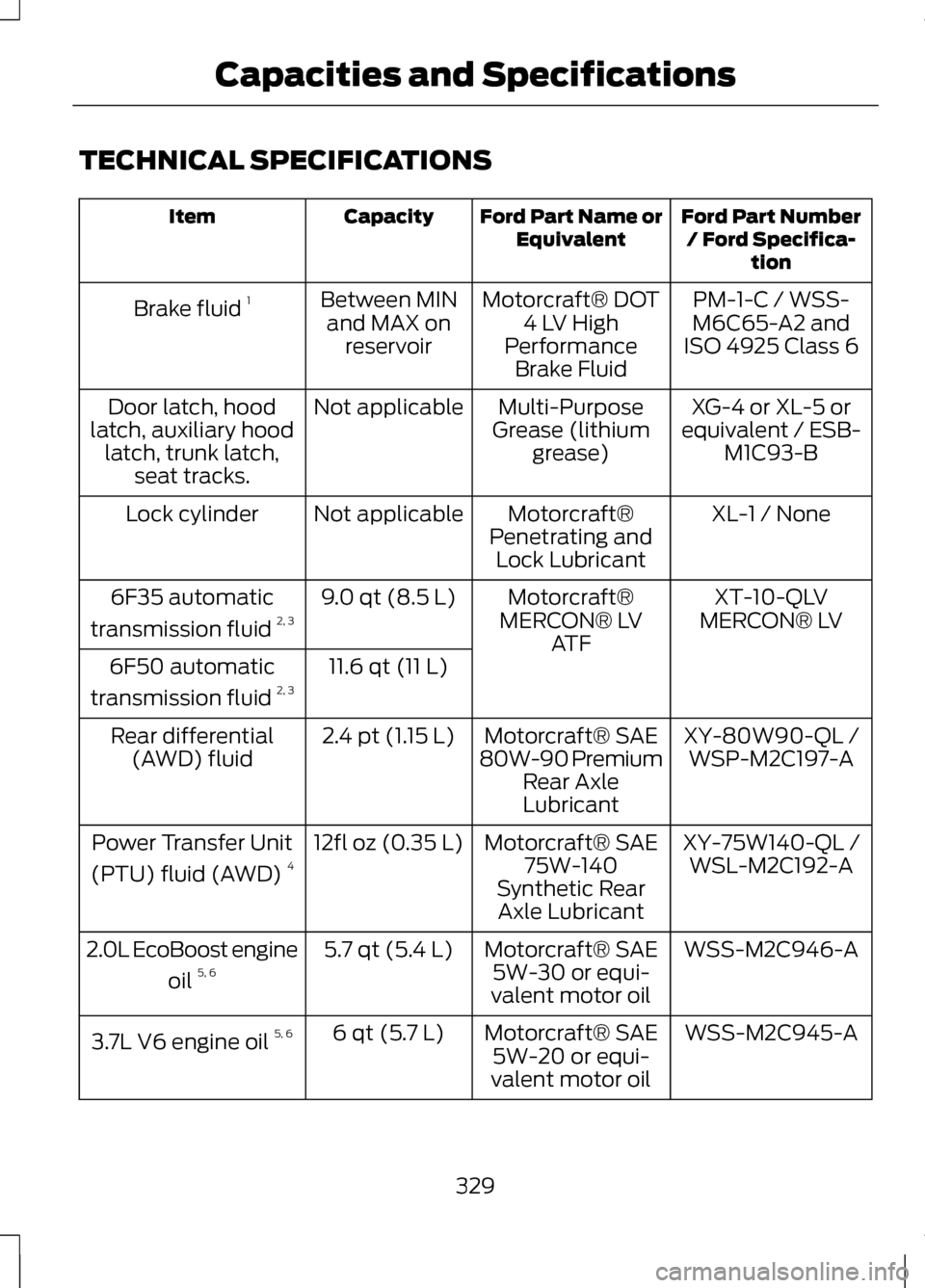
TECHNICAL SPECIFICATIONS
Ford Part Number
/ Ford Specifica- tion
Ford Part Name or
Equivalent
Capacity
Item
PM-1-C / WSS-
M6C65-A2 and
ISO 4925 Class 6
Motorcraft® DOT
4 LV High
Performance Brake Fluid
Between MIN
and MAX on reservoir
Brake fluid
1
XG-4 or XL-5 or
equivalent / ESB- M1C93-B
Multi-Purpose
Grease (lithium grease)
Not applicable
Door latch, hood
latch, auxiliary hood latch, trunk latch, seat tracks.
XL-1 / None
Motorcraft®
Penetrating and Lock Lubricant
Not applicable
Lock cylinder
XT-10-QLV
MERCON® LV
Motorcraft®
MERCON® LV ATF
9.0 qt (8.5 L)
6F35 automatic
transmission fluid 2, 3
11.6 qt (11 L)
6F50 automatic
transmission fluid 2, 3
XY-80W90-QL /WSP-M2C197-A
Motorcraft® SAE
80W-90 Premium Rear Axle
Lubricant
2.4 pt (1.15 L)
Rear differential
(AWD) fluid
XY-75W140-QL /WSL-M2C192-A
Motorcraft® SAE
75W-140
Synthetic Rear Axle Lubricant
12fl oz (0.35 L)
Power Transfer Unit
(PTU) fluid (AWD) 4
WSS-M2C946-A
Motorcraft® SAE
5W-30 or equi-
valent motor oil
5.7 qt (5.4 L)
2.0L EcoBoost engine
oil 5, 6
WSS-M2C945-A
Motorcraft® SAE
5W-20 or equi-
valent motor oil
6 qt (5.7 L)
3.7L V6 engine oil 5, 6
329
Capacities and Specifications
Page 335 of 474
For a complete listing of the
accessories that are available for your
vehicle, please contact your dealer or
visit our online store at:
Accessories.Lincoln.com (U.S.
only).
Lincoln Custom Accessories are
available for your vehicle through your
local Lincoln or Lincoln of Canada
dealer. Ford Motor Company will
repair or replace any properly
dealer-installed Lincoln Custom
Accessories found to be defective in
factory-supplied materials or
workmanship during the warranty
period, as well as any component
damaged by the defective
accessories. The accessories will be
warranted for whichever provides you
the greatest benefit:
• 12 months or 12,000 miles (20,000
kilometers) (whichever occurs
first), or
• the remainder of your new vehicle
limited warranty.
Contact your dealer for details and a
copy of the warranty.
Exterior style
• Hood deflectors
• Side-window deflectors
• Wheels
• Bumper protectors
Interior style
• All-weather floor mats
• Rear seat entertainment*
• Premium carpeted floor mats Lifestyle
•
Ash cup (smoker's packages)
• Cargo area protector
• Cargo net
• Cargo organizer
• Roof racks and carriers*
Peace of mind
• Car cover*
• Wheel locks
• Bumper mounted parking sensor*
• Locking fuel plug for capless fuel
system
*Lincoln Licensed Accessories are
warranted by the accessory
manufacturer's warranty. Lincoln
Licensed Accessories are fully
designed and developed by the
accessory manufacturer and have not
been designed or tested to Ford Motor
Company engineering requirements.
Contact your Lincoln dealer for details
regarding the manufacturer's limited
warranty and a copy of the Lincoln
Licensed Accessories product limited
warranty offered by the accessory
manufacturer.
For maximum vehicle performance,
keep the following information in mind
when adding accessories or
equipment to your vehicle:
332
Accessories
Page 336 of 474
•
When adding accessories,
equipment, passengers and
luggage to your vehicle, do not
exceed the total weight capacity
of the vehicle or of the front or rear
axle (GVWR or GAWR as indicated
on the Safety Compliance
Certification label). Consult your
authorized dealer for specific
weight information.
• The Federal Communications
Commission (FCC) and Canadian
Radio Telecommunications
Commission (CRTC) regulate the
use of mobile communications
systems — such as two-way
radios, telephones and theft
alarms - that are equipped with
radio transmitters. Any such
equipment installed in your vehicle
should comply with FCC or CRTC
regulations and should be installed
only by a qualified service
technician.
• Mobile communications systems
may harm the operation of your
vehicle, particularly if they are not
properly designed for automotive
use. •
To avoid interference with other
vehicle functions, such as anti-lock
braking systems, amateur radio
users who install radios and
antennas onto their vehicle should
not locate the amateur radio
antennas in the area of the driver's
side hood.
• Any non-Lincoln custom electrical
or electronic accessories or
components that are added to the
vehicle by the authorized dealer or
the owner, may adversely affect
battery performance and
durability, and may also adversely
affect the performance of other
electrical systems in the vehicle.
333
Accessories
Page 344 of 474
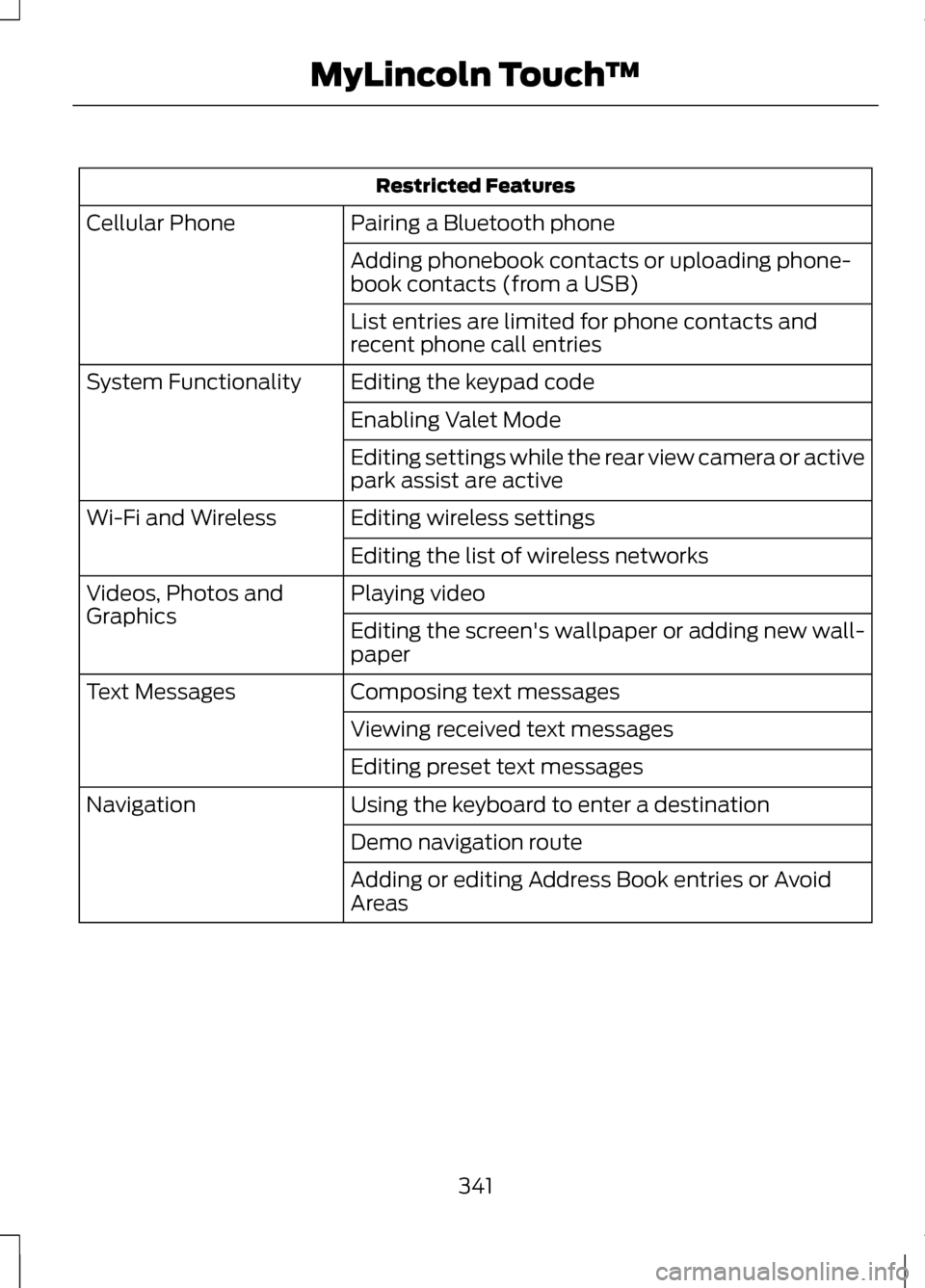
Restricted Features
Pairing a Bluetooth phone
Cellular Phone
Adding phonebook contacts or uploading phone-
book contacts (from a USB)
List entries are limited for phone contacts and
recent phone call entries
Editing the keypad code
System Functionality
Enabling Valet Mode
Editing settings while the rear view camera or active
park assist are active
Editing wireless settings
Wi-Fi and Wireless
Editing the list of wireless networks
Playing video
Videos, Photos and
Graphics
Editing the screen's wallpaper or adding new wall-
paper
Composing text messages
Text Messages
Viewing received text messages
Editing preset text messages
Using the keyboard to enter a destination
Navigation
Demo navigation route
Adding or editing Address Book entries or Avoid
Areas
341
MyLincoln Touch
™
Page 355 of 474
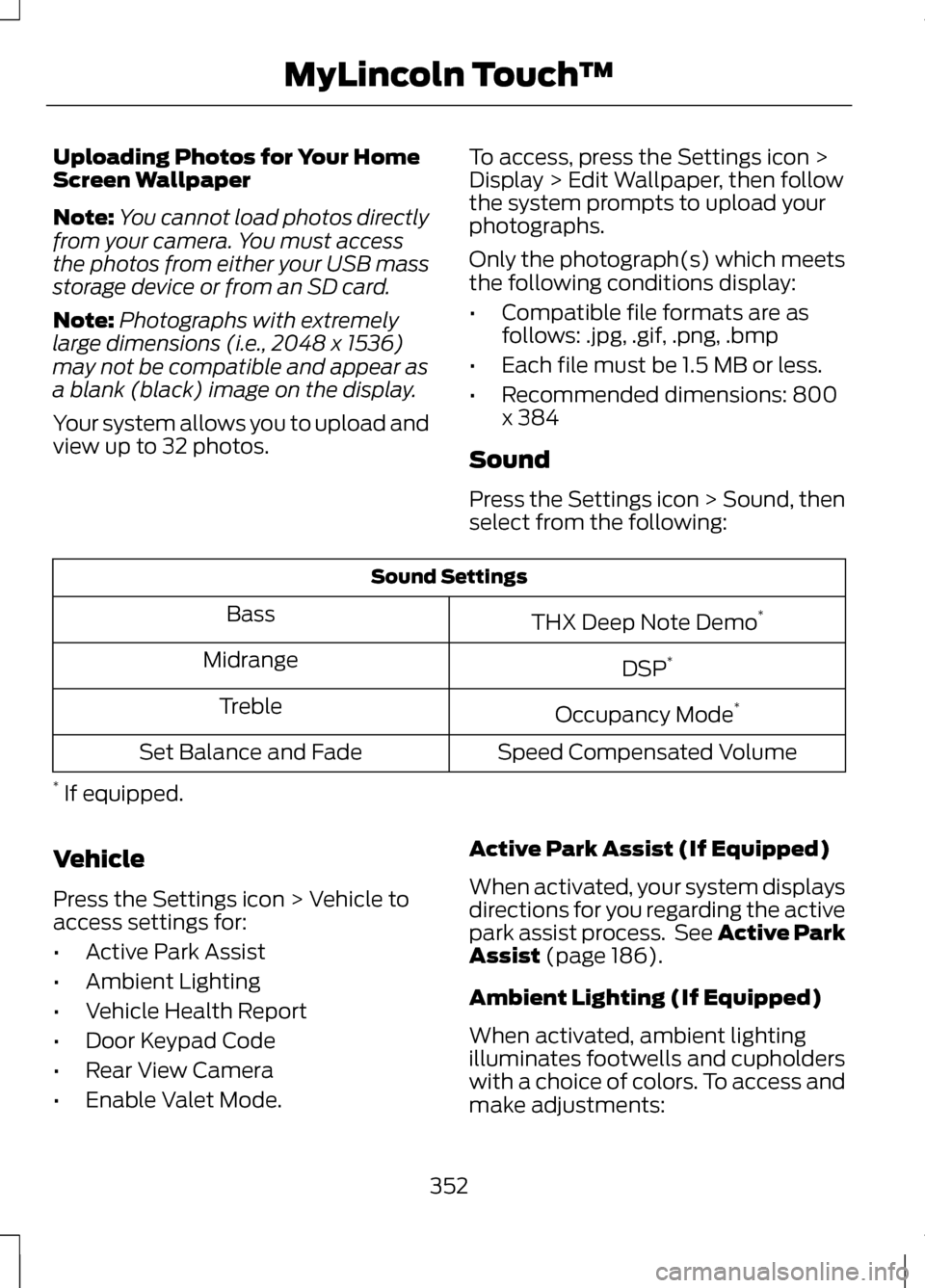
Uploading Photos for Your Home
Screen Wallpaper
Note:
You cannot load photos directly
from your camera. You must access
the photos from either your USB mass
storage device or from an SD card.
Note: Photographs with extremely
large dimensions (i.e., 2048 x 1536)
may not be compatible and appear as
a blank (black) image on the display.
Your system allows you to upload and
view up to 32 photos. To access, press the Settings icon >
Display > Edit Wallpaper, then follow
the system prompts to upload your
photographs.
Only the photograph(s) which meets
the following conditions display:
•
Compatible file formats are as
follows: .jpg, .gif, .png, .bmp
• Each file must be 1.5 MB or less.
• Recommended dimensions: 800
x 384
Sound
Press the Settings icon > Sound, then
select from the following: Sound Settings
THX Deep Note Demo *
Bass
DSP*
Midrange
Occupancy Mode*
Treble
Speed Compensated Volume
Set Balance and Fade
* If equipped.
Vehicle
Press the Settings icon > Vehicle to
access settings for:
• Active Park Assist
• Ambient Lighting
• Vehicle Health Report
• Door Keypad Code
• Rear View Camera
• Enable Valet Mode. Active Park Assist (If Equipped)
When activated, your system displays
directions for you regarding the active
park assist process. See Active Park
Assist (page 186).
Ambient Lighting (If Equipped)
When activated, ambient lighting
illuminates footwells and cupholders
with a choice of colors. To access and
make adjustments:
352
MyLincoln Touch
™