service LINCOLN MKZ 2013 Owner's Guide
[x] Cancel search | Manufacturer: LINCOLN, Model Year: 2013, Model line: MKZ, Model: LINCOLN MKZ 2013Pages: 474, PDF Size: 3.79 MB
Page 174 of 474
USING ALL-WHEEL DRIVE
All-wheel drive uses all four wheels
to power the vehicle. This increases
traction, enabling you to drive over
terrain and road conditions that a
conventional two-wheel drive vehicle
cannot. The AWD system is active all
the time and requires no input from
the operator.
Note:
Your AWD vehicle is not
intended for off-road use. The AWD
feature gives your vehicle some limited
off-road capabilities in which driving
surfaces are relatively level,
obstruction-free and otherwise similar
to normal on-road driving conditions.
Operating your vehicle under other than
those conditions could subject the
vehicle to excessive stress which might
result in damage which is not covered
under your warranty.
Note: A warning message will be
displayed in the information display
when an AWD system fault is present
See Information Messages (page 105).
An AWD system fault will cause the
AWD system to default to front-wheel
drive only mode. When this warning
message is displayed, have your vehicle
serviced at an authorized dealer Note:
A warning message will be
displayed in the information display if
the AWD system has overheated See
Information Messages (page 105).
This condition may occur if the vehicle
was operated in extreme conditions
with excessive wheel slip, such as deep
sand. To resume normal AWD function
as soon as possible, stop the vehicle in
a safe location and stop the engine for
at least 10 minutes. After the engine
has been restarted and the AWD
system has adequately cooled, the
warning message will turn off and
normal AWD function will return.
Do not use a spare tire of a different
size other than the tire provided. If the
mini-spare tire is installed, the AWD
system may disable automatically
and enter front-wheel drive only mode
to protect driveline components. This
condition will be indicated by a
warning in the information display
See
Information Messages (page
105). If there is a warning message in
the information display from using the
spare tire, this indicator should turn
off after reinstalling the repaired or
replaced normal road tire and cycling
the ignition off and on. It is
recommended to reinstall the repaired
or replaced road tire as soon as
possible. Major dissimilar tire sizes
between the front and rear axles
could cause the AWD system to stop
functioning and default to front-wheel
drive or damage the AWD system.
171
All-Wheel Drive
(If Equipped)
Page 177 of 474
Avoid excessive speed because
vehicle momentum can work against
you and cause the vehicle to become
stuck to the point that assistance may
be required from another vehicle.
Remember, you may be able to back
out the way you came if you proceed
with caution.
Mud and Water
If you must drive through high water,
drive slowly. Traction or brake
capability may be limited.
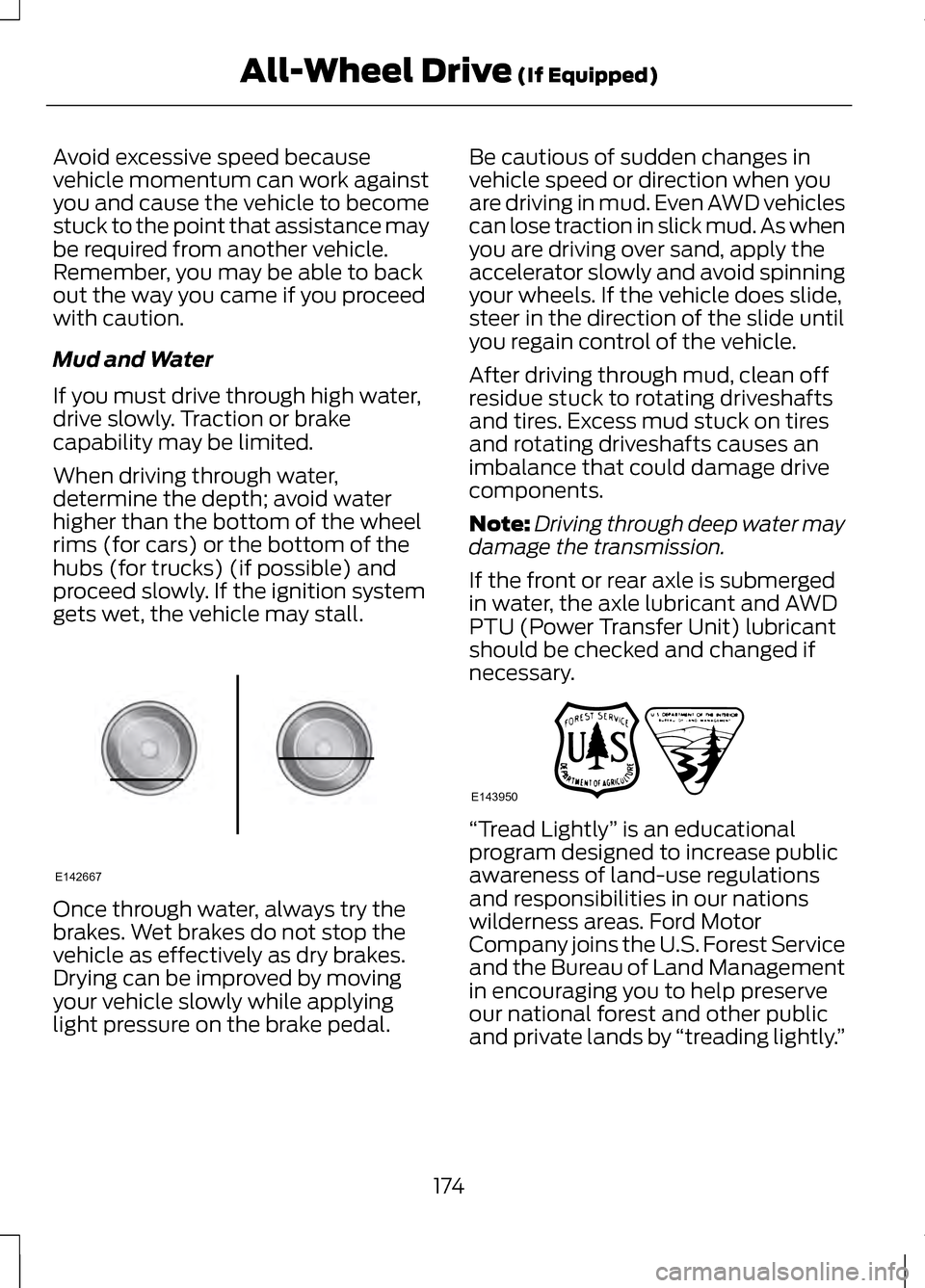
When driving through water,
determine the depth; avoid water
higher than the bottom of the wheel
rims (for cars) or the bottom of the
hubs (for trucks) (if possible) and
proceed slowly. If the ignition system
gets wet, the vehicle may stall.
Once through water, always try the
brakes. Wet brakes do not stop the
vehicle as effectively as dry brakes.
Drying can be improved by moving
your vehicle slowly while applying
light pressure on the brake pedal. Be cautious of sudden changes in
vehicle speed or direction when you
are driving in mud. Even AWD vehicles
can lose traction in slick mud. As when
you are driving over sand, apply the
accelerator slowly and avoid spinning
your wheels. If the vehicle does slide,
steer in the direction of the slide until
you regain control of the vehicle.
After driving through mud, clean off
residue stuck to rotating driveshafts
and tires. Excess mud stuck on tires
and rotating driveshafts causes an
imbalance that could damage drive
components.
Note:
Driving through deep water may
damage the transmission.
If the front or rear axle is submerged
in water, the axle lubricant and AWD
PTU (Power Transfer Unit) lubricant
should be checked and changed if
necessary. “Tread Lightly
” is an educational
program designed to increase public
awareness of land-use regulations
and responsibilities in our nations
wilderness areas. Ford Motor
Company joins the U.S. Forest Service
and the Bureau of Land Management
in encouraging you to help preserve
our national forest and other public
and private lands by “treading lightly.”
174
All-Wheel Drive (If Equipped)E142667 E143950
Page 180 of 474
GENERAL INFORMATION
Note:
Occasional brake noise is
normal. If a metal-to-metal,
continuous grinding or continuous
squeal sound is present, the brake
linings may be worn-out and should be
inspected by an authorized dealer. If
the vehicle has continuous vibration or
shudder in the steering wheel while
braking, the vehicle should be
inspected by an authorized dealer.
Note: Brake dust may accumulate on
the wheels, even under normal driving
conditions. Some dust is inevitable as
the brakes wear and does not
contribute to brake noise. See
Warning Lamps and Indicators (page
95). See
Warning Lamps and
Indicators (page 95).
Wet brakes result in reduced braking
efficiency. Gently press the brake
pedal a few times when driving from
a car wash or standing water to dry
the brakes. Brake Over Accelerator
In the event the accelerator pedal
becomes stuck or entrapped, apply
steady and firm pressure to the brake
pedal to slow the vehicle and reduce
engine power. If you experience this
condition, apply the brakes and bring
your vehicle to a safe stop. Turn the
engine off, shift to position
P and
apply the parking brake, and then
inspect the accelerator pedal for any
interferences. If none are found and
the condition persists, have your
vehicle towed to the nearest
authorized dealer.
Brake Assist
Brake assist detects when you brake
rapidly by measuring the rate at which
you press the brake pedal. It provides
maximum braking efficiency as long
as you press the pedal, and can
reduce stopping distances in critical
situations.
Anti-lock Brake System
This system helps you maintain
steering control during emergency
stops by keeping the brakes from
locking. This lamp momentarily
illuminates when the ignition
is turned on. If the light does
not illuminate during start up, remains
on or flashes, the anti-lock braking
system may be disabled and may
need to be serviced.
177
BrakesE144522
Page 181 of 474
If the system is disabled,
normal braking is still
effective. If the brake
warning lamp illuminates with the
parking brake released, have your
brake system serviced immediately.
HINTS ON DRIVING WITH
ANTI-LOCK BRAKES
Note: When the system is operating,
the brake pedal will pulse and may
travel further. Maintain pressure on the
brake pedal. You may also hear a noise
from the system. This is normal.
The ABS will not eliminate the risks
when:
• you drive too closely to the vehicle
in front of you
• your vehicle is hydroplaning
• you take corners too fast
• the road surface is poor.
ELECTRIC PARKING BRAKE
The electric parking brake replaces
the conventional handbrake. The
operating switch is located on the
instrument panel to the left of the
steering wheel. WARNING
Always set the parking brake and
leave your vehicle with the
transmission selector lever in position
P. Note:
When you apply the electric
parking brake in certain conditions e.g.
on a steep hill, the electric parking
brake may reapply the brakes within
three to ten minutes.
Note: You may notice various noises
when you apply and release the electric
parking brake. This is normal and no
cause for concern.
Applying the electric parking
brake WARNING
If the brake system warning lamp
does not illuminate or flashes,
there could be a problem with your
electric parking brake. Have the
system checked by an authorized
dealer as soon as possible. Note:
The brake system warning lamp
will illuminate for ten seconds, if the
ignition is turned off after the electric
parking brake has been applied, or the
electric parking brake has been applied
after the ignition has been turned off.
Note: The electric parking brake will
not automatically apply. You must
apply the electric parking brake using
the electric parking brake switch.
178
BrakesE144522
Page 184 of 474
PRINCIPLE OF OPERATION
The traction control system helps
avoid drive wheel spin and loss of
traction.
If your vehicle begins to slide, the
system applies the brakes to
individual wheels and, when needed,
reduces engine power at the same
time. If the wheels spin when
accelerating on slippery or loose
surfaces, the system reduces engine
power in order to increase traction.
USING TRACTION
CONTROL
In certain situations (e.g. stuck in snow
or mud), turning the traction control
off may be beneficial as this allows
the wheels to spin with full engine
power. Turn off the traction control
system through the information
display. See General Information
(page 100). System Indicator Lights and
Messages WARNING
If a failure has been detected
within the AdvanceTrac system,
the stability control light will
illuminate steadily. Verify that the
AdvanceTrac system was not
manually disabled through the
information display. If the stability
control light still illuminates steadily,
have the system serviced by an
authorized dealer immediately.
Operating your vehicle with
AdvanceTrac disabled could lead to
an increased risk of loss of vehicle
control, vehicle rollover, personal
injury and death. The stability control light
temporarily illuminates on
engine start-up and flashes
when a driving condition activates the
stability system. The stability control off light
temporarily illuminates on
engine start-up and stays on
when the traction control system is
turned off.
When the traction control system is
turned off or on, a message appears
in the information display showing
system status.
181
Traction ControlE138639
Page 192 of 474
When automatic steering is finished,
the touch screen displays a message
indicating that the active park assist
process is done. The driver is
responsible for checking the parking
job and making any necessary
corrections before putting the
transmission in P (Park).
Deactivating the Park Assist
Feature
The system can be deactivated
manually by:
•
pressing the active park assist
button
• grabbing the steering wheel
• driving above approximately 20
mph (35 km/h) for 30 seconds
during an active park search •
driving above 6 mph (10 km/h)
during automatic steering
• turning off the traction control
system.
Certain vehicle conditions can also
deactivate the system, such as:
• Traction control has activated on
a slippery or loose surface.
• There is an anti-lock brake system
activation or failure.
• Something touches the steering
wheel.
If a problem occurs with the system,
a warning message is displayed,
followed by a chime. Occasional
system messages may occur in
normal operation. For recurring or
frequent system faults, contact an
authorized dealer to have your vehicle
serviced.
Troubleshooting the System The system does not look for a space
The traction control system may be off The system does not offer a particular space
Something may be contacting the front bumper or side sensors
There is not enough room on both sides of the vehicle in order to park
There is not enough space for the parking maneuver on the opposite side of
the parking space
189
Parking Aids
Page 220 of 474
STEERING
Electric Power Steering
WARNING
Obtain immediate service if a
system error is detected. You
may not notice any difference in the
feel of your steering, but a serious
condition may exist. Failure to do so
may result in loss of steering control. Note:
Your vehicle is equipped with an
electric power-assisted steering
system. There is no fluid reservoir to
check or fill.
The electric power steering system
has diagnostic checks that
continuously monitor the system to
ensure proper operation of the
electronic system. When an electronic
error is detected, a message will be
displayed in the information display.
If this happens, stop the vehicle in a
safe place, and turn off the engine.
After at least 10 seconds, reset the
system by restarting the engine, and
watch the information display for a
steering message. If a steering
message returns, or returns while
driving, take the vehicle to your dealer
to have it checked. If your vehicle loses electrical power
while you are driving (or if the ignition
is turned off), you can steer the
vehicle manually, but it takes more
effort. Extreme continuous steering
may increase the effort it takes for you
to steer. This occurs to prevent
internal overheating and permanent
damage to your steering system. If this
should occur, you will neither lose the
ability to steer the vehicle manually
nor will it cause permanent damage.
Typical steering and driving
maneuvers will allow the system to
cool and steering assist will return to
normal.
Steering Tips
If the steering wanders or pulls, check
for:
•
an improperly inflated tire
• uneven tire wear
• loose or worn suspension
components
• loose or worn steering
components
• improper vehicle alignment
A high crown in the road or high
crosswinds may also make the
steering seem to wander or pull.
217
Driving Aids
Page 232 of 474
ESSENTIAL TOWING
CHECKS
Follow these guidelines to ensure safe
towing:
•
Do not tow a trailer until you drive
your vehicle at least 1000 miles
(1600 kilometers).
• Consult your local motor vehicle
laws for towing a trailer.
• Refer to the instructions included
with towing accessories for the
proper installation and adjustment
specifications.
• Service your vehicle more
frequently if you tow a trailer. Refer
to your scheduled maintenance
information.
• If you use a rental trailer, follow the
instructions the rental agency gives
you.
You can find information on load
specification terms found on the tire
label and Safety Compliance label as
well as instructions on calculating
your vehicle's load in another chapter
of this manual. See Load Limit (page
219).
Remember to account for the trailer
tongue weight as part of the vehicle
load when calculating the total
vehicle weight. Hitches
•
Do not use a hitch that either
clamps onto the bumper or
attaches to the axle.
• Distribute the trailer load so
10-15% of the total trailer weight
is on the trailer tongue.
Safety Chains
Note: Never attach safety chains to
the bumper.
Always connect the trailer ’s safety
chains to the hook retainers of the
vehicle hitch.
To connect the trailer ’s safety chains,
cross the chains under the trailer
tongue and allow enough slack for
turning tight corners. Do not allow the
chains to drag on the ground.
Trailer Brakes WARNING
Do not connect a trailer's
hydraulic brake system directly
to your vehicle's brake system. Your
vehicle may not have enough braking
power and your chances of having a
collision greatly increase. Electric brakes and manual,
automatic or surge-type trailer brakes,
when installed properly and adjusted
to the manufacturer's specifications,
are safe to use. The trailer brakes
must meet local and federal
regulations.
229
Towing
Page 234 of 474
•
Avoid parking on a grade.
• However, if you must park on a
grade:
•Turn the steering wheel to point
the vehicle tires away from
traffic flow.
• Set the vehicle parking brake.
• Place automatic transmission
in position P.
• Place wheel chocks in front and
back of the trailer wheels.
(Chocks not equipped with
vehicle.)
Launching or Retrieving a Boat
or Personal Watercraft (PWC)
Note: Disconnect the wiring to the
trailer
before backing the trailer into
the water.
Note: Reconnect the wiring to the
trailer after you remove the trailer from
the water.
When backing down a ramp during
boat launching or retrieval:
• Do not allow the static water level
to rise above the bottom edge of
the rear bumper.
• Do not allow waves to break higher
than 6 inches (15 centimeters)
above the bottom edge of the rear
bumper.
Exceeding these limits may allow
water to enter vehicle components:
• Causing internal damage to the
components.
• Affecting drivability, emissions, and
reliability. Any time the rear axle submerges in
water, replace the rear axle lubricant.
Water may contaminate the rear axle
lubricant, which is not a normal
maintenance inspection item unless
there is a possibility of a leak or other
axle repair is required.
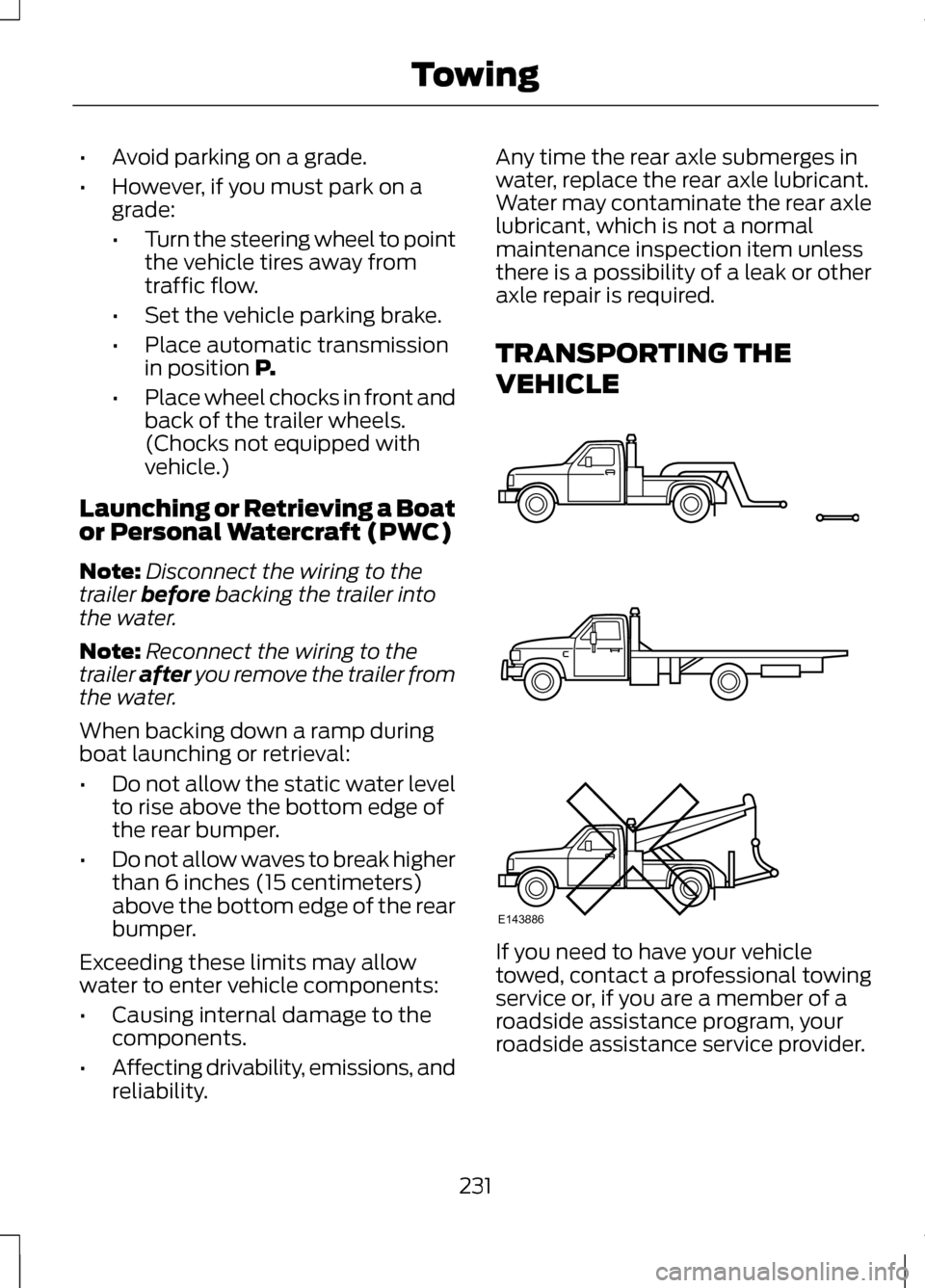
TRANSPORTING THE
VEHICLE
If you need to have your vehicle
towed, contact a professional towing
service or, if you are a member of a
roadside assistance program, your
roadside assistance service provider.
231
TowingE143886
Page 241 of 474
ROADSIDE ASSISTANCE
Vehicles Sold In The U.S.:
Getting Roadside Assistance
To fully assist you should you have a
vehicle concern Ford Motor Company
offers a complimentary roadside
assistance program. This program is
separate from the New Vehicle
Limited Warranty. The service is
available:
•
24-hours, seven days a week.
• for the coverage period listed on
the Roadside Assistance Card
included in your Owner's Manual
portfolio.
Roadside assistance will cover:
• a flat tire change with a good spare
(except vehicles that have been
supplied with a tire inflation kit).
• battery jump start.
• lock-out assistance (key
replacement cost is the customer's
responsibility).
• fuel delivery — Independent
Service Contractors, if not
prohibited by state, local or
municipal law shall deliver up to
2.0 gallons (7.5L) of gasoline or
5.0 gallons (18.9L) of diesel fuel
to a disabled vehicle. Fuel delivery
service is limited to two no-charge
occurrences within a 12-month
period. •
winch out — available within 100
feet (30.5 meters) of a paved or
county maintained road, no
recoveries.
• towing — Ford and Lincoln eligible
vehicles towed to an authorized
dealer within 35 miles (56 km) of
the disablement location or to the
nearest authorized dealer. If a
member requests to be towed to
an authorized dealer more than 35
miles (56 km) from the
disablement location, the member
shall be responsible for any
mileage costs in excess of 35 miles
(56 km).
Trailers shall be covered up to $200
if the disabled eligible vehicle requires
service at the nearest authorized
dealer. If the trailer is disabled, but the
towing vehicle is operational, the
trailer does not qualify for any
roadside services.
Vehicles Sold In The U.S. :
Using Roadside Assistance
Complete the roadside assistance
identification card and place it in your
wallet for quick reference. This card
is found in the owner's information
portfolio in the glove compartment.
U.S. Lincoln vehicle customers who
require Roadside Assistance, call
1-800-521-4140.
238
Roadside Emergencies