tow LINCOLN MKZ 2013 Repair Manual
[x] Cancel search | Manufacturer: LINCOLN, Model Year: 2013, Model line: MKZ, Model: LINCOLN MKZ 2013Pages: 474, PDF Size: 3.79 MB
Page 339 of 474
Name (PLEASE PRINT)
ZIP
STATE
CITY
E-MAIL
SERVICE PLANS (CANADA
ONLY)
You can get more protection for your
vehicle by purchasing a Ford Extended
Service Plan. Ford Extended Service
Plan is the only service contract
backed by Ford Motor Company of
Canada, Limited. Depending on the
plan you purchase, Ford Extended
Service Plan provides benefits such
as:
• Rental reimbursement
• Coverage for certain maintenance
and wear items
• Protection against repair costs
after your New Vehicle Limited
Warranty Coverage expires
• Roadside Assistance benefits
There are several Ford Extended
Service Plans available in various time,
distance and deductible
combinations. Each plan is tailored to
fit your own driving needs, including
reimbursement for towing and rental. When you purchase Ford Extended
Service Plan, you receive added
peace-of-mind protection throughout
Canada and the United States,
provided by a network of participating
Ford Motor Company dealers. The
Lincoln Maintenance Protection Plan
is honored at authorized Lincoln
dealers.
Note:
Repairs performed outside of
Canada and the United States are not
eligible for Ford Extended Service Plan
coverage.
This information is subject to change.
For more information, visit your local
Ford of Canada dealer or www.ford.ca
to find the Ford Extended Service Plan
that is right for you.
336
Ford Extended Service Plan (ESP)
Page 375 of 474
SIRIUS satellite radio is a
subscription-based satellite radio
service that broadcasts a variety of
music, sports, news, weather, traffic
and entertainment programming.
Your factory-installed SIRIUS satellite
radio system includes hardware and
a limited subscription term which
begins on the date of sale or lease of
the vehicle. Refer to your authorized
dealer for availability.
For more information on extended
subscription terms (a service fee is
required), the online media player and
a complete list of SIRIUS satellite
radio channels, and other features,
please visit www.siriusxm.com in the
United States, www.sirius.ca in
Canada, or call SIRIUS at
1-888-539-7474.
Satellite Radio Electronic Serial
Number (ESN)
You need your ESN to activate, modify
or track your satellite radio account.
The ESN is found on the System
Information Screen (SR ESN:
XXXXXXXXXXXX). To access your
ESN, touch the bottom left corner of
the touchscreen. Touch SIRIUS,
Options, then ESN.
SIRIUS Satellite Radio Reception Factors and Troubleshooting Potential Reception Issues
For optimal reception performance, keep the
antenna clear of snow and ice build-up and keep
luggage and other material as far away from the
antenna as possible.
Antenna obstructions
Hills, mountains, tall buildings, bridges, tunnels,
freeway overpasses, parking garages, dense tree
foliage and thunderstorms can interfere with your
reception.
Terrain
When you pass a ground-based broadcast repeating
tower, a stronger signal may overtake a weaker one
and the audio system may mute.
Station overload
Your display may show ACQUIRING... to indicate
the interference and the audio system may mute.
Satellite radio signal
interference
372
MyLincoln Touch
™E142593
Page 376 of 474
Troubleshooting Tips
Action
Cause
Radio Display
None. This message
should disappear shortly.
Radio requires more than
two seconds to produce
audio for the selected
channel.
Acquiring...
If this message does not
clear shortly, or with an
ignition key cycle, your
receiver may have a fault.
See your authorized
dealer for service.
Internal module or
system failure present.
Sat Fault/SIRIUS System
Failure.
Tune to another channel
or choose another preset.
Channel no longer avail-
able.
Invalid Channel.
Contact SIRIUS at 1-888-
539-7474 to subscribe to
the channel, or tune to
another channel.
Subscription not avail-
able for this channel.
Unsubscribed Channel.
The signal is currently
being blocked. When you
move into an open area,
the signal should return.
Loss of signal from the
SIRIUS satellite or
SIRIUS tower to the
vehicle antenna.
No Signal.
None. The process may
take up to three minutes.
Update of channel
programming in progress.
Updating.
Contact SIRIUS at 1-888-
539-7474 to reactivate
or resolve subscription
issues.
Satellite service has been
deactivated by SIRIUS
satellite radio.
Call SIRIUS
1-888-539-7474.
Using the channel guide,
unlock or unskip the
channels.
All the channels in the
selected category are
skipped or locked.
No Channels Available.
None.
SIRIUS has updated the
channels available for
your vehicle.
Subscription Updated.
373
MyLincoln Touch
™
Page 415 of 474
Map Mode
Press the green bar in the upper right
area of the touchscreen to view map
mode. Map mode shows advanced
viewing comprised of both 2D city
maps as well as 3D landmarks (when
available).
2D city maps show detailed outlines
of buildings, visible land use and land
elements and detailed railway
infrastructure for the most essential
cities around the globe. These maps
also contain features such as town
blocks, building footprints, and
railways.
3D landmarks appear as clear, visible
objects which are typically
recognizable and have a certain
tourist value. The 3D landmarks
appear in 3D map mode only.
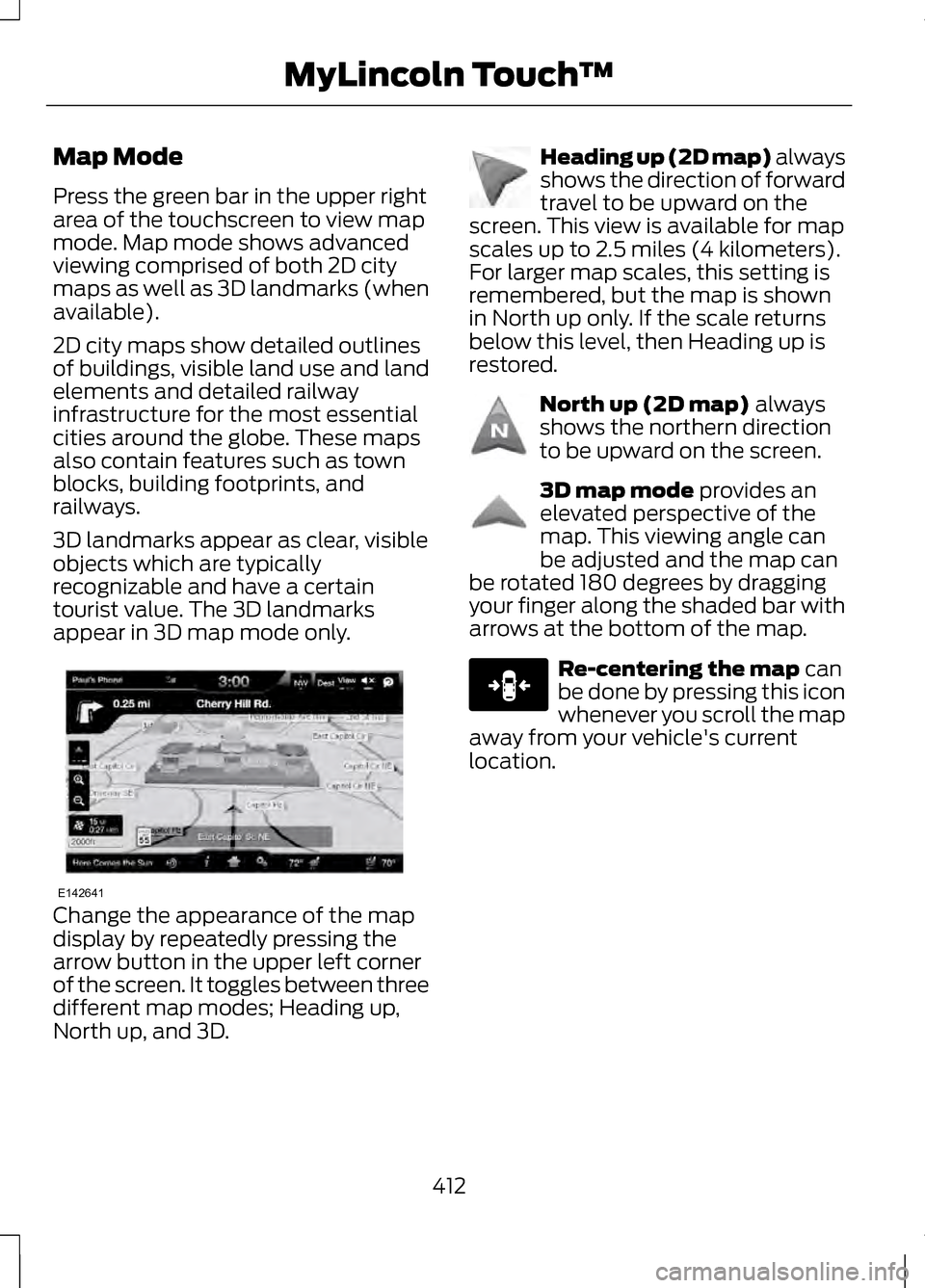
Change the appearance of the map
display by repeatedly pressing the
arrow button in the upper left corner
of the screen. It toggles between three
different map modes; Heading up,
North up, and 3D. Heading up (2D map) always
shows the direction of forward
travel to be upward on the
screen. This view is available for map
scales up to 2.5 miles (4 kilometers).
For larger map scales, this setting is
remembered, but the map is shown
in North up only. If the scale returns
below this level, then Heading up is
restored. North up (2D map) always
shows the northern direction
to be upward on the screen. 3D map mode
provides an
elevated perspective of the
map. This viewing angle can
be adjusted and the map can
be rotated 180 degrees by dragging
your finger along the shaded bar with
arrows at the bottom of the map. Re-centering the map
can
be done by pressing this icon
whenever you scroll the map
away from your vehicle's current
location.
412
MyLincoln Touch
™E142641 E142642 E142643 E142644 E146188
Page 421 of 474
If your vehicle is equipped with the SD
card navigation feature, you have the
ability to enter in a street address
using a feature called One-Shot
Destination Street Address. When
you say either "Navigation destination
street address" or "Destination street
address", the system asks you to say
the full address. The system displays
an example on-screen. You can then
speak the address naturally, such as
"One two three four Main Street,
Anytown".
418
MyLincoln Touch
™
Page 447 of 474
Be sure to ask your dealership service
advisor or technician about the
multi-point vehicle inspection. It is a
comprehensive way to perform a
thorough inspection of your vehicle.
Your checklist gives you immediate
feedback on the overall condition of
your vehicle.
Normal Scheduled
Maintenance
Intelligent Oil-Life Monitor®
Your vehicle is equipped with an
Intelligent Oil-Life Monitor that
determines when you should change
the engine oil based on how your
vehicle is used. By using several
important factors in its calculations,
the monitor helps reduce the cost of
owning your vehicle and reduces
environmental waste at the same
time.
This means you do not have to
remember to change the oil on a
mileage-based schedule. Your vehicle
lets you know when an oil change is
due by displaying ENGINE OIL
CHANGE DUE or OIL CHANGE
REQUIRED in the information display.
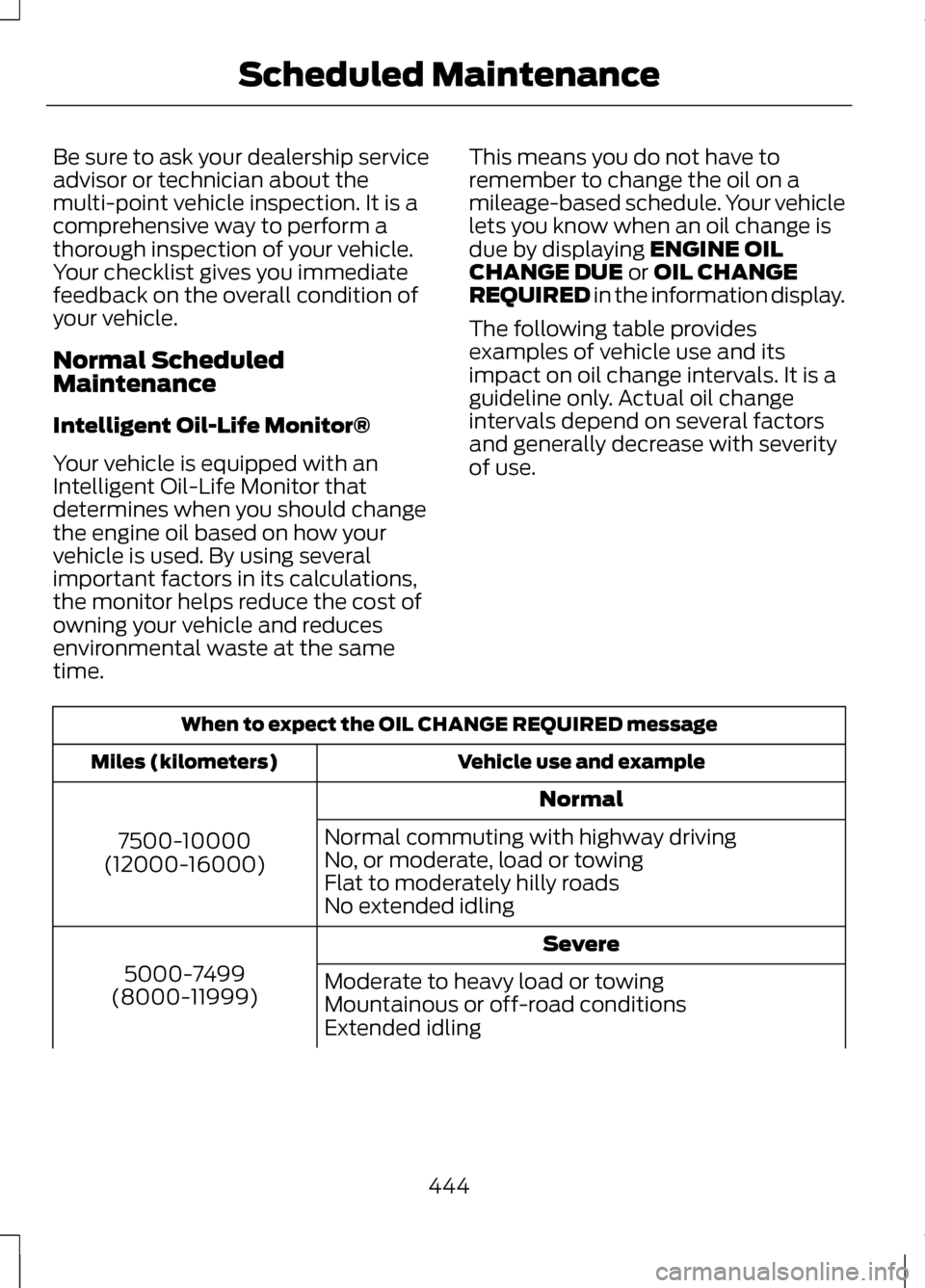
The following table provides
examples of vehicle use and its
impact on oil change intervals. It is a
guideline only. Actual oil change
intervals depend on several factors
and generally decrease with severity
of use. When to expect the OIL CHANGE REQUIRED message
Vehicle use and example
Miles (kilometers)
Normal
7500-10000
(12000-16000) Normal commuting with highway driving
No, or moderate, load or towing
Flat to moderately hilly roads
No extended idling
Severe
5000-7499
(8000-11999) Moderate to heavy load or towing
Mountainous or off-road conditions
Extended idling
444
Scheduled Maintenance
Page 448 of 474
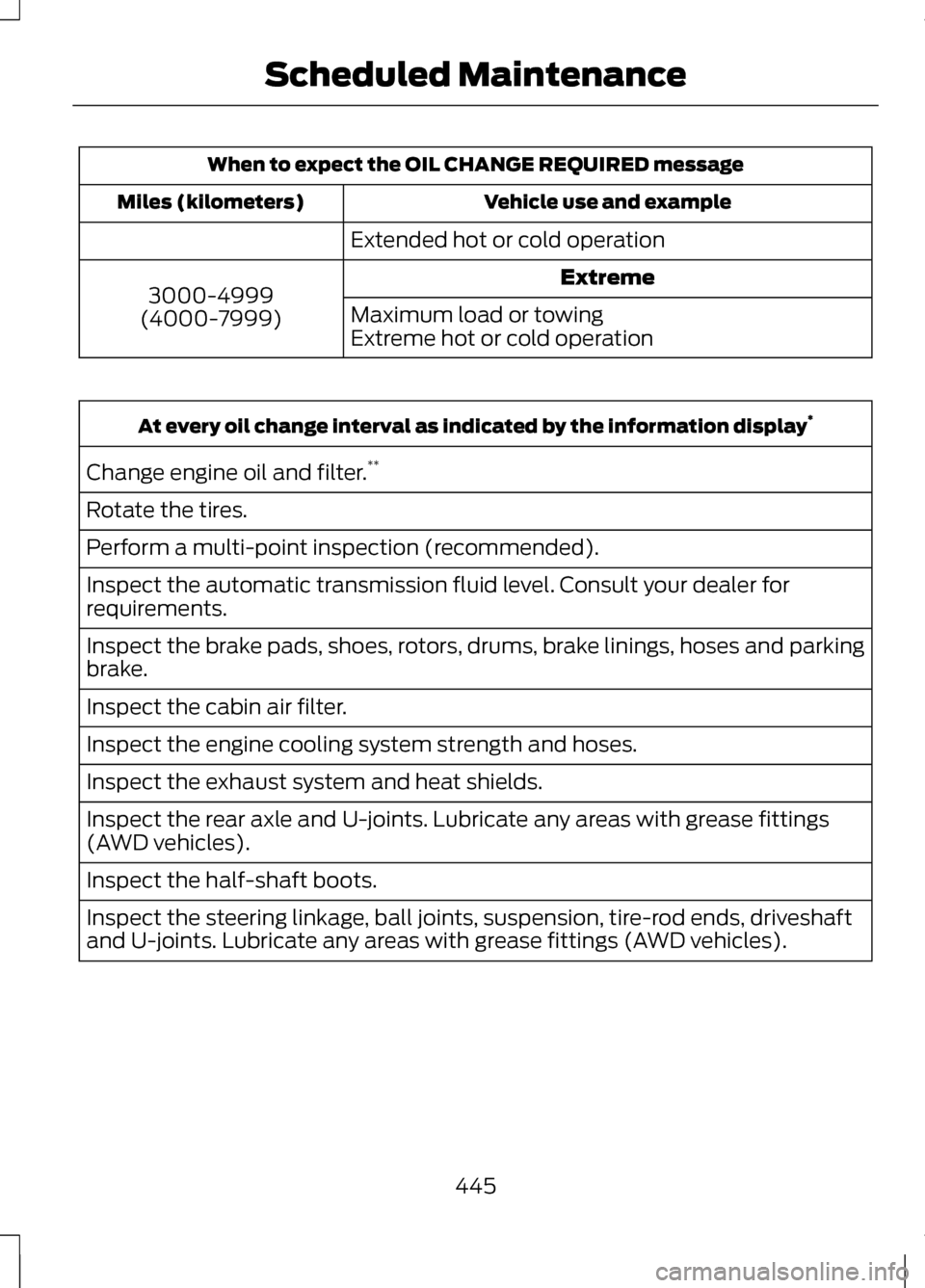
When to expect the OIL CHANGE REQUIRED message
Vehicle use and example
Miles (kilometers)
Extended hot or cold operationExtreme
3000-4999
(4000-7999) Maximum load or towing
Extreme hot or cold operationAt every oil change interval as indicated by the information display
*
Change engine oil and filter. **
Rotate the tires.
Perform a multi-point inspection (recommended).
Inspect the automatic transmission fluid level. Consult your dealer for
requirements.
Inspect the brake pads, shoes, rotors, drums, brake linings, hoses and parking
brake.
Inspect the cabin air filter.
Inspect the engine cooling system strength and hoses.
Inspect the exhaust system and heat shields.
Inspect the rear axle and U-joints. Lubricate any areas with grease fittings
(AWD vehicles).
Inspect the half-shaft boots.
Inspect the steering linkage, ball joints, suspension, tire-rod ends, driveshaft
and U-joints. Lubricate any areas with grease fittings (AWD vehicles).
445
Scheduled Maintenance
Page 455 of 474
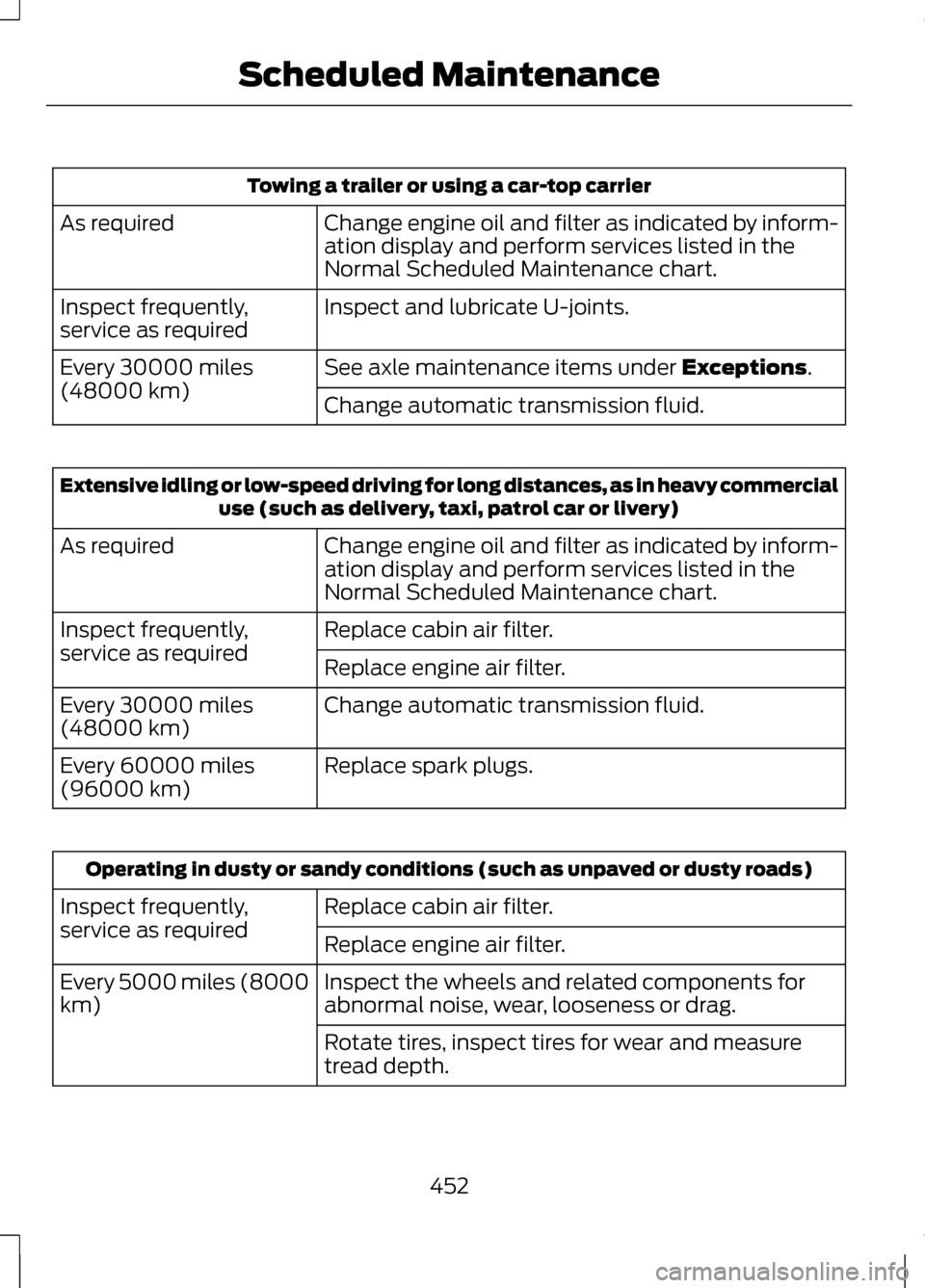
Towing a trailer or using a car-top carrier
Change engine oil and filter as indicated by inform-
ation display and perform services listed in the
Normal Scheduled Maintenance chart.
As required
Inspect and lubricate U-joints.
Inspect frequently,
service as required
See axle maintenance items under Exceptions.
Every 30000 miles
(48000 km)
Change automatic transmission fluid.Extensive idling or low-speed driving for long distances, as in heavy commercial
use (such as delivery, taxi, patrol car or livery)
Change engine oil and filter as indicated by inform-
ation display and perform services listed in the
Normal Scheduled Maintenance chart.
As required
Replace cabin air filter.
Inspect frequently,
service as required
Replace engine air filter.
Change automatic transmission fluid.
Every 30000 miles
(48000 km)
Replace spark plugs.
Every 60000 miles
(96000 km) Operating in dusty or sandy conditions (such as unpaved or dusty roads)
Replace cabin air filter.
Inspect frequently,
service as required
Replace engine air filter.
Inspect the wheels and related components for
abnormal noise, wear, looseness or drag.
Every 5000 miles (8000
km)
Rotate tires, inspect tires for wear and measure
tread depth.
452
Scheduled Maintenance
Page 462 of 474
A
A/C
See: Climate Control...............................126
About This Manual..................................7
Protecting the Environment......................7
ABS See: Brakes.................................................. 177
ABS driving hints See: Hints on Driving With Anti-Lock
Brakes....................................................... 178
Accessories...........................................332 Exterior style.............................................. 332
Interior style............................................... 332
Lifestyle....................................................... 332
Peace of mind........................................... 332
Accessories See: Replacement Parts
Recommendation...................................12
ACC See: Using Adaptive Cruise Control...196
Active Park Assist...............................186 Automatic Steering into Parking
Space....................................................... 188
Deactivating the Park Assist Feature..................................................... 189
Troubleshooting the System...............189
Using Active Park Assist.........................187
Adjusting the Headlamps
................281
Horizontal Aim Adjustment.................282
Vertical Aim Adjustment.......................281
Adjusting the Steering Wheel...........75 Power Tilt and Telescope Steering
Column....................................................... 75
Airbag Disposal
......................................52
Air Conditioning See: Climate Control...............................126
Alarm See: Anti-Theft Alarm...............................73
All-Wheel Drive
.....................................171 Anti-Theft Alarm...................................73
Arming the Alarm.......................................73
Disarming the Alarm.................................73
Appendices...........................................419
Audible Warnings and Indicators..............................................99
Headlamps On Warning Chime...........99
Key in Ignition Warning Chime ..............99
Keyless Warning Alert..............................99
Parking Brake On Warning Chime.......99
Audio Control..........................................76 Seek, Next or Previous..............................76
Audio System........................................122 General Information.................................122
Audio unit - Vehicles With: Premium AM/FM/CD..........................................123
Autolamps...............................................82
Automatic Climate Control.............126
Automatic High Beam Control
........84
Activating the System..............................85
Manually Overriding the System..........85
Automatic Transmission..................165 Automatic Transmission Adaptive
Learning................................................... 169
Brake-Shift Interlock Override............168
If Your Vehicle Gets Stuck In Mud or Snow......................................................... 170
Push Button Shift Transmission.........165
SelectShift Automatic® Transmission.......................................... 167
Automatic Transmission Fluid Check....................................................272
6F35/HF35 transmission......................272
6F50/6F55 Transmission.....................272
Autowipers..............................................79
Auxiliary Power Points.......................147 110 Volt AC Power Point..........................147
12 Volt DC Power Point............................147
Locations...................................................... 147
AWD See: All-Wheel Drive.................................171
459
Index
Page 463 of 474
B
Blind Spot Monitor..............................212
Blind Spot Information System
(BLIS®) with Cross Traffic
Alert........................................................... 212
Booster Seats..........................................18
Types of Booster Seats.............................19
Brake Fluid Check...............................276
Brakes.......................................................177 General Information.................................177
Breaking-In............................................235
Bulb Specification Chart.................283
C
Cabin Air Filter
......................................129
California Proposition 65.....................11
Capacities and Specifications.......325
Technical Specifications.......................329
Car Wash See: Cleaning the Exterior....................284
Center Console
....................................149
Changing a Bulb.................................282
Lamp Assembly Condensation..........282
Replacing Bulbs.......................................282
Changing a Fuse
..................................251
Fuses............................................................. 251
Changing a Road Wheel...................319 Dissimilar Spare Wheel and Tire
Assembly Information.......................320
Stowing the flat tire................................323
Tire Change Procedure...........................321
Changing the 12V Battery.................277
Changing the Engine Air Filter - 2.0L EcoBoost™/3.7L.............................280
........................................................................\
280
2.0L EcoBoost Engine...........................280
3.7L Engine................................................. 280
Changing the Wiper Blades............279
Checking MyKey System Status.....................................................60 Checking the Wiper Blades............279
Child Restraint and Safety Belt
Maintenance........................................40
Child Safety
..............................................15
General Information...................................15
Child Safety Locks................................29 Left-Hand Side........................................... 29
Right-Hand Side........................................30
Child Seat Positioning
..........................17
Cleaning Leather Seats...................288
Cleaning Products.............................284
Cleaning the Alloy Wheels.............289
Cleaning the Engine
..........................286
Cleaning the Exterior........................284 Cleaning Plastic Exterior Parts...........285
Exterior Chrome.......................................285
Underbody................................................. 285
Cleaning the Instrument Panel and Instrument Cluster Lens
................287
Cleaning the Interior..........................287
Cleaning the Windows and Wiper Blades..................................................286
Clearing All MyKeys
.............................59
Climate..................................................403 Climate Control Voice
Commands........................................... 405
Climate Control
....................................126
Coolant Check See: Engine Coolant Check - 2.0L
EcoBoost™/3.7L.................................268
Crash Sensors and Airbag Indicator..................................................51
Creating a MyKey..................................59 Programming/Changing Optional
Settings..................................................... 59
Cruise Control
.........................................77
Principle of Operation.............................195
Type 1............................................................... 77
Type 2.............................................................. 77
Cruise Control See: Using Cruise Control......................195
Customer Assistance
........................243
460
Index