Head LINCOLN MKZ 2014 User Guide
[x] Cancel search | Manufacturer: LINCOLN, Model Year: 2014, Model line: MKZ, Model: LINCOLN MKZ 2014Pages: 468, PDF Size: 4.49 MB
Page 55 of 468
GENERAL INFORMATION
ON RADIO FREQUENCIES
This device complies with Part 15 of
the FCC Rules and with Industry
Canada license-exempt RSS
standard(s). Operation is subject to
the following two conditions: (1) This
device may not cause harmful
interference, and (2) This device must
accept any interference received,
including interference that may cause
undesired operation.
Note:Changes or modifications not
expressively approved by the party
responsible for compliance could void
the user's authority to operate the
equipment. The term IC before the
radio certification number only signifies
that Industry Canada technical
specifications were met.
The typical operating range for your
transmitter is approximately 33 feet
(10 meters). Vehicles with the remote
start feature will have a greater range.
One of the following could cause a
decrease in operating range:
• weather conditions
• nearby radio towers
• structures around the vehicle
• other vehicles parked next to your vehicle The radio frequency used by your
remote control can also be used by
other short distance radio
transmissions, for example amateur
radios, medical equipment, wireless
headphones, remote controls and
alarm systems. If the frequencies are
jammed, you will not be able to use
your remote control. You can lock and
unlock the doors with the key.
Note:
Make sure to lock your vehicle
before leaving it unattended.
Note: If you are in range, the remote
control will operate if you press any
button unintentionally.
Intelligent Access
The system uses a radio frequency
signal to communicate with your
vehicle and authorize your vehicle to
unlock when one of the following
conditions are met:
• You touch the inside of the front exterior door handle.
• You press the luggage compartment button.
• You press a button on the transmitter.
If excessive radio frequency
interference is present in the area or
if the transmitter battery is low, you
may need to mechanically unlock your
door. You can use the mechanical key
blade in your intelligent access key to
open the driver door in this situation.
See Remote Control (page 53).
52
Keys and Remote Controls
Page 59 of 468
The horn will sound if the system fails
to start, unless quiet start is on. Quiet
start will run the blower fan at a
slower speed to reduce noise. It can
be switched on or off in the
information display. See General
Information (page 101).
Note: If the vehicle has been remote
started with an integrated keyhead
transmitter, you must switch the
ignition on before driving your vehicle.
With an intelligent access transmitter,
you must press the START/STOP
button on the instrument panel once
while applying the brake pedal before
driving your vehicle.
The power windows will not work
during the remote start and the radio
will not turn on automatically.
The parking lamps will remain on and
the vehicle will run for 5, 10, or 15
minutes, depending on the setting.
Extending the Vehicle Run Time
Repeat Steps 1 and 2 with the vehicle
still running to extend the run time for
another remote start duration. If you
programmed the duration to last 10
minutes, the second 10 minutes will
begin after what is left of the first
activation time. For example, if the
vehicle had been running from the first
remote start for five minutes, the
vehicle will continue to run now for a
total of 15 minutes. You can extend
the remote start up to a maximum of
35 minutes.
Wait at least five seconds before
remote starting after a vehicle
shutdown. Turning the Vehicle Off After
Remote Starting
E138625
Press the button once. The
parking lamps will turn off.
You may have to be closer to
the vehicle than when starting due to
ground reflection and the added noise
of the running vehicle.
You can disable or enable the remote
start system through the information
display. See General Information
(page 101).
REPLACING A LOST KEY OR
REMOTE CONTROL
Replacement keys or remote controls
can be purchased from an authorized
dealer. Authorized dealers can
program remote controls for your
vehicle. See Passive Anti-Theft
System (page 72).
To re-program the passive anti-theft
system see an authorized dealer.
56
Keys and Remote Controls
Page 68 of 468
The autolock feature repeats when:
• you open then close any door whilethe ignition is on and your vehicle
speed is 9 mph (15 km/h) or lower,
and
• your vehicle then attains a speed greater than 12 mph (20 km/h).
Autounlock Feature
The autounlock feature will unlock all
the doors when:
• the ignition is on, all the doors are closed, and your vehicle has been
in motion at a speed greater than
12 mph (20 km/h);
• your vehicle comes to a stop and you switch the ignition off or to
accessory; and
• you open the driver door within 10 minutes of switching the ignition
off or to accessory.
Note: The doors will not autounlock if
you electronically lock your vehicle
after you switch the ignition off and
before you open the driver door.
Enabling or Disabling
Note: You can enable or disable the
autolock and autounlock features
independently of each other.
You can enable or disable these
features in the information display or
your authorized dealer can do it for
you. See General Information (page
101).Illuminated Entry
The interior lamps and select exterior
lamps will illuminate when you unlock
the doors with the remote entry
system.
The illuminated entry system will turn
off the lights if:
• the ignition is on,
• you press the remote control lock button, or
• after 25 seconds of illumination.
The lights will not turn off if:
• you turn them on with the lamp control, or
• any door is open.
Illuminated Exit
The interior lamps and select exterior
lamps will illuminate when all doors
are closed and you switch the ignition
off.
The lamps will turn off if all the doors
remain closed and:
• 25 seconds elapse
• you press the START/STOP button.
Battery Saver
If you leave the courtesy lamps, dome
lamps or headlamps on, the battery
saver will shut them off 10 minutes
after you switch the ignition off.
65
Locks
Page 83 of 468
Note:If you switch autolamps on in
conjunction with autowipers, your low
beam headlamps will illuminate
automatically when the rain sensor
activates the windshield wipers
continuously.
Note: Wet or winter driving conditions
with ice, snow or salty road mist can
cause inconsistent and unexpected
wiping or smearing.
In these conditions, you can do the
following to help keep your windshield
clear:
• Lower the sensitivity of the autowipers to reduce the amount
of smearing.
• Switch to normal or high-speed wipe.
• Switch the autowipers off.
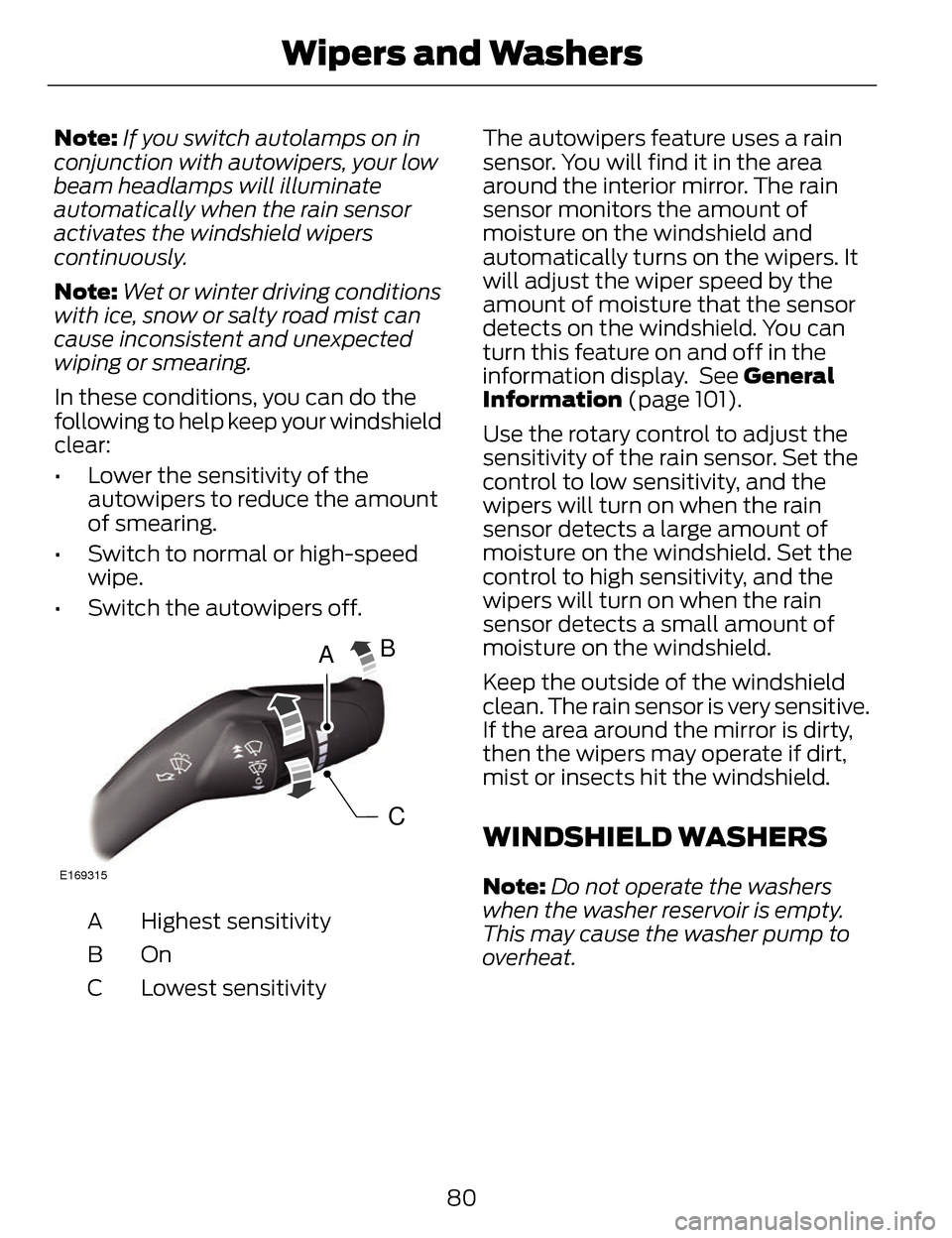
A
C
B
E169315
Highest sensitivity
A
OnB
Lowest sensitivity
C The autowipers feature uses a rain
sensor. You will find it in the area
around the interior mirror. The rain
sensor monitors the amount of
moisture on the windshield and
automatically turns on the wipers. It
will adjust the wiper speed by the
amount of moisture that the sensor
detects on the windshield. You can
turn this feature on and off in the
information display. See General
Information (page 101).
Use the rotary control to adjust the
sensitivity of the rain sensor. Set the
control to low sensitivity, and the
wipers will turn on when the rain
sensor detects a large amount of
moisture on the windshield. Set the
control to high sensitivity, and the
wipers will turn on when the rain
sensor detects a small amount of
moisture on the windshield.
Keep the outside of the windshield
clean. The rain sensor is very sensitive.
If the area around the mirror is dirty,
then the wipers may operate if dirt,
mist or insects hit the windshield.
WINDSHIELD WASHERS
Note:
Do not operate the washers
when the washer reservoir is empty.
This may cause the washer pump to
overheat.
80
Wipers and Washers
Page 85 of 468
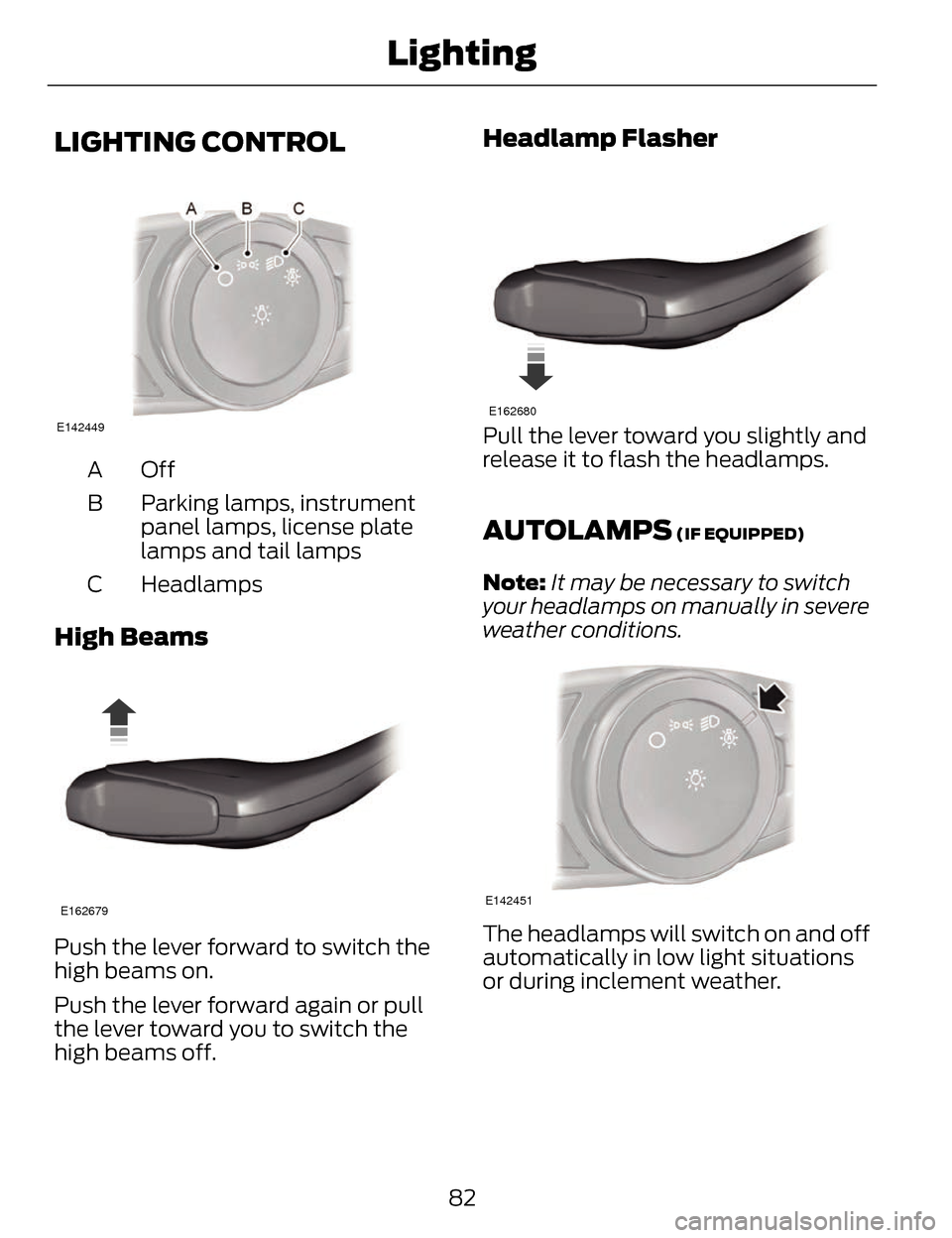
LIGHTING CONTROL
E142449
OffA
Parking lamps, instrument
panel lamps, license plate
lamps and tail lamps
B
Headlamps
C
High Beams
E162679
Push the lever forward to switch the
high beams on.
Push the lever forward again or pull
the lever toward you to switch the
high beams off.
Headlamp Flasher
E162680
Pull the lever toward you slightly and
release it to flash the headlamps.
AUTOLAMPS (IF EQUIPPED)
Note: It may be necessary to switch
your headlamps on manually in severe
weather conditions.
E142451
The headlamps will switch on and off
automatically in low light situations
or during inclement weather.
82
Lighting
Page 86 of 468
The headlamps will remain on for a
period of time after you switch the
ignition off. You can adjust the time
delay using the information display
controls. See Information Displays
(page 101).
Note:If you switch autolamps on in
conjunction with autowipers, low beam
headlamps will illuminate
automatically when the rain sensor
activates the windshield wipers
continuously.
INSTRUMENT LIGHTING
DIMMER
Note: If you disconnect and connect
the battery, or fully discharge and
charge the battery, the illuminated
components will switch to the
maximum setting.
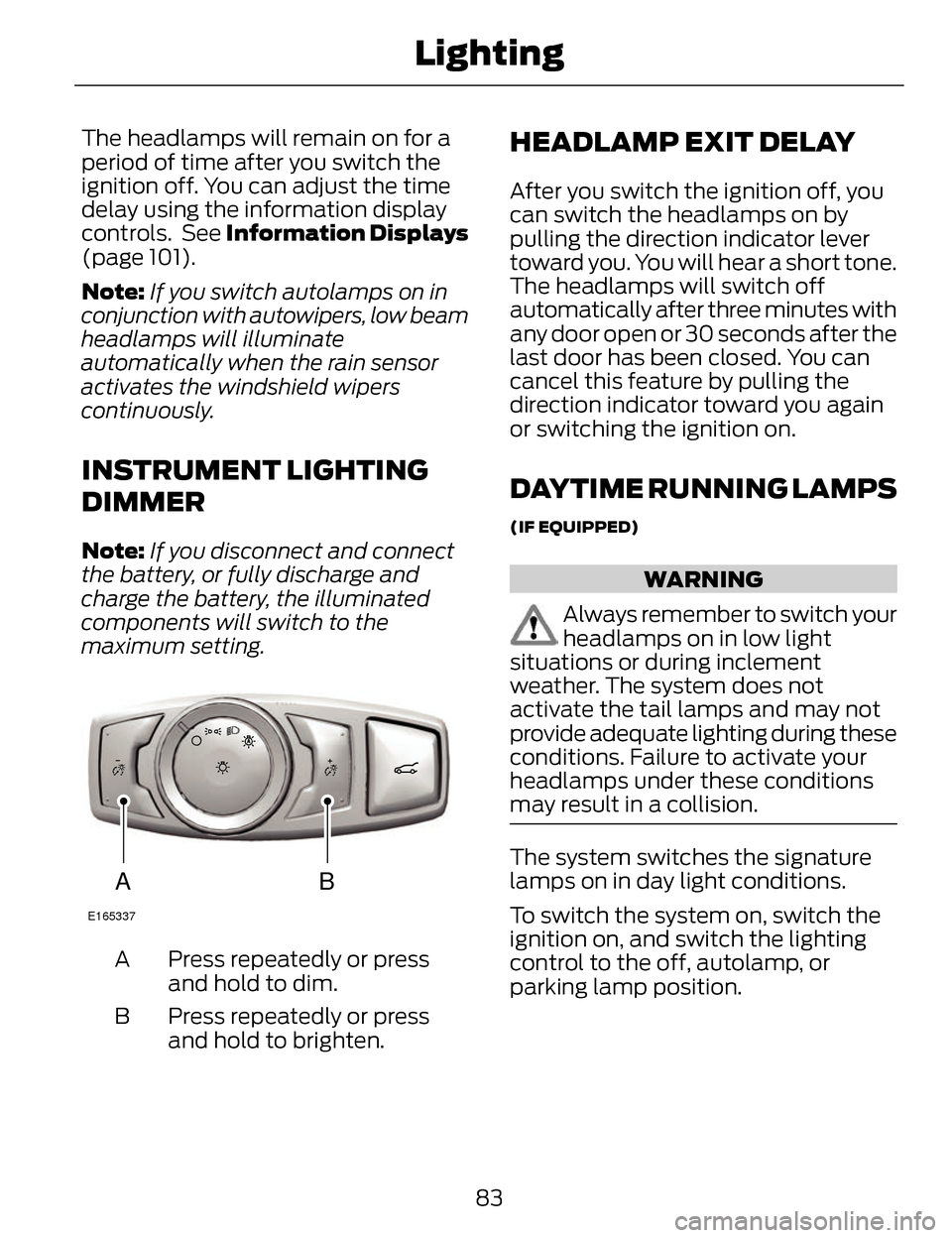
AB
E165337
Press repeatedly or press
and hold to dim.
A
Press repeatedly or press
and hold to brighten.
B
HEADLAMP EXIT DELAY
After you switch the ignition off, you
can switch the headlamps on by
pulling the direction indicator lever
toward you. You will hear a short tone.
The headlamps will switch off
automatically after three minutes with
any door open or 30 seconds after the
last door has been closed. You can
cancel this feature by pulling the
direction indicator toward you again
or switching the ignition on.
DAYTIME RUNNING LAMPS
(IF EQUIPPED)
WARNING
Always remember to switch your
headlamps on in low light
situations or during inclement
weather. The system does not
activate the tail lamps and may not
provide adequate lighting during these
conditions. Failure to activate your
headlamps under these conditions
may result in a collision.
The system switches the signature
lamps on in day light conditions.
To switch the system on, switch the
ignition on, and switch the lighting
control to the off, autolamp, or
parking lamp position.
83
Lighting
Page 87 of 468
AUTOMATIC HIGH BEAM
CONTROL
(IF EQUIPPED)
The system will automatically turn on
your high beams if it is dark enough
and no other traffic is present. When
it detects the headlights of an
approaching vehicle, the tail lamps of
the preceding vehicle or street lighting,
the system will turn off the high
beams before they distract other
drivers. The low beams remain on.
Note:If it appears that automatic
control of the high beams is not
functioning properly, check the
windshield in front of the camera for a
blockage. A clear view of the road is
required for proper system operation.
Have any windshield damage in the
area of the camera’s field-of-view
repaired.
Note: If the system detects a blockage
such as bird droppings, bug splatter,
snow or ice, and you do not observe
changes, the system will go into low
beam mode until you clear the
blockage. A message may also appear
in the instrument cluster display noting
the front camera is blocked. Note:
Typical road dust, dirt and water
spots will not affect the performance
of the automatic high beam system .
However, in cold or inclement weather
conditions, you will notice a decrease
in the availability of the high beam
system, especially at start up. If you
want to change the beam state
independently of the system, you may
switch the high beams on or off using
the multifunction switch. Automatic
control will resume when conditions
are correct.
Note: Modification of the vehicle ride
height such as using much larger tires,
may degrade feature performance.
A camera sensor, centrally mounted
behind the windshield of your vehicle,
continuously monitors conditions to
decide when to switch the high beams
off and on.
Once the system is active, the high
beams will switch on if:
• the ambient light level is low enough
• there is no traffic in front of the vehicle
• the vehicle speed is greater than 25 mph (40 km/h)
The high beams will switch off if:
• the system detects the headlamps of an approaching vehicle or the
tail lamps of a preceding vehicle.
• vehicle speed falls below 16 mph (25 km/h)
• the ambient light level is high enough that high beams are not
required
84
Lighting
Page 88 of 468
• the system detects severe rain,snow or fog
• the camera is blocked
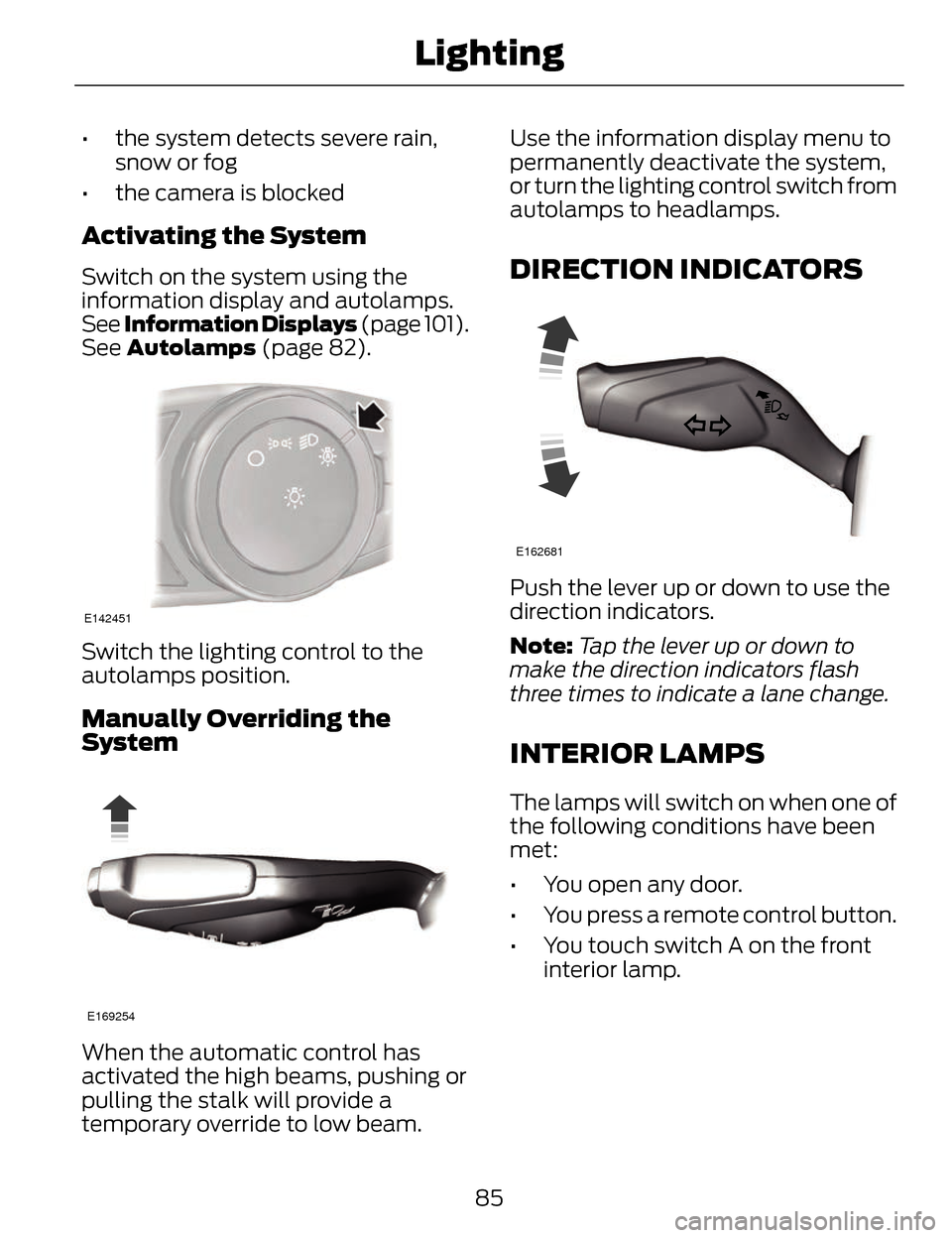
Activating the System
Switch on the system using the
information display and autolamps.
See Information Displays (page 101).
See Autolamps (page 82).
E142451
Switch the lighting control to the
autolamps position.
Manually Overriding the
System
E169254
When the automatic control has
activated the high beams, pushing or
pulling the stalk will provide a
temporary override to low beam. Use the information display menu to
permanently deactivate the system,
or turn the lighting control switch from
autolamps to headlamps.
DIRECTION INDICATORS
E162681
Push the lever up or down to use the
direction indicators.
Note:
Tap the lever up or down to
make the direction indicators flash
three times to indicate a lane change.
INTERIOR LAMPS
The lamps will switch on when one of
the following conditions have been
met:
• You open any door.
• You press a remote control button.
• You touch switch A on the front interior lamp.
85
Lighting
Page 89 of 468
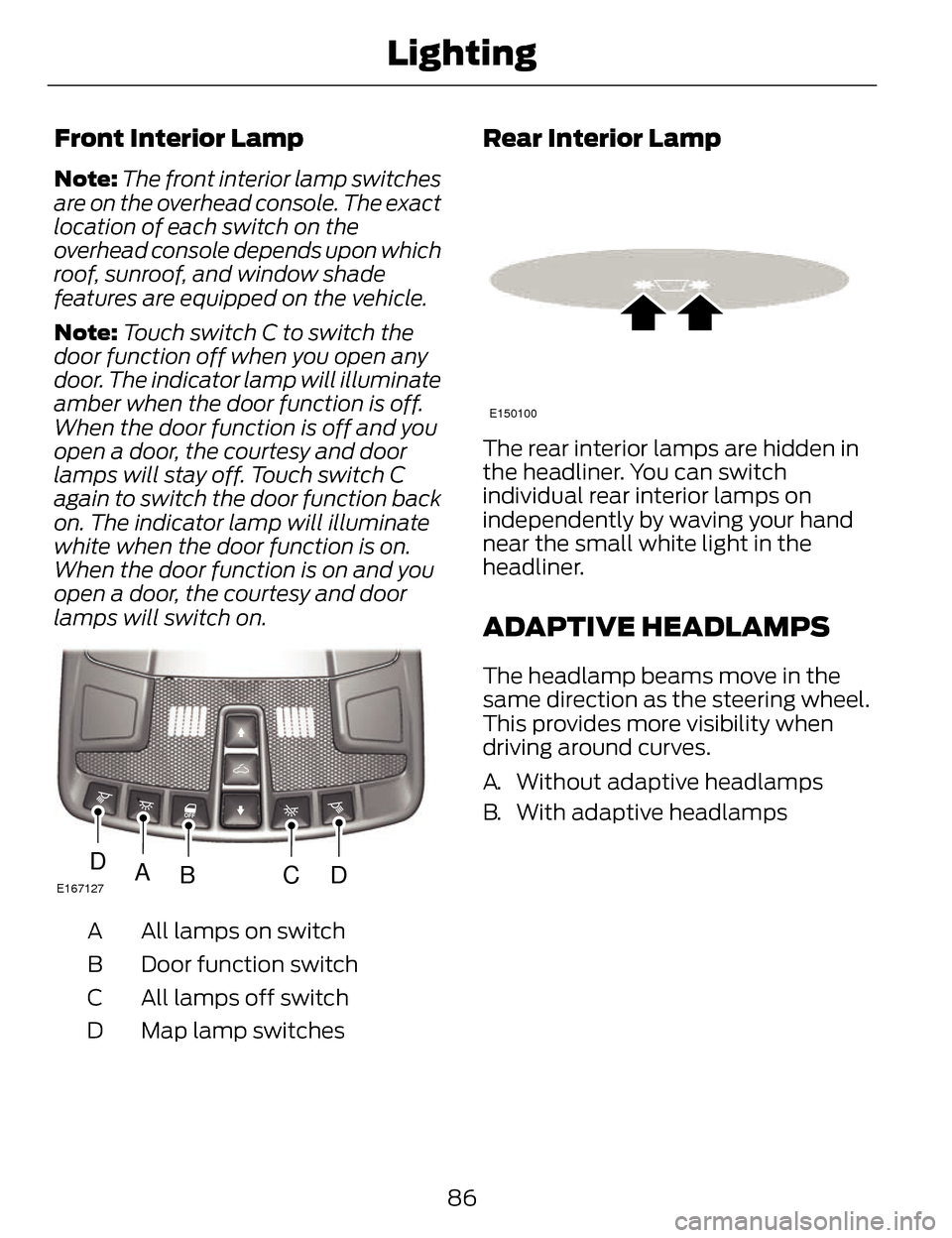
Front Interior Lamp
Note:The front interior lamp switches
are on the overhead console. The exact
location of each switch on the
overhead console depends upon which
roof, sunroof, and window shade
features are equipped on the vehicle.
Note: Touch switch C to switch the
door function off when you open any
door. The indicator lamp will illuminate
amber when the door function is off.
When the door function is off and you
open a door, the courtesy and door
lamps will stay off. Touch switch C
again to switch the door function back
on. The indicator lamp will illuminate
white when the door function is on.
When the door function is on and you
open a door, the courtesy and door
lamps will switch on.
E167127ABCDD
All lamps on switch
A
Door function switch
B
All lamps off switch
C
Map lamp switches
D
Rear Interior Lamp
E150100
The rear interior lamps are hidden in
the headliner. You can switch
individual rear interior lamps on
independently by waving your hand
near the small white light in the
headliner.
ADAPTIVE HEADLAMPS
The headlamp beams move in the
same direction as the steering wheel.
This provides more visibility when
driving around curves.
A. Without adaptive headlamps
B. With adaptive headlamps
86
Lighting
Page 94 of 468
A
B
C
E138665
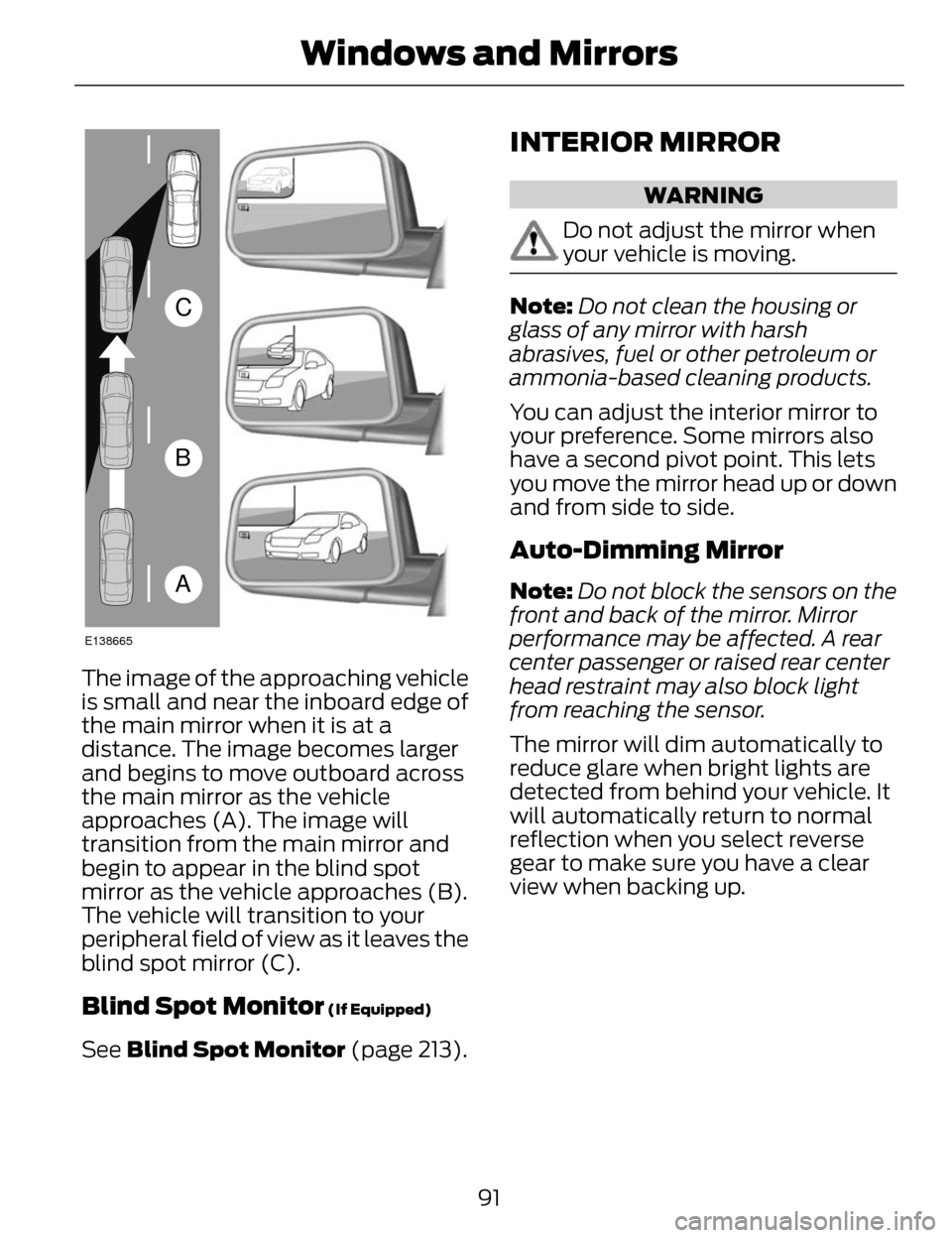
The image of the approaching vehicle
is small and near the inboard edge of
the main mirror when it is at a
distance. The image becomes larger
and begins to move outboard across
the main mirror as the vehicle
approaches (A). The image will
transition from the main mirror and
begin to appear in the blind spot
mirror as the vehicle approaches (B).
The vehicle will transition to your
peripheral field of view as it leaves the
blind spot mirror (C).
Blind Spot Monitor (If Equipped)
See Blind Spot Monitor (page 213).
INTERIOR MIRROR
WARNING
Do not adjust the mirror when
your vehicle is moving.
Note:Do not clean the housing or
glass of any mirror with harsh
abrasives, fuel or other petroleum or
ammonia-based cleaning products.
You can adjust the interior mirror to
your preference. Some mirrors also
have a second pivot point. This lets
you move the mirror head up or down
and from side to side.
Auto-Dimming Mirror
Note: Do not block the sensors on the
front and back of the mirror. Mirror
performance may be affected. A rear
center passenger or raised rear center
head restraint may also block light
from reaching the sensor.
The mirror will dim automatically to
reduce glare when bright lights are
detected from behind your vehicle. It
will automatically return to normal
reflection when you select reverse
gear to make sure you have a clear
view when backing up.
91
Windows and Mirrors