tow LINCOLN MKZ 2014 User Guide
[x] Cancel search | Manufacturer: LINCOLN, Model Year: 2014, Model line: MKZ, Model: LINCOLN MKZ 2014Pages: 468, PDF Size: 4.49 MB
Page 83 of 468
Note:If you switch autolamps on in
conjunction with autowipers, your low
beam headlamps will illuminate
automatically when the rain sensor
activates the windshield wipers
continuously.
Note: Wet or winter driving conditions
with ice, snow or salty road mist can
cause inconsistent and unexpected
wiping or smearing.
In these conditions, you can do the
following to help keep your windshield
clear:
• Lower the sensitivity of the autowipers to reduce the amount
of smearing.
• Switch to normal or high-speed wipe.
• Switch the autowipers off.
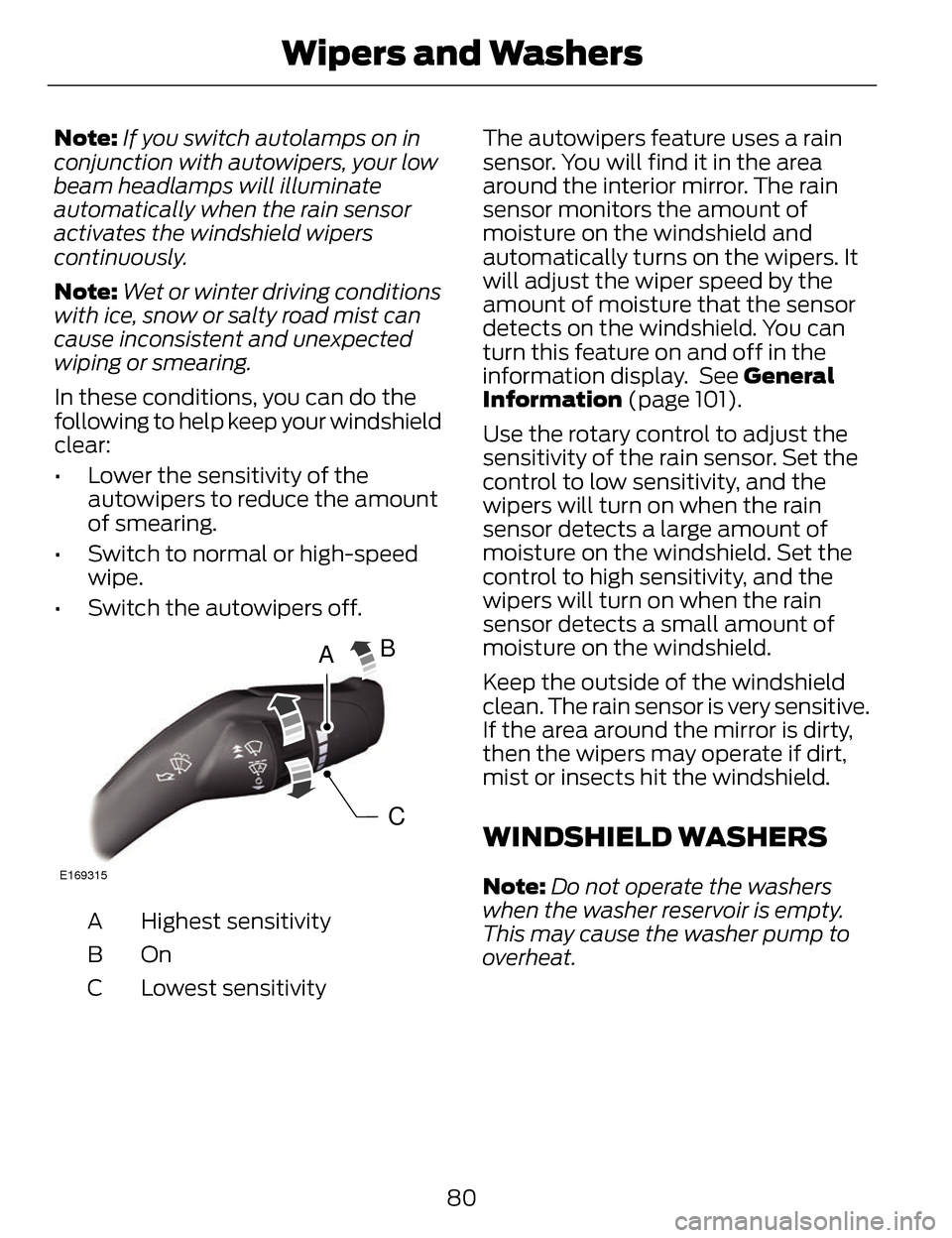
A
C
B
E169315
Highest sensitivity
A
OnB
Lowest sensitivity
C The autowipers feature uses a rain
sensor. You will find it in the area
around the interior mirror. The rain
sensor monitors the amount of
moisture on the windshield and
automatically turns on the wipers. It
will adjust the wiper speed by the
amount of moisture that the sensor
detects on the windshield. You can
turn this feature on and off in the
information display. See General
Information (page 101).
Use the rotary control to adjust the
sensitivity of the rain sensor. Set the
control to low sensitivity, and the
wipers will turn on when the rain
sensor detects a large amount of
moisture on the windshield. Set the
control to high sensitivity, and the
wipers will turn on when the rain
sensor detects a small amount of
moisture on the windshield.
Keep the outside of the windshield
clean. The rain sensor is very sensitive.
If the area around the mirror is dirty,
then the wipers may operate if dirt,
mist or insects hit the windshield.
WINDSHIELD WASHERS
Note:
Do not operate the washers
when the washer reservoir is empty.
This may cause the washer pump to
overheat.
80
Wipers and Washers
Page 84 of 468
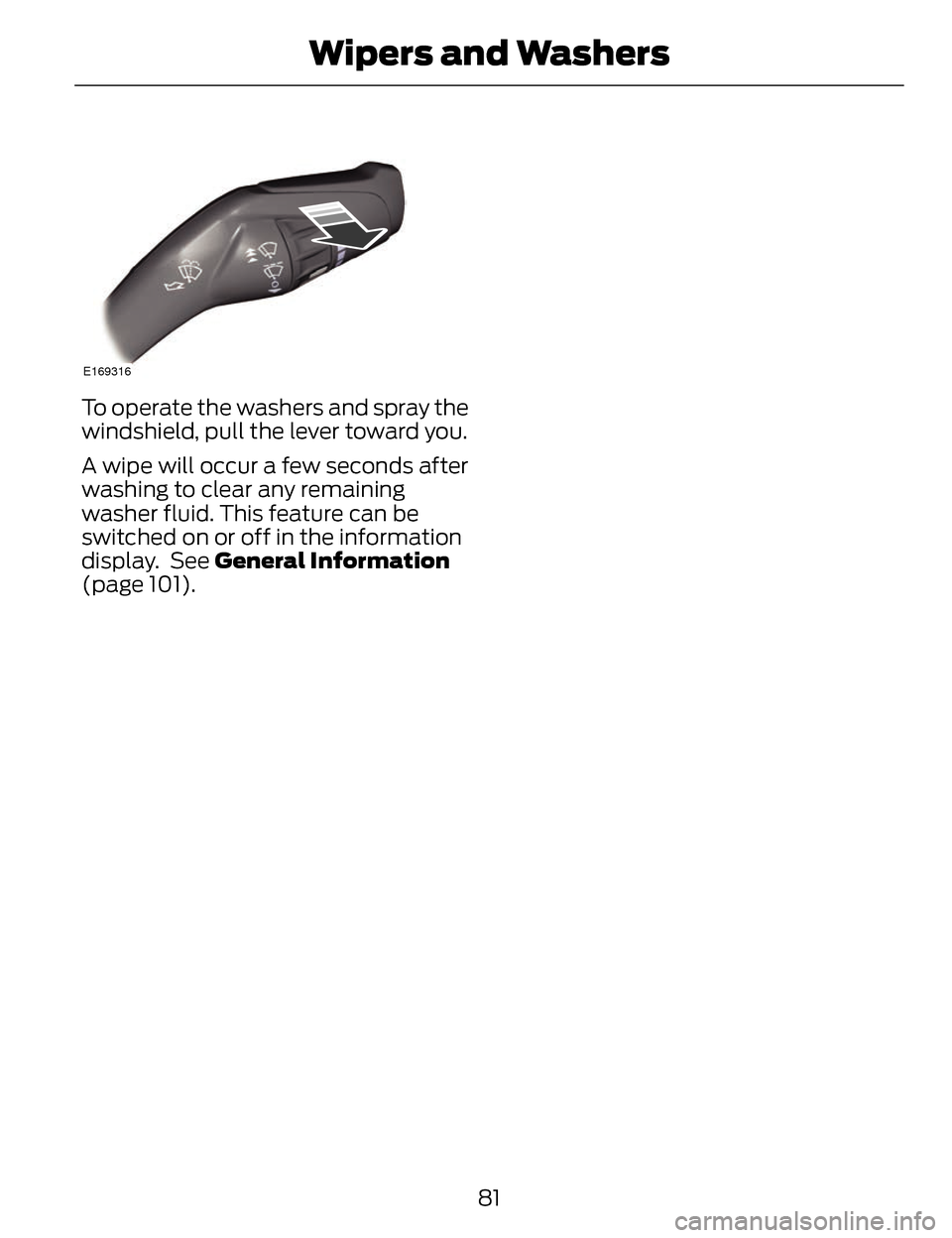
E169316
To operate the washers and spray the
windshield, pull the lever toward you.
A wipe will occur a few seconds after
washing to clear any remaining
washer fluid. This feature can be
switched on or off in the information
display. See General Information
(page 101).81
Wipers and Washers
Page 85 of 468
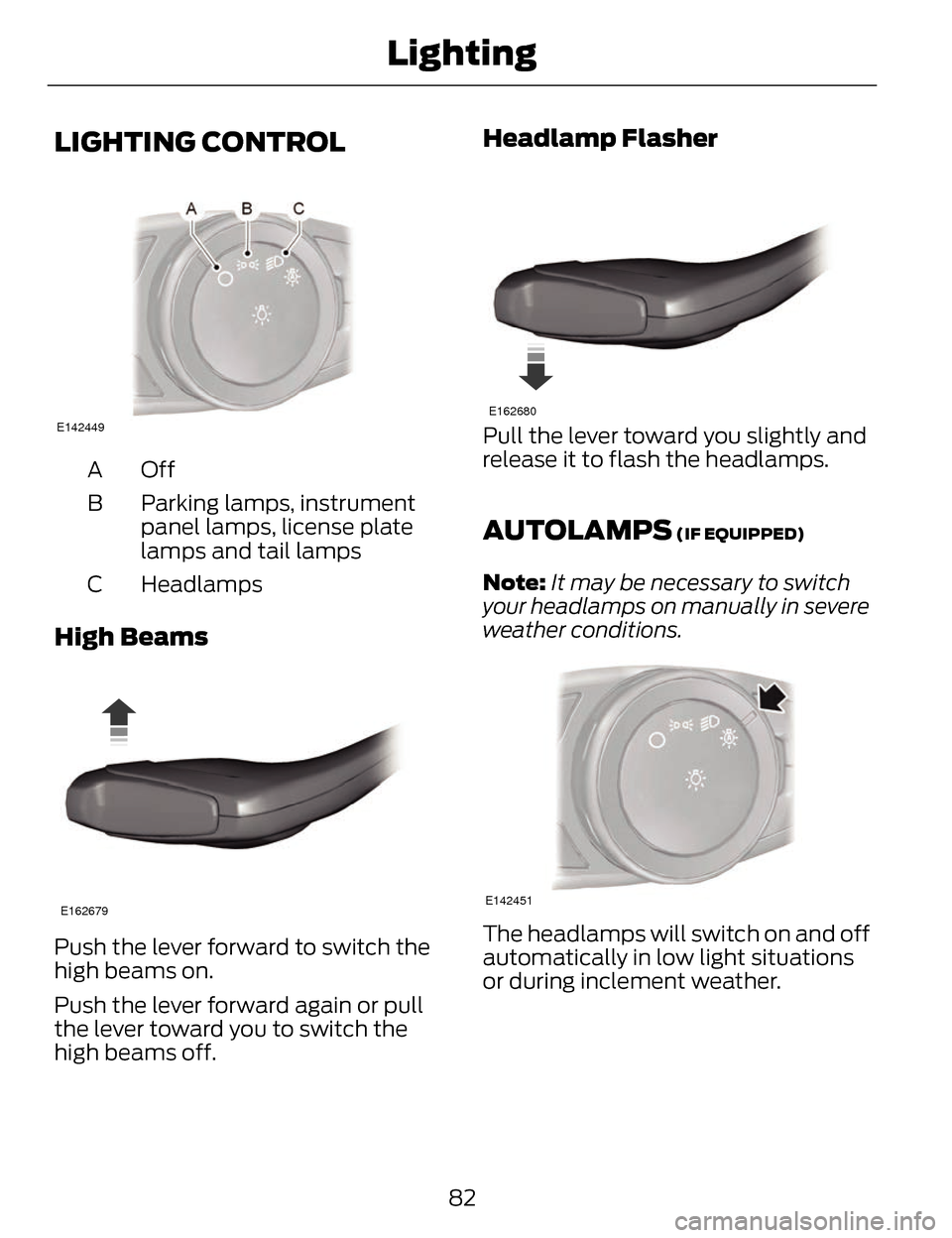
LIGHTING CONTROL
E142449
OffA
Parking lamps, instrument
panel lamps, license plate
lamps and tail lamps
B
Headlamps
C
High Beams
E162679
Push the lever forward to switch the
high beams on.
Push the lever forward again or pull
the lever toward you to switch the
high beams off.
Headlamp Flasher
E162680
Pull the lever toward you slightly and
release it to flash the headlamps.
AUTOLAMPS (IF EQUIPPED)
Note: It may be necessary to switch
your headlamps on manually in severe
weather conditions.
E142451
The headlamps will switch on and off
automatically in low light situations
or during inclement weather.
82
Lighting
Page 86 of 468
The headlamps will remain on for a
period of time after you switch the
ignition off. You can adjust the time
delay using the information display
controls. See Information Displays
(page 101).
Note:If you switch autolamps on in
conjunction with autowipers, low beam
headlamps will illuminate
automatically when the rain sensor
activates the windshield wipers
continuously.
INSTRUMENT LIGHTING
DIMMER
Note: If you disconnect and connect
the battery, or fully discharge and
charge the battery, the illuminated
components will switch to the
maximum setting.
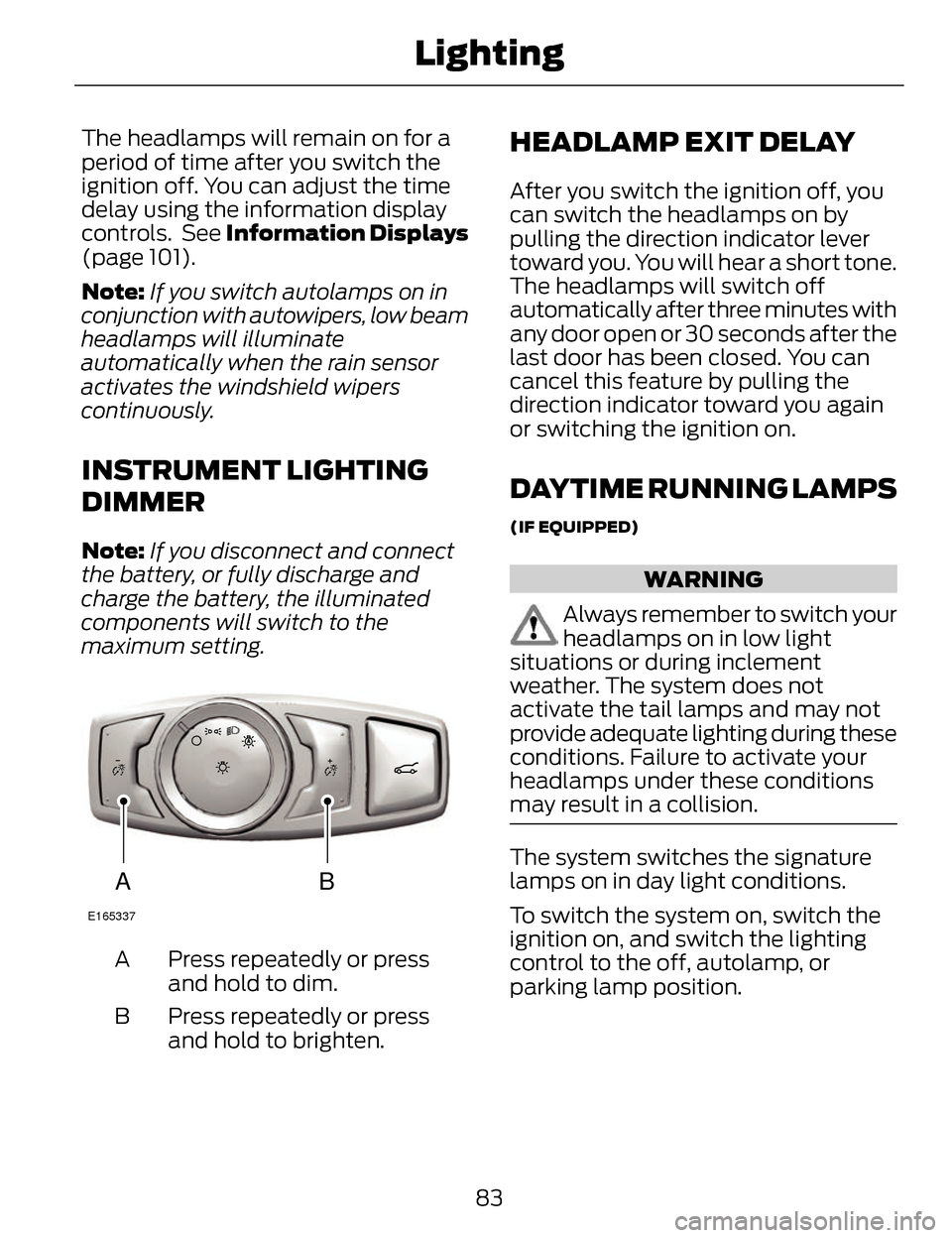
AB
E165337
Press repeatedly or press
and hold to dim.
A
Press repeatedly or press
and hold to brighten.
B
HEADLAMP EXIT DELAY
After you switch the ignition off, you
can switch the headlamps on by
pulling the direction indicator lever
toward you. You will hear a short tone.
The headlamps will switch off
automatically after three minutes with
any door open or 30 seconds after the
last door has been closed. You can
cancel this feature by pulling the
direction indicator toward you again
or switching the ignition on.
DAYTIME RUNNING LAMPS
(IF EQUIPPED)
WARNING
Always remember to switch your
headlamps on in low light
situations or during inclement
weather. The system does not
activate the tail lamps and may not
provide adequate lighting during these
conditions. Failure to activate your
headlamps under these conditions
may result in a collision.
The system switches the signature
lamps on in day light conditions.
To switch the system on, switch the
ignition on, and switch the lighting
control to the off, autolamp, or
parking lamp position.
83
Lighting
Page 93 of 468
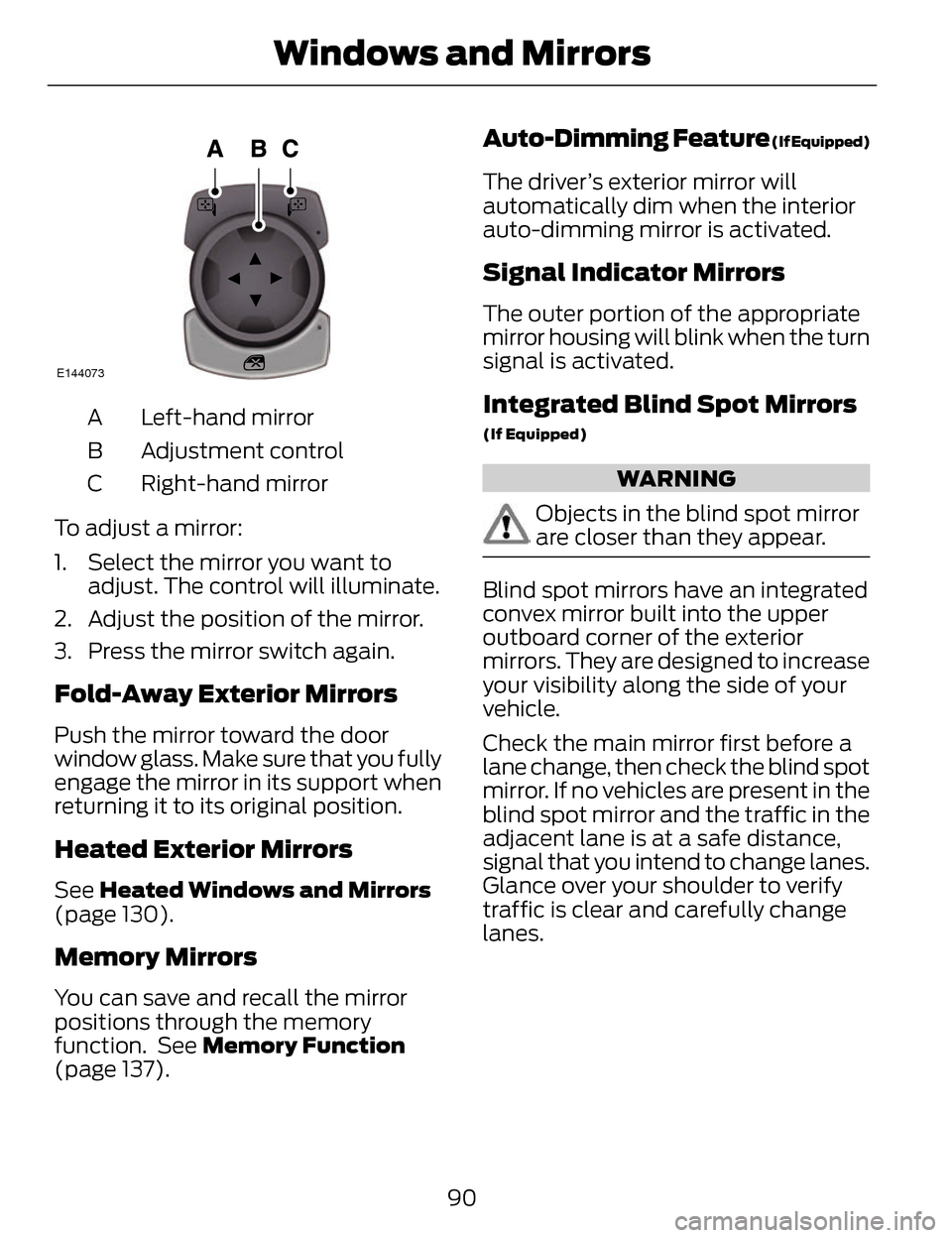
E144073
Left-hand mirror
A
Adjustment control
B
Right-hand mirror
C
To adjust a mirror:
1. Select the mirror you want to adjust. The control will illuminate.
2. Adjust the position of the mirror.
3. Press the mirror switch again.
Fold-Away Exterior Mirrors
Push the mirror toward the door
window glass. Make sure that you fully
engage the mirror in its support when
returning it to its original position.
Heated Exterior Mirrors
See Heated Windows and Mirrors
(page 130).
Memory Mirrors
You can save and recall the mirror
positions through the memory
function. See Memory Function
(page 137).
Auto-Dimming Feature (If Equipped)
The driver’s exterior mirror will
automatically dim when the interior
auto-dimming mirror is activated.
Signal Indicator Mirrors
The outer portion of the appropriate
mirror housing will blink when the turn
signal is activated.
Integrated Blind Spot Mirrors
(If Equipped)
WARNING
Objects in the blind spot mirror
are closer than they appear.
Blind spot mirrors have an integrated
convex mirror built into the upper
outboard corner of the exterior
mirrors. They are designed to increase
your visibility along the side of your
vehicle.
Check the main mirror first before a
lane change, then check the blind spot
mirror. If no vehicles are present in the
blind spot mirror and the traffic in the
adjacent lane is at a safe distance,
signal that you intend to change lanes.
Glance over your shoulder to verify
traffic is clear and carefully change
lanes.
90
Windows and Mirrors
Page 95 of 468
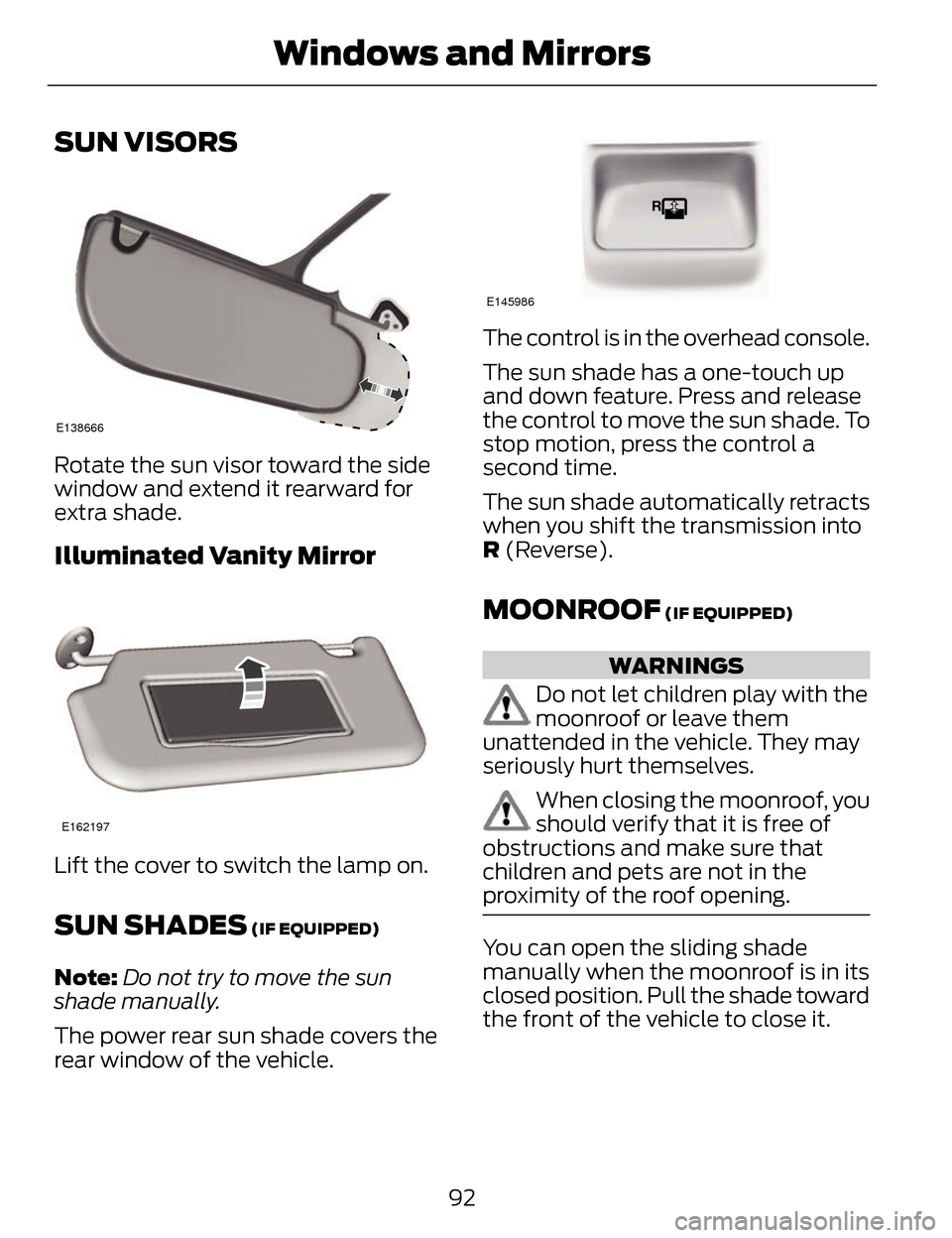
SUN VISORS
E138666
Rotate the sun visor toward the side
window and extend it rearward for
extra shade.
Illuminated Vanity Mirror
E162197
Lift the cover to switch the lamp on.
SUN SHADES (IF EQUIPPED)
Note:Do not try to move the sun
shade manually.
The power rear sun shade covers the
rear window of the vehicle.
E145986
The control is in the overhead console.
The sun shade has a one-touch up
and down feature. Press and release
the control to move the sun shade. To
stop motion, press the control a
second time.
The sun shade automatically retracts
when you shift the transmission into
R (Reverse).
MOONROOF (IF EQUIPPED)
WARNINGS
Do not let children play with the
moonroof or leave them
unattended in the vehicle. They may
seriously hurt themselves.
When closing the moonroof, you
should verify that it is free of
obstructions and make sure that
children and pets are not in the
proximity of the roof opening.
You can open the sliding shade
manually when the moonroof is in its
closed position. Pull the shade toward
the front of the vehicle to close it.
92
Windows and Mirrors
Page 107 of 468
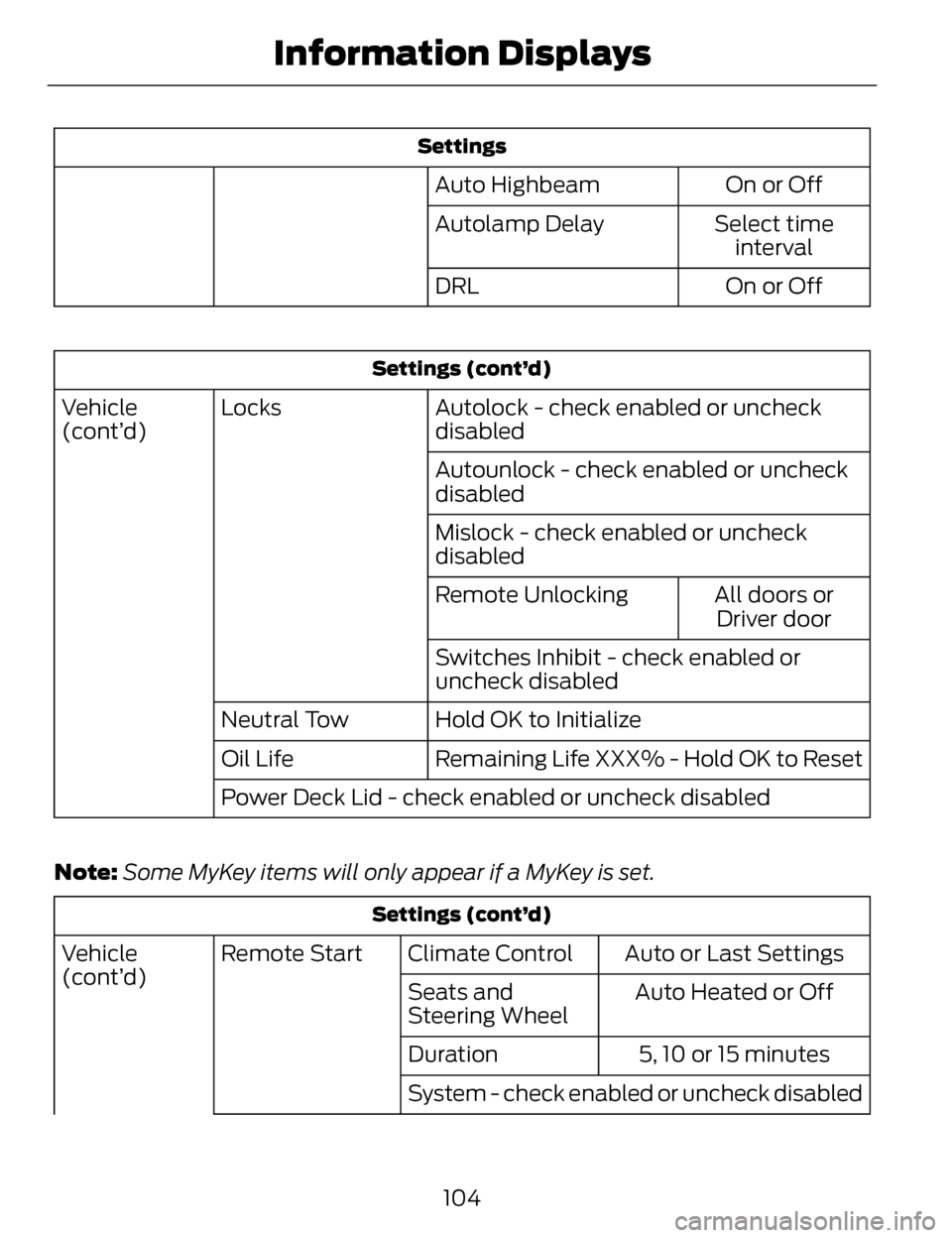
Settings
On or Off
Auto Highbeam
Select timeinterval
Autolamp Delay
On or Off
DRL
Settings (cont’d)
Autolock - check enabled or uncheck
disabled
Locks
Vehicle
(cont’d)
Autounlock - check enabled or uncheck
disabled
Mislock - check enabled or uncheck
disabledAll doors orDriver door
Remote Unlocking
Switches Inhibit - check enabled or
uncheck disabled
Hold OK to Initialize
Neutral Tow
Remaining Life XXX% - Hold OK to Reset
Oil Life
Power Deck Lid - check enabled or uncheck disabled
Note: Some MyKey items will only appear if a MyKey is set.
Settings (cont’d)
Auto or Last Settings
Climate Control
Remote Start
Vehicle
(cont’d)
Auto Heated or Off
Seats and
Steering Wheel
5, 10 or 15 minutes
Duration
System - check enabled or uncheck disabled
104
Information Displays
Page 125 of 468
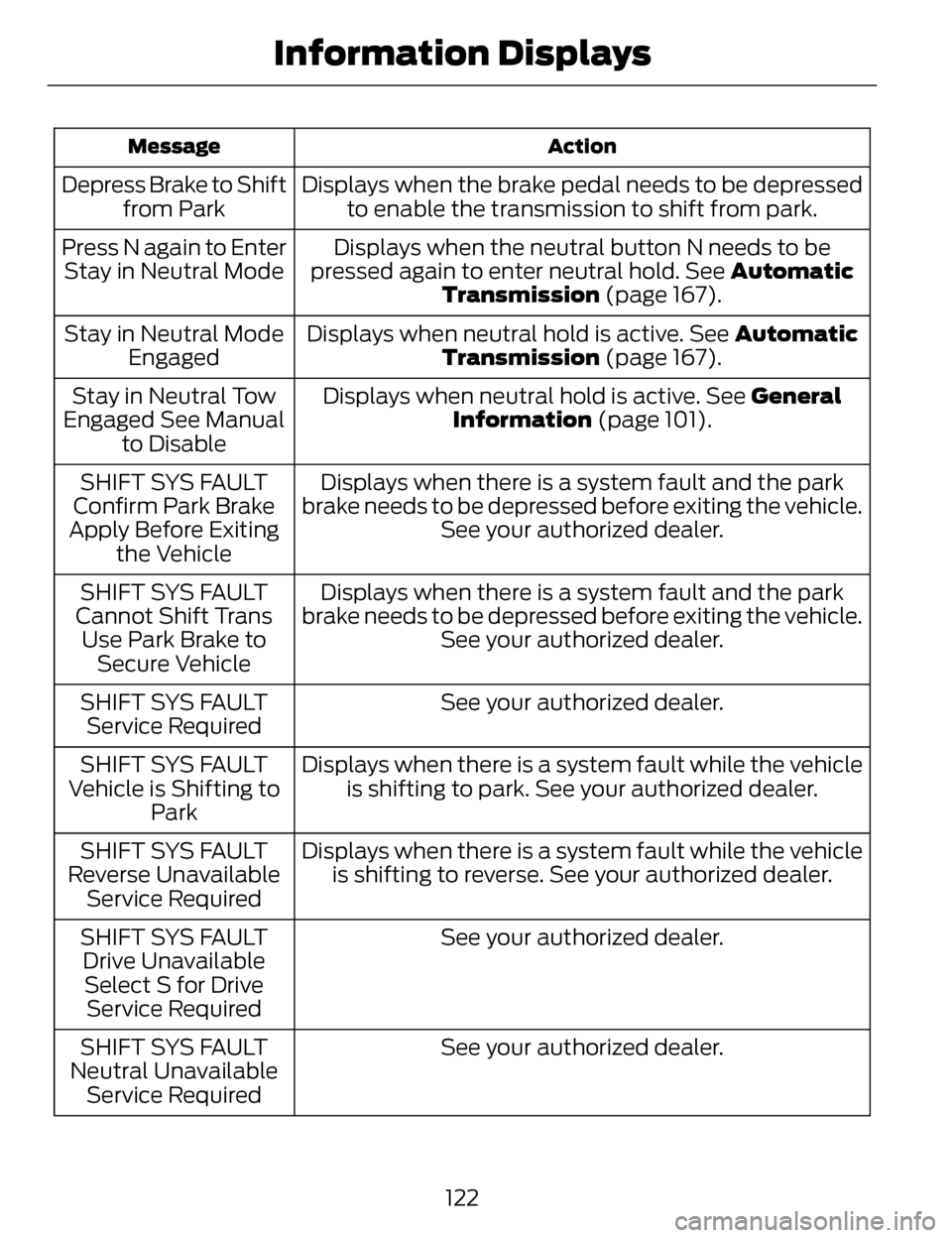
Action
Message
Displays when the brake pedal needs to be depressed
to enable the transmission to shift from park.
Depress Brake to Shift
from Park
Displays when the neutral button N needs to be
pressed again to enter neutral hold. See Automatic Transmission (page 167).
Press N again to Enter
Stay in Neutral Mode
Displays when neutral hold is active. See Automatic
Transmission (page 167).
Stay in Neutral Mode
Engaged
Displays when neutral hold is active. See General
Information (page 101).
Stay in Neutral Tow
Engaged See Manual to Disable
Displays when there is a system fault and the park
brake needs to be depressed before exiting the vehicle. See your authorized dealer.
SHIFT SYS FAULT
Confirm Park Brake
Apply Before Exiting the Vehicle
Displays when there is a system fault and the park
brake needs to be depressed before exiting the vehicle. See your authorized dealer.
SHIFT SYS FAULT
Cannot Shift Trans Use Park Brake to Secure Vehicle
See your authorized dealer.
SHIFT SYS FAULT
Service Required
Displays when there is a system fault while the vehicleis shifting to park. See your authorized dealer.
SHIFT SYS FAULT
Vehicle is Shifting to Park
Displays when there is a system fault while the vehicleis shifting to reverse. See your authorized dealer.
SHIFT SYS FAULT
Reverse Unavailable Service Required
See your authorized dealer.
SHIFT SYS FAULT
Drive UnavailableSelect S for Drive Service Required
See your authorized dealer.
SHIFT SYS FAULT
Neutral Unavailable Service Required
122
Information Displays
Page 126 of 468
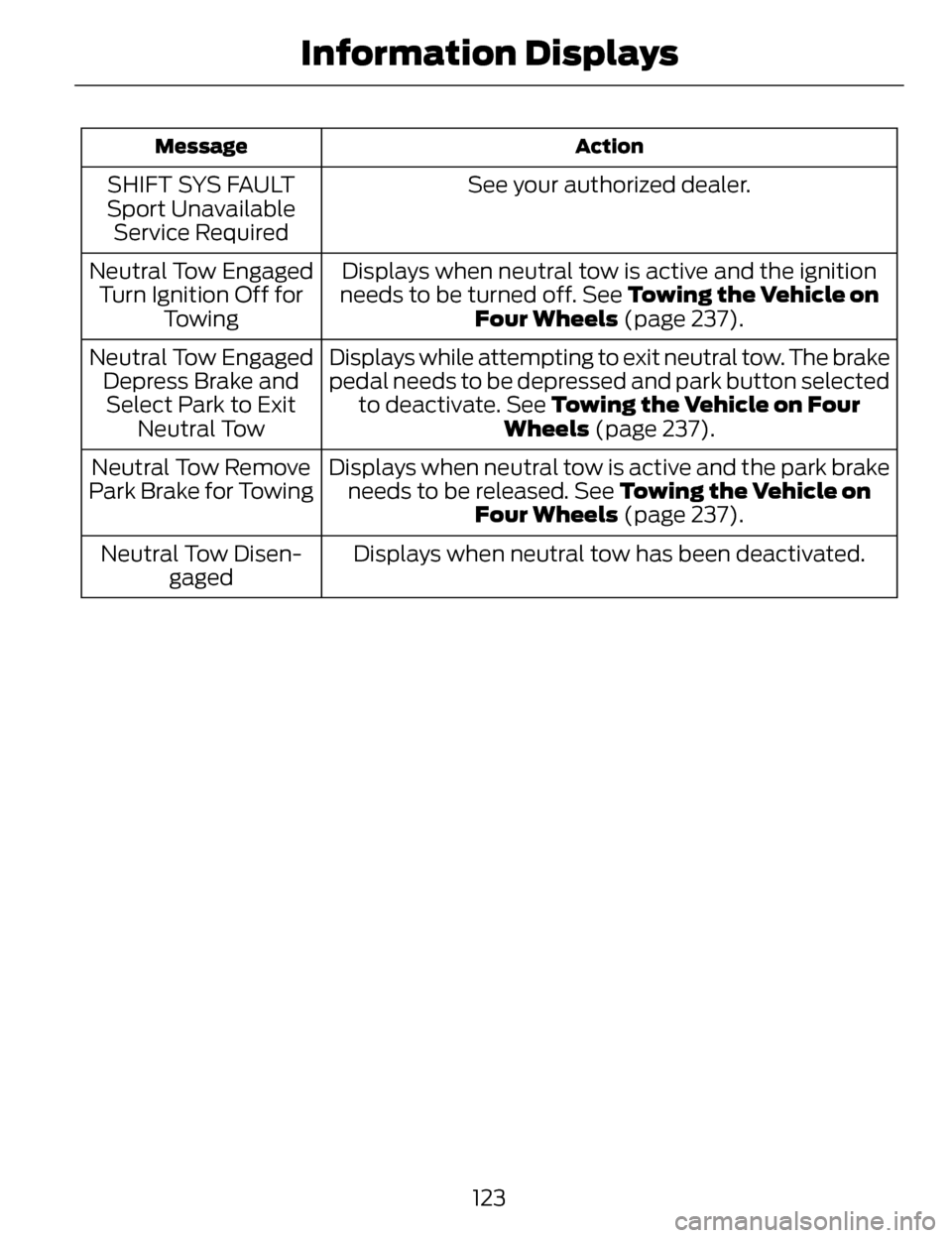
Action
Message
See your authorized dealer.
SHIFT SYS FAULT
Sport Unavailable Service Required
Displays when neutral tow is active and the ignition
needs to be turned off. See Towing the Vehicle on
Four Wheels (page 237).
Neutral Tow Engaged
Turn Ignition Off for Towing
Displays while attempting to exit neutral tow. The brake
pedal needs to be depressed and park button selectedto deactivate. See Towing the Vehicle on Four Wheels (page 237).
Neutral Tow Engaged
Depress Brake andSelect Park to Exit Neutral Tow
Displays when neutral tow is active and the park brakeneeds to be released. See Towing the Vehicle on Four Wheels (page 237).
Neutral Tow Remove
Park Brake for Towing
Displays when neutral tow has been deactivated.
Neutral Tow Disen-
gaged
123
Information Displays
Page 127 of 468
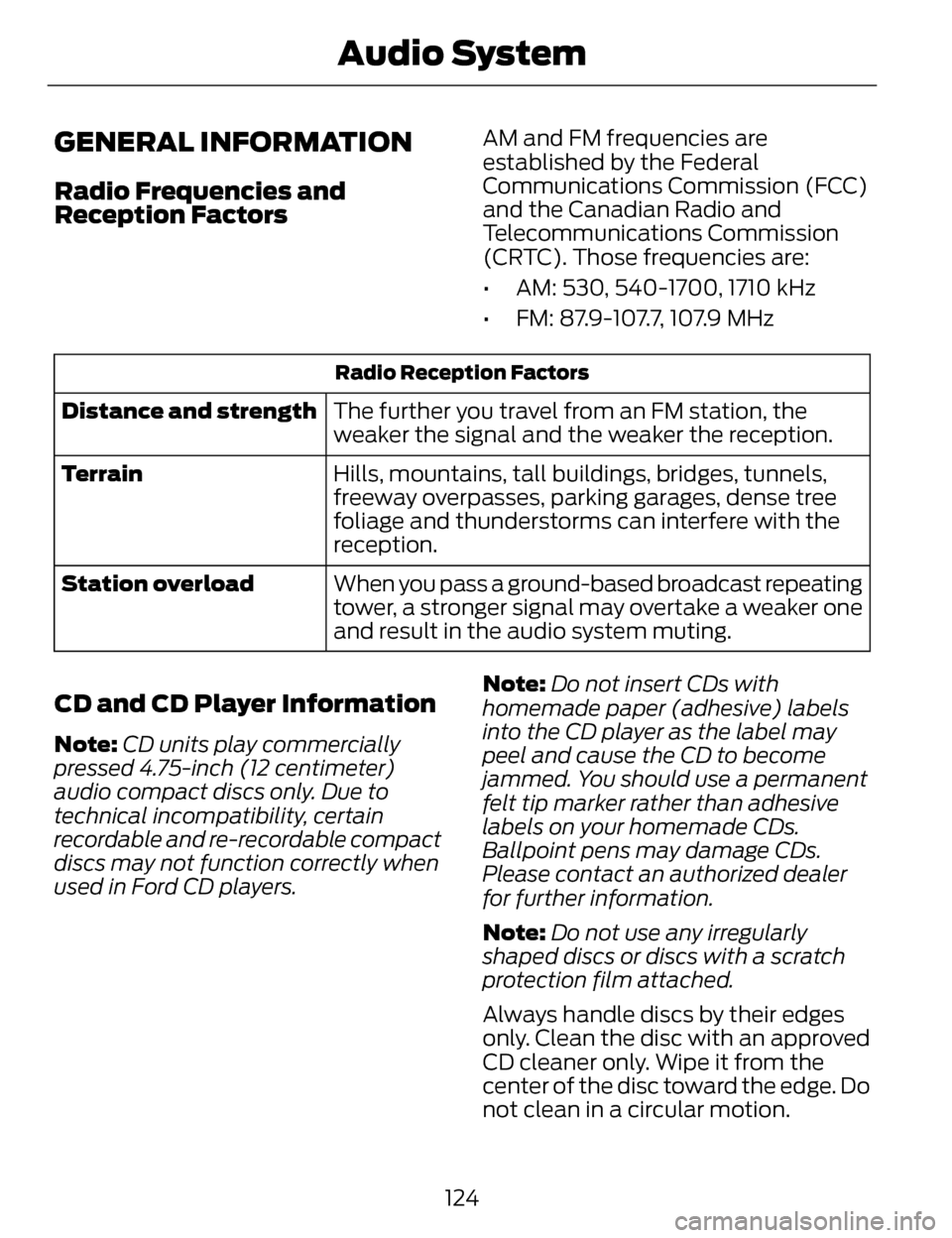
GENERAL INFORMATION
Radio Frequencies and
Reception Factors
AM and FM frequencies are
established by the Federal
Communications Commission (FCC)
and the Canadian Radio and
Telecommunications Commission
(CRTC). Those frequencies are:
• AM: 530, 540-1700, 1710 kHz
• FM: 87.9-107.7, 107.9 MHz
Radio Reception Factors
The further you travel from an FM station, the
weaker the signal and the weaker the reception.
Distance and strength
Hills, mountains, tall buildings, bridges, tunnels,
freeway overpasses, parking garages, dense tree
foliage and thunderstorms can interfere with the
reception.
Terrain
When you pass a ground-based broadcast repeating
tower, a stronger signal may overtake a weaker one
and result in the audio system muting.
Station overload
CD and CD Player Information
Note:
CD units play commercially
pressed 4.75-inch (12 centimeter)
audio compact discs only. Due to
technical incompatibility, certain
recordable and re-recordable compact
discs may not function correctly when
used in Ford CD players. Note:
Do not insert CDs with
homemade paper (adhesive) labels
into the CD player as the label may
peel and cause the CD to become
jammed. You should use a permanent
felt tip marker rather than adhesive
labels on your homemade CDs.
Ballpoint pens may damage CDs.
Please contact an authorized dealer
for further information.
Note: Do not use any irregularly
shaped discs or discs with a scratch
protection film attached.
Always handle discs by their edges
only. Clean the disc with an approved
CD cleaner only. Wipe it from the
center of the disc toward the edge. Do
not clean in a circular motion.
124
Audio System