tow LINCOLN MKZ 2014 Owner's Manual
[x] Cancel search | Manufacturer: LINCOLN, Model Year: 2014, Model line: MKZ, Model: LINCOLN MKZ 2014Pages: 468, PDF Size: 4.49 MB
Page 132 of 468
A/C: Press the button to turn on or turn off the air conditioning system.
To improve air conditioning when starting your vehicle, drive with the
windows slightly open for two to three minutes. Use A/C with
recirculated air to improve cooling performance and efficiency.
F
MAX A/C: Press the button to switch on. Recirculated air flows through
the instrument panel air vents, air conditioning automatically adjusts
to the highest speed and the temperature dial returns to the full cool
position. This re-cooling of the interior is more economical and efficient.
G
AUTO: Press the button to switch on. Recirculated air flows through
the instrument panel air vents, air conditioning automatically adjusts
to the highest speed and the temperature dial returns to the full cool
position. This re-cooling of the interior is more economical and efficient.
H
Heated rear window: Turns the heated rear window on and off. See
Heated Windows and Mirrors (page 130).
I
Defrost: Distributes air through the windshield defroster vents and
de-mister vents. You can also use this setting to defog and clear the
windshield of a thin covering of ice.
J
HINTS ON CONTROLLING
THE INTERIOR CLIMATE
General Hints
Note:
Prolonged use of recirculated
air may cause the windows to fog up.
Note: You may feel a small amount of
air from the footwell air vents
regardless of the air distribution setting.
Note: To reduce humidity build-up
inside your vehicle, do not drive with
the system switched off or with
recirculated air always switched on.
Note: Do not place objects under the
front seats as this may interfere with
the airflow to the rear seats. Note:
Remove any snow, ice or leaves
from the air intake area at the base of
the windshield.
Automatic Climate Control
Note: Do not adjust the settings when
your vehicle interior is extremely hot or
cold. The system automatically adjusts
to the previously stored settings. For
the system to function efficiently, the
instrument panel and side air vents
should be fully open.
Note: At low ambient temperatures
with AUTO selected, the system directs
air toward the windshield and side
windows for as long as the engine
remains cold.
Note: When you switch the system off,
outside air cannot enter your vehicle.
129
Climate Control
Page 138 of 468
Lowering the Head Restraint
1. Press and hold button C.
2. Push the head restraint down.
Removing the Head Restraint
1. Pull the head restraint up until itreaches its highest position.
2. Press and hold buttons C and D.
3. Pull the head restraint up.
Installing the Head Restraint
Align the steel stems into the guide
sleeves and push the head restraint
down until it locks.
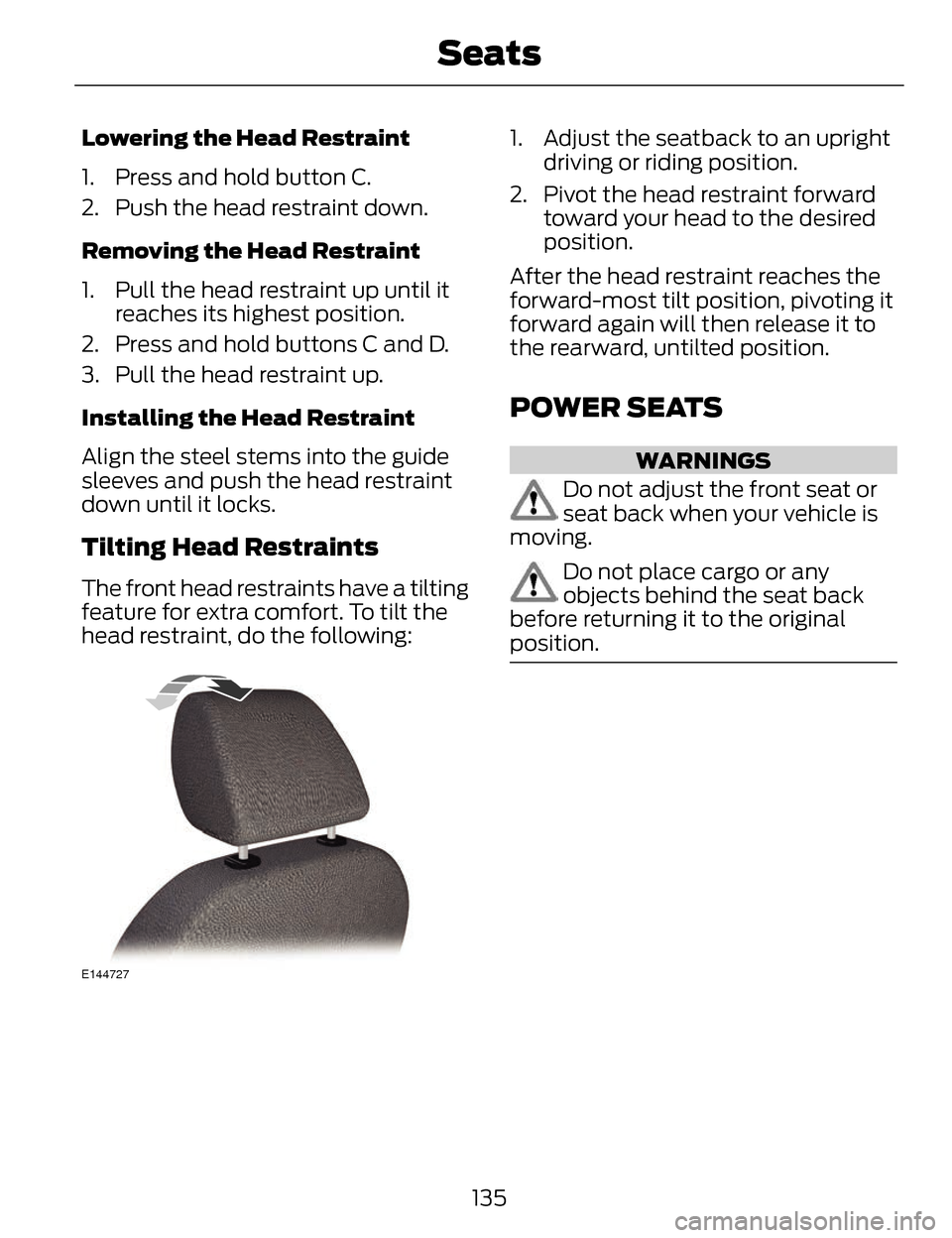
Tilting Head Restraints
The front head restraints have a tilting
feature for extra comfort. To tilt the
head restraint, do the following:
E144727
1. Adjust the seatback to an upright driving or riding position.
2. Pivot the head restraint forward toward your head to the desired
position.
After the head restraint reaches the
forward-most tilt position, pivoting it
forward again will then release it to
the rearward, untilted position.
POWER SEATS
WARNINGS
Do not adjust the front seat or
seat back when your vehicle is
moving.
Do not place cargo or any
objects behind the seat back
before returning it to the original
position.
135
Seats
Page 143 of 468
E164098
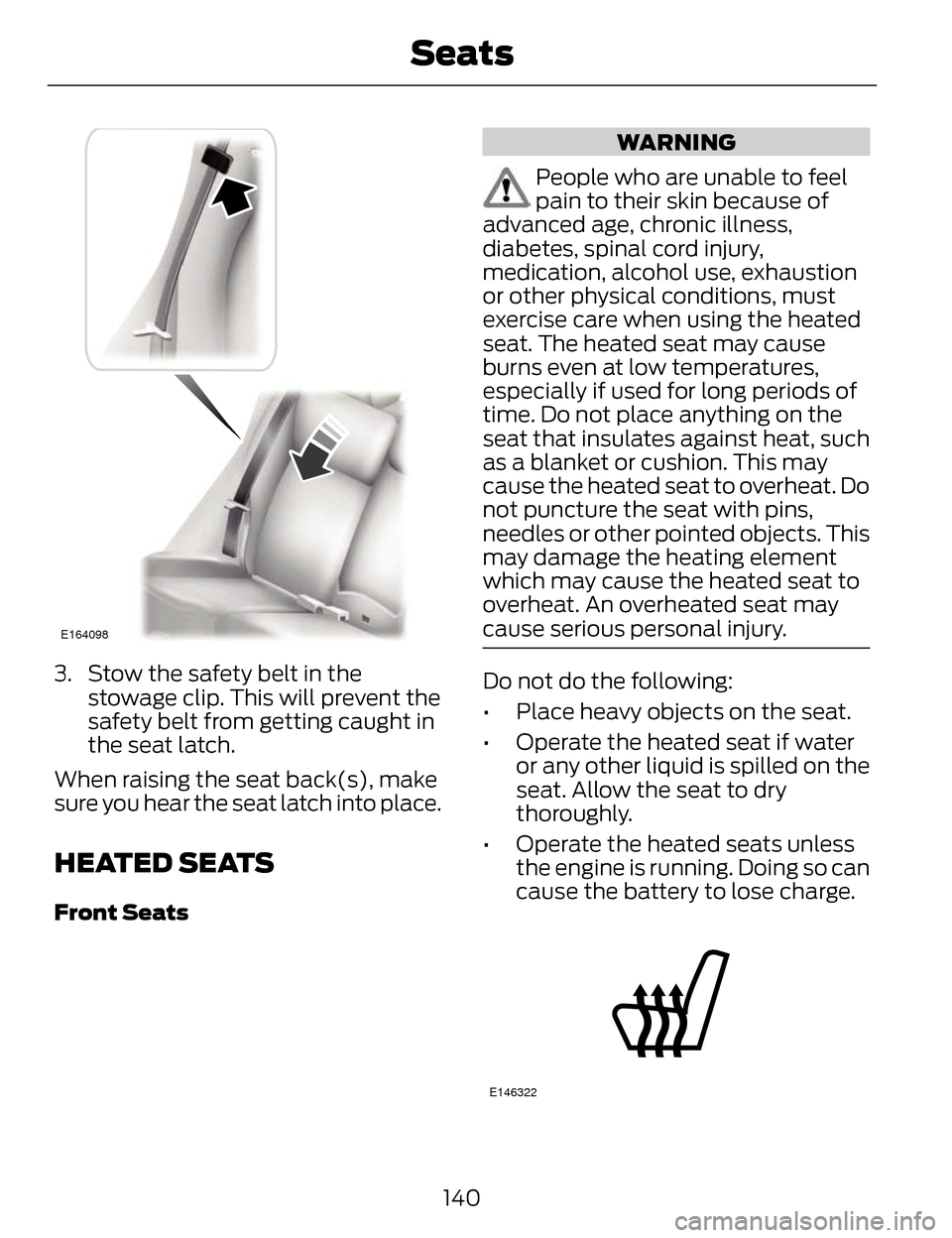
3. Stow the safety belt in thestowage clip. This will prevent the
safety belt from getting caught in
the seat latch.
When raising the seat back(s), make
sure you hear the seat latch into place.
HEATED SEATS
Front Seats
WARNING
People who are unable to feel
pain to their skin because of
advanced age, chronic illness,
diabetes, spinal cord injury,
medication, alcohol use, exhaustion
or other physical conditions, must
exercise care when using the heated
seat. The heated seat may cause
burns even at low temperatures,
especially if used for long periods of
time. Do not place anything on the
seat that insulates against heat, such
as a blanket or cushion. This may
cause the heated seat to overheat. Do
not puncture the seat with pins,
needles or other pointed objects. This
may damage the heating element
which may cause the heated seat to
overheat. An overheated seat may
cause serious personal injury.
Do not do the following:
• Place heavy objects on the seat.
• Operate the heated seat if water or any other liquid is spilled on the
seat. Allow the seat to dry
thoroughly.
• Operate the heated seats unless the engine is running. Doing so can
cause the battery to lose charge.
E146322
140
Seats
Page 153 of 468
CENTER CONSOLE
Stow items in the cupholder carefully
as items may become loose during
hard braking, acceleration or
collisions, including hot drinks which
may spill.
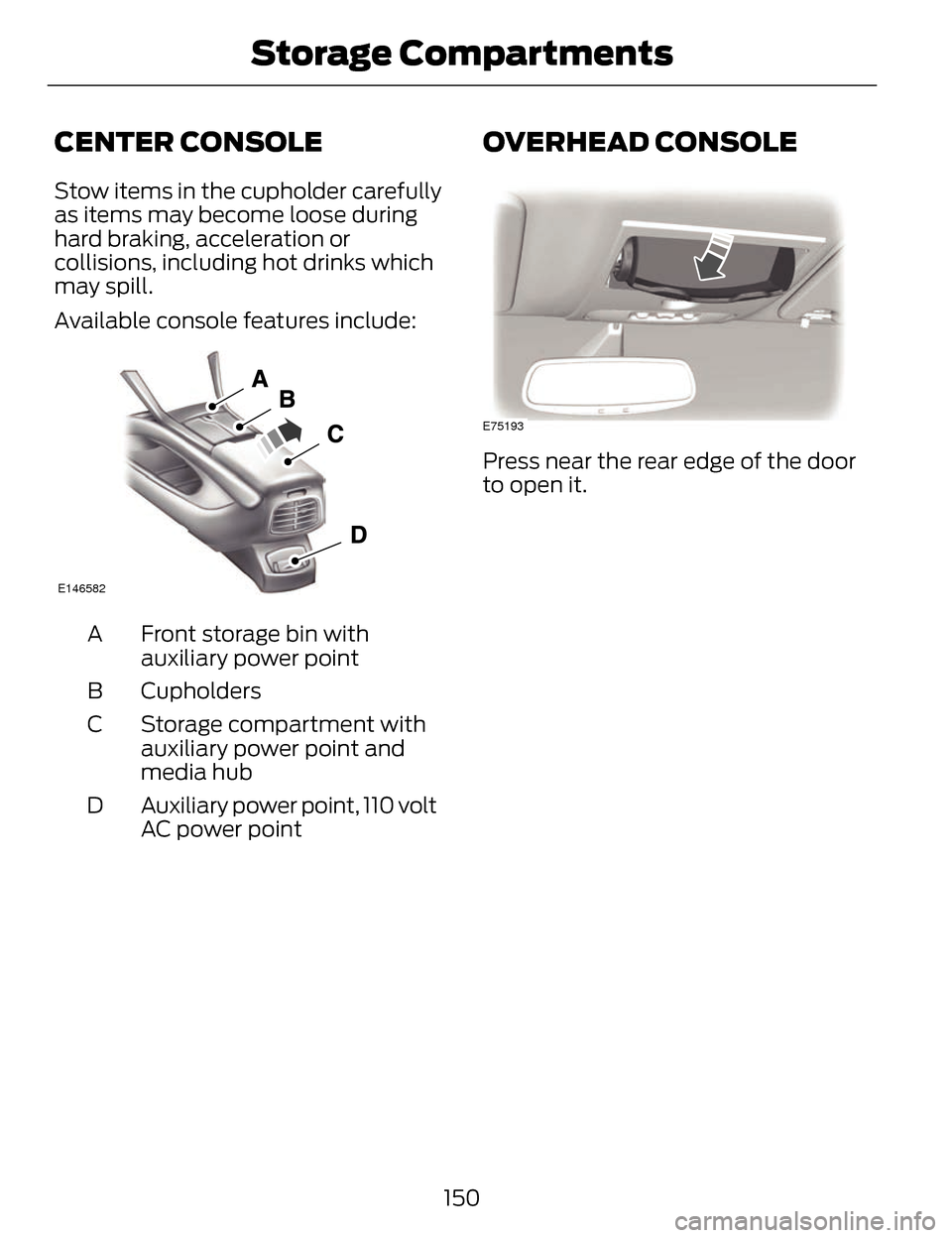
Available console features include:
E146582
Front storage bin with
auxiliary power point
A
Cupholders
B
Storage compartment with
auxiliary power point and
media hub
C
Auxiliary power point, 110 volt
AC power point
D
OVERHEAD CONSOLE
E75193
Press near the rear edge of the door
to open it.
150
Storage Compartments
Page 159 of 468
• Make sure the system is unpluggedand properly stowed before driving
your vehicle. Make sure the
protective cover seals the prongs
of the block heater cord plug when
not in use.
• Make sure the heater system is checked for proper operation
before winter.
Using the Engine Block Heater
Make sure the receptacle terminals
are clean and dry prior to use. Clean
them with a dry cloth if necessary.
The heater uses 0.4 to 1.0
kilowatt-hours of energy per hour of
use. The system does not have a
thermostat. It achieves maximum
temperature after approximately
three hours of operation. Using the
heater longer than three hours does
not improve system performance and
unnecessarily uses electricity.
156
Starting and Stopping the Engine
Page 161 of 468
• Fuels can also be harmful ifabsorbed through the skin. If fuel
is splashed on the skin, clothing or
both, promptly remove
contaminated clothing and wash
skin thoroughly with soap and
water. Repeated or prolonged skin
contact with fuel liquid or vapor
causes skin irritation.
• Be particularly careful if you are taking “Antabuse” or other forms
of disulfiram for the treatment of
alcoholism. Breathing gasoline
vapors, or skin contact could cause
an adverse reaction. In sensitive
individuals, serious personal injury
or sickness may result. If fuel is
splashed on the skin, promptly
wash skin thoroughly with soap
and water. Consult a physician
immediately if you experience an
adverse reaction.
FUEL QUALITY
Note: We recommend that you use
only high quality fuel without additives
or other engine treatments.
Choosing the Right Fuel
Note: Use of any fuel other than those
recommended may cause powertrain
damage, a loss of vehicle performance
and repairs may not be covered under
warranty. If your vehicle is not a flexible fuel
vehicle, then only use unleaded fuel
or unleaded fuel blended with a
maximum of 15% ethanol. Do not use
fuel ethanol (E85), diesel fuel, fuel
methanol, leaded fuel or any other
fuel because it could damage or
impair the emission control system.
The use of leaded fuel is prohibited by
law.
Your vehicle was not designed to use
fuel or fuel additives with metallic
compounds, including
manganese-based additives.
Octane Recommendations
Regular unleaded gasoline with a
pump (R+M)/2 octane rating of 87 is
recommended. Some fuel stations
offer fuels posted as regular with an
octane rating below 87, particularly in
high altitude areas. Fuels with octane
levels below 87 are not
recommended. Premium fuel will
provide improved performance and is
recommended for severe duty use
such as trailer tow.
Do not be concerned if your engine
sometimes knocks lightly. However,
if it knocks heavily while you are using
fuel with the recommended octane
rating, see your authorized dealer to
prevent any engine damage.
RUNNING OUT OF FUEL
Avoid running out of fuel because this
situation may have an adverse effect
on powertrain components.
158
Fuel and Refueling
Page 171 of 468
Note:If you attempt to leave your
vehicle while it is in gear, the vehicle
will automatically shift into P (Park).
Safety belt and door monitors
determine your intent and make the
shift for you. During this time, a
Transmission not in Park message
will appear in the information display
screen prompting you to make the shift.
Note: To put your vehicle in gear with
the door open, perform steps 1-4. See
the Automatic Return to Park section
in this chapter for more information on
this feature.
P (Park)
With the transmission in P (Park),
your vehicle locks the transmission
and prevents the front wheels from
turning. Always come to a complete
stop before putting your vehicle into
and out of P (Park). An audible chime
sounds once you select P (Park).
When the ignition is turned off, the
vehicle will automatically shift into P
(Park). If the ignition is turned off
while the vehicle is moving, it will first
shift into N (Neutral) until a slow
enough speed is reached. The vehicle
will then shift into P (Park)
automatically.
Automatic Return to Park
Note: This feature will not operate
when your vehicle is in Stay in Neutral
mode or neutral tow.
Your vehicle has a safety feature that
will automatically shift your vehicle
into P (Park) when any of the
following conditions occur: • You turn the ignition off
• You open the driver's door with
your safety belt unlatched
• Your safety belt is unlatched while the driver's door is open
If you turn the ignition off while your
vehicle is moving, your vehicle will first
shift into N (Neutral) until it slows
down enough to shift into P (Park)
automatically.
Note: If you have waited an extended
period of time, (2-15 minutes) before
starting your vehicle, unlatching your
safety belt will cause this feature to
activate, even with the driver's door
closed.
Note: This feature may not work
properly if the door ajar switch is
malfunctioning. If your door ajar
indicator does not illuminate when you
open the driver’s door or the indicator
illuminates with the driver’s door
closed. See your authorized dealer.
R (Reverse)
With the transmission in R (Reverse),
your vehicle will move backward.
Always come to a complete stop
before shifting into and out of R
(Reverse).
N (Neutral)
With the transmission in N (Neutral),
you can start your vehicle and it is free
to roll. Hold the brake pedal down
while in this position.
168
Transmission
Page 174 of 468
WARNINGS
If the parking brake is fully
released, but the brake warning
lamp remains illuminated, the brakes
may not be working properly. See your
authorized dealer.
Note: See your authorized dealer as
soon as possible if this procedure is
used.
Note: For some markets this feature
is disabled.
Note: This feature will only function if
your 12-volt battery has power.
Use the brake-shift interlock override
to move your transmission from the
park position in the event of an
electrical malfunction or if your
vehicle has a dead battery.
1. Apply the parking brake and turn your ignition off before performing
this procedure.
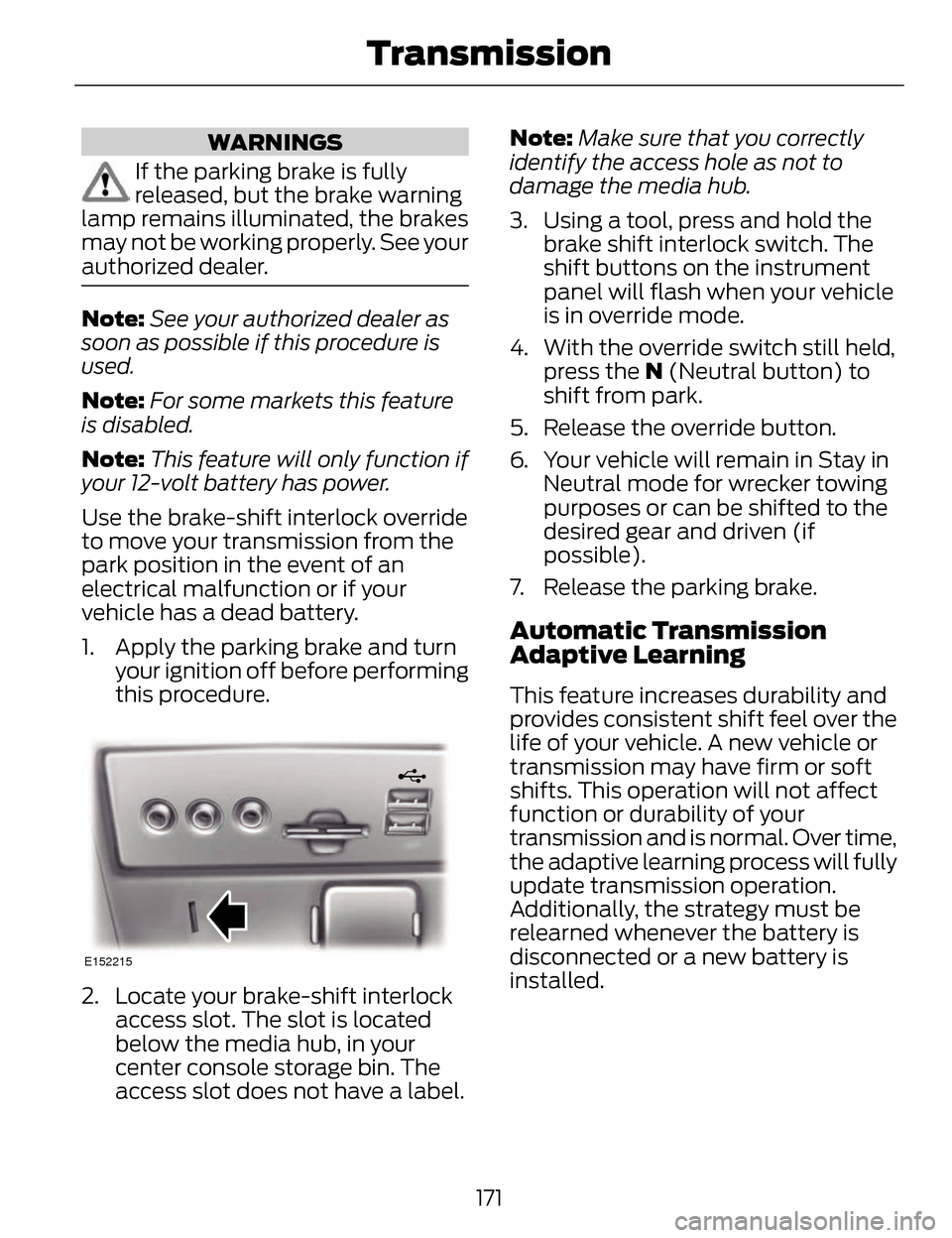
E152215
2. Locate your brake-shift interlockaccess slot. The slot is located
below the media hub, in your
center console storage bin. The
access slot does not have a label. Note:
Make sure that you correctly
identify the access hole as not to
damage the media hub.
3. Using a tool, press and hold the brake shift interlock switch. The
shift buttons on the instrument
panel will flash when your vehicle
is in override mode.
4. With the override switch still held, press the N (Neutral button) to
shift from park.
5. Release the override button.
6. Your vehicle will remain in Stay in Neutral mode for wrecker towing
purposes or can be shifted to the
desired gear and driven (if
possible).
7. Release the parking brake.
Automatic Transmission
Adaptive Learning
This feature increases durability and
provides consistent shift feel over the
life of your vehicle. A new vehicle or
transmission may have firm or soft
shifts. This operation will not affect
function or durability of your
transmission and is normal. Over time,
the adaptive learning process will fully
update transmission operation.
Additionally, the strategy must be
relearned whenever the battery is
disconnected or a new battery is
installed.
171
Transmission
Page 182 of 468
GENERAL INFORMATION
Note:Occasional brake noise is
normal. If a metal-to-metal,
continuous grinding or continuous
squeal sound is present, the brake
linings may be worn-out. Have the
system checked by an authorized
dealer. If your vehicle has continuous
vibration or shudder in the steering
wheel while braking, have it checked
by an authorized dealer.
Note: Brake dust may accumulate on
the wheels, even under normal driving
conditions. Some dust is inevitable as
the brakes wear and does not
contribute to brake noise. See
Cleaning the Alloy Wheels (page 293).
E144522
See Warning Lamps and
Indicators (page 96).
Wet brakes result in reduced braking
efficiency. Gently press the brake
pedal a few times when driving from
a car wash or standing water to dry
the brakes.
Brake Over Accelerator
In the event the accelerator pedal
becomes stuck or entrapped, apply
steady and firm pressure to the brake
pedal to slow the vehicle and reduce
engine power. If you experience this
condition, apply the brakes and bring
your vehicle to a safe stop. Move the
transmission selector lever to position P,
switch the engine off and apply the
parking brake. Inspect the accelerator
pedal for any interference. If none are
found and the condition persists, have
your vehicle towed to the nearest
authorized dealer.
Brake Assist
Brake assist detects when you brake
rapidly by measuring the rate at which
you press the brake pedal. It provides
maximum braking efficiency as long
as you press the pedal, and can
reduce stopping distances in critical
situations.
Anti-lock Brake System
This system helps you maintain
steering control during emergency
stops by keeping the brakes from
locking.
This lamp momentarily
illuminates when you turn
the ignition on. If the light
does not illuminate during start up,
remains on or flashes, the system may
be disabled. Have the system checked
by an authorized dealer.
E144522
If the system is disabled,
normal braking is still
effective. If the brake
warning lamp illuminates when you
release the parking brake, have the
system checked by an authorized
dealer.
179
Brakes
Page 191 of 468
Rear Sensing System
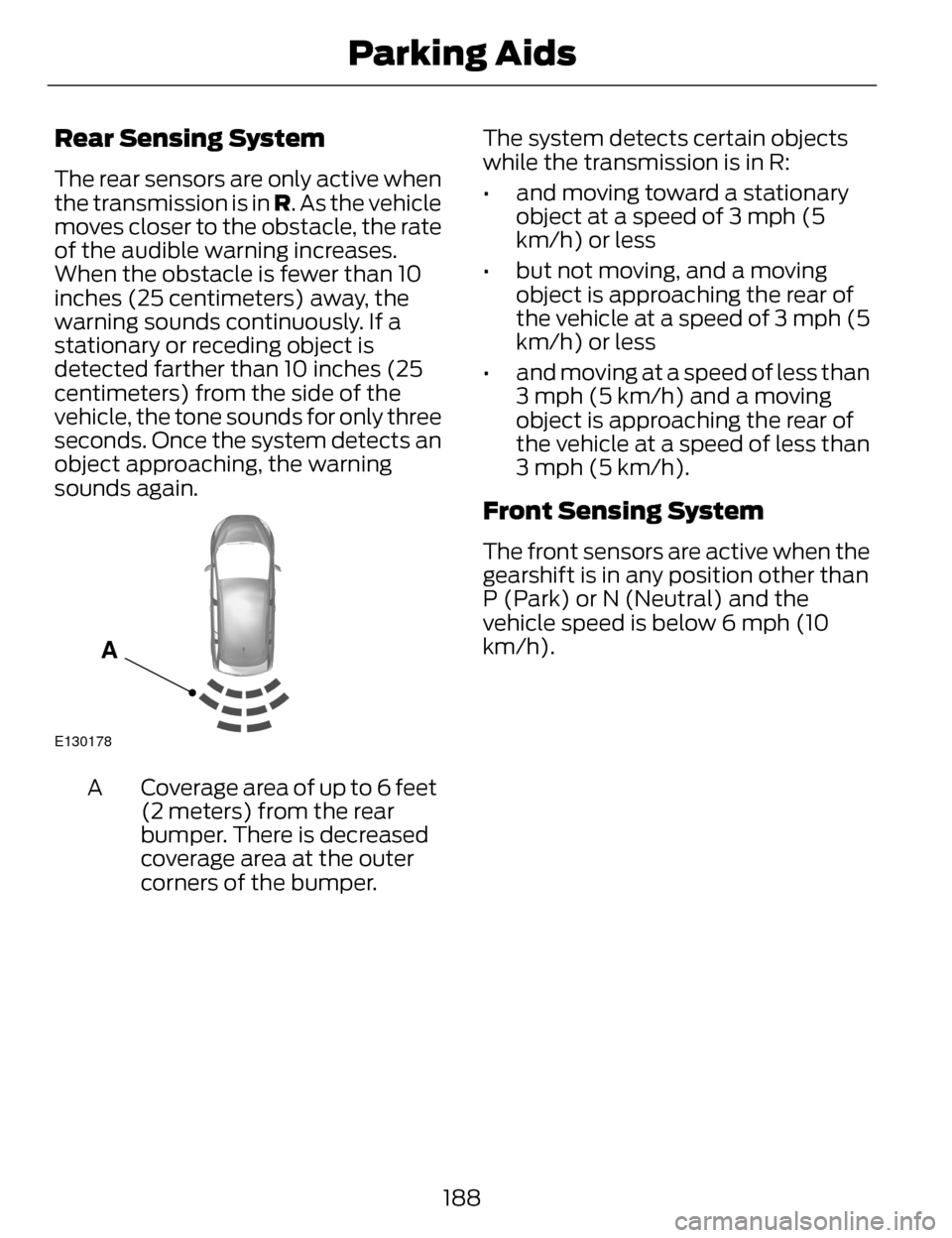
The rear sensors are only active when
the transmission is in R. As the vehicle
moves closer to the obstacle, the rate
of the audible warning increases.
When the obstacle is fewer than 10
inches (25 centimeters) away, the
warning sounds continuously. If a
stationary or receding object is
detected farther than 10 inches (25
centimeters) from the side of the
vehicle, the tone sounds for only three
seconds. Once the system detects an
object approaching, the warning
sounds again.
E130178
A
Coverage area of up to 6 feet
(2 meters) from the rear
bumper. There is decreased
coverage area at the outer
corners of the bumper.
A The system detects certain objects
while the transmission is in R:
• and moving toward a stationary
object at a speed of 3 mph (5
km/h) or less
• but not moving, and a moving object is approaching the rear of
the vehicle at a speed of 3 mph (5
km/h) or less
• and moving at a speed of less than 3 mph (5 km/h) and a moving
object is approaching the rear of
the vehicle at a speed of less than
3 mph (5 km/h).
Front Sensing System
The front sensors are active when the
gearshift is in any position other than
P (Park) or N (Neutral) and the
vehicle speed is below 6 mph (10
km/h).
188
Parking Aids