ECU LINCOLN NAVIGATOR 2015 Owner's Guide
[x] Cancel search | Manufacturer: LINCOLN, Model Year: 2015, Model line: NAVIGATOR, Model: LINCOLN NAVIGATOR 2015Pages: 475, PDF Size: 5.13 MB
Page 267 of 475
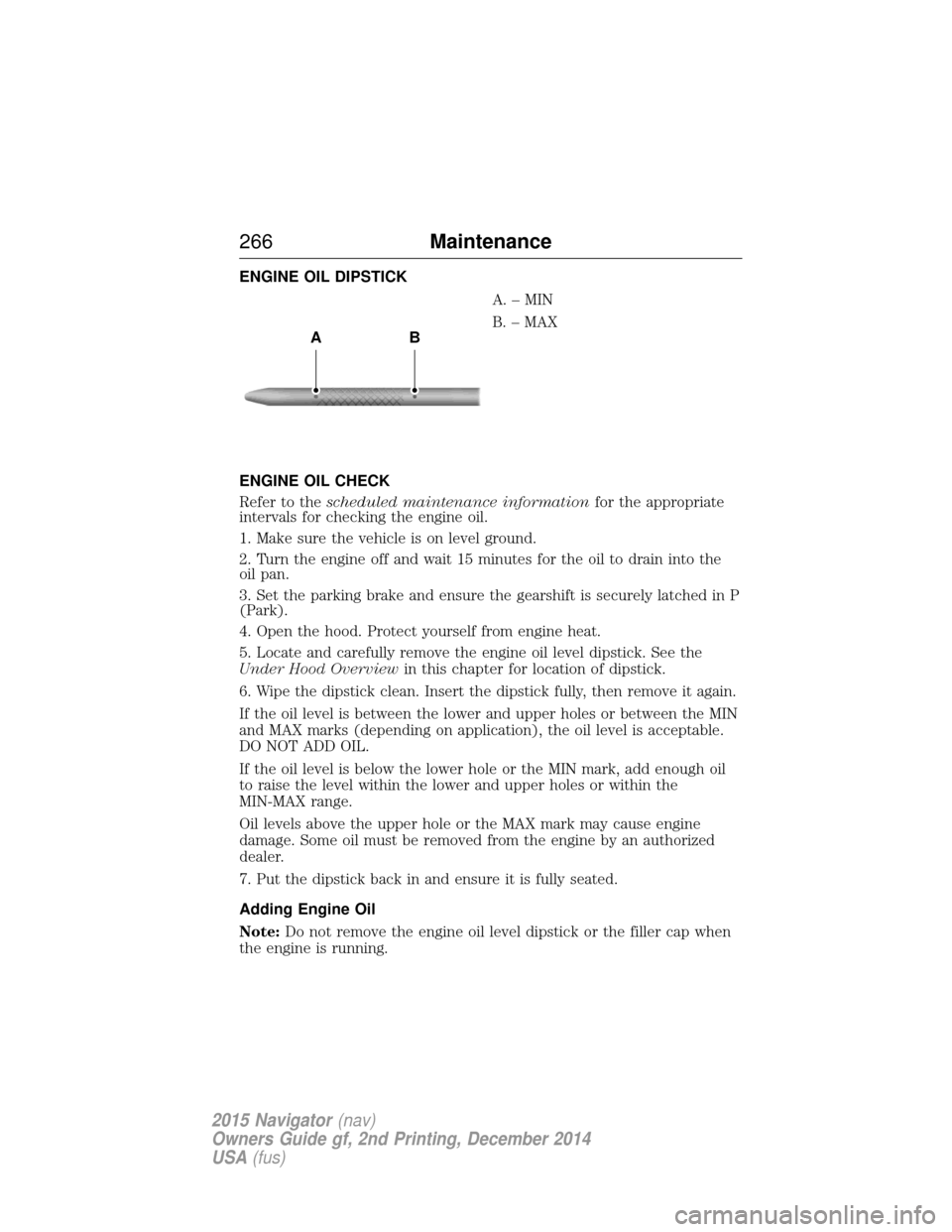
ENGINE OIL DIPSTICKA.–MIN
B. – MAX
ENGINE OIL CHECK
Refer to the scheduled maintenance information for the appropriate
intervals for checking the engine oil.
1. Make sure the vehicle is on level ground.
2. Turn the engine off and wait 15 minutes for the oil to drain into the
oil pan.
3. Set the parking brake and ensure the gearshift is securely latched in P
(Park).
4. Open the hood. Protect yourself from engine heat.
5. Locate and carefully remove the engine oil level dipstick. See the
Under Hood Overview in this chapter for location of dipstick.
6. Wipe the dipstick clean. Insert the dipstick fully, then remove it again.
If the oil level is between the lower and upper holes or between the MIN
and MAX marks (depending on application), the oil level is acceptable.
DO NOT ADD OIL.
If the oil level is below the lower hole or the MIN mark, add enough oil
to raise the level within the lower and upper holes or within the
MIN-MAX range.
Oil levels above the upper hole or the MAX mark may cause engine
damage. Some oil must be removed from the engine by an authorized
dealer.
7. Put the dipstick back in and ensure it is fully seated.
Adding Engine Oil
Note: Do not remove the engine oil level dipstick or the filler cap when
the engine is running.
AB
266 Maintenance
2015 Navigator(nav)
Owners Guide gf, 2nd Printing, December 2014
USA (fus)
Page 279 of 475
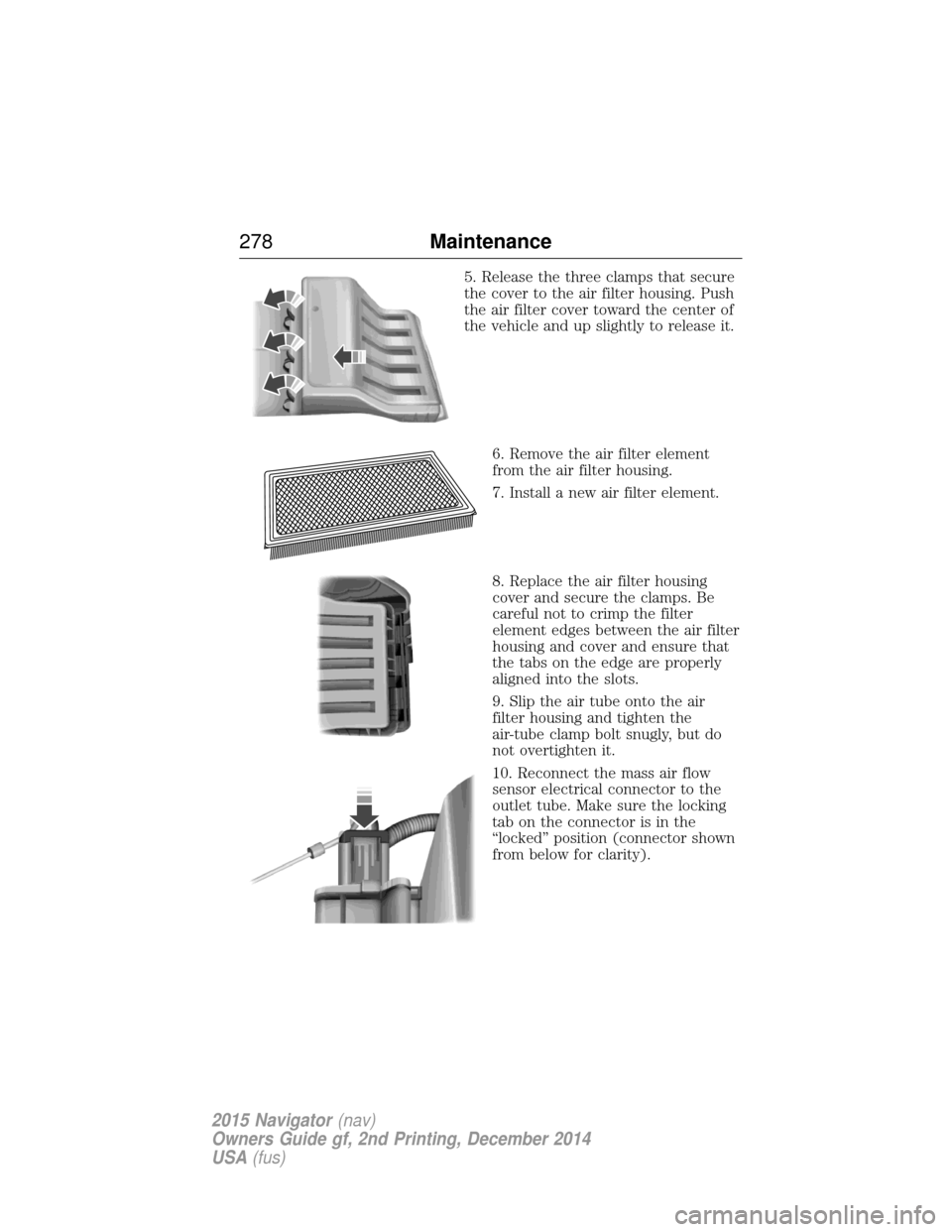
5. Release the three clamps that secure
the cover to the air filter housing. Push
the air filter cover toward the center of
the vehicle and up slightly to release it.6. Remove the air filter element
from the air filter housing.
7. Install a new air filter element.
8. Replace the air filter housing
cover and secure the clamps. Be
careful not to crimp the filter
element edges between the air filter
housing and cover and ensure that
the tabs on the edge are properly
aligned into the slots.
9. Slip the air tube onto the air
filter housing and tighten the
air-tube clamp bolt snugly, but do
not overtighten it.
10. Reconnect the mass air flow
sensor electrical connector to the
outlet tube. Make sure the locking
tab on the connector is in the
“locked” position (connector shown
from below for clarity).
278 Maintenance
2015 Navigator(nav)
Owners Guide gf, 2nd Printing, December 2014
USA (fus)
Page 282 of 475
Replacing HID Headlamp Bulbs
The low/high beam headlamps on your vehicle use a “high intensity
discharge” source. These lamps operate at a high voltage. For bulb
replacement, see your authorized dealer.
Replacing Front Parking Lamp, Turn Signal, and Side Marker Bulbs
These lamps are designed with LED light sources. For replacement, see
your authorized dealer.
Replacing Tail, Stop, Turn Signal, and Backup Lamp Bulbs
These lamps are designed with LED light sources. For replacement, see
your authorized dealer.
Replacing Supplemental Tail Lamp Bulbs
These lamps are designed with LED light sources. For replacement, see
your authorized dealer.
Replacing License Plate Lamp Bulbs
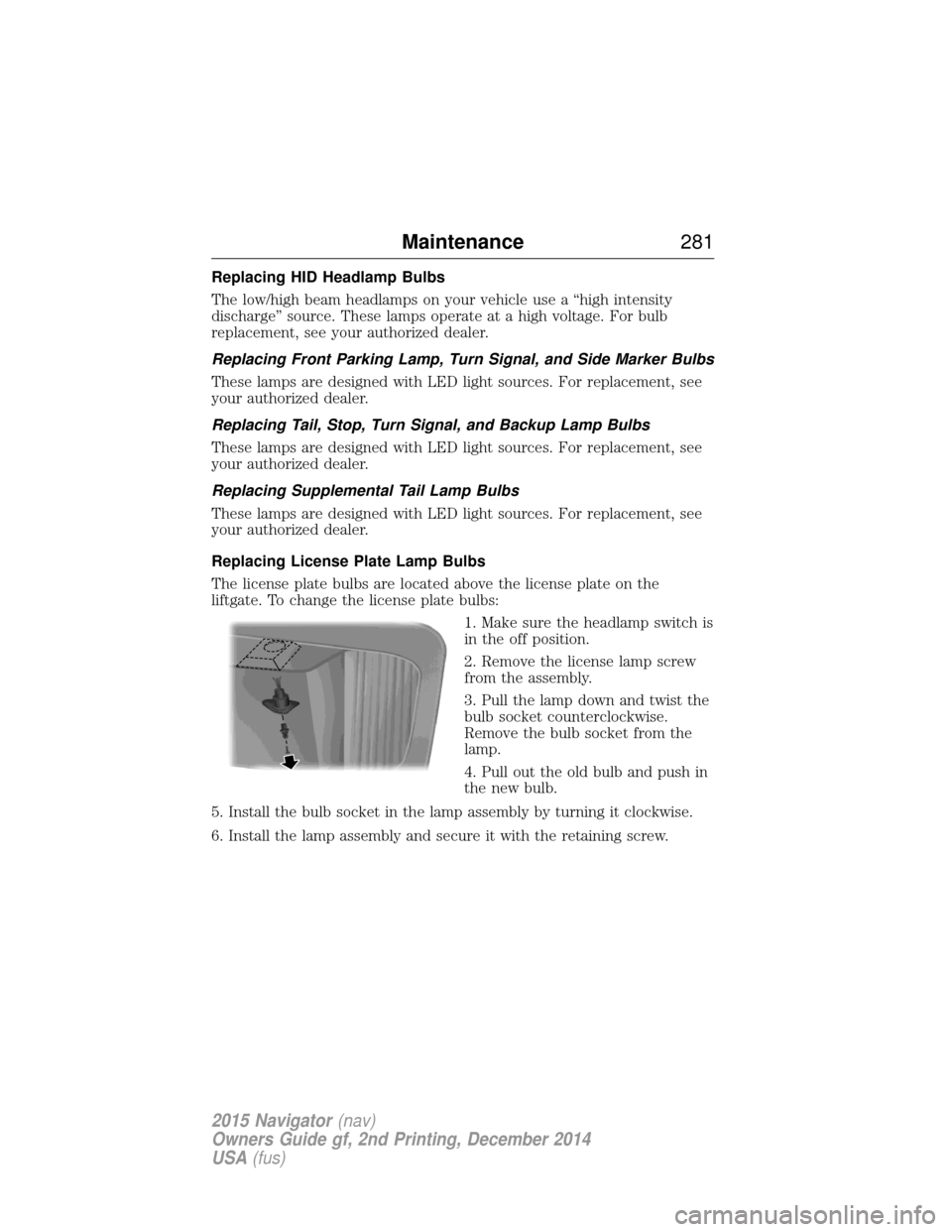
The license plate bulbs are located above the license plate on the
liftgate. To change the license plate bulbs:1. Make sure the headlamp switch is
in the off position.
2. Remove the license lamp screw
from the assembly.
3. Pull the lamp down and twist the
bulb socket counterclockwise.
Remove the bulb socket from the
lamp.
4. Pull out the old bulb and push in
the new bulb.
5. Install the bulb socket in the lamp assembly by turning it clockwise.
6. Install the lamp assembly and secure it with the retaining screw.
Maintenance 281
2015 Navigator(nav)
Owners Guide gf, 2nd Printing, December 2014
USA (fus)
Page 314 of 475
Note:The suspension insulation and bumpers will help prevent vehicle
damage. Do not remove these components from your vehicle when using
snow tires and chains.
The tires on your vehicle have all-weather treads to provide traction in
rain and snow. However, in some climates, you may need to use snow
tires and chains. If you need to use chains, it is recommended that steel
wheels (of the same size and specifications) be used, as chains may chip
aluminum wheels.
Follow these guidelines when using snow tires and chains:
• If possible, avoid fully loading your vehicle.
• Use only cable type chains or chains offered by Ford/Lincoln as an
accessory or equivalent. Other conventional link type chains may
contact and cause damage to the vehicle’s wheel house and/or body.
• Do not install chains on the front wheels as this may interfere with
suspension components.
• Only certain snow cables or chains have been approved by
Ford/Lincoln as safe for use on your vehicle with the following tires:
275/65R18.
• You should install snow cables or chains that have been rated as SAE
Class S.
• Install chains securely, verifying that the chains do not touch any
wiring, brake lines or fuel lines.
• Do not exceed 30 mph (50 km/h) or less if recommended by the chain
manufacturer while using snow chains.
• Drive cautiously. If you hear the chains rub or bang against your
vehicle, stop and retighten the chains. If this does not work, remove
the chains to prevent damage to your vehicle.
• Remove the tire chains when they are no longer needed. Do not use
tire chains on dry roads.
• Purchase chains or cables from a manufacturer that clearly labels body
to tire dimension restrictions. The snow chains or cables must be
mounted in pairs on the rear tires only.
If you have any questions regarding snow chains or cables, please
contact your Ford/Lincoln dealer.
Wheels and Tires 313
2015 Navigator(nav)
Owners Guide gf, 2nd Printing, December 2014
USA (fus)
Page 325 of 475
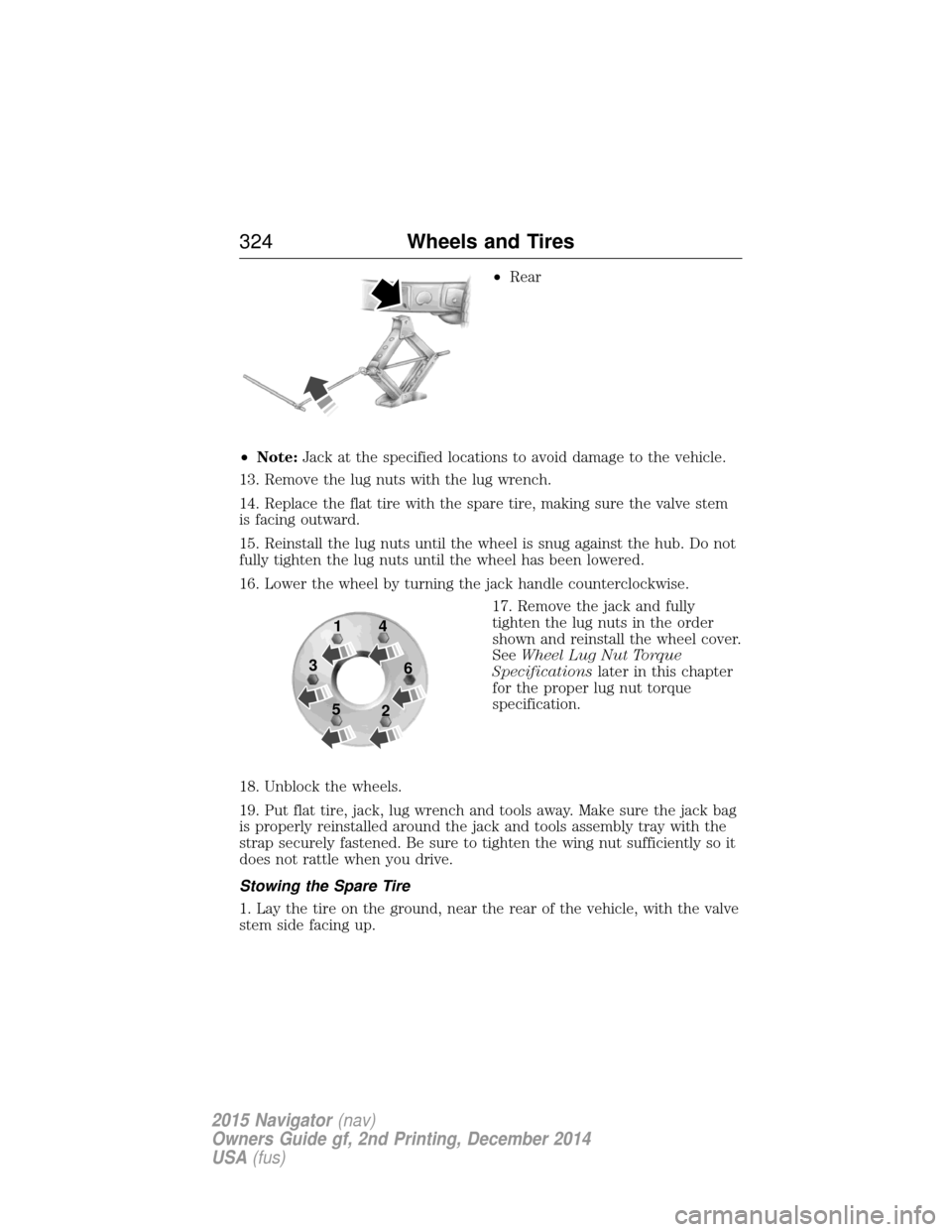
•Rear
• Note: Jack at the specified locations to avoid damage to the vehicle.
13. Remove the lug nuts with the lug wrench.
14. Replace the flat tire with the spare tire, making sure the valve stem
is facing outward.
15. Reinstall the lug nuts until the wheel is snug against the hub. Do not
fully tighten the lug nuts until the wheel has been lowered.
16. Lower the wheel by turning the jack handle counterclockwise. 17. Remove the jack and fully
tighten the lug nuts in the order
shown and reinstall the wheel cover.
SeeWheel Lug Nut Torque
Specifications later in this chapter
for the proper lug nut torque
specification.
18. Unblock the wheels.
19. Put flat tire, jack, lug wrench and tools away. Make sure the jack bag
is properly reinstalled around the jack and tools assembly tray with the
strap securely fastened. Be sure to tighten the wing nut sufficiently so it
does not rattle when you drive.
Stowing the Spare Tire
1. Lay the tire on the ground, near the rear of the vehicle, with the valve
stem side facing up.
1
3
5 4
6
2
324 Wheels and Tires
2015 Navigator(nav)
Owners Guide gf, 2nd Printing, December 2014
USA (fus)
Page 326 of 475
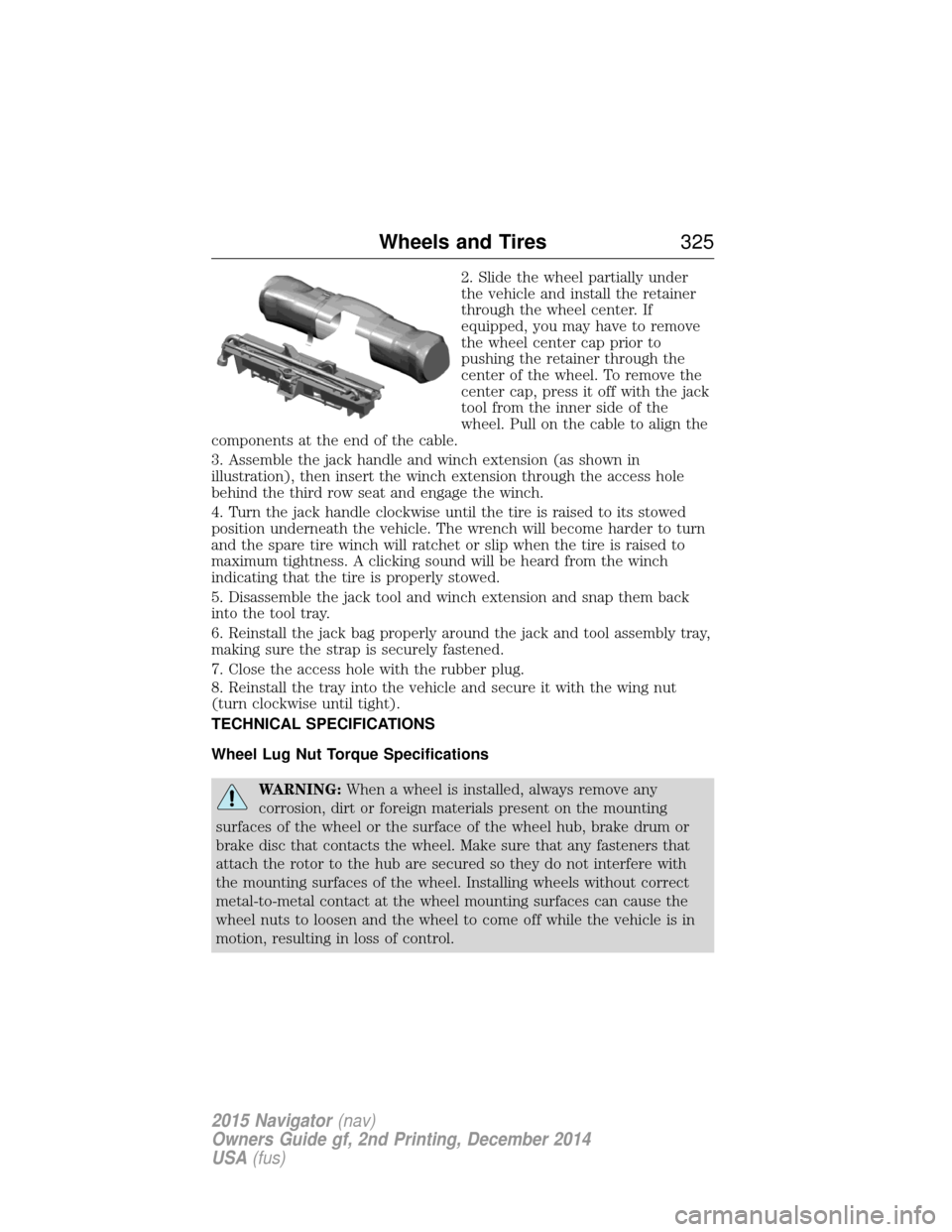
2. Slide the wheel partially under
the vehicle and install the retainer
through the wheel center. If
equipped, you may have to remove
the wheel center cap prior to
pushing the retainer through the
center of the wheel. To remove the
center cap, press it off with the jack
tool from the inner side of the
wheel. Pull on the cable to align the
components at the end of the cable.
3. Assemble the jack handle and winch extension (as shown in
illustration), then insert the winch extension through the access hole
behind the third row seat and engage the winch.
4. Turn the jack handle clockwise until the tire is raised to its stowed
position underneath the vehicle. The wrench will become harder to turn
and the spare tire winch will ratchet or slip when the tire is raised to
maximum tightness. A clicking sound will be heard from the winch
indicating that the tire is properly stowed.
5. Disassemble the jack tool and winch extension and snap them back
into the tool tray.
6. Reinstall the jack bag properly around the jack and tool assembly tray,
making sure the strap is securely fastened.
7. Close the access hole with the rubber plug.
8. Reinstall the tray into the vehicle and secure it with the wing nut
(turn clockwise until tight).
TECHNICAL SPECIFICATIONS
Wheel Lug Nut Torque Specifications
WARNING: When a wheel is installed, always remove any
corrosion, dirt or foreign materials present on the mounting
surfaces of the wheel or the surface of the wheel hub, brake drum or
brake disc that contacts the wheel. Make sure that any fasteners that
attach the rotor to the hub are secured so they do not interfere with
the mounting surfaces of the wheel. Installing wheels without correct
metal-to-metal contact at the wheel mounting surfaces can cause the
wheel nuts to loosen and the wheel to come off while the vehicle is in
motion, resulting in loss of control.
Wheels and Tires 325
2015 Navigator(nav)
Owners Guide gf, 2nd Printing, December 2014
USA (fus)
Page 337 of 475
ACCESSORIES
For a complete listing of the accessories that are available for your
vehicle, please contact an authorized dealer or visit our online store at:
www.Accessories.Lincoln.com (United States only).
Lincoln Motor Company will repair or replace any properly authorized
dealer-installed Lincoln Genuine Accessory found to be defective in
factory-supplied materials or workmanship during the warranty period, as
well as any component damaged by the defective accessories.
Lincoln Motor Company will warrant your accessory through the
warranty that provides the greatest benefit:
•24 months, unlimited mileage.
• The remainder of your new vehicle limited warranty.
Contact an authorized dealer for details and a copy of the warranty.
Exterior style
• Splash guards.
• Deflectors.
Interior style •Ambient lighting •Floor mats
•Illuminated door sill plates
Lifestyle •SUV camping tent* •Rear seat entertainment*
•Racks and carriers* •Towing accessories
•Cargo area protector •Cargo organizers
•Cargo organization and management
Peace of mind •Remote start •Vehicle security systems
•Forward bumper mounted
warning sensors* •Vehicle cover*
•Locking gas plug •Wheel locks
336Accessories
2015 Navigator(nav)
Owners Guide gf, 2nd Printing, December 2014
USA (fus)
Page 340 of 475
Roadside Assistance
Exclusive 24/7 roadside assistance, including:
•Towing, flat-tire change and battery jump starts.
• Out of fuel and lock-out assistance.
• Travel expense reimbursement for lodging, meals and rental car.
• Destination assistance for taxi, shuttle, rental car coverage and
emergency transportation.
Transferable Coverage
If you sell your vehicle before your Lincoln Extended Service Plan
coverage expires, you can transfer any remaining coverage to the new
owner. Whenever you sell your vehicle, prospective buyers may have a
higher degree of confidence that vehicle was properly maintained with
Lincoln ESP, thereby improving resale value.
Avoid the Rising Cost of Properly Maintaining Your Vehicle!
Lincoln Extended Service Plan also offers a Premium Maintenance Plan
that covers all scheduled maintenance, and select items that routinely
wear out. The coverage is prepaid, so you never have to worry about
affording your vehicle maintenance. It covers regular checkups, routine
inspections, preventive care and replacement of select items that require
periodic attention for normal wear:
• Windshield wiper blades.
• Spark plugs (except in California).
• The clutch disc.
• Brake pads and linings.
• Shock absorbers.
• Belts and hoses.
• Diesel exhaust fluid replenishment.
Interest Free Finance Options Available
Take advantage of our interest free installment payment plan. Just a 10%
down payment will provide you with an affordable, no interest, no fee
payment program allowing you all the security and benefits Lincoln ESP
has to offer while paying over time. You are pre-approved with no credit
checks, no hassles! To learn more, call our Lincoln ESP specialists at
800-367-3377.
Lincoln ESP
P.O. Box 8072
Royal Oak, MI 48068-0039
Extended Service Plan 339
2015 Navigator(nav)
Owners Guide gf, 2nd Printing, December 2014
USA (fus)
Page 360 of 475
system creates and retains an index of supported media content. The
system also records a short development log of approximately
10 minutes of all recent system activity. The log profile and other system
data may be used to improve the system and help diagnose any problems
that may occur.
The cellular profile, media device index, and development log remain in
the vehicle unless you delete them and are generally accessible only in
the vehicle when the cellular phone or media player is connected. If you
no longer plan to use the system or the vehicle, we recommend you
perform a Master Reset to erase all stored information.
System data cannot be accessed without special equipment and access to
the vehicle’s SYNC module. Ford Motor Company and Ford of Canada do
not access the system data for any purpose other than as described
absent consent, a court order, or where required by law enforcement,
other government authorities, or other third parties acting with lawful
authority. Other parties may seek to access the information
independently of Ford Motor Company and Ford of Canada. For further
privacy information, see the sections on 911 Assist, Vehicle Health
Report, and Traffic, Directions and Information.
Privacy Notice for GPS Mapping with MyLincoln Mobile in the
United States and Canada
MyLincoln Mobile allows for GPS mapping when a vehicle is registered to
a MyLincoln Mobile account. To remove the vehicle from the account,
thereby removing GPS mapping ability, a Master Reset can be performed
in the vehicle. SeeSettingsin the MyLincoln Touch chapter.
Prior to transferring ownership of a vehicle, owners may choose to
execute a Master Reset or Factory Reset (completed via the MyLincoln
Mobile website). Either method will remove the vehicle from all
MyLincoln Mobile accounts.
It is recommended that new owners conduct a Master Reset upon taking
possession of the vehicle to remove it from any existing MyLincoln
Mobile accounts. The new owner can activate a MyLincoln Mobile
account by going to
http://support.lincoln.com/owner-services/mylincoln-mobile-app and
following the registration process.
MyLincoln Touch™ 359
2015 Navigator(nav)
Owners Guide gf, 2nd Printing, December 2014
USA (fus)
Page 383 of 475
Bluetooth Audio
Your system allows you to stream audio over your vehicle’s speakers from
your connected, Bluetooth-enabled cellular phone.To access, press the lower left corner on the touchscreen, then
select the BT Stereo tab.
Bluetooth Audio Voice Commands If you are listening to a Bluetooth audio device, press the voice
button on the steering wheel control. When prompted, say
“Next song”, “Pause”, “Play” or “Previous song”.
If you are not listening to a Bluetooth audio device, press the voice
button and, after the tone, say “Bluetooth Audio”, then “Next song”,
“Pause”, “Play” or “Previous song”.
Line In (Auxiliary Input Jack)
WARNING: Driving while distracted can result in loss of vehicle
control, crash and injury. We strongly recommend that you use
extreme caution when using any device that may take your focus off
the road. Your primary responsibility is the safe operation of your
vehicle. We recommend against the use of any hand-held device while
driving and encourage the use of voice-operated systems when possible.
Make sure you are aware of all applicable local laws that may affect the
use of electronic devices while driving.
WARNING: For safety reasons, do not connect or adjust the
settings on your portable music player while your vehicle is
moving.
WARNING: Store the portable music player in a secure location,
such as the center console or the glove box, when your vehicle is
in motion. Hard objects may become projectiles in a crash or sudden
stop, which may increase the risk of serious injury. The audio extension
cable must be long enough to allow the portable music player to be
safely stored while your vehicle is moving.
382 MyLincoln Touch™
2015 Navigator(nav)
Owners Guide gf, 2nd Printing, December 2014
USA (fus)