brake LINCOLN NAVIGATOR 2022 Owner's Manual
[x] Cancel search | Manufacturer: LINCOLN, Model Year: 2022, Model line: NAVIGATOR, Model: LINCOLN NAVIGATOR 2022Pages: 646, PDF Size: 7.29 MB
Page 208 of 646
HOW DOES AUTOMATIC ENGINE
STOP WORK
Automatic engine stop turns the engine off.
The ignition also turns off in order to save
battery power. Before the engine shuts
down, a message appears in the information
display showing a timer counting down. If
you do not intervene within 30 seconds, the
engine shuts down. Another message
appears in the information display to inform
you that the engine has shut down in order
to save fuel. Start your vehicle as you
normally do.
SWITCHING AUTOMATIC ENGINE
STOP ON AND OFF
1. Press the menu button on the steering
wheel to enter the information display
main menu.
2. Select Settings.
3. Switch
Auto Engine Off on or off.
Note: You cannot permanently switch off
the automatic shutdown. If you switch it off,
it turns on each time you switch the ignition
on. OVERRIDING AUTOMATIC ENGINE
STOP
You can stop the engine shutdown, or reset
the timer, at any point before the 30-second
countdown has expired by doing any of the
following:
•
Pressing the brake pedal or accelerator
pedal.
• Pressing the OK or RESET button during
the countdown.
Note: You cannot permanently switch off
the automatic engine shutdown feature.
When you switch it off temporarily, it turns
on at the next ignition cycle.
ACCESSING THE PASSIVE KEY
BACKUP POSITION
If you are unable to start your vehicle, do the
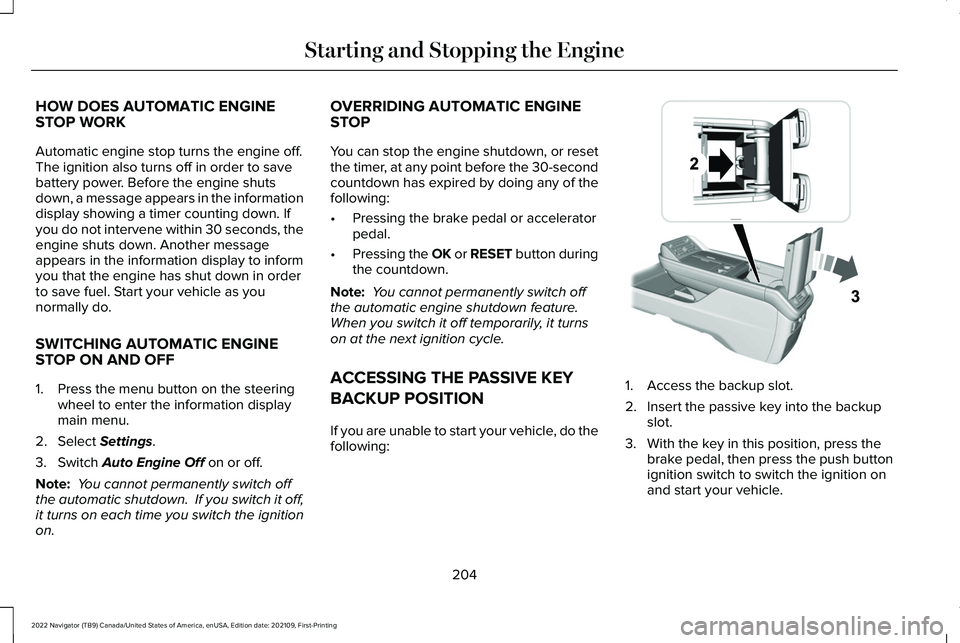
following: 1. Access the backup slot.
2. Insert the passive key into the backup
slot.
3. With the key in this position, press the brake pedal, then press the push button
ignition switch to switch the ignition on
and start your vehicle.
204
2022 Navigator (TB9) Canada/United States of America, enUSA, Edition date: 202109, First-Printing Starting and Stopping the EngineE247437
Page 210 of 646
STARTING AND STOPPING THE
ENGINE – FREQUENTLY ASKED
QUESTIONS
Why is the engine idle speed high when I
am starting the engine?
The speed at which the engine idles
immediately after starting is optimized
to minimize vehicle emissions and
maximize cabin comfort and fuel
economy.
Why does the engine not crank? You can only attempt to start the engine
for a limited amount of time before the
starting system temporarily disables. If
you exceed the starting time limit, a
message may appear and you cannot
attempt to start the engine for at least
15 minutes. Why do I experience different driving
characteristics?
If you disconnect the battery, your
vehicle may exhibit some unusual
driving characteristics for approximately
5 mi (8 km) after you reconnect it. This
is because the engine management
system must realign itself with the
engine. You can disregard any unusual
driving characteristics during this period.
Why can I not start the engine? If you cannot start the engine after 3
attempts, wait 10 seconds and do the
following:
1. Fully press the brake pedal or the clutch
pedal.
Note: Make sure that the parking brake is
applied.
Note: Make sure that the transmission is in
park (P) or neutral (N).
2. Fully press the accelerator pedal and hold it there.
3. Press the push button ignition switch. Note:
The engine cranks for a short period
of time and then it stops.
4. Release the accelerator pedal. 5. Press the push button ignition switch.
Why does the system not detect a passive
key?
If the system does not detect a passive
key and you are unable to start the
engine, insert the passive key into the
backup position and press the push
button ignition switch to start the
engine. See Accessing the Passive Key
Backup Position
(page 204).
206
2022 Navigator (TB9) Canada/United States of America, enUSA, Edition date: 202109, First-Printing Starting and Stopping the EngineE321258
Page 211 of 646
WHAT IS AUTO-START-STOP
The system is designed to help reduce fuel
consumption and CO
2 emissions by stopping
the engine when it is idling, for example at
traffic lights.
AUTO-START-STOP PRECAUTIONS WARNING: Apply the parking brake,
shift into park (P), switch the ignition off
and remove the key before you leave your
vehicle. Failure to follow this instruction
could result in personal injury or death. WARNING: Apply the parking brake,
shift into park (P), switch the ignition off
and remove the key before you open the
hood or have any service or repair work
completed. If you do not switch the ignition
off, the engine could restart at any time.
Failure to follow this instruction could result
in personal injury or death. SWITCHING AUTO-START-STOP
ON AND OFF
The system turns on when you switch the
ignition on. Press the button to switch the
system off.
Note: OFF illuminates in the switch.
Note: Deactivating the system using the
button lasts only one key cycle.
Press the button again to switch the system
back on.
Note: The system turns off if it detects a
malfunction. If the system malfunctions,
have your vehicle checked as soon as
possible.
STOPPING THE ENGINE
Stop your vehicle, keep your foot on the
brake pedal and the transmission in drive
(D). RESTARTING THE ENGINE
Release the brake pedal or press the
accelerator pedal.
A message appears in the information
display if the system requires you to take
action.
AUTO-START-STOP INDICATORS
WARNING:
The system may require
the engine to automatically restart when
the auto-start-stop indicator illuminates
green or flashes amber. Failure to follow
this instruction could result in personal
injury. The Auto-Start-Stop indicator
illuminates green when the engine
stops. It flashes amber and a
message appears when you need to take
action.
207
2022 Navigator (TB9) Canada/United States of America, enUSA, Edition date: 202109, First-Printing Auto-Start-Stop
Page 212 of 646
The Auto-Start-Stop indicator
illuminates gray with a
strikethrough when the system is
not available.
Note: You can display the reason why the
system is not available in the information
display. AUTO-START-STOP –
TROUBLESHOOTING
AUTO-START-STOP – INFORMATION
MESSAGES
A message appears in the information
display if the system requires you to take
action. Action
Condition
Message
Press the brake pedal to restart the engine.
The system needs to restart the engine but
requires your confirmation.
Auto StartStop Press Brake to Start Engine
Press the brake pedal or the accelerator pedal
to restart the engine.
The system needs to restart the engine but
requires your confirmation.
Auto StartStop Press a Pedal to Start Engine
208
2022 Navigator (TB9) Canada/United States of America, enUSA, Edition date: 202109, First-Printing Auto-Start-StopE146361
Page 213 of 646
AUTO-START-STOP – FREQUENTLY
ASKED QUESTIONS
Why does the engine not always stop
when I expect it to?
The system is designed to work in a way that
complements other vehicle systems, allowing
them to operate at optimum performance.
The system does not stop the engine if:
•
The driver door is open.
• Your vehicle is at high altitude.
• The heated windshield is on.
• The engine is warming up.
• The outside temperature is too low or
too high.
• The battery charge is low.
• The battery temperature is outside the
optimal operating range.
• The engine is required to run to maintain
interior climate and reduce fogging. Why does the engine sometimes
restart when I do not expect it to?
The system is designed to work in a way that
complements other vehicle systems, allowing
them to operate at optimum performance.
The system restarts the engine if:
•
You switch the heated windshield on.
• You switch maximum defrost on.
• Your vehicle starts to roll downhill in
neutral.
• The engine is required to run to maintain
adequate brake system assistance.
• The engine is required to run to maintain
interior climate and reduce fogging.
Can I permanently switch the system
off ?
No. The system plays an important role in
reducing the fuel consumption and the CO 2
emissions. Will the frequent engine starts cause
parts to wear out?
Your vehicle has an enhanced battery and
starter motor that are designed for the
increased number of engine starts.
209
2022 Navigator (TB9) Canada/United States of America, enUSA, Edition date: 202109, First-Printing Auto-Start-Stop
Page 220 of 646
Left-hand side. Pull the rear of the
fuel filler door to open it.
C
Right-hand side. Pull the rear of the
fuel filler door to open it.
D
FUEL TANK CAPACITY
Advertised Capacity
The advertised capacity is the maximum
amount of fuel that you can add to the fuel
tank after running out of fuel. Included in the
advertised capacity is an empty reserve. The
empty reserve is an unspecified amount of
fuel that remains in the fuel tank when the
fuel gauge indicates empty.
Note: The amount of fuel in the empty
reserve varies and should not be relied upon
to increase driving range. FUEL AND REFUELING –
TROUBLESHOOTING
FUEL AND REFUELING – WARNING
LAMPS If it illuminates when you are
driving, refuel as soon as possible.
FUEL AND REFUELING –
INFORMATION MESSAGES
Refueling System Warning
If the fuel tank filler valve does not fully close,
a message could appear in the information
display. Message
Check Fuel Fill Inlet
If the message appears, do the following:
1. Stop your vehicle as soon as it is safe to
do so and switch the engine off.
2. Shift into park (P) or neutral (N). 3. Apply the parking brake.
4. Fully open the fuel filler door.
5. Check the fuel tank filler valve for any
debris that may be restricting its
movement.
6. Remove any debris from the fuel tank filler valve.
7. Fully insert a fuel pump nozzle or the fuel
filler funnel provided with your vehicle
into the fuel filler pipe. See Locating the
Fuel Filler Funnel (page 211). This action
should dislodge any debris that may be
preventing the fuel tank filler valve from
fully closing.
8. Remove the fuel pump nozzle or fuel filler
funnel from the fuel filler pipe.
9. Fully close the fuel filler door.
Note: The message may not immediately
reset. If the message continues to appear
and a warning lamp illuminates, have your
vehicle checked as soon as possible.
216
2022 Navigator (TB9) Canada/United States of America, enUSA, Edition date: 202109, First-Printing Fuel and Refueling
Page 223 of 646
AUTOMATIC TRANSMISSION
PRECAUTIONS
WARNING: Apply the parking brake,
shift into park (P), switch the ignition off
and remove the key before you leave your
vehicle. Failure to follow this instruction
could result in personal injury or death. WARNING: When your vehicle is
stationary, keep the brake pedal fully
pressed when shifting gears. Failure to
follow this instruction could result in
personal injury, death or property damage. WARNING:
Do not apply the brake
pedal and accelerator pedal
simultaneously. Applying both pedals
simultaneously for more than a few
seconds will limit engine performance,
which may result in difficulty maintaining
speed in traffic and could lead to serious
injury. AUTOMATIC TRANSMISSION
POSITIONS
PARK (P)
This position locks the driveline and prevents
the wheels from turning. Come to a complete
stop before putting your vehicle into and out
of park (P).
The electric parking brake could apply when
you shift to park (P) without the brake pedal
fully pressed. The electric parking brake
applies when you shift to park (P) on large
slopes. The electric parking brake releases
with the drive away release function or
manually as described in the Releasing the
Electric Parking Brake section. See Electric
Parking Brake (page 236).
Note: A warning tone sounds if you open the
driver door and you have not shifted the
transmission selector to park (P). REVERSE (R) WARNING:
Shift into reverse (R) only
when your vehicle is stationary.
In reverse (R) power is transmitted to the
driven wheels.
NEUTRAL (N) WARNING: In neutral (N) your vehicle
is free to roll.
In neutral (N) power is not transmitted to the
driven wheels.
DRIVE (D)
In drive (D) power is transmitted to the driven
wheels.
219
2022 Navigator (TB9) Canada/United States of America, enUSA, Edition date: 202109, First-Printing Automatic Transmission
Page 224 of 646
SHIFTING YOUR VEHICLE INTO
GEAR
The transmission selector is on the center
stack.
1. Press and hold the brake pedal.
2. Press a button to select a position.
Note:
The position illuminates on the
transmission selector. AUTOMATIC TRANSMISSION
POSITION INDICATORS
The instrument cluster displays the current
position.
Note:
The position could illuminate on the
transmission selector.
MANUALLY SHIFTING GEARS
SHIFTING USING THE PADDLE
SHIFTERS
The instrument cluster displays the current
gear. The current gear flashes when your
vehicle cannot shift into the requested gear.
Your vehicle will not shift if the requested
gear raises or lowers the engine speed
beyond the limit. Your vehicle could shift when you fully press
the accelerator or brake pedal.
Note:
Prolonged driving with high engine
speed could cause vehicle damage not
covered by the vehicle warranty.
Note: Selecting certain drive modes could
affect the response you receive when your
vehicle shifts into the requested gear. Manually Shifting Gears in Drive (D)
Use this feature when overtaking another
vehicle, or to temporarily change gear:
•
Pull any paddle to switch the feature on.
• Pull the right (+) paddle to upshift.
220
2022 Navigator (TB9) Canada/United States of America, enUSA, Edition date: 202109, First-Printing Automatic TransmissionE247220 E358682 E144821
Page 225 of 646
•
Pull the left (-) paddle to downshift.
• Hold the + paddle for a few seconds to
switch the feature off.
Note: The feature switches off after a short
period of time if you do not pull either
paddle.
TEMPORARY NEUTRAL MODE
WHAT IS TEMPORARY NEUTRAL
MODE
This mode keeps your vehicle in neutral (N),
for a limited time, when you exit your vehicle
or switch your vehicle off.
Note: Do not tow your vehicle in this mode.
TEMPORARY NEUTRAL MODE
LIMITATIONS
Your vehicle could shift to park (P) after 30
minutes, or when the vehicle battery charge
level is low. Prolonged use of this mode can
cause the vehicle battery to run out of
charge. Do not tow your vehicle in this mode. Failure
to follow these instructions could result in
vehicle damage not covered by the vehicle
warranty.
ENTERING TEMPORARY NEUTRAL
MODE
1. Power your vehicle on.
2. Bring your vehicle to a complete stop.
3. Press and hold the brake pedal.
4. Shift into neutral (N).
Note:
An instructional message appears.
5. Press the neutral (N) button.
Note: A confirmation message appears
when your vehicle enters the mode.
6. Release the brake pedal.
Note: Your vehicle is free to roll.
7. Switch your vehicle off.
Note: Do not tow your vehicle in this mode.
Note: The neutral (N) indicator on the
transmission selector may flash in this mode. EXITING TEMPORARY NEUTRAL
MODE
1. Press the brake pedal.
2. Shift into park (P), or power your vehicle
on and shift into drive (D) or reverse (R).
AUTOMATIC RETURN TO PARK (P)
WHAT IS AUTOMATIC RETURN TO
PARK (P)
Your vehicle shifts into park (P) if you attempt
to exit your vehicle without the transmission
in park (P).
221
2022 Navigator (TB9) Canada/United States of America, enUSA, Edition date: 202109, First-Printing Automatic Transmission
Page 230 of 646
FOUR-WHEEL DRIVE AUTO
4A turns on when you select EXCITE,
NORMAL 4x4 AUTO or SLIPPERY.
Four-wheel drive auto provides electronically
controlled four-wheel drive power to both
the front and rear wheels, as required, for
increased traction in varying on-road
conditions. The four-wheel drive auto tuning
varies based on selected Drive Mode. See
Selecting a Drive Mode (page 294).
Note: Four-wheel drive auto can turn on or
off automatically based on Drive Mode
selection. See Selecting a Drive Mode (page
294
).
FOUR-WHEEL DRIVE HIGH
4H turns on when you select DEEP
CONDITIONS. Four-wheel drive high
provides electronically locked four-wheel
drive power to both the front and rear wheels
for use in off-road or winter conditions such
as deep snow, sand or mud. This mode is
not for use on dry pavement. Note:
Four-wheel drive high can turn on or
off automatically based on Drive Mode
selection. See Selecting a Drive Mode (page
294
).
FOUR-WHEEL DRIVE LOW
4L turns on when you select SLOW CLIMB.
Four-wheel drive low provides electronically
or mechanically locked four-wheel drive
power to both the front and rear wheels for
use on low traction surfaces, but does so
with additional gearing for increased torque
multiplication. This mode is only for off-road
conditions such as deep sand, steep slopes,
or pulling heavy objects.
Note: Four-wheel drive low can turn on or
off automatically based on drive mode
selection. See Selecting a Drive Mode (page
294
).
FOUR-WHEEL DRIVE INDICATORS
Two-wheel Drive High Momentarily illuminates when
two-wheel drive high is selected.Four-wheel Drive Auto Continuously illuminates when
four-wheel drive auto is selected.
Four-wheel Drive High Continuously illuminates when
four-wheel drive high is selected.
Four-wheel Drive Low
(If Equipped) Continuously illuminates when
four-wheel drive low is selected.
FOUR-WHEEL DRIVE DRIVING HINTS
EMERGENCY MANEUVERS
In an unavoidable emergency situation
where a sudden sharp turn must be made,
remember to avoid over-driving your vehicle
(i.e. turn the steering wheel only as rapidly
and as far as required to avoid the
emergency). Excessive steering can result
in loss of vehicle control. Apply smooth
pressure to the accelerator pedal or brake
226
2022 Navigator (TB9) Canada/United States of America, enUSA, Edition date: 202109, First-Printing Four-Wheel Drive
(If Equipped)E181778 E181781 E181779 E181780