brake LINCOLN NAVIGATOR 2022 Service Manual
[x] Cancel search | Manufacturer: LINCOLN, Model Year: 2022, Model line: NAVIGATOR, Model: LINCOLN NAVIGATOR 2022Pages: 646, PDF Size: 7.29 MB
Page 245 of 646
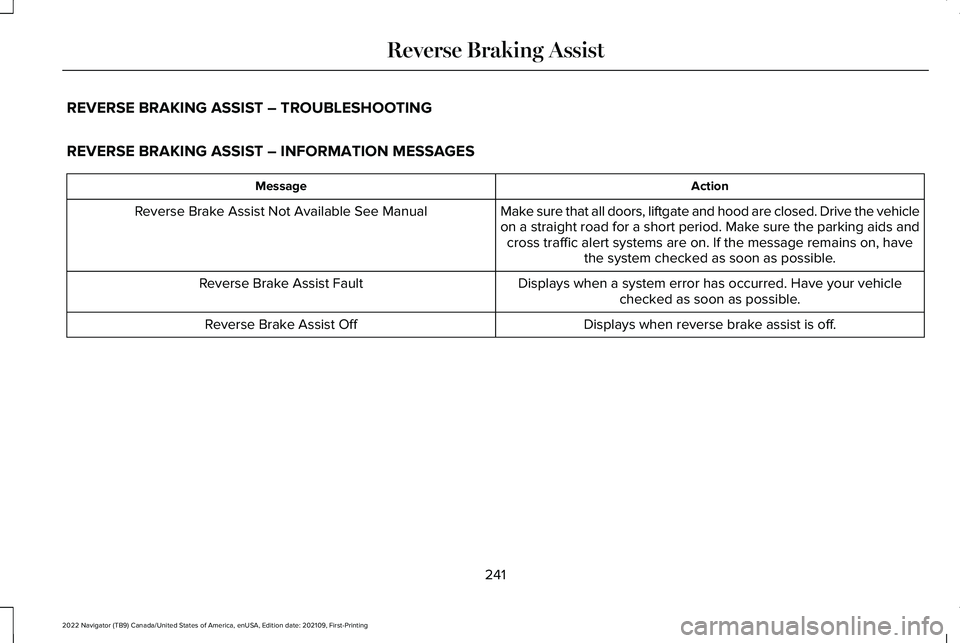
REVERSE BRAKING ASSIST – TROUBLESHOOTING
REVERSE BRAKING ASSIST – INFORMATION MESSAGES
Action
Message
Make sure that all doors, liftgate and hood are closed. Drive the vehicle
on a straight road for a short period. Make sure the parking aids andcross traffic alert systems are on. If the message remains on, have the system checked as soon as possible.
Reverse Brake Assist Not Available See Manual
Displays when a system error has occurred. Have your vehiclechecked as soon as possible.
Reverse Brake Assist Fault
Displays when reverse brake assist is off.
Reverse Brake Assist Off
241
2022 Navigator (TB9) Canada/United States of America, enUSA, Edition date: 202109, First-Printing Reverse Braking Assist
Page 246 of 646
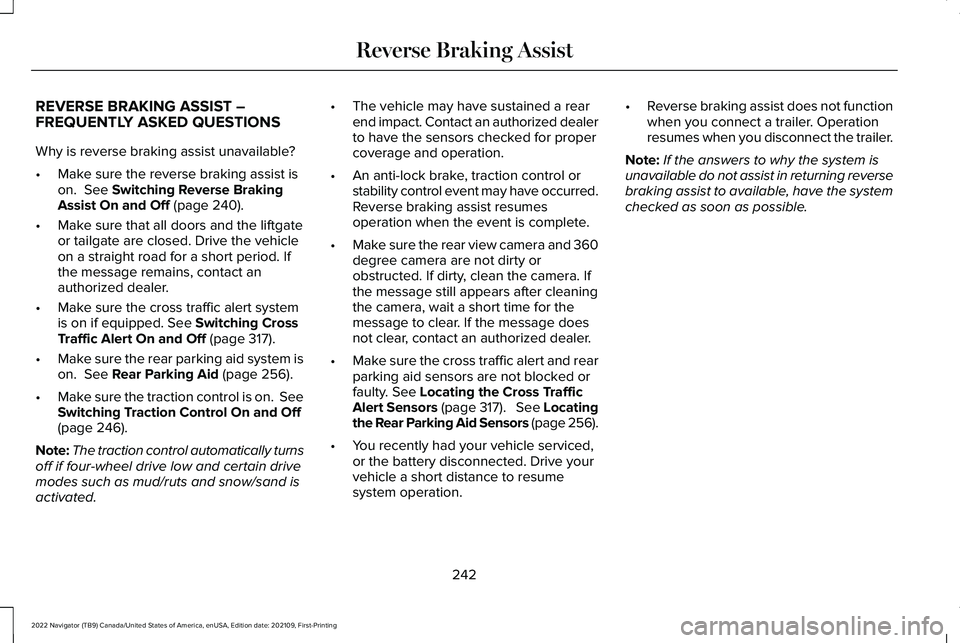
REVERSE BRAKING ASSIST –
FREQUENTLY ASKED QUESTIONS
Why is reverse braking assist unavailable?
•
Make sure the reverse braking assist is
on. See Switching Reverse Braking
Assist On and Off (page 240).
• Make sure that all doors and the liftgate
or tailgate are closed. Drive the vehicle
on a straight road for a short period. If
the message remains, contact an
authorized dealer.
• Make sure the cross traffic alert system
is on if equipped.
See Switching Cross
Traffic Alert On and Off (page 317).
• Make sure the rear parking aid system is
on.
See Rear Parking Aid (page 256).
• Make sure the traction control is on. See
Switching Traction Control On and Off
(page
246).
Note: The traction control automatically turns
off if four-wheel drive low and certain drive
modes such as mud/ruts and snow/sand is
activated. •
The vehicle may have sustained a rear
end impact. Contact an authorized dealer
to have the sensors checked for proper
coverage and operation.
• An anti-lock brake, traction control or
stability control event may have occurred.
Reverse braking assist resumes
operation when the event is complete.
• Make sure the rear view camera and 360
degree camera are not dirty or
obstructed. If dirty, clean the camera. If
the message still appears after cleaning
the camera, wait a short time for the
message to clear. If the message does
not clear, contact an authorized dealer.
• Make sure the cross traffic alert and rear
parking aid sensors are not blocked or
faulty.
See Locating the Cross Traffic
Alert Sensors (page 317). See Locating
the Rear Parking Aid Sensors (page 256).
• You recently had your vehicle serviced,
or the battery disconnected. Drive your
vehicle a short distance to resume
system operation. •
Reverse braking assist does not function
when you connect a trailer. Operation
resumes when you disconnect the trailer.
Note: If the answers to why the system is
unavailable do not assist in returning reverse
braking assist to available, have the system
checked as soon as possible.
242
2022 Navigator (TB9) Canada/United States of America, enUSA, Edition date: 202109, First-Printing Reverse Braking Assist
Page 247 of 646
WHAT IS HILL START ASSIST
Hill Start Assist makes it easier for you to pull
away when your vehicle is on a slope without
using the parking brake.
HOW DOES HILL START ASSIST
WORK
When the system activates, your vehicle
remains stationary for a few seconds after
you release the brake pedal. This gives you
time to move your foot from the brake pedal
to the accelerator pedal. The brakes release
when the engine has developed sufficient
torque to prevent your vehicle from rolling
down the slope.
HILL START ASSIST PRECAUTIONS
WARNING: The system does not
replace the parking brake. When you leave
your vehicle, always apply the parking
brake. WARNING: You must remain in your
vehicle when the system turns on. At all
times, you are responsible for controlling
your vehicle, supervising the system and
intervening, if required. Failure to take care
may result in the loss of control of your
vehicle, serious personal injury or death. WARNING:
The system will turn off
if a malfunction is apparent. Failure to take
care may result in the loss of control of
your vehicle, serious personal injury or
death. HILL START ASSIST –
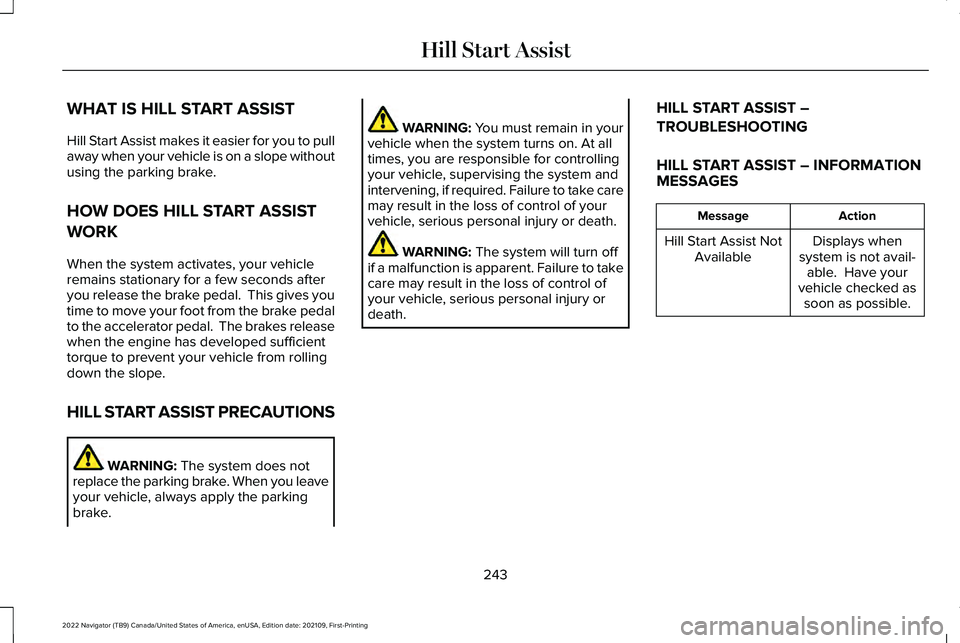
TROUBLESHOOTING
HILL START ASSIST – INFORMATION
MESSAGES Action
Message
Displays when
system is not avail- able. Have your
vehicle checked as soon as possible.
Hill Start Assist Not
Available
243
2022 Navigator (TB9) Canada/United States of America, enUSA, Edition date: 202109, First-Printing Hill Start Assist
Page 248 of 646
HOW DOES AUTO HOLD WORK
Auto Hold applies the brakes to hold your
vehicle after you stop it and release the
brake pedal. This can help when waiting on
a hill or in traffic.
SWITCHING AUTO HOLD ON AND
OFF
WARNING: The system does not
replace the parking brake. When you leave
your vehicle, always apply the parking
brake. WARNING: You must remain in your
vehicle when the system turns on. At all
times, you are responsible for controlling
your vehicle, supervising the system and
intervening, if required. Failure to take care
may result in the loss of control of your
vehicle, serious personal injury or death. WARNING:
The system will turn off
if a malfunction is apparent. Failure to take
care may result in the loss of control of
your vehicle, serious personal injury or
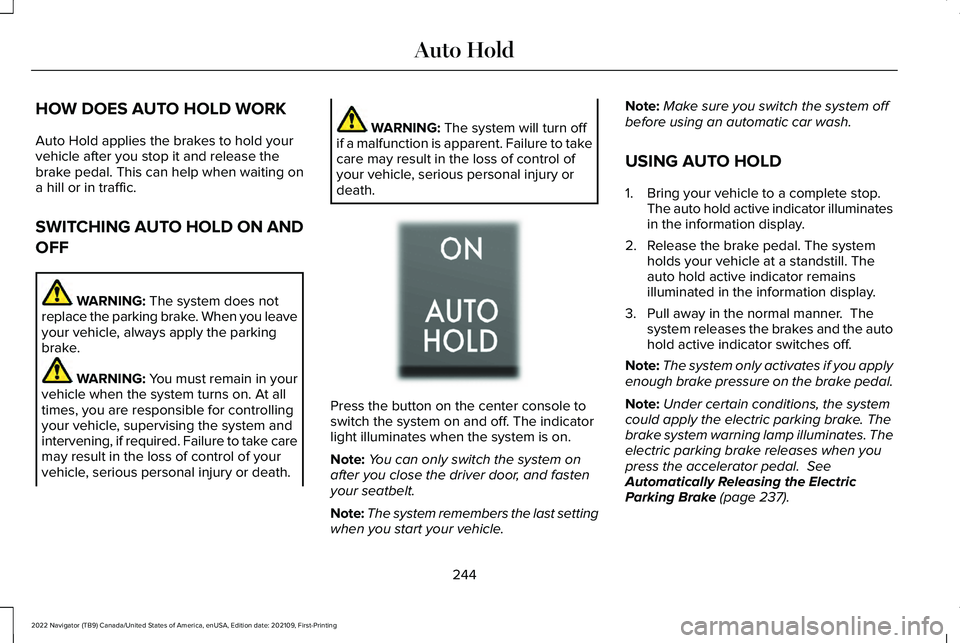
death. Press the button on the center console to
switch the system on and off. The indicator
light illuminates when the system is on.
Note:
You can only switch the system on
after you close the driver door, and fasten
your seatbelt.
Note: The system remembers the last setting
when you start your vehicle. Note:
Make sure you switch the system off
before using an automatic car wash.
USING AUTO HOLD
1. Bring your vehicle to a complete stop. The auto hold active indicator illuminates
in the information display.
2. Release the brake pedal. The system holds your vehicle at a standstill. The
auto hold active indicator remains
illuminated in the information display.
3. Pull away in the normal manner. The system releases the brakes and the auto
hold active indicator switches off.
Note: The system only activates if you apply
enough brake pressure on the brake pedal.
Note: Under certain conditions, the system
could apply the electric parking brake. The
brake system warning lamp illuminates. The
electric parking brake releases when you
press the accelerator pedal.
See
Automatically Releasing the Electric
Parking Brake
(page 237).
244
2022 Navigator (TB9) Canada/United States of America, enUSA, Edition date: 202109, First-Printing Auto HoldE256165
Page 249 of 646
Note:
The system switches off if you shift
into reverse (R) and press the brake pedal.
There could be actions that can cause the
auto hold system not to work when the
following occur:
• When you use active park assist.
• Your vehicle is in stay in neutral mode.
• The driver door is open.
• You have not fastened your seatbelt.
• You shift into reverse (R) before the
system is active.
AUTO HOLD INDICATORS Illuminates when the system is
active.
Illuminates when the system is on
but cannot hold your vehicle at a
standstill at this particular time.
245
2022 Navigator (TB9) Canada/United States of America, enUSA, Edition date: 202109, First-Printing Auto HoldE323448 E323449
Page 250 of 646
WHAT IS TRACTION CONTROL
The traction control system helps to avoid
drive wheel spin and loss of traction.
HOW DOES TRACTION CONTROL
WORK
If your wheels begin to spin, the loss of
traction can compromise steering control
and stability of the vehicle. The traction
control system applies the brakes to
individual wheels and when needed, reduces
engine power at the same time to increase
traction.
SWITCHING TRACTION CONTROL
ON AND OFF WARNING: Operating your vehicle
with the traction control disabled could
lead to an increased risk of loss of vehicle
control, vehicle rollover, personal injury
and death. The traction control system turns on each
time you switch the ignition on.
The button for the stability and traction
control system is on the instrument panel.
Press and release the button to switch
traction control off. The stability control
system remains fully active, to switch it off,
press and hold the button for a few seconds,
then release.
When you switch traction control off, a
message and an illuminated icon appear on
the instrument cluster.Press the switch again to turn the traction
control system back on to normal operation.
If your vehicle is stuck in mud or snow,
switching traction control off may be
beneficial as this allows the wheels to spin.
Your vehicle may have MyKey restrictions
regarding this feature.
See What Is MyKey
(page 82).
TRACTION CONTROL INDICATOR
Stability and Traction Control Indicator If the indicator does not illuminate
when you switch the ignition on,
or remains on when the engine is
running, this indicates a malfunction. Have
your vehicle checked by an authorized
dealer as soon as possible. The traction control off indicator
illuminates when you switch the
traction control system off, or when
an alternative stability control mode is
selected that requires the traction control off
depending on the drive mode selected.
246
2022 Navigator (TB9) Canada/United States of America, enUSA, Edition date: 202109, First-Printing Traction ControlE327252 E138639 E130458
Page 252 of 646
HOW DOES STABILITY CONTROL
WORK
WARNING: Vehicle modifications
involving braking system, aftermarket roof
racks, suspension, steering system, tire
construction and wheel and tire size may
change the handling characteristics of your
vehicle and may adversely affect the
performance of the electronic stability
control system. In addition, installing any
stereo speakers may interfere with and
adversely affect the electronic stability
control system. Reducing the effectiveness
of the electronic stability control system
could lead to an increased risk of loss of
vehicle control, vehicle rollover, personal
injury and death. WARNING:
Remember that even
advanced technology cannot defy the laws
of physics. It's always possible to lose
control of a vehicle due to inappropriate
driver input for the conditions. Aggressive
driving on any road condition can cause
you to lose control of your vehicle increasing the risk of personal injury or
property damage. Activation of the
electronic stability control system is an
indication that at least some of the tires
have exceeded their ability to grip the
road; this could reduce the operator's
ability to control the vehicle potentially
resulting in a loss of vehicle control, vehicle
rollover, personal injury and death.
WARNING:
You are responsible for
controlling your vehicle at all times. The
system is designed to be an aid and does
not relieve you of your responsibility to
drive with due care and attention. Failure
to follow this instruction could result in the
loss of control of your vehicle, personal
injury or death.
If a driving condition activates either the
stability control or traction control you may
experience the following conditions:
• The stability and traction control light
flashes.
• Your vehicle slows down.
• Reduced engine power. The stability control system has several
features built into it to help you maintain
control of your vehicle:
Electronic Stability Control
Electronic stability control enhances your
vehicle
’s ability to prevent skids or lateral
slides by applying brakes to one or more of
the wheels individually and, if necessary,
reducing engine power.
Roll Stability Control
Roll stability control enhances your vehicle ’s
ability to prevent rollovers by detecting your
vehicle ’s roll motion and the rate at which it
changes by applying the brakes to one or
more wheels individually.
Curve Control
Curve control enhances your vehicle ’s ability
to follow the road when cornering severely
or avoiding objects in the roadway. Curve
control operates by reducing engine power
and, if necessary, applying brakes to one or
more of the wheels individually.
248
2022 Navigator (TB9) Canada/United States of America, enUSA, Edition date: 202109, First-Printing Stability Control
Page 253 of 646
Side Wind Stabilization
Side wind stabilization is an advanced
feature that works by carefully applying the
brakes on one side of the vehicle to reduce
the effect of a side wind gust on the vehicle's
path.
Traction Control
Traction control enhances your vehicle
’s
ability to maintain traction of the wheels by
detecting and controlling wheel spin. See
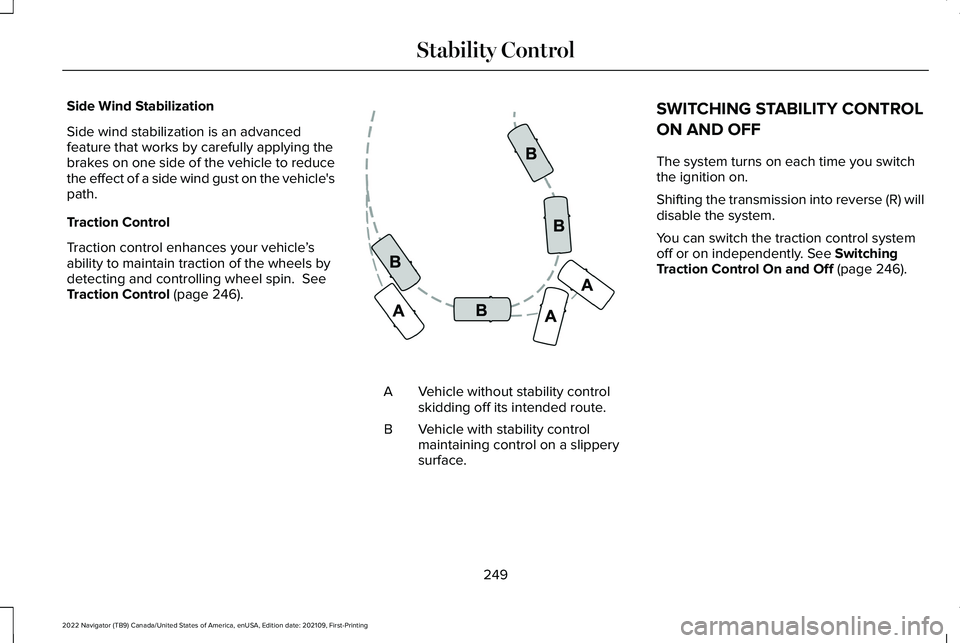
Traction Control (page 246). Vehicle without stability control
skidding off its intended route.
A
Vehicle with stability control
maintaining control on a slippery
surface.
B SWITCHING STABILITY CONTROL
ON AND OFF
The system turns on each time you switch
the ignition on.
Shifting the transmission into reverse (R) will
disable the system.
You can switch the traction control system
off or on independently.
See Switching
Traction Control On and Off (page 246).
249
2022 Navigator (TB9) Canada/United States of America, enUSA, Edition date: 202109, First-Printing Stability ControlE72903
Page 255 of 646
WHAT IS HILL DESCENT CONTROL
Hill descent control allows the driver to set
and maintain vehicle speed while
descending steep slopes in various surface
conditions.
HOW DOES HILL DESCENT
CONTROL WORK
Hill descent control can maintain vehicle
speeds on downhill slopes between
2–20 mph (3–32 km/h). Above 20 mph
(32 km/h), the system remains on but the
descent speed cannot be set or maintained.
Note: The system does not function below
2 mph (3 km/h)
.
The system requires a cool down interval
after a period of sustained use. Hill descent
control provides a warning in the message
center and a tone sounds when the system
is about to disengage for cooling. At this
time, manually apply the brakes as needed
to maintain descent speed. Note:
The amount of time that the system
can remain active before cooling varies with
conditions.
HILL DESCENT CONTROL
PRECAUTIONS WARNING:
The system does not
control speed in low traction conditions or
extremely steep slopes. The system is
designed to be an aid and does not relieve
you of your responsibility to drive with due
care and attention. Failure to follow this
instruction could result in personal injury. WARNING:
Hill descent control
cannot control descent in all surface
conditions and circumstances, such as ice
or extremely steep grades. Hill descent
control is a driver assist system and cannot
substitute for good judgment by the driver.
Failure to do so may result in loss of
vehicle control, crash or serious injury. WARNING:
The system does not
replace the parking brake. When you leave
your vehicle, always apply the parking
brake and shift the transmission into park
(P) for automatic transmission or first gear
for manual transmission.
SWITCHING HILL DESCENT
CONTROL ON AND OFF Press the button on the instrument
panel. A light illuminates and a
tone sounds when the system is
active.
SETTING THE HILL DESCENT
SPEED
To increase or decrease the descent speed,
press the accelerator or brake pedal, or use
the SET + and SET - buttons on the steering
wheel. Once you reach the preferred speed
remove your feet from the pedals.
251
2022 Navigator (TB9) Canada/United States of America, enUSA, Edition date: 202109, First-Printing Hill Descent Control
(If Equipped)E163171
Page 258 of 646
Note:
During parking maneuvers, the
adaptive steering system balances the driver
workload for various steering wheel inputs
and vehicle loading conditions. Under
extreme operating conditions the system
locking device could engage. This strategy
prevents overheating and permanent
damage to the adaptive steering system.
Typical steering and driving maneuvers
allow the system to cool and return to normal
operation. Adaptive Learning
Adaptive learning helps correct road
irregularities and improves overall handling
and steering. It communicates with the brake
system to help operate advanced stability
control and crash avoidance systems.
Additionally, whenever you disconnect the
battery or install a new battery, you must
drive your vehicle a short distance before
the system relearns the strategy and
reactivates all systems.STEERING – TROUBLESHOOTING
STEERING – WARNING INDICATORS The adaptive steering system
indicator illuminates if the system
detects a fault during the
continuous diagnostic checks.
Note: If a red warning message displays,
stop your vehicle as soon as it is safe to do
so.
STEERING – INFORMATION MESSAGES Action
Message
The power steering system has detected a condition that requiresservice. Have your vehicle checked as soon as possible.
Steering Fault Service Now
The power steering system is not working. Stop your vehicle in a safeplace. Have your vehicle checked as soon as possible.
Steering Loss Stop Safely
The power steering system has detected a condition that requiresservice. Have your vehicle checked as soon as possible.
Steering Assist Fault Service Required
The steering system has detected a condition that requires service. Have your vehicle checked as soon as possible.
Steering Lock Malfunction Service Now
254
2022 Navigator (TB9) Canada/United States of America, enUSA, Edition date: 202109, First-Printing SteeringE223375