ignition MAZDA MODEL 3 5-DOOR 2017 Service Manual
[x] Cancel search | Manufacturer: MAZDA, Model Year: 2017, Model line: MODEL 3 5-DOOR, Model: MAZDA MODEL 3 5-DOOR 2017Pages: 612
Page 145 of 612
4–15
When Driving
Instrument Cluster and Display
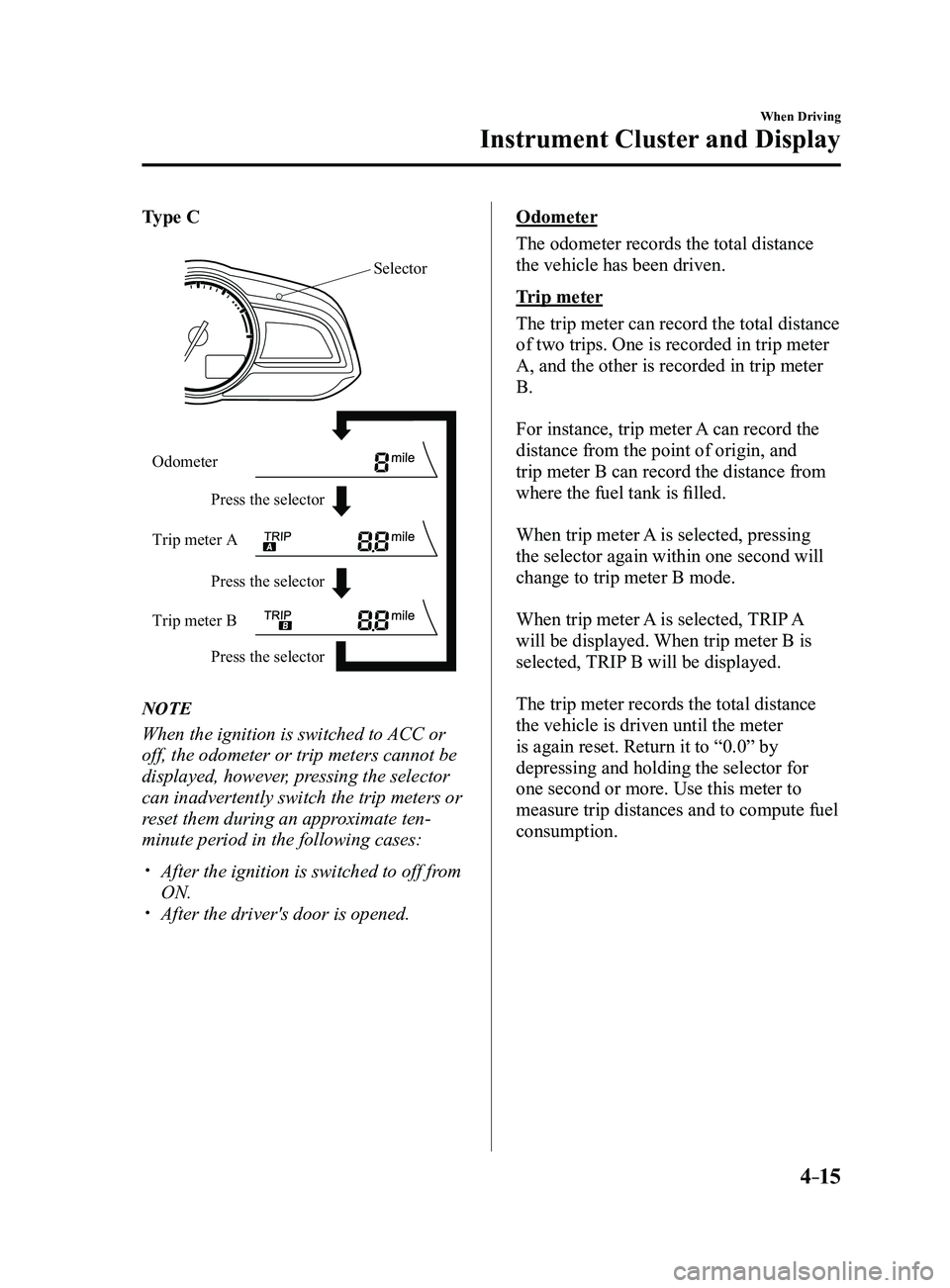
Type C
Press the selector Press the selector
Press the selector
Odometer
Trip meter A
Trip meter B
Selector
NOTE
When the ignition is switched to ACC or
off, the odometer or trip meters cannot be
displayed, however, pressing the selector
can inadvertently switch the trip meters or
reset them during an approximate ten-
minute period in the following cases:
After the ignition is switched to off fr
om
ON. After the driver's door is opened.
Odometer
The odometer records the total distance
the vehicle has been driven.
Trip meter
The trip meter can record the total distance
of two trips. One is recorded in trip meter
A, and the other is recorded in trip meter
B.
For instance, trip meter A can record the
distance from the point of origin, and
trip meter B can record the distance from
where the fuel tank is filled.
When trip meter A is selected, pressing
the selector again within one second will
change to trip meter B mode.
When trip meter A is selected, TRIP A
will be displayed. When trip meter B is
selected, TRIP B will be displayed.
The trip meter records the total distance
the vehicle is driven until the meter
is again reset. Return it to “0.0” by
depressing and holding the selector for
one second or more. Use this meter to
measure trip distances and to compute fuel
consumption.
Mazda3_8FL6-EA-16F_Edition2.indb 152016/08/10 17:35:47
Page 147 of 612
4–17
When Driving
Instrument Cluster and Display
Fuel Gauge
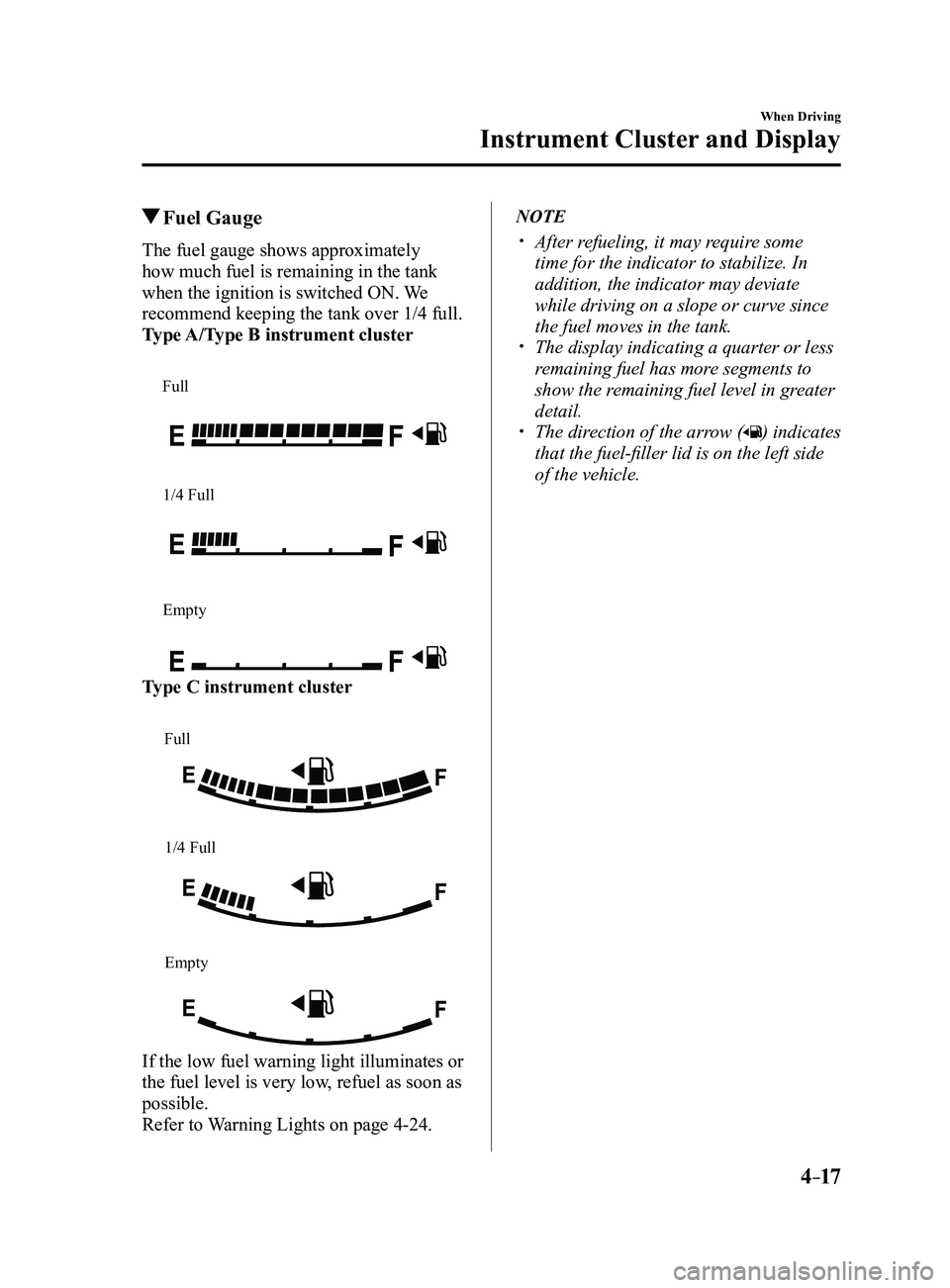
The fuel gauge shows approximately
how much fuel is remaining in the tank
when the ignition is switched ON. We
recommend keeping the tank over 1/4 full.
Type A/Type B instrument cluster
Full
1/4 Full
Empty
Type C instrument cluster
Full
1/4 Full
Empty
If the low fuel warning light illuminates or
the fuel level is very low, refuel as soon as
possible.
Refer to Warning Lights on page
4-24.
NOTE
After refueling, it may require some
time for the indicator to stabilize. In
addition, the indicator may deviate
while driving on a slope or curve since
the fuel moves in the tank.
The display indicating a quarter or less
remaining fuel has more segments to
show the remaining fuel level in greater
detail.
The direction of the arrow () indicates
that the fuel-filler lid is on the left side
of the vehicle.
Mazda3_8FL6-EA-16F_Edition2.indb 172016/08/10 17:35:49
Page 148 of 612
4–18
When Driving
Instrument Cluster and Display
Dashboard Illumination
When the position lights are turned
on with the ignition switched ON,
the brightness of the instrument panel
illumination is dimmed.
NOTE
When the position lights are turned on,
the position lights indicator light in the
instrument cluster turns on.
Refer to Headlights on page
4-43.
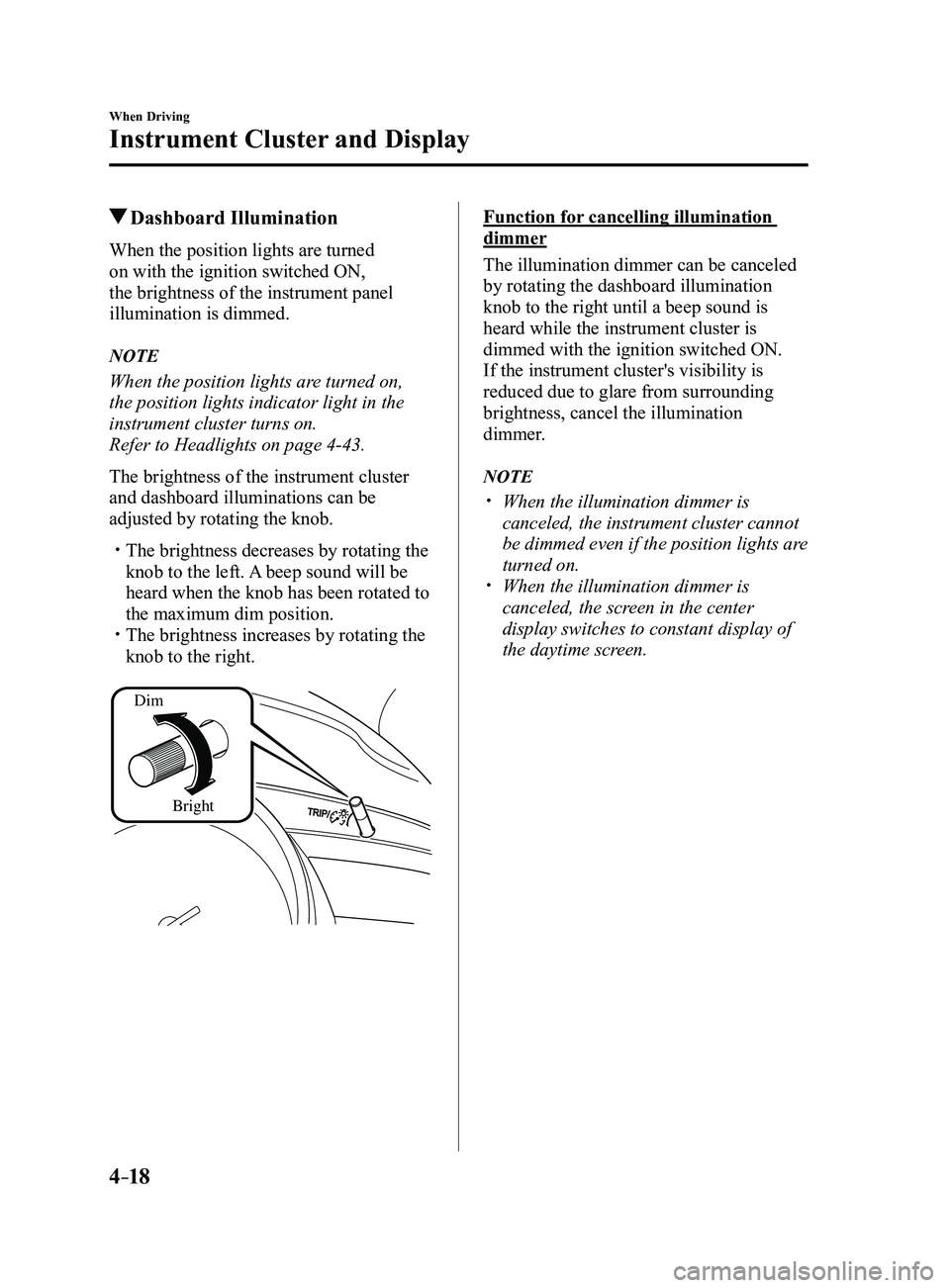
The brightness of the instrument cluster
and dashboard illuminations can be
adjusted by rotating the knob.
The brightness decreases by rotating the
knob to the left. A beep sound will be
heard when the knob has been rotated to
the maximum dim position.
The brightness increases by rotating the
knob to the right.
Dim
Bright
Function for cancelling illumination
dimmer
The illumination dimmer can be canceled
by rotating the dashboard illumination
knob to the right until a beep sound is
heard while the instrument cluster is
dimmed with the ignition switched ON.
If the instrument cluster's visibility is
reduced due to glare from surrounding
brightness, cancel the illumination
dimmer.
NOTE
When the illumination dimmer is
canceled, the instrument cluster cannot
be dimmed even if the position lights are
turned on.
When the illumination dimmer is
canceled, the screen in the center
display switches to constant display of
the daytime screen.
Mazda3_8FL6-EA-16F_Edition2.indb 182016/08/10 17:35:49
Page 149 of 612
4–19
When Driving
Instrument Cluster and Display
*Some models.
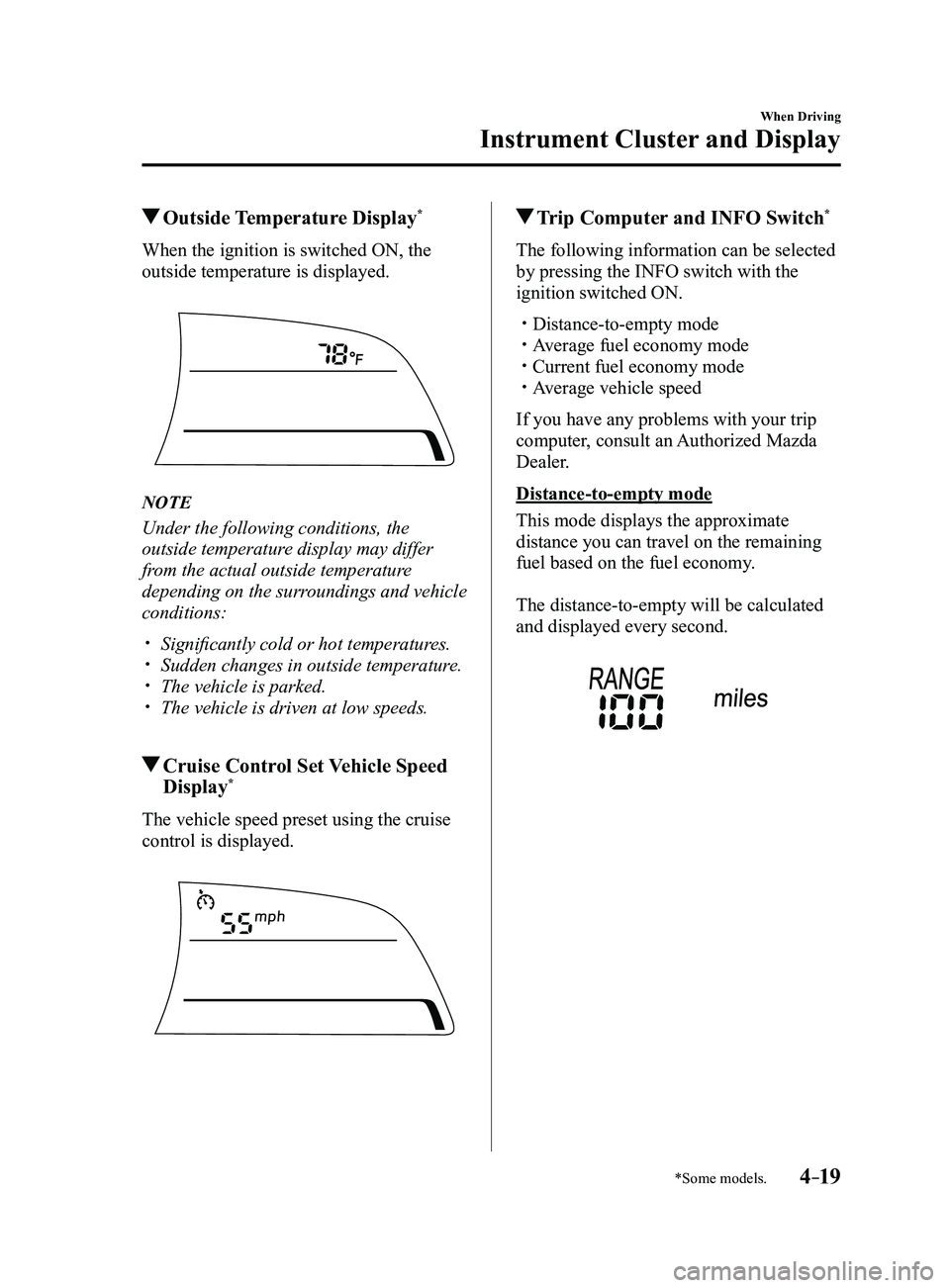
Outside Temperature Display*
When the ignition is switched ON, the
outside temperature is displayed.
NOTE
Under the following conditions, the
outside temperature display may differ
from the actual outside temperature
depending on the surroundings and vehicle
conditions:
Significantly cold or hot temperatures. Sudden changes in outside temperatur e. The vehicle is parked. The vehicle is driven at low speeds.
Cruise Control Set Vehicle Speed
Display*
The vehicle speed preset using the cruise
control is displayed.
Trip Computer and INFO Switch*
The following information can be selected
by pressing the INFO switch with the
ignition switched ON.
Distance-to-empty mode Average fuel economy mode Current fuel economy mode Average vehicle speed
If you have any problems with your trip
computer, consult an Authorized Mazda
Dealer.
Distance-to-empty mode
This mode displays the approximate
distance you can travel on the remaining
fuel based on the fuel economy.
The distance-to-empty will be calculated
and displayed every second.
Mazda3_8FL6-EA-16F_Edition2.indb 192016/08/10 17:35:50
Page 155 of 612
4–25
When Driving
Instrument Cluster and Display
*Some models.
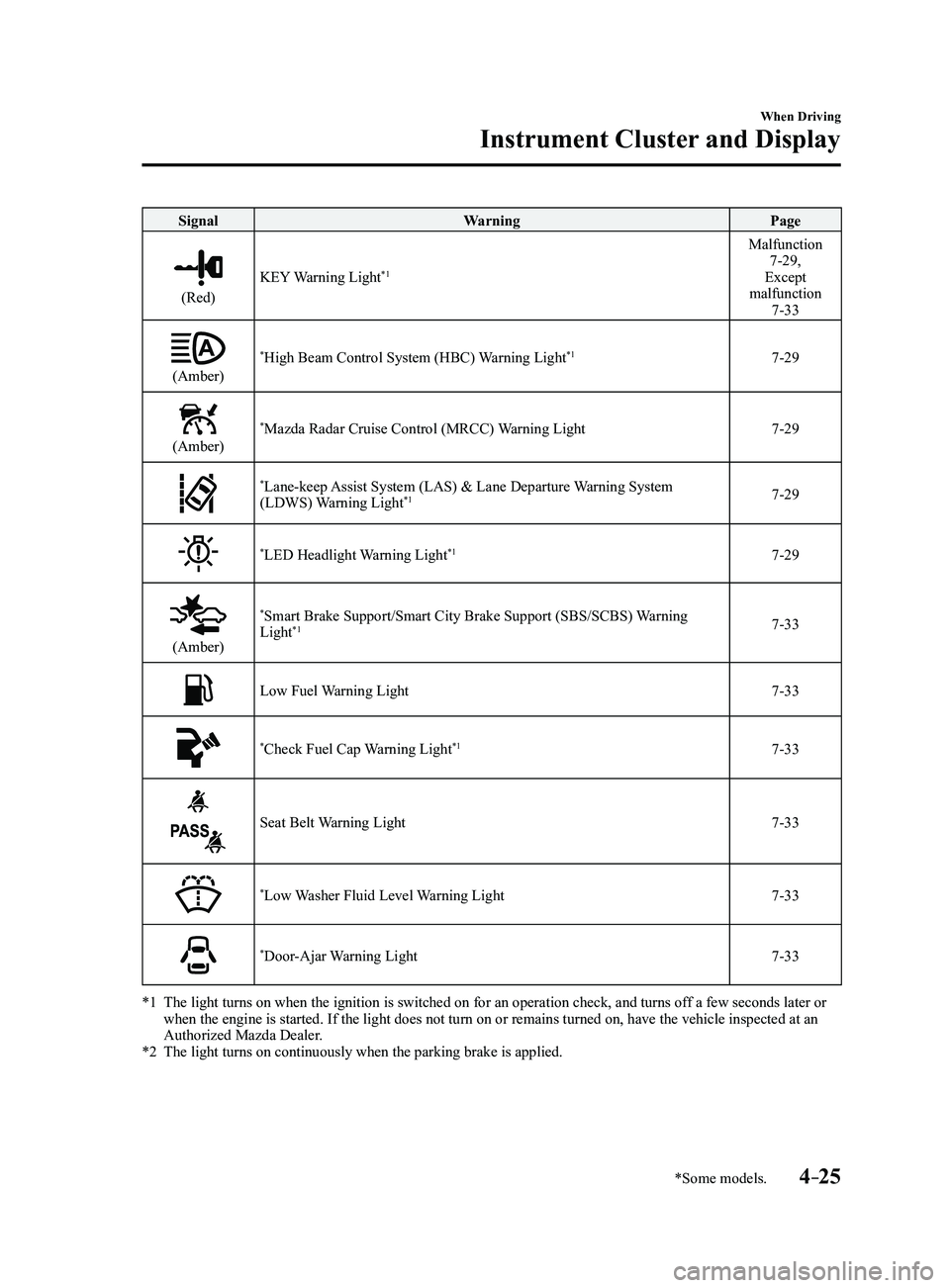
SignalWarning Page
(Red)
KEY Warning Light*1
Malfunction 7-29,
Except
malfunction
7-33
(Amber)
*High Beam Control System (HBC) Warning Light*17-29
(Amber)
*Mazda Radar Cruise Control (MRCC) Warning Light7-29
*Lane-keep Assist System (LAS) & Lane Departure Warning System
(LDWS) Warning Light*17-29
*LED Headlight Warning Light*17-29
(Amber)
*Smart Brake Support/Smart City Brake Support (SBS/SCBS) Warning
Light*17-33
Low Fuel Warning Light7-33
*Check Fuel Cap Warning Light*17-33
Seat Belt Warning Light7-33
*Low Washer Fluid Level Warning Light7-33
*Door-Ajar Warning Light7-33
*1 The light turns on when the ignition is switched on for an operation che\
ck, and turns of f a few seconds later or when the engine is started. If the light does not turn on or remains tur\
ned on, have the vehicle inspected at an
Authorized Mazda Dealer.
*2 The light turns on continuously when the parking brake is applied.
Mazda3_8FL6-EA-16F_Edition2.indb 252016/08/10 17:35:58
Page 157 of 612
4–27
When Driving
Instrument Cluster and Display
*Some models.
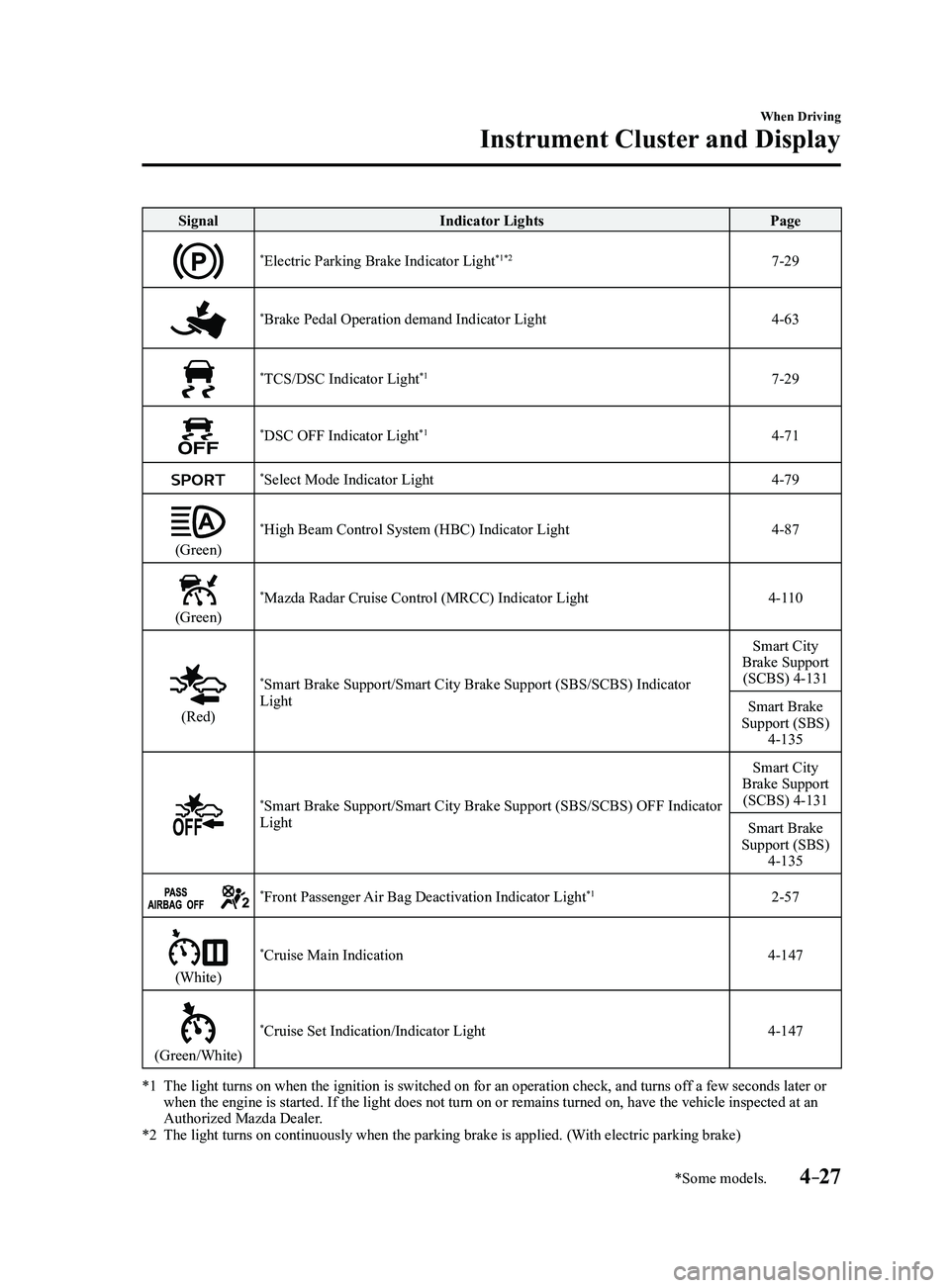
SignalIndicator Lights Page
*Electric Parking Brake Indicator Light*1*27-29
*Brake Pedal Operation demand Indicator Light4-63
*TCS/DSC Indicator Light*17-29
*DSC OFF Indicator Light*14-71
*Select Mode Indicator Light4-79
(Green)
*High Beam Control System (HBC) Indicator Light4-87
(Green)
*Mazda Radar Cruise Control (MRCC) Indicator Light4-110
(Red)
*Smart Brake Support/Smart City Brake Support (SBS/SCBS) Indicator
Light Smart City
Brake Support (SCBS) 4-131
Smart Brake
Support (SBS)
4-135
*Smart Brake Support/Smart City Brake Support (SBS/SCBS) OFF Indicator
Light Smart City
Brake Support (SCBS) 4-131
Smart Brake
Support (SBS)
4-135
*Front Passenger Air Bag Deactivation Indicator Light*12-57
(White)
*Cruise Main Indication4-147
(Green/White)
*Cruise Set Indication/Indicator Light4-147
*1 The light turns on when the ignition is switched on for an operation che\
ck, and turns of f a few seconds later or when the engine is started. If the light does not turn on or remains tur\
ned on, have the vehicle inspected at an
Authorized Mazda Dealer.
*2 The light turns on continuously when the parking brake is applied. (With electric parking brake)
Mazda3_8FL6-EA-16F_Edition2.indb 272016/08/10 17:36:04
Page 158 of 612
4–28
When Driving
Instrument Cluster and Display
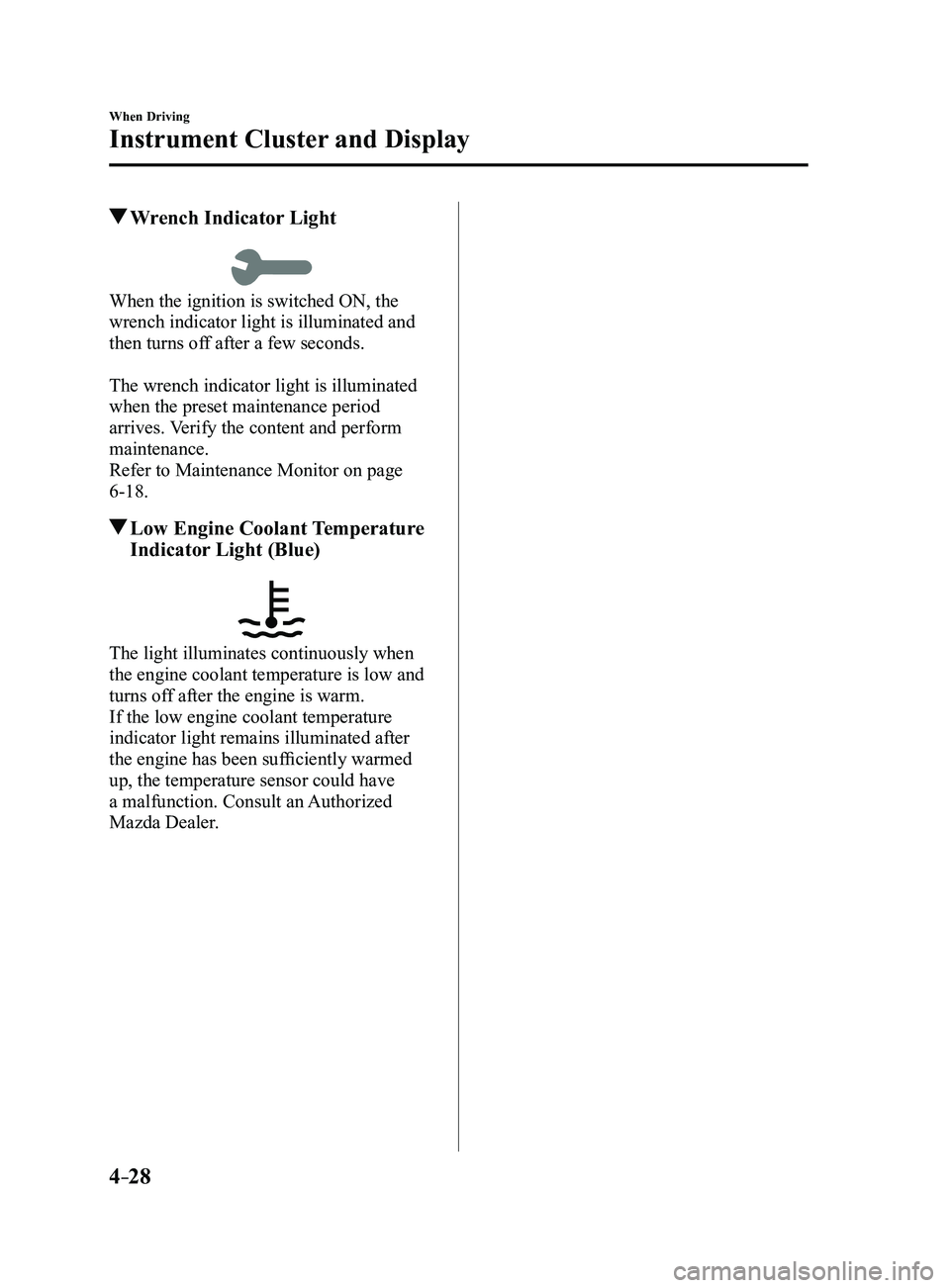
Wrench Indicator Light
When the ignition is switched ON, the
wrench indicator light is illuminated and
then turns off after a few seconds.
The wrench indicator light is illuminated
when the preset maintenance period
arrives. Verify the content and perform
maintenance.
Refer to Maintenance Monitor on page
6-18.
Low Engine Coolant Temperature
Indicator Light (Blue)
The light illuminates continuously when
the engine coolant temperature is low and
turns off after the engine is warm.
If the low engine coolant temperature
indicator light remains illuminated after
the engine has been sufficiently warmed
up, the temperature sensor could have
a malfunction. Consult an Authorized
Mazda Dealer.
Mazda3_8FL6-EA-16F_Edition2.indb 282016/08/10 17:36:05
Page 162 of 612
4–32
When Driving
Automatic Transaxle
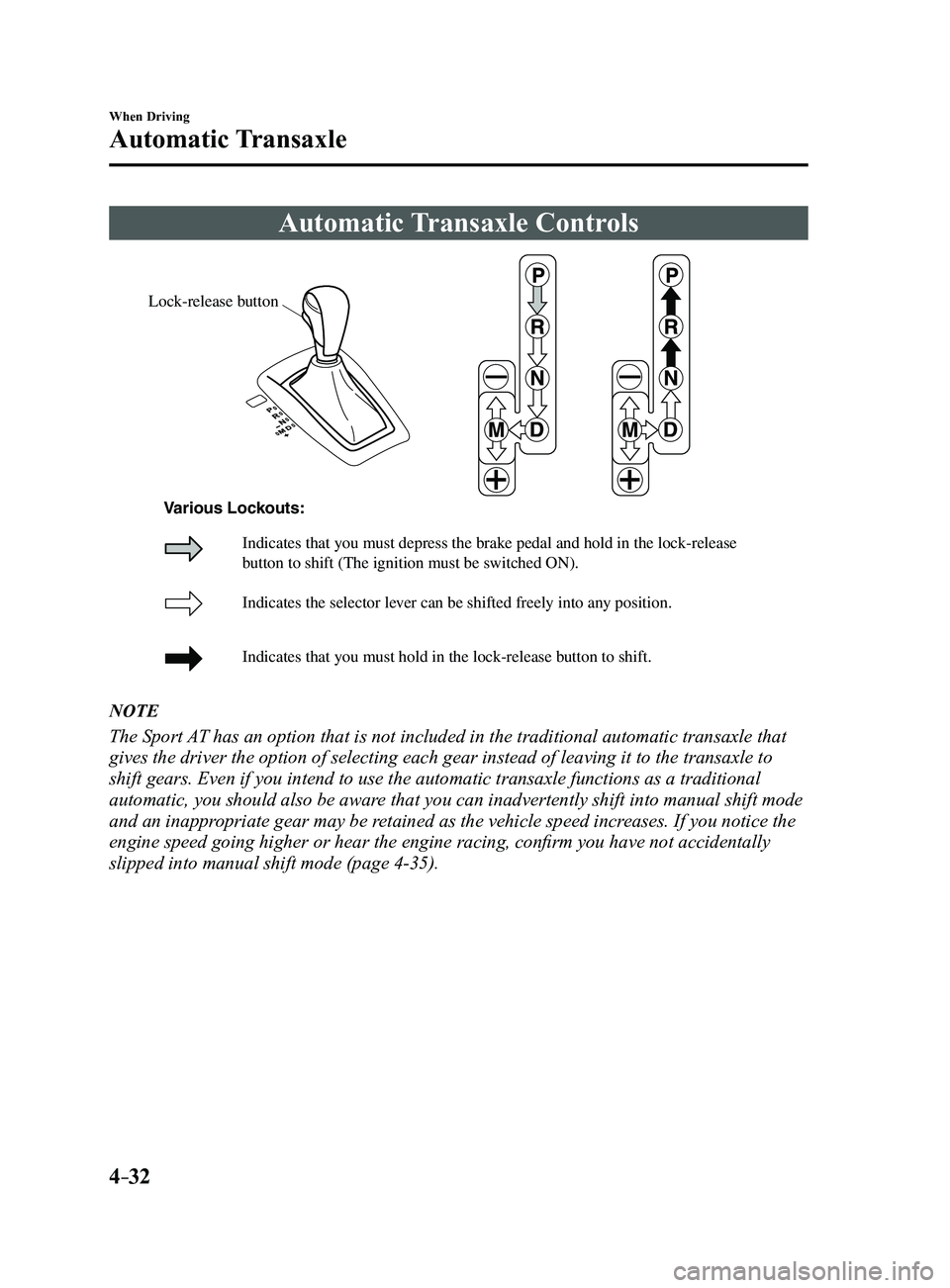
Automatic Transaxle Controls
Lock-release button
Indicates the selector lever can be shifted freely into any position.
Indicates that you must hold in the lock-release button to shift.
Indicates that you must depress the brake pedal and hold in the lock-rel\
ease
button to shift (The ignition must be switched ON).
Various Lockouts:
NOTE
The Sport AT has an option that is not included in the traditional automatic transax\
le that
gives the driver the option of selecting each gear instead of leaving it\
to the transaxle to
shift gears. Even if you intend to use the automatic transaxle functions\
as a traditional
automatic, you should also be aware that you can inadvertently shift into manual shift mode
and an inappropriate gear may be retained as the vehicle speed increases. If you notice the
engine speed going higher or hear the engine racing, confirm you have not accidentally
slipped into manual shift mode (page
4-35).
Mazda3_8FL6-EA-16F_Edition2.indb 322016/08/10 17:36:07
Page 163 of 612
4–33
When Driving
Automatic Transaxle
Shift-Lock System
The shift-lock system prevents shifting out
of P unless the brake pedal is depressed.
To shift from P:
1. Depress and hold the brake pedal.
2. Start the engine.
3. Press and hold the lock-release button.
4. Move the selector lever.
NOTE
When the ignition is switched to ACC or
the ignition is switched off, the selector
lever cannot be shifted from P.
The ignition cannot be switched to OFF
if the selector lever is not in P.
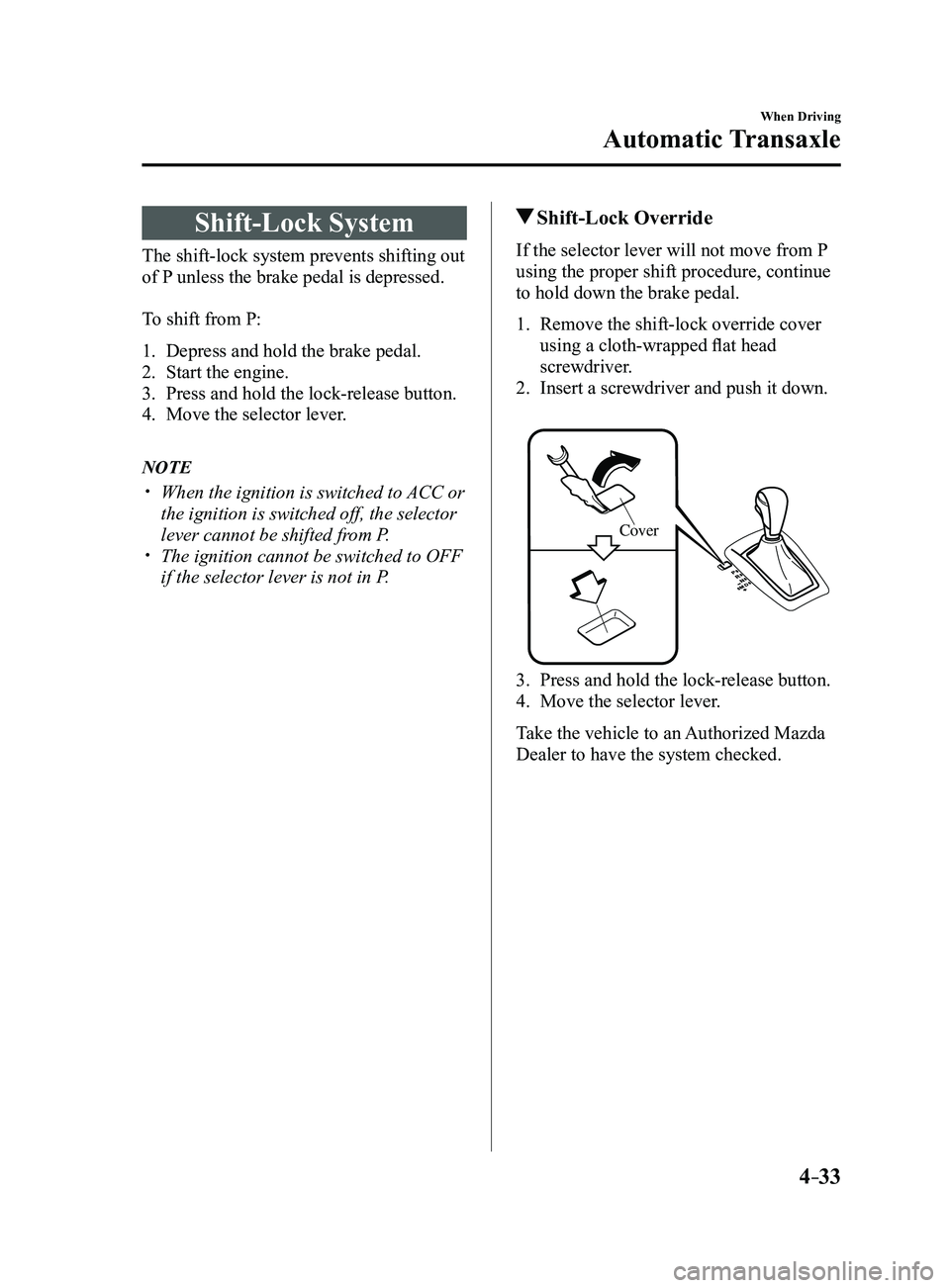
Shift-Lock Override
If the selector lever will not move from P
using the proper shift procedure, continue
to hold down the brake pedal.
1. Remove the shift-lock override cover
using a cloth-wrapped flat head
screwdriver.
2. Insert a screwdriver and push it down.
Cover
3. Press and hold the lock-release button.
4. Move the selector lever .
Take the vehicle to an Authorized Mazda
Dealer to have the system checked.
Mazda3_8FL6-EA-16F_Edition2.indb 332016/08/10 17:36:08
Page 165 of 612
4–35
When Driving
Automatic Transaxle
Shift Position Indication
The selector position is indicated when the
ignition is switched ON.
Gear position indication
In manual shift mode, the “M” of the shift
position indication illuminates and the
numeral for the selected gear is displayed.
Active Adaptive Shift (AAS)
Active Adaptive Shift (AAS)
automatically controls the transaxle shift
points to best suit the road conditions
and driver input. This improves driving
feel. The transaxle may switch to AAS
mode when driving up and down slopes,
cornering, driving at high elevations,
or depressing the accelerator pedal
quickly while the selector lever is in the
D position. Depending on the road and
driving conditions/vehicle operations, gear
shifting could be delayed or not occur,
however, this does not indicate a problem
because the AAS mode will maintain the
optimum gear position.
Manual Shift Mode
The manual shift mode gives you the feel
of driving a manual transaxle vehicle by
allowing you to operate the selector lever
manually. This allows you to control
engine rpm and torque to the drive wheels
much like a manual transaxle when more
control is desired.
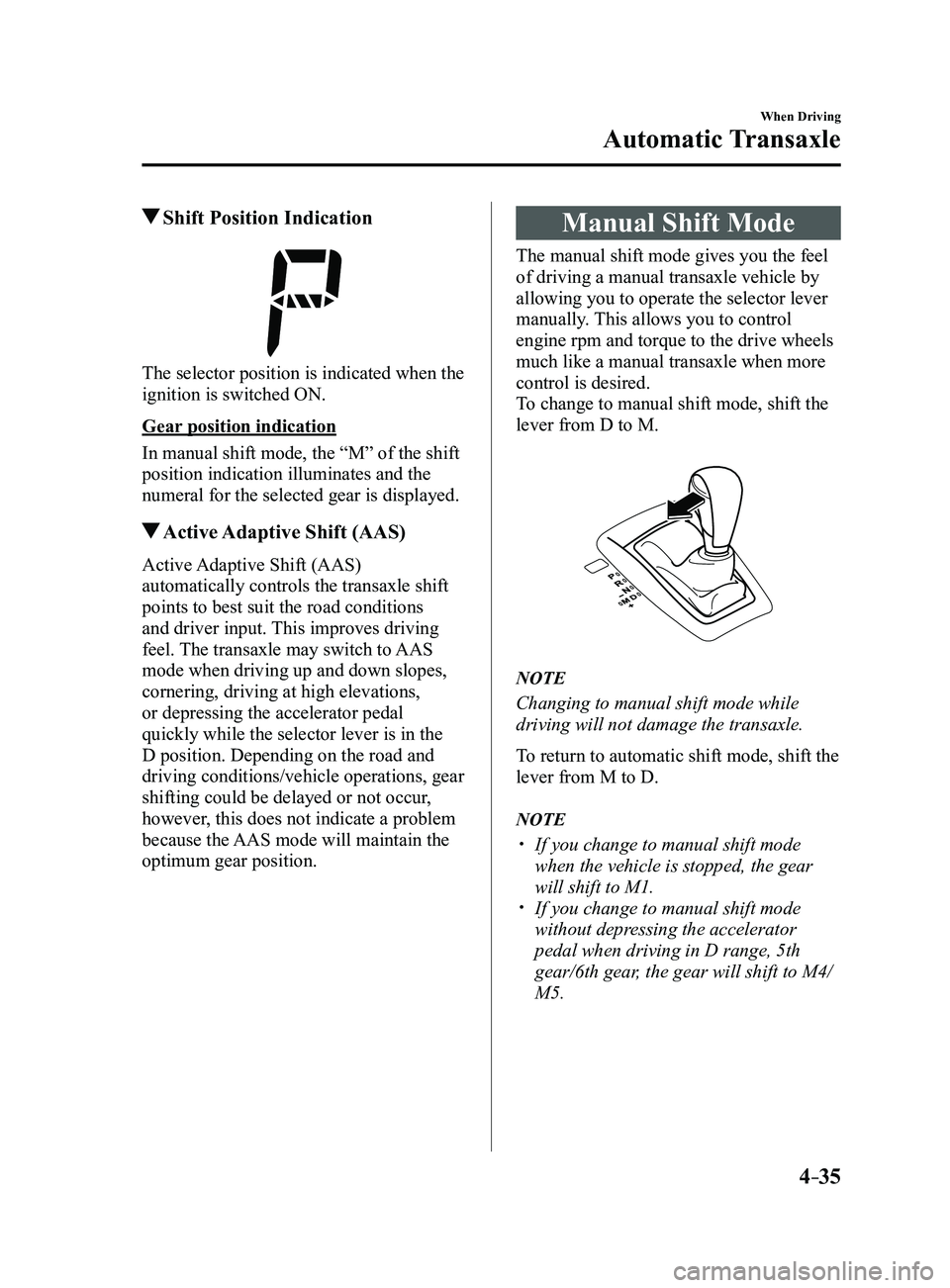
To change to manual shift mode, shift the
lever from D to M.
NOTE
Changing to manual shift mode while
driving will not damage the transaxle.
To return to automatic shift mode, shift the
lever from M to D.
NOTE
If you change to manual shift mode
when the vehicle is stopped, the gear
will shift to M1.
If you change to manual shift mode
without depressing the accelerator
pedal when driving in D range, 5th
gear/6th gear, the gear will shift to M4/
M5.
Mazda3_8FL6-EA-16F_Edition2.indb 352016/08/10 17:36:09