display MAZDA MODEL 3 5-DOOR 2017 Manual PDF
[x] Cancel search | Manufacturer: MAZDA, Model Year: 2017, Model line: MODEL 3 5-DOOR, Model: MAZDA MODEL 3 5-DOOR 2017Pages: 612
Page 292 of 612
4–162
When Driving
Rear View Monitor
Picture Quality Adjustment
WARNING
Always adjust the picture quality of the rear view monitor while the vehicle is stopped:
Do not adjust the picture quality of the rear view monitor while driving the vehicle.
Adjusting the picture quality of the rear view monitor such as brightness, contrast, color,
and tint while driving the vehicle is dangerous as it could distract your attention from the
vehicle operation which could lead to an accident.
Picture quality adjustment can be done while the shift lever is in reverse (R).
There are four settings which can be adjusted including, brightness, con\
trast, tint, and color.
When adjusting, pay sufficient attention to the vehicle surroundings.
1. Select the icon on the screen to display the tabs.
2. Select the desired tab item.
3. Adjust the brightness, contrast, tint, and color using the slider .
If you need to reset, press the reset button.
4. Select the icon on the screen to close the tab.
Mazda3_8FL6-EA-16F_Edition2.indb 1622016/08/10 17:37:09
Page 304 of 612
5–12
Interior Features
Climate Control System
Dual-Zone Automatic Climate Control
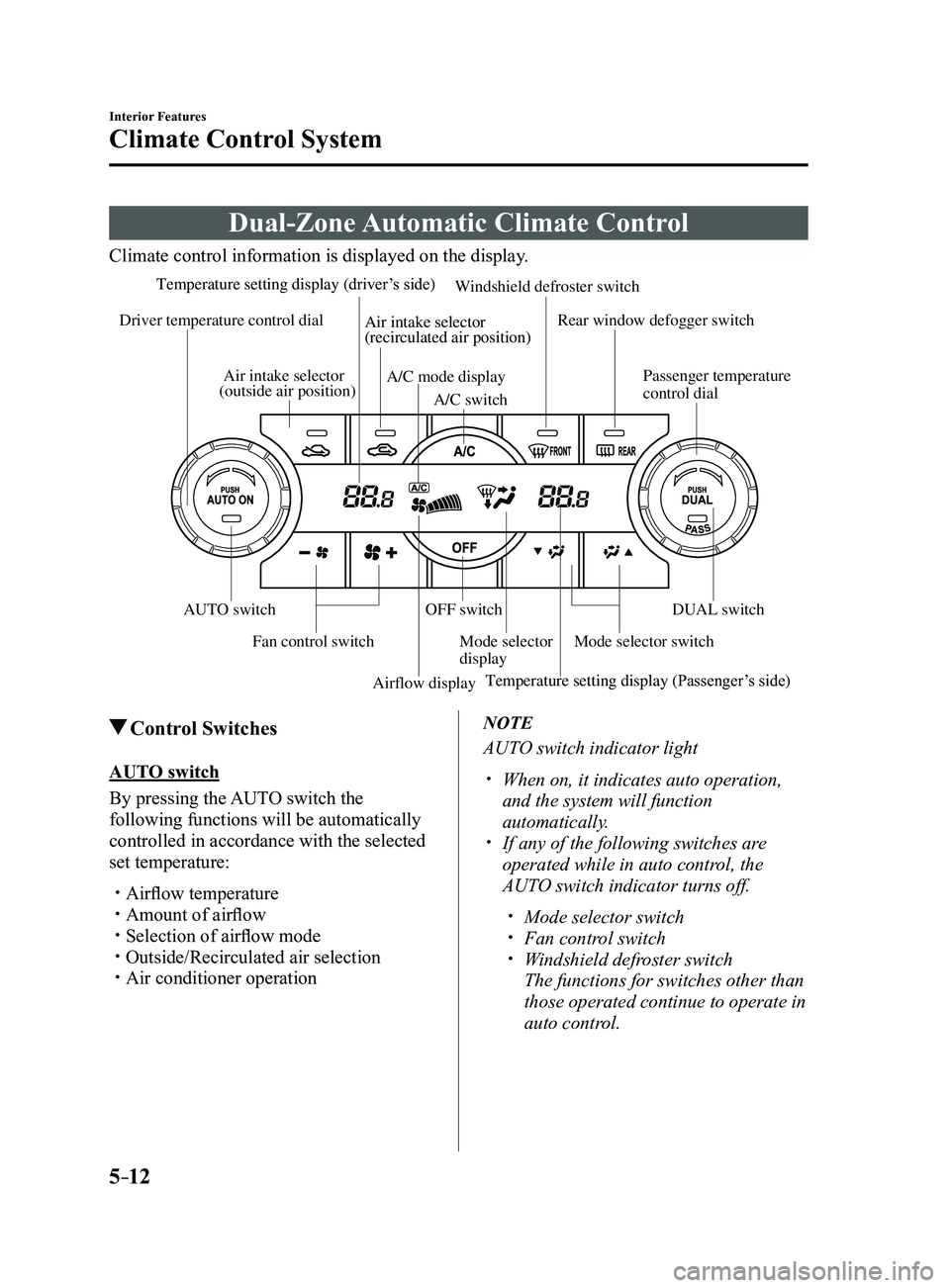
Climate control information is displayed on the display.
Airflow displayMode selector
display
A/C mode display
Air intake selector
(outside air position)
Driver temperature control dial
AUTO switch
Mode selector switch
Fan control switch OFF switch
Windshield defroster switch
Rear window defogger switch
Passenger temperature
control dial
DUAL switch
A/C switch
Temperature setting display (driver
’s side)
Temperature setting display (Passenger ’s side)
Air intake selector
(recirculated air position)
Control Switches
AUTO switch
By pressing the AUTO switch the
following functions will be automatically
controlled in accordance with the selected
set temperature:
Airflow temperature Amount of airflow Selection of airflow mode Outside/Recirculated air selection Air conditioner operation
NOTE
AUTO switch indicator light
When on, it indicates auto operation,
and the system will function
automatically.
If any of the following switches ar e
operated while in auto control, the
AUTO switch indicator turns off.
Mode selector switch Fan control switch Windshield defroster switch
The functions for switches other than
those operated continue to operate in
auto control.
Mazda3_8FL6-EA-16F_Edition2.indb 122016/08/10 17:37:17
Page 305 of 612
5–13
Interior Features
Climate Control System
OFF switch
Pressing the OFF switch shuts off the
climate control system.
Temperature control dial
This dial controls temperature. Turn it
clockwise for hot and counterclockwise
for cold.
When the DUAL switch is off:
Turn the driver temperature control dial
to control the temperature throughout
the entire cabin.
When the DUAL switch is on:
Turn the driver or front passenger
temperature control dial to
independently control the temperature
on each side of the cabin.
NOTE
The climate contr ol system changes to
the individual operation mode (DUAL
switch indicator light illuminated) by
turning the front passenger temperature
control dial even when the DUAL switch
is off, which allows individual control
of the set temperature for the driver and
front passenger.
The temperature units for the
temperature setting display can be
changed in conjunction with the
temperature units for the outside
temperature display. Refer to Outside
Temperature Display on page
4-19.
Fan control switch
The fan has seven speeds. The selected
speed will be displayed.
Mode selector switch
The desired airflow mode can be selected
(page
5-4).
NOTE
With the airflow mode set to the
position and the temperature control
dial set at a medium temperature,
heated air is directed to the feet and air
at a comparably lower temperature will
flow through the central, left and right
vents.
To set the air vent to , press the
windshield defroster switch. In the or position, the air
conditioner is automatically turned on
and the outside air position is
automatically selected to defrost the
windshield. In the
or position, the
outside air position cannot be changed
to the recirculated air position.
A/C switch
Pressing the A/C switch while the AUTO
switch is turned on will turn off the air-
conditioning (cooling/dehumidifying
functions).
The air-conditioning can be turned on and
off by pressing the A/C switch while the
fan control switch is on.
NOTE
The air-conditioning operates when the
A/C switch is pressed even if the fan is
off.
The air conditioner may not function
when the outside temperature
approaches 0 °C (32 °F).
Mazda3_8FL6-EA-16F_Edition2.indb 132016/08/10 17:37:17
Page 313 of 612
5–21
Interior Features
Audio System
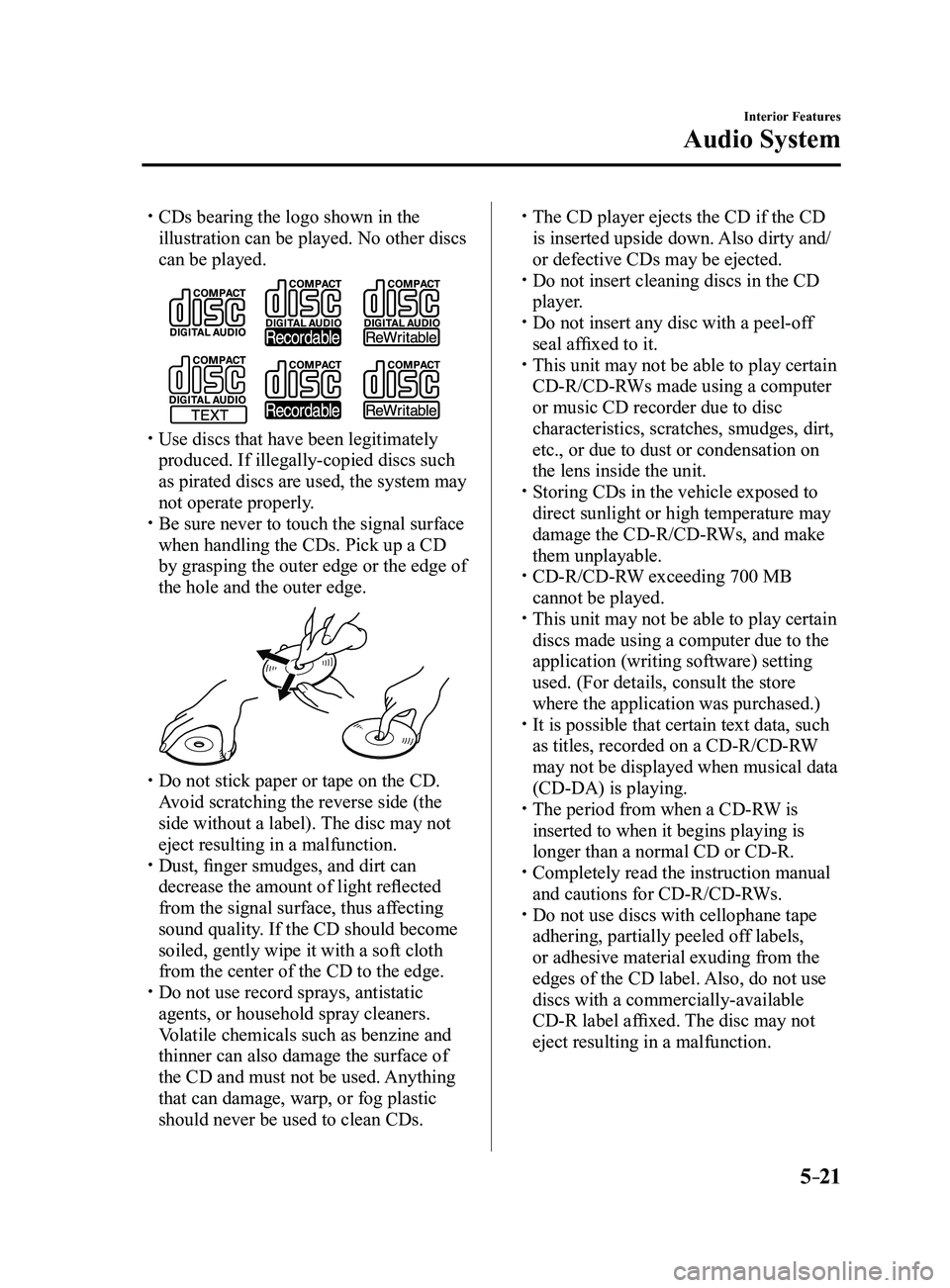
CDs bearing the logo shown in the
illustration can be played. No other discs
can be played.
Use discs that have been legitimately
produced. If illegally-copied discs such
as pirated discs are used, the system may
not operate properly.
Be sure never to touch the signal surface
when handling the CDs. Pick up a CD
by grasping the outer edge or the edge of
the hole and the outer edge.
Do not stick paper or tape on the CD.
Avoid scratching the reverse side (the
side without a label). The disc may not
eject resulting in a malfunction.
Dust, finger smudges, and dirt can
decrease the amount of light reflected
from the signal surface, thus affecting
sound quality. If the CD should become
soiled, gently wipe it with a soft cloth
from the center of the CD to the edge.
Do not use record sprays, antistatic
agents, or household spray cleaners.
Volatile chemicals such as benzine and
thinner can also damage the surface of
the CD and must not be used. Anything
that can damage, warp, or fog plastic
should never be used to clean CDs.
The CD player ejects the CD if the CD
is inserted upside down. Also dirty and/
or defective CDs may be ejected.
Do not insert cleaning discs in the CD
player. Do not insert any disc with a peel-off
seal affixed to it. This unit may not be able to play certain
CD-R/CD-RWs made using a computer
or music CD recorder due to disc
characteristics, scratches, smudges, dirt,
etc., or due to dust or condensation on
the lens inside the unit.
Storing CDs in the vehicle exposed to
direct sunlight or high temperature may
damage the CD-R/CD-RWs, and make
them unplayable.
CD-R/CD-RW exceeding 700 MB
cannot be played. This unit may not be able to play certain
discs made using a computer due to the
application (writing software) setting
used. (For details, consult the store
where the application was purchased.)
It is possible that certain text data, such
as titles, recorded on a CD-R/CD-RW
may not be displayed when musical data
(CD-DA) is playing.
The period from when a CD-R W is
inserted to when it begins playing is
longer than a normal CD or CD-R.
Completely read the instruction manual
and cautions for CD-R/CD-RWs. Do not use discs with cellophane tape
adhering, partially peeled off labels,
or adhesive material exuding from the
edges of the CD label. Also, do not use
discs with a commercially-available
CD-R label affixed. The disc may not
eject resulting in a malfunction.
Mazda3_8FL6-EA-16F_Edition2.indb 212016/08/10 17:37:23
Page 314 of 612
5–22
Interior Features
Audio System
Operating Tips for MP3
MP3 stands for MPEG Audio Layer 3,
which is standardized voice compression
established by the ISO
*1 working group
(MPEG).
Use of MP3 allows for audio data to be
compressed to approximately a tenth of
the source data size.
This unit plays files with the extension
(.mp3) as MP3 files.
*1 International Or ganization for
Standardization
CAUTION
Do not use an audio file extension on
files other than audio files. In addition,
do not change the audio file extension.
Otherwise, the unit will not recognize
the file correctly resulting in noise or a
malfunction.
NOTE
Supply of this product only conveys a
license for private, non-commercial
use and does not convey a license nor
imply any right to use this product in any
commercial (i.e. revenue-generating)
real time broadcasting (terrestrial,
satellite, cable and/or any other media),
broadcasting/streaming via the Internet,
intranets and/or other networks or in other
electronic content distribution systems,
such as pay-audio or audio-on-demand
applications. An independent license for
such use is required. For details, please
visit http://www.mp3licensing.com.
This audio system handles MP3 files
that have been recorded on CD-R/CD-
RW/CD-ROMs.
When naming an MP3 file, be sure to
add an MP3 file extension (.mp3) after
the file name.
The number of characters which can be
displayed is restricted.
Operating Tips for WMA
WMA is short for Windows Media*1 Audio
and is the audio compression format used
by Microsoft
*1.
Audio data can be created and stored at a
higher compression ratio than MP3.
This unit plays files with the extension
(.wma) as WMA files.
*1 Windows Media and Microsoft are
registered trademarks of Microsoft
Corporation U.S. in the United States
and other countries.
CAUTION
Do not use an audio file extension on
files other than audio files. In addition,
do not change the audio file extension.
Otherwise, the unit will not recognize
the file correctly resulting in noise or a
malfunction.
WMA files written under specifications
other than the indicated specification
may not play normally or files or folder
names may not display correctly.
The file extension may not be provided
depending on the computer operating
system, version, software, or settings. In
this case, add the file extension “.wma”
to the end of the file name, and then
write it to the disc/memory.
Mazda3_8FL6-EA-16F_Edition2.indb 222016/08/10 17:37:23
Page 315 of 612
5–23
Interior Features
Audio System
Operating Tips for AAC
AAC stands for Advanced Audio Coding,
which is standardized voice compression
established by the ISO
*1 working group
(MPEG). Audio data can be created and
stored at a higher compression ratio than
MP3.
This unit plays files with the extensions
(.aac/.m4a/.wav
*2) as the AAC files.
CAUTION
Do not use an audio file extension on
files other than audio files. In addition,
do not change the audio file extension.
Otherwise, the unit will not recognize
the file correctly resulting in noise or a
malfunction.
AAC files written under specifications
other than the indicated specification
may not play normally or files or folder
names may not display correctly.
The file extension may not be provided
depending on the computer operating
system, version, software, or settings. In
this case, add the file extension “.aac ”,
“.m4a”, or “.wav
*2” to the end of the file
name, and then write it to the memory.
*1 International Or ganization for
Standardization
*2 Type B
Operating Tips for OGG
OGG is the audio compression format for
Xiph. Org Foundation.
Audio data can be created and stored at a
higher compression ratio than MP3.
This unit plays files with the extension
(.ogg) as OGG files.
CAUTION
Do not use an audio file extension on
files other than audio files. In addition,
do not change the audio file extension.
Otherwise, the unit will not recognize
the file correctly resulting in noise or a
malfunction.
OGG files written under specifications
other than the indicated specification
may not play normally or files or folder
names may not display correctly.
The file extension may not be provided
depending on the computer operating
system, version, software, or settings. In
this case, add the file extension “.ogg” to
the end of the file name, and then write
it to the disc/memory.
Mazda3_8FL6-EA-16F_Edition2.indb 232016/08/10 17:37:24
Page 316 of 612
5–24
Interior Features
Audio System
Operating Tips for USB device
This unit plays audio files as follows:
ExtensionPlayback with this unit
.mp3 MP3
.wma WMA
.aac AAC
.m4a
.wav
*1WAV
.ogg*1OGG
CAUTION
Do not use an audio file extension on
files other than audio files. In addition,
do not change the audio file extension.
Otherwise, the unit will not recognize
the file correctly resulting in noise or a
malfunction.
NOTE
Playback may not be possible
depending on the type and condition of
the USB flash memory even if the audio
file complies with the standard.
A copyright protected WMA/AAC file
cannot be played in this unit. The order of the music data stored in
the device may differ from the playback
order.
To prevent loss or damage of stored
data, we recommend that you always
back up your data.
If a device exceeds the maximum
electric current value of 1,000 mA,
it may not operate or recharge when
connected.
Do not pull out the USB device while in
the USB mode (only pull it out while in
FM/AM radio or CD mode).
The device will not operate if the data is
password protected.
MP3/WMA/AAC/OGG
*1 files written
under specifications other than the
indicated specification may not play
normally or files/folder names may not
display correctly.
*1 Type B
Mazda3_8FL6-EA-16F_Edition2.indb 242016/08/10 17:37:24
Page 317 of 612
5–25
Interior Features
Audio System
Operating Tips for iPod
This unit supports playback of music files
recorded to an iPod.
* iPod is a trademark of Apple Inc.,
registered in the U.S. and other
countries.
The iPod may not be compatible
depending on the model or OS version. In
this case, an error message is displayed.
CAUTION
Remove the iPod when it is not in
use. Because the iPod is not designed
to withstand excessive changes in
temperature inside the cabin, it could be
damaged or the battery may deteriorate
due to the excessive temperature or
humidity inside the cabin if it is left in the
vehicle.
If data in the iPod is lost while it is
connected to the unit, Mazda cannot
guarantee recovery of any lost data.
If the iPod battery is deteriorated, the
iPod may not recharge and playback
may not be possible when it is connected
to the unit.
Be careful not to pinch the iPod
connecting cable when opening/closing
the center console.
For details on using the iPod, refer to the
iPod instruction manual. When connecting the iPod to a USB port,
all commands are made from the audio
unit. iPod control is not possible.
NOTE
The audio unit cannot display images or
videos stored in an iPod.
Mazda3_8FL6-EA-16F_Edition2.indb 252016/08/10 17:37:24
Page 320 of 612
5–28
Interior Features
Audio System
Power/Volume/Sound Controls
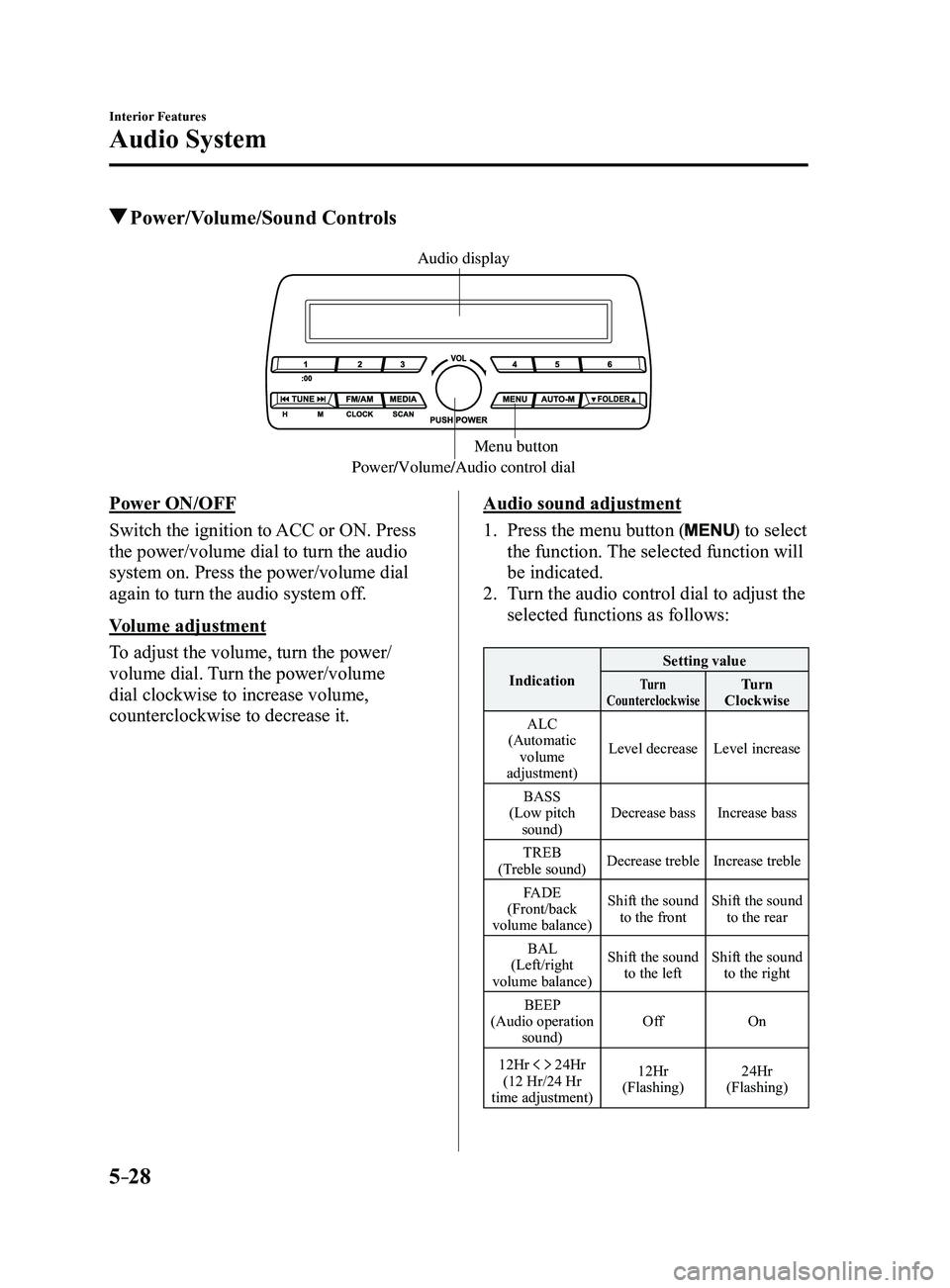
Power/Volume/Audio control dialMenu button
Audio display
Power ON/OFF
Switch the ignition to ACC or ON. Press
the power/volume dial to turn the audio
system on. Press the power/volume dial
again to turn the audio system off.
Volume adjustment
To adjust the volume, turn the power/
volume dial. Turn the power/volume
dial clockwise to increase volume,
counterclockwise to decrease it.Audio sound adjustment
1. Press the menu button () to select
the function. The selected function will
be indicated.
2. Turn the audio control dial to adjust the
selected functions as follows:
Indication Setting valueTurn
CounterclockwiseTurn
Clockwise
ALC
(Automatic volume
adjustment) Level decrease
Level increase
BASS
(Low pitch sound) Decrease bass
Increase bass
TREB
(Treble sound) Decrease treble
Increase treble
FADE
(Front/back
volume balance) Shift the sound
to the front Shift the sound
to the rear
BAL
(Left/right
volume balance) Shift the sound
to the left Shift the sound
to the right
BEEP
(Audio operation sound) Off
On
12Hr
24Hr
(12 Hr/24 Hr
time adjustment) 12Hr
(Flashing) 24Hr
(Flashing)
Mazda3_8FL6-EA-16F_Edition2.indb 282016/08/10 17:37:26
Page 321 of 612
5–29
Interior Features
Audio System
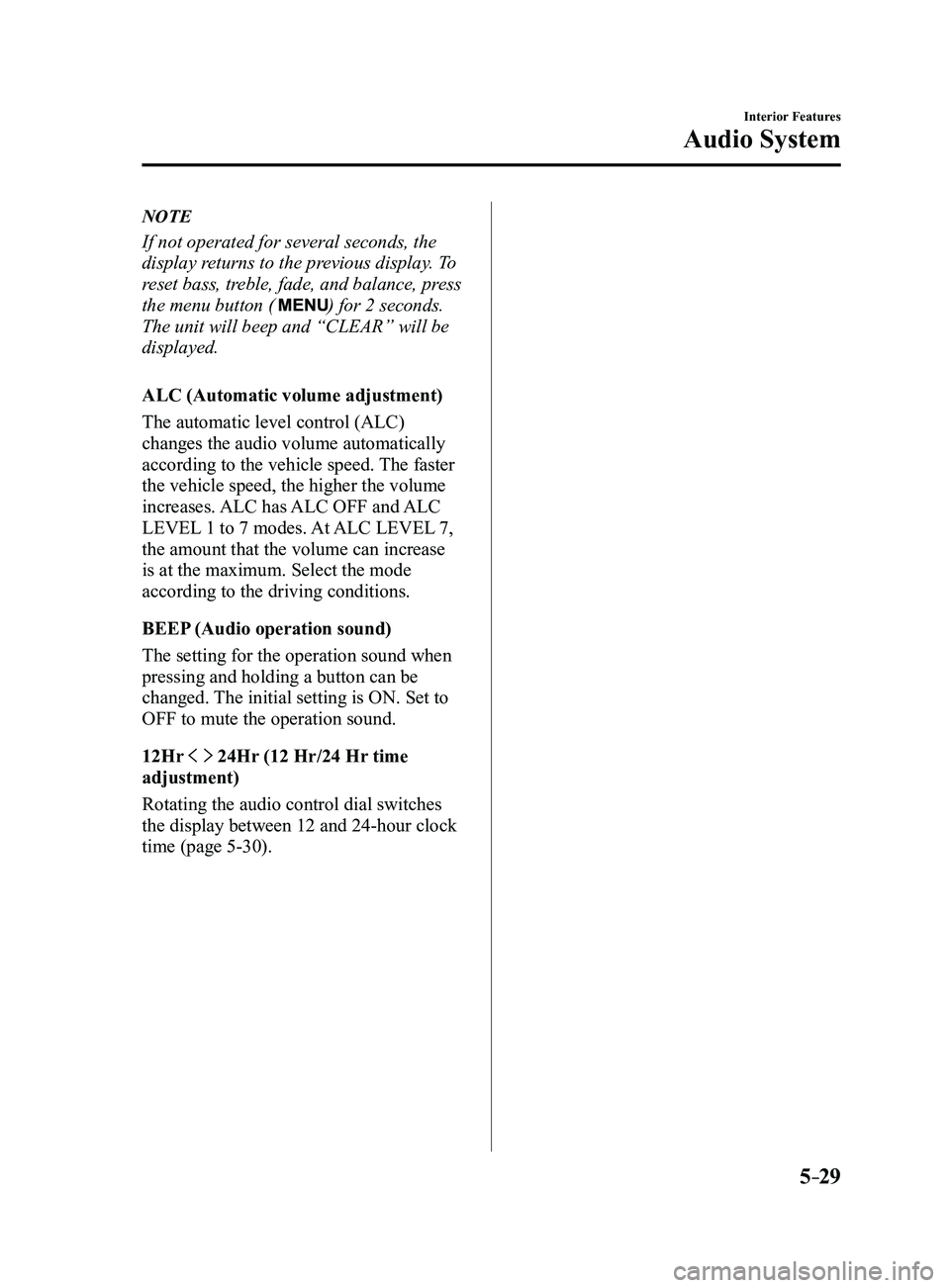
NOTE
If not operated for several seconds, the
display returns to the previous display. To
reset bass, treble, fade, and balance, press
the menu button (
) for 2 seconds.
The unit will beep and “CLEAR” will be
displayed.
ALC (Automatic volume adjustment)
The automatic level control (ALC)
changes the audio volume automatically
according to the vehicle speed. The faster
the vehicle speed, the higher the volume
increases. ALC has ALC OFF and ALC
LEVEL 1 to 7 modes. At ALC LEVEL 7,
the amount that the volume can increase
is at the maximum. Select the mode
according to the driving conditions.
BEEP (Audio operation sound)
The setting for the operation sound when
pressing and holding a button can be
changed. The initial setting is ON. Set to
OFF to mute the operation sound.
12Hr
24Hr (12 Hr/24 Hr time
adjustment)
Rotating the audio control dial switches
the display between 12 and 24-hour clock
time (page
5-30).
Mazda3_8FL6-EA-16F_Edition2.indb 292016/08/10 17:37:26