display MAZDA MODEL 3 5-DOOR 2017 Owner's Guide
[x] Cancel search | Manufacturer: MAZDA, Model Year: 2017, Model line: MODEL 3 5-DOOR, Model: MAZDA MODEL 3 5-DOOR 2017Pages: 612
Page 224 of 612
4–94
When Driving
i-ACTIVSENSE
*Some models.
Traffic Sign Recognition System (TSR)*
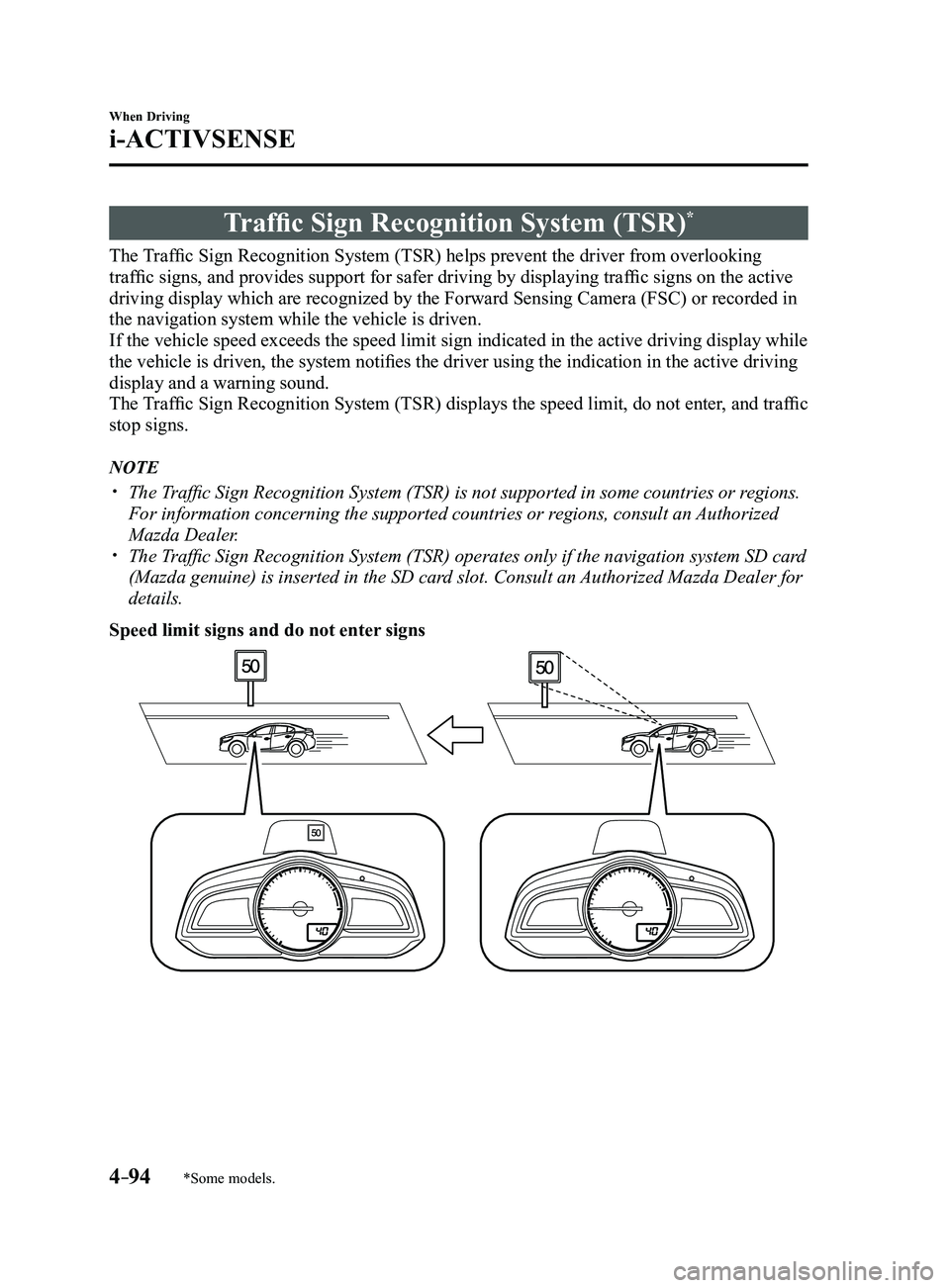
The Traffic Sign Recognition System (TSR) helps prevent the driver from overlooking
traffic signs, and provides support for safer driving by displaying traffic signs on the active
driving display which are recognized by the Forward Sensing Camera (FSC\
) or recorded in
the navigation system while the vehicle is driven.
If the vehicle speed exceeds the speed limit sign indicated in the activ\
e driving display while
the vehicle is driven, the system notifies the driver using the indication in the active driving
display and a warning sound.
The Traffic Sign Recognition System (TSR) displays the speed limit, do not enter, and traffic
stop signs.
NOTE
The Traffic Sign Recognition System (TSR) is not supported in some countries or regions.
For information concerning the supported countries or regions, consult an Authorized
Mazda Dealer.
The Traffic Sign Recognition System (TSR) operates only if the navigation system SD card
(Mazda genuine) is inserted in the SD card slot. Consult an Authorized Mazda Dealer for
details.
Speed limit signs and do not enter signs
Mazda3_8FL6-EA-16F_Edition2.indb 942016/08/10 17:36:40
Page 225 of 612
4–95
When Driving
i-ACTIVSENSE
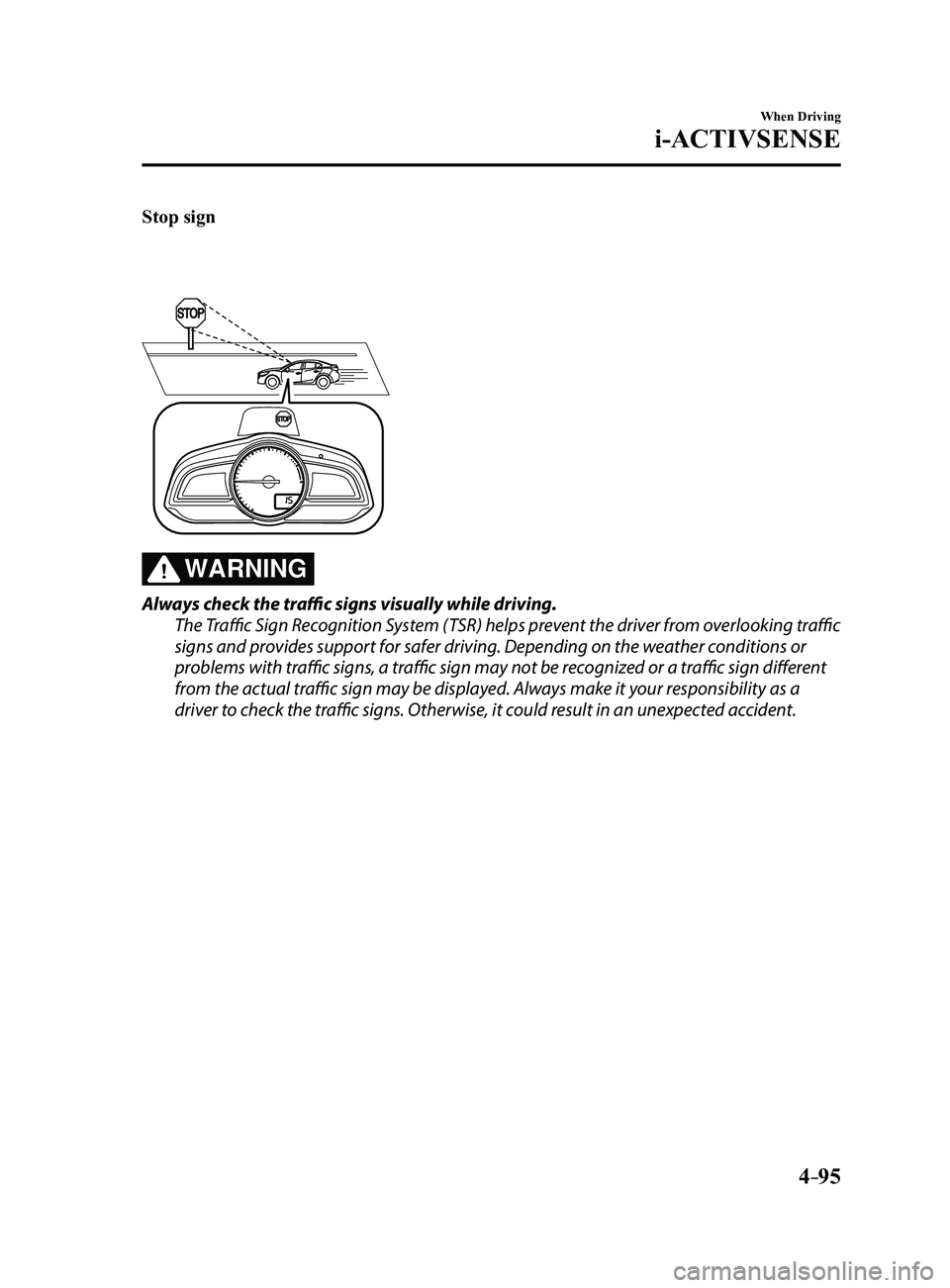
Stop sign
WARNING
Always check the traffic signs visually while driving.
The Traffic Sign Recognition System (TSR) helps prevent the driver from overlooking traffic
signs and provides support for safer driving. Depending on the weather conditions or
problems with traffic signs, a traffic sign may not be recognized or a traffic sign different
from the actual traffic sign may be displayed. Always make it your responsibility as a
driver to check the traffic signs. Otherwise, it could result in an unexpected accident.
Mazda3_8FL6-EA-16F_Edition2.indb 952016/08/10 17:36:41
Page 226 of 612
4–96
When Driving
i-ACTIVSENSE
NOTE
The Traffic Sign Recognition System (TSR) does not operate if there is a malfunction in
the Forward Sensing Camera (FSC). Under the following conditions, the Traffic Sign Recognition System (TSR) may not
operate normally.
An object placed on the dashboard is reflected in the windshield and picked up by the
camera. Heavy luggage is loaded in the luggage compartment or on the r ear seat and the
vehicle is tilted. The tire pressures are not adjusted to the specified pressure. Tires other than standard tires are equipped. The vehicle is driven on the ramp and surrounding area to or from a rest area or a
tollgate on a highway. When surrounding brightness suddenly changes such as when entering or exiting a
tunnel. The illumination of the headlights is weakened because of dirt or the op\
tical axis is
deviated. The windshield is dirty or foggy. The windshield and camera are fogged (water droplets). Strong light is directed at the front of the vehicle (such as backlight or high-beam
headlights of on-coming vehicles). The vehicle is making a sharp turn. Strong light reflects off the road. A traffic sign is in a position which makes it difficult to reflect the light from the
vehicle's headlights, such as when the vehicle is driven at night or in \
a tunnel. The vehicle is driven under weather conditions such as rain, fog, or sno\
w . The stored map data for the navigation system is not current. The camera cannot capture a traffic sign's image. A traffic sign is obscured by mud or snow. A traffic sign is concealed by trees or a vehicle. A traffic sign is partially shaded. A traffic sign is bent or warped. A traffic sign is too low or too high. A traffic sign is too bright or too dark (including electronic traffic signs). A traffic sign is too big or too small. There is an object similar to the traffic sign being read (such as another traffic sign or
other signs resembling it).
The Traffic Sign Recognition System (TSR) does not operate if the active driving display
is set to non-display. The Traffic Sign Recognition System (TSR) can be set to inoperable.
Refer to Personalization Featur es on page 9-12.
Mazda3_8FL6-EA-16F_Edition2.indb 962016/08/10 17:36:41
Page 227 of 612
4–97
When Driving
i-ACTIVSENSE
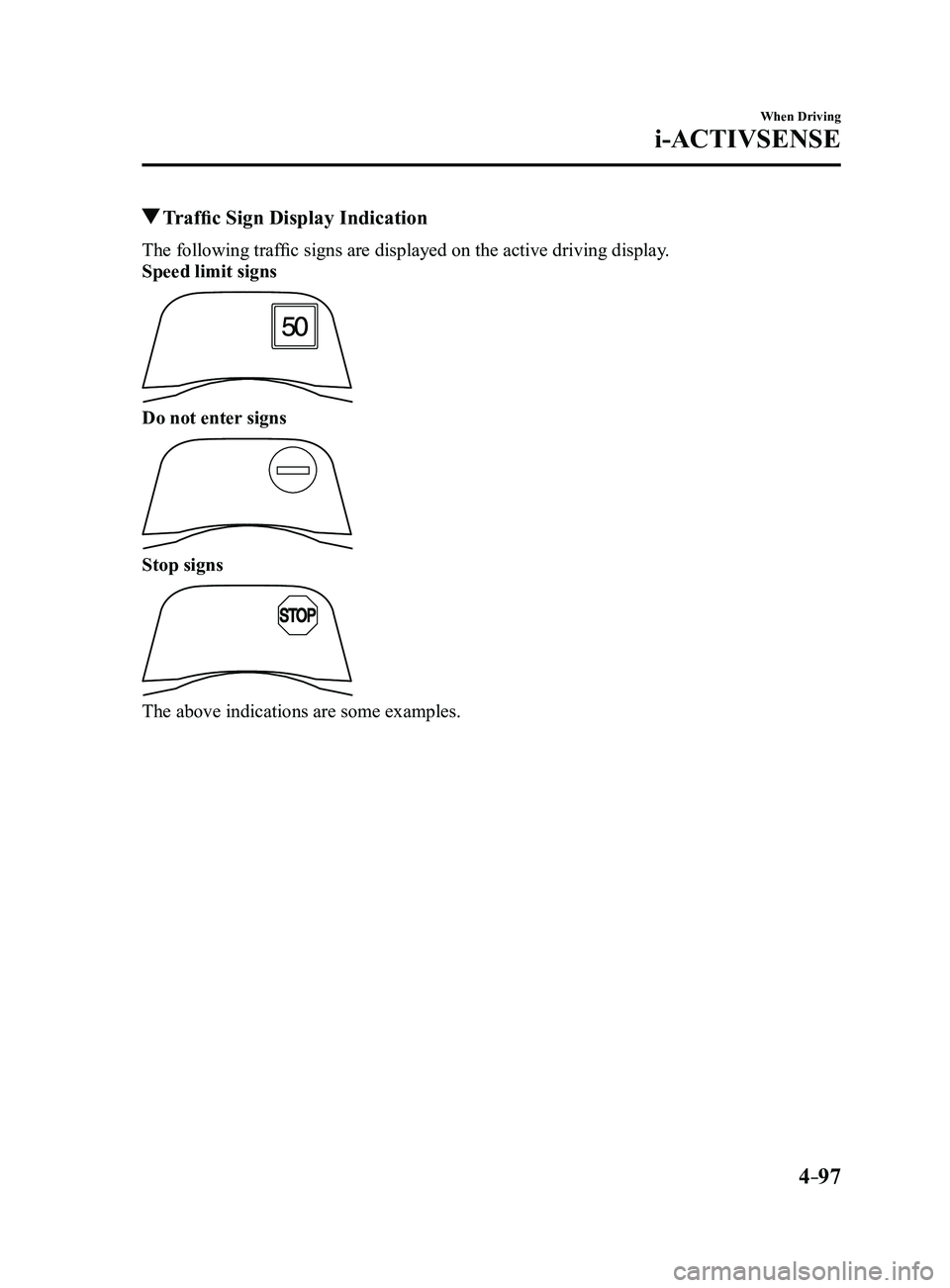
Traffic Sign Display Indication
The following traffic signs are displayed on the active driving display.
Speed limit signs
Do not enter signs
Stop signs
The above indications are some examples.
Mazda3_8FL6-EA-16F_Edition2.indb 972016/08/10 17:36:42
Page 228 of 612
4–98
When Driving
i-ACTIVSENSE
NOTE
Speed limit signs
When the vehicle speed is about 1 km/h (0.6 mph) or faster, the speed limit sign is
displayed when any one of the following conditions are met.
The Forward Sensing Camera (FSC) recognizes a speed limit sign as a sign targeted
for your vehicle and the vehicle passes it. The speed limit sign stor ed in the navigation system is read (if the Forward Sensing
Camera (FSC) does not recognize a speed limit sign).
In the following cases, display of the speed limit sign stops.
The Forward Sensing Camera (FSC) recognizes the speed limit sign and the vehicle is
driven for a certain distance after passing the sign. Each sensor determines that the vehicle has changed dir ection of travel. The Forward Sensing Camera (FSC) recognizes a new speed limit sign which differs
from the previous one (displays the new speed limit sign). The speed limit sign stor ed in the navigation system is not read within a certain period
of time (if the Forward Sensing Camera (FSC) does not recognize a speed limit sign,
the speed limit sign stored in the navigation system is displayed).
The vehicle speed exceeds the displayed speed limit sign by 30 km/h (19\
mph) or mor e
after a certain period of time has elapsed since the speed limit sign wa\
s displayed.
(Except when there is information for the speed limit sign in the navigation system)
Do not enter signs
A do not enter sign is displayed when all of the following conditions are met.
The vehicle speed is about 60 km/h (37 mph) or slower . The Forward Sensing Camera (FSC) recognizes a do not enter sign as a sign targeted
for your vehicle and the vehicle passes it.
In the following case, the display of the do not enter sign stops.
The Forward Sensing Camera (FSC) recognizes the do not enter sign and a certain
period of time has elapsed since the vehicle passed the sign.
Mazda3_8FL6-EA-16F_Edition2.indb 982016/08/10 17:36:42
Page 229 of 612
4–99
When Driving
i-ACTIVSENSE
Stop sign
A stop sign is displayed when all of the following conditions are met:
The vehicle speed is about 30 km/h (19 mph) or slower. The Forward Sensing Camera (FSC) recognizes a stop sign as a sign targeted for your
vehicle.
In the following cases, display of the stop sign stops.
A certain period of time has elapsed since the stop sign was displayed.
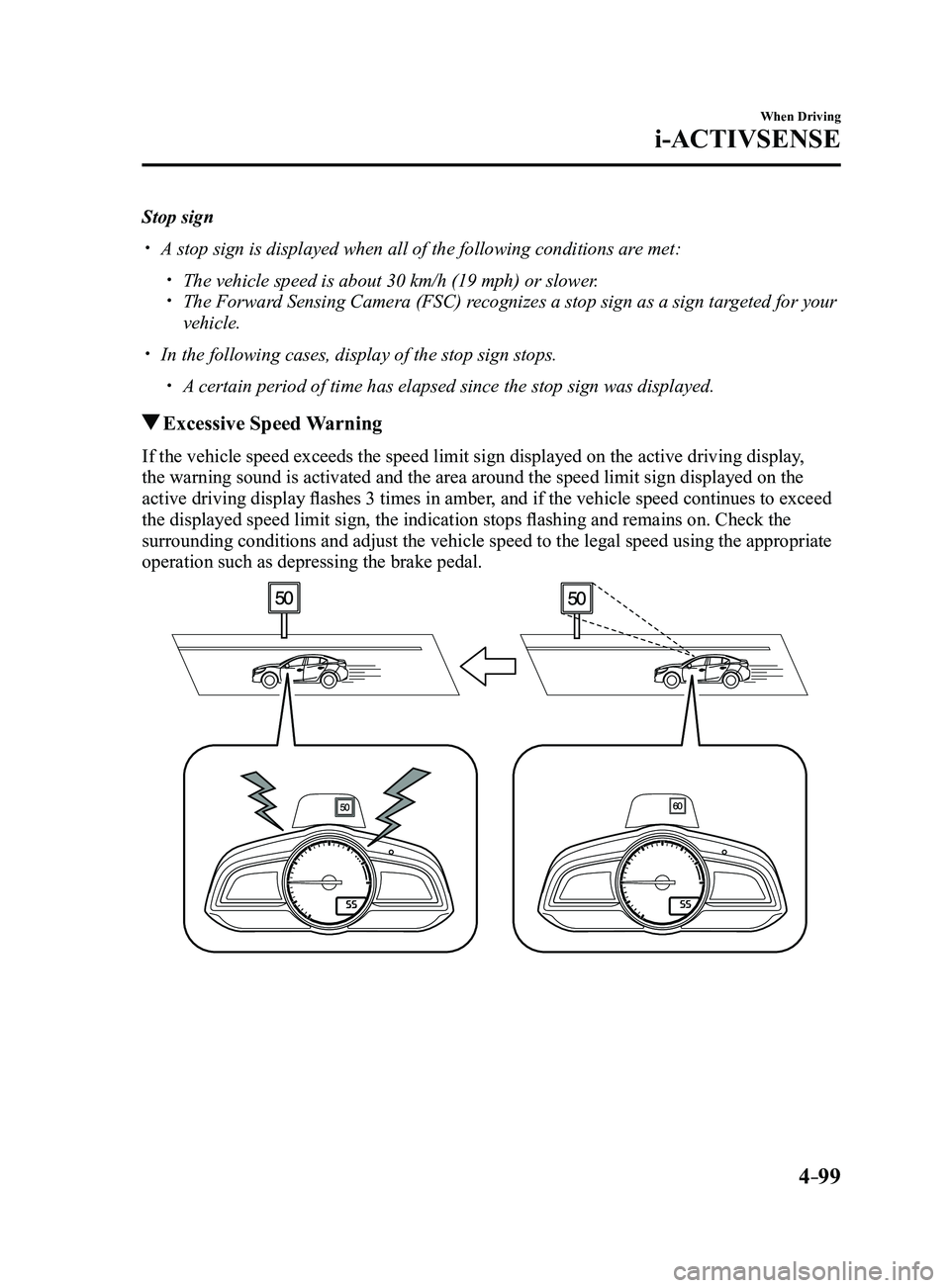
Excessive Speed Warning
If the vehicle speed exceeds the speed limit sign displayed on the activ\
e driving display,
the warning sound is activated and the area around the speed limit sign \
displayed on the
active driving display flashes 3 times in amber, and if the vehicle speed continues to exceed
the displayed speed limit sign, the indication stops flashing and remains on. Check the
surrounding conditions and adjust the vehicle speed to the legal speed u\
sing the appropriate
operation such as depressing the brake pedal.
Mazda3_8FL6-EA-16F_Edition2.indb 992016/08/10 17:36:42
Page 230 of 612

4–10 0
When Driving
i-ACTIVSENSE
NOTE
The excessive speed warning is initially set to inoperable. If you want \
to activate the
excessive speed warning, change the setting in the personalization featu\
res.
Off: The excessive speed warning is not activated. Warning display only: The area around the speed limit sign flashes 3 times in amber,
and if the vehicle speed continues to exceed the displayed speed limit s\
ign, the
indication stops flashing and remains on.
Warning display warning sound: The area around the speed limit sign flashes 3
times in amber, and if the vehicle speed continues to exceed the displayed speed limit\
sign, the indication stops flashing and remains on and the warning sound is activated.
In the following cases, the excessive speed warning stops operating.
The vehicle speed is less than the speed of the displayed speed limit si\
gn. (If the
activation timing for the excessive speed warning is changed in the pers\
onalization
features, the excessive speed warning stops operating when the vehicle speed i\
s less
than the changed vehicle speed.
A speed limit sign indication has been updated and the conditions for act\
ivating the
excessive speed warning are not met. Display of the speed limit sign stops.
The warning indication is displayed at the same time the excessive speed\
warning sound
is activated if the vehicle speed exceeds the speed indicated on the spe\
ed limit sign.
Refer to W arning Sound is Activated on page 7-39. If the Forwar d Sensing Camera (FSC) displays a speed limit sign which was recognized
incorrectly, the excessive speed alarm is activated even if the vehicle is driven a\
t the legal
speed.
The following settings can be changed for the excessive speed warning.
Warning sound and indication pattern Timing at which the warning is activated
Refer to Personalization Featur es on page 9-12.
Mazda3_8FL6-EA-16F_Edition2.indb 1002016/08/10 17:36:43
Page 231 of 612
4–101
When Driving
i-ACTIVSENSE
*Some models.
Distance Recognition Support System (DRSS)*
The Distance Recognition Support System (DRSS) measures the distance between your
vehicle and a vehicle ahead using a radar sensor (front) while the veh\
icle speed is about 30
km/h (19 mph) or faster, and if your vehicle approaches a vehicle ahead more closely than
what is appropriate for maintaining distance between the vehicles accord\
ing to the vehicle
speed, a notification in the active driving display is indicated to advise you to keep a safe
distance from the vehicle ahead.
WARNING
Do not rely completely on the Distance Recognition Support System (DRSS) and always
drive carefully:The Distance Recognition Support System (DRSS) provides advice for safer driving and
notifies the driver of a recommended, safer distance to maintain with a vehicle ahead.
The ability to detect a vehicle ahead is limited depending on the type of vehicle ahead,
the weather conditions, and the traffic conditions. Therefore, if the accelerator and brake
pedals are not operated correctly it could lead to an accident. Always verify the safety of
the surrounding area and depress the brake pedal or accelerator pedal while keeping a
safer distance from vehicles ahead or on-coming vehicles.
NOTE
The Distance Recognition Support System (DRSS) operates when all of th\
e following
conditions are met:
The ignition is switched ON. The Distance Recognition Support System (DRSS) is on. The selector lever is in a position other than r everse (R). The vehicle speed is 30 km/h or faster (19 mph or faster).
The objects which activate the system are 4-wheeled vehicles. The Distance Recognition Support System (DRSS) may also operate in the\
pr esence of
motorcycles and bicycles. The Distance Recognition Support System (DRSS) system may not operate \
normally
under the following conditions:
The Dynamic Stability Control (DSC) has a malfunction. The vehicle ahead is traveling at an extr emely slow speed.
The system does not operate with the following objects:
Vehicles approaching in the opposite direction. Stationary objects (stopped vehicles, obstructions)
Mazda3_8FL6-EA-16F_Edition2.indb 1012016/08/10 17:36:43
Page 232 of 612
4–102
When Driving
i-ACTIVSENSE
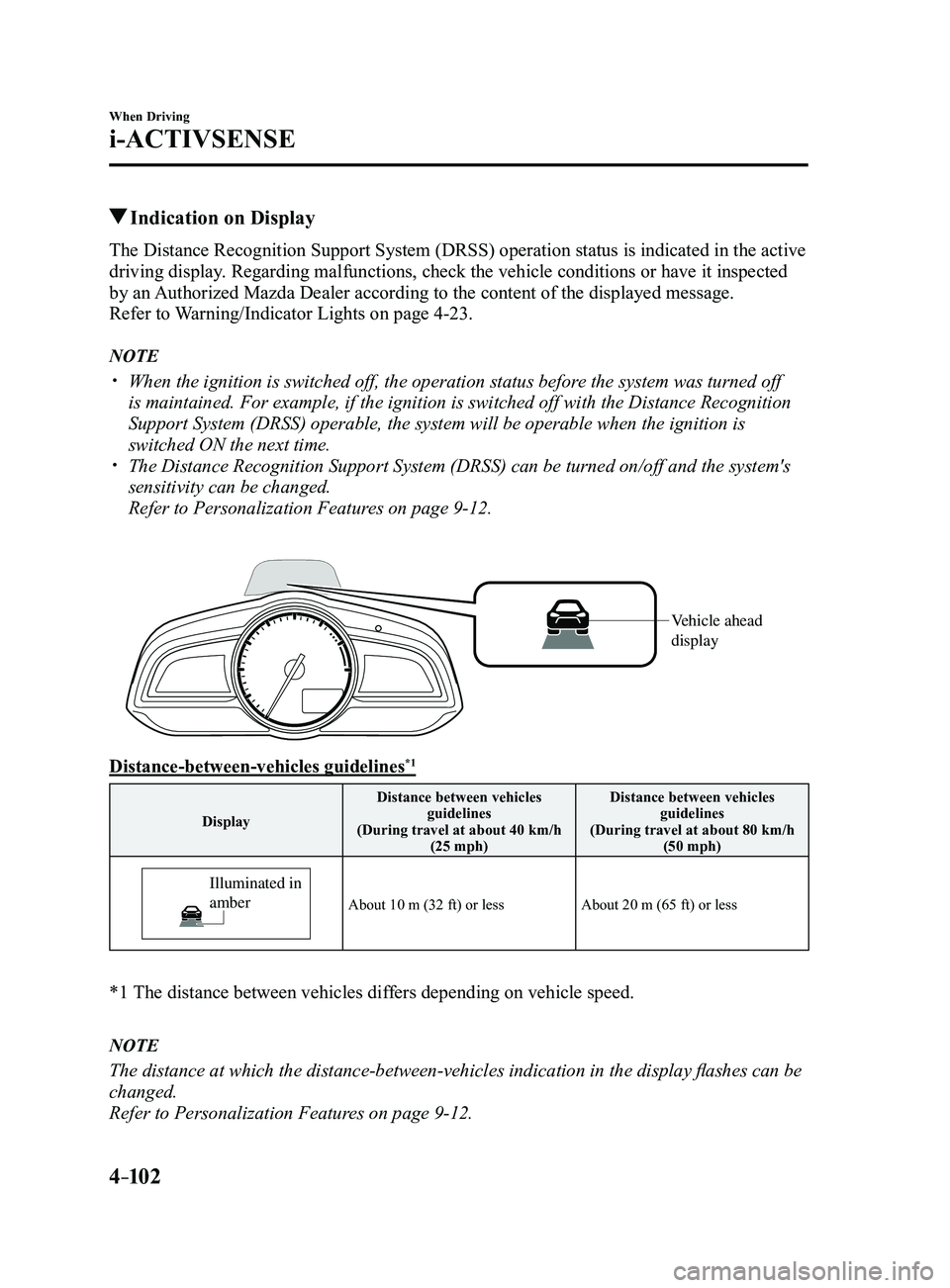
Indication on Display
The Distance Recognition Support System (DRSS) operation status is indicated in the active
driving display. Regarding malfunctions, check the vehicle conditions or have it inspected
by an Authorized Mazda Dealer according to the content of the displayed messag\
e.
Refer to Warning/Indicator Lights on page
4-23.
NOTE
When the ignition is switched off, the operation status before the system was turned off
is maintained. For example, if the ignition is switched off with the Dis\
tance Recognition
Support System (DRSS) operable, the system will be operable when the i\
gnition is
switched ON the next time.
The Distance Recognition Support System (DRSS) can be turned on/off an\
d the system's
sensitivity can be changed.
Refer to Personalization Features on page 9-12.
Vehicle ahead
display
Distance-between-vehicles guidelines*1
DisplayDistance between vehicles
guidelines
(During travel at about 40 km/h (25 mph) Distance between vehicles
guidelines
(During travel at about 80 km/h (50 mph)
Illuminated in
amber
About 10 m (32 ft) or lessAbout 20 m (65 ft) or less
*1 The distance between vehicles dif fers depending on vehicle speed.
NOTE
The distance at which the distance-between-vehicles indication in the display flashes can be
changed.
Refer to Personalization Features on page
9-12.
Mazda3_8FL6-EA-16F_Edition2.indb 1022016/08/10 17:36:44
Page 237 of 612
4–107
When Driving
i-ACTIVSENSE
*Some models.
Mazda Radar Cruise Control (MRCC)*
The Mazda Radar Cruise Control (MRCC) system is designed to maintain headway control*1
according to the vehicle speed using a radar sensor (front) to detect \
the distance to a vehicle
ahead, and by presetting the vehicle speed between 30 km/h (19 mph) an\
d 145 km/h (90 mph),
the driver is freed from having to constantly use the accelerator or bra\
ke pedals.
*1 Headway Control: Control of the distance between your vehicle and the ve\
hicle ahead
detected by the Mazda Radar Cruise Control (MRCC) system.
Additionally, if your vehicle starts closing in on the vehicle ahead because, for ex\
ample, the
vehicle ahead brakes suddenly, a warning sound and a warning indication in the display are
activated simultaneously to alert you to maintain a sufficient distance between the vehicles.
Use the Mazda Radar Cruise Control (MRCC) system on expressways and other highways
which do not require a lot of repeated acceleration and deceleration.
WARNING
Do not rely completely on the Mazda Radar Cruise Control (MRCC) system and always
drive carefully:
The Mazda Radar Cruise Control (MRCC) system is designed to reduce load on the driver,
and although it maintains a constant vehicle speed, or specifically, it maintains a constant
distance between your vehicle and the detected vehicle ahead according to the vehicle
speed, the system has detection limitations depending on the type of vehicle ahead and its
conditions, the weather conditions, and the road conditions. Additionally, the system may
be unable to decelerate sufficiently to avoid hitting the vehicle ahead if the vehicle ahead
applies the brakes suddenly or another vehicle cuts into the driving lane, which could result in
an accident. Always verify the safety of the surrounding area and depress the brake pedal or
accelerator pedal while keeping a safer distance from vehicles ahead or on-coming vehicles.
Do not use the Mazda Radar Cruise Control (MRCC) system in the following locations.
Otherwise, it could lead to an accident:
Roads with sharp cur ves and where vehicle traffic is heavy and there is insufficient
space between vehicles. Roads where frequent and repetitive acceleration and
deceleration occur (Driving under these conditions using the Mazda Radar Cruise
Control (MRCC) system is not possible).
When entering and exiting interchanges, service areas, and parking areas of highways
(If you exit a highway while headway control is in use, the vehicle ahead will no longer
be tracked and your vehicle may accelerate to the set speed).
Slippery roads such as ice or snow-bound roads (The tires could spin causing you to
lose vehicle control). Long descending slopes (to maintain distance between vehicles, the system automatically
and continuously applies the brakes which could result in the loss of brake power).
For the purposes of safety, switch the Mazda Radar Cruise Control (MRCC) system off
when it is not being used.
Mazda3_8FL6-EA-16F_Edition2.indb 1072016/08/10 17:36:46