change MAZDA MODEL 6 2015 (in English) User Guide
[x] Cancel search | Manufacturer: MAZDA, Model Year: 2015, Model line: MODEL 6, Model: MAZDA MODEL 6 2015Pages: 576
Page 85 of 576
Black plate (85,1)
qLocking, Unlocking with Request
Switch (With the advanced
keyless function)
All doors and the trunk lid can be locked/
unlocked by pressing the request switch
on the front doors while the key is being
carried.
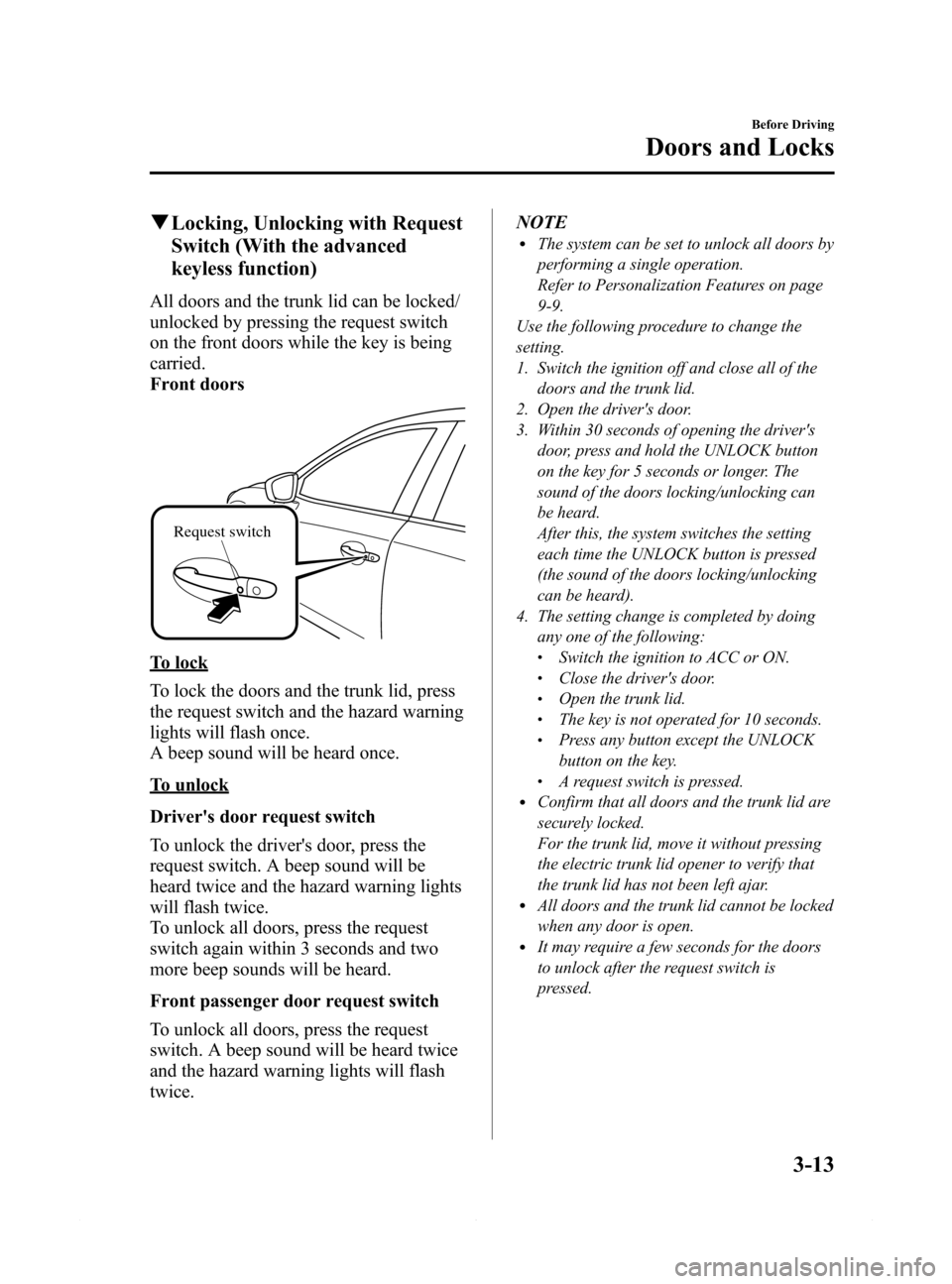
Front doors
Request switch
To lock
To lock the doors and the trunk lid, press
the request switch and the hazard warning
lights will flash once.
A beep sound will be heard once.
To unlock
Driver's door request switch
To unlock the driver's door, press the
request switch. A beep sound will be
heard twice and the hazard warning lights
will flash twice.
To unlock all doors, press the request
switch again within 3 seconds and two
more beep sounds will be heard.
Front passenger door request switch
To unlock all doors, press the request
switch. A beep sound will be heard twice
and the hazard warning lights will flash
twice.NOTE
lThe system can be set to unlock all doors by
performing a single operation.
Refer to Personalization Features on page
9-9.
Use the following procedure to change the
setting.
1. Switch the ignition off and close all of the
doors and the trunk lid.
2. Open the driver's door.
3. Within 30 seconds of opening the driver's
door, press and hold the UNLOCK button
on the key for 5 seconds or longer. The
sound of the doors locking/unlocking can
be heard.
After this, the system switches the setting
each time the UNLOCK button is pressed
(the sound of the doors locking/unlocking
can be heard).
4. The setting change is completed by doing
any one of the following:
lSwitch the ignition to ACC or ON.lClose the driver's door.lOpen the trunk lid.lThe key is not operated for 10 seconds.lPress any button except the UNLOCK
button on the key.
lA request switch is pressed.lConfirm that all doors and the trunk lid are
securely locked.
For the trunk lid, move it without pressing
the electric trunk lid opener to verify that
the trunk lid has not been left ajar.
lAll doors and the trunk lid cannot be locked
when any door is open.
lIt may require a few seconds for the doors
to unlock after the request switch is
pressed.
Before Driving
Doors and Locks
3-13
Mazda6_8DQ8-EA-13L_Edition3 Page85
Friday, June 13 2014 6:21 PM
Form No.8DQ8-EA-13L
Page 86 of 576
Black plate (86,1)
lA beep sound is heard for confirmation
when the doors and the trunk lid are
locked/unlocked using the request switch. If
you prefer, the beep sound can be turned
off.
The volume of the beep sound can also be
changed.
Refer to Personalization Features on page
9-9.
Use the following procedure to change the
setting.
1. Switch the ignition off and close all of the
doors and the trunk lid.
2. Open the driver's door.
3. Within 30 seconds of opening the driver's
door, press and hold the LOCK button on
the key for 5 seconds or longer.
All of the doors and the trunk lid lock and
the beep sound activates at the currently set
volume. (If the beep sound is currently set
to not activate, it will not activate.) The
setting changes each time the LOCK button
on the key is pressed and the beep sound
activates at the set volume. (If the beep
sound has been set to not activate, it will
not activate.)
4. The setting change is completed by doing
any one of the following:
lSwitch the ignition to ACC or ON.lClose the driver's door.lOpen the trunk lid.lThe key is not operated for 10 seconds.lPress any button except the LOCK
button on the key.
lA request switch is pressed.l(With theft-deterrent system)
The hazard warning lights flash when the
theft-deterrent system is armed or turned
off.
Refer to Theft-Deterrent System on page
3-43.
lThe setting can be changed so that the
doors and the trunk lid are locked
automatically without pressing the request
switch.
Refer to Personalization Features on page
9-9.
(Auto-lock function)
A beep sound is heard when all doors are
closed while the advanced key is being
carried. All doors and the trunk lid are
locked automatically after about three
seconds when the advanced key is out of the
operational range. Also, the hazard
warning lights flash once. (Even if the
driver is in the operational range, all doors
and the trunk lid are locked automatically
after about 30 seconds.) If you are out of
the operational range before the doors and
the trunk lid are completely closed or
another key is left in the vehicle, the auto-
lock function will not work. Always make
sure that all doors and the trunk lid are
closed and locked before leaving the
vehicle. The auto-lock function does not
close the power windows.
l(Auto re-lock function)
After unlocking with the request switch, all
doors and the trunk lid will automatically
lock if any of the following operations are
not performed within about 60 seconds. If
your vehicle has a theft-deterrent system,
the hazard warning lights will flash for
confirmation.
The time required for the doors to lock
automatically can be changed.
Refer to Personalization Features on page
9-9.
lA door or the trunk lid is opened.lThe ignition is switched to any position
other than off.
3-14
Before Driving
Doors and Locks
Mazda6_8DQ8-EA-13L_Edition3 Page86
Friday, June 13 2014 6:21 PM
Form No.8DQ8-EA-13L
Page 87 of 576
Black plate (87,1)
qLocking, Unlocking with Transmitter
All doors and the trunk lid can be locked/
unlocked by operating the keyless entry
system transmitter, refer to Keyless Entry
System (page 3-3).
qLocking, Unlocking with Door-
Lock Switch
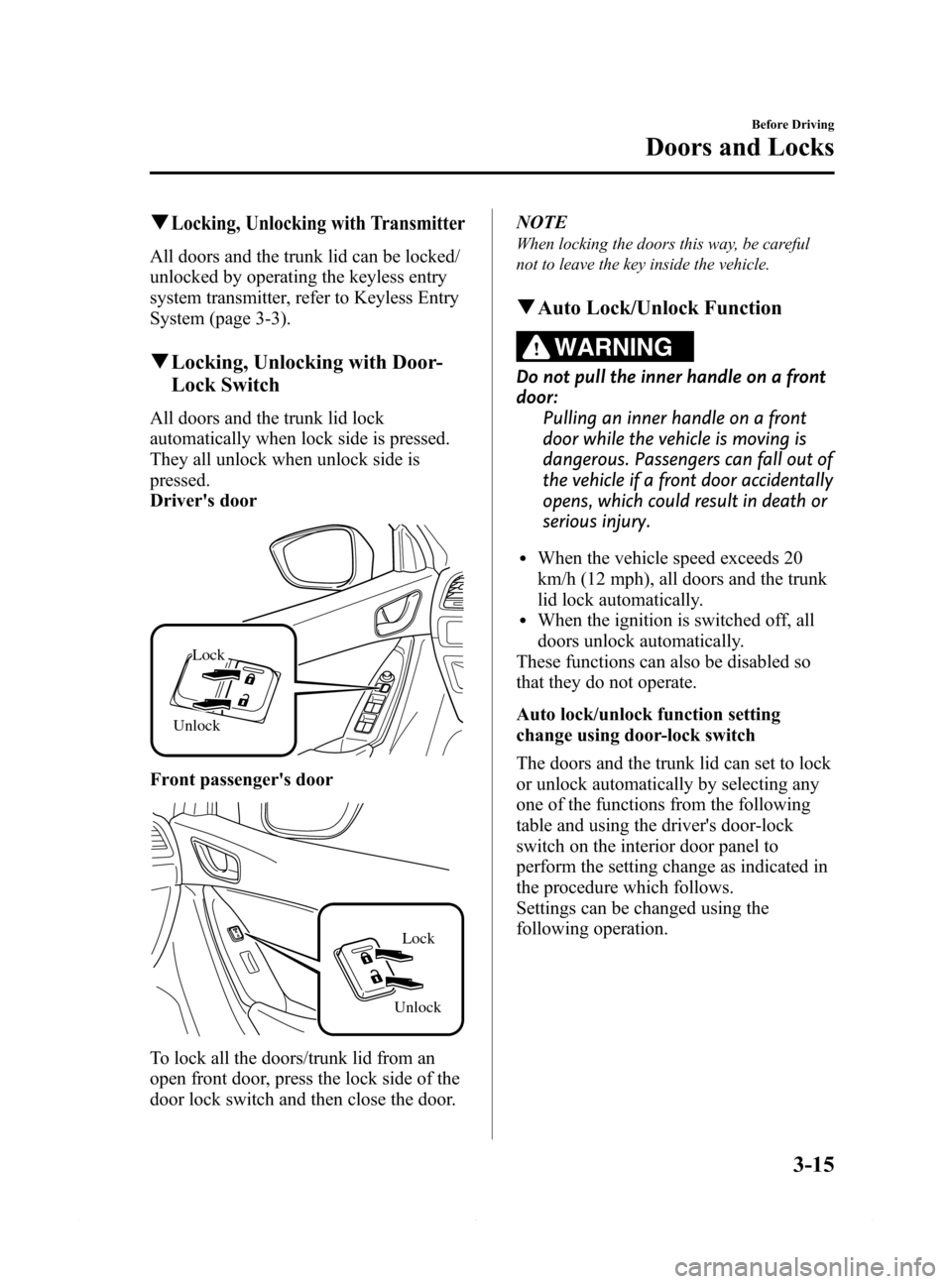
All doors and the trunk lid lock
automatically when lock side is pressed.
They all unlock when unlock side is
pressed.
Driver's door
Unlock
Lock
Front passenger's door
UnlockLock
To lock all the doors/trunk lid from an
open front door, press the lock side of the
door lock switch and then close the door.NOTE
When locking the doors this way, be careful
not to leave the key inside the vehicle.
qAuto Lock/Unlock Function
WARNING
Do not pull the inner handle on a front
door:
Pulling an inner handle on a front
door while the vehicle is moving is
dangerous. Passengers can fall out of
the vehicle if a front door accidentally
opens, which could result in death or
serious injury.
lWhen the vehicle speed exceeds 20
km/h (12 mph), all doors and the trunk
lid lock automatically.
lWhen the ignition is switched off, all
doors unlock automatically.
These functions can also be disabled so
that they do not operate.
Auto lock/unlock function setting
change using door-lock switch
The doors and the trunk lid can set to lock
or unlock automatically by selecting any
one of the functions from the following
table and using the driver's door-lock
switch on the interior door panel to
perform the setting change as indicated in
the procedure which follows.
Settings can be changed using the
following operation.
Before Driving
Doors and Locks
3-15
Mazda6_8DQ8-EA-13L_Edition3 Page87
Friday, June 13 2014 6:21 PM
Form No.8DQ8-EA-13L
Page 88 of 576
Black plate (88,1)
NOTElFunction number 3 is the factory setting for
your vehicle.
lThere are only a total of five auto lock/
unlock settings available for automatic
transaxle vehicles, and three for manual
transaxle vehicles. Be sure to press the
unlock side of the driver's door-lock switch
the correct number of times according to
the selected function number. If the switch
is mistakenly pressed six times on an
automatic transaxle vehicle or four times
on a manual transaxle, the procedure will
be invalidated. If this occurs, start the
procedure from the beginning.
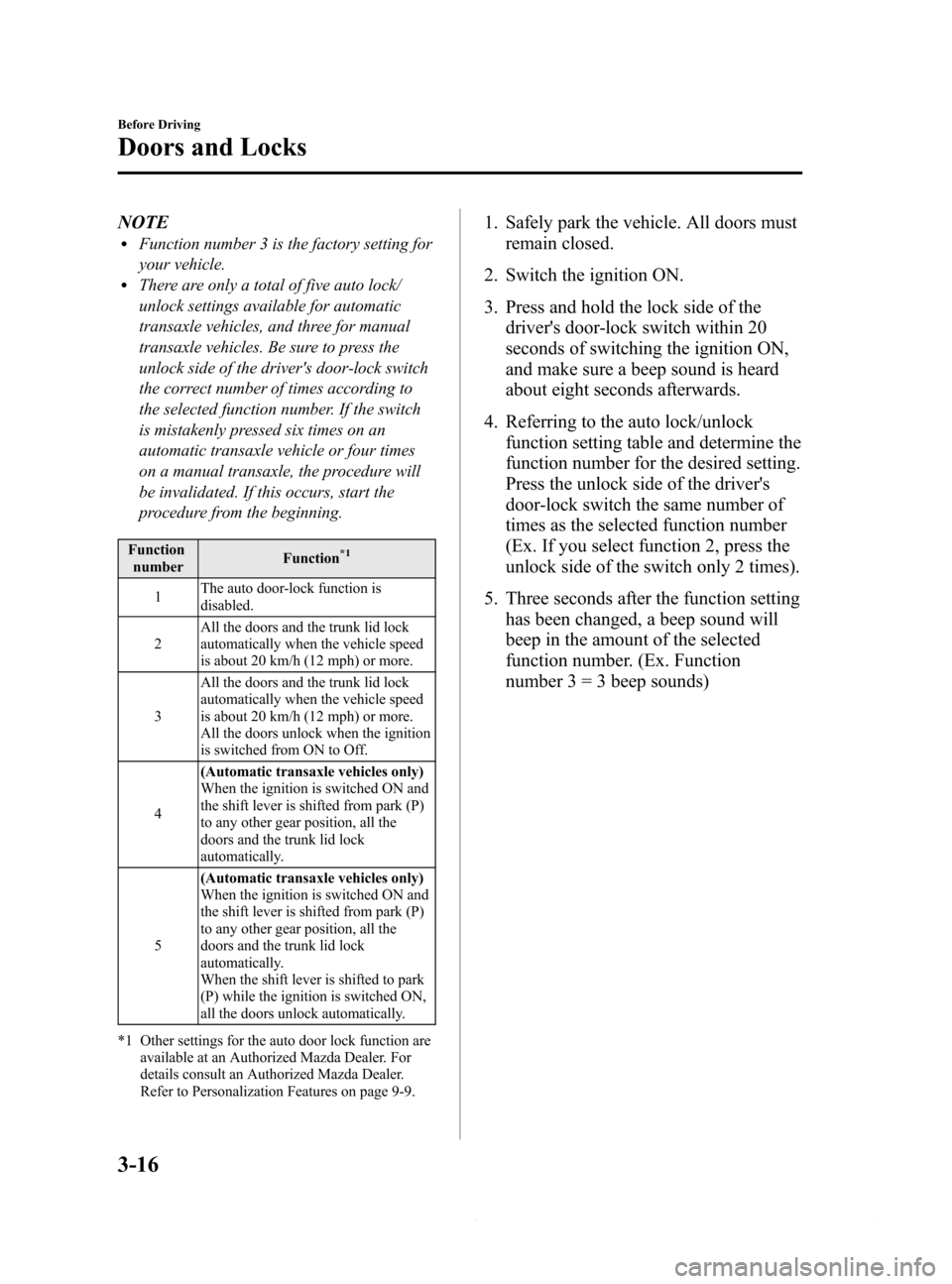
Function
numberFunction*1
1The auto door-lock function is
disabled.
2All the doors and the trunk lid lock
automatically when the vehicle speed
is about 20 km/h (12 mph) or more.
3All the doors and the trunk lid lock
automatically when the vehicle speed
is about 20 km/h (12 mph) or more.
All the doors unlock when the ignition
is switched from ON to Off.
4(Automatic transaxle vehicles only)
When the ignition is switched ON and
the shift lever is shifted from park (P)
to any other gear position, all the
doors and the trunk lid lock
automatically.
5(Automatic transaxle vehicles only)
When the ignition is switched ON and
the shift lever is shifted from park (P)
to any other gear position, all the
doors and the trunk lid lock
automatically.
When the shift lever is shifted to park
(P) while the ignition is switched ON,
all the doors unlock automatically.
*1 Other settings for the auto door lock function are
available at an Authorized Mazda Dealer. For
details consult an Authorized Mazda Dealer.
Refer to Personalization Features on page 9-9.
1. Safely park the vehicle. All doors must
remain closed.
2. Switch the ignition ON.
3. Press and hold the lock side of the
driver's door-lock switch within 20
seconds of switching the ignition ON,
and make sure a beep sound is heard
about eight seconds afterwards.
4. Referring to the auto lock/unlock
function setting table and determine the
function number for the desired setting.
Press the unlock side of the driver's
door-lock switch the same number of
times as the selected function number
(Ex. If you select function 2, press the
unlock side of the switch only 2 times).
5. Three seconds after the function setting
has been changed, a beep sound will
beep in the amount of the selected
function number. (Ex. Function
number 3 = 3 beep sounds)
3-16
Before Driving
Doors and Locks
Mazda6_8DQ8-EA-13L_Edition3 Page88
Friday, June 13 2014 6:21 PM
Form No.8DQ8-EA-13L
Page 101 of 576
Black plate (101,1)
Steering Wheel
WARNING
Never adjust the steering wheel while
the vehicle is moving:
Adjusting the steering wheel while
the vehicle is moving is dangerous.
Moving it can very easily cause the
driver to abruptly turn to the left or
right. This can lead to loss of control
or an accident.
qSteering Wheel Adjustment
To change the angle or length of the
steering wheel:
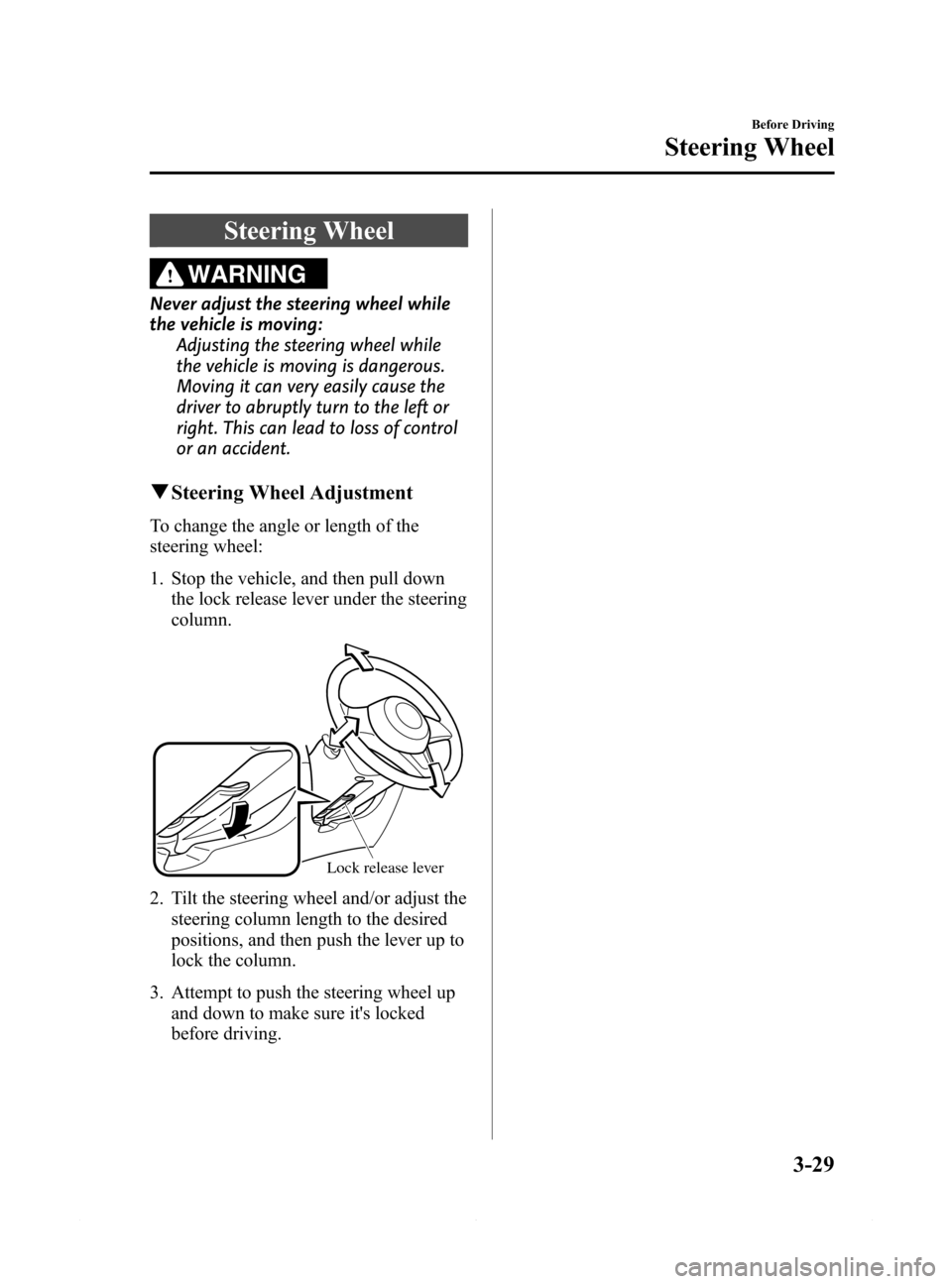
1. Stop the vehicle, and then pull down
the lock release lever under the steering
column.
Lock release lever
2. Tilt the steering wheel and/or adjust the
steering column length to the desired
positions, and then push the lever up to
lock the column.
3. Attempt to push the steering wheel up
and down to make sure it's locked
before driving.
Before Driving
Steering Wheel
3-29
Mazda6_8DQ8-EA-13L_Edition3 Page101
Friday, June 13 2014 6:21 PM
Form No.8DQ8-EA-13L
Page 113 of 576
Black plate (113,1)
Modification and Add-On
Equipment
Mazda cannot guarantee the immobilizer
and the theft-deterrent systems' operation
if the system have been modified or if any
add-on equipment has been installed.
CAUTION
To avoid damage to your vehicle, do
not modify the system or install any
add-on equipment to the immobilizer
and the theft-deterrent systems or
the vehicle.
Immobilizer System
The immobilizer system allows the engine
to start only with a key the system
recognizes.
If someone attempts to start the engine
with an unrecognized key, the engine will
not start, thereby helping to prevent the
theft of your vehicle.
If you have a problem with the
immobilizer system or the key, consult an
Authorized Mazda Dealer.
CAUTION
ØRadio equipment like this is
governed by laws.
Changes or modifications not
expressly approved by the party
responsible for compliance could
void the user's authority to
operate the equipment.
ØTo avoid damage to the key, do
not:
ØDrop the key.
ØGet the key wet.
ØExpose the key to any kind of
magnetic field.
ØExpose the key to high
temperatures on places such as
the dashboard or hood, under
direct sunlight.
ØIf the engine does not start with
the correct key, and the security
indicator light keeps illuminating
or flashing, the system may have
a malfunction. Consult an
Authorized Mazda Dealer.
Before Driving
Security System
3-41
Mazda6_8DQ8-EA-13L_Edition3 Page113
Friday, June 13 2014 6:21 PM
Form No.8DQ8-EA-13L
Page 118 of 576
Black plate (118,1)
Hazardous Driving
WARNING
Be extremely careful if it is necessary to
downshift on slippery surfaces:
Downshifting into lower gear while
driving on slippery surfaces is
dangerous. The sudden change in tire
speed could cause the tires to skid.
This could lead to loss of vehicle
control and an accident.
When driving on ice or in water, snow,
mud, sand, or similar hazards:
lBe cautious and allow extra distance
for braking.
lAvoid sudden braking and sudden
maneuvering.
lDo not pump the brakes. Continue to
press down on the brake pedal.
Refer to Antilock Brake System (ABS)
on page 4-92.
lIf you get stuck, select a lower gear and
accelerate slowly. Do not spin the front
wheels.
lFor more traction in starting on
slippery surfaces such as ice or packed
snow, use sand, rock salt, chains,
carpeting, or other nonslip material
under the front wheels.
NOTE
Use snow chains only on the front wheels.
Floor Mat
WARNING
Make sure the floor mats are hooked
on the retention pins to prevent them
from bunching up under the foot
pedals:
Using a floor mat that is not secured
is dangerous as it will interfere with
the accelerator and brake pedal
operation, which could result in an
accident.
Do not install two floor mats, one on
top of the other, on the driver's side:
Installing two floor mats, one on top
of the other, on the driver's side is
dangerous as the retention pins can
only keep one floor mat from sliding
forward.
In using a heavy duty floor mat for
winter use always remove the
original floor mat.
Loose floor mat(s) will interfere with
the foot pedal and could result in an
accident.
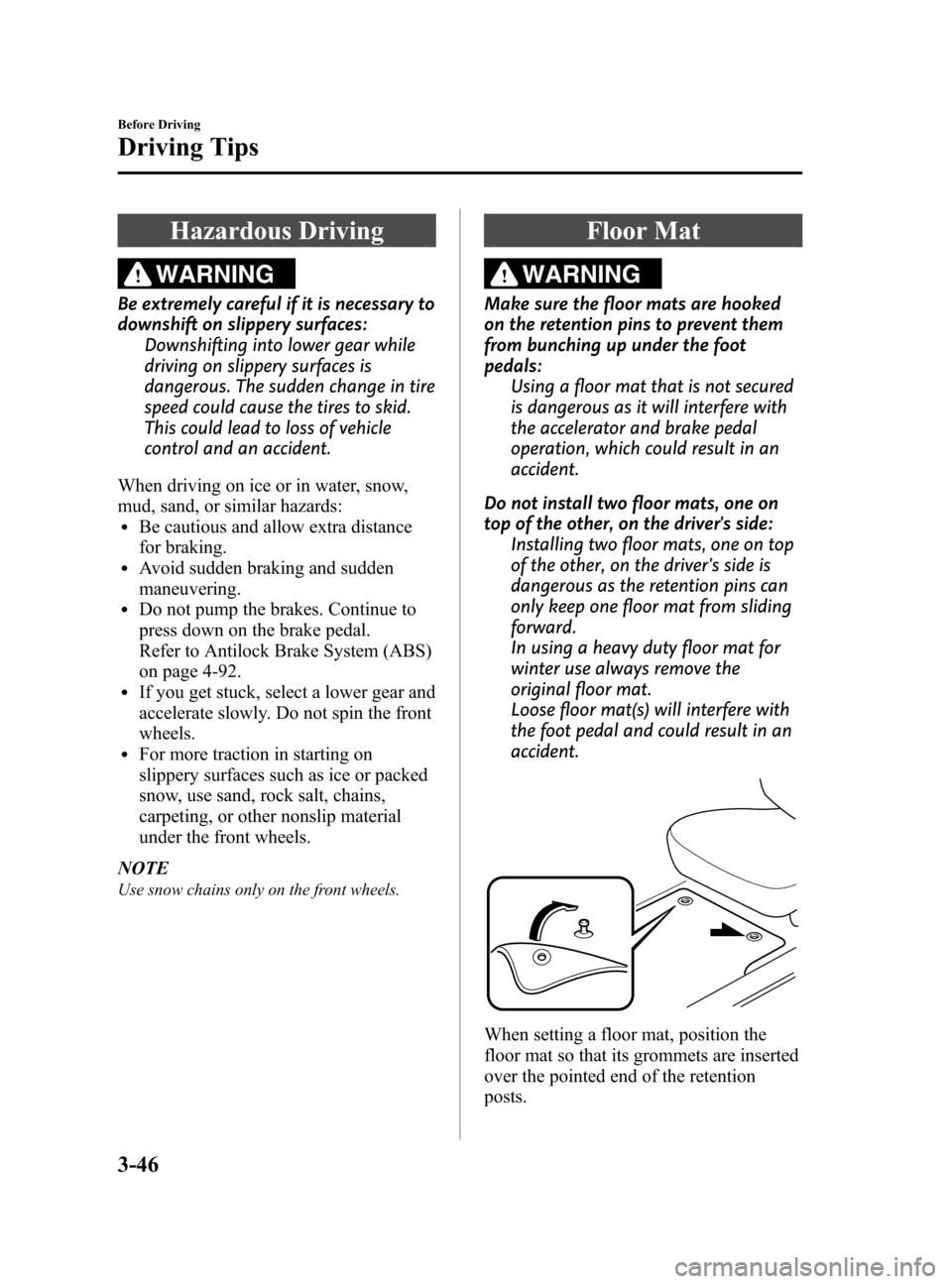
When setting a floor mat, position the
floor mat so that its grommets are inserted
over the pointed end of the retention
posts.
3-46
Before Driving
Driving Tips
Mazda6_8DQ8-EA-13L_Edition3 Page118
Friday, June 13 2014 6:21 PM
Form No.8DQ8-EA-13L
Page 125 of 576

Black plate (125,1)
4When Driving
Information concerning safe driving and stopping.
Start/Stop Engine .................................... 4-2
Ignition Switch .................................... 4-2
Starting the Engine .............................. 4-3
Turning the Engine Off ....................... 4-8
Instrument Cluster and Display ........... 4-10
Meters and Gauges ............................ 4-10
Warning/Indicator Lights .................. 4-23
Transaxle ................................................ 4-47
Manual Transaxle Operation ............. 4-47
Automatic Transaxle Controls .......... 4-49
Switches and Controls ........................... 4-58
Lighting Control ............................... 4-58
High Beam Control System (HBC)í... 4-63
Fog Lightsí...................................... 4-67
Turn and Lane-Change Signals ......... 4-67
Windshield Wipers and Washer ........ 4-68
Rear Window Defogger .................... 4-72
Horn .................................................. 4-73
Hazard Warning Flasher .................... 4-74
HomeLink Wireless Control
System
í............................................ 4-74
Radar Sensor .......................................... 4-78
Radar Sensor
í.................................. 4-78
Brake ...................................................... 4-81
Brake System .................................... 4-81
Hill Launch Assist (HLA) ................. 4-84
Smart City Brake Support (SCBS)í... 4-86
ABS/TCS/DSC ....................................... 4-92
Antilock Brake System (ABS) .......... 4-92
Traction Control System (TCS) ........ 4-93
Dynamic Stability Control (DSC) ..... 4-94i-ELOOP ................................................. 4-96
i-ELOOP
í........................................ 4-96
Drive Selection ....................................... 4-99
Drive Selection
í............................... 4-99
Power Steering ..................................... 4-101
Power Steering ................................ 4-101
Mazda Radar Cruise Control (MRCC)... 4-102
Mazda Radar Cruise Control (MRCC)í... 4-102
Cruise Control ...................................... 4-111
Cruise Control
í.............................. 4-111
Forward Obstruction Warning (FOW)... 4-114
Forward Obstruction Warning (FOW)í... 4-114
Tire Pressure Monitoring System ....... 4-117
Tire Pressure Monitoring System .... 4-117
Blind Spot Monitoring (BSM)
System .................................................. 4-121
Blind Spot Monitoring (BSM)
System
í.......................................... 4-121
Lane Departure Warning System
(LDWS) ................................................ 4-130
Lane Departure Warning System
(LDWS)
í....................................... 4-130
Rear View Monitor .............................. 4-137
Rear View Monitor
í...................... 4-137
4-1íSome models.
Mazda6_8DQ8-EA-13L_Edition3 Page125
Friday, June 13 2014 6:21 PM
Form No.8DQ8-EA-13L
Page 131 of 576
Black plate (131,1)
2. Verify that the push button start
indicator light (green) flashes.
NOTE
The push button start indicator light (green)
will flash even if the push button start is
pressed before depressing the brake pedal
(automatic transaxle) or the clutch pedal
(manual transaxle). If the clutch pedal is
depressed (manual transaxle) or the brake
pedal is depressed (automatic transaxle) under
this condition, the engine can be started by
resuming the procedure following this.
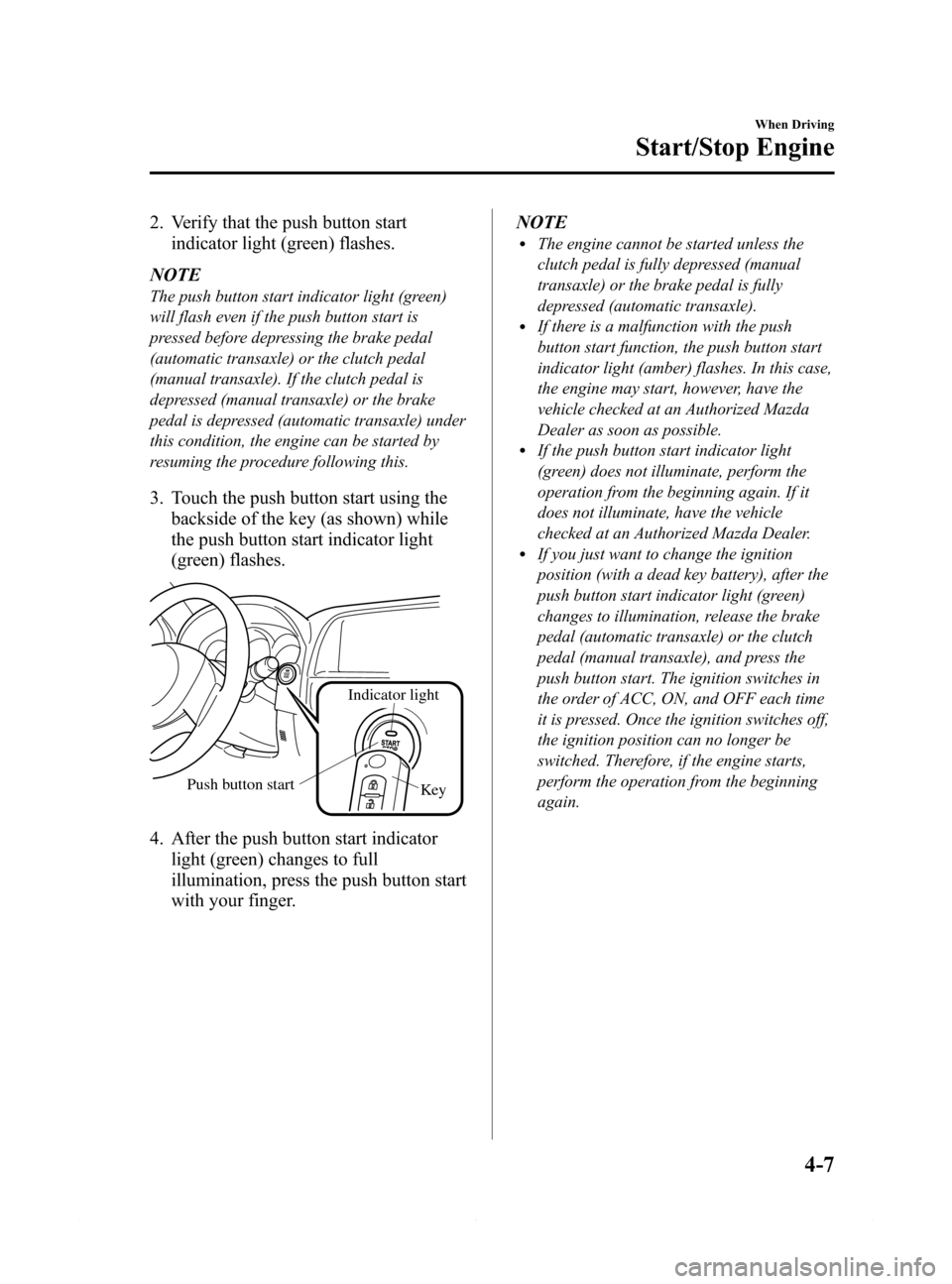
3. Touch the push button start using the
backside of the key (as shown) while
the push button start indicator light
(green) flashes.
Key
Indicator light
Push button start
4. After the push button start indicator
light (green) changes to full
illumination, press the push button start
with your finger.NOTE
lThe engine cannot be started unless the
clutch pedal is fully depressed (manual
transaxle) or the brake pedal is fully
depressed (automatic transaxle).
lIf there is a malfunction with the push
button start function, the push button start
indicator light (amber) flashes. In this case,
the engine may start, however, have the
vehicle checked at an Authorized Mazda
Dealer as soon as possible.
lIf the push button start indicator light
(green) does not illuminate, perform the
operation from the beginning again. If it
does not illuminate, have the vehicle
checked at an Authorized Mazda Dealer.
lIf you just want to change the ignition
position (with a dead key battery), after the
push button start indicator light (green)
changes to illumination, release the brake
pedal (automatic transaxle) or the clutch
pedal (manual transaxle), and press the
push button start. The ignition switches in
the order of ACC, ON, and OFF each time
it is pressed. Once the ignition switches off,
the ignition position can no longer be
switched. Therefore, if the engine starts,
perform the operation from the beginning
again.
When Driving
Start/Stop Engine
4-7
Mazda6_8DQ8-EA-13L_Edition3 Page131
Friday, June 13 2014 6:21 PM
Form No.8DQ8-EA-13L
Page 135 of 576

Black plate (135,1)
qSpeedometer
The speedometer indicates the speed of
the vehicle.
qOdometer, Trip Meter and Trip
Meter Selector
The display mode can be changed
between trip meter A and trip meter B by
pressing the selector while one of them is
displayed. The selected mode will be
displayed.
Type A
Press the selector Press the selector Trip meter A
Odometer
Trip meter B
Odometer
Type B
Press the selector Press the selector Trip meter A
Odometer
Trip meter B
Odometer
NOTE
When the ignition is switched to ACC or OFF,
the odometer or trip meters cannot be
displayed, however, pressing the selector can
inadvertently switch the trip meters or reset
them during an approximate ten-minute period
in the following cases:
lAfter the ignition is switched to OFF from
ON.
lAfter the driver's door is opened.
Odometer
The odometer records the total distance
the vehicle has been driven.
Trip meter
The trip meter can record the total
distance of two trips. One is recorded in
trip meter A, and the other is recorded in
trip meter B.
When Driving
Instrument Cluster and Display
4-11
Mazda6_8DQ8-EA-13L_Edition3 Page135
Friday, June 13 2014 6:21 PM
Form No.8DQ8-EA-13L