change MAZDA MODEL CX-9 2010 (in English) Owner's Guide
[x] Cancel search | Manufacturer: MAZDA, Model Year: 2010, Model line: MODEL CX-9, Model: MAZDA MODEL CX-9 2010Pages: 592
Page 202 of 592
Black plate (202,1)
If the warning light illuminates again even
after the tire pressures are adjusted, there
may be a tire puncture. Replace the
punctured tire with the temporary spare
tire (page 7-8).
NOTE
A tire pressure sensor is not installed to the
temporary spare tire. The warning light will
flash continuously while the temporary spare
tire is being used.
Warning light flashes
When the warning light flashes, there may
be a system malfunction. Consult an
Authorized Mazda Dealer.
qSystem Error Activation
When the TPMS warning light flashes,
there may be a system malfunction.
Consult an Authorized Mazda Dealer.
A system error activation may occur in
the following cases:
lWhen there is equipment or a device
near the vehicle using the same radio
frequency as that of the tire pressure
sensors.
lWhen using the following devices in
the vehicle that may cause radio
interference with the receiver unit.
lA digital device such as a personal
computer.
lA current converter device such as a
DC-AC converter.
lWhen excess snow or ice adheres to
the vehicle, especially around the
wheels.
lWhen the tire pressure sensor batteries
are exhausted.
lWhen using a wheel with no tire
pressure sensor installed.
lWhen using tires with steel wire
reinforcement in the side walls.
lWhen using tire chains.
qTires and Wheels
CAUTION
When inspecting or adjusting the tire
air pressures, do not apply excessive
force to the stem part of the wheel
unit. The stem part could be
damaged.
Changing tires and wheels
The following procedure allows the
TPMS to recognize a tire pressure sensor's
unique ID signal code whenever tires or
wheels are changed, such as changing to
and from winter tires.
NOTE
Each tire pressure sensor has a unique ID
signal code. The signal code must be
registered with the TPMS before it can work.
The easiest way to do it is to have an
Authorized Mazda Dealer change your tire and
complete ID signal code registration.
When having tires changed at an
Authorized Mazda Dealer
Tire pressure sensor ID signal code
registration is completed when an
Authorized Mazda Dealer changes your
vehicle's tires.
When changing tires yourself
If you or someone else changes tires, you
or someone else can also undertake the
steps for the TPMS to complete the ID
signal code registration.
1. After tires have been changed, turn the
ignition switch to the ON position, then
turn it back to the ACC or LOCK
position.
2. Wait for about 15 minutes.
5-32
Driving Your Mazda
Starting and Driving
CX-9_8AU2-EA-09G_Edition5 Page202
Thursday, May 6 2010 4:52 PM
Form No.8AU2-EA-09G
Page 204 of 592
Black plate (204,1)
Blind Spot Monitoring (BSM) Systemí
The Blind Spot Monitoring (BSM) system is designed to assist the driver by monitoring
blind spots on both sides of the vehicle to the rear in certain situations such as when
changing lanes on roads and freeways.
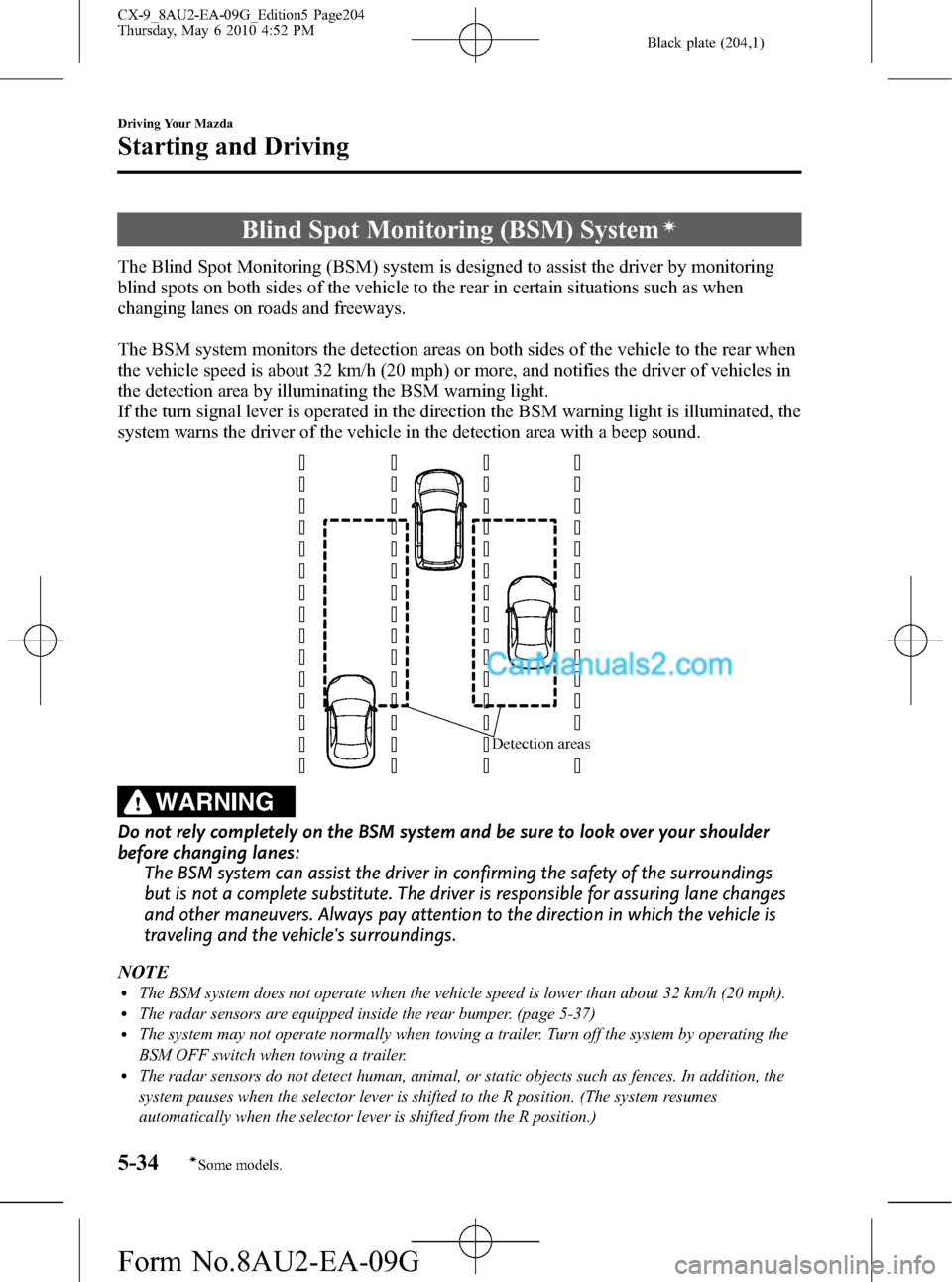
The BSM system monitors the detection areas on both sides of the vehicle to the rear when
the vehicle speed is about 32 km/h (20 mph) or more, and notifies the driver of vehicles in
the detection area by illuminating the BSM warning light.
If the turn signal lever is operated in the direction the BSM warning light is illuminated, the
system warns the driver of the vehicle in the detection area with a beep sound.
Detection areas
WARNING
Do not rely completely on the BSM system and be sure to look over your shoulder
before changing lanes:
The BSM system can assist the driver in confirming the safety of the surroundings
but is not a complete substitute. The driver is responsible for assuring lane changes
and other maneuvers. Always pay attention to the direction in which the vehicle is
traveling and the vehicle's surroundings.
NOTE
lThe BSM system does not operate when the vehicle speed is lower than about 32 km/h (20 mph).lThe radar sensors are equipped inside the rear bumper. (page 5-37)lThe system may not operate normally when towing a trailer. Turn off the system by operating the
BSM OFF switch when towing a trailer.
lThe radar sensors do not detect human, animal, or static objects such as fences. In addition, the
system pauses when the selector lever is shifted to the R position. (The system resumes
automatically when the selector lever is shifted from the R position.)
5-34
Driving Your Mazda
íSome models.
Starting and Driving
CX-9_8AU2-EA-09G_Edition5 Page204
Thursday, May 6 2010 4:52 PM
Form No.8AU2-EA-09G
Page 208 of 592

Black plate (208,1)
qSafety Certification
Radiation Hazard
This BSM (blind spot monitoring) device
emits intentional electromagnetic
radiation in the 24 GHz to 25 GHz
frequency range. The total radiated
average power over the entire bandwidth
is below_
14 dBm (40 µW). The active
emitting antenna surface is 72 cm
2;
therefore the radiated power density in
front of the BSM device is 0.55 µW/cm
2.
This value is far below the legal human
exposure protection limit of 1 mW/
cm
2(MPE) in Europe and US.
Declaration of compliance for 24 GHz
blind spot radar
(U.S.A)
FCC ID: KR5SV2008BSD
This vehicle is equipped with a 24 GHz
blind spot monitoring (BSM) radar
system, which complies with part 15 of
the FCC rules. Operation is subject to the
following conditions:
1. This device may not cause harmful
interference, and
2. This device must accept any
interference received, including
interference that may cause undesired
operation.
3. This device may only work when the
vehicle is in operation pursuant to
§15.252 (a) (4).(CANADA)
ICDCE2008075 (temporary permission
until RSS·220 is in force)
This vehicle is equipped with a 24 GHz
blind spot monitoring (BSM) radar
system, which complies with the (actually
draft) RSS·220 standard of Industry
Canada. Operation is subject to the
following conditions:
1. This device may not cause harmful
interference, and
2. This device must accept any
interference received, including
interference that may cause undesired
operation.
3. This device may only work when the
vehicle is in operation pursuant to
RSS·220 5.2 (b)
NOTE
During printing time of this user manual the
approvals listed below are granted. Further
countries may become available or actual
certification identifiers may be subject to
change or update.
WARNING
Changes or modifications not
expressively approved by the party
responsible for compliance could void
the user's authority to operate the
equipment.
5-38
Driving Your Mazda
Starting and Driving
CX-9_8AU2-EA-09G_Edition5 Page208
Thursday, May 6 2010 4:52 PM
Form No.8AU2-EA-09G
Page 210 of 592

Black plate (210,1)
qSpeedometer
The speedometer indicates the speed of
the vehicle.
qOdometer, Trip Meter and Trip
Meter Selector
The display mode can be changed
between trip meter A and trip meter B by
pressing the selector while one of them is
displayed. The selected mode will be
displayed.
Selector
Trip meter
Odometer
Trip meter B
Press the selector Press the selector Trip meter AOdometer
Odometer
Odometer
The odometer records the total distance
the vehicle has been driven.
Trip meter
The trip meter can record the total
distance of two trips. One is recorded in
trip meter A, and the other is recorded in
trip meter B.
For instance, trip meter A can record the
distance from the point of origin, and trip
meter B can record the distance from
where the fuel tank is filled.
When trip meter A is selected, pressing
the selector again within one second will
change to trip meter B mode.
When trip meter A is selected, TRIP A
will be displayed. When trip meter B is
selected, TRIP B will be displayed.
5-40
Driving Your Mazda
Instrument Cluster and Indicators
CX-9_8AU2-EA-09G_Edition5 Page210
Thursday, May 6 2010 4:52 PM
Form No.8AU2-EA-09G
Page 226 of 592

Black plate (226,1)
lUnder the following conditions, the
KEY warning light (red) will flash
continuously when the start knob has
not been returned to the LOCK
position to notify the driver that the
advanced key has been removed from
the vehicle. It will stop flashing when
the advanced key is back inside the
vehicle.
lThe start knob has not been returned
to the LOCK position, the driver's
door is open, and the advanced key
is removed from the vehicle.
lThe start knob has not been returned
to the LOCK position and all the
doors are closed after removing the
advanced key from the vehicle.
NOTE
The flashing KEY warning light (red) and the
beep sound operate simultaneously (page
3-22).
KEY Indicator Light (Green)
When illuminated
When the start knob is pushed in from the
LOCK position, the system confirms that
the correct advanced key is inside the
vehicle, the KEY indicator light (green)
illuminates, and the start knob can be
turned to the ACC position (page 3-10).
When flashing
When the advanced key battery power is
low, the KEY indicator light flashes for 30
seconds after the start knob is turned from
the ON position to the ACC or LOCK
position. Replace with a new battery
before the advanced key becomes
unusable (page 3-7).NOTE
The advanced key can be set so that the KEY
indicator light (green) does not flash even if
the battery power is low.
Refer to Setting Change (Function
Customization)(page 3-21).
qSecurity Indicator Light
This indicator light starts flashing every 2
seconds when the ignition switch is turned
from the ON to the ACC position and the
immobilizer system is armed.
The light stops flashing when the ignition
switch is turned to the ON position with
the correct ignition key.
At this time, the immobilizer system is
disarmed and the light illuminates for
about 3 seconds and then turns off.
If the engine does not start with the
correct ignition key, and the security
indicator light keeps illuminating or
flashing, the system may have a
malfunction. Consult an Authorized
Mazda Dealer.
5-56
Driving Your Mazda
Warning/Indicator Lights and Beep Sounds
CX-9_8AU2-EA-09G_Edition5 Page226
Thursday, May 6 2010 4:53 PM
Form No.8AU2-EA-09G
Page 233 of 592

Black plate (233,1)
NOTElThe headlights, other exterior lights and
dashboard illumination may not turn off
immediately even if the surrounding area
becomes well-lit because the light sensor
determines that it is nighttime if the
surrounding area is continuously dark for
several minutes such as inside long tunnels,
traffic jams inside tunnels, or in indoor
parking lots.
In this case, the light turns off if the light
switch is turned to the OFF position.
lThe dashboard illumination can be
adjusted by rotating the knob in the
instrument cluster. Also, the day/night mode
can be changed by pressing the knob. To
adjust the brightness of the dashboard
illumination: Refer to Dashboard
Illumination on page 5-42.
lThe sensitivity of the AUTO lights may be
changed by an Authorized Mazda Dealer.
Xenon fusion headlight bulbsí
The low-beam bulbs of the headlights
have xenon fusion bulbs that produce a
bright white beam over a wide area.
WARNING
Do not replace the xenon fusion bulbs
yourself
Replacing the xenon fusion bulbs
yourself is dangerous. Because the
xenon fusion bulbs require high
voltage, you could receive an electric
shock if the bulbs are handled
incorrectly. Consult an Authorized
Mazda Dealer when the replacement
is necessary.
NOTE
If the headlights flicker, or the brightness
weakens, the bulb-life may be depleted and a
replacement is necessary. Consult an
Authorized Mazda Dealer.
qLights-On Reminderí
If lights are on and the key is removed
from the ignition switch, a continuous
beep sound will be heard when the
driver's door is opened.
NOTE
When the advanced keyless function is used
and the start knob is in the ACC position, the
Start Knob Not in Lock Warning Beep (page
3-19) overrides the lights-on reminder.
qHeadlight High-Low Beam
Press the lever forward to turn on the high
beams.
Pull the lever back to its original position
for the low beams.
Type A
High beam
Low beam
Type B
High beam
Low beam
Driving Your Mazda
Switches and Controls
5-63íSome models. CX-9_8AU2-EA-09G_Edition5 Page233
Thursday, May 6 2010 4:53 PM
Form No.8AU2-EA-09G
Page 234 of 592

Black plate (234,1)
qFlashing the Headlights
To flash the headlights, pull the lever fully
towards you (the headlight switch does
not need to be on). The lever will return to
the normal position when released.
Type A
OFF
Flashing
Type B
OFF
Flashing
qHeadlight Levelingí
The number of passengers and weight of
cargo in the luggage compartment change
the angle of the headlights.
The headlight leveling switch adjusts this
angle.
Select the proper setting from the following chart.
Front seat Rear seat
LoadSwitch
Position
Driver
PassengerSecond-
rowThird-
row
×――――0
××―― ―0
××―×―1
××××―1
××××× 2
×―――×3
×: Yes
―:No
qDaytime Running Lights (Canada)
In Canada, vehicles must be driven with
the headlights on during daytime
operation.
For that reason, the daytime running lights
automatically turn on when the ignition
switch is turned to the ON position.
5-64
Driving Your Mazda
íSome models.
Switches and Controls
CX-9_8AU2-EA-09G_Edition5 Page234
Thursday, May 6 2010 4:53 PM
Form No.8AU2-EA-09G
Page 235 of 592

Black plate (235,1)
NOTE
The Daytime Running Lights turn off when the
parking brake is applied.Turn and Lane-Change
Signals
qTurn Signal
Move the signal lever down (for a left
turn) or up (for a right turn) to the stop
position. The signal will self-cancel after
the turn is completed.
If the indicator light continues to flash
after a turn, manually return the lever to
its original position.
(Type A)
Right turn
Left turn Right lane change
Left lane changeOFF
(Type B)
Right turn
Left turn Right lane change
Left lane changeOFF
Green indicators on the dashboard show
which signal is working.
Driving Your Mazda
Switches and Controls
5-65
CX-9_8AU2-EA-09G_Edition5 Page235
Thursday, May 6 2010 4:53 PM
Form No.8AU2-EA-09G
Page 236 of 592

Black plate (236,1)
Lane-change signals
Move the lever slightly toward the
direction of the change―until the
indicator flashes―and hold it there. It
will return to the off position when
released.
NOTE
If an indicator light stays on without flashing
or if it flashes abnormally, one of the turn
signal bulbs may be burned out.
Fog Lightsí
Use this switch to turn on the fog lights.
They help you to see as well as to be seen.
To turn the fog lights on, rotate the fog
light switch to the
position.
The headlight switch must be in the
position before turning on the fog lights.
Type A
Fog light switch
Type B
Fog light switch
To turn them off, rotate the fog light
switch to the OFF position or turn the
headlight switch to the
(Type A)/
(Type B) position.
5-66
Driving Your Mazda
íSome models.
Switches and Controls
CX-9_8AU2-EA-09G_Edition5 Page236
Thursday, May 6 2010 4:53 PM
Form No.8AU2-EA-09G
Page 245 of 592
Black plate (245,1)
HomeLink Wireless
Control System
í
NOTE
HomeLink and HomeLink house are registered
trademarks of Johnson Controls.
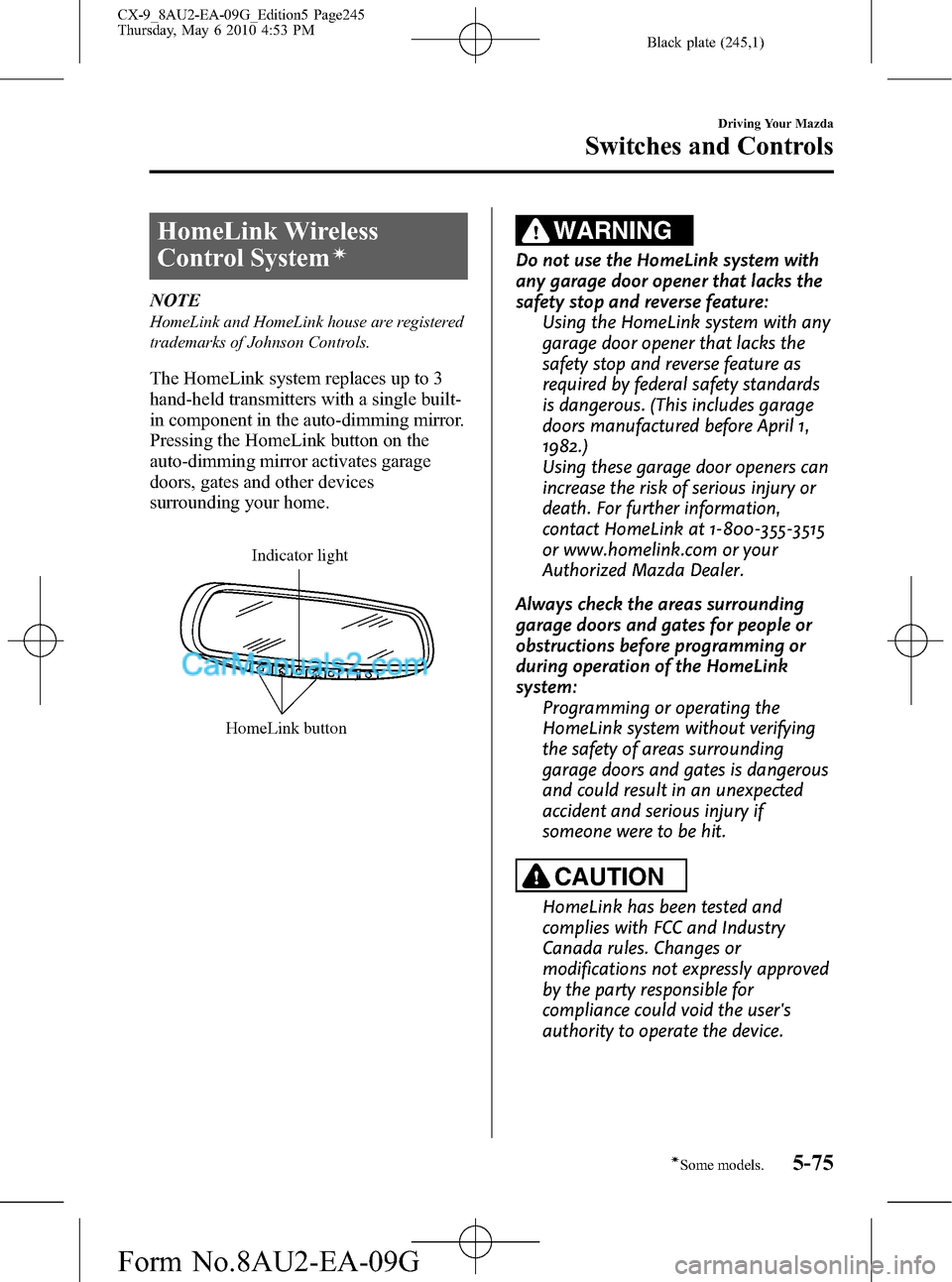
The HomeLink system replaces up to 3
hand-held transmitters with a single built-
in component in the auto-dimming mirror.
Pressing the HomeLink button on the
auto-dimming mirror activates garage
doors, gates and other devices
surrounding your home.
HomeLink button
Indicator light
WARNING
Do not use the HomeLink system with
any garage door opener that lacks the
safety stop and reverse feature:
Using the HomeLink system with any
garage door opener that lacks the
safety stop and reverse feature as
required by federal safety standards
is dangerous. (This includes garage
doors manufactured before April 1,
1982.)
Using these garage door openers can
increase the risk of serious injury or
death. For further information,
contact HomeLink at 1-800-355-3515
or www.homelink.com or your
Authorized Mazda Dealer.
Always check the areas surrounding
garage doors and gates for people or
obstructions before programming or
during operation of the HomeLink
system:
Programming or operating the
HomeLink system without verifying
the safety of areas surrounding
garage doors and gates is dangerous
and could result in an unexpected
accident and serious injury if
someone were to be hit.
CAUTION
HomeLink has been tested and
complies with FCC and Industry
Canada rules. Changes or
modifications not expressly approved
by the party responsible for
compliance could void the user's
authority to operate the device.
Driving Your Mazda
Switches and Controls
5-75íSome models. CX-9_8AU2-EA-09G_Edition5 Page245
Thursday, May 6 2010 4:53 PM
Form No.8AU2-EA-09G