wheel MERCEDES-BENZ B-CLASS HATCHBACK 2015 Service Manual
[x] Cancel search | Manufacturer: MERCEDES-BENZ, Model Year: 2015, Model line: B-CLASS HATCHBACK, Model: MERCEDES-BENZ B-CLASS HATCHBACK 2015Pages: 293, PDF Size: 10.83 MB
Page 136 of 293

D
- Sporty driving or driving on a
downhill gradient
The brake pedal does not need to
be used as often because the
extent of the deceleration is
greater than in D.
Energy use when decelerating is
considerably higher than when
the vehicle is braked with the
brake pedal. D
AUTO
(radar-
based) The intensity of recuperation is
automatically adjusted to the cur-
rent traffic situation.
Default setting In levels
Dand D-
, deceleration can be control-
led in an infinitely variable manner using the
accelerator pedal.
The braking performance of the electric motor
using recuperative braking is, in some operating modes, either reduced or not effective:
R when the charge status of the high-voltage
battery increases
R if the high-voltage battery is not yet at a nor-
mal operating temperature
R when driving close to the maximum design
speed
R when the vehicle is almost stationary
R in transmission position N
R during and after ESP stability control
If you do not make an additional effort to apply
the brake yourself, the braking effect may not be sufficient. If necessary, counteract the reduced regenerative braking effect by applying the
brake yourself.
Radar-based recuperation The vehicle uses the sensors of COLLISION PRE-
VENTION ASSIST PLUS during radar-based
recuperation (D AUTO
). The sensors detect the
distance to the vehicle ahead and its speed. The intensity of recuperation is then automatically
adjusted to the current traffic situation.
The range can then be increased by storing
energy efficiently. Adjustment is infinitely vari-
able from overrun mode (no recuperation) to
maximum recuperation.
Maintain sufficient distance to the vehicle in
front. Mercedes-Benz recommends that you activate COLLISION PREVENTION ASSIST PLUS
as a visual and acoustic aid.
Examples of radar-based recuperation:
R Approaching a slower vehicle, a decelerating
vehicle or when following a vehicle downhill.
Your vehicle decelerates slightly and increa-
ses recuperation.
R Driving when no vehicle is detected in front or
when a vehicle is detected in the far distance or an accelerating vehicle is detected. Your
vehicle switches to overrun mode at higher
speeds.
R Driving on a steep downhill slope. Accelera-
tion downhill is reduced and recuperation is
increased. This is comparable with shifting
down when driving downhill.
X To activate radar-based recuperation: pull
steering wheel gearshift paddle :or;
towards you and hold for about one second.
X To deactivate radar-based recuperation:
briefly pull steering wheel gearshift paddle
:
or ; towards you.
If you change between radar-based and manual
recuperation, the following levels are activated
depending on the selection via the steering
wheel gearshift paddles: :
Steering wheel
gearshift paddle - selects
D-
(maximum
recuperation) ;
Steering wheel
gearshift paddle + selects
D+
(overrun) In particular, the function of the radar sensors
can be impaired in the case of:
R
dirt on the sensors or obscured sensors
R snow or heavy rain
R interference by other radar sources
R strong radar reflections, for example, in multi-
storey car parks
R a narrow vehicle travelling in front, e.g. a
motorcycle
R a vehicle travelling in front on a different line
Following damage to the front end of the vehicle, have the radar sensor settings and operation
checked at a qualified specialist workshop
immediately. This also applies to collisions at
slow speeds where there is no visible damage to the front of the vehicle.
If the radar sensors are not available, the system
switches automatically to level Dwith moderate Transmission
133Driving and parking Z
Page 137 of 293
recuperation. Have the radar sensors checked
at a qualified specialist workshop immediately.
Automatic adjustment of recuperation
on downhill gradients The vehicle can detect steep downhill gradients.
To reduce acceleration downhill and to charge
the high-voltage battery, recuperation is
increased steplessly. This is comparable to the
engine brake in a combustion engine when you
downshift a gear on a downhill gradient.
Automatic adjustment of recuperation on down-
hill gradients is available in level DAUTO
or on
vehicles without steering wheel gearshift pad-
dles in level D.
Intelligent recuperation The vehicle uses the map and camera data of
Traffic Sign Assist in addition to the sensors of
COLLISION PREVENTION ASSIST PLUS during
radar-based recuperation ( DAUTO
). The rate of
recuperation is then automatically adjusted to
the current traffic situation, taking the current
and future maximum speed into account. High-voltage battery
Important safety notes
G
DANGER
The vehicle's high voltage electrical system is under high voltage. If you modify components
in the vehicle's high-voltage electrical system or touch damaged components, you may be
electrocuted. The components in the vehi-
cle's high-voltage electrical system may be
damaged in an accident, although the damage
is not visible. There is a risk of fatal injury.
Do not touch any high-voltage components
after an accident and never modify the vehi-
cle's high-voltage electrical system. Have the vehicle towed away after an accident and the vehicle's high-voltage electrical system
checked by a qualified specialist workshop. G
WARNING
In the event of a vehicle fire, the internal pres- sure of the high-voltage battery could exceed a critical value. In this case, flammable gas
escapes through a vent valve in the vehicle's
underbody. The gas can ignite. There is a risk of injury.
Leave the danger area immediately. Secure
the danger area at a suitable distance, whilst
observing legal requirements. G
DANGER
Connecting the charging cable to the mains
supply via incorrectly installed mains sockets or by means of adapters, extension cables or
similar could cause a fire or an electric shock. There is a risk of fatal injury.
To avoid such risks, observe the following:
R Only connect the charging cable to mains
sockets:
- which have been properly installed and
- which have been inspected by a qualified
electrician
R For safety reasons, only use charging
cables which have been supplied with the
vehicle or which have been approved for
this vehicle.
R Never use a damaged charging cable.
R Do not use:
- extension cables
- extension reels
- multi-outlet sockets
R Never use socket adapters to connect the
charging cable to the mains socket. The
only exception is if the adapter has been
tested and approved by the manufacturer
for charging the high-voltage battery of an
electric vehicle.
R Observe the safety notes in the operating
instructions for the socket adapter. G
DANGER
Connecting the charging cable to the wallbox via an incorrectly installed wallbox or adapter,
extension cable or similar could cause a fire or an electric shock. There is a risk of fatal injury. 134
High-voltage batteryDriving and parking
Page 148 of 293
Parking
Important safety notes
G
WARNING
If you release the parking brake on uphill or
downhill gradients, the vehicle can begin to
move when in park position P. There is a risk
of an accident.
To avoid hazardous situations:
R prevent the parked vehicle from rolling on
uphill or downhill gradients by always
applying the parking brake.
R do not park the vehicle on uphill or downhill
gradients if the parking brake is malfunc-
tioning. G
WARNING
If you leave children unattended in the vehi-
cle, they may be able to set the vehicle in
motion, for example, if they:
R release the parking brake
R shift the transmission out of park position P
R start the vehicle's drive system
In addition, they may operate vehicle equip-
ment. There is a risk of an accident and injury.
When leaving the vehicle, always take the key
with you and lock the vehicle. Never leave
children unattended in the vehicle.
! while the vehicle is rolling, do not shift the
transmission directly from Dto R, from Rto D
or directly to P.
Do not open the driver's door while the vehi-
cle is in motion. Otherwise, at low speeds in
transmission position Dor R, park position P
is engaged automatically and the electrical
parking brake is applied.
The transmission could be damaged.
! Always secure the vehicle correctly against
rolling away. Otherwise, the vehicle or its driv-
etrain could be damaged.
To ensure that the vehicle is safeguarded
against rolling away unintentionally: R the electric parking brake must be applied.
R the transmission must be in position P.R
the key must be turned to position 0in the
ignition lock and then removed from the igni-
tion lock or the Start/Stop button must be
pressed
R on uphill or downhill gradients, turn the front
wheels towards the kerb. Switching off the drive system
G
WARNING
If you switch off the ignition while the vehicle
is in motion, safety-relevant functions are
restricted or not available. This can affect the power steering function and the brake boost-
ing effect, for example. You will then require
considerably more force to steer and brake.
There is a risk of an accident.
Do not switch off the ignition while the vehicle is in motion.
X Shift the DIRECT SELECT lever to position P.
X With the key: turn the key to position 0in the
ignition lock and remove it.
The immobiliser is activated.
X With the Start/Stop button: press the
Start/Stop button (Y page 126).
The drive system and all the indicator lamps in
the instrument cluster go out.
When the driver's door is closed, this corre-
sponds to key position 1. When the driver's
door is open, this corresponds to key position
0: "key removed".
If you switch the drive system off with the trans- mission in position Ror D, the transmission
automatically shifts to N.
With the key: if you then open the driver's door
or the front-passenger door or remove the key
from the ignition, the transmission automati-
cally shifts to P.
With the Start/Stop button: if you then open
the driver's door or the front-passenger door,
the transmission automatically shifts to P.
If you want the transmission to remain in neutral
N, e.g. when having the vehicle cleaned in an
automatic car wash with a towing system: Parking
145Driving and parking Z
Page 151 of 293
Drive sensibly – save energy
Observe the following tips to save energy:
R The tyres should always be inflated to the rec-
ommended tyre pressure.
R Remove unnecessary loads.
R Remove roof racks when they are not needed.
R Avoid frequent acceleration or braking.
Energy consumption also increases when driv-
ing in low or high outside temperatures, in stop-
start traffic, on short journeys and in hilly ter-
rain. ECO display
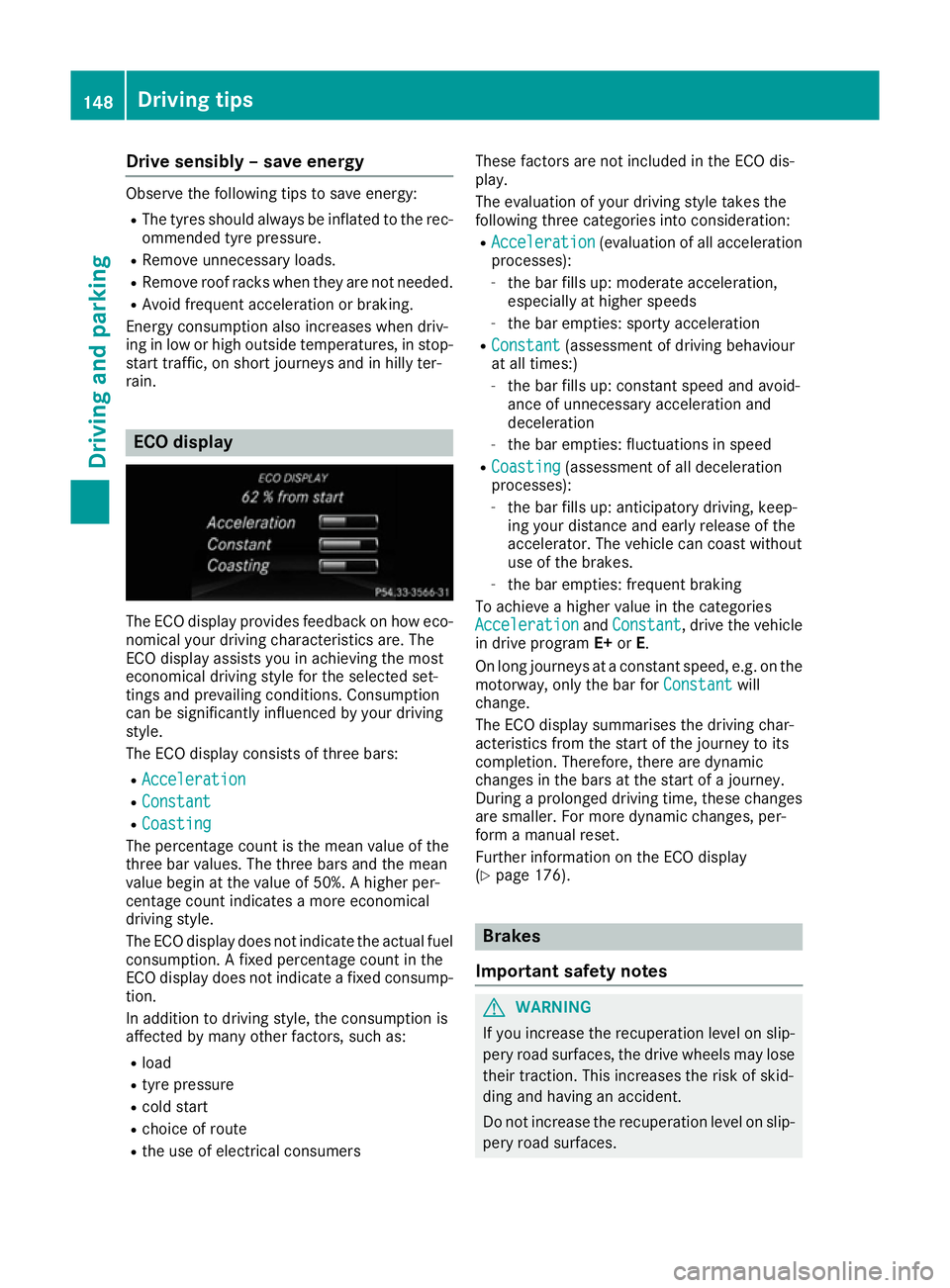
The ECO display provides feedback on how eco-
nomical your driving characteristics are. The
ECO display assists you in achieving the most
economical driving style for the selected set-
tings and prevailing conditions. Consumption
can be significantly influenced by your driving
style.
The ECO display consists of three bars:
R Acceleration Acceleration
R Constant
Constant
R Coasting
Coasting
The percentage count is the mean value of the
three bar values. The three bars and the mean
value begin at the value of 50%. A higher per-
centage count indicates a more economical
driving style.
The ECO display does not indicate the actual fuel
consumption. A fixed percentage count in the
ECO display does not indicate a fixed consump- tion.
In addition to driving style, the consumption is
affected by many other factors, such as:
R load
R tyre pressure
R cold start
R choice of route
R the use of electrical consumers These factors are not included in the ECO dis-
play.
The evaluation of your driving style takes the
following three categories into consideration:
R Acceleration
Acceleration (evaluation of all acceleration
processes):
- the bar fills up: moderate acceleration,
especially at higher speeds
- the bar empties: sporty acceleration
R Constant Constant (assessment of driving behaviour
at all times:)
- the bar fills up: constant speed and avoid-
ance of unnecessary acceleration and
deceleration
- the bar empties: fluctuations in speed
R Coasting Coasting (assessment of all deceleration
processes):
- the bar fills up: anticipatory driving, keep-
ing your distance and early release of the
accelerator. The vehicle can coast without
use of the brakes.
- the bar empties: frequent braking
To achieve a higher value in the categories
Acceleration Acceleration andConstant
Constant, drive the vehicle
in drive program E+orE.
On long journeys at a constant speed, e.g. on the motorway, only the bar for Constant
Constant will
change.
The ECO display summarises the driving char-
acteristics from the start of the journey to its
completion. Therefore, there are dynamic
changes in the bars at the start of a journey.
During a prolonged driving time, these changes are smaller. For more dynamic changes, per-
form a manual reset.
Further information on the ECO display
(Y page 176). Brakes
Important safety notes G
WARNING
If you increase the recuperation level on slip- pery road surfaces, the drive wheels may lose
their traction. This increases the risk of skid-
ding and having an accident.
Do not increase the recuperation level on slip-
pery road surfaces. 148
Driving tipsDriving and pa
rking
Page 153 of 293
Driving on wet roads
Aquaplaning If water has accumulated to a certain depth on
the road surface, there is a danger of aquaplan- ing occurring, even if:
R you are driving at low speeds
R the tyres have adequate tread depth
For this reason, drive in the following manner in the event of heavy rain or in conditions in which
aquaplaning can occur:
R lower your speed
R avoid tyre ruts
R avoid sudden steering movements
R brake carefully
Driving on flooded roads !
Bear in mind that vehicles travelling in front
or in the opposite direction create waves. This may cause the maximum permissible water
depth to be exceeded.
These notes must be observed under all cir-
cumstances. You could otherwise damage
the engine, the electronics or the transmis-
sion.
If you must drive on stretches of road on which
water has collected, please bear in mind that:
R in the case of standing water, the water level
must be no higher than the lower edge of the
vehicle body
R you should drive no faster than walking pace Winter driving
G
WARNING
If you increase the recuperation level on slip- pery road surfaces, the drive wheels may lose
their traction. This increases the risk of skid-
ding and having an accident.
Do not increase the recuperation level on slip-
pery road surfaces.
Have your vehicle winterproofed at a qualified
specialist workshop at the onset of winter.
You should drive particularly carefully on slip-
pery road surfaces. Avoid sudden acceleration, steering and braking manoeuvres. Do not use
cruise control.
If the vehicle threatens to skid or cannot be
stopped when moving at low speed:
X Shift the DIRECT SELECT lever to position N.
X Try to bring the vehicle under control by using
corrective steering.
The outside temperature indicator is not
designed to serve as an ice-warning device and
is therefore unsuitable for that purpose.
Changes in the outside temperature are dis-
played after a short delay.
Indicated temperatures just above the freezing
point do not guarantee that the road surface is
free of ice. The road may still be icy, especially in
wooded areas or on bridges.
You should pay special attention to road condi-
tions when temperatures are around freezing
point.
Further information on driving with snow chains (Y page 269).
Further information on driving with summer
tyres (Y page 268).
Observe the notes in the "Winter operation" sec-
tion (Y page 268). Driving systems
Cruise control
General notes Cruise control maintains a constant road speed
for you. It brakes automatically in order to avoid
exceeding the set speed. Change into transmis-
sion position D-
(Y page 132) on long and steep
downhill gradients. This increases recuperation
in overrun mode. This relieves the load on the
brake system and prevents the brakes from
overheating and wearing too quickly.
Use cruise control only if road and traffic con-
ditions are appropriate for maintaining a steady
speed for a prolonged period. You can store any road speed above 30 km/h.
The speed indicated in the speedometer may
differ slightly from the speed stored. 150
Driving syste
msDriving and parking
Page 154 of 293
Important safety notes
If you fail to adapt your driving style, cruise con-
trol can neither reduce the risk of an accident
nor override the laws of physics. Cruise control
cannot take into account road, weather or traffic
conditions. Cruise control is only an aid. You are responsible for the distance to the vehicle in
front, for vehicle speed, for braking in good time, and for staying in lane.
Do not use cruise control:
R in road and traffic conditions which do not
allow you to maintain a constant speed, e.g. in
heavy traffic or on winding roads
R on smooth or slippery roads. Braking or accel-
erating can cause the drive wheels to lose
traction and the vehicle could then skid
R when there is poor visibility, e.g. due to fog,
heavy rain or snow
If there is a change of drivers, advise the new
driver of the speed stored.
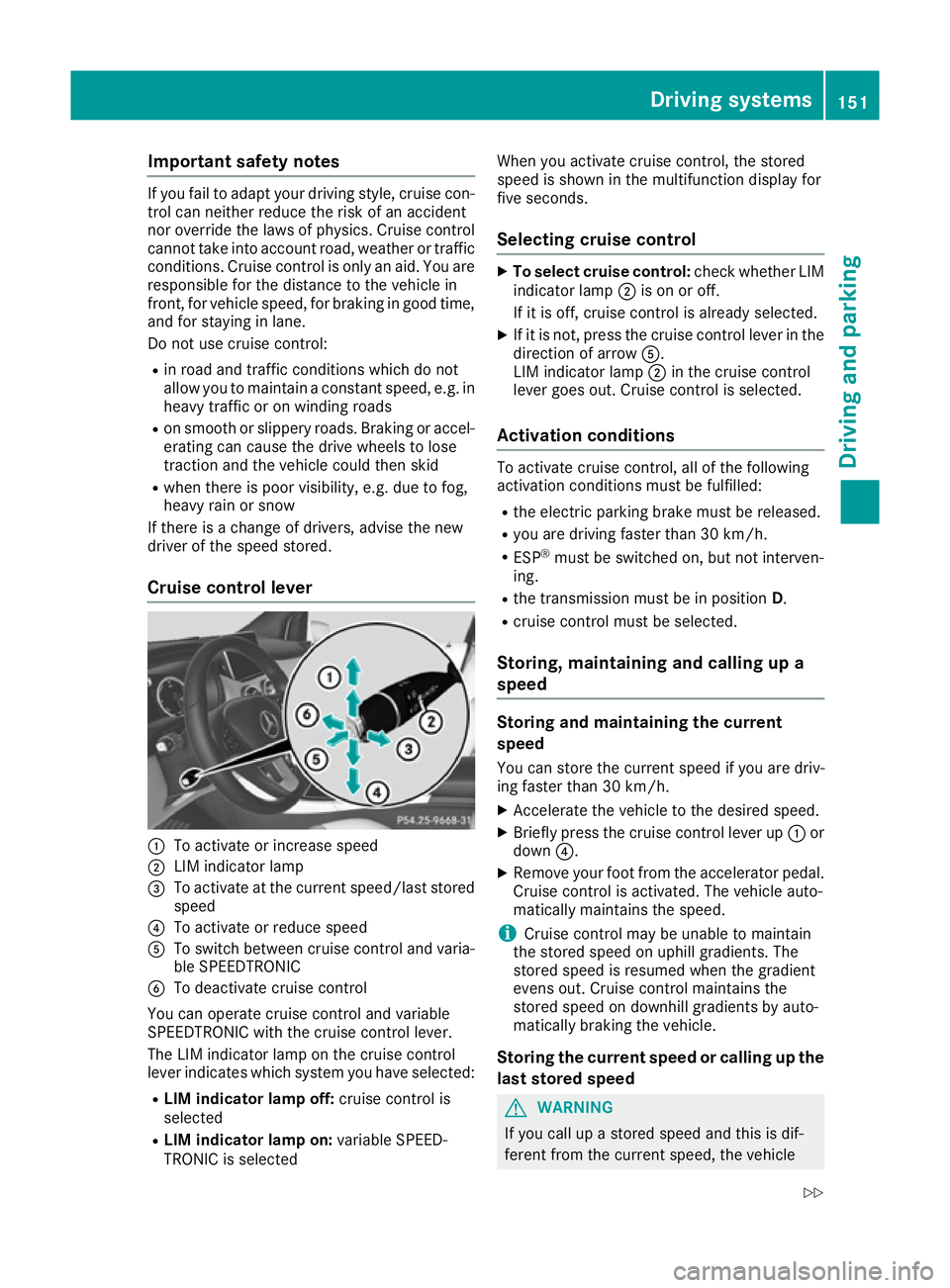
Cruise control lever :
To activate or increase speed
; LIM indicator lamp
= To activate at the current speed/last stored
speed
? To activate or reduce speed
A To switch between cruise control and varia-
ble SPEEDTRONIC
B To deactivate cruise control
You can operate cruise control and variable
SPEEDTRONIC with the cruise control lever.
The LIM indicator lamp on the cruise control
lever indicates which system you have selected:
R LIM indicator lamp off: cruise control is
selected
R LIM indicator lamp on: variable SPEED-
TRONIC is selected When you activate cruise control, the stored
speed is shown in the multifunction display for
five seconds.
Selecting cruise control X
To select cruise control: check whether LIM
indicator lamp ;is on or off.
If it is off, cruise control is already selected.
X If it is not, press the cruise control lever in the
direction of arrow A.
LIM indicator lamp ;in the cruise control
lever goes out. Cruise control is selected.
Activation conditions To activate cruise control, all of the following
activation conditions must be fulfilled:
R the electric parking brake must be released.
R you are driving faster than 30 km/h.
R ESP ®
must be switched on, but not interven-
ing.
R the transmission must be in position D.
R cruise control must be selected.
Storing, maintaining and calling up a
speed Storing and maintaining the current
speed
You can store the current speed if you are driv-
ing faster than 30 km/h.
X Accelerate the vehicle to the desired speed.
X Briefly press the cruise control lever up :or
down ?.
X Remove your foot from the accelerator pedal.
Cruise control is activated. The vehicle auto-
matically maintains the speed.
i Cruise control may be unable to maintain
the stored speed on uphill gradients. The
stored speed is resumed when the gradient
evens out. Cruise control maintains the
stored speed on downhill gradients by auto-
matically braking the vehicle.
Storing the current speed or calling up the
last stored speed G
WARNING
If you call up a stored speed and this is dif-
ferent from the current speed, the vehicle Driving systems
151Driving and parking
Z
Page 161 of 293
Problems with PARKTRONIC
Problem
Possible causes/consequences and
M
MSolutions Only the red segments in
the PARKTRONIC warn-
ing displays are lit. You
also hear a warning tone
for approximately two
seconds.
PARKTRONIC is then
deactivated and the indi-
cator lamp on the
PARKTRONIC button
lights up. PARKTRONIC has malfunctioned and has been deactivated.
X If problems persist, have PARKTRONIC checked at a qualified spe-
cialist workshop. Only the red segments in
the PARKTRONIC warn-
ing displays are lit.
PARKTRONIC is then
deactivated. The PARKTRONIC sensors are dirty or there is interference.
X
Clean the PARKTRONIC sensors (Y page 245).
X Switch the ignition back on. The problem may be caused by an external source of radio or ultra-
sound waves.
X See if PARKTRONIC functions in a different location. Active Parking Assist
General notes Active Parking Assist is an electronic parking aid
with ultrasound. It measures the road on both
sides of the vehicle. A parking symbol indicates a suitable parking space. Active steering inter-
vention can assist you during manoeuvring and
parking. You may also use PARKTRONIC
(Y page 155).
Important safety notes Active Parking Assist is only an aid. It is not a
substitute for your attention to the immediate
surroundings. The responsibility for safe
manoeuvring and parking remains with you.
Make sure that no persons, animals or objects
are in the manoeuvring range.
When PARKTRONIC is deactivated, Active Park-
ing Assist is also unavailable. G
WARNING
While parking or pulling out of a parking
space, the vehicle swings out and can drive
onto areas of the oncoming lane. This could cause you to collide with other road users.
There is a risk of an accident.
Pay attention to other road users. Stop the
vehicle if necessary or cancel the Active Park- ing Assist parking procedure.
! If unavoidable, you should drive over obsta-
cles such as kerbs slowly and not at a sharp
angle. Otherwise, you may damage the
wheels or tyres.
Active Parking Assist may also display spaces
not suitable for parking, e.g.: R parking or stopping prohibitions
R in front of driveways or entrances and exits
R unsuitable surfaces
Parking tips:
R on narrow roads, drive as closely as possible
past the parking space
R parking spaces that are littered or overgrown
might be identified or measured incorrectly
R parking spaces that are partially occupied by
trailer drawbars might not be identified as
such or be measured incorrectly
R snowfall or heavy rain may lead to a parking
space being measured inaccurately 158
Driving systemsDriving and parking
Page 162 of 293
R
pay attention to the PARKTRONIC
(Y page 157) warning messages during the
parking procedure
R you can intervene in the steering procedure to
correct it at any time. Active Parking Assist
will then be cancelled
R when transporting a load which protrudes
from your vehicle, you should not use Active
Parking Assist
R never use Active Parking Assist when snow
chains are fitted
R make sure that the tyre pressures are always
correct. This has a direct influence on the
parking characteristics of the vehicle.
Use Active Parking Assist for parking spaces
that are:
R parallel to the direction of travel.
R on straight roads, not bends
R on the same level as the road, e.g. not on the
pavement
Detecting parking spaces Objects located above the height range of Active
Parking Assist will not be detected when the
parking space is measured. These are not taken
into account when the parking procedure is cal- culated, e.g. overhanging loads, tail sections or
loading ramps of goods vehicles. G
WARNING
If there are objects above the detection range:
R Active Park Assist may steer too early
R the vehicle may not stop in front of these
objects
This could cause a collision. There is a risk of
an accident.
If objects are located above the detection
range, stop and deactivate Active Parking
Assist.
For further information on the detection range
(Y page 156).
Active Parking Assist does not support you park-
ing in spaces that are parallel to the direction of
travel if:
R the parking space is on a kerb
R the parking space appears to be blocked, for
example by foliage or grass paving blocks R
the range of movement is too small
R the parking space is bordered by an obstacle
which is not clearly defined such as a tree or a
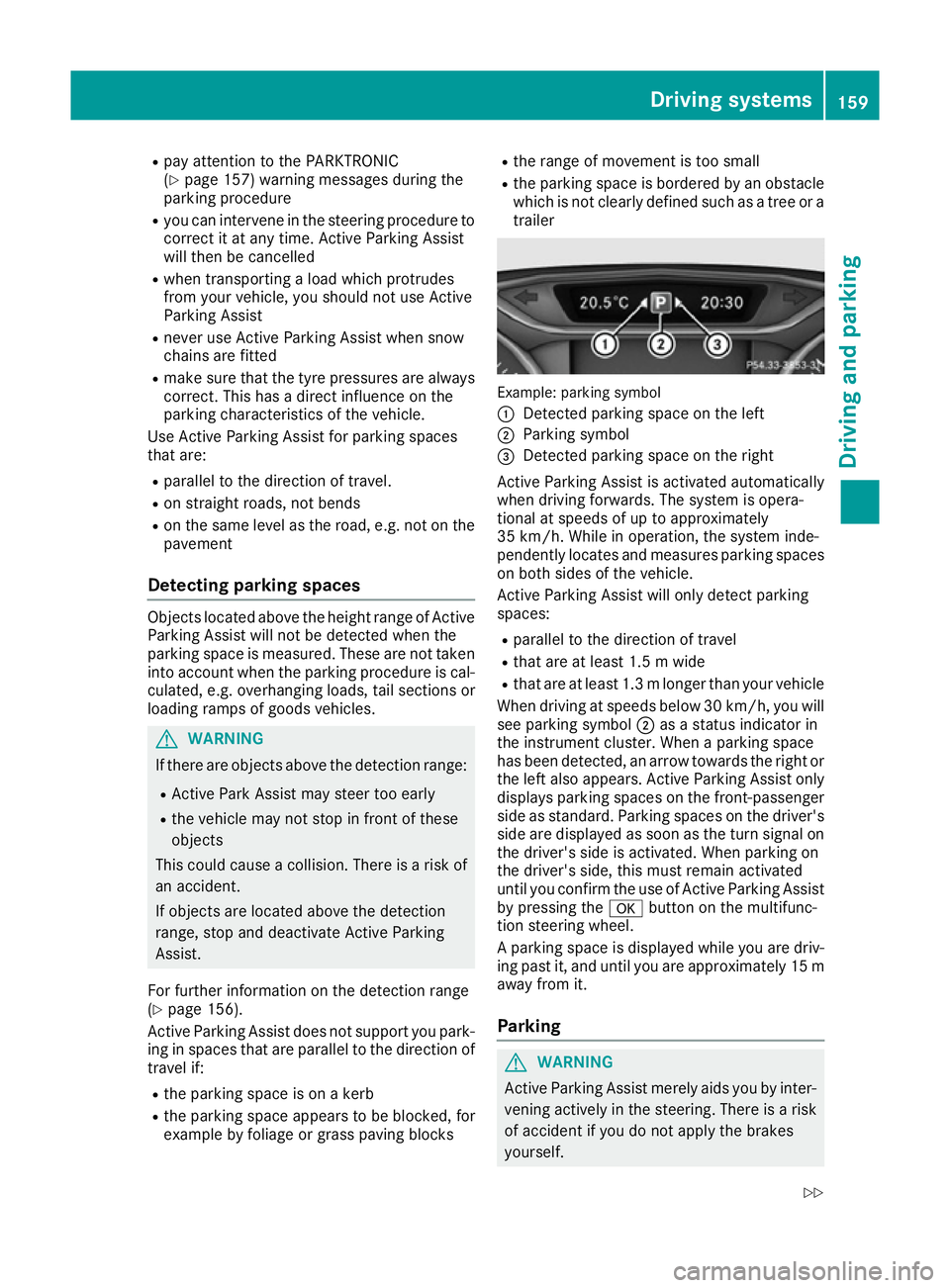
trailer Example: parking symbol
:
Detected parking space on the left
; Parking symbol
= Detected parking space on the right
Active Parking Assist is activated automatically
when driving forwards. The system is opera-
tional at speeds of up to approximately
35 km/ h.While in operation, the system inde-
pendently locates and measures parking spaces on both sides of the vehicle.
Active Parking Assist will only detect parking
spaces:
R parallel to the direction of travel
R that are at least 1.5 m wide
R that are at least 1.3 mlonger than your vehicle
When driving at speeds below 30 km/h, you will
see parking symbol ;as a status indicator in
the instrument cluster. When a parking space
has been detected, an arrow towards the right or the left also appears. Active Parking Assist only
displays parking spaces on the front-passenger side as standard. Parking spaces on the driver's
side are displayed as soon as the turn signal on the driver's side is activated. When parking on
the driver's side, this must remain activated
until you confirm the use of Active Parking Assist
by pressing the abutton on the multifunc-
tion steering wheel.
A parking space is displayed while you are driv- ing past it, and until you are approximately 15 maway from it.
Parking G
WARNING
Active Parking Assist merely aids you by inter- vening actively in the steering. There is a risk
of accident if you do not apply the brakes
yourself. Driving systems
159Driving and parking
Z
Page 163 of 293
Always apply the brakes yourself when park-
ing and manoeuvring.
X Stop the vehicle when the parking symbol
shows the desired parking space in the instru- ment cluster.
X Shift the transmission to position R.
The Start
Start Park
ParkAssist?
Assist? Yes:
Yes:OK
OKNo:
No: %
message appears in the multifunction display.
X To cancel the procedure: press the%
button on the multifunction steering wheel or pull away.
or
X To park using Active Parking Assist: press
the a button on the multifunction steering
wheel.
The Park Assist active Accelerate
Park Assist active Accelerate
and brake and brake Observe surroundings
Observe surroundings mes-
sage appears in the multifunction display.
X Release the multifunction steering wheel.
X Reverse the vehicle, being ready to brake at
all times. When reversing, drive at a speed
below 10 km/h. Otherwise, Active Parking
Assist will be cancelled.
Manoeuvring may be required in tight parking
spaces.
X Stop as soon as PARKTRONIC sounds the
continuous warning tone, if not before.
Manoeuvring may be required in tight parking
spaces.
The Park
Park Assist Assist active
activeSelect D
Select D Observe
Observe
surroundings
surroundings message appears in the multi-
function display.
X Shift the transmission to position Dwhile the
vehicle is stationary.
Active Parking Assist immediately steers in
the other direction.
The Park Assist active Accelerate Park Assist active Accelerate
and brake and brake Observe surroundings
Observe surroundings mes-
sage appears in the multifunction display.
i You will achieve the best results by waiting
for the steering procedure to complete before
pulling away.
X Drive forwards and be ready to brake at all
times.
Manoeuvring may be required in tight parking
spaces.
X Stop as soon as PARKTRONIC sounds the
continuous warning tone, if not before. The
Park
Park Assist Assist active
activeSelect R
Select R Observe
Observe
surroundings
surroundings message appears in the multi-
function display.
As soon as the parking procedure is complete,
the Park Assist switched off Park Assist switched off message
appears and a warning tone sounds. The vehicle
is now parked.
Active Parking Assist no longer supports you
with steering interventions and brake applica-
tions. When Active Parking Assist is finished,
you must steer and brake again yourself.
PARKTRONIC is still available.
Parking tips:
R The way your vehicle is positioned in the park-
ing space after parking is dependent on vari-
ous factors. These include the position and
shape of the vehicles parked in front and
behind it and the conditions of the location. It
may be the case that Active Parking Assist
guides you too far into a parking space, or not
far enough into it. In some cases, it may also
lead you across or onto the kerb. If necessary, you should cancel the parking procedure withActive Parking Assist.
R You can also preselect transmission position
D. The vehicle redirects and does not drive as
far into the parking space. Should the trans-
mission change take place too early, the park-
ing procedure will be cancelled. A sensible
parking position can no longer be achieved
from this position.
Exiting a parking space In order that Active Parking Assist can support
you when exiting the parking space:
R you need to have parked using Active Parking
Assist.
R the border of the parking space must be high
enough at the front and the rear. A kerb stone is too small, for example.
R the border of the parking space must not be
too wide, as the position of the vehicle must
not exceed an angle of 45° to the starting
position as it is manoeuvred into the parking
space.
R a manoeuvring distance of at least 1.0 mmust
be available.
Active Parking Assist can only assist you with
exiting a parking space if you have parked the
vehicle parallel to the direction of travel using
Active Parking Assist. 160
Driving systemsDriving and pa
rking
Page 164 of 293
X
Start the engine.
X Release the electric parking brake.
X Switch on the turn signal in the direction you
will drive out of the parking space.
X Shift the transmission to position Dor R.
The Start Park Assist? Yes: OK No:
Start Park Assist? Yes: OK No:
message appears in the multifunction display %.
X To cancel the procedure: press the%
button on the multifunction steering wheel or
pull away.
or X To exit a parking space using Active Park-
ing Assist: press theabutton on the mul-
tifunction steering wheel.
The Park Assist active Accelerate
Park Assist active Accelerate
and brake Observe surroundings
and brake Observe surroundings mes-
sage appears in the multifunction display.
X Release the multifunction steering wheel.
X Pull away, being ready to brake at all times. Do
not exceed a maximum speed of approx-
imately 10 km/h when exiting a parking
space. Otherwise, Active Parking Assist will
be cancelled.
X Stop when PARKTRONIC sounds the contin-
uous warning tone, if not before.
X Depending on the message or as required,
shift the transmission to position Dor R.
Active Parking Assist immediately steers in
the other direction. The Park Assist Park Assist
active
active Accelerate
Accelerate and
andbrake
brake Observe
Observe
surroundings
surroundings message appears in the mul-
tifunction display.
i You will achieve the best results by waiting
for the steering procedure to complete before
pulling away.
If you reverse after activation, the steering
wheel is moved to the straight-ahead posi-
tion.
X Drive forwards and reverse as prompted by
the PARKTRONIC warning displays, several
times if necessary.
X Stop when PARKTRONIC sounds the contin-
uous warning tone, if not before.
Once you have exited the parking space com-
pletely, the steering wheel is moved to the
straight-ahead position. You hear a tone and the
Park
Park Assist
Assist switched switched off
offmessage appears
in the multifunction display. You will then have
to steer and merge into traffic on your own.
PARKTRONIC is still available. You can take over the steering before the vehicle has exited the
parking space completely. This is useful, for
example, when you recognise that it is already
possible to pull out of the parking space.
Cancelling Active Parking Assist X
Stop the movement of the multifunction
steering wheel or steer yourself.
Active Parking Assist will be cancelled at
once. The Park Assist cancelled
Park Assist cancelled mes-
sage appears in the multifunction display.
or
X Press the PARKTRONIC button (Y page 157).
PARKTRONIC is switched off and Active Park- ing Assist is immediately cancelled. The
Park Assist cancelled Park Assist cancelled message appears
in the multifunction display.
Active Parking Assist is cancelled automatically
if:
R the electric parking brake is applied
R transmission position Pis selected
R parking using Active Parking Assist is no lon-
ger possible
R you are driving faster than 10 km/h
R a wheel spins and ESP ®
intervenes or fails.
The ÷ warning lamp lights up in the instru-
ment cluster.
A warning tone sounds. The parking symbol dis-
appears and the multifunction display shows the
Park Assist cancelled Park Assist cancelled message.
When Active Parking Assist is cancelled, you
must steer and brake again yourself.
If a system malfunction occurs, the vehicle is
braked to a standstill. To drive on, depress the
accelerator pedal again. Driving systems
161Driving and parking Z