wheel MERCEDES-BENZ B-CLASS HATCHBACK 2015 Owner's Guide
[x] Cancel search | Manufacturer: MERCEDES-BENZ, Model Year: 2015, Model line: B-CLASS HATCHBACK, Model: MERCEDES-BENZ B-CLASS HATCHBACK 2015Pages: 293, PDF Size: 10.83 MB
Page 96 of 293
Mirrors
Rear-view mirror
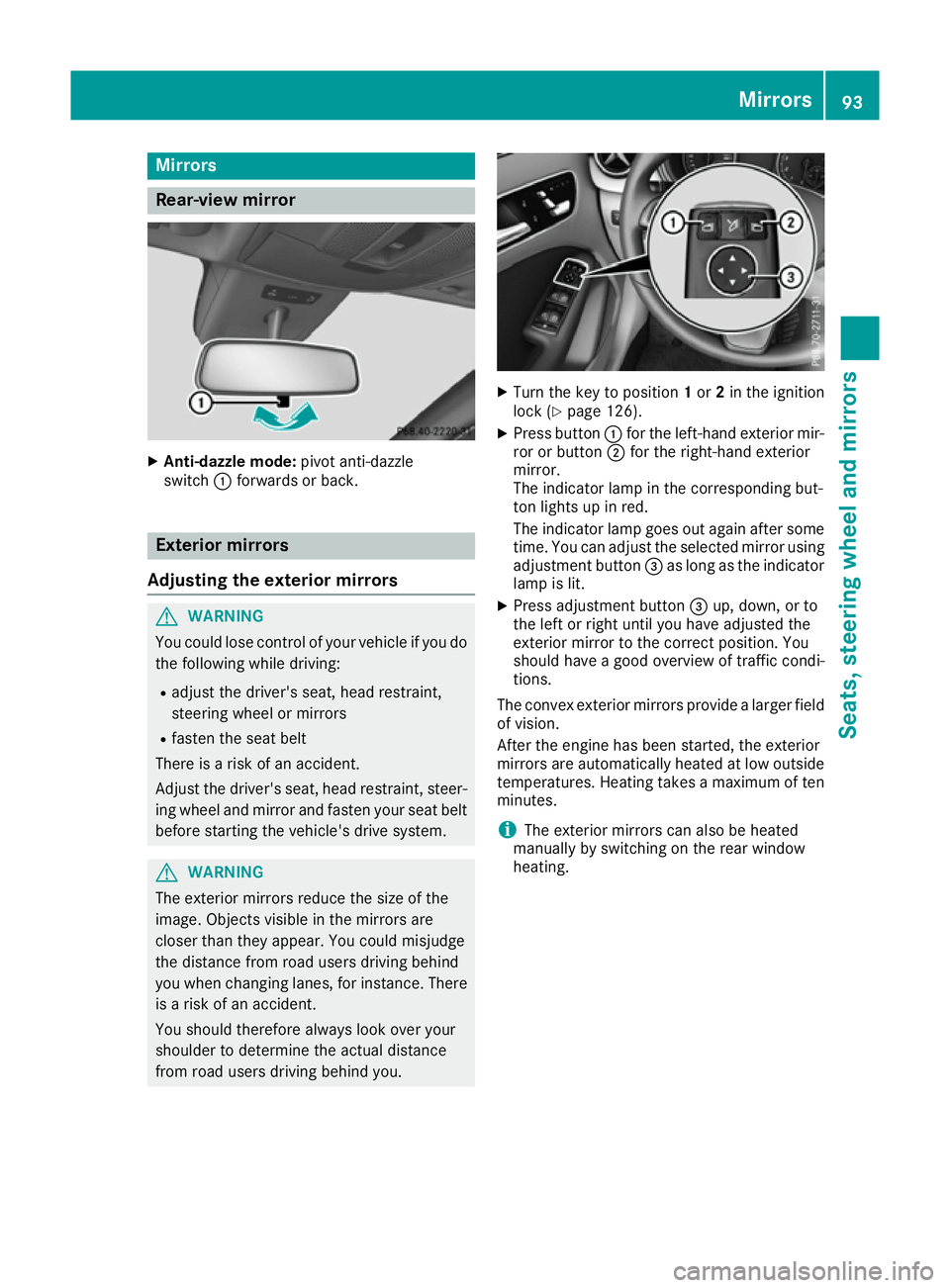
X
Anti-dazzle mode: pivot anti-dazzle
switch :forwards or back. Exterior mirrors
Adjusting the exterior mirrors G
WARNING
You could lose control of your vehicle if you do the following while driving:
R adjust the driver's seat, head restraint,
steering wheel or mirrors
R fasten the seat belt
There is a risk of an accident.
Adjust the driver's seat, head restraint, steer-
ing wheel and mirror and fasten your seat belt before starting the vehicle's drive system. G
WARNING
The exterior mirrors reduce the size of the
image. Objects visible in the mirrors are
closer than they appear. You could misjudge
the distance from road users driving behind
you when changing lanes, for instance. There is a risk of an accident.
You should therefore always look over your
shoulder to determine the actual distance
from road users driving behind you. X
Turn the key to position 1or 2in the ignition
lock (Y page 126).
X Press button :for the left-hand exterior mir-
ror or button ;for the right-hand exterior
mirror.
The indicator lamp in the corresponding but-
ton lights up in red.
The indicator lamp goes out again after some
time. You can adjust the selected mirror using
adjustment button =as long as the indicator
lamp is lit.
X Press adjustment button =up, down, or to
the left or right until you have adjusted the
exterior mirror to the correct position. You
should have a good overview of traffic condi-
tions.
The convex exterior mirrors provide a larger field
of vision.
After the engine has been started, the exterior
mirrors are automatically heated at low outside temperatures. Heating takes a maximum of ten
minutes.
i The exterior mirrors can also be heated
manually by switching on the rear window
heating. Mirrors
93Seats, steering wheel and mirrors Z
Page 97 of 293
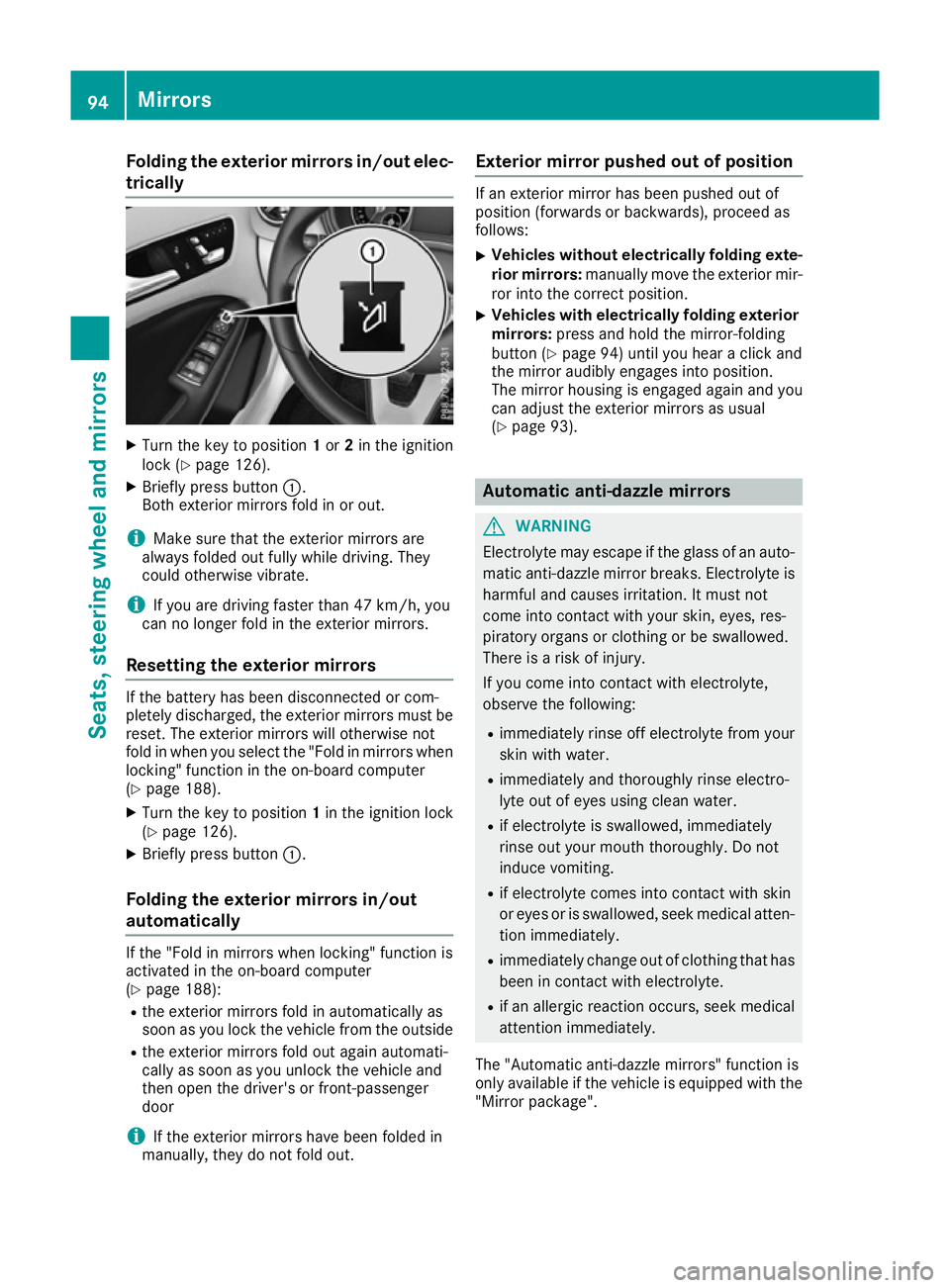
Folding the exterior mirrors in/out elec-
trically X
Turn the key to position 1or 2in the ignition
lock (Y page 126).
X Briefly press button :.
Both exterior mirrors fold in or out.
i Make sure that the exterior mirrors are
always folded out fully while driving. They
could otherwise vibrate.
i If you are driving faster than 47 km/h, you
can no longer fold in the exterior mirrors.
Resetting the exterior mirrors If the battery has been disconnected or com-
pletely discharged, the exterior mirrors must be
reset. The exterior mirrors will otherwise not
fold in when you select the "Fold in mirrors whenlocking" function in the on-board computer
(Y page 188).
X Turn the key to position 1in the ignition lock
(Y page 126).
X Briefly press button :.
Folding the exterior mirrors in/out
automatically If the "Fold in mirrors when locking" function is
activated in the on-board computer
(Y page 188):
R the exterior mirrors fold in automatically as
soon as you lock the vehicle from the outside
R the exterior mirrors fold out again automati-
cally as soon as you unlock the vehicle and
then open the driver's or front-passenger
door
i If the exterior mirrors have been folded in
manually, they do not fold out. Exterior mirror pushed out of position If an exterior mirror has been pushed out of
position (forwards or backwards), proceed as
follows:
X Vehicles without electrically folding exte-
rior mirrors: manually move the exterior mir-
ror into the correct position.
X Vehicles with electrically folding exterior
mirrors: press and hold the mirror-folding
button (Y page 94) until you hear a click and
the mirror audibly engages into position.
The mirror housing is engaged again and you can adjust the exterior mirrors as usual
(Y page 93). Automatic anti-dazzle mirrors
G
WARNING
Electrolyte may escape if the glass of an auto- matic anti-dazzle mirror breaks. Electrolyte is
harmful and causes irritation. It must not
come into contact with your skin, eyes, res-
piratory organs or clothing or be swallowed.
There is a risk of injury.
If you come into contact with electrolyte,
observe the following:
R immediately rinse off electrolyte from your
skin with water.
R immediately and thoroughly rinse electro-
lyte out of eyes using clean water.
R if electrolyte is swallowed, immediately
rinse out your mouth thoroughly. Do not
induce vomiting.
R if electrolyte comes into contact with skin
or eyes or is swallowed, seek medical atten-
tion immediately.
R immediately change out of clothing that has
been in contact with electrolyte.
R if an allergic reaction occurs, seek medical
attention immediately.
The "Automatic anti-dazzle mirrors" function is
only available if the vehicle is equipped with the
"Mirror package". 94
MirrorsSeats, steering wheel and
mirrors
Page 98 of 293
The rear-view mirror and the exterior mirror on
the driver's side automatically go into anti-daz-
zle mode if:
R the ignition is switched on and
R incident light from headlamps strikes the sen-
sor in the rear-view mirror
The mirrors do not go into anti-dazzle mode if
reverse gear is engaged or if the interior lighting
is switched on. Parking position of the exterior mirror
on the front-passenger side
General notes The "Parking position for the exterior mirror on
the front-passenger side" function is only avail-
able if the vehicle is equipped with the "Memory
package".
Setting and storing the parking position You can set the front-passenger side exterior
mirror so that you can see the rear wheel on that side as soon as you engage reverse gear. You
can store this position.
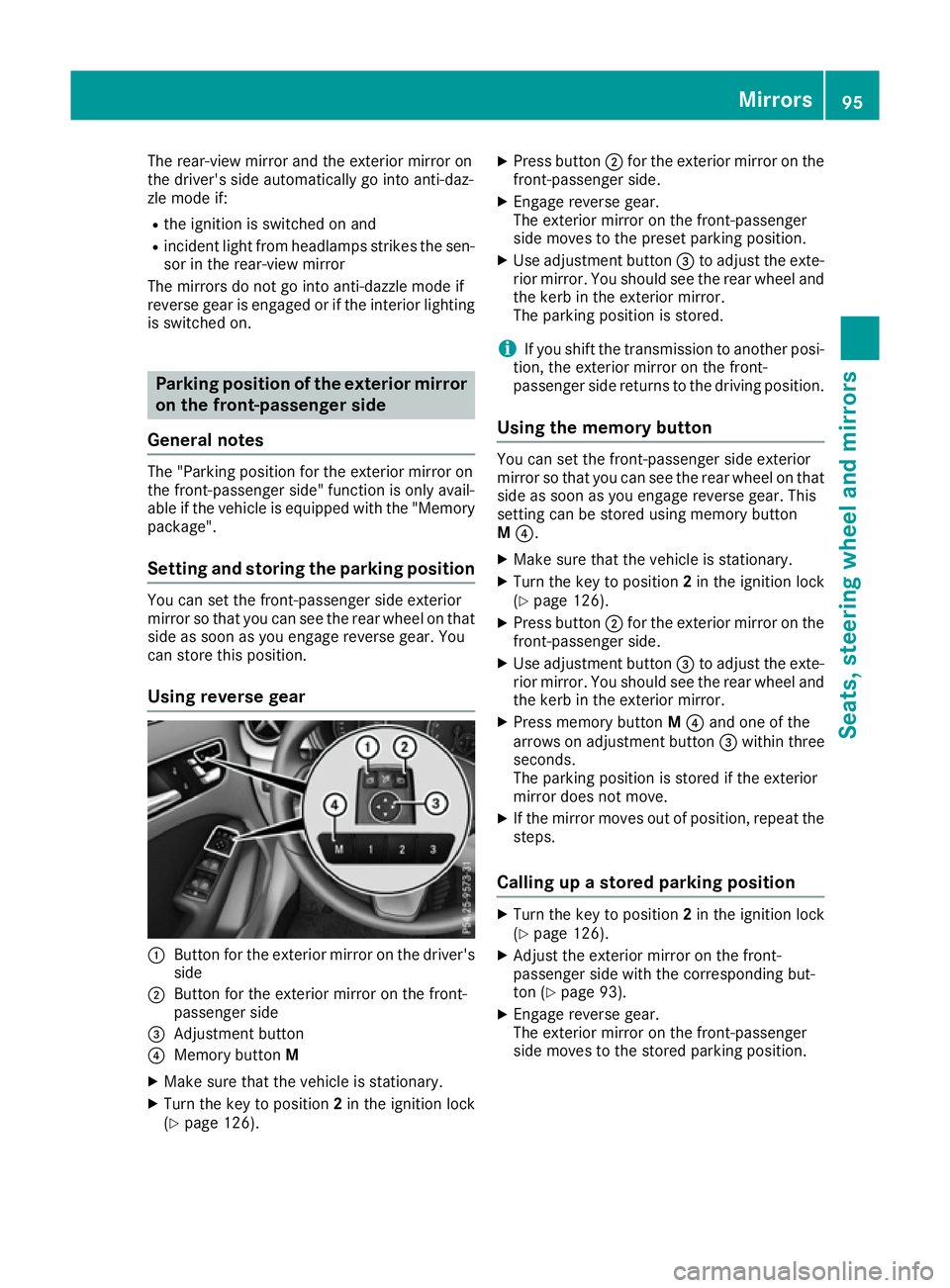
Using reverse gear :
Button for the exterior mirror on the driver's
side
; Button for the exterior mirror on the front-
passenger side
= Adjustment button
? Memory button M
X Make sure that the vehicle is stationary.
X Turn the key to position 2in the ignition lock
(Y page 126). X
Press button ;for the exterior mirror on the
front-passenger side.
X Engage reverse gear.
The exterior mirror on the front-passenger
side moves to the preset parking position.
X Use adjustment button =to adjust the exte-
rior mirror. You should see the rear wheel and
the kerb in the exterior mirror.
The parking position is stored.
i If you shift the transmission to another posi-
tion, the exterior mirror on the front-
passenger side returns to the driving position.
Using the memory button You can set the front-passenger side exterior
mirror so that you can see the rear wheel on that
side as soon as you engage reverse gear. This
setting can be stored using memory button
M ?.
X Make sure that the vehicle is stationary.
X Turn the key to position 2in the ignition lock
(Y page 126).
X Press button ;for the exterior mirror on the
front-passenger side.
X Use adjustment button =to adjust the exte-
rior mirror. You should see the rear wheel and
the kerb in the exterior mirror.
X Press memory button M? and one of the
arrows on adjustment button =within three
seconds.
The parking position is stored if the exterior
mirror does not move.
X If the mirror moves out of position, repeat the
steps.
Calling up a stored parking position X
Turn the key to position 2in the ignition lock
(Y page 126).
X Adjust the exterior mirror on the front-
passenger side with the corresponding but-
ton (Y page 93).
X Engage reverse gear.
The exterior mirror on the front-passenger
side moves to the stored parking position. Mirrors
95Seats, steering wheel and mirrors Z
Page 99 of 293
The exterior mirror on the front-passenger side
moves back to its original position:
R as soon as you exceed a speed of 15 km/h
R about ten seconds after you have disengaged
reverse gear
R if you press button :for the exterior mirror
on the driver's side. Memory function
Important safety notes
G
WARNING
If you use the memory function on the driver's side while driving, the adjustments could
cause you to lose control of the vehicle. There
is a risk of an accident.
Only use the memory function on the driver's
side while the vehicle is stationary. G
WARNING
If the memory function adjusts the seat, you
and other vehicle occupants – particularly
children – could become trapped. There is a
risk of injury.
While the memory function is making adjust-
ments, make sure that no one has any part of their body within the sweep of the seat. If
someone becomes trapped, immediately
release the memory function position button.
The adjustment is stopped. G
WARNING
If children activate the memory function, they
could become trapped, especially if they are
unattended. There is a risk of injury.
When leaving the vehicle, always take the key with you and lock the vehicle. Never leave
children unattended in the vehicle.
The memory function can be used at any time,
e.g. even when the key is not in the ignition lock. Storing settings
With the memory function, you can store up to
three different settings, e.g. for three different
people.
The following settings are stored as a single
memory preset:
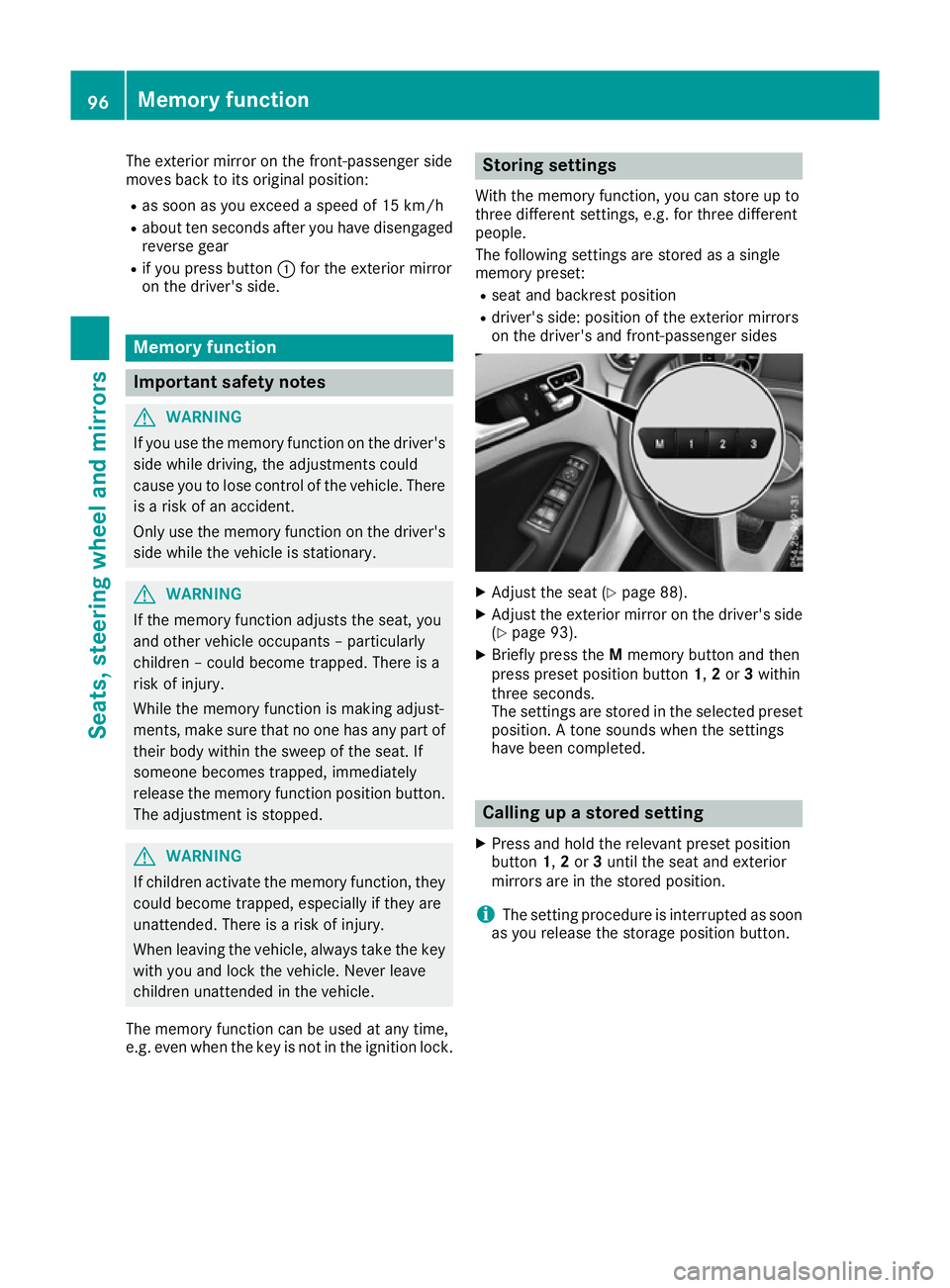
R seat and backrest position
R driver's side: position of the exterior mirrors
on the driver's and front-passenger sides X
Adjust the seat (Y page 88).
X Adjust the exterior mirror on the driver's side
(Y page 93).
X Briefly press the Mmemory button and then
press preset position button 1,2or 3within
three seconds.
The settings are stored in the selected preset
position. A tone sounds when the settings
have been completed. Calling up a stored setting
X Press and hold the relevant preset position
button 1,2or 3until the seat and exterior
mirrors are in the stored position.
i The setting procedure is interrupted as soon
as you release the storage position button. 96
Memory functionSeats, steering wheel and mirrors
Page 103 of 293
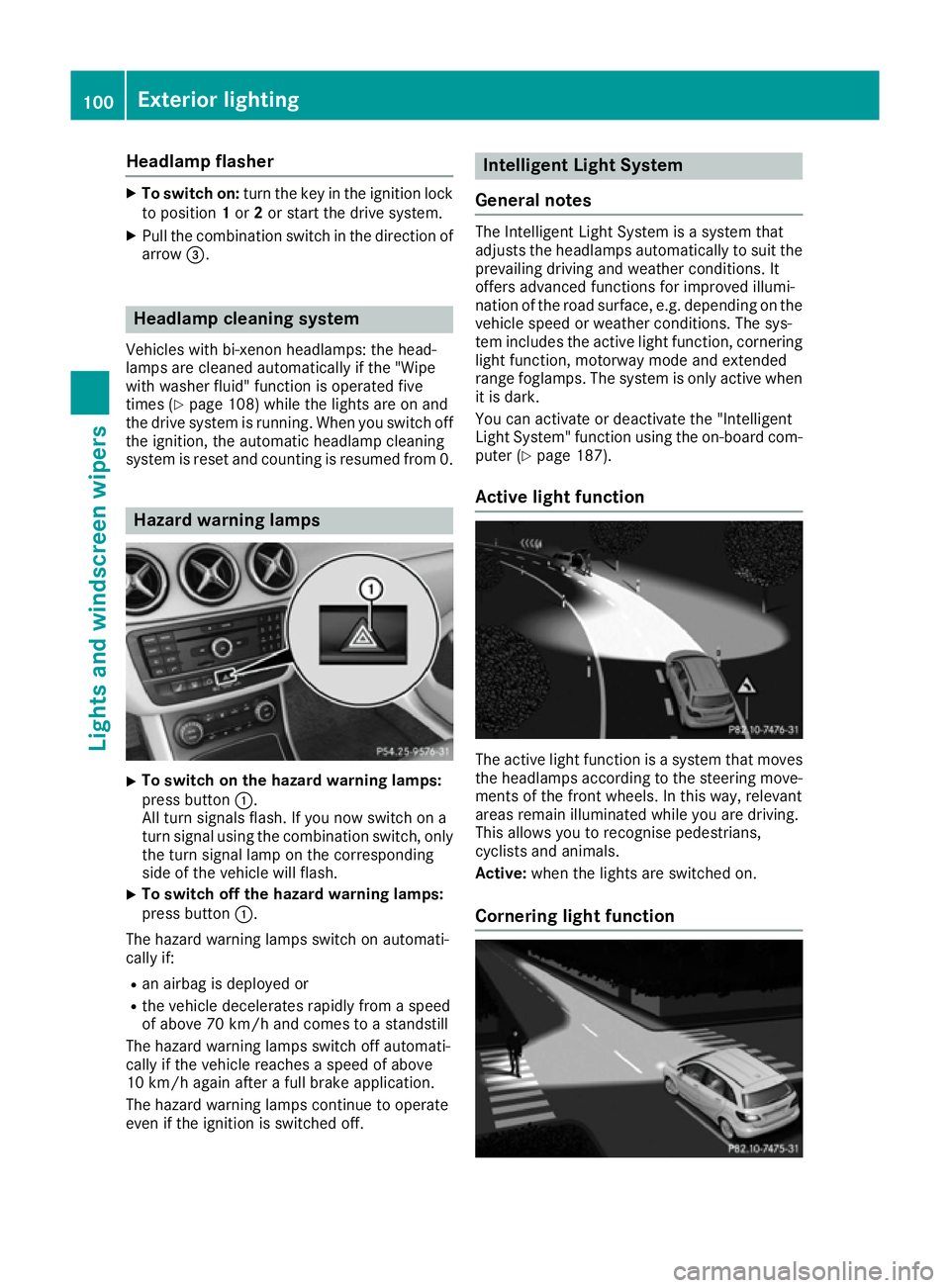
Headlamp flasher
X
To switch on: turn the key in the ignition lock
to position 1or 2or start the drive system.
X Pull the combination switch in the direction of
arrow =. Headlamp cleaning system
Vehicles with bi-xenon headlamps: the head-
lamps are cleaned automatically if the "Wipe
with washer fluid" function is operated five
times (Y page 108) while the lights are on and
the drive system is running. When you switch off the ignition, the automatic headlamp cleaning
system is reset and counting is resumed from 0. Hazard warning lamps
X
To switch on the hazard warning lamps:
press button :.
All turn signals flash. If you now switch on a
turn signal using the combination switch, only the turn signal lamp on the corresponding
side of the vehicle will flash.
X To switch off the hazard warning lamps:
press button
:.
The hazard warning lamps switch on automati-
cally if:
R an airbag is deployed or
R the vehicle decelerates rapidly from a speed
of above 70 km/h and comes to a standstill
The hazard warning lamps switch off automati-
cally if the vehicle reaches a speed of above
10 km/h again after a full brake application.
The hazard warning lamps continue to operate
even if the ignition is switched off. Intelligent Light System
General notes The Intelligent Light System is a system that
adjusts the headlamps automatically to suit the
prevailing driving and weather conditions. It
offers advanced functions for improved illumi-
nation of the road surface, e.g. depending on the vehicle speed or weather conditions. The sys-
tem includes the active light function, corneringlight function, motorway mode and extended
range foglamps. The system is only active when it is dark.
You can activate or deactivate the "Intelligent
Light System" function using the on-board com-
puter (Y page 187).
Active light function The active light function is a system that moves
the headlamps according to the steering move-
ments of the front wheels. In this way, relevant
areas remain illuminated while you are driving.
This allows you to recognise pedestrians,
cyclists and animals.
Active: when the lights are switched on.
Cornering light function 100
Exterior lightingLights and windscreen wipers
Page 104 of 293
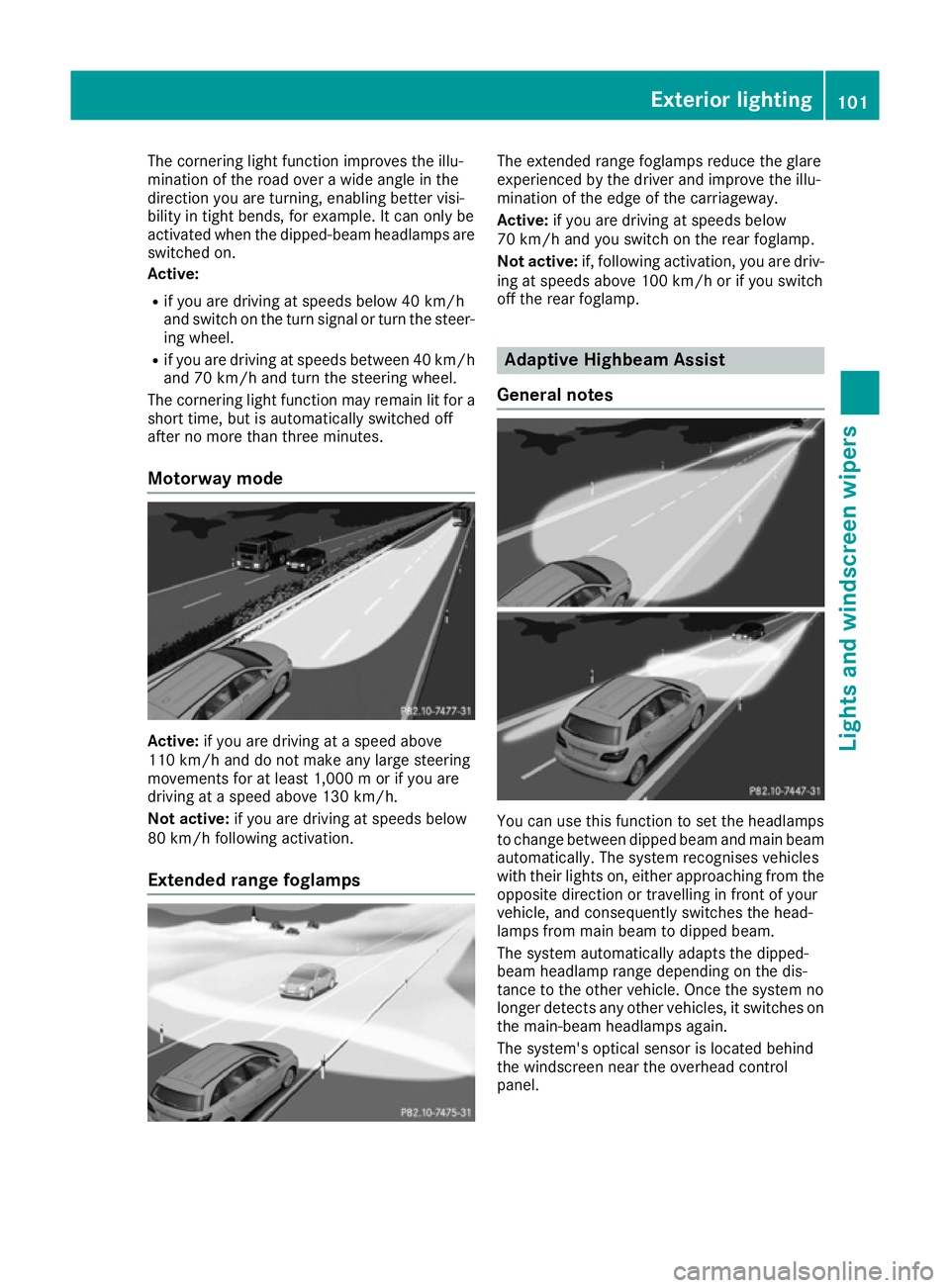
The cornering light function improves the illu-
mination of the road over a wide angle in the
direction you are turning, enabling better visi-
bility in tight bends, for example. It can only be
activated when the dipped-beam headlamps are
switched on.
Active:
R if you are driving at speeds below 40 km/h
and switch on the turn signal or turn the steer- ing wheel.
R if you are driving at speeds between 40 km/h
and 70 km/h and turn the steering wheel.
The cornering light function may remain lit for a
short time, but is automatically switched off
after no more than three minutes.
Motorway mode Active:
if you are driving at a speed above
110 km/h and do not make any large steering
movements for at least 1,000 m or if you are
driving at a speed above 130 km/h.
Not active: if you are driving at speeds below
80 km/h following activation.
Extended range foglamps The extended range foglamps reduce the glare
experienced by the driver and improve the illu-
mination of the edge of the carriageway.
Active:
if you are driving at speeds below
70 km/h and you switch on the rear foglamp.
Not active: if, following activation, you are driv-
ing at speeds above 100 km/h or if you switch
off the rear foglamp. Adaptive Highbeam Assist
General notes You can use this function to set the headlamps
to change between dipped beam and main beam automatically. The system recognises vehicles
with their lights on, either approaching from theopposite direction or travelling in front of your
vehicle, and consequently switches the head-
lamps from main beam to dipped beam.
The system automatically adapts the dipped-
beam headlamp range depending on the dis-
tance to the other vehicle. Once the system no
longer detects any other vehicles, it switches on the main-beam headlamps again.
The system's optical sensor is located behind
the windscreen near the overhead control
panel. Exterior lighting
101Lights and windscreen wipers Z
Page 108 of 293
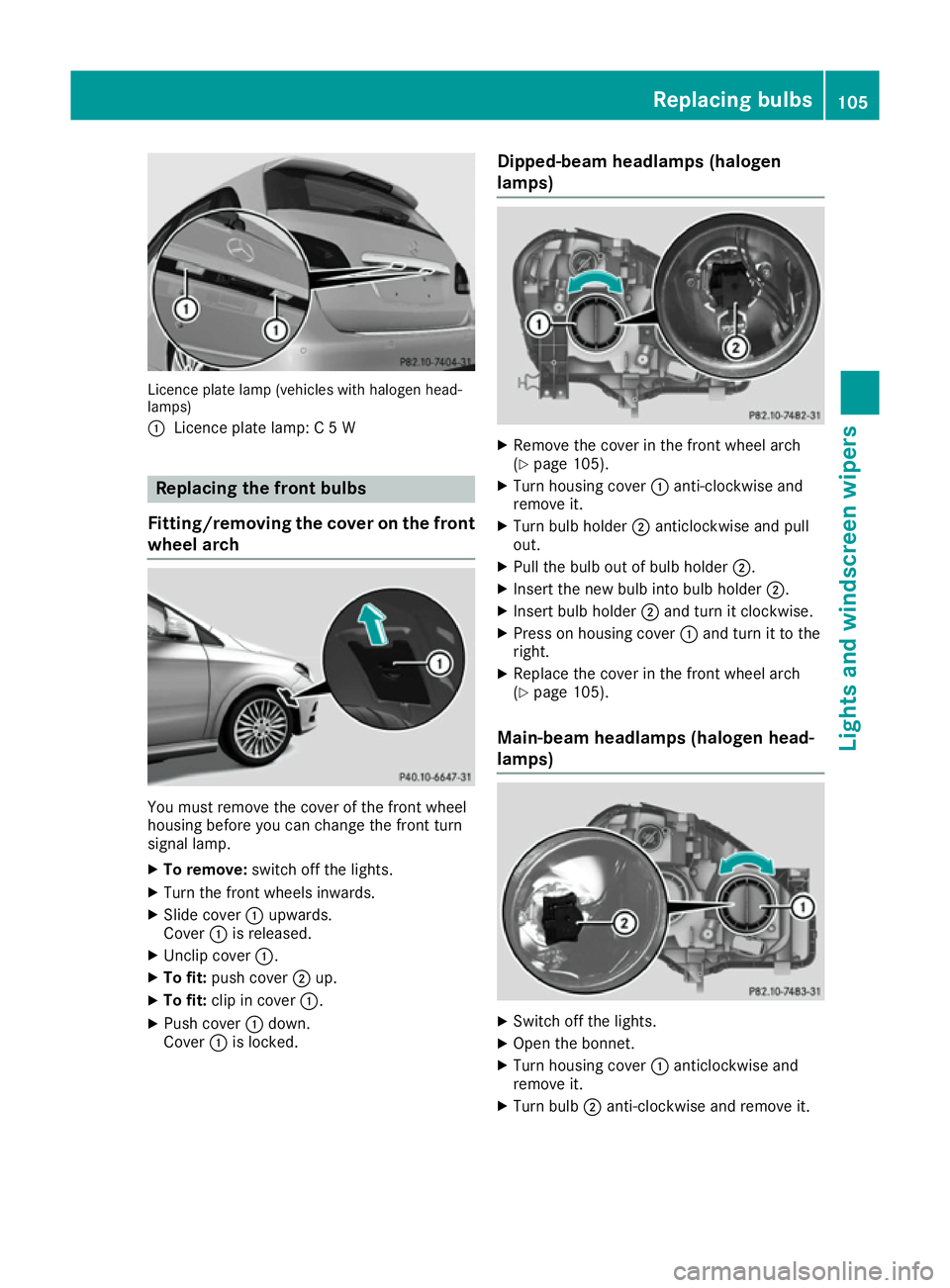
Licence plate lamp (vehicles with halogen head-
lamps)
: Licence plate lamp: C 5 W Replacing the front bulbs
Fitting/removing the cover on the front wheel arch You must remove the cover of the front wheel
housing before you can change the front turn
signal lamp.
X To remove: switch off the lights.
X Turn the front wheels inwards.
X Slide cover :upwards.
Cover :is released.
X Unclip cover :.
X To fit: push cover ;up.
X To fit: clip in cover :.
X Push cover :down.
Cover :is locked. Dipped-beam headlamps (halogen
lamps) X
Remove the cover in the front wheel arch
(Y page 105).
X Turn housing cover :anti-clockwise and
remove it.
X Turn bulb holder ;anticlockwise and pull
out.
X Pull the bulb out of bulb holder ;.
X Insert the new bulb into bulb holder ;.
X Insert bulb holder ;and turn it clockwise.
X Press on housing cover :and turn it to the
right.
X Replace the cover in the front wheel arch
(Y page 105).
Main-beam headlamps (halogen head-
lamps) X
Switch off the lights.
X Open the bonnet.
X Turn housing cover :anticlockwise and
remove it.
X Turn bulb ;anti-clockwise and remove it. Replacing bulbs
105Lights and windscreen wipers Z
Page 127 of 293
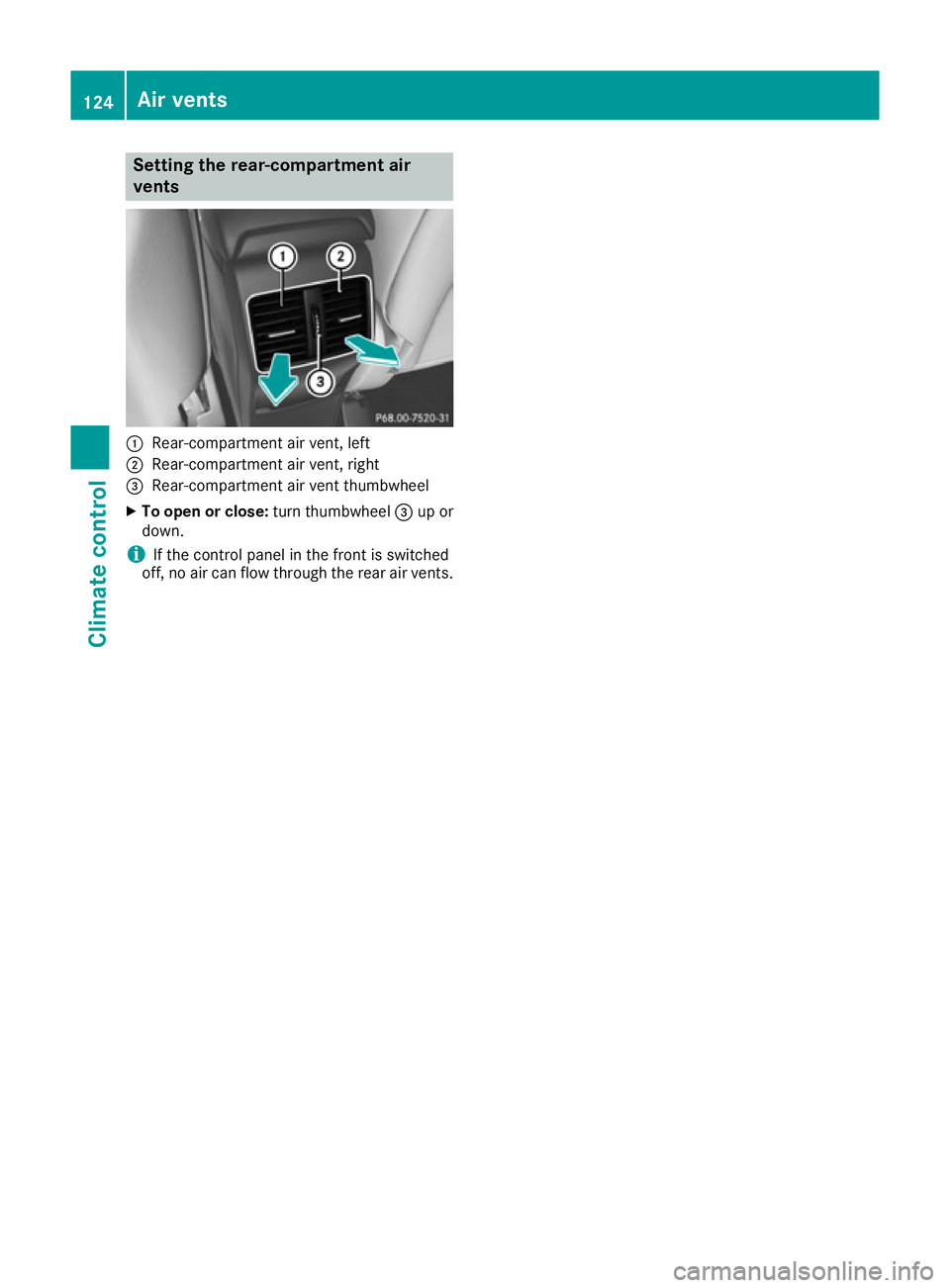
Setting the rear-compartment air
vents :
Rear-compartment air vent, left
; Rear-compartment air vent, right
= Rear-compartment air vent thumbwheel
X To open or close: turn thumbwheel=up or
down.
i If the control panel in the front is switched
off, no air can flow through the rear air vents. 124
Air ventsClimate control
Page 134 of 293
Transmission positions
B Parking lock
This prevents the vehicle from rolling
away when stopped. Only move the
DIRECT SELECT lever to Pwhen the
vehicle is stationary.
The key can only be removed when
the DIRECT SELECT lever is in posi-
tion P. When there is no key in the
ignition lock, the DIRECT SELECT
lever is locked in position P.C Reverse gear
Only move the DIRECT SELECT lever
to
Rwhen the vehicle is stationary. A Neutral
No power is transmitted from the
drive system to the drive wheels.
Releasing the brakes will allow you to
move the vehicle freely.
If ESP ®
is faulty: only move the
DIRECT SELECT lever to Nif the vehi-
cle is in danger of skidding, e.g. on icy
roads. 7 Drive
For driving forwards
Driving tips
Holding the vehicle stationary on uphill
gradients Do not hold the vehicle stationary on uphill gra-
dients by depressing the accelerator pedal.
Instead, only ever hold the vehicle stationary on
uphill gradients by:
R depressing the brake pedal
R engaging the electric parking brake
Kickdown Use kickdown for maximum acceleration:
X Depress the accelerator pedal beyond the
pressure point.
The needle in the power display points to the
boost area (Y page 173).
X Ease off the accelerator pedal once the
desired speed is reached. i
Maximum acceleration is available for a limi-
ted time. Program selector button
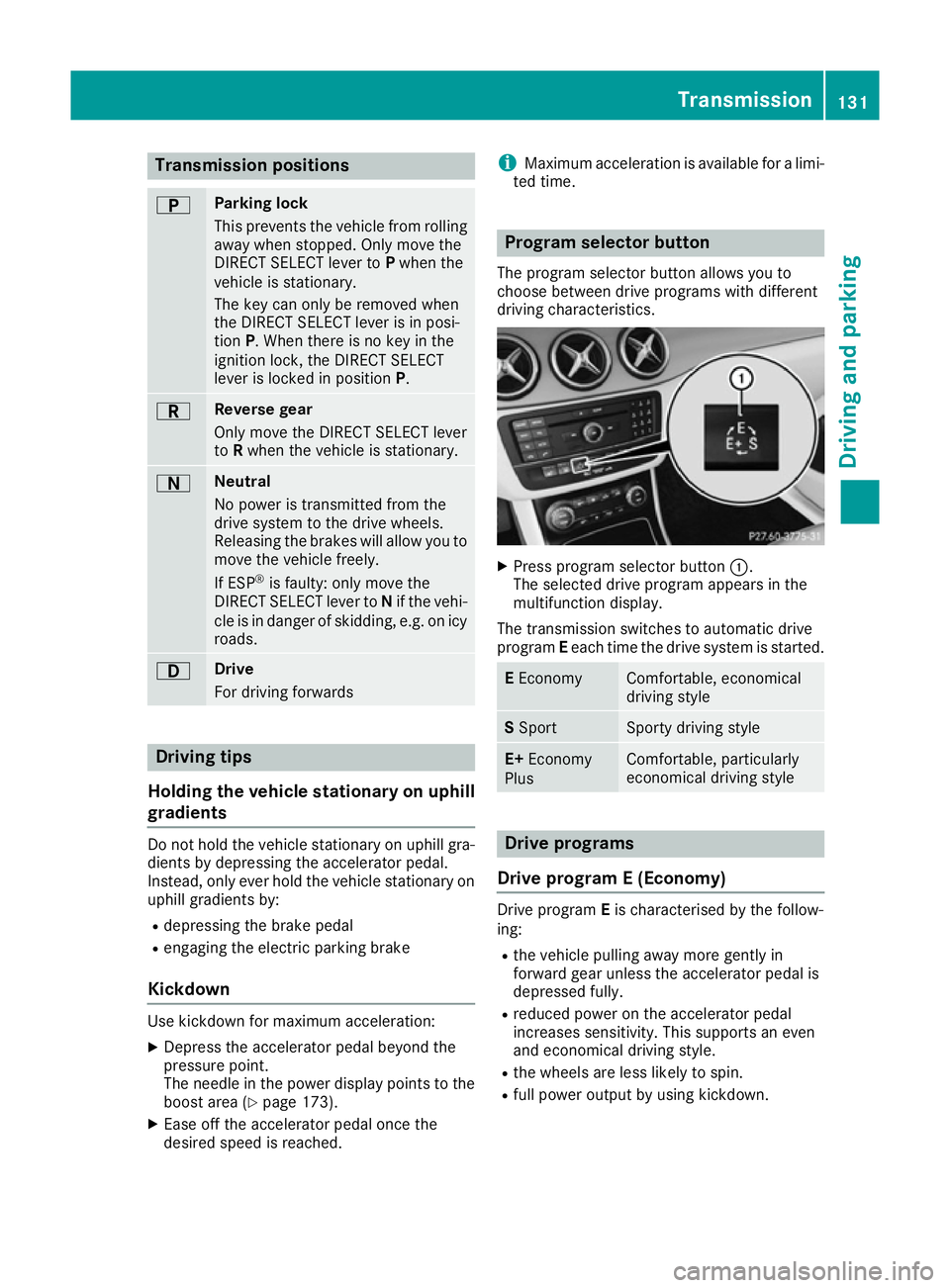
The program selector button allows you to
choose between drive programs with different
driving characteristics. X
Press program selector button :.
The selected drive program appears in the
multifunction display.
The transmission switches to automatic drive
program Eeach time the drive system is started. E
Economy Comfortable, economical
driving style
S
Sport Sporty driving style
E+
Economy
Plus Comfortable, particularly
economical driving style
Drive programs
Drive program E (Economy) Drive program
Eis characterised by the follow-
ing:
R the vehicle pulling away more gently in
forward gear unless the accelerator pedal is
depressed fully.
R reduced power on the accelerator pedal
increases sensitivity. This supports an even
and economical driving style.
R the wheels are less likely to spin.
R full power output by using kickdown. Transmission
131Driving and parking Z
Page 135 of 293
Drive program S (Sport)
Drive program
Sis characterised by the follow-
ing:
R the vehicle exhibits sporty driving character-
istics
R the entire power output can be utilised by
depressing the accelerator pedal.
E+ (Economy Plus) Drive program
E+is characterised by the fol-
lowing:
R reduced torque and significantly reduced
power. This supports an especially efficient
and even driving style and results in a reduc-
tion in speed to approximately 110 km/h.
R the vehicle pulling away more gently in
forward gear unless the accelerator pedal is
depressed fully.
R the wheels are less likely to spin.
R particularly efficient overrun.
R full power output by using kickdown.
R the performance of the air-conditioning and
heating systems is reduced. Steering wheel gearshift paddles
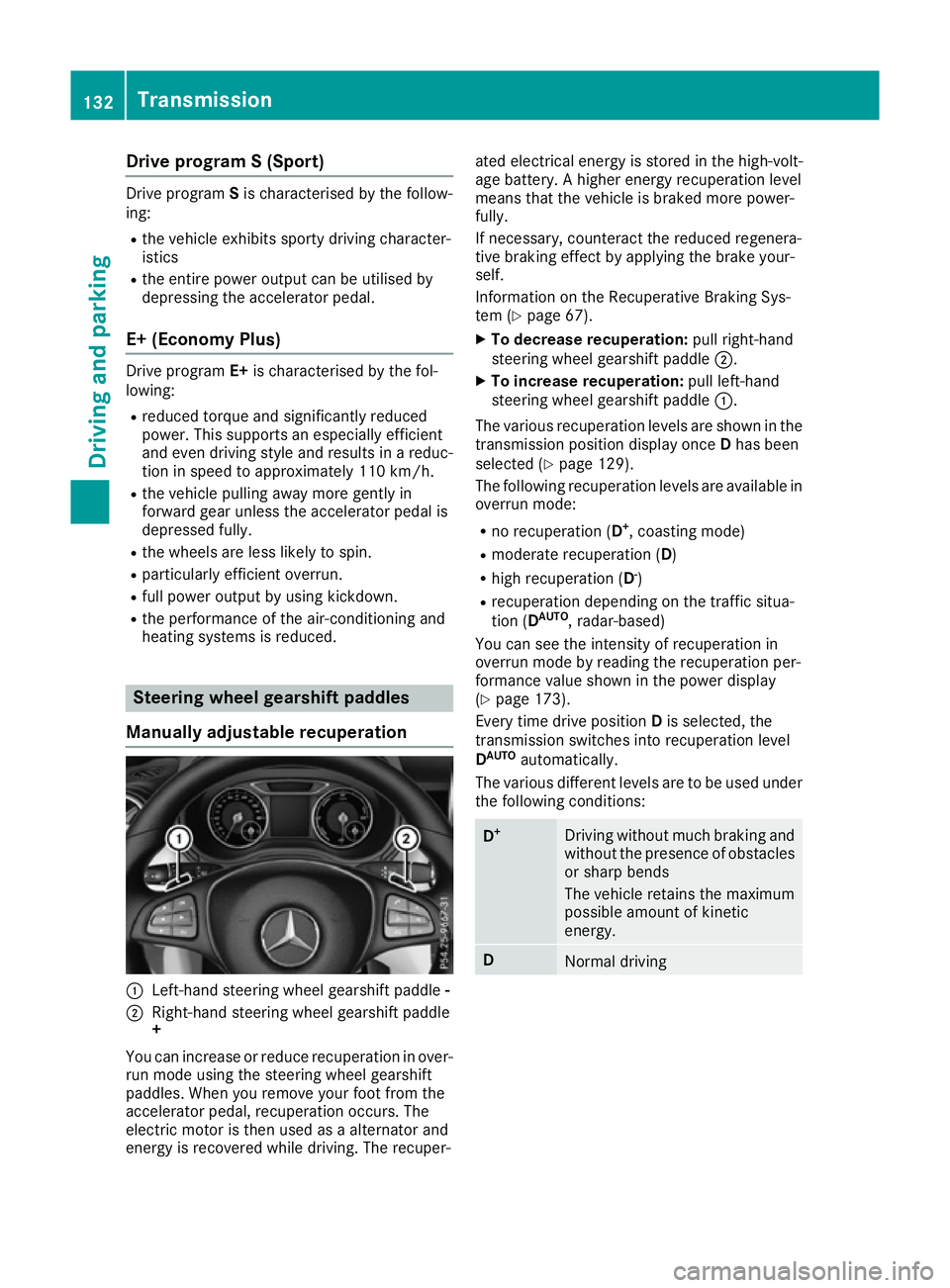
Manually adjustable recuperation :
Left-hand steering wheel gearshift paddle -
; Right-hand steering wheel gearshift paddle
+
You can increase or reduce recuperation in over-
run mode using the steering wheel gearshift
paddles. When you remove your foot from the
accelerator pedal, recuperation occurs. The
electric motor is then used as a alternator and
energy is recovered while driving. The recuper- ated electrical energy is stored in the high-volt-
age battery. A higher energy recuperation level
means that the vehicle is braked more power-
fully.
If necessary, counteract the reduced regenera-
tive braking effect by applying the brake your-
self.
Information on the Recuperative Braking Sys-
tem (Y page 67).
X To decrease recuperation: pull right-hand
steering wheel gearshift paddle ;.
X To increase recuperation: pull left-hand
steering wheel gearshift paddle :.
The various recuperation levels are shown in the
transmission position display once Dhas been
selected (Y page 129).
The following recuperation levels are available in
overrun mode:
R no recuperation (D +
, coasting mode)
R moderate recuperation ( D)
R high recuperation ( D-
)
R recuperation depending on the traffic situa-
tion (D AUTO
, radar-based)
You can see the intensity of recuperation in
overrun mode by reading the recuperation per-
formance value shown in the power display
(Y page 173).
Every time drive position Dis selected, the
transmission switches into recuperation level
D AUTO
automatically.
The various different levels are to be used under the following conditions: D
+ Driving without much braking and
without the presence of obstacles
or sharp bends
The vehicle retains the maximum
possible amount of kinetic
energy. D
Normal driving132
TransmissionDriving and pa
rking