ECU MERCEDES-BENZ C-CLASS COUPE 2015 Service Manual
[x] Cancel search | Manufacturer: MERCEDES-BENZ, Model Year: 2015, Model line: C-CLASS COUPE, Model: MERCEDES-BENZ C-CLASS COUPE 2015Pages: 385, PDF Size: 13.12 MB
Page 232 of 385
X
Position the trailer horizontally behind the
vehicle.
X Couple up the trailer.
X Establish the electrical connection between
the vehicle and the trailer.
X Check that the trailer lighting system is work-
ing.
X Push the combination switch upwards/down-
wards
X Check whether the corresponding turn signal
on the trailer is flashing.
Ac onnected trailer is only detected when the
electrical connection is established correctly
and when the lighting system is working prop- erly. The function of other systems, such as
ESP ®
,P ARKTRONIC, Active Parking Assist,
Active Blind Spot Assist or Lane Keeping
Assist also depends on this. Uncoupling
atrailer G
WARNING
If you uncouple atrailer with an engaged over-
run brake, you could trap your hand between
the vehicle and the trailer drawbar. This poses ar isk of injury.
Do not uncouple atrailer with an engaged
overrun brake. G
WARNING
Vehicles with level control:
If you disconnect the trailer cable, the vehicle is lowered. This can cause you or others to
become trapped between the vehicle body
and tyres, or underneat hthe vehicle. This
poses arisk of injury.
Make sure that no-one is in the immediate
vicinit yofthe wheel arch or underneat hthe
vehicle when disconnectin gthe trailer cable.
! Do not disconnect
atrailer with an engaged
overrun brake. Otherwise, your vehicle could
be damaged by the rebounding of the overrun
brake.
! Remove the installed adapter cable before
folding in the ball coupling. Otherwise, dam-
age may occur to the rear bumper and the
adapter cable. X
Make sure that the transmission is in position
P.
X Apply the electric parking brake.
X Secure the trailer against rolling away.
X Remove the trailer cable and decouple the
trailer. Trailer power supply
! You can connect accessories to the perma-
nent power supply up to amaximum of 240 W.
You cannot charge atrailer battery using the
power supply.
When it leaves the factory, your vehicle's trailer
socket is equipped with apermanen tpower
supply and apower supply that is switched on
via the ignition lock.
The permanen tpower supply is supplied via
trailer socket pin 9.
The power supply that is switched on via the
ignition lock is supplied via trailer socket pin 10.
The trailer's permanen tpower supply is
switched off in the event of low vehicle supply
voltage and after six hours at the latest.
You can find more information about fitting the
trailer electric sataqualified specialist work-
shop.
X To switch the connected power supply on
or off: turn the key to position 2or 0respec-
tively (Y page 145). Failure check for LEDs
If LED lamps are fitted in the trailer, amalfunc-
tion message may appear in the multifunction
display even if there is no fault. The reason for
the error message may be that the curren thas
fallen below the minimum of 50 mA.
To ensure reliable operation of the failure indi-
cator, each LED chain in the trailer lighting must
be guaranteed aminimum curren tof50mA. Trailer with 7-pin connector
General notes Trailer with 7-pin connector:
you can connect
to the 13-pin socket on the ball coupling using
an adapter or, if necessary, an adapter cable. Towing
atrailer
229Driving and parking Z
Page 233 of 385
Both can be obtained at
aquali fied specialist
workshop.
Fitting the adapter !
Make sur
ethat there is sufficient cable play
so that the cable cannot become detached
whe ncornering.
! Remove the installed adapter cable before
folding in the ball coupling. Otherwise, dam-
ag em ay occu rtothe rea rbum pera nd the
adapter cable. X
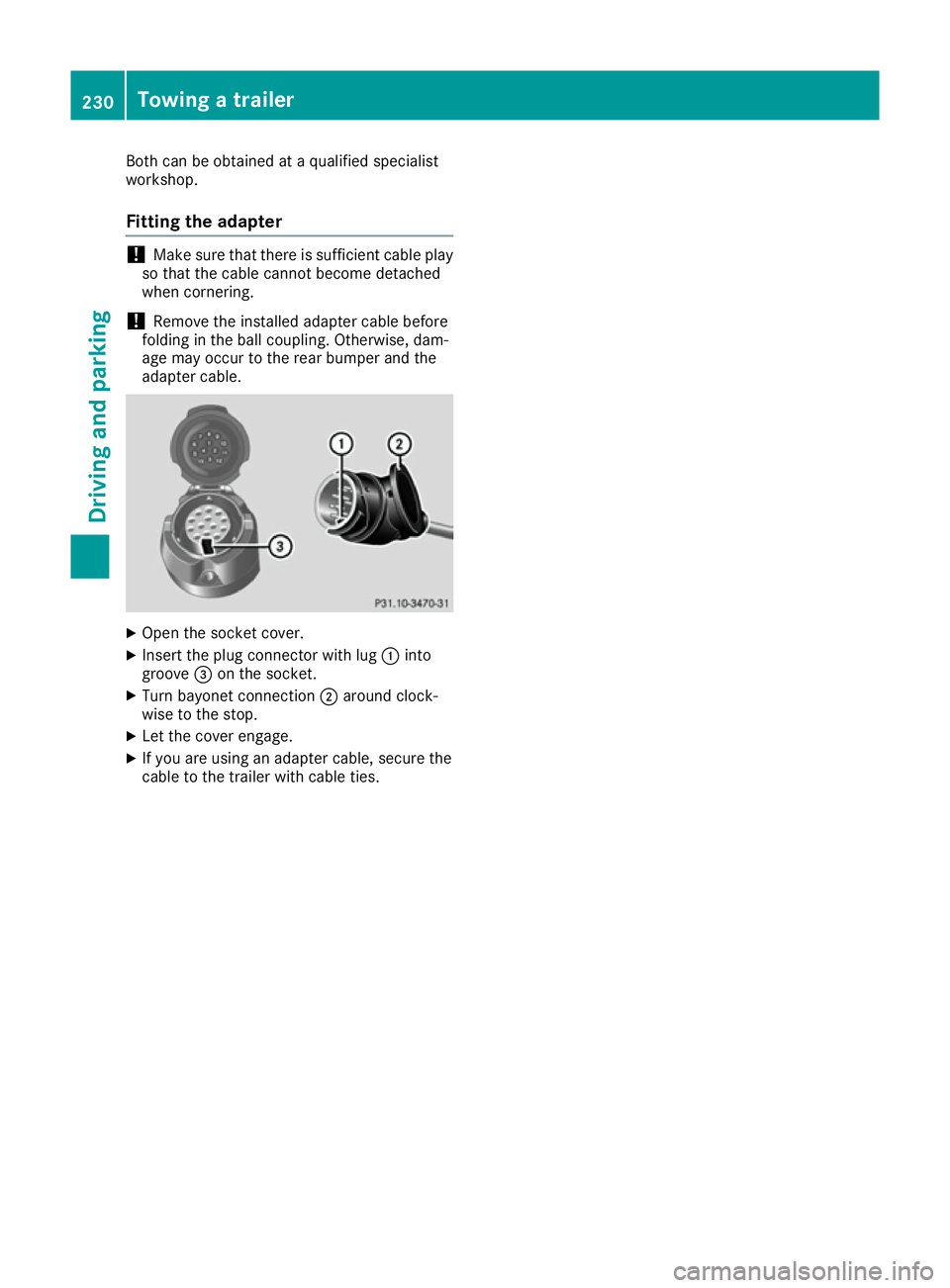
Ope nthe socket cover.
X Insert the plug connector with lug :into
groove =on the socket.
X Turn bayonet connection ;around clock-
wise to the stop.
X Let the cover engage.
X If yo uare using an adapter cable, secure the
cable to the trailer with cable ties. 230
Towingat
railerDrivingand parking
Page 240 of 385
Displaying th
erange an dcurrent fuel
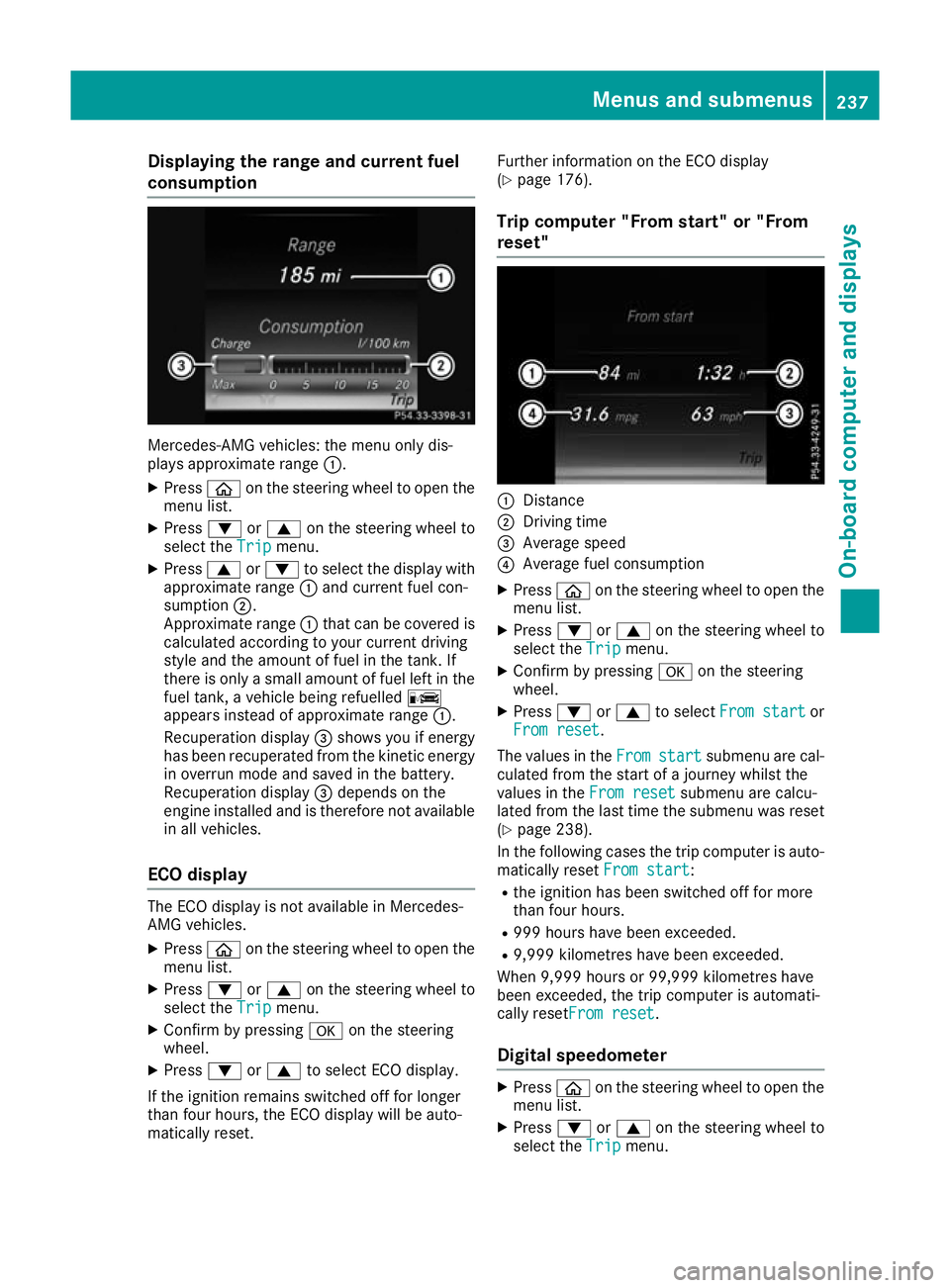
consumption Mercedes-AMG vehicles
:the men uonlyd is-
plays approximat erange :.
X Press òon thesteerin gwhee ltoo pent he
men ulist.
X Press :or9 on thesteerin gwhee lto
selec tthe Trip
Trip menu.
X Press 9or: to selec tthe display with
approximat erange :and curren tfue lcon-
sumption ;.
Approximat erange :that can be covered is
calculated accordin gtoyour curren tdriving
style and th eamount of fue linthetank .If
there is only asma ll amount of fue llef tint he
fue ltank, avehicle bein grefuelled C
appears instead of approximat erange :.
Recuperation display =shows you if energy
has bee nrecuperated from th ekinetic energy
in overrun mode and saved in th ebattery.
Recuperation display =depend sonthe
engin einstal led and is therefore no tavailable
in all vehicles.
ECO display The EC
Odisplay is no tavailable in Mercedes-
AM Gvehicles.
X Press òon thesteerin gwhee ltoo pent he
men ulist.
X Press :or9 on thesteerin gwhee lto
selec tthe Trip
Trip menu.
X Confir mbyp ressing aon thesteering
wheel.
X Press :or9 to selec tECO display.
If th eignition remain sswitched of ffor longer
than four hours, th eECO display will be auto-
matically reset. Further information on th
eECO display
(Y page 176).
Trip compute r"From start" or "From
reset" :
Distance
; Driving time
= Average speed
? Average fue lconsu mption
X Press òon thesteerin gwhee ltoo pent he
men ulist.
X Press :or9 on thesteerin gwhee lto
selec tthe Trip
Trip menu.
X Confir mbyp ressing aon thesteering
wheel.
X Press :or9 to select Froms tart
Fro ms tart or
Fro mr eset
Fro mr eset.
The values in the From
Fromstart
start submen uare cal-
culated from th estart of ajou rney whilst the
values in the Fromr eset
Fro mr eset submen uare calcu-
lated from th elast time th esubmen uwas reset
(Y page 238).
In th efollowin gcases th etripc om pute risa uto-
matically reset Froms tart
Fro ms tart:
R thei gnition has bee nswitched of ffor more
than four hours.
R 99 9h our shaveb eene xcee ded.
R 9,999 kilometres hav ebeene xcee ded.
Whe n9,999 hour sor99,99 9k ilometres have
bee nexcee ded, th etripc om pute risa utomati-
cally reset Fromr eset
Fro mr eset.
Digital speedometer X
Press òon thesteerin gwhee ltoo pent he
men ulist.
X Press :or9 on thesteerin gwhee lto
selec tthe Trip
Trip menu. Menus an
dsubmenus
237On-boardcompu tera nd displays Z
Page 288 of 385
Warning and indicator lamps in the instrument cluster
General notes
Some systems carry out aself-diagnosis when the ignition is switched on. Severa lwarning and
indicator lamps can thereby temporarily light up or flash. This behaviou risnon-critical. These
warning and indicator lamps only indicate amalfunction if they light up or flas hafter the engine is
started or during ajourney. Safety
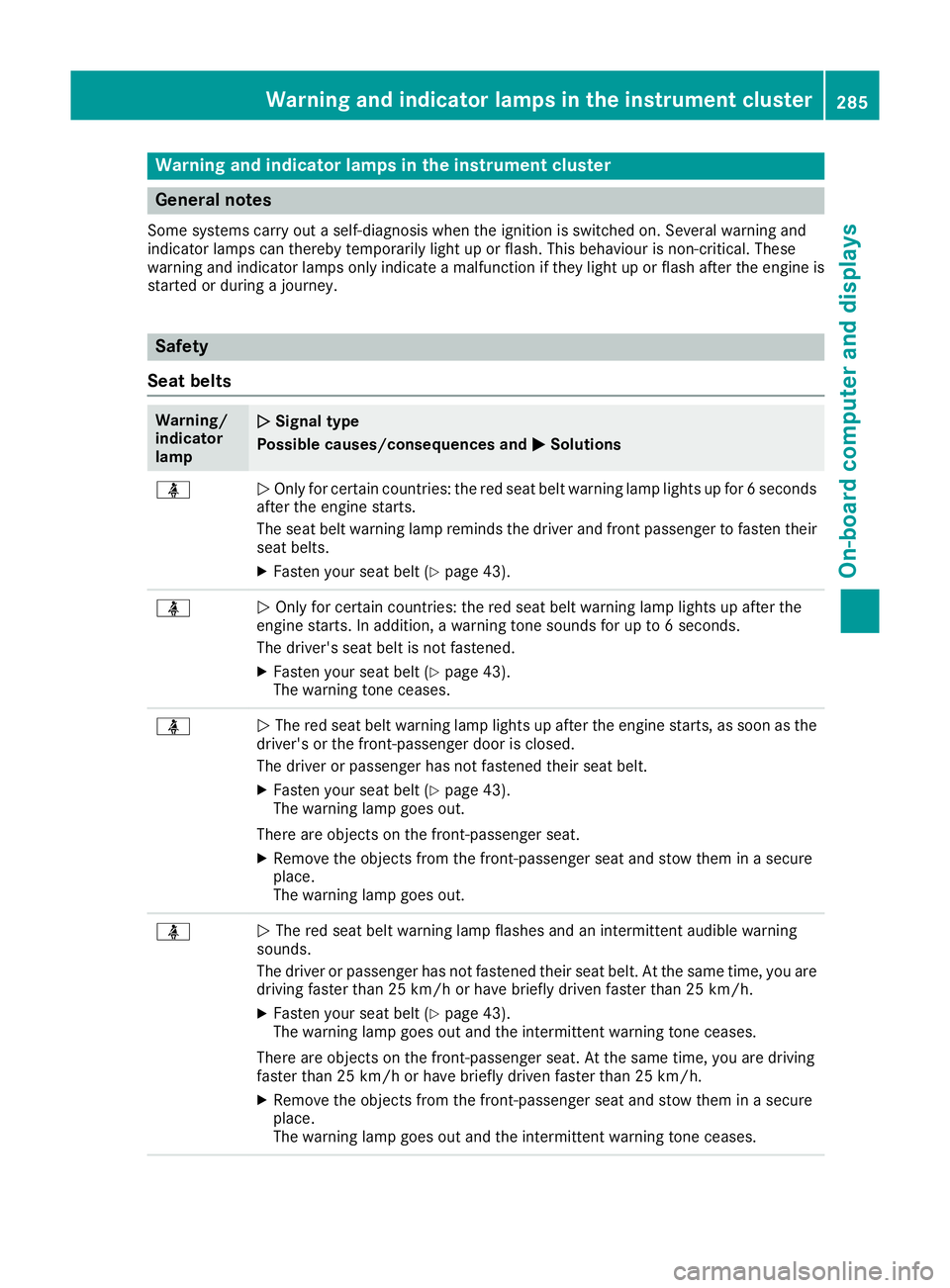
Seat belts Warning/
indicator
lamp
N N
Signal type
Possibl ecauses/consequencesa ndM
MSolutions ü
N
Only for certain countries :the red sea tbeltw arning lam plights up for 6seconds
after the engine starts.
The sea tbeltw arning lam preminds the drive rand front passenger to fasten their
sea tbelts.
X Fasten you rseatb elt( Y pag e43). ü
N
Only for certain countries :the red sea tbeltw arning lam plights up after the
engine starts. In addition, awarning tone sound sfor up to 6seconds.
The driver's sea tbeltisn ot fastened.
X Fasten you rseatb elt( Y pag e43).
The warning tone ceases. ü
N
The red sea tbeltw arning lam plights up after the engine starts, as soon as the
driver's or the front-passenger door is closed.
The drive rorpassenger has not fastened their sea tbelt.
X Fasten you rseatb elt( Ypag e43).
The warning lam pgoes out.
There are objects on the front-passenger seat.
X Remove the objects from the front-passenger sea tand stow them in asecure
place.
The warning lam pgoes out. ü
N
The red sea tbeltw arning lam pflashes and an intermittent audible warning
sounds.
The drive rorpassenger has not fastened their sea tbelt. At the same time, you are
driving faster than 25 km/h or have briefly drive nfaster than 25 km/h.
X Fasten you rseatb elt( Y pag e43).
The warning lam pgoes out and the intermittent warning tone ceases.
There are objects on the front-passenger seat. At the same time, you are driving
faster than 25 km/h or have briefly drive nfaster than 25 km/h.
X Remove the objects from the front-passenger sea tand stow them in asecure
place.
The warning lam pgoes out and the intermittent warning tone ceases. Warning and indicator lamps in the instrument cluster
285On-board computer and displays Z
Page 300 of 385
Adjusting th
evolume X
Turn th ethumbwheel on th eright of th econ-
troller.
The volume is adjusted:
R for th ecurrentl yselected media source
R during traffic or navigation announcements
R in hands-free mod eduring aphone call
Switchin gthe soun don/off This function is no
tavailable for Mercedes-AMG
vehicles wit hselectable AM GPerformance
exhaust system.
X Press th ethumbwheel to th eright of th econ-
troller.
If th eaudio output is switched off ,the status
lin ew ill sho wthe 8 symbol. If you switch
th em edia source or set th evolume, th esound
is automatically switched on.
i Navigation message
swill be hear devenif
th es oun dism uted.
Functions The multimedia system has th
efollowin gfunc-
tions:
R radi omode
R media mod ewithm edia search
R soun dsystems
R navigation system
COMAND Online: navigation via th ehardd rive
Audio 20 :navigation via SD card
R communication functions
R vehicl efunction swiths ystem settings
R favourite sfunctions
Controller The controller in th
ecentre console let syou:
R select men uitems on th edisplay
R ente rcharacters
R select adestination on th emap
R sav eentries
The controller can be:
R turned 3
R slid lef torright1
R slid forward sorback4 R
slid diagonally 2
R presse dbriefl yorp ressedand held 7
Back button You can use the
%buttontoe xitam enuorto
call up th ebasic display of th ecurren toperating
mode.
X To exit th emenu: brieflypress the %
button.
The multimedia system changes to th enext
higher men ulevel in th ecurren toperating
mode.
X To call up th ebasic display: press the%
butto nfor longer than two seconds.
The multimedia system changes to th ebasic
display of th ecurren toperating mode. Touchpad
Switchin gthe touchpad on/off Multimedia system:
X Select Vehicle
VehicleQSy stem set‐
System set‐
tings tingsQ Activate touchpad
Activate touchpad.
The touchpad is activated Oor deactivated
ª.
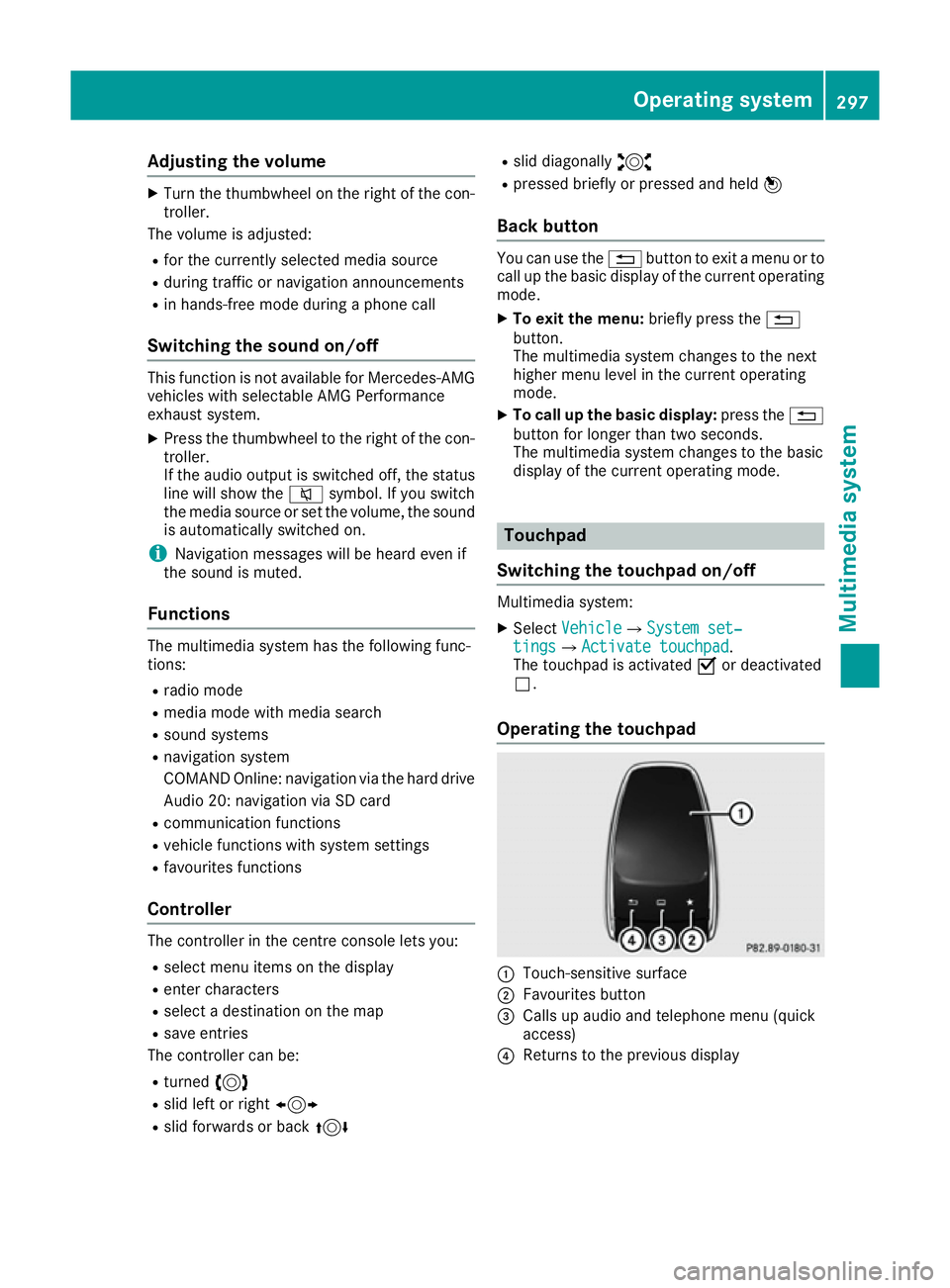
Operating th etouchpad :
Touch-sensitive surface
; Favourite sbutton
= Calls up audio and telephon emenu( quick
access)
? Return stotheprevious display Operating system
297Multimedia system Z
Page 301 of 385
You can navigate in menus and lists via touch-
sensitiv esurface :by using asingle finger
swiping gesture .
X To select th emenu item: swipe up, down, to
the left or right.
X Press the touchpad.
X To move th edigital map: swipe in all direc-
tions.
Use atwo-finger swiping gesture ,e.g. to use
these functions:
X To show or hide th eaudio menu: swipe up
or down with two fingers.
X To increase or reduce th
evehicle settings
and sound settings: turn two fingers clock-
wise or anti-clockwise.
X To zoom in and out of th emap:move two
fingers together or apart.
Character inpu twith handwriting rec-
ognition Entering characters
X Use one finger to write characters on the sur-
face.
The character is entered in the input line. If
the character that you have entered can be
interpreted in differen tways, the suggested
characters are displayed.
X If character suggestions are shown ,turn and
press the controller.
X Resume character input on the touchpad.
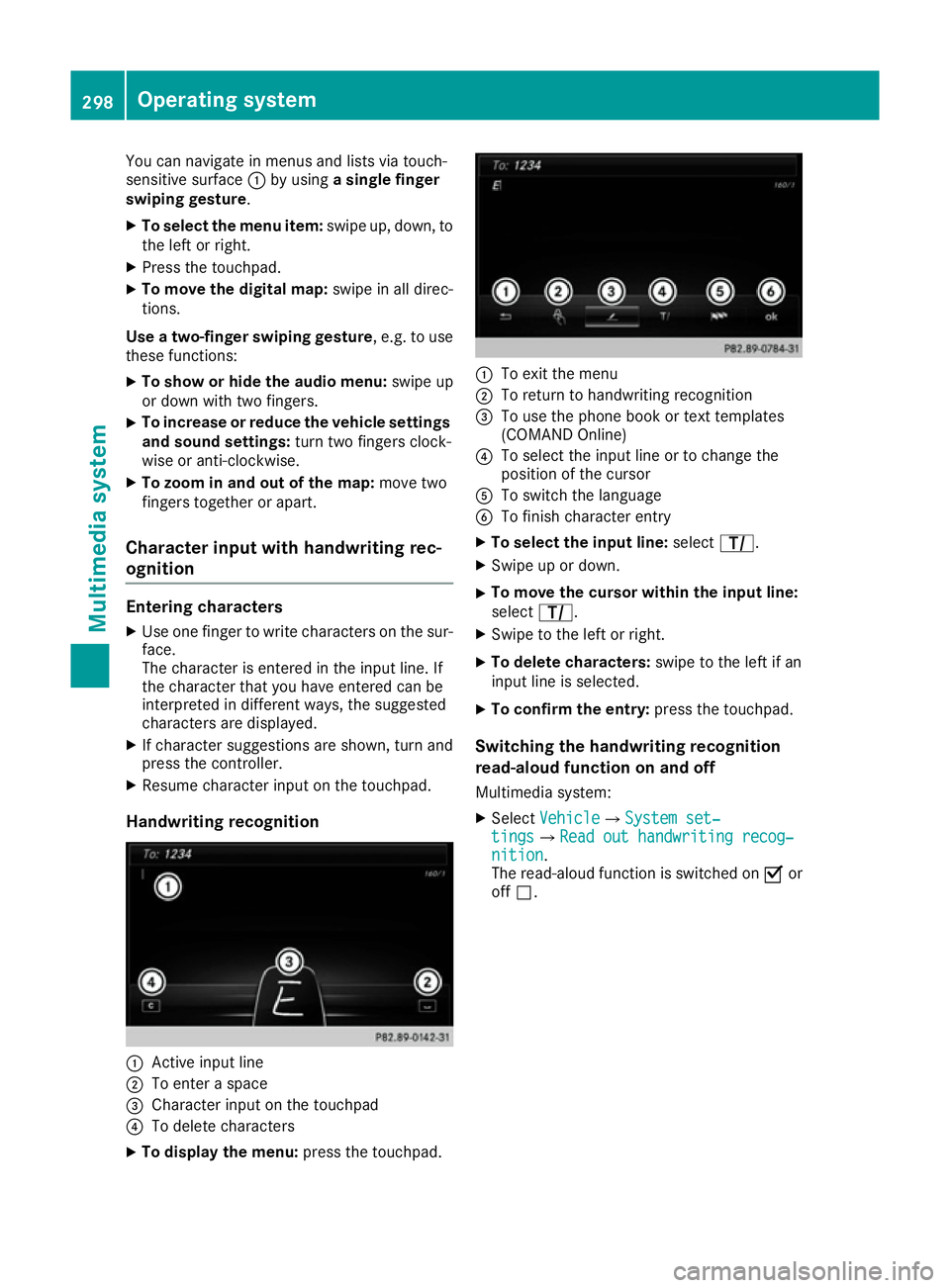
Handwriting recognition :
Activ einput line
; To enter aspace
= Character input on the touchpad
? To delete characters
X To display th emenu: press the touchpad. :
To exit the menu
; To return to handwritin grecognition
= To use the phon ebook or tex ttemplates
(COMAN DOnline)
? To selec tthe input line or to change the
position of the cursor
A To switc hthe language
B To finish character entry
X To select th einpu tline: select p.
X Swipe up or down.
X To move th
ecursor within th einpu tline:
select p.
X Swipe to the left or right.
X To delet echaracters: swipe to the left if an
input line is selected.
X To confirm th eentry: press the touchpad.
Switchin gthe handwriting recognition
read-aloud function on and off
Multimedia system:
X Select Vehicle VehicleQ System set‐ System set‐
tings
tingsQRead out handwriting recog‐ Read out handwriting recog‐
nition
nition.
The read-aloud function is switched on Oor
off ª. 298
Operating systemMultimedia system
Page 305 of 385
Enterin
ganaddress Multimedia system:
X Select Navi
NaviQNa vigation
Navigation.
The map displays th ecurren tvehicle position.
X Slide 6thec ontroller.
X Select Destination
DestinationQ Addressentry
Addres sentry.
Ente rana ddress, e.g .asfollows:
R town or postcode, street ,house number
R country, town or postcode
R town or postcode, centre
R street ,tow norp ostcode, junction
X Select Town
Town.
The town in whic hthe vehicle is currently
locate d(curren tvehicle position )isatthetop.
Below this, you will see locations for which
rout eguidance has alread ybeen carried out.
X Ente rthe town.
The Gsymbol: th elocatio niscontained on
th ed igital map multiple times.
X To switch to th elist: slide 5thec ontrol-
ler.
X Select th elocation.
If available, th epostcod eisshown. If there
are differen tpostcodes availabl efor th eloca-
tion, th ecorrespondin gdigitsare displayed
with an X
X.
X Ente rthe street and house number.
The address is in th emenu.
Further options for destination entry:
R search for akeyword
The keyword search finds destination susing
fragment sofwords.
R selec tthe last destination
R selec tacontact
R selec taPOI
You can search for aPOI by location, nam eor
telephone number.
R selec tadestination on th emap
R enter an intermediat edestination
You can map th erout etot hedestination
yourself with up to four intermediat edestina-
tions.
R selec tatravel guide destination (only availa-
ble for selecte dEuropean countries)
R selec tdestination sfromM ercedes-Benz
Apps
R selec tgeo-coordinates Calculating th
eroute Prerequisite: th
eaddress has been entered and
is in th emenu.
X Select Start
StartorContinue
Continue.
The rout eiscalculate dwith th eselecte droute
type and th eselecte drout eoptions.
If rout eguidance has alread ybeen activated,
ap rompt will appear asking whether you wish
to end th ecurren trout eguidance.
X Select Yes
YesorSet as intermediate des‐
Set as intermediate des‐
tination
tination.
Yes Yes cancel sthe curren trout eguidance and
start srout ecalculation to th enew destina-
tion.
Set as intermediate destination Set as intermediate destination adds
th en ew destination in addition to th eexisting
destination and open sthe intermediat edes-
tinations list. Connecting th
emobile phone
Requirements For telephony via th
eBluetooth ®
interface, you
require aBluetooth ®
-capable mobile phone. The
mobile phon emust support Hands-Free Profile
1. 0ora bove.
Multimedia system:
X Select Vehicle
VehicleQSy stem set‐
System set‐
tings
tingsQ Activate Bluetooth
Activate Bluetooth .
X Activate Bluetooth ®
O.
Mobil ephone:
X Activate Bluetooth ®
and, if necessary, Blue-
tooth ®
visibilit yfor other devices (see the
manufacturer' soperatin ginstructions).
The Bluetooth ®
device names for all of on eman-
ufacturer' sproduct smightbei dentical. To
mak eitp ossible to clearly identif yyour mobile
phone, chang ethe device nam e(see th eman-
ufacturer' soperatin ginstructions).
If th emobile phon esupport sthe PBA P(Phone
Book Access Profile) and MA P(Message
Acc ess Profile) Bluetooth ®
profiles ,the follow-
ing informatio nwill be transmitte dafter you
connect:
R phon ebook
R call lists
R messages 302
Operating systemMultimedia system
Page 306 of 385
i
Furthe
rinformation on suitabl emobile
phones can be obtained on the Internet at:
http://www.mercedes-benz.com/
connect
Searching for and authorisin gamobile
phone Befor
eusing your mobile phone with the multi-
media system for the firs ttime, yo uwilln eed to
search for the phone and then authorise (con-
nect) it. Depending on the mobile phone, author- isation takes place by means of Secure Simple
Pairing or by entering apasskey .The multimedia
system automaticall ymake sthe procedure that
is relevant for your mobile phone available. The
mobile phone is always connected automati-
cally afte rauthorisation. Furthe rinformation on
using amobile phone with the multimedia sys-
tem (se ethe Digital Owner's Manual).
If the multimedia system doe snot detect your
mobile phone, this may be du etoparticular
security setting sonyourm obile phone (se ethe
manufacturer's operating instructions).
Only one mobile phone can be connected to the
multimedia system at any one time.
Searching for amobile phone
Audio 20:
X Select Tel/
Tel/ ®QConnect Connect
device deviceQSe archfor phones
Search for phonesQSt art
Start
search
search.
The available mobile phones are displayed.
COMAND Online:
X Select Telephone TelephoneQConnect Connect
device
deviceQSe archfor phones
Search for phonesQSt art
Start
search
search.
The available mobile phones are displayed.
Symbols in the device list Sym-
bol Explanation
Ï
New mobile phone found, not yet
authorised. Ñ
Mobil
ephone is authorised ,but is
not connected. #
Mobil
ephone is authorised and
connected. Connecting the mobile phone Authorisation using Secure Simple Pairing:
X Select the mobile phone.
Ac ode is displaye dinthe multimedia system
and on the mobile phone.
X If the codes match: selectYes Yeson the mul-
timedia system.
X Confirm the code on the mobile phone.
Depending on the mobile phone used, con-
firm the connectio ntothe multimedia system
and for the PBAP and MAP Bluetooth ®
pro-
files. The prompt to confir mmay take up to
two minutes to be displaye d(seet he manu-
facturer's operating instructions).
X If the codes are different: selectNo
No on the
multimedia system.
The process is cancelled.
Repea tauthorisation.
Authorisation by entering apasskey:
X Select the Bluetooth ®
name of the mobile
phone.
The inpu tmenu for the passkey is displayed.
X Choose aone- to sixteen-digit number com-
bination as apasskey.
X Enter the passkey on the multimedia system.
X Press ¬to confirm.
X Enter and confir mthe passkey on the mobile
phone. Depending on the mobile phone used,
confir mthe connectio ntothe multimedia sys-
tem and for the PBAP and MAP Bluetooth ®
profiles. The prompt to confir mmay take up
to two minutes to be displaye d(seet he man-
ufacturer's operating instructions).
i Mobil
ephones that are connected to the
optionally available telephone module with
Bluetooth ®
(SAP profile) are displaye dsepa-
rately in the device list. These are found below
the entry MB SAP module phones MB SAP module phones.
Switchin gbetween mobile phones If yo
uhavea uthorised more than one mobile
phone, yo ucan switch between the individual
phones.
Multimedia system:
X Select Connect device Connect device.
X Select amobile phone from the device list. Operating system
303Multimedia system Z
Page 311 of 385
Stowage areas
Loading guidelines
G
WARNING
Combustion engines emit poisonous exhaust
gases such as carbon monoxide. Exhaust
gases can enter the vehicle interior if the boot
lid is open when the engine is running, espe-
cially if the vehicle is in motion. There is arisk
of poisoning.
Always switch off the engine before opening
the boot lid. Never drive with the boot lid
open. G
WARNING
If objects, luggage or loads are not secured or not secured sufficiently, they could slip, tip
over or be flung around and thereby hit vehicle
occupants. There is arisk of injury, especially
when braking or abruptly changing directions.
Always store objectssot hat they cannot be
flung around. Secure objects, luggage or
loads against slipping or tipping before the
journey. G
WARNING
The exhaust tail pipe and tail pipe trim can
become very hot. If you come into contact
with these parts of the vehicle, you could burn
yourself. There is arisk of injury.
Always be particularly careful around the
exhaust tail pipe and the tail pipe trim. Allow
these components to cool down before touch-
ing them.
The handling characteristics of aladen vehicle
are dependent on the distribution of the load
within the vehicle. For this reason, you should
observe the following notes when transporting a
load:
R never exceed the maximum permissible gross
vehicle weight or the permissible axle loads
for the vehicle (including occupants).
R the boot is the preferred place to store
objects.
R position heavy loads as far forward as possi-
ble and as low down in the boot as possible. R
the load must not protrude above the upper
edge of the seat backrests.
R always place the load behind unoccupied
seats if possible.
R secure the load with sufficiently stronga nd
wear-resistant lashing material. Pad sharp
edges for protection.
i Load restraint
sare available at any qualified
specialist workshop, e.g. aMercedes-Benz
Service Centre. Stowage compartments
Important safety notes G
WARNING
If objectsint he passenger compartmen tare
stowed incorrectly, they can slide or be
thrown around and hit vehicle occupants. In
addition, cupholders, open stowage spaces
and mobile phone brackets cannot always
retain all objectst hey contain. There is arisk
of injury, particularly in the event of sudden
braking or asudden change in direction.
R Always stow objectssot hat they cannot be
thrown around in such situations.
R Always make sure that objectsdon ot pro-
trude from stowage spaces, parcel nets or
stowage nets.
R Close the lockable stowage spaces before
startingaj ourney.
R Always stow and secure heavy, hard, poin-
ted, sharp-edged, fragile or bulky objectsin
the boot.
Observe the loading guidelines (Y page 308).308
Stowage areasStowing and features
Page 315 of 385
X
Adjust the hea drestraints if necessary
(Y page 106).
X Mov ethe driver's or front-passenger seat
back if necessary.
If yo udon ot nee dthe through-loading feature,
yo us houl dalway sengag ethe rea rseatb ackr-
ests .Thisw illp revent unauthorised access to
the boot from the vehicl einterior.
Lockin gthe centre rear seat backrest In order to prevent the boot from being
accesse
dbyunauthorised persons, the centre
sea tbackres tcan be locked using acatch .The
centre sea tbackres tcan onl ybefoldedforward
together with the left sea tbackrest.
X To lock: foldt he left and centre sea tbackr-
ests forward. Make sure tha tthe centre and
left sea tbackrests ar eengaged and joined
together.
X Slide catch :upwards.
The release mechanism of the centre seat
backres tisl oc ked.
X To unlock: foldthe left and centre sea tbackr-
ests forward.
X Slide catch :downwards. Securin
gaload
Lashin geyelets Observ
ethe following notes on securing loads:
R observe the loading guideline s(Ypage 308).
R secur ethe load using the lashing eyelets.
R distribute the load on the lashing eyelets
evenly.
R do not us eelast ic straps or nets to secur ea
load .These ar eonlyi ntende dasana nti-slip
protection for light loads. R
do not route lashing material sacross sharp
edge sorc orners.
R pa ds harp edge sfor protection. Vehicles with the through-loading feature in the
rea rbench seat:
X Fol dupt he lashing eyelets next to the rear
sea tbackres tand pu tthem throug hthe slots
in the carpet.
Bag hook G
WARNING
The ba ghooks canno trestrai nheavy objects
or items of luggage. Objects or items of lug-
gage could be flung around and thereb yhit
vehicl eoccupants when braking or abruptly
changing directions. There is ariskofi njury.
Onl yhanglight objects on the ba ghooks.
Never hang hard, sharp-edged or fragile
objects on the ba ghooks.
! The ba
ghookc an bear amaximu mloadof
3k g. Do not us eittosecureaload. X
Pull ba ghook ;down by tab :.312
Stowage areasSto
wing an dfeatures