key MERCEDES-BENZ C-CLASS COUPE 2015 Workshop Manual
[x] Cancel search | Manufacturer: MERCEDES-BENZ, Model Year: 2015, Model line: C-CLASS COUPE, Model: MERCEDES-BENZ C-CLASS COUPE 2015Pages: 385, PDF Size: 13.12 MB
Page 129 of 385
If the wiper blades are worn, the windscreen will
no longer be wiped properly. This could mean
you are unabletoo bserve the traffic conditions. Replacin
gthe wiperb lades
Important safety notes G
WARNING
If the windscree nwipers begin to move while
you are changing the wiper blades, you can be trapped by the wiper arm. There is arisk of
injury.
Alwayss witch off the windscreen wipers and
ignition before changing the wiper blades.
! Never open the bonnet/tailgate if
awiper
arm is folded awayf rom the windscreen/rear
window.
Never fold awindscreen wiper arm withou ta
wiper blade back onto the windscreen/rear
window.
Hold the windscree nwiper arm firmly when
you change the wiper blade. If you release the
wiper arm withou tawiper blade and it falls
onto the windscreen/rear window ,the wind-
screen/rear window may be damaged by the
force of the impact.
Mercedes-Benz recommends that you have
the wiper blades changed at aqualifieds pe-
cialist workshop.
! To avoid damaging the windscreen wiper
blades, make sure that you touch only the
wiper arm of the windscreen wiper.
Replacing the windscreen wiperb ladesMovingt
he wiperb lades to the vertical
position
On vehicles without KEYLESS-GO:
X Turn the key to position 1or 2in the ignition
lock (Y page 145).
X Set the windscree nwipers to the °posi-
tion.
X When the wiper arms have reached the verti-
cal position, turn the key to position 0and
remove it from the ignition lock.
X Fold the wiper arm awayf rom the windscreen.On vehicles with KEYLESS-GO:
X Switch off the engine.
X Remove yourf oot from the brake pedal.
X Set the windscree nwipers to the °posi-
tion.
X Press the Start/Stop button repeatedly until
the windscree nwipers start.
X When the wiper arms have reached the verti-
cal position, press the Start/Stop button.
X Fold the wiper arm awayf rom the windscreen.
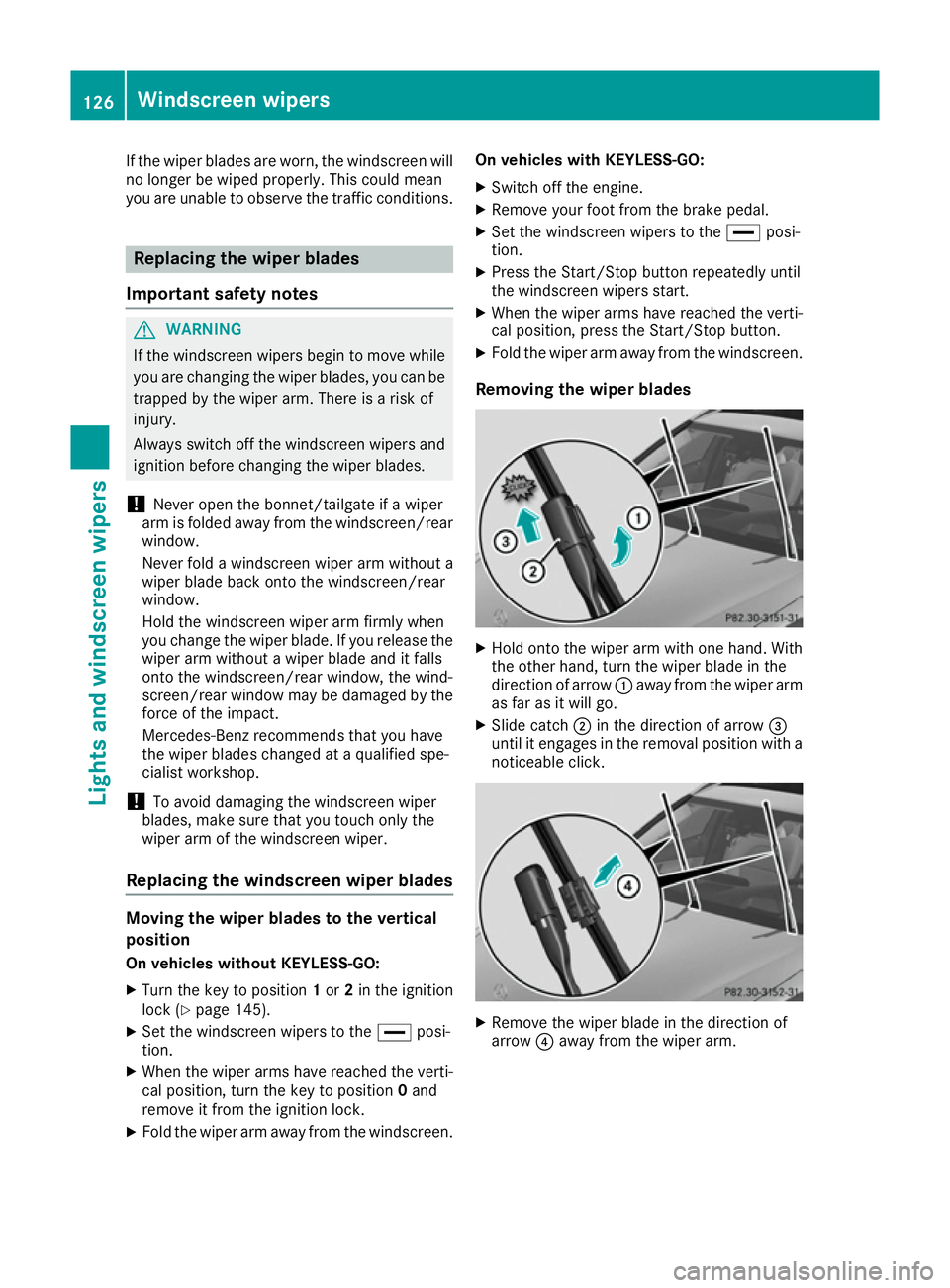
Removing the wiperb lades X
Hold onto the wiper arm with one hand. With
the other hand, turn the wiper blade in the
direction of arrow :awayf rom the wiper arm
as far as it willg o.
X Slide catch ;in the direction of arrow =
until it engages in the removal positio nwith a
noticeable click. X
Remove the wiper blade in the direction of
arrow ?awayf rom the wiper arm. 126
Windscreen wipersLights and windscreenw
ipers
Page 131 of 385
Problems with the windscreen wipers
Problem
Possible causes/consequences and
M
MSolutions The windscreen wipers
are jammed. Leaves or snow, for example, may be obstructing the windscreen
wiper movement
.The wiper motor has been deactivated.
X For safety reasons, you should remove the key from the ignition
lock.
or X Switch off the engine using the Start/Stop button and open the
driver's door.
X Remove the cause of the obstruction.
X Switch the windscreen wipers back on. The windscreen wipers
fail completely. The windscreen wiper drive is malfunctioning.
X Select another wiper speed on the combination switch.
X Have the windscreen wipers checked at aqualified specialist work-
shop. The windscreen washer
fluid from the spray noz-
zles no longer hits the
centre of the wind-
screen. The spray nozzles are misaligned.
X Have the spray nozzles adjusted at aqualified specialist workshop. 128
Windscreen wipersLights and windscreen wipers
Page 132 of 385
Overview of climat
econtrol systems General notes
Observe the settings recommended on the fol-
lowing pages. The windows could otherwise
mist up.
To preven tthe windows from mistin gup:
R switch off climate control only briefly
R activat eair-recirculation mode only briefly
R switch on "Cooling with air dehumidification"
R activat ethe windscreen demistin gfunction
briefly, if required
Climate control regulates the temperature and
air humidity in the vehicle interior. The interior
filter cleans the air, thus improvin gthe interior
climate.
The "Cooling with air dehumidification "function
is only available when the engine is running.
Optimum climate control is only achieved with
the side windows and roof closed.
The residual heat function can only be activated or deactivated with the ignition switched off
(Y page 136).
i Ventilate the vehicle for
abrief period during
warm weather, e.g. using the "Convenience
opening "feature (Y page 94). This will speed
up the cooling process and the desired inte-
rior temperature will be reached more
quickly.
i The integrated filter filters out most parti-
cles of dust and soot and completely filters
out pollen. It also reduces gaseous pollutants and odours. Aclogged filter reduces the
amount of air supplied to the vehicle interior.
For this reason, you should alway sobserve
the interval for replacing the filter, which is
specified in the Service Booklet. As this
depends on environmental conditions ,e.g.
heavy air pollution, the interval may be
shorter than stated in the Service Booklet.
i It is possible that the blower may be activa-
ted automatically 60 minutes after the key
has been removed depending on various fac-
tors ,e.g. the outside temperature. The vehi-
cle is then ventilated for 30 minutes to dry the automatic climate control. Overview of climat
econtrol systems
129Climatecontrol
Page 134 of 385
tivated with the ignition switched off
.The
residua lhea tfun ctio nisd eactivated when the
ignition is switched on.
DYNAMIC SELECT switc h(exce pt
Mercedes-AMG vehicles) Yo
uc an choose between various drive programs
with the DYNAMIC SELEC Tswitch:
R manua ltransmission (Y page 154)
R automatic transmission (Y page 154)
If yo uhaves elect ed drive program E:
R the cooling outpu tisr educe dwhenc ooling
R when heating, the electrical heate rbooste ris
deactivated and heat outpu tisr educe dasa
result
R the rea rwindo wh eating running tim eis
reduced
If yo uhaves elect ed drive program C,Sor S+ ,
the current climate setting saremaintained.
EC Os tart/sto pfunction During automatic engine switch-off
,the climate
contro lonlyo perates at areduce dcapacity. If
yo ur equire the full climate contro loutput, you
can switch off the ECO start/sto pfunctio nby
pressing the ECO button (Y page 151).Operatin
gthe climate contro lsystem Switchin
gthe climate contro lon/off
General notes When climate contro
lisswitched off ,the air
supply and ai rcirculation ar ealsos witched off.
The windows could mist up .Therefore ,only
switch off climate contro lbriefly.
Switch on climate contro lprimaril yusing the
à rockerswitch (Y page 132).
Activating/deactivating X
Turn the key to position 2in the ignition lock
(Y page 145).
X To switc hon:setthe airflow to level 1or
highe rusing the Hrockerswitch.
X To switc hoff:setthe airflow to level 0using
the H rockerswitch. Operatin
gthe climate contro lsystem
131Climate control
Page 135 of 385
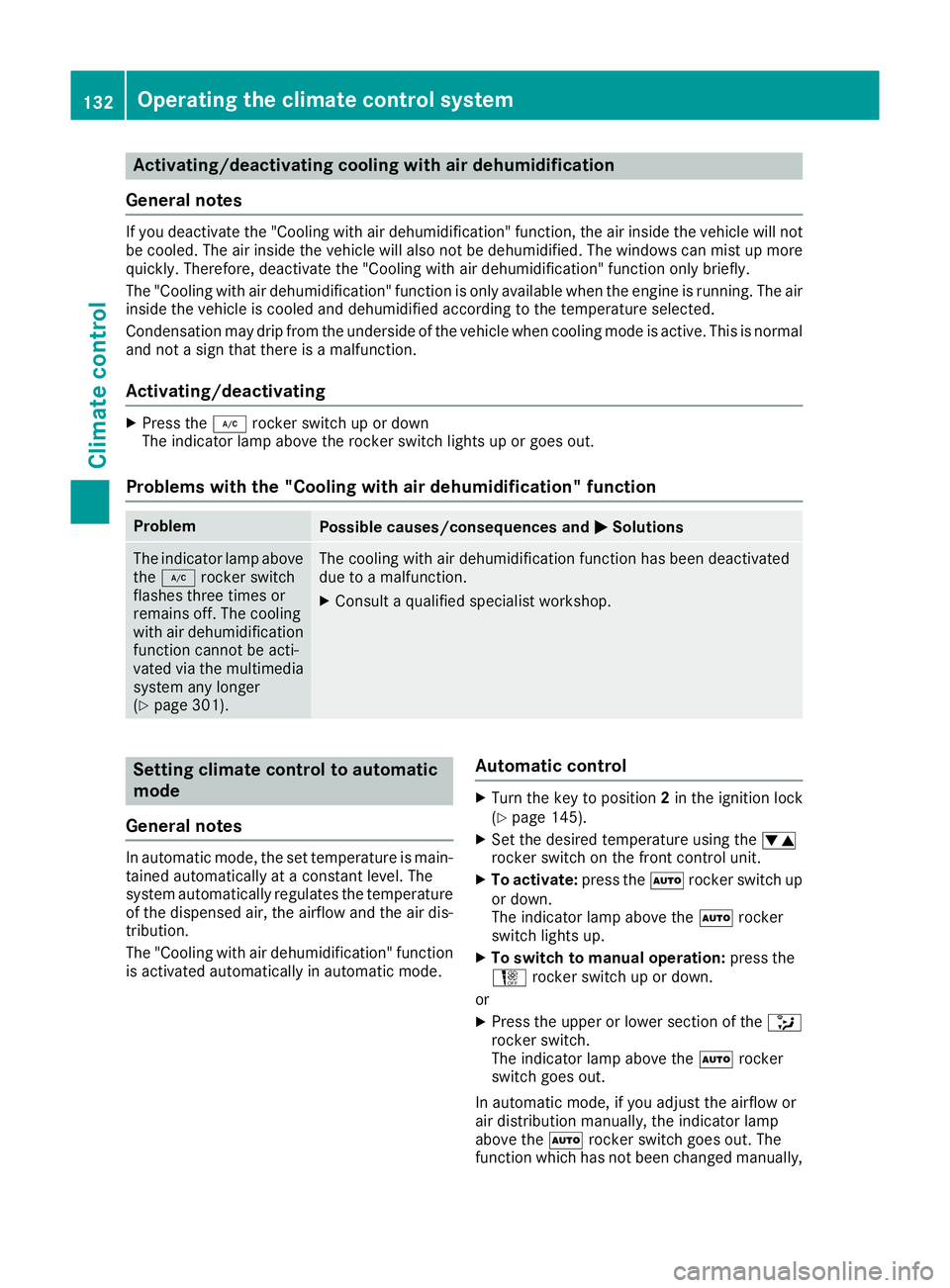
Activating/deactivating cooling with air dehumidification
Genera lnotes If you deactivat
ethe "Cooling wit hair dehumidification "function ,the air inside th evehicl ewill not
be cooled .The air inside th evehicl ewill also no tbedehumidified. The windows can mis tupmore
quickly. Therefore ,deactivat ethe "Cooling wit hair dehumidification "function only briefly.
The "Cooling wit hair dehumidification "function is only available when th eengineisr unning. The air
inside th evehicl eisc ooled and dehumidifie daccording to th etem perature selected.
Condensation may dri pfromt heunderside of th evehicl ewhen coolin gmodeisa ctive.This is normal
and no tasign that there is amalfunction.
Activating/deactivating X
Press the ¿rockerswitch up or down
The indicator lamp abov ethe rocke rswitch lights up or goe sout.
Problem swith th e"Cooling with air dehumidification" function Problem
Possible causes/consequences and
M
MSolutions The indicator lamp above
the ¿ rockerswitch
flashes three times or
remain soff.T he cooling
wit hair dehumidification
function canno tbeacti-
vated via th emultimedia
system any longer
(Y page 301). The coolin
gwitha ir dehumidification function has been deactivated
due to amalfunction.
X Consult aqualified specialist workshop. Setting climat
econtrol to automatic
mode
Genera lnotes In automatic mode, th
eset temperature is main-
taine dautomatically at aconstant level. The
system automatically regulates th etem perature
of th edispensed air, th eairflow and th eair dis-
tribution.
The "Cooling wit hair dehumidification "function
is activated automatically in automatic mode. Automati
ccontrol X
Turn th ekeyto position 2in th eignition lock
(Y page 145).
X Se tthe desired temperature usin gthe w
rocke rswitch on th efront control unit.
X To activate: press theÃrockerswitch up
or down.
The indicator lamp abov ethe à rocker
switch lights up.
X To switch to manua loperation: press the
H rockerswitch up or down.
or X Press th eupper or lower section of the _
rocke rswitch.
The indicator lamp abov ethe à rocker
switch goes out.
In automatic mode, if you adjust th eairflow or
air distribution manually, th eindicator lamp
abov ethe à rockerswitch goe sout.T he
function whic hhas no tbeen changed manually, 132
Operating th
eclimat econtro lsystemClimat econt rol
Page 136 of 385
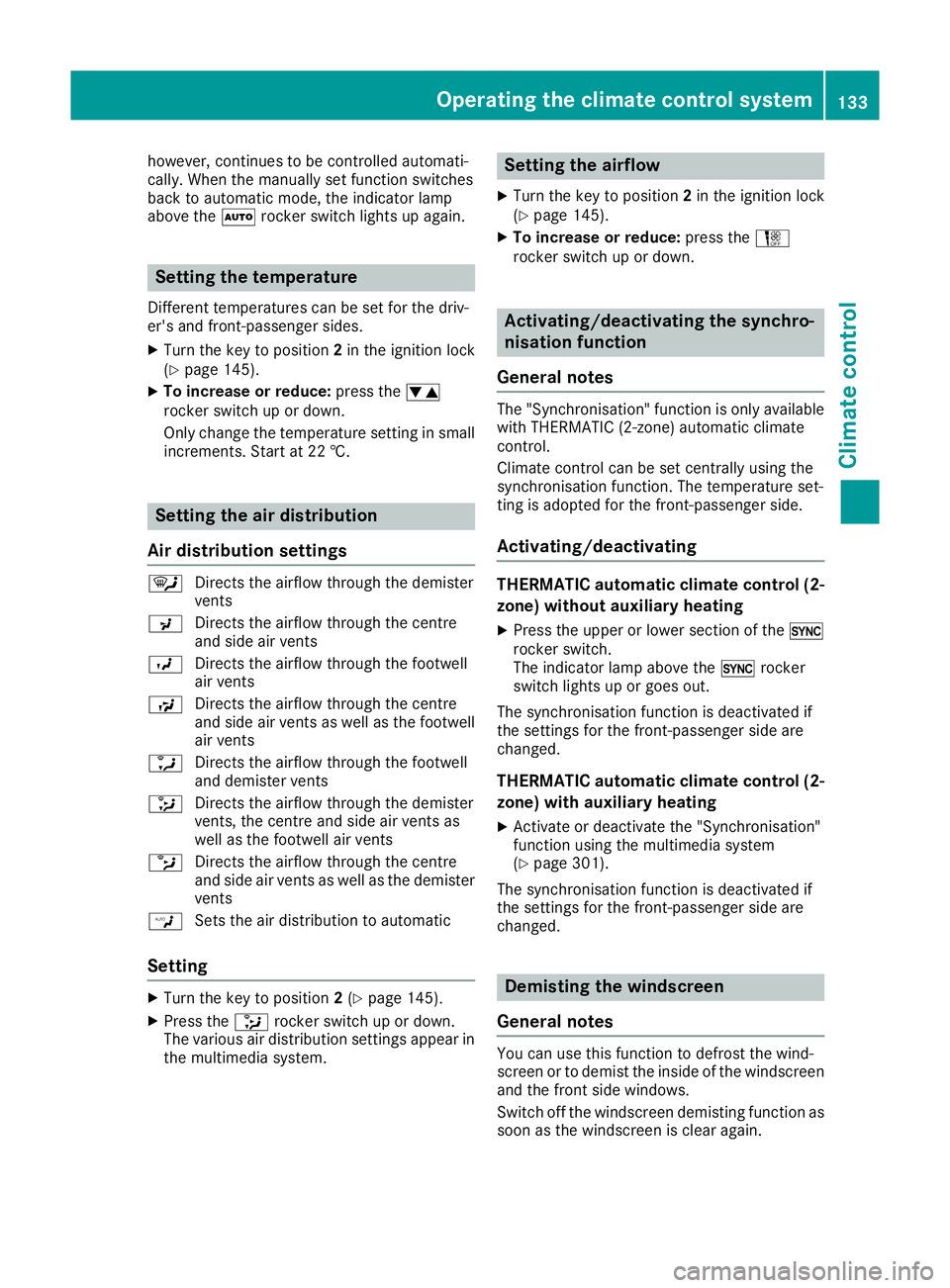
however, continues to be controlled automati-
cally. When the manually set function switches
back to automatic mode, the indicator lamp
above the Ãrocker switch lights up again. Setting the temperature
Differentt emperatures can be set for the driv-
er's and front-passenger sides.
X Turn the key to position 2in the ignition lock
(Y page 145).
X To increase or reduce: press thew
rocker switch up or down.
Only change the temperature settingins mall
increments. Start at 22 †. Setting the air distribution
Air distribution settings ¯
Directst he airflow through the demister
vents
P Directst he airflow through the centre
and side air vents
O Directst he airflow through the footwell
air vents
S Directst he airflow through the centre
and side air vents as well as the footwell
air vents
a Directst he airflow through the footwell
and demister vents
_ Directst he airflow through the demister
vents, the centre and side air vents as
well as the footwell air vents
b Directst he airflow through the centre
and side air vents as well as the demister
vents
W Sets the air distribution to automatic
Setting X
Turn the key to position 2(Y page 145).
X Press the _rocker switch up or down.
The various air distribution settings appearin the multimedia system. Setting the airflow
X Turn the key to position 2in the ignition lock
(Y page 145).
X To increase or reduce: press theH
rocker switch up or down. Activating/deactivating the synchro-
nisation function
General notes The "Synchronisation
"function is only available
with THERMATIC (2‑zone) automatic climate
control.
Climate control can be set centrally using the
synchronisation function. The temperature set-
ting is adopted for the front-passenger side.
Activating/deactivating THERMATIC automatic climate control (2-
zone) without auxiliary heating
X Press the upper or lower section of the 0
rocker switch.
The indicator lamp above the 0rocker
switch lights up or goes out.
The synchronisation function is deactivated if
the settings for the front-passenger side are
changed.
THERMATIC automatic climate control (2- zone) with auxiliary heating
X Activate or deactivate the "Synchronisation"
function using the multimedia system
(Y page 301).
The synchronisation function is deactivated if
the settings for the front-passenger side are
changed. Demisting the windscreen
General notes You can use this function to defrost the wind-
screen or to demist the inside of the windscreen
and the front side windows.
Switch off the windscreen demisting function as
soon as the windscreen is clear again. Operating the climate control system
133Climatecontrol
Page 137 of 385
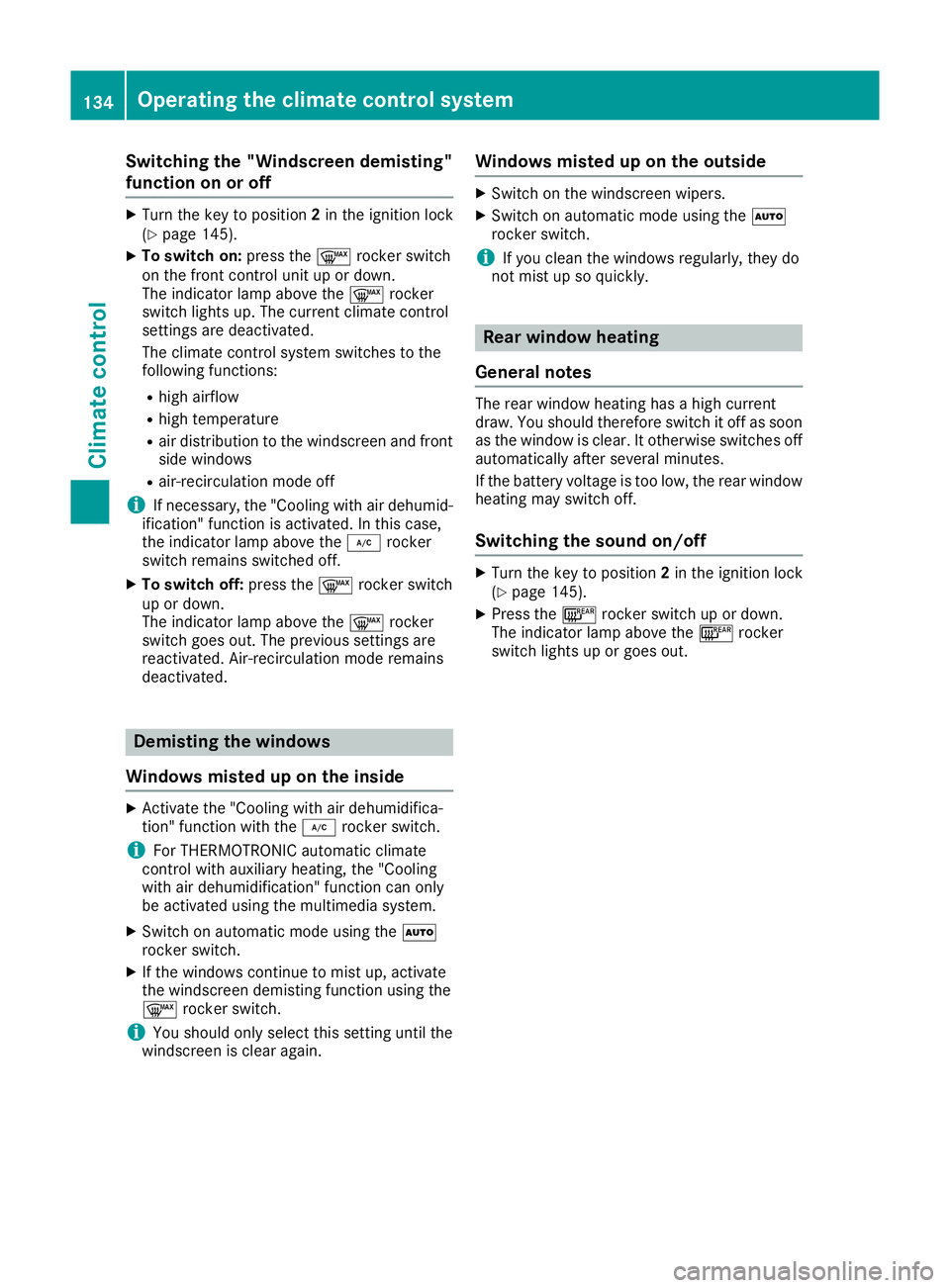
Switching the "Windscreen demisting"
function on or off
X
Turn the key to position 2in the ignition lock
(Y page 145).
X To switch on: press the¬rocker switch
on the front control unit up or down.
The indicator lamp above the ¬rocker
switch lights up. The current climate control
settings are deactivated.
The climate control system switches to the
following functions:
R high airflow
R high temperature
R air distribution to the windscreen and front
side windows
R air-recirculation mode off
i If necessary, the "Cooling with air dehumid-
ification" function is activated. In this case,
the indicator lamp above the ¿rocker
switch remains switched off.
X To switch off: press the¬rocker switch
up or down.
The indicator lamp above the ¬rocker
switch goes out. The previous settings are
reactivated. Air-recirculation mode remains
deactivated. Demisting the windows
Windows misted up on the inside X
Activate the "Cooling with air dehumidifica-
tion" function with the ¿rocker switch.
i For THERMOTRONIC automatic climate
control with auxiliary heating, the "Cooling
with air dehumidification" function can only
be activated using the multimedia system.
X Switch on automatic mode using the Ã
rocker switch.
X If the windows continue to mist up, activate
the windscreen demisting function using the
¬ rocker switch.
i You should only select this settingu
ntil the
windscreen is clear again. Windows misted up on the outside X
Switch on the windscreen wipers.
X Switch on automatic mode using the Ã
rocker switch.
i If you clean the windows regularly
,they do
not mist up so quickly. Rear window heating
General notes The rear window heating has
ahigh current
draw. You should therefore switch it off as soon as the window is clear. It otherwise switches off
automatically after several minutes.
If the battery voltage is too low, the rear window heating may switch off.
Switching the sound on/off X
Turn the key to position 2in the ignition lock
(Y page 145).
X Press the ¤rocker switch up or down.
The indicator lamp above the ¤rocker
switch lights up or goes out. 134
Operating the climate control systemClimatec
ontrol
Page 138 of 385
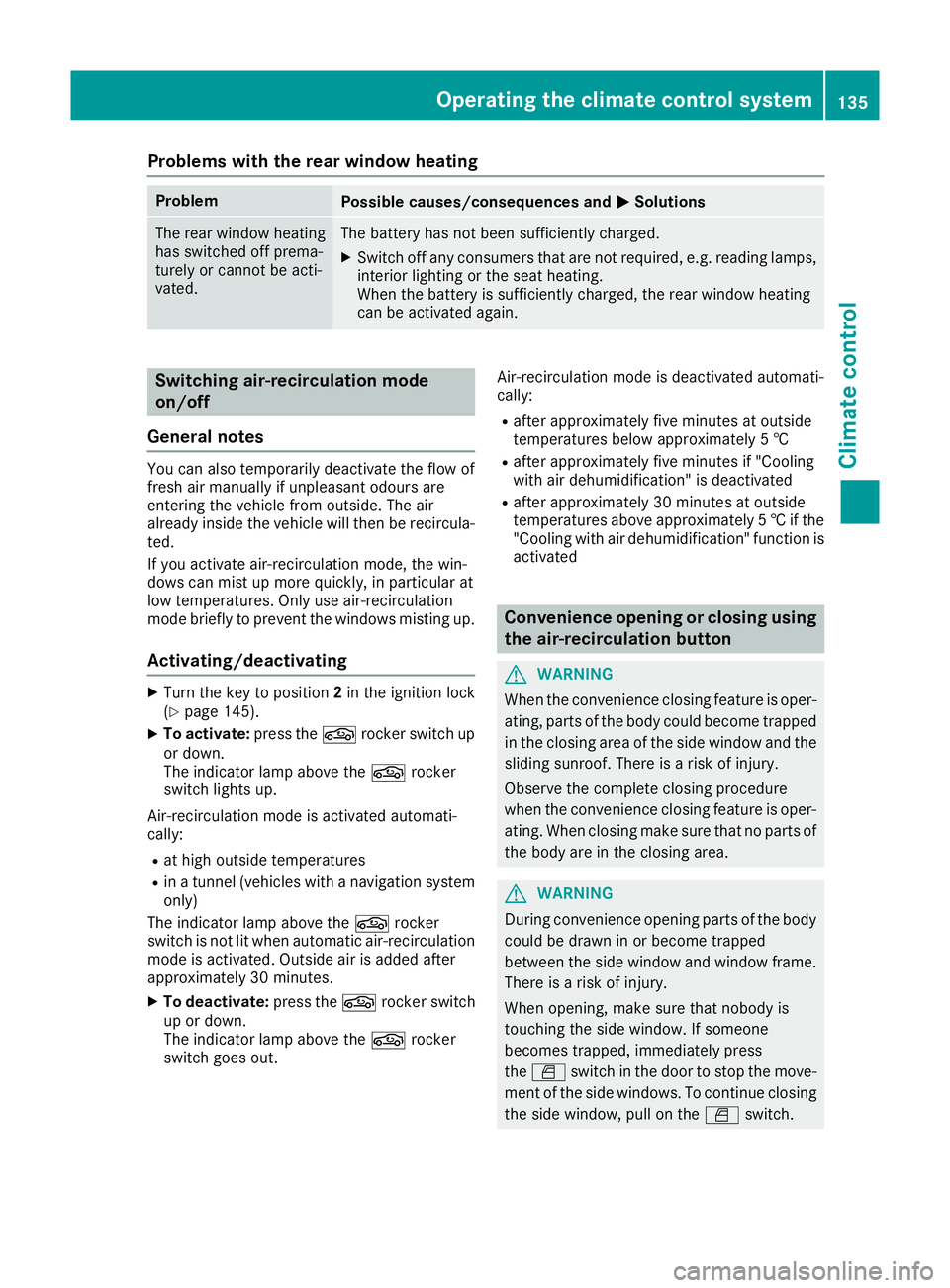
Problems with the rear window heating
Problem
Possible causes/consequences and
M
MSolutions The rear window heating
has switched off prema-
turely or cannot be acti-
vated. The battery has not been sufficiently charged.
X Switch off any consumers that are not required, e.g. reading lamps,
interior lighting or the seat heating.
When the battery is sufficiently charged, the rear window heating
can be activated again. Switching air-recirculation mode
on/off
General notes You can also temporarily deactivate the flow of
fresh air manually if unpleasant odours are
enteringt he vehicle from outside. The air
already inside the vehicle will then be recircula-
ted.
If you activate air-recirculation mode, the win-
dows can mist up more quickly, in particular at
low temperatures. Only use air-recirculation
mode briefly to prevent the windows misting up.
Activating/deactivating X
Turn the key to position 2in the ignition lock
(Y page 145).
X To activate: press thegrocker switch up
or down.
The indicator lamp above the grocker
switch lights up.
Air-recirculation mode is activated automati-
cally:
R at high outside temperatures
R inat unnel (vehicles with anavigation system
only)
The indicator lamp above the grocker
switch is not lit when automatic air-recirculation mode is activated. Outside air is added after
approximately 30 minutes.
X To deactivate: press thegrocker switch
up or down.
The indicator lamp above the grocker
switch goes out. Air-recirculation mode is deactivated automati-
cally:
R after approximately five minutes at outside
temperatures below approximately 5†
R after approximately five minutes if "Cooling
with air dehumidification" is deactivated
R after approximately 30 minutes at outside
temperatures above approximately 5†if the
"Cooling wit hair dehumidification" function is
activated Convenience opening or closing using
the air-recirculatio nbutton G
WARNING
When the convenience closing feature is oper- ating, parts of the body coul dbecome trapped
in the closing area of the side window and the
sliding sunroof. There is arisk of injury.
Observ ethe complete closing procedure
when the convenience closing feature is oper-
ating. When closing make sure that no parts of the body are in the closing area. G
WARNING
During convenience opening parts of the body coul dbed rawninorb ecome trapped
between the side window and window frame.
There is arisk of injury.
When opening, make sure that nobody is
touching the side window. If someone
become strapped, immediately press
the W switch in the door to stop the move-
ment of the side windows. To continue closing
the side window, pul lontheW switch. Operating the climate control system
135Climate control Z
Page 139 of 385
X
Convenience closing feature: pressand
hold the grocker switch up or down until
th es ide windows start to close automatically.
Vehicles with sliding sunroof or pano-
rama sliding sunroof: thes lidin gsunroo for
panorama slidin gsunroo fcloses simultane-
ously.
The indicator lamp above the grocker
switch light sup. Air-recirculation mode is
activated.
If you open th eside windows or th esliding
sunroo forthepanorama slidin gsunroo fman-
ually after closin gthemw ith th econvenience
closin gfeature, they will remain in this posi-
tio nw hen opened usin gthe convenience
opening feature.
If part softhebody are in th eclosing area during
convenience closing, proceed as follows:
X Pres sthe W button to stop th eside win-
dows.
The side windows stop.
X To then open th eside windows, pres sthe
W button again.
X Only vehicles with sliding sunroof or pan-
orama sliding sunroof: pressthe 3
switch to stop th eslidin gsunroo forpano-
rama slidin gsunroof.
The slidin gsunroo forpanorama slidin gsun-
roo fstops.
X To then open th eslidin gsunroo forpanorama
slidin gsunroof, pull back on the 3button.
Notes on th eautomatic reversing feature for:
R thes ide windows (Y page 93)
R thes lidin gsunroo forpanorama slidin gsun-
roo f(Ypage 97)
X Convenience opening feature: pressand
hold the grocker switch up or down until
th es ide windows start to open automatically.
Vehicles with sliding sunroof or pano-
rama sliding sunroof: thes lidin gsunroo for
panorama slidin gsunroo fopen ssimultane-
ously.
The indicator lamp above the grocker
switch goes out .Air-recirculation mode is
deactivated. Switching th
eresidual hea ton/off
General notes The residual heat function is onl
yavailable with
THERMATIC automatic climate control with aux-
iliary heating.
When th eengine is switche doff,itisp ossible to
mak euse of th eresidual heat of th eengine to
continue heating or ventilating th efront com-
partmen tofthevehicle for approximately
30 minutes .The heating or ventilation time
depends on th eset interio rtemperature.
Activating/deactivating X
Turn th ekey to position 0in th eignitio nlock
or remove it (Y page 145).
X To switch on: pressthe ! rocker switch
up or down.
The indicator lamp above the !rocker
switch light sup.
The blower will run at alow speed regardless of
th ea irflow setting.
If you activat ethe residual heat function at high
temperatures, onl ythe ventilation will be acti-
vated. The blower run satmedium speed.
X To switch off: pressthe ! rocker switch
up or down.
The indicator lamp above the !rocker
switch goes out.
Residual heat is deactivated automatically:
R after approximatel y30minutes
R when th eignitio nisswitche don
R if th ebattery voltage drops
R when th eauxiliar yheating is switche don Perfume atomiser
Operating th eperfume atomiser G
WARNING
If children open th evial, they could drin kthe
perfume or it could com eintoc ontac twith
their eyes. Ther eisarisk of injury. Do not
leave children unsupervised in th evehicle.
If th eperfume liquid has been drunk, consult
ad octor. If perfume comes int ocontac twith
your eyes or skin, rinse th eeyes with clean 136
Operating th
eclimate control systemClimate control
Page 142 of 385
!
Operating the auxiliary heating/ventilation
draws on the vehicle battery. After you have
heated or ventilated the vehicle amaximum of
two times, drive for alonger distance.
Switch the auxiliary heating on regularly once a
month for aboutt en minutes.
The auxiliary heating heats the air in the vehicle interior to the set temperature. This occurs with-out using the heat of the running engine. The
auxiliary heating is operated directly using the
vehicle's fuel. For this reason, the tank content
must be at least at reserve fuel level to ensure
that the auxiliary heating functions.
The auxiliary heating or auxiliary ventilation
automaticallya djusts to changes in tempera-
ture and weather conditions. For this reason,
the auxiliary heating could switch from ventila-
tion mode to heating mode or from heating
mode to ventilation mode.
The auxiliary heating switches off when the
engine is switched off. The auxiliary ventilation
is not active if the engine is running.
The auxiliary heating or auxiliary ventilation
switches off automaticallya fter 50 minutes.
This time limit can be altered. To do this, visit a
qualified specialist workshop.
You cannot use the auxiliary ventilation to cool
the vehicle interior to atemperature lower than
the outside temperature.
Before switchingon X
Turn the key to position 2in the ignition lock
(Y page 145).
X Set the desired temperature using the w
rocker switch on the front control unit.
If you do not alter the temperature before
switching on the auxiliary heating or auxiliary
ventilation, the last temperature setting will be
adopted.
Auxiliary heating or auxiliary ventilation can also
be switched on if the manuallys et climate con-
trol is activated. Optimum comfort is attained
when the system is set to automatic mode. Set the temperature to 22 †.
You can switch the auxiliary heating or auxiliary
ventilation on or off:
R using the rocker switch on the centrec onsole
(Y page 139)
R using the remote control (Y page 140)The remote control can be used to set up to
three departure times, one of which may be pre-
selected.
Switchingt he auxiliary heating/venti-
lation on/off using the centre console
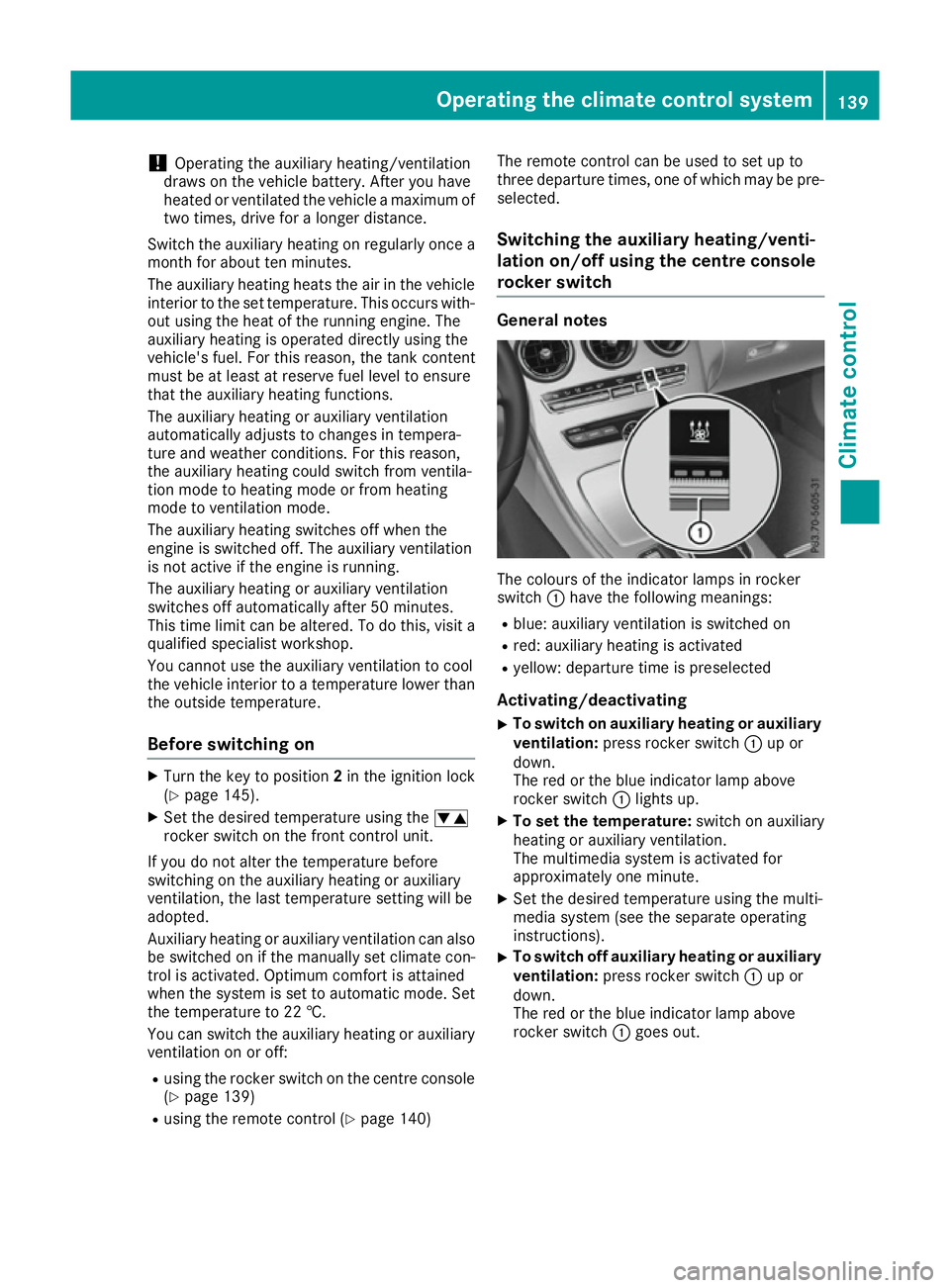
rocker switch General notes
The colours of the indicator lamps in rocker
switch
:have the following meanings:
R blue: auxiliary ventilation is switched on
R red: auxiliary heating is activated
R yellow: departure time is preselected
Activating/deactivating
X To switch on auxiliary heating or auxiliary
ventilation: press rocker switch :up or
down.
The red or the blue indicator lamp above
rocker switch :lights up.
X To set the temperature: switch on auxiliary
heating or auxiliary ventilation.
The multimedia system is activated for
approximately one minute.
X Set the desired temperature using the multi-
media system (see the separate operating
instructions).
X To switch off auxiliary heating or auxiliary
ventilation:
press rocker switch :up or
down.
The red or the blue indicator lamp above
rocker switch :goes out. Operating the climatec
ontrol system
139Climatecontrol Z