key MERCEDES-BENZ C-CLASS COUPE 2015 Manual Online
[x] Cancel search | Manufacturer: MERCEDES-BENZ, Model Year: 2015, Model line: C-CLASS COUPE, Model: MERCEDES-BENZ C-CLASS COUPE 2015Pages: 385, PDF Size: 13.12 MB
Page 232 of 385
X
Position the trailer horizontally behind the
vehicle.
X Couple up the trailer.
X Establish the electrical connection between
the vehicle and the trailer.
X Check that the trailer lighting system is work-
ing.
X Push the combination switch upwards/down-
wards
X Check whether the corresponding turn signal
on the trailer is flashing.
Ac onnected trailer is only detected when the
electrical connection is established correctly
and when the lighting system is working prop- erly. The function of other systems, such as
ESP ®
,P ARKTRONIC, Active Parking Assist,
Active Blind Spot Assist or Lane Keeping
Assist also depends on this. Uncoupling
atrailer G
WARNING
If you uncouple atrailer with an engaged over-
run brake, you could trap your hand between
the vehicle and the trailer drawbar. This poses ar isk of injury.
Do not uncouple atrailer with an engaged
overrun brake. G
WARNING
Vehicles with level control:
If you disconnect the trailer cable, the vehicle is lowered. This can cause you or others to
become trapped between the vehicle body
and tyres, or underneat hthe vehicle. This
poses arisk of injury.
Make sure that no-one is in the immediate
vicinit yofthe wheel arch or underneat hthe
vehicle when disconnectin gthe trailer cable.
! Do not disconnect
atrailer with an engaged
overrun brake. Otherwise, your vehicle could
be damaged by the rebounding of the overrun
brake.
! Remove the installed adapter cable before
folding in the ball coupling. Otherwise, dam-
age may occur to the rear bumper and the
adapter cable. X
Make sure that the transmission is in position
P.
X Apply the electric parking brake.
X Secure the trailer against rolling away.
X Remove the trailer cable and decouple the
trailer. Trailer power supply
! You can connect accessories to the perma-
nent power supply up to amaximum of 240 W.
You cannot charge atrailer battery using the
power supply.
When it leaves the factory, your vehicle's trailer
socket is equipped with apermanen tpower
supply and apower supply that is switched on
via the ignition lock.
The permanen tpower supply is supplied via
trailer socket pin 9.
The power supply that is switched on via the
ignition lock is supplied via trailer socket pin 10.
The trailer's permanen tpower supply is
switched off in the event of low vehicle supply
voltage and after six hours at the latest.
You can find more information about fitting the
trailer electric sataqualified specialist work-
shop.
X To switch the connected power supply on
or off: turn the key to position 2or 0respec-
tively (Y page 145). Failure check for LEDs
If LED lamps are fitted in the trailer, amalfunc-
tion message may appear in the multifunction
display even if there is no fault. The reason for
the error message may be that the curren thas
fallen below the minimum of 50 mA.
To ensure reliable operation of the failure indi-
cator, each LED chain in the trailer lighting must
be guaranteed aminimum curren tof50mA. Trailer with 7-pin connector
General notes Trailer with 7-pin connector:
you can connect
to the 13-pin socket on the ball coupling using
an adapter or, if necessary, an adapter cable. Towing
atrailer
229Driving and parking Z
Page 236 of 385
The segment
sbetween the speed of the vehi-
cle in front and the stored speed light up. Rev counter
! Do not drive in the overrevving range. Doing
so will damage the engine.
The red band in the rev counter indicates the
engine's overrevving range.
The fuel supply is interrupted to protec tthe
engine when the red band is reached. Outside temperature display
You should pay special attention to road condi-
tions when temperatures are around freezing
point.
Bear in mind that the outside temperature dis-
play indicates the measured air temperature
and not the road surface temperature.
The outside temperature display is in the multi-
function display (Y page 234).
Changes in the outside temperature are dis-
played after ashort delay. Coolant temperature gauge
G
WARNING
If you open the bonnet while the engine is
overheatin gorwhile there is afire in the
engine compartment,y ou could come into
contact with hot gases or other leaking ser-
vice products. There is adanger of injury.
Allow an overheatin gengine to cool down
before opening the bonnet .Ifthere is afire in
the engine compartment,l eave the bonnet
closed and notify the fire brigade.
The multifunction display shows the coolant
temperature gauge in the lower section of the
rev counter (Y page 32).
At high outside temperatures and when driving
uphill, the coolant temperature may rise to the
end of the scale.
Under normal operating conditions and with the
specified coolant level, the coolant temperature may rise to 120 †. Operating the on-board computer
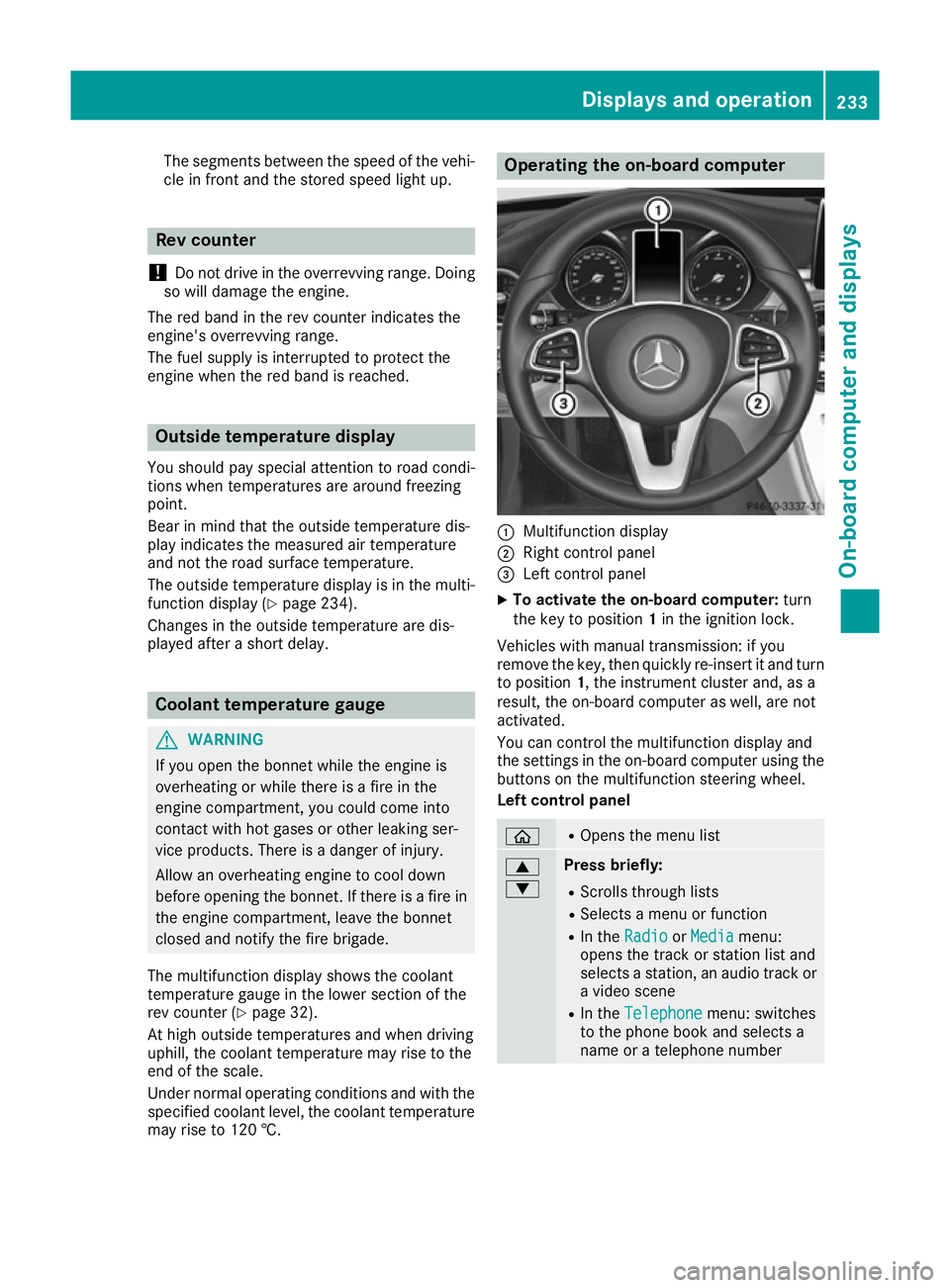
:
Multifunction display
; Right control panel
= Left control panel
X To activat ethe on-board computer: turn
the key to position 1in the ignition lock.
Vehicles with manual transmission: if you
remove the key, then quickly re-insert it and turn
to position 1,the instrument cluster and, as a
result, the on-board computer as well, are not
activated.
You can control the multifunction display and
the settings in the on-board computer using the button sonthe multifunction steerin gwheel.
Left control panel ò R
Opens the menu list 9
: Press briefly:
R Scrolls through lists
R Select samenu or function
R In the Radio Radio orMedia
Media menu:
opens the track or station list and
selects astation ,anaudio track or
av ideo scene
R In the Telephone Telephone menu: switches
to the phone book and selects a
name or atelephone number Displays and operation
233On-board computer and displays Z
Page 254 of 385
RACETIMER
Displaying and startin
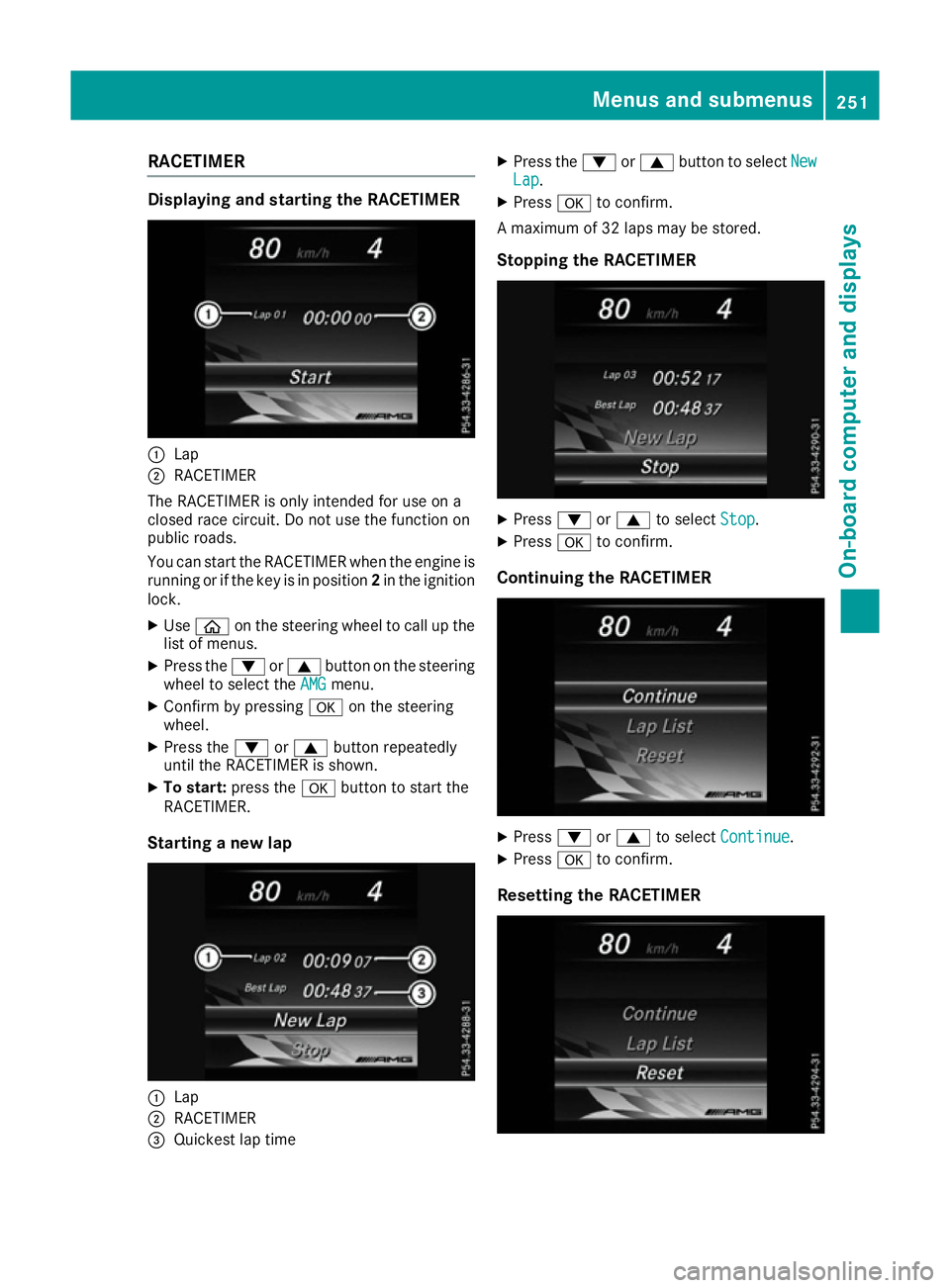
gthe RACETIMER :
Lap
; RACETIMER
The RACETIMER is only intended for us eona
closed race circuit. Do not us ethe function on
public roads.
Yo uc an star tthe RACETIMER when the engine is
running or if the key is in position 2in the ignition
lock.
X Use ò on the steering wheel to cal lupthe
list of menus.
X Press the :or9 button on the steering
wheel to select the AMG
AMG menu.
X Confirm by pressing aon the steering
wheel.
X Press the :or9 button repeatedly
unti lthe RACETIMER is shown.
X To start: press the abutton to star tthe
RACETIMER.
Startin ganewlap :
Lap
; RACETIMER
= Quickest la ptime X
Press the :or9 button to select New New
Lap Lap.
X Press ato confirm.
Am aximum of 32 laps may be stored.
Stoppin gthe RACETIMER X
Press :or9 to select Stop
Stop.
X Press ato confirm.
Continuin gthe RACETIMER X
Press :or9 to select Continue
Continue .
X Press ato confirm.
Resetting the RACETIMER Menus and submenus
251On-board computer and displays Z
Page 286 of 385

Display messages
Possible causes/consequences and
M
MSolutions Ð
Power steering mal‐ Power steering mal‐
function See Own‐ function See Own‐
er'
sM anual
er' sM anual The powe
rsteering assistanc eisfaulty.
Aw arning tone also sounds.
G WARNING
You will need to use mor eforce to steer.
There is ariskofana ccident.
X Chec kwhether you are able to apply th eextra force required.
If you ar eabletos teer safely:
X Drive on carefully.
X Consult aqualified specialist workshop immediately.
If you ar eunable to steer safely:
X Do no tdrive on.
X Consult aqualified specialist workshop. Ð
Steering malfunc‐ Steering malfunc‐
tio
nS ee Owner's
tio nS ee Owner's
Manual Manual Vehicl
ewithm anual transmission :the electric steering loc kismal-
functioning.
G WARNING
The steering may be locke dbytheelectric steering lock.
There is ariskofana ccident.
X Pull ove rand stop th evehicl esafely as soo naspossible, paying
attention to roa dand traffic conditions.
X Safeguar dthe vehicl eagainst rollin gaway (Y page 172).
X Do no tdrive on.
X Consult aqualified specialist workshop. _
Before Before
starting
starting the
the
engine ,turnt he
engine ,turnt he
steering wheel.
steering wheel. Vehicl
ewithm anual transmission :the electric steering loc kismal-
functioning.
X Remove th ekeyfrom th eignition lock.
X To unloc kthe steering ,movet he steering whee lslightly.
X Inser tthe keyintot he ignition loc kagain. Telephone Telephone
No
Noservice
service Your vehicl
eisoutside th enetwork provider' stransmitter/receiver
range.
X Wait until th emobile phone operational readiness symbol appears
in th emultifunction display. ¥
Top up washer fluid Top up washer fluid The washer flui
dlevel in th ewasher flui dreservoir has dropped below
th em inimum.
X Top up th ewasher flui d(Ypage 325). Display
messages
283On-boardcomputer an ddisplays Z
Page 287 of 385
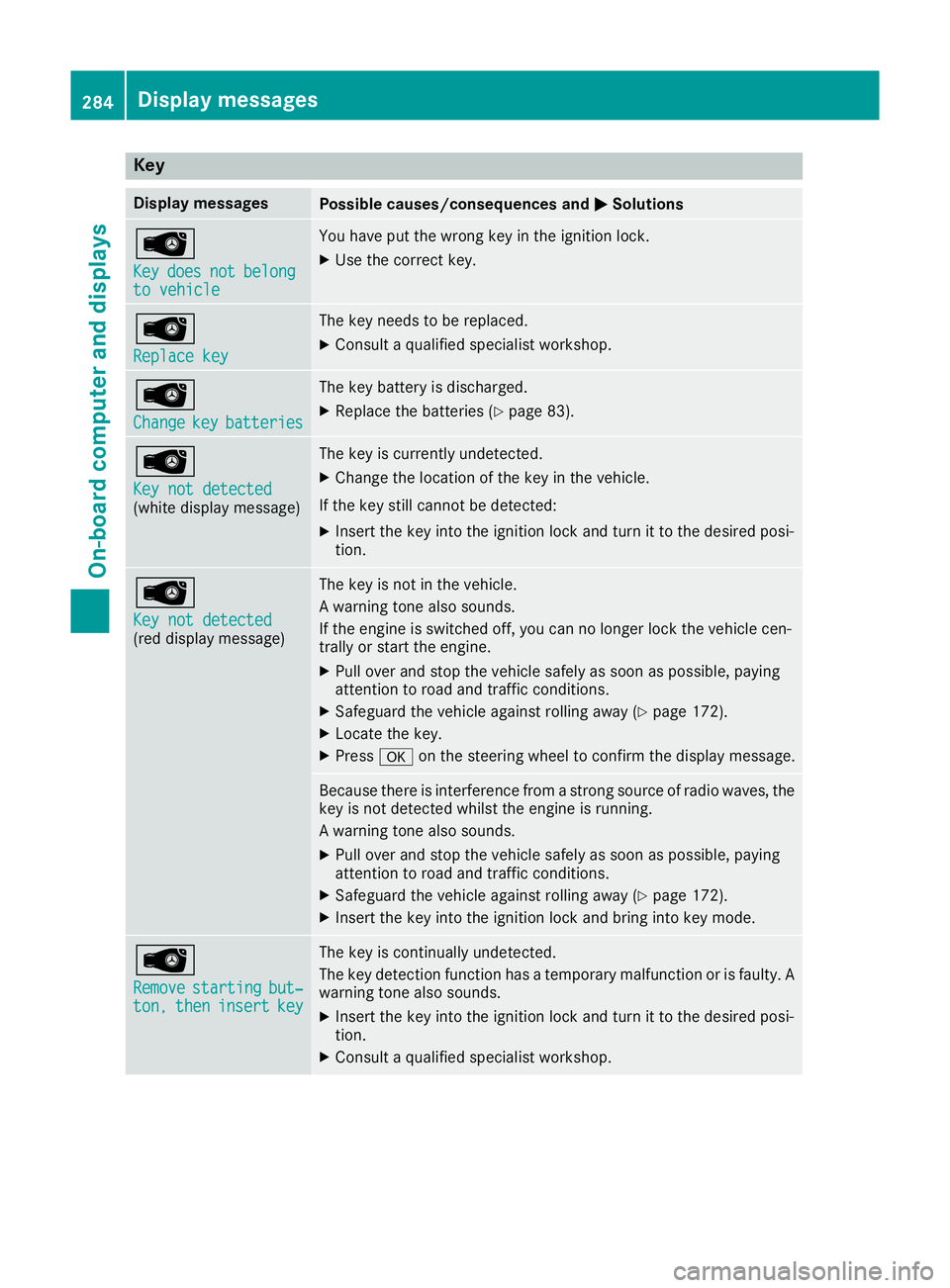
Key
Display messages
Possible causes/consequences and
M
MSolutions Â
Key Key
does
does not
notbelong
belong
to vehicle
to vehicle You hav
eput th ewrong ke yintheignition lock.
X Use th ecorrect key. Â
Replac
ekey
Replac ekey The ke
yneeds to be replaced.
X Consult aqualified specialist workshop. Â
Change Change
key
keybatteries
batteries The ke
ybattery is discharged.
X Replac ethe batterie s(Ypage 83). Â
Key not detected Key not detected
(whit
edisplay message) The ke
yiscurrentl yundetected.
X Change th elocation of th ekeyin th evehicle.
If th ekeystill canno tbedetected:
X Inser tthe keyintot he ignition loc kand tur nittot hedesire dposi-
tion. Â
Key not detected Key not detected
(re
dd isplay message) The ke
yisnotin th evehicle.
Aw arning tone also sounds.
If th eengineiss witched off ,you can no longer loc kthe vehicl ecen-
trally or start th eengine.
X Pull ove rand stop th evehicl esafely as soo naspossible, paying
attention to roa dand traffic conditions.
X Safeguar dthe vehicl eagainst rollin gaway (Y page 172).
X Locate th ekey.
X Press aon thesteering whee ltoc onfir mthedisplay message. Becaus
ethe re is interferenc efromas tron gs ource of radi owaves, the
ke yisn otdetecte dwhilstthe engin eisrunning.
Aw arning tone also sounds.
X Pull ove rand stop th evehicl esafely as soo naspossible, paying
attention to roa dand traffic conditions.
X Safeguar dthe vehicl eagainst rollin gaway (Y page 172).
X Inser tthe keyintot he ignition loc kand bring int okeymode. Â
Remove Remove
starting
starting but‐
but‐
ton,
ton, then
theninsert
insert key
key The ke
yiscontinually undetected.
The ke ydetection function has atem porar ymalfunction or is faulty. A
warning tone also sounds.
X Inser tthe keyintot he ignition loc kand tur nittot hedesire dposi-
tion.
X Consult aqualified specialist workshop. 284
Display
messagesOn-boardcomputer an ddisplays
Page 305 of 385
Enterin
ganaddress Multimedia system:
X Select Navi
NaviQNa vigation
Navigation.
The map displays th ecurren tvehicle position.
X Slide 6thec ontroller.
X Select Destination
DestinationQ Addressentry
Addres sentry.
Ente rana ddress, e.g .asfollows:
R town or postcode, street ,house number
R country, town or postcode
R town or postcode, centre
R street ,tow norp ostcode, junction
X Select Town
Town.
The town in whic hthe vehicle is currently
locate d(curren tvehicle position )isatthetop.
Below this, you will see locations for which
rout eguidance has alread ybeen carried out.
X Ente rthe town.
The Gsymbol: th elocatio niscontained on
th ed igital map multiple times.
X To switch to th elist: slide 5thec ontrol-
ler.
X Select th elocation.
If available, th epostcod eisshown. If there
are differen tpostcodes availabl efor th eloca-
tion, th ecorrespondin gdigitsare displayed
with an X
X.
X Ente rthe street and house number.
The address is in th emenu.
Further options for destination entry:
R search for akeyword
The keyword search finds destination susing
fragment sofwords.
R selec tthe last destination
R selec tacontact
R selec taPOI
You can search for aPOI by location, nam eor
telephone number.
R selec tadestination on th emap
R enter an intermediat edestination
You can map th erout etot hedestination
yourself with up to four intermediat edestina-
tions.
R selec tatravel guide destination (only availa-
ble for selecte dEuropean countries)
R selec tdestination sfromM ercedes-Benz
Apps
R selec tgeo-coordinates Calculating th
eroute Prerequisite: th
eaddress has been entered and
is in th emenu.
X Select Start
StartorContinue
Continue.
The rout eiscalculate dwith th eselecte droute
type and th eselecte drout eoptions.
If rout eguidance has alread ybeen activated,
ap rompt will appear asking whether you wish
to end th ecurren trout eguidance.
X Select Yes
YesorSet as intermediate des‐
Set as intermediate des‐
tination
tination.
Yes Yes cancel sthe curren trout eguidance and
start srout ecalculation to th enew destina-
tion.
Set as intermediate destination Set as intermediate destination adds
th en ew destination in addition to th eexisting
destination and open sthe intermediat edes-
tinations list. Connecting th
emobile phone
Requirements For telephony via th
eBluetooth ®
interface, you
require aBluetooth ®
-capable mobile phone. The
mobile phon emust support Hands-Free Profile
1. 0ora bove.
Multimedia system:
X Select Vehicle
VehicleQSy stem set‐
System set‐
tings
tingsQ Activate Bluetooth
Activate Bluetooth .
X Activate Bluetooth ®
O.
Mobil ephone:
X Activate Bluetooth ®
and, if necessary, Blue-
tooth ®
visibilit yfor other devices (see the
manufacturer' soperatin ginstructions).
The Bluetooth ®
device names for all of on eman-
ufacturer' sproduct smightbei dentical. To
mak eitp ossible to clearly identif yyour mobile
phone, chang ethe device nam e(see th eman-
ufacturer' soperatin ginstructions).
If th emobile phon esupport sthe PBA P(Phone
Book Access Profile) and MA P(Message
Acc ess Profile) Bluetooth ®
profiles ,the follow-
ing informatio nwill be transmitte dafter you
connect:
R phon ebook
R call lists
R messages 302
Operating systemMultimedia system
Page 306 of 385
i
Furthe
rinformation on suitabl emobile
phones can be obtained on the Internet at:
http://www.mercedes-benz.com/
connect
Searching for and authorisin gamobile
phone Befor
eusing your mobile phone with the multi-
media system for the firs ttime, yo uwilln eed to
search for the phone and then authorise (con-
nect) it. Depending on the mobile phone, author- isation takes place by means of Secure Simple
Pairing or by entering apasskey .The multimedia
system automaticall ymake sthe procedure that
is relevant for your mobile phone available. The
mobile phone is always connected automati-
cally afte rauthorisation. Furthe rinformation on
using amobile phone with the multimedia sys-
tem (se ethe Digital Owner's Manual).
If the multimedia system doe snot detect your
mobile phone, this may be du etoparticular
security setting sonyourm obile phone (se ethe
manufacturer's operating instructions).
Only one mobile phone can be connected to the
multimedia system at any one time.
Searching for amobile phone
Audio 20:
X Select Tel/
Tel/ ®QConnect Connect
device deviceQSe archfor phones
Search for phonesQSt art
Start
search
search.
The available mobile phones are displayed.
COMAND Online:
X Select Telephone TelephoneQConnect Connect
device
deviceQSe archfor phones
Search for phonesQSt art
Start
search
search.
The available mobile phones are displayed.
Symbols in the device list Sym-
bol Explanation
Ï
New mobile phone found, not yet
authorised. Ñ
Mobil
ephone is authorised ,but is
not connected. #
Mobil
ephone is authorised and
connected. Connecting the mobile phone Authorisation using Secure Simple Pairing:
X Select the mobile phone.
Ac ode is displaye dinthe multimedia system
and on the mobile phone.
X If the codes match: selectYes Yeson the mul-
timedia system.
X Confirm the code on the mobile phone.
Depending on the mobile phone used, con-
firm the connectio ntothe multimedia system
and for the PBAP and MAP Bluetooth ®
pro-
files. The prompt to confir mmay take up to
two minutes to be displaye d(seet he manu-
facturer's operating instructions).
X If the codes are different: selectNo
No on the
multimedia system.
The process is cancelled.
Repea tauthorisation.
Authorisation by entering apasskey:
X Select the Bluetooth ®
name of the mobile
phone.
The inpu tmenu for the passkey is displayed.
X Choose aone- to sixteen-digit number com-
bination as apasskey.
X Enter the passkey on the multimedia system.
X Press ¬to confirm.
X Enter and confir mthe passkey on the mobile
phone. Depending on the mobile phone used,
confir mthe connectio ntothe multimedia sys-
tem and for the PBAP and MAP Bluetooth ®
profiles. The prompt to confir mmay take up
to two minutes to be displaye d(seet he man-
ufacturer's operating instructions).
i Mobil
ephones that are connected to the
optionally available telephone module with
Bluetooth ®
(SAP profile) are displaye dsepa-
rately in the device list. These are found below
the entry MB SAP module phones MB SAP module phones.
Switchin gbetween mobile phones If yo
uhavea uthorised more than one mobile
phone, yo ucan switch between the individual
phones.
Multimedia system:
X Select Connect device Connect device.
X Select amobile phone from the device list. Operating system
303Multimedia system Z
Page 312 of 385
Fron
tstowage compartments Glov
ecompartment X
To open: pull handle :and open glov ecom-
partmen tflap ;.
X To close: foldg lovec om partmen tflap ;
upward suntil it engages.
Object sinA4format or an iPad ®
,f or example,
can be store dintheglov ecom partment. For
vehicles wit haperfum eatomiser (Y page 136)
th es torag espac eoft heglov ecom partmen tis
restricted. The glov
ecom partmen tcan only be locke dand
unlocked usin gthe emergenc ykey element
(Y page 82).
X To lock: insert theemergenc ykey element
int ot he locka nd tur nit90°clockwise to
position 2.
X To unlock: insert theemergenc ykey element
int othe lockand tur nit90°anti-clockwise to
position 1. Spectacles compartment
X
To open: press marking :.
The spectacles compartmen topen sdown-
wards.
Mak esure that th espectacles compartmen tis
always closed while th evehicl eisinm otion.
Stowage compartment in th efront centre
console Illustration
:vehicles wit hDIRECT SELECT lever
X Briefly press trim ;in th edirection of the
arrow.
Cover :swings upwards.
Stowage compartment in th edoors Stowage areas
309Stowing and featu res Z
Page 319 of 385
i
You can remove the ashtray inser
tand use
the resulting compartmen tfor stowage.
Rear-compartment ashtray X
To open: pull cover ;out by its top edge.
X To remove th einsert: push ribbing =from
the left side and pull insert :upwards.
X To fit th einsert: fit insert :intot he holder
from above and press down int othe holder
until it engages. Cigarett
elighter G
WARNING
You can burn yourself if you touc hthe hot
heatin gelemen torthe socket of the cigarette
lighter.
In addition ,flammable materials can ignit eif:
R the hot cigarett elighter falls
R ac hild holds the hot cigarett elighter to
objects, for example
There is arisk of fire and injury.
Always hold the cigarett elighter by the knob.
Always make sure that the cigarett elighter is
out of reach of children. Never leave children unattended in the vehicle.
Your attention must always be focused on the
traffic conditions. Only use the cigarett elighter
when road and traffic condition spermit. Example
X Turn the key to position 2in the ignition lock
(Y page 145).
X To open: open the stowage compartment
(Y page 309).
X Press in cigarett elighter ;.
Cigarette lighter ;will pop out automatically
when the heatin gelemen tisred-hot.
X To close: push cover :of the stowage com-
partmen tclosed. 12
Vsockets
Genera lnotes X
Turn the key to position 1in the ignition lock
(Y page 145).
The sockets can be used for accessories with a
maximum draw of 180 W(15 A). Accessories
include such item sasmobile phon echargers.
If you use the sockets for long periods when the engin eisswitched off, the battery may dis-
charge.
An emergenc ycut-of fensures that the on-board
voltage does not drop too low. If the on-board
voltage is too low, the power to the sockets is
automatically cut .This ensures that there is suf-
ficient power to star tthe engine.
If you have connected adevic etot he 12 V
socket, leave the cover of the stowage com-
partmen topen. This prevent sthe cover from
being blocked. 316
FeaturesStowing and features
Page 327 of 385
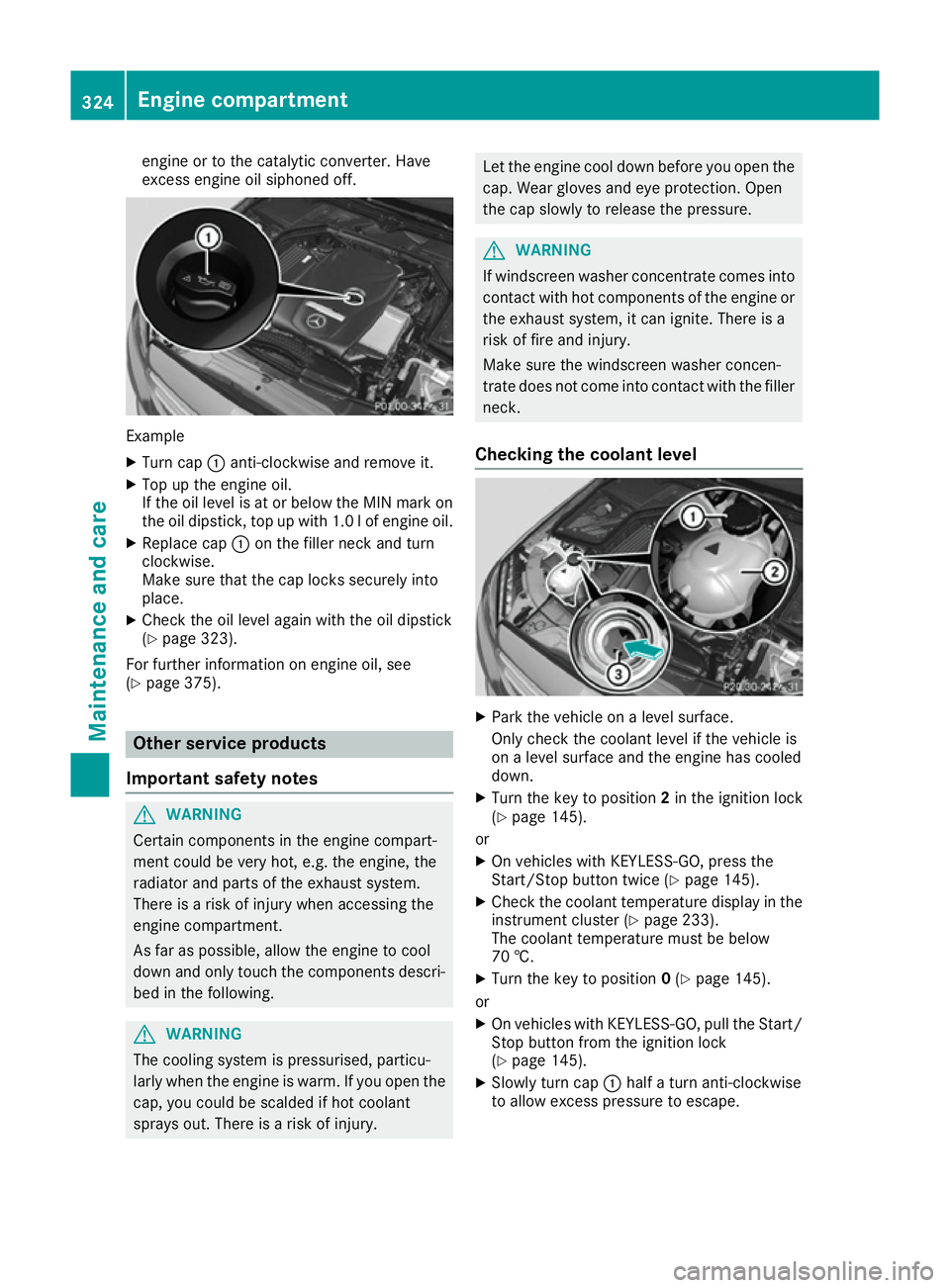
engine or to the catalytic converter. Have
exces
sengine oil siphoned off. Example
X Turn cap :anti-clockwise and remove it.
X Top up the engine oil.
If the oil level is at or below the MIN mark on
the oil dipstick ,top up with 1.0 lofe ngine oil.
X Replace cap :on the filler neck and turn
clockwise.
Make sure that the cap locks securely into
place.
X Check the oil leve lagain with the oil dipstick
(Y pag e323).
For further information on engine oil ,see
(Y pag e375). Other service products
Important safety notes G
WARNING
Certain components in the engine compart-
ment coul dbevery hot, e.g. the engine, the
radiator and parts of the exhaust system.
There is arisk of injury when accessing the
engine compartment.
As far as possible ,allow the engine to cool
dow nand only touch the components descri-
bed in the following. G
WARNING
The cooling system is pressurised, particu-
larl yw hen the engine is warm. If you open the
cap, you coul dbescalded if hot coolant
sprays out. There is arisk of injury. Let the engine cool dow
nbefore you open the
cap. Wea rglove sand eye protection. Open
the cap slowly to release the pressure. G
WARNING
If windscreen washer concentrate comes into contact with hot components of the engine or
the exhaust system, it can ignite. There is a
risk of fire and injury.
Make sure the windscreen washer concen-
trate does not come into contact with the filler neck.
Checking the coolan tlevel X
Park the vehicl eonalevelsurface.
Only check the coolant leve lifthe vehicl eis
on aleve lsurface and the engine has cooled
down.
X Turn the key to position 2in the ignition lock
(Y pag e145).
or
X On vehicles with KEYLESS-GO, press the
Start/Stop button twice (Y page145).
X Check the coolant temperature display in the
instrument cluster (Y page233).
The coolant temperature must be below
70 †.
X Turn the key to position 0(Y pag e145).
or
X On vehicles with KEYLESS-GO, pul lthe Start/
Stop button from the ignition lock
(Y pag e145).
X Slowl yturn cap :halfat urn anti-clockwise
to allow excess pressure to escape. 324
Engine compartmentMaintenance and care