check engine MERCEDES-BENZ CLA 2016 User Guide
[x] Cancel search | Manufacturer: MERCEDES-BENZ, Model Year: 2016, Model line: CLA, Model: MERCEDES-BENZ CLA 2016Pages: 374, PDF Size: 9.97 MB
Page 45 of 374
See "Children in the vehicle" for information
on infants and children traveling with you in
the vehicle restraint systems for infants and
children ( Y
page 58).
Important safety notes
G WARNING
Modifications to the restraint system may
cause it to no longer work as intended. The
restraint system may then not perform its
intended protective function and may fail in an
accident or trigger unexpectedly, for example.
This poses an increased risk of injury or even
fatal injury.
Never modify parts of the restraint system.
Never tamper with the wiring, the electronic
components or their software.
If it is necessary to modify an air bag system to
accommodate a person with disabilities, con-
tact an authorized Mercedes-Benz Center for
details. USA only: for further information con-
tact our Customer Assistance Center at
1-800-FOR-MERCedes (1 ‑ 800 ‑ 367 ‑ 6372).
Restraint system warning lamp
The functions of the restraint system are
checked after the ignition is switched on and
at regular intervals while the engine is run-
ning. Therefore, malfunctions can be detec-
ted in good time.
The u restraint system warning lamp in
the instrument cluster lights up when the igni-
tion is switched on. It goes out no later than a
few seconds after the vehicle is started. The
components of the restraint system are in
operational readiness.
A malfunction has occurred if the u
restraint system warning lamp: R
does not light up after the ignition is
switched on R
does not go out after a few seconds with
the engine running R
lights up again while the engine is running G WARNING
If restraint system is malfunctioning, restraint
system components may be triggered unin-
tentionally or might not be triggered at all in
the event of an accident with a high rate of
vehicle deceleration. This can affect the Emer-
gency Tensioning Device or air bag, for exam-
ple. This poses an increased risk of injury or
even fatal injury.
Have the restraint system checked and
repaired in a qualified specialist workshop as
soon as possible.
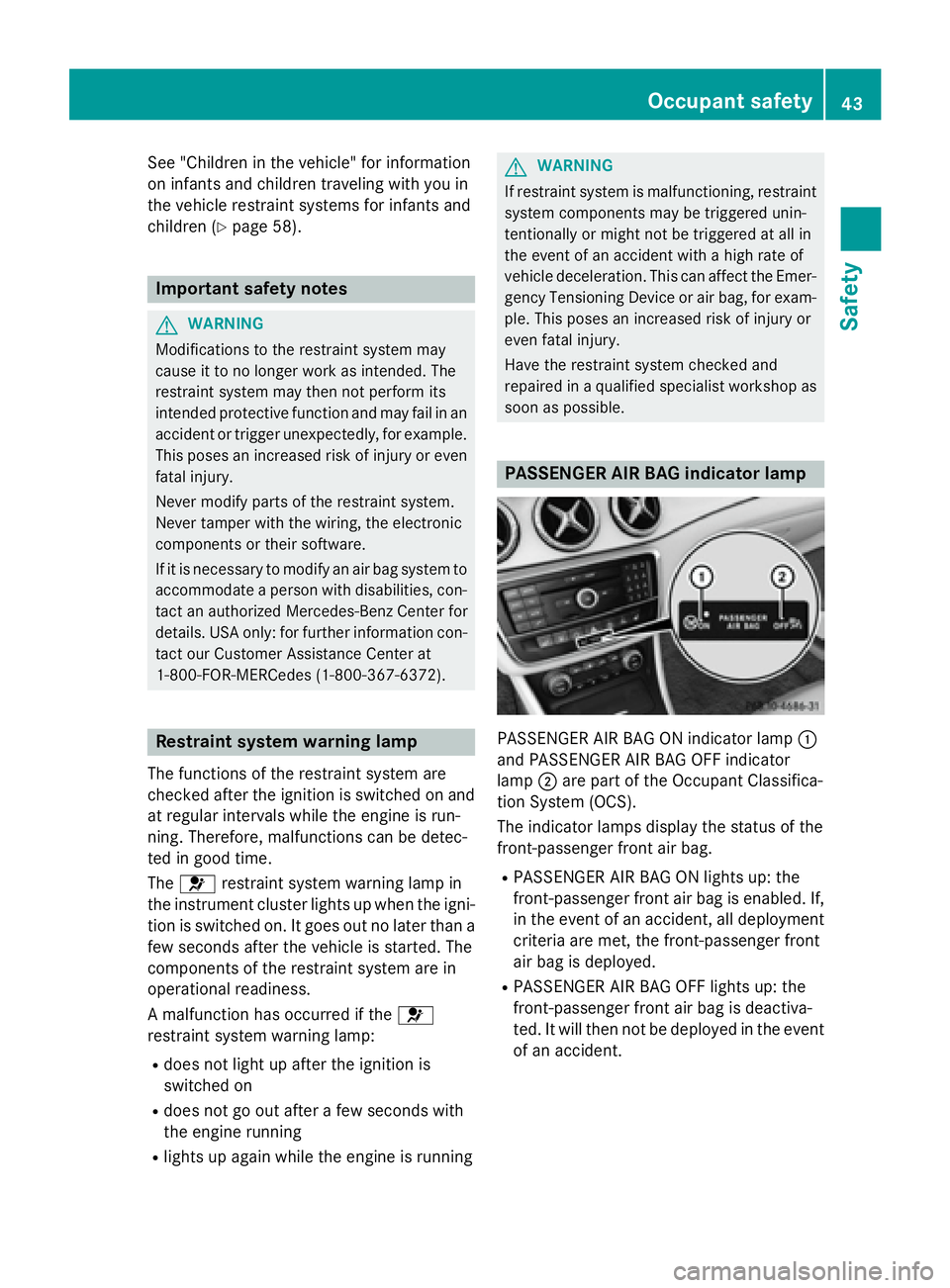
PASSENGER AIR BAG indicator lamp
PASSENGER AIR BAG ON indicator lamp C
and PASSENGER AIR BAG OFF indicator
lamp D are part of the Occupant Classifica-
tion System (OCS).
The indicator lamps display the status of the
front-passenger front air bag. R
PASSENGER AIR BAG ON lights up: the
front-passenger front air bag is enabled. If,
in the event of an accident, all deployment
criteria are met, the front-passenger front
air bag is deployed. R
PASSENGER AIR BAG OFF lights up: the
front-passenger front air bag is deactiva-
ted. It will then not be deployed in the event
of an accident.Occupant safety 43
Safety Z
Page 71 of 374
ESP ®
(Electronic Stability Program)
General notes
i Observe the "Important safety notes" sec-
tion ( Y
page 65).
ESP ®
monitors driving stability and traction,
i.e. power transmission between the tires and
the road surface.
If ESP ®
detects that the vehicle is deviating
from the direction desired by the driver, one
or more wheels are braked to stabilize the
vehicle. The engine output is also modified to
keep the vehicle on the desired course within
physical limits. ESP ®
assists the driver when
pulling away on wet or slippery roads. ESP ®
can also stabilize the vehicle during braking.
ETS/4ETS (Electronic Traction System)
i Observe the "Important safety notes" sec-
tion ( Y
page 65).
ETS traction control is part of ESP ®
. On vehi-
cles with 4MATIC, 4ETS is part of ESP ®
.
Traction control brakes the drive wheels indi-
vidually if they spin. This enables you to pull
away and accelerate on slippery surfaces, for
example if the road surface is slippery on one
side. In addition, more drive torque is trans-
ferred to the wheel or wheels with traction.
Traction control remains active, even if you
deactivate ESP ®
.
Important safety notes
i Observe the "Important safety notes" sec-
tion ( Y
page 65).
G WARNING
If ESP ®
is malfunctioning, ESP ®
is unable to
stabilize the vehicle. Additionally, further driv-
ing safety systems are deactivated. This
increases the risk of skidding and an accident.
Drive on carefully. Have ESP ®
checked at a
qualified specialist workshop. Vehicles without 4MATIC: when towing
your vehicle with the front axle raised, it is
important that you observe the notes on ESP ®
( Y
page 323).
If the
Page 74 of 374
R
COLL IS ION PREVENTION AS SIST is no lon-
ger available; nor is it activated if you brake
firmly wit h assistance from ESP ®
.R
ESP ®
st ill provides support when you brake
firmly.
ESP ®
trailer stabilizationGeneral info rm ation
If your veh icle/t railer combination begins to
swerve, ESP ®
assists you in this situation.
ESP ®
slows the vehicle down by braking and
limit ing the engine output unt il the vehicle/
trailer co mbin ation has stabilized.
Import ant safety notes
G WARNIN G
If road and weather condition s are poor ,
trailer stabilization will no t be able to preven t
th e vehicle/traile r combination from swerv-
ing . Trailers wit h a high cente r of gravity can
tip ove r before ES P ®
can detect this. Ther e is
a ris k of an accident.
Always adapt your driving style to th e prevail-
ing road and weather conditions.
If your veh icle wit h trailer (vehicle/trailer
co mbin ation) begins to lurch, you can only
st abiliz e the vehicle /t railer combination by
depr essing the brake firmly.
ESP ®
trailer st abiliz ation is active above
spee ds of about 65 km/h.
ESP ®
trailer stabilization does not work if
ESP ®
is deactivated or disabled because of a
malfunction.
EBD (electronic brake force distribu-
tion)
General information
EBD mon it ors and controls the brake pres-
sure on the rear wheels to improve driving
st abilit y while braking. Important safety notes
i Observe the "Im portant safety notes" sec-
tion ( Y
page 65).
G WARNIN G
If EB D is malfunctioning, th e rear wheels can
lock, e.g. under full braking . This increases th e
ris k of skiddin g and an accident.
You should therefor e adapt your driving style
to th e different handlin g characteristics. Hav e
th e brak e system checked at a qualified spe-
cialist workshop.
Observe information regarding indicator and
warning lamps ( Y
page 261) as well as dis-
play messages ( Y
page 230).
ADAPTIVE BRAKE ADAPTIVE BRAKE enhances braking safety
and offers increased braking comfort. In addi-
tion to the braking function, ADAPTIVE BRAKE
also has the HOLD function ( Y
page 187) and
hill start assist ( Y
page 151).
STEER CONTROL
General information
ST EER CONTROL helps you by transmitting a
noticea ble steering force to the steering
wheel in the direction required for vehicle
st abiliz ation.
This steering assistance is pro vide d in partic-
ular if: R
both right wheels or both left wheels are on
a wet or slippery road surface when you
brake. R
the veh icle starts to skid.
Important safety notes
i Observe the "Im portant safety notes" sec-
tion ( Y
page 65).72
Driving safety systems
Safety
Page 79 of 374
The SmartKey centrally locks/unlocks: R
the doors R
the trunk lid R
the fuel filler flap
The turn signals flash once when unlocking
and three times when locking.
When the locator lighting is activated in Audio
20/COMAND, it lights up when it is dark after
the vehicle is unlocked with the remote con-
trol (see separate operating instructions).
You can also set an audible signal to confirm
that the vehicle has been locked. The audible
signal can be activated and deactivated using
the on-board computer ( Y
page 222).X
To open the trunk lid automatically:
press and hold the T button until the
trunk lid opens ( Y
page 86).
KEYLESS-GO
General notes
Bear in mind that the engine can be started by
any of the vehicle occupants if there is a
SmartKey in the vehicle.
Locking and unlocking
You can start, lock or unlock the vehicle using
KEYLESS-GO. To do this, you only need carry
the SmartKey with you. You can combine the
functions of KEYLESS-GO with those of a con-
ventional SmartKey. Unlock the vehicle by
using KEYLESS-GO, for instance, and lock it
using the 7 button on the SmartKey.
The driver's door and the door at which the
handle is used, must both be closed. The
SmartKey must be outside the vehicle. When
locking or unlocking with KEYLESS-GO, the
distance between the SmartKey and the cor-
responding door handle must not be greater
than 3 ft (1 m). A check which periodically establishes a radio
connection between the vehicle and the
SmartKey determines whether a valid Smart-
Key is in the vehicle. This occurs, for example: R
when starting the engine R
whilst driving R
when the external door handles are
touched R
during convenience closing
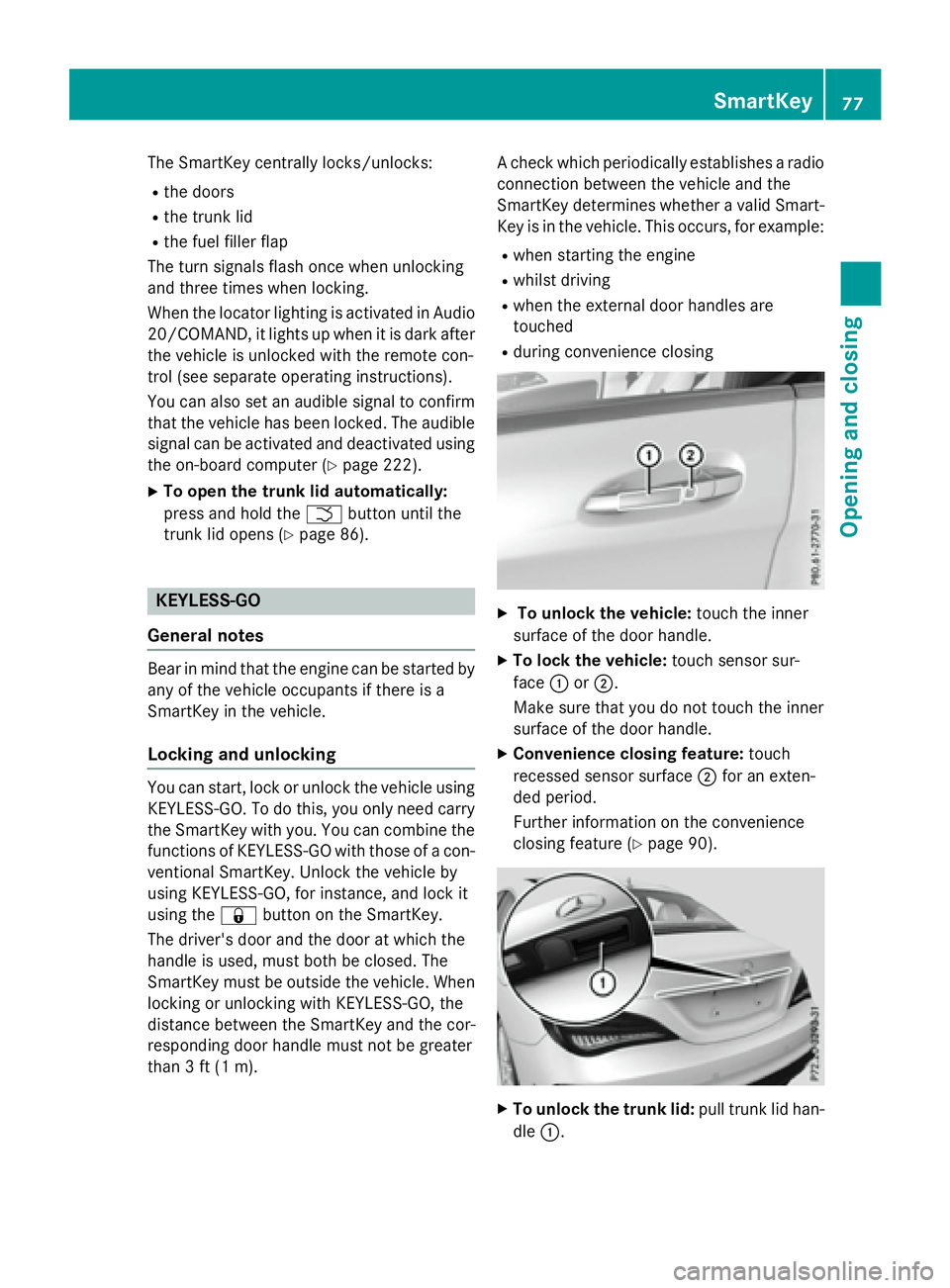
X
To unlock the vehicle: touch the inner
surface of the door handle. X
To lock the vehicle: touch sensor sur-
face C or D .
Make sure that you do not touch the inner
surface of the door handle. X
Convenience closing feature: touch
recessed sensor surface D for an exten-
ded period.
Further information on the convenience
closing feature ( Y
page 90).
X
To unlock the trunk lid: pull trunk lid han-
dle C . SmartKey 77
Opening and closing Z
Page 84 of 374
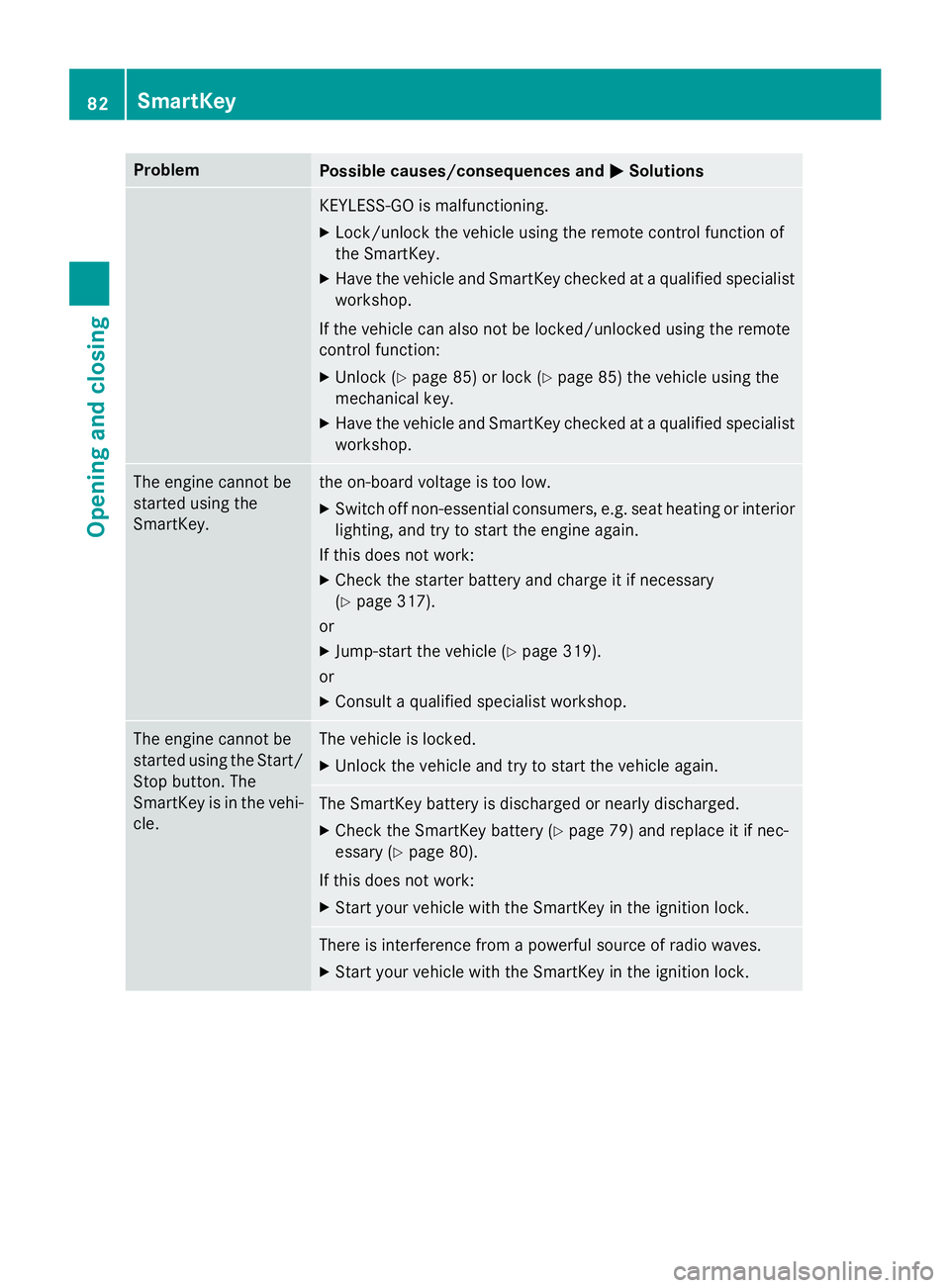
Problem
Possible causes/consequences and P Solutions
KEYLESS-GO is malfunctioning. X
Lock/unlock the vehicle using the remote control function of
the SmartKey. X
Have the vehicle and SmartKey checked at a qualified specialist
workshop.
If the vehicle can also not be locked/unlocked using the remote
control function: X
Unlock ( Y
page 85) or lock ( Y
page 85) the vehicle using the
mechanical key. X
Have the vehicle and SmartKey checked at a qualified specialist
workshop.
The engine cannot be
started using the
SmartKey. the on-board voltage is too low. X
Switch off non-essential consumers, e.g. seat heating or interior
lighting, and try to start the engine again.
If this does not work: X
Check the starter battery and charge it if necessary
( Y
page 317).
or X
Jump-start the vehicle ( Y
page 319).
or X
Consult a qualified specialist workshop.
The engine cannot be
started using the Start/
Stop button. The
SmartKey is in the vehi-
cle. The vehicle is locked. X
Unlock the vehicle and try to start the vehicle again.
The SmartKey battery is discharged or nearly discharged. X
Check the SmartKey battery ( Y
page 79) and replace it if nec-
essary ( Y
page 80).
If this does not work: X
Start your vehicle with the SmartKey in the ignition lock.
There is interference from a powerful source of radio waves. X
Start your vehicle with the SmartKey in the ignition lock.82
SmartKey
Opening and closing
Page 87 of 374
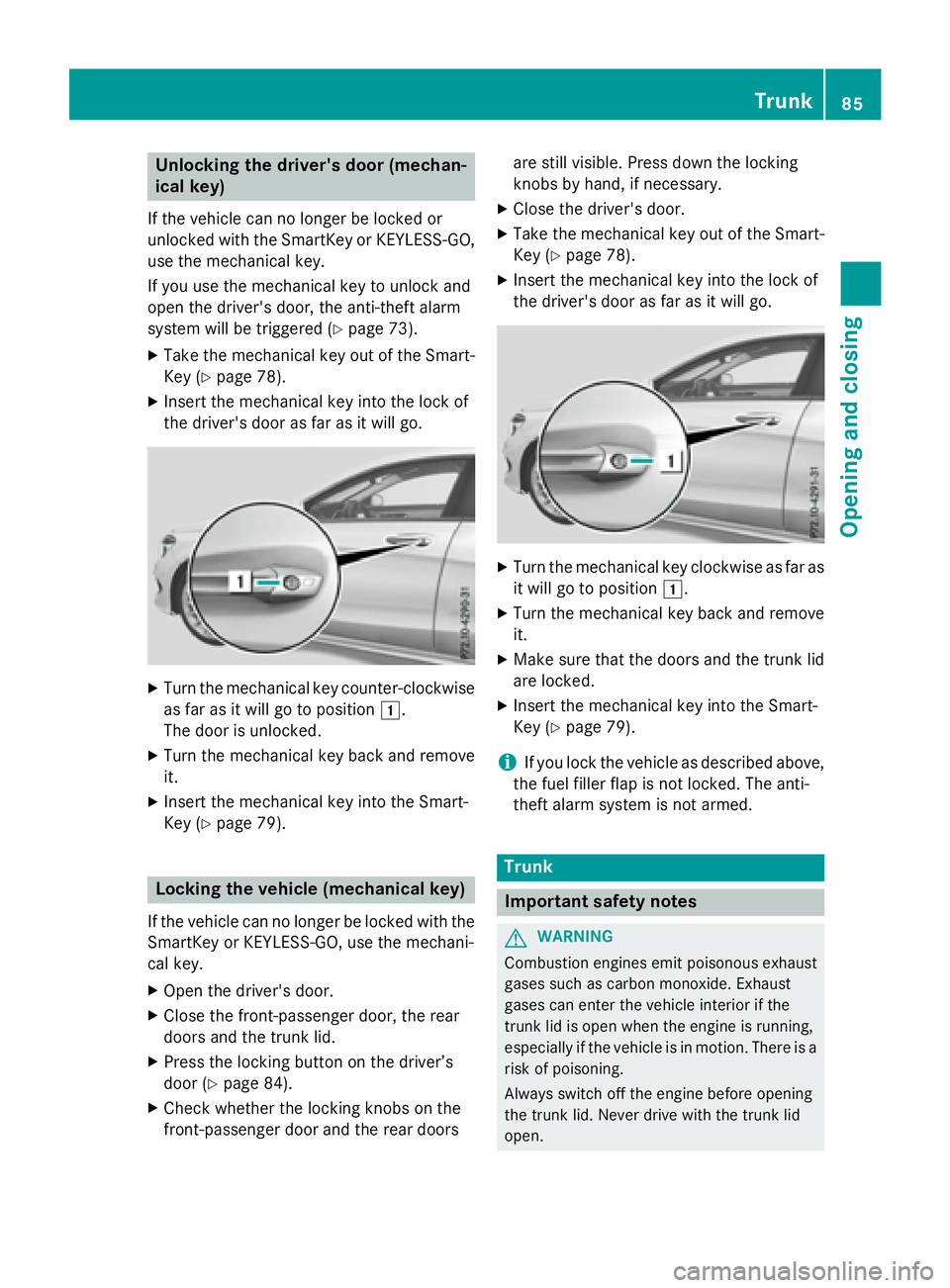
Unlocking the driver's door (mechan-
ical key) If the vehicle can no longer be locked or
unlocked with the SmartKey or KEYLESS-GO,
use the mechanical key.
If you use the mechanical key to unlock and
open the driver's door, the anti-theft alarm
system will be triggered ( Y
page 73).X
Take the mechanical key out of the Smart-
Key ( Y
page 78).X
Insert the mechanical key into the lock of
the driver's door as far as it will go.
X
Turn the mechanical key counter-clockwise
as far as it will go to position G .
The door is unlocked. X
Turn the mechanical key back and remove
it. X
Insert the mechanical key into the Smart-
Key ( Y
page 79).
Locking the vehicle (mechanical key)
If the vehicle can no longer be locked with the
SmartKey or KEYLESS-GO, use the mechani-
cal key. X
Open the driver's door. X
Close the front-passenger door, the rear
doors and the trunk lid. X
Press the locking button on the driver’s
door ( Y
page 84).X
Check whether the locking knobs on the
front-passenger door and the rear doors are still visible. Press down the locking
knobs by hand, if necessary. X
Close the driver's door. X
Take the mechanical key out of the Smart-
Key ( Y
page 78). X
Insert the mechanical key into the lock of
the driver's door as far as it will go.
X
Turn the mechanical key clockwise as far as
it will go to position G .X
Turn the mechanical key back and remove
it. X
Make sure that the doors and the trunk lid
are locked. X
Insert the mechanical key into the Smart-
Key ( Y
page 79).
i If you lock the vehicle as described above,
the fuel filler flap is not locked. The anti-
theft alarm system is not armed.
Trunk
Important safety notes
G WARNING
Combustion engines emit poisonous exhaust
gases such as carbon monoxide. Exhaust
gases can enter the vehicle interior if the
trunk lid is open when the engine is running,
especially if the vehicle is in motion. There is a
risk of poisoning.
Always switch off the engine before opening
the trunk lid. Never drive with the trunk lid
open. Trunk 85
Opening and closing Z
Page 149 of 374
G WARNING
Unsuitable footwear can hinder correct usage
of the pedals, e.g.: R
shoes with thick soles R
shoes with high heels R
slippers
There is a risk of an accident.
Wear suitable footwear to ensure correct
usage of the pedals.
G WARNING
If you switch off the ignition while driving,
safety-relevant functions are only available
with limitations, or not at all. This could affect,
for example, the power steering and the brake
boosting effect. You will require considerably
more effort to steer and brake. There is a risk
of an accident.
Do not switch off the ignition while driving.
G WARNING
If the parking brake has not been fully
released when driving, the parking brake can: R
overheat and cause a fire R
lose its hold function.
There is a risk of fire and an accident. Release
the parking brake fully before driving off.
! Do not warm up the engine with the vehi-
cle stationary. Drive off immediately. Avoid
high engine speeds and driving at full throt-
tle until the engine has reached its operat-
ing temperature.
Only shift the automatic transmission to
the desired drive position when the vehicle
is stationary.
Where possible, avoid spinning the drive
wheels when pulling away on slippery
roads. You could otherwise damage the
drive train.
! Mercedes-AMG vehicles: avoid full-load
operation and engine speeds greater than
5000 rpm when the engine is cold. This helps to protect the engine and avoids
uncomfortable driving.
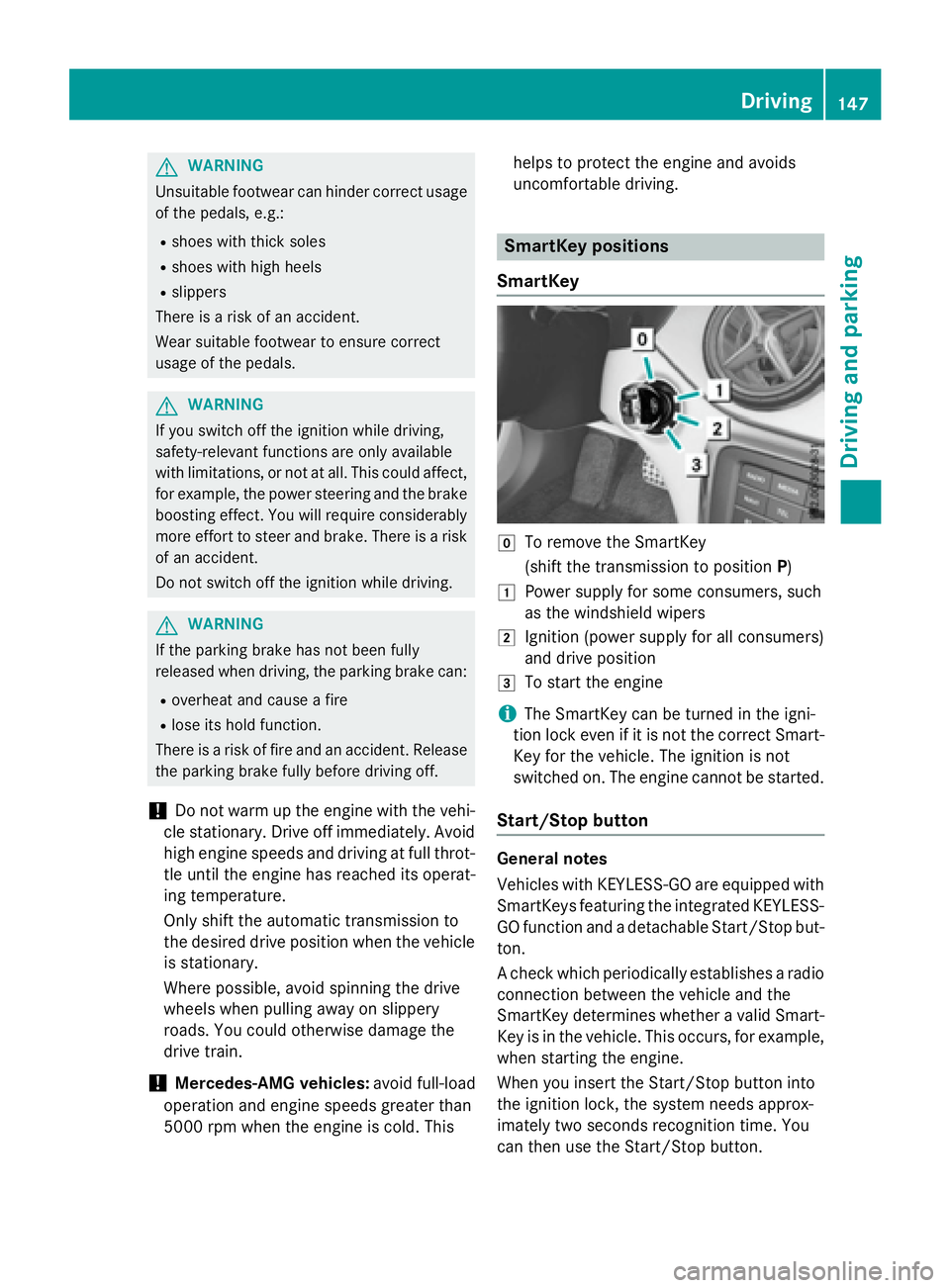
SmartKey positions
SmartKey
Z
To remove the SmartKey
(shift the transmission to position P )G
Power supply for some consumers, such
as the windshield wipers H
Ignition (power supply for all consumers)
and drive position I
To start the engine
i The SmartKey can be turned in the igni-
tion lock even if it is not the correct Smart-
Key for the vehicle. The ignition is not
switched on. The engine cannot be started.
Start/Stop button
General notes
Vehicles with KEYLESS-GO are equipped with
SmartKeys featuring the integrated KEYLESS-
GO function and a detachable Start/Stop but-
ton.
A check which periodically establishes a radio
connection between the vehicle and the
SmartKey determines whether a valid Smart-
Key is in the vehicle. This occurs, for example,
when starting the engine.
When you insert the Start/Stop button into
the ignition lock, the system needs approx-
imately two seconds recognition time. You
can then use the Start/Stop button. Driving 147
Driving and parking Z
Page 151 of 374
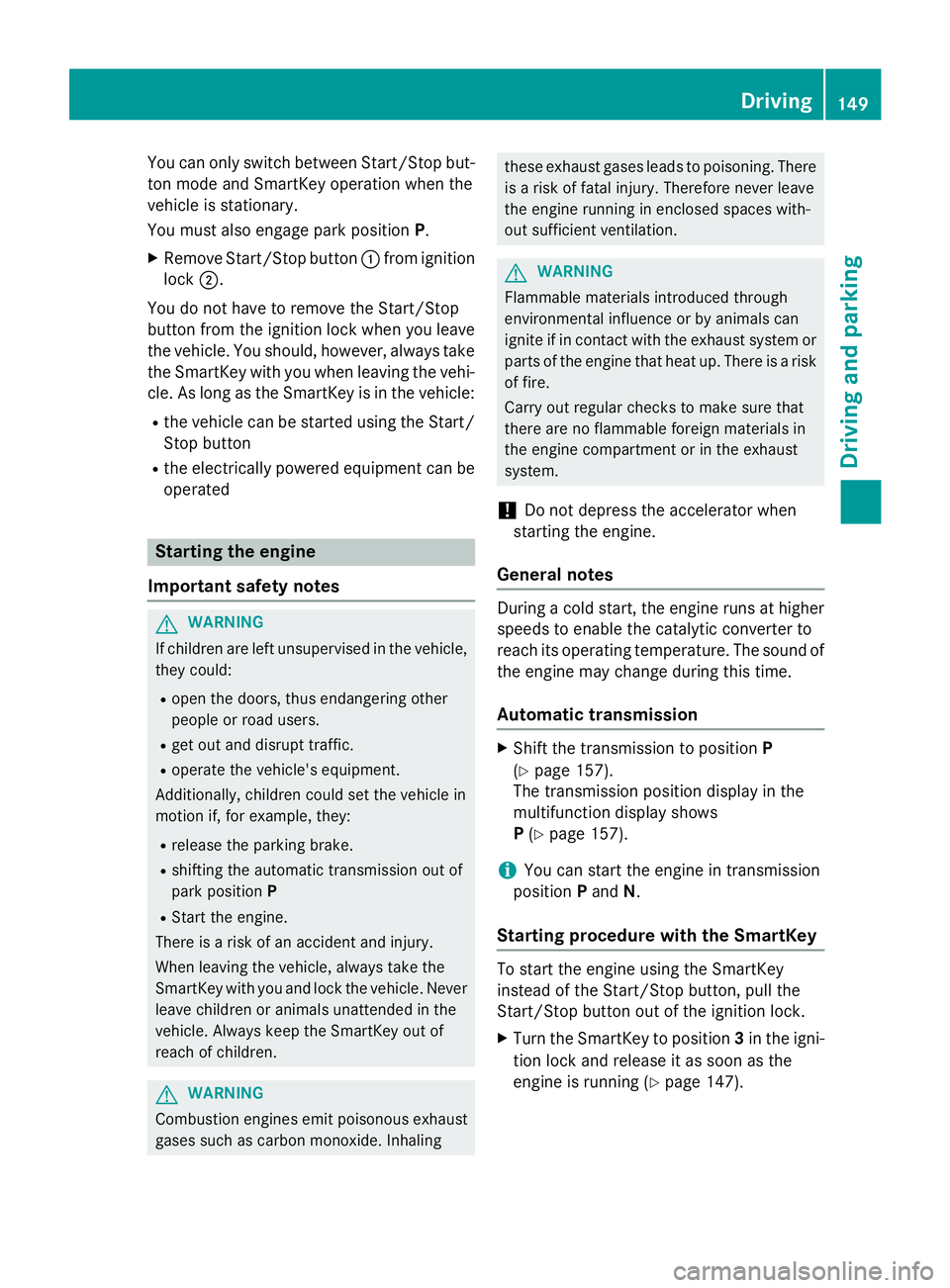
You can only switch between Start/Stop but-
ton mode and SmartKey operation when the
vehicle is stationary.
You must also engage park position P .X
Remove Start/Stop button C from ignition
lock D .
You do not have to remove the Start/Stop
button from the ignition lock when you leave
the vehicle. You should, however, always take
the SmartKey with you when leaving the vehi-
cle. As long as the SmartKey is in the vehicle: R
the vehicle can be started using the Start/
Stop button R
the electrically powered equipment can be
operated
Starting the engine
Important safety notes
G WARNING
If children are left unsupervised in the vehicle,
they could: R
open the doors, thus endangering other
people or road users. R
get out and disrupt traffic. R
operate the vehicle's equipment.
Additionally, children could set the vehicle in
motion if, for example, they: R
release the parking brake. R
shifting the automatic transmission out of
park position PR
Start the engine.
There is a risk of an accident and injury.
When leaving the vehicle, always take the
SmartKey with you and lock the vehicle. Never
leave children or animals unattended in the
vehicle. Always keep the SmartKey out of
reach of children.
G WARNING
Combustion engines emit poisonous exhaust
gases such as carbon monoxide. Inhaling these exhaust gases leads to poisoning. There
is a risk of fatal injury. Therefore never leave
the engine running in enclosed spaces with-
out sufficient ventilation.
G WARNING
Flammable materials introduced through
environmental influence or by animals can
ignite if in contact with the exhaust system or
parts of the engine that heat up. There is a risk
of fire.
Carry out regular checks to make sure that
there are no flammable foreign materials in
the engine compartment or in the exhaust
system.
! Do not depress the accelerator when
starting the engine.
General notes During a cold start, the engine runs at higher
speeds to enable the catalytic converter to
reach its operating temperature. The sound of
the engine may change during this time.
Automatic transmission X
Shift the transmission to position P
( Y
page 157).
The transmission position display in the
multifunction display shows
P ( Y
page 157).
i You can start the engine in transmission
position P and N .
Starting procedure with the SmartKey
To start the engine using the SmartKey
instead of the Start/Stop button, pull the
Start/Stop button out of the ignition lock. X
Turn the SmartKey to position 3 in the igni-
tion lock and release it as soon as the
engine is running ( Y
page 147).Driving 149
Driving and parking Z
Page 157 of 374
Problem
Possible causes/consequences and P Solutions
The engine is not run-
ning smoothly and is
misfiring. There is a malfunction in the engine electronics or in a mechanical
component of the engine management system. X
Only depress the accelerator pedal slightly.
Otherwise, non-combusted fuel may get into the catalytic con-
verter and damage it. X
Have the cause rectified immediately at a qualified specialist
workshop.
The coolant tempera-
ture gauge shows a
value above 248 ‡
(120 †). The coolant
warning lamp may also
be on and a warning
tone may sound. The coolant level is too low. The coolant is too hot and the engine
is no longer being cooled sufficiently. X
Stop as soon as possible and allow the engine and the coolant to
cool down. X
Check the coolant level ( Y
page 299). Observe the warning
notes as you do so and add coolant if necessary.
DYNAMIC SELECT button (all vehicles
except Mercedes-AMG vehicles)
Use the DYNAMIC SELECT button to change
the drive program. Depending on the drive
program selected the following vehicle char-
acteristics will change: R
the drive (engine and transmission man-
agement) R
the suspension (vehicles with damping sys-
tem or AMG adaptive sport suspension sys-
tem) R
the steering R
the availability of the ECO start/stop func-
tion R
the climate control:
Each time you start the engine with the
SmartKey or the Start/Stop button, drive pro-
gram C is activated. For further information
about starting the engine, see ( Y
page 149). X
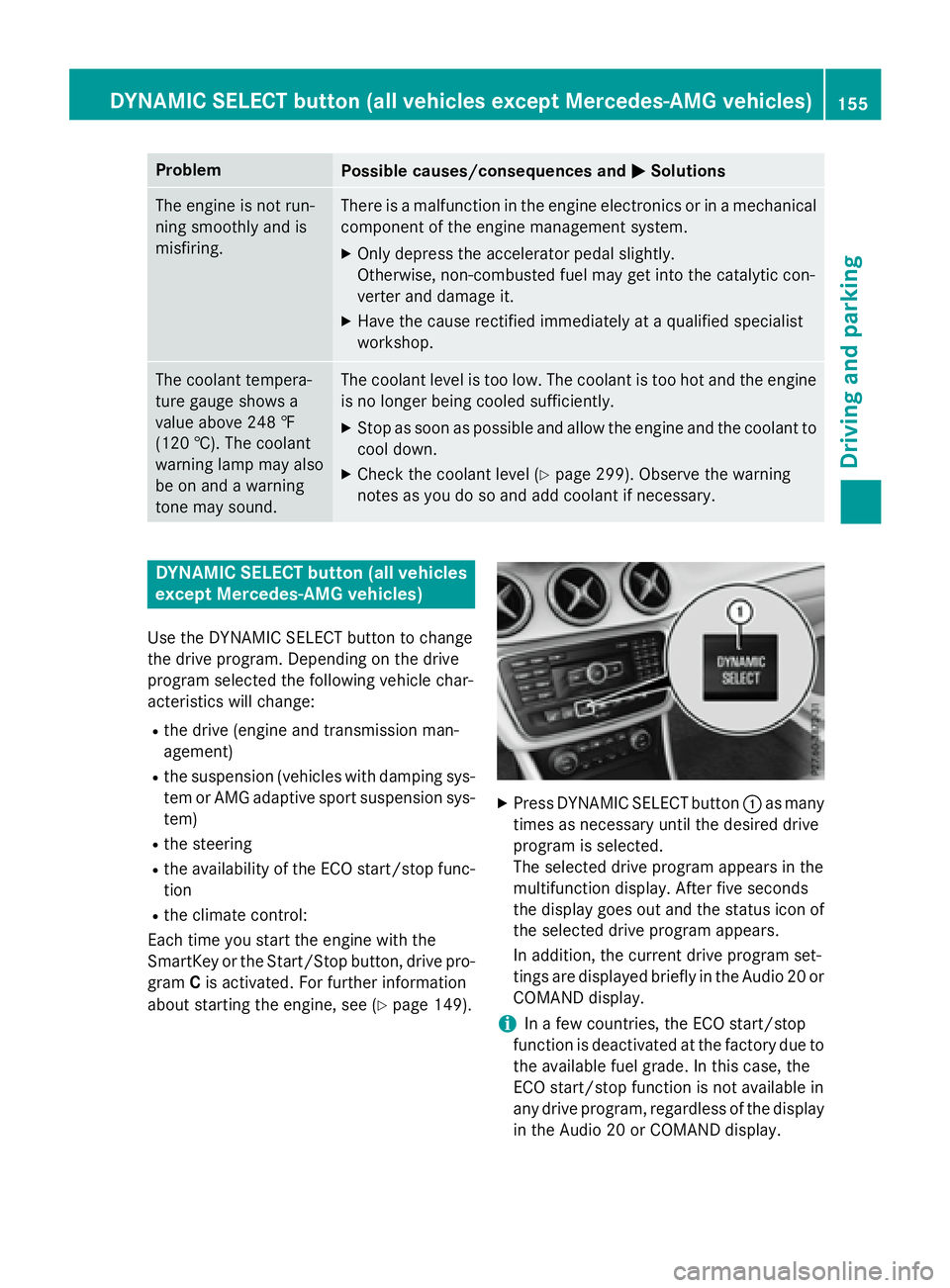
Press DYNAMIC SELECT button C as many
times as necessary until the desired drive
program is selected.
The selected drive program appears in the
multifunction display. After five seconds
the display goes out and the status icon of
the selected drive program appears.
In addition, the current drive program set-
tings are displayed briefly in the Audio 20 or
COMAND display.
i In a few countries, the ECO start/stop
function is deactivated at the factory due to
the available fuel grade. In this case, the
ECO start/stop function is not available in
any drive program, regardless of the display
in the Audio 20 or COMAND display.DYNAMIC SELECT button (all vehicles except Mercedes-AMG vehicles) 155
Driving and parking Z
Page 162 of 374
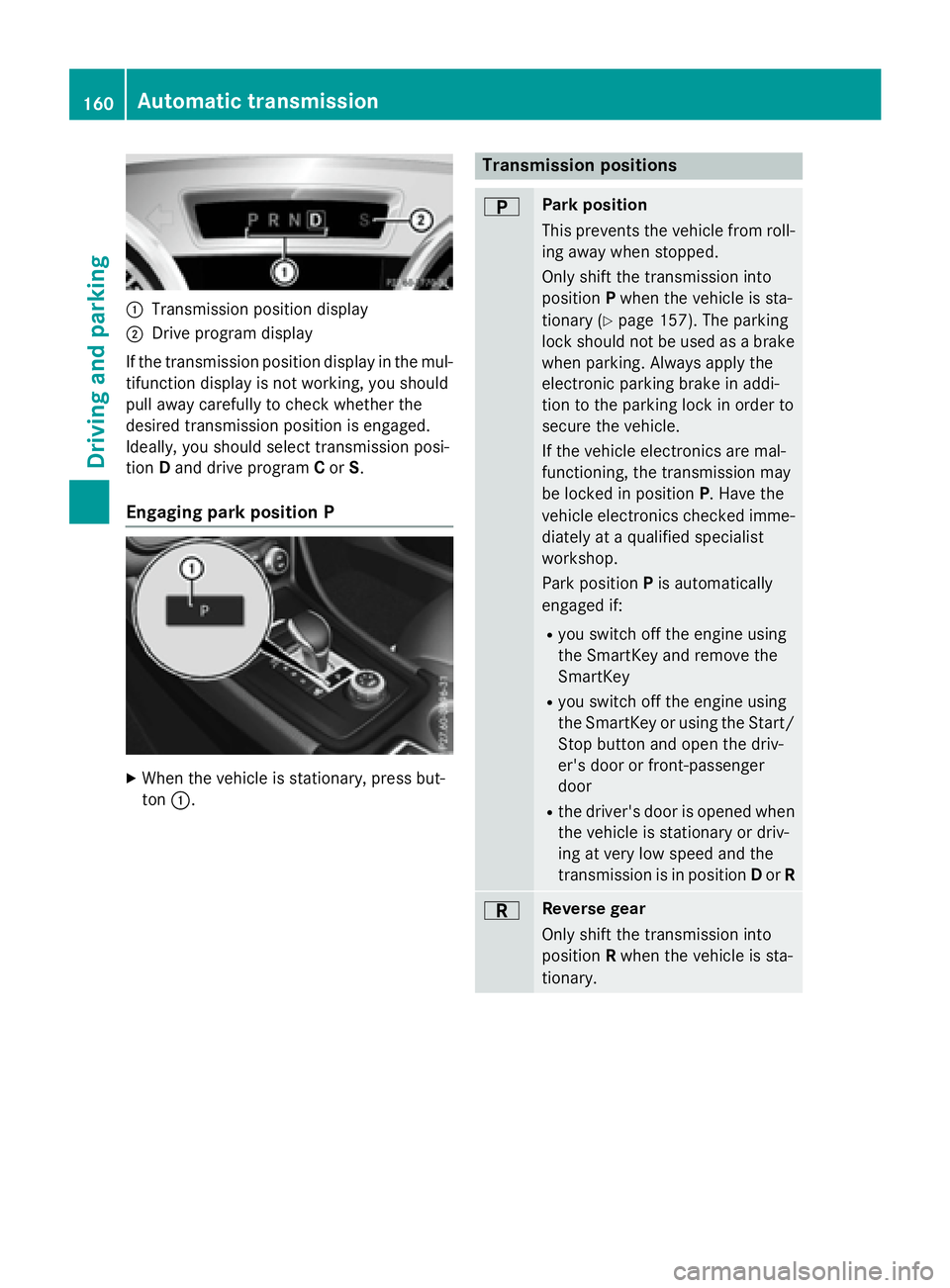
C
Transmission position displayD
Drive program display
If the transmission position display in the mul-
tifunction display is not working, you should
pull away carefully to check whether the
desired transmission position is engaged.
Ideally, you should select transmission posi-
tion D and drive program C or S .
Engaging park position P
X
When the vehicle is stationary, press but-
ton C . Transmission positions E Park position
This prevents the vehicle from roll-
ing away when stopped.
Only shift the transmission into
position P when the vehicle is sta-
tionary ( Y
page 157). The parking
lock should not be used as a brake
when parking. Always apply the
electronic parking brake in addi-
tion to the parking lock in order to
secure the vehicle.
If the vehicle electronics are mal-
functioning, the transmission may
be locked in position P . Have the
vehicle electronics checked imme-
diately at a qualified specialist
workshop.
Park position P is automatically
engaged if: R
you switch off the engine using
the SmartKey and remove the
SmartKey R
you switch off the engine using
the SmartKey or using the Start/
Stop button and open the driv-
er's door or front-passenger
door R
the driver's door is opened when
the vehicle is stationary or driv-
ing at very low speed and the
transmission is in position D or R
F Reverse gear
Only shift the transmission into
position R when the vehicle is sta-
tionary.160
Automatic transmission
Driving and parking