lock MERCEDES-BENZ CLS COUPE 2018 Manual PDF
[x] Cancel search | Manufacturer: MERCEDES-BENZ, Model Year: 2018, Model line: CLS COUPE, Model: MERCEDES-BENZ CLS COUPE 2018Pages: 589, PDF Size: 10.95 MB
Page 470 of 589
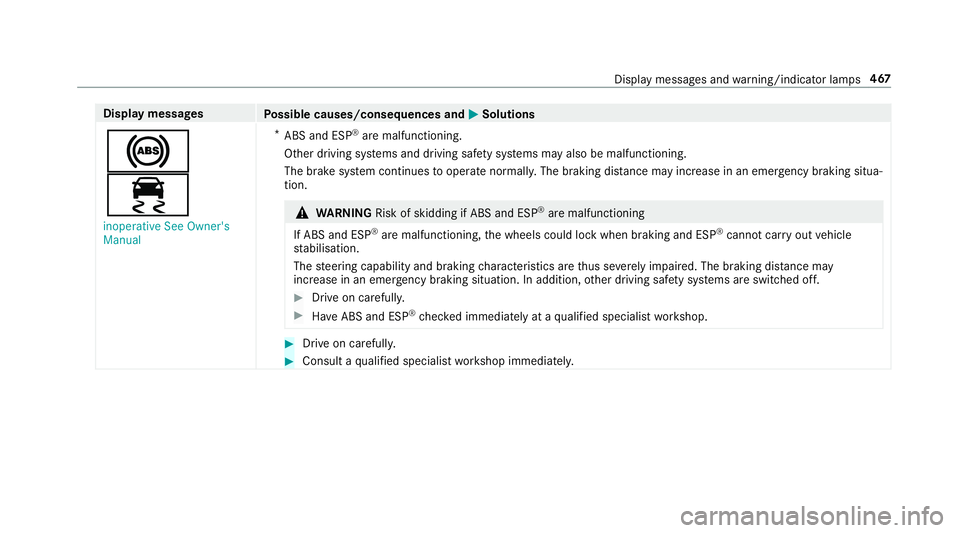
Display messages
Possible causes/consequences and M
MSolutions
!
÷ inoperative See Owner's
Manual *
ABS and ESP ®
are malfunctioning.
Other driving sy stems and driving saf ety sy stems may also be malfunctioning.
The brake sy stem continues tooperate normally. The braking dis tance may increase in an emergency braking situa‐
tion. &
WARNING Risk of skidding if ABS and ESP ®
are malfunctioning
If ABS and ESP ®
are malfunctioning, the wheels could lock when braking and ESP ®
cann otcar ryout vehicle
st abilisation.
The steering capability and braking characteristics are thus se verely impaired. The br aking distance may
increase in an emergency braking situation. In addition, other driving saf ety sy stems are switched off. #
Drive on carefull y. #
Have ABS and ESP ®
ch ecked immediately at a qualified specialist workshop. #
Drive on carefully. #
Consult a qualified specialist workshop immediatel y. Displ
aymessa ges and warning/indicator lamps 467
Page 473 of 589
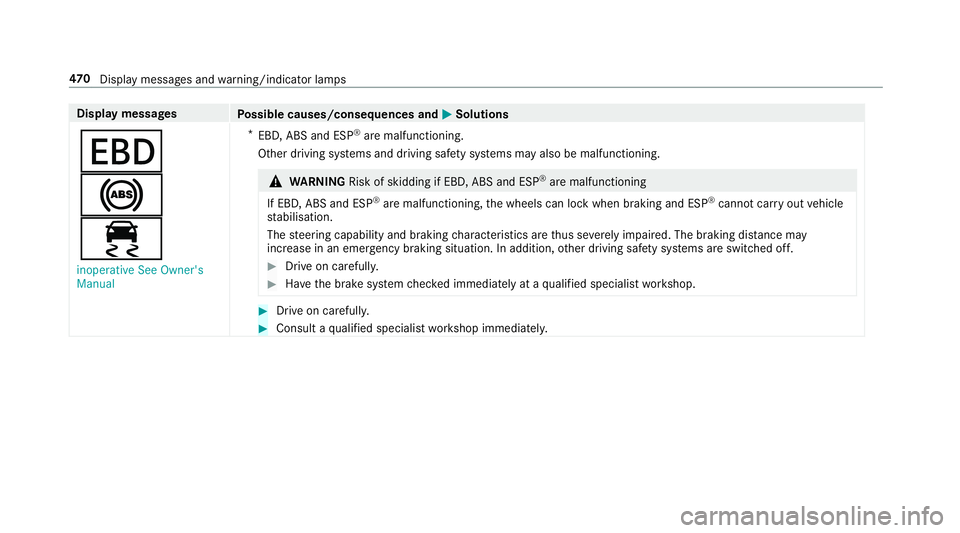
Display messages
Possible causes/consequences and M
MSolutions
T
!
÷ inoperative See Owner's
Manual *
EBD, ABS and ESP ®
are malfunctioning.
Other driving sy stems and driving saf ety sy stems may also be malfunctioning. &
WARNING Risk of skidding if EBD, ABS and ESP ®
are malfunctioning
If EBD, ABS and ESP ®
are malfunctioning, the wheels can lock when braking and ESP ®
cann otcar ryout vehicle
st abilisation.
The steering capability and braking characteristics are thus se verely impaired. The br aking distance may
increase in an eme rgency braking situation. In addition, other driving saf ety sy stems are switched off. #
Drive on carefull y. #
Have the brake sy stem checked immediately at a qualified specialist workshop. #
Drive on carefully. #
Consult a qualified specialist workshop immediatel y.47 0
Displaymessa ges and warning/indicator lamps
Page 513 of 589
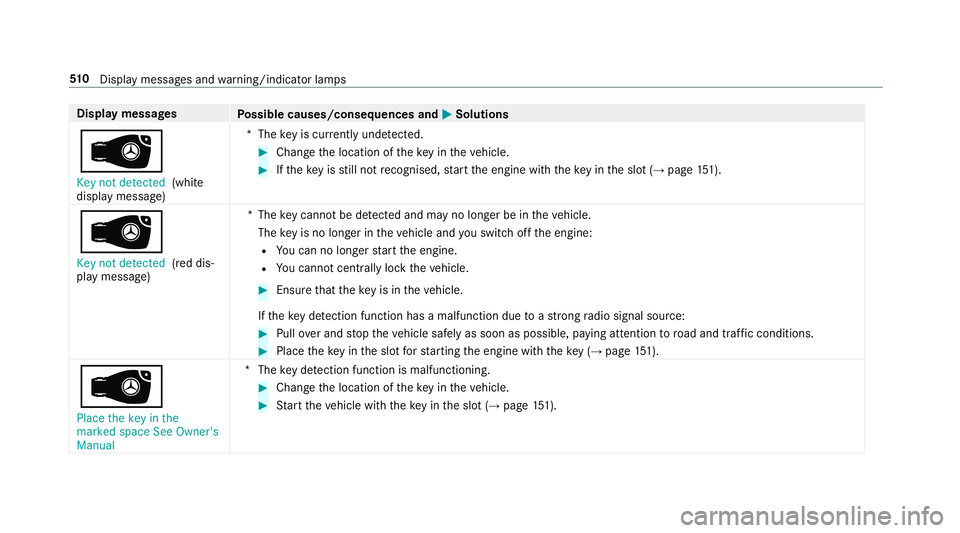
Display messages
Possible causes/consequences and M
MSolutions
 Key not detected (white
display message) *T
hekey is cur rently und etected. #
Change the location of theke y in theve hicle. #
Ifth eke y is still not recognised, start the engine with theke y in the slot (→ page151).
Â
Key not detected (red dis‐
pl ay messa ge) *T
hekey cannot be de tected and may no longer be in theve hicle.
The key is no lon ger in theve hicle and you swit choff the engine:
R You can no lon gerst art the engine.
R You cannot centrally lock theve hicle. #
Ensure that theke y is in theve hicle.
If th eke y de tection function has a malfunction due toast ro ng radio signal source: #
Pull over and stop theve hicle safely as soon as possible, paying attention toroad and traf fic conditions. #
Place theke y in the slot forst arting the engine with theke y (→ page 151).
Â
Place the key in the
marked space See Owner's
Manual *T
hekey de tection function is malfunctioning. #
Change the location of theke y in theve hicle. #
Start theve hicle with theke y in the slot (→ page151). 51 0
Displaymessa ges and warning/indicator lamps
Page 515 of 589
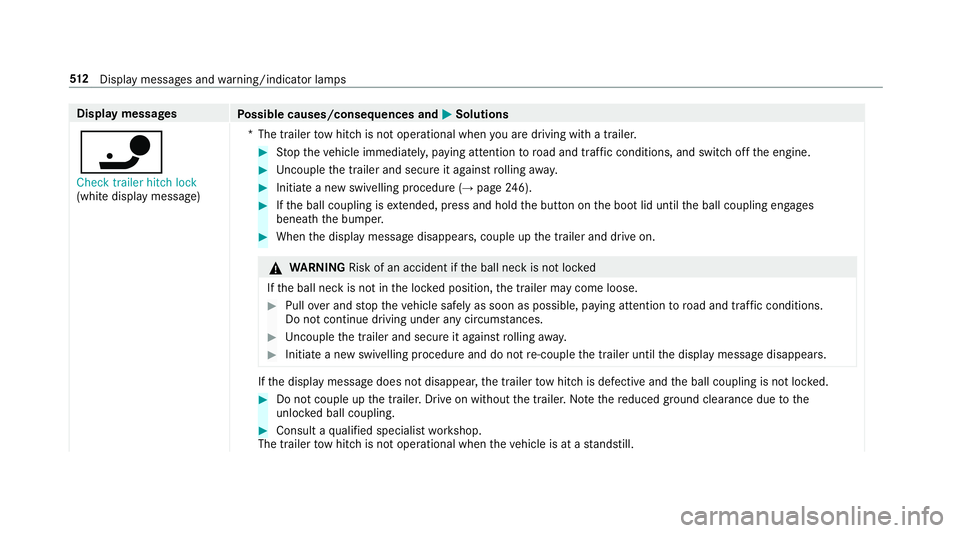
Display messages
Possible causes/consequences and M
MSolutions
ï Check trailer hitch lock
(white display message) *T
he trailer tow hit chis not operational when you are driving with a trailer. #
Stop theve hicle immediately, paying attention toroad and traf fic conditions, and switch off the engine. #
Uncouple the trailer and secure it against rolling away. #
Initiate a new swivelling procedure (→ page246). #
Ifth e ball coupling is extended, press and hold the button on the boot lid until the ball coupling engages
beneath the bumper. #
When the display message disappears, couple up the trailer and drive on. &
WARNING Risk of an accident if the ball neck is not loc ked
If th e ball neck is not in the loc ked position, the trailer may come loose. #
Pull over and stop theve hicle safely as soon as possible, paying attention toroad and traf fic conditions.
Do not continue driving under any circums tances. #
Uncouple the trailer and secure it against rolling away. #
Initiate a new swivelling procedure and do not re-couple the trailer until the display message disappears. If
th e display message does not disappear, the trailer tow hit chis defective and the ball coupling is not loc ked. #
Do not couple up the trailer. Drive on without the trailer. No tethere duced ground clearance due tothe
unlo cked ball coupling. #
Consult a qualified specialist workshop.
The trailer tow hit chis not operational when theve hicle is at a standstill. 512
Displaymessa ges and warning/indicator lamps
Page 519 of 589
Display messages
Possible causes/consequences and M
MSolutions
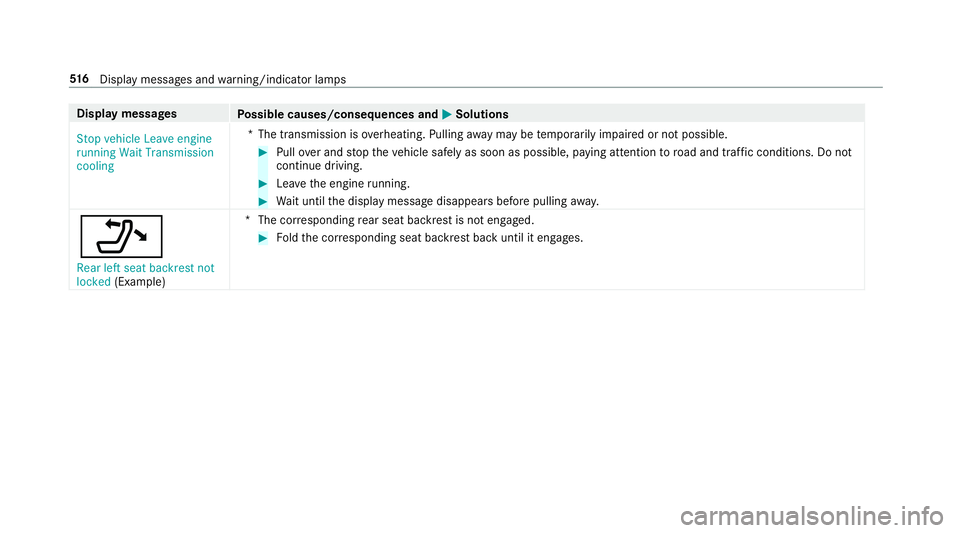
Stop vehicle Leave engine
running Wait Transmission
cooling *T
he transmission is overheating. Pulling away may be temp orarily impaired or not possible. #
Pull over and stop theve hicle safely as soon as possible, paying attention toroad and traf fic conditions. Do not
continue driving. #
Lea vethe engine running. #
Wait until the display message disappears before pulling away.
_ Rear left seat backrest not
locked (Exa mp le) *T
he cor responding rear seat backrest is not engaged. #
Foldthe cor responding seat backrest back until it engages. 516
Displaymessa ges and warning/indicator lamps
Page 521 of 589
Display messages
Possible causes/consequences and M
MSolutions
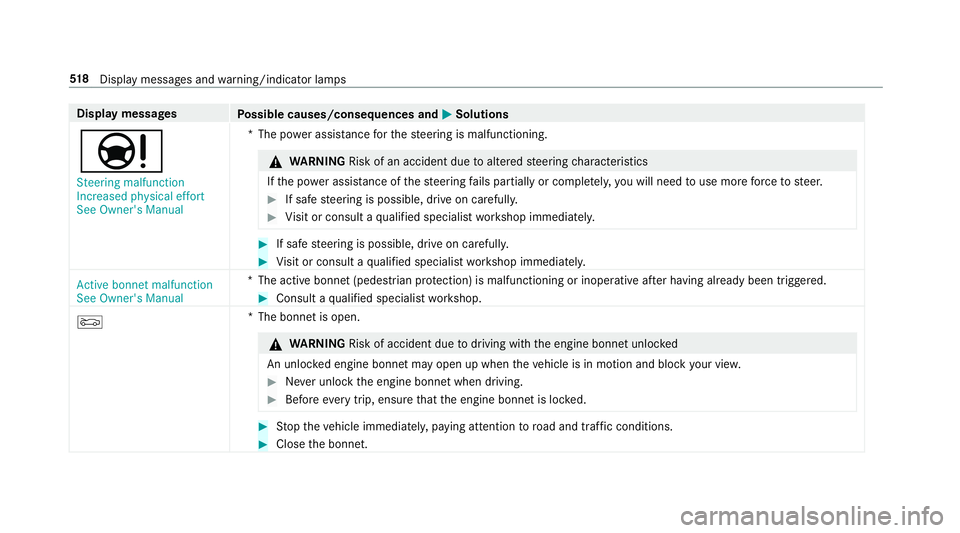
Ð Steering malfunction
Increased physical effort
See Owner's Manual *T
he po wer assi stance forth esteering is malfunctioning. &
WARNING Risk of an accident due toaltered steering characteristics
If th e po wer assi stance of thesteering fails partially or comple tely, you will need touse more forc eto steer. #
If safe steering is possible, drive on carefully. #
Visit or consult a qualified specialist workshop immediatel y. #
If safe steering is possible, drive on carefully. #
Visit or consult a qualified specialist workshop immediatel y.
Active bonnet malfunction
See Owner's Manual *T
he active bonnet (pedestrian pr otection) is malfunctioning or inoperative af ter having already been triggered. #
Consult a qualified specialist workshop.
M *T
he bonnet is open. &
WARNING Risk of accident due todriving with the engine bonn etunlo cked
An unloc ked engine bonn etmay open up when theve hicle is in motion and block your vie w. #
Never unlock the engine bonn etwhen driving. #
Before every trip, ensure that the engine bonn etis loc ked. #
Stop theve hicle immediately, paying attention toroad and traf fic conditions. #
Close the bonn et. 518
Displaymessa ges and warning/indicator lamps
Page 530 of 589
Wa
rning/indicator lamp
Possible causes/consequences and M
MSolutions #
Consult a qualified specialist workshop.
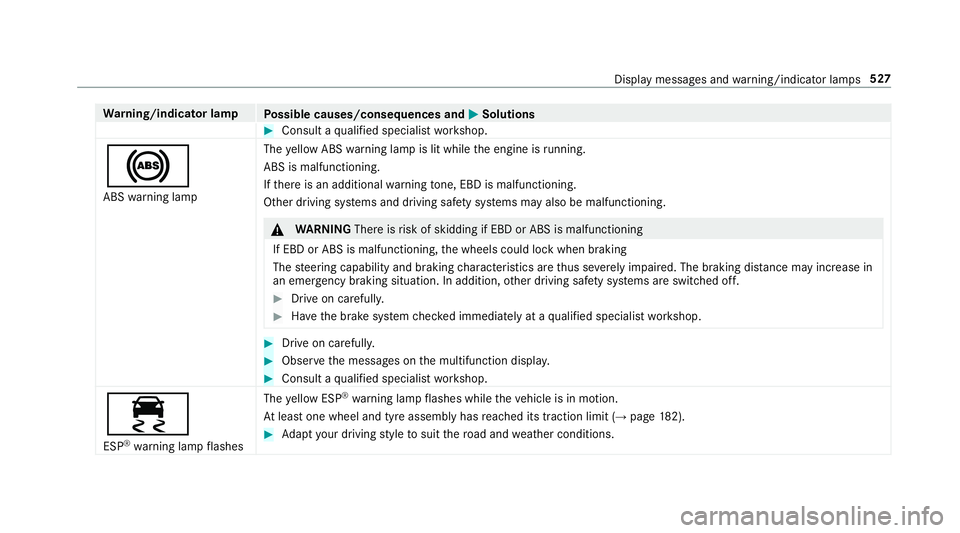
! ABS warning lamp The
yellow ABS warning lamp is lit while the engine is running.
ABS is malfunctioning.
If th ere is an additional warning tone, EBD is malfunctioning.
Other driving sy stems and driving saf ety sy stems may also be malfunctioning. &
WARNING Thereisrisk of skidding if EBD or ABS is malfunctioning
If EBD or ABS is malfunctioning, the wheels could lock when braking
The steering capability and braking characteristics are thus se verely impaired. The braking dis tance may increase in
an emergency braking situation. In addition, other driving saf ety sy stems are switched off. #
Drive on carefull y. #
Have the brake sy stem checked immediately at a qualified specialist workshop. #
Drive on carefully. #
Obser vethe messages on the multifunction displa y. #
Consult a qualified specialist workshop.
÷ ESP ®
wa rning lamp flashes The
yellow ESP ®
wa rning lamp flashes while theve hicle is in motion.
At least one wheel and tyre assembly has reached its traction limit (→ page182). #
Adapt your driving style to suit thero ad and weather conditions. Display messages and
warning/indicator lamps 527
Page 544 of 589
1,
2, 3 ...
12 V battery
see Battery (vehicle)
12 V so cket
see Soc ket (12 V)
48 V on-board electrical sy stem
Operating saf ety .................................... 23
230 V soc ket
see Soc ket (230 V)
360° Camera ........................................... 220
Ca re .................................................... 400
Fu nction .............................................. 220
Opening the camera co ver (r eve rsing
camera) .............................................. .223
Selecting a view .................................. 223
Setting favo urites ................................ 224
Swit ching automatic operation
on/off (r eversing camera) .................. .223 A
A/C function Activating/deactivating (multimedia
sy stem) ................................................ 13 8Switching on/off (control panel) .........
13 8
ABS (Anti-lock Braking Sy stem) ............ .182
Ac celeration
see Kickdown
Ac cess data
Editing (Blue tooth®
) .............................3 54
Setting (Blue tooth®
) ............................ 353
Ac oustic locking verification signal
Ac tivating/deactivating ......................... 68
Ac tivating/deactivating automatic
vo lume adjustment
Burmes ter®
sur round sound sy stem ... 384
Ac tive Blind Spot Assi st.......................... 241
Ac tivating/deactivating ...................... .243
Brake application ................................. 241
Fu nction ............................................... 241
Sy stem limitations ...............................2 41
Tr ailer operation .................................. .241
Ac tive bonn et(pedestrian pr otection) .. 388
Operation ............................................ 388
Re setting ............................................. 388
Ac tive Brake Assi st
Fu nction/no tes .................................... 187Setting .................................................
191
Ac tive Di stance Assist DISTRO NIC........ 19 6
Ac tive Emergency Stop Assist .............2 06
Ac tive Lane Change Assi st.................. 204
Calling up a speed ............................... 19 8
Displ ays in the Instrument Display ...... 206
Fu nction .............................................. 19 6
Increasing/decreasing speed .............. 19 8
Re quirements: .................................... .198
Ro ute-based speed adap tation ........... .201
Selecting ............................................. 19 8
St eering wheel buttons ........................ 19 8
St oring a speed ................................... 19 8
Switching off/deacti vating .................. 19 8
Switching on/activating ...................... 19 8
Sy stem limitations ...............................1 96
Ac tive Eme rgency Stop Assist ...............206
Ac tive headlamps .................................... 12 5
Ac tive Lane Change Assi st..................... 204
Fu nction .............................................. 204
Ac tive Lane Keeping Assist .................... 24 3
Ac tivating/deactivating ...................... .245
Ac tivating/deactivating thewa rning .... 24 6
Fu nction .............................................. 24 3 Index
541
Page 547 of 589
Anti-lock braking sy
stem
see ABS (Anti-lock Braking Sy stem)
Anti-skid chains
see Snow chains
Anti-theft ala rmsystem
see ATA (anti-theft alarm sy stem)
Anti-theft pr otection
Ad ditional door lock ...............................71
Immobiliser ...........................................89
Anti-theft pr otection
see ATA (anti-theft alarm sy stem)
Anticipatory occupant pr otection
see PRE- SAFE®
(anticipatory occu‐
pant pr otection)
see PRE-SAFE ®
PLUS (anticipatory
occupant pr otection plus)
Apple CarPlay™ ....................................... 341
Connecting an iPhone ®
....................... 342
Ending .................................................3 43
No tes .................................................. 342
Overview ..............................................3 41
Sound settings .................................... 343
Tr ans ferred vehicle data ......................3 45Ashtr
ay
Fr ont centre console ............................ 11 6
Re ar passenger compartment .............. 11 6
Assistance sy stems
see Driving saf ety sy stem
Assistant display Menu (on-board computer) .................. 258
ASS YST PLUS ........................................... 387
Battery disconnection pe riods .............3 88
Displ aying the service due date ........... 387
Fu nction/no tes ................................... 387
Re gular maintenance work .................. 387
Special service requ irements .............. 387
ATA (anti-theft ala rmsystem) .................. 89
Deactivating the alarm .......................... 90
Fu nction ................................................ 89
Fu nction of interior pr otection ............... 91
Priming/deactivating interior pr otec‐
tion ........................................................ 91
Priming/deactivating tow- aw ay pro‐
te ction ................................................... 91
To w- aw ay protection function ................90
AT TENTION ASSI ST.......................... 235, 237
Fu nction .............................................. 235 Setting ................................................. 237
Sy
stem limitations ...............................2 35
At tention assistant
see ATTENTION ASSIST
Au dio mode
Connecting USB devices ..................... 363
Co pyrights ...........................................3 61
Information ..........................................3 59
Inserting/removing an SD card ........... 361
Media sea rch ....................................... 366
Overview ............................................. 362
Pa use and playback function .............. .363
Selecting a track ................................. 363
Selecting playba ckoptions .................. 363
Switching on media mode ...................3 61
Tr ack list .............................................. 363
Au thorised workshop
see Qualified specialist workshop
Au tomatic distance control
see Active Dis tance Assi stDISTRONIC
Au tomatic driving lights .........................12 3
Au tomatic engine start (ECO start/
sto p function) .......................................... 15 6544
Index
Page 549 of 589
Blue
tooth ®
audio
Ac tivating ............................................ .371
De-authorising (de-regis tering) the
device .................................................. 371
Information .......................................... 368
Overview ............................................. 369
Sear ching for a track ........................... 371
Sea rching for and auth orisingthe
device .................................................. 370
Selecting a music pl ayer ......................3 71
Switching device via NFC ..................... 371
Boot lid Activating/deactivating theta ilgate
opening limiter ...................................... .81
Closing .................................................. 77
HANDS-FREE ACCESS .......................... .79
Locking separa tely ................................ 80
Opening ................................................. 76
Opening dimensions ............................4 61
Brake Assi stSystem
see BAS (Brake Assi stSystem)
Brake fluid
No tes .................................................. 459 Brake
forc e distribution
EBD (Elect ronic Brake forc e Distribu‐
tion) ..................................................... 186
Brakes ABS (Anti-lo ckBraking Sy stem) ........... 182
Ac tive Brake Assi st.............................. 187
Ad aptive brake lights .......................... .192
BA S (Brake Assi stSystem) .................. 182
Driving tips .......................................... 154
EBD (Electronic Brake forc e Distribu‐
tion) ..................................................... 186
HOLD function .................................... .208
Limi ted braking ef fect (salt-trea ted
ro ads) .................................................. 154
New/replaced brakepads/brake
discs .................................................... 15 3
Ru nning-in no tes ..................................1 53
Braking assi stance
see BAS (Brake Assi stSystem)
Breakdown Overview of the help functions .............. 18
To w- starting ........................................ 424
To wing away ........................................ 420
Tr ansporting theve hicle ......................4 22
Wheel change ...................................... 440Breakdown
see Flat tyre
Breakdown assistance call see Mercedes me connect
Burmes ter®
high-end 3D sur round
sound sy stem
Ad justing the balance/fader ............... 385
Ad justing the sound optimisation ........ 386
Ad justing treble, mid-range and bass
settings ............................................... 385
Au tomatic volume adjustment ............ .385
Calling up the sound menu .................. 385
Information .......................................... 385
Setting the sound profile ..................... 386
Burmes ter®
sur round sound sy stem .....3 84
Ad justing the balance/fader ............... 384
Ad justing the sound focus ................... 385
Ad justing treble, mid-range and bass
settings ............................................... 384
Au tomatic volume adjustment ............ .384
Calling up the sound menu .................. 384
Information .......................................... 384
Switching the sur round sound on/off
............................................................ .385 546
Index