check engine MERCEDES-BENZ G-Class 2017 W463 Owner's Manual
[x] Cancel search | Manufacturer: MERCEDES-BENZ, Model Year: 2017, Model line: G-Class, Model: MERCEDES-BENZ G-Class 2017 W463Pages: 286, PDF Size: 4.91 MB
Page 9 of 286
Indicator lamp .................................. 97
Maximumcooling .............................9 9
Notes on using dual-zone auto-
matic climate control ....................... 96
Overview of systems ........................ 95
Problemw ith the rear window
defroster ........................................ 100
Problems with "cooling with air
dehumidification" .............................9 7
Refrigerant .................................... .280
Refrigerant filling capacity ............. 281
Setting the ai rdistribution ...............9 8
Setting the ai rvents ...................... 101
Setting the airflow ........................... 98
Setting the temperature .................. 98
Switching air-recirculation mode
on/off. ........................................... 101
Switching on/off. ............................. 97
Switching residua lheato n/off. ..... 101
Switching the rearw indow
defroster on/off. ........................... 100
Switching the ZONE function
on/off. ............................................. 99
Windshield defroster ........................ 99
Cockpit
Overview .......................................... 31
COMAND
Switching on/off. .......................... 199
see separate operating instructions
COMAND display
Cleaning ......................................... 236
Combination switch ............................ 87
Connecting aUSB device
see also Digital Operator's Man-
ua l.................................................. 198
Consumptions tatistics (on-board
computer) .......................................... 160
Controller ........................................... 199
Controllin gspeed
see DISTRONIC PLUS
Convenience closin gfeature .............. 70
Convenience opening feature ............ 70
Coolant (engine)
Checking the level ......................... 229
Displa ymessage ............................ 176
Filling capacity ............................... 280
Notes. ............................................ 279 Temperature (on-board com-
puter) ............................................. 167
Temperature gaug
e........................ 158
Warning la mp ................................. 194
C
ooling
see Climate control
Copyright ............................................. 29
Cruise control
Cruis econtrol lever ....................... 131
Deactivating ................................... 132
Driving system ............................... 131
Function/note s............................. 131
Generaln otes ................................ 131
Important safety notes .................. 131
Resuming the storeds peed ........... 132
Setting aspeed .............................. 132
Storing and maintaining current
speed ............................................. 131
Cup holder
Center console .............................. 210
Important safety notes .................. 210
Rear compartment ......................... 210
D
Datasee Technical data
Daytime runnin glamps
Displa ymessage ............................ 176
Switching on/off( on-board com-
puter) ............................................. 165
Switching on/off( switch) ................ 85
Delayed switch-off
Exterior lighting (on-board com-
puter) ............................................. 165
Interior lighting .............................. 166
Diagnostic sconnection ...................... 27
Differential locks
Disengaging ................................... 149
Engaging ........................................ 148
Front axl e...................................... 149
Genera lnotes ................................ 147
Rear axl e........................................ 149
Terrai n........................................... 147
Transferc ase. ................................ 149
Digital Operator's Manual
Help. ................................................ 22
Introduction ..................................... 22
Index7
Page 10 of 286
Digital speedometer........................ .160
Display messages
Calling up (on-board computer) ..... 170
Driving systems .............................1 79
Engine ............................................ 176
General notes ................................ 169
Hiding (on-board computer) ........... 170
Lights ............................................. 176
Safety systems .............................. 171
Service intervald isplay.................. 230
SmartKey ....................................... 187
Tires ............................................... 183
Vehicl e........................................... 186
Distance recorder
see Odometer
see Tripo dometer
Distance warnin g(wa rning lamp) .... 196
DISTRONICP LUS
Activating ....................................... 134
Activation conditions ..................... 134
Cruise control lever ....................... 134
Deactivating ................................... 136
Displa ymessage ............................ 181
Driving tip s.................................... 136
Driving with DISTRONIC PLUS. ...... 135
Function/note s............................. 132
Important safety notes .................. 133
Stopping ........................................ 135
Warning lamp ................................. 196
Doors
Automati cloc king (on-board com-
puter) ............................................. 166
Automati cloc king (switch) ............... 67
Central locking/unlocking
(SmartKey). ...................................... 63
Control panel ................................... 37
Displa ymessage ............................ 186
Emergency locking ........................... 68
Emergency unlocking ....................... 68
Important safety notes .................... 66
Opening (fro minside )...................... 67
Overview .......................................... 66
Drinking and driving ......................... 123
Drive program
Automati ctransmissio n................. 114
Displa y........................................... 110
SETUP (on-board computer,
Mercedes-AMGv ehicles) ............... 168 Driver's door
see Doors
Drivin gdownhill ................................ 130
Drivin ginm ountainous terrain
Approach/departure angle ............ 130
Driving downhil l............................. 130
Gradient-climbing capability
(maximum) ..................................... 130
Drivin glamps
see Day time ru
nning lamps
Drivin goff-road
Driving downhil l............................. 130
see Off-road driving
Drivin gonfloodedroads .................. 125
Drivin gsafety systems
ABS (Anti-lock Braking System) ....... 57
ADAPTIVEB RAKE............................. 61
BAS (Brake Assist System) .............. 58
EBD (electronicb rake force distri-
bution) ............................................. 61
ESP
®(Electronic Stability Pro-
gram) ............................................... 58
Important safety information ........... 57
Overview .......................................... 57
Drivin gsystems
Blind Spot Assist ............................ 137
Cruise control ................................ 131
Displa ymessage ............................ 179
DISTRONIC PLUS. .......................... 132
HOLD function ............................... 139
PARKTRONIC ................................. 140
Rear vie wcamera .......................... 143
Drivin gtips
Automati ctransmission ................. 112
Brakes ........................................... 123
Break-in perio d.............................. 103
DISTRONIC PLUS. .......................... 136
Downhil lgradient ........................... 123
Drinking and driving ....................... 123
Driving in winter ............................. 126
Driving on floode droads ................ 125
Driving on sand .............................. 129
Driving on we troads ...................... 125
Driving overo bstacles ................... 129
Exhaus tcheck ............................... 123
Fue l................................................ 122
General. ......................................... 122
Gravel roads .................................. 129
8Index
Page 11 of 286
Hydroplaning ................................. 125
Icy roadsurfaces........................... 126
Important safety notes .................. 103
Limited braking efficiency on sal-
ted roads ....................................... 124
Off-roadd riving .............................. 127
Off-roadf ording ............................. 126
Pulling away on slippery surface s..1 25
Snow chains .................................. 253
Subjecting brakes to aloa d. .......... 124
The first 1500 km .......................... 103
Tire ruts ......................................... 129
Towing atraile r.............................. 151
Traveling uphill ............................... 130
Wet roads urface ........................... 124
DVD audio
Operating (on-board computer) ..... 162
DVD video
Operating (on-board computer) ..... 162
see also Digital Operator's Man-
ual.................................................. 198
E
EASY-ENTRY feature
Activating/deactivating ................. 166
Function/note s................................ 80
EASY-EXIT feature
Function/note s................................ 80
Switching on/off. .......................... 166
EBD (electronicb rake forcedistri-
bution)
Displa ymessage ............................ 172
Function/note s................................ 61
EC Os tart/stopf unction
Deactivating/activating ................. 106
Generali nformation ....................... 106
Electronic Stability Program
see ESP
®(Electronic Stability Program)
Emergency
Automati cmeasures afte ranacci-
dent ................................................. 49
Emergencyr elease
Driver's doo r.................................... 68
Vehicl e............................................. 68
EmergencyT ensioningDevices
Activation ......................................... 46 Emission
scontrol
Service and warranty information .... 24
Engine
Check Engine warning lamp ........... 194
Displa ymessage ............................ 176
ECO start/stop function ................ 106
Engine number ............................... 276
Irregula rrunning ............................ 108
Jump-starting ................................. 243
Starting problems .......................... 108
Starting the engine with the
SmartKey ....................................... 105
Switching off .................................. 121
Tow-starting (vehicle )..................... 248
Engine electronics
Problem (malfunction) ................... 108
Engine oil
Adding ........................................... 228
Additives ........................................ 279
Checking the oill evel ..................... 227
Checking the oill evel using the
dipstick .......................................... 227
Checking the oill evel using the
on-board compute r........................ 227
Displa ymessage ............................ 178
Filling capacity ............................... 279
Generaln otes ................................ 278
Notesa boutoilgrade s................... 278
Notesono illevel/consumption .... 227
Temperature (on-board com-
puter) ............................................. 167
Entering an address
see also Digital Operator's Man-
u
a l. ................................................. 198
ESP
®(ElectronicS tability Pro-
gram)
AMG menu (on-board computer) ... 168
Characteristics ................................. 59
Deactivating/activating ................... 59
Displa ymessage ............................ 171
Function/note s................................ 58
Generaln otes .................................. 58
Important safety information ........... 59
Trailer stabilization ........................... 60
Warning lamp ................................. 191
ETS/4ETS (ElectronicT raction Sys-
tem) ...................................................... 59
Index9
Page 15 of 286
Connecting another mobile
phone........................................... .203
Frequencie s................................... 27 4
Instal latio n..................................... 274
Menu (on-board computer) ............ 163
Transmissiono utput (maximum ).... 274
Modifying the programming
(SmartKey) ...........................................6 4
Mountingw heels
Lowering the vehicle. ..................... 272
Mounting anew wheel. .................. 272
Preparing the vehicle. ....................270
Raising the vehicle ......................... 270
Removing awheel .......................... 272
Securing the vehicle against roll-
ing away ........................................ 270
MP3
Operation ....................................... 162
see also Digita lOperator's Man-
ua l..................................................1 98
see separate operating instructions
Multifunctio ndisplay
Function/notes .............................1 59
Permanent display. ........................ 165
Multifunctio nsteering wheel
Operating the on-board computer .. 158
Overview .......................................... 33
Music files
see also Digita lOperator's Man-
ua l..................................................1 98
N
Navigation
Entering adestination .................... 200
Menu (on-board computer) ............ 161
see also Digita lOperator's Man-
ua l..................................................1 98
see separate operating instructions
NECK-PRO head restraints
Operation ......................................... 48
Resetting triggered .......................... 48
NECK-PRO luxury head restraints
Important safety notes .................... 48
Operation ......................................... 48
Resetting whe ntriggered ................. 49
Notes on breaking-inan ew vehi-
cle ....................................................... 103
O
Occupant safety
Air bag s...........................................4 3
Automatic measures after an acci-
dent ................................................. 49
BabySmart™ ai rbag deactivation
system ............................................. 53
Childre ninthe vehicl e..................... 49
Important safety notes. ................... 38
Introduction to the restraint sys-
tem .................................................. 38
PASSENGER AIR BAG indicator
lamps ............................................... 39
Pets in the vehicl e........................... 57
Restraint system warning lamp ........ 38
Seatb elt. ......................................... 39
Odometer ........................................... 160
Off-road
Differential locks ............................ 147
Off-road ABS .................................... 58
Off-road driving
Checklist afte rdriving off-road ...... 129
Checklist before driving off-road .... 128
Driving on sand .............................. 129
Generali nformation ....................... 127
Important safety notes .................. 127
Traveling uphill ............................... 130
Off-road fording ................................. 126
Off-road system
Permanent all-wheeld rive ............. 139
Oil
see Engine oil
On-board computer
AMG menu ..................................... 167
Assistance menu ........................... 164
Audio menu ................................... 162
Convenience submenu .................. 166
Displa ymessages .......................... 169
Factory settings submenu ............. 167
Important safety notes .................. 157
Instrument cluster submenu .......... 165
Lighting submenu .......................... 165
Menu overview .............................. 159
Message memory .......................... 170
Navigation menu ............................ 161
Operation ....................................... 158
RACETIMER ................................... 168
Index13
Page 18 of 286
Removing....................................... 20 3
SD memory card
seea lsoD igita lOperator's Man-
ua l..................................................1 98
Search&S end
see also Digita lOperator's Man-
ua l..................................................1 98
Seat backrest
Folding back .................................. 207
Seat belts
Adjusting the height ......................... 41
center rear-compartment seat. ........ 42
Cleaning ......................................... 237
Correct usag e.................................. 41
Fastening ......................................... 41
Important safety guideline s............. 40
Introduction ..................................... 39
Releasing ......................................... 43
Warning lamp ................................. 188
Warning lamp (function) ................... 43
Seat heating
Indicato rlam p(malfunction) ............ 79
Seat ventilation
Indicato rlam p(malfunction) ............ 79
Seats
Adjusting (electrically) ..................... 76
Adjusting the 4-wa ylum bars up-
por t.................................................. 78
Adjusting the headr estraint ............ 76
Cleaning the cover. ........................ 236
Correct driver'ss eatposition ........... 74
Important safety notes .................... 74
Overview .......................................... 74
Storing settings (memory func-
tion) ................................................. 83
Switching seath eating on/off......... 78
Switching seatv entilation on/off. ... 79
Selecto rlever
Cleaning ......................................... 236
Sensors (cleaning instructions) ....... 234
Servic einterva ldisplay
Displaying aservice message (on-
board computer) ............................ 231
Servic emenu( on-board com-
puter) .................................................. 164
Servic eproducts
Brake fluid ..................................... 279
Coolant (engine) ............................ 279 Engine oil.
...................................... 278
Fue l................................................ 276
Important safety notes .................. 276
Notes. ............................................ 276
Refrigerant (air-conditioni ng sy
s-
tem) ............................................... 280
Washerf luid ................................... 280
Setting the air distribution ................. 98
Setting the date/time format
see also Digital Operator's Man-
ual.................................................. 198
Setting the language
see also Digital Operator's Man-
ual.................................................. 198
Setting the time
see also Digital Operator's Man-
ual.................................................. 198
Settings
Calling up astoreds etting ............... 84
Factory (on-board computer) ......... 167
On-board compute r....................... 164
SETUP (on-board computer,
Mercedes-AMG vehicles) .................. 168
Shift ranges ....................................... 114
Side impac tair bag ............................. 45
Side marker lamp (display mes-
sage) ................................................... 176
Side windows
Convenience closing feature ............ 70
Convenience opening feature .......... 70
Important safety information ........... 69
Opening/closing .............................. 69
Overview .......................................... 69
Problem (malfunction) ..................... 70
SIRIU Sservices
see also Digital Operator's Man-
ua l.................................................. 198
Sliding sunroof
Important safety notes .................... 71
Opening/closing .............................. 72
Operating manually .......................... 72
Problem (malfunction) ..................... 73
SmartKey
Changing the battery ....................... 65
Changing the programming ............. 64
Checking the battery ....................... 65
Convenience closing feature ............ 70
16Index
Page 20 of 286
Connectingamobile phone( gen-
eral information). ...........................201
Dis play message ............................ 187
Menu( on-board computer) ............ 163
Number from th ephoneb ook ........ 163
Redialin g........................................ 164
Rejecting/ending acall. ................ 163
see also Digital Operator's Man-
ua l.................................................. 198
Switching between mobile
phones ........................................... 203
see Mobil ephone
Temperature
Coolant .......................................... 158
Coolant (on-board computer) ......... 167
Engine oil( on-board computer) ...... 167
Outsid etemperature ...................... 157
Setting (climate control ).................. 98
Tilt/slidin gsunroof
see Sliding sunroof
Time
see separate operating instructions
Timing (RACETIMER) ......................... 168
Tire pressure
Calling up (on-board computer) ..... 257
Checking manually ........................ 257
Displa ymessage ............................ 183
Maximu m....................................... 256
Notes. ............................................ 255
Recommended ............................... 254
Tire pressure monitor
Checking the tire pressure elec-
tronically ........................................ 258
Function/note s............................. 257
Generaln otes ................................ 257
Important safety notes .................. 257
Radi otypea pproval for the tire
pressure monitor ........................... 260
Restarting ...................................... 259
Warning lamp ................................. 197
Warning message .......................... 259
Tires
Aspect rati o(definition) ................. 269
Average weight of the vehicle
occupants (definition) .................... 267
Bar (definition) ............................... 267
Changing awheel .......................... 269
Characteristics .............................. 267 Checking ........................................ 251
Curb weight (definition) ................. 268
Definition of
terms ......................... 267
Di
rectio nofrotation ...................... 270
Displa ymessage ............................ 183
Distribution of the vehicl eoccu-
pants (definition) ............................ 269
DOT (Department of Transporta-
tion) (definition) ............................. 267
DOT, Tire Identification Number
(TIN) ............................................... 266
GAW R(GrossA xle Weight Rating)
(definition) ..................................... 268
GT W( GrossT railer Weight) (defi-
nition) ............................................ 268
GV W( GrossV ehicleWeight) (def-
inition) ........................................... 268
GVWR (GrossV ehicleWeight Rat-
ing )(de finition) .............................. 268
Important safety notes .................. 251
Increased vehicl eweigh tdue to
optionale quipment (definition) ...... 268
Information on driving .................... 251
Kilopascal( kPa)(de finition) ........... 268
Labeling (overview) ........................ 264
Loadb earing index (definition) ...... 269
Loadi ndex ..................................... 266
Loadi ndex (definition) ................... 268
Maximu mloadona tire (defini-
tion) ............................................... 268
Maximu mloaded vehicleweigh t
(definition) ..................................... 268
Maximu mpermissibl etire pres-
sure (definition) ............................. 268
Maximu mtire load ......................... 266
Maximu mtire load (definition) ....... 268
Optionale quipmentweight (defi-
nition) ............................................ 269
PSI (pounds pe rsquare inch )(de f-
inition) ........................................... 269
Replacing ....................................... 269
Service life ..................................... 252
Sidewal l(de finition) ....................... 269
Snow chains .................................. 253
Speed rating (definition) ................ 268
Storing ........................................... 270
Structure and characteristics
(definition) ..................................... 267
18Index
Page 22 of 286
Turn signalsDisplay message ............................ 176
Replacing bulb s(front) ..................... 90
Switching on/off .............................. 87
TV
Operating (on-boar dcomputer) ..... 163
see Separate operating instructions
Two-way radio
Frequencie s................................... 274
Installation ..................................... 274
Transmission output( maximum) .... 274
TWR (Tongue Weight Rating) (defi-
nition) ................................................. 269
Type identificatio nplate
see Vehicl eide ntificatio nplate
U
Unlocking
Emergency unlocking ....................... 68
From insid ethe vehicl e(central
unlocking button) ............................. 67
US Bd evices
Connecting to the Media Inter-
face ...............................................2 03
V
Vanity mirror
Sun visor. ....................................... 211
Vehicle
Correct use ...................................... 27
Data acquisition ............................... 28
Display message ............................ 186
Equipment ....................................... 24
Individua lsettings .......................... 164
Limited Warranty .............................2 8
Loading .......................................... 260
Locking (in an emergency) ............... 68
Locking (SmartKey) .......................... 63
Lowering ........................................ 272
Maintenance .................................... 25
Operation outsidet he USA/
Canada ............................................ 25
Parking .......................................... 120
Parking for along period. ............... 122
Pulling awa y................................... 105
Raising ........................................... 270
Securing from rolling away ............ 270 Tow-starting ................................... 248
Towing ........................................... 246
Transporting .................................. 247
Unlocking (i
nanemergency) ........... 68
Unlocking (SmartKey). ..................... 63
Vehicl edata. .................................. 281
Vehicl edata ....................................... 281
Vehicl edata (off-road driving)
Approach/departure angle ............ 283
Fording depth ................................ 283
Maximu mgradient climbing abil-
ity .................................................. 283
Vehicl edimensions ........................... 281
Vehicl eemergencyl ocking ................ 68
Vehicl eidentificatio nnumber
see VIN
Vehicl eidentificatio nplate .............. 275
Vehicl etoolkit.................................. 239
Ventilation
Setting the airflow ........................... 98
Video
Operating the DVD ......................... 162
see also Digital Operator's Man-
ual.................................................. 198
VIN
Type plate ...................................... 275W
Warning and indicator lampsABS ................................................ 190
Brakes ........................................... 189
Check Engine ................................. 194
Coolant .......................................... 194
Distance warning ........................... 196
DISTRONIC PLUS. .......................... 196
ESP
®.............................................. 191
ESP®OFF ....................................... 192
Fue ltank ........................................ 194
Generaln otes ................................ 187
Overview .......................................... 32
Parking brake ................................ 193
PASSENGER AIR BAG OFF ............... 39
Reserve fue l................................... 194
Restraint system ............................ 193
Seatb elt. ....................................... 188
Tire pressure monitor .................... 197
Warning triangle ................................ 238
20Index
Page 34 of 286
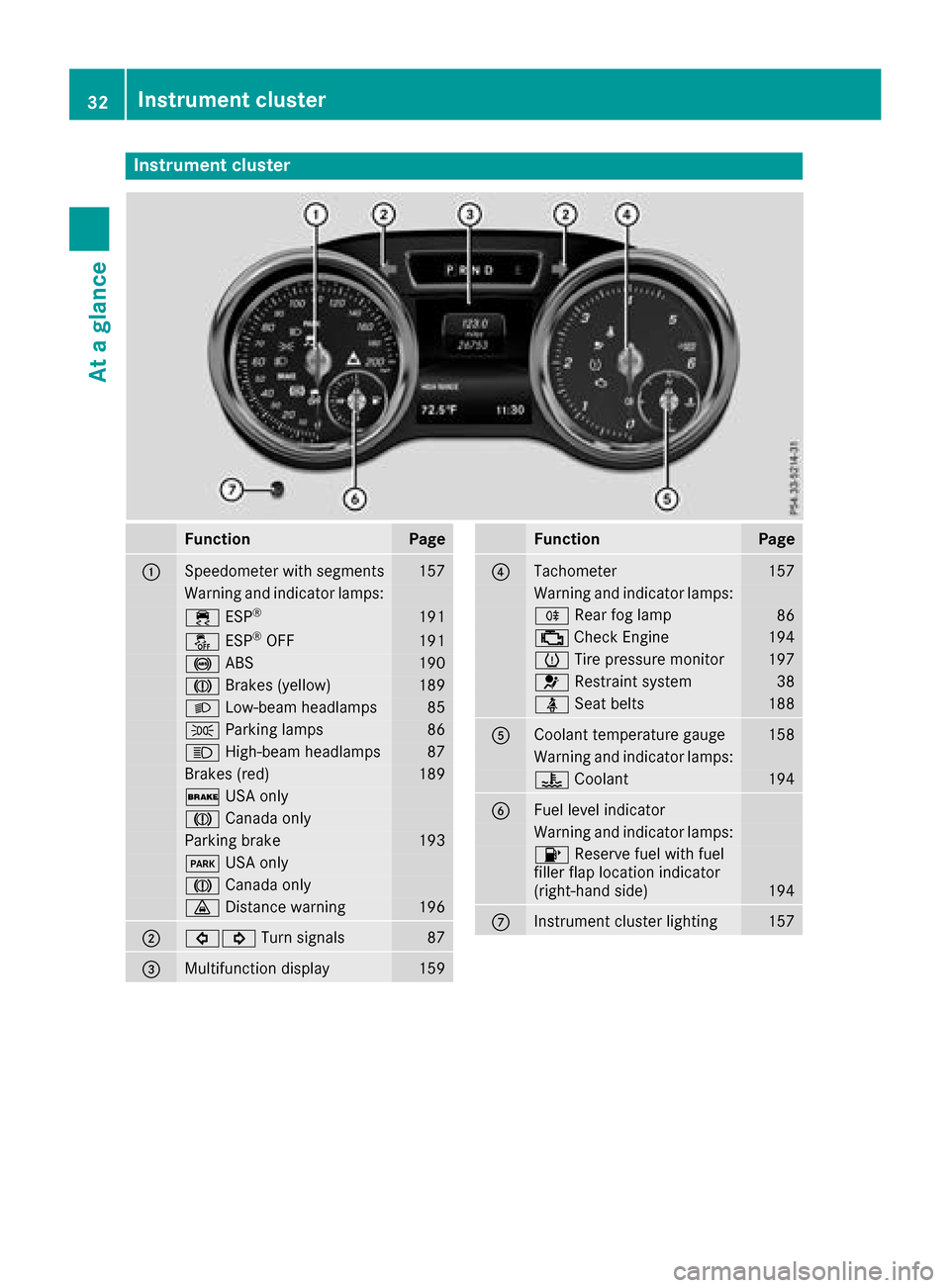
Instrumentcluster
FunctionPag e
:Speedometer wit hsegments157
Warning and indicator lamps:
÷ ESP®19 1
å ESP®OF F191
! ABS190
J Brakes(yellow)18 9
L Low-beam headlamps85
TParking lamp s86
KHigh-beam headlamps87
Brakes(red)18 9
$ USAo nly
J Canad aonly
Parking brak e193
F USAo nly
J Canad aonly
· Distanc ewarning196
;#! Turn signals87
=Multifunction display159
FunctionPag e
?Tachometer157
Warning and indicator lamps:
R Rear fog lamp86
;CheckEngine19 4
h Tirep ressur emonitor197
6 Restrain tsystem38
ü Seat belt s188
ACoolan ttem perature gauge158
Warning and indicator lamps:
? Coolan t194
BFue llevel indicator
Warning and indicator lamps:
8 Reserve fuel wit hfuel
filler flap location indicator
(right-hand side )
194
CInstrumen tcluste rlighting15 7
32Instrumen tcluster
At ag lance
Page 63 of 286
EBD (electronic brakeforce distribu-
tion)
General information
EB Dm onitors and controls th ebrak epressure
on th erear wheels to improve driving stability
while braking.
Important safety notes
iObserv ethe "Important safety notes" sec-
tio n(Ypage 57).
GWARNING
If EB Dism alfunctioning, th erear wheels can
lock, e.g .unde rfull braking .This increases the
risk of skiddinga nd an accident.
You should therefore adapt your driving style
to th edifferenth andlingcharacteristics .Have
th eb rak esystem checked at aqualified spe-
cialist workshop.
Observ einformatio nregardin gindicator and
warning lamps (
Ypage 190) as well as display
messages (Ypage 172).
ADAPTIV EBRAKE
ADAPTIVEB RAKE provide sincreased braking
safety. In addition to th ebraking function,
ADAPTIVEB RAKE also has th eHOLDf unction
(
Ypage 139) and hill start assist(Ypage 127).
Protection against theft
Immobilizer
The immobilizer prevent syour vehicle from
beings tarted without th ecorrec tSma rtKey.
XTo activate: remove theSmartKey from the
ignition lock.
XTo deactivate: switch on theignition.
When leavin gthe vehicle ,always tak ethe
SmartKey with you and lockt hevehicle .The
engine can be started by anyon ewithavalid
SmartKey that is left inside th evehicle.
iThe immobilizer is always deactivate dwhen
you start th eengine. In th
eeven ttha tthe engine canno tbestarted
(yet th evehicle's battery is charged), th esys-
te misn otoperational. Contac tanauthorized
Mercedes-Ben zCenter or call
1-800-FOR-MERCedes (in th eUSA)or
1-800-387-0100 (in Canada).
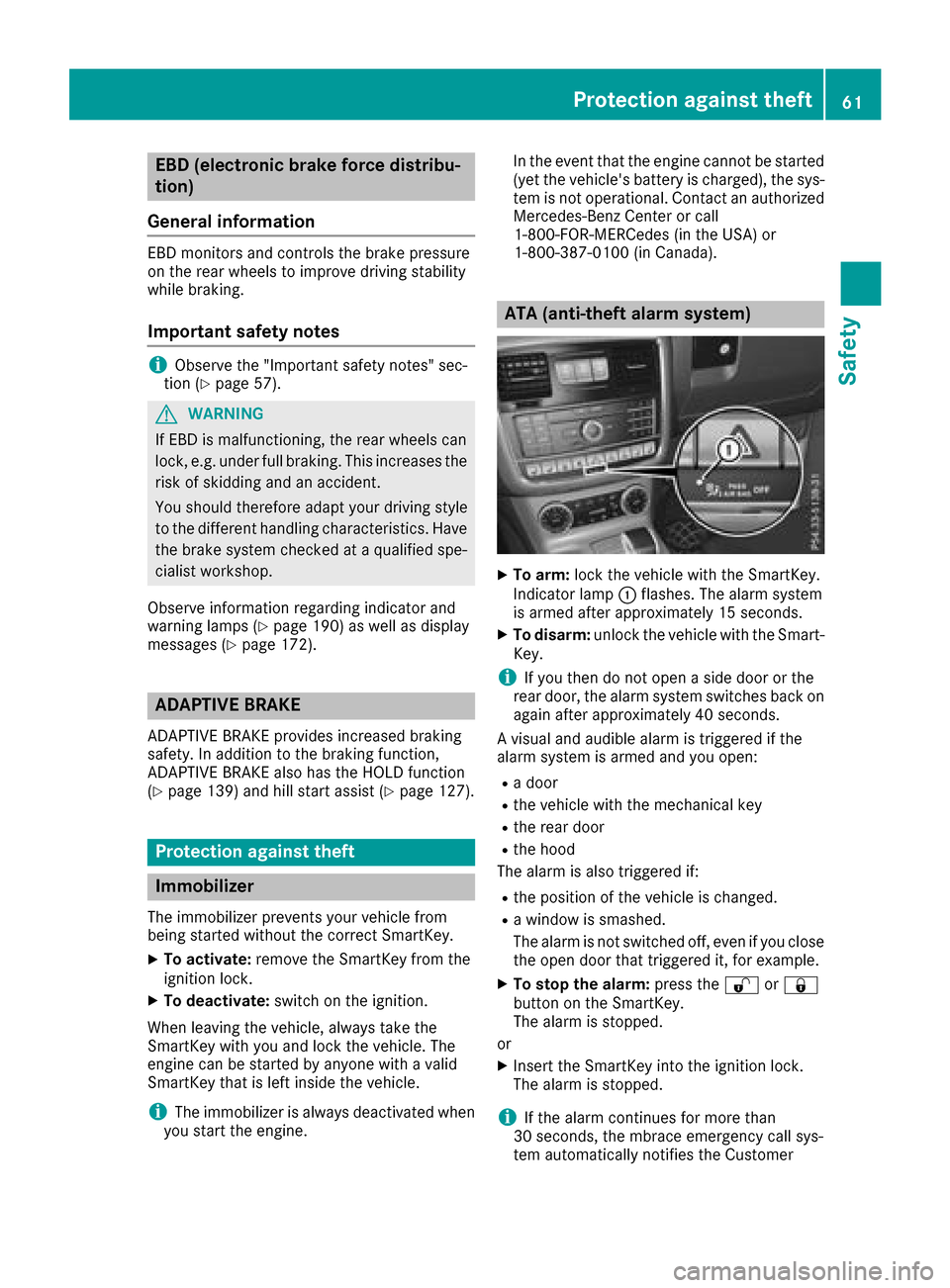
ATA (anti-thef talarm system)
XTo arm: lockthevehicle with th eSmartKey.
Indicato rlamp :flashes. The alarm system
is armed after approximately 15 seconds.
XTo disarm: unlock thevehicle with th eSma rt-
Key.
iIf you then do no topen aside door or the
rear door,t healarm system switches back on
again after approximately 40 seconds.
Av isual and audible alarm is triggered if the
alarm system is armed and you open:
Rad oor
Rthev ehicle with th emechanical key
Rther ear door
Rtheh ood
The alarm is also triggered if:
Rth ep osition of th evehicle is changed.
Raw indow is smashed.
The alarm is no tswitched off ,even if you close
th eo pen door that triggered it, for example.
XTo stop th ealarm: pressthe % or&
butto nont heSmartKey.
The alarm is stopped.
or
XInsertt heSmartKey int othe ignition lock.
The alarm is stopped.
iIf th ealarm continues for mor ethan
30 seconds, th embrace emergency call sys-
te ma utomaticall ynotifies th eCustomer
Protection against theft61
Safety
Z
Page 68 of 286
Problems with the SmartKey
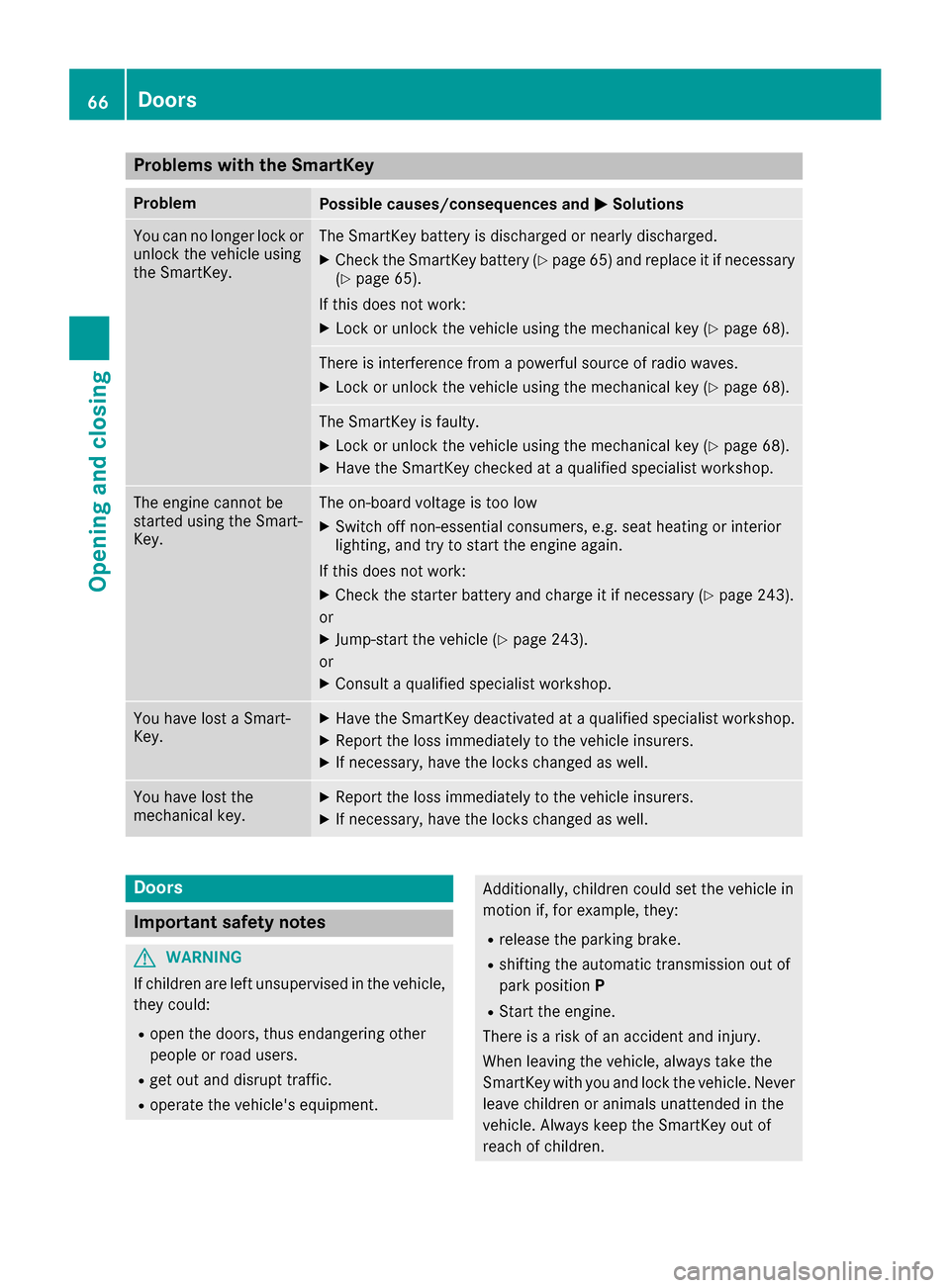
ProblemPossible causes/consequences andMSolutions
You can no longer lock or
unlock the vehicle using
the SmartKey.The SmartKey battery is discharged or nearly discharged.
XCheck the SmartKey battery (Ypage 65) and replace it if necessary
(Ypage 65).
If this does not work:
XLock or unlock the vehicle using the mechanical key (Ypage 68).
There is interference from apowerful source of radio waves.
XLock or unlock the vehicle using the mechanical key (Ypage 68).
The SmartKey is faulty.
XLock or unlock the vehicle using the mechanical key (Ypage 68).
XHave the SmartKey checked at aqualified specialist workshop.
The engine cannot be
started using the Smart-
Key.The on-board voltage is too low
XSwitch off non-essential consumers, e.g. seat heating or interior
lighting, and try to start the engine again.
If this does not work:
XCheck the starter battery and charge it if necessary (Ypage 243).
or
XJump-start the vehicle (Ypage 243).
or
XConsult aqualified specialist workshop.
You have lost aSmart-
Key.XHave the SmartKey deactivated at aqualified specialist workshop.
XReport the loss immediately to the vehicle insurers.
XIf necessary, have the locks changed as well.
You have lost the
mechanical key.XReport the loss immediately to the vehicle insurers.
XIf necessary, have the locks changed as well.
Doors
Important safety notes
GWARNING
If children are left unsupervised in the vehicle,
they could:
Ropen the doors, thus endangering other
people or road users.
Rget out and disrupt traffic.
Roperate the vehicle's equipment.
Additionally, children could set the vehicle in
motion if, for example, they:
Rrelease the parking brake.
Rshifting the automatic transmission out of
park position P
RStart the engine.
There is arisk of an accident and injury.
When leaving the vehicle, always take the
SmartKey with you and lock the vehicle. Never
leave children or animals unattended in the
vehicle. Always keep the SmartKey out of
reach of children.
66Doors
Opening and closing