warning MERCEDES-BENZ GL SUV 2012 Owners Manual
[x] Cancel search | Manufacturer: MERCEDES-BENZ, Model Year: 2012, Model line: GL SUV, Model: MERCEDES-BENZ GL SUV 2012Pages: 441, PDF Size: 10.66 MB
Page 229 of 441
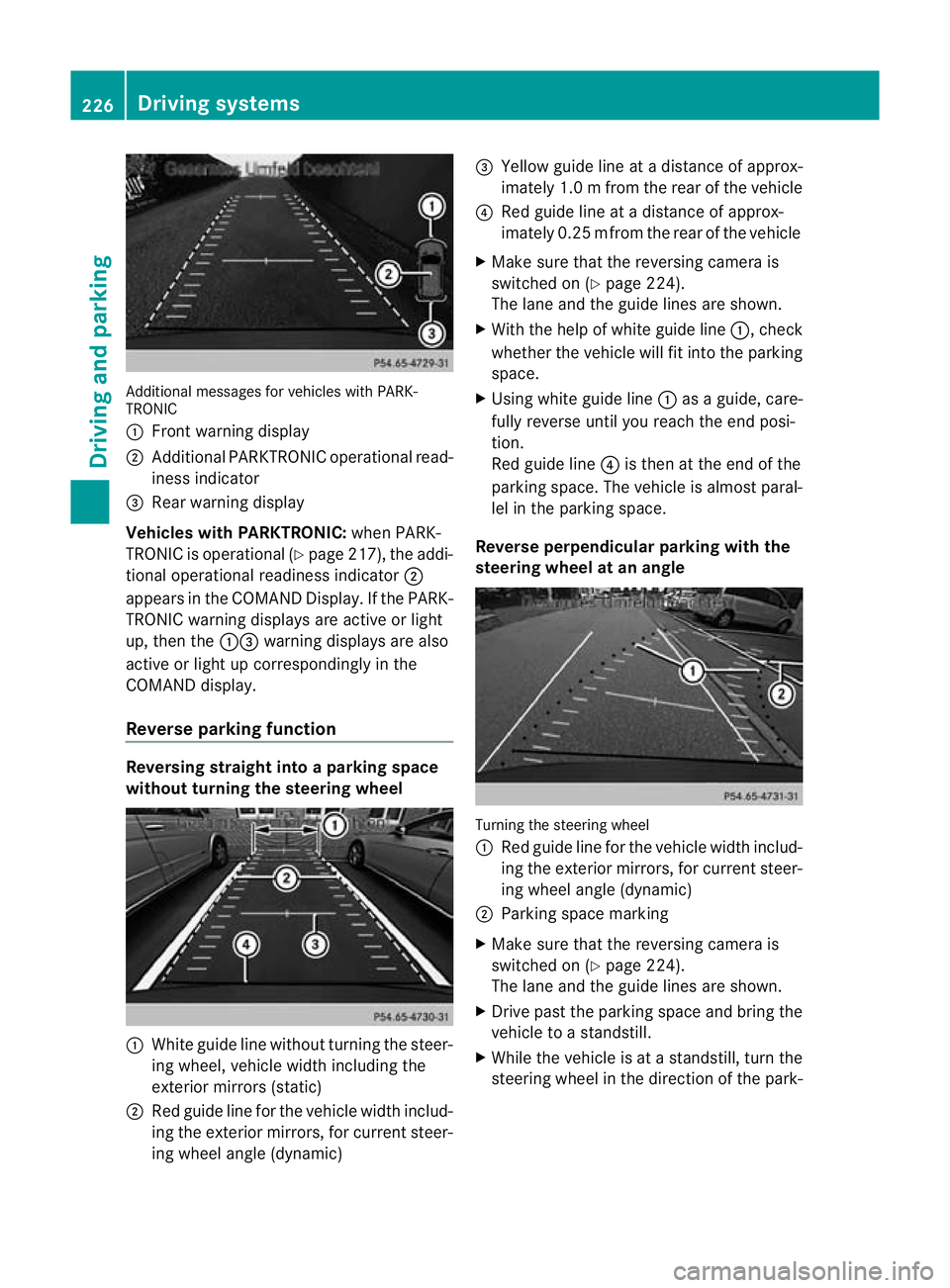
Additiona
lmessages for vehicles with PARK-
TRONIC
: Fron twarning display
; Additiona lPARKTRONIC operationa lread-
iness indicator
= Rear warning display
Veh icleswithP ARKTRONIC: when PARK-
TRONIC is operationa l(Y page 217), the addi-
tional operat iona lreadiness indicator ;
appears in the COMAN DDisplay. If the PARK-
TRONIC warnin gdisplays are active or light
up ,then the :=warnin gdisplays are also
active or light up correspondingl yinthe
COMAND display.
Reverse parkin gfunction Reversin
gstraight into aparkin gspace
withou tturning the ste eringwheel :
White gu idel ine without turning the steer-
ing wheel, vehicle width including the
exterior mirrors (static)
; Red guide line for the vehicle width includ-
ing the exterior mirrors, for current steer-
ing wheel angle (dynamic) =
Yellow guide line at adistance of approx-
imately 1.0 mfrom th erear of the vehic le
? Red guide line at adistance of approx-
imately 0.2 5mfrom th erear of the vehic le
X Ma ke sure that the reversing camera is
switched on (Y page224).
Th elane and the guide lines are sho wn.
X Wi th the hel pofwhite guide line :,check
whether the vehicle will fit into the parking
space.
X Using white guide line :asag uide, care-
fully reverse until you reach the end posi-
tion.
Red guide line ?is then at the end of the
parking space. The vehicle is almost paral-
lel in the parking space.
Reverse perpendicular parking with the
steering wheel at an angle Turning the steering wheel
:
Red guide line for the vehicle width includ-
ing the exterior mirrors, for current steer-
ing wheel angle (dynamic)
; Parking space marking
X Make sure that the reversing camera is
switched on (Y page 224).
The lane and the guide lines are shown.
X Drive past the parking space and bring the
vehicle to astandstill.
X While the vehicle is at astandstill, turn the
steering whee lint he direction of the park- 226
Driving systemsDriving and pa
rking
Page 231 of 441
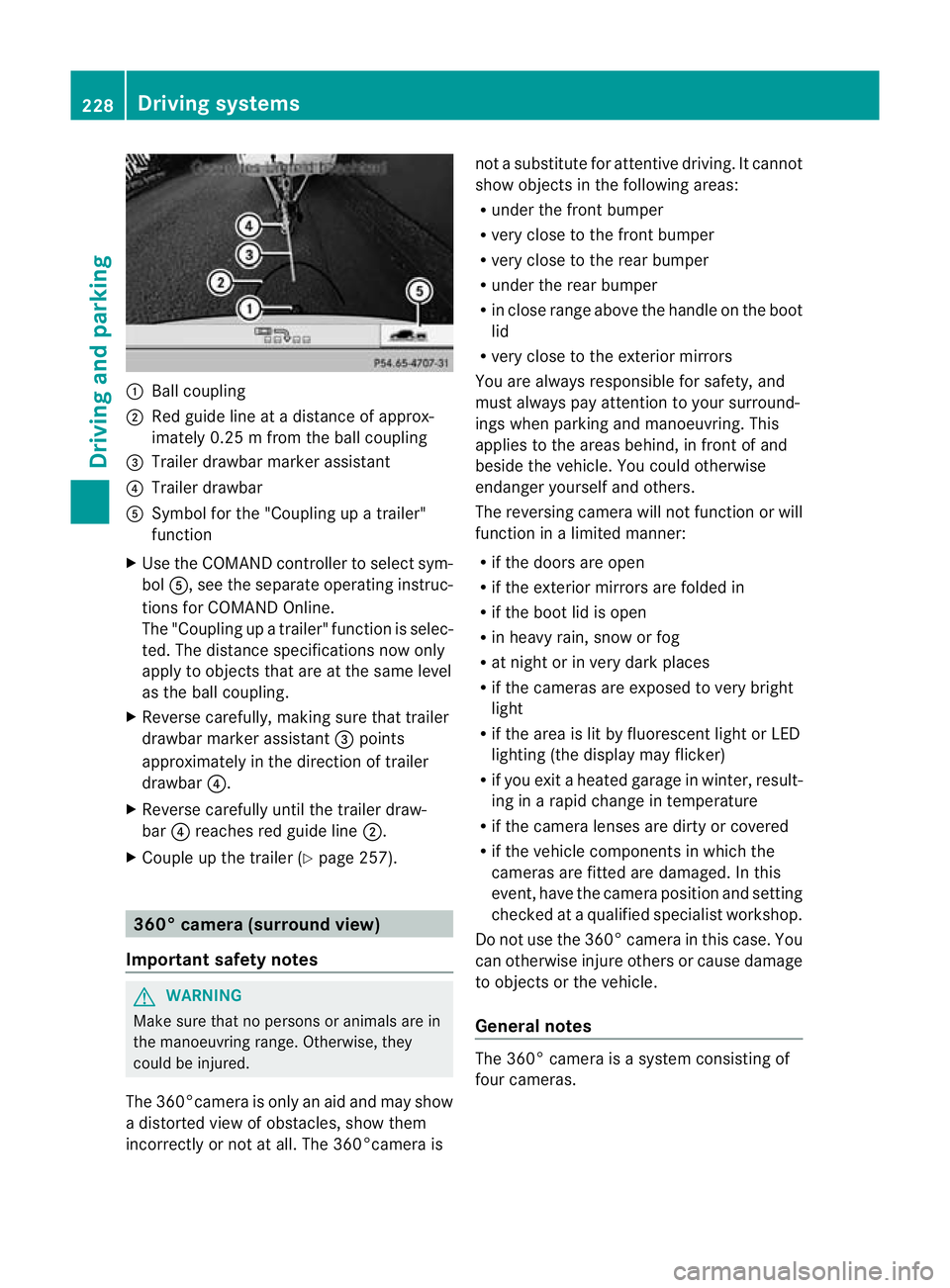
:
Ballcoupling
; Red guid elineatad istance of approx-
imately 0.25 mfromt he ball coupling
= Trailer drawbar marker assistant
? Trailer drawbar
A Symbol for the "Coupling up atrailer"
functi on
X Use th eCOM AND controlle rtoselect sym-
bol A,s ee the separate operating instruc-
tions for COMAN DOnline.
The "Coupling up atrailer" functio nisselec-
ted. The distance specification snow only
apply to objec tsthat are at the same level
as the ball coupling.
X Reverse carefully, making sure that trailer
drawbar marker assistant =points
approximately in the directio noftrailer
drawbar ?.
X Revers ecarefully until the trailer draw-
bar ?reaches red guide line ;.
X Couple up the trailer (Y page 257).360° camera (surround view)
Important safety notes G
WARNING
Make sure that no persons or animals are in
the manoeuvring range. Otherwise, they
could be injured.
The 360°camera is only an aid and may show
ad istorted view of obstacles, show them
incorrectly or not at all. The 360°camer aisnot
asubstitute for attentiv edriving. It cannot
sho wobjects in the following areas:
R under the fr ontb um per
R very clos etothe frontb um per
R very clos etothe rear bumper
R unde rthe rear bumper
R in close range abov ethe handle on th eboot
lid
R ver yclose to th eexter ior mirrors
You are always responsible for safety, and
must always pay attention to your surround-
ing sw hen par king and manoeuvring. This
applies to the areas behind ,inf ront of and
beside th evehicle. Yo ucould otherwise
endanger yoursel fand oth ers.
The rever sing camera will not functi on or will
function in alimited manner:
R if the doors are open
R if the exterior mir rors are folde din
R if the boot lid is open
R in heavy rain, snow or fog
R at night or in very dark places
R if the cameras are exposed to very bright
light
R if the area is lit by fluorescen tlight or LED
lightin g(the display may flicker)
R if you exit aheate dgarage in winter, result-
ing in arapid change in temperature
R if the camera lenses are dirt yorcovered
R if the vehicle component sinwhich the
cam erasare fitted are damaged .Inthis
event, hav ethe cam eraposition and setting
checked at aqualified specialist workshop.
Do not use the 360 °camer aint his case .You
can otherwise injur eothersorc ause damage
to object sorthe vehicle.
Ge neral notes The 360° camera is
asystem consisting of
four cameras. 228
Drivin
gsystemsDriving and parking
Page 235 of 441
Display wit
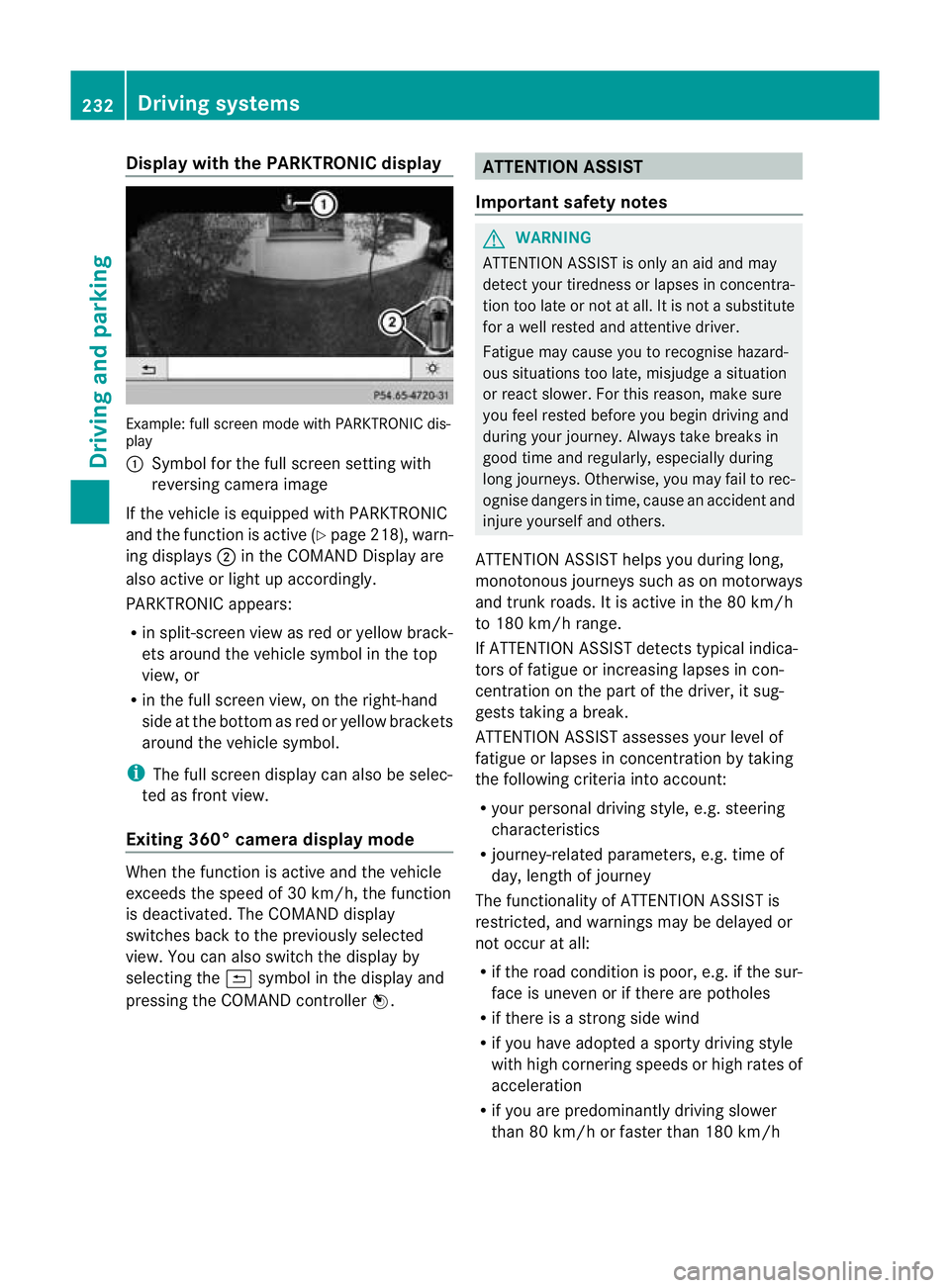
hthe PARKTRONIC display Exam
ple:full scree nmode with PARKTRONI Cdis-
play
: Symbol for the full screen setting with
reversing camer aimage
If th evehicle is equipped with PARKTRONIC
and the function is active (Y page 218), warn-
ing displays ;in the COMAN DDisplay are
also activ eorlight up accordingly.
PARKTRONIC appears:
R in split-screen view as red or yellow brack-
ets around the vehicle symbol in the top
view, or
R in the full screen view, on the right-hand
side at the bottom as red or yellow brackets
around the vehicle symbol.
i The full screen display can also be selec-
ted as front view.
Exiting 360° camera display mode When the func
tion is active and the vehicle
exceeds the speed of 30 km /h,the func tion
is deactivated. The COMAN Ddisplay
switches back to the previously selected
view. You can also switch the display by
selecting the &symbol in the display and
pressing the COMAND controller W. ATTENTION ASSIST
Important safet ynotes G
WARNING
ATTENTION ASSIST is only an aid and may
detect your tiredness or lapses in concentra-
tion too late or not at all. It is not asubstitute
for aw ell reste dand attentiv edriver.
Fatigue may cause yo utorecognise hazard-
ous situations to olate ,misjudge asituation
or reac tslower .For this rea son, make sure
you fee lreste dbefore you begin driving and
duri ngyour jour ney. Always tak ebreaks in
good time and regularly ,especiall yduring
long jour neys. Otherwise ,you may fai ltorec-
ognise danger sint ime, caus eanaccidentand
injur eyours elfa nd others.
ATTENTIO NASSIST he lpsy ou durin glon g,
mon otonous journeys such as on motorways
and trunk roads. It is act iveint he 80 km/h
to 18 0km/h range.
If ATTENTIO NASSIST detects typica lindica-
tors of fatigu eorincreasing lapse sincon-
centr ation on the part of the driver, it sug-
gests taking abreak.
ATTENTIO NASSIST asse sses your level of
fat igue or lapse sinconcentr ation by taking
the following crit eria into account:
R your persona ldriving st yle, e.g. steering
characteristics
R journey-relate dparameters ,e.g. time of
day, length of journey
Th ef unctionality of ATTENTIO NASSIST is
restricted, and warning smay be delaye dor
not occu ratall:
R if the road condition is poor, e.g. if the sur-
face is uneven or if there are potholes
R if there is astrong sid ewind
R if you have adopted asport ydrivi ng style
wit hh igh cornering speeds or high rates of
acceleration
R if you are predominantly drivin gslower
than 80 km/h or faster than 180 km/h 232
Drivin
gsystemsDrivin gand parking
Page 236 of 441
R
if you are cur rently using COM ANDOnline
or ma kingatelephon ecall with it
R if the tim ehas been set incorrectly
R in active drivin gsituations, such as when
you change lanes or change your speed
Warning and display messages in the
multifunction display X
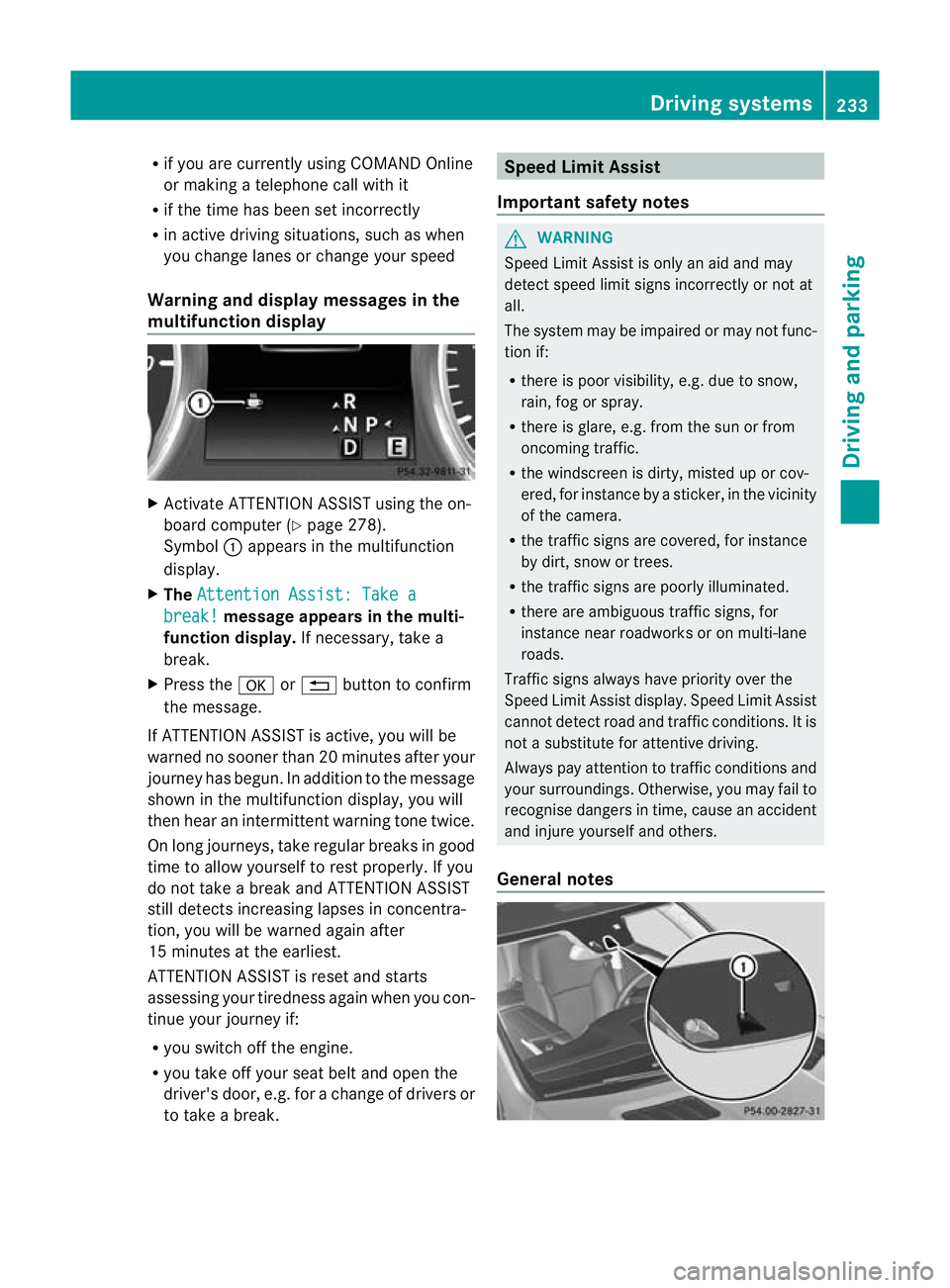
Activate ATTE NTION ASSIS Tusing the on-
boar dcomputer (Y page 278).
Symbol :appears in the multifunction
display.
X The Attentio nA ssist: Take a break! mess
agea ppears in th emulti-
function display. If necessary, takea
break.
X Press the aor% button to confirm
the message.
If ATTENTION ASSI STis active, you will be
warne dnosooner than 20 minutes after your
journey has begun. In additio ntothe message
shown in the multifunc tion display, you will
then hear an intermit tent warning tone twice.
On long journeys ,take regular breaks in good
time to allow yourself to rest properly. If you
do not take abrea kand ATTENTION ASSIST
stil ldetect sincreasing lapses in concentra-
tion, you will be warned agai nafter
15 minutes at th eearliest.
ATTENTION ASSIST is reset and starts
assessing your tiredness again when you con-
tinue your journey if:
R you switch off the engine.
R you take off your seat belt and open the
driver' sdoor, e.g. for achange of driver sor
to take abreak. Speed Limit Assist
Important safety notes G
WARNING
Speed Limit Assis tiso nly an aid and may
detect speed limit signs incorrectly or not at
all.
The system may be impaired or may not func-
tion if:
R there is poo rvisibility, e.g. due to snow,
rain, fog or spray.
R there is glare, e.g. from the sun or from
oncoming traffic.
R the windscreen is dirty, misted up or cov-
ered, for instance by asticker, in the vicinity
of the camera.
R the traffic signs are covered, for instance
by dirt, snow or trees.
R the traffic signs are poorly illuminated.
R there are ambiguous traffic signs, for
instance near roadworks or on multi-lane
roads.
Traffic signs alway shave priority over the
Speed Limit Assis tdisplay .Speed Limit Assist
cannot detec troad and traffic conditions. It is
not asubstitute for atten tivedriving.
Alway spay atten tion to traffic condition sand
your surroundings. Otherwise ,you may fai lto
recognise dangers in time ,cause an accident
and injure yourself and others.
General notes Driving systems
233Drivingand parking Z
Page 237 of 441
Speed Limi
tAssist detect sthe traffi csigns
with cam era:attached at the top of the
windscreen.
i Speed Limit Assist is not operationa linall
countries.
Speed Limit Ass ists hows you detected speed
limits in the mu ltifunction display .Data from
the navigation system is also used for this
purpose. The display appears if Speed Limit
Assist detect satraffic sign indica ting aspeed
limit or th eend ofas peed limit .IfSpeed Limit
Assist does not detec tany traffic signs ,the
speed limit from the digital road map is tak en
and shown in the display.
Informatio ninthe mult ifunction display Briefly showing detecte
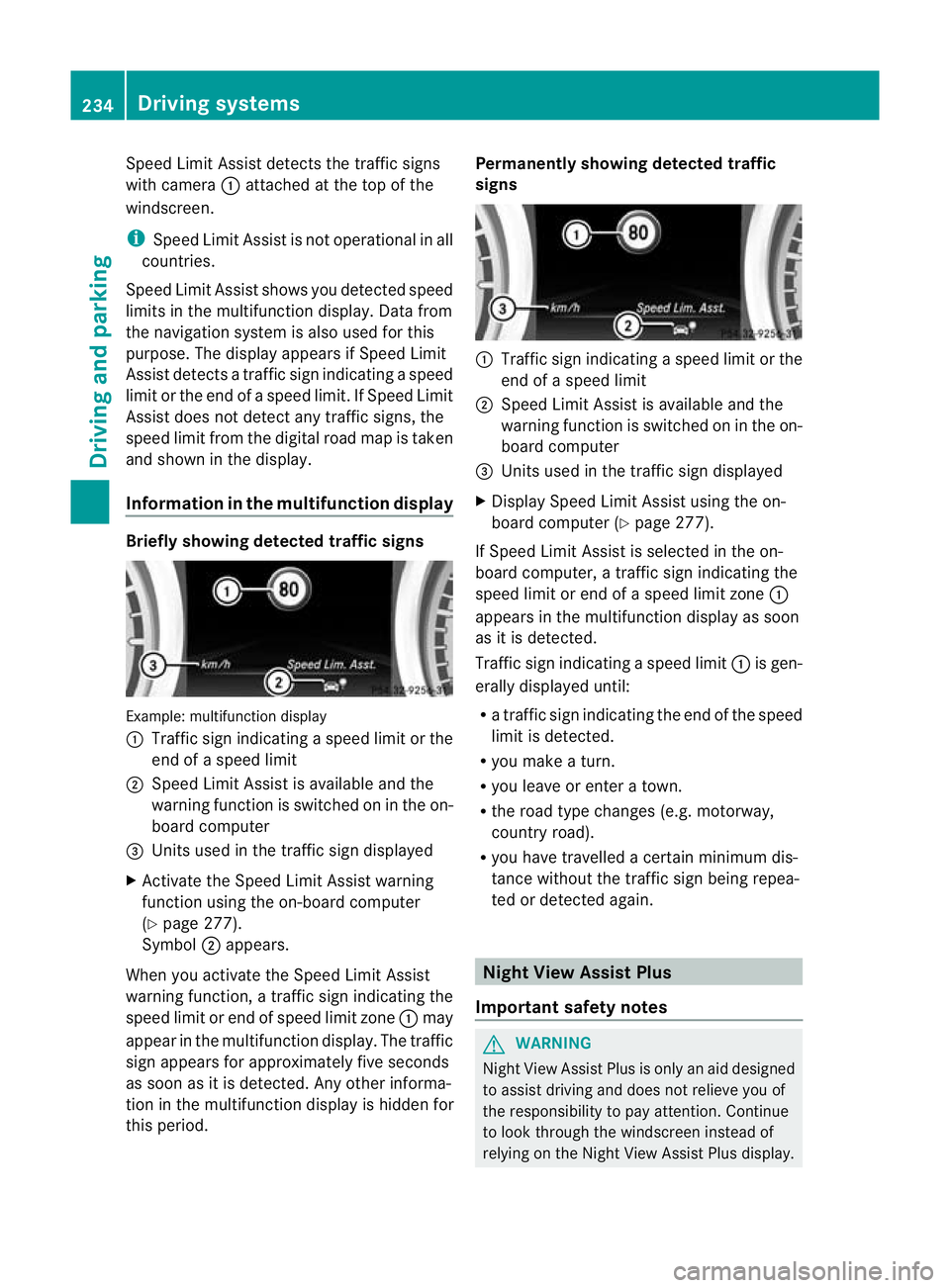
dtraffic signs Examp
le:m ultifunctio ndisplay
: Traffic sign indicatin gaspeed limit or the
end of aspeed limit
; Speed Limit Assist is available and the
warning fun ction is switched on in the on-
board computer
= Unit sused in the traffi csign displayed
X Activat ethe Speed Limi tAssist warning
function usin gthe on-boar dcompu ter
( Y page 27 7).
Symbol ;appears.
When you activate the Spee dLimit Assist
warnin gfunction, atraffic sign indicating the
spee dlimit or end of speed limit zone :may
appear in the multifunction display. The traffic
sign appears for approximately fiv eseconds
as soon as it is detected. An yother informa-
tion in the multifunction display is hidden for
this period. Permanently showing detected traffic
signs
:
Traffic sig nindicating aspeed limit or the
end of aspeed limit
; Speed Limit Assist is available and the
warning fun ction is switched on in the on-
board computer
= Unit sused in the traffi csign displayed
X Display Speed Limit Assist using the on-
board computer (Y page 277).
If Speed Limit Assist is selected in the on-
board computer, atraffic sign indicating the
spee dlimit or end of aspeed limit zone :
appear sinthe multifunction displa yassoon
as it is detected.
Traffic sign indicating aspeed limit :is gen-
erall ydisplayed until:
R at raffic sign indicating th eend of the speed
limit is dete cted.
R you mak eaturn.
R you leave or enter atown.
R the roa dtype changes (e.g. motorway,
country road).
R you have travelle dacertain minimu mdis-
tanc ewithout the traffic sign being repea-
ted or detected again. Night View Assist Plus
Importan tsafety notes G
WARNING
Nigh tView Assist Plus is only an aid designed
to assist drivin gand doe snot relieve you of
the responsibilit ytopay attention. Continue
to look through the windscreen instead of
relying on the Night View Assis tPlus display. 234
Drivin
gsystemsDrivin gand parking
Page 238 of 441
You are responsible for safet
yand must drive
in accordanc ewith traffic conditions. You
could otherwise endanger yourself and oth-
ers.
The system may be impaired or may not func-
tion if:
R there is poor visibility, e.g. due to snow,
rain ,fog or spray.
R thew indscree nisdirty, misted up or cov-
ered, for instance by asticker, in the vicinity
of the camera.
R on bends ,onuphillgradient sordownhill
gradients. G
WARNING
Night Vie wAssist Plus is only an aid designed
to assist driving and does not reliev eyou of
the responsibility to pay attention. Continue
to look through the windscreen instea dof
relyin gonthe Night View Assist Plus display.
You ar eresponsible for safet yand must drive
in accordance with traffic conditions .You
coul dotherwis eendange ryourself and oth-
ers.
The syste mmay be impaired or may not func-
tio nif:
R the re is poor visibility,e.g.d ue to snow,
rain ,fog or spray.
R thew indscree nisdirty, misted up or cov-
ered, for instance by asticker, in the vicinity
of the camera.
R on bends ,onuphillgradient sordownhill
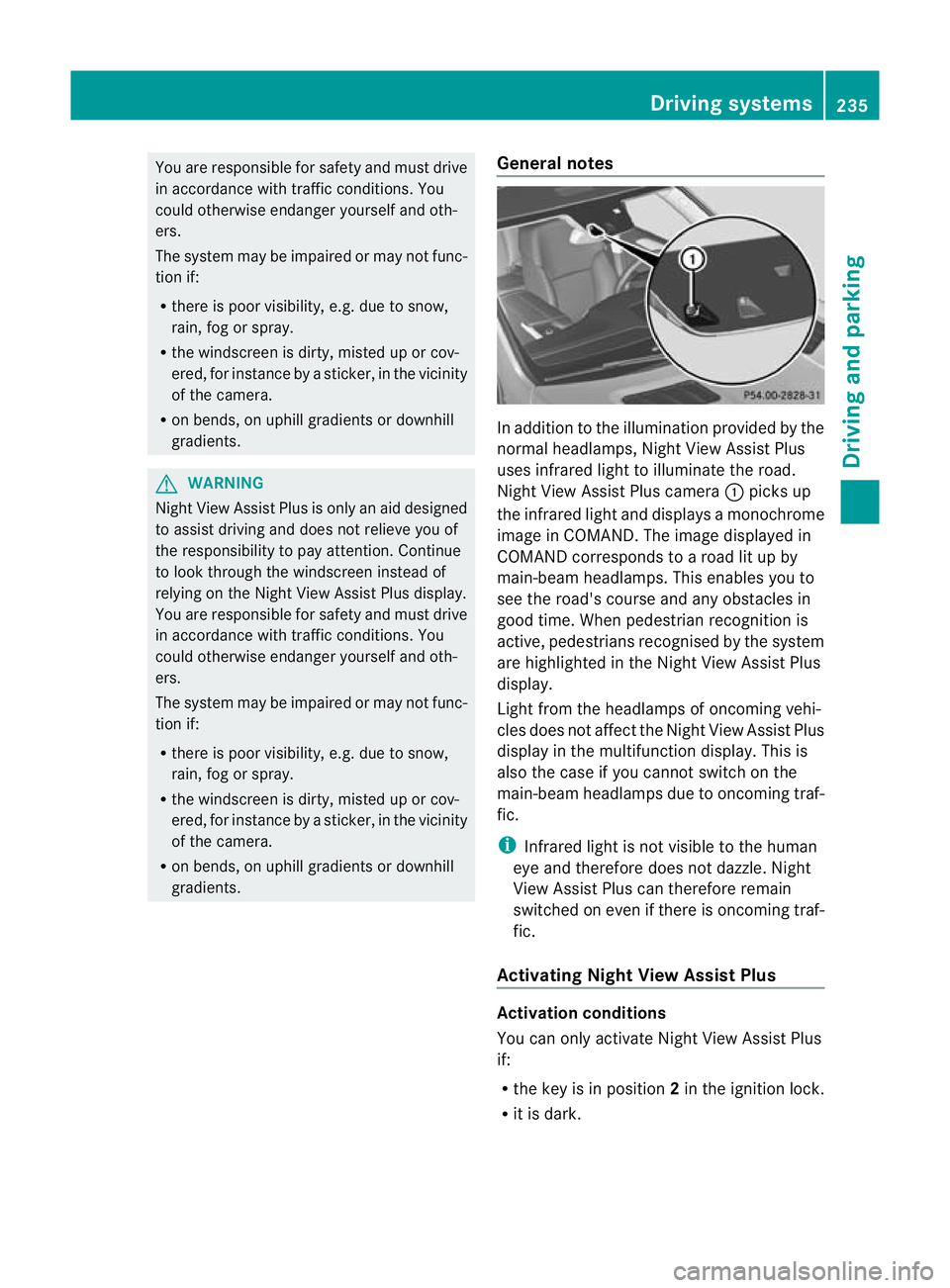
gradients. General notes In addition to the illumination provided by the
normal headlamps, Night View Assist Plus
uses infrared light to illuminate the road.
Night View Assist Plus camera
:pick sup
the infrared ligh tand displays amonochrome
image in COMAND. The image displayed in
COMAN Dcorresponds to aroad lit up by
main-beam headlamps. This enables you to
see the road's course and any obstacles in
good time. When pedestrian recognition is
active, pedestrians recognised by the system
ar eh ighlighted in the Night View Assist Plus
display.
Light from the headlamps of oncomin gvehi-
cles does not affect the Night View Assist Plus
display in the multifunction display. This is
also the case if you cannot switch on the
main-bea mheadlamps due to oncoming traf-
fic.
i Infrared light is not visible to the human
eye and therefore does not dazzle. Night
View Assist Plus can therefore remain
switched on even if there is oncoming traf-
fic.
Activating Nigh tView Assis tPlus Activation conditions
You can only activat
eNight View Assist Plus
if:
R the key is in position 2in the ignition lock.
R it is dark. Drivin
gsystems
235Drivingand parking Z
Page 239 of 441
R
the ligh tswitc hisi nthe à orL posi-
tion.
R reverse gear has not been engaged.
Activating Nigh tView Assist Plus X
Make sure that COMAN DAPS is switched
on.
X Press button :.
The Night Vie wAssist Plus displa yappears
in the COMAN Ddisplay.
You can read about how to adjust the bright-
ness of the COMAND display in the COMAND
Online operating instructions.
i The infrared headlamps only switch on
when the vehicle is being driven at speeds
of at least 10 km/h. This means that you
do not have the full visual range while sta-
tionary and cannot check whether Night
View Assist Plus is working.
Pedestrian recognition G
WARNING
Pedestrian recognition may be impaired or
inoperativ eif:
R pedestrians are partially or entirely
obscured by objects, e.g .byp arked vehi-
cles.
R the silhouette of the pedestrian in the Night
View Assis tPlus display is incomplete or
interrupted, e.g. by powerful light reflec-
tions. R
pedestrians do not contrast with the sur-
roundings.
R pedestrians are not in an upright position,
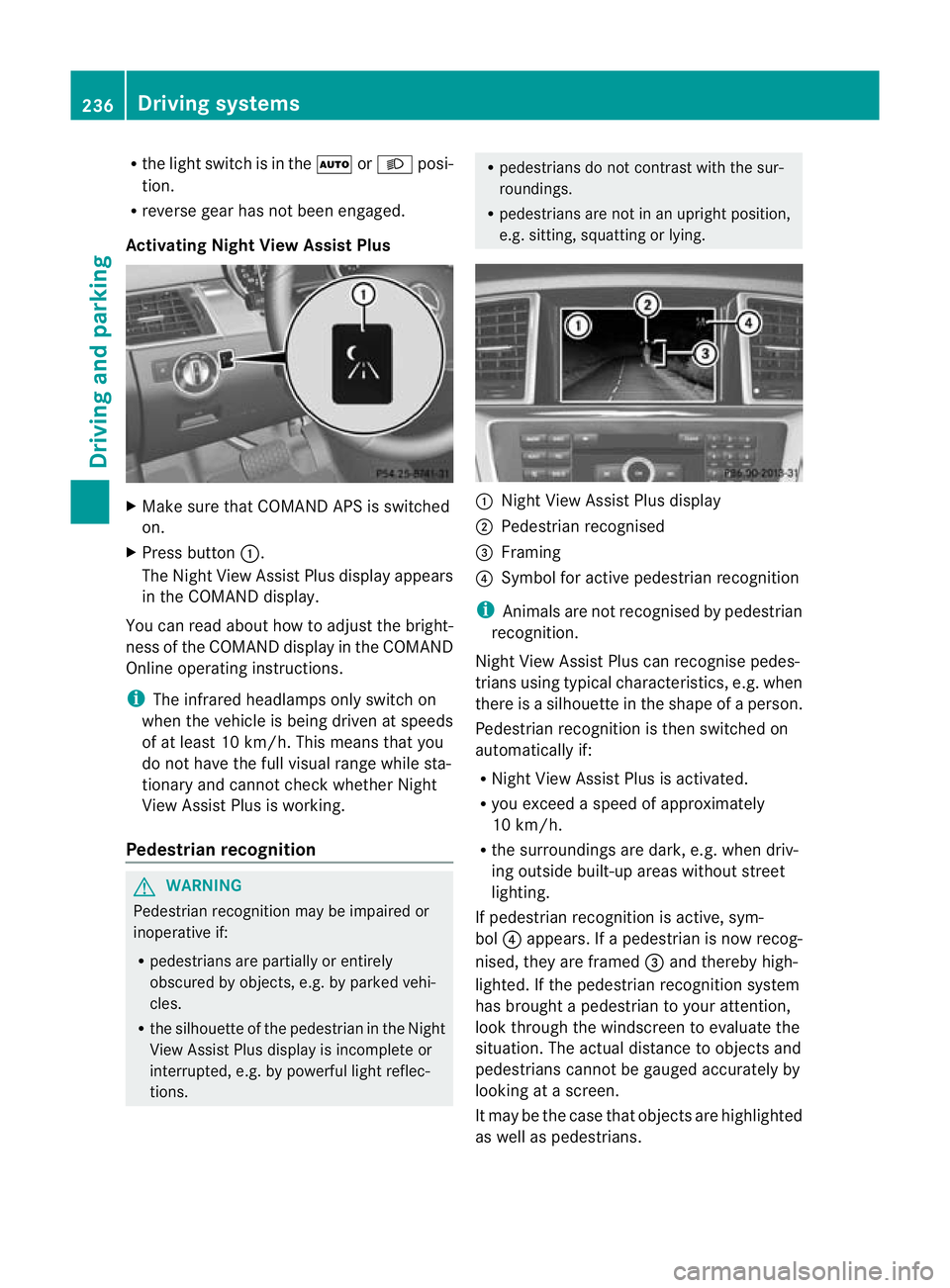
e.g. sitting, squatting or lying. :
Night View Assist Plus display
; Pedestrian recognised
= Framing
? Symbol for activ epedestrian recognition
i Animals are not recognised by pedestrian
recognition.
Night View Assist Plus can recognise pedes-
trians using typical characteristics ,e.g. when
there is asilhouette in the shape of aperson.
Pedestria nrecognition is then switched on
automatically if:
R Night View Assist Plus is activa ted.
R you exceed aspeed of approximately
10 km/h.
R the surroundings are dark ,e.g. whe ndriv-
ing outsid ebuilt-up areas without street
lighting.
If pedestrian recognition is active, sym-
bol ?appears. If apedestrian is now recog-
nised, they are framed =and thereby high-
lighted. If the pedestrian recognition system
has brought apedestrian to your attention,
look through the windscreen to evaluate the
situation. The actual distanc etoobjectsand
pedestrians cannot be gauged accurately by
looking at ascreen.
It may be the case that objects are highlighted
as wel laspedestrians. 236
Driving systemsDriving and parking
Page 241 of 441
Problems wit
hNight View Assist Plus Problem Possible causes/consequences and
M Solutions
The pictur
equality of
Night View Assis tPlus
has deteriorated. The windscreen wipers are smearin
gthe windscreen.
X Replace the wiper blades (Y page 132). The windscreen is smeared after the vehicle has been cleaned in
ac
ar wash.
X Clea nthe windscreen (Y page 369). There is windscreen chip damage in the camera's field of vision.
X
Replace the windscreen. The windscreen is misted up on the inside.
X
Demist the windscreen (Y page 145). The windscreen is iced up.
X
De-ice the windscreen (Y page 145). There is dir
tonthe insid eofthe windscreen.
X Clean the insid eofthe windscreen (Y page 369). Lan
eTracking package
General notes The Lane Tracking package consis
tsof Blind
Spot Assist (Y page 238) and Lane Keeping
Assist (Y page 240).
Blind Spot Assist Important safety notes
G
WARNING
Blind Spot Assist is only an aid designe dto
assis tdriving. It may fail to detec tsome vehi-
cles and is no substitute for attentive driving.
Blin dSpot Assist cannot detect road and traf-
fic conditions. It may fail to detect narrow
vehicles, such as motor cycles or bicycles ,or
only detec tthem too late.
Monitorin gmay be affected by dirty sensors,
stron gspray or poor visibility caused by snow,
rain or mist, for example. In this case, vehicles
are detected late or not at all. Alway
spay attention to traffic conditions and
your surroundings. Otherwise ,you may fai lto
recognise dangers in time ,cause an accident
and injure yourself and others. G
WARNING
Blind Spot Assis tisn ot active at speeds below
30 km/h. The indicator lamps in the exterior
mirror sare yello w.Vehicle sinthe monitoring
range ar ethen not indicated.
Always pay attention to traf ficc ondition sand
your surroundings. Otherwise, you may fail to
recognise dangers in time, cause an accident
and injure yourself and othe rs.
Ge nera lnotes
Blind Spot Assist uses aradar senso rsystem
to monitor the areas on both side sofyour
vehicle. It supports you from speeds of
30 km /h.Aw arning display in the exterior
mirror sdraws your attentio ntovehicles
detected in the monitored area .Ifyou then
switc hont he cor respondi ng turn signal to 238
Drivin
gsystemsDriving and parking
Page 242 of 441
change lane, yo
uwilla lsor eceive an optical
and audible collisio nwarning. For monitoring,
Active Blin dSpot Assist uses sensors in the
rear bumper.
For Blin dSpot Assist to assist you when driv-
ing, the rada rsensor system must be activa-
ted (Y page 283) and operational.
The rada rsensor system is switched off auto-
maticall yinthe vicinit yofradio telescope
facilities (Y page 433).
Monitoring range of the sensors G
WARNING
Blind Spot Assist monitors certain areas in the
immediate vicinit yofyour vehicle. Vehicles
that approach and driv epast at high speeds
are not detected. There is no display and no
warning.
If the lanes are very wide, it may not be pos-
sible to monitor the complete width of the
neighbouring lane. For this reason, vehicles in
the next lane may not be detected, especially
if they are driving in astaggered formation in
different lanes .This ma ybethe case if vehi-
cles ar edriving at th eedge of their lane that
is furthest away from your vehicle.
Alway spay attention to traffic conditions and
your surroundings. Otherwise ,you may fai lto
recognis edangers in time, cause an accident
and injure yourself and others. Blind Spot Assis
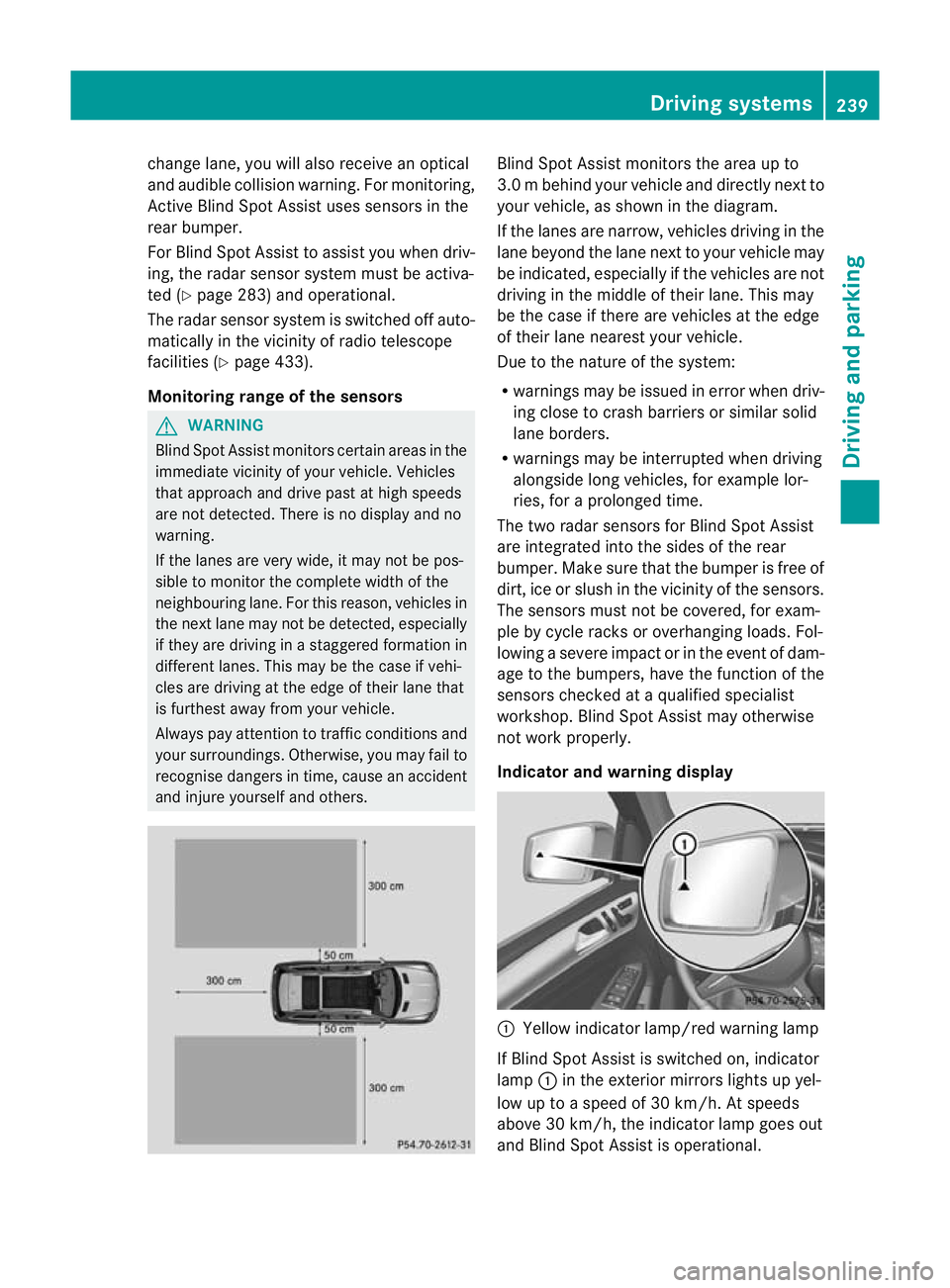
tmonitors the area up to
3. 0mb ehind your vehicle and direc tlyn extto
your vehicle, as shown in the diagram.
If the lanes are narrow, vehicles drivin gint he
lan ebeyond th elan en ext to your vehicle may
be indicated, especially if th evehicles are not
drivin gint he midd le of their lane. This may
be th ecase if there are vehicles at th eedge
of their lan eneares tyour vehicle.
Due to th enature of th esystem:
R warnings may be issued in error when driv-
ing close to crash barriers or similar solid
lane borders.
R warnings may be interrupted when driving
alongside long vehicles, for example lor-
ries, for aprolonged time.
Th et wo radar sensors for Blin dSpot Assist
are integrated int othe sides of the rear
bumper .Make sure that the bumper is free of
dirt, ice or slush in the vicinity of the sensors.
The sensor smust not be covered, for exam-
ple by cycle racks or overhanging loads .Fol-
lowin gasevereimpact or in th eevent of dam-
ag etot he bumpers, hav ethe function of the
sensor schecked at aqualified special ist
workshop. Blind Spot Assist may otherwise
not work properly.
Indicator and warning display :
Yello windicato rlamp/red warning lamp
If Blind Spot Assis tiss witched on, indicator
lamp :in the exterior mirrors lights up yel-
low up to aspeed of 30 km/h. At speeds
above 30 km/h, the indicator lamp goes out
and Blin dSpot Assist is operational. Driving systems
239Driving and parking Z
Page 243 of 441
If
av ehicle is detected within the monitoring
range of Blin dSpot Assist at speed sabove
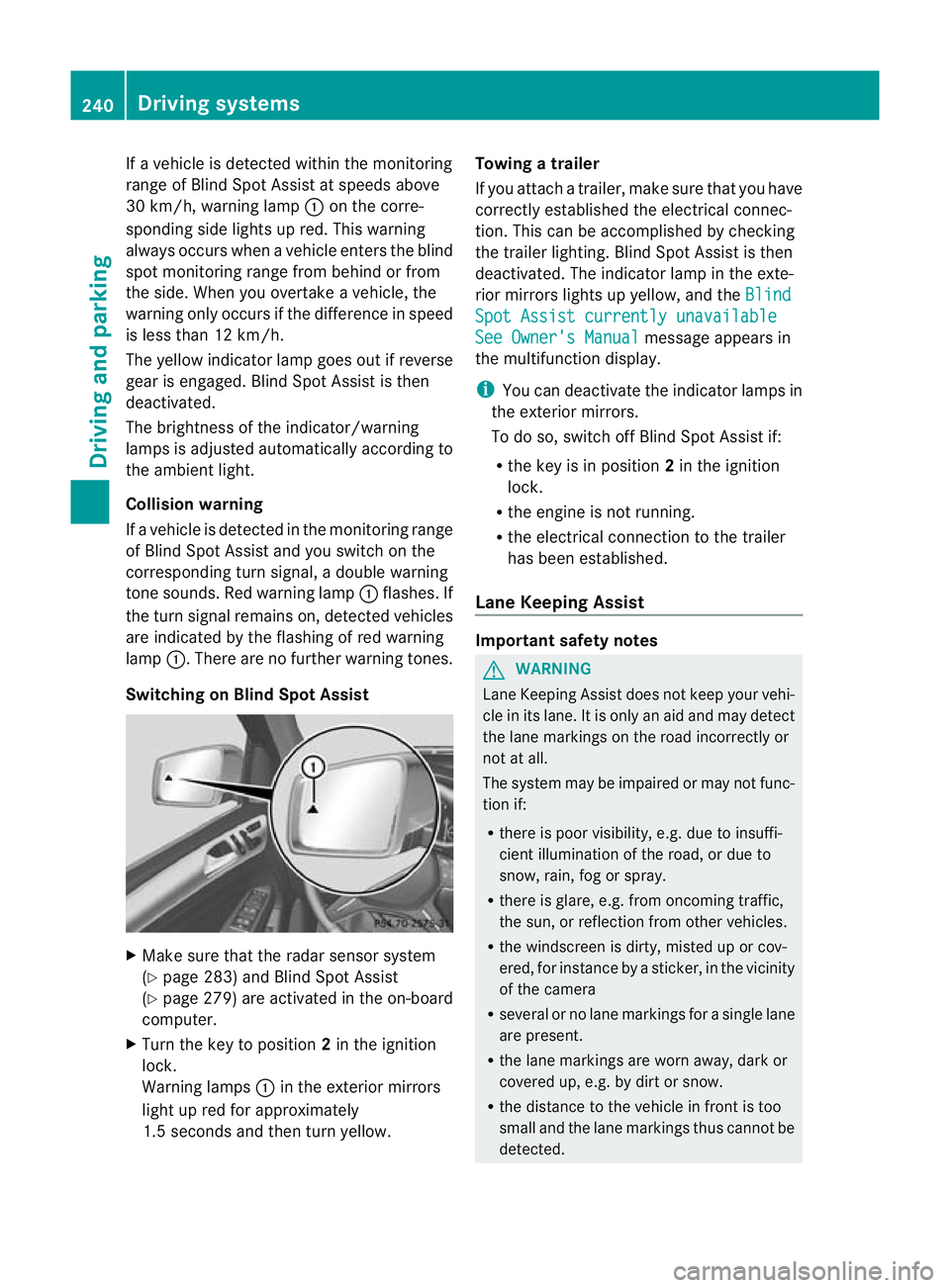
30 km/h, warning lamp :on the corre-
sponding side lights up red. This warning
alway soccurs whe navehicle enter sthe blind
spot monitoring range from behind or from
the side. When you overtak eavehicle, the
warning only occurs if the difference in speed
is less than 12 km/h.
The yellow indicator lam pgoes out if reverse
gear is engaged. Blin dSpot Assist is then
deactivated.
The brightness of the indicator/warning
lamps is adjusted autom atically according to
the ambient light.
Collision warning
If av ehicle is detected in the monitoring range
of Blin dSpot Assist and you switch on the
correspondin gturn signal ,adouble warning
tone sounds. Red warnin glamp :flashes. If
the turn signal remains on, detected vehicles
are indicated by the flashing of red warning
lamp :.There ar enofurther warning tones.
Switching on Blind Spot Assist X
Make sure that the radar senso rsystem
(Y page 283) and Blind Spot Assist
(Y page 279) are activated in the on-board
computer.
X Turn the key to position 2in the ignition
lock.
Warning lamps :in the exterior mirrors
ligh tupr ed for approximately
1. 5s econds and then tur nyellow. Towing
atrailer
If yo uattach atrailer, make sure th at you have
corre ctly established the electrical connec-
tion. This can be accomplished by checking
the trailer lighting. Blind Spot Assist is then
deactivated. The indicator lamp in the exte-
rior mirrors lights up yellow ,and the Blind Spo
tAssist currently unavailable See Owner's Manual message appears in
th em ultifunction display.
i You can deactivate the indicator lamps in
the exterior mirrors.
To do so, switch off Blind Spot Assis tif:
R thek ey is in position 2in the ignition
lock.
R the engine is not running.
R the electrical connection to the trailer
has been established.
Lane Keeping Assist Important safety notes
G
WARNING
Lan eKeeping Assist does not keep your vehi-
cle in its lane. It is only an aid and may detect
the lane markings on the road incor rectly or
not at all.
Th es ystem may be impaired or may not func-
tion if:
R there is poo rvisibility, e.g. due to insuffi-
cient illumination of the road, or due to
snow, rain, fog or spray.
R there is glare, e.g. from oncoming traffic,
the sun, or reflec tion from other vehicles.
R the windscreen is dirty, misted up or cov-
ered, for insta ncebyasticker, in the vicinity
of the camera
R several or no lane markings for asingle lane
are present.
R the lane markings are worn away, dark or
covered up, e.g. by dirt or snow.
R the distance to the vehicle in fron tist oo
smal land the lane markings thus cannot be
detected. 240
Drivin
gsystemsDrivin gand pa rking