wheel MERCEDES-BENZ GLA 2019 Repair Manual
[x] Cancel search | Manufacturer: MERCEDES-BENZ, Model Year: 2019, Model line: GLA, Model: MERCEDES-BENZ GLA 2019Pages: 346, PDF Size: 16.66 MB
Page 178 of 346
Rthat are parallel to the direction of traveland at least 39.5 in (1.0m) longer than yourvehicle
Rat right angles to the direction of travel andat least 39.5 in (1.0m) widerthan your vehi-cle
When driving at speeds below 19 mph(30 km/h), you will see parking symbolDasa status indicator in the instrument cluster.When a parking space has been detected, anarrow towards the right or the left alsoappears. By default, Active Parking Assist onlydisplays parking spaces on the front-passenger side. Parking spaces on the driver'sside are displayed as soon as the turn signalon the driver's side is activated. When parkingon the driver's side, this must remain activateduntil you confirm the use of Active ParkingAssist by pressing thevbutton on the mul-tifunction steering wheel. The system automat-ically determines whether the parking space isparallel or at right-angles to the direction oftravel.
A parking space is displayed while you aredriving past it, and until you are approximately50 ft (15m) away from it.
Parking
GWARNING
If you leave the driver's seat when the vehi-
cle is only being braked by the Parking Pack-
age with rear view camera, it could roll
away:
Rif there is a malfunction in the system or
in the voltage supply
Rif the electrical system in the engine com-
partment, the battery or the fuses are
tampered with
Rif the battery is disconnected
Rif the vehicle is accelerated, e.g. by a vehi-
cle occupant
There is a risk of an accident.
Before leaving the vehicle, always secure it
against rolling away.
iIf Active Parking Assist detects obstacles,Active Parking Assist brakes automaticallywhile the vehicle is parking. You are respon-sible for braking in good time.
XStop the vehicle when the parking spacesymbol shows the desired parking space inthe instrument cluster.
XShift the transmission to position^.TheStart Parking Assist?Start Parking Assist?Yes: OKYes: OKNo:No:8message appears on the multifunctiondisplay.
XTo cancel the procedure:press the8button on the multifunction steering wheelor pull away.
or
XTo park using Active Parking Assist:press thevbutton on the multifunctionsteering wheel.TheParking Assist Active Acceler‐Parking Assist Active Acceler‐ate and Brakeate and BrakeObserve SurroundingsObserve Surroundingsmessage appears on the multifunction dis-play.
XLet go of the multifunction steering wheel.
XBack up the vehicle, being ready to brake atall times. When backing up, drive at a speedbelow approximately 6 mph (10 km/h). Oth-erwise, Active Parking Assist will be can-celed.Active Parking Assist brakes the vehicle to astandstill when the vehicle approaches therear border of the parking space.
Maneuvering may be required in tight park-ing spaces.
TheParking Assist Active SelectParking Assist Active SelectDObserve SurroundingsDObserve Surroundingsmessage appearson the multifunction display.
XShift the transmission to position[whilethe vehicle is stationary.Active Parking Assist immediately steers inthe other direction.
TheParking Assist Active Acceler‐Parking Assist Active Acceler‐ate and Brakeate and BrakeObserve SurroundingsObserve Surroundingsmessage appears on the multifunction dis-play.
iYou will achieve the best results by waitingfor the steering procedure to completebefore pulling away.
XDrive forwards and be ready to brake at alltimes.Active Parking Assist brakes the vehicle to astandstill when the vehicle approaches thefront border of the parking space.
Maneuvering may be required in tight park-ing spaces.
176Driving systems
Driving an d parking
Page 179 of 346
TheParking Assist Active Select RParking Assist Active Select RObserve SurroundingsObserve Surroundingsmessage appears onthe multifunction display.
As soon as the parking procedure is complete,theActive Parking Assist FinishedActive Parking Assist Finishedmes-sage appears and a warning tone sounds. Thevehicle is now parked.
The vehicle is kept stationary without thedriver having to depress the brake pedal. Thebraking effect is canceled when you depressthe accelerator pedal.
Active Parking Assist no longer supports youwith steering interventions and brake applica-tions. When Active Parking Assist is finished,you must steer and brake again yourself.Active Parking Assist is still available.
Parking tips:
RThe way your vehicle is positioned in theparking space after parking is dependent onvarious factors. These include the positionand shape of the vehicles parked in frontand behind it and the conditions of the loca-tion. It may be the case that Active ParkingAssist guides you too far into a parkingspace, or not far enough into it. In somecases, it may also lead you across or ontothe curb. If necessary, cancel the parkingprocedure with Active Parking Assist.
RYou can also preselect transmission position[. The vehicle redirects and does not driveas far into the parking space. Should thetransmission change take place too early,the parking procedure is canceled. A sensi-ble parking position can no longer be ach-ieved from this position.
Exiting a parking space
In order that Active Parking Assist can supportyou when exiting the parking space:
Ryou need to have parked using Active Park-ing Assist.
Rthe border of the parking space must behigh enough at the front and the rear. Acurb stone is too small, for example.
Rthe border of the parking space must not betoo wide, as the position of the vehicle mustnot exceed an angle of 45° to the startingposition as it is maneuvered into the parkingspace.
Ra maneuvering distance of at least 3.3 ft(1.0 m) must be available.
Active Parking Assist can only assist you withexiting a parking space if you have parked thevehicle parallel to the direction of travel usingActive Parking Assist.
iIf Active Parking Assist detects obstacles,Active Parking Assist brakes automaticallywhile the vehicle is exiting the parkingspace. You are responsible for braking ingood time.
XStart the engine.
XRelease the electric parking brake.
XSwitch on the turn signal in the directionyou will drive out of the parking space.
XShift the transmission to position[or^.TheStart Parking Assist?Start Parking Assist?Yes: OKYes: OKNo:No:8message appears on the multifunctiondisplay.
XTo cancel the procedure:press the8button on the multifunction steering wheelor pull away.
or
XTo exit a parking space using ActiveParking Assist:press thevbutton onthe multifunction steering wheel.TheParking Assist Active Acceler‐Parking Assist Active Acceler‐ate and Brakeate and BrakeObserve SurroundingsObserve Surroundingsmessage appears on the multifunction dis-play.
XLet go of the multifunction steering wheel.
XPull away, being ready to brake at all times.Do not exceed a maximum speed of approx-imately 6 mph (10 km/h)when exiting aparking space. Otherwise, Active ParkingAssist will be canceled.
XDepending on the message or as required,shift the transmission to position[or^.Active Parking Assist immediately steers inthe other direction. TheParking AssistParking AssistActive Accelerate and BrakeActive Accelerate and BrakeObserveObserveSurroundingsSurroundingsmessage appears on themultifunction display.
iYou will achieve the best results by waitingfor the steering procedure to completebefore pulling away.
If you back up after activation, the steeringwheel is moved to the straight-ahead posi-tion.
XDrive forwards and reverse as prompted bythe Active Parking Assist warning displays,several times if necessary.
Driving systems177
Driving and parking
Z
Page 180 of 346
Once you have exited the parking space com-pletely, the steering wheel is moved to thestraight-ahead position. You hear a tone andtheActive Parking Assist FinishedActive Parking Assist Finishedmes-sage appears on the multifunction display. Youwill then have to steer and merge into trafficon your own. Active Parking Assist is still avail-able. You can take over the steering before thevehicle has exited the parking space com-pletely. This is useful, for example when yourecognize that it is already possible to pull outof the parking space.
Canceling Active Parking Assist
XStop the movement of the multifunctionsteering wheel or steer yourself.Active Parking Assist will be canceled atonce. TheActive Parking Assist Can‐Active Parking Assist Can‐celedceledmessage appears in the multifunctiondisplay.
or
XPress the PARKTRONIC button(Ypage 173).Active Parking Assist is switched off andActive Parking Assist is immediately can-celed. TheActive Parking Assist Can‐Active Parking Assist Can‐celedceledmessage appears in the multifunctiondisplay.
Active Parking Assist is canceled automaticallyif:
Rthe electric parking brake is engaged
Rtransmission position]is selected
Rparking using Active Parking Assist is nolonger possible
Ryou are driving faster than 6 mph (10 km/h)
Ra wheel spins, ESP®intervenes or fails. Insuch cases the
Page 183 of 346
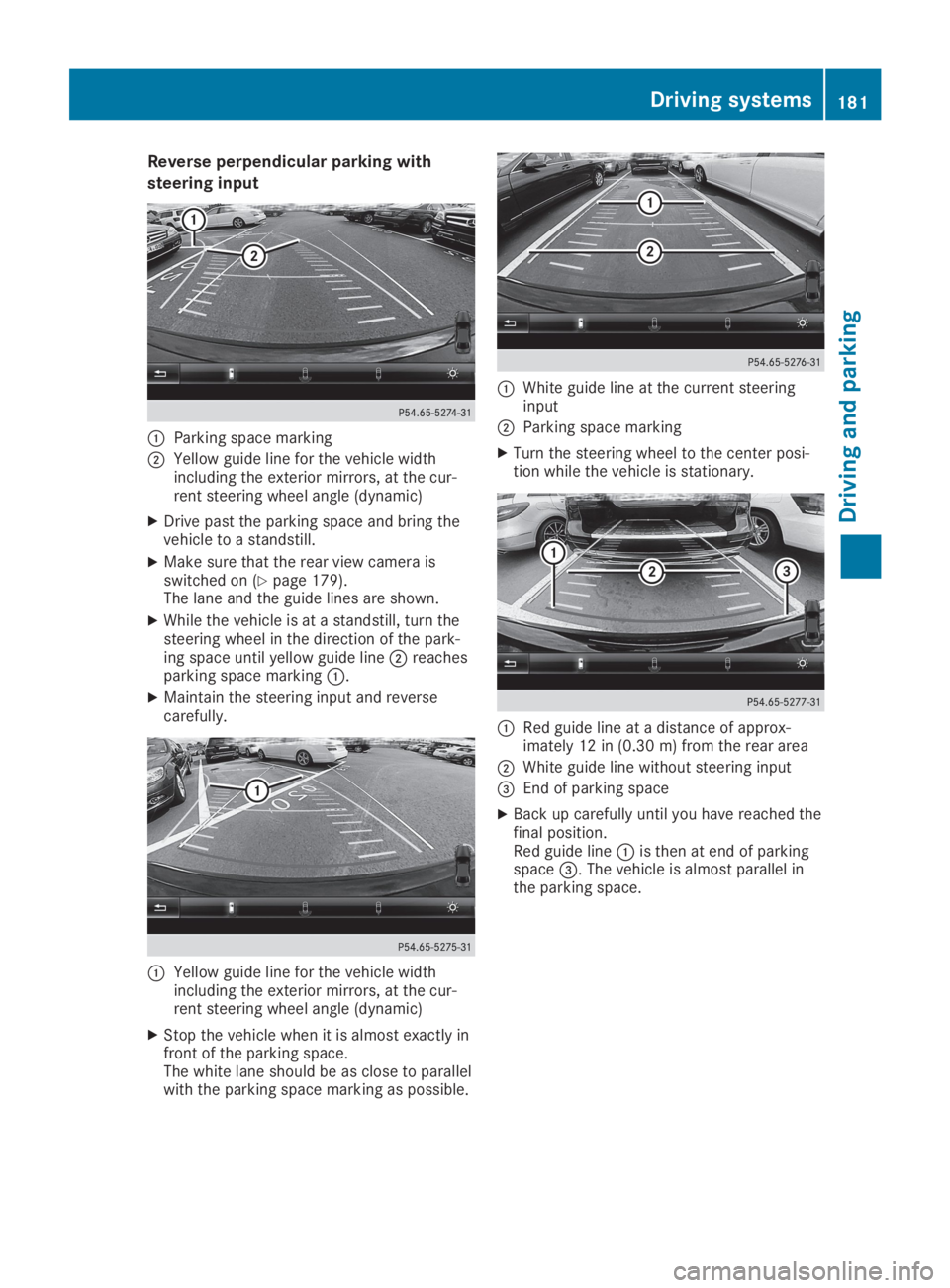
Reverse perpendicular parking with
steering input
CParking space marking
DYellow guide line for the vehicle widthincluding the exterior mirrors, at the cur-rent steering wheel angle (dynamic)
XDrive past the parking space and bring thevehicle to a standstill.
XMake sure that the rear view camera isswitched on (Ypage 179).The lane and the guide lines are shown.
XWhile the vehicle is at a standstill, turn thesteering wheel in the direction of the park-ing space until yellow guide lineDreachesparking space markingC.
XMaintain the steering input and reversecarefully.
CYellow guide line for the vehicle widthincluding the exterior mirrors, at the cur-rent steering wheel angle (dynamic)
XStop the vehicle when it is almost exactly infront of the parking space.The white lane should be as close to parallelwith the parking space marking as possible.
CWhite guide line at the current steeringinput
DParking space marking
XTurn the steering wheel to the center posi-tion while the vehicle is stationary.
CRed guide line at a distance of approx-imately 12 in (0.30m) fromthe rear area
DWhite guide line without steering input
Page 188 of 346
If the lanes are narrow, vehicles driving in thelane beyond the lane next to your vehicle maybe indicated, especially if the vehicles are notdriving in the middle of their lane. This may bethe case if the vehicles are driving on the innerside of their lane.
Due to the nature of the system:
Rwarnings may be issued in error when driv-ing close to crash barriers or similar solidlane borders.
Rwarnings may be interrupted when you aredriving alongside particularly long vehicles,such as trucks, for a prolonged time.
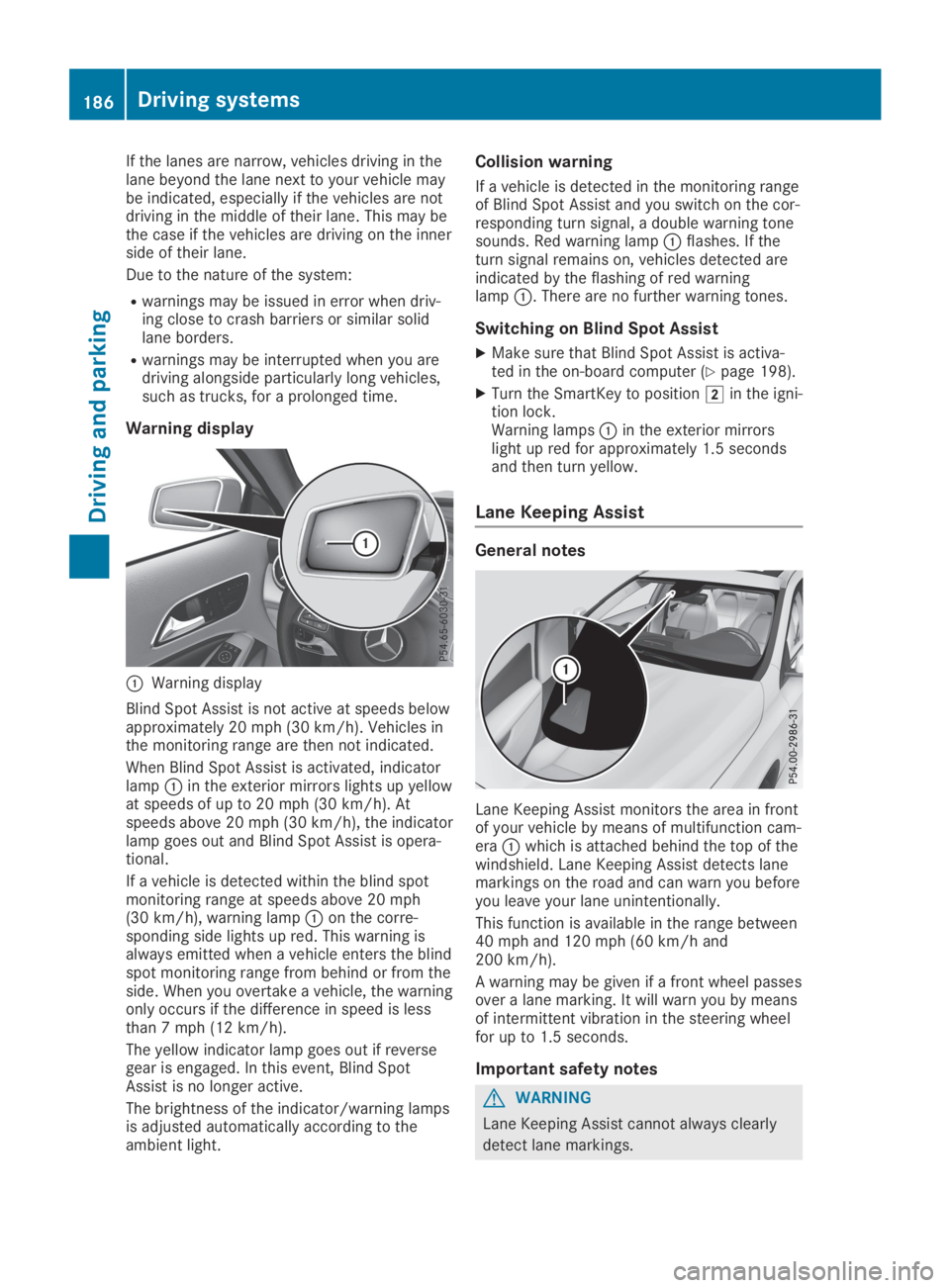
Warning display
CWarning display
Blind Spot Assist is not active at speeds belowapproximately 20 mph (30 km/h). Vehicles inthe monitoring range are then not indicated.
When Blind Spot Assist is activated, indicatorlampCin the exterior mirrors lights up yellowat speeds of up to 20 mph (30 km/h). Atspeeds above 20 mph (30 km/h), the indicatorlamp goes out and Blind Spot Assist is opera-tional.
If a vehicle is detected within the blind spotmonitoring range at speeds above 20 mph(30 km/h), warning lampCon the corre-sponding side lights up red. This warning isalways emitted when a vehicle enters the blindspot monitoring range from behind or from theside. When you overtake a vehicle, the warningonly occurs if the difference in speed is lessthan 7 mph (12 km/h).
The yellow indicator lamp goes out if reversegear is engaged. In this event, Blind SpotAssist is no longer active.
The brightness of the indicator/warning lampsis adjusted automatically according to theambient light.
Collision warning
If a vehicle is detected in the monitoring rangeof Blind Spot Assist and you switch on the cor-responding turn signal, a double warning tonesounds. Red warning lampCflashes. If theturn signal remains on, vehicles detected areindicated by the flashing of red warninglampC. There are no further warning tones.
Switching on Blind Spot Assist
XMake sure that Blind Spot Assist is activa-ted in the on-board computer (Ypage 198).
XTurn the SmartKey to positionHin the igni-tion lock.Warning lampsCin the exterior mirrorslight up red for approximately 1.5 secondsand then turn yellow.
Lane Keeping Assist
General notes
Lane Keeping Assist monitors the area in frontof your vehicle by means of multifunction cam-eraCwhich is attached behind the top of thewindshield. Lane Keeping Assist detects lanemarkings on the road and can warn you beforeyou leave your lane unintentionally.
This function is available in the range between40 mph and 120 mph (60 km/h and200 km/h).
A warning may be given if a front wheel passesover a lane marking. It will warn you by meansof intermittent vibration in the steering wheelfor up to 1.5 seconds.
Important safety notes
GWARNING
Lane Keeping Assist cannot always clearly
detect lane markings.
186Driving systems
Driving and parking
Page 194 of 346
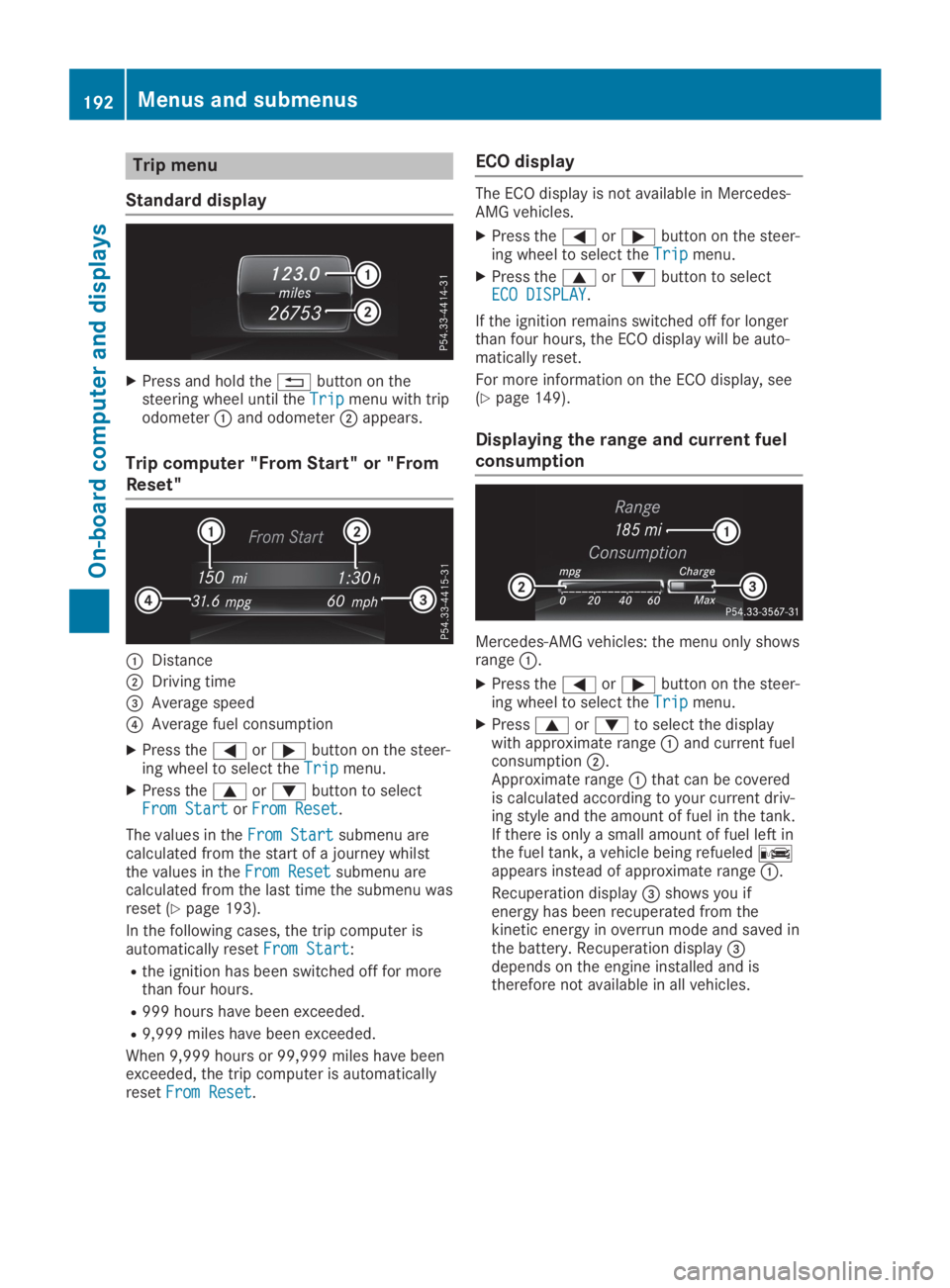
Trip menu
Standard display
XPress and hold the8button on thesteering wheel until theTripTripmenu with tripodometerCand odometerDappears.
Trip computer "From Start" or "From
Reset"
CDistance
DDriving time
Page 195 of 346
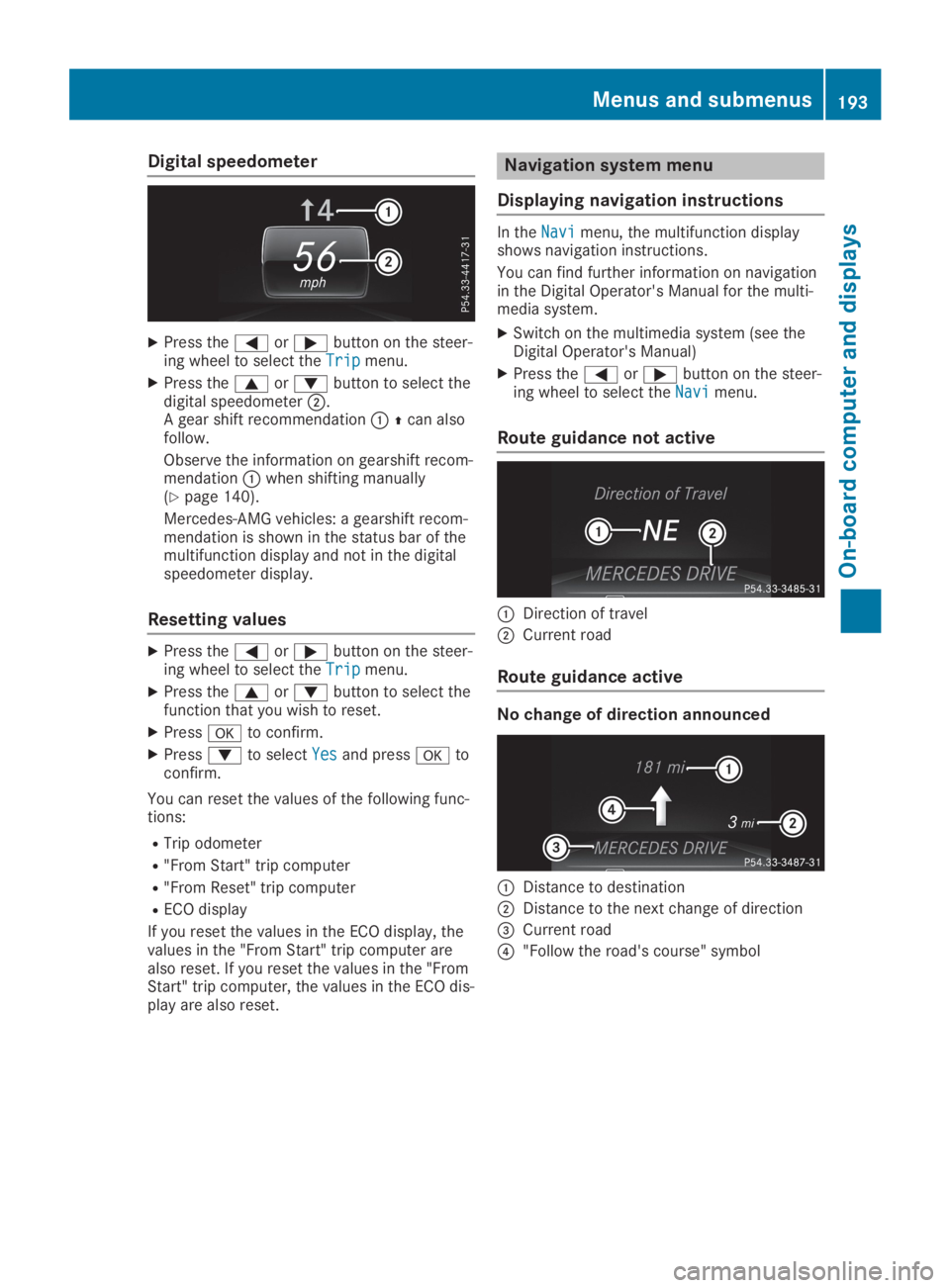
Digital speedometer
XPress theYorebutton on the steer-ing wheel to select theTripTripmenu.
XPress thecordbutton to select thedigital speedometerD.A gear shift recommendationC
Page 197 of 346
XSwitch on the multimedia system and selectradio (see the Digital Operator's Manual).
XPress theYorebutton on the steer-ing wheel to select theAudioAudiomenu.
XTo select a preset list or station list:press and briefly hold thecordbut-ton until the preset list or station list in thedesired frequency range is shown.
XTo select a station:briefly presscord.
iSIRIUS XM satellite radio functions like anormal radio.
You can find further information on opera-tion in the "Satellite radio" section of theDigital Operator's Manual for the multimediasystem.
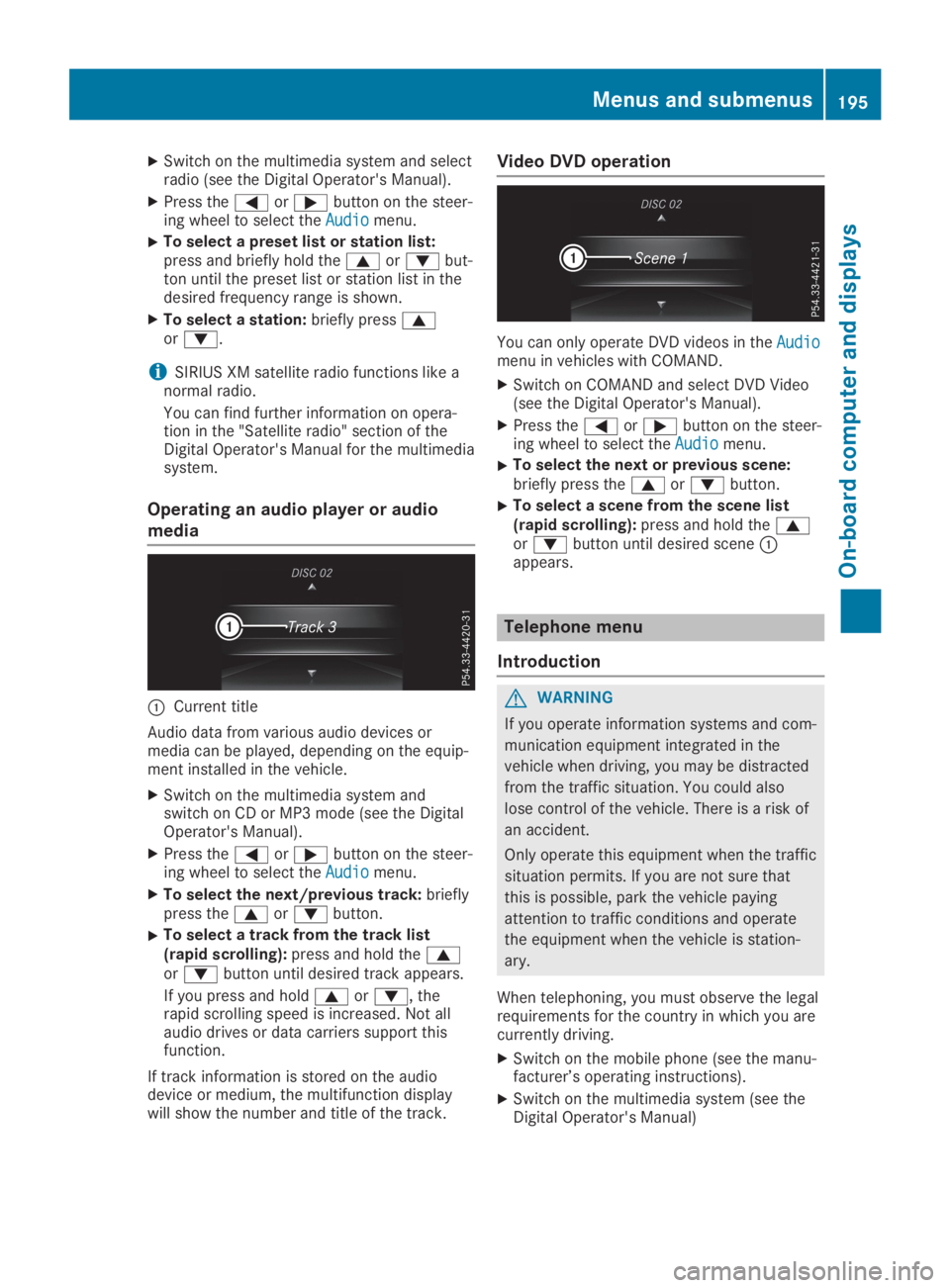
Operating an audio player or audio
media
CCurrent title
Audio data from various audio devices ormedia can be played, depending on the equip-ment installed in the vehicle.
XSwitch on the multimedia system andswitch on CD or MP3 mode (see the DigitalOperator's Manual).
XPress theYorebutton on the steer-ing wheel to select theAudioAudiomenu.
XTo select the next/previous track:brieflypress thecordbutton.
XTo select a track from the track list(rapid scrolling):press and hold thecordbutton until desired track appears.
If you press and holdcord, therapid scrolling speed is increased. Not allaudio drives or data carriers support thisfunction.
If track information is stored on the audiodevice or medium, the multifunction displaywill show the number and title of the track.
Video DVD operation
You can only operate DVD videos in theAudioAudiomenu in vehicles with COMAND.
XSwitch on COMAND and select DVD Video(see the Digital Operator's Manual).
XPress theYorebutton on the steer-ing wheel to select theAudioAudiomenu.
XTo select the next or previous scene:briefly press thecordbutton.
XTo select a scene from the scene list(rapid scrolling):press and hold thecordbutton until desired sceneCappears.
Telephone menu
Introduction
GWARNING
If you operate information systems and com-
munication equipment integrated in the
vehicle when driving, you may be distracted
from the traffic situation. You could also
lose control of the vehicle. There is a risk of
an accident.
Only operate this equipment when the traffic
situation permits. If you are not sure that
this is possible, park the vehicle paying
attention to traffic conditions and operate
the equipment when the vehicle is station-
ary.
When telephoning, you must observe the legalrequirements for the country in which you arecurrently driving.
XSwitch on the mobile phone (see the manu-facturer’s operating instructions).
XSwitch on the multimedia system (see theDigital Operator's Manual)
Menus and submenus195
On-board computer and displays
Z
Page 198 of 346
XEstablish a Bluetooth®connection to themultimedia system (see the Digital Opera-tor's Manual).
XPress theYorebutton on the steer-ing wheel to select theTelTelmenu.
You will see one of the following display mes-sages in the multifunction display:
RPhone READYPhone READYor the name of the networkprovider: the mobile phone has found a net-work and is ready to receive.
RPhone No ServicePhone No Service: there is no networkavailable or the mobile phone is searchingfor a network.
Accepting a call
If someone calls you when you are in theTelTelmenu, a display message appears in the multi-function display.
You can accept a call at any time, even if youare not in theTelTelmenu.
XPress theabutton on the steering wheelto accept an incoming call.
Rejecting or ending a call
You can end or reject a call anytime, even ifyou are not in theTelTelmenu.
XPress thevbutton on the steering wheelto reject or end a call.
Selecting an entry in the phone book
XPress theYorebutton on the steer-ing wheel to select theTelTelmenu.
XPress thec,dorvbutton toswitch to the phone book.
XAuthorize access to the phone book on thephone.
XPress thecordbutton to select thedesired name.
or
XTo begin rapid scrolling:press and holdthecordbutton for longer than onesecond.Rapid scrolling stops when you release thebutton or reach the end of the list.
XIf only one telephone number is storedfor a name:press theaorvbuttonto start dialing.
or
XIf there is more than one number for aparticular name:press theaorvbutton to display the numbers.
XPress thecordbutton to select thenumber you want to dial.
XPress theaorvbutton to start dial-ing.
or
XIf you do not want to make a call:pressthevor8button.
Redialing
The on-board computer saves the last namesor numbers dialed in the redial memory.
XPress theYorebutton on the steer-ing wheel to select theTelTelmenu.
XPress theabutton to switch to theredial memory.
XPress thecordbutton to select thedesired name or number.
XPress theaorvbutton to start dial-ing.
or
XIf you do not want to make the call:pressthevor8button.
Assistance menu
Introduction
Depending on the equipment installed in thevehicle, you have the following options in theDriveAssistDriveAssistmenu:
RDisplaying the assistance graphic(Ypage 197)
RDeactivating/activating ESP®(exceptMercedes‑AMG vehicles) (Ypage 197)
RActivating/deactivating Active Brake Assist(Ypage 197)
RActivating/deactivating ATTENTION ASSIST(Ypage 198)
RActivating/deactivating Blind Spot Assist(Ypage 198)
RActivating/deactivating Lane Keeping Assist(Ypage 198)
196Menus and submenus
On-board computer and displays
Page 199 of 346
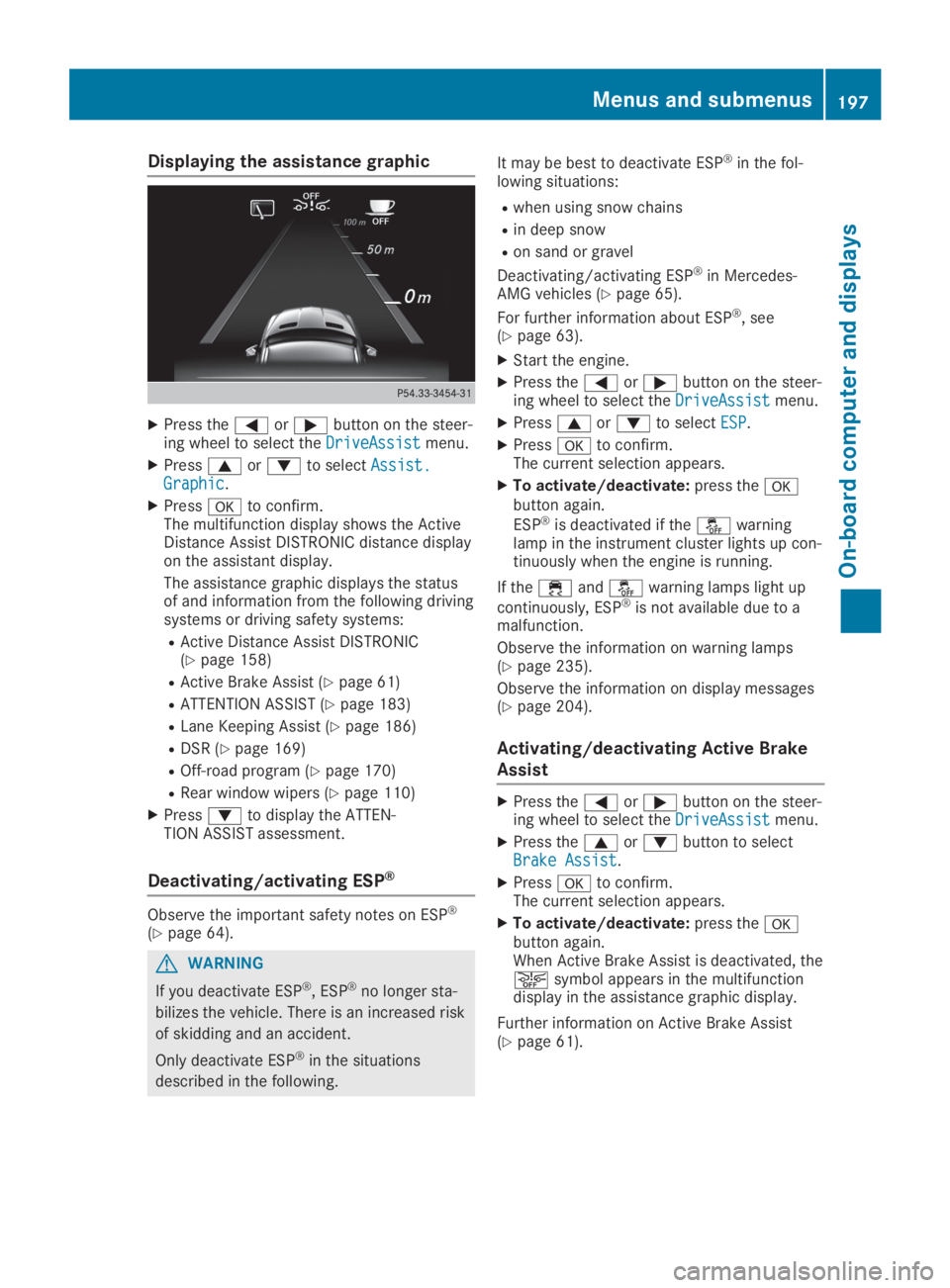
Displaying the assistance graphic
XPress theYorebutton on the steer-ing wheel to select theDriveAssistDriveAssistmenu.
XPresscordto selectAssist.Assist.GraphicGraphic.
XPressvto confirm.The multifunction display shows the ActiveDistance Assist DISTRONIC distance displayon the assistant display.
The assistance graphic displays the statusof and information from the following drivingsystems or driving safety systems:
RActive Distance Assist DISTRONIC(Ypage 158)
RActive Brake Assist (Ypage 61)
RATTENTION ASSIST (Ypage 183)
RLane Keeping Assist (Ypage 186)
RDSR (Ypage 169)
ROff-road program (Ypage 170)
RRear window wipers (Ypage 110)
XPressdto display the ATTEN-TION ASSIST assessment.
Deactivating/activating ESP®
Observe the important safety notes on ESP®
(Ypage 64).
GWARNING
If you deactivate ESP®, ESP®no longer sta-
bilizes the vehicle. There is an increased risk
of skidding and an accident.
Only deactivate ESP®in the situations
described in the following.
It may be best to deactivate ESP®in the fol-lowing situations:
Rwhen using snow chains
Rin deep snow
Ron sand or gravel
Deactivating/activating ESP®in Mercedes-AMG vehicles (Ypage 65).
For further information about ESP®, see(Ypage 63).
XStart the engine.
XPress theYorebutton on the steer-ing wheel to select theDriveAssistDriveAssistmenu.
XPresscordto selectESPESP.
XPressvto confirm.The current selection appears.
XTo activate/deactivate:press thevbutton again.
ESP®is deactivated if the