ESP MERCEDES-BENZ M-CLASS SUV 2011 Owner's Manual
[x] Cancel search | Manufacturer: MERCEDES-BENZ, Model Year: 2011, Model line: M-CLASS SUV, Model: MERCEDES-BENZ M-CLASS SUV 2011Pages: 389, PDF Size: 9.22 MB
Page 64 of 389
R
ABS ( Anti-lock BrakingSystem)
R BAS ( Brake Assist System)
R BAS PLU S(Brake Assist Sys tem Plus*)
R Adaptive brake lamps
R ESP ®
(Elec tronic Stability Program)
R EBD ( electronic brake force distribution)
R ADAP TIVE BRA KE
R PRE- SAFE ®
Brake
R STEER CONTROL Important safety notes
If yo ufail to adap tyou rd riving style, the driv-
ing safety systems ca nneither reduc ethe risk
of accident nor override the laws of physics.
Drivi ngsafety systems ar emerely aids
designed to assist driving. You are responsi-
ble for the distance to the vehicle in front ,for
vehicle speed and for brakin gingood time.
Always adapt your drivin gstyle to suit the
prevailing road and weather conditions, as
well as the traffic conditions and maintain a
safe distance from the vehicle in front .Drive
carefully.
i Please note that th edriving safetys ys-
tems described only work as effectively as
possibl ewhen ther eisadequate contact
between the tyres and the road surface.
Pay particula rattention to the information
regarding tyres, recommended minimum
tyre tread depth setc. in the "Wheels and
tyres" sectio n(Ypage 356).
In wintr ydriving conditions ,always use
winter tyres (M+S tyres) and if necessary,
snow chains. Only in this way will the driv-
ing safety systems described in this section
work as effec tivel yasp ossible. ABS (Anti-loc
kBrak ing System)
Impor tant safety notes i
Observ ethe "Importan tsafety notes" sec-
tion (Y page 61). ABS regulates brake pressure in such
away
that the wheels do not lock when you brake.
This allows you to continue steering the vehi-
cle when braking.
ABS works from aspeed of about 8km/h
upwards, regardless of road-surfac econdi-
tions. AB Sworksons lippery surfaces, even
when you only brake gently. G
WARNING
If ABS is faulty, the wheels could lock when
braking. This limits the steerability of the vehi-
cle when brakin gand the braking distance
may increase.
If ABS is deactivated due to amalfunction,
then BAS and ESP are also deactivated. There
is an increased risk of your vehicle skidding in
certain situations.
You shoul dalways adapt your drivin gstyle to
suit the prevailing road and weather condi-
tions.
Braking If ABS intervenes whe
nbraking, yo uwill feel
ap ulsing in the brake pedal.
X If ABS intervenes: continue to depressthe
brake pedal with force until the brakin gsit-
uation is over.
X To mak eafull brake application:
depress th ebrake peda lwith full force.
The pulsating brake pedal can be an indica-
tion of hazardous road conditions and func-
tions as areminder to take extr acare while
driving. G
WARNING
Do not depress the brake pedal several times
in quick succession (pumping). Pumping the
brake pedal reduces the braking effect .You
might otherwise not be able to stop the vehi-
cle in tim eand could cause an accident.
Depres sthe brake pedal firmly and smoothly. Driving safety systems
61Safety Z
Page 66 of 389
The radar sensor system must be switched off
using the on-boar
dcomputer in the vicinit yof
radio telescop efacilities in the following vehi-
cles:
R vehicles without COMAND Online and nav-
igation
R vehicles without Audio 20 and Becker ®
MAP PILOT
R vehicles for Australia
Information about switching off the rad ar sen-
so rs ystem using the on-board computer can
be found in the "On-board computer and dis-
plays “section (Y page 249).
For BAS PLUS to assist you when driving, the
rada rsensor system must be switched on and
operational; see "Radar sensor system "inthe
index. G
WARNING
BA SP LUS cannot alway sclearly identify
objects and complex traf fics ituations. BAS
PLU Scannot interven einthese cases.
There is arisk of an accident. Always pay
careful attention to the traf fics ituation and be
ready to brake.
In particular, the detection of obstacles can
be impaired if ther eis:
R dir tont he sensor soranything els ecover-
ing the sensors
R snow or heav yrain
R interference by other radar sources
R the possibility of strong radar reflections,
for example in multi-storey car parks
R an arrow vehicle travellin ginfront, e.g .a
motorbike
R av ehicle travellin ginfront on adifferent
line G
WAR
NING
BAS PLUS doe snot react:
R to people or animals
R to oncomin gvehicles
R to crossin gtraffic
R when cornering As
aresult, BAS PLU Smay not interven ein
critical situatio ns.T here is arisk of an acci-
dent .Always pay careful attention to the traf-
fic situation and be ready to brake.
Followin gdamage to the front end of the vehi-
cle, have the configuration and operation of
the radar sensors checked at aqualified spe-
cialist workshop. This also applie stocolli-
sion sats low speeds where ther eisnovisible
damage to the fron tofthe vehi cle.
If BA SPLUS is no tavailable du etoam alfunc-
tion in the rada rsensor system ,the brake
system remain savailable wit hfull brake
boostin geffect and BAS. Adaptiv
ebrak elamps
i Adapti vebrak elamps are only available in
certain countries.
If you brake sharply from aspeed of more
than 50 km/ horifb raking is assisted by BAS
or BAS PLUS, th ebrake lamp sflas hrapidly.
In this way, traffic travelling behind you is
warned in an even more noticeable manner.
If you brake sharply from aspee dofm ore
than 70 km/h to astandsti ll,t he hazard warn-
ing lam psare activated automatically .Ifthe
brakes ar eapplied again, the brak elamps
light up continuously .The hazard warning
lamps switc hoff automatically if you travel
faster than 10 km/h .You can also switc hoff
th eh azard warning lamps using the hazard
warning switch button (Y page 109). ESP
®
(Electronic Stability Program)
Important safety notes i
See the "Importan tsafety notes" section
(Y page 61).
If ESP ®
detect sthat the vehicle is deviating
from the direction desired by the driver ,one
or more wheels are braked to stabilis ethe
vehicle. If necessary, the engin eoutput is also
modified to keep the vehicle on the desired Driving safety systems
63Safety Z
Page 67 of 389
course withi
nphysical limits. ESP ®
assists
the driver when pulling away on wet or slip-
pery roads. ESP ®
can als ostabilise the vehi-
cle durin gbraking.
If ESP ®
intervenes, the ÷ESP®
warning
lamp flashe sinthe instrumen tcluster. G
WAR
NING
If the ÷ warnin glamp in the instrument
cluster flashes, proceed as follows:
R do not deactivat eESP®
under any circum-
stances.
R only depress the accelerator pedal as far as
necessar ywhen pulling away.
R adapt your drivin gstyle to suit the prevail-
ing road and weather conditions.
Otherwise, the vehicle could go into askid.
ESP ®
cannot reduce the risk of an accident if
you drive too fast. ESP ®
cannot override the
laws of physics.
! Only operate the vehicl efor am aximum
of ten seconds on abrake dynamometer.
Switch off th eignition.
Application of the brakes by ESP ®
ma yoth-
erwise destroy the brake system.
! Function or performanc etest sm ay only
be performed on a2-axle dynamometer. If
you wis htooperatethe vehicle on such a
dynamometer, please consult aMercedes-
Benz Servic eCentr ebeforehand. You could
otherwise damage the driv etrain or the
brake system.
i Only us ewheels with the recommended
tyr es izes. Only then will ESP ®
func tion
properly.
4ETS (Electronic Traction System) i
Observ ethe "Importan tsafety notes" sec-
tion (Y page 61).
Traction control is part of ESP ®
.
Traction control brakes the drive wheels indi-
viduall yifthey spin. This enables you to pull
away and accelerate on slipper ysurfaces, for example if the road surface is slippery on one
side .Ina ddition, mor edrive torqu eistrans-
ferre dtot he wheel or wheels with traction.
Traction con trol remains active if you deacti-
vate ESP ®
.
X In appropriate drivin gsituations, activate
the off- road program (Y page 222). G
WARNING
Traction control cannot reduce the risk of an
accident if you drive too fast. Traction control
cannot override the laws of physics.
Off-road 4ETS (Electronic Traction Sys-
tem)
A4 ETS syste mspecifically suited to off -road
ter rain is activated automatically onc ethe off-
roa ddrive progra m(Ypage 22 2)is activated.
Deactivating/activating ESP ® i
Observe the "Important safety notes" sec-
tion (Y page 61).
ESP ®
is activate dautomaticall ywhen the
engin eisstarted.
i Vehicle swith ECO start/stop func tion:
the ECO start/stop func tion switches the
engin eoff automatically when th evehicle
comes to astop. The engine starts auto-
matically when the driver wants to pull
away again. ESP ®
remains in its previously
selected status .Example: if ESP ®
was
deactivated before the engine was
switched off, ESP ®
remains deactivated
whe nthe engin eisswitched on again.
It may be best to deactivate ESP ®
in the fol-
lowing situations:
R when using snow chains
R in deep snow
R on sand or gravel G
WARNING
Activate ESP ®
as soon as the situations
described above no longer apply .ESP ®
will
oth erwise not be able to stabilise the vehicle 64
Drivin
gsafety systemsSafety
Page 68 of 389
if the vehicle starts to skid or
awheel starts
to spin.
When you deactivate ESP ®
:
R ESP ®
no longer improves drivin gstabili ty.
R the engine's torque is no longer limited and
the drive wheels can spin. The spinning of
the wheels results in acuttin gaction, which
provides bet terg rip.
R tractio ncontrol is still activated.
R ESP ®
still provides suppor twhen you
bra ke.
If ESP ®
is deactivate dand one or more wheels
start to spin, the ÷ESP®
warning lamp in
the instrument cluster flashes. In such situa-
tions, ESP ®
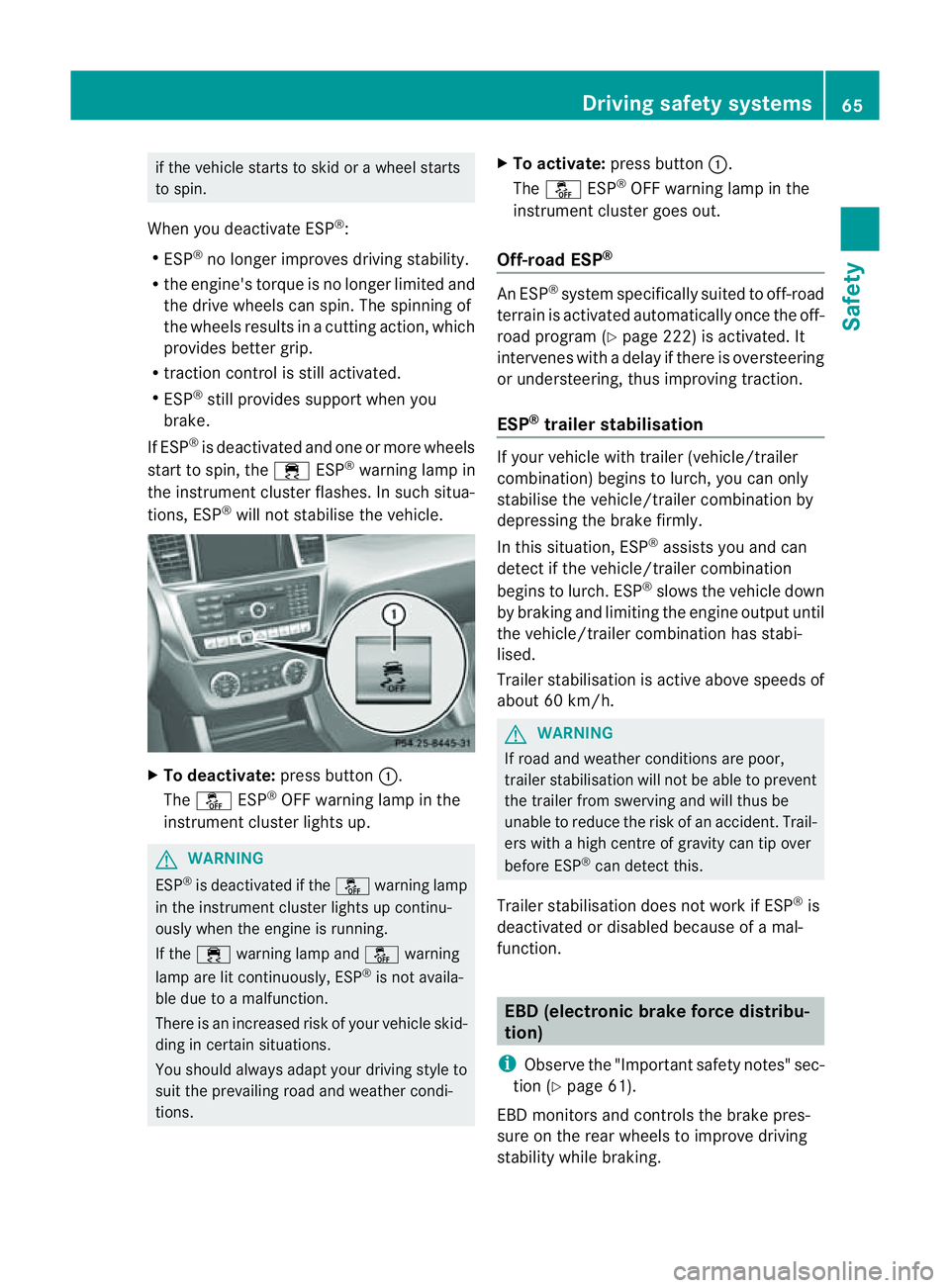
will not stabilis ethe vehicle. X
To deactivate: press button:.
The å ESP®
OFF warnin glamp in the
instrument cluster lights up. G
WARNING
ESP ®
is deactivated if the åwarning lamp
in the instrument cluster lights up continu-
ously when the engine is running.
If the ÷ warning lamp and åwarning
lamp are lit continuously, ESP ®
is not availa-
ble due to amalfunction.
There is an increased risk of your vehicle skid-
ding in certain situations.
You shoul dalway sadapt your driving style to
suit the prevailing road and weather condi-
tions. X
To activate: press button :.
The å ESP®
OFF warning lamp in the
instrumen tcluster goes out.
Off- road ESP® An ESP
®
system specifically suited to off-road
terrain is activated automatically once the off-
road program (Y page 222)isa ctivated. It
intervene swithadelay if there is oversteering
or understeering, thus improvin gtraction.
ESP ®
traile rstabilisation If your vehicle with trailer (vehicle/trailer
combination) begins to lurch, you can only
stabilis ethe vehicle/ trailer combination by
depressing the brake firmly.
In this situation, ESP ®
assists you and can
detect if the vehicle/trailer combination
begins to lurch. ESP ®
slows the vehicle down
by brakin gand limiting the engine output until
the vehicle/traile rcombination has stabi-
lised.
Trailer stabilisation is active abov espeeds of
about 60 km/h. G
WARNING
If road and weather condi tions are poor,
trailer stabilisation will not be able to prevent
the trailer from swerving and will thus be
unable to reduce the risk of an accident .Trail-
ers wit hahigh centr eofgravity can tip over
before ESP ®
can detec tthis.
Trailer stabilisation does not work if ESP ®
is
deactivated or disable dbecause of amal-
function. EBD (electronic brake force distribu-
tion)
i Observe the "Important safety notes" sec-
tion (Y page61).
EBD monitors and control sthe brake pres-
sur eonthe rea rwheels to improv edriving
stab ility while braking. Driving safety systems
65Safety Z
Page 70 of 389
obstacles, for example stopped or parked
vehicles.
If you approach an obstacle and PRE-
SAFE®
Brake detects arisk of acollision ,the system
will initiall yalert you both visually and acous-
tically. If you do not brake or take evasive
action, the system will warn you by automat-
ically brakin gthe vehicle gently. If ther eisan
increased risk of collision, preventative
passenger protection measures (PRE-SAFE ®
)
are activated (Y page 45). If the risk of colli-
sion remains and you do not brake, take eva-
sive action or accelerate significan tly, the
vehicle may perform automatic emergency
braking. Automatic emergency braking is not
performed until immediately prior to an acci-
dent that can no longe rbea voided. G
WARNING
Even if PRE-SAFE ®
Brake slow sthe vehicle
befor eani mminent rear-en dcollision ,the
system can nota vert acollision withou tthe
intervention of the driver .There is arisk of an
accident .Brake according to th esituation or
take evasive action. Delayed intervention by
the driver can lead to an accident. G
WARNING
PRE-SAFE ®
Brak ecannot alway sclearly iden-
tify object sand comple xtraffic conditions.
In thes ecases, PRE-SAFE ®
Brake may:
R give an unnecessary warning and then
brake the vehicle
R not give awarning or intervene
There is arisk of an accident .Always pay par-
ticular attention to the traffic situation and be
ready to brake, especially if PRE-SAFE ®
Brake
warns you. Terminat ethe interv entionina
non-critical drivin gsituation.
In particular, the detec tion of obstacles can
be impaired if there is:
R dir tont he sensors or any thing else cover-
ing the sensors
R snow or heavy rain
R interference by other radar sources R
the possibility of strong radar reflections,
for example in multi-storey car parks
R an arrow vehicle travellin ginfront,e.g. a
motorbike
R av ehicle travellin ginfront on adifferent
line G
WAR
NING
PRE-SAFE ®
Brak edoes not react:
R to people or animals
R to oncomin gvehicles
R to cr ossin gtraffic
R when cornering
As aresult ,PRE-SAFE ®
Brak emay not give
warnings or intervene in critical situations.
There is arisk of an accident .Always pay
careful attention to the traffic situation and be
ready to brake.
In order to maintain the appropriate distan ce
to the vehicle in front and thus prevent acol-
lision ,you must apply the bra kesy ourself.
X To activate/deac tivate: activate or deac-
tivate PRE -SAFE®
Brak eint he on-board
compute r(Ypage 24 5).
The Ä symbol appear sinthe multifunc-
tion displa yaslong as the HOL Dfunction
is not activated (Y page 187).
On vehicles with Active Parking Assist ,the
Ä symbolisd isplayed when Pis
engaged or you are driving faste rthan
35 km/h.
The radar sensor system is switched off auto-
matically in the vicinit yofradio telescope
facilities in the following vehicles:
R vehicles with COMAND Online and naviga-
tion
R vehicles with Audio 20 and Becker ®
MAP
PILOT
Becker ®
MAP PILOT must be connected;
see the separate Audio 20 operating
instructions. Driving safety systems
67Safety Z
Page 71 of 389
The radar sensor system must be switched off
using the on-boar dcomputer in the vicinit yof
radio telescop efacilities in the following vehi-
cles:
R vehicles without COMAND Online and nav-
igation
R vehicles without Audio 20 and Becker ®
MAP PILOT
R vehicles for Australia
Information about switching off the rad ar sen-
so rs ystem using the on-board computer can
be found in the "On-board computer and dis-
plays “section (Y page 249).
For PRE- SAFE®
Brake to assist you whe ndriv-
ing ,the radar sensor system must be
switc hed on (Y page 249) an dbeopera-
tional.
Followin gdamage to the fron tend of the vehi-
cle ,havet he configuration and operation of
the radar sensors checked at aqualified spe-
cialist workshop. This also applie stoc olli-
sions at slow speeds where ther eisnovisible
damage to the fron tofthe vehicle. STEE
RCONTROL
The steering assistan tSTEE RCONTROL helps
you by transmittin ganoticeable steering
force to the steering wheel in the direction
required for vehicle stabilisation.
This steering assistance is provided in partic-
ular if:
R both right wheels or both left wheels ar eon
aw et or slippery road surface when you
brake
R the vehicle starts to skid
You have control over the steerin gatall
times. G
WARNING
If there is an ESP ®
malfunction, you will not
receiv eany steering assistance from the
STEER CONTROL. The steering continues to
function with steering assistance. Anti-theft systems
Immobiliser
The immobilise rprevents your vehicl efrom
being starte dwithout the correct key.
X To activate with the key: removethe key
from the ignition lock.
X To activate wit hKEYLESS-GO: switch the
ignition off and open the driver' sdoor.
X To deactivate: switchont he ignition.
i The immobiliser is always deactivated
when you star tthe engine. ATA (Anti-Thef
tAlarm system)
Av isual and audible alarm is triggered if the
alarm system is prime dand you ope n:
R ad oor
R the vehicle with the emergency key ele-
ment
R the tailgate
R the bonnet
The alar misnot switched off ,even if you
close th eopen door that has triggere dit, for
example. X
To prime: lock the vehicle with the key or
KEYLESS-GO.
Indicator lamp :flashes. The alarm sys-
tem is primed after approximately 15 sec-
onds.
X To deactivate: unlock the vehicle with the
key or KEYL ESS-GO.68
Anti-thef
tsystemsSafety
Page 77 of 389
Emergency key element
General notes If th
evehicle can no longer be unlocked with
th ek ey, us ethe emergency ke yelement.
If you use th eemergency key element to
unlock and open the dri ver'sd oor ,the anti-
theft alar msystem will be triggered
(Y page 68).
The reare several ways to tur noff th ealarm:
X To turn the alarm off with the key: press
the % or& buttonont he key.
or
X Insert the key int othe ignition lock.
or
X To deactivat ethe alarm with KEYLESS-
GO: press th eStart/Stop button in the igni-
tion lock. The key must be in the vehicle.
or
X Lock or unlock the vehicle using KEYLESS-
GO. The key must be outside the vehicle.
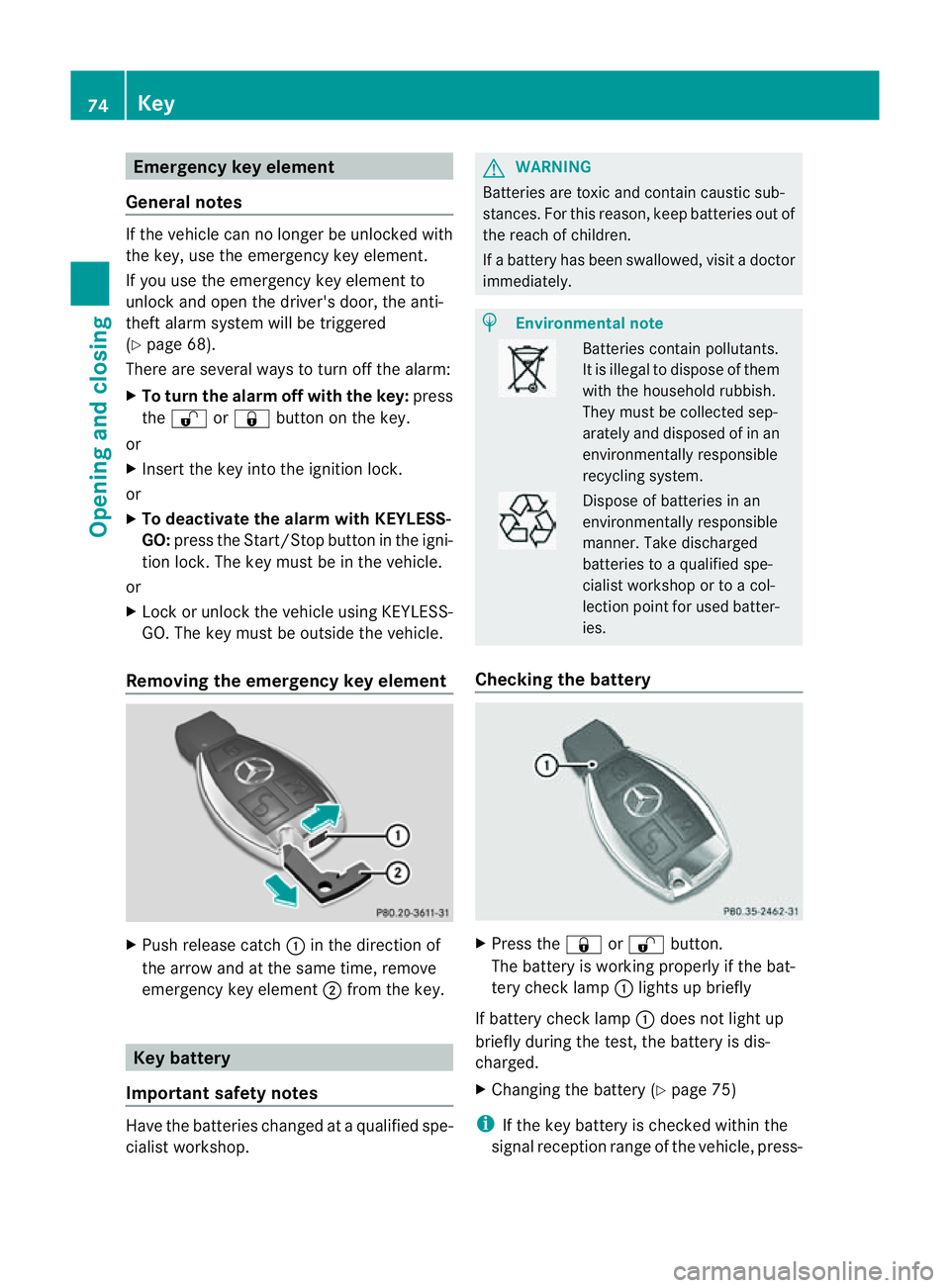
Removing the emergency key element X
Pus hrelease catch :in the direction of
the arrow and at the same time, remove
emergency key element ;from the key. Key battery
Important safety notes Hav
ethe batteries changed at aqualified spe-
cialist workshop. G
WARNING
Batteries are toxic and contain caustic sub-
stances. For this reason, keep batteries out of
the reach of children.
If ab attery has been swallowed ,visi tad octor
immediately. H
Environmental note Bat
terie sc ontain pollutants.
It is illegal to dispose of them
with the household rubbish.
They must be collec teds ep-
arately and disposed of in an
environmentally responsible
recycli ngsystem. Dispose of batt
eries in an
envi ronmentally responsible
manner. Take discharged
batteries to aqualified spe-
cialist workshop or to acol-
lection point for used batt er-
ie s.
Checking th ebattery X
Press the &or% button.
Th eb attery is workin gproperl yifthe bat-
ter yc hec klamp :lights up briefly
If battery chec klamp :does not light up
briefly during the test, the batter yisdis-
charged.
X Changing the battery (Y page 75)
i If the key battery is checked within the
signal reception range of the vehicle, press- 74
KeyOpening and closing
Page 87 of 389
=
Rear right
? Rear left
The switches for all side windows are located
on the driver's door. There is also aswitch on
eac hdoorfor the corresponding side window.
The switches on the driver's door tak eprec-
edence.
i Thes ide windows cannot be operated
from the rear when the override featur efor
the side window sisactivate d(Ypage 60).
X Turn the key to position 1or 2in the ignition
lock.
X To open: press the corresponding switch.
X To close: pull the corresponding switch.
i If you press the switch beyond the point
of resistan ce,ana utomatic opening /clos-
ing process is started in the corresponding
direction .You can stop automatic opera-
tion by pressin gagain.
i You can con tinue to operate the sid ewin-
dows after switching off the engine or
removing the key. This func tion remains
active for fiv eminutes or until the driver's
or front-passenger door is opened. Convenience opening feature
You can ventilate the vehicle before you start
driving. To do this, the key is used to carr yout
the following functions simultaneously:
R unlock the vehicle
R open the side windows
R open the sliding sunroof or the panorama
sliding sunroof and the roller sunblinds
R switch on the seat ventilation for the driv-
er's seat
i The convenience opening feature can
only be operated using the key. The key
must be close to the driver' sdoor handle. X
Point the tip of the key at the driver's door
handle.
X Press and hold the %button until the
side window sand the sliding sunroo forthe
panorama slidin gsunroof are in the desired
position.
If the roller sunblinds of the panorama sliding
sunroof are closed ,the roller sunblinds are
opened first.
X Press and hold the %button again until
the panorama slidin gsunroof is in the
desired position.
X To interrupt convenience opening:
release the %button. Convenience closin
gfeature
General notes When you lock the vehicle, you can simulta-
neously:
R
close the side windows
R close the sliding sunroof or the panorama
sliding sunroof
On vehicles with apanorama sliding sunroof,
you can then close the roller sunblinds. G
WARNING
When using the convenienc eclosing feature,
make sure that nobody can become trapped.
Proceed as follows if there is arisk of entrap-
ment:
With the key:
R release the &button.
R press and hold the %button until the
side windows and the sliding sunroof or the
panoram asliding sunroof open again.
With KEYL ESS-GO:
R release the senso rsurface on the door han-
dle.
R pull the door handle immediately and hold
it.
The side windows and the sliding sunroof
or the panorama sliding sunroof open. 84
Side windowsOpenin
gand closing
Page 88 of 389
Using th
ekey i
The key must be close to the driver 'sdoor
handle.
X Point the tip of the key at the driver' sdoor
handle.
X Press and hold the &button until the
side window sand the sliding sunroof or the
panorama sliding sunroof are fully closed.
X Make sure that all the side windows and the
sliding sunroof or panorama sliding sunroof
are closed.
On vehicles with apanorama sliding sunroof:
X Press and hold the &button again until
the roller sunblinds of the panorama sliding
sunroof close.
X To interrupt convenienc eclosing:
release the &button.
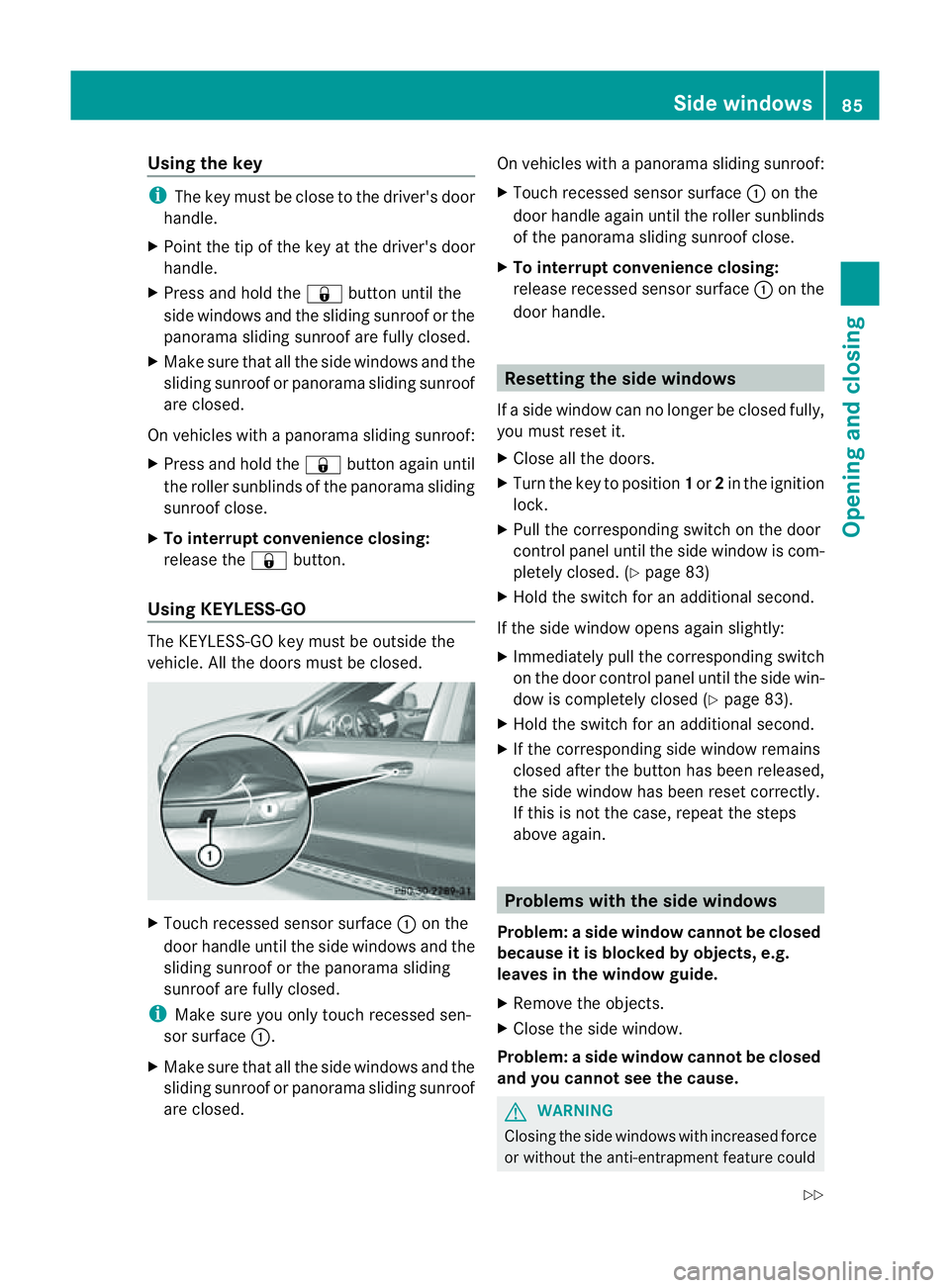
Using KEYLESS-GO The KEYL
ESS-GOkey must be outside the
vehicle .All the doors must be closed. X
Touch recessed sensor surface :on the
door handle until the side windows and the
sliding sunroof or the panoram asliding
sunroof are fully closed.
i Make sure you only touch recessed sen-
sor surface :.
X Make sure that all the side windows and the
sliding sunroof or panoram asliding sunroof
are closed. On vehicles with
apanorama sliding sunroof:
X Touch recessed senso rsurface :on the
door handle again until the roller sunblinds
of the panorama sliding sunroof close.
X To interrupt convenienc eclosing:
release recessed sensor surface :on the
door handle. Resetting the side windows
If as ide window can no longer be closed fully,
you must reset it.
X Close all the doors.
X Turn the key to position 1or 2in the ignition
lock.
X Pull the corresponding switch on the door
control panel until the side window is com-
pletely closed. (Y page 83)
X Hold the switch for an additional second.
If the side window opens again slightly:
X Immediately pull the corresponding switch
on the door control panel until the side win-
dow is completely closed (Y page 83).
X Hold the switch for an additional second.
X If the corresponding side window remains
closed after the button has been released,
the side window has been reset correctly.
If this is not the case, repeat the steps
above again. Problems with the side windows
Problem: aside window cannot be closed
because it is blocked by objects, e.g.
leaves in th ewindow guide.
X Remov ethe objects.
X Close the side window.
Problem :aside window cannot be closed
and you cannot see th ecause. G
WARNING
Closing the side windows wit hincrease dforce
or withou tthe anti-entrapmen tfeature could Side windows
85Openingand closing
Z
Page 89 of 389
lead to serious or even fatal injury. Make sure
that nobody can becom etrapped when clos-
ing the side windows.
If as ide window is obstructed during closing
and reopen sagain slightly:
X Im me diately after the window blocks, pull
the correspondin gswitc hagain until the
side window has closed.
The side window is close dwith increased
force.
If as ide window is obstructed again during
closing and reopen sagain slightly:
X Im me diately after the window blocks, pull
the correspondin gswitc hagain until the
side window has closed.
The side window is close dwithout the anti-
entrapmen tfeature. Sliding sunroof
Important safet
ynotes
Your vehicle may be fitted with asliding sun-
roof or apanorama sliding sunroof. In the fol-
lowing section, the ter m"slidin gsunroof"
refers to both types of sliding sunroof. G
WARNING
Make sure that nobody can become trapped
when opening and closing the sliding sunroof.
If there is arisk of entrapment ,release the
switch immediately. Durin gautomatic opera-
tion ,push the switc hbriefly in any direction
to stop the sliding sunroof. G
WARNING
Th eg lass in th epanoram asunroof could
brea kinana ccident. If yo uare not wearin ga
seat belt ,there is arisk that you could be
thrown through the opening in the event of the
vehicle overturning. Therefore, always wear a
seat belt to reduce the risk of injuries. G
WARNING
Children could injur ethemselves if they oper-
ate the slidin gsunroof.
Never leave children unsupervised in the vehi-
cle. Always take the key with you when leaving
the vehicle, even if you are only leaving it for
as hort time.
! Only open the panoram asliding sunroof
if it is free of snow and ice. Otherwise, mal-
func tions ma yoccur.
Do not allo wanything to protrude from the
sliding sunroof. Otherwise, the seals could
be damaged.
i Resonance noises can occur in addition
to the usual airflow noises whe nthe sliding
sunroof is open. They ar ecaused by minor
pressure fluctuations in the vehicle interior.
Change the position of the sliding sunroof
or open aside window slightly to reduce or
eliminat ethese noises. Operating th
esliding sunroof
Opening and closing i
You can continue to operate the sliding
sunroof after switching off the engine or
removing the key. This function remains
activ efor fiv eminutes or until the driver's
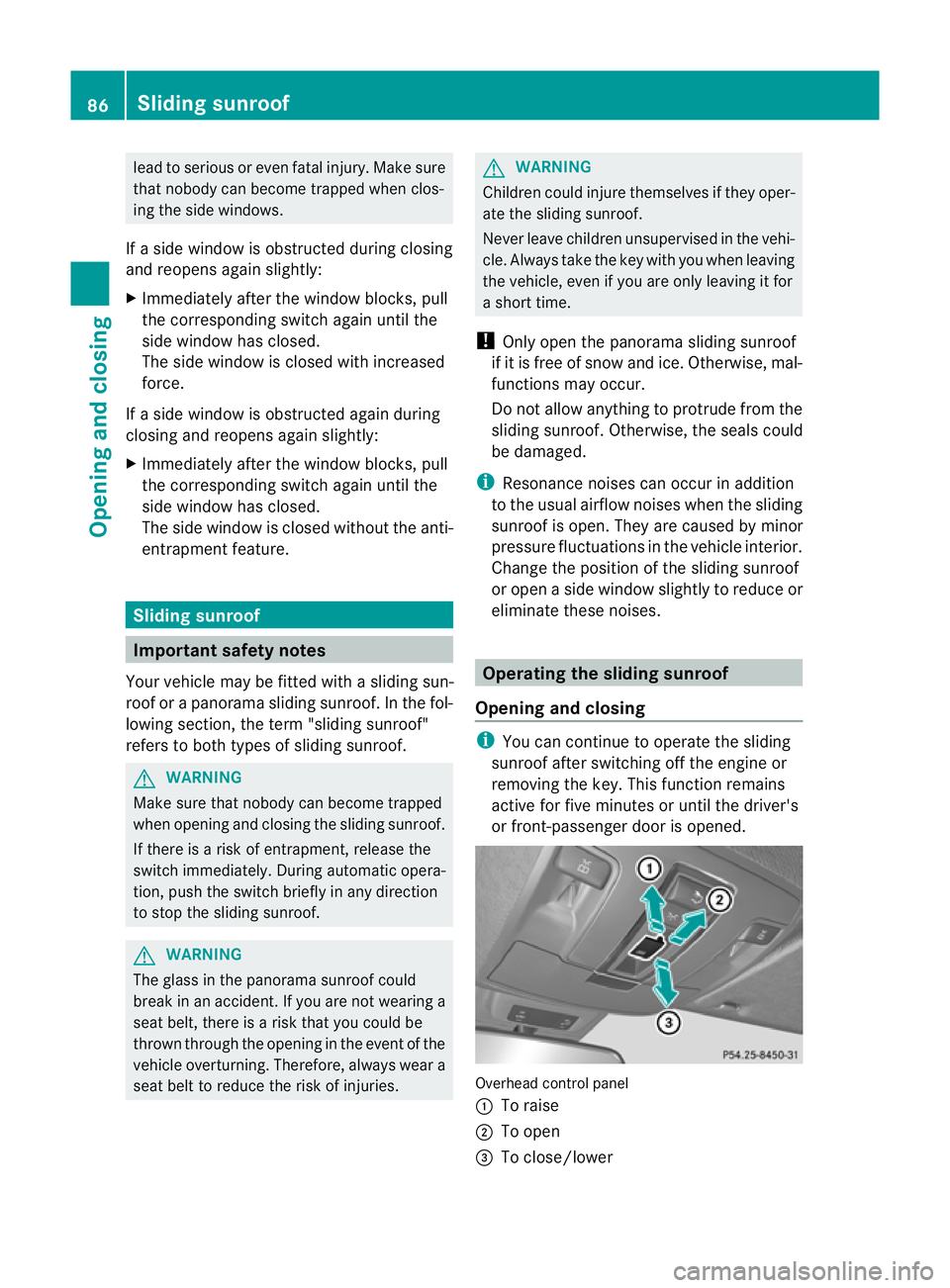
or front-passenger door is opened. Overhead control panel
:
To raise
; To open
= To close/lower 86
Slidin
gsunroofOpenin gand closing