ESP MERCEDES-BENZ M-CLASS SUV 2011 Workshop Manual
[x] Cancel search | Manufacturer: MERCEDES-BENZ, Model Year: 2011, Model line: M-CLASS SUV, Model: MERCEDES-BENZ M-CLASS SUV 2011Pages: 389, PDF Size: 9.22 MB
Page 167 of 389
fitted to you
rvehicle which have been
approved for Mercedes-Benz vehicles or
which cor respond to an equivalen tquality
standard. Brak epads/linings which have not
been approved for Mercedes -Ben zvehicles or
which are not of an equivalent qualit ycould
affect your vehicle' soperatin gsafety. Tyr
etrac tion G
WARNING
Whereas the vehicle can be fully controlle dat
ac ertain speed on dry roads, you must reduce
your speed on wet or icy roads to achiev ethe
sam eroad safety. You coul dotherwise cause
an accident.
Pay particular attention to the road conditions
at temperatures around freezing point.
If ice has formed on the road surface (e.g.
from fog), athin fil mofw ater rapidly forms on
the ice when you brake, considerably reduc-
ing tyre traction. Driv ewith particular care in
such weather conditions. Driving on wet roads
Aqua planing If water ha
saccumulate dtoacertain depth
on the road surface, ther eisadanger of aqua-
planing occurring, even if:
R you are driving at low speeds.
R the tyres have adequate tread depth.
For this reason, do not drive in tyre ruts, and
brake carefully.
Driving on flooded roads If you have to drive on stretches of road on
which water has collected, please bear in
mind that:
R the maximum permissible still water depth
depends on the vehicle equipment.
R you should drive no faster than at walking
pace. !
Bear in mind that vehicles travellin gin
front or in th eopposite direc tion create
waves. This ma ycause the maximum per-
missible water depth to be exceeded.
Thes enotes must be observed under all
cir cums tances. You could othe rwise dam-
age the engine, the electronics or the trans-
mission.
Off- road fording Th
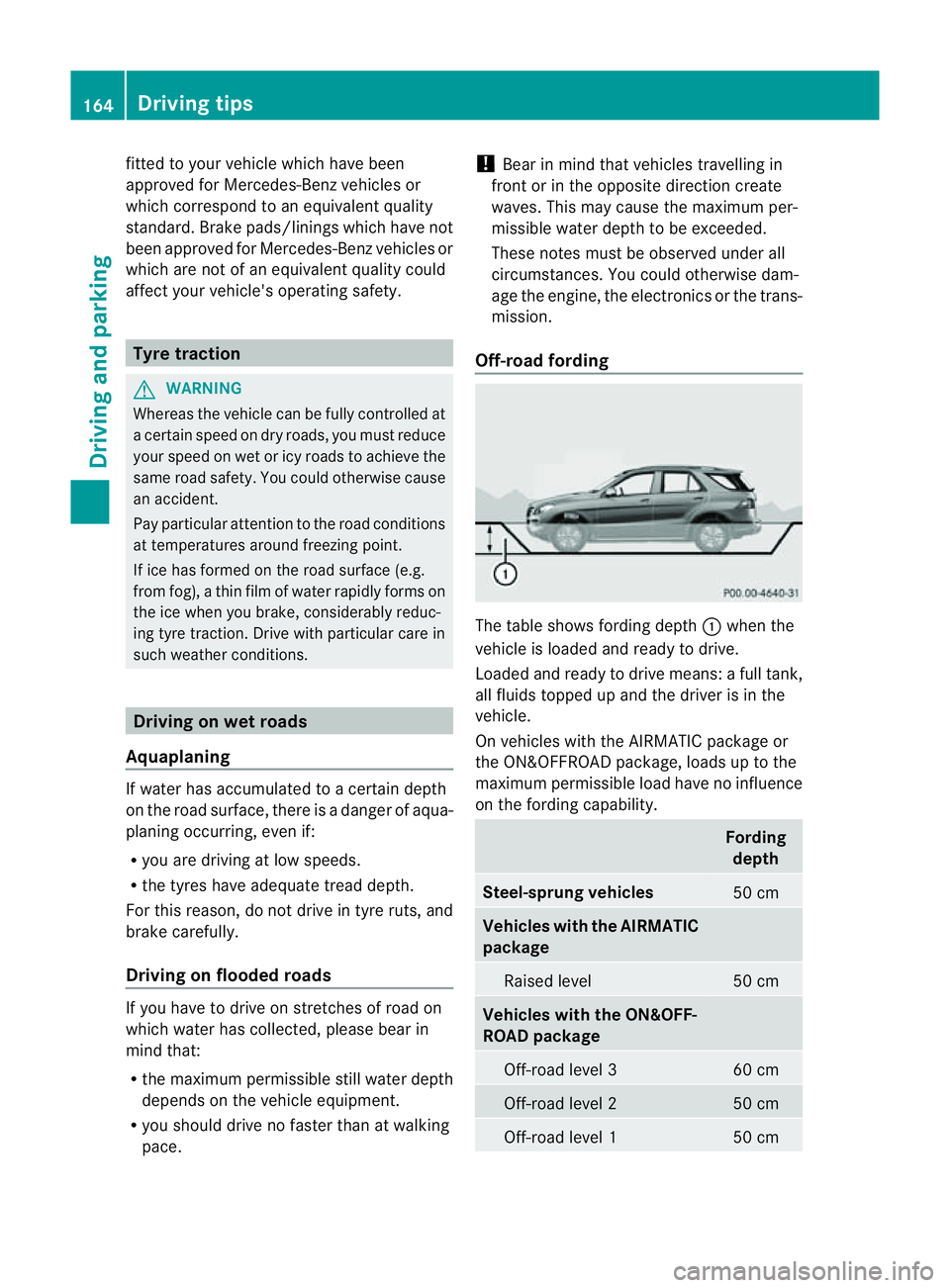
et able shows fordin gdepth :when the
vehicle is loaded and ready to drive.
Loaded and ready to driv emeans: afull tank,
all fluids topped up and the driver is in the
vehicle.
On vehicles with the AIRMATIC package or
the ON&OFFROAD package, loads up to the
maximum permissible load have no influence
on the fordin gcapability. Fording
depth Steel-sprung vehicles
50 cm
Vehicles with the AIRMATIC
pack
age Raised level 50 cm
Vehicles with the ON&OFF-
ROAD package
Off-road level 3 60 cm
Off-road level 2 50 cm
Off-road level 1 50 cm164
Driving tipsDrivin
gand parking
Page 168 of 389
!
The depth of water must not exceed the
value specified in the table. Not ethat the
possible fording depth is less in flowing
water.
R Establish how deep the water is and the
characteristic softhe body of water before
fording.
R Select the highest possible vehicle level.
R Restrict the shift range to 1or 2.
R Avoid high engin espeeds.
R Enter and exit the water at aflat place and
at as teady walking pace.
! Under no circumstances should you
accelerate before entering the water. The
bow wave could cause water to enter and
damage the engine and neighbouring
assemblies.
R Drive slowl yand at aconstant speed
through the water.
R Do not stop.
! Do not open any of the vehicle' sdoors
while fording. Otherwise, wate rcould get
int ot he vehicle interior and damage the
vehicle' selectronics and interior equip-
ment.
R Water offer sahigh degree of resistance,
and the ground is slippery and in some
cases unstable. Therefore, it is difficult and
dangerous to pull away in the water.
R Ensure that abow wav edoes not for mas
you drive.
R Clea nany mud from the tyre tread after
fording.
R Appl ythe brakes to dry them after fording. Winter driving
Genera lnotes G
WARNING
If the vehicle becomes trapped in snow,
ensure that snow is kept away from the
exhaust pipe and from around the vehicle as long as the engine is running. Otherwise, poi-
sonous carbon monoxide (CO) may enter the
vehicle, resulting in loss of consciousness and
even death.
To assure sufficient fresh air ventilation, open
aw indow slightly on the side of the vehicle
not facin gthe wind.
At the onset of winter, have your vehicle win-
terproofed at aqualified special istworkshop,
e.g. at aMercedes-Ben zService Centre.
Vehicles with the ON&OFFROAD package: if
driving in snow or with snow chains, select
the snow program (Y page 219) with the off-
road program selector wheel in the centre
console.
Driving with summer tyres Observ
ethe notes in the "Winter operation"
section (Y page 357).
Slippery roa dsurfaces G
WARNING
Do not shift down for additiona lengine brak-
ing on aslippery road surface. This could
cause the drive wheels to lose their grip and
the vehicle could skid.
You should drive particularly carefully on slip-
pery road surfaces. Avoid sudden accelera-
tion, steering and braking manoeuvres.
If the vehicle threatens to skid or cannot be
stopped when moving at low speed:
X Shift the transmission to position N.
X Try to bring the vehicle under control by
using corrective steering.
i For more information on drivin gwith
snow chains, see (Y page 358). Drivin
gtips
165Driving and park ing Z
Page 169 of 389
Off-road driving
Important safet ynotes G
WARNING
Driv eslowly in rough terrain with which you
are unfamiliar. This will allow you to detect
unexpected obstacles more easily and, there-
fore, to reduce the risk of an accident.
Do not make U-turns on mountain roads. Oth-
erwise, the vehicle could tip over. If aslope is
too steep for the vehicle, drive back in reverse
gear.
Do not drive at an angle up steep inclines.
Otherwise, the vehicle could tip over. If you
drive up asteep incline at an angle and the
vehicle threatens to overturn, stee rinto the
line of fall immediately.
Never allo wthe vehicle to roll backwards. The
brakin geffect of the engine canno tbeu tilised
in neutral. If you only use the service brake,
you could los econtrol of the vehicle. G
WARNING
Grains of sand, particles of dirt and other
abrasiv ematerials can enter the brake sys-
tem. This can lead to excessive wear and
unpredictable braking efficiency.
After the brakes have been expose dtodirty
conditions ,have them checked and cleaned
at aq ualified specialist workshop ,e.g. a
Mercedes-Benz Service Cent re.O therwise,
there is arisk that braking power may be
insufficient in the event of an emergency, or
that the braking effec tmay be unpredictable. G
WARNING
Damage to the vehicle creates the risk of an
accident for yourself and other road users. If
in doubt, have your vehicle chec kedataq uali-
fied specialist workshop which has the nec-
essary specialist knowledg eand tool stocarry
out the work required. Mercedes-Benz rec-
ommends that you use aMercedes-Benz
Servic eCentr efor this purpose. General notes Read this section befor
edriving your vehicle
off- road. Practise by travelling over more gen-
tle off-road terrain first.
The following driving systems are specially
adapted to off-road driving:
R Off-road program (vehicles without the
ON&OFFROAD package) (Y page 222)
R Off-road program 1and 2(vehicles wit hthe
ON&OFFROAD package) (Y page 222)
R LOW RANGE off-road gear (vehicles with
the ON&OFFROAD package)
(Y page 223)
R Differential lock (vehicles wit hthe
ON&OFFROAD package) (Y page 223)
R Off-road AB S(Ypage 61)
R Off-road 4ETS (Y page 64)
R Off-road ESP ®
(Y page 65)
R AIRMATI Cpackag e(veh icle level)
(Y pag e188)
R DSR (Downh illS peed Regulation)
(Y page 220)
Observe the following notes:
R stop your vehicle and, if necessary, select
the off-road program (Y page 222)orthe
LOW RANGE off -road gear (Y page 223)
befor edriving off-road.
R select avehicle level suitable for the off-
road ter rain. Make sure ther eisalways suf-
ficien tground clearance to prevent dam-
ag etot he vehicle.
R chec kthat item sofluggage and loads are
stowe dsafely and are well secured
(Y page 300).
R always keep the engine running and in gear
when driving on adownhil lgradient. Acti-
vate DSR (Y page 220).
R drive slowly and evenly ,ifnecessar yata
walking pace.
R ensure that the wheels are in contact with
the ground at all times.
R drive with extreme care on unknown off-
road routes where visibility is poor. For 166
Driving tipsDriving and parking
Page 170 of 389
safety reasons, get out of the vehicle first
and survey the off-road route.
R chec kthe depth of water before fording
river sand streams.
R loo kout for obstacle ssuch as rocks, holes,
tree stumps and furrows.
R take care when turning on an uphil lor
downhill slope and when turning at sharp
angles. The vehicle could otherwise tip
over.
R always keep the side windows and the pan-
oram asliding sunroof closed during the
journey.
R do not stray from marked routes or paths.
i Information abou tretrofitting special all-
ter rain tyres is available from any
Mercedes-Benz Service Centre. H
Environmental note
Protection of the environmen tisofprimary
importance .Trea tnature with respect.
Observe all prohibiting signs.
Checklist before drivin goff-road X
Engine oi llevel: checkthe engin eoil and
top it up if necessary.
When drivin gonsteep gradients, the oil
level must be sufficiently hig htoensure a
correct oil supply in the vehicle.
X AdBlue ®
tank (BlueTEC vehicl es):check
the fluid leve land, if necessary, refill to the
maximum (13 l) (Y page157).
X Tyre-chang etool kit: check that the jack
is working and make sure you have the
wheelbrace, arobust tow cabl eand afold-
ing spade in the vehicle.
X Wheels and tyres: checkthe tyr etread
depth and tyre pressure.
X Check for damag eand remove any foreign
objects, e.g. small stones, from the
wheels/tyres.
X Repl acea ny missing valve caps. X
Repl aced ented or damaged wheels.
X Wheels: dented or bent wheels can lead to
al oss of tyr epressure and damag etot he
tyr eb ead. Before driving off-road, check
the wheels and replace them if necessary.
Checklist after driving off-road !
If you detect damage to the vehicle after
driving off-road, have the vehicle checked
immediately at aqualified specialist work-
shop.
Driving over rough terrain places greater
demands on your vehicle than driving on nor-
mal roads. After driving off-road, check the
vehicle. This allow syou to detec tdamage
promptly and reduce the risk of an accident
to yourself and other road users.
X Vehicles with the ON&OFFROAD pack-
age: activate the on-road program
(Y page 222).
X Vehicles without the ON&OFFROAD
package: deactivate the on-road program
(Y page 222).
X Deactivate the LOW RANGE off-road gear
(Y page 223).
X Deactivate DSR (Y page 220).
X Lower the vehicle level again to alevel suit-
able to the road conditions, e.g. to the high-
way/high-speed level.
X Clean the headlamps and rear lights and
check for damage.
X Clean the front and rear licence plates.
X Clean the wheels/tyres with awater jet and
remove any foreign objects.
X Clea nthe wheels, wheel arches and the
vehicle underside with awater jet; check
for any foreign objects and damage.
X Check whethe rtwigs or other parts of
plants have become trapped. These
increase the risk of fire and can damage
fuel pipes, brake hose sorthe rubber bel-
lows of the axl ejoint sand propeller shafts.
X After the trip, examine without fail the
entire undercarriage, wheels ,tyres, brakes, Driving tips
167Drivingand park ing Z
Page 172 of 389
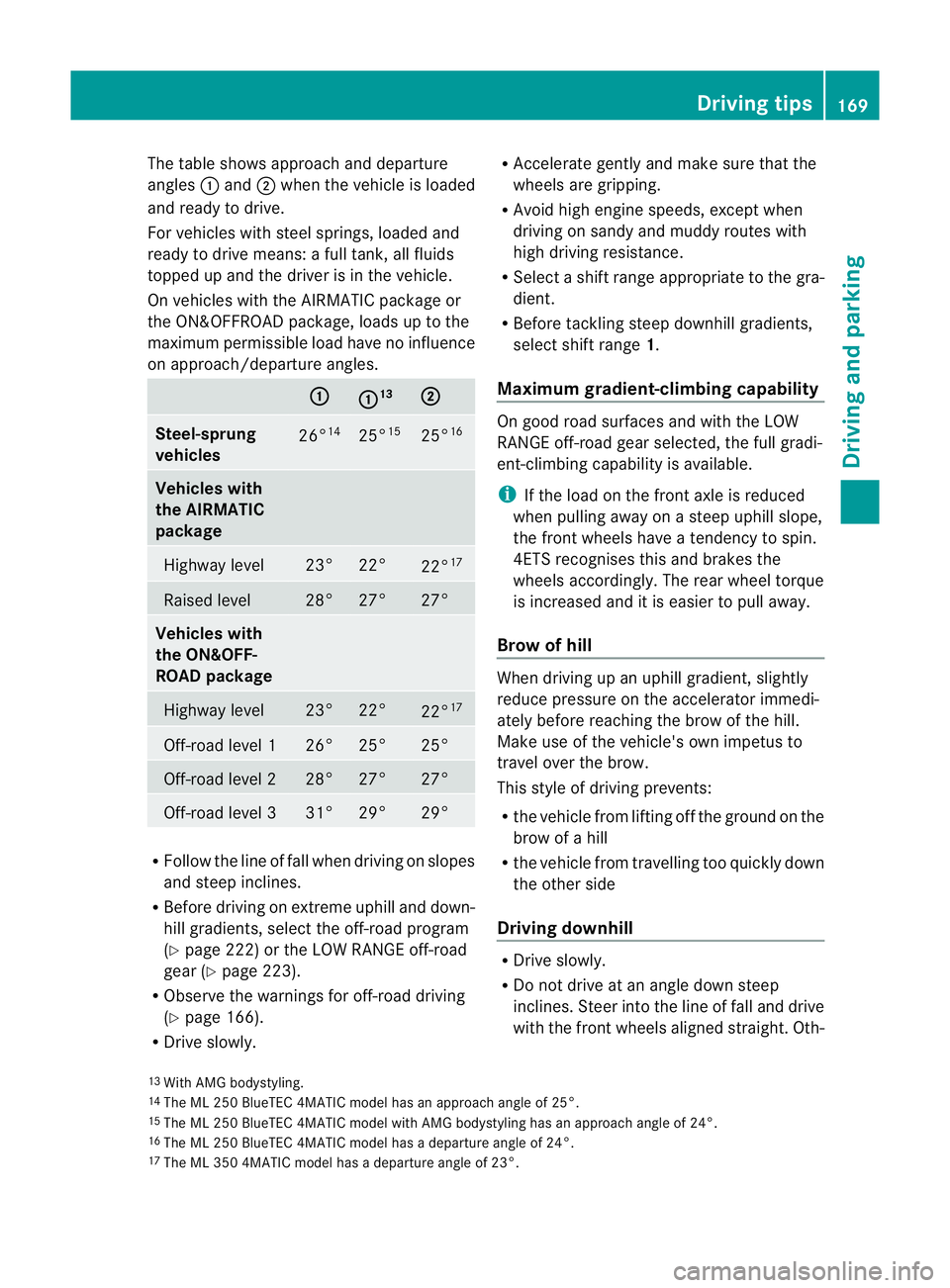
The table shows approach and departure
angles :and ;when the vehicle is loaded
and ready to drive.
For vehicles with steel springs, loaded and
ready to driv emeans: afull tank, all fluids
topped up and the driver is in the vehicle.
On vehicles with the AIRMATI Cpackag eor
the ON&OFFROAD package, load suptothe
maximu mpermissible load have no influence
on approach/departur eangles. :
: 13
;
Steel-sp
rung
vehicles 26
°14 25
°15 25
°16 Vehicles with
th
eA IRMATIC
package Highway level
23° 22°
22°
17 Raised level
28° 27° 27°
Vehicles with
th
eO N&O FF-
ROA Dpackage Highway level
23° 22°
22°
17 Off-roa
dleve l1 26° 25° 25°
Off-road level 2
28° 27° 27°
Off-road level 3
31° 29° 29°
R
Follo wthe lineoff all when driving on slopes
and steep inclines.
R Before driving on extreme uphill and down-
hill gradients ,select th eoff-roa dprogram
(Y page 222) or the LOW RANGE off-road
gear (Y page 223).
R Observ ethe warnings fo roff-roa ddriving
(Y page 166).
R Drive slowly. R
Accelerat egentl yand mak esure that the
wheels are gripping.
R Avoid high engin espeeds, excep twhen
drivin gons andy and muddy routes with
high driving resistance.
R Select ashift range appropriate to the gra-
dient.
R Before tacklin gsteep downhill gradients,
select shift range 1.
Maximum gradient-climbin gcapability On good road surfaces and wit
hthe LOW
RANGE off-road gear selected, the full gradi-
ent -climbing capability is available.
i If the load on the front axle is reduced
when pulling away on asteep uphill slope,
the front wheels have atendency to spin.
4ETS recognises this and brakes the
wheels accordingly. The rear wheel torque
is increased and it is easier to pull away.
Brow of hill When driving up an uphill gradient, slightly
reduc epressure on th eaccelerator immedi-
atel ybefor ereachin gthe brow of the hill.
Make use of the vehicle' sown impetus to
travel over the brow.
This style of driving prevents:
R the vehicle from lifting off the ground on the
brow of ahill
R the vehicle from travelling too quickly down
the other side
Driving downhill R
Driv eslowly.
R Do not drive at an angle down steep
inclines. Steer into the line of fall and drive
with the front wheels aligned straight. Oth-
13
14
15
16
17 Drivin
gtips
169Driving and park ing Z
The ML 25
0BlueTEC 4MATIC model has an approach angle of 25°.
The ML 250 BlueTEC 4MATIC model with AMG bodystyling has an approach angle of 24°.
The ML 250 BlueTEC 4MATIC model has adeparture angle of 24°.
With AMG bodystyling.
The ML 35 04MATI Cmodel has adeparture angle of 23°.
Page 173 of 389
erwise, the vehicle could slip sideways, tip
and over turn.
R Before tackling steep downhill gradients,
select shift range 1.
R Activat eDSR. If this is not suffici ent, brake
gently. Whe ndoing so, make sure that the
vehicle is facing in the direction of the line
of fall.
R Check that the brakes ar eworking normally
after along downhil lstretch.
i Off-road ABS is activated when the off-
road program or LOW RANGE off-road gear
is selected.
At speeds belo w30km/h, th efront wheels
lock cyclicall yduring braking. The digging-
in effect achieved in the process reduces
the stopping distance when driving off-
road. The steerability of the vehicle is con-
siderably reduced if the wheel slock. Driving systems
Cruise control
Important safety notes G
WARNING
Do not change down for additiona lengine
braking on aslippery road surface. This could
cause the drive wheels to lose their grip and
the vehicle could skid. G
WARNING
Cruise control cannot take account of road
and traffic conditions.
Always pay attention to traffic conditions
even when cruise control is activated.
Cruise control is only an aid designed to assist
driving. You are responsible for the vehicle's
speed and for braking in good time. G
WARNING
Do not use cruise control
R in traffic conditions that do not allow you to
drive at aconstant speed (e.g. heavy traffic or winding roads). You may otherwise
cause an accident.
R on slipper yroads. The driv ewheels may
lose their grip when brakin goraccelerating
and the vehicle may skid.
R whe nthere is low visibility, e.g. due to fog,
heav yrain or snow.
General notes Cruise control maintains
aconstant road
speed for you. It brakes automatically in order
to avoid exceeding the set speed. On long and
steep downhil lgradients ,especially if the
vehicle is laden or towing atrailer, yo umust
select shift range 1,2or 3in good time. By
doing so, you will make use of the braking
effect of the engine. This relieves the load on
the brake system and prevent sthe brakes
from overheating and wearing too quickly.
Use cruise con trol only if roa dand traffic con-
ditions make it appropriate to maintain a
steady speed for aprolonged period. Yo ucan
store any road spee dabove 30 km/h.
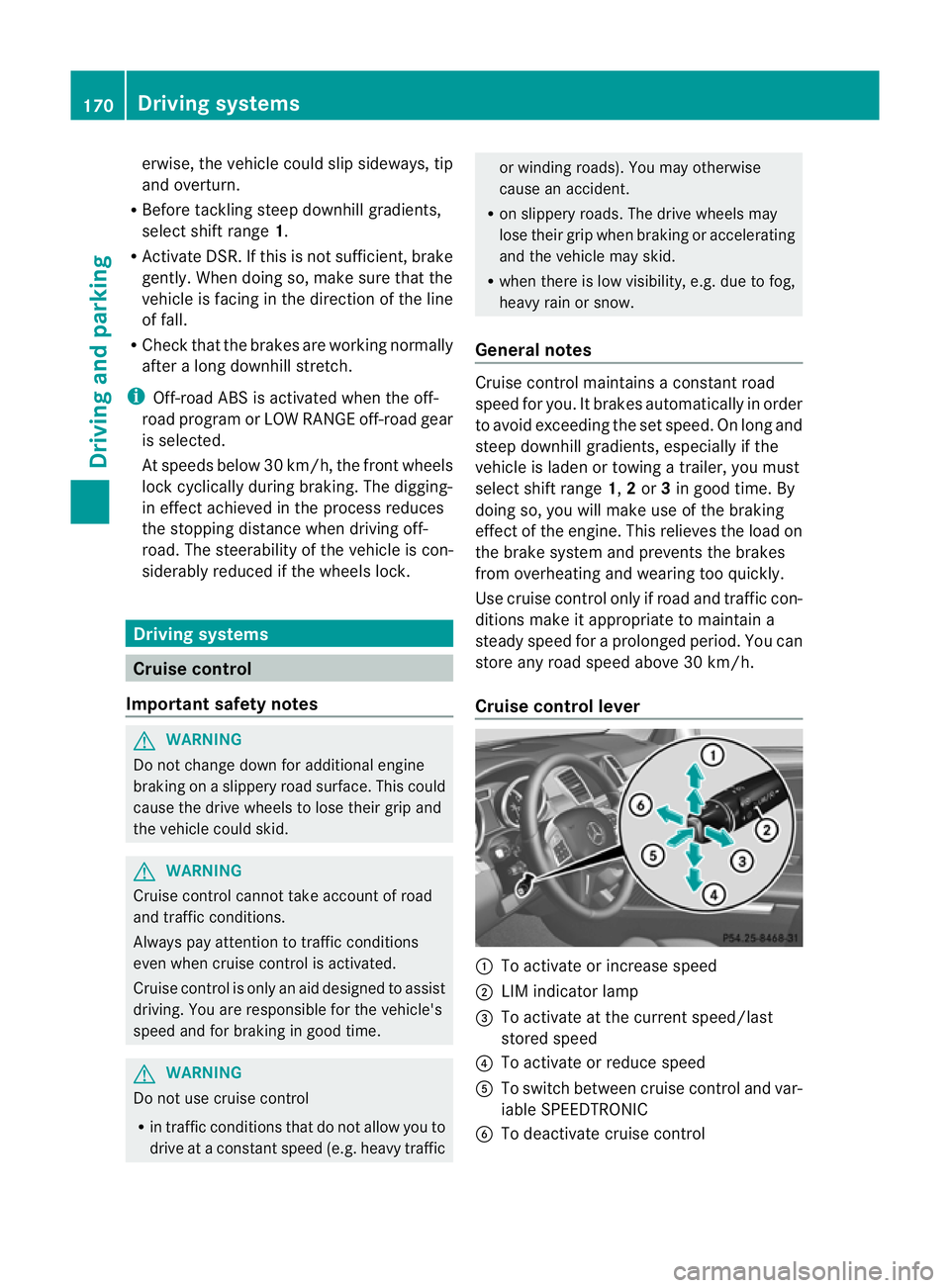
Cruise contro llever :
To activate or increase speed
; LIMi ndicato rlamp
= To activate at the current speed/last
stored speed
? To activate or reduce speed
A To switch between cruise control and var-
iable SPEEDTRONIC
B To deactivate cruise control 170
Driving systemsDriving and parking
Page 174 of 389
You can operat
ecruise control and variable
SPEEDTRONIC with th ecruise control lever.
X To switc hbetween variable SPEED-
TRONIC and cruise control: press the
cruis econtrol leve rinthe direction of arrow
A.
LI Mi ndicator lamp ;on the cruise control
lever indicates which function you have selec-
ted:
R LIM indic ator lamp ; off:
cruis econtrol
is selected.
R LIM indic ator lamp ; on:
variable
SPEEDTRONIC is selected.
When you activate cruis econtrol, the stored
speed is shown in the multifunction display
for fiv eseconds .Inthe multifunction display,
the segments between the stored speed and
the maximum speed light up.
Activation conditions To activate cruise con
trol, all of the following
activation condition smust be fulfilled:
R your vehicle must not be secured by the
electric parking brake.
R you must be driving faster than 30 km/h.
R ESP ®
must be switched on, but not inter-
vening.
R the transmission must be in position D.
R DSR must be deactivated.
R Off-road program 2must be deactivated
(vehicles with the ON&OFFROAD package).
R the cruise control function must be selec-
ted (Y page 170).
Activating cruise control You can accept the current spee
difyou are
drivin gfaster than 30 km/h. X
Accelerate the vehicle to the desired
speed.
X Briefly press the cruise control lever
up : or down ?.
X Remove your foot from the accelerator
pedal.
Cruise control is activated. The vehicle
automatically maintains the stored speed.
i Cruise control may be unable to maintain
the stored spee donuphill gradients. The
stored speed is resumed when the gradient
evens out. Cruise control maintain sthe
stored speed on downhill gradient sby
automatically applying the brakes.
Activating at the current speed/last
stored speed G
WARNING
Only call up astored speed if you know what
that speed is and if it is suitable for the current
traffic and driving situation. You can other-
wise endanger yoursel forothers by uninten-
tionall ytriggering sudden acceleration or
braking.
X Briefly pull th ecruis econtrol leve rtowards
you =.
X Remove your foot from the accelerator
pedal.
The first tim ecruis econtrol is activated, it
stores the curren tspeed or regulates the
speed of the vehicle to the previously
stored speed.
Setting aspeed X
Press the cruise control lever up :for a
high er spee dordown?for alower speed.
X Keep the cruise contr ol leverpresse duntil
the desired speed is reached.
X Release the cruise contro llever.
The new speed is stored. Driving systems
171Drivingand parking Z
Page 175 of 389
X
Makin gadjustments in 1km/h incre-
ments: briefly press the cruise control
leve rtot he pressur epoint.
The last stored speed increases or decrea-
ses in 1km/h increments.
X Makin gadjustments in 10 km/h incre-
ments: briefly pres sthe cruise con trol
leve rbeyond the pressur epoint.
The last stored speed increases or decrea-
ses in 10 km /hincrements.
i Cruise control is not deactivated if you
depress the accelerator pedal. For exam-
ple, if you accelerate briefly to overta ke,
cruis econtrol adjusts the vehicle' sspeed
to the last speed stored after you have fin-
ished overtaking.
Deactivating cruise control There are several ways to deactivat
ecruise
con trol:
X Briefl ypres sthe cruise con trol leve rfor-
wards B.
or
X Brake
or
X Briefl ypres sthe cruise con trol leve rinthe
direction of arrow A.
Variable SPE EDTRONIC is selected. LIM
indicator lamp ;in the cruise control lever
lights up.
Cruise control is automatically deactivated if:
R you engage the electric parkin gbrake.
R yo ua re driving at less than 30 km/h.
R ESP ®
intervenes or if yo udeactivate ESP ®
.
R you activate DSR.
R you activate off-road program 2onvehicles
with the ON&OFFROA Dpackage.
R you shift the transmissio ntoposition N
while driving.
If cruise control is deactiva ted, you will hear
aw arning tone. You will see the Cruisecontro
loff message in th
emultifunction
display for approximately five seconds. i
When you switch off the engine, the last
spee dstored is cleared. SPEEDTRONIC
Important safet ynotes G
WARNING
Never depress the brake pedal continuously
while the vehicle is in motion ,e.g. never cause
the brakes to rub by applying constant slight
pedal pressure. This causes the brake system
to ove rheat, increases the braking distance
and can lead to the brakes failing completely. G
WAR
NING
Do not change down for additional engine
braking on aslippery road surface. This could
cause the drive wheels to lose their grip and
the vehicle could skid. G
WARNING
SPEEDTRONIC is only an aid designed to
assist driving. You are responsible for the
vehicle's speed and for braking in good time. G
WARNING
If ther eisac hange of drivers, advise the new
drive rofthe limit speed stored.
Only use variable SPE EDTRONI Cifyou will not
have to accelerate suddenl ytoaspeed above
that stored as the limit speed. You could oth-
erwise cause an accident.
You can only exceed the limit speed stored if
you deactivate variable SPE EDTRONIC:
R using the cruise control lever
R by depressin gthe accelerator pedal
beyon dthe pressure point (kickdown)
It is not possible to deactivate variable
SPE EDTRONI Cbybraking.
General notes SPE
EDTRONIC brakes automatically so that
you do not exceed the set speed. On long and
steep downhil lgradients ,especially if the 172
Driving systemsDriving and parking
Page 177 of 389
X
Release the cruise con trol lever.
The ne wspeed is stored.
X Makin gadjustments in1k m/ hincre-
ments: brieflypress the cruis econtrol
lever to the pressurepoint.
The last store dspeed increase sordecrea-
ses in 1km/ hincre ments.
X Mak ing adjustment sin10km/hincre-
ments: brieflypress the cruis econtrol
lever beyon dthe pressur epoint.
The last store dspeed increase sordecrea-
ses in 10 km/h increments.
Deactivating variabl eSPEED TRONIC G
WARNING
It is not possible to deactivate variable Speed-
tronic by braking.
There are severa lways to deactivate variable
SPEEDTRONIC:
X Briefly press the cruise control lever for-
wards B.
or
X Briefly press the cruise control lever in the
direction of arrow A.
LIM indicator lamp ;in the cruise control
lever goes out. Variable SPEEDTRONIC is
deactivated.
Cruise control or DISTRONIC PLUS is selec-
ted.
Variable SPEEDTRONIC is automatically
deactivated if:
R you depress the accelerator pedal beyond
the pressure point (kickdown), but only if
your current spee ddoes not differ by more
than 20 km /h from the stored speed. You
will hear awarning tone if this is the case.
R you activate DSR.
R you activate off-road program 2(vehicles
wit hthe ON&OFFROAD package).
i When you switch off the engine, the last
speed stored is cleared. Permane
nt SPEEDTRONIC You can use the on-board computer to limit
the speed permanently to
avalue between
16 0k m/ h(e.g. for driving on winter tyres)
and th emaximum speed ( Ypage 249).
Shor tlyb efore th estore dspeed is reached, it
appear sinthe multifunction display.
Permanent SPEEDTRONIC remain sactive,
even if variabl eSPEEDTRONI Cisdeactivated.
You can note xceed the sto redl imit speed,
even if you depress the accelerator pedal
beyond the pressure point (kickdown). DISTRONIC PLUS
Importan tsafety notes G
WARNING
Do not change down for additiona lengine
braking on aslippery road surface. This could
cause the drive wheels to lose their grip and
the vehicle could skid. G
WARNING
DISTRONIC PLU Siso nly an aid designe dto
assis tdriving. Th edrive rremain sfully respon-
sible for the vehicle's distance from other
vehicles, the vehicle's spee dand for braking
in goo dtime.
DISTRONIC PLU Sdoes not react in particular
to:
R pedestrians
R stationar yobstacles on the road, e.g. stop-
ped or parked vehicles
R oncoming and crossin gtraffic
DISTRONIC PLUS may not detect narrow vehi-
cle sdriving in front, e.g .motorcycles, or vehi-
cles driving on adifferen tline. Therefore,
always pay attention to traffic condition seven
when DISTRO NICP LUS is activated. Other-
wise ,you may fai ltorecognise danger sin
time, cause an accident and injure yourself
and others. 174
Drivin
gsystemsDrivin gand parking
Page 178 of 389
G
WARNING
DISTRONIC PLUS canno ttake account of road
and traffic conditions. If DISTRONI Cdoes not
recognise or no longer recognises the vehicle
in front, do not activate DISTRONIC or, if it is
alr eady active, deactivate it. This is especially
the case:
R befor ecorners
R on filter lanes
R when changing to alane with faster moving
traffic
R in comple xdriving situations or where lanes
are diverte d,e.g. at roadworks on amotor-
way
DISTRONIC PLU Sotherwise maintains the
current spe ed setbyyou or accelerates up to
the set speed.
DISTRONIC PLU Scannot take account of
weather conditions. Deactivate, or do not
activate, DISTRONI CPLUS:
R if th eroads are slippery, snow-covered or
icy .The wheels coul dlose their grip when
brakin goraccelerating .The vehicle could
star ttos kid.
R if the sensors are dirty or there is poo rvis-
ibility, e.g. due to snow, rain or fog. Dis-
tance control may be impaired.
Always pay attention to traffic conditions
even when DISTRONIC PLU Sisactivate d.
Otherwise, you ma yfail to recognise dangers
in time, caus eanaccident and injure yourself
and others. G
WARNING
DISTRONIC PLUS brake syourvehicle up to a
maximu mof4m /s2
depending on its speed.
This corresponds to approximately 40% of
your vehicle's maximum braking power. You
must als oapply the brakes yourself if this
braking power is not sufficient.
If DISTRONI CPLUS detects arisk of collision
with avehicle in front, an intermit tent warning
tone sounds. In addition, the ·distance
warning lamp in the instrument cluste rlights
up. Brak etoavoidac ollision. G
WAR
NING
The vehicle can be braked when DISTRONIC
PLUS is activated. For this reason, deactivate
DISTRONIC PLUS if the vehicle is to be set in
motion by othe rmeans (e.g. in acar wash or
by towing).
The radar senso rsystem is automatically
deactivated near radio teles cope facilities
(Y page 38 0).
If you want DISTRONIC PLUS to assist you,
the radar sensor syste mmust be activated
(Y page 249 )and operational.
General notes DISTRONIC PLUS regulates the speed and
automati cally helps you maintain the dis-
tanc etot he vehicle detected in front. It
brakes automatically in orde rtoavoid
exceedi ngthe set speed.
On long and stee pdownhil lgradients, espe-
ciall yifthe vehicle is laden or towing atrailer,
yo um ust select shift range 1,2or 3in good
time. By doing so, you will make use of the
braking effec tofthe engine. This relieves the
load on the brake system and prevents the
brakes from overheating and wearing too
quickly.
If DI STRONIC PLUS detects aslower-moving
vehicle in front ,your vehicle is braked in order
to maintain the preset distance to the vehicle
in front.
If ther eisnov ehicle in front ,DISTRONIC
PLUS operate sinthe sam eway as cruise
control in the spee drange between
30 km/h and 200 km/h. If avehicle is driving
in fron tofyou, DI STRONIC operates in the
speed range betwee n0km/h and
200 km/h.
Do not us eDISTRONIC PLUS on roa dswith
steep gradients. Driving systems
175Drivingand parking Z