ESP MERCEDES-BENZ M-CLASS SUV 2011 Owner's Guide
[x] Cancel search | Manufacturer: MERCEDES-BENZ, Model Year: 2011, Model line: M-CLASS SUV, Model: MERCEDES-BENZ M-CLASS SUV 2011Pages: 389, PDF Size: 9.22 MB
Page 103 of 389
Position of th
esteerin gwheel for driv-
ing Th
es teering whee lismoved to the previously
set position if:
R the driver's door is closed.
R you inser tthe key int othe ignition lock.
or
R you press the Star t/Stop butto nonce on
vehicles with KEYLESS-GO.
If you clos ethe driver's door with the key
inserted int othe ignition lock ,the steering
wheel is automatically moved to the previ-
ously set position.
The last position of the steering wheel is
stored when you switc hoff th eignition or
when you stor ethe setti ngwith the memory
function (Y page 103).
Crash-responsive EASY-EXIT fea tureIf th
ecrash-resp onsive EASY-EXIT feature is
trig gere dinana ccident,the steeri ngcolu mn
will mov eupwards when the driv er'sdoor is
opened. This occurs irrespective of the posi-
tion of the key in the ignition lock .This makes
it easier to exit the vehicle and rescue the
occupants.
The crash-responsive EASY-EXIT featur eis
only operational if the EASY-EXIT/ENTRY fea-
tur eisa ctivate dinthe on-boar dcomputer. Mirrors
Rear-view mirror
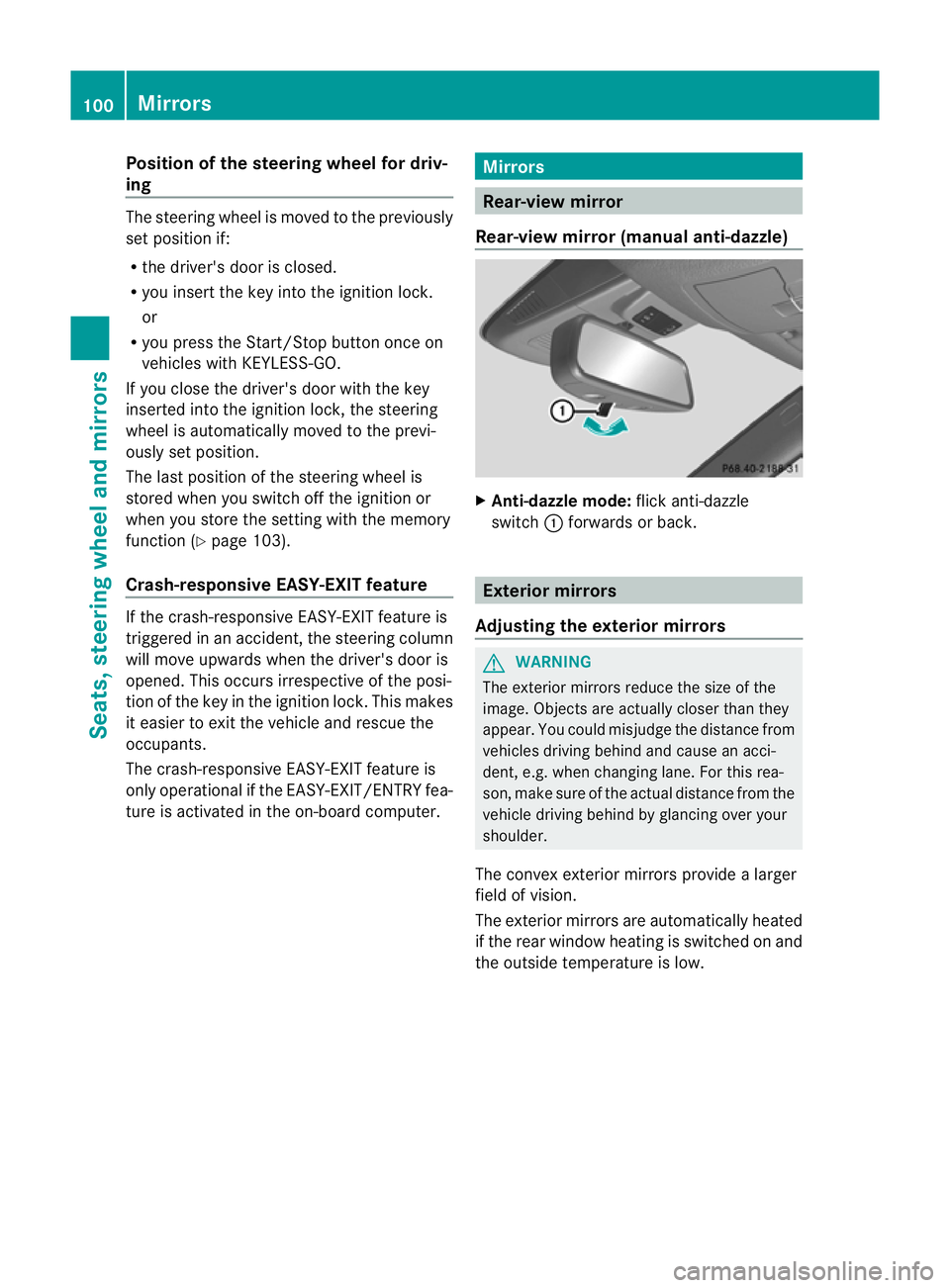
Rear-view mirror (manua lanti- daz zle) X
Anti-dazzle mode: flick anti-dazzle
switch :forward sorback. Exterior mirrors
Adjusting the exterior mirrors G
WARNING
The exterior mirrors reduce the size of the
image. Objects are actually closer than they
appear. You could misjudge the distance from
vehicles driving behind and cause an acci-
dent, e.g. when changing lane. For this rea-
son, make sure of the actual distance from the
vehicle driving behind by glancing over your
shoulder.
The convex exterior mirrors provide alarger
field of vision.
The exterior mirrors are automatically heated
if the rear window heating is switched on and
the outside temperature is low. 100
MirrorsSeats
,steering wheel and mirrors
Page 104 of 389
X
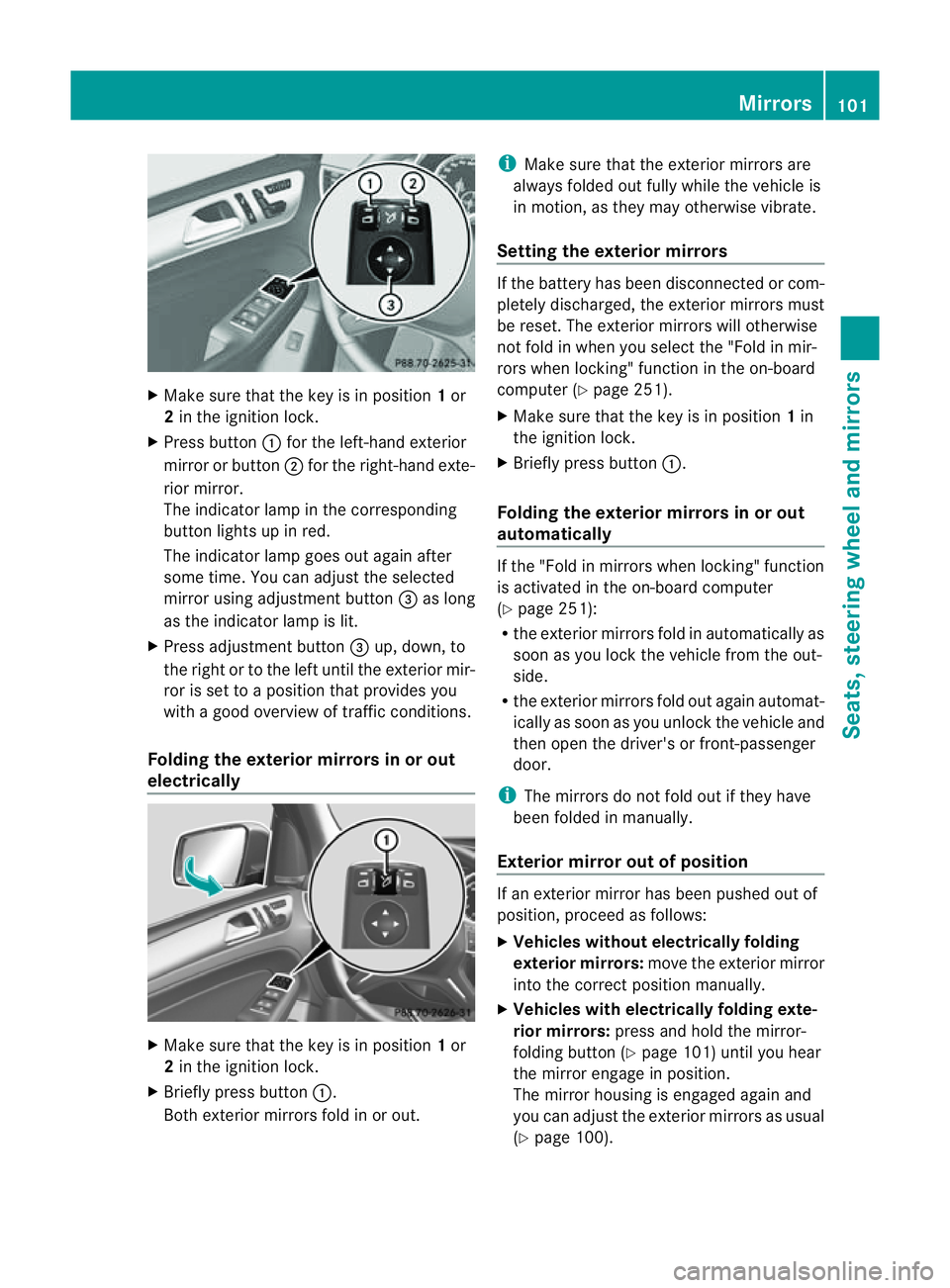
Make sur ethat the key is in position 1or
2 in the ignition lock.
X Press button :for the left-hand exterior
mirror or button ;for the right-hand exte-
rior mirror.
The indicator lam pint he corresponding
button lights up in red.
The indicator lam pgoes out again after
some time. You can adjust the selected
mirror using adjustment button =as long
as the indicator lam pislit.
X Press adjustment button =up, down, to
the right or to the left until the exterior mir-
ror is set to aposition that provides you
with agood overview of traffic conditions.
Folding th eexterior mir rors in or out
electrically X
Make sure that the key is in position 1or
2 in the ignitio nlock.
X Briefl ypres sbutton :.
Both exterior mirrors fold in or out. i
Make sure that the exterior mirrors are
always folded out fully while the vehicle is
in motion, as they may otherwis evibrate.
Setting the exterior mirrors If the battery has been disconnected or com-
pletely discharged, the exterior mirrors must
be reset. The exterior mirrors will otherwise
not fold in when you select the "Fold in mir-
rors when locking" func tion in the on-board
computer (Y page 251).
X Make sure that the key is in position 1in
the ignition lock.
X Briefl ypres sbutton :.
Folding the exterior mirrors in or out
automatically If the "Fold in mirrors when locking" function
is activated in the on-board computer
(Y page 251):
R the exterior mirrors fold in automatically as
soo nasyou lock the vehicle from the out-
side.
R the exterior mirror sfold out again automat-
ically as soon as you unloc kthe vehicle and
then open the driver's or front-passenger
door.
i The mirrors do not fol dout if they have
been folded in manually.
Exterior mirror out of position If an exterior mirror has been pushed out of
position, proceed as follows:
X Vehicles without electrically folding
exterior mirrors: move the exterior mirror
into the correct position manually.
X Vehicles with electrically folding exte-
rior mirrors: press and hold the mirror-
folding button (Y page 101)until you hear
the mirror engage in position.
The mirror housing is engaged agai nand
you can adjus tthe exterior mirrors as usual
(Y page 100). Mir
rors
101Seats ,steeri ngwheel and mirrors Z
Page 105 of 389
Automati
canti-dazzle mirrors G
WA
RNING
If inciden tlight fro mheadlamps is prevented
from striking the sensor in the rear-view mir-
ror ,for instance, by luggage piled too high in
the vehicle, the mirror's automatic anti-dazzle
fun ction will not operate.
Incident light could then blind you. This may
distrac tyou from the traffic condition sand,
as aresult, you may cause an accident.
The rear-view mirror and the exterior mirror
on the driver' sside automatically go into anti-
dazzle mode if the ignition is switched on and
inciden tlight from headlamps strikes the sen-
sor in the rear-view mirror.
The mirror sdonot go int oanti-dazzle mode if
reverse gea risengaged or if the interior light-
ing is switched on. Parking position for the exterior mir-
ror on the front-passenge rside
Setting and storing the parking position You can position the front-passenger side
exterior mirror in such away that you can see
the rear wheel on that side as soon as you
engage revers egear. You can stor ethis posi-
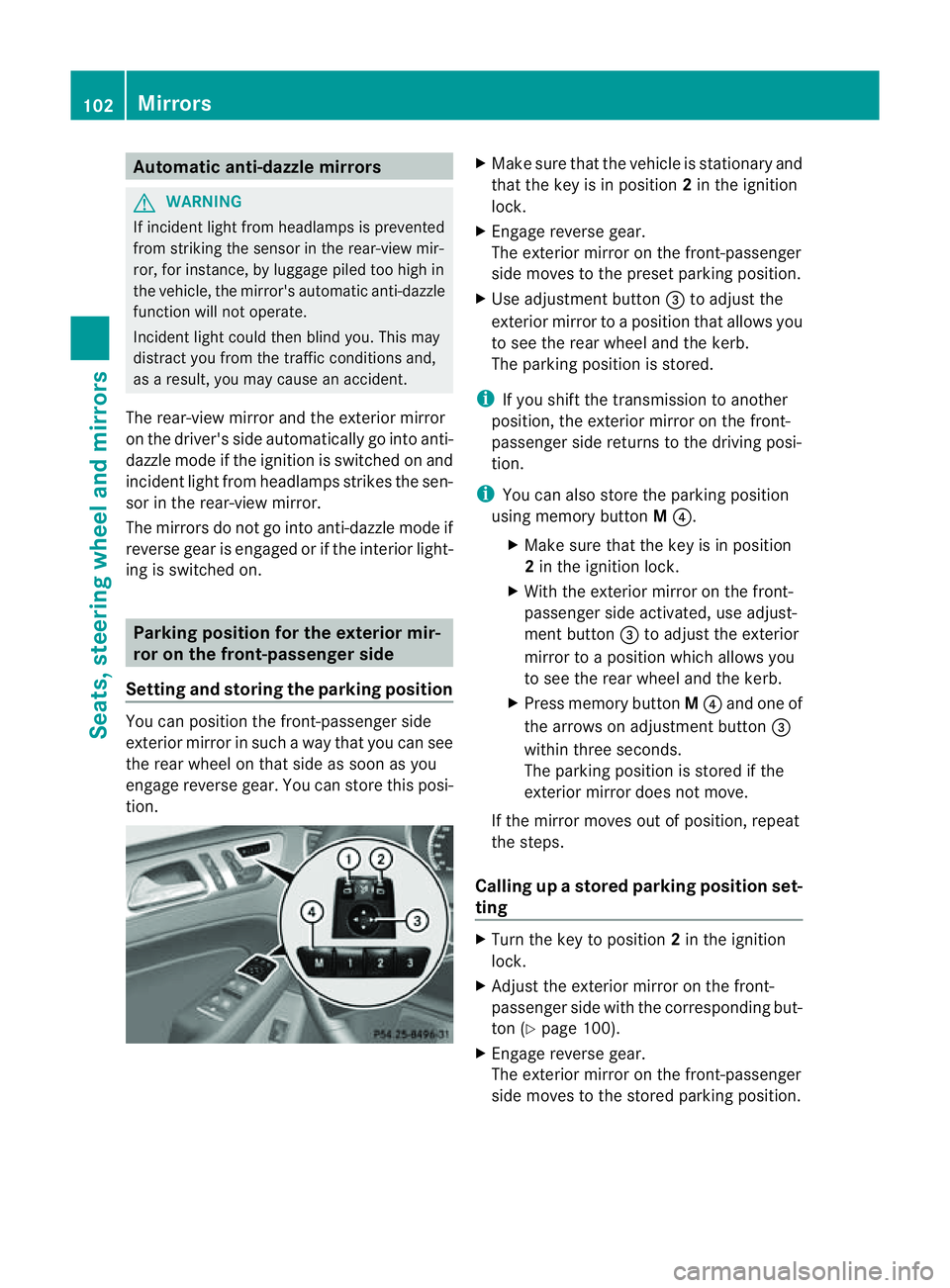
tion. X
Make sur ethat the vehicle is stationary and
that the key is in position 2in the ignition
lock.
X Engage revers egear.
The exterior mirror on the front-passenger
side moves to the preset parkin gposition.
X Use adjustment button =to adjust the
exterior mirror to aposition that allows you
to see the rea rwheel and the kerb.
The parkin gposition is stored.
i If you shift the transmission to anot her
po sition ,the exterior mirror on the front-
passenger side retur nsto the driving posi-
tion.
i You can also store the parking position
using memory button M?.
X Make sure that the key is in position
2in the ignitio nlock.
X With the exterior mirror on the front-
passenger side activa ted, use adjust-
ment button =to adjust the exterior
mirror to aposition which allows you
to see the rea rwheel and the kerb.
X Press memory button M? and one of
the arrow sonadjustment button =
within three seconds.
The parkin gposition is stored if the
exterior mirror does not move.
If the mirror moves out of position ,repeat
the steps.
Calling up astore dparkin gposition set-
ting X
Turn the key to position 2in the ignition
lock.
X Adjus tthe exterior mirror on the front-
passenger side with the correspondin gbut-
ton (Y page 100).
X Engage reverse gear.
The exterior mirror on the front-passenger
side moves to the stored parking position. 102
MirrorsSeats, steerin
gwhee land mirrors
Page 110 of 389
If yo
uhear awarning tone when you leave the
vehicle ,the lights ma ystill be switched on.
X Turn the ligh tswitc htoà .
Dipped-beam headlamps X
To switch on th edipped-bea mhead-
lamps: turnthe ke yinthe ignition lock to
po sition 2or star tthe engine.
X Tur nthe li ght switch to L.
The L indicator lam pinthe instrument
clus terlight sup.
Day time driving lights You can activat
eordeactiva tethe daytime
driving ligh tsfunctio nusingthe on-board
compute r(Ypage 247).
X Day time drivin glights: activat ethe day-
ti me driving light sfunction using the on-
board computer.
X Turn the light switch to Ã.
When the engine is on: depe nding on the
ambien tlight conditions, the daytime driv-
ing lights or the parking and dipped-beam
headlamps are switched on.
When the dipped-beam headlamps are
switched on, the Lindicator lamp in the
instrumen tcluster lights up.
Automatic headlam pmode X
To switch on automatic headlamp
mode: turnthe light switc htoÃ.
Key in position 1in th eignition lock :the
side lamps ar eswitched on or off automat-
ically depending on the brightness of the
ambien tlight.
With the engin erunning: depe nding on the
brightness of the ambien tlight, the daytime
drivin glights 6
or the dipped-beam head-
lamps are switched on or off automatically.
When the dipped-beam headlamps are
switched on, the Lindicator lamp in the
instrumen tcluster lights up. G
WAR
NING
If the ligh tswitc hiss et to Ã,t he dipped-
beam headlamps will not com eonautomati-
cally if it is foggy. This could endanger you and
others. Therefore, tur nthe light switc hto
Lin fog.
The automatic headlamp featur eisonly an
aid. The driver is responsible for the vehicle's
lighting at all times.
Rear foglamp X
To switc honthe rear foglamp: turn the
key in th eignition lock to position 2or start
the engine.
X Tur nthe light switc htoLorÃ.
X Press the Rbutton.
The yellow Rindicator lam pint he
instrumen tcluster lights up.
X To switch off th erear foglamp: press the
R button.
The yellow Rindicator lamp in the
inst rument cluster goes out.
i If you switch the engine off (ke yinposi-
tion 1in the ignition lock )and then restart
it, the previous rear fogla mpsettings are
restored.
Rea rfoglamp X
To switch on th erearfoglamp: turnthe
key in the igni tion lock to position 2or start
the engine.
X Tur nthe light switc htoLorÃ.
X Press the Rbutton.
The yellow Rindicator lam pinthe
instrumen tcluster lights up.
X To switch off th erear foglamp: press the
R button.
The yellow Rindicator lamp in the
inst rument cluster goes out.
i If you switch the engine off (ke yinposi-
tion 1in the ignition lock )and then restart
6 Only if daytime driving ligh tshave been activa tedv ia the on-board computer. Exterior lighting
107Lightsand windscr een wipers Z
Page 111 of 389
it, the previous rear foglam
psettings are
restored.
Adjusting th eheadlam prang e(halog en
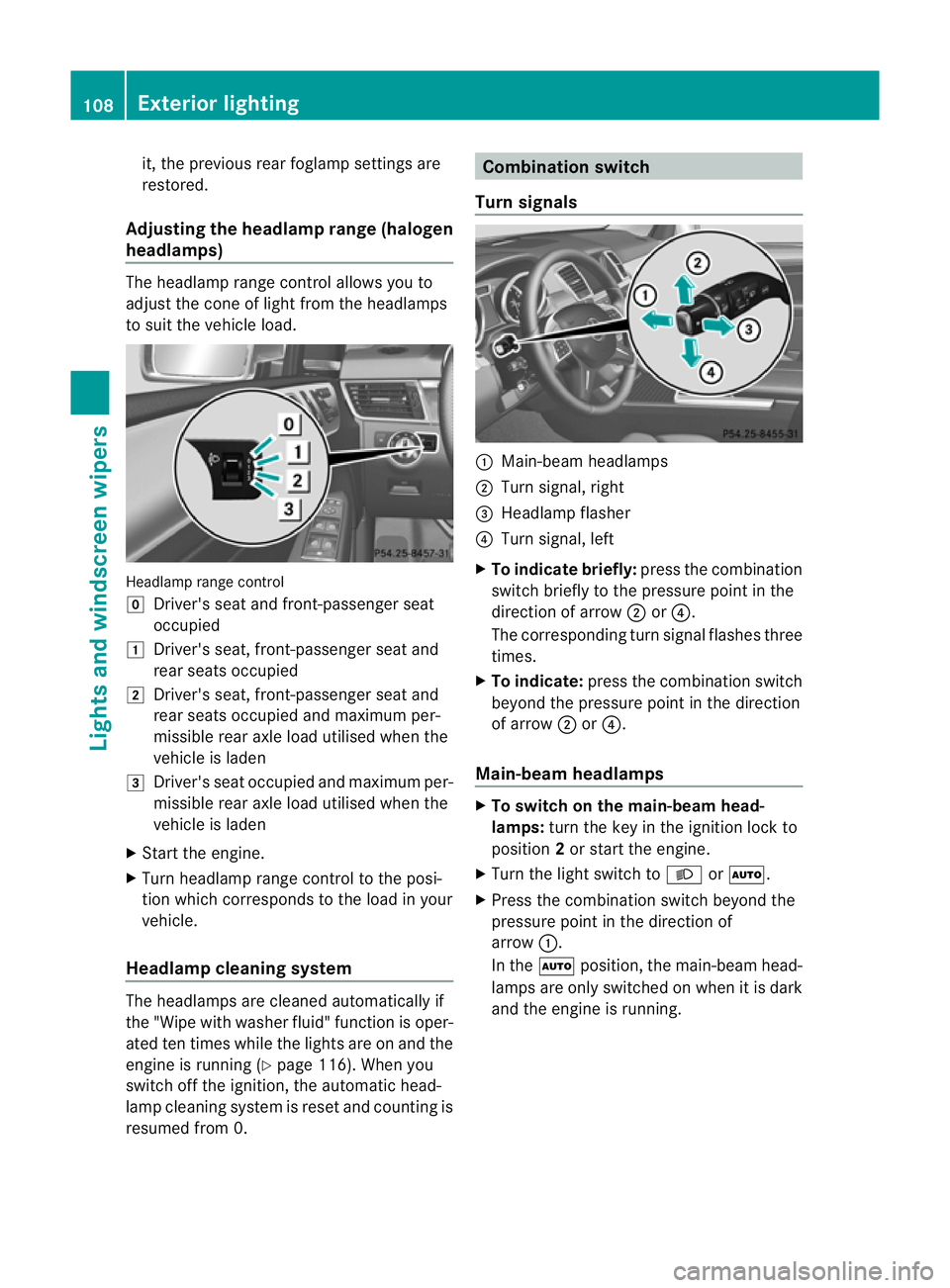
headlamps) Th
eh eadlamp range control allow syou to
adjust the con eoflight from the headlamps
to sui tthe vehicle load. Headlam
prange control
g Driver' sseat and front-passenger seat
occupied
1 Driver's seat, front-passenger seat and
rear seats occupied
2 Driver's seat, front-passenger seat and
rear seats occupied and maximu mper-
missible rear axle load utilised when the
vehicle is laden
3 Driver's seat occupied and maximu mper-
missible rear axle load utilised when the
vehicle is laden
X Start the engine.
X Turn headlamp range control to the posi-
tion which corresponds to the load in your
vehicle.
Headla mpcleaning system The headlamps are cleaned automatically if
the "Wipe with washer fluid" fun
ction is oper-
ated ten times while the lights are on and the
engin eisrunning (Y page 116). When you
switc hoff th eignition, the automa tich ead-
lam pcleaning system is reset and counting is
resumed from 0. Combination switch
Tu rn signals :
Main-beam headlamps
; Turnsignal, right
= Headlamp flasher
? Turn signal, left
X To indicate briefly: press the combination
switch briefly to the pressure point in the
direction of arrow ;or?.
The corresponding turn signal flashes three
times.
X To indicate: press the combination switch
beyond the pressure point in the direction
of arrow ;or?.
Main-beam headlamps X
To switch on the main-bea mhead-
lamps: turn the key in the ignition lock to
position 2or start the engine.
X Turn the light switch to LorÃ.
X Press the combination switch beyond the
pressure point in the direction of
arrow :.
In the Ãposition, the main-beam head-
lamps are only switched on when it is dark
and the engine is running. 108
Exterio
rlightingLights and windscreen wipers
Page 114 of 389
X
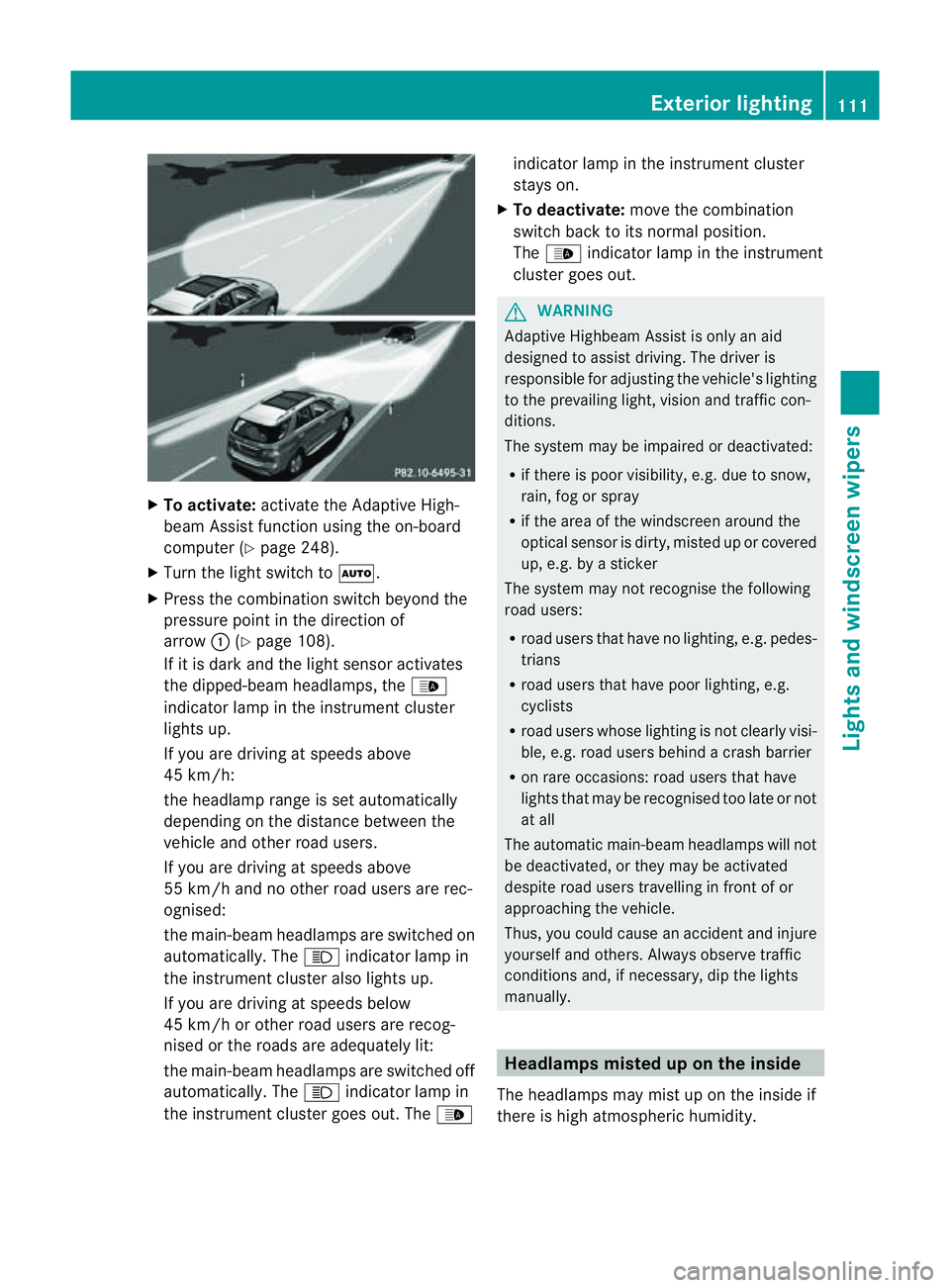
To activate: activatethe Adaptive High-
beam Assist function using the on-board
computer (Y page 248).
X Turn the ligh tswitch to Ã.
X Press the combination switch beyond the
pressure point in the direction of
arrow :(Ypage 108).
If it is dark and the light sensor activates
the dipped-beam headlamps, the _
indicator lamp in the instrument cluster
lights up.
If you are driving at speed sabove
45 km/h:
the headlamp range is set automatically
depending on the distanc ebetween the
vehicle and other road users.
If you are driving at speeds above
55 km/h and no other road users are rec-
ognised:
the main-bea mheadlamps are switched on
automatically. The Kindicator lam pin
the instrument cluster also lights up.
If you are driving at speeds below
45 km/h or othe rroad user sare recog-
nised or th eroads ar eadequately lit:
the main-beam headlamps are switched off
automatically. The Kindicator lamp in
the instrumen tcluster goes out. The _indicator lamp in the instrument cluster
stays on.
X To deactivate: move the combination
switch back to its normal position.
The _ indicator lamp in the instrument
cluster goes out. G
WARNING
Adaptiv eHighbeam Assist is only an aid
designed to assist driving. The driver is
responsible for adjusting the vehicle's lighting
to the prevailing light, vision and traffic con-
ditions.
The system may be impaired or deactivated:
R if there is poor visibility, e.g. due to snow,
rain, fog or spray
R if the area of the windscreen around the
optical sensor is dirty, misted up or covered
up, e.g. by asticker
The syste mmay not recognise the following
road users:
R road users that have no lighting, e.g. pedes-
trians
R road users that have poor lighting, e.g.
cyclists
R road users whos elighting is not clearly visi-
ble, e.g. road users behind acras hb arrier
R on rare occasions: road users that have
lights that may be recognised too late or not
at all
The automatic main-beam headlamps will not
be deactivated, or they may be activated
despite road users travelling in front of or
approaching the vehicle.
Thus, you could cause an accident and injure
yoursel fand others. Alway sobserv etraffic
conditions and ,ifnecessary, dip the lights
manually. Hea
dlamps misted up on the inside
The headlamps may mist up on the insid eif
there is hig hatmospheric humidity. Exterio
rlighting
111Lightsand windscreen wipers Z
Page 115 of 389
X
Drive with the headlamps switched on.
Th elevel of moisture diminishes, depend-
ing on the length of the journey and the
weather conditions (humidity and tem per-
ature).
If th elevel of moisture does not diminish:
X Have the headlamps checked at aquali fied
specialis tworkshop. Interior lighting
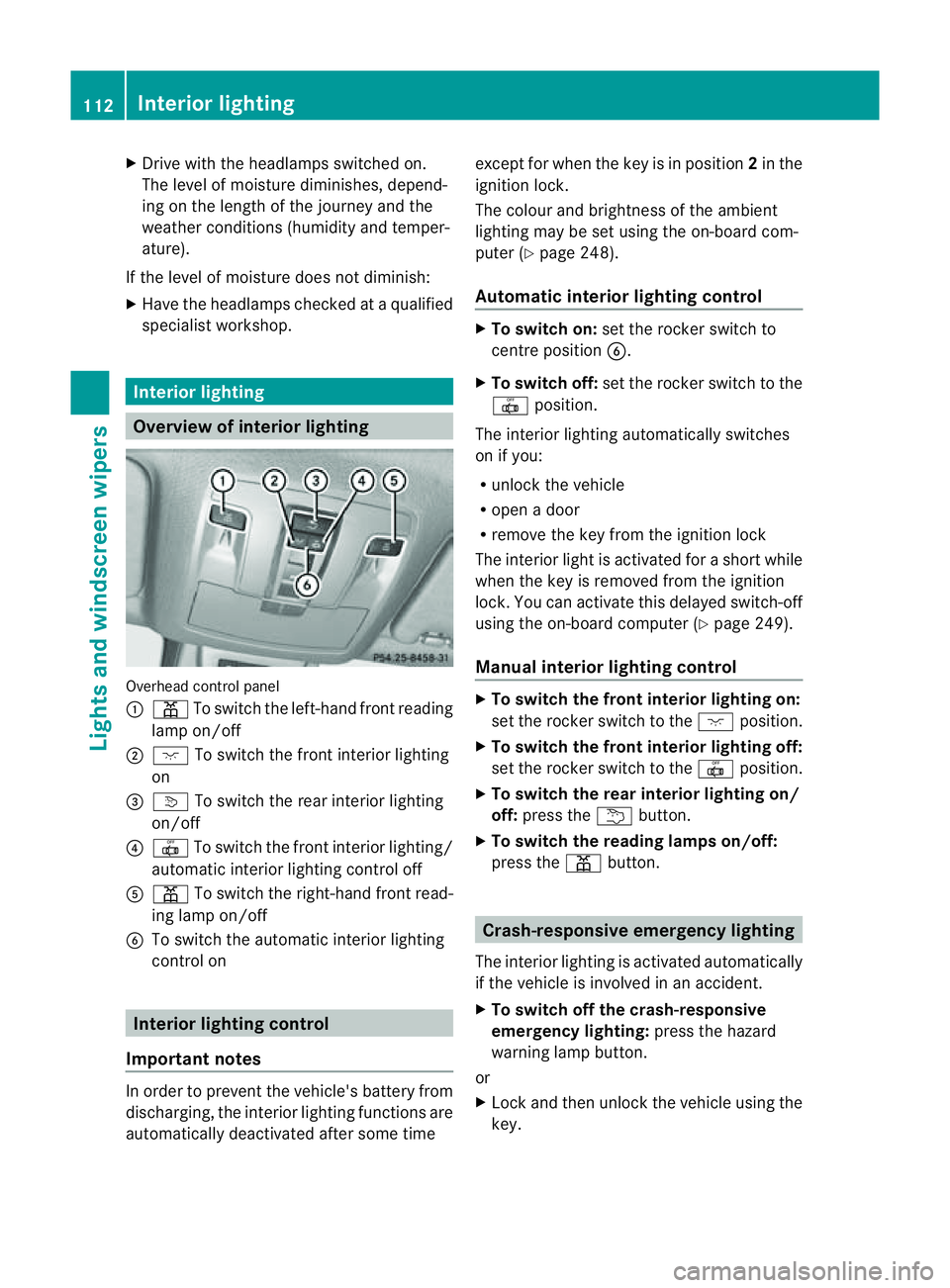
Overview of interior lighting
Overhead con
trol panel
: p To switch the left-hand front reading
lamp on/off
; c To switch the front interior lighting
on
= v To switch the rear interior lighting
on/off
? | To switch the front interior lighting/
automatic interior lighting control off
A p To switch the right-hand front read-
ing lamp on/off
B To switch the automatic interior lighting
control on Interio
rlighting control
Impor tant notes In order to prevent the vehicle'
sbattery from
discharging, the interior lighting functions are
automatically deactivated after some time except for when the key is in position
2in the
ignition lock.
The colour and brightness of the ambient
lighting may be set using the on-board com-
puter (Y page 248).
Automatic interior lighting control X
To switch on: set the rocker switch to
centre position B.
X To switch off: set the rocker switch to the
| position.
The interior lighting automatically switches
on if you:
R unlock the vehicle
R open adoor
R remove the key from the ignition lock
The interior light is activated for ashort while
when the key is removed from the ignition
lock .You can activate this delayed switch-off
using the on-boar dcomputer (Y page 249).
Manua linterior lighting control X
To switc hthe fron tinterior lighting on:
set the roc kers witch to the cposition.
X To switch the front interior lighting off:
set the rocker switch to the |position.
X To switch the rear interior lighting on/
off: press the ubutton.
X To switch the reading lamp son/off:
press the pbutton. Crash-responsive emergency lighting
The interior lightin gisactivate dautomatically
if the vehicle is involved in an accident.
X To switch off the crash-responsive
emergency lighting: press the hazard
warning lamp button.
or
X Lock and then unlock the vehicle using the
key. 112
Interior lightingLights and windscreen wipers
Page 116 of 389
Changing bulbs
Important safety notes
Xenon bulbs If your vehicle is equipped wit
hxenon bulb s,
you ca nrecognise this by th efollowing: the
cone of light from th exenon bulbs moves
from th etop to the bottomand back again
whe nyou star tthe engine. Fo rthis to be
observed ,the lights must be switched on
before startin gthe engine. G
DANGER
Xenon bulb scarry ahigh voltage. You could
get an electric shock and be seriously or even
fatally injured if you touch the electric con-
tacts on xenon bulbs. Therefore, never
remov ethe cover from xenon bulbs.
Do not change xenon bulbs yourself, but have
them replaced at aqualified specialist work-
sho pwhich has the necessar yspecialist
knowledge and tools to carry out the work
required.
Mercedes-Ben zrecom mends that you use a
Mercedes-Benz Service Centre for this pur-
pose. In particular, work relevant to safety or
on safety-related systems must be carried out
at aq ualified specialist workshop.
Bulbs and lamps are an important aspect of
vehicle safety. You must therefore make sure
that thes efunction correctly at all times.
Have the headlamp setting checked regularly.
Other bulbs There are bulbs other than the xenon bulbs
that you cannot replace. Replace only the
bulbs listed (Y page 113). Have the bulbs that
you cannot replace yourself changed at a
qualified specialist workshop.
Mercedes -Benz recommends that you use a
Mercedes-Benz Ser vice Centre for thi spur-
pose .Inp articular, work relevant to safety or
on safety-related systems must be carried out
at aq ualified specialist workshop. If you require assistanc
echangi ngbulbs, con-
sult aqualified specialist workshop.
Do not touch the glass tube of new bulbs with
your bare hands. Even minor contamination
can burn into the glass surface and reduce
the servic elife of the bulbs. Always use alint-
free cloth or only touch the base of the bulb
when fitting.
Only use bulbs of the correct type.
If the new bulb still does not light up, consult
aq ualified specialist workshop.
Bulbs and lamps are an important aspect of
vehicle safety. You must therefore make sure
that these function correctly at all times.
Have the headlamp setting checked regularly. G
WARNING
Bulbs and lights can become very hot. For this
reason, allow them to cool down before
changin gthem. Otherwise, you coul dburn
yourself when you touch them.
Keep bulbs out of the reach of children. Oth-
er wise ,they could damage them, for example,
and inj uret hemselves.
Never use abulbw hich ha sbeend ropped.
Suc hab ulbm ay explod eand injure you.
Halogen bulb sare pressu rised and could
explode when yo uchange them, especiall yif
the yarever yhot. Yo ushould therefor ewear
eye protec tion and gloves when you are
changing them. Overview of bulb replacement
–bulbs
Yo uc an replace the following bulbs. The
details for the bul btype can be found in the
legend. Changing bulbs
113Lightsand windsc reenwipers Z
Page 128 of 389
more quickly
.This ma yprevent you from
observing th etraffic conditions, thereby caus-
ing an accident.
Condensation may dri pfrom th eunders ideof
the vehicl ewhen cooling mode is active .This
is norma land not asign that there is amal-
function.
i The cooling with air dehumidification
function uses refrigerant R134a. This cool-
ant does not contain chlorofluorocarbons,
and therefore does not damage the ozone
layer.
Switching on/off X
To activate: press the¿/Á button.
The indicator lamp in the ¿/Ábut-
ton lights up.
X To deactivate: press the¿/Á but-
ton.
The indicator lamp in the ¿/Ábut-
ton goes out. The cooling with air dehumid-
ification function has adelayed switch-off
feature.
Problems with the cooling with air
dehumidification function When you press the
¿/Ábutton ,the
indicator lam pint he button fla shes three
times or remains off .You can no longer switch
on the cooling with air dehumidification func-
tion.
X Consult aqualified specialist worksho p.Setting climat
econt rol to automatic
mode
In automatic mode, the set temperature is
maintained automatically at aconstant leve l.
The system automatically regulates the tem-
peratur eofthe dispensed air ,the airflow and
the air distribution.
Automatic mode will achi eveo ptimal opera-
tion if cooling with air dehumidification is also activated
.Ifdesired, coolin gwith air dehu-
midification can be deactiva ted.
In the rear compartment ,you can also switch
climate control for the rea rseats to automatic
mode using the Ãbutton.
X Turn the key to position 2in the ignition
lock.
X Set the desired temperature.
X To activate: press theÃbutton.
The indicator lam pintheà button lights
up. Automati cair distribution and airflow
are activated.
i THERMOTRONIC automatic climate con-
trol: when automatic mode is activated, you
can select aclimate mode setting
(Y page 125).
X To switch off: press the_button.
or
X Press the IorK button.
The indicator lamp in the Ãbutton goes
out. Setting the climat
emode
This function is only available with the
THERMOTRONIC automatic climat econtrol.
The climate control settings ar eespecially
effectiv eathigh temperatures.
You can select the following climat econtrol
settings in automatic mode:
FOCU Shigh airflow that is set slightly
cooler
MEDIU Mmedium airflow, standard setting
DI FFUS Elow airflow that is set slightly
warmer and with alower rate of
airflow
X Tur nthe key to position 2in the ignition
lock.
X Press the Ãbutton.
X Press the ñbutton repeatedly until the
desired climate mode appears in the dis-
play. Operating th
eclimat econtrol system
125Climate control Z
Page 136 of 389
H
Environmenta
lnote Batteries contain pollutants.
It is agains
tthe law to dis-
pose of them with the house-
hold rubbish. They must be
collected separatel yand
recycled in an environmen-
tally responsible manner. Dispose of batteries in an
environmentally responsible
manner. Take discharged
batteries to aqualified spe-
cialist workshop ,e.g. a
Mercedes-Benz Service
Centre, or to aspecial col-
lection point for old batter-
ies.
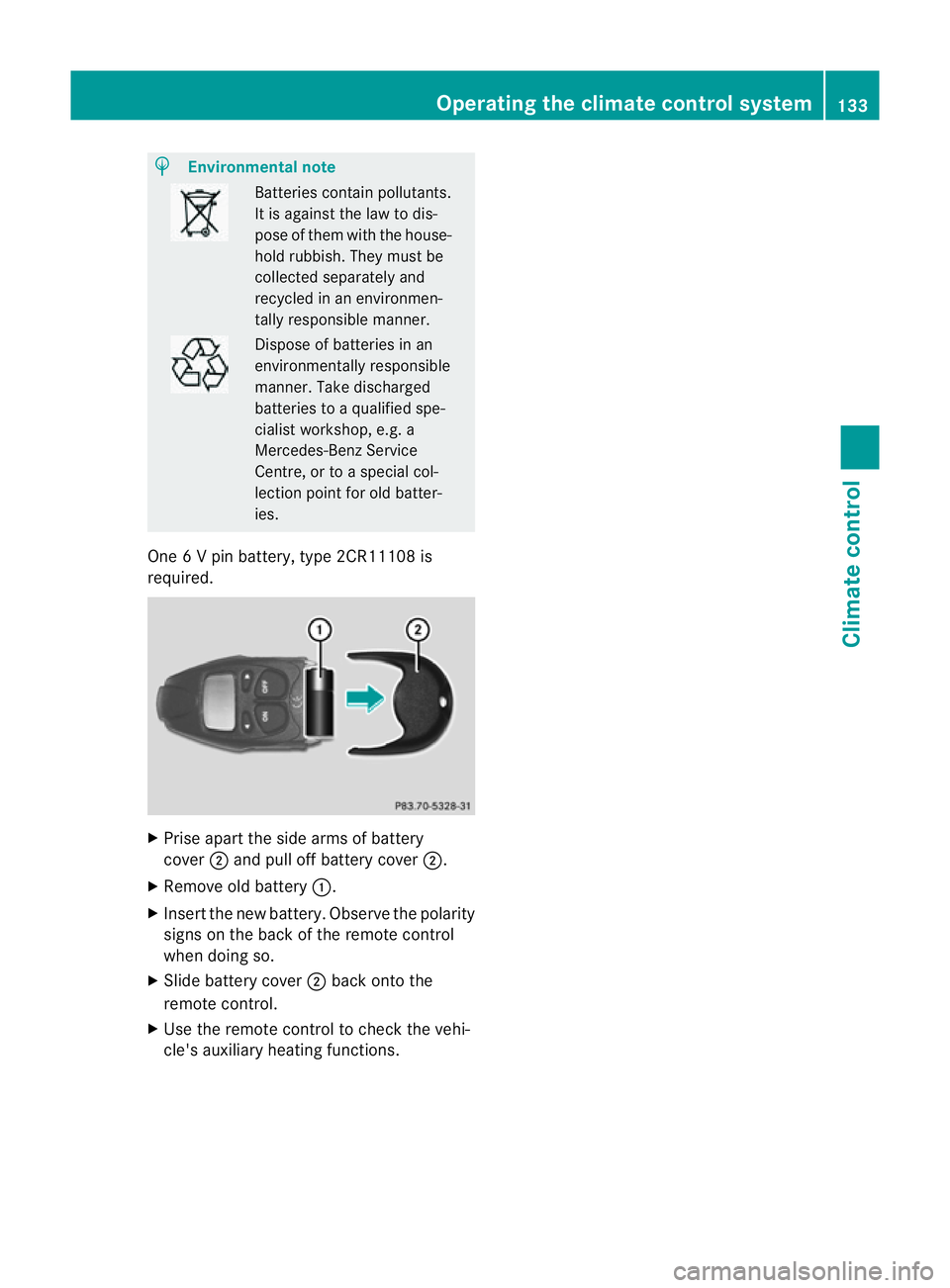
One 6Vp in battery ,type 2CR11108 is
required. X
Prise apart the side arms of battery
cover ;and pull off battery cover ;.
X Remove old battery :.
X Insert the new battery. Observe the polarity
signs on the back of the remote control
when doing so.
X Slide battery cover ;back onto the
remote control.
X Use the remote control to check the vehi-
cle's auxiliary heating functions. Operating the climate control system
133Climate control Z