service MERCEDES-BENZ M-CLASS SUV 2011 Owner's Guide
[x] Cancel search | Manufacturer: MERCEDES-BENZ, Model Year: 2011, Model line: M-CLASS SUV, Model: MERCEDES-BENZ M-CLASS SUV 2011Pages: 389, PDF Size: 9.22 MB
Page 168 of 389
!
The depth of water must not exceed the
value specified in the table. Not ethat the
possible fording depth is less in flowing
water.
R Establish how deep the water is and the
characteristic softhe body of water before
fording.
R Select the highest possible vehicle level.
R Restrict the shift range to 1or 2.
R Avoid high engin espeeds.
R Enter and exit the water at aflat place and
at as teady walking pace.
! Under no circumstances should you
accelerate before entering the water. The
bow wave could cause water to enter and
damage the engine and neighbouring
assemblies.
R Drive slowl yand at aconstant speed
through the water.
R Do not stop.
! Do not open any of the vehicle' sdoors
while fording. Otherwise, wate rcould get
int ot he vehicle interior and damage the
vehicle' selectronics and interior equip-
ment.
R Water offer sahigh degree of resistance,
and the ground is slippery and in some
cases unstable. Therefore, it is difficult and
dangerous to pull away in the water.
R Ensure that abow wav edoes not for mas
you drive.
R Clea nany mud from the tyre tread after
fording.
R Appl ythe brakes to dry them after fording. Winter driving
Genera lnotes G
WARNING
If the vehicle becomes trapped in snow,
ensure that snow is kept away from the
exhaust pipe and from around the vehicle as long as the engine is running. Otherwise, poi-
sonous carbon monoxide (CO) may enter the
vehicle, resulting in loss of consciousness and
even death.
To assure sufficient fresh air ventilation, open
aw indow slightly on the side of the vehicle
not facin gthe wind.
At the onset of winter, have your vehicle win-
terproofed at aqualified special istworkshop,
e.g. at aMercedes-Ben zService Centre.
Vehicles with the ON&OFFROAD package: if
driving in snow or with snow chains, select
the snow program (Y page 219) with the off-
road program selector wheel in the centre
console.
Driving with summer tyres Observ
ethe notes in the "Winter operation"
section (Y page 357).
Slippery roa dsurfaces G
WARNING
Do not shift down for additiona lengine brak-
ing on aslippery road surface. This could
cause the drive wheels to lose their grip and
the vehicle could skid.
You should drive particularly carefully on slip-
pery road surfaces. Avoid sudden accelera-
tion, steering and braking manoeuvres.
If the vehicle threatens to skid or cannot be
stopped when moving at low speed:
X Shift the transmission to position N.
X Try to bring the vehicle under control by
using corrective steering.
i For more information on drivin gwith
snow chains, see (Y page 358). Drivin
gtips
165Driving and park ing Z
Page 169 of 389
Off-road driving
Important safet ynotes G
WARNING
Driv eslowly in rough terrain with which you
are unfamiliar. This will allow you to detect
unexpected obstacles more easily and, there-
fore, to reduce the risk of an accident.
Do not make U-turns on mountain roads. Oth-
erwise, the vehicle could tip over. If aslope is
too steep for the vehicle, drive back in reverse
gear.
Do not drive at an angle up steep inclines.
Otherwise, the vehicle could tip over. If you
drive up asteep incline at an angle and the
vehicle threatens to overturn, stee rinto the
line of fall immediately.
Never allo wthe vehicle to roll backwards. The
brakin geffect of the engine canno tbeu tilised
in neutral. If you only use the service brake,
you could los econtrol of the vehicle. G
WARNING
Grains of sand, particles of dirt and other
abrasiv ematerials can enter the brake sys-
tem. This can lead to excessive wear and
unpredictable braking efficiency.
After the brakes have been expose dtodirty
conditions ,have them checked and cleaned
at aq ualified specialist workshop ,e.g. a
Mercedes-Benz Service Cent re.O therwise,
there is arisk that braking power may be
insufficient in the event of an emergency, or
that the braking effec tmay be unpredictable. G
WARNING
Damage to the vehicle creates the risk of an
accident for yourself and other road users. If
in doubt, have your vehicle chec kedataq uali-
fied specialist workshop which has the nec-
essary specialist knowledg eand tool stocarry
out the work required. Mercedes-Benz rec-
ommends that you use aMercedes-Benz
Servic eCentr efor this purpose. General notes Read this section befor
edriving your vehicle
off- road. Practise by travelling over more gen-
tle off-road terrain first.
The following driving systems are specially
adapted to off-road driving:
R Off-road program (vehicles without the
ON&OFFROAD package) (Y page 222)
R Off-road program 1and 2(vehicles wit hthe
ON&OFFROAD package) (Y page 222)
R LOW RANGE off-road gear (vehicles with
the ON&OFFROAD package)
(Y page 223)
R Differential lock (vehicles wit hthe
ON&OFFROAD package) (Y page 223)
R Off-road AB S(Ypage 61)
R Off-road 4ETS (Y page 64)
R Off-road ESP ®
(Y page 65)
R AIRMATI Cpackag e(veh icle level)
(Y pag e188)
R DSR (Downh illS peed Regulation)
(Y page 220)
Observe the following notes:
R stop your vehicle and, if necessary, select
the off-road program (Y page 222)orthe
LOW RANGE off -road gear (Y page 223)
befor edriving off-road.
R select avehicle level suitable for the off-
road ter rain. Make sure ther eisalways suf-
ficien tground clearance to prevent dam-
ag etot he vehicle.
R chec kthat item sofluggage and loads are
stowe dsafely and are well secured
(Y page 300).
R always keep the engine running and in gear
when driving on adownhil lgradient. Acti-
vate DSR (Y page 220).
R drive slowly and evenly ,ifnecessar yata
walking pace.
R ensure that the wheels are in contact with
the ground at all times.
R drive with extreme care on unknown off-
road routes where visibility is poor. For 166
Driving tipsDriving and parking
Page 170 of 389
safety reasons, get out of the vehicle first
and survey the off-road route.
R chec kthe depth of water before fording
river sand streams.
R loo kout for obstacle ssuch as rocks, holes,
tree stumps and furrows.
R take care when turning on an uphil lor
downhill slope and when turning at sharp
angles. The vehicle could otherwise tip
over.
R always keep the side windows and the pan-
oram asliding sunroof closed during the
journey.
R do not stray from marked routes or paths.
i Information abou tretrofitting special all-
ter rain tyres is available from any
Mercedes-Benz Service Centre. H
Environmental note
Protection of the environmen tisofprimary
importance .Trea tnature with respect.
Observe all prohibiting signs.
Checklist before drivin goff-road X
Engine oi llevel: checkthe engin eoil and
top it up if necessary.
When drivin gonsteep gradients, the oil
level must be sufficiently hig htoensure a
correct oil supply in the vehicle.
X AdBlue ®
tank (BlueTEC vehicl es):check
the fluid leve land, if necessary, refill to the
maximum (13 l) (Y page157).
X Tyre-chang etool kit: check that the jack
is working and make sure you have the
wheelbrace, arobust tow cabl eand afold-
ing spade in the vehicle.
X Wheels and tyres: checkthe tyr etread
depth and tyre pressure.
X Check for damag eand remove any foreign
objects, e.g. small stones, from the
wheels/tyres.
X Repl acea ny missing valve caps. X
Repl aced ented or damaged wheels.
X Wheels: dented or bent wheels can lead to
al oss of tyr epressure and damag etot he
tyr eb ead. Before driving off-road, check
the wheels and replace them if necessary.
Checklist after driving off-road !
If you detect damage to the vehicle after
driving off-road, have the vehicle checked
immediately at aqualified specialist work-
shop.
Driving over rough terrain places greater
demands on your vehicle than driving on nor-
mal roads. After driving off-road, check the
vehicle. This allow syou to detec tdamage
promptly and reduce the risk of an accident
to yourself and other road users.
X Vehicles with the ON&OFFROAD pack-
age: activate the on-road program
(Y page 222).
X Vehicles without the ON&OFFROAD
package: deactivate the on-road program
(Y page 222).
X Deactivate the LOW RANGE off-road gear
(Y page 223).
X Deactivate DSR (Y page 220).
X Lower the vehicle level again to alevel suit-
able to the road conditions, e.g. to the high-
way/high-speed level.
X Clean the headlamps and rear lights and
check for damage.
X Clean the front and rear licence plates.
X Clean the wheels/tyres with awater jet and
remove any foreign objects.
X Clea nthe wheels, wheel arches and the
vehicle underside with awater jet; check
for any foreign objects and damage.
X Check whethe rtwigs or other parts of
plants have become trapped. These
increase the risk of fire and can damage
fuel pipes, brake hose sorthe rubber bel-
lows of the axl ejoint sand propeller shafts.
X After the trip, examine without fail the
entire undercarriage, wheels ,tyres, brakes, Driving tips
167Drivingand park ing Z
Page 182 of 389
not accelerate. Thi
sisbasedonthe current
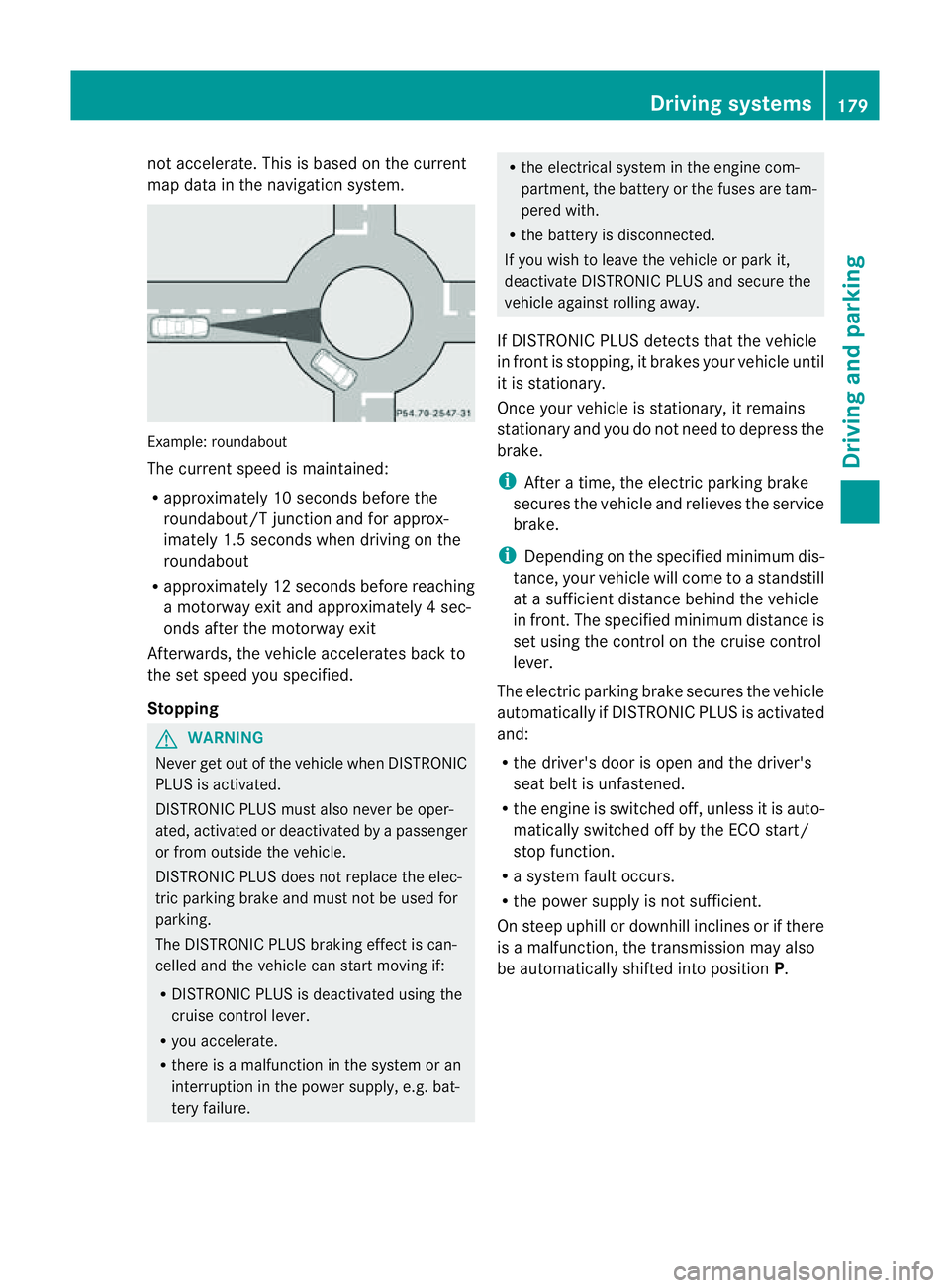
map data in the navigation system. Example: roundabout
The current speed is maint
ained:
R approximatel y10second sbefore the
roundabout/T junction and for approx-
imatel y1.5 second swhend riving on the
roundabout
R approximatel y12second sbefore reaching
am otorwa yexita nd approximatel y4sec-
onds after the motorwa yexit
Afterwards ,the vehicle accelerates bac kto
the set speed you specified.
Stopping G
WARNING
Never get out of the vehicle when DISTRONIC
PLUS is activated.
DISTRONIC PLUS must also never be oper-
ated, activated or deactivated by apassenger
or from outside the vehicle.
DISTRONIC PLUS does not replace the elec-
tric parkin gbrake and mus tnot be used for
parking.
The DI STRONIC PLUS brakin geffect is can-
celle dand the vehicl ecan start movin gif:
R DISTRONIC PLUS is deactivated using the
cruis econtrol lever.
R you accelera te.
R there is amalfunction in the system or an
interruption in the power supply, e.g. bat-
tery failure. R
the electrical system in the engine com-
partment, the batter yorthe fuses ar etam-
pered with.
R the batter yisdisconnected.
If you wish to leave the vehicle or park it,
deactiva teDISTRONIC PLUS and secure the
vehicle agains trolling away.
If DI STRONIC PLUS detects that the vehicle
in fron tisstopping, it brakes your vehicle until
it is stationary.
Once your vehicle is stationary, it remains
stationary and you do not need to depress the
brake.
i After atime, the electric parkin gbrake
secure sthe vehicle and relieves the service
brake.
i Depending on the specifie dminimum dis-
tance, your vehicle will come to astandstill
at as ufficient distance behind the vehicle
in front .The specifie dminimum distance is
set using the control on the cruise control
lever.
The electric parkin gbrake secure sthe vehicle
automatically if DI STRONIC PLUS is activated
and:
R the driver's doo risopen and the driver's
seat belt is unfastened.
R the engine is switched off ,unles sitisa uto-
matically switched off by the ECO start/
stop function.
R as ystem fault occurs.
R the powe rsupply is not sufficient.
On steep uphill or downhill inclines or if there
is am alfunction, the transmission may also
be automatically shifted into position P. Driving systems
179Drivingand parking Z
Page 190 of 389
HOL
Dfunction
Gen eral notes Th
eH OLD function ca nassist the driver in the
foll owing situations:
R when pulling away, especially on steep
slopes
R when manoeuvrin gonsteep slopes
R when waiting in traffic
The vehicle is kept stationary without the
driver having to depress the brake pedal.
The braking effect is cancelled and the HOLD
function is deactivated when you depress the
accelerator peda ltop ull away.
Activation conditions You can activate the HOLD function if:
R the vehicle is stationary.
R the engine is running or if it has been auto-
matically switched off by the ECO start/
stop function.
R the driver' sdoor is closed or if your seat
belt is fastened.
R the electric parkin gbrake is released.
R thet ransmission is in position D,Ror N.
R DISTRONIC PLUS is deactivated.
Activatin gthe HOL Dfunction X
Make sure that th eactivation conditions
are met.
X Depress the brake pedal. X
Quickly depress the brake pedal further
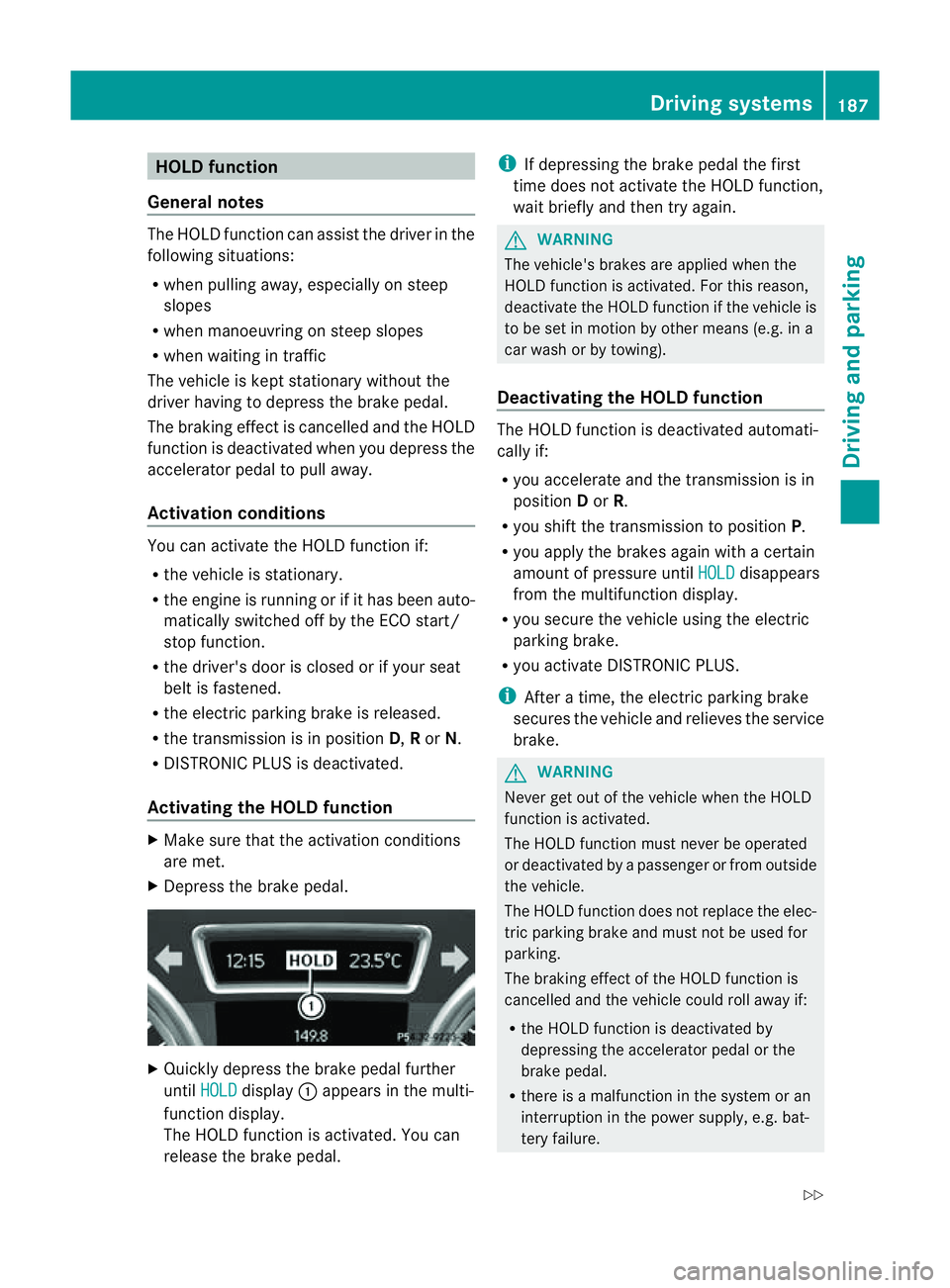
until HOLD display
:appears in the multi-
function display.
Th eH OLD func tion is activated. You can
release the brake pedal. i
If depressing the brake pedal the first
tim edoes not activate the HOL Dfunction,
wait briefly and then try again. G
WARNING
The vehicle's brakes are applied when the
HOLD function is activated. For this reason,
deactivate the HOLD function if the vehicle is
to be set in motion by other means (e.g. in a
car wash or by towing).
Deactivating the HOLD function The HOLD function is deactivated automati-
cally if:
R you accelerate and the transmission is in
position Dor R.
R you shift the transmission to position P.
R you apply the brakes again with acertain
amount of pressur euntil HOLD disappears
from the multifunctio ndisplay.
R you secure the vehicle using the electric
parkin gbrake.
R yo ua ctivate DISTRONIC PLUS.
i After atime, the electric parkin gbrake
secure sthe vehicle and relieves the service
brake. G
WARNING
Never get out of the vehicle when the HOLD
func tion is activated.
The HOL Dfunction must never be operated
or deactivated by apassenger or from outside
the vehicle.
The HOLD function does not replace the elec-
tric parking brake and must not be used for
parking.
The braking effect of the HOLD function is
cancelled and the vehicle could roll away if:
R the HOLD function is deactivated by
depressing the accelerator pedal or the
brake pedal.
R there is amalfunction in the system or an
interruption in the power supply ,e.g. bat-
tery failure. Driving systems
187Drivingand parkin g
Z
Page 212 of 389
Mon
itoring range of the sensors
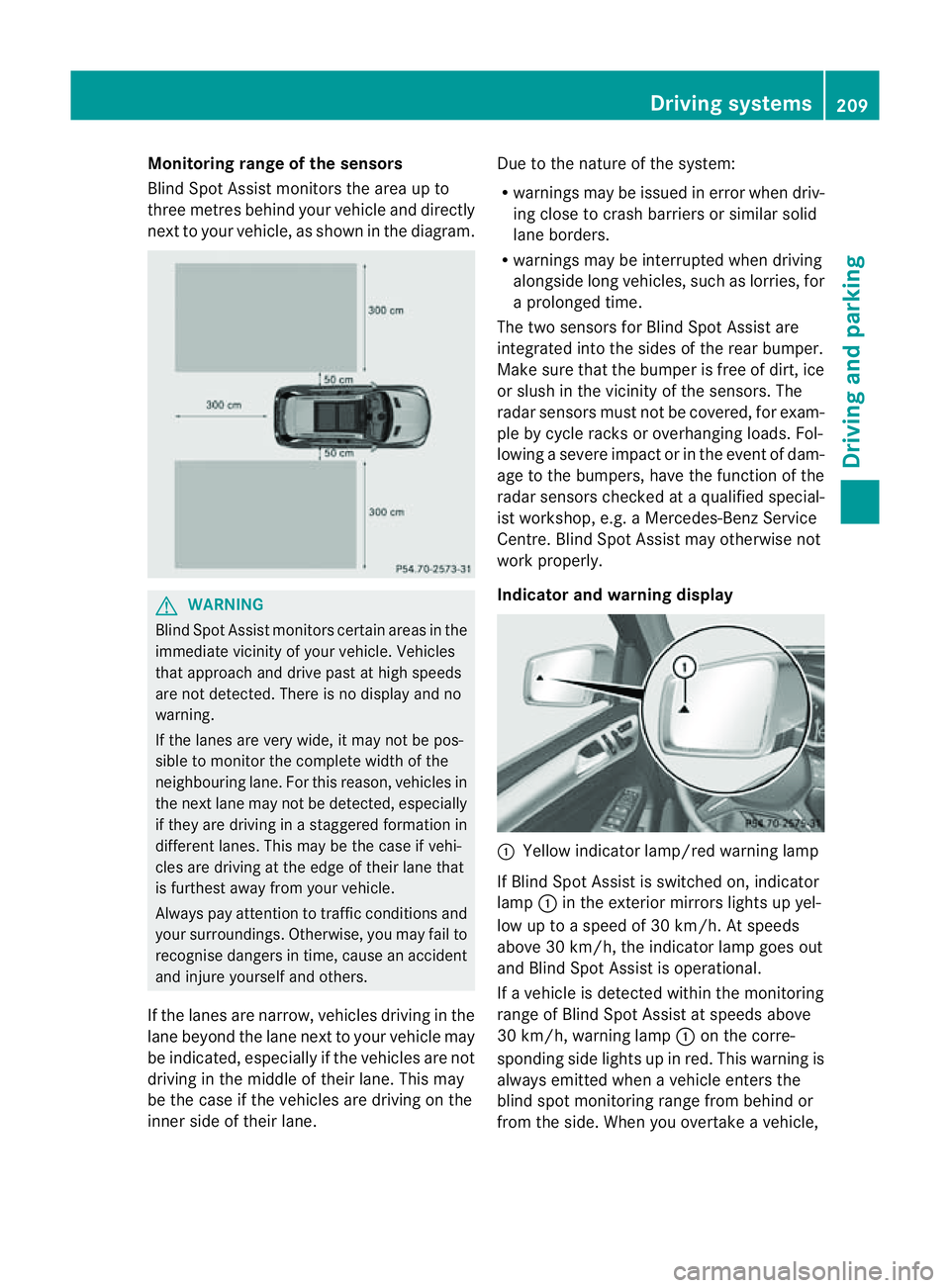
Blind Spot Assist monitors the area up to
three metres behind you rvehicle and direc tly
next to you rvehicle, as shown in the diagram. G
WARNING
Blin dSpot Assist monitors cer tain areas in the
immediate vicinit yofyour vehicle. Vehicles
that approach and driv epast at high speeds
are not detected. There is no display and no
warning.
If the lanes are very wide, it may not be pos-
sible to monitor the complete width of the
neighbouring lane. For this reason, vehicles in
the next lane may not be detected, especially
if they are driving in astaggered formation in
different lanes .This ma ybethe case if vehi-
cles ar edriving at th eedge of their lane that
is furthest away from your vehicle.
Alway spay attention to traffic conditions and
your surroundings. Otherwise ,you may fai lto
recognis edangers in time, cause an accident
and injure yourself and others.
If the lanes are narrow, vehicles driving in the
lane beyond the lane next to your vehicle may
be indicated, especially if the vehicles are not
driving in the middle of their lane. This may
be the case if the vehicles are driving on the
inner side of their lane. Due to the nature of the system:
R
warnings may be issue dine rror when driv-
ing close to cras hbarriers or similar solid
lane borders.
R warnings may be interrupted when driving
alongside long vehicles, such as lorries, for
ap rolonged time.
Th et wo sensors for Blind Spot Assist are
integrated into the sides of the rear bumper.
Make sure that the bumper is free of dirt, ice
or slush in the vicinit yofthe sensors. The
radar sensor smust not be covered, for exam-
ple by cycle racks or overhanging loads .Fol-
lowin gasevereimpact or in th eevent of dam-
ag etot he bumpers, hav ethe func tion of the
radar sensor schecked at aqualified special-
ist workshop, e.g. aMercedes-Ben zService
Cent re.B lind Spot Assist may otherwise not
work properly.
Indicator and warning display :
Yellow indicator lamp/red warnin glamp
If Blind Spot Assis tiss witched on, indicator
lamp :in the exterior mirror slights up yel-
low up to aspeed of 30 km/h. At speeds
above 30 km/h, the indicator lamp goes out
and Blin dSpot Assist is operational.
If av ehicle is detected within the monitoring
range of Blin dSpot Assist at speeds above
30 km/h, warning lamp :on the cor re-
spondi ngside light supinred. This warning is
always emit tedw hen avehicle enters the
blind spot monitorin grange from behind or
from the side. When you overtake avehicle, Driving systems
209Drivingand parking Z
Page 223 of 389
R
Hig hway level is set.
R ADS (Adaptive Damping System) adjusts
the comfort damping characteristics to
the current operating and driving condi-
tions.
R The automatic transmission selects the
automatic drive progra mforac omforta-
ble and efficien tdriving style ,and the
shift points are optimally adjusted.
R The differential lock is engaged when
pulling away. Off-road driving systems
4MATIC (permanent all-wheel drive)
4MATIC ensures that all four wheels are per-
manently driven. Togethe rwith ESP ®
and
4ETS, it improves the trac tion of your vehicle
whenever adrive whee lspins due to insuffi-
cient grip. G
WARNING
4MATI Ccannot reduce the risk of an accident
if you drive too fast.
If ad rive whee lspins due to insufficien tgrip:
R onl ydepress the accelerator peda lasfar as
necessary when pulling away.
R accelerate less when driving.
R adapt you rdriving style to su itroa dand
traffic conditions.
! Never tow the vehicle with one axle
raised. Thi smay damage the transfer case.
Damage of this sort is not covered by the
Mercedes-Benz implied warranty. All
wheels must remain either on the ground
or be fully raised. Observe the instructions
for towing the vehicle with all wheels in full
contact with the ground.
i In wintry driving conditions, the maximum
effect of 4MATIC can only be achieved if
you use winter tyres (M+S tyres), with snow
chains if necessary. !
Functio norperformanc etests ma yonly
be performed on a2-axle dynamometer. If
you wis htooperatethe vehicle on such a
dynamometer, pleas econsult aMercedes-
Benz Service Centr ebeforehand. You could
otherwise damage th edrive train or the
bra kesystem.
Fo rinformation abou tdriving off-roa d, see
( Y page 166). DSR (Downhill Speed Regulation)
Important safety notes DSR assists you when driv
ingd ownhill .It
keeps the spee doftravel at th espeed set on
the on-board comp uter. Th esteeper the
downhil lgradient ,the greate rthe DS Rbrak-
ing effect on th evehicle. When driving on flat
stretches of road or on an uphill gradient, the
DSR braking effect is minima lornon-existent. G
WARNING
DSR is only an aid designe dtoassist you when
driving downhill. You ar eresponsible for keep-
ing control of the vehicle and for assessing
whether the downhill gradien tcan be man-
aged.
When activating DSR the vehicle may brake
suddenly due to DSR intervening. This is
dependent on the downhill gradient and the
difference between the current spee dand the
speed set. DSR may not always be able to
keep to the set speed, depending on road sur-
face and tyre conditions .You coul dlose con-
trol of the vehicle and cause an accident.
Selec taset speed suitable for the prevailing
conditions and when necessary, apply the
brakes manually.
DSR con trols the set speed when it is active
and the automatic transmission is in the D,
R or Nposition. By accelerating or braking,
you can always drive at ahigher or alower
speed than that set on the on-boar dcom-
puter. 220
Off-road driving systemsDriving and parking
Page 234 of 389
X
To switc hthe conn ected powe rsupply
on or off: turn thekey in the ignition lock
to position 2or 0respectivel y. Bulb failure indi
cator for LE Dlamps
i If LED lamps are fitte dinthe trailer, an
error message ma yappear in the multi-
function display even if there is no fault. The
reason for the error message may be that
the current has fallen below the minimum
of 50 milliamper es(mA).
To ensure reliabl eoperation of the bul bfailure
indicator, each LED chai ninthe trailer lighting
must be guaranteed aminimum current of
50 mA. Trailer with 7-pin connector
Genera linforma tion If your trailer has
a7-pin connector, you can
connect it to the 13-pin socket on the ball
coupling using an adapter or, if necessary, an
adapter cable .Both of these can be obtained
at aq ualified specialist workshop, e.g. at a
Mercedes-Ben zService Centre.
Fitting the adapter X
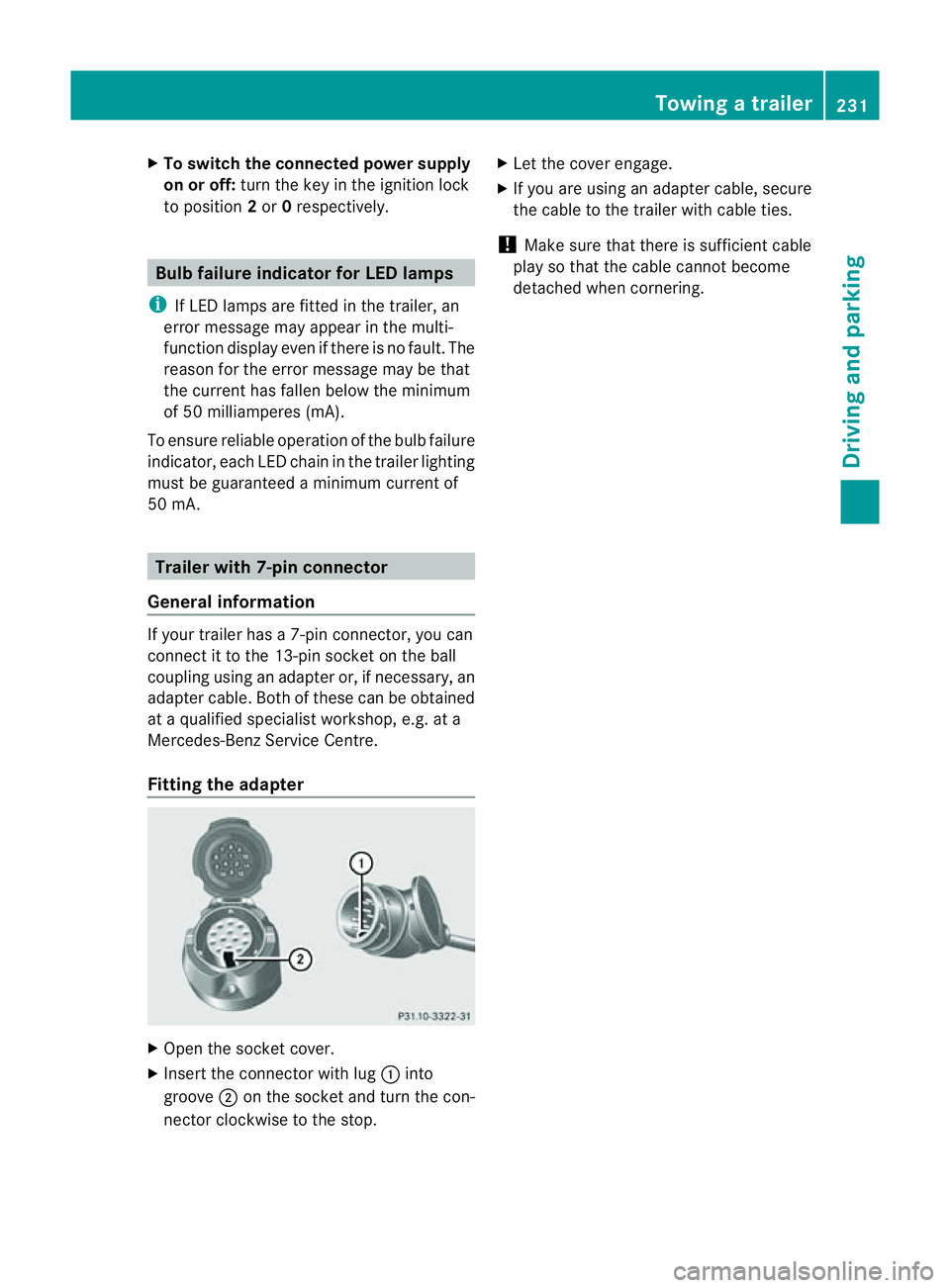
Open the socket cover.
X Insert the connector with lug :into
groove ;on the socket and tur nthe con-
nec torc lockwise to the stop. X
Let the cover engage.
X If you are using an adapter cable, secure
the cable to the trailer with cable ties.
! Make sure that there is sufficient cable
play so that the cable cannot become
detached when cornering. Towing
atrailer
231Driving andparki ng Z
Page 237 of 389
Usefu
linfor mati on
i This Owner's Manual describes all models
and all standard and optional equipment
available to your vehicle at the time of pub-
lication of the Owner's Manual. Country-
specific deviation sare possible .Please
not ethat your vehicle ma ynot be equipped
with all featur es described. This also
applies to safety-releva ntsystems and
functions.
i Please read the information on qualified
specialist workshops (Y page 24).Important safet
ynotes
You will fin danillustration of th einstrument
cluste rinthe "A taglance "section
(Y page 30). G
WARNING
Only use th eon-bo ardc omputer wh en road
and traffic condition spermit .You would oth-
erwise be distracted and unable to concen-
trate properly on driving, and coul dcause an
accident. G
WARNING
No message swill be displayed if either the
instrument cluster or the multifunction dis-
play is inoperative.
As aresult, you will not be able to see infor-
mation about your driving conditions, such as
speed, outside temperature, warning and indi-
cator lamps, display messages or system fail-
ures. Drivin gcharacteristic smay be impaired.
Adjust your driving style and vehicle speed
accordingly.
Contact aqualified specialist workshop
immediately. G
WARNING
The on-board computer only records and dis-
plays malfunctions and warnings from certain
systems. For this reason, you should always make sure that your vehicle is safe to use. You
could otherwis
ecause an accident by driving
an unsafe vehicle. G
WARNING
The operating safety of your vehicle could be
impaired if maintenance work is carried out
incorrectly. This could cause you to lose con-
trol of your vehicle and cause an accident.
Moreover, the safety systems may no longer
be able to protect you or others as they are
designed to do.
Always have service work carried out at a
qualified specialis tworkshop. Displays and operation
Coolant tempera
tureg auge
Th ec oolant temperatur egauge is in the
instrument cluster on the right-hand side.
Under normal operating conditions and with
the specified coolant level, the coolant tem-
perature may rise to 120 †.
At high outside temperatures and when driv-
ing uphill, the coolant temperature may rise
to the end of the scale. Rev counter
The red band in the rev counter indicates the
engine's overrevvin grange.
! Do not drive in the overrevving range.
Doing so will damage the engine.
The fuel supply is interrupted to protect the
engine when the red band is reached. Outside temperature display
The outside temperature display is in the mul-
tifunction display (Y page 236). G
WARNING
At temperatures just above freezing point, the
street may be icy, especially in wooded areas 234
Displays and operationOn-board computer and displays
Page 241 of 389
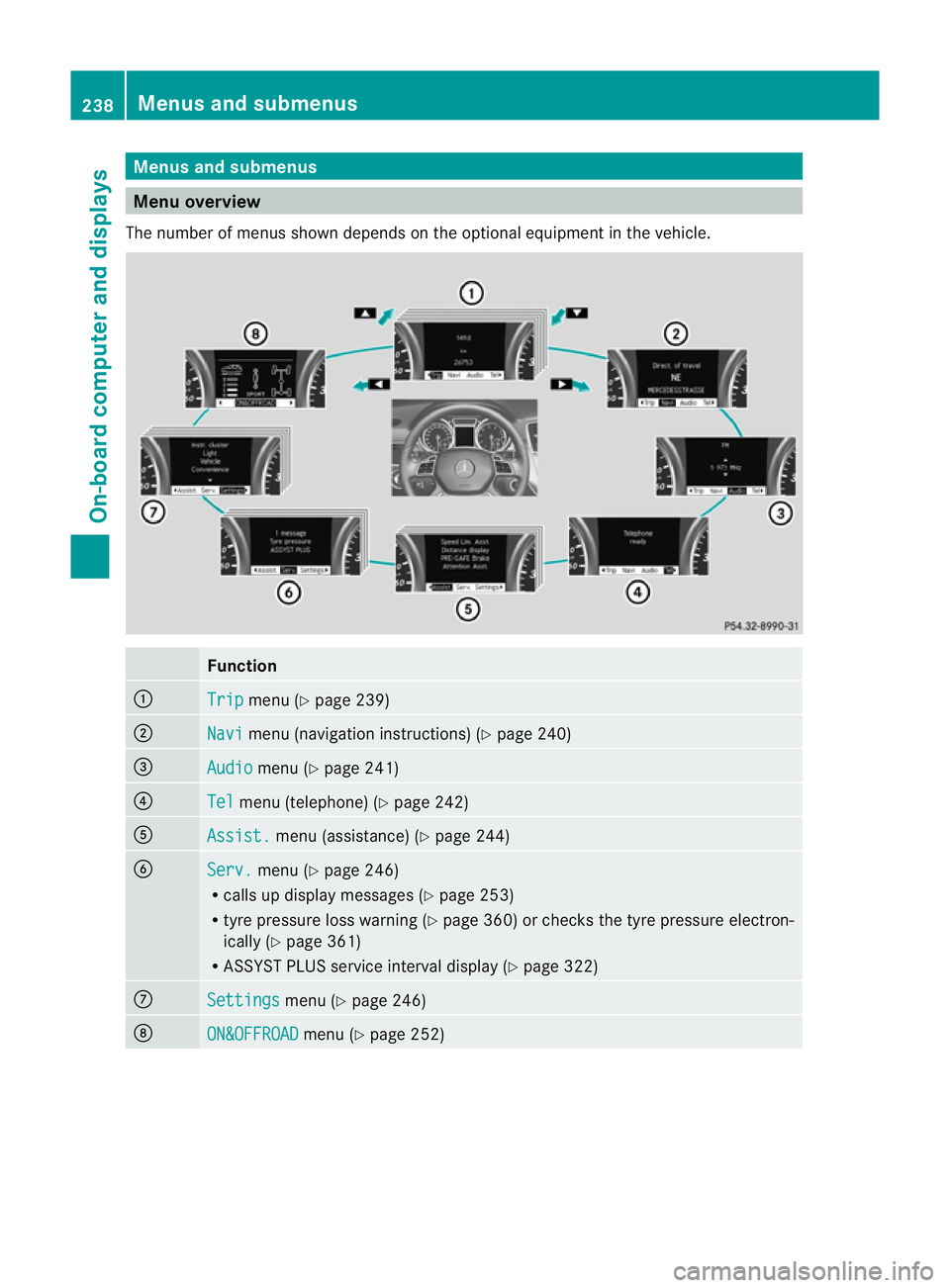
Menus and submenus
Men
uoverview
The number of menu sshown depends on the optional equipment in the vehicle. Function
:
Trip menu (Y
page 239) ;
Navi menu (navigation instructions) (Y
page 240)=
Audio menu (Y
page 241) ?
Tel menu (telepho
ne)(Y page 24 2) A
Assist. me
nu (assistance) (Y page244) B
Serv. menu (Y
page246)
R call supd isplay messages (Y page 253)
R tyre pressure loss warnin g(Ypage 36 0)or checks the tyr epressure elect ron-
ically (Y page361)
R ASSYST PLUS service interval display (Y page322) C
Settin
gs menu (Y
page 246) D
ON&OFFROAD menu (Y
page 252) 238
Menus an
dsubmenusOn-board computer and displays