ECU MERCEDES-BENZ METRIS 2016 MY16 Operator’s Manual
[x] Cancel search | Manufacturer: MERCEDES-BENZ, Model Year: 2016, Model line: METRIS, Model: MERCEDES-BENZ METRIS 2016Pages: 310, PDF Size: 7.28 MB
Page 156 of 310
Problems with PARKTRONIC
ProblemPossible causes/consequences andMSolutions
Only the red segments in
the PARKTRONIC warn-
ing displaysare lit.
Aw arning tone also
sounds for approx-
imately 2seconds.
PARKTRONIC is then
deactivated.
The indicator lamp of the
f button lights up
and the red segments in
the PARKTRONIC warn-
ing display go out.PARKTRONIC has malfunctioned and has switched itself off.
XIf problems persist, have PARKTRONIC checked at aqualified spe-
cialist workshop.
The PARKTRONIC warn-
ing displaysi mplausible
distances.
For example, all the seg-
mentsm ay be lit even
though there is no obsta-
cle present.The PARKTRONIC sensors are dirty or iced up.
XClean the PARKTRONIC sensors (Ypage 257).
XTurn the key to position 2again in the ignition lock.
The license plate or other parts attached near the sensors may not be
secured correctly.
XCheck the license plate and attachmentp arts near the sensors for
correct seating.
An external radio or ultrasonic source may be causing interference.
XCheck PARKTRONIC functions in adifferent location.
Active Parking Assist
General notes
Active Parking Assist is an electronic parking
aid. The system uses ultrasound sensors to
measure the road on both sides of the vehicle
and indicates suitable parking spaces. It can
then actively steer and brake the vehicle to help
you to park and exit the parking space.
Active Parking Assist includes the PARKTRONIC
parking aid which indicates visuallya nd audibly
the distance between your vehicle and an
object .Todot his, PARKTRONIC uses the ultra-
sonic sensors of the Active Parking Assist
(
Ypage 150).
Important safety notes
Active Parking Assist is only an aid. It is not a
substitute for your attention to the immediate
surroundings. You are responsible for safe maneuvering, parking and pulling away.M
ake
sure that no persons, animals or object sare in
the maneuvering range.
When you deactivate PARKTRONIC, Active Park-
ing Assist will also be deactivated.
For vehicles with atrailer coupling installed, the
minimum length for parking spaces will be
slightly increased.
If you have attached atrailer to your vehicle, you
should not use Active Parking Assist. Once the
electrical connection is established between
your vehicle and the trailer, Active Parking
Assist is no longer available. PARKTRONIC is
then deactivated for the rear area.
GWARNING
While parking or pulling out of aparking
space, the vehicle swings out and can drive
onto areas of the oncomingl ane. This could
result in acollision with another road user.
There is arisk of an accident.
154Driving systems
Driving and parking
Page 158 of 310
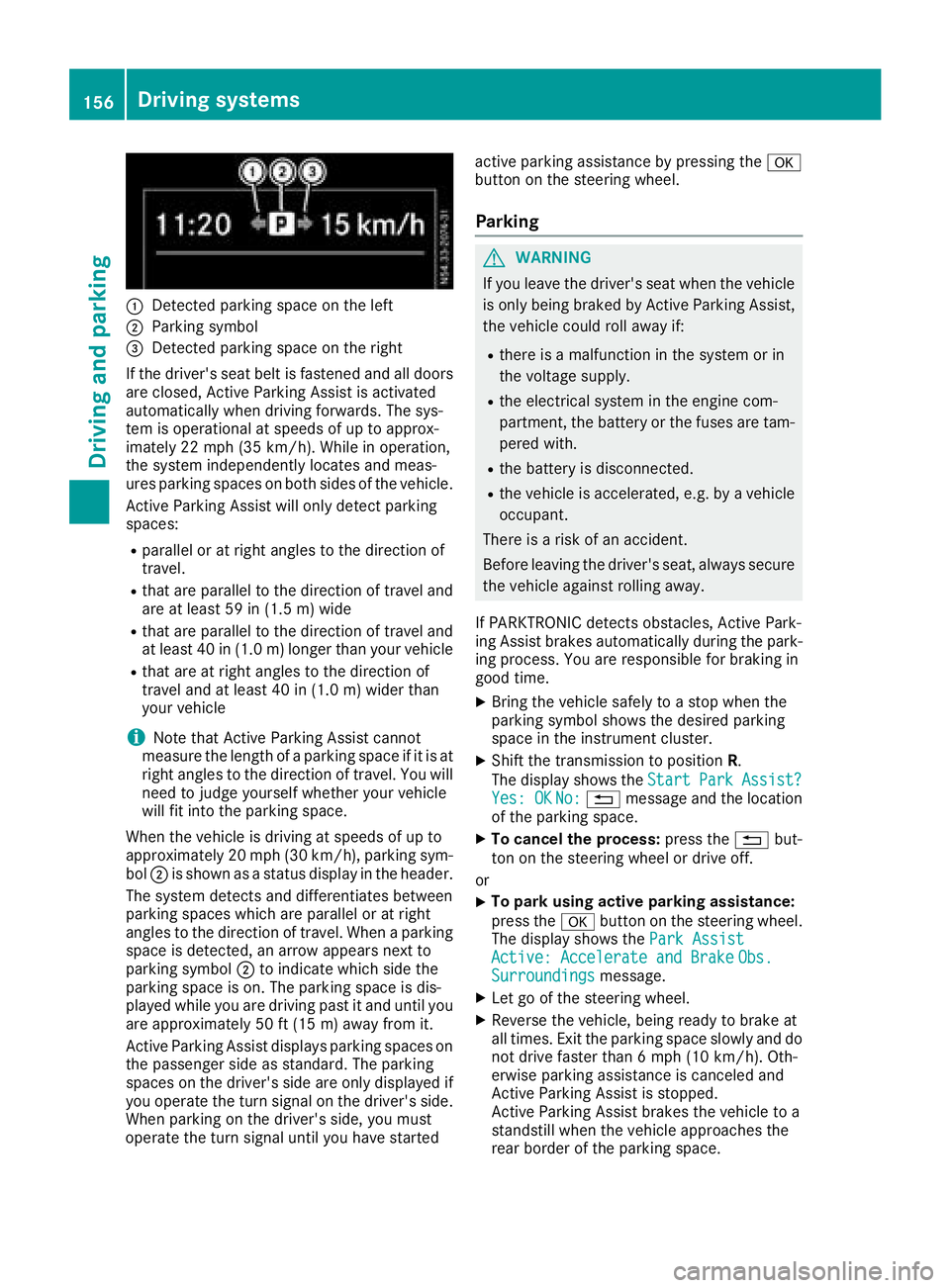
:Detected parkingspace on the left
;Parkin gsym bol
=Detected parkin gspace on the right
If the driver's sea tbeltisf astened and al ldoo rs
ar ec losed ,Activ eParkin gA ssist is activated
automaticall ywhend rivin gforwards .The sys-
tem is operational at speeds of up to approx-
imatel y22m ph (35 km/h). Whil einoperation,
the system independentl yloc ate sand meas-
ures parkin gspacesonb oths ides of the vehicle.
Activ eParkin gA ssist will onl ydetect parking
spaces:
Rparallel or at right angle stothe direction of
travel.
Rthata reparallel to the direction of travel and
ar eatl east59 in (1.5 m) wide
Rthatareparallel to the direction of travel and
at leas t40in( 1.0m) lo nger thany ourvehicle
Rthata re at right angle stothe direction of
travel and at leas t40in( 1.0 m) wider than
your vehicle
iNote thatA ctiveParking Assist cannot
measure the length of aparking space if it is at
right angle stothe direction of travel .You will
nee dtoj udge yourself whether your vehicle
will fit into the parking space.
When the vehicl eisdrivingats peeds of up to
approximately 20 mph (30 km/h), parking sym-
bol ;is shown as astatus dis
pla y
int he header.
The systemd etects and differentiate sbetween
parking space swhich ar eparalle loratr ight
angle stothe direction of travel .Whenap arking
space is detected, an arrow appear snext to
parking symbol ;to indicate which side the
parking space is on. The parking space is dis-
played whil eyou ared rivin gpastita nd unti lyou
ar ea pproximately 50 ft (15 m) awayfromi t.
Active Parkin gAssist display sparking spaces on
the passengers ideass tandard. The parking
spaces on the driver's side ar eonlyd isplayed if
yo uo perate the turn signalont he driver's side.
Whe nparking on the driver's side ,you must
operate the turn signalu ntilyou have started active parking assistance by pressing the
a
button on the steering wheel.
Parking
GWARNING
If yo uleave the driver's sea twhent he vehicle
is onlyb eing braked by Active Parking Assist,
the vehicl ecould rol lawa yif:
Rther eisam alfunctio ninthe system or in
the voltag esupply.
Rthe electrical system in the engine com-
partment, the battery or the fuses ar etam-
pered with.
Rthe battery is disconnected.
Rthe vehicl eisaccelerated,e .g.b yav ehicle
occupant.
There is ariskofana ccident.
Before leaving the driver's seat, always secure the vehicl eagain st rolling away.
If PARKTRONICd etects obstacles, Active Park-
ing Assist brakes automaticall yduring the park-
ing process. Yo uareresponsibl efor braking in
goo dtime.
XBring the vehicl esafelytoas top when the
parking symbo lshows the desired parking
space in the instrument cluster.
XShift the transmission to position R.
The display shows the Start
ParkAssist?Yes:OKNo:% message and the location
of the parking space.
XTo cance lthe process: press the%but-
ton on the steering whee lordrive off.
or
XTo park using active parking assistance:
press the abutton on the steering wheel.
The display shows the ParkAssist
Active :Accelerat eand BrakeObs.Surroundingsmessage.
XLet go of the steering wheel.
XReverse the vehicle, being ready to brake at
allt imes. Exit the parking space slowly and do
not drive faster than6m ph (10 km/h). Oth-
erwis eparking assistance is cancele dand
Active Parking Assist is stopped.
Active Parking Assist brakes the vehicl etoa
standstill when the vehicl eapproaches the
rea rborde roft he parking space.
156Driving systems
Driving an dparking
Page 165 of 310
Therefore notethe following:
ROnly installaball coupling that is approved
for your vehicle.
RBefore the journey, make sure that the ball
coupling is correctly installed and secured.
To do this, observe the operating instruc-
tions of the ball coupling manufacturer.
RDo not make any modification stothe ball
coupling or the trailer tow hitch.
You must observe the operating instructions
of the trailer tow hitch or ball coupling manu-
facturer.
GWARNING
If the ball coupling is not correctly installed
and secured, it could come loose while driving and endanger other road users. There is arisk
of an accident and injury.
Install and secure the ball coupling as descri-
bed in the ball coupling manufacturer's instal-
lation instructions .Make sure that the ball
coupling is correctly installed and secured
before every journey.
GWARNING
When the vehicle/trailer combination begins
to lurch, you could lose control of it. The vehi- cle/trailer combination could even rollover.
There is arisk of an accident.
On no account should you attempt to
straighten up the vehicle/trailer combination
by increasingt he speed. Reduce vehicle
speed and do not countersteer. Apply the
brake as necessary.
You can attach carrier systems such as bicycle
racks or load-bearing implements on the ball
coupling. The maximum noseweight of 165 lb
(75 kg) applies when using carrier systems on
the ball coupling.
Always observe the operating instructions pro-
vided by the manufacturers of the trailer cou-
pling and the ball coupling.
Couple and decouple the trailer carefully. When backing up the towing vehicle, make sure
nobody is standin gbetween the vehicle and the
trailer. At
railer which is incorrectly coupled to the tow-
ing vehicle could break away.Ac orrectly cou-
pled trailer must be positioned horizontally
behind the towing vehicle.
Ensure that the following weights are not excee-
ded:
Rthe permissible noseweight
Rthe permissible trailer load
Rthe permissible rear axle load of the towing
vehicle
Rthe maximum permissible gross vehicle
weight of both the towing vehicle and the
trailer
Rthe maximum permissible gross weight of
vehicle/trailer combination
The applicable permissible values that may not
be exceeded can be found:
Rin your vehicle documents
Ron the type plates for the trailer tow hitch
Ron the type plates for the trailer
Ron the vehicle identification plate
(Ypage 294).
Where the values differ, the lowest is valid.
You will find the values approved by the manu-
facturer on the vehicle identification plates and
those for the towing vehicle in the "Technical
data" section (
Ypage 305).
Your vehicle behaves differently with atrailer
than without one.
The vehicle/trailer combination:
Ris heavier
Ris restricted in its acceleration and gradient-
climbing capability
Rhas an increased braking distance
Ris more susceptible to stron gcrosswinds
Rrequires more sensitiv esteering
Rhas alarger turnin gcircle
This may impair the handling characteristics.
When towing atrailer, alwaysa djust your speed
to suit the road and weather conditions. Drive
carefully. Maint ainasafe
distance.
If you require any further explanation regarding
the information contained in the Operating
Instructions, please contact aMercedes-Benz
Commercial Van Center.
Towing atrailer163
Driving and parking
Z
Page 167 of 310
Coupling upatrailer
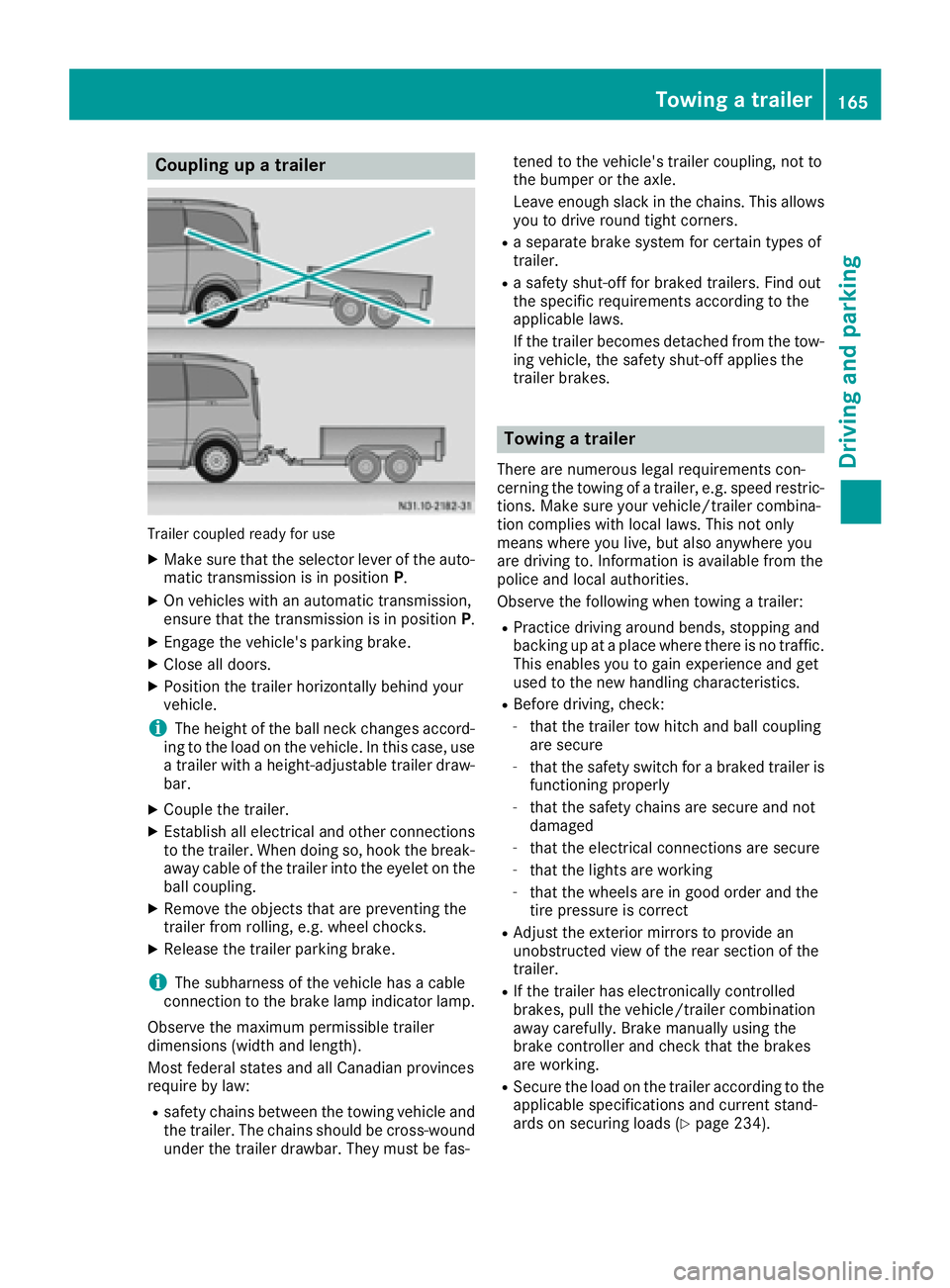
Trailer coupled read yfor use
XMakes ure that th eselecto rleveroft heauto-
matic transmission is in position P.
XOn vehicleswithana utomatic transmission,
ensure that th etransmission is in position P.
XEngage thevehicle's parking brake.
XClose all doors.
XPositio nthe trailer horizontally behindy our
vehicle.
iThe height of th eball neck changes accord-
ing to th eload on th evehicle .Inthisc ase, use
at railer withah eight-adjustable trailer draw-
bar.
XCouple th etrailer.
XEstablish all electrical and other connections
to th etrailer.W hen doings o, hook thebreak-
away cabl eofthetrailer int othe eyelet on the
ball coupling.
XRemove th eobject sthata re preventin gthe
trailer from rolling ,e.g.w heel chocks.
XRelease th etrailer parking brake.
iThe subharness of th evehicle has acable
connection to th ebrak elamp indicator lamp.
Observ ethe maximum permissible trailer
dimensions( widthand length).
Mostf ederal state sand all Canadian provinces
require by law:
Rsafety chains between th etow ing vehicle and
th et railer.T he chains should be cross-wound
unde rthe trailer drawbar. They must be fas- tene
dtot hevehicle's trailer coupling, no tto
th eb umpe rortheaxle.
Leavee nough slackint hechains .This allows
you to driv eroun dtight corn
ers.
Raseparate brak esystem for certain type sof
trailer.
Ras afety shut-off for braked trailers. Fin dout
th es pecific requirements according to the
applicable laws.
If th etrailer become sdetached from th etow -
ing vehicle ,the safety shut-off applies the
trailer brakes.
Towin gatrailer
Therea re numerous legal requirements con-
cernin gthe towing of atrailer,e .g.s peedr estric-
tions .Makes ure your vehicle/traile rcombina-
tio nc omplies withl ocal laws. This no tonly
mean swherey ou live ,but also anywhere you
are driving to .Inf ormation is available from the
policea nd local authorities.
Observ ethe followingw hen towing atrailer:
RPractic edriving aroun dbends, stoppinga nd
backing up at aplacew herethere is no traffic.
This enables you to gain experience and get
used to th enew handlingc haracteristics.
RBefore driving ,che ck:
-that th etrailer to whitch and ball coupling
are secure
-that th esafety switch for abraked trailer is
functioning properly
-that th esafety chains are secure and not
damaged
-that th eelectrical connectionsa re secure
-that thelightsa re working
-that thewheelsa re in good order and the
tir ep ressure is correct
RAdjus tthe exterior mirror stoprovide an
unobstructe dview of th erear sectio nofthe
trailer.
RIf th etrailer has electronicall ycontrolled
brakes, pull th evehicle/traile rcombination
away carefully. Brake manually usingt he
brak econtroller and check that th ebrakes
are working.
RSecure th eload on th etrailer according to the
applicable specifications an d currentst and-
ards on securin gloads (Ypage 234).
Towing atrailer165
Driving and parking
Z
Page 168 of 310
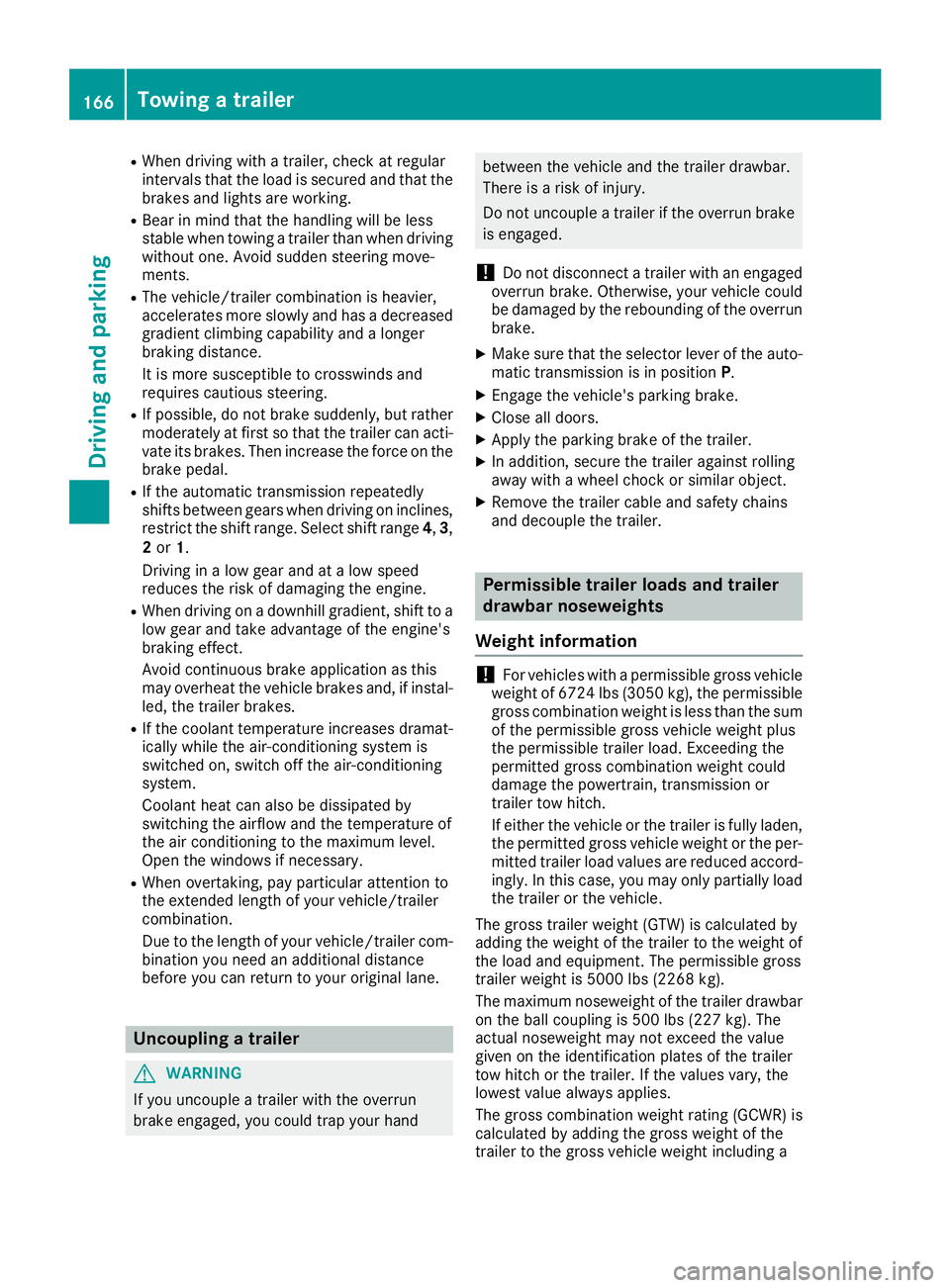
RWhen driving withatrailer, check at regular
intervals that the load is secured and that the
brakes and lights are working.
RBear in mind that the handling will be less
stable when towing atrailer than when driving
without one. Avoid sudden steerin gmove-
ments.
RThe vehicle/trailer combination is heavier,
accelerates more slowly and has adecreased
gradient climbing capability and alonger
braking distance.
It is more susceptible to crosswinds and
requires cautious steering.
RIf possible, do not brake suddenly, but rather
moderately at first so that the trailer can acti-
vate its brakes. Then increase the forceont he
brake pedal.
RIf the automatic transmission repeatedly
shifts between gears when driving on inclines,
restrict the shift range. Select shift range 4,3,
2 or 1.
Drivin ginal ow gear and at alow speed
reduces the risk of damaging the engine.
RWhen driving on adownhill gradient, shift to a
low gear and take advantage of the engine's
braking effect.
Avoid continuous brake application as this
may overheat the vehicle brakes and, if instal-
led, the trailer brakes.
RIf the coolant temperature increases dramat-
ically while the air-conditionin gsystem is
switched on, switch off the air-conditioning
system.
Coolant heat can also be dissipated by
switchin gthe airflow and the temperature of
the air conditioning to the maximum level.
Open the windows if necessary.
RWhen overtaking, pay particular attention to
the extended length of your vehicle/trailer
combination.
Due to the length of your vehicle/trailer com- bination you need an additional distance
before you can return to your original lane.
Uncoupling atrailer
GWARNING
If you uncouple atrailer with the overrun
brake engaged, you could trap your hand
between the vehicle and the trailer drawbar.
There is arisk of injury.
Do not uncouple atrailer if the overrun brake
is engaged.
!Do not disconnect atrailer with an engaged
overrun brake. Otherwise, your vehicle could
be damaged by the rebounding of the overrun
brake.
XMake sure that the selector lever of the auto-
matic transmission is in position P.
XEngage the vehicle's parking brake.
XClose all doors.
XApply the parking brake of the trailer.
XIn addition, secure the trailer against rolling
away withawheel chock or similar object.
XRemove the trailer cable and safety chains
and decouple the trailer.
Permissible trailer loads and trailer
drawbar noseweights
Weight information
!For vehicles with apermissible gross vehicle
weight of 6724 lbs (3050 kg), the permissible gross combination weight is less than the sum
of the permissible gross vehicle weight plus
the permissible trailer load. Exceeding the
permitted gross combination weight could
damage the powertrain ,transmission or
trailer tow hitch.
If either the vehicle or the trailer is fully laden,
the permitted gross vehicle weight or the per- mitted trailer load values are reduced accord-
ingly. In this case, you may only partially load
the trailer or the vehicle.
The gross trailer weight (GTW) is calculated by
adding the weight of the trailer to the weight of
the load and equipment. The permissible gross
trailer weight is 5000 lbs (2268 kg).
The maximum noseweight of the trailer drawbar
on the ball coupling is 500 lbs (227 kg). The
actual noseweight may not exceed the value
given on the identification plates of the trailer
tow hitch or the trailer. If the values vary, the
lowest value alwaysa pplies.
The gross combination weight rating (GCWR) is
calculated by adding the gross weight of the
trailer to the gross vehicle weight including a
166Towing atrailer
Driving and parking
Page 189 of 310
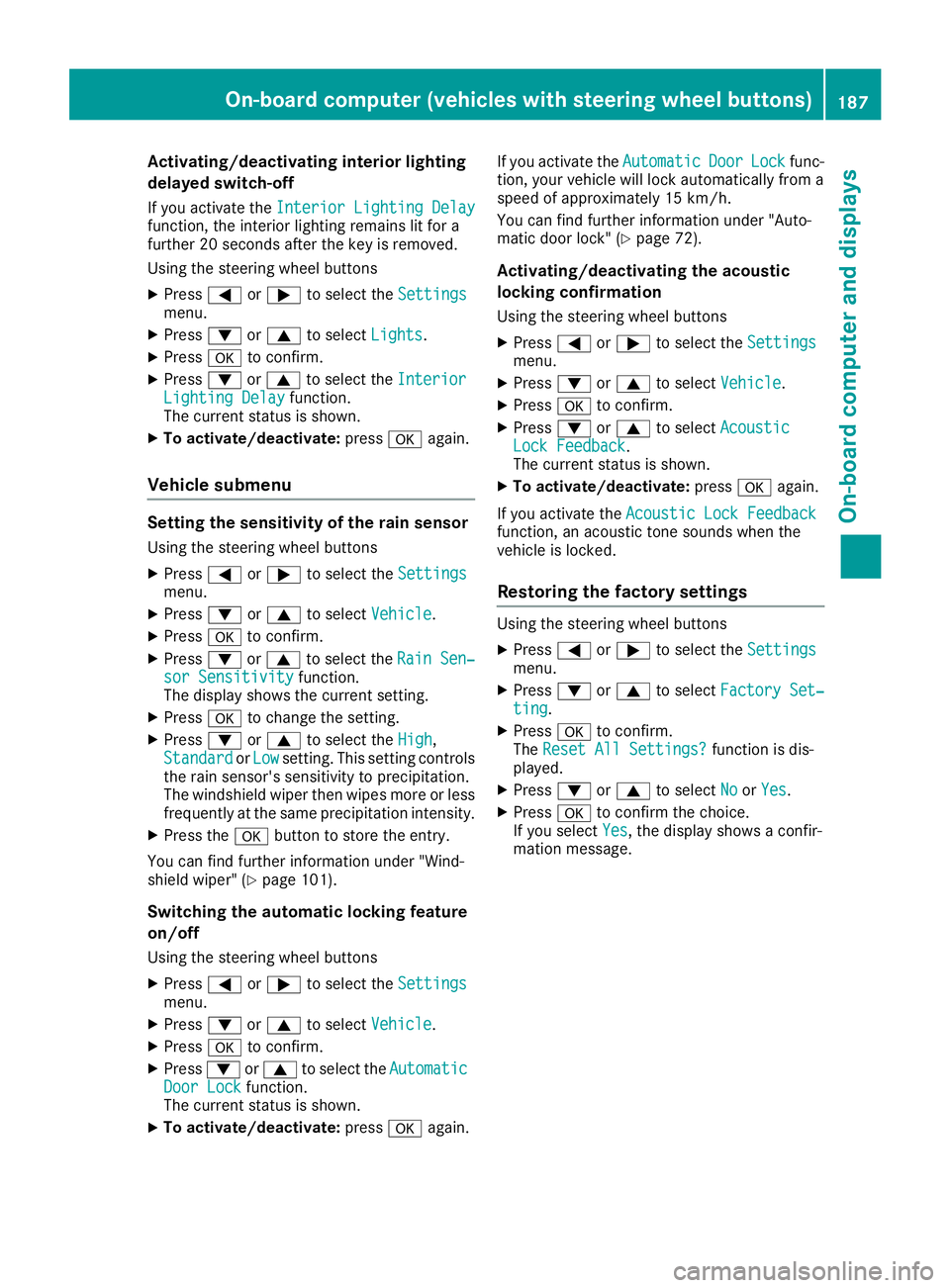
Activating/deactivatinginteri orlighting
delayed switch-off
If you activat ethe Interior Lighting Delayfunction ,the interio rlightin gremains lit for a
further 20 seconds after th ekeyis removed.
Usin gthe steering whee lbuttons
XPress =or; to select th eSettingsmenu.
XPress :or9 to select Lights.
XPressato confirm .
XPress:or9 to select th eInteriorLighting Delayfunction .
The curren tstatus is shown.
XTo act ivate/deact ivate:pressaagain.
Vehicle submenu
Settin gthe sensitivity of therains ensor
Usin gthe steering whee lbuttons
XPress =or; to select th eSettingsmenu.
XPress :or9 to select Vehicle.
XPressato confirm .
XPress:or9 to select th eRai nSen‐sor Sensitivityfunction .
The display shows th ecurren tsetting.
XPress ato chang ethe setting.
XPress :or9 to select th eHig h,
Standardor Lowsetting. This settin gcontrols
th er ain sensor's sensitivit ytop recipitation.
The windshield wiper then wipes mor eorless
frequently at th esame precipitatio nintensity.
XPress th ea buttontos tore th eentry.
You can fin dfurther information under "Wind-
shield wiper "(
Ypage 101).
Switchingthe autom atic lockin gfeature
on/off
Usin gthe steering whee lbuttons
XPress =or; to select th eSettingsmenu.
XPress :or9 to select Vehicle.
XPressato confirm .
XPress:or9 to select th eAutomaticDoo rLockfunction .
The curren tstatus is shown.
XTo act ivate/deact ivate:pressaagain.If you activat
ethe Automatic
Doo rLockfunc-
tion, your vehicl ewill loc kautomatically from a
spee dofa pproximately 15 km/h.
You can fin dfurther information under "Auto-
matic door lock" (
Ypage 72).
Activating/deactivatin gthe acoustic
lockin gconfirm ation
Usingthe steering whee lbuttons
XPress =or; to select th eSettingsmenu.
XPress :or9 to select Vehicle.
XPressato confirm .
XPress:or9 to select AcousticLockFeedback.
The curren tstatus is shown.
XTo act ivate/deact ivate:pressaagain.
If you activat ethe Acoustic Loc kFeedback
function ,anacoustic tone sounds when th e
vehicl eislocked.
Restoring th efactor ysettings
Usin gthe steering whee lbuttons
XPress =or; to select th eSettingsmenu.
XPress :or9 to select FactorySet‐tin g.
XPress ato confirm .
The Reset All Settings?function is dis-
played.
XPress :or9 to select NoorYes.
XPress ato confirm th echoice.
If you select Yes,the display shows aconfir -
mation message .
On-boardcomputer (vehicles with steering wheel buttons)187
On-boardcomputer and displays
Z
Page 192 of 310
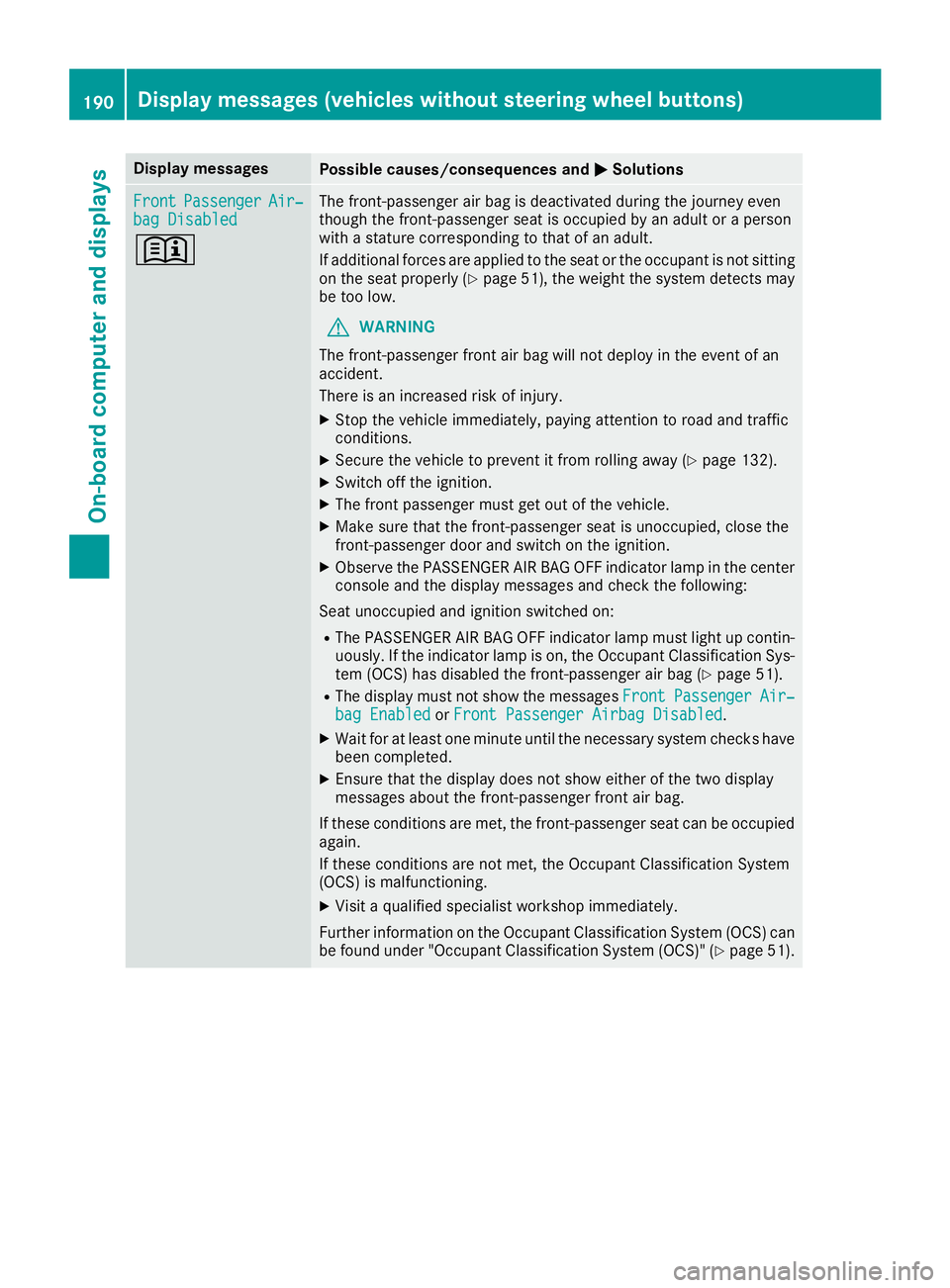
Display messagesPossible causes/consequences andMSolutions
FrontPassengerAir‐bag Disabled
+
The front-passenger air bag is deactivated during th ejou rney eve n
though th efront-pa ssenger seat is occupied by an adult or aperson
wit has tatur ec orre spondin gtothato fana dult.
If additional force sare applie dtotheseat or th eoccupant is no tsitting
on th eseat properly (
Ypage 51), theweigh tthe system detects may
be to olow.
GWARNIN G
The front-passenger fron tair bag will no tdeploy in th eevent of an
accident.
There is an increased ris kofinjury.
XStop th evehicl eimmediately, payin gattention to roa dand traffic
conditions.
XSecur ethe vehicl etopreventitfromr ollin gaway (Ypage 132).
XSwitc hoff th eignition .
XThe fron tpassenger mus tget out of th evehicle.
XMak esuret hatthe front-passenger seat is unoccupied ,close th e
front-passenger door and switch on th eignition .
XObserv ethe PASSENGER AI RBAG OFFindicator lamp in th ecenter
console and th edisplay message sand chec kthe following:
Seat unoccupied and ignition switched on :
RThe PASSENGER AIRBAG OFFindicator lamp mus tligh tupc ontin-
uously. If th eindicator lamp is on ,the Occupant Classification Sys -
te m( OCS )has disabled th efront-pa ssenger air bag (
Ypage 51).
RThe display mus tnotsho wthe message sFrontPassengerAir ‐bag Enable dorFront Passenger Airbag Disabled.
XWait for at least on eminute until th eneces sarysystem checks hav e
been completed.
XEnsur ethatthe display does no tsho we ither of th etwo display
message sabout th efront-pa ssenger fron tair bag.
If these condition sare met ,the front-passenger seat can be occupied
again .
If these condition sare no tmet,t he Occupant Classification Syste m
(OCS )ism alfunctioning .
XVisitaqualified specialist workshop immediately.
Further information on th eOccupant Classification Syste m(OCS )can
be found under "Occupant Classification Syste m(OCS)" (
Ypage 51).
190Display message s(vehicles withou tsteering wheelbuttons)
On-board computera nd displays
Page 193 of 310
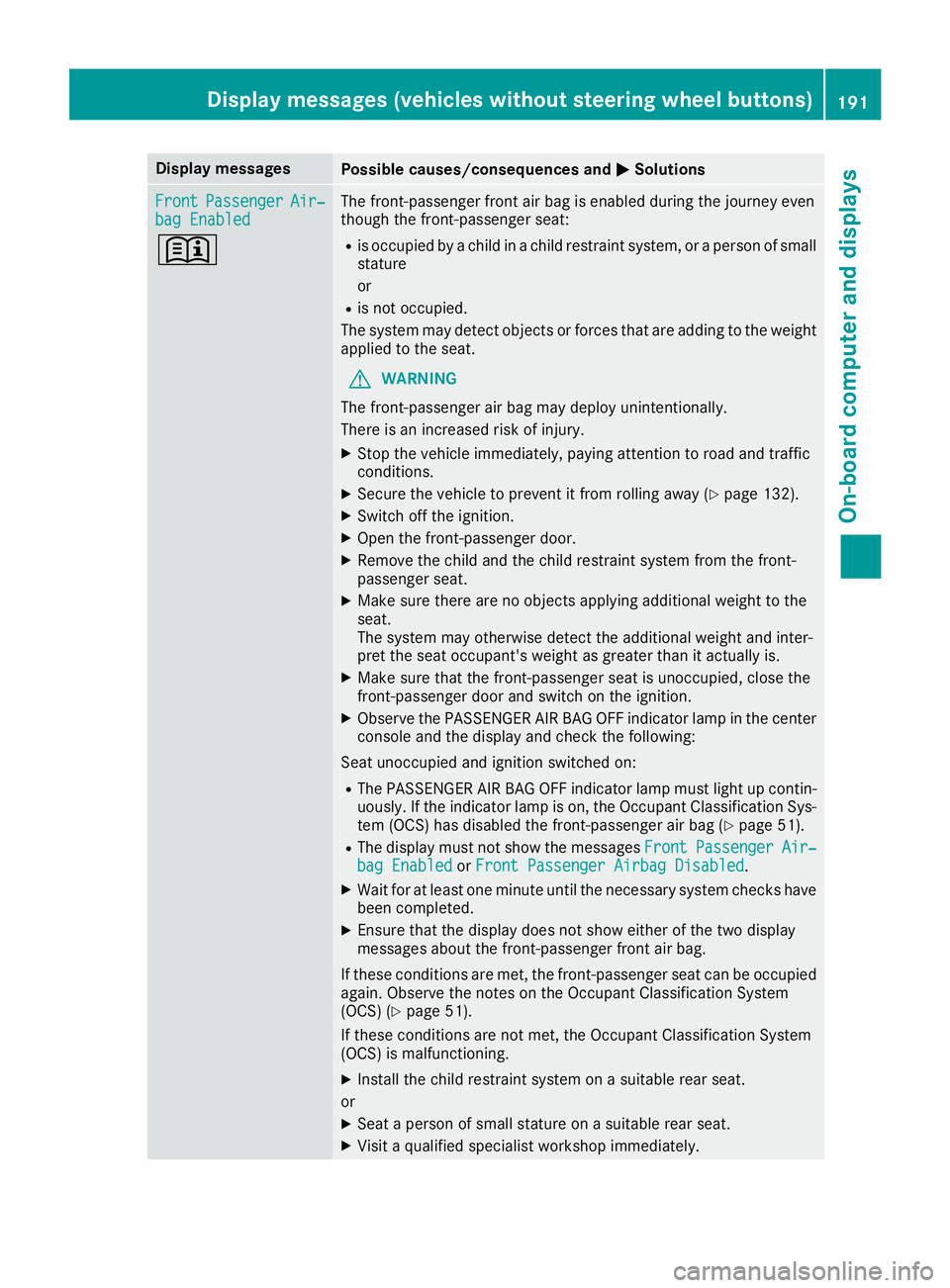
Display messagesPossible causes/consequences andMSolutions
FrontPassengerAir‐bag Enable d
+
The front-passenger fron tair bag is enabled during th ejou rney eve n
though th efront-pa ssenger seat :
Ris occupied by achild in achild restrain tsystem, or aperson of small
statur e
or
Ris no toccupied.
The system may detec tobjects or force stha tare addin gtotheweigh t
applie dtotheseat .
GWARNIN G
The front-passenger air bag may deploy unintentionally.
There is an increased ris kofinjury.
XStop th evehicl eimmediately, payin gattention to roa dand traffic
conditions.
XSecur ethe vehicl etopreventitfromr ollin gaway (Ypage 132).
XSwitc hoff th eignition .
XOpenthe front-passenger door .
XRemove thechild and th echild restrain tsystem from th efront -
passenger seat .
XMakesuret here are no objects applyin gadditional weigh ttothe
seat .
The system may otherwise detec tthe additional weigh tand inter-
pre tthe seat occupant's weigh tasgreatertha nita ctually is.
XMakesuret hatthe front-passenger seat is unoccupied ,close th e
front-passenger door and switch on th eignition .
XObserv ethe PASSENGER AI RBAG OFFindicator lamp in th ecenter
console and th edisplay and chec kthe following:
Seat unoccupied and ignition switched on :
RThe PASSENGER AIRBAG OFFindicator lamp mus tligh tupc ontin-
uously. If th eindicator lamp is on ,the Occupant Classification Sys -
te m( OCS )has disabled th efront-pa ssenger air bag (
Ypage 51).
RThe display mus tnotsho wthe message sFrontPassengerAir ‐bag Enable dorFront Passenger Airbag Disabled.
XWait for at least on eminute until th eneces sarysystem checks hav e
been completed.
XEnsur ethatthe display does no tsho we ither of th etwo display
message sabout th efront-pa ssenger fron tair bag.
If these condition sare met ,the front-passenger seat can be occupied
again .Observ ethe note sont heOccupant Classification Syste m
(OCS )(
Ypage 51) .
If these condition sare no tmet,t he Occupant Classification Syste m
(OCS )ism alfunctioning .
XInstall thechild restrain tsystem on asuitable rear seat .
or
XSeat aperson of small statur eonasuitable rear seat .
XVisitaqualified specialist workshop immediately.
Display message s(vehicles withou tsteering wheelbuttons)19 1
On-board computera nd displays
Z
Page 194 of 310
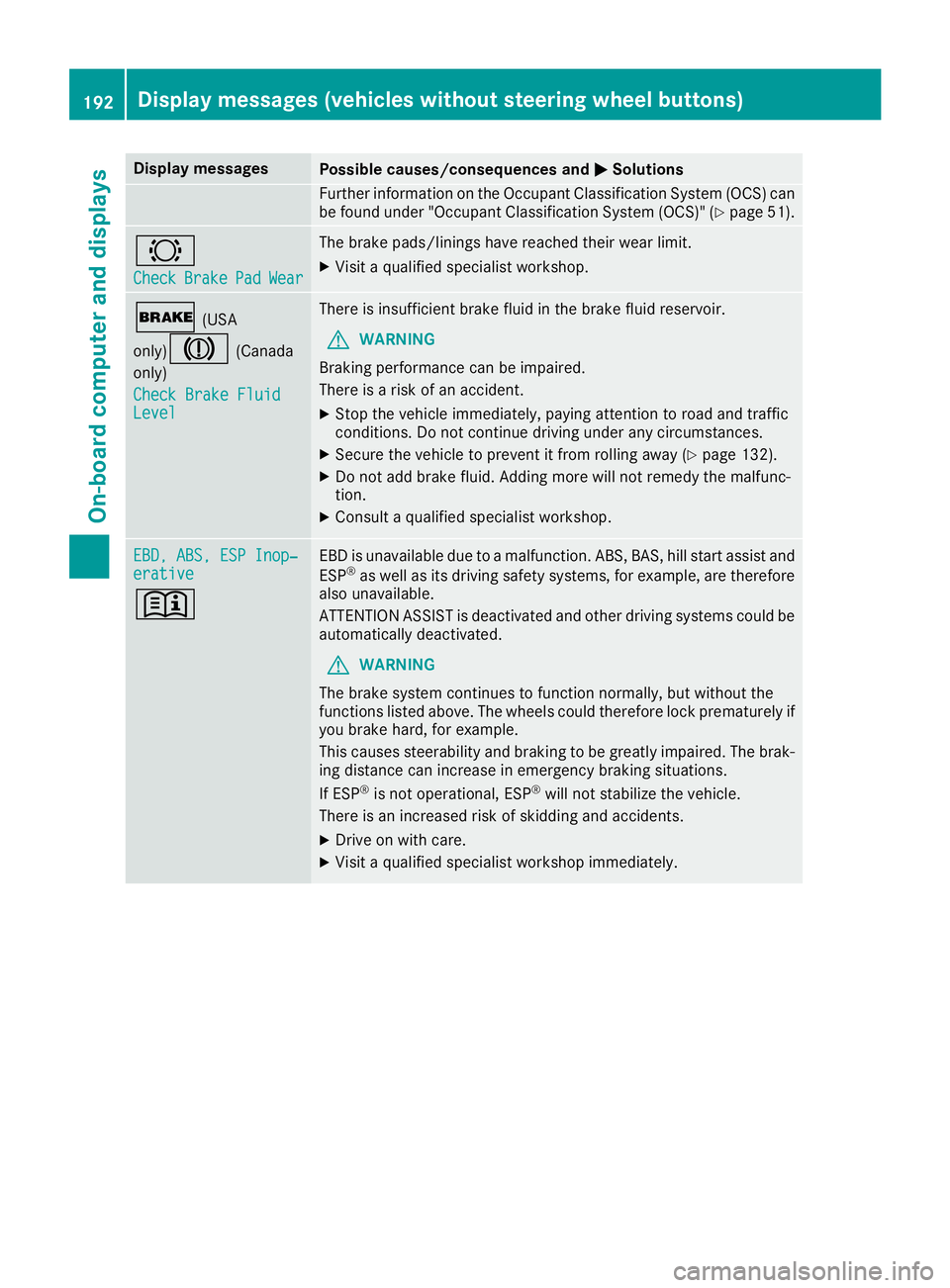
Display messagesPossible causes/consequences andMSolutions
Further information on theOccupant Classification Syste m(OCS )can
be found under "Occupant Classification Syste m(OCS)" (Ypage 51).
#
CheckBrakePadWear
The brak epads/linings hav ereached their wear limit.
XVisit aqualified specialist workshop .
$(USA
only)
J(Canada
only)
Check Brake Fluid
Level
There is insufficien tbrak efluidint hebrak efluid reservoir .
GWARNING
Braking performance can be impaired.
There is ariskofana ccident.
XStop thevehicl eimmediately, payin gattention to roa dand traffic
conditions. Do no tcontinue drivingunder any circumstances.
XSecur ethe vehicl etopreventitfromr ollin gaway (Ypage 132).
XDo no tadd brak efluid .Addingm orew ill no tremedy th emalfunc -
tion .
XConsult aqualified specialist workshop .
EBD,ABS,E SP Inop‐erativ e
+
EBDisu navailable due to amalfunction .ABS ,BAS ,hill start assist and
ES P®as well as it sdrivin gsafet ysystems ,for example, are therefor e
also unavailable .
ATTENTION ASSIST is deactivated and other drivin gsystems could be
automatically deactivated.
GWARNIN G
The brak esystem continues to function normally, but without th e
function slisted above. The wheels could therefor eloc kp rematurel yif
you brak ehard, for example.
This causes steerabilit yand braking to be greatl yimpaired. The brak -
ing distanc ecan increas einemergenc ybraking situations.
If ES P
®is no toperational, ES P®will notstabiliz ethe vehicle.
There is an increased ris kofskiddin gand accidents .
XDrive on withcare.
XVisit aqualified specialist workshop immediately.
192Display message s(vehicles withou tsteering wheelbuttons)
On-board computera nd displays
Page 199 of 310
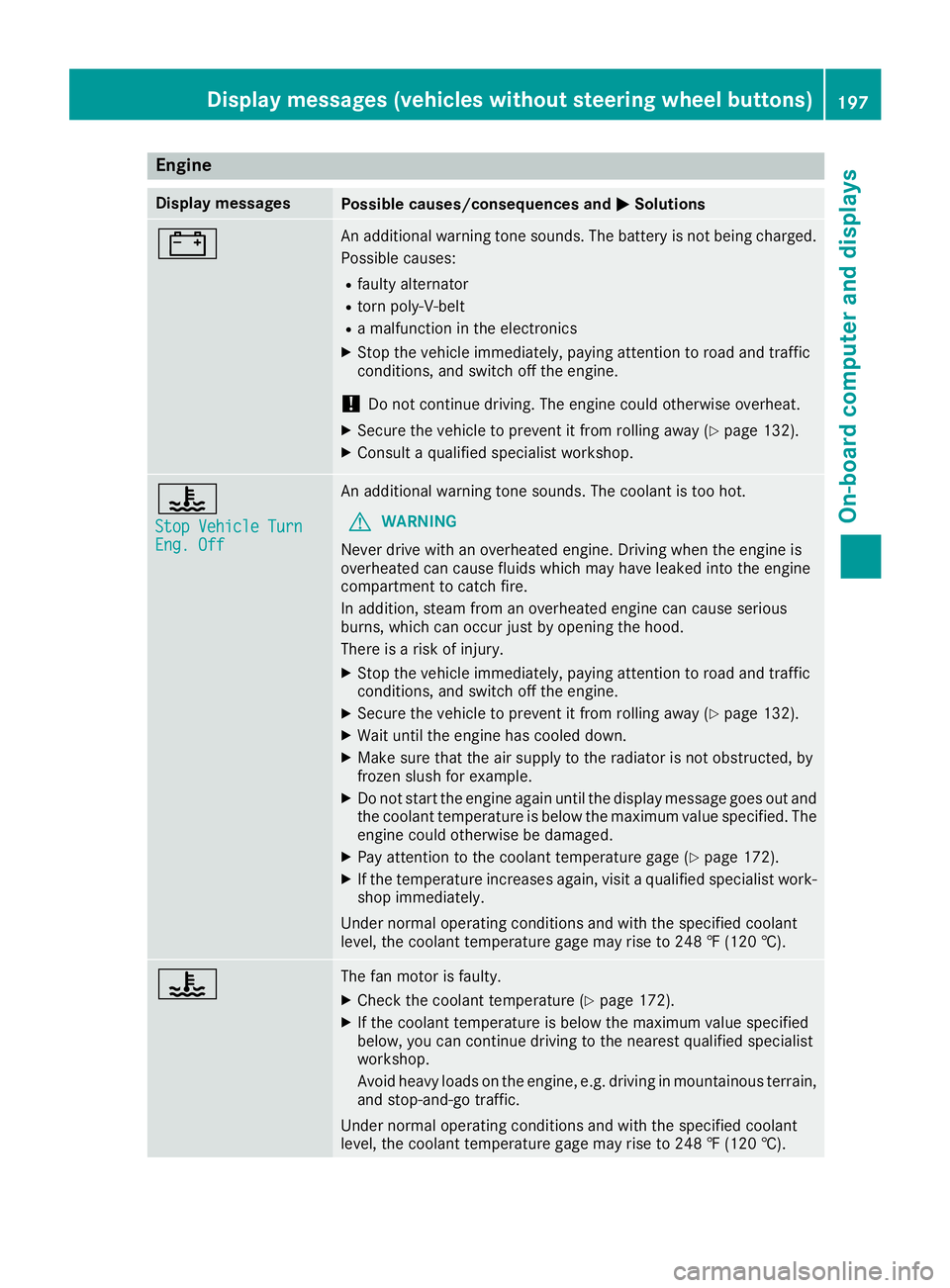
Engine
Display messagesPossible causes/consequences andMSolutions
#An additional warning tone sounds. The battery is no tbeingc harged.
Possible causes:
Rfault yalternator
Rtorn poly-V-belt
Ram alfunctio nintheelectronics
XStop th evehicle immediately, payinga ttention to road and traffic
conditions, and switch off th eengine.
!Do no tcontinue driving .The engine coul dotherwise overheat.
XSecure th evehicle to prevent it from rolling away (Ypage 132).
XConsult aqualified specialist workshop.
?
StopV ehicleT urnEng.Off
An additional warning tone sounds. The coolant is to ohot.
GWARNING
Never driv ewith an overheate dengine .Drivin gw hen th eengine is
overheate dcan caus efluids whichm ay have leaked int othe engine
compartmen ttocatch fire.
In addition,s team from an overheate dengine can caus eserious
burns, whichc an occur justbyopening th ehood.
Thereisar isk of injury.
XStop thevehicle immediately, payinga ttention to road and traffic
conditions, and switch off th eengine.
XSecure th evehicle to prevent it from rolling away (Ypage 132).
XWait until th eengine has cooled down.
XMakes ure that th eair supply to th eradiator is no tobstructed, by
frozen slush for example.
XDo no tstart th eengine again until th edisplay message goes out and
th ec oolant temperatur eisbelow th emaximum value specified. The
engine coul dotherwise be damaged.
XPay attention to th ecoolant temperatur egage (Ypage 172).
XIf th etem peratur eincreases again,v isitaq ualified specialist work-
shop immediately.
Under normal operatin gconditionsa nd with thespecifie dcoolant
level, th ecoolant temperatur egage may rise to 24 8‡(120† ).
?The fan motor is faulty.
XCheckt hecoolant temperatur e(Ypage 172).
XIf thecoolant temperatur eisbelow th emaximum value specified
below, you can continue driving to th enearest qualified specialist
workshop.
Avoid heavyl oads on theengine ,e.g.d riving in mountainous terrain,
and stop-and-go traffic.
Under normal operatin gconditionsa nd with thespecifie dcoolant
level, th ecoolant temperatur egage may rise to 24 8‡(120† ).
Displa ymessages (vehicles without steerin gwheel buttons)197
On-boardc omputer and displays
Z