navigation system MERCEDES-BENZ S-Class 2013 W221 Owner's Guide
[x] Cancel search | Manufacturer: MERCEDES-BENZ, Model Year: 2013, Model line: S-Class, Model: MERCEDES-BENZ S-Class 2013 W221Pages: 542, PDF Size: 7.97 MB
Page 167 of 542
Entering an intermediate stop
Introduction
When route guidance is active, you can enter
an intermediate stop. Intermediate stops can
be predefined destinations from the following
categories that COMAND offers for selection:
R Mercedes-Benz Service Center R
Hospital R
Gas Station R
Parking Lot R
Restaurant However, you can also ente
rdestinations
other than the predefined ones. To do this
select the menu item Other .
You can use the intermediate stop function to
influence route guidance to the main
destination. When you have reached your
intermediate stop, COMAND automatically
recalculates the route to the main
destination.
Entering predefined destinations
X To activate navigation mode: press the
0011 function button once or twice.
X To show the menu: press0021the COMAND
controller.
X Select Destination in the navigation
system menu bar by turning 0031001C0032the
COMAND controller and pressing 0021to
confirm.
X Select Stopover and press
0021to confirm.
Option 1: no intermediate stop has been
entered yet.
X Select a category; see option 2.
Option 2: an intermediate stop has
already been entered.
X Select Change Stopover and press
0021to
confirm. X
To select acategory: select a category by
turning 0031001C0032the COMAND controller and
pressing 0021to confirm.
COMAND first searches in the selected
category for destinations along the route.
If there are no destinations available there,
COMAND searches for destinations within
a radius of up to 100 km of the vehicle
position.
If COMAND finds destinations, a list
appears on the right-hand side of the
display. The currently selected point of
interes tis highlighted on the left-hand side
of the map.
The intermediate stops are listed according
to increasing distance from the current
vehicle position. They are displayed in the
form of a name and their position in relation
to the route and your direction of travel.
If COMAND does not find any destinations,
you will see a message to this effect.
X Confirm OK by pressing
0021.
X Select a different category.
X Select the intermediate stop by turning
0031001C0032 the COMAND controller and pressing
0021 to confirm.
X To start route calculation: selectStart and press
0021to confirm.
Entering another destination as an
intermediate stop
X To activate navigation mode: press the
0011 function button once or twice.
X To show the menu: press0021the COMAND
controller.
X Select Destination in the navigation
system menu bar by turning 0031001C0032the
COMAND controller and pressing 0021to
confirm.
X Select Stopover and press
0021to confirm.
X Select Other and press
0021to confirm. Navigation
165COMAND Z
Page 168 of 542
X
Select Address Entry ,
From Memory ,
From Last Destinations or
From POIs .
Selection Step
Address Entry X
Enter a
destination by
address
(Y page 157). From Memory X
Select a
destination from
the destination
memory
(Y page 163). From Last
Destinations X
Select a
destination from
the list of last
destinations
(Y page 163). From POIs X
Enter a point of
interest
(Y page 166). X
To start route calculation: once you have
entered a destination, select Start and
press 0021to confirm.
Deleting an intermediate stop
If an intermediate stop has already been
entered, you can delete it.
X To activate navigation mode: press the
0011 function button once or twice.
X To show the menu: press0021the COMAND
controller.
X Select Destination in the navigation
system menu ba rby turning 0031001C0032the
COMAND controller and pressing 0021to
confirm.
X Select Stopover and press
0021to confirm. X
Select Delete Stopover and press
0021to
confirm.
COMAND deletes the intermediate stop
and recalculates the route to the main
destination. Entering
apoint of interest
Initiating point of interes tentry X
To activate navigation mode: press the
0011 function button once or twice.
X To show the menu: press0021the COMAND
controller.
X Select Destination in the navigation
system menu bar by turning 0031001C0032the
COMAND controller and press 0021to
confirm.
X Select From POIs and press
0021to confirm.
Am enu appears.
Entering apoint of interes tin the
vicinity of the destination Entering a point of interest in the vicinity of
the destination is only possible when route
guidance is active.
X
Select Destination Area from the menu
and press 0021to confirm.
X Continue with assigning the point of
interest category (Y page 167).
Entering apoint of interes tin the
vicinity of the current position X
Select Current Position and press
0021to
confirm.
X Continue with assigning the point of
interest category (Y page 167).166
NavigationCOMAND
Page 169 of 542
Entering
apoint of interes tin the
vicinity of aspecific city Option 1
X
Select Other City in the menu and press
0021 to confirm.
X If desired, select the state/province
(Y page 157).
X To enter a city: selectCity and press
0021
to confirm.
Proceed as described in the "Entering a
city" section (Y page 157).
X After entering the city, select the point of
interest category (Y page 167).
Option 2
X Enter an address in the address entry
menu, e.g. a city ,stree tand house number
(Y page 157).
X Select POI and press
0021to confirm.
X Select the point of interest category
(Y page 167).
Entering apoint of interes tusing name
search This function allows you to access all the
points of interest available on the digital map.
X Select By Name from the menu and press
0021 to confirm.
You will see a list of further selection
options.
X Select the desired option and press 0021to
confirm.
X Enter the name using the character bar.
Entering apoint of interes tusing the
phone number search This function gives you access to all points of
interest that have a phone number.
X
Select By Telephone Number and press
0021 to confirm.
You will see a list of phone numbers. X
Enter the phone number using the
character bar.
Assigning apoint of interes tcategory Introduction
The categories and points of interest
available depend on the distance from the
vehicle position you have set for the point of
interest.
R
point of interest in the vicinity of the
destination:
Alphabetically sorted categories, as well as
points of interes tinthe vicinity of the target
destination and sorted by distance are
available.
R point of interest in the vicinity of the current
position:
Alphabetically sorted categories are
available, as well as points of interest in the
vicinity of the vehicle position arranged by
distance.
R point of interest within a given city:
If you have entered only the state/province
and the city, the system will return
alphabetically sorted categories and points
of interest within the city limits.
If you have entered more than the state/
province and the city, the system will return
alphabetically sorted categories and points
of interest sorted by distance, all in the
vicinity of the address you entered.
R point of interest using name search:
An alphabetically sorted list of all points of
interest is available.
The list sorts points of interest with the
same name and in the same category
according to distance, starting with those
nearest to you.
Selecting acategory
X Select a mai ncategory by turning 0031001C0032the
COMAND controller. Navigation
167COMAND Z
Page 172 of 542
Selecting
apoint of interes tusing the
map You can select points of interest that are
available in the selected (visible) section of
the map.
X
To activate navigation mode: press the
0011 function button once or twice.
X To show the menu: press0021the COMAND
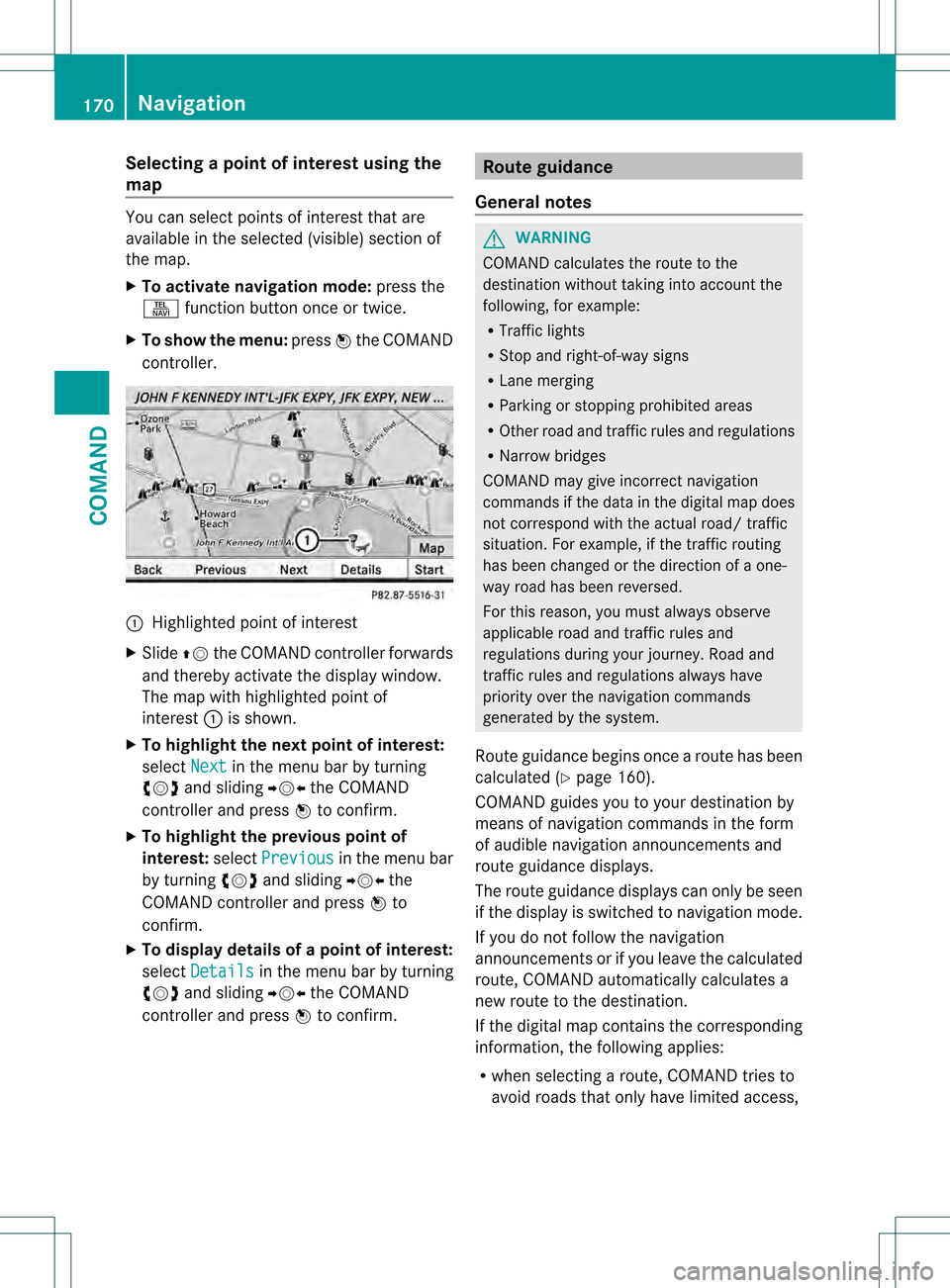
controller. 0002
Highlighted point of interest
X Slide 002A001Cthe COMAND controller forwards
and thereby activate the display window.
The map with highlighted point of
interest 0002is shown.
X To highlight the next point of interest:
select Next in the menu bar by turning
0031001C0032 and sliding 003D001C003Cthe COMAND
controller and press 0021to confirm.
X To highlight the previous point of
interest: selectPrevious in the menu bar
by turning 0031001C0032and sliding 003D001C003Cthe
COMAND controller and press 0021to
confirm.
X To display details of a point of interest:
select Details in the menu bar by turning
0031001C0032 and sliding 003D001C003Cthe COMAND
controller and press 0021to confirm. Route guidance
General notes G
WARNING
COMAND calculates the route to the
destination without taking into account the
following, for example:
R Traffic lights
R Stop and right-of-way signs
R Lane merging
R Parking or stopping prohibited areas
R Other road and traffic rules and regulations
R Narrow bridges
COMAND may give incorrect navigation
commands if the data in the digital map does
not correspond with the actual road/ traffic
situation. For example, if the traffic routing
has been changed or the direction of a one-
way road has been reversed.
For this reason, you must always observe
applicable road and traffic rules and
regulations during your journey. Road and
traffic rules and regulations always have
priority over the navigation commands
generated by the system.
Route guidance begins once aroute has been
calculated (Y page 160).
COMAND guides you to your destination by
means of navigation commands in the form
of audible navigation announcements and
route guidance displays.
The route guidance displays can only be seen
if the display is switched to navigation mode.
If you do not follow the navigation
announcements or if you leave the calculated
route, COMAND automatically calculates a
new route to the destination.
If the digital map contains the corresponding
information, the following applies:
R when selecting a route, COMAND tries to
avoid roads that only have limited access, 170
NavigationCOMAND
Page 175 of 542
Display and description of lane recommendations
The colors used in the lan erecommendation display vary depending on whether day or night
design is switched on. Lane Day design Night design
Recommended lane
0014
In this lane, you will be able to complete the
nextt wo changes of directio nwithout
changing lanes. Dar
kblue Light blue
Possible lane
0024
In this lane, you will only be able to complete
the nex tchange of direction without
changing lanes. Light blue Dark blue
Lane not recommended
0015
In this lane, you will not be able to complete
the next change of direction without
changing lane. Gray Gray
Display in the multifunction display
The lane recommendations are also shown in
the multifunction display. You will find further
information in the "On-board computer"
section (Y page 379).
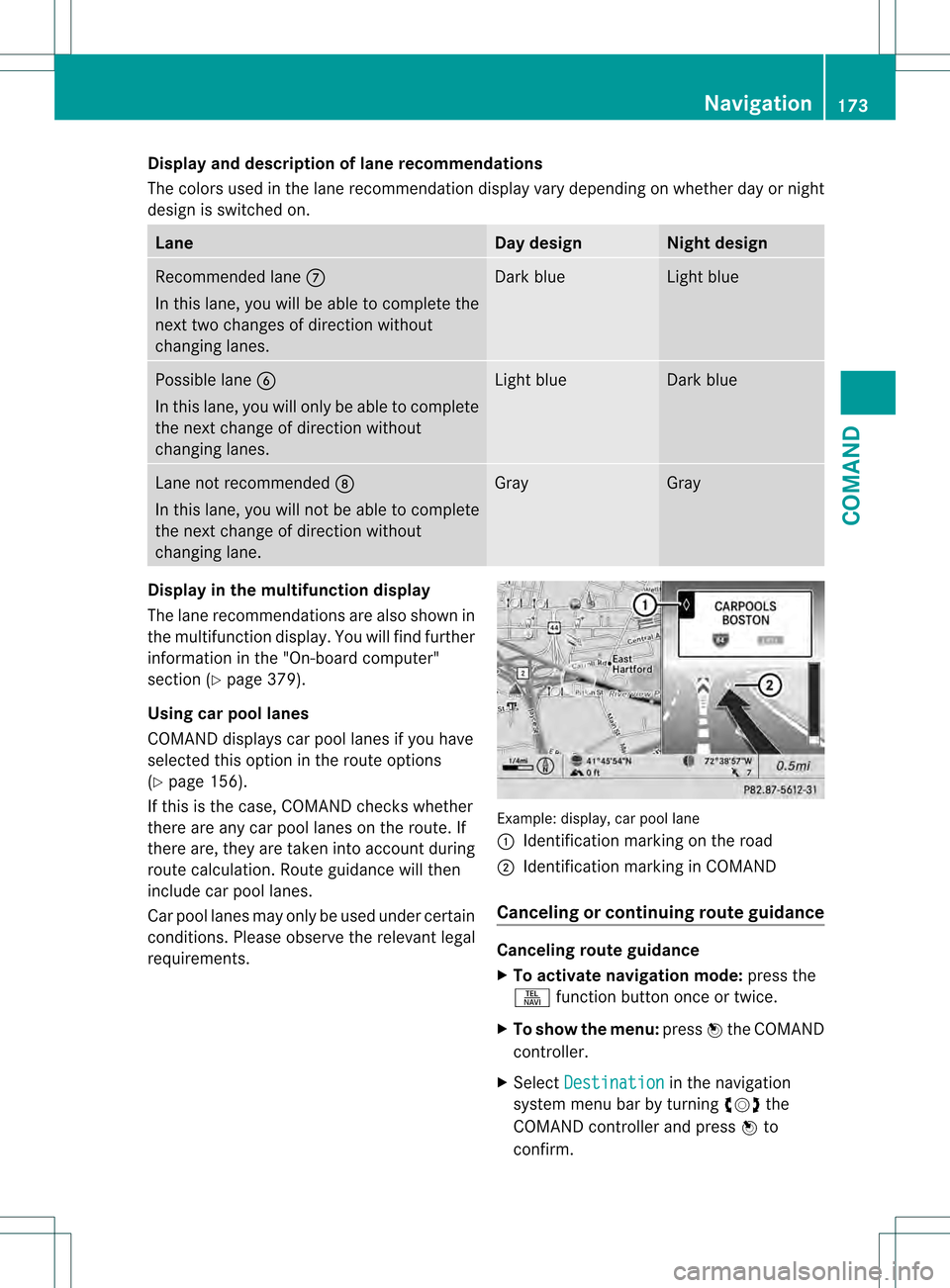
Using car pool lanes
COMAND displays car pool lanes if you have
selected this option in the route options
(Y page 156).
If this is the case, COMAND checks whether
there are any car pool lanes on the route. If
there are, they are taken into account during
route calculation. Route guidance will then
include car pool lanes.
Car pool lanes may only be used under certain
conditions. Please observe the relevant legal
requirements. Example: display, car pool lane
0002
Identification marking on the road
0003 Identification marking in COMAND
Canceling or continuing route guidance Canceling route guidance
X
To activate navigation mode: press the
0011 function button once or twice.
X To show the menu: press0021the COMAND
controller.
X Select Destination in the navigation
system menu bar by turning 0031001C0032the
COMAND controller and press 0021to
confirm. Navigation
173COMAND Z
Page 176 of 542
X
Select Cancel Route Guidance and press
0021 to confirm.
Continuing route guidance
X To activate navigation mode: press the
0011 function button once or twice.
X To show the menu: press0021the COMAND
controller.
X Select Destination in the navigation
system menu ba rby turning 0031001C0032the
COMAND controller and press 0021to
confirm.
X Select Continue Route Guidance and
press 0021to confirm.
COMAND calculates the route.
Destination or area of destination
reached Whe
nyou reach your destination, COMAND
displays a checkered flag and route guidance
is automatically ended.
For certain points of interest (e.g. airports),
the Destination Reached display is shown
as well as the checkered flag.
Navigation announcements Repeating navigation announcements
G
WARNING
Navigation announcements are intended to
direct you while driving without diverting your
attention from the road and driving.
Please always use this feature instead of
consulting the map display for directions.
Looking at the icons or map display can
distract you from traffic conditions and
driving, and increase the risk of an accident.
i Audible navigation announcements are
muted during a telephone call.
If you have missed an announcement, you can
call up the current announcement at any
time. X
To show the menu: press0021the COMAND
controller.
X In the navigation menu bar, confirm RPT with
0021.
Switching navigation announcements
on/off
X To switch off: during the announcement,
press the 0029button on the multifunction
steering wheel.
You will briefly see the message: The driving instructions have been
muted .
X To switch on: press0021the COMAND
controller.
X In the 002Enavigation menu bar, press 0021
to confirm.
i COMAND automatically switches the
navigation announcements back on when:
R you have a new route calculated.
R you start the engine again after having
left the vehicle.
Reducing volume during anavigation
announcement
The volume of an active audio or video source
can be automatically reduced during a
navigation announcement.
X Select Navi in the main function bar by
sliding 002A001Cand turning 0031001C0032the COMAND
controller and press 0021to confirm.
X Select Audio Fadeout and press
0021to
confirm.
The function is switched on 000Aor off 0002,
depending on the previous status.
Setting the volume manually
X Set the volume during a navigation
announcement.
or
X In the map display whe nthe menu is
shown, select 002Eand adjust the volume. 174
NavigationCOMAND
Page 177 of 542
Avoiding
asection of the route blocked
by a traffic jam This function blocks a sectio
nofthe route
ahead of you. You can set the length of the
blocked route section. If possible, COMAND
calculates a detour around the blocked
section of the route.
X To activate navigation mode: press the
0011 function button once or twice.
X To show the menu: press0021the COMAND
controller.
X Select Route in the navigation system
menu bar by turning 0031001C0032the COMAND
controller and press 0021to confirm.
X Select Detour and press
0021to confirm.
X To block a section of the route: select
More or
Less repeatedly and confirm using
0021 until the desired section has been
selected.
i The total length of the section that can be
blocked is defined by the digital map. The
menu items are available accordingly.
X To start route calculation: selectStart and press
0021to confirm.
X To delete the blockeds ection:select
Delete while the message is shown and
press 0021to confirm.
COMAND calculates the rout ewithout the
block.
Selecting an alternative route With the "Alternative route" function, routes
other than the original one can be calculated.
X To activate navigation mode: press the
0011 function button once or twice.
X To show the menu: press0021the COMAND
controller.
X Select Route in the navigation system
menu bar by turning 0031001C0032the COMAND
controller and press 0021to confirm. X
Select Alternative Route and press
0021
to confirm.
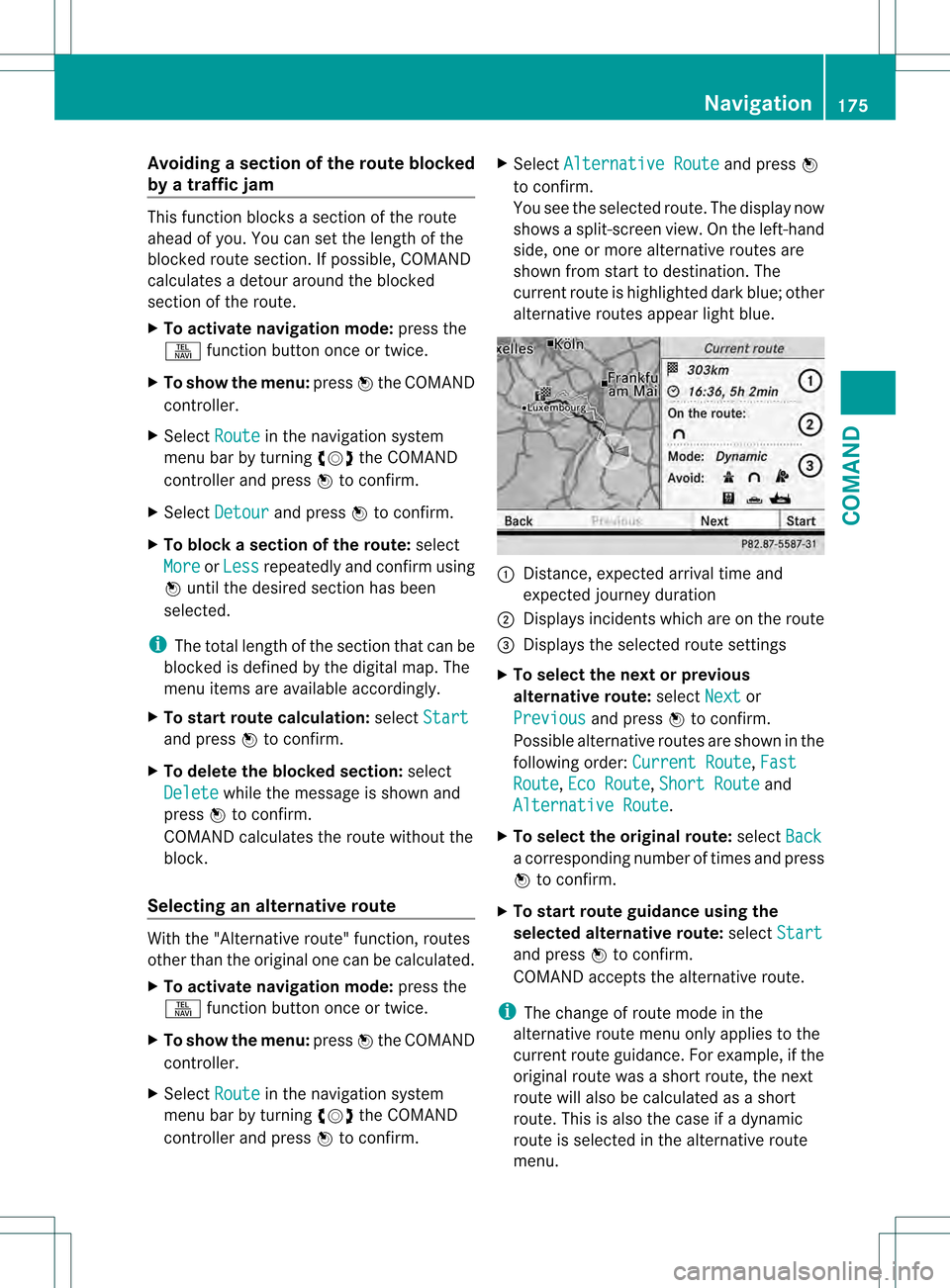
You see the selected route. The display now
shows a split-screen view. On the left-hand
side, one or more alternative routes are
shown from start to destination. The
current route is highlighted dark blue; other
alternative routes appear light blue. 0002
Distance, expected arrival time and
expected journey duration
0003 Displays incidents which are on the route
0026 Displays the selected route settings
X To select the next or previous
alternative route: selectNext or
Previous and press
0021to confirm.
Possible alternative routes are shown in the
following order: Current Route ,
Fast Route ,
Eco Route ,
Short Route and
Alternative Route .
X To select the original route: selectBack a corresponding number of times and press
0021
to confirm.
X To start route guidance using the
selected alternative route: selectStart and press
0021to confirm.
COMAND accepts the alternative route.
i The change of route mode in the
alternative route menu only applies to the
current route guidance. For example, if the
original route was a shor troute, the next
route will also be calculated as a short
route. This is also the case if a dynamic
route is selected in the alternative route
menu. Navigation
175COMAND Z
Page 178 of 542
Displaying destination information
Prerequisite: you have entered a destination
(Y page 157) and possibly an intermediate
stop (Y page 165).
X To activate navigation mode: press the
0011 function button once or twice.
X To show the menu: press0021the COMAND
controller.
X Select Info in the menu bar by turning
0031001C0032 the COMAND controller and press
0021 to confirm.
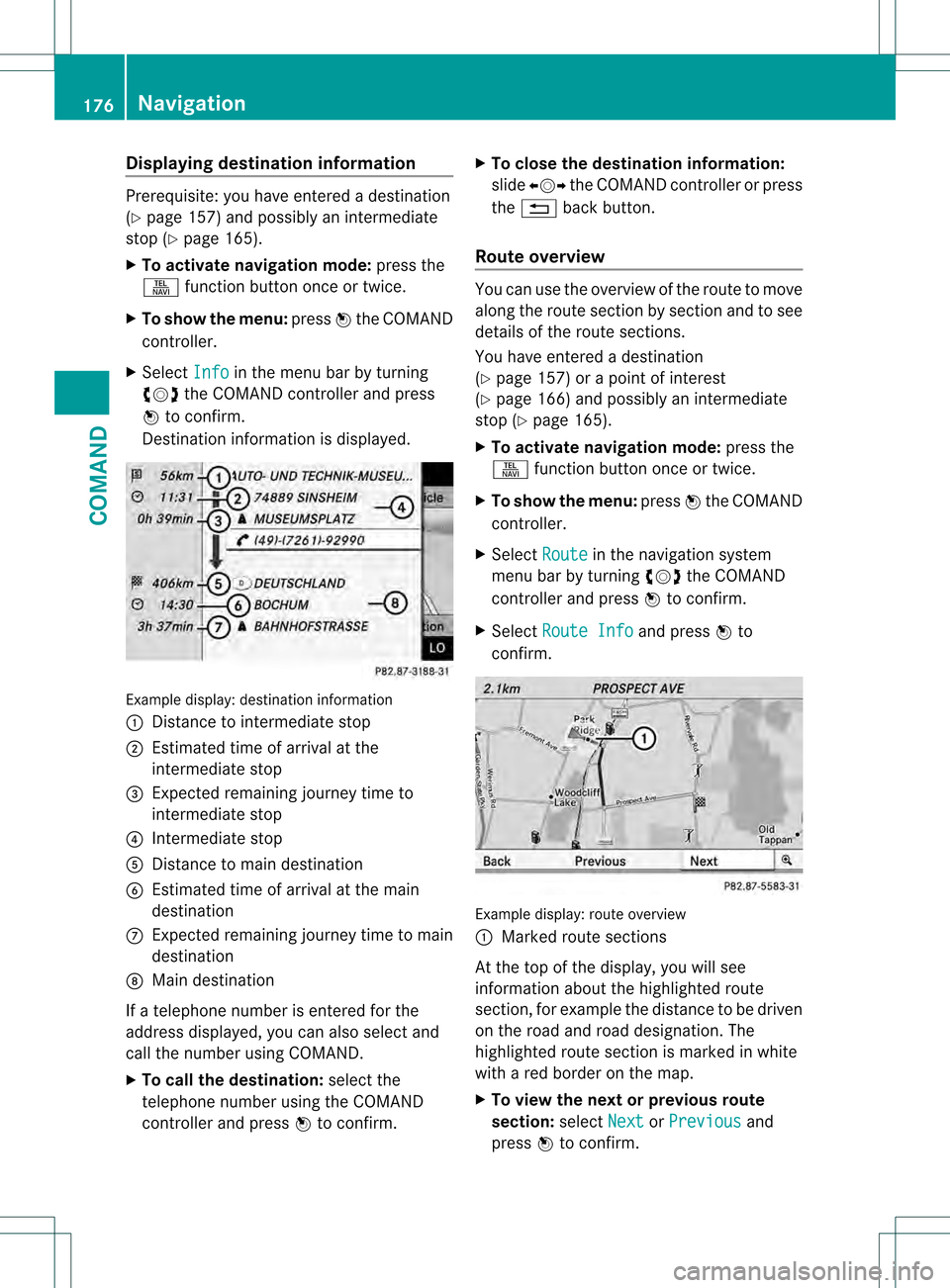
Destination information is displayed. Example display: destination information
0002
Distance to intermediate stop
0003 Estimated time of arrival at the
intermediate stop
0026 Expected remaining journey time to
intermediate stop
0025 Intermediate stop
0023 Distance to main destination
0024 Estimated time of arrival at the main
destination
0014 Expected remaining journey time to main
destination
0015 Main destination
If a telephone number is entered for the
address displayed, you can also selec tand
call the numbe rusing COMAND.
X To call the destination: select the
telephone number using the COMAND
controller and press 0021to confirm. X
To close the destination information:
slide 003C001C003D the COMAND controller or press
the 0001 back button.
Route overview You can use the overview of the route to move
along the route section by section and to see
details of the route sections.
You have entered a destination
(Y
page 157) or a point of interest
(Y page 166) and possibly an intermediate
stop (Y page 165).
X To activate navigation mode: press the
0011 function button once or twice.
X To show the menu: press0021the COMAND
controller.
X Select Route in the navigation system
menu bar by turning 0031001C0032the COMAND
controller and press 0021to confirm.
X Select Route Info and press
0021to
confirm. Example display: route overview
0002
Marked route sections
At the top of the display, you will see
information aboutt he highlighted route
section, for example the distance to be driven
on the road and road designation. The
highlighted route section is marked in white
with a red border on the map.
X To view the next or previous route
section: selectNext or
Previous and
press 0021to confirm. 176
NavigationCOMAND
Page 179 of 542
i
If the first or last route section is
highlighted, you cannot select Previous or
Next .
X To zoom in or out of the map: select000B
or 000A and press 0021to confirm.
X To close the route overview: select
Back and press
0021to confirm.
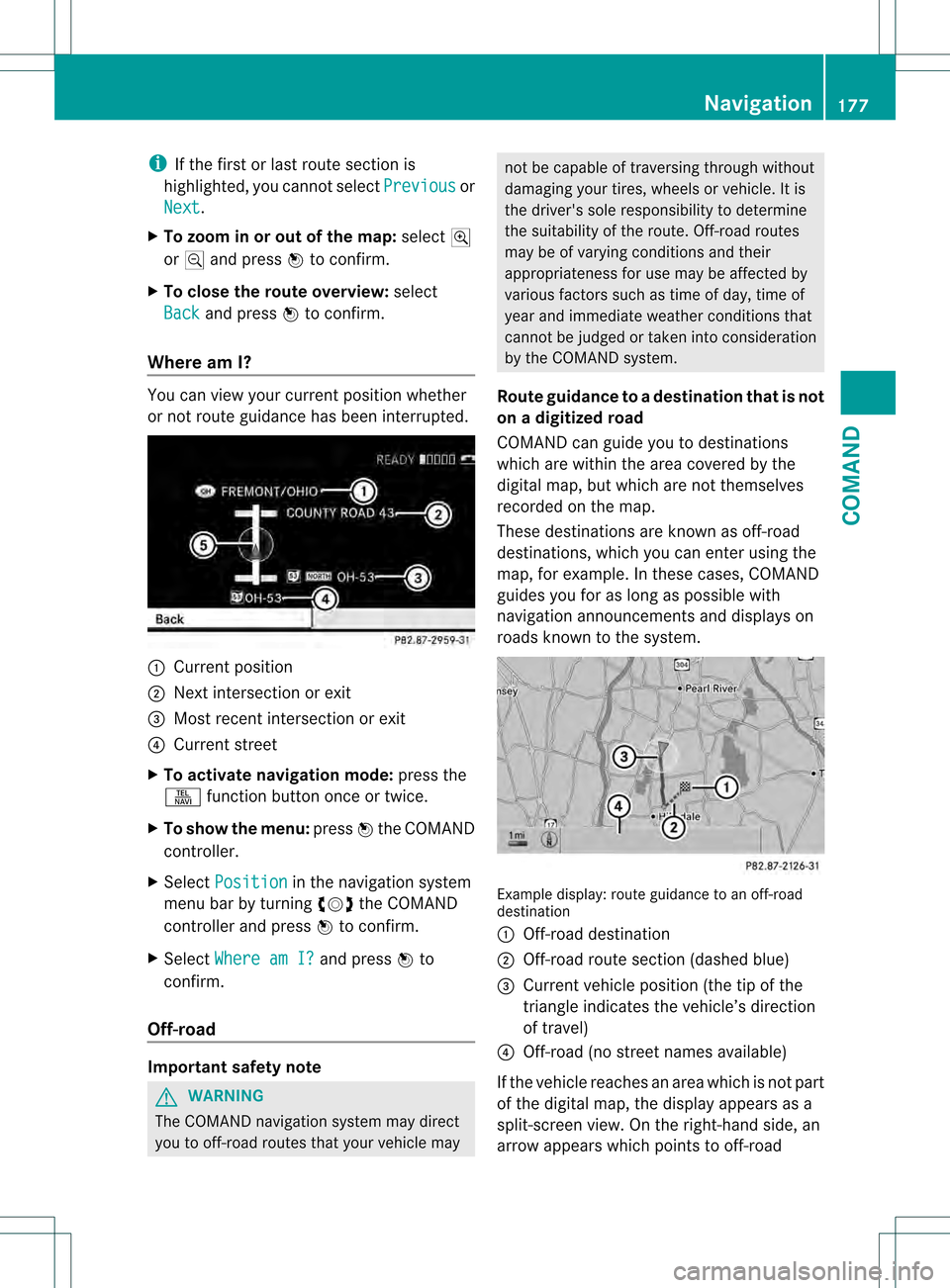
Where am I? You can view yourc
urrentposition whether
or not route guidance has been interrupted. 0002
Current position
0003 Next intersection or exit
0026 Most recent intersection or exit
0025 Current street
X To activate navigation mode: press the
0011 function button once or twice.
X To show the menu: press0021the COMAND
controller.
X Select Position in the navigation system
menu bar by turning 0031001C0032the COMAND
controller and press 0021to confirm.
X Select Where am I? and press
0021to
confirm.
Off-road Important safety note
G
WARNING
The COMAND navigation system may direct
you to off-road routes that your vehicle may not be capable of traversing through without
damaging your tires, wheels or vehicle. It is
the driver's sole responsibility to determine
the suitability of the route. Off-road routes
may be of varying conditions and their
appropriateness for use may be affected by
various factors such as time of day, time of
year and immediate weather conditions that
cannot be judged or taken into consideration
by the COMAND system.
Route guidance to adestination that is not
on a digitized road
COMAND can guide you to destinations
which are within the area covered by the
digital map, but which are not themselves
recorded on the map.
These destinations are known as off-road
destinations, which you can enter using the
map, for example. In these cases, COMAND
guides you for as long as possible with
navigation announcements and displays on
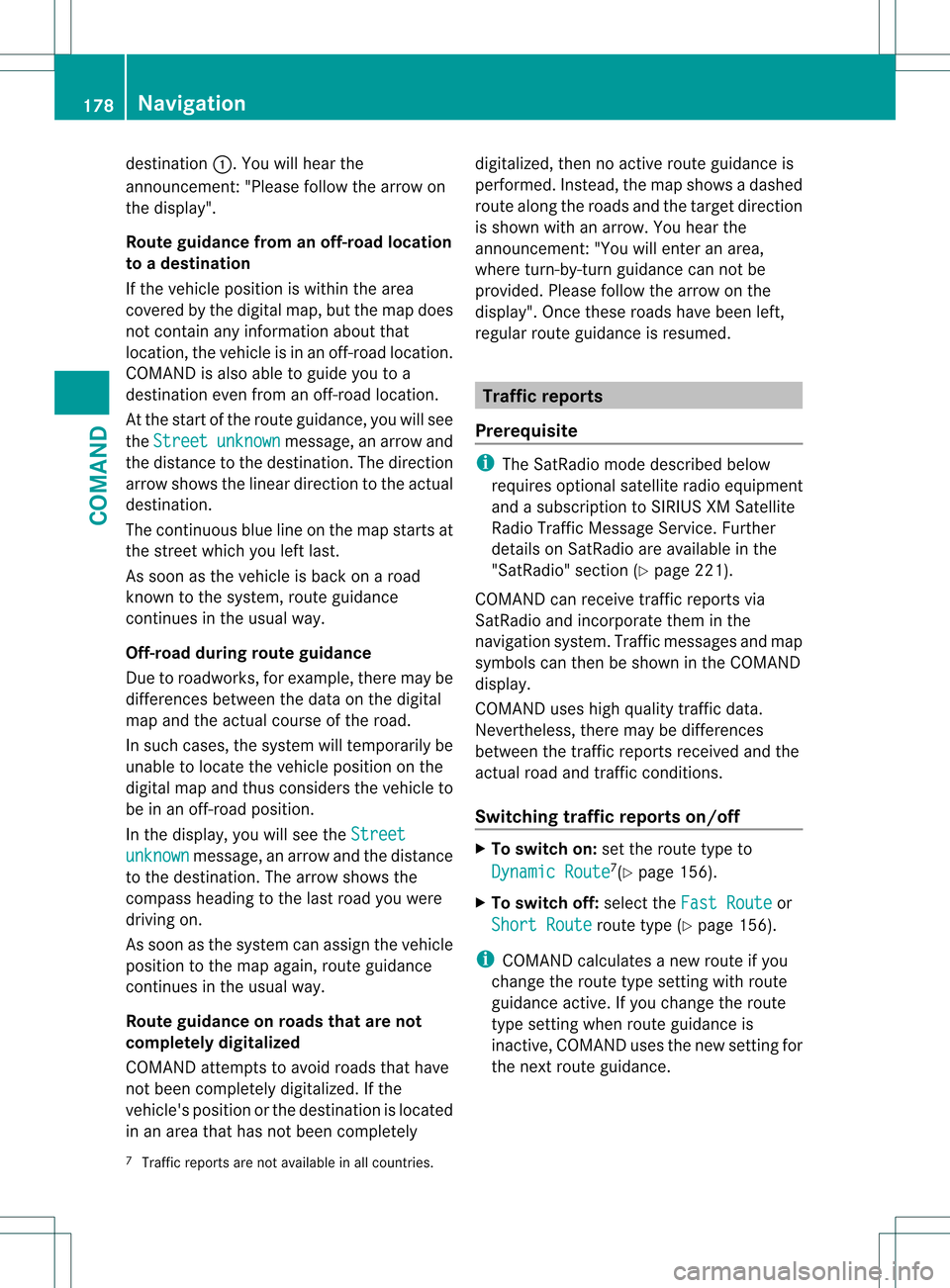
roads known to the system. Example display: route guidance to an off-road
destination
0002
Off-road destination
0003 Off-road route sectio n(dashed blue)
0026 Current vehicle position (the tip of the
triangle indicates the vehicle’s direction
of travel)
0025 Off-road (no street names available)
If the vehicle reaches an area which is not part
of the digital map, the display appears as a
split-screen view. On the right-hand side, an
arrow appears which points to off-road Navigation
177COMAND Z
Page 180 of 542
destination
0002.You will hear the
announcement:" Please follow the arrow on
the display".
Route guidance from an off-road location
to a destination
If the vehicle position is within the area
covered by the digital map, but the map does
not contain any information about that
location, the vehicle is in an off-road location.
COMAND is also able to guide you to a
destination even from an off-road location.
At the start of the route guidance, you will see
the Street unknown message, an arrow and
the distance to the destination. The direction
arrow shows the linear direction to the actual
destination.
The continuous blue line on the map starts at
the street which you left last.
As soon as the vehicle is back on a road
known to the system, route guidance
continues in the usual way.
Off-road during route guidance
Due to roadworks, for example, there may be
differences between the data on the digital
map and the actual course of the road.
In such cases, the system will temporarily be
unable to locate the vehicle position on the
digital map and thus considers the vehicle to
be in an off-road position.
In the display, you will see the Streetunknown message, an arrow and the distance
to the destination. The arrow shows the
compass heading to the last road you were
driving on.
As soon as the system can assign the vehicle
position to the map again, route guidance
continues in the usual way.
Route guidance on roads that are not
completely digitalized
COMAND attempts to avoid roads that have
not been completely digitalized. If the
vehicle's position or the destination is located
in an area that has not been completely digitalized, then no active route guidance is
performed. Instead, the map shows a dashed
route along the roads and the target direction
is shown with an arrow. You hear the
announcement
:"You will enter an area,
where turn-by-turn guidance can not be
provided. Please follow the arrow on the
display". Once these roads have been left,
regular route guidance is resumed. Traffic reports
Prerequisite i
The SatRadio mode described below
requires optional satellite radio equipment
and a subscription to SIRIUS XM Satellite
Radio Traffic Message Service .Further
details on SatRadio are available in the
"SatRadio" section (Y page 221).
COMAND can receive traffic reports via
SatRadio and incorporate them in the
navigation system. Traffic messages and map
symbols can then be shown in the COMAND
display.
COMAND uses high quality traffic data.
Nevertheless, there may be differences
between the traffic reports received and the
actual road and traffic conditions.
Switching traffic reports on/off X
To switch on: set the route type to
Dynamic Route 7
(Y page 156).
X To switch off: select theFast Route or
Short Route route type (Y
page 156).
i COMAND calculates a new route if you
change the route type setting with route
guidance active. If you change the route
type setting when route guidance is
inactive, COMAND uses th enew setting for
the nextr oute guidance.
7 Traffic reports are not available in all countries. 178
NavigationCOMAND