navigation system MERCEDES-BENZ S-Class 2013 W221 Repair Manual
[x] Cancel search | Manufacturer: MERCEDES-BENZ, Model Year: 2013, Model line: S-Class, Model: MERCEDES-BENZ S-Class 2013 W221Pages: 542, PDF Size: 7.97 MB
Page 279 of 542
X
Select Setting by sliding 002A001C0006or turning
0031001C0032 the COMAND controller and press
0021 to confirm.
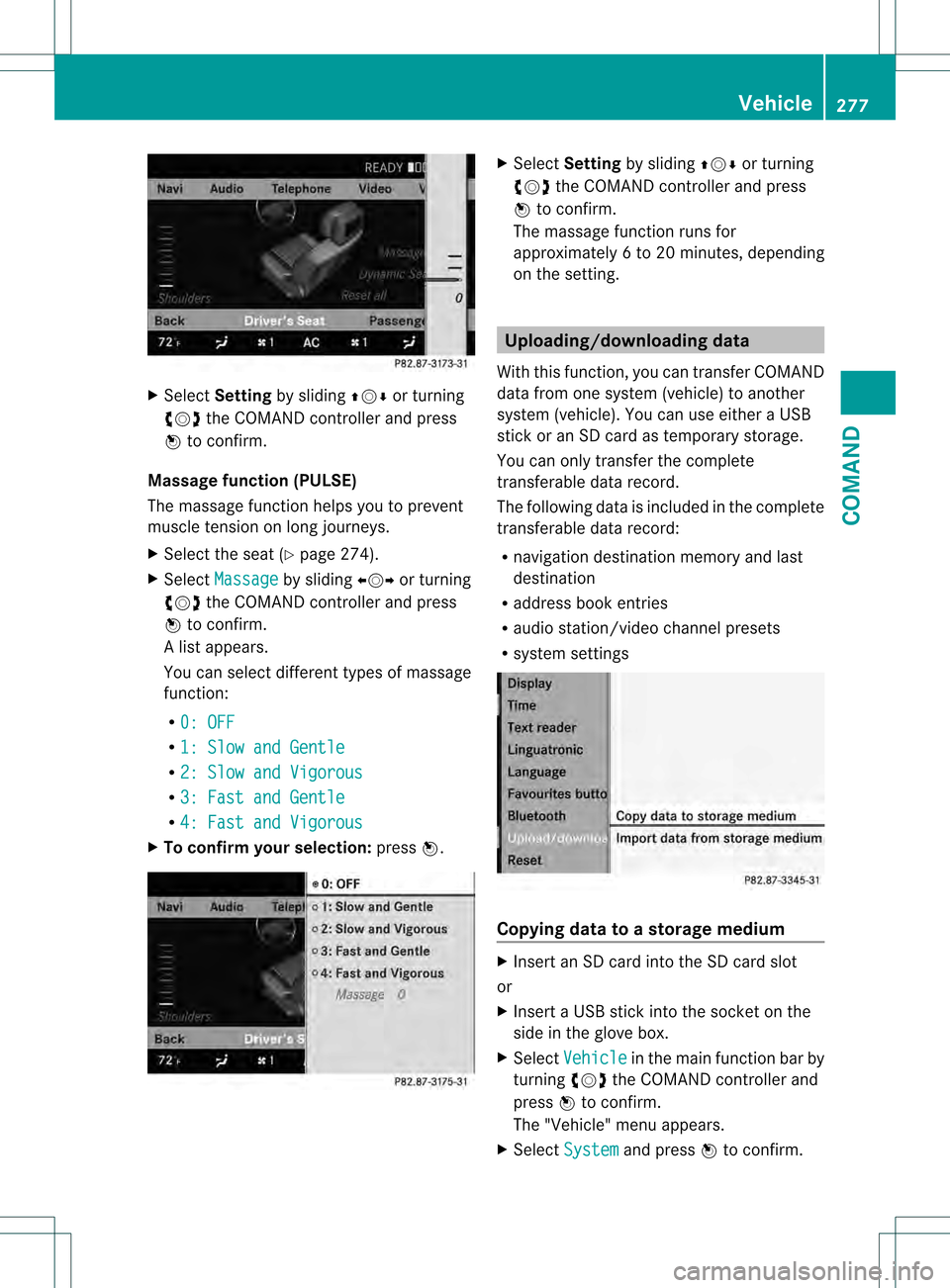
Massage function (PULSE)
The massage function helps yo uto prevent
muscle tension on long journeys.
X Select the seat (Y page 274).
X Select Massage by sliding
003C001C003Dor turning
0031001C0032 the COMAND controller and press
0021 to confirm.
Al ist appears.
You can selec tdifferen ttypes of massage
function:
R 0: OFF R
1: Slow and Gentle R
2: Slow and Vigorous R
3: Fast and Gentle R
4: Fast and Vigorous X
To confir myour selection: press0021. X
Select Setting by sliding 002A001C0006or turning
0031001C0032 the COMAND controller and press
0021 to confirm.
The massage function runs for
approximately 6to 20 minutes, depending
on the setting. Uploading/downloading data
With this function, you can transfer COMAND
data from one system (vehicle) to another
system (vehicle). You can use either a USB
stick or an SD card as temporary storage.
You can only transfer the complete
transferable data record.
The following data is included in the complete
transferable data record:
R navigation destination memory and last
destination
R address book entries
R audio station/video channel presets
R system settings Copying data to a storage medium
X
Insert an SD card into the SD card slot
or
X Insert a USB stick into the socket on the
side in the glove box.
X Select Vehicle in the main function bar by
turning 0031001C0032the COMAND controller and
press 0021to confirm.
The "Vehicle" menu appears.
X Select System and press
0021to confirm. Vehicle
277COMAND Z
Page 382 of 542
display
0026nex tto the symbol for the change
of direction 0003.This decreases in size as you
approach the announced change of direction.
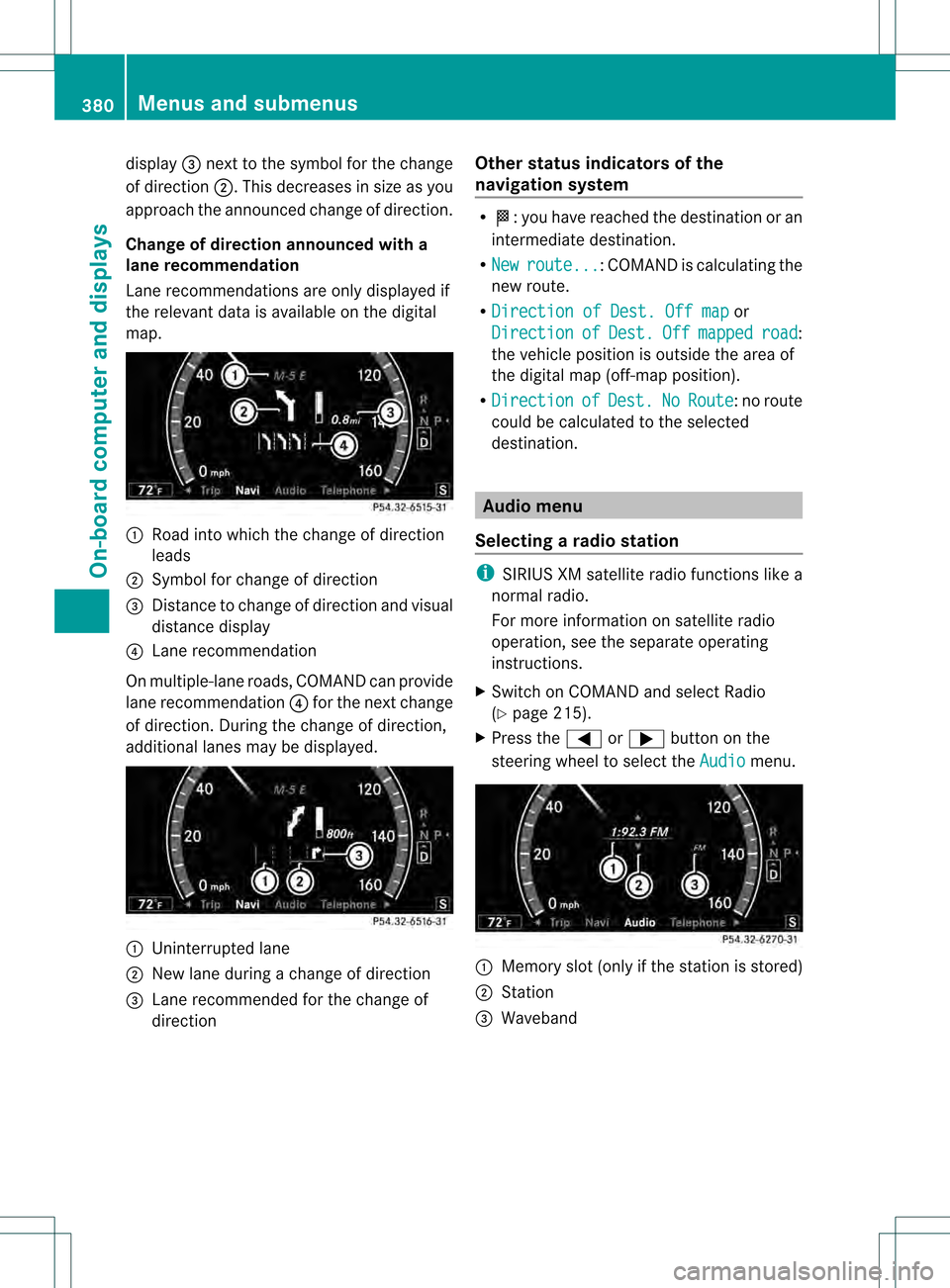
Change of direction announced with a
lane recommendation
Lane recommendations are only displayed if
the relevant data is available on the digital
map. 0002
Road into which the change of direction
leads
0003 Symbol for change of direction
0026 Distance to change of direction and visual
distance display
0025 Lane recommendation
On multiple-lane roads, COMAND can provide
lane recommendation 0025for the next change
of direction. During the change of direction,
additional lanes may be displayed. 0002
Uninterrupted lane
0003 New lane during a change of direction
0026 Lane recommended for the change of
direction Other status indicators of the
navigation system R
000C:y ou have reached the destination or an
intermediate destination.
R New route ... :C
OMAND is calculating the
new route.
R Direction of Dest. Off map or
Direction of Dest. Off mapped road :
the vehicle position is outside the area of
the digital map (off-map position).
R Direction of Dest. No Route : no route
could be calculated to the selected
destination. Audio menu
Selecting aradio station i
SIRIUS XM satellite radio functions like a
normal radio.
For more information on satellite radio
operation, see the separate operating
instructions.
X Switch on COMAND and select Radio
(Y page 215).
X Press the 0009or000C button on the
steering wheel to select the Audio menu.
0002
Memory slot (only if the statio nis stored)
0003 Station
0026 Waveband 380
Menus and submenusOn-board computer and displays
Page 454 of 542

Roadside Assistance button
X
Ope nthe stowage compartmentu nderthe
armrest (Y page 439). X
Press and hold Roadside Assistance
button 0002for more than two seconds.
This initiates a call to the Mercedes-Benz
Customer Assistance Center. The indicator
lamp in Roadside Assistance button 0002
flashes while the call is active. The
Connecting Call message appears in the
multifunction display and the COMAND
display. The audio output is muted.
If a connection can be established, the CallConnected message appears in the
multifunction display and in the COMAND
display.
If a cellularp hone network is available and
there is sufficient GPS reception, the mbrace
system transmits data to the Mercedes-Benz
Customer Assistance Center, for example:
R current location of the vehicle
R vehicle identification number
i The multifunction display and COMAND
display show that an mbrace call is active.
You can change to the navigation menu by
pressing the 0011button during the call,
for example.
Voice output is not available.
Av oice connection is established between
the Mercedes-Benz Customer Assistance
Center and the vehicle occupants.
X Describe the type of assistance needed. The Mercedes-Benz Customer Assistance
Center either sends a qualified Mercedes-
Benz technician or organizes for your vehicle
to be transported to the nearest authorized
Mercedes-Benz Center. You may be charged
for services such as repair work and/or
towing. Further details are available in your
mbrace manual.
i
The mbrace system failed to initiate a
Roadside Assistance call if:
R the indicator lamp in Roadside
Assistance button 0002is flashing
continuously.
R no voice connection to the Mercedes-
Benz Customer Assistance Center was
established.
This may be because the corresponding
mobile phone network is not available.
The Call Failed message appears in the
multifunction display.
The COMAND display shows the Call could not be connected! message.
Press 0021to confirm the message.
X To end acall: press the 001Fbutton on the
multifunctio nsteering wheel.
or
X Press the corresponding button for ending
a phone call on the COMAND telephone
keypad.
MB Info call button X
Open the stowage compartment under the
armrest (Y page 439).452
FeaturesSto
wage an d features
Page 455 of 542
X
Press and hold MB Info call button 0002for
more than two seconds.
This initiates a call to the Mercedes-Benz
Customer Assistance Center. The indicator
lamp in MB Info call button 0002flashes while
the connection is being established. The
Connecting Call message appears in the
multifunction display. The COMAND
display shows the Information Call Activated message. The audio output is
muted.
If a connection can be established, the CallConnected message appears in the
multifunction display.
The COMAND display shows the
Information Call Activated message.
If a cellular phone network is available and
there is sufficient GPS reception, the mbrace
system transmits data to the Mercedes-Benz
Customer Assistance Center, for example:
R current location of the vehicle
R vehicle identification number
i The COMAND display shows that an
mbrace call is active. You can change to the
navigation menu by pressing the 0011
button during the call, for example.
Voice output is not available.
Av oice connection is established between
the Mercedes-Benz Customer Assistance
Center and the vehicle occupants. You can
obtain information on how to operate your
vehicle's systems, on the location of the
nearest authorized Mercedes-Benz Center,
and on further products and services offered
by Mercedes-Benz USA.
Further details on the mbrace system can be
found under http://www.mbusa.com 24
.
Log in under "Owners Online". i
The mbrace system failed to initiate an
MB Info call if:
R the indicator lamp in MB Info call
button 0002is flashing continuously.
R no voice connection to the Mercedes-
Benz Customer Assistance Center was
established.
This may be because the corresponding
mobile phone network is not available.
The Call Failed message appears in the
multifunction display.
The COMAND display shows the Call could not be connected! message.
Press 0021to confirm the message.
X To end acall: press the 001Fbutton on the
multifunctio nsteering wheel.
or
X Press the corresponding button for ending
a phone call on the COMAND telephone
keypad.
Call priority When service calls are active, e.g
.Roadside
Assistance or MB Info calls, an emergency
call can still be initiated. In this case, an
emergency call will take priority and override
all other active calls.
The indicator lamp of the respective button
flashes until the call is ended. An emergency
call can only be terminated by the Mercedes-
Benz Customer Assistance Center. All other
calls can be ended by pressing the 001F
button on the multifunction steering wheel or
the corresponding button for ending a
telephone call on the COMAND telephone
keypad.
Downloading destinations in COMAND i
The components and operating principles
of COMAND can be found on
(Y page 122).
24 USA only. Features
453Stowage and features Z
Page 456 of 542
i
You can only use the Destination
Download function if the vehicle is
equipped with a navigation system.
Destination Download gives you access to a
database with over 15 million points of
interest (POIs)/important destinations that
can be downloaded onto the navigation
system of your vehicle. If you know the
destination, you can download the address or
obtain the location of points of interest
(POIs)/important destinations in the
surrounding area.
You are prompted to confirm route guidance
to the address entered.
X Slide 003C001C003D and turn 0031001C0032the COMAND
controller to select Yes and confirm by
pressing 0021.
The system calculates the route and
subsequently starts the rout eguidance with
the address entered.
i If you select No , the address can be stored
in the address book.
i The Destination Download function is
available if the corresponding mobile
phone network is available and data
transfer is possible.
Route Assistance
This service is part of the mbrace PLUS
Package and canno tbe purchased
separately.
i You can also use the Route Assistance
function if your vehicle is not equipped with
a navigation system.
Within the framework of this service, you
receive a professional and reliable form of
navigation support without having to leave
your vehicle.
The customer service representative
determines a suitable driving route based on
your curren tvehicle position and the desired
destination and guides you live through the
current sections of the route. Search
&Send Points to observe before use
i
To use "Search &Send", your vehicle
must be equipped with mbrace and a
navigation system. You must also have an
mbrace service subscription.
"Search & Send" is a destination entry
service. Adestination address which is found
on Google Maps ®
can be transferred via
mbrace directly to your vehicle's navigation
system.
Specifying and sending the destination
address
X Go to the website http://
www.maps.google.com and enter a
destination address into the entry field.
X To send the destination address to the
E-Mail address of your mbrace
account: click on the corresponding
button.
i Example:
If you select 'Send to vehicle' and then
'Mercedes-Benz', the destination address
will be sent to your vehicle.
X When the "Send" dialog window appears:
In the relevant field, enter the e-mail
address which you specified when
activating your mbrace account.
X Click "Send".
i Information on specific commands such
as "Address entry" or "Sending" can be
found on the website. 454
FeaturesStowage and features
Page 457 of 542
Calling up destination addresses
X
Press the MB Info call button to load the
destination address to your vehicle's
navigation system.
Ad isplay message appears, asking
whether navigation should be started.
X Select Yes by sliding
003C001C003Dand turning
0031001C0032 the COMAND controller and press
0021 to confirm.
The system calculates the route and
subsequently starts the rout eguidance
with the address entered.
i If you select No , the address can be stored
in the address book.
i If you have sent more than one
destination address, you have to make an
info call to load each individual address.
i Destination addresses are loaded in the
same order as the order in which they were
sent. If you own multiple Mercedes-Benz
vehicles with mbrace and activated mbrace
accounts:
Each destination address sen tcan be
accessed by every vehicle which is
connected with the relevant e-mail
address.
Vehicle remote opening You can use the vehicle remote opening if you
have unintentionally locked your vehicle and
a replacemen
tSmartKey is not available.T he
vehicle can be opened by the Mercedes-Benz
Customer Assistance Center.
The vehicle can be opened remotely up to four
days after the ignition was last switched off.
X Contact the following service hotlines:
R
USA: Mercedes-Ben zCustomer
Assistance Cente rat 1-800-FOR-MERCedes
(1-800-367-6372) or 1-866-990-9007
R Canada: Customer Service at
1-888-923-8367
You will be asked for you rpassword.
X Return to your vehicle at the time agreed
upon with the Mercedes-Ben zCustomer
Assistance Center.
X Pull on the trunk lid handle for at least
20 seconds until the indicator lamp in the
SOS button (Y page 450) flashes.
The Connecting Call message appears in
the multifunction display.
US Ao nly:alternatively, the vehicle can be
opened via:
R the Internet, under the "Owners Online"
section
R the telephone application (e.g .iPhone ®
)
i Vehicle remote opening is only possible if
the corresponding mobile phone network
is accessible.
The SOS button flashes and the
Connecting Call message appears in the
multifunction display to confirm that the
command for vehicle remote unlocking has
been received.
If the trunkl id handle is pulled for longer
than 20 seconds befor eauthorization has
been received, you must wait for
15 minutes. Only then can you pull the
trunk lid handle once again.
Vehicle remote closing The remote closing feature can be used when
you have forgotte
nto lock the vehicle and you
are no longer nearby. The vehicle can then be
locked by the Mercedes-Benz Customer
Assistance Center.
The vehicle can be locked remotely up to four
days after the ignition was last switched off.
X Contact the following service hotlines:
R
USA: Mercedes-Benz Customer
Assistance Center at Features
455Stowage and features Z