display message MERCEDES-BENZ S-CLASS SEDAN 2012 Owner's Manual
[x] Cancel search | Manufacturer: MERCEDES-BENZ, Model Year: 2012, Model line: S-CLASS SEDAN, Model: MERCEDES-BENZ S-CLASS SEDAN 2012Pages: 536, PDF Size: 39.39 MB
Page 28 of 536
Towing away .................................. 485
Transporting .................................. 487
Unlocking (in an emergency) ...........90
Unlocking (SmartKey) ......................82
Vehicle data ................................... 531
Vehicle battery
see Battery (vehicle)
Vehicle data ....................................... 531
Vehicle dimensions ........................... 531
Vehicle emergency locking ................ 91
Vehicle identification number see VIN
Vehicle identification plate .............. 523
Vehicle level Active Body Control (ABC) .............348
AIRMATIC ...................................... 347
Display message ............................ 412
Vehicle level (display message) ....... 411
Vehicle tool kit .................................. 474
Video see Video DVD
Video AUX
Setting the picture .........................244
Video DVD
Automatic picture shutoff ..............244
DVD menu ..................................... 248
Fast forward/rewind ...................... 247
Function restrictions ......................246
Interactive content ........................250
Notes on discs ............................... 245
Operation ....................................... 245
Pause function ............................... 247
Playing conditions .......................... 245
Rear Seat Entertainment System ...258
Safety notes .................................. 245
Selecting ........................................ 247
Selecting a film/title ...................... 248
Selecting a scene/chapter ............247
Setting the audio format ................249
Setting the language ......................249
Setting the picture .........................244
Showing/hiding the control menu . 246
Showing/hiding the menu .............246
Stop function ................................. 247
Subtitles ........................................ 249
Switching to ................................... 246
VIN ...................................................... 523Voice Control System
Settings ......................................... 149
Volume, adjusting
COMAND ....................................... 138
Headphones .................................. 146
Navigation messages .....................138
Using the remote control (Rear
Seat Entertainment System) ..........144
W
Waiting call ........................................ 205
Warning and indicator lamps ABS ................................................ 425
Brakes ........................................... 424
Check Engine ................................. 429
Distance warning ........................... 430
DISTRONIC PLUS ........................... 430
ESP ®
.............................................. 426
ESP ®
OFF ....................................... 427
Fuel tank ........................................ 430
Overview .......................................... 38
PASSENGER AIR BAG OFF
indicator lamp .................................. 54
Reserve fuel ................................... 430
Seat belt ........................................ 422
SRS ................................................ 428
Tire pressure monitor ....................431
Warranty ............................................ 523
Washer fluid Display message ............................ 420
Weather Band
Searching for a channel .................218
Switching on .................................. 218
Wheel bolt tightening torque ........... 479
Wheel chock ...................................... 476
Wheels Changing a wheel .......................... 475
Checking ........................................ 493
Cleaning ......................................... 468
Important safety notes ..................492
Interchanging/changing ................515
Mounting a new wheel ...................478
Removing a wheel ..........................478
Storing ........................................... 515
Tightening torque ........................... 479
Wheel size/tire size .......................515
26Index
Page 29 of 536
Window curtain air bagDisplay message ............................ 400
Operation ......................................... 53
Windows
Cleaning ......................................... 469
see Side windows
Windshield
Defrosting ...................................... 300
Infrared reflective .......................... 456
Windshield washer fluid
see Windshield washer system
Windshield washer system .............. 464
Notes ............................................. 531
Windshield wipers
Problem (malfunction) ...................290
Replacing the wiper blades ............289
Switching on/off ........................... 289
Winter driving
Important safety notes ..................494
Slippery road surfaces ...................334
Snow chains .................................. 495
Winter operation
Radiator cover ............................... 459
Winter tires
M+S tires ....................................... 494
Wiper blades
Cleaning ......................................... 469
Important safety notes ..................289
Wooden trim (cleaning
instructions) ...................................... 472
Workshop see Qualified specialist workshop Index27
Page 41 of 536
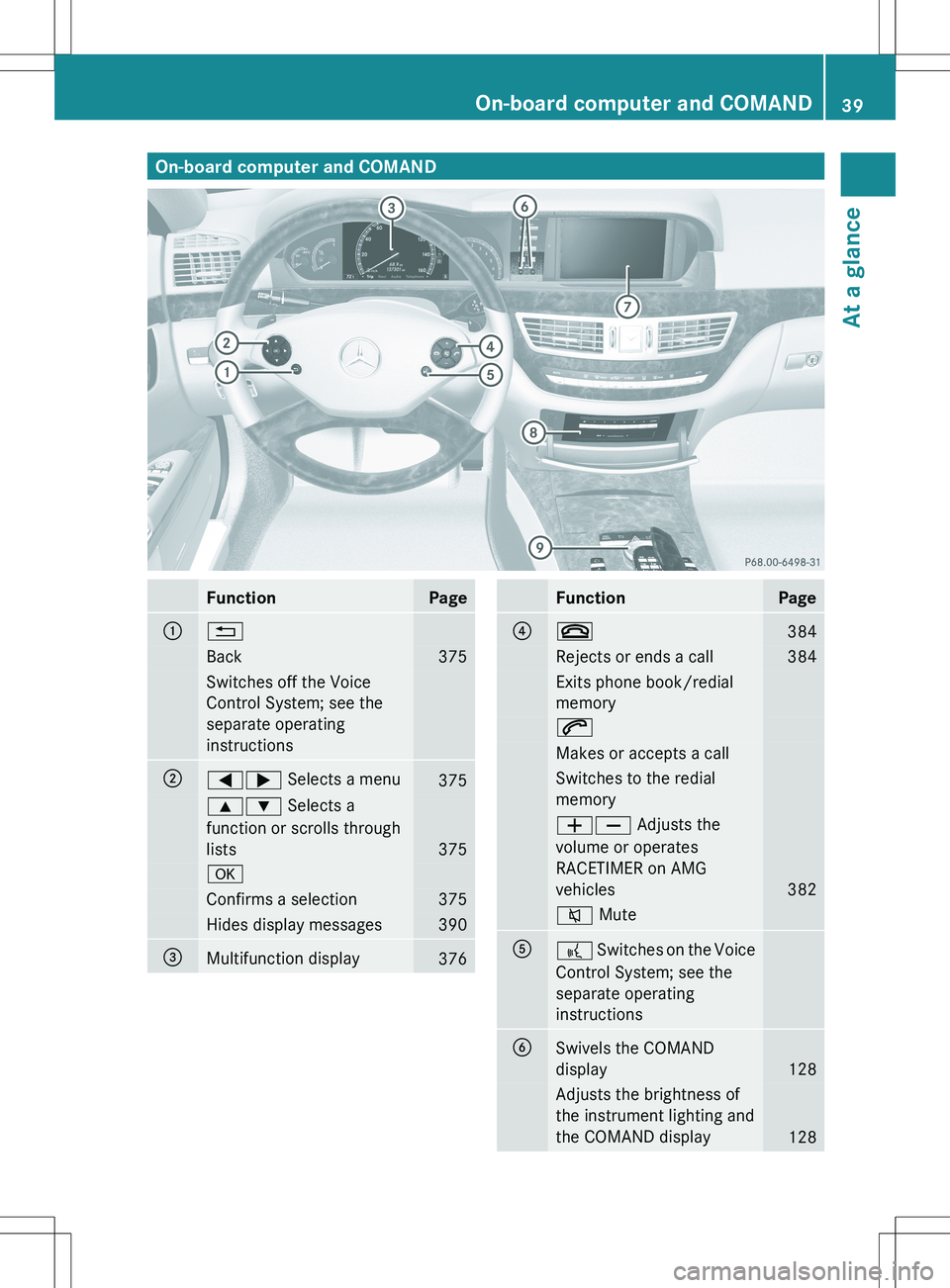
On-board computer and COMANDFunctionPage:%Back375Switches off the Voice
Control System; see the
separate operating
instructions;=; Selects a menu3759: Selects a
function or scrolls through
lists
375
aConfirms a selection375Hides display messages390=Multifunction display376FunctionPage?~384Rejects or ends a call384Exits phone book/redial
memory6Makes or accepts a callSwitches to the redial
memoryWX Adjusts the
volume or operates
RACETIMER on AMG
vehicles
382
8 MuteA? Switches on the Voice
Control System; see the
separate operating
instructionsBSwivels the COMAND
display
128
Adjusts the brightness of
the instrument lighting and
the COMAND display
128
On-board computer and COMAND39At a glance
Page 57 of 536
When the OCS senses that the front-
passenger seat is classified as being empty,
the 42 indicator lamp will
illuminate when the engine is started and
remain illuminated, indicating that the front-
passenger front air bag is deactivated.
When the OCS senses that the front-
passenger seat occupant is classified as
being heavier than the weight of a typical 12-
month-old child seated in a standard child
restraint or as being a small individual (such
as a young teenager or a small adult), the
42 indicator lamp will illuminate
for approximately 6 seconds when the engine
is started and then, depending on occupant
weight sensor readings from the front-
passenger seat, remain illuminated or go out.
With the 42 indicator lamp
illuminated, the front-passenger front air bag
is deactivated. With the 42
indicator lamp out, the front-passenger front
air bag is activated.
When the OCS senses that the front-
passenger seat occupant is classified as an
adult or someone larger than a small
individual, the 42 indicator lamp
will illuminate for approximately 6 seconds
when the engine is started and then go out,
indicating that the front-passenger front air
bag is activated.
If the 42 indicator lamp is
illuminated, the front-passenger front air bag
is deactivated and will not be deployed.
If the 42 indicator lamp is not
illuminated, the front-passenger front air bag
is activated and will be deployed:
R in the event of certain frontal impacts
R if impact exceeds a preset deployment
threshold
R independently of the side impact air bagsIf the front-passenger front air bag is
deployed, the rate of inflation will be
influenced by:
R the rate of vehicle deceleration as assessed
by the air bag control unit
R the front passenger's weight category as
identified by OCS
For further information, see "Air bag display
messages" ( Y page 401).GWARNING
According to accident statistics, children are
safer when properly restrained on the rear
seats than on the front-passenger seat. Thus,
we strongly recommend that children be
placed in the rear seats whenever possible.
Regardless of seating position, children 12
years old and under must be seated and
properly secured in an appropriately sized
child restraint system or booster seat
recommended for the size and weight of the
child.
The infant or child restraint system must be
properly secured with the vehicle's seat belt,
the seat belt and Top Tether strap, or lower
anchors and Top Tether strap, fully in
accordance with the child seat
manufacturer's instructions.
Occupants, especially children, should always
sit as upright as possible, wear the seat belt
properly and use an appropriate sized infant
restraint, toddler restraint, or booster seat
recommended for the size and weight of the
child.
Children can be killed or seriously injured by
an inflating air bag. Note the following
important information when circumstances
require you to place a child in the front-
passenger seat:
R Your vehicle is equipped with air bag
technology designed to deactivate the
front-passenger front air bag in your vehicle
when the system senses the weight of a
typical 12-month-old child or less along
Occupant safety55SafetyZ
Page 60 of 536
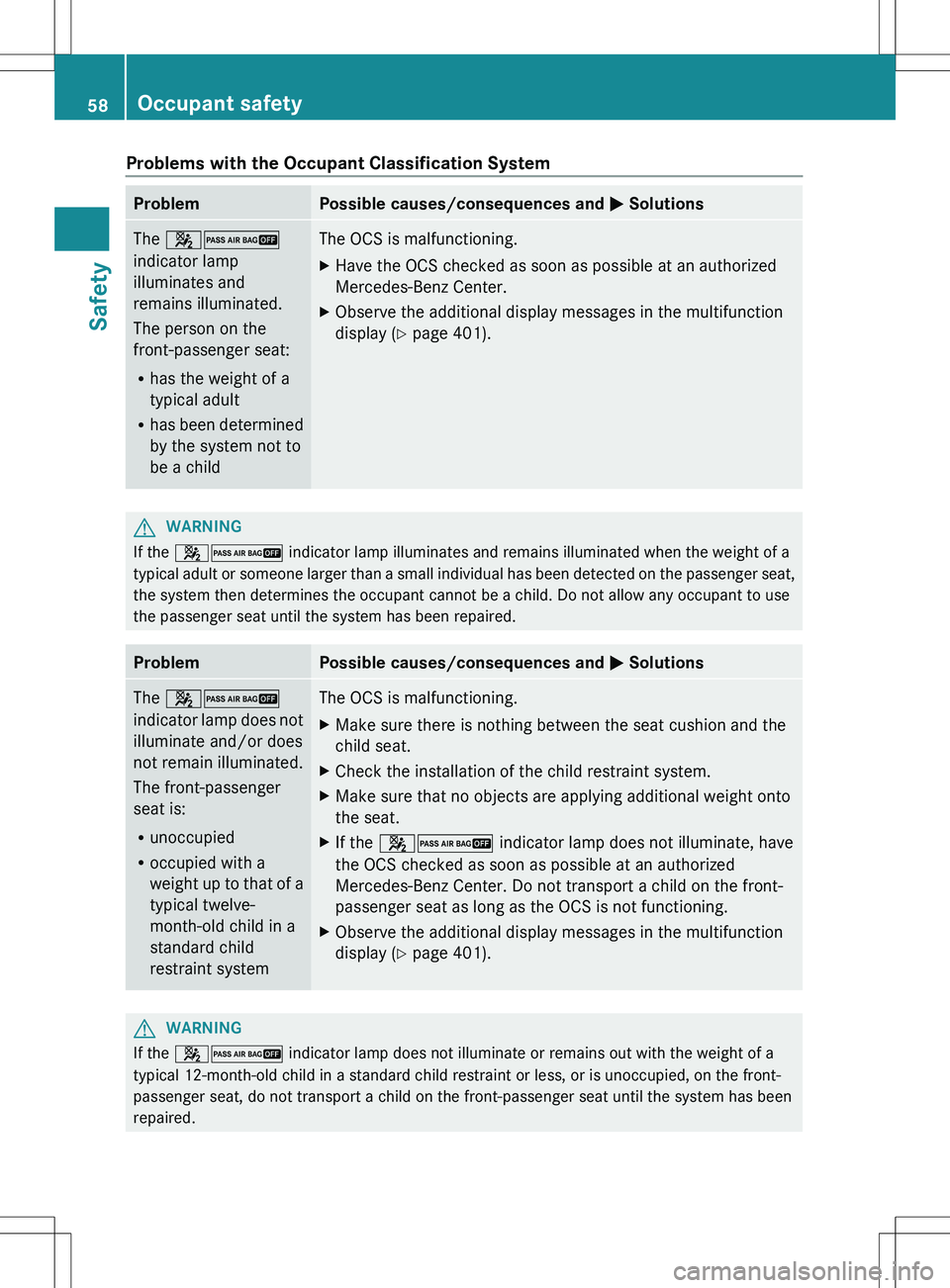
Problems with the Occupant Classification SystemProblemPossible causes/consequences and M SolutionsThe 42
indicator lamp
illuminates and
remains illuminated.
The person on the
front-passenger seat:
R has the weight of a
typical adult
R has been determined
by the system not to
be a childThe OCS is malfunctioning.XHave the OCS checked as soon as possible at an authorized
Mercedes-Benz Center.XObserve the additional display messages in the multifunction
display ( Y page 401).GWARNING
If the 42 indicator lamp illuminates and remains illuminated when the weight of a
typical adult or someone larger than a small individual has been detected on the passenger seat,
the system then determines the occupant cannot be a child. Do not allow any occupant to use
the passenger seat until the system has been repaired.
ProblemPossible causes/consequences and M SolutionsThe 42
indicator lamp does not
illuminate and/or does
not remain illuminated.
The front-passenger
seat is:
R unoccupied
R occupied with a
weight up to that of a
typical twelve-
month-old child in a
standard child
restraint systemThe OCS is malfunctioning.XMake sure there is nothing between the seat cushion and the
child seat.XCheck the installation of the child restraint system.XMake sure that no objects are applying additional weight onto
the seat.XIf the 42 indicator lamp does not illuminate, have
the OCS checked as soon as possible at an authorized
Mercedes-Benz Center. Do not transport a child on the front-
passenger seat as long as the OCS is not functioning.XObserve the additional display messages in the multifunction
display ( Y page 401).GWARNING
If the 42 indicator lamp does not illuminate or remains out with the weight of a
typical 12-month-old child in a standard child restraint or less, or is unoccupied, on the front-
passenger seat, do not transport a child on the front-passenger seat until the system has been
repaired.
58Occupant safetySafety
Page 75 of 536
RADAPTIVE BRAKE
R PRE-SAFE ®
Brake
Important safety notes
GWARNING
The following factors increase the risk of
accidents:
R Excessive speed, especially in turns
R Wet and slippery road surfaces
R Following another vehicle too closely
The driving safety systems described in this
section cannot reduce these risks or prevent
the natural laws of physics from acting on the
vehicle. They cannot increase braking or
steering efficiency beyond that afforded by
the condition of the vehicle brakes and tires
or the traction afforded.
Only a safe, attentive, and skillful driver can
prevent accidents.
The capabilities of a vehicle equipped with the
driving safety systems described in this
section must never be exploited in a reckless
or dangerous manner which could jeopardize
the user's safety or the safety of others.
Always adjust your driving style to the
prevailing road and weather conditions and
keep a safe distance to other road users and
objects on the street.
If a driving system malfunctions, other driving
safety systems may also switch off. Observe
indicator and warning lamps that may come
on as well as messages in the multifunction
display that may appear.
GWARNING
HYBRID vehicles: It is imperative that you read
the HYBRID Supplemental Operating
Instructions included in your vehicle literature
portfolio. You may otherwise not receive all
necessary safety information and warning for
the operation of your vehicle.
i Please note that the driving safety
systems described only work as effectively
as possible when there is adequate contact
between the tires and the road surface. Pay
particular attention to the information
regarding tires, recommended minimum
tire tread depths etc. in the "Wheels and
tires" section ( Y page 492).
In wintry driving conditions, always use
winter tires (M+S tires) and if necessary,
snow chains. Only in this way will the
driving safety systems described in this
section work as effectively as possible.
ABS (Anti-lock Braking System)
Important safety notes
i Observe the "Important safety notes"
section ( Y page 73).
ABS regulates brake pressure in such a way
that the wheels do not lock when you brake.
This allows you to continue steering the
vehicle when braking.
ABS works from a speed of about 5 mph
( 8 km/h) upwards, regardless of road-surface
conditions. ABS works on slippery surfaces,
even if you only brake gently.
GWARNING
If the ABS malfunctions, other driving systems
such as the BAS or the ESP ®
are also switched
off. Observe indicator and warning lamps that
may come on as well as messages in the
multifunction display that may appear.
If the ABS malfunctions, the wheels may lock
during hard braking, reducing the steering
capability and extending the braking distance.
The ! warning lamp in the instrument
cluster lights up when the ignition is switched
on. It goes out when the engine is running.
Brakes
If ABS intervenes when braking, you will feel
a pulsing in the brake pedal.
Driving safety systems73SafetyZ
Page 79 of 536
Rtraction control is still activated.
R ESP ®
still provides support when you
brake.
If ESP ®
is deactivated and one or more wheels
start to spin, the ÷ ESP®
warning lamp in
the instrument cluster flashes. In such
situations, ESP ®
will not stabilize the vehicle.XTo deactivate: (Y page 386).
The å ESP®
OFF warning lamp in the
instrument cluster lights up.GWARNING
When the å ESP®
OFF warning lamp is lit,
ESP ®
is deactivated.
If the ÷ ESP®
warning lamp and the
å ESP®
OFF warning lamp remain lit,
ESP ®
is not available due to a malfunction.
When ESP ®
is deactivated or not operational,
vehicle stability in standard driving
maneuvers is reduced.
Adapt your speed and driving to the prevailing
road conditions and to the non-operating
status of the ESP ®
.
! Avoid spinning the driven wheels for an
extended period with ESP ®
deactivated.
You could otherwise damage the drivetrain.
XTo activate: (Y page 386).
The å ESP®
OFF warning lamp in the
instrument cluster goes out.
EBD (electronic brake force
distribution)
i Observe the "Important safety notes"
section ( Y page 73).
EBD monitors and controls the brake
pressure on the rear wheels to improve
driving stability while braking.
GWARNING
If EBD has malfunctioned, the braking system
remains available with full brake boosting
effect. However, the rear wheels can still lock,
e.g. under full braking. This could cause you
to lose control of your vehicle and cause an
accident. You should therefore adapt your
driving style to the different handling
characteristics.XObserve the notes on warning and indicator
lamps ( Y page 425) as well as display
messages ( Y page 394).
ADAPTIVE BRAKE
ADAPTIVE BRAKE enhances braking safety
and offers increased braking comfort. In
addition to the braking function, ADAPTIVE
BRAKE also has the HOLD function
( Y page 346) and hill start assist
( Y page 310). For further information, see
Driving tips ( Y page 331).
PRE-SAFE ®
Brake
PRE-SAFE ®
Brake is only available in vehicles
with DISTRONIC PLUS.
i Observe the "Important safety notes"
section ( Y page 73).
PRE-SAFE ®
Brake can help you to minimize
the risk of a frontal collision with a vehicle
ahead or reduce the effects of such a
collision. If PRE-SAFE ®
Brake has detected a
risk of collision, you will be warned visually
and acoustically as well as by automatic
braking. PRE-SAFE ®
Brake cannot prevent a
collision without your intervention.
At speeds above approximately
4 mph (7 km/h), this function warns you
when you are rapidly approaching the vehicle
in front. An intermittent warning tone will
then sound and the · distance warning
lamp in the instrument cluster will light up.
Driving safety systems77SafetyZ
Page 123 of 536
Declarations of conformity
Vehicle components which receive and/
or transmit radio waves
USA only: The wireless devices of this vehicle
comply with Part 15 of the FCC Rules.
Operation is subject to the following two
conditions: 1) These devices may not cause
harmful interference, and 2) These devices
must accept any interference received,
including interference that may cause
undesired operation.
Changes or modifications not expressly
approved by the party responsible for
compliance could void the user’s authority to
operate the equipment.
Canada only: The wireless devices of this
vehicle comply with Industry Canada license-
exempt RSS standard(s). Operation is subject
to the following two conditions: (1) These
devices may not cause interference, and (2)
These devices must accept any interference,
including interference that may cause
undesired operation of the device.
Correct use
Observe the following information when using
COMAND:
R the safety notes in this manual
R national road traffic regulations
i Work improperly carried out on electronic
components or systems (e.g. radio, DVD
changer) and associated software could
cause them to cease functioning. Even
systems that have not been modified could
be affected because the electronic
systems are connected. Electronic
malfunctions can seriously jeopardize the
operational safety of your vehicle.
i Therefore, have all work on or
modifications to electronic components
carried out at a qualified specialist
workshop.
i Protection against theft: this device is
equipped with technical provisions to
protect it against theft. You can obtain
further information about protecting
against theft from a qualified specialist
workshop.
Function restrictions
For safety reasons, some COMAND functions
are restricted or unavailable while the vehicle
is in motion. You will notice this, for example,
because you will not be able to select certain
menu items. In some cases, COMAND will
also display a message to this effect.
To protect the integrated hard drive against
damage, COMAND deactivates it at very high
temperatures. The following functions will be
temporarily unavailable:
R navigation
R the Voice Control System
R the address book
R MUSIC REGISTER
Introduction121COMANDZ
Page 131 of 536
Cleaning instructions
! Do not touch the COMAND display. The
display has a very sensitive high-gloss
surface; there is a risk of scratching. If you
have to clean the screen, however, use a
mild cleaning agent and a soft, lint-free
cloth.
The display must be switched off and have
cooled down before you start cleaning. Clean
the display screen, when necessary, with a
commercially available microfiber cloth and
cleaning agent for TFT/LCD displays. Then,
dry the surface with a dry microfiber cloth.
Avoid using alcoholic thinners, gasoline or
abrasive cleaning agents. These could
damage the display surface. Do not apply
pressure to the display surface when cleaning
it, as this could cause irreversible damage.
Remote control
Overview
You can use the remote control to operate the
COMAND display, SPLITVIEW and either one
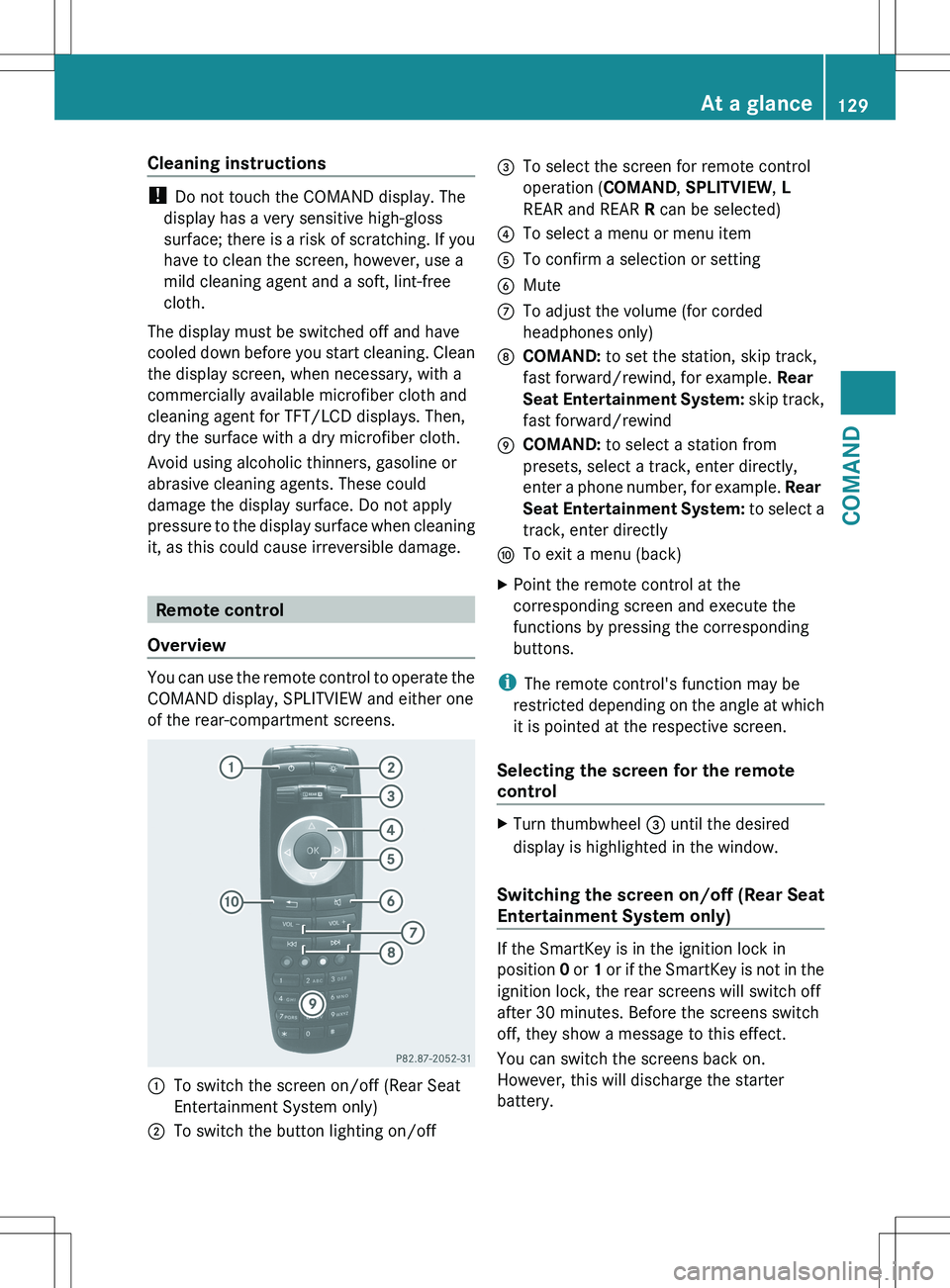
of the rear-compartment screens.
:To switch the screen on/off (Rear Seat
Entertainment System only);To switch the button lighting on/off=To select the screen for remote control
operation ( COMAND, SPLITVIEW , L
REAR and REAR R can be selected)?To select a menu or menu itemATo confirm a selection or settingBMuteCTo adjust the volume (for corded
headphones only)DCOMAND: to set the station, skip track,
fast forward/rewind, for example. Rear
Seat Entertainment System: skip track,
fast forward/rewindECOMAND: to select a station from
presets, select a track, enter directly,
enter a phone number, for example. Rear
Seat Entertainment System: to select a
track, enter directlyFTo exit a menu (back)XPoint the remote control at the
corresponding screen and execute the
functions by pressing the corresponding
buttons.
i The remote control's function may be
restricted depending on the angle at which
it is pointed at the respective screen.
Selecting the screen for the remote
control
XTurn thumbwheel = until the desired
display is highlighted in the window.
Switching the screen on/off (Rear Seat
Entertainment System only)
If the SmartKey is in the ignition lock in
position 0 or 1 or if the SmartKey is not in the
ignition lock, the rear screens will switch off
after 30 minutes. Before the screens switch
off, they show a message to this effect.
You can switch the screens back on.
However, this will discharge the starter
battery.
At a glance129COMANDZ
Page 140 of 536
Switching the sound on or off
Switching audio and video sources on/off
XPress the 8 button on the multifunction
steering wheel.
The sound from the respective audio or
video source is switched on or off.
i When the sound is off, the system
displays the , symbol in the status line.
When you change the audio or video
source, or adjust the volume, sound
automatically switches on again.
i Even if the sound is switched off, you will
still hear traffic and navigation system
announcements.
Switching off traffic and navigation
announcements completely
XTraffic announcements: press the 8
button until the . message disappears
from the status bar of the display.
A confirmation tone sounds.XNavigation announcements: during an
announcement, press the 8 button on
the multifunction steering wheel.
Switching traffic and navigation
announcements on again
XTraffic announcements: press and hold
down the 8 button until the . display
appears in the status bar.
A confirmation tone sounds.XNavigation announcements: select the
y symbol in the navigation menu bar
and press W to confirm.
i
The navigation announcements are
activated again if you switch COMAND off
and on again or start a new route guidance.
Adjusting the volume
Adjusting the volume for the audio or
video source
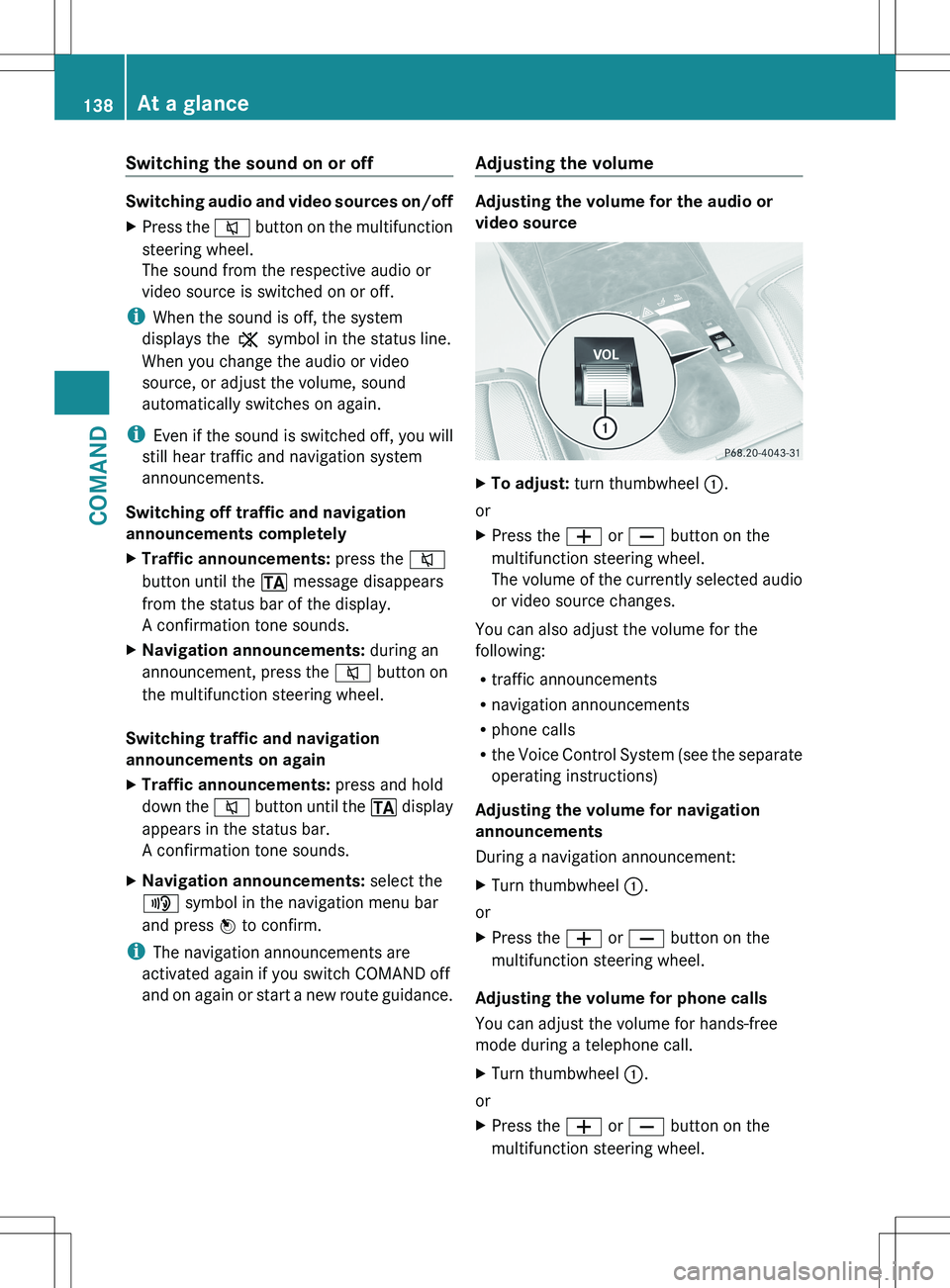
XTo adjust: turn thumbwheel :.
or
XPress the W or X button on the
multifunction steering wheel.
The volume of the currently selected audio
or video source changes.
You can also adjust the volume for the
following:
R traffic announcements
R navigation announcements
R phone calls
R the Voice Control System (see the separate
operating instructions)
Adjusting the volume for navigation
announcements
During a navigation announcement:
XTurn thumbwheel :.
or
XPress the W or X button on the
multifunction steering wheel.
Adjusting the volume for phone calls
You can adjust the volume for hands-free
mode during a telephone call.
XTurn thumbwheel :.
or
XPress the W or X button on the
multifunction steering wheel.138At a glanceCOMAND