change time MERCEDES-BENZ SPRINTER 2013 MY13 Operator’s Manual
[x] Cancel search | Manufacturer: MERCEDES-BENZ, Model Year: 2013, Model line: SPRINTER, Model: MERCEDES-BENZ SPRINTER 2013Pages: 334, PDF Size: 3.88 MB
Page 134 of 334
Useful information
This Operator's Manual describes all models
as well as standard and optional equipment
of your vehicle that were available at the time
of going to print. Country-specific variations
are possible. Note that your vehicle may not
be equipped with all of the described
functions. This also applies to systems and
functions relevant to safety.
Read the information on qualified specialist
workshops (Y page 26). Breaking-in notes
The first 1,000 miles (1,500 km)
New or replaced brake pads and brake disks
only reach their optimum braking effec tafter
100 miles (a few hundred kilometers). Until
then, compensate for this by applying greater
force to the brake pedal.
For the service life and economy of your
vehicle it is crucial that you brea kinthe
engine with due care.
R Therefore, protect the engine for the first
1,000 miles (1,500 km) by driving at
varying vehicle and engine speeds.
R Avoid overstraining the vehicle and high
engine speeds during this period, e.g.
driving at full throttle. Do not exceed 0001of
the maximum speed for each gear.
R Do not change down a gear manually in
order to brake.
R Try to avoid depressing the accelerator
pedal beyond the point of resistance
(kickdown).
R The shift ranges 3,2or 1should only be
engaged when driving slowly, e.g. when
driving in mountainous terrain.
After 1,000 miles (1,500 km), you can
increase the engine speed gradually and
accelerate the vehicle up to full speed.
i You should also observe these notes on
breaking-in if the engine or parts of the drive train on your vehicle have been
replaced. Driving
Important safety notes
G
WARNING
If you switch off the ignition while driving,
safety-relevant functions are only available
with limitations, or not at all. This could affect,
for example, the power steering and the brake
boosting effect.Y ou will require considerably
more effort to steer and brake. There is a risk
of an accident.
Do not switch off the ignition while driving. G
WARNING
If the parking brake has not been fully
released when driving, the parking brake can:
R overheat and cause a fire
R lose its hold function.
There is a risk of fire and an accident .Release
the parking brake fully before driving off. Battery isolating switch
Important safety notes !
Make sure that the key is in position 0in
the ignition lock and wait at least
20 seconds before disconnecting or
connecting the battery isolating switch.
You could otherwise damage electrical
system components.
You can use the battery isolating switch to
disconnect the power supply to all your
vehicle's consumers. This will prevent
uncontrolled battery discharge caused by off-
load curren tconsumption.
If your vehicle is equipped with an auxiliary
battery in the engine compartment, you will
need to disconnect both batteries. Only then
is the electrical system fully disconnected
from the power supply. 132
DrivingDriving and parking
Page 152 of 334
cross the border, bu
tas close to it as
possible.
When you return from your journey, and as
close to the border as possible, you will need
to:
R remove the adhesive surfaces from your
halogen headlamps and clean the glass of
the headlamps if necessary
R have the Bi-Xenon headlamps reset to
asymmetrical low beam at aqualified
specialist workshop Transport by rail
Transporting your vehicle by rail may be
subject to certain restrictions or require
special measures to be taken in some
countries due to varying tunnel heights and
loading standards.
You can obtain further information from any
authorized Sprinte rdealer. Braking
Important safety notes G
WARNING
If you shift down on a slippery road surface in
an attempt to increase the engine's braking
effect, the drive wheels could lose their grip.
There is an increased danger of skidding and
accidents.
Do not shift down for additional engine
braking on a slippery road surface.
Downhill gradients !
Depressing the brake pedal constantly
results in excessive and premature wear to
the brake pads.
On long and steep downhill gradients, you
should change down to shift range 0009or0008
in good time. This should be observed in
particular when driving with a laden vehicle
and when towing a trailer. i
You must also change the shift range in
good time when cruise control is switched
on.
You thereby make use of the braking effec tof
the engine and do not have to brake as often
to maintain the speed. This relieves the load
on the service brake and prevents the brakes
fro mo verheating and wearing too quickly.
Heavy and light loads G
WARNING
If you rest yourf oot on the brake pedal while
driving, the braking system can overheat. This
increases the stopping distance and can even
cause the braking system to fail. There is a
risk of an accident.
Never use the brake pedal as a footrest .Never
depress the brake pedal and the accelerator
pedal at the same time.
! Depressing the brake pedal constantly
results in excessive and premature wear to
the brake pads.
If the brakes have been subjected to a heavy
load, do not stop the vehicle immediately.
Drive on for a short while. The brakes are
cooled down more quickly in the airflow.
Wet road surfaces If you have been driving for a long time in
heavy rain without braking
,there may be a
delayed response when you first apply the
brakes. This may also occur after driving
through a car wash or deep water.
You must depress the brake pedal more
firmly. Maintain a longer distance to the
vehicle in front.
While paying attention to the traffic
conditions, you should brake the vehicle
firmly after driving on a wet road surface or
through a car wash. This heats the brake
discs, so that they dry more quickly, which
protects them against corrosion. 150
Driving tipsDriving and parking
Page 157 of 334
steering, chassis and exhaust system for
any damage.
X Check the service brake for operating
safety, e.g. carry out a brake test.
X If you notice strong vibrations after driving
off-road, check the wheels and drive train
for foreign objects again. Remove any
foreign objects which can lead to
imbalances and thus cause vibrations. Driving systems
Cruise control
Important safety notes Observe the notes on braking in the "Driving
tips" section (Y
page 150).
If you fail to adapty our driving style or if you
are inattentive, cruise control can neither
reduce the risk of an accident nor override the
laws of physics. Cruise control cannot take
road, weather and traffic conditions into
account .Cruise control is only an aid.Y ou are
responsible for the distance to the vehicle in
front, for vehicle speed and for braking in
good time.
Do not use cruise control:
R in traffic conditions that are unsuitable for
driving at a constant speed, e.g. in heavy
traffic, on winding roads or off-road
R on slippery roads. Brakin goraccelerating
may cause the drive wheel sto lose traction
and the vehicle could then skid.
R when there is poor visibility, e.g. due to fog,
heavy rain or snow
If there is a change of drivers, make sure that
you inform the new driver about the set cruise
speed.
General notes Cruise control maintains the speed of the
vehicle for you.
Use cruise control if road and traffic
conditions make it appropriate to maintain a steady speed for a prolonged period. You can
set any speed from 20 mph upwards in
increments of 1 mph.
Use cruise control if road and traffic
conditions make it appropriate to maintain a
steady speed for a prolonged period. You can
set any speed from 20 mph upwards in
increments of 1 mph.
i
If you have set km/h as the unit for the
digital speedometer (Y page 185), you can
set any speed from 30 km/h upwards in
increments of 1 km/h.
i Cruise control should not be activated
when driving off-road or on construction
sites.
Cruise control may not be able to maintain
the stored speed on uphill or downhill
gradients. If the gradient evens out and the
vehicle's speed does not fall below 20 mph
(30 km/h), the stored speed is resumed.
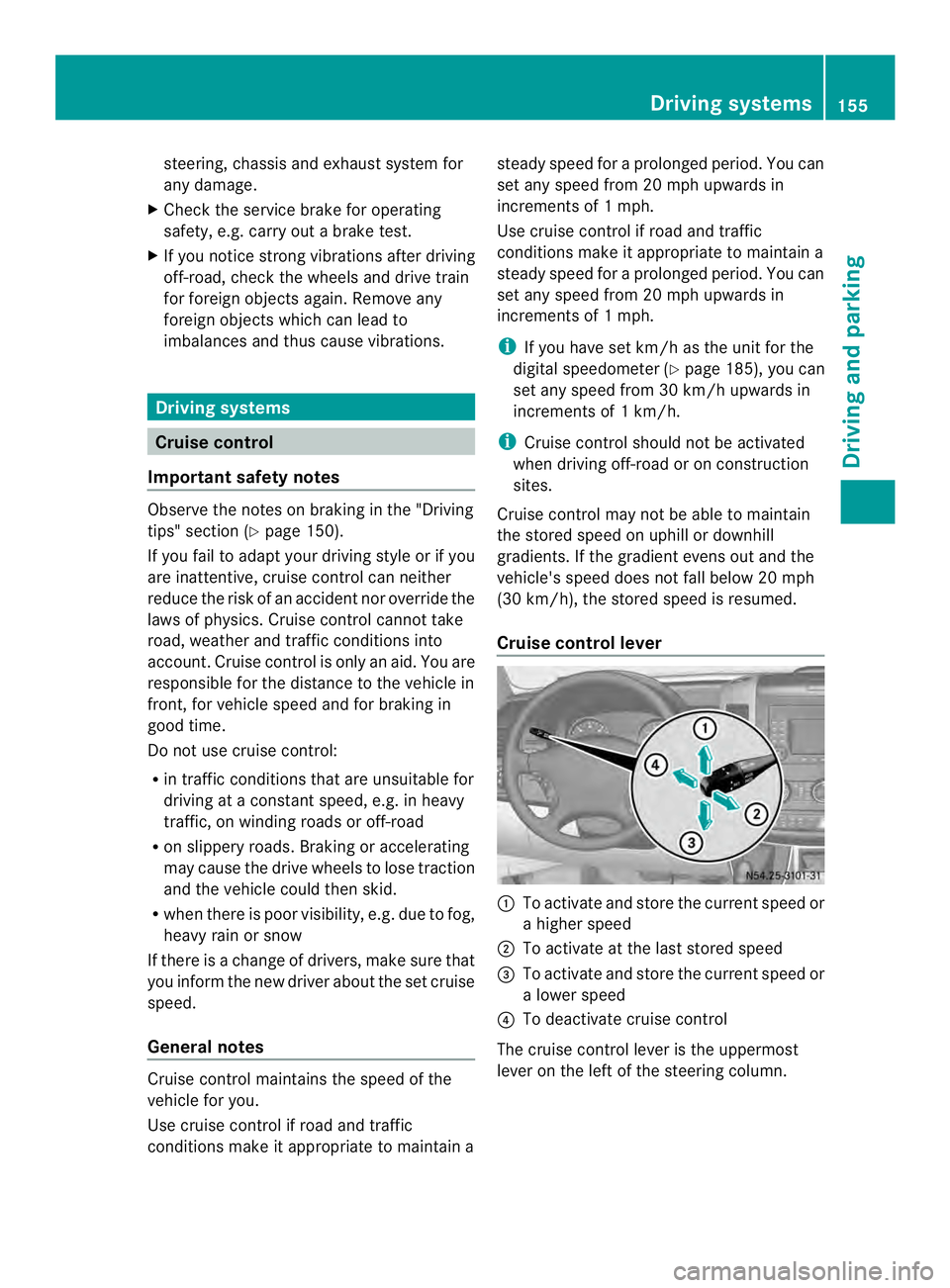
Cruise control lever 0005
To activate and store the current speed or
a higher speed
0006 To activate at the last stored speed
0026 To activate and store the current speed or
a lower speed
0025 To deactivate cruise control
The cruise control lever is the uppermost
lever on the left of the steering column. Driving systems
155Driving and parking Z
Page 172 of 334
R
Do not install rented trailer couplings or
other detachable trailer couplings to the
bumpers.
R Minimize the risk of damage to the ball
coupling .Ifyou do not require the ball
coupling, remove it from the ball coupling
recess.
Weight information can be found in the
“Permissible trailer and drawbar
noseweights” section (Y page 169).
Note that, when towing atrailer,
PARKTRONIC is only available with limitations
or not at all (Y page 160).
i The height of the ball neck changes
according to the load on the vehicle. If this
is case, use a trailer with a height-
adjustable trailer drawbar.
Driving tips The maximu
mpermissible speed for vehicle/
trailer combination depends on the type of
trailer. Before setting off, check the vehicle
documents of the your trailer to find out the
permissible maximum speed. Observe the
legally prescribed maximum speed for
vehicle/trailer combinations in the relevant
country, state or Canadian province.
When towing a trailer, your vehicle's handling
characteristics will be differen tincomparison
to when driving without a trailer and it will
consume more fuel.
On long, steep downhill slopes you must
select shift range 3,2or 1in good time.
i This also applies if you have activated
cruise control.
This enables you to utilize the engine's
braking effect and you do not need to brake
so heavily to keep the correc tspeed. which
protects the brake system and prevents the
brakes from overheating and wearing too
quickly. If you need to brake additionally, to
not depress the brake pedal constantly, but
periodically. Driving tips If the trailer begins to swing from side to side:
X
Do not accelerate.
X Do not counter-steer.
X Brake if necessary.
i You can reduce the risk of the trailer
swinging and rocking by retrofitting anti-
roll bars or trailer stability programs .More
information is available from your
authorized Sprinter Dealer.
R Maintain a greater distance than you would
when driving without towing a trailer.
R Avoid sudden braking. Apply the brakes
gently at first to allow the trailer brake to
overrun. Then, increase the brake force
quickly.
R The figures for the gradient climbing
capabilities from a standstill refer to sea
level. When driving in mountainous areas,
note that the power output of the engine,
and with it its gradient climbing capability,
decrease with increasing altitude. Attaching and removing the ball
coupling
G
WARNING
If the ball coupling is not correctly installed
and secured, it could come loose while driving
and endanger other road users. There is a risk
of an accident and injury.
Install and secure the ball coupling as
described in the ball coupling manufacturer's
installation instructions. Make sure that the
ball coupling is correctly installed and
secured before every journey. G
WARNING
If the ball coupling is not installed and secured
correctly the trailer may come loose. There is
a risk of an accident.
Install and secure the ball coupling as
described in the ball coupling installation
instructions. Make sure that the ball coupling 170
Towing
atrailerDriving an d parking
Page 181 of 334
Menus in the on-board computer
Overview If you wish to exit a menu and go to the
standard display:
X Press the 0004menu button for longer than
one second.
Or
X Do not press any button for 10 seconds.
The display accepts the changed settings.
Using the 000E,000F,0004or0007 adjustment
buttons, you can select the following
functions:
R Calling up the service due date
(Y page 249)
R Checking the oil level (Y page 242)
R Preselecting/setting the auxiliary heating
switch-on time ( Ypage 119)
R Tire pressure monitor (Y page 281)
R Setting the time (Y page 179)
R Setting daytime running lamp mode
(Y page 179)
Setting the time X
Turn the key to position 2in the ignition
lock.
X Press the 0004menu button repeatedly until
the hours figure flashes.
X Press the 000Eor000F button to set the hour.
X Press the 0007reset button.
The minute display flashes.
X Press the 000Eor000F button to set the minute.
i If you keep the 000Eor000F button pressed,
the value will change continuously.
Setting daytime running lamp mode For safety reasons, it is only possible to
change this setting when the vehicle is
stationary. The factory setting is
On in
countries in which daytime running lamp
mode is mandatory. X
Turn the key to position 2in the ignition
lock.
X Press the 0004menu button repeatedly until
the 0004 indicator lamp flashes and the
on or
OFF message appears in the display.
X Press the 000Eor000F button to activate or
deactivate daytime running lamp mode.
If you have activated daytime running lamp
mode and the light switch is set to 000C, the
following light up automatically when the
engine is running:
R Parking lamps
R Low-beam headlamps
R Tail lamps
R License plate lamp
i USA only:
If you turn the light switch to 000Bor
0004, the corresponding light switches on.
If you turn the light switch to 0007, daytime
running lamp mode stays switched on.
Canada only:
If you turn the light switch to 0004, the low-
beamh eadlamps switch on. If you turn the
light switch to 000Bor0007, daytime
running lamp mode stays switched on. On-boar
dcomputer (vehicles without steering wheel buttons)
179On-board computer and displays Z
Page 185 of 334
Using the steering wheel buttons
X
Switch on the audio equipment (see the
separate operating instructions).
X Press the 0010or0007 button repeatedly
until the station selected appears in the
display.
The kind of search depends on the setting
for radio station selection (Y page 188).
The nearest stored station will be selected
or the station search starts (except on
Audio 20).
X Press the 0001or0009 button to select the
desired station.
i You can only store new stations on the
audio system itself. See the separate
operating instructions.
You can also operate the audioe quipment
in the same way as usual.
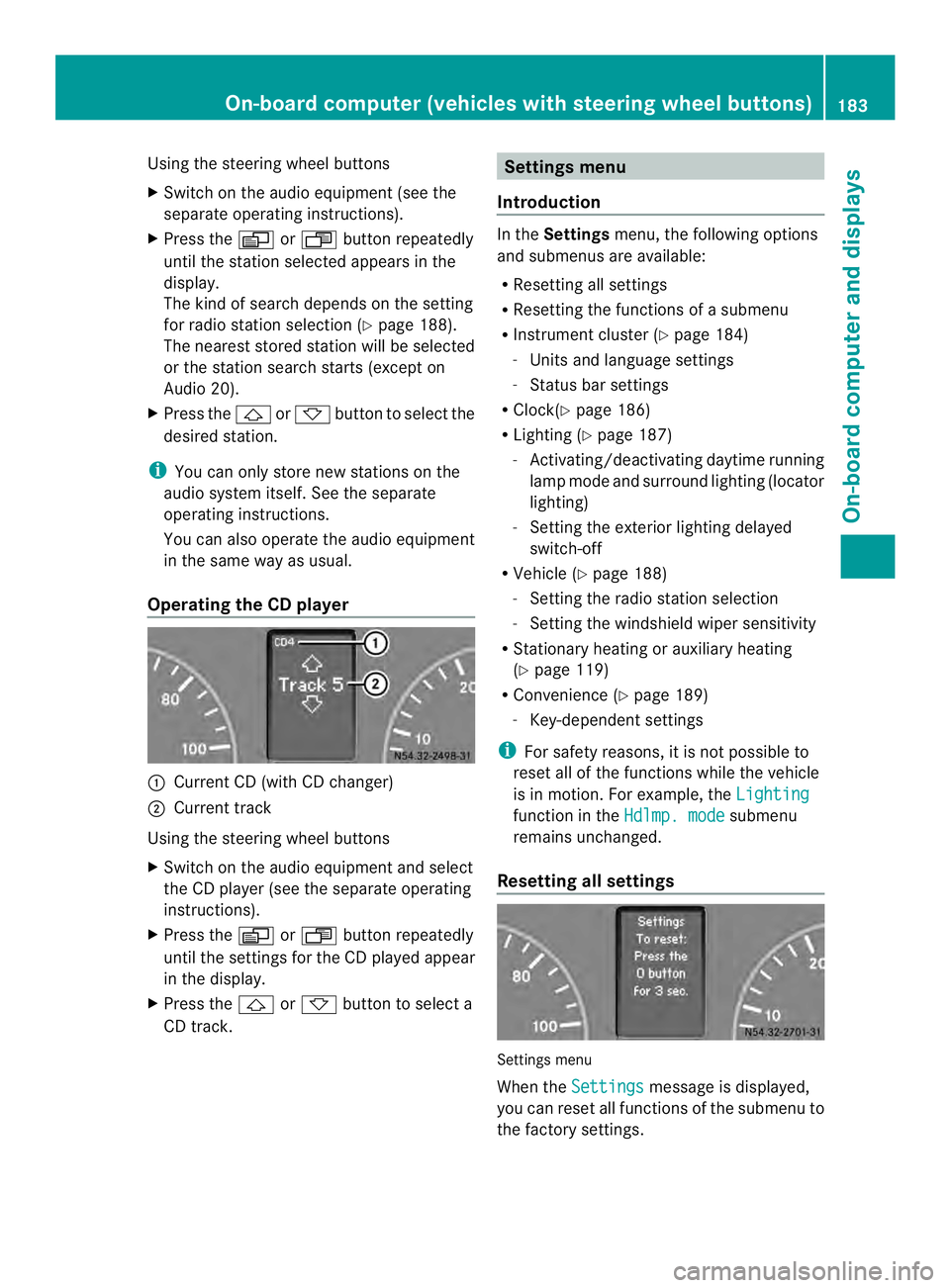
Operating the CD player 0005
Current CD (with CD changer)
0006 Current track
Using the steering wheel buttons
X Switch on the audio equipment and select
the CD player (see the separate operating
instructions).
X Press the 0010or0007 button repeatedly
until the settings for the CD played appear
in the display.
X Press the 0001or0009 button to select a
CD track. Settings menu
Introduction In the
Settings menu, the following options
and submenus are available:
R Resetting all settings
R Resetting the functions of a submenu
R Instrument cluster (Y page 184)
- Units and language settings
- Status bar settings
R Clock( Ypage 186)
R Lighting (Y page 187)
- Activating/deactivating daytime running
lamp mode and surround lighting (locator
lighting)
- Setting the exterior lighting delayed
switch-off
R Vehicle (Y page 188)
- Setting the radio station selection
- Setting the windshield wiper sensitivity
R Stationary heating or auxiliary heating
(Y page 119)
R Convenience (Y page 189)
- Key-dependent settings
i For safety reasons, it is not possible to
reset all of the functions while the vehicle
is in motion. For example, the Lighting function in the
Hdlmp. mode submenu
remains unchanged.
Resetting all settings Settings menu
When the
Settings message is displayed,
you can reset all functions of the submenu to
the factory settings. On-boar
dcomputer (vehicles with steering wheel buttons)
183On-board computer and displays Z
Page 186 of 334
Using the steering wheel buttons
X
Press the 0010or0007 button repeatedly
until the Settings menu appears in the
display.
X Press and hold the 0007reset button for
approximately 3seconds.
You will see a message in the display
prompting you to press reset button 0007
again to confirm.
X Press the 0007reset button again.
The functions in all submenus are reset to
the factory settings.
i If you want to retain the settings, do not
press the 0007reset button a second time.
The Settings menu appears again after
approximately five seconds.
Resetting the functions of asubmenu You can individually reset the functions of
each submenu to the factory settings.
Using the steering wheel buttons
X
Press the 0010or0007 button repeatedly
until the Settings menu appears in the
display.
X Press the 0001button to switch to the
submenu selection.
X Press the 0011or0012 button to select a
submenu.
X Press and hold reset button 0007for
approximately 3seconds.
You will see a message in the display
prompting you to press reset button 0007
again to confirm.
X Press reset button 0007again.
All functions in the submenu are reset to
the factory settings.
i If you want to retain the settings, do not
press reset button 0007a second time. The
Settings menu appears again after
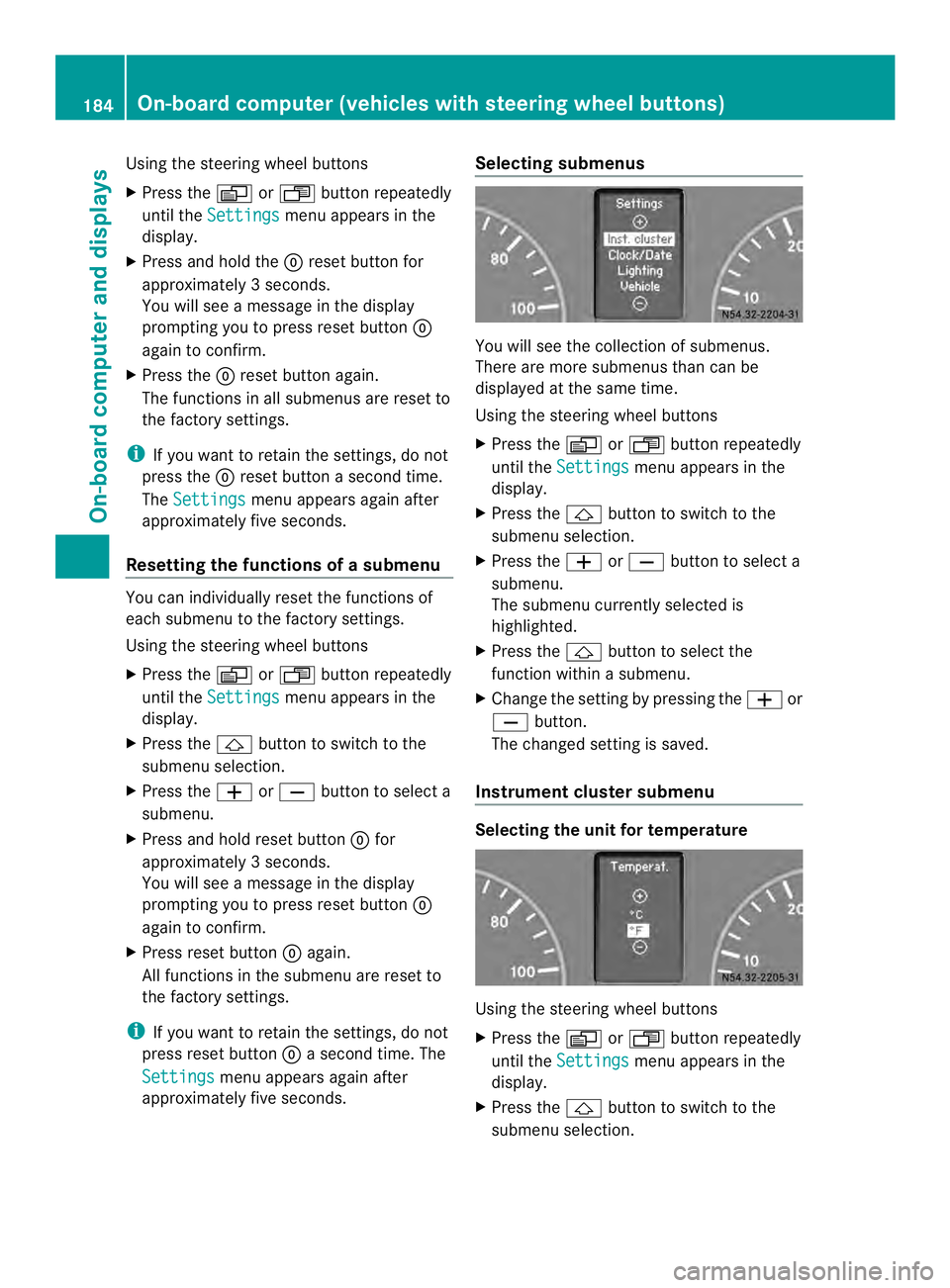
approximately five seconds. Selecting submenus You will see the collection of submenus.
There are more submenus than can be
displayed at the same time.
Using the steering wheel buttons
X Press the 0010or0007 button repeatedly
until the Settings menu appears in the
display.
X Press the 0001button to switch to the
submenu selection.
X Press the 0011or0012 button to select a
submenu.
The submenu currently selected is
highlighted.
X Press the 0001button to select the
function within a submenu.
X Change the setting by pressing the 0011or
0012 button.
The changed setting is saved.
Instrument cluster submenu Selecting the unit for temperature
Using the steering wheel buttons
X
Press the 0010or0007 button repeatedly
until the Settings menu appears in the
display.
X Press the 0001button to switch to the
submenu selection. 184
On-boar
dcomputer (vehicles with steering wheel buttons)On-board computer and displays
Page 189 of 334
Using the steering wheel buttons
X
Press the 0010or0007 button repeatedly
until the Settings menu appears in the
display.
X Press the 0001button to switch to the
submenu selection.
X Press the 0011or0012 button to select the
Clock submenu.
X Press the 0001button to select the
12/24 h function.
The selection marker is on the current
setting.
X Press the 0011or0012 button to select the
12 h or
24 h clock format.
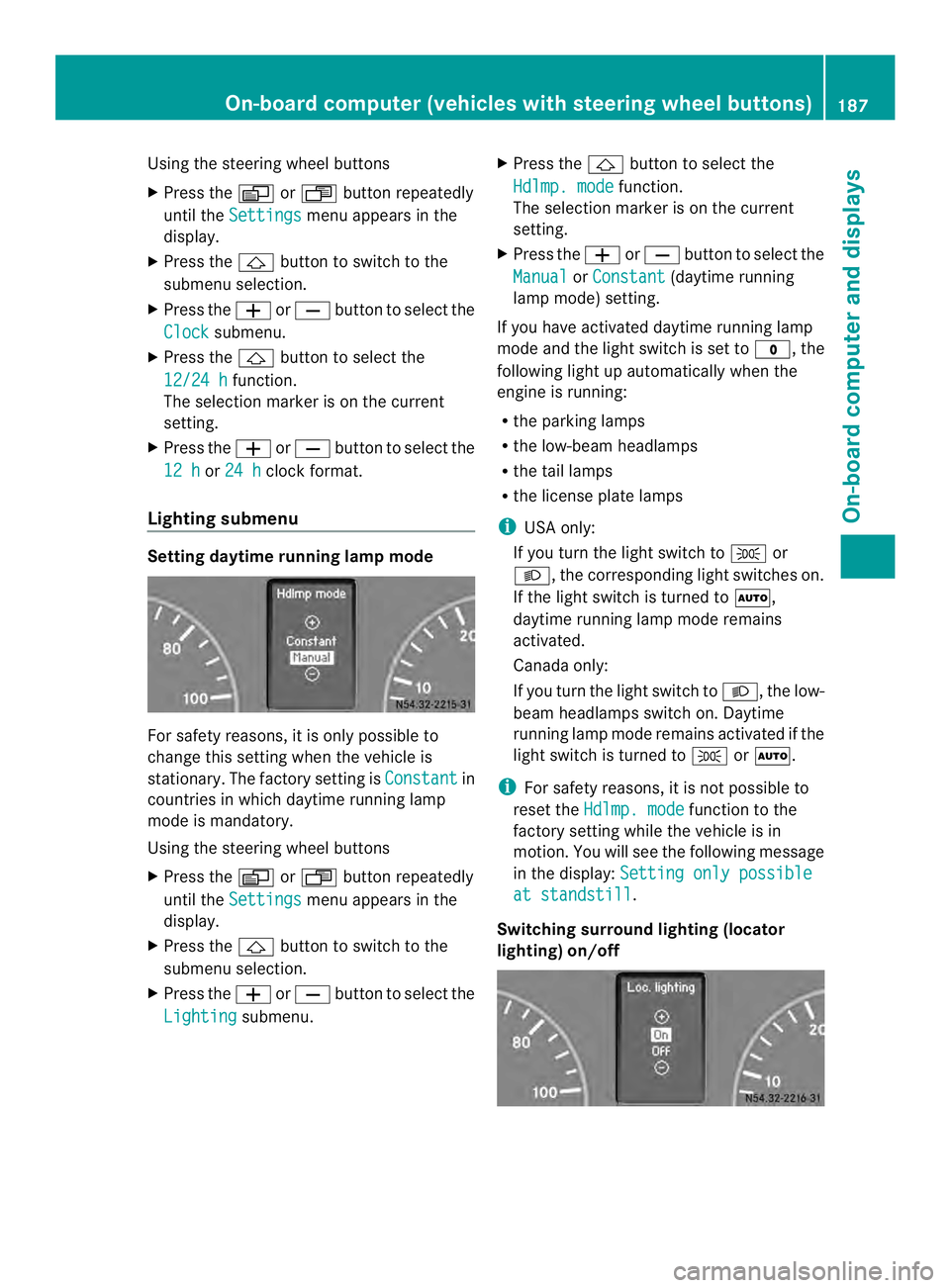
Lighting submenu Setting daytime running lamp mode
For safety reasons, it is only possible to
change this setting when the vehicle is
stationary. The factory setting is
Constant in
countries in which daytime running lamp
mode is mandatory.
Using the steering wheel buttons
X Press the 0010or0007 button repeatedly
until the Settings menu appears in the
display.
X Press the 0001button to switch to the
submenu selection.
X Press the 0011or0012 button to select the
Lighting submenu. X
Press the 0001button to select the
Hdlmp. mode function.
The selection marker is on the current
setting.
X Press the 0011or0012 button to select the
Manual or
Constant (daytime running
lamp mode) setting.
If you have activated daytime running lamp
mode and the light switch is set to 000C, the
following light up automaticallyw hen the
engine is running:
R the parking lamps
R the low-beam headlamps
R the tail lamps
R the license plate lamps
i USA only:
If you turn the light switch to 000Bor
0004, the corresponding light switches on.
If the light switch is turned to 0007,
daytime running lamp mode remains
activated.
Canada only:
If you turn the light switch to 0004, the low-
beam headlamps switch on. Daytime
running lamp mode remains activated if the
light switch is turned to 000Bor0007.
i For safety reasons, it is not possible to
reset the Hdlmp. mode function to the
factory setting while the vehicle is in
motion. You will see the following message
in the display: Setting only possible at standstill .
Switching surround lighting (locator
lighting) on/off On-board computer (vehicles with steering wheel buttons)
187On-board computer and displays Z
Page 234 of 334
Useful information
This Operator's Manual describes all models
as well as standard and optional equipment
of your vehicle that were available at the time
of going to print. Country-specific variations
are possible. Note that your vehicle may not
be equipped with all of the described
functions. This also applies to systems and
functions relevant to safety.
Read the information on qualified specialist
workshops (Y page 26). Loading guidelines
Important safety notes
G
WARNING
As a result of improperly placed or unevenly
distributed loads, the center of gravity of the
load being transported may be too high or too
far back. This can significantly impair handling
as well as steering and braking
characteristics. There is a risk of an accident.
Always make sure that the center of gravity of
the load is:
R between the axles
and
R as low as possible, near the rear axle. G
WARNING
When objects are unsecured or inadequately
secured, they can slip, turn over or be thrown
about, striking vehicle occupants .This also
applies to:
R luggage or loads
R a rear bench seat which has been removed
and is being transported in the vehicle in an
exceptional case.
There is a risk of injury, particularly in the
event of braking maneuvers or abrupt
changes in direction.
Always stow objects in such a way that they
cannot be tossed about. Before traveling,
secure objects, luggage or loads to prevent them slipping or tipping over. If you remove a
rear bench seat, it is advisable to store it
outside the vehicle. G
WARNING
When the permissible wheel loads, axle loads
and/or the maximum permissible gross
vehicle weight are exceeded, driving safety is
compromised. The handling as well as
steering and braking characteristics may be
significantly impaired. Overloaded tires may
overheat, causing them to burst. There is a
risk of an accident.
When transporting a load, always observe the
permissible wheel loads, axle loads and the
maximum permissible gross vehicle weight
for the vehicle (including occupants). G
WARNING
When you load the roof, the center of gravity
of the vehicle rises and the driving
characteristics change. If you exceed the
maximum roof load, the driving
characteristics, as well as steering and
braking, will be greatly impaired. There is a
risk of an accident.
Never exceed the maximum roof load and
adjust your driving style.
! If you are using a roof carrier, observe the
maximum roof load and maximum roof
carrier load.
You will find information about the maximum
roof load in the "Technical data" section
(Y page 327) and information about roof
carriers in the "Carrier systems" section
(Y page 236).
R Do not stack luggage or loads higher than
the backrests.
R Objects to be transported should
preferably be stowed in the cargo
compartment. 232
Loading guidelinesTransporting loads
Page 236 of 334
Checks after loading
G
WARNING
Combustion engines emit poisonous exhaust
gases, such as carbon monoxide. If the sliding
door or rear door is open when the engine is
running, exhaust gases can ente rthe vehicle
interior, especially during the journey. There
is a risk of poisoning.
Always switch off the engine before opening
the sliding door or rear door. Never drive the
vehicle when the sliding door or rear door is
open.
X Securing loads: check that the load is
secure before every journey and at regular
intervals during a long journey, and correct
if necessary.
X Doors: close the sliding doors and rear
doors.
X Tire pressure: adjust the tire pressures
according to the vehicle load
(Y page 278).
X Driving style: adapt your driving style
according to the vehicle load. Load distribution
General notes
! Excessive loads on individualp oints of the
cargo floor or on the load surface impair
vehicle handling characteristics and could
cause damage to the floor covering.
The overall center of gravity of the load should
always be as low as possible, centered and
between the axles near the rear axle.
On Cargo Vans/Passenger Vans:
X Always transport loads in the cargo
compartment.
X Always place the load against the backrests
of the rear bench seat.
X Move large and heavy loads as far towards
the front of the vehicle as possible against the rear bench seat. Stow the load flush
with the rear bench seat.
X Always additionally secure the load with
suitable load-securing aids or tie downs.
Observe the following notes:
R Do not stack loads higher than the upper
edge of the backrests.
R Transport loads behind seats that are not
occupied.
R If the rear bench seat is not occupied, insert
the seat belts crosswise into the buckle of
the opposite seat belt. Securing loads
Important safety notes
G
WARNING
If you attach the tie-down incorrectly when
securing the load, the following may occur in
the event of abrupt changes in direction,
braking maneuvers or an accident:
R the cargo tie-down rings may become
detached or the tie-down may tear if the
permissible load is exceeded
R the load may not be restrained.
This may cause the load to slip, tip over or be
tossed about, striking vehicle occupants.
There is a risk of an accident and injury.
Always tension the tie-downs in the proper
manner and only between the described
cargo tie-down rings. Always use tie-downs
designed specifically for the loads. G
WARNING
You may not transport anyone in the cargo
compartment or on the load surface. Never
let more people ride in the vehicle than there
are seat belts available. Make sure everyone
riding in the vehicle is correctly restrained
with a separate seat belt. Never use a seat
belt for more than one person at a time. 234
Securing loadsTransporting loads