check engine light MERCEDES-BENZ SPRINTER 2013 MY13 Operator’s Manual
[x] Cancel search | Manufacturer: MERCEDES-BENZ, Model Year: 2013, Model line: SPRINTER, Model: MERCEDES-BENZ SPRINTER 2013Pages: 334, PDF Size: 3.88 MB
Page 96 of 334
signal lamps on the side of the vehicle
selected will light up.
The hazard warning lamps switch on
automatically if:
R
an air bag is deployed.
R you brake sharply and bring the vehicle to
a halt from a speed of more than 45 mph
(70 km/h).
If the hazard warning lamps have been
switched on automatically, press the 0011
hazard warning lamp switch to switch them
off.
i The hazard warning lamps work even
when the ignition is switched off. Headlamp cleaning system
The headlamps are cleaned automatically
with a high-pressure water jet if the "Wipe
with washer fluid" function is activated
(Y page 103) while the low-beam headlamps
are on and the engine is running.
Information on checking the washer fluid
level can be found in the "Maintenance and
care" (Y page 246) section. Headlamps fogged up on the inside
The headlamps may fog up on the inside if
there is high atmospheric humidity.
X Switch on the low-beam headlamps and
drive off.
The level of moisture diminishes,
depending on the length of the journey and
the weather conditions (humidity and
temperature).
If the level of moisture does not diminish:
X Have the headlamps checked at a qualified
specialist workshop. Interior lighting
Switching the dashboard lighting on/
off
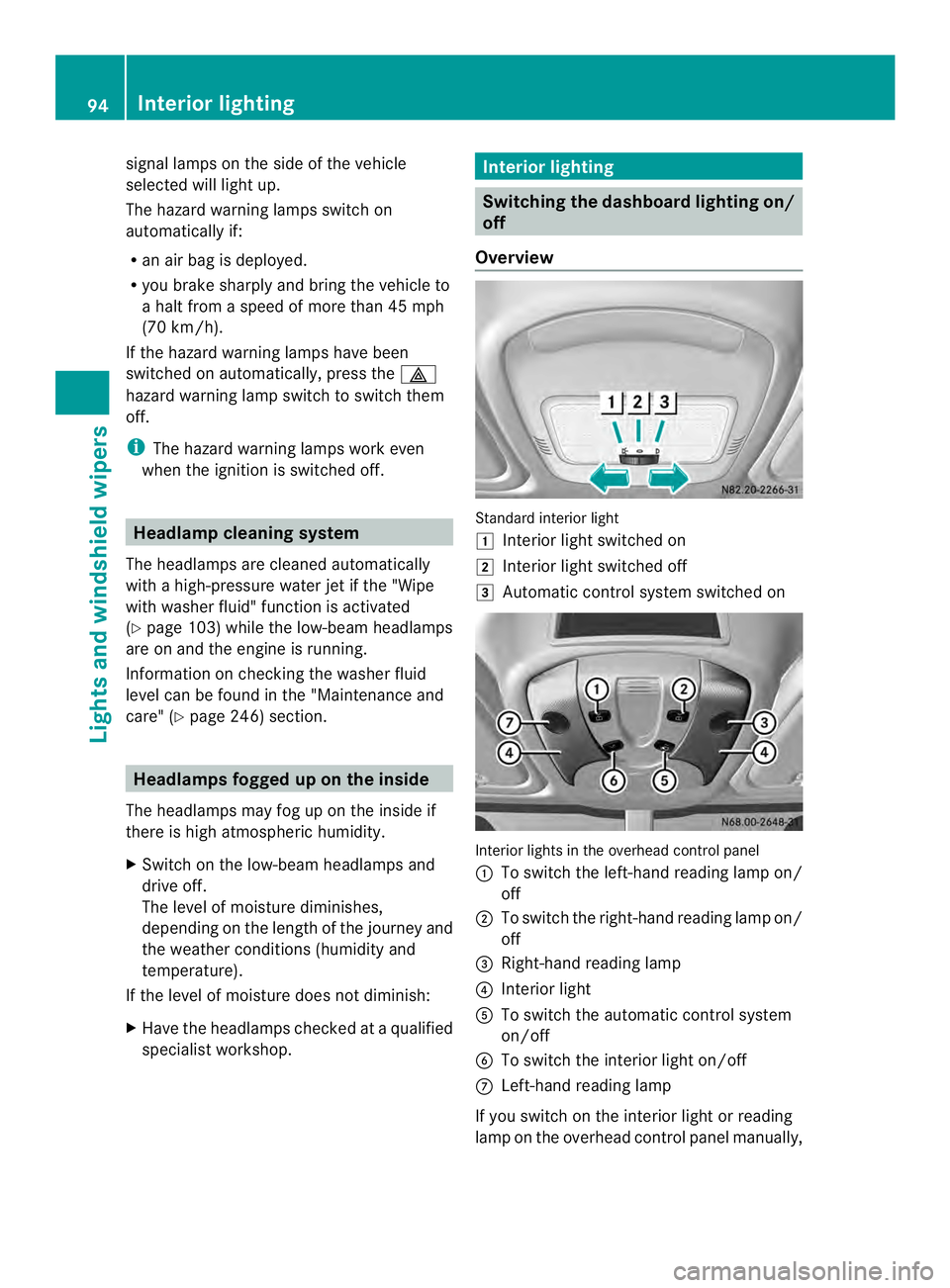
Overview Standard interior light
0008
Interior light switched on
0009 Interior light switched off
000A Automatic control system switched on Interior lights in the overhead control panel
0005 To switch the left-hand reading lamp on/
off
0006 To switch the right-hand reading lamp on/
off
0026 Right-hand reading lamp
0025 Interior light
0023 To switch the automatic control system
on/off
0024 To switch the interior light on/off
0018 Left-hand reading lamp
If you switch on the interior light or reading
lamp on the overhead control panel manually, 94
Interior lightingLights and windshield wipers
Page 121 of 334
The auxiliary heating works independently of
the engine and supplements the climate
control system in the vehicle. The auxiliary
heating heats the air in the vehicle interior to
the temperature set.
If your vehicle is equipped with a hot-water
auxiliary heater, the auxiliary heating also
keeps the coolant warm. This way, the load
on the engine is minimized and fuel is saved.
The heater booster function of the auxiliary
heating supports the climate control system
when the engine is runnin gand the outside
temperature is low.
You can use the auxiliary heating at an
outside temperature of up to 39 ‡ (4 †). At
an outside temperature above 39 ‡(4† ) the
auxiliary heating system and the heater
booster function switch off automatically.
i If the interior motion sensor (Y page 61)
is armed and the auxiliary heating is
switched on, it is possible that the interior
temperature monitoring may cause a false
alarm. In this case, either deactivate the
interior motion sensor or switch off the
auxiliary heating. Before switching on
X Check the fuel level and top up if necessary.
The auxiliary heating is operated directly
using the vehicle's fuel. The tan kmust be
at least a quarter full to ensure that the
auxiliary heating functions.
X Switch on climate control (Y page 112).
X Se tthe temperature control to the desired
temperature (Y page 113).
X Set the air distribution as required
(Y page 113).
X Open the center (Y page 117) and side air
vents (Y page 117) and set them to the
middle position.
i The auxiliary heating automatically
switches to heater booster mode after the
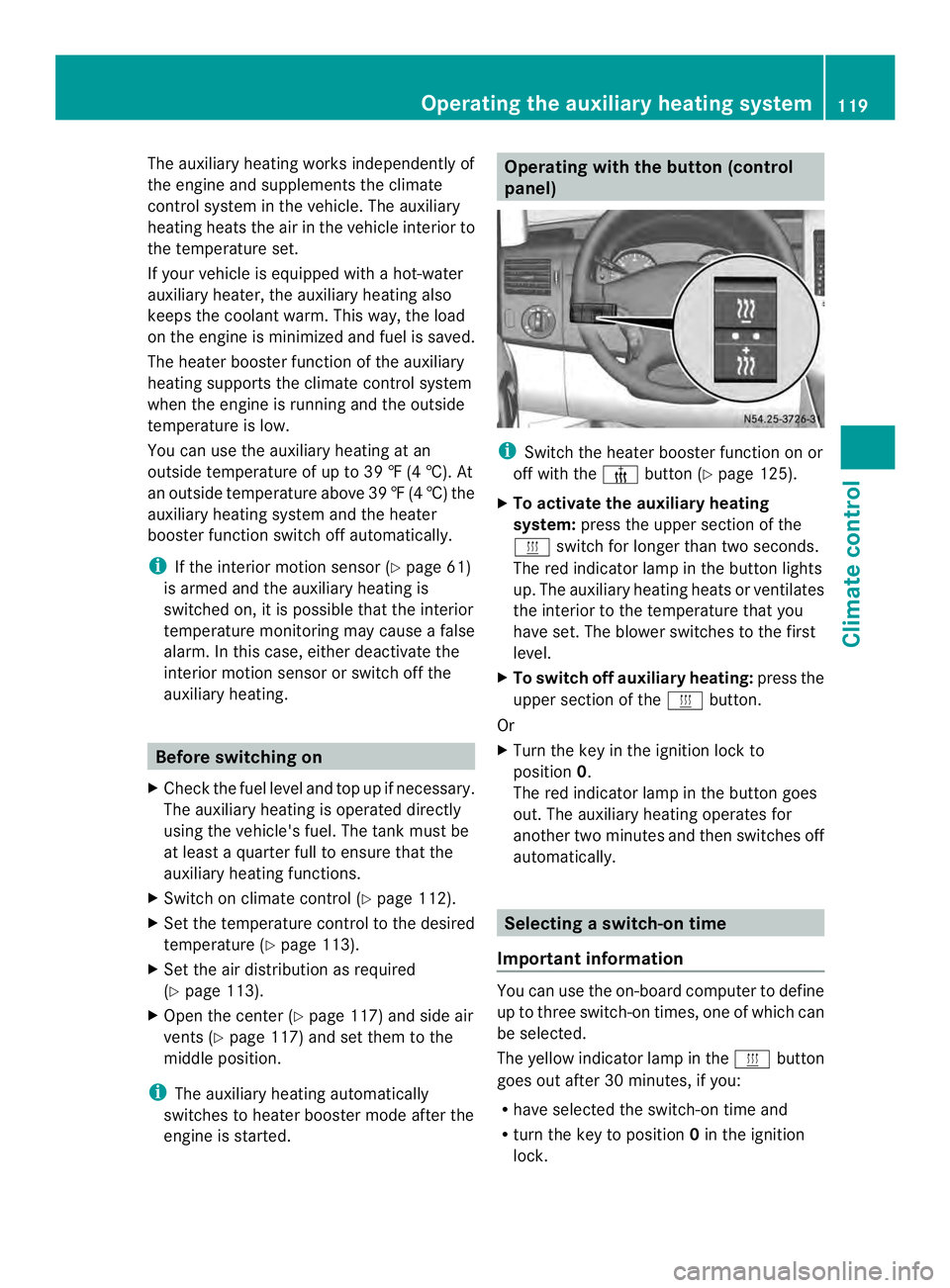
engine is started. Operating with the button (control
panel)
i
Switch the heater booster function on or
off with the 0013button (Y page 125).
X To activate the auxiliary heating
system: press the upper section of the
0020 switch for longer than two seconds.
The red indicator lamp in the button lights
up. The auxiliary heating heats or ventilates
the interior to the temperature that you
have set. The blower switches to the first
level.
X To switch off auxiliary heating: press the
upper section of the 0020button.
Or
X Turn the key in the ignition lock to
position 0.
The red indicator lamp in the button goes
out. The auxiliary heating operates for
another two minutes and then switches off
automatically. Selecting
aswitch-on time
Important information You can use the on-boar
dcomputer to define
up to three switch-on times, one of which can
be selected.
The yellow indicator lamp in the 0020button
goes out after 30 minutes, if you:
R have selected the switch-on time and
R turn the key to position 0in the ignition
lock. Operating the auxiliary heating system
119Climate control Z
Page 128 of 334
At an outside temperature of up to
39 ‡(4 †) the fuel-fired heate
rbooster
system heats the vehicle interior as quickly
as possible when the engine is running.
The auxiliary heating automatically switches
to heater booster mode after the engine is
started.
At an outside temperature above 39 ‡(4 †)
the auxiliary heating system and the heater
booster function switch off automatically.
If you switch off the engine without switching
off the heater booster function, the system
will be switched on the next time the engine
is started (memory function).
i Switch the auxiliary heating on or off with
the 0020 button (Y page 119).
X To switch on/off: press the0013switch.
If the indicator lamp in the button lights up,
the heater booster function is switched on.
After switching off, the auxiliary heating
operates for about another three minutes and
then switches off automatically. Replacing the remote control battery
G
WARNING
Batteries contain toxic and corrosive
substances. If batteries are swallowed, it can
result in severe health problems. There is a
risk of fatal injury.
Keep batteries out of the reach of children. If
a battery is swallowed, seek medical attention
immediately. H
Environmental note Batteries contain dangerous
substances. It is against the
law to dispose of them with
the household rubbish. They
must be collected separately
and recycled to protect the
environment.
Dispose of batteries in an
environmentally friendly
manner
.Take discharged
batteries to a qualified
specialist workshop or a
special collectio npoint for
used batteries.
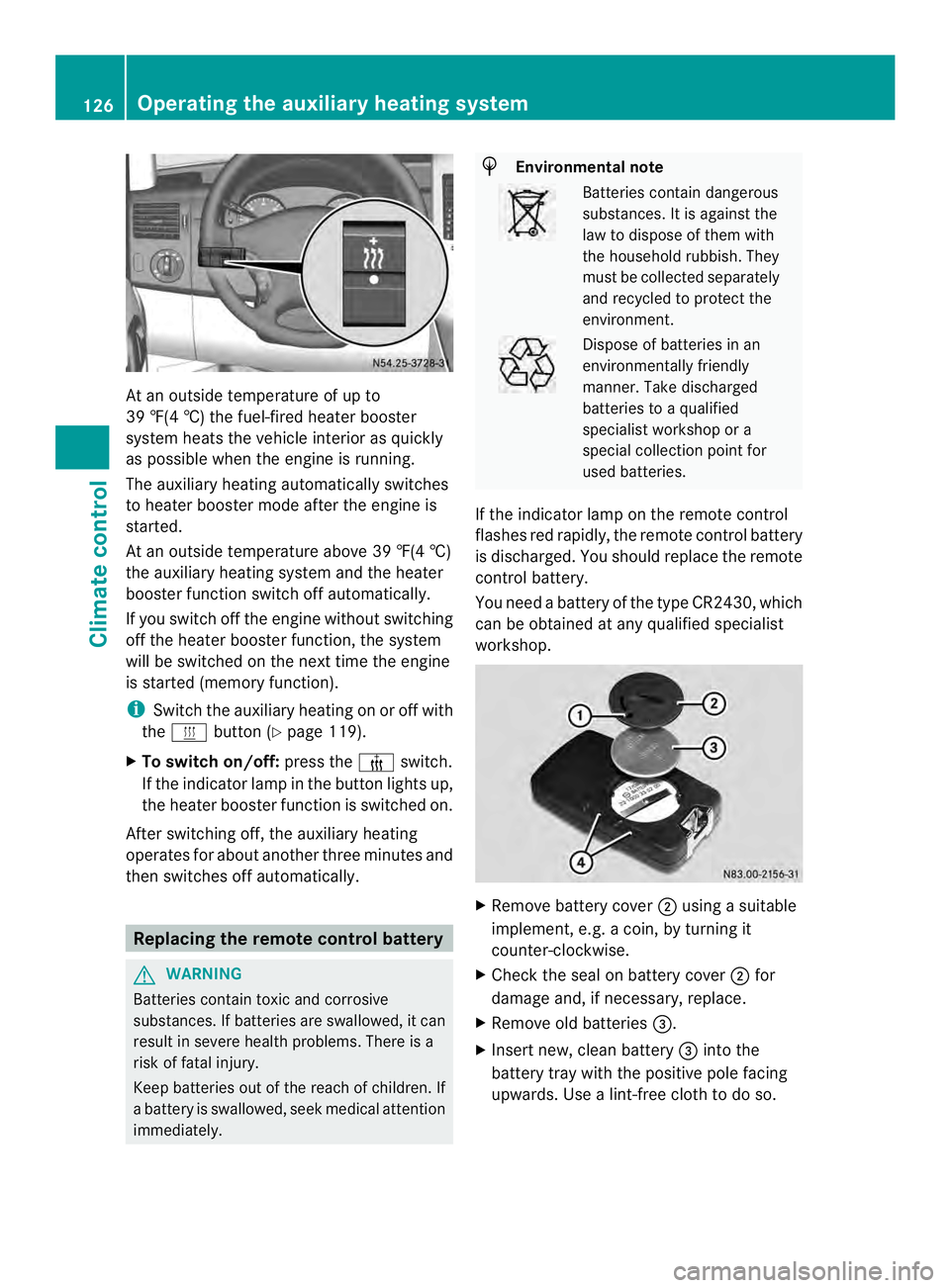
If the indicator lamp on the remote control
flashes red rapidly, the remote control battery
is discharged. You should replace the remote
control battery.
You need a battery of the type CR2430, which
can be obtained at any qualified specialist
workshop. X
Remove battery cover 0006using a suitable
implement, e.g. a coin, by turning it
counter-clockwise.
X Check the seal on battery cover 0006for
damage and, if necessary, replace.
X Remove old batteries 0026.
X Insert new, clean battery 0026into the
battery tray with the positive pole facing
upwards. Use a lint-free cloth to do so. 126
Operating the auxiliary heating systemClimate control
Page 136 of 334
i
To unlock the steering, move the steering
wheel slightly while turning the key to
position 1. Preparing for a journey
Visual check of the vehicle exterior X
In particular, check the following
components on the vehicle, and on the
trailer as necessary:
R
license plates, vehicle lighting, turn
signals, brake lamps and wiper blades for
dirt and damage
R tires and wheels for firm seating, correct
tire pressure and general condition
R trailer tow hitch for play and security
i The trailer coupling is one of the most
importan tvehicle parts with regard to road
safety. The separate instructions issued by
the manufacturer pertaining to operation,
care and maintenance should be observed.
X Rectify any noticeable defects before
commencing the journey.
Checks in the vehicle Emergency equipment/first-aid kit
X
Check the equipment to make sure that it
is accessible, complete and ready for use.
The first aid and breakdown assistance
equipment is in the fron tdoor stowage
compartments and behind the driver's seat.
Vehicle lighting
X Turn the key to position 2in the ignition
lock.
X Check the lighting system with the aid of a
second person.
X Replace defective bulbs (Y page 96). Before driving off
G
WARNING
Objects in the driver's footwell may restrict
the clearance around the pedals or block a
depressed pedal. This jeopardizes the
operating and road safety of the vehicle.
There is a risk of an accident.
Stow all objects securely in the vehicle so that
they do not get into the driver's footwell.
When using floormats or carpets, make sure
that they are properly secured so that they do
not slip or obstruct the pedals. Only use non-
slip floormats. G
WARNING
Unsuitable footwear can hinder correc tusage
of the pedals, e.g.:
R shoes with thick soles
R shoes with high heels
R slippers
There is a risk of an accident.
Wear suitable footwear to ensure correct
usage of the pedals.
X Secure the load as per the loading
guidelines (Y page 232).
X Make sure that the floormats and carpets
are properly secured so that they cannot
slip and obstruct the pedals.
X Close all doors. Starting the engine
G
WARNING
Combustion engines emit poisonous exhaust
gases such as carbon monoxide. Inhaling
these exhaust gases leads to poisoning. There
is a risk of fatal injury. Therefore never leave
the engine running in enclosed spaces
without sufficient ventilation.
! Do not depress the accelerator pedal
when starting the engine.
X Before starting the engine, make sure that: 134
DrivingDriving and parking
Page 153 of 334
Limited braking performance on salt-
treated roads When driving on salted roads, salt may start
to build up on the brak edisks and brake pads.
This can increase braking distances
considerably.
Maintain a greater distanc eto the vehicle in
front.
To remove any build up of salt that may have
formed:
X Apply the brakes at the start of the journey,
occasionally during journey and at the end
of the journey. Make sure that you do not
endanger other road users when doing so.
Parking brake G
WARNING
If you must brake the vehicle with the parking
brake, the braking distance is considerably
longer and the wheels could lock. There is an
increased danger of skidding and accidents.
Only use the parking brake to brake the
vehicle when the service brake is faulty. Do
not apply the parking brake too firmly. If the
wheels lock, release the parking brake until
the wheels begin turning again.
When driving on wet roads or dirt-covered
surfaces, road salt and/or dirt may get into
the parking brake. This causes corrosion and
a reduction of braking force.
In order to prevent this, drive with the parking
brake lightly applied from time to time. When
doing so, drive for a distance of approximately
110 yds (100 m) at a maximum speed of
12 mph (20 km/h).
The brake lamps are not illuminated when you
brake the vehicle using the parking brake. Driving in wet conditions
Hydroplaning G
WARNING
There is a danger of hydroplaning occurring,
even if you are driving slowly and your tires
have sufficient tread depth, depending on the
depth of water on the road. There is a risk of
an accident.
For this reason, avoid tire ruts and brake
carefully.
Therefore, in heavy rain or other conditions in
which hydroplaning can occur, drive as
follows:
R reduce your speed
R avoid tire ruts
R apply the brakes with care
Driving on flooded roads !
Do not drive through flooded areas.
Check the depth of any water before driving
through it. Drive slowly through standing
water. Otherwise, water may enter the
vehicle interior or the engine compartment.
This can damage the electronic
components in the engine or the automatic
transmission. Water can also be drawn in
by the engine's air suction nozzles and this
can cause engine damage.
If you have to drive on stretches of road on
which water has collected, please bear in
mind that:
R the water level of standing water should not
be above the lower edge of the front
bumper
R do not drive faster than walking speed Driving tips
151Driving and parking Z
Page 169 of 334
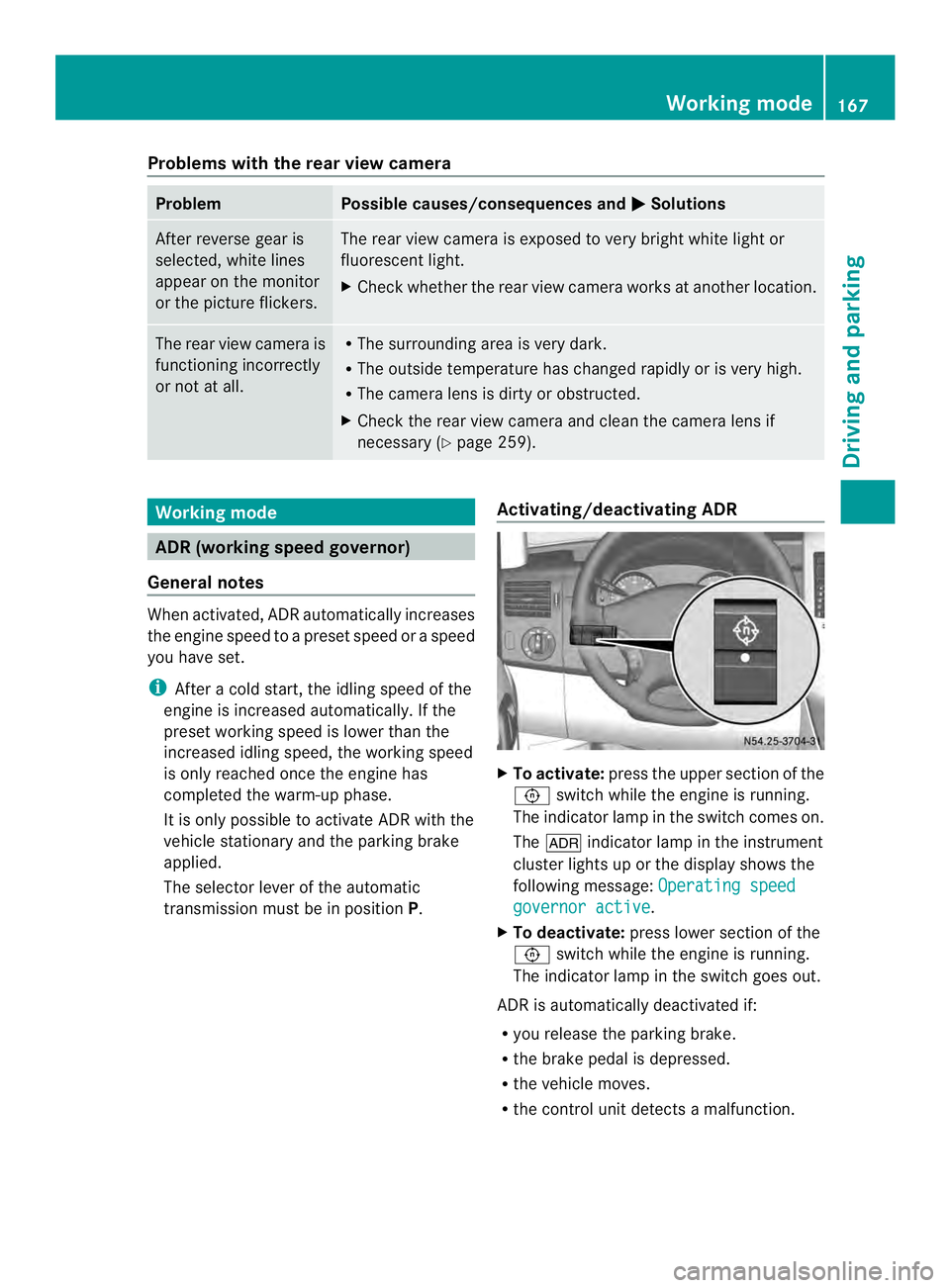
Problems with the rear view camera
Problem Possible causes/consequences and
0004 Solutions
After reverse gear is
selected, white lines
appear on the monitor
or the picture flickers. The rear view camera is exposed to very bright white light or
fluorescent light.
X
Check whether the rear view camera works at another location. The rear view camera is
functioning incorrectly
or not at all. R
The surrounding area is very dark.
R The outside temperature has changed rapidly or is very high.
R The camera lens is dirty or obstructed.
X Check the rear view camera and clean the camera lens if
necessary (Y page 259). Working mode
ADR (working speed governor)
General notes When activated, ADR automatically increases
the engine speed to a preset speed or a speed
you have set.
i After a cold start, the idling speed of the
engine is increased automatically. If the
preset working speed is lower than the
increased idling speed, the working speed
is only reached once the engine has
completed the warm-up phase.
It is only possible to activate ADR with the
vehicle stationary and the parking brake
applied.
The selector lever of the automatic
transmission must be in position P.Activating/deactivating ADR X
To activate: press the upper section of the
0023 switch while the engine is running.
The indicator lamp in the switch comes on.
The 0004 indicator lamp in the instrument
cluster lights up or the display shows the
following message: Operating speed governor active .
X To deactivate: press lower section of the
0023 switch while the engine is running.
The indicator lamp in the switch goes out.
ADR is automatically deactivated if:
R you release the parking brake.
R the brake pedal is depressed.
R the vehicle moves.
R the control unit detects a malfunction. Working mode
167Driving and parking Z
Page 174 of 334
available from the police and local
authorities.
Observe the following when towing a trailer:
R
Practice driving around bends, stopping
and backing up at a place where there is no
traffic. This enables you to gain experience
and get used to the new handling
characteristics.
R Before driving, check:
-that the trailer tow hitch and ball
coupling are secure
- that the safety switch for a braked trailer
is functioning properly
- that the safety chains are secure and not
damaged
- that the electrical connections are
secure
- that the lights are working
- that the wheels are in good order and the
tire pressure is correct
R Adjust the exterior mirrors to provide an
unobstructed view of the rear sectio nofthe
trailer.
R If the trailer has electronically controlled
brakes, pull the vehicle/trailer
combination away carefully. Brake
manually using the brake controller and
check that the brakes are working.
R Secure the load on the trailer according to
the applicable specifications and current
standards on securing loads
(Y page 234).
R When driving with a trailer, check at regular
intervals that the load is secured and that
the brakes and lights are working.
R Bear in mind that the handling will be less
stable when towing a trailer than when
driving without one. Avoid sudden steering
movements.
R The vehicle/trailer combination is heavier,
accelerates more slowly and has a
decreased gradient climbing capability and
a longer braking distance.
It is more susceptible to crosswinds and
requires cautious steering. R
If possible, do not brake suddenly, but
rather moderately at first so that the trailer
can activate its brakes. Then increase the
force on the brake pedal.
R If the automatic transmission repeatedly
shifts between gears when driving on
inclines, restrict the shift range. Select shift
range 4,3,2or 1.
Driving in a low gear and at a low speed
reduces the risk of damaging the engine.
R When driving on a downhill gradient, shift
to a low gear and take advantage of the
engine's braking effect.
Avoid continuous brake application as this
may overheat the vehicle brakes and, if
installed, the trailer brakes.
R If the coolant temperature increases
dramatically while the air-conditioning
system is switched on, switch off the air-
conditioning system.
Coolant heat can also be dissipated by
switching the airflow and the temperature
of the heater/air conditioning to the
maximum level. Open the windows if
necessary.
R When overtaking, pay particular attention
to the extended length of your vehicle/
trailer combination.
Due to the length of your vehicle/trailer
combination you need an additional
distance before you can return to your
original lane. Uncoupling
atrailer G
WARNING
If you uncouple a trailer with the overrun
brake engaged, you could trap your hand
between the vehicle and the trailer drawbar.
There is a risk of injury.
Do not uncouple a trailer if the overru nbrake
is engaged.
! Do not disconnect a trailer with an
engaged overru nbrake. Otherwise, your 172
Towing
atrailerDriving an d parking
Page 180 of 334
0026
Fuel fille rflap location indicator 000F: the
fuel filler flap is on the left-hand side. Fuel
filler flap location indicator 001E:the fuel
filler flap is on the right-hand side
0025 Reserve fuel warning lamp (Y page 216)DEF gauge
Vehicles without steering wheel
buttons If the supply of DEF is less than 1.5 US gal
(5.5 l), the 0009indicator lamp lights up and
the 0002dEF Chk display message appears.
If the supply of DEF falls below the reserve
range of 0.8 US gal (3.0 l), the 0009indicator
lamp lights up and the 0002StArtS RExxdisplay message appears. In the display,
xxcorresponds to the number of possible
remaining engine starts (16
to
0 ).
Further information on DEF consumption can
be found in the "Service products and filling
capacity" section (Y page 320).
Vehicles with steering wheel buttons If the supply of DEF is less than 1.5 US gal
(5.5 l), the Check Diesel Exhaust Fluid See Operator's Manual message is shown
in the display.
If the supply of DEF falls below the reserve
range of 0.8 US gal (3.0 l), the 0009xxstarts remaining message is displayed. In
the display, xx corresponds to the number of
possible remaining engine starts (16 to
0 ).
Further information on DEF consumption can
be found in the "Service products and filling
capacity" section (Y page 320). On-board computer (vehicles without
steering wheel buttons)
Operating the on-board computer
General notes The on-board computer is activated as soon
as you turn the key to position
1in the ignition
lock.
The on-board computer shows vehicle
information and settings in the display.
You can control the displaya nd the settings
in the on-board compute rusing the
adjustment buttons on the instrument
cluster.
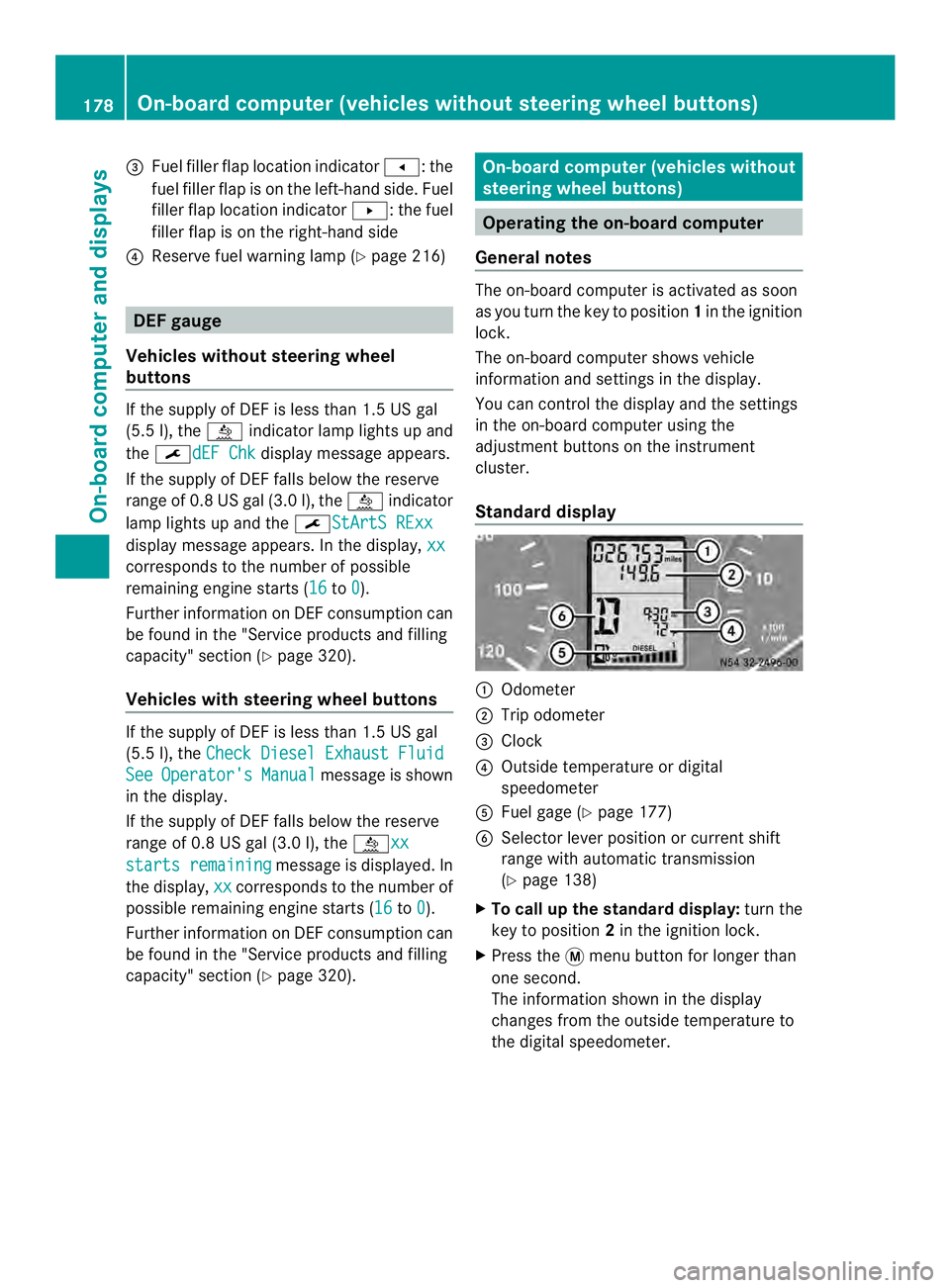
Standard display 0005
Odometer
0006 Trip odometer
0026 Clock
0025 Outside temperature or digital
speedometer
0023 Fuel gage (Y page 177)
0024 Selector lever position or current shift
range with automatic transmission
(Ypage 138)
X To call up the standard display: turn the
key to position 2in the ignition lock.
X Press the 0004menu button for longer than
one second.
The information shown in the display
changes from the outside temperature to
the digital speedometer. 178
On-board computer (vehicles without steering wheel buttons)On-board computer and displays
Page 181 of 334
Menus in the on-board computer
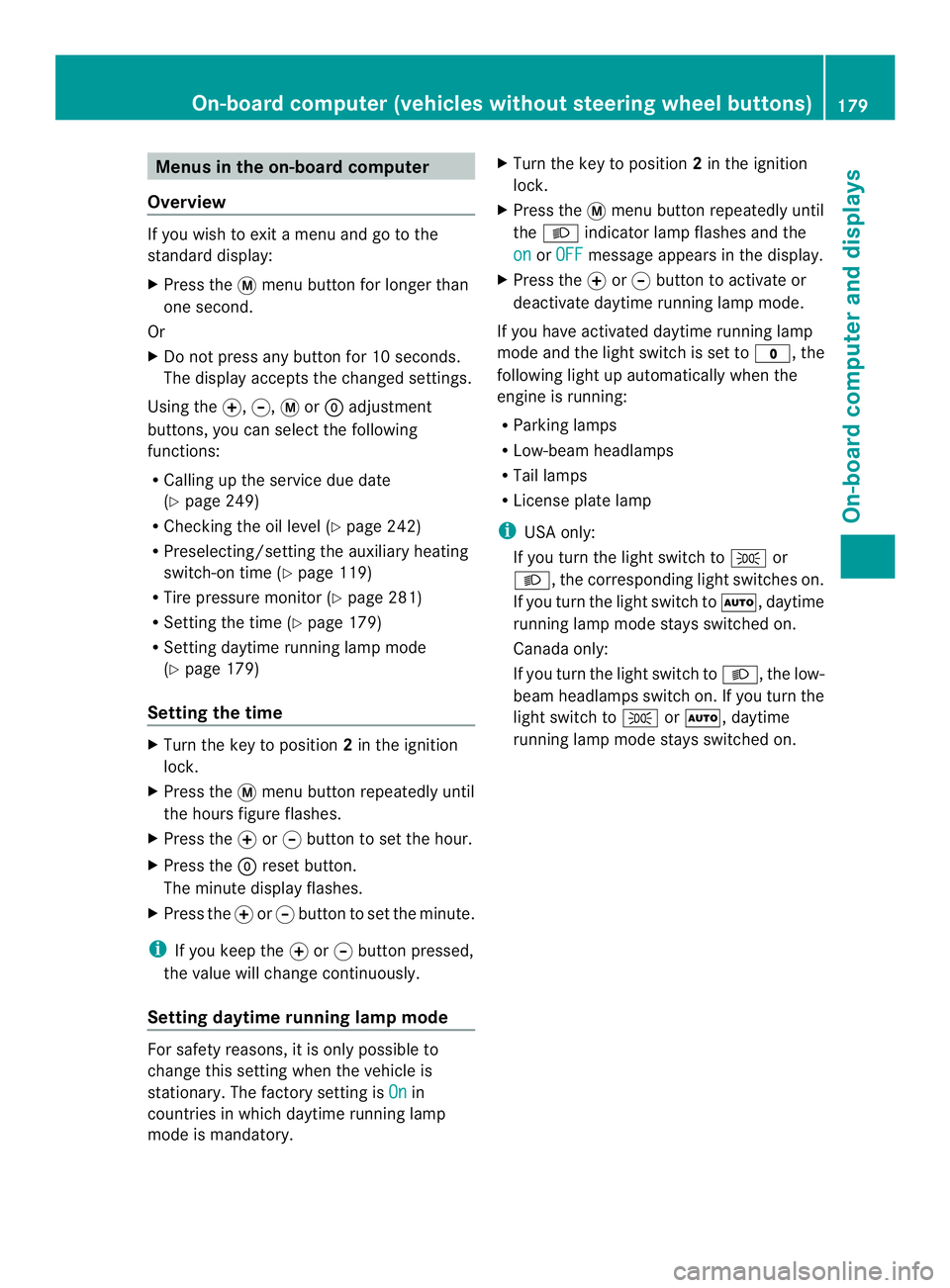
Overview If you wish to exit a menu and go to the
standard display:
X Press the 0004menu button for longer than
one second.
Or
X Do not press any button for 10 seconds.
The display accepts the changed settings.
Using the 000E,000F,0004or0007 adjustment
buttons, you can select the following
functions:
R Calling up the service due date
(Y page 249)
R Checking the oil level (Y page 242)
R Preselecting/setting the auxiliary heating
switch-on time ( Ypage 119)
R Tire pressure monitor (Y page 281)
R Setting the time (Y page 179)
R Setting daytime running lamp mode
(Y page 179)
Setting the time X
Turn the key to position 2in the ignition
lock.
X Press the 0004menu button repeatedly until
the hours figure flashes.
X Press the 000Eor000F button to set the hour.
X Press the 0007reset button.
The minute display flashes.
X Press the 000Eor000F button to set the minute.
i If you keep the 000Eor000F button pressed,
the value will change continuously.
Setting daytime running lamp mode For safety reasons, it is only possible to
change this setting when the vehicle is
stationary. The factory setting is
On in
countries in which daytime running lamp
mode is mandatory. X
Turn the key to position 2in the ignition
lock.
X Press the 0004menu button repeatedly until
the 0004 indicator lamp flashes and the
on or
OFF message appears in the display.
X Press the 000Eor000F button to activate or
deactivate daytime running lamp mode.
If you have activated daytime running lamp
mode and the light switch is set to 000C, the
following light up automatically when the
engine is running:
R Parking lamps
R Low-beam headlamps
R Tail lamps
R License plate lamp
i USA only:
If you turn the light switch to 000Bor
0004, the corresponding light switches on.
If you turn the light switch to 0007, daytime
running lamp mode stays switched on.
Canada only:
If you turn the light switch to 0004, the low-
beamh eadlamps switch on. If you turn the
light switch to 000Bor0007, daytime
running lamp mode stays switched on. On-boar
dcomputer (vehicles without steering wheel buttons)
179On-board computer and displays Z
Page 197 of 334
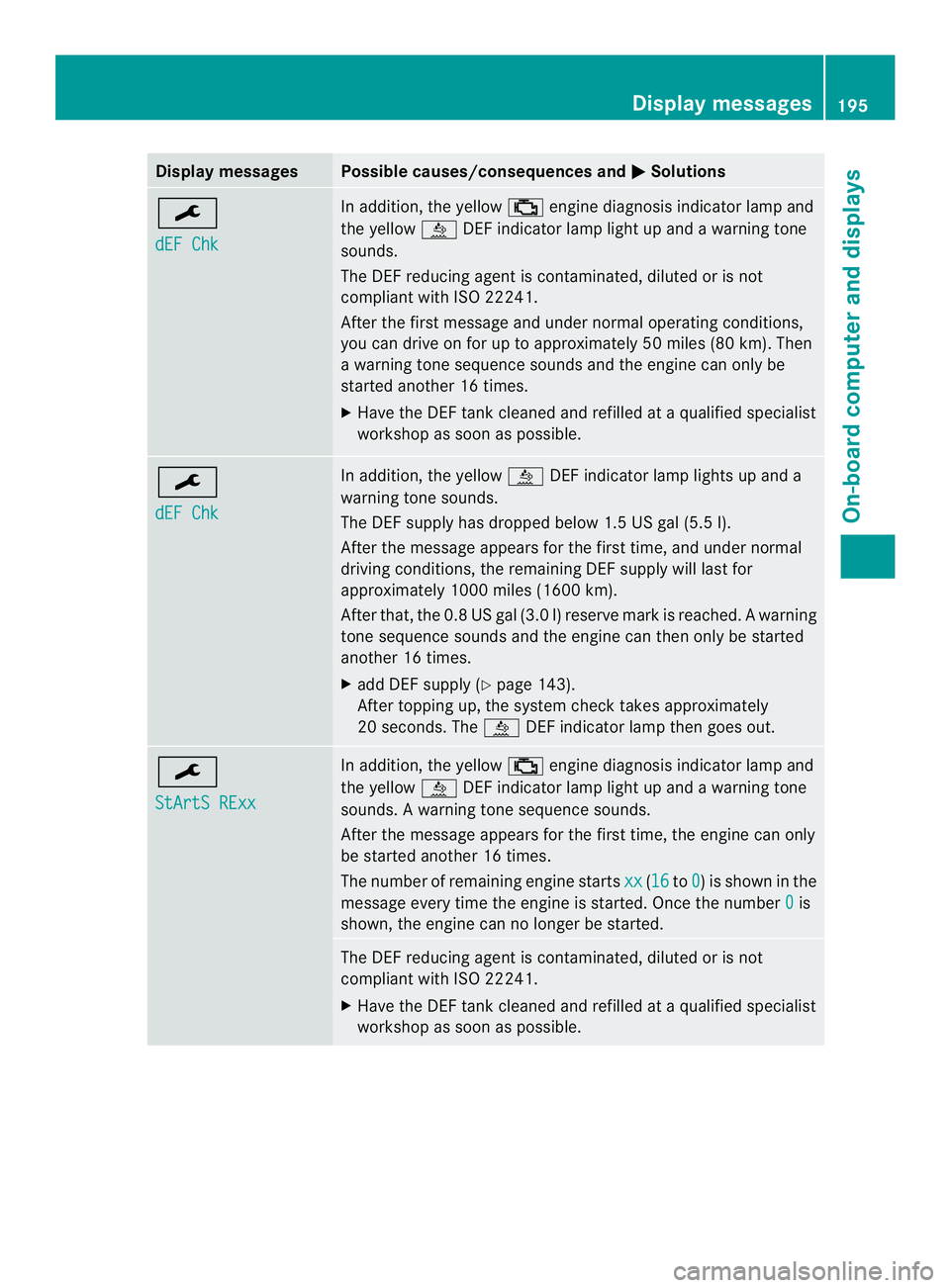
Display messages Possible causes/consequences and
0004 Solutions
0002
dEF Chk In addition, the yellow
0018engine diagnosis indicato rlamp and
the yellow 0009DEF indicator lamp light up and a warning tone
sounds.
The DE Freducing agent is contaminated, diluted or is not
compliant with ISO 22241.
After the first message and under normal operating conditions,
you can drive on for up to approximately 50 miles (80 km). Then
a warning tone sequence sounds and the engine can only be
started another 16 times.
X Have the DEFt ank cleaned and refilled at a qualified specialist
workshop as soon as possible. 0002
dEF Chk In addition, the yellow
0009DEFindicato rlamp lights up and a
warning tone sounds.
The DE Fsupply has dropped below 1. 5USgal (5.5l).
After the message appears for the first time, and under normal
driving conditions, the remaining DEFs upply will last for
approximately 1000 miles (1600 km).
After that, th e0.8 US ga l(3.0 l) reserv emark is reached. A warning
tone sequence sounds and th eengine can then only be started
another 16 times.
X add DEF supply (Y page 143).
After topping up, the system check takes approximately
20 seconds. The 0009DEF indicator lamp then goes out. 0002
StArtS RExx In addition, the yellow
0018engine diagnosis indicator lamp and
the yellow 0009DEF indicator lamp light up and a warning tone
sounds. Awarning tone sequence sounds.
Afte rthe message appears for the first time, the engine can only
be started another 16 times.
The number of remaining engine starts xx (16 to
0 ) is shown in the
message every time the engine is started. Once the number 0 is
shown, the engine can no longer be started. The DEF reducing agent is contaminated, diluted or is not
compliant with ISO 22241.
X
Have the DEF tank cleaned and refilled at a qualified specialist
workshop as soon as possible. Display messages
195On-board computer and displays Z