instrument cluster MERCEDES-BENZ SPRINTER 2013 MY13 Operator’s Manual
[x] Cancel search | Manufacturer: MERCEDES-BENZ, Model Year: 2013, Model line: SPRINTER, Model: MERCEDES-BENZ SPRINTER 2013Pages: 334, PDF Size: 3.88 MB
Page 60 of 334
If ESP
®
intervenes:
X Do not deactivate ASR under any
circumstances.
X When driving off, apply as little throttle as
possible.
X Adapt yours peed and driving style to the
prevailing road conditions.
i Only use wheels with the recommended
tire sizes. Only then will ESP ®
function
properly. ASR (acceleration skid control)
General notes Important safety notes
Note the section on 'Important safety notes'
(Y
page 56).
ASR can neither reduce the risk of an accident
nor suspend the laws of physics if the driver
does not pay attention when pulling away or
accelerating. ASR is only an aid. Always adapt
your driving style to suit the prevailing road
and weather conditions.
Vehicles without steering wheel buttons: if
ASR is malfunctioning, the 000Aindicator
lamp lights up while the engine is running and
the engine power may be reduced
(Y page 210).
ASR significantly improves traction, i.e. the
transmission of power from the tires to the
road surface, and thus increases the vehicle's
driving stability. If the driving wheels start to
spin, ASR brakes individual drive wheels and
limits the engine torque. ASR thus
significantly assists you when pulling away
and accelerating, especially on wet or
slippery roads.
If traction on the road surface is not sufficient,
even ASR will not allow you to pull away
without difficulty. The type of tires and total
weight of the vehicle as well as the gradient
of the road also play a crucial role. If ASR intervenes, the
000Dwarning lamp in
the instrument cluster flashes.
Activating/deactivating ASR G
WARNING
If deactivated, ASR will not attempt to
stabilize the vehicle during pulling away and
acceleration. There is an increased risk of
skidding and of an accident.
Only deactivate ASR in the situations
described in the following.
! If you deactivate ASR, ESP ®
will still
intervene to stabilize the vehicle. Frequent
braking automatically triggered by ESP ®
can damage the brake system.
For this reason, deactivate ASR only briefly
and when absolutely necessary. When ESP
®
is intervening and the 000D
warning lamp in the instrument cluster is
flashing, leave ASR on. In this case, only
depress the accelerator pedal as far as
required when pulling away.
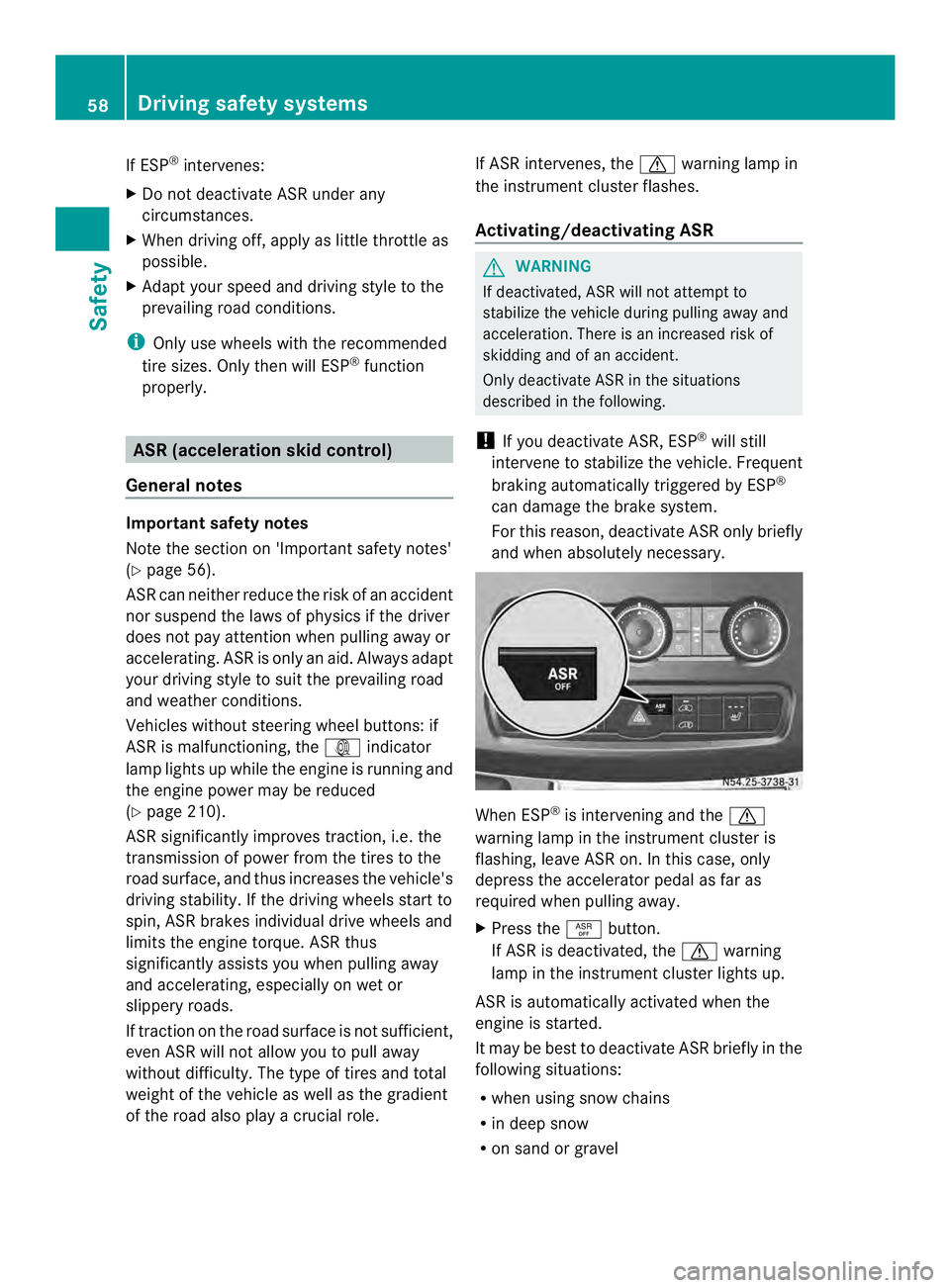
X Press the 0006button.
If ASR is deactivated, the 000Dwarning
lamp in the instrument cluster lights up.
ASR is automatically activated when the
engine is started.
It may be best to deactivate ASR briefly in the
following situations:
R when using snow chains
R in deep snow
R on sand or gravel 58
Driving safet
ysystemsSafety
Page 61 of 334
If you deactivate ASR:
R
engine torque is not limited and the drive
wheels are able to spin. The spinning
wheels will then achieve a cutting effect for
better traction.
R traction control remains active through
brake intervention. If a drive wheel attains
its tire traction limitb ecause one side of the
road is slippery, for example, that wheel is
braked. The traction is then increased in
this situation.
R active brake intervention by ESP ®
to
increase driving stability remains active.
The 000D warning lamp in the instrument
cluster flashes when ESP ®
is intervening. Emergency exit
Emergency exit window
G
WARNING
The emergency exit window cannot be locked
in place. You risk injury if you exit the vehicle
through the emergency exit window.
R Make sure that nobody becomes trapped,
both when closing and when opening the
emergency exit window.
R The opened emergency exit window must
be held in place by another person.
Pay attention to traffic conditions. G
WARNING
If the emergency exit window is unlocked
while driving, it could open and slam shut and
consequently fall down. There is a risk of an
accident and injury.
Before starting off, make sure that the
emergency exit window is locked and the
locking pins are undamaged.
! Make sure there is sufficien tclearance
when opening the emergency exit window.
Hold the open window in position. You
could otherwise damage the emergency
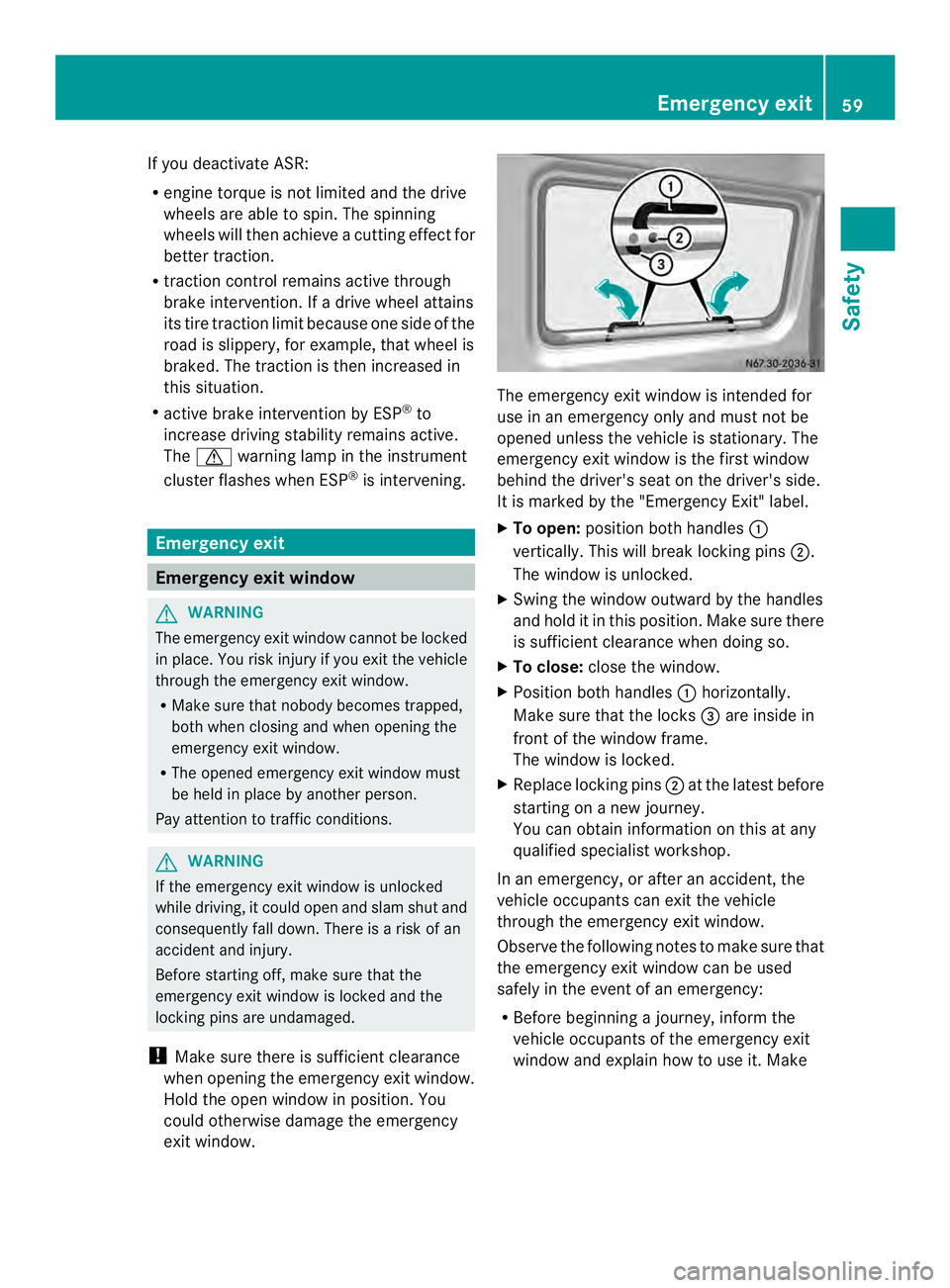
exit window. The emergency exit window is intended for
use in an emergency only and must not be
opened unless the vehicle is stationary. The
emergency exit window is the firs
twindow
behind the driver's seat on the driver's side.
It is marked by the "Emergency Exit" label.
X To open: position both handles 0005
vertically. This will break locking pins 0006.
The window is unlocked.
X Swing the window outward by the handles
and hold it in this position. Make sure there
is sufficien tclearance when doing so.
X To close: close the window.
X Position both handles 0005horizontally.
Make sure that the locks 0026are inside in
front of the window frame.
The window is locked.
X Replace locking pins 0006at the lates tbefore
starting on a new journey.
You can obtain information on this at any
qualified specialist workshop.
In an emergency, or after an accident, the
vehicle occupants can exit the vehicle
through the emergency exit window.
Observe the following notes to make sure that
the emergency exit window can be used
safely in the event of an emergency:
R Before beginning a journey, inform the
vehicle occupants of the emergency exit
window and explain how to use it. Make Emergency exit
59Safety Z
Page 74 of 334
Electrical closing assist
If your vehicle is equipped with electrical
closing assist, you will require less force to
close the sliding door. Electrical step
Important safety notes
If you do no tuse the grab handle and the step,
you could injure yourselfw hen getting in and
out of the vehicle.
In order to reduce risks:
R draw the passengers' attention to the
electrical step. Wait until the electrical step
is fully extended.
R do not jump out of the vehicle.
R only use the grab handle and step. Only
they are designed for such a load.
R keep grab handles, access steps and entry
sills free from dirt, e.g. mud, clay, snow and
ice. Operation and obstacle detection
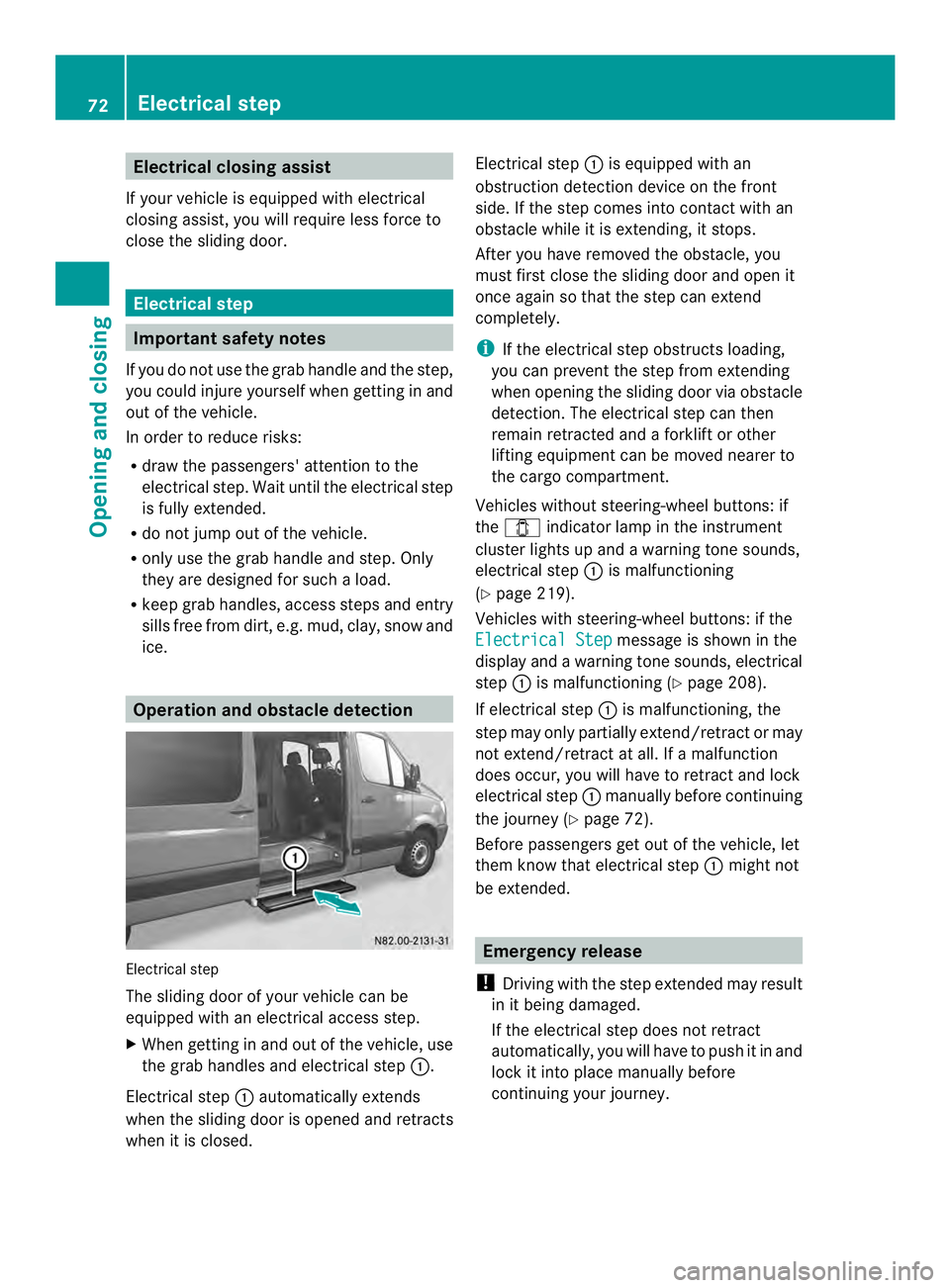
Electrical step
The sliding door of your vehicle can be
equipped with an electrical access step.
X When getting in and out of the vehicle, use
the grab handles and electrical step 0005.
Electrical step 0005automatically extends
when the sliding door is opened and retracts
when it is closed. Electrical step
0005is equipped with an
obstruction detection device on the front
side. If the step comes into contact with an
obstacle while it is extending, it stops.
After you have removed the obstacle, you
must first close the sliding door and open it
once again so that the step can extend
completely.
i If the electrical step obstructs loading,
you can prevent the step from extending
when opening the sliding door via obstacle
detection. The electrical step can then
remain retracted and aforklift or other
lifting equipment can be moved nearer to
the cargo compartment.
Vehicles without steering-wheel buttons: if
the 0004 indicator lamp in the instrument
cluster lights up and a warning tone sounds,
electrical step 0005is malfunctioning
(Y page 219).
Vehicles with steering-wheel buttons: if the
Electrical Step message is shown in the
display and a warning tones ounds, electrical
step 0005is malfunctioning (Y page 208).
If electrical step 0005is malfunctioning, the
step may only partially extend/retract or may
not extend/retract at all. If a malfunction
does occur, you will have to retrac tand lock
electrical step 0005manually before continuing
the journey (Y page 72).
Before passengers ge tout of the vehicle, let
them know that electrical step 0005might not
be extended. Emergency release
! Driving with the step extended may result
in it being damaged.
If the electrical step does not retract
automatically, you will have to push it in and
loc kiti nto place manually before
continuing your journey. 72
Electrical stepOpening and closing
Page 92 of 334
Useful information
This Operator's Manual describes all models
as well as standard and optional equipment
of your vehicle that were available at the time
of going to print. Country-specific variations
are possible. Note that your vehicle may not
be equipped with all of the described
functions. This also applies to systems and
functions relevant to safety.
Read the information on qualified specialist
workshops (Y page 26). Exterior lighting
Important safety notes
For reasons of safety, we recommend that
you drive with the lights switched on even
during the daytime. There may be differences
in operation due to legal requirements and
voluntary recommendations in some
countries. Lamp failure indicator
The bulb failure indicator is only an aid. You
are responsible for the proper functioning of
the vehicle lighting. Insufficient or non-
functioning vehicle lightin gputs the operating
safety of the vehicle at risk.
For this reason, check the condition and
function of your vehicle's lighting system and,
if necessary, that of the trailer before each
journey.
The bulb failure indicator monitors all of the
exterio rlighting lamps, except the perimeter
lamp and the trailer lighting. If a bulb fails,
either the 0002(Ypage 34) indicator lamp
lights up, or you will see a corresponding
message in the display (Y page 201).
i Depending on the equipment, the bulb
failure indicator can fail for all lamps with
the exceptio nofthe turn signal lamps. Light switch
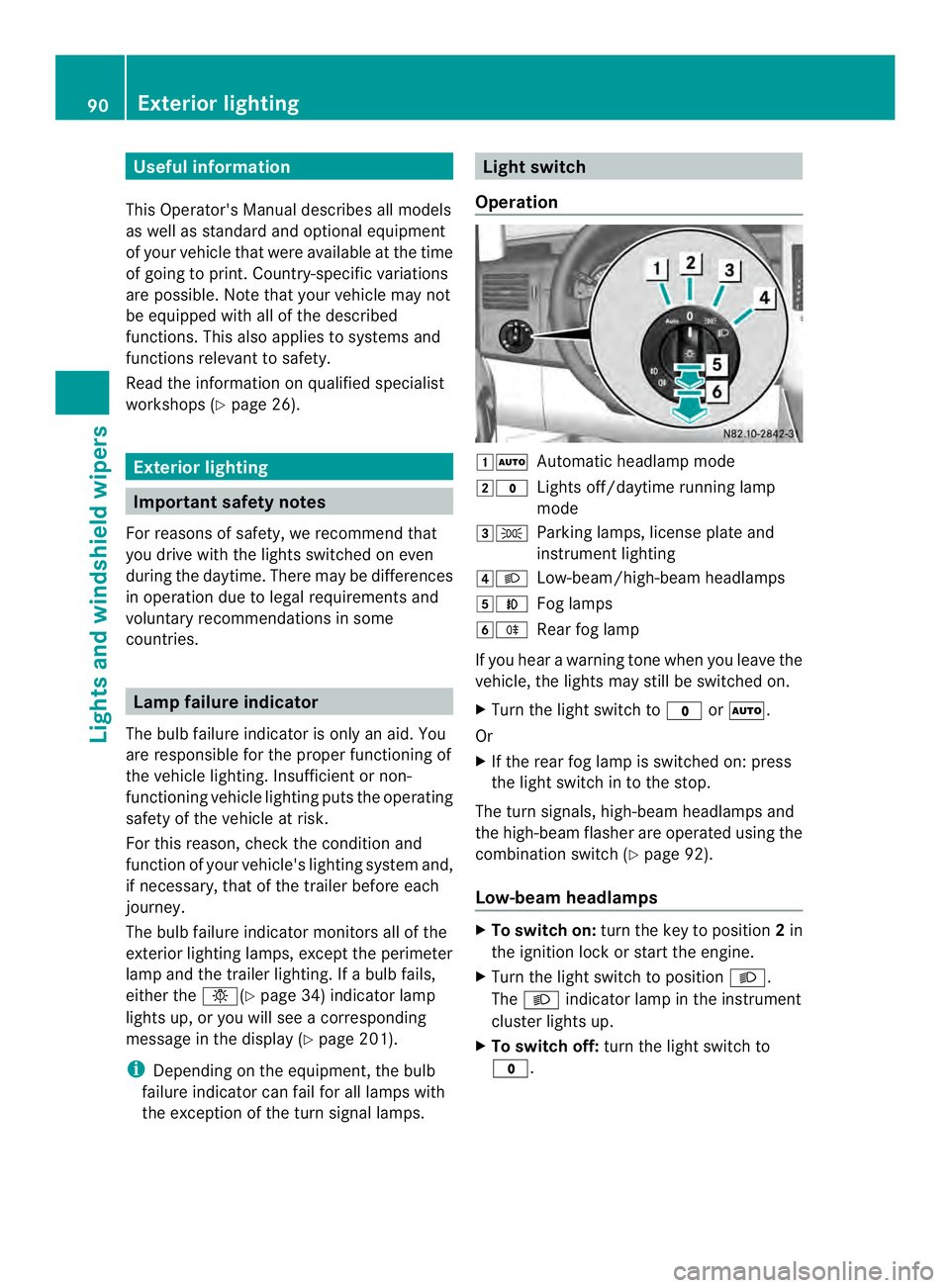
Operation 00080007
Automatic headlamp mode
0009000C Lights off/daytime running lamp
mode
000A000B Parking lamps, license plate and
instrumentl ighting
000E0004 Low-beam/high-beam headlamps
000F0005 Fog lamps
00100007 Rear fog lamp
If you hear a warning tone when you leave the
vehicle, the lights may still be switched on.
X Turn the light switch to 000Cor0007.
Or
X If the rear fog lamp is switched on: press
the light switch in to the stop.
The tur nsignals, high-beam headlamps and
the high-beam flasher are operated using the
combination switch (Y page 92).
Low-beam headlamps X
To switch on: turnthe key to position 2in
the ignition lock or start the engine.
X Turn the light switch to position 0004.
The 0004 indicator lamp in the instrument
cluster lights up.
X To switch off: turn the light switch to
000C. 90
Exterior lightingLights and windshield wipers
Page 93 of 334
Daytime running lamp mode
You can activate/deactivate daytime running
lamp mode using the on-board computer.
This is no tpossible in countries where
daytime running lamp mode is a legal
requirement.
Daytime running lamp mode must be
activated using the on-board computer:
R Vehicles with steering wheel
buttons(Y page 187)
R Vehicles without steering wheel buttons
(Y page 179)
X To switch on: turn the light switch to the
000C position.
The low-beam headlamps, parking lamps
and license plate lamp are switched on
when the engine is running. The 0004
indicator lamp in the instrument cluster
lights up.
i USA only:
If you turn the light switch to the 000Bor
0004 position, the parking lamps or low-
beam headlamps are switched on. If you
turn the light switch to the 0007position,
daytime running lamp mode stays switched
on.
i Canada only:
If you turn the light switch to the 0004
position, the low-beam headlamps are
switched on. If you turn the light switch to
the 000B or0007 position, daytime running
lamp mode stays switched on.
Automatic headlamp mode G
WARNING
If the light switch is set to 000Band it is foggy,
snowing or there is poor visibility, the low-
beam headlamps will not come on
automatically. There is a risk of an accident.
In such situations, turn the light switch to
0004. Automatic headlamp mode is only a driving
aid. You are responsible for the vehicle
lighting at all times.
If it is dark or foggy, turn the light switch
quickly from
0007to0004.Y ou could
otherwise briefly interrupt operation of the
headlamps.
Depending on ambient light, the rain and light
sensor automatically switches on the parking
lamps, low-beam headlamps and the license
plate lamp. This excludes weather-related
impairments to visibility, such as snow, fog or
spray.
X To switch on automatic headlamp
mode: turn the light switch to 0007.
Key in position 1in the ignition lock: the
parking lamps are switched on or off
automatically depending on the ambient
light.
When the engine is running: depending on
the ambient light, the parking lamps and
the low-beam headlamps are switched on
or off automatically.
When the low-beam headlamps are
switched on, the 0004indicator lamp in the
instrument cluster lights up.
Fog lamp/rear fog lamp G
WARNING
If you suspect that driving conditions will be
foggy, turn the light switch to 0004before you
start your journey. Your vehicle may
otherwise not be visible and you could
endanger yourself and others. G
WARNING
In low ambient lighting or foggy conditions,
only switch from position 0007to0004 with
the vehicle at a standstill in a safe location.
Switching from 0007to0004 will briefly
switch off the headlamps. Doing so while
driving in low ambient lighting conditions may
result in an accident. Exterior lighting
91Lights and windshiel dwipers Z
Page 94 of 334
X
Turn the ignition key to position 2in the
ignition lock or start the engine.
X Turn the light switch to 0004or000B.
i If your vehicle is only equipped with one
rear fog lamp, you must turn the light
switch to 0004.
i When the light switch is set to 0007, you
cannot switch on the front or rear fog
lamps.
X To switch on the front fog lamps: pull the
light switch out to the first locking point.
The green 0005indicator lamp on the light
switch lights up.
X To switch on the rear fog lamp: pull the
light switch out to the second locking point.
The yellow 0007indicator lamp on the light
switch lights up.
X To switch off the front fog lamps/rear
fog lamp: push in the light switch to the
stop.
The 0007 and0005 indicator lamp on the
light switch go out. Combination switch
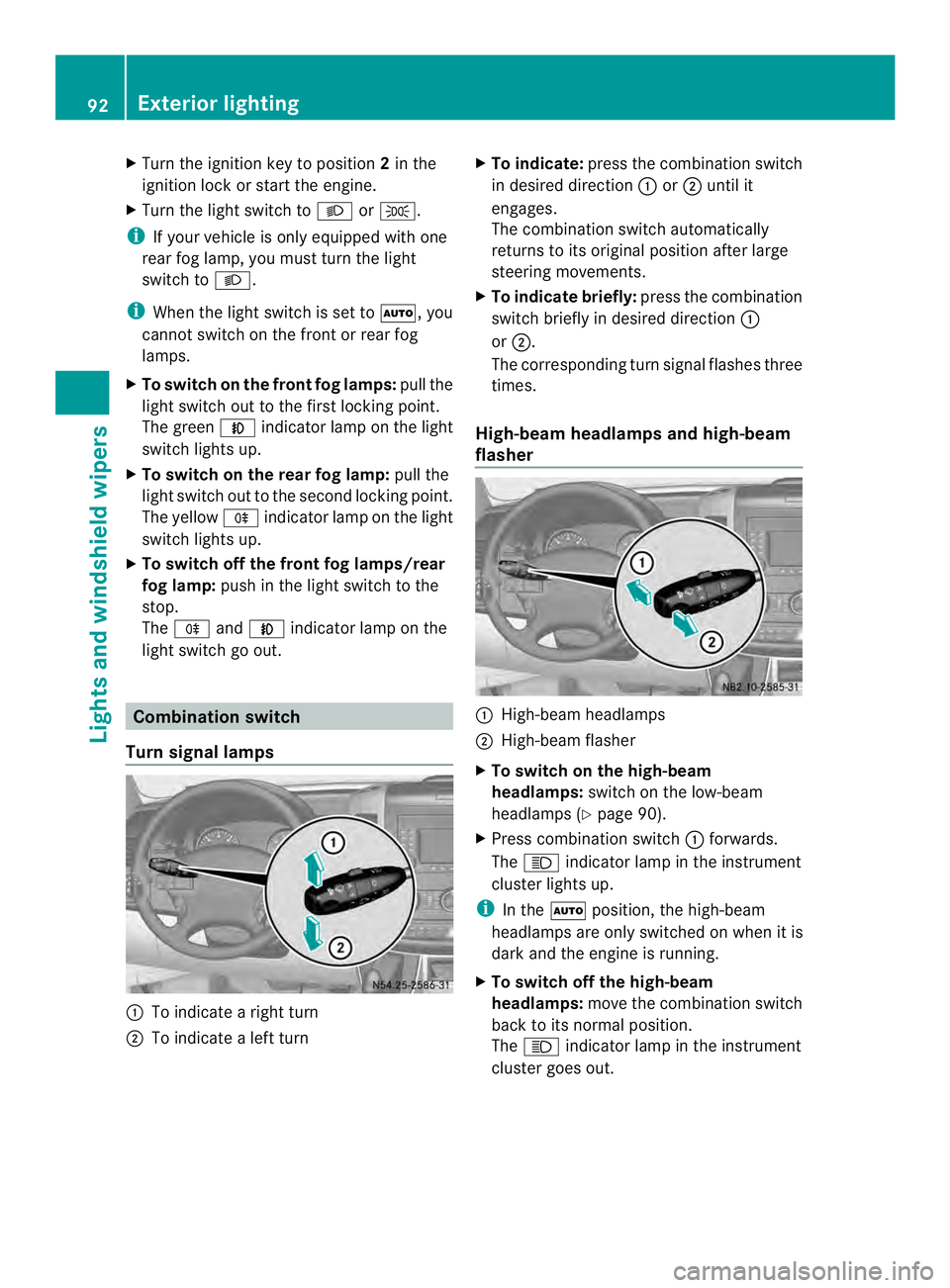
Turn signal lamps 0005
To indicate a right turn
0006 To indicate a left turn X
To indicate: press the combination switch
in desired direction 0005or0006 until it
engages.
The combination switch automatically
returns to its original position after large
steering movements.
X To indicate briefly: press the combination
switch briefly in desired direction 0005
or 0006.
The corresponding turn signal flashes three
times.
High-beam headlamps and high-beam
flasher 0005
High-beam headlamps
0006 High-beam flasher
X To switch on the high-beam
headlamps: switch on the low-beam
headlamps (Y page 90).
X Press combination switch 0005forwards.
The 0003 indicator lamp in the instrument
cluster lights up.
i In the 0007position, the high-beam
headlamps are only switched on when it is
dark and the engine is running.
X To switch off the high-beam
headlamps: move the combination switch
back to its normal position.
The 0003 indicator lamp in the instrument
cluster goes out. 92
Exterior lightingLights and windshield wipers
Page 122 of 334
On-board computer without steering
wheel buttons
X
Turn the key to position 2in the ignition
lock.
X Press the 0020button.
The 0020 symbol flashes in the display.
Or
X Press the 0004menu button on the
instrument cluster repeatedly until the
0020 symbol flashes in the display.
X Use the 000Eor000F buttons on the instrument
cluster to select the switch-on time 1 to
3 .
The switch-on time selected is displayed.
X Wait 10 seconds for the standard display to
appear.
The switch-on time is selected. The yellow
indicator lamp in the 0020button lights up.
If you do not preselect a switch-on time,
and --:-- is shown in the display, this
means that the automatic switch-on mode
is switched off. The yellow indicator lamp
in the 0020button goes out.
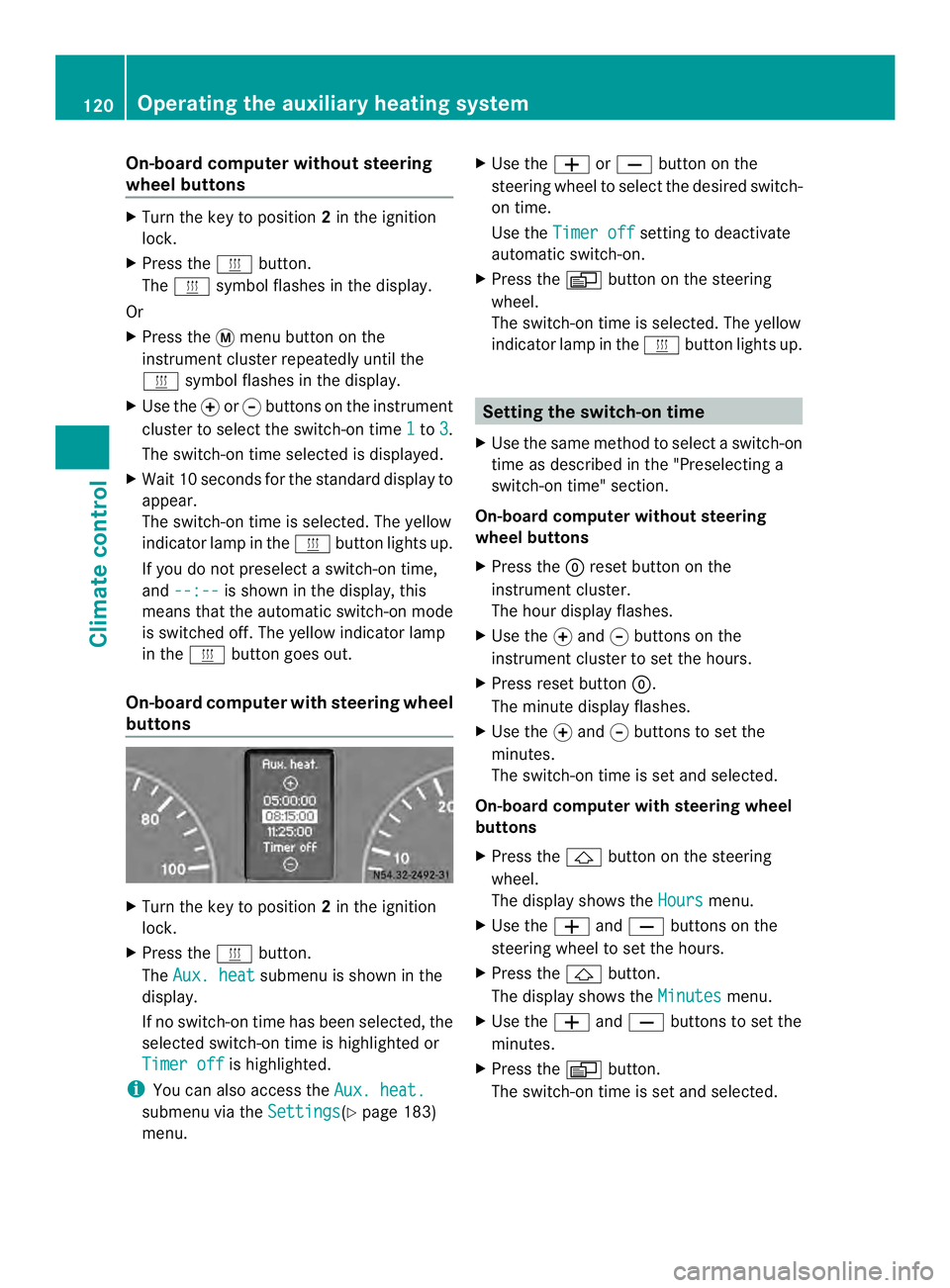
On-boar dcomputer with steering wheel
buttons X
Turn the key to position 2in the ignition
lock.
X Press the 0020button.
The Aux. heat submenu is shown in the
display.
If no switch-on time has been selected, the
selected switch-on time is highlighted or
Timer off is highlighted.
i You can also access the Aux. heat.submenu via the
Settings (Y
page 183)
menu. X
Use the 0011or0012 button on the
steering wheel to selec tthe desired switch-
on time.
Use the Timer off setting to deactivate
automatic switch-on.
X Press the 0010button on the steering
wheel.
The switch-on time is selected. The yellow
indicator lamp in the 0020button lights up. Setting the switch-on time
X Use the same method to select a switch-on
time as described in the "Preselecting a
switch-on time" section.
On-board computer without steering
wheel buttons
X Press the 0007reset button on the
instrument cluster.
The hour display flashes.
X Use the 000Eand 000Fbuttons on the
instrument cluster to set the hours.
X Press reset button 0007.
The minute display flashes.
X Use the 000Eand 000Fbuttons to set the
minutes.
The switch-on time is set and selected.
On-board computer with steering wheel
buttons
X Press the 0001button on the steering
wheel.
The display shows the Hours menu.
X Use the 0011and0012 buttons on the
steering wheel to set the hours.
X Press the 0001button.
The display shows the Minutes menu.
X Use the 0011and0012 buttons to set the
minutes.
X Press the 0010button.
The switch-on time is set and selected. 120
Operating the auxiliary heating systemClimate control
Page 137 of 334
R
all the doors are closed.
R all the vehicle occupants are wearing
their seat belts correctly.
R the parking brake is applied.
i If you depress the brake pedal before
starting the engine, th epedal travel is short
and pedal resistance is high.
If you depress the brake pedal again after
starting the engine, pedal travel and
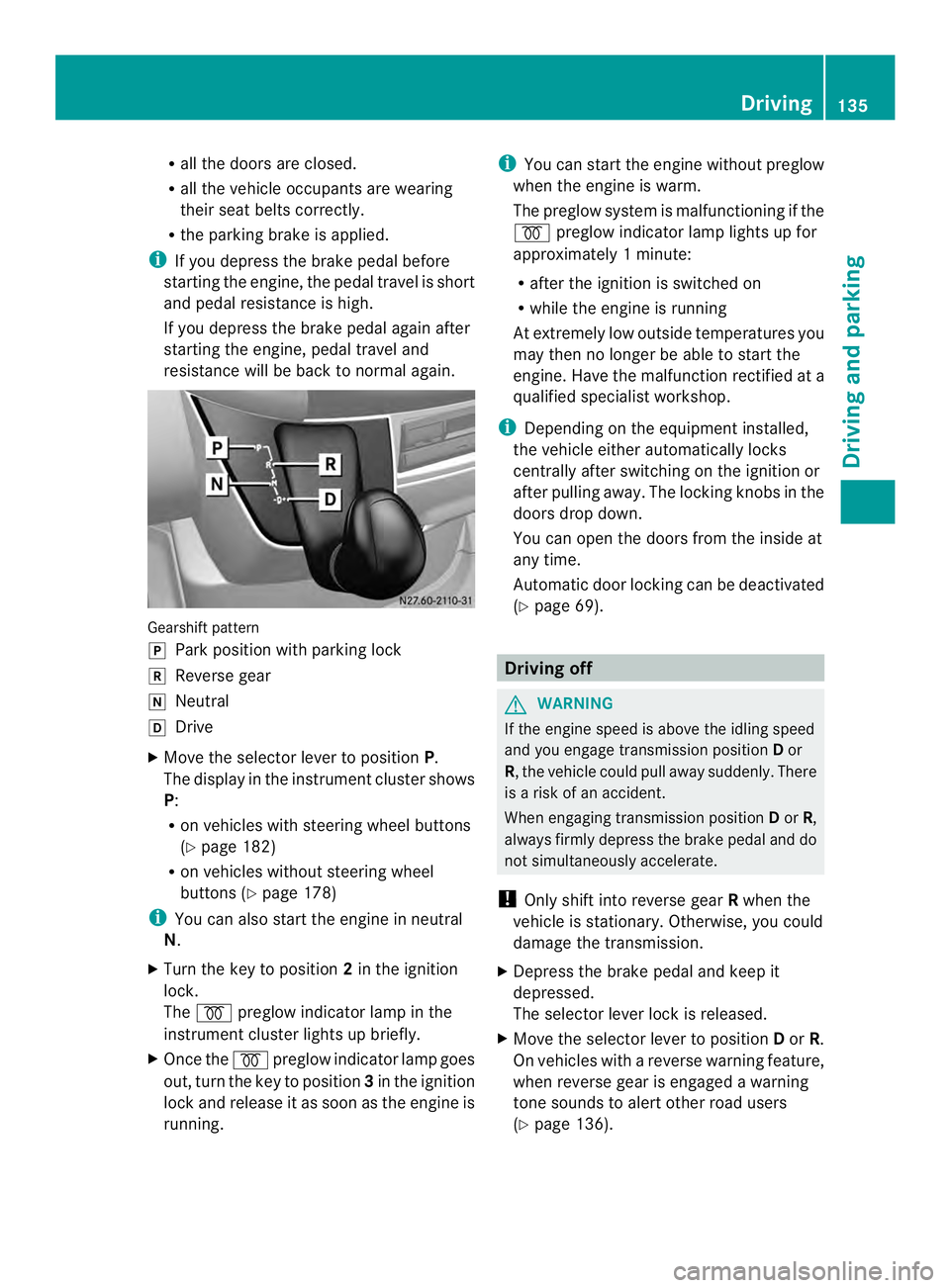
resistance will be back to normal again. Gearshift pattern
0016
Park position with parking lock
0012 Reverse gear
0013 Neutral
0015 Drive
X Move the selector lever to position P.
The display in the instrument cluster shows
P:
R on vehicles with steering wheel buttons
(Y page 182)
R on vehicles without steering wheel
buttons (Y page 178)
i You can also start the engine in neutral
N.
X Turn the key to position 2in the ignition
lock.
The 000D preglow indicator lamp in the
instrument cluster lights up briefly.
X Once the 000Dpreglow indicator lamp goes
out, turn the key to position 3in the ignition
lock and release it as soon as the engine is
running. i
You can start the engine without preglow
when the engine is warm.
The preglow system is malfunctioning if the
000D preglow indicator lamp lights up for
approximately 1minute:
R after the ignition is switched on
R while the engine is running
At extremely low outside temperatures you
may the nno longer be able to start the
engine. Have the malfunction rectified at a
qualified specialist workshop.
i Depending on the equipment installed,
the vehicle either automatically locks
centrally after switching on the ignition or
after pulling away.T he locking knobs in the
doors drop down.
You can open the doors from the inside at
any time.
Automatic door locking can be deactivated
(Y page 69). Driving off
G
WARNING
If the engine speed is above the idling speed
and you engage transmission position Dor
R, the vehicle could pull away suddenly. There
is a risk of an accident.
When engaging transmission position Dor R,
always firmly depress the brake pedal and do
not simultaneously accelerate.
! Only shift into reverse gear Rwhen the
vehicle is stationary. Otherwise, you could
damage the transmission.
X Depress the brake pedal and keep it
depressed.
The selector lever lock is released.
X Move the selector lever to position Dor R.
On vehicles with a reverse warning feature,
when reverse gear is engaged a warning
tone sounds to alert other road users
(Y page 136). Driving
135Driving and parking Z
Page 140 of 334
Problem Possible causes/consequences and
0004 Solutions
The engine does not
start.
The starter motor
cannot be heard. The on-board voltage is too low. The battery is too weak or
discharged.
X
Jump-start the vehicle (Y page 267).
If the engine cannot be jump-started, the starter motor is faulty.
X Consult a qualified specialist workshop. The engine does not
start.
The starter motor
cannot be heard. The battery is discharged or faulty.
X
Check the battery for damage.
X Charge the battery (Y page 254).Automatic transmission
Important safety notes
G
WARNING
If the engine speed is above the idling speed
and you engage transmission position Dor
R, the vehicle could pull away suddenly. There
is a risk of an accident.
When engaging transmission position Dor R,
always firmly depress the brake pedal and do
not simultaneously accelerate.
! Vehicles with automatic transmission
may roll only briefly in the neutral position
N.P rolonged rolling of the wheels, e.g.
when being towed, will result in
transmission damage. Selector lever
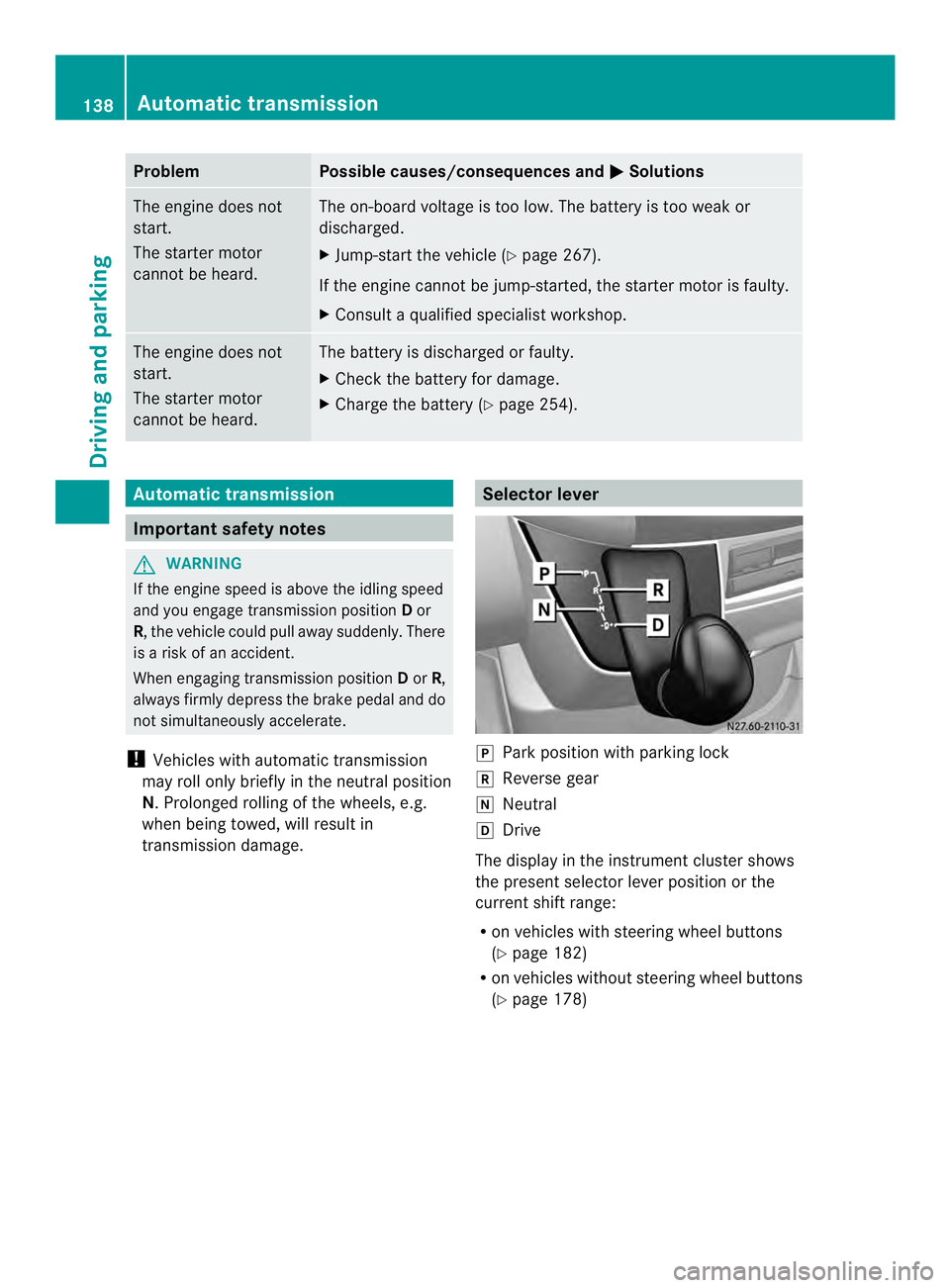
0016
Park position with parking lock
0012 Reverse gear
0013 Neutral
0015 Drive
The display in the instrument cluster shows
the present selector leve rposition or the
current shift range:
R on vehicles with steering wheel buttons
(Y page 182)
R on vehicles without steerin gwheel buttons
(Y page 178) 138
Automatic transmissionDriving and parking
Page 148 of 334
Use the wheel chock (Y
page 147) to do so.Parking brake
G
WARNING
If you leave children unsupervised in the
vehicle, they could set it in motion by, for
example:
R releasing the parking brake
R shifting the automatic transmission out of
the parking position P
R starting the engine.
They could also operate the vehicle's
equipment. There is a risk of an accident and
injury.
When leaving the vehicle, always take the
SmartKey with you and lock the vehicle. Never
leave children unsupervised in the vehicle. G
WARNING
If you must brake the vehicle with the parking
brake, the braking distance is considerably
longer and the wheels could lock. There is an
increased danger of skidding and accidents.
Only use the parking brake to brake the
vehicle when the service brake is faulty. Do
not apply the parking brake too firmly. If the
wheels lock, release the parking brake until
the wheels begin turning again. The brake lamps are not illuminated when you
brake the vehicle using the parking brake.
As a rule, you may only apply the parking
brake when the vehicle is stationary. X
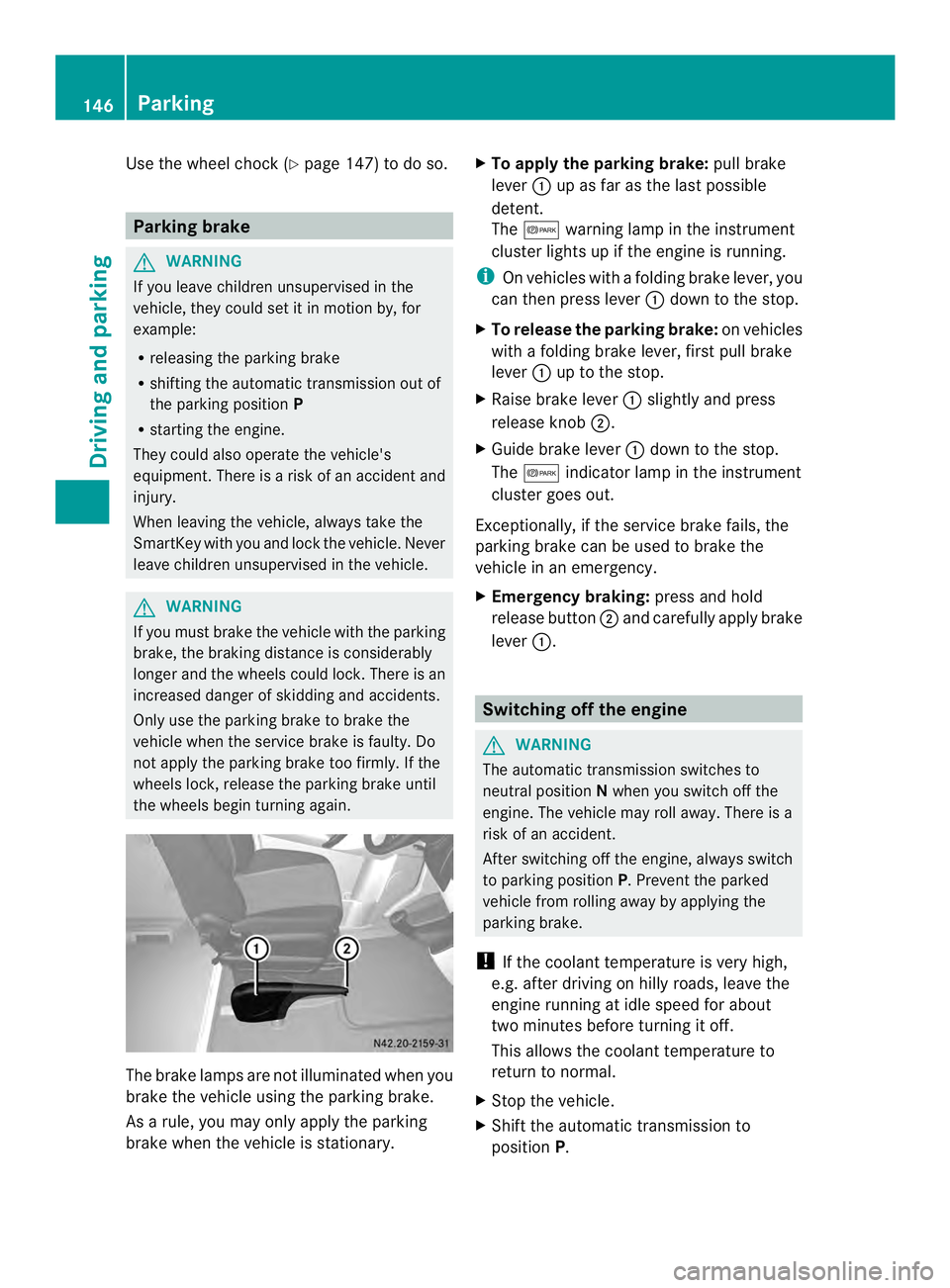
To apply the parking brake: pull brake
lever 0005up as far as the last possible
detent.
The 000B warning lamp in the instrument
cluster lights up if the engine is running.
i On vehicles with a folding brake lever, you
can then press lever 0005down to the stop.
X To release the parking brake: on vehicles
with a folding brake lever, first pull brake
lever 0005up to the stop.
X Raise brake lever 0005slightly and press
release knob 0006.
X Guide brake lever 0005down to the stop.
The 000B indicator lamp in the instrument
cluster goes out.
Exceptionally, if the service brake fails, the
parking brake can be used to brake the
vehicle in an emergency.
X Emergency braking: press and hold
release button 0006and carefully apply brake
lever 0005. Switching off the engine
G
WARNING
The automatic transmission switches to
neutral position Nwhen you switch off the
engine. The vehicle may roll away. There is a
risk of an accident.
After switching off the engine, always switch
to parking position P. Prevent the parked
vehicle from rolling away by applying the
parking brake.
! If the coolant temperature is very high,
e.g. after driving on hilly roads, leave the
engine running at idle speed for about
two minutes before turning it off.
This allows the coolant temperature to
return to normal.
X Stop the vehicle.
X Shift the automatic transmission to
position P. 146
ParkingDriving and parking