ESP MERCEDES-BENZ SPRINTER 2013 MY13 Operator’s Manual
[x] Cancel search | Manufacturer: MERCEDES-BENZ, Model Year: 2013, Model line: SPRINTER, Model: MERCEDES-BENZ SPRINTER 2013Pages: 334, PDF Size: 3.88 MB
Page 85 of 334
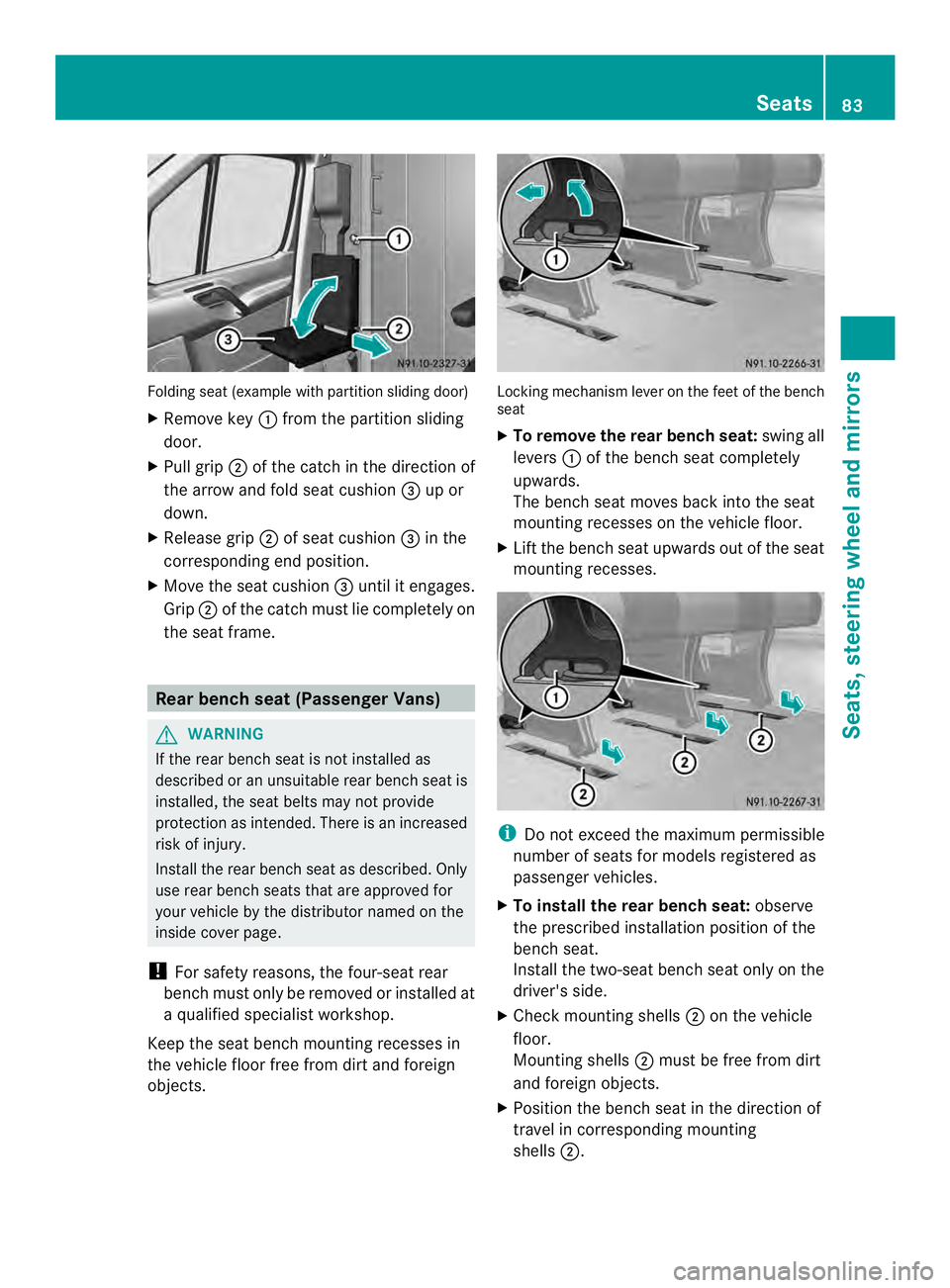
Folding sea
t(example with partition sliding door)
X Remove key 0005from the partition sliding
door.
X Pull grip 0006of the catch in the direction of
the arrow and fold seat cushion 0026up or
down.
X Release grip 0006of seat cushion 0026in the
corresponding end position.
X Move the seat cushion 0026until it engages.
Grip 0006of the catch must lie completely on
the seat frame. Rear bench seat (Passenger Vans)
G
WARNING
If the rear bench seat is not installed as
described or an unsuitable rear bench seat is
installed, the seat belts may not provide
protection as intended. There is an increased
risk of injury.
Install the rear bench seat as described. Only
use rear bench seats that are approved for
your vehicle by the distributor named on the
inside cover page.
! For safety reasons, the four-seat rear
bench must only be removed or installed at
a qualified specialist workshop.
Keep the seat bench mounting recesses in
the vehicle floor free from dirt and foreign
objects. Locking mechanism lever on the feet of the bench
seat
X
To remove the rear bench seat: swing all
levers 0005of the bench seat completely
upwards.
The bench seat moves back into the seat
mounting recesses on the vehicle floor.
X Lift the bench seat upwards out of the seat
mounting recesses. i
Do not exceed the maximum permissible
number of seats for models registered as
passenger vehicles.
X To install the rear bench seat: observe
the prescribed installation position of the
bench seat.
Install the two-seat bench seat only on the
driver's side.
X Check mounting shells 0006on the vehicle
floor.
Mounting shells 0006must be free from dirt
and foreign objects.
X Position the bench seat in the direction of
travel in corresponding mounting
shells 0006. Seats
83Seats, steering wheel and mirrors Z
Page 92 of 334
Useful information
This Operator's Manual describes all models
as well as standard and optional equipment
of your vehicle that were available at the time
of going to print. Country-specific variations
are possible. Note that your vehicle may not
be equipped with all of the described
functions. This also applies to systems and
functions relevant to safety.
Read the information on qualified specialist
workshops (Y page 26). Exterior lighting
Important safety notes
For reasons of safety, we recommend that
you drive with the lights switched on even
during the daytime. There may be differences
in operation due to legal requirements and
voluntary recommendations in some
countries. Lamp failure indicator
The bulb failure indicator is only an aid. You
are responsible for the proper functioning of
the vehicle lighting. Insufficient or non-
functioning vehicle lightin gputs the operating
safety of the vehicle at risk.
For this reason, check the condition and
function of your vehicle's lighting system and,
if necessary, that of the trailer before each
journey.
The bulb failure indicator monitors all of the
exterio rlighting lamps, except the perimeter
lamp and the trailer lighting. If a bulb fails,
either the 0002(Ypage 34) indicator lamp
lights up, or you will see a corresponding
message in the display (Y page 201).
i Depending on the equipment, the bulb
failure indicator can fail for all lamps with
the exceptio nofthe turn signal lamps. Light switch
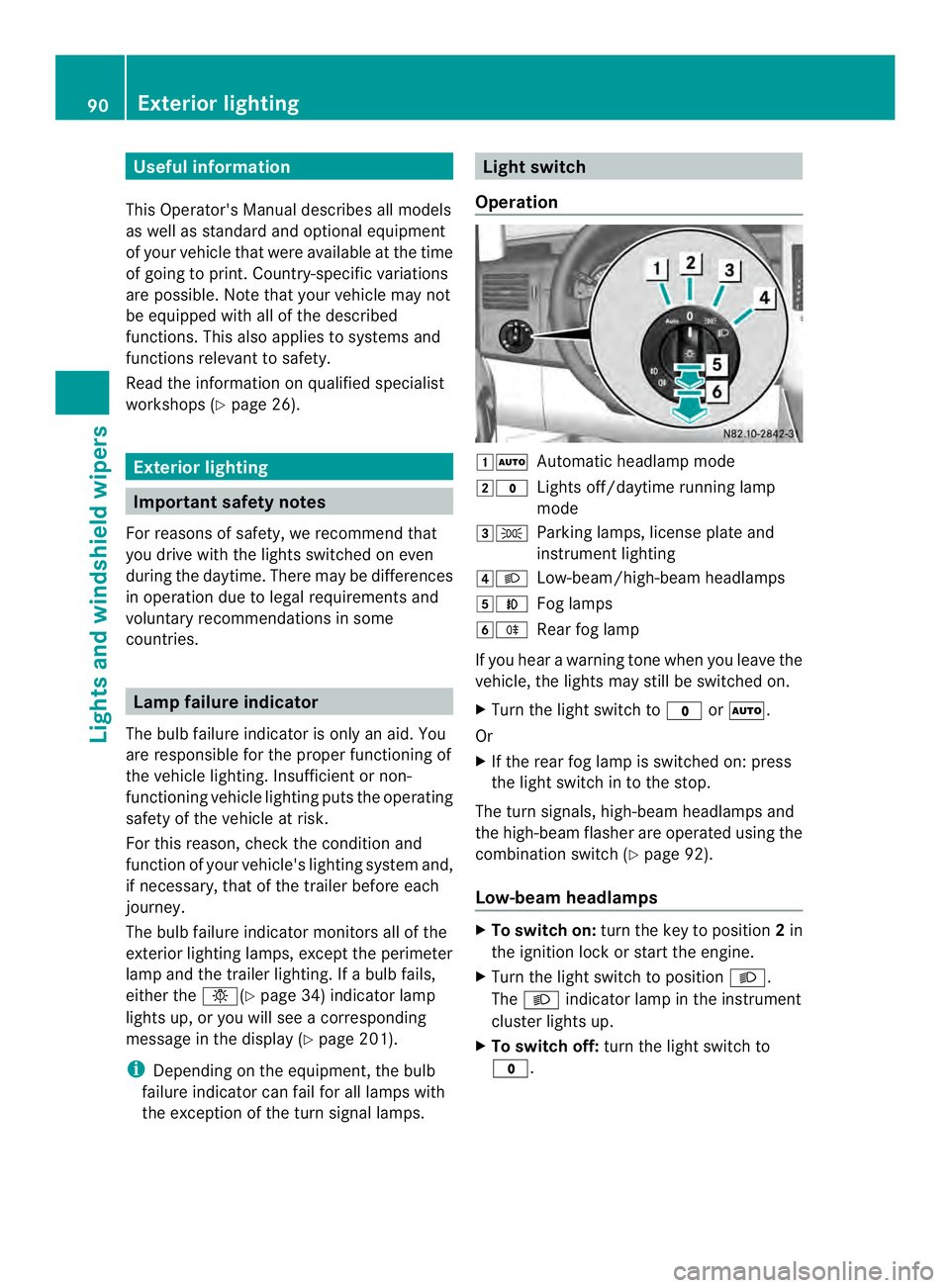
Operation 00080007
Automatic headlamp mode
0009000C Lights off/daytime running lamp
mode
000A000B Parking lamps, license plate and
instrumentl ighting
000E0004 Low-beam/high-beam headlamps
000F0005 Fog lamps
00100007 Rear fog lamp
If you hear a warning tone when you leave the
vehicle, the lights may still be switched on.
X Turn the light switch to 000Cor0007.
Or
X If the rear fog lamp is switched on: press
the light switch in to the stop.
The tur nsignals, high-beam headlamps and
the high-beam flasher are operated using the
combination switch (Y page 92).
Low-beam headlamps X
To switch on: turnthe key to position 2in
the ignition lock or start the engine.
X Turn the light switch to position 0004.
The 0004 indicator lamp in the instrument
cluster lights up.
X To switch off: turn the light switch to
000C. 90
Exterior lightingLights and windshield wipers
Page 93 of 334
Daytime running lamp mode
You can activate/deactivate daytime running
lamp mode using the on-board computer.
This is no tpossible in countries where
daytime running lamp mode is a legal
requirement.
Daytime running lamp mode must be
activated using the on-board computer:
R Vehicles with steering wheel
buttons(Y page 187)
R Vehicles without steering wheel buttons
(Y page 179)
X To switch on: turn the light switch to the
000C position.
The low-beam headlamps, parking lamps
and license plate lamp are switched on
when the engine is running. The 0004
indicator lamp in the instrument cluster
lights up.
i USA only:
If you turn the light switch to the 000Bor
0004 position, the parking lamps or low-
beam headlamps are switched on. If you
turn the light switch to the 0007position,
daytime running lamp mode stays switched
on.
i Canada only:
If you turn the light switch to the 0004
position, the low-beam headlamps are
switched on. If you turn the light switch to
the 000B or0007 position, daytime running
lamp mode stays switched on.
Automatic headlamp mode G
WARNING
If the light switch is set to 000Band it is foggy,
snowing or there is poor visibility, the low-
beam headlamps will not come on
automatically. There is a risk of an accident.
In such situations, turn the light switch to
0004. Automatic headlamp mode is only a driving
aid. You are responsible for the vehicle
lighting at all times.
If it is dark or foggy, turn the light switch
quickly from
0007to0004.Y ou could
otherwise briefly interrupt operation of the
headlamps.
Depending on ambient light, the rain and light
sensor automatically switches on the parking
lamps, low-beam headlamps and the license
plate lamp. This excludes weather-related
impairments to visibility, such as snow, fog or
spray.
X To switch on automatic headlamp
mode: turn the light switch to 0007.
Key in position 1in the ignition lock: the
parking lamps are switched on or off
automatically depending on the ambient
light.
When the engine is running: depending on
the ambient light, the parking lamps and
the low-beam headlamps are switched on
or off automatically.
When the low-beam headlamps are
switched on, the 0004indicator lamp in the
instrument cluster lights up.
Fog lamp/rear fog lamp G
WARNING
If you suspect that driving conditions will be
foggy, turn the light switch to 0004before you
start your journey. Your vehicle may
otherwise not be visible and you could
endanger yourself and others. G
WARNING
In low ambient lighting or foggy conditions,
only switch from position 0007to0004 with
the vehicle at a standstill in a safe location.
Switching from 0007to0004 will briefly
switch off the headlamps. Doing so while
driving in low ambient lighting conditions may
result in an accident. Exterior lighting
91Lights and windshiel dwipers Z
Page 94 of 334
X
Turn the ignition key to position 2in the
ignition lock or start the engine.
X Turn the light switch to 0004or000B.
i If your vehicle is only equipped with one
rear fog lamp, you must turn the light
switch to 0004.
i When the light switch is set to 0007, you
cannot switch on the front or rear fog
lamps.
X To switch on the front fog lamps: pull the
light switch out to the first locking point.
The green 0005indicator lamp on the light
switch lights up.
X To switch on the rear fog lamp: pull the
light switch out to the second locking point.
The yellow 0007indicator lamp on the light
switch lights up.
X To switch off the front fog lamps/rear
fog lamp: push in the light switch to the
stop.
The 0007 and0005 indicator lamp on the
light switch go out. Combination switch
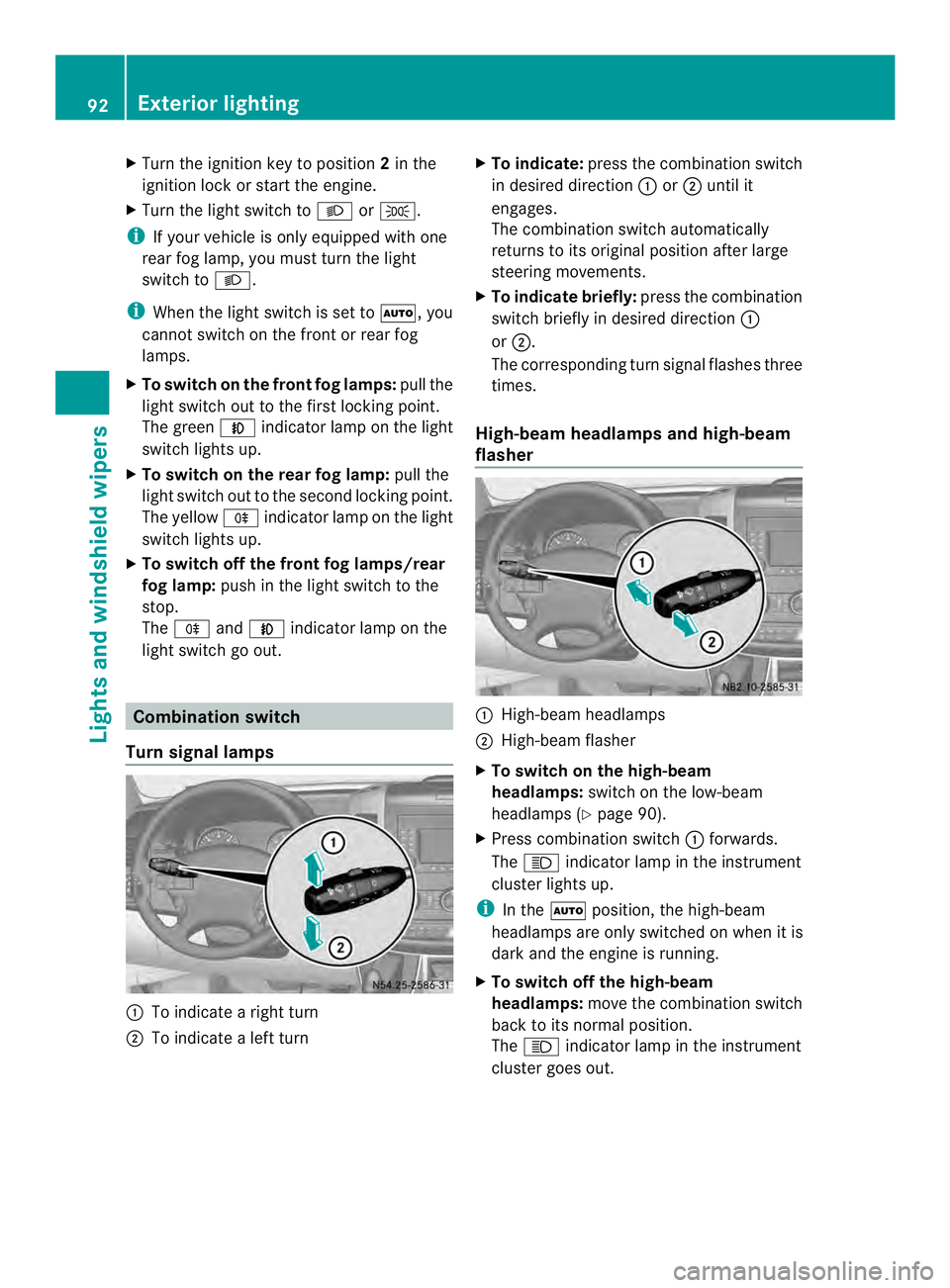
Turn signal lamps 0005
To indicate a right turn
0006 To indicate a left turn X
To indicate: press the combination switch
in desired direction 0005or0006 until it
engages.
The combination switch automatically
returns to its original position after large
steering movements.
X To indicate briefly: press the combination
switch briefly in desired direction 0005
or 0006.
The corresponding turn signal flashes three
times.
High-beam headlamps and high-beam
flasher 0005
High-beam headlamps
0006 High-beam flasher
X To switch on the high-beam
headlamps: switch on the low-beam
headlamps (Y page 90).
X Press combination switch 0005forwards.
The 0003 indicator lamp in the instrument
cluster lights up.
i In the 0007position, the high-beam
headlamps are only switched on when it is
dark and the engine is running.
X To switch off the high-beam
headlamps: move the combination switch
back to its normal position.
The 0003 indicator lamp in the instrument
cluster goes out. 92
Exterior lightingLights and windshield wipers
Page 95 of 334
X
To operate the high-beam flasher: turn
the key to position 1or 2in the ignition
lock.
X Pull the combinatio nswitch briefly in
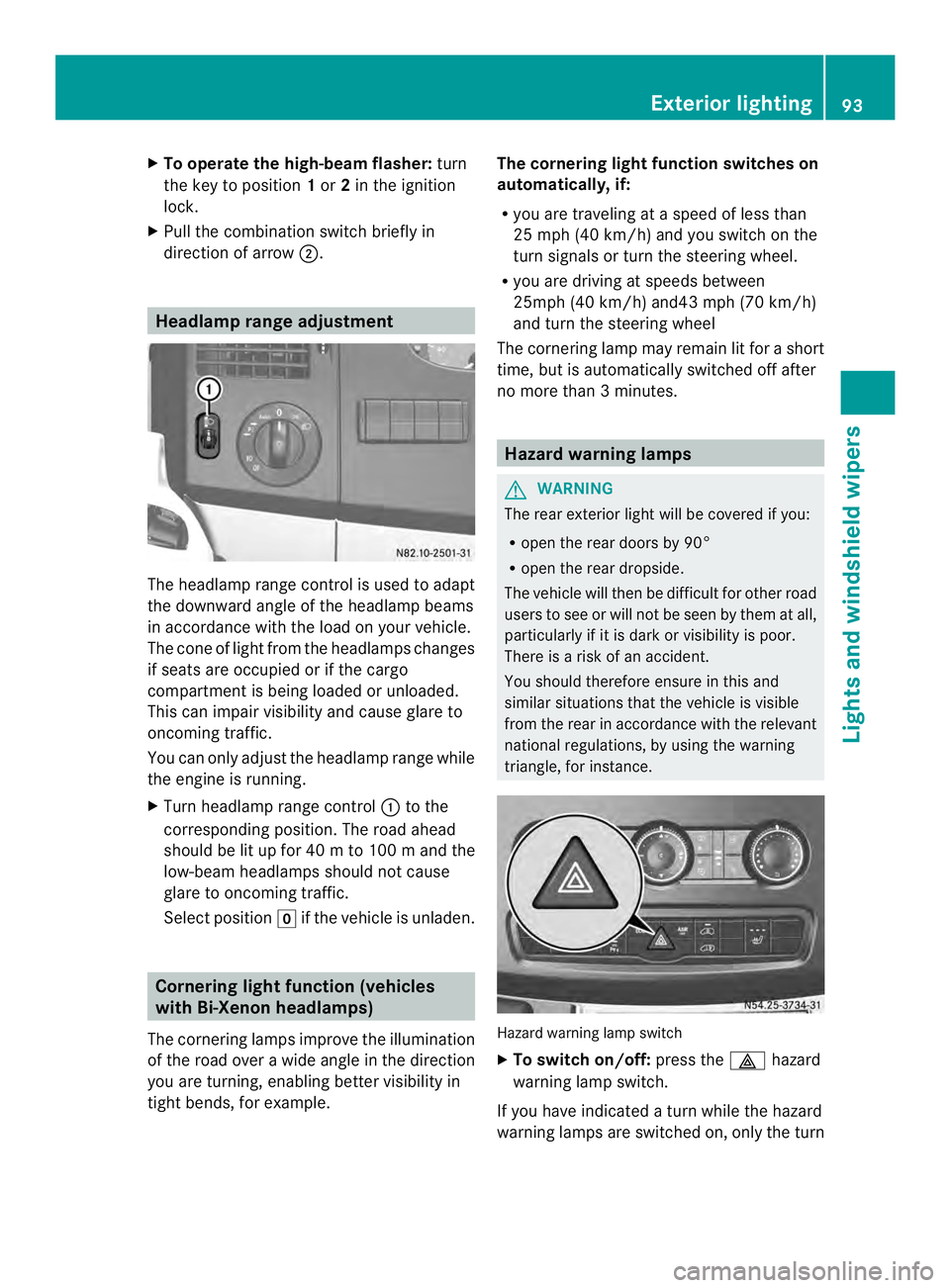
directio nofarrow0006. Headlamp range adjustment
The headlamp range control is used to adapt
the downward angle of the headlamp beams
in accordance with the loadony our vehicle.
The cone of light from the headlamps changes
if seats are occupied or if the cargo
compartment is being loaded or unloaded.
This can impair visibility and cause glare to
oncoming traffic.
You can only adjust the headlamp range while
the engine is running.
X Turn headlamp range control 0005to the
corresponding position. The road ahead
should be lit up for 40 mto 100 mand the
low-bea mheadlamps should not cause
glare to oncoming traffic.
Select position 0011if the vehicle is unladen. Cornering light function (vehicles
with Bi-Xenon headlamps)
The cornering lamps improve the illumination
of the road over a wide angle in the direction
you are turning, enabling better visibility in
tight bends, for example. The cornering light function switches on
automatically, if:
R
you are traveling at a speed of less than
25 mph (40 km/h) and you switch on the
turn signals or turn the steering wheel.
R you are driving at speeds between
25mph (40 km/h) and43 mph (70 km/h)
and turn the steering wheel
The cornering lamp may remain lit for a short
time, but is automatically switched off after
no more than 3 minutes. Hazard warning lamps
G
WARNING
The rear exterior light will be covered if you:
R open the rear doors by 90°
R open the rear dropside.
The vehicle will then be difficult for other road
users to see or will not be seen by them at all,
particularly if it is dark or visibility is poor.
There is a risk of an accident.
You should therefore ensure in this and
similar situations that the vehicle is visible
from the rear in accordance with the relevant
national regulations, by using the warning
triangle, for instance. Hazard warning lamp switch
X
To switch on/off: press the0011hazard
warning lamp switch.
If you have indicated a turn while the hazard
warning lamps are switched on, only the turn Exterior lighting
93Lights and windshield wipers Z
Page 100 of 334
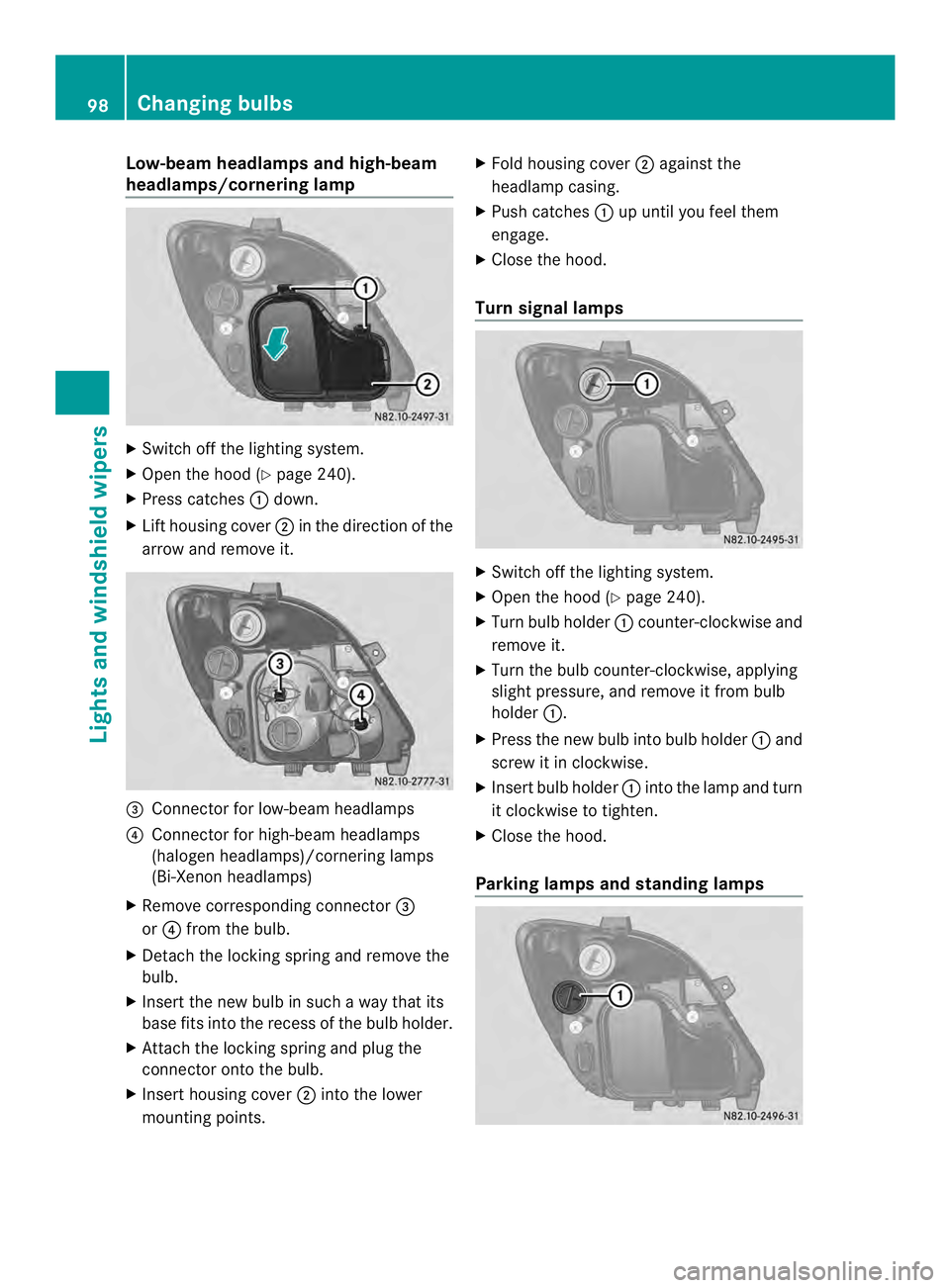
Low-beam headlamps and high-beam
headlamps/cornering lamp
X
Switch off the lighting system.
X Open the hood (Y page 240).
X Press catches 0005down.
X Lif th ousing cover 0006in the direction of the
arrow and remove it. 0026
Connector for low-beam headlamps
0025 Connector for high-beam headlamps
(halogen headlamps)/cornering lamps
(Bi-Xenon headlamps)
X Remove corresponding connector 0026
or 0025 from the bulb.
X Detach the locking spring and remove the
bulb.
X Insert the new bulb in such a way that its
base fits into the recess of the bulb holder.
X Attach the locking spring and plug the
connector onto the bulb.
X Insert housing cover 0006into the lower
mounting points. X
Fold housing cover 0006against the
headlamp casing.
X Push catches 0005up until you feel them
engage.
X Close the hood.
Turn signal lamps X
Switch off the lighting system.
X Open the hood (Y page 240).
X Turn bulb holder 0005counter-clockwise and
remove it.
X Turn the bulb counter-clockwise, applying
slight pressure, and remove it from bulb
holder 0005.
X Press the new bulb into bulb holder 0005and
screw it in clockwise.
X Insert bulb holder 0005into the lamp and turn
it clockwise to tighten.
X Close the hood.
Parking lamps and standing lamps 98
Changing bulbsLights and windshiel
dwipers
Page 106 of 334
X
Turn the key to position 1or 2in the
ignition lock.
X Turn the combination switch in the
direction of arrow 0005to the appropriate
setting depending on the intensity of the
rain.
X Single wipe: push the combination switch
briefly up to the pressure point in the
direction of arrow 0006.
X To wipe with washer fluid: press the
combination switch beyond the pressure
point in the direction of arrow 0006.
i Wipe the windshield using washer fluid
even if it is raining. By doing so, you will
prevent smears on the windshield.
The detent positions of the combination
switch correspond to the following wiper
speeds:
0W indshield wipers off
II ntermittent wipe
II Normal wipe
III Rapid wipe
i Canada only:
If the windshield wipers are switched on
and you stop the vehicle, the windshield
wipe rspeed is reduced. For example, if you
have selected level IIand stop the vehicle,
wiping continues with intermitten twipe
while the vehicle is stationary. If
intermitten twipe is selected, the intervals
become longer.
Vehicles with arain and light sensor:
you can use level Ias the universal setting.
The rai nand light sensor sets the
appropriate wiping frequency
automatically, according to the intensity of
the rain. Whe nyou stop the vehicle, levels
III and IIare switched down to level I
automatically.
The windshield wiper will return to the
original level when you drive faster than
5 mph (8 km/h) again. You can adjust the sensitivity of the rain and
light sensor using the on-board computer
(Y
page 189).
Information on checking the washer fluid
level can be found in the "Maintenance and
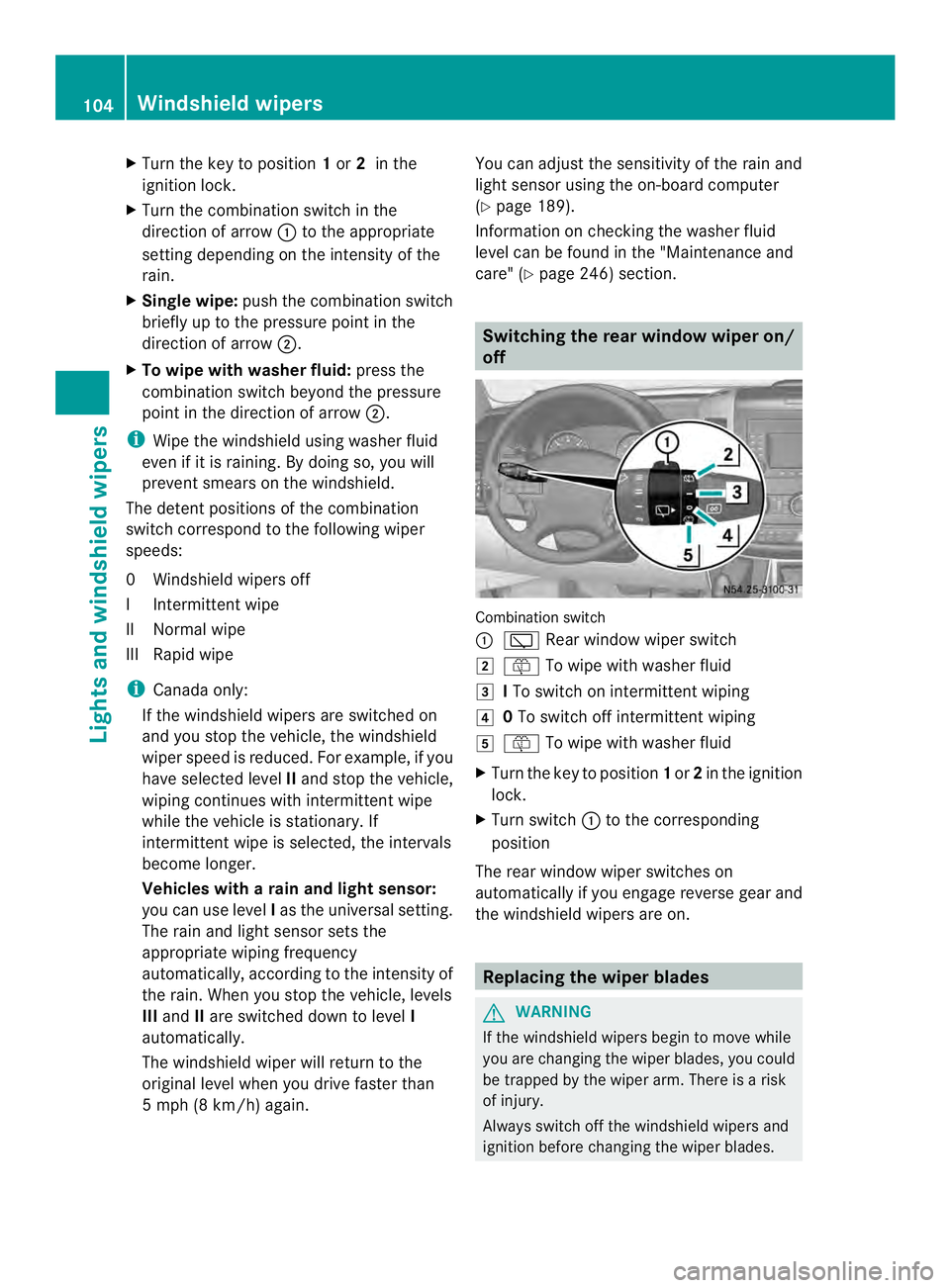
care" (Y page 246) section. Switching the rear window wiper on/
off
Combination switch
0005
0001 Rear window wiper switch
0009 0006 To wipe with washer fluid
000A ITo switch on intermittent wiping
000E 0To switch off intermittent wiping
000F 0006 To wipe with washer fluid
X Turn the key to position 1or 2in the ignition
lock.
X Turn switch 0005to the corresponding
position
The rear window wiper switches on
automatically if you engage reverse gear and
the windshield wipers are on. Replacing the wiper blades
G
WARNING
If the windshield wipers begin to move while
you are changing the wiper blades, you could
be trapped by the wiper arm. There is a risk
of injury.
Always switch off the windshield wipers and
ignition before changing the wiper blades. 104
Windshield wipersLights and windshiel
dwipers
Page 116 of 334
000C
Directs airto the windshield, the
air vents and into the footwell
000D Directs air to the air vents and
into the footwell
Adjusting X
Switch on climate control (Y page 112).
X Set air-distribution control 0025for the
heating (Y page 109) or air-conditioning
system 0023(Ypage 110) to the
corresponding symbol. Setting the airflow
X Switch on climate control (Y page 112).
X Vehicle with heating/rear-
compartment heating: set airflow
control 0006of the heating (Y page 109) or
of the rear-compartment heating
(Y page 111) to the desired level.
X Vehicle with air conditioning/rear-
compartment air conditioning: press the
0025 button to reduce or the 0026button
to increase the airflow.
The blower speeds are shown in bars next
to the buttons. Defrosting the windows
You can use the "defrosting" function to
defrost the windshield or to demist the inside
of the windshield and the side windows.
Only use the following settings until the
windows are clear again.
X Vehicle with window heating: switch on
the front (Y page 115) and/or rear window
defroster (Y page 116) .
X Switch on climate control (Y page 112).Vehicle with heating
X
Set temperature control 0005and airflow
control 0006to0021 (Ypage 109).
X Set air-distribution control 0025to
000B0021(Y page 109).
X Close the center air vents (Y page 117) and
the air outlets for the headroom and the
rear compartment (Y page 117).
X Direct the side air vents towards the side
windows and open the defroster vents for
the side windows (Y page 117).
Vehicle with air conditioning
X Set temperature control 0005to
0021 (Ypage 110).
X Press the 0026button until the maximum
blower output is reached.
All bars in the display next to the button
light up.
X Set air-distribution control 0023to
000B0021(Y page 110).
X Close the center air vents (Y page 117) and
the air outlets for the headroom and the
rear compartment (Y page 117).
X Direct the side air vents towards the side
windows and open the defroster vents for
the side windows (Y page 117). Defrosting the windows
Windows fogged up on the inside You should only select this setting until the
windows are clear again.
X
Vehicle with window heating: switch on
the front (Y page 115) and/or rear window
defroster (Y page 116) .
X Switch on climate control (Y page 112).
X Switch off air-recirculation mode
(Y page 116). 114
Operating the climate control systemClimate control
Page 126 of 334
X
Press the 0003or0006 button until the
0001 symbol in menu bar 0006flashes.
X Press the 000Abutton.
In program column 0005, the day selected
flashes.
X Press the 0003or0006 button to set the
desired day.
X Press the 000Abutton.
The day selected is stored. The hour setting
of the clock flashes.
X In the same way, set the hour and
subsequently the minutes, then confirm by
pressing the 000Abutton.
The time is stored. Program column 0005
disappears and the operating duration
flashes.
i The operating duration set is the default
setting for immediate heating mode. You
can set the operating duration from 10 to
120 minutes or activate continuous
operation.
X Using the 0003or0006 button, set the
minute value or select the 0005symbol for
continuous operation.
X Press the 000Abutton.
The operating duration is stored. The time
is shown.
Activating/deactivating immediate
heating mode X
To switch on: press the0003or0006
button until the 0020symbol in the menu
bar flashes.
X Press the 000Abutton.
The operation duration flashes in the
display.
i You can preset the default value that is
shown (Y page 123).
X Using the 0003or0006 button, set the
minute value (10 – 120) or select the
0005 symbol for continuous operation. X
Press the 000Abutton.
Immediate heating mode is activated. The
time and the 0020symbol appear.
X To switch off: press the0003or0006
button until the 0020symbol flashes in the
menu bar, and then press the 000Abutton.
Immediate heating mode is deactivated.
The 0020 symbol disappears.
The auxiliary heating operates for another
two minutes and then switches off
automatically.
i If you switch off the ignition while
immediate heating mode (operating
duration 10– 120 minutes) is active,
immediate heating mode is also switched
off. The auxiliary heating operates for
another two minutes and then switches off
automatically.
If you have set continuous operation as the
operating duration and you switch off the
ignition, the auxiliary heating switches off
automatically after about 15 minutes .If, in
the remaining time, the ignition is switched
on again, continuous operation of the
auxiliary heating continues.
Setting the preselection time G
WARNING
The auxiliary heating must not be operated if
there are highly flammable substances
nearby or in enclosed spaces without an
extraction system. Make sure that the
auxiliary heating is not switched on
automatically by the timer in such places. If
this possibility exists, deactivate the
respective programmed time.
You can set three preselectio ntimes using
the timer.
Observe that when setting the preselection
time, this does not correspond to the switch-
on time but to the switch-off or departure
time. The auxiliary heatin gsystem starts up
automatically and runs fo rthe operating
duration set prior to departure. 124
Operating the auxiliary heating systemClimate control
Page 127 of 334
Example:
For a planned departur etime of
7:00 a.m., you should also set the
preselection time to 7:00 a.m. If the operating
duration is prese tto 40 minutes, for example,
the auxiliary heating startsu p at 6:20a.m.
If an identical time (time and day) is set in the
preselection memory, onl ythe last time set is
saved.
After a malfunction or if the battery has been
disconnected, you must set the preselection
times again. You can find further information
on malfunctions in the "Problems with the
auxiliary heating" section (Y page 128).
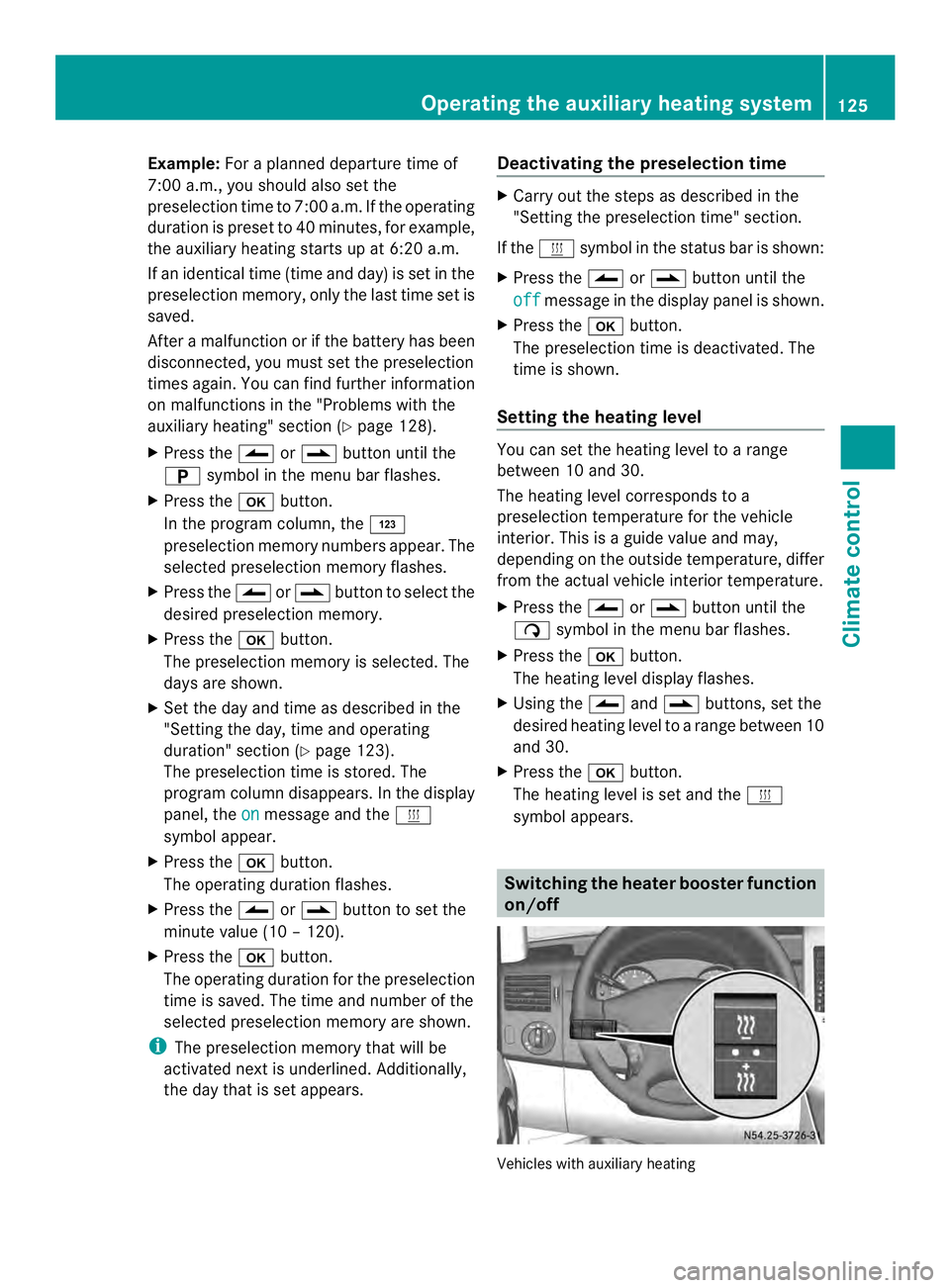
X Press the 0003or0006 button until the
0002 symbol in the menu bar flashes.
X Press the 000Abutton.
In the program column, the 0001
preselection memory numbers appear. The
selected preselection memory flashes.
X Press the 0003or0006 button to select the
desired preselection memory.
X Press the 000Abutton.
The preselection memory is selected. The
days are shown.
X Set the day and time as described in the
"Setting the day, time and operating
duration" section (Y page 123).
The preselection time is stored. The
program column disappears. In the display
panel, the on message and the
0020
symbol appear.
X Press the 000Abutton.
The operating duration flashes.
X Press the 0003or0006 button to set the
minute value (10 – 120).
X Press the 000Abutton.
The operating duration for the preselection
time is saved. The time and number of the
selected preselection memory are shown.
i The preselection memory that will be
activated next is underlined. Additionally,
the day that is set appears. Deactivating the preselection time X
Carry out the steps as described in the
"Setting the preselection time" section.
If the 0020 symbol in the status bar is shown:
X Press the 0003or0006 button until the
off message in the display panel is shown.
X Press the 000Abutton.
The preselection time is deactivated. The
time is shown.
Setting the heating level You can set the heating level to a range
between 10 and 30.
The heating level corresponds to a
preselection temperature for the vehicle
interior. This is a guide value and may,
depending on the outside temperature, differ
from the actual vehicle interior temperature.
X
Press the 0003or0006 button until the
0004 symbol in the menu bar flashes.
X Press the 000Abutton.
The heating level display flashes.
X Using the 0003and0006 buttons, set the
desired heating level to a range between 10
and 30.
X Press the 000Abutton.
The heating level is set and the 0020
symbol appears. Switching the heater booster function
on/off
Vehicles with auxiliary heatingOperating the auxiliary heating system
125Climate control Z